Here s my 67th monthly but brief update about the activities I ve done in the F/L/OSS world.
Debian
This was my 76th month of actively contributing to Debian.
I became a DM in late March 2019 and a DD on Christmas 19! \o/
There s a bunch of things I do, both, technical and non-technical. Here s what I did:
Updating Matomo to v5.3.1.
Lots of bursary stuff for DC25. We rolled out the results for the first batch.
Helping Andreas Tille with and around FTP team bits.
Mentoring for newcomers.
Moderation of -project mailing list.
Ubuntu
This was my 51st month of actively contributing to Ubuntu.
I joined Canonical to work on Ubuntu full-time back in February 2021.
Whilst I can t give a full, detailed list of things I did (there s so much and some of it might not be public yet!), here s a quick TL;DR of what I did:
Jon, VP of Engineering, asked me to lead the Canonical Release team - that was definitely not something I saw coming. :)
We re now doing Ubuntu monthly releases for the devel releases - I ll be the tech lead for the project.
Preparing for the May sprints - too many new things and new responsibilities. :)
Debian (E)LTS
Debian Long Term Support (LTS) is a project to extend the lifetime of all Debian stable releases to (at least) 5 years. Debian LTS is not handled by the Debian security team, but by a separate group of volunteers and companies interested in making it a success.
And Debian Extended LTS (ELTS) is its sister project, extending support to the stretch and jessie release (+2 years after LTS support).
This was my 67th month as a Debian LTS and 54th month as a Debian ELTS paid contributor.
Due to DC25 bursary work, Ubuntu 25.04 release, and other travel bits, I only worked for 2.00 hours for LTS and 4.50 hours for ELTS.
I did the following things:
[ELTS] Had already backported patches for adminer for the following CVEs:
As the same CVEs are affected LTS, we decided to release for LTS first and then for ELTS but since I had no hours for LTS, I decided to do a bit more of testing for ELTS to make sure things don t regress in buster.
Will prepare LTS (and also s-p-u, sigh) updates this month and get back to ELTS thereafter.
[LTS] Started to prepare the LTS update for adminer for the same CVEs as for ELTS:
Haven t fully backported the patch yet but this is what I intend to do for this month (now that I have hours :D).
[LTS] Partially attended the LTS meeting on Jitsi. Summary here.
Partially because I was fighting SSO auth issues with Jitsi. Looks like there were some upstream issues/activity and it was resulting in gateway crashes but all good now.
I was following the running notes and keeping up with things as much as I could. :)
After some days of effort, I am happy to report that
the great
interactive application firewall OpenSnitch got a new version in
Trixie, now with the Linux kernel based ebpf sniffer included for better
accuracy. This new version made it possible for me to finally track
down the rule required to avoid a deadlock when using it on a machine
with the user home directory on NFS. The problematic connection
originated from the Linux kernel itself, causing the /proc based
version in Debian 12 to fail to properly attribute the connection and
cause the OpenSnitch daemon to block while waiting for the Python GUI,
which was unable to continue because the home directory was blocked
waiting for the OpenSnitch daemon. A classic deadlock reported
upstream for a more permanent solution.
I really love the control over all the programs and web pages
calling home that OpenSnitch give me. Just today I discovered a
strange connection to sb-ssl.google.com when I pulled up a PDF passed
on to me via a Mattermost installation. It is some times hard to know
which connections to block and which to go through, but after running
it for a few months, the default rule set start to handle most regular
network traffic and I only have to have a look at the more unusual
connections.
If you would like to know more about what your machines programs
are doing, install OpenSnitch today. It is only a apt install
opensnitch away. :)
I hope to get the 1.6.9 version in experimental into Trixie before
the archive enter hard freeze. This new version should have no
relevant changes not already in the 1.6.8-11 edition, as it mostly
contain Debian patches, but will give it a few days testing to see if
there are any surprises. :)
As usual, if you use Bitcoin and want to show your support of my
activities, please send Bitcoin donations to my address
15oWEoG9dUPovwmUL9KWAnYRtNJEkP1u1b.
November 2024 will be known as the time when killing peanut, a pet squirrel, by the New York State DEC swung the US presidential elections and shaped history forever.
The hundreds of millions of dollars spent on each side, the tireless campaigning by the candidates, the celebrity endorsements ... all made for an open race for months. Investments evened each other out.
But an OnlyFans producer showing people an overreaching, bureaucracy driven State raiding his home to confiscate a pet squirrel and kill it ... swung enough voters to decide the elections.
That is what we need to understand in times of instant worldwide publication and a mostly attention driven economy: Human fates, elections, economic cycles and wars can be decided by people killing squirrels.
RIP, peanut.
P.S.: Trump Media & Technology Group Corp. (DJT) stock is up 30% pre-market.
*[DEC]: Department of Environmental Conservation
I was just released from the hospital after a 3 day stay for my ( hopefully ) last surgery. There was concern with massive blood loss and low heart rate. I have stabilized and have come home. Unfortunately, they had to prescribe many medications this round and they are extremely expensive and used up all my funds. I need gas money to get to my post-op doctors appointments, and food would be cool. I would appreciate any help, even just a dollar!
I am already back to work, and continued work on the crashy KDE snaps in a non KDE env. ( Also affects anyone using kde-neon extensions such as FreeCAD) I hope to have a fix in the next day or so.
Fixed kate bug https://bugs.kde.org/show_bug.cgi?id=503285
Thanks for stopping by.
For a long time I ve been wanting to try GitOps tools, but I haven t had the chance to try them for real on the projects
I was working on.
As now I have some spare time I ve decided I m going to play a little with Argo CD,
Flux and Kluctl to test them and be able to use one of them in a real project
in the future if it looks appropriate.
On this post I will use Argo-CD Autopilot to install argocd on a
k3d local cluster installed using OpenTofu to test the autopilot approach of
managing argocd and test the tool (as it manages argocd using a git repository it can be used to test argocd as
well).
Installing tools locally with arkadeRecently I ve been using the arkade tool to install kubernetes related
applications on Linux servers and containers, I usually get the applications with it and install them on the
/usr/local/bin folder.
For this post I ve created a simple script that checks if the tools I ll be using are available and installs them on the
$HOME/.arkade/bin folder if missing (I m assuming that docker is already available, as it is not installable with
arkade):
#!/bin/sh# TOOLS LISTARKADE_APPS="argocd argocd-autopilot k3d kubectl sops tofu"# Add the arkade binary directory to the path if missingcase":$ PATH:"in*:"$ HOME/.arkade/bin":*);;*)export PATH="$ PATH:$ HOME/.arkade/bin";;esac# Install or update arkadeif command-v arkade >/dev/null;then
echo"Trying to update the arkade application"sudo arkade update
else
echo"Installing the arkade application"
curl -sLS https://get.arkade.dev sudo sh
fi
echo""echo"Installing tools with arkade"echo""for app in$ARKADE_APPS;do
app_path="$(command-v$app)"true
if["$app_path"];then
echo"The application '$app' already available on '$app_path'"else
arkade get "$app"fi
done
cat<<EOF
Add the ~/.arkade/bin directory to your PATH if tools have been installed there
EOF
The rest of scripts will add the binary directory to the PATH if missing to make sure things work if something was
installed there.
Creating a k3d cluster with opentofuAlthough using k3d directly will be a good choice for the creation of the cluster, I m using tofu to do it because
that will probably be the tool used to do it if we were working with Cloud Platforms like AWS or Google.
The main.tf file is as follows:
The k3d configuration is quite simple, as I plan to use the default traefik ingress controller with TLS I publish
the 443 port on the hosts 8443 port, I ll explain how I add a valid certificate on the next step.
I ve prepared the following script to initialize and apply the changes:
#!/bin/shset-e# VARIABLES# Default token for the argocd clusterK3D_CLUSTER_TOKEN="argocdToken"# Relative PATH to install the k3d cluster using terr-iaformK3D_TF_RELPATH="k3d-tf"# Secrets yaml fileSECRETS_YAML="secrets.yaml"# Relative PATH to the workdir from the script directoryWORK_DIR_RELPATH=".."# Compute WORKDIRSCRIPT="$(readlink-f"$0")"SCRIPT_DIR="$(dirname"$SCRIPT")"WORK_DIR="$(readlink-f"$SCRIPT_DIR/$WORK_DIR_RELPATH")"# Update the PATH to add the arkade bin directory# Add the arkade binary directory to the path if missingcase":$ PATH:"in*:"$ HOME/.arkade/bin":*);;*)export PATH="$ PATH:$ HOME/.arkade/bin";;esac# Go to the k3d-tf dircd"$WORK_DIR/$K3D_TF_RELPATH"exit 1
# Create secrets.yaml file and encode it with sops if missingif[!-f"$SECRETS_YAML"];then
echo"token: $K3D_CLUSTER_TOKEN">"$SECRETS_YAML"
sops encrypt -i"$SECRETS_YAML"fi# Initialize terraform
tofu init
# Apply the configuration
tofu apply
Adding a wildcard certificate to the k3d ingressAs an optional step, after creating the k3d cluster I m going to add a default wildcard certificate for the traefik
ingress server to be able to use everything with HTTPS without certificate issues.
As I manage my own DNS domain I ve created the lo.mixinet.net and *.lo.mixinet.net DNS entries on my public and
private DNS servers (both return 127.0.0.1 and ::1) and I ve created a TLS certificate for both entries using
Let s Encrypt with Certbot.
The certificate is updated automatically on one of my servers and when I need it I copy the contents of the
fullchain.pem and privkey.pem files from the /etc/letsencrypt/live/lo.mixinet.net server directory to the local
files lo.mixinet.net.crt and lo.mixinet.net.key.
After copying the files I run the following file to install or update the certificate and configure it as the default
for traefik:
#!/bin/sh# Script to update thesecret="lo-mixinet-net-ingress-cert"cert="$ 1:-lo.mixinet.net.crt"key="$ 2:-lo.mixinet.net.key"if[-f"$cert"]&&[-f"$key"];then
kubectl -n kube-system create secret tls $secret\--key=$key\--cert=$cert\--dry-run=client --save-config-o yaml kubectl apply -f -
kubectl apply -f - <<EOF
apiVersion: traefik.containo.us/v1alpha1
kind: TLSStore
metadata:
name: default
namespace: kube-system
spec:
defaultCertificate:
secretName: $secretEOF
else
cat<<EOF
To add or update the traefik TLS certificate the following files are needed:
- cert: '$cert'
- key: '$key'
Note: you can pass the paths as arguments to this script.
EOF
fi
Creating a repository and a token for autopilotI ll be using a project on my forgejo instance to manage argocd, the repository I ve created is on the URL
https://forgejo.mixinet.net/blogops/argocd and I ve created a private user named argocd that only has write access to
that repository.
Logging as the argocd user on forgejo I ve created a token with permission to read and write repositories that I ve
saved on my pass password store on the mixinet.net/argocd@forgejo/repository-write
entry.
Bootstrapping the installationTo bootstrap the installation I ve used the following script (it uses the previous GIT_REPO and GIT_TOKEN values):
#!/bin/shset-e# VARIABLES# Relative PATH to the workdir from the script directoryWORK_DIR_RELPATH=".."# Compute WORKDIRSCRIPT="$(readlink-f"$0")"SCRIPT_DIR="$(dirname"$SCRIPT")"WORK_DIR="$(readlink-f"$SCRIPT_DIR/$WORK_DIR_RELPATH")"# Update the PATH to add the arkade bin directory# Add the arkade binary directory to the path if missingcase":$ PATH:"in*:"$ HOME/.arkade/bin":*);;*)export PATH="$ PATH:$ HOME/.arkade/bin";;esac# Go to the working directorycd"$WORK_DIR"exit 1
# Set GIT variablesif[-z"$GIT_REPO"];then
export GIT_REPO="https://forgejo.mixinet.net/blogops/argocd.git"fi
if[-z"$GIT_TOKEN"];then
GIT_TOKEN="$(pass mixinet.net/argocd@forgejo/repository-write)"export GIT_TOKEN
fi
argocd-autopilot repo bootstrap --provider gitea
The output of the execution is as follows:
  bin/argocd-bootstrap.sh
INFO cloning repo: https://forgejo.mixinet.net/blogops/argocd.git
INFO empty repository, initializing a new one with specified remote
INFO using revision: "", installation path: ""
INFO using context: "k3d-argocd", namespace: "argocd"
INFO applying bootstrap manifests to cluster...
namespace/argocd created
customresourcedefinition.apiextensions.k8s.io/applications.argoproj.io created
customresourcedefinition.apiextensions.k8s.io/applicationsets.argoproj.io created
customresourcedefinition.apiextensions.k8s.io/appprojects.argoproj.io created
serviceaccount/argocd-application-controller created
serviceaccount/argocd-applicationset-controller created
serviceaccount/argocd-dex-server created
serviceaccount/argocd-notifications-controller created
serviceaccount/argocd-redis created
serviceaccount/argocd-repo-server created
serviceaccount/argocd-server created
role.rbac.authorization.k8s.io/argocd-application-controller created
role.rbac.authorization.k8s.io/argocd-applicationset-controller created
role.rbac.authorization.k8s.io/argocd-dex-server created
role.rbac.authorization.k8s.io/argocd-notifications-controller created
role.rbac.authorization.k8s.io/argocd-redis created
role.rbac.authorization.k8s.io/argocd-server created
clusterrole.rbac.authorization.k8s.io/argocd-application-controller created
clusterrole.rbac.authorization.k8s.io/argocd-applicationset-controller created
clusterrole.rbac.authorization.k8s.io/argocd-server created
rolebinding.rbac.authorization.k8s.io/argocd-application-controller created
rolebinding.rbac.authorization.k8s.io/argocd-applicationset-controller created
rolebinding.rbac.authorization.k8s.io/argocd-dex-server created
rolebinding.rbac.authorization.k8s.io/argocd-notifications-controller created
rolebinding.rbac.authorization.k8s.io/argocd-redis created
rolebinding.rbac.authorization.k8s.io/argocd-server created
clusterrolebinding.rbac.authorization.k8s.io/argocd-application-controller created
clusterrolebinding.rbac.authorization.k8s.io/argocd-applicationset-controller created
clusterrolebinding.rbac.authorization.k8s.io/argocd-server created
configmap/argocd-cm created
configmap/argocd-cmd-params-cm created
configmap/argocd-gpg-keys-cm created
configmap/argocd-notifications-cm created
configmap/argocd-rbac-cm created
configmap/argocd-ssh-known-hosts-cm created
configmap/argocd-tls-certs-cm created
secret/argocd-notifications-secret created
secret/argocd-secret created
service/argocd-applicationset-controller created
service/argocd-dex-server created
service/argocd-metrics created
service/argocd-notifications-controller-metrics created
service/argocd-redis created
service/argocd-repo-server created
service/argocd-server created
service/argocd-server-metrics created
deployment.apps/argocd-applicationset-controller created
deployment.apps/argocd-dex-server created
deployment.apps/argocd-notifications-controller created
deployment.apps/argocd-redis created
deployment.apps/argocd-repo-server created
deployment.apps/argocd-server created
statefulset.apps/argocd-application-controller created
networkpolicy.networking.k8s.io/argocd-application-controller-network-policy created
networkpolicy.networking.k8s.io/argocd-applicationset-controller-network-policy created
networkpolicy.networking.k8s.io/argocd-dex-server-network-policy created
networkpolicy.networking.k8s.io/argocd-notifications-controller-network-policy created
networkpolicy.networking.k8s.io/argocd-redis-network-policy created
networkpolicy.networking.k8s.io/argocd-repo-server-network-policy created
networkpolicy.networking.k8s.io/argocd-server-network-policy created
secret/autopilot-secret created
INFO pushing bootstrap manifests to repo
INFO applying argo-cd bootstrap application
INFO pushing bootstrap manifests to repo
INFO applying argo-cd bootstrap application
application.argoproj.io/autopilot-bootstrap created
INFO running argocd login to initialize argocd config
Context 'autopilot' updated
INFO argocd initialized. password: XXXXXXX-XXXXXXXX
INFO run:
    kubectl port-forward -n argocd svc/argocd-server 8080:80
Now we have the argocd installed and running, it can be checked using the port-forward and connecting to
https://localhost:8080/ (the certificate will be wrong, we are going to fix that in the next step).
Updating the argocd installation in gitNow that we have the application deployed we can clone the argocd repository and edit the deployment to disable TLS
for the argocd server (we are going to use TLS termination with traefik and that needs the server running as insecure,
see the Argo CD documentation)
  ssh clone ssh://git@forgejo.mixinet.net/blogops/argocd.git
  cd argocd
  edit bootstrap/argo-cd/kustomization.yaml
  git commit -m 'Disable TLS for the argocd-server'
The changes made to the kustomization.yaml file are the following:
As this simply changes the ConfigMap we have to restart the argocd-server to read it again, to do it we delete the
server pods so they are re-created using the updated resource:
After doing this the port-forward command is killed automatically, if we run it again the connection to get to the
argocd-server has to be done using HTTP instead of HTTPS.
Instead of testing that we are going to add an ingress definition to be able to connect to the server using HTTPS and
GRPC against the address argocd.lo.mixinet.net using the wildcard TLS certificate we installed earlier.
To do it we to edit the bootstrap/argo-cd/kustomization.yaml file to add the ingress_route.yaml file to the
deployment:
After pushing the changes and waiting a little bit the change is applied and we can access the server using HTTPS and
GRPC, the first way can be tested from a browser and the GRPC using the command line interface:
  argocd --grpc-web login argocd.lo.mixinet.net:8443
Username: admin
Password:
'admin:login' logged in successfully
Context 'argocd.lo.mixinet.net:8443' updated
  argocd app list -o name
argocd/argo-cd
argocd/autopilot-bootstrap
argocd/cluster-resources-in-cluster
argocd/root
So things are working fine and that is all on this post, folks!
Posted on April 28, 2025
Tags: madeof:atoms, craft:sewing
Years ago I made myself a quick dressing gown from a white fleece IKEA
throw and often wore it in the morning between waking up and changing
into day clothes.
One day I want to make myself a fancy victorian wrapper, to use in its
place, but that s still in the early planning stage, and will require
quite some work.
Then last autumn I discovered that the taxes I owed to the local lord (who
provides protection from mice and other small animals) included not just
a certain amount of kibbles, but also some warm textiles, and the
dressing gown (which at this time was definitely no longer pristine) had
to go.
For a while I had to do without a dressing gown, but then in the second
half of this winter I had some time for a quick machine sewing
project. I could not tackle the big victorian thing, but I still had a
second POLARVIDE throw from IKEA (this time in a more sensible dark
grey) I had bought with sewing intents.
The fabric in a throw isn t that much, so I needed something pretty
efficient, and rather than winging it as I had done the first time I
decided I wanted to try the Modular Jacket from A Year of Zero Waste
Sewing (which
I had bought in the zine instalments: the jacket is in the March
issue).
After some measuring and decision taking, I found that I could fit most
of the pieces and get a decent length, but I had no room for the collar,
and probably not for the belt nor the pockets, but I cut all of the main
pieces. I had a possible idea for a contrasting collar, but I decided to
start sewing the main pieces and decide later, before committing to
cutting the other fabric.
As I was assembling the jacket I decided that as a dressing gown I could
do without the collar, and noticed that with the fraying-free plastic
fleece I didn t really need the front facings, so I cut those in half
lengthwise, pieced them together, and used them as binding to finish the
front end.
Since I didn t have enough fabric for the belt I also skipped the belt
loops, but I have been wearing this with random belts and I don t feel
the need for them anyway. I ve also been thinking about adding a button
just above the bust and use that to keep it closed, but I m still not
100% sure about it.
Another thing I still need to do is to go through the few scraps of
fleece that are left and see if I can piece together a serviceable
pocket or two.
Because of the size of the fabric, I ended up having quite long sleeves:
I m happy with them because they mean that I can cover my hands when
it s cold, or fold them back to make a nice cuff.
If I ll make a real jacket with this patter I ll have to take this in
consideration, and either make the sleeves shorter or finish the seam in
a way that looks nice when folded back.
Will I make a real jacket? I m not sure, it s not really my style of
outer garment, but as a dressing gown it has already been used quite a
bit (as in, almost every morning since I ve made it :) ) and will
continue to be used until too worn to be useful, and that s a good
thing.
Evolution of the situation
In March, we have released 31 DLAs.
Notable security updates:
linux-6.1 (12)and linux, prepared by Ben Hutchings, fixed an extensive list of vulnerabilities
firefox-esr, prepared by Emilio Pozuelo Monfort, fixed a variety of vulnerabilities
intel-microcode, prepared by Tobias Frost, fixed
several local privilege escalation, denial of service, and information disclosure vulnerabilities
vim, prepared by Sean Whitton, fixed a multitude of vulnerabilities, including many application crashes, buffer overflows, and out-of-bounds reads
The recent trend of contributions from contributors external to the formal LTS team has continued. LTS contributor Sylvain Beucler reviewed and facilitated an update to openvpn proposed by Aquila Macedo, resulting in the publication of DLA 4079-1. Thanks a lot to Aquila for preparing the update.
The LTS Team continues to make contributions to the current stable Debian release, Debian 12 (codename bookworm ). LTS contributor Bastien Roucari s prepared a stable upload of krb5 to ensure that fixes made in the LTS release, Debian 11 (codename bullseye ) were also made available to stable users. Additional stable updates, for tomcat10 and jetty9, were prepared by LTS contributor Markus Koschany. And, finally, LTS contributor Utkarsh Gupta prepared stable updates for rails and ruby-rack.
LTS contributor Emilio Pozuelo Monfort has continued his ongoing improvements to the Debian security tracker and its associated tooling, making the data contained in the tracker more reliable and easing interaction with it.
The ckeditor3 package, which has been EOL by upstream for some time, is still depended upon by the PHP Horde packages in Debian. Sylvain, along with Bastien, did monumental work in coordinating with maintainers, security team fellows, and other Debian teams, to formally declare the EOL of the ckeditor3 package in Debian 11 and in Debian 12. Additionally, as a result of this work Sylvain has worked towards the removal of ckeditor3 as a dependency by other packages in order to facilitate the complete removal of ckeditor3 from all future Debian releases.
Thanks to our sponsors
Sponsors that joined recently are in bold.
Posted on April 27, 2025
Tags: madeof:atoms, madeof:bits, craft:graphics, topic:stickers
After just a few years of procrastination, I ve given a wash of
git-filter-repo to the repository where I keep my hexagonal sticker
designs, removed a few failed experiments and stuff with dubious
licensing and was able to finally publish it among my public git
repositories
This repo includes the template I m using,
most of the stickers I ve had printed, some that have been published
elsewhere and have been printed by other people, as well as some that
have never been printed and I may or may not print in the future.
The licensing details are in the metadata of each file, and mostly
depend on the logos or cliparts used. Most, but not all, are under a
free culture license.
My server is not setup to correctly serve the SVG files, yet:
downloading them (from the plain links) should work, but I need to fix
the content type that is provided. I will probably procrastinate doing
it for quite some time, but eventually it will be done. Of course
cloning the repository from the public https URL also works.
BRB, need to add MOAR stickerses.
The Internet is an amazing place, and occasionally you can find things on the web that have somehow lingered online for decades longer than you might expect.
Today I ll take you on a tour of some parts of the early Internet.
The Internet, of course, is a network of networks and part of its early (and continuing) promise was to provide a common protocol that all sorts of networks can use to interoperate with each other. In the early days, UUCP was one of the main ways universities linked with each other, and eventually UUCP and the Internet sort of merged (but that s a long story).
Let s start with some Usenet maps, which were an early way to document the UUCP modem links between universities. Start with this PDF. The first page is a Usenet map (which at the time mostly flowed over UUCP) from April of 1981. Notice that ucbvax, a VAX system at Berkeley, was central to the map.
ucbvax continued to be a central node for UUCP for more than a decade; on page 5 of that PDF, you ll see that it asks for a Path from a major node (eg, ucbvax, devcax, harpo, duke) . Pre-Internet email addresses used a path; eg, mark@ucbvax was duke!decvax!ucbvax!mark to someone. You had to specify the route from your system to the recipient on your email To line. If you gave out your email address on a business card, you would start it from a major node like ucbvax, and the assumption was that everyone would know how to get from their system to the major node.
On August 19, 1994, ucbvax was finally turned off. TCP/IP had driven UUCP into more obscurity; by then, it was mostly used by people without a dedicated Internet connection to get on the Internet, rather than an entire communication network of its own. A few days later, Cliff Frost posted a memoir of ucbvax; an obscurbe bit of Internet lore that is fun to read.
UUCP was ad-hoc, and by 1984 there was an effort to make a machine-parsable map to help automate routing on UUCP. This was called the pathalias project, and there was a paper about it. The Linux network administration guide even includes a section on pathalias.
Because UUCP mainly flowed over phone lines, long distance fees made it quite expensive. In 1985, the Stargate Project was formed, with the idea of distributing Usenet by satellite. The satellite link was short-lived, but the effort eventually morphed into UUNET. It was initially a non-profit, but eventually became a commercial backbone provider, and later ISP. Over a long series of acquisitions, UUNET is now part of Verizon. An article in ;login: is another description of this history.
IAPS has an Internet in 1990 article, which includes both pathalias data and an interesting map of domain names to UUCP paths.
As I was pondering what interesting things a person could do with NNCPNET Internet email, I stumbled across a page on getting FTP files via e-mail. Yes, that used to be a thing! I remember ftpmail@decwrl.dec.com.
It turns out that page is from a copy of EFF s (Extended) Guide to the Internet from 1994. Wow, what a treasure! It has entries such as A Slice of Life in my Virtual Community, libraries with telnet access, Gopher, A Statement of Principle by Bruce Sterling, and I could go on. You can also get it as a PDF from Internet Archive.
UUCP is still included with modern Linux and BSD distributions. It was part of how I experienced the PC and Internet revolution in rural America. It lacks modern security, but NNCP is to UUCP what ssh is to telnet.
Armadillo is a powerful
and expressive C++ template library for linear algebra and scientific
computing. It aims towards a good balance between speed and ease of use,
has a syntax deliberately close to Matlab, and is useful for algorithm
development directly in C++, or quick conversion of research code into
production environments. RcppArmadillo
integrates this library with the R environment and language and is
widely used by (currently) 1245 other packages on CRAN, downloaded 39.4 million
times (per the partial logs from the cloud mirrors of CRAN), and the CSDA paper (preprint
/ vignette) by Conrad and myself has been cited 628 times according
to Google Scholar.
A new release arriveed at CRAN yesterday with a fix for
expmat() and adjustments for clang++-20. These
changes since the last CRAN
release are summarised below.
Changes in
RcppArmadillo version 14.4.2-1 (2025-04-25)
Upgraded to Armadillo release 14.4.2 (Filtered Espresso)
A few days ago, I announced NNCPNET, the email network based atop NNCP. NNCPNET lets anyone run a real mail server on a network that supports all sorts of topologies for transport, from Internet to USB drives. And verification is done at the NNCP protocol level, so a whole host of Internet email bolt-ons (SPF, DMARC, DKIM, etc.) are unnecessary.
Shortly after announcing NNCPNET, I added an Internet bridge. This lets you get your own DOMAIN.nncpnet.org domain, and from there route email to and from the Internet using a gateway node. Simple, effective, and a way to get real email to and from your laptop or Raspberry Pi without having to have a static IP, SPF, DMARC, DKIM, etc.
It s a volunteer-run, free, service. Give it a try!
I host my own GitLab CI/CD runners, and find that having coverage on the riscv64 CPU architecture is useful for testing things. The HiFive Premier P550 seems to be a common hardware choice. The P550 is possible to purchase online. You also need a (mini-)ATX chassi, power supply (~500W is more than sufficient), PCI-to-M2 converter and a NVMe storage device. Total cost per machine was around $8k/ 8k for me. Assembly was simple: bolt everything, connect ATX power, connect cables for the front-panel, USB and and Audio. Be sure to toggle the physical power switch on the P550 before you close the box. Front-panel power button will start your machine. There is a P550 user manual available.
Below I will guide you to install the GitLab Runner on the pre-installed Ubuntu 24.04 that ships with the P550, and configure it to use Podman in root-less mode and without the --privileged flag, without any additional capabilities like SYS_ADMIN. Presumably you want to migrate to some other OS instead; hey Trisquel 13 riscv64 I m waiting for you! I wouldn t recommend using this machine for anything sensitive, there is an awful lot of non-free and/or vendor-specific software installed, and the hardware itself is young. I am not aware of any riscv64 hardware that can run a libre OS, all of them appear to require non-free blobs and usually a non-mainline kernel.
Login on console using username ubuntu and password ubuntu . You will be asked to change the password, so do that.
Start a terminal, gain root with sudo -i and change the hostname: echo jas-p550-01 > /etc/hostname
Connect ethernet and run: apt-get update && apt-get dist-upgrade -u.
If your system doesn t have valid MAC address (they show as MAC 8c:00:00:00:00:00 if you run ip a ), you can fix this to avoid collisions if you install multiple P550 s on the same network. Connect the Debug USB-C connector on the back to one of the hosts USB-A slots. Use minicom (use Ctrl-A X to exit) to talk to it.
apt-get install minicom
minicom -o -D /dev/ttyUSB3
#cmd: ifconfig
inet 192.168.0.2  netmask: 255.255.240.0
gatway 192.168.0.1
SOM_Mac0: 8c:00:00:00:00:00
SOM_Mac1: 8c:00:00:00:00:00
MCU_Mac:  8c:00:00:00:00:00
#cmd: setmac 0 CA:FE:42:17:23:00
The MAC setting will be valid after rebooting the carrier board!!!
MAC[0] addr set to CA:FE:42:17:23:00(ca:fe:42:17:23:0)
#cmd: setmac 1 CA:FE:42:17:23:01
The MAC setting will be valid after rebooting the carrier board!!!
MAC[1] addr set to CA:FE:42:17:23:01(ca:fe:42:17:23:1)
#cmd: setmac 2 CA:FE:42:17:23:02
The MAC setting will be valid after rebooting the carrier board!!!
MAC[2] addr set to CA:FE:42:17:23:02(ca:fe:42:17:23:2)
#cmd:
For reference, if you wish to interact with the MCU you may do that via OpenOCD and telnet, like the following (as root on the P550). You need to have the Debug USB-C connected to a USB-A host port.
Now with a reasonable setup ready, let s install the GitLab Runner. The following is adapted from gitlab-runner s official installation instructions documentation. The normal installation flow doesn t work because they don t publish riscv64 apt repositories, so you will have to perform upgrades manually.
Remember the NVMe device? Let s not forget to use it, to avoid wear and tear of the internal MMC root disk. Do this now before any files in /home/gitlab-runner appears, or you have to move them manually.
Next install gitlab-runner and configure it. Replace token glrt-REPLACEME below with the registration token you get from your GitLab project s Settings -> CI/CD -> Runners -> New project runner. I used the tags riscv64 and a runner description of the hostname.
You need to run some commands as the gitlab-runner user, but unfortunately some interaction between sudo/su and pam_systemd makes this harder than it should be. So you have to setup SSH for the user and login via SSH to run the commands. Does anyone know of a better way to do this?
# on the p550:
cp -a /root/.ssh/ /home/gitlab-runner/
chown -R gitlab-runner:gitlab-runner /home/gitlab-runner/.ssh/
# on your laptop:
ssh gitlab-runner@jas-p550-01
systemctl --user --now enable podman.socket
systemctl --user --now start podman.socket
loginctl enable-linger gitlab-runner gitlab-runner
systemctl status --user podman.socket
We modify /etc/gitlab-runner/config.toml as follows, replace 997 with the user id shown by systemctl status above. See feature flags documentation for more documentation.
Note that unlike the documentation I do not add the privileged = true parameter here. I will come back to this later.
Restart the system to confirm that pushing a .gitlab-ci.yml with a job that uses the riscv64 tag like the following works properly.
At this point, things were working fine and I was running many successful builds. Now starts the fun part with operational aspects!
I had a problem when running buildah to build a new container from within a job, and noticed that aardvark-dns was crashing. You can use the Debian aardvark-dns binary instead.
wget http://ftp.de.debian.org/debian/pool/main/a/aardvark-dns/aardvark-dns_1.14.0-3_riscv64.deb
echo 'df33117b6069ac84d3e97dba2c59ba53775207dbaa1b123c3f87b3f312d2f87a  aardvark-dns_1.14.0-3_riscv64.deb'   sha256sum -c
mkdir t
cd t
dpkg -x ../aardvark-dns_1.14.0-3_riscv64.deb .
mv /usr/lib/podman/aardvark-dns /usr/lib/podman/aardvark-dns.ubuntu
mv usr/lib/podman/aardvark-dns /usr/lib/podman/aardvark-dns.debian
My setup uses podman in rootless mode without passing the privileged parameter or any add-cap parameters to add non-default capabilities. This is sufficient for most builds. However if you try to create container using buildah from within a job, you may see errors like this:
Writing manifest to image destination
Error: mounting new container: mounting build container "8bf1ec03d967eae87095906d8544f51309363ddf28c60462d16d73a0a7279ce1": creating overlay mount to /var/lib/containers/storage/overlay/23785e20a8bac468dbf028bf524274c91fbd70dae195a6cdb10241c345346e6f/merged, mount_data="lowerdir=/var/lib/containers/storage/overlay/l/I3TWYVYTRZ4KVYCT6FJKHR3WHW,upperdir=/var/lib/containers/storage/overlay/23785e20a8bac468dbf028bf524274c91fbd70dae195a6cdb10241c345346e6f/diff,workdir=/var/lib/containers/storage/overlay/23785e20a8bac468dbf028bf524274c91fbd70dae195a6cdb10241c345346e6f/work,volatile": using mount program /usr/bin/fuse-overlayfs: unknown argument ignored: lazytime
fuse: device not found, try 'modprobe fuse' first
fuse-overlayfs: cannot mount: No such file or directory
: exit status 1
Can we do better? After some experimentation, and reading open issues with suggested capabilities and configuration snippets, I ended up with the following configuration. It runs podman in rootless mode (as the gitlab-runner user) without --privileged, but add the CAP_SYS_ADMIN capability and exposes the /dev/fuse device. Still, this is running as non-root user on the machine, so I think it is an improvement compared to using --privileged and also compared to running podman as root.
Still I worry about the security properties of such a setup, so I only enable these settings for a separately configured runner instance that I use when I need this docker-in-docker (oh, I meant buildah-in-podman) functionality. I found one article discussing Rootless Podman without the privileged flag that suggest isolation=chroot but I have yet to make this work. Suggestions for improvement are welcome.
Happy Riscv64 Building!
Update 2025-05-05: I was able to make it work without the SYS_ADMIN capability too, with a GitLab /etc/gitlab-runner/config.toml like the following:
I ve updated the blog title to add the word capability-less as well. I ve confirmed that the same recipe works on podman on a ppc64el platform too. Remaining loop-holes are escaping from the chroot into the non-root gitlab-runner user, and escalating that privilege to root. The /dev/fuse and sub-uid/gid may be privilege escalation vectors here, otherwise I believe you ve found a serious software security issue rather than a configuration mistake.
The voting period and tally of votes for the Debian Project Leader election
has just concluded and the winner is Andreas Tille, who has been elected for
the second time. Congratulations!
Out of a total of 1,030 developers, 362 voted. As usual in Debian, the voting
method used was the
Condorcet method.
More information about the result is available in the Debian Project Leader
Elections 2025 page.
Many thanks to Andreas Tille, Gianfranco Costamagna, Julian Andres Klode, and
Sruthi Chandran for their campaigns, and to our Developers for voting.
The new term for the project leader started on April 21st and will expire on
April 20th 2026.
A new minor release 0.4.26 of RQuantLib
arrived on CRAN this morning,
and has just now been uploaded to Debian too.
QuantLib is a rather
comprehensice free/open-source library for quantitative
finance. RQuantLib
connects (some parts of) it to the R environment and language, and has
been part of CRAN for nearly
twenty-two years (!!) as it was one of the first packages I uploaded to
CRAN.
This release of RQuantLib
brings updated Windows build support taking advantage of updated Rtools,
thanks to a PR by Tomas
Kalibera. We also updated expected results for three of the
schedule tests (in a way that is dependent on the upstream library
version) as the just-released QuantLib 1.38 differs slightly.
Changes in RQuantLib version 0.4.26 (2025-04-24)
Use system QuantLib (if found by pkg-config) on Windows too
(Tomas Kalibera in #192)
Accommodate same test changes for schedules in QuantLib
1.38
Back when I setup my home automation I ended up with one piece that used an external service: Amazon Alexa. I d rather not have done this, but voice control is extremely convenient, both for us, and guests. Since then Home Assistant has done a lot of work in developing the capability of a local voice assistant - 2023 was their Year of Voice. I ve had brief looks at this in the past, but never quite had the time to dig into setting it up, and was put off by the fact a lot of the setup instructions were just Download our prebuilt components . While I admire the efforts to get Home Assistant fully packaged for Debian I accept that s a tricky proposition, and settle for running it in a venv on a Debian stable container. Voice requires a lot more binary components, and I want to have voice satellites in more than one location, so I set about trying to understand a bit better what I was deploying, and actually building the binary bits myself.
This is the start of a write-up of that. I ll break it into a bunch of posts, trying to cover one bit in each, because otherwise this will get massive. Let s start with some requirements:
All local processing; no call-outs to external services
Ability to have multiple voice satellites in the house
A desire to do wake word detection on the satellites, to avoid lots of network audio traffic all the time
As clean an install on a Debian stable based system as possible
Binaries built locally
No need for a GPU
My house server is an AMD Ryzen 7 5700G, so my expectation was that I d have enough local processing power to be able to do this. That turned out to be a valid assumption - speech to text really has come a long way in recent years. I m still running Home Assistant 2024.3.3 - the last one that supports (but complains about) Python 3.11. Trixie has started the freeze process, so once it releases I ll look at updating the HA install. For now what I have has turned out to be Good Enough, but I know there have been improvements upstream I m missing.
Finally, before I get into the details, I should point out that if you just want to get started with a voice assistant on Home Assistant and don t care about what s under the hood, there are a bunch of more user friendly details on Home Assistant s site itself, and they have pre-built images you can just deploy.
My first step was sorting out a voice satellite . This is the device that actually has a microphone and speaker and communicates with the main Home Assistant setup. I d seen the post about a $13 voice assistant, and as a result had an ATOM Echo sitting on my desk I hadn t got around to setting up.
Here, we ignore a bit about delving into exactly what s going on under the hood, even if we re compiling locally. This is a constrained embedded device and while I m familiar with the ESP32 IDF build system I just accepted that using ESPHome and letting it do it s thing was the quickest way to get up and running. It is possible to do this all via the web with a pre-built image, but I wanted to change the wake word to Hey Jarvis rather than the default Okay Nabu , and that was a good reason to bother doing a local build. We ll get into actually building a voice satellite on Debian in later posts.
I started with the default upstream assistant config and tweaked it a little for my setup:
diff of my configuration tweaks
(I note that the current upstream config has moved on a bit since I first did this, but I double checked the above instructions still work at the time of writing. I end up pinning ESPHome to the right version below due to that.)
It turns out to be fairly easy to setup ESPHome in a venv and get it to build + flash the image for you:
Instructions for building + flashing ESPHome to ATOM Echo
noodles@sevai:~$ python3 -m venv esphome-atom-echo
noodles@sevai:~$ . esphome-atom-echo/bin/activate
(esphome-atom-echo) noodles@sevai:~$ cd esphome-atom-echo/
(esphome-atom-echo) noodles@sevai:~/esphome-atom-echo$  pip install esphome==2024.12.4
Collecting esphome==2024.12.4
  Using cached esphome-2024.12.4-py3-none-any.whl (4.1 MB)

Successfully installed FontTools-4.57.0 PyYAML-6.0.2 appdirs-1.4.4 attrs-25.3.0 bottle-0.13.2 defcon-0.12.1 esphome-2024.12.4 esphome-dashboard-20241217.1 freetype-py-2.5.1 fs-2.4.16 gflanguages-0.7.3 glyphsLib-6.10.1 glyphsets-1.0.0 openstep-plist-0.5.0 pillow-10.4.0 platformio-6.1.16 protobuf-3.20.3 puremagic-1.27 ufoLib2-0.17.1 unicodedata2-16.0.0
(esphome-atom-echo) noodles@sevai:~/esphome-atom-echo$ esphome compile assistant.yaml
INFO ESPHome 2024.12.4
INFO Reading configuration assistant.yaml...
INFO Updating https://github.com/esphome/esphome.git@pull/5230/head
INFO Updating https://github.com/jesserockz/esphome-components.git@None

Linking .pioenvs/study-atom-echo/firmware.elf
/home/noodles/.platformio/packages/toolchain-xtensa-esp32@8.4.0+2021r2-patch5/bin/../lib/gcc/xtensa-esp32-elf/8.4.0/../../../../xtensa-esp32-elf/bin/ld: missing --end-group; added as last command line option
RAM:   [=         ]  10.6% (used 34632 bytes from 327680 bytes)
Flash: [========  ]  79.8% (used 1463813 bytes from 1835008 bytes)
Building .pioenvs/study-atom-echo/firmware.bin
Creating esp32 image...
Successfully created esp32 image.
esp32_create_combined_bin([".pioenvs/study-atom-echo/firmware.bin"], [".pioenvs/study-atom-echo/firmware.elf"])
Wrote 0x176fb0 bytes to file /home/noodles/esphome-atom-echo/.esphome/build/study-atom-echo/.pioenvs/study-atom-echo/firmware.factory.bin, ready to flash to offset 0x0
esp32_copy_ota_bin([".pioenvs/study-atom-echo/firmware.bin"], [".pioenvs/study-atom-echo/firmware.elf"])
==================================================================================== [SUCCESS] Took 130.57 seconds ====================================================================================
INFO Successfully compiled program.
(esphome-atom-echo) noodles@sevai:~/esphome-atom-echo$ esphome upload --device /dev/serial/by-id/usb-Hades2001_M5stack_9552AF8367-if00-port0 assistant.yaml
INFO ESPHome 2024.12.4
INFO Reading configuration assistant.yaml...
INFO Updating https://github.com/esphome/esphome.git@pull/5230/head
INFO Updating https://github.com/jesserockz/esphome-components.git@None

INFO Upload with baud rate 460800 failed. Trying again with baud rate 115200.
esptool.py v4.7.0
Serial port /dev/serial/by-id/usb-Hades2001_M5stack_9552AF8367-if00-port0
Connecting....
Chip is ESP32-PICO-D4 (revision v1.1)
Features: WiFi, BT, Dual Core, 240MHz, Embedded Flash, VRef calibration in efuse, Coding Scheme None
Crystal is 40MHz
MAC: 64:b7:08:8a:1b:c0
Uploading stub...
Running stub...
Stub running...
Configuring flash size...
Auto-detected Flash size: 4MB
Flash will be erased from 0x00010000 to 0x00176fff...
Flash will be erased from 0x00001000 to 0x00007fff...
Flash will be erased from 0x00008000 to 0x00008fff...
Flash will be erased from 0x00009000 to 0x0000afff...
Compressed 1470384 bytes to 914252...
Wrote 1470384 bytes (914252 compressed) at 0x00010000 in 82.0 seconds (effective 143.5 kbit/s)...
Hash of data verified.
Compressed 25632 bytes to 16088...
Wrote 25632 bytes (16088 compressed) at 0x00001000 in 1.8 seconds (effective 113.1 kbit/s)...
Hash of data verified.
Compressed 3072 bytes to 134...
Wrote 3072 bytes (134 compressed) at 0x00008000 in 0.1 seconds (effective 383.7 kbit/s)...
Hash of data verified.
Compressed 8192 bytes to 31...
Wrote 8192 bytes (31 compressed) at 0x00009000 in 0.1 seconds (effective 813.5 kbit/s)...
Hash of data verified.
Leaving...
Hard resetting via RTS pin...
INFO Successfully uploaded program.
And then you can watch it boot (this is mine already configured up in Home Assistant):
Watching the ATOM Echo boot
$ picocom --quiet --imap lfcrlf --baud 115200 /dev/serial/by-id/usb-Hades2001_M5stack_9552AF8367-if00-port0
I (29) boot: ESP-IDF 4.4.8 2nd stage bootloader
I (29) boot: compile time 17:31:08
I (29) boot: Multicore bootloader
I (32) boot: chip revision: v1.1
I (36) boot.esp32: SPI Speed      : 40MHz
I (40) boot.esp32: SPI Mode       : DIO
I (45) boot.esp32: SPI Flash Size : 4MB
I (49) boot: Enabling RNG early entropy source...
I (55) boot: Partition Table:
I (58) boot: ## Label            Usage          Type ST Offset   Length
I (66) boot:  0 otadata          OTA data         01 00 00009000 00002000
I (73) boot:  1 phy_init         RF data          01 01 0000b000 00001000
I (81) boot:  2 app0             OTA app          00 10 00010000 001c0000
I (88) boot:  3 app1             OTA app          00 11 001d0000 001c0000
I (96) boot:  4 nvs              WiFi data        01 02 00390000 0006d000
I (103) boot: End of partition table
I (107) esp_image: segment 0: paddr=00010020 vaddr=3f400020 size=58974h (362868) map
I (247) esp_image: segment 1: paddr=0006899c vaddr=3ffb0000 size=03400h ( 13312) load
I (253) esp_image: segment 2: paddr=0006bda4 vaddr=40080000 size=04274h ( 17012) load
I (260) esp_image: segment 3: paddr=00070020 vaddr=400d0020 size=f5cb8h (1006776) map
I (626) esp_image: segment 4: paddr=00165ce0 vaddr=40084274 size=112ach ( 70316) load
I (665) boot: Loaded app from partition at offset 0x10000
I (665) boot: Disabling RNG early entropy source...
I (677) cpu_start: Multicore app
I (677) cpu_start: Pro cpu up.
I (677) cpu_start: Starting app cpu, entry point is 0x400825c8
I (0) cpu_start: App cpu up.
I (695) cpu_start: Pro cpu start user code
I (695) cpu_start: cpu freq: 160000000
I (695) cpu_start: Application information:
I (700) cpu_start: Project name:     study-atom-echo
I (705) cpu_start: App version:      2024.12.4
I (710) cpu_start: Compile time:     Apr 18 2025 17:29:39
I (716) cpu_start: ELF file SHA256:  1db4989a56c6c930...
I (722) cpu_start: ESP-IDF:          4.4.8
I (727) cpu_start: Min chip rev:     v0.0
I (732) cpu_start: Max chip rev:     v3.99
I (737) cpu_start: Chip rev:         v1.1
I (742) heap_init: Initializing. RAM available for dynamic allocation:
I (749) heap_init: At 3FFAE6E0 len 00001920 (6 KiB): DRAM
I (755) heap_init: At 3FFB8748 len 000278B8 (158 KiB): DRAM
I (761) heap_init: At 3FFE0440 len 00003AE0 (14 KiB): D/IRAM
I (767) heap_init: At 3FFE4350 len 0001BCB0 (111 KiB): D/IRAM
I (774) heap_init: At 40095520 len 0000AAE0 (42 KiB): IRAM
I (781) spi_flash: detected chip: gd
I (784) spi_flash: flash io: dio
I (790) cpu_start: Starting scheduler on PRO CPU.
I (0) cpu_start: Starting scheduler on APP CPU.
[I][logger:171]: Log initialized
[C][safe_mode:079]: There have been 0 suspected unsuccessful boot attempts
[D][esp32.preferences:114]: Saving 1 preferences to flash...
[D][esp32.preferences:143]: Saving 1 preferences to flash: 0 cached, 1 written, 0 failed
[I][app:029]: Running through setup()...
[C][esp32_rmt_led_strip:021]: Setting up ESP32 LED Strip...
[D][template.select:014]: Setting up Template Select
[D][template.select:023]: State from initial (could not load stored index): On device
[D][select:015]: 'Wake word engine location': Sending state On device (index 1)
[D][esp-idf:000]: I (100) gpio: GPIO[39]  InputEn: 1  OutputEn: 0  OpenDrain: 0  Pullup: 0  Pulldown: 0  Intr:0
[D][binary_sensor:034]: 'Button': Sending initial state OFF
[C][light:021]: Setting up light 'M5Stack Atom Echo 8a1bc0'...
[D][light:036]: 'M5Stack Atom Echo 8a1bc0' Setting:
[D][light:041]:   Color mode: RGB
[D][template.switch:046]:   Restored state ON
[D][switch:012]: 'Use listen light' Turning ON.
[D][switch:055]: 'Use listen light': Sending state ON
[D][light:036]: 'M5Stack Atom Echo 8a1bc0' Setting:
[D][light:047]:   State: ON
[D][light:051]:   Brightness: 60%
[D][light:059]:   Red: 100%, Green: 89%, Blue: 71%
[D][template.switch:046]:   Restored state OFF
[D][switch:016]: 'timer_ringing' Turning OFF.
[D][switch:055]: 'timer_ringing': Sending state OFF
[C][i2s_audio:028]: Setting up I2S Audio...
[C][i2s_audio.microphone:018]: Setting up I2S Audio Microphone...
[C][i2s_audio.speaker:096]: Setting up I2S Audio Speaker...
[C][wifi:048]: Setting up WiFi...
[D][esp-idf:000]: I (206) wifi:
[D][esp-idf:000]: wifi driver task: 3ffc8544, prio:23, stack:6656, core=0
[D][esp-idf:000]:
[D][esp-idf:000][wifi]: I (1238) system_api: Base MAC address is not set
[D][esp-idf:000][wifi]: I (1239) system_api: read default base MAC address from EFUSE
[D][esp-idf:000][wifi]: I (1274) wifi:
[D][esp-idf:000][wifi]: wifi firmware version: ff661c3
[D][esp-idf:000][wifi]:
[D][esp-idf:000][wifi]: I (1274) wifi:
[D][esp-idf:000][wifi]: wifi certification version: v7.0
[D][esp-idf:000][wifi]:
[D][esp-idf:000][wifi]: I (1286) wifi:
[D][esp-idf:000][wifi]: config NVS flash: enabled
[D][esp-idf:000][wifi]:
[D][esp-idf:000][wifi]: I (1297) wifi:
[D][esp-idf:000][wifi]: config nano formating: disabled
[D][esp-idf:000][wifi]:
[D][esp-idf:000][wifi]: I (1317) wifi:
[D][esp-idf:000][wifi]: Init data frame dynamic rx buffer num: 32
[D][esp-idf:000][wifi]:
[D][esp-idf:000][wifi]: I (1338) wifi:
[D][esp-idf:000][wifi]: Init static rx mgmt buffer num: 5
[D][esp-idf:000][wifi]:
[D][esp-idf:000][wifi]: I (1348) wifi:
[D][esp-idf:000][wifi]: Init management short buffer num: 32
[D][esp-idf:000][wifi]:
[D][esp-idf:000][wifi]: I (1368) wifi:
[D][esp-idf:000][wifi]: Init dynamic tx buffer num: 32
[D][esp-idf:000][wifi]:
[D][esp-idf:000][wifi]: I (1389) wifi:
[D][esp-idf:000][wifi]: Init static rx buffer size: 1600
[D][esp-idf:000][wifi]:
[D][esp-idf:000][wifi]: I (1399) wifi:
[D][esp-idf:000][wifi]: Init static rx buffer num: 10
[D][esp-idf:000][wifi]:
[D][esp-idf:000][wifi]: I (1419) wifi:
[D][esp-idf:000][wifi]: Init dynamic rx buffer num: 32
[D][esp-idf:000][wifi]:
[D][esp-idf:000]: I (1441) wifi_init: rx ba win: 6
[D][esp-idf:000]: I (1441) wifi_init: tcpip mbox: 32
[D][esp-idf:000]: I (1450) wifi_init: udp mbox: 6
[D][esp-idf:000]: I (1450) wifi_init: tcp mbox: 6
[D][esp-idf:000]: I (1460) wifi_init: tcp tx win: 5760
[D][esp-idf:000]: I (1471) wifi_init: tcp rx win: 5760
[D][esp-idf:000]: I (1481) wifi_init: tcp mss: 1440
[D][esp-idf:000]: I (1481) wifi_init: WiFi IRAM OP enabled
[D][esp-idf:000]: I (1491) wifi_init: WiFi RX IRAM OP enabled
[C][wifi:061]: Starting WiFi...
[C][wifi:062]:   Local MAC: 64:B7:08:8A:1B:C0
[D][esp-idf:000][wifi]: I (1513) phy_init: phy_version 4791,2c4672b,Dec 20 2023,16:06:06
[D][esp-idf:000][wifi]: I (1599) wifi:
[D][esp-idf:000][wifi]: mode : sta (64:b7:08:8a:1b:c0)
[D][esp-idf:000][wifi]:
[D][esp-idf:000][wifi]: I (1600) wifi:
[D][esp-idf:000][wifi]: enable tsf
[D][esp-idf:000][wifi]:
[D][esp-idf:000][wifi]: I (1605) wifi:
[D][esp-idf:000][wifi]: Set ps type: 1
[D][esp-idf:000][wifi]:
[D][wifi:482]: Starting scan...
[D][esp32.preferences:114]: Saving 1 preferences to flash...
[D][esp32.preferences:143]: Saving 1 preferences to flash: 1 cached, 0 written, 0 failed
[W][micro_wake_word:151]: Wake word detection can't start as the component hasn't been setup yet
[D][esp-idf:000][wifi]: I (1646) wifi:
[D][esp-idf:000][wifi]: Set ps type: 1
[D][esp-idf:000][wifi]:
[W][component:157]: Component wifi set Warning flag: scanning for networks

[I][wifi:617]: WiFi Connected!

[D][wifi:626]: Disabling AP...
[C][api:026]: Setting up Home Assistant API server...
[C][micro_wake_word:062]: Setting up microWakeWord...
[C][micro_wake_word:069]: Micro Wake Word initialized
[I][app:062]: setup() finished successfully!
[W][component:170]: Component wifi cleared Warning flag
[W][component:157]: Component api set Warning flag: unspecified
[I][app:100]: ESPHome version 2024.12.4 compiled on Apr 18 2025, 17:29:39

[C][logger:185]: Logger:
[C][logger:186]:   Level: DEBUG
[C][logger:188]:   Log Baud Rate: 115200
[C][logger:189]:   Hardware UART: UART0
[C][esp32_rmt_led_strip:187]: ESP32 RMT LED Strip:
[C][esp32_rmt_led_strip:188]:   Pin: 27
[C][esp32_rmt_led_strip:189]:   Channel: 0
[C][esp32_rmt_led_strip:214]:   RGB Order: GRB
[C][esp32_rmt_led_strip:215]:   Max refresh rate: 0
[C][esp32_rmt_led_strip:216]:   Number of LEDs: 1
[C][template.select:065]: Template Select 'Wake word engine location'
[C][template.select:066]:   Update Interval: 60.0s
[C][template.select:069]:   Optimistic: YES
[C][template.select:070]:   Initial Option: On device
[C][template.select:071]:   Restore Value: YES
[C][gpio.binary_sensor:015]: GPIO Binary Sensor 'Button'
[C][gpio.binary_sensor:016]:   Pin: GPIO39
[C][light:092]: Light 'M5Stack Atom Echo 8a1bc0'
[C][light:094]:   Default Transition Length: 0.0s
[C][light:095]:   Gamma Correct: 2.80
[C][template.switch:068]: Template Switch 'Use listen light'
[C][template.switch:091]:   Restore Mode: restore defaults to ON
[C][template.switch:057]:   Optimistic: YES
[C][template.switch:068]: Template Switch 'timer_ringing'
[C][template.switch:091]:   Restore Mode: always OFF
[C][template.switch:057]:   Optimistic: YES
[C][factory_reset.button:011]: Factory Reset Button 'Factory reset'
[C][factory_reset.button:011]:   Icon: 'mdi:restart-alert'
[C][captive_portal:089]: Captive Portal:
[C][mdns:116]: mDNS:
[C][mdns:117]:   Hostname: study-atom-echo-8a1bc0
[C][esphome.ota:073]: Over-The-Air updates:
[C][esphome.ota:074]:   Address: study-atom-echo.local:3232
[C][esphome.ota:075]:   Version: 2
[C][esphome.ota:078]:   Password configured
[C][safe_mode:018]: Safe Mode:
[C][safe_mode:020]:   Boot considered successful after 60 seconds
[C][safe_mode:021]:   Invoke after 10 boot attempts
[C][safe_mode:023]:   Remain in safe mode for 300 seconds
[C][api:140]: API Server:
[C][api:141]:   Address: study-atom-echo.local:6053
[C][api:143]:   Using noise encryption: YES
[C][micro_wake_word:051]: microWakeWord:
[C][micro_wake_word:052]:   models:
[C][micro_wake_word:015]:     - Wake Word: Hey Jarvis
[C][micro_wake_word:016]:       Probability cutoff: 0.970
[C][micro_wake_word:017]:       Sliding window size: 5
[C][micro_wake_word:021]:     - VAD Model
[C][micro_wake_word:022]:       Probability cutoff: 0.500
[C][micro_wake_word:023]:       Sliding window size: 5
[D][api:103]: Accepted 192.168.39.6
[W][component:170]: Component api cleared Warning flag
[W][component:237]: Component api took a long time for an operation (58 ms).
[W][component:238]: Components should block for at most 30 ms.
[D][api.connection:1446]: Home Assistant 2024.3.3 (192.168.39.6): Connected successfully
[D][ring_buffer:034]: Created ring buffer with size 2048
[D][micro_wake_word:399]: Resetting buffers and probabilities
[D][micro_wake_word:195]: State changed from IDLE to START_MICROPHONE
[D][micro_wake_word:107]: Starting Microphone
[D][micro_wake_word:195]: State changed from START_MICROPHONE to STARTING_MICROPHONE
[D][esp-idf:000]: I (11279) I2S: DMA Malloc info, datalen=blocksize=1024, dma_buf_count=4
[D][micro_wake_word:195]: State changed from STARTING_MICROPHONE to DETECTING_WAKE_WORD
That s enough to get a voice satellite that can be configured up in Home Assistant; you ll need the ESPHome Integration added, then for the noise_psk key you use the same string as I have under api/encryption/key in my diff above (obviously do your own, I used dd if=/dev/urandom bs=32 count=1 base64 to generate mine).
If you re like me and a compulsive VLANer and firewaller even within your own network then you need to allow Home Assistant to connect on TCP port 6053 to the ATOM Echo, and also allow access to/from UDP port 6055 on the Echo (it ll send audio from that port to Home Assistant, then receive back audio to the same port).
At this point you can now shout Hey Jarvis, what time is it? at the Echo, and the white light will turn flashing blue (indicating it s heard the wake word). Which means we re ready to teach Home Assistant how to do something with the incoming audio.
The fifteenth release of the qlcal package
arrivied at CRAN today,
following the QuantLib 1.38
release this morning.
qlcal
delivers the calendaring parts of QuantLib. It is provided (for the R
package) as a set of included files, so the package is self-contained
and does not depend on an external QuantLib library (which can be
demanding to build). qlcal covers
over sixty country / market calendars and can compute holiday lists, its
complement (i.e. business day lists) and much more. Examples
are in the README at the repository, the package page,
and course at the CRAN package
page.
This releases synchronizes qlcal with
the QuantLib release 1.38.
Changes in version 0.0.15
(2025-04-23)
Synchronized with QuantLib 1.38 released today
Calendar updates for China, Hongkong, Thailand
Minor continuous integration update
Courtesy of my CRANberries, there
is a diffstat report for this
release. See the project page
and package documentation for more details, and more examples.
The new FAI release 6.4 comes with some nice new features.
It now supports installing the Xfce edition of Linux Mint
22.1 'Xia'. There's now an additional Linux Mint ISO [1]
which does an unattended Linux Mint installation via FAI and does not need a network connection
because all packages are available on the ISO.
The package_config configurations now support arbitrary boolean
expressions with FAI classes like this:
PACKAGES install UBUNTU && XORG && ! MINT
If you use the command ifclass in customization scripts you can now
also use these expressions.
The tool fai-kvm for starting a KVM virtual machine now uses UEFI
variables if the VM is started with an UEFI environment, so boot
settings are saved during a reboot.
For the installation of Rocky Linux and Almalinux in an UEFI
environment some configuration files were added.
New ISO images [2] are available
but it may take some time
until the FAIme service [3] will
supports customized Linux Mint images.
Just over a year ago I bought myself a Thinkpad Yoga Gen 3 [1]. That is a nice machine and I really enjoyed using it. But a few months ago it started crashing and would often play some music on boot. The music is a diagnostic code that can be interpreted by the Lenovo Android app. Often the music translated to code 0284 TCG-compliant functionality-related error which suggests a motherboard problem. So I bought a new motherboard.
The system still crashes with the new motherboard. It seems to only crash when on battery so that indicates that it might be a power issue causing the crashes. I configured the BIOS to disable the TPM and that avoided the TCG messages and tunes on boot but it still crashes.
An additional problem is that the design of the Yoga series is that the keys retract when the system is opened past 180 degrees and when the lid is closed. After the motherboard replacement about half the keys don t retract which means that they will damage the screen more when the lid is closed (the screen was already damaged from the keys when I bought it).
I think that spending more money on trying to fix this would be a waste. So I ll use it as a test machine and I might give it to a relative who needs a portable computer to be used when on power only.
For the moment I m back to the Thinkpad X1 Carbon Gen 5 [2]. Hopefully the latest kernel changes to zswap and the changes to Chrome to suspend unused tabs will make up for more RAM use in other areas. Currently it seems to be giving decent performance with 8G of RAM and I usually don t notice any difference from the Yoga Gen 3.
Now I m considering getting a Thinkpad X1 Carbon Extreme with a 4K display. But they seem a bit expensive at the moment. Currently there s only one on ebay Australia for $1200ono.
A new release 0.2.19 of RInside arrived on CRAN and in Debian today. RInside provides a
set of convenience classes which facilitate embedding of R inside of C++ applications and
programs, using the classes and functions provided by Rcpp.
This release fixes a minor bug that got tickled (after a decade and a
half RInside) by
environment variables (which we parse at compile time and encode in a
C/C++ header file as constants) built using double quotes. CRAN currently needs that on one
or two platforms, and RInside was erroring.
This has been addressed. In the two years since the last release we also
received two kind PRs updating the Qt examples to Qt6. And as always we
also updated a few other things around the package.
The list of changes since the last release:
Changes in RInside
version 0.2.19 (2025-04-22)
The qt example now supports Qt6 (Joris Goosen in #54 closing
#53)
CMake support was refined for more recent versions (Joris Goosen
in #55)
The sandboxed-server example now states more clearly that
RINSIDE_CALLBACKS needs to be defined
More routine update to package and continuous
integration.
Some now-obsolete checks for C++11 have been removed
When parsing environment variables, use of double quotes is now
supported



 November 2024 will be known as the time when killing
  RIP,
RIP, 
 For a long time I ve been wanting to try GitOps tools, but I haven t had the chance to try them for real on the projects
I was working on.
As now I have some spare time I ve decided I m going to play a little with
For a long time I ve been wanting to try GitOps tools, but I haven t had the chance to try them for real on the projects
I was working on.
As now I have some spare time I ve decided I m going to play a little with 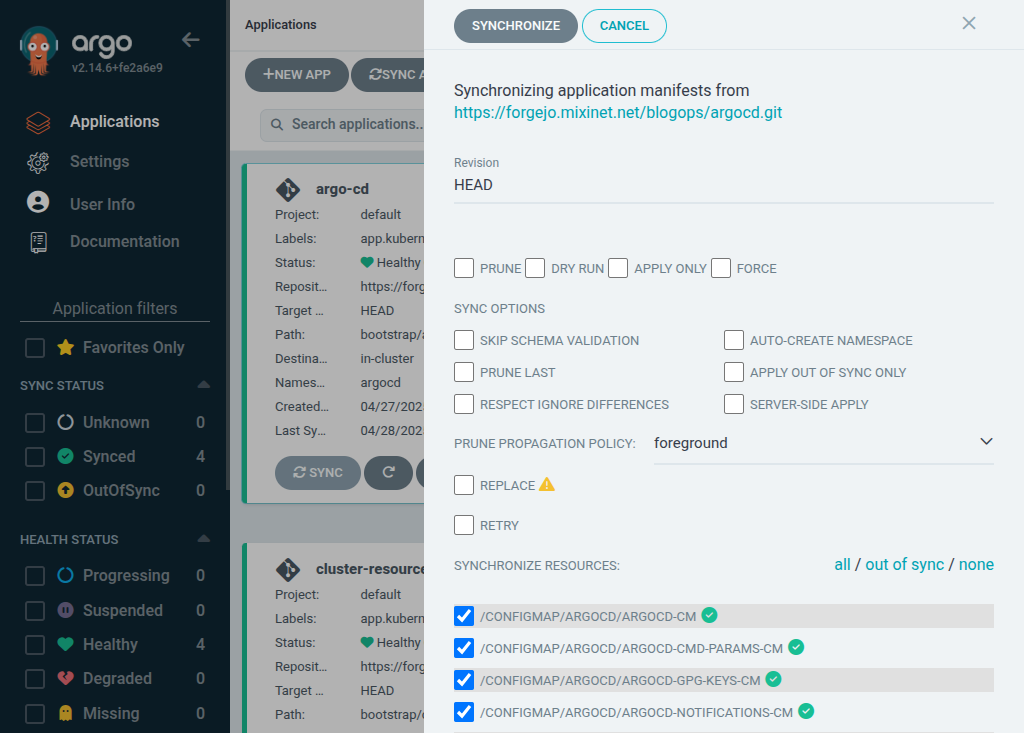
 Years ago I made myself a quick dressing gown from a white fleece IKEA
throw and often wore it in the morning between waking up and changing
into day clothes.
One day I want to make myself a fancy victorian wrapper, to use in its
place, but that s still in the early planning stage, and will require
quite some work.
Years ago I made myself a quick dressing gown from a white fleece IKEA
throw and often wore it in the morning between waking up and changing
into day clothes.
One day I want to make myself a fancy victorian wrapper, to use in its
place, but that s still in the early planning stage, and will require
quite some work.
 Then last autumn I discovered that the taxes I owed to the local lord (who
provides protection from mice and other small animals) included not just
a certain amount of kibbles, but also some warm textiles, and the
dressing gown (which at this time was definitely no longer pristine) had
to go.
For a while I had to do without a dressing gown, but then in the second
half of this winter I had some time for a quick machine sewing
project. I could not tackle the big victorian thing, but I still had a
second POLARVIDE throw from IKEA (this time in a more sensible dark
grey) I had bought with sewing intents.
The fabric in a throw isn t that much, so I needed something pretty
efficient, and rather than winging it as I had done the first time I
decided I wanted to try the Modular Jacket from
Then last autumn I discovered that the taxes I owed to the local lord (who
provides protection from mice and other small animals) included not just
a certain amount of kibbles, but also some warm textiles, and the
dressing gown (which at this time was definitely no longer pristine) had
to go.
For a while I had to do without a dressing gown, but then in the second
half of this winter I had some time for a quick machine sewing
project. I could not tackle the big victorian thing, but I still had a
second POLARVIDE throw from IKEA (this time in a more sensible dark
grey) I had bought with sewing intents.
The fabric in a throw isn t that much, so I needed something pretty
efficient, and rather than winging it as I had done the first time I
decided I wanted to try the Modular Jacket from  Since I didn t have enough fabric for the belt I also skipped the belt
loops, but I have been wearing this with random belts and I don t feel
the need for them anyway. I ve also been thinking about adding a button
just above the bust and use that to keep it closed, but I m still not
100% sure about it.
Another thing I still need to do is to go through the few scraps of
fleece that are left and see if I can piece together a serviceable
pocket or two.
Since I didn t have enough fabric for the belt I also skipped the belt
loops, but I have been wearing this with random belts and I don t feel
the need for them anyway. I ve also been thinking about adding a button
just above the bust and use that to keep it closed, but I m still not
100% sure about it.
Another thing I still need to do is to go through the few scraps of
fleece that are left and see if I can piece together a serviceable
pocket or two.
 Because of the size of the fabric, I ended up having quite long sleeves:
I m happy with them because they mean that I can cover my hands when
it s cold, or fold them back to make a nice cuff.
If I ll make a real jacket with this patter I ll have to take this in
consideration, and either make the sleeves shorter or finish the seam in
a way that looks nice when folded back.
Will I make a real jacket? I m not sure, it s not really my style of
outer garment, but as a dressing gown it has already been used quite a
bit (as in, almost every morning since I ve made it :) ) and will
continue to be used until too worn to be useful, and that s a good
thing.
Because of the size of the fabric, I ended up having quite long sleeves:
I m happy with them because they mean that I can cover my hands when
it s cold, or fold them back to make a nice cuff.
If I ll make a real jacket with this patter I ll have to take this in
consideration, and either make the sleeves shorter or finish the seam in
a way that looks nice when folded back.
Will I make a real jacket? I m not sure, it s not really my style of
outer garment, but as a dressing gown it has already been used quite a
bit (as in, almost every morning since I ve made it :) ) and will
continue to be used until too worn to be useful, and that s a good
thing.

 Like each month, have a look at the work funded by

 The voting period and tally of votes for the Debian Project Leader election
has just concluded and the winner is Andreas Tille, who has been elected for
the second time. Congratulations!
Out of a total of 1,030 developers, 362 voted. As usual in Debian, the voting
method used was the
The voting period and tally of votes for the Debian Project Leader election
has just concluded and the winner is Andreas Tille, who has been elected for
the second time. Congratulations!
Out of a total of 1,030 developers, 362 voted. As usual in Debian, the voting
method used was the
 Back when I setup my home automation I ended up with one piece that used an external service:
  The new FAI release 6.4 comes with some nice new features.
It now supports installing the Xfce edition of Linux Mint
22.1 'Xia'. There's now an additional
The new FAI release 6.4 comes with some nice new features.
It now supports installing the Xfce edition of Linux Mint
22.1 'Xia'. There's now an additional  Time flies by so quickly, it s >20 years since I started the