Search Results: "tar"

19 November 2009

Adrian von Bidder: HTTP over UDP?

I was just seeing the headlines about Google's SPDY technology which, as far as I understand right now (haven't read the LWN article yet) is trying to accelerate HTTP by doing fancy things within the TCP stream. I'm just thinking: why not do HTTP over UDP instead, like DNS does? This would cut down latency for small requests a lot, and for big transfers, the added latency woulnd't matter that much. How could that work? I figure that with today's JavaScript enabled, Ajaxy web, many requests (and responses, of course) would indeed be small and would fit in an UDP packet (especially since I'd say content should be compressed in any case without special negotiation.) OTOH, encryption would be hard (or, at least in a first protocol revision, not supported) and since persistent TCP connections are available, maybe this is just unnneccessary. I don't know. But I'm not sure if persistent TCP connections are actually that widely in use on web application where a user might click on a button every few minutes. How long do browsers and servers keep the TCP connection open?

18 November 2009

Robert Millan: GRUB news


This is being a busy month for GRUB. Quick catch-up of GRUB news:

Jan Wagner: dkms rocks or how to get the Intel 82576 GBit NIC running on Lenny

We ordered a couple of the new HP DL160 G6, cause they can be equipped with a lot of RAM. Unfortunately it s always the same with HP and the bandnew ProLiant 100 series the driver for the NICs is missing/too old in the latest stable debian release. The DL160 G6 is shipped with a Intel 82576 GBit NIC, which isn t recognized by Lenny, see also #522922.
I installed the system with another NIC installed (not really, but this is a way it works :) and wanted to get free the PCI-X slot again. So I did backport dkms and downloaded the latest igb driver. A short look into /usr/share/doc/dkms/HOWTO.Debian did advice me the way to create the DKMS driver package. Just after a couple of minutes I did roll out the igb-dkms_2.0.6_all.deb to the target maschine(s).
On the target systems I just installed dkms, the DKMS package and appropriate linux-headers and sim, salabim there was the interfaces. :)

Axel Beckert: Spam in SMTP not via SMTP

While examining the mail queue after a big mail server migration, I found the following reason for a bounce (hostnames replaced according to RFC2606):
550-5.1.1 - 
550-5.1.1 -
550-5.1.1 TO LEARN WHY YOUR EMAIL WAS REJECTED PLEASE GO HERE: 
550-5.1.1 - 
550-5.1.1 http://www.example.com/answers/dWtsb3R0b3NAdWtsb3R0ZXJ5LmNvLnVrPgA=AAA=/
550-5.1.1 - 
550-5.1.1 Cheap, Reliable Webhosting
550-5.1.1 http://www.example.com/a/hostgator/
550-5.1.1 -
550-5.1.1 Round-Trip Flights under $200 from Priceline!
550-5.1.1 http://www.example.com/a/pricelinertf/
550-5.1.1 -
550-5.1.1 Free Skype-to-Skype calls on your mobile
550-5.1.1 http://www.example.com/a/skype/
550-5.1.1 -
550 5.1.1 -
What s next? Advertisements in HTTP headers? Oh, I forgot, they already exist and are called referrer spam .

17 November 2009

Florian Maier: another debian bug squasing party at limux office

To celebrate the move to our new office building, there will be another Debian Bug Sqashing Party! The event will take place from 27.11. to 29.11. Here is the Google Maps link. The BSP starts on Friday afternoon at about 17:00. As always, everybody with moderate Unix skills is welcome to participate. Some Debian or programming knowledge is also desirable. For Debian Newbies, there will be a packaging introduction on Friday evening. Please be prepare your Notebooks for a Wireles LAN setup, as we're still not done with the cabling after our move to the new office building last week. Last, but not least i'm glad we will be able to sponsor some pizza for the hungry developer crowd ;-) More information about BSPs is available here:

16 November 2009

Tim Retout: On mentors and museums

This evening I investigated #555941 in libxml-filter-xslt-perl, and was able to downgrade it to "important". I'm working on a proper fix, but it's not RC any more. (Gunnar, I don't mean to make you feel bad! I've been inactive for a while myself - I'm just making up for lost time.) And now for conversation via blog! Clint, I'm inclined to agree about ego, fiefdoms and so on. But I'm unconvinced that personal relationships themselves are harmful. Actually, I was thinking more about "professional relationships" - I don't care much whether mentors take their mentees to an art gallery, provided they work with them over a period of time, and therefore get to know the quality of their packaging. (I was a bit careless in my phrasing last night.) Having said that, let's do that as well! Indeed, building relationships so that we don't flame each other to a crisp the rest of the year is the very reason we hold DebConf, right? (Apart from the beer. And the holiday.) I reckon the mentoring system would be more effective if we started thinking along these lines, and this in turn would help address the wider problem of resources within various parts of Debian. Maybe not directly, but it could free up other people to work on the complicated stuff. We could probably turn debian-mentors into a sort of "team" in its own right. (Apologies if someone's suddenly made debian-mentors active again behind my back.) And if I ever get approved by DAM (ahem), I intend to propose a deal to the debian-mentors list that each upload of an updated package will cost them one RC bug NMUdiff, and uploads of new packages will cost two. ;)

Gunnar Wolf: Personal assessment about myself: Being slow everywhere

Sigh I am starting to fill up my annual report for my real-life work. You know, that chore you must do every year where you score little bullets next to each completed project and talk well about yourself. For my workplace, fortunately, I do not have to lie and convince people I am worth rehiring - As this year I achieved definitividad as a T cnico Acad mico Asociado C de Tiempo Completo at my University, I can say for sure I have long-term job safety. UNAM is the best place for me to work, and I am most grateful Even if I do want to advance for the future, even though I would strongly like at some point to start working in a real academic position My job is mostly operative, limited to keeping things running smoothly in our network and servers. I work in a social sciences (Economics) research institute, and even though I have taken on an interesting project that is viewed from the social sciences I do expect to finish with a very interesting product in the near future, my interest lies in computing as a science. Anyway, back on track This is the time of year to start evaluating many things, many factors, from many different sides. And yes, for me that involves measuring how am I faring in my involvement in the projects I most care about Specifically, Debian, but also several other Free Software projects, even if my involvement in them is mostly organizational. I am once again going through a tough period in my personal life, and the impact it carries is obviously deep. However, I am not fond of finding excuses for my underachievement or underperformance. And that's what I feel now. Even more when I see posts such as Zack's and Tim's status updates, and when I see that we continue to be on a history-high streak of RC bugs. Regarding the several teams I am (at least formally) involved with in Debian, I have been away from the pkg-perl group for far too long... It is still my first group when it comes to identifying myself with - Both as on a personal level, as I consider them as good friends and great people to work with, and I do feel the responsability to share the load with them, as maintaining >1300 packages (even if they are so highly regular) is just not an easy task. But for over a year, my involvement has been basically zero. I have been a bit more active on pkg-ruby-extras, maybe paradoxically as it is a smaller team and with less packages (as I know it is much less probable for somebody to keep my packages in adequate shape if I don't do it)... and also because I am working more with Ruby than Perl nowadays. And finally, about Cherokee, I decided during DebConf9 to redo the packaging to fully use DH7 instead of our old-style quasimanual style. I have had several bursts of activity, and am almost-almost-ready to do the first newstyle upload... But so far, have been unable to do so. Of course, keyring-maint: With Jonathan's help, I have come to terms with most of the processes. Both Jonathan and I have been swamped lately, but at least I think I am finally helping speed up the process instead of holding it down. We do, yes, have several pending updates - but are working our way up the queue, and I hope not to leave people waiting for too long. And yes, we have discussed several ways of documenting and automating several of the tasks we currently sustain, and that should come soon I have been also leaving maybe a bit too much responsability aside on EDUSOL, for which today we are entering the second week of activity, and I'm very sorry to see our server is just too overloaded to even reply to even answer to me And even lacking admin powers myself, I should have worked earlier on setting up redundancy on a more automatic way (as we have an off-site backup we can promote to live and redirect to, but I am unable to do this... Given that I am the techie person on board/the only "professional" sysadmin). This year I also quietly finished the bulk of the Comas rewrite. What? Comas? Still alive? Yes, and you can expect me to show it off to more people soon, and get it used for more conferences. I will talk more about it (and its motivation, and its current status) later on But basically, the only two things that Comas shares in common with the mod_perl-based system most of you got to know (mainly at CONSOL 2004-2008 or at Debconf 5 and 6, although I know of several other conferences which used it) and the current incarnation are The (most) basic database structure and the name. The project underwent a full rewrite, and is now a far more flexible, far easier to install, Ruby-on-Rails based application. And most important, it does no longer involve your name being Gunnar Wolf as a prerequisite for successfully setting it up ;-) Regarding DebConf, I have promoted a Central American MiniDebConf, and we are right on track for holding it in late March in Panam City. Everybody's invited, and we will have (surprise, surprise!) the very professional involvement of Mr. Anto Recio as local team, as it seems he didn't have enough with last year's DebConf9 and wants to suffer further. What am I lacking here? Motivation. I have been quite pessimistic, possibly turning some people away, even though we have a good first sampling of interested people's profiles and expectations. If you want to get involved, tomorrow (Tuesday 17-nov) we will have a meeting at Freenode's #sl-centroamerica, 17:00 GMT-6. Please note we do need involvement from the Central American communities, it is more than just a motivational issue. Last meeting it seemed Anto and I were the only people pushing the MiniDebConf - and frankly, that would be a basis for not even holding it. We need motivation from the very people involved in it! Anyway You can see I have (and it seems to be a constant in my life) a series of contradictions going on. However, the excercise of putting it all into writing helps me understand better where I am standing. When I started writing this post I felt much heavier, much more at a loss Right now I feel I want to refocus my energy on the same projects and teams I have been involved with, yes, but feel it at least more plausible. Hope so.

Asheesh Laroia: Choosing something to work in Free Software is hard

Debian is primiarly organized into mostly one-person "projects," namely packaging a piece of software. But in the past few days on Planet Debian, there has been discussion about how existing packages in Debian need more help. Tim Retout wrote:
There's a huge role for non-DDs to play in getting fixes into Debian, but as far as I remember, the emphasis of the mentors documentation is on packaging rather than bug fixing.
I think this is a serious problem across Free Software. Open source contributors are grouped into projects. If you're burning out on what you're working on lately, or you are looking to become a new contributor, it's hard to know what projects need your help. As someone who knows Python and Debian packaging, it would be nice to be able to search Debian for Python-language packages that need help. I also think that Tim hit on a really important social point later in his post:
It seems to me that the mentor relationship works better when DDs get to know particular people
Tim's right that personal relationships make a big difference. I got serious about my NM application when I asked someone I already knew to sponsor my packages. But not everyone can be so lucky as to have a Debian Developer as a friend. And many projects aren't as friendly as Debian; there's no official mentorship available. I think that we need to start paying a lot more attention to personal relationships all across Free Software. (I'm working on a web tool in this space. Join me in #openhatch on irc.freenode.net to discuss it, or just stay tuned until I write it up tomorrow.)

John Goerzen: Droid Review Update

It s now been nearly a week since I started using the Droid, and I have some updates from my initial review. Browser First, I, like many reviewers, complained about the lack of multi-touch in the browser, thinking it inferior to the iPhone/iPod Touch as a result. I think I, and all those other reviewers, were mistaken. The great part about the Droid browser is that I can just double-tap on the content column, and it automatically zooms in to the width of that column (hiding left/right navigation or whatever else may be there). Moreover, the Droid browser also seems to render these columns narrower than the iPhone/Touch browser does. So some websites aren t viewable on the iPhone even in landscape mode without horizontal scrolling, but work great on the Droid even in portrait. Perhaps multi-touch pinching is missed in the map, but the utility of it seems far less important now that I ve played with it some. Vibration I complained that the shortcut on the lock screen puts the device into silent mode, with no corresponding shortcut to put it in vibrate mode. That s true, but there s another annoyance: if you enable a lock pattern the Droid version of a power-on password even the shortcut to silent mode is gone. Doh. Now you have to unlock the device before you can put it on silent or vibrate. Cool Stuff in Settings There s some nifty stuff in settings that some reviewers seem to have missed. You can see what services are running, and kill any of them. Even niftier, in the about the device screen, it can show you what s using battery power, and how much. It lists apps, cell modem, wifi, OS, etc. It would be nice if the iPod Touch, with its worse battery life, had this feature; my Android, at least, doesn t seem to really need it, as the battery life is fine. I also appreciate that just about everything on the Droid has more options than on the iPhone/Touch. I was in the Wifi menu on Terah s iPod Touch today, trying to figure out where the rest of the settings where. Then I realized they aren t anywhere; the iPod Touch doesn t have those as configurable options. Consistency and Duplication I get rather annoyed with UIs or devices put similar functionality multiple places. The Droid has a habit of doing this sometimes. Here s an example. Say you want to remove an app. You can, as I did, go to Settings, then Applications, and remove it from there. But later, I was wondering how you can rate applications. I noticed a Downloads screen available from the menu in the Market. That s where you rate it. You can remove apps from there too. Strangely, removing apps from the Downloads screen asks you why you re removing it, but the other screen doesn t. Wonder why that is? Camera I did check out the camera. I have very little experience using cell phone cameras. So I guess I ll say the Droid s camera is far better than the Blackberry Pearl s and far worse than my Digital Rebel. Compared to the Digital Rebel, or even an ancient 35mm camera, it s terrible. Maybe it s typical for a cell phone, and I guess it works in a pinch. I wouldn t rely on it for anything I want a print of.

15 November 2009

Russell Coker: Backing up MySQL

I run a number of MySQL databases, the number of mysqld installations that I run is something like 8, but I may have forgotten some. With the number of servers that I run on a do nothing except when it breaks basis it s difficult to remember the details. The number of actual databases that I run would be something like 30, four databases running on a database server (not counting mysql is fairly common. Now I need to maintain some sort of automated backup of these, this fact became obvious to me a couple of days ago when I found myself trying to recreate blog entries and comments from Google s cache There are two types of database that I run. There are ones of significant size (more than 1GB) and tiny ones I don t think I run any database which has a MySQL dump file that is more than 20M and less than 2G in size. For the machines with small databases I have the following script run daily from a cron job (with db1 etc replaced with real database names and /mysql-backup replaced by something more appropriate). The --skip-extended-insert option allows the possibility of running diff on the dump files but at the cost of increasing file size, when the raw file size is less than 20M this overhead doesn t matter and gzip should handle some extra redundancy well. #!/bin/bash -e for n in db1 etc ; do
/usr/bin/mysqldump --skip-extended-insert $n gzip -9 > /mysql-backup/$n- date +%Y-%m-%d .gz
done Then I have a backup server running the following script from a cron job to copy all the dump files off the machines. #!/bin/bash -e
cd /backup-store
for n in server1 server2 ; do
scp $n:/mysql-backup/*- date +%Y-%m-%d .gz $n
done This script relies on being run after the script that generates the dump files. Which is a little more tricky than it should be, it s a pity that cron jobs can t be set to have UTC run times. I could have run the dumps more frequently and used rsync to transfer the data, but it seems that the risk of losing one day s worth of data is acceptable. For my blog I can get any posts that I might lose from Planet installations in that time period. For the bigger databases my backup method starts by putting the database and the binary log files on the same filesystem not /var. This requires some minor hackery of the MySQL configuration. Then I use rsync to copy the contents of an LVM snapshot of the block device. The risks of data consistency problems involved in doing this should be no greater than the risks from an unexpected power fluctuation and the system should be able to recover from that without any problems. My experience with MySQL dumps is that they take too long and too much system resources for large databases so I only use them for backing up small databases (where a dump can be completed in a matter of seconds so even without using a transaction it doesn t hurt).

Stefano Zacchiroli: RC bugs of the week - week 10

RCBW - week #10 Here is this week squashes, by yours truly (also truly amazed by the simple fact of having reached the 10th RCBW week, my DDPO NMU section probably hates me now): This week I've made (once more) a friday/saturdary rush to keep up, mostly because during the week I've been traveling (again) back to Italy and also because on mon/tue we invited Luk in Paris to discuss some Mancoosi-powered Britney (potential) improvements (and yes, have some fun also. BTW, Yves, Ralf was not visiting, he has been teaching in Paris for quite a while now :-) ). More on this as soon as the advantages will turn potentiality into reality. To conclude ... drum roll ... please join me in cherishing this week new RCBW participant, welcome on board Tim!

14 November 2009

Andre Luis Lopes: Public service announcement : A LDAP directory won t do it all by itself

Recently I ve been dealing with requests for LDAP directories configs which clearly demonstrates how little people understand about directories and what they are capable of doing. A significant amount of people I know seems to really get it wrong when it comes to what they want from a directory. Actually, they somehow think that a LDAP directory will do whatever is needed for their application to store, retrieve, validate, authenticate and even take decisions based on no data provided at all. These people think that one should just deploy a directory using the minimum effort approach and suddenly everything will just work. They don t seem to realize that for their application to make use of a directory it should be prepared to do so. They can t accept it when they are told that the directory won t just work and by some unknow enchantment get their systems data stored, validated, authenticated and, shockingly for them, that it won t make their credentials consolidated so lots of different services will out of the box just start working using the same username/password pair. Also, some people don t understand the difference between a LDAP directory and a single sign-on (SSO) system. They don t realize that a directory won t, by itself (i.e. without additional software and some respectable amount of tweaking), provide them the ability to authenticate against it only a single time and have their credentials shared among all their systems. That s it. Said. Don t get me wrong. All that was metioned above is possible, but it isn t done by LDAP alone. LDAP is just a bunch of protocols and a directory is only one nice place to store information. What will be done with this information, how it wll be treated and how it could be used to produce meaningful results are almost always up to the application and/or to some middleware or added plugin/overlay/connector/whatever. Next time someone ask you to install LDAP so I can get rid of all my different username/passwords and use only one instead , be afraid. Be very afraid and present him/her some theorical knowledgment regarding the topic. Or, better said, insert some clue into his/her brain.

Tim Retout: RC bug roundup

On Wednesday, I fixed #551228 in libgstreamer-perl - from the bug log, it looked like it would be an intriguing parallel-build problem, but I reckon it was just a faulty test. Next I applied a patch from the upstream bug tracker for #544894 in libtk-filedialog-perl, which was fine; but then we noticed that there was no explicit copyright notice in the source, so it hasn't been uploaded yet. The code is from 1996, so we would request removal from Debian if it weren't for 'horae' depending on it. Hmm... Then yesterday I found the time to test #520406 in libdbd-mysql-perl, which I remember being open as long ago as DebConf. It turns out it's dead easy - there's already a test case and a patch upstream, which was applied a while ago, so the bug is already fixed in squeeze. Today I prepared an updated package to fix this in lenny. So, I'm still falling short of one RC bug a day, and pkg-perl has more RC bugs open than at the start of the week. :( The weekend's not over yet, though.

Steve Kemp: And if you fail gym, you'll never get into college.

Today I rebooted my desktop for the first time in a few months. This did not go well. Probably as a result of this issue with lvm/dmsetup/cryptsetup conflicting my system didn't boot, and the error message was non-helpful. The error shown just after grub2 had started to load a system was :
Cannot find LVM volume group gold-vol
The actual cause was that I was missing the mdadm package. D'oh. My desktop has 2x500Gb drives setup as:
 sda1 + sdb1 = md1  = /boot [1Gb]
 sda2 + sdb2 = md0  = LVM storage [460Gb]
(It's only as I write this that I'm surprised that md1 + md0 are opposite to the fashion I'd have expected them to be. I guess I just created them in the "wrong" order at install time. Oops) So without mdadm the LVM volume group on /dev/md0 couldn't be found, and that in turn meant my root filesystem couldn't be accessed at /dev/gold-vol/root. Fixing this was a real pain. Because the system is the PXE network host on my LAN I couldn't boot it that way, and the machine has no CD-ROM drive connected. My solution was to download and install System Rescue CD, which I placed upon a USB stick. This worked beautifully once I realised I had to boot with rescue64 to get a 64-bit kernel capable of letting me run chroot. Oddly enough I had problems booting from USB. If I powered down my system and hit the "on" switch the system just ignored the USB stick. I noticed that my USB mouse and card reader didn't show any power lights at all - not until after grub had failed to boot the system. So the process of booting from USB was eventually determined to be: Very very odd. I guess its a question of what does the "USB enabling". I'd previously assumed the BIOS would do this setup - but looking over at another system I notice that the USB mouse doesn't "come alive" until mid-way through the Linux boot process even though I know that BIOS has options for "Enabling USB mouse & keyboard". Maybe I'm missing something obvious ..? In conclusion .. I restarted GDM for the first time in weeks and rebooted, and this was a bad idea. ObFilm: Never Been Kissed

13 November 2009

Martin F. Krafft: Successful BIOS flash with flashrom

An older machine of mine previously ran off 7 harddisks, which were added over the years. Initially, there were two 80Gb drives, then one failed and I replaced it with a 160Gb drive, leaving 80Gb of unused space. At some point I had two 120Gb drives, which I also added, and then another 160Gb and a 250Gb drive, and finally I replaced the first 160Gb with a 320Gb one. Between the different RAID1 and RAID5 arrays across these disks, as well as the LVM configuration atop, I had completely lost overview of the assembly. It didn t help that the drives were all IDE (PATA), so you can imagine the cable mess! When two drives started reporting S.M.A.R.T. errors, I took the opportunity to replace the mess with the four 250Gb SATA drives I had lying around at home. The problem was that two of the four SATA ports apparently didn t work. Hence I went to try a BIOS upgrade for the plain Asus K8V motherboard (Via VT8237 chipset). I don t remember what floppies look like, and I hate all these DOS-based flasher programs anyway, so this time around I gave flashrom a try (using the outdated version in Debian lenny). I managed to read out the existing ROM image, but even after verifying that it looked very similar to the new one, I was still scared of turning my computer into a brick. While waiting for people on the #flashrom/irc.freenode.org channel to reassure me, I managed to wipe the saved image and essentially had no other way but to move forward. I used flashrom to verify that the image was written and rebooted and the system came back up, this time with support for all four SATA drives. Thank you, flashrom people!

12 November 2009

Holger Levsen: Customized Blends

Almost exactly a year ago, the term "Custom Debian Distribution" was changed to [1 "Debian Pure Blends"] to better reflect what it is about: a variation of Debian within Debian. So far, so good. Then there are also "Debian Blends", which are not pure, meaning they have some parts which are not yet in Debian.

But the intention is clear, a Debian Blend aims to be fully part of Debian.

This week it occured to me that there is something else, something which is widely done and which is something else, so it should have it's own term: "Customized Blends", where some parts of the "distribution" is taken from a Debian Blend, while there are others, which are customisations, which are not likely or even desired/possible to end up in Debian.

As I see it, LiMUX is such a distribution, or what is installed in the schools in Extremadura or Rheinland-Pfalz atm. Mostly the software they use is Debian (either from stable or backported version), while some parts are not, like bookmarks, wallpapers, custom (sometimes propietary) software or firmware for specific hardware.

My motivation in pointing this is out, is to create an awareness that those "Customized Blends" are an important and frequent part of the Debian Blends ecosystem _and_ that it's for their own benefit to contribute back. Minimising the diff to a "real" pure Blend is good :-)

11 November 2009

John Goerzen: In-Depth Review: Motorola Droid (with some iPhone comparisons)

The Motorola Droid A855 is the first Android 2.0 phone. I have been using one since Monday, having switched from a BlackBerry Pearl. I also wrote about Terah s iPod Touch recently, so I ll be making comparisons to it too. Here s my review. Hardware Physically, the device is very nice. It fits well in my hand. It comes in a fairly small box. It s surprisingly heavy for such a small device, but it isn t so heavy as to be a problem. It feels solid, sturdy, and durable throughout. Terah has the most recent iPod Touch 8GB, and compared to that, the Droid is thicker and heavier. The Droid s screen is awesome; a little longer but not as wide as the iPod Touch s. The iPod Touch screen seemed to offer less friction as I d slide my finger over it, which was nice but not a terribly big deal. I don t share some other people s annoyance with the keyboard. It is far better than the BlackBerry Pearl, or many other BlackBerries I ve seen. Along the bottom of the screen are some silkscreened buttons. My gripe with them is that they are easy to accidentally press. I ve done that more than once while using the phone in speakerphone mode, but you can lock the phone keyboard while you re on a call. I also don t share the complaint about battery life. It is excellent compared to the Pearl. Despite having a long-life battery, if I had it charged fully when leaving work at 5PM, by the next morning at 7AM it would often be completely discharged (though sometimes only half discharged). I believe that has to do with my home being in a poor reception area, and it spending a lot of energy looking for signals. In any case, the Droid has impressed me with its battery life and I have no complaints there. The screen, as I said, is brilliant and sharp. It is readable in various lighting conditions. By default, its brightness adjusts with the brightness of the ambient light. That s normally fine, but it can be annoying to stand in front of a light with the Droid in a shadow, watch its screen darken, and then shift a bit and it becomes bright again. There is a setting to disable automatic brightness. Button-wise, it has four physical buttons: the power/lock button at the top, volume up/down on the side, and a camera button on the side. The camera button only works when the phone isn t suspended (locked), and disappointingly can t be remapped to something actually useful. Just beneath the screen are four touch buttons: back, menu, home, and search. These are the ones I complained were easy to accidentally press. MicroSD and USB The Droid comes by default with a 16GB MicroSD card already installed. This is one huge advantage over the iPhone or iPod Touch: you can actually put things on the phone yourself, directly, without having to use iTunes and its limited features. I have, for instance, downloaded a PDF on the Droid and later copied it to my PC. I also copied a KeePassX encrypted password database from my Linux computer to the Android, for use with KeePassDroid. The iPhone/iPod Touch password programs don t support this kind of copying of files from your PC to the device, though one will let you put a database up on a webserver you control and download it from there. Plugging in a MicroUSB cable will start charging the Droid automatically. In order to make the SD card mountable, you must simply drag down the notification bar (which is how you get detail about what it s telling you normally) and touch the USB icon. When the SD is mounted on the computer, the Droid won t see it, of course. Touch the USB icon again to mount it on the Droid again, or just unplug USB. Wireless and Wifi The wifi support works like you might expect: pretty well. The cell phone reception works well, as does its Bluetooth support. It has an easily-activated airplane mode which disables all wireless features, which can then later be re-enabled. You can also individually disable wifi and Bluetooth. Oddly, you can t disable the cell phone network individually. The only way I could find to disable it is via Airplane Mode. User Interface The user interface, overall, is very slick and polished. However, I would have to say it is not as slick and polished as the iPhone/Touch interface. A few of the animated effects have a low framerate, which isn t really a big deal. More of a big deal is that settings and options can be scattered in many different locations, making them hard to track down at times. The device also offers fewer visual cues than the iPhone/Touch, though that is perhaps not significant. Like Apple s device, the Android 2.0 UI offers you three home panels, which you switch between by dragging your finger left and right. The iPhone shows some dots at the bottom of the screen, a standard UI indicator on that device that you can flick left/right, while there is no such indication on the Android. This is somewhat nitpicky though. I would put Android 2.0 and iPhone in the same general class of user interfaces, way above any other such device I ve tried. The Droid has an on-screen keyboard similar to the iPhone/Touch, though somehow it felt like the keys were smaller or easier to mistype. I m not sure why that is; maybe they really are smaller. The physical keyboard can be used at any point too, of course. Background Apps This is an area where Android really shines over iPhone. Android supports background apps everywhere. That means that your weather widget can be always correct, instead of being hardcoded at the factory to show 73 degrees as iPhone s weather icon does until you tap to open it. It means that more apps remember where you were and what you were doing when you switch to/from them. And it means that you can do things while that PDF downloads. Finally, it means that you can have native Jabber clients on the Android without having to do some mess with Apple push notifications plus third party servers, significantly reducing the complexity of such apps. Browser Now moving on to the applications preloaded on the phone, I ll start with the browser. It is, in a word, awesome. It is far faster and reliable than the browser in my N810. Compared to BlackBerries, of course, this is a real browser, not their limited one; and even so, it is still faster. It is also faster than the iPhone/Touch browser, sometimes significantly so. The pinch to zoom feature of the iPhone/Touch is lacking, and it must be said is both useful and pretty. Zooming softkeys appear on the screen when you tap, and do work well. It also automatically zooms if you tap on the page to fill out a form, for instance. The bookmarks save thumbnail images similar to the iPhone, and you can put bookmarks on your home screens as well. Rotating the Droid to landscape orientation causes the browser to also rotate, and on most websites it will also zoom in by default at that point, since it s got a wider orientation and doesn t have to shrink stuff to fit as much. The physical keyboard is very nice for filling in usernames and passwords. iPhone-optimized sites, such as Bloglines, work great on the Android. Though many of them fail to autodetect the Android as an iPhone-like device, and thus you have to manually ferret out their iPhone-optimized URLs. Email This is both a strong and a weak spot of the Droid. First off, it comes with two email client apps preinstalled: one for Gmail, and one for everything else. I haven t used the Gmail one, so this review doesn t consider it. You can connect the email program to your IMAP, POP, SMTP, or Exchange (ActiveSync) accounts in the predictable way. Each account can be configured with its own notification preferences, so you can easily see an icon, vibration, or beep when you get new mail on one account and not the other. All folders on an IMAP account are accessible, which is a very nice feature that is not shared by the BlackBerry. You can view your mail as a unified INBOX if you prefer. In such a few, a thin color bar to the left of each message summary tells you which account it came from by its color. This is a nice way to quickly deal with all new email, wherever it may be from, and ought to be emulated by some desktop clients. You can, of course, also view each account individually. The email program supports attachments, both viewing and sending. It does not appear to have the iPhone/Touch bug if failing to display emails forwarded as attachments. Now to the drawbacks. First of all, it inexplicably doesn t support the IMAP IDLE command. As a result, IMAP accounts are polling-only; there is no near-instant notification of new mail as there is with Exchange accounts, even though IMAP supports that trivially. Like the iPhone/Touch, Android 2.0 s mail program has a great deal of trouble with self-signed SSL certs, or SSL certs that are unusual in any way. Both devices refuse, by default, to talk to mail servers with self-signed SSL certs. Neither one offers to let you add an exception to recognize a particular cert in the manner that the built-in web browser on these devices would do. On the iPhone/Touch, at this point you need to obtain the cert by other means, stick it up on a web server, browse to it from the device, and add it that way. This trick doesn t work on Android 2.0, nor does adding it using the import from SD option. There appears to be absolutely no way to teach the mail program to use a self-signed cert on Android. The good(?) news is that you can choose to have Android accept any certificate. Many people in forums suggest that, and it does let it connect. Of course, it also removes much of the security benefit of using SSL/TLS in the first place, and is a terrible excuse for the lack of proper self-signed cert support. Both iPhone and Android devices have a horrible user experience in this area Quickoffice The Droid comes with some sort of Quickoffice software pre-installed. It can be used to view PDF, Word, and Excel files (at least; maybe more). But it is a rather strange beast. It has no icon on the applications screen. The only way to open Quickoffice is by opening a file that it supports in another app. So, for instance, tap on a PDF in the browser or open a Word attachment in email. I haven t played with it much, but I can say that it s read-only but seems to have high-quality rendering of all document types. Its PDF viewer is glacially slow on any page that has graphics. Flip the page to one with graphics and up pops a progress bar. And good thing too, because it might take 15-30 seconds to render a page. I will be looking for better PDF viewers in the Market; there are quite a few. Lack of file manager And that brings us to the next surprising limitation: there is no built-in file manager. I downloaded a PDF from the browser, and saved it to the SD card, but there was no way to look at it from the phone! Absolutely none. No way to delete it, rename it, etc. Several people recommended Astro, which solved all of those problems. Not having such a program built in is a weird glaring oversight. Of course, the iPhone/Touch doesn t have one built in, but in their case the glaring oversight is not having any files to manage Calender, Contacts, and PIM features This is an area of exceptional strength for the Android. I believe it s got the best PIM features of any mobile device out there, though it s not without its quirks. There are two calendar apps on the Droid, and they both have virtually identical interfaces and feature sets. I am rather at a loss as to why we are burdened with two separate apps. In any case, the app called Calendar works with a local calendar, or with Google Calendar syncing. It supports all the features you d expect, and plenty you wouldn t, including excellent support for meetings, viewing other people s calendars that you ve configured access to on google.com/calendar, viewing subscribed iCal calendars, etc. It has push syncing with Google Calendar, so new events appear in about 10 seconds. It is well-executed and completely flawless in every way I could see. Corporate Calendar is the same, but for hooking into Exchange or Exchange-compatible calendars via ActiveSync. We are evaluating groupware, and have so far tested it with Zimbra and Scalix. It worked well with Zimbra, and not so well with Scalix. That s not to say there were no problems. The meeting invitation emails Corporate Calendar generated appeared to have no body in the Zimbra mail client, or in Thunderbird (though if you look at the raw email, you see it does have a vcal entry in it). Meeting invitations sent to the Android can be displayed in the Email program, but the Email program doesn t offer accept/decline buttons, so you have to manually pull up the event on your calendar to accept or decline it. Other than that, it worked flawlessly with Zimbra. Scalix exhibited several data integrity issues that will probably make it unsuitable for syncing with an Android at this time. There is a built-in Calendar widget you can put on your home screen. It will show you the date and info about your next appointment. I miss the BlackBerry Pearl theme that showed me the next two appointments. There are some apps that claim to do this, but none of them work well. Contacts are also quite powerful. The contacts viewer aggregates your contacts from multiple sources into a single view, which is nice. It can sync in Gmail contacts, ActiveSync, and Facebook contacts. (How s that for a device with corporate and personal appeal?) The viewer works better than Apple s, and creating a new contact lets you choose which source you d like to add it to if you have more than one available. Continuing the trend of many recent devices, the Droid has no task/todo list support built in. Maps I ve heard people be all excited about Google Maps, saying it s the best maps ever in a phone (though I suspect they have forgotten that Garmin has added on a phone to their GPS products in the past). In general, they are probably right. And also they are probably irrelevant. The first thing that must be said is that the maps on the Android, like the iPhone/Touch and other such devices, are not actually installed on the Android. Consequently, for mapping or navigation to work, you must have a data signal, either wifi or CDMA. That immediately turns this into a GPS accessory, not a go-to device, because who wants to be stuck without a working GPS someplace without cell phone reception? (Such as several areas right near my house) I have a Garmin Nuvi 500 (see my review), and despite not being a terribly expensive GPS, it runs circles around the mapping in Android 2.0 (or iPhone for that matter). The 3D display on the Nuvi is very helpful for driving in dense city streets, and that s not available on Android or iPhone. The Nuvi has nice features such as one-touch detour calculation, excellent geocaching integration, accurate and sensitive receiver, etc. I will not be leaving it at home for trips just because the Android supports maps. That said, there is something to be said for having maps of Android s quality. It can be a nice crutch if you re somewhere unfamiliar but didn t expect to be, and thus left your GPS at home. It also can give you routing on transit sources, which Garmin can t, so if you re in an urban area with bus/subway options, the Android maps could be very helpful. I will probably try that out when we re in Chicago next and still pack the Garmin unit for driving around rural Indiana. The Phone The last built-in app to discuss is the phone feature. Yes, the Android is a phone. As expected, the phone integrates well with the system. There is not much of any great interest to discuss here. It s a phone. It integrates with contacts. It works. I use Google Voice, and have had their BlackBerry app for some time now. The Google Voice android app is far nicer. You have the option to make all calls via Google Voice, none via Google Voice, prompt each time, or only international calls via GV (which is presumably cheaper for such than your carrier). A couple of annoyances, though. One is that you have to touch a button to activate the keypad (to send touch-tone digits while you re on a call). It should be activated by default. Android Market vs. App Store I know some people love it, but to me the Apple App Store is like a cross between the sleazy guy selling watches from his car trunk and the tourist trap strip malls that sell 50-cent useless plastic memorabilia for $20. Yes, there are some quality apps in the App Store that aren t overpriced, don t violate your privacy, and do something useful. But you ll have to look hard. It still boggles the mind that most of the secure password storage tools for Android think they need access to the GPS, Internet, and at least one of your contacts, phone number, logs, etc. Yes, you heard me right. A password storage tool wants GPS and Internet access. And, being Apple, we all know how tight they ve locked down the App Store. Emulators are banned. Useful apps get arbitrarily banned at various points. Now, the Android App Market is better than the Apple App Store in the sense that it has a lower percentage of the crappy apps, and perhaps more useful apps, at least to my taste. That s not to say it s without crappy apps. It boggles my mind why most weather applets on the Market think they need to know my phone s status and identity, and why some apps that have nothing to do with the Internet or location services want to know all of the above. I don t install such apps. But there are gems out there. The small 400K weather applets that do what they advertise, and do it well. My absolute favorite is droid48, an emulator for my beloved HP 48GX calculator. Yes, an emulator. You can also find various NES, SNES, and C-64 emulators on the Market; Apple famously removed the latter from their App Store recently. And you re not tied to the Market either; you can install apps from wherever you like. KeePassDroid is another one. It reads the same database as KeePassX for Linux or KeePass (.kdb format only) for Windows. It s a secure password management system, and I can periodically copy the file from my desktop over to the Droid and have all my passwords at my fingertips but encrypted, of course. There is simply nothing that convenient for the iPhone/Touch because the device doesn t permit it. Music and Video I haven t played with these much, but the music player seems to just see MP3s placed anywhere on the SD and presents them as you d expect a music player to do. It looks fully-functional and easy to use. Conclusion Overall, I think the Droid is a very nice phone. It isn t perfect, but it bests the iPhone in a number of areas. I think it s probably the best phone for many right now, and the iPhone for some others. Update Nov 11: Two other annoyances I forgot to mention. One is that the power-button shortcut menu, as well as the lock screen, have a quick shortcut to put the phone into silent mode. Very well. Except, confusingly, these buttons not only enable silent mode but also disable vibrate mode while checking the silent mode checkbox in settings does nothing to vibrate mode. There is no built-in shortcut to enable vibrate mode; you d have to unlock the device, use the volume keys to go down the vibrate. The app Silent Mode Jammer helps with this. Second is that the documentation is as poor as any other cell phone around. For instance, there s a setting that says Voice Privacy. It s a checkbox. The description is Enable enhanced privacy mode. Thanks, but that tells me nothing. Nobody online seems to know either. A few overconfident forum posters claim it s encryption, linking to posts from 2003 about a Sony phone with a checkbox with the same name. Maybe it is encryption, but that is hardly definitive. The bottom line is it s not documented anywhere. Neither of these change my conclusion above though.

MJ Ray: SPI November 2009

An announcement for this meeting just dropped into my inbox with Apologies for the lateness of this announcement; some crossed wires . It will be in #spi of irc.oftc.net as usual, at 2000 UTC. The agenda is available online and someone will email the logs to spi-general afterwards.

Jan Hauke Rahm: Long time no see

It s been quite a while since I posted something in my blog. I had to recover from not going to Debconf9 which was real sad. Right before the conference, I mean like a day before it, I got more or less sick and just couldn t fly the next day. I managed to rebook the flight (thanks to SwissAir) for the next day but it wasn t meant to be. I would have loved to meet the Debian crew , get my GnuPG key a bit more into the web of trust, discuss a few issues, envy the fast end evolved notebooks everyone else has You can imagine it wasn t easy to see the conference going its way via live stream when I was actually planned to be there. Again sorry to everyone who worked for me being sponsored and everything! Anyways, time goes by and a lot happens, none of which I d like to publish in a blog, except: I got a part time job. :) If you ve ever asked me about my experience with Linux vServers or web hosting in general, and if you even asked me where to get such with fair prices and good support, I might have mentioned a small firm in Germany which I m a customer of for a long time now. And about two months ago it just so happened that they called me. I admit, I know the owner of the company (haven t seen him in a too long time, though) and I already considered us friends. But I was still surprised when he asked me to work for him. It s not a big deal, he said, just administer the servers we re running and take care of them. It s a few hours a month, don t worry, you can do it! All that with a scary smile Now it turns out he had more in mind and I m working on different projects at the same time, but still have the system (all Debian of course) at first priority. I have no clue if he s satisfied with my work or if he s just afraid to tell me (you know, us being friends and all), yet the systems are up and running and I m learning every day. I even got the chance to write a small project in ruby which I wanted to do for a long time. Love it! So, this is the first time that I recommend him not only because I trusted him with my system but also because I know your system would be safe. ;-) Need an IT partner in Germany or the Netherlands? o-byte.com Uhhh, I have to ask for a raise after this hymn :) Something else I forgot? Well, I became a DD but that s also some time ago, so hmm no, that s it for now.

10 November 2009

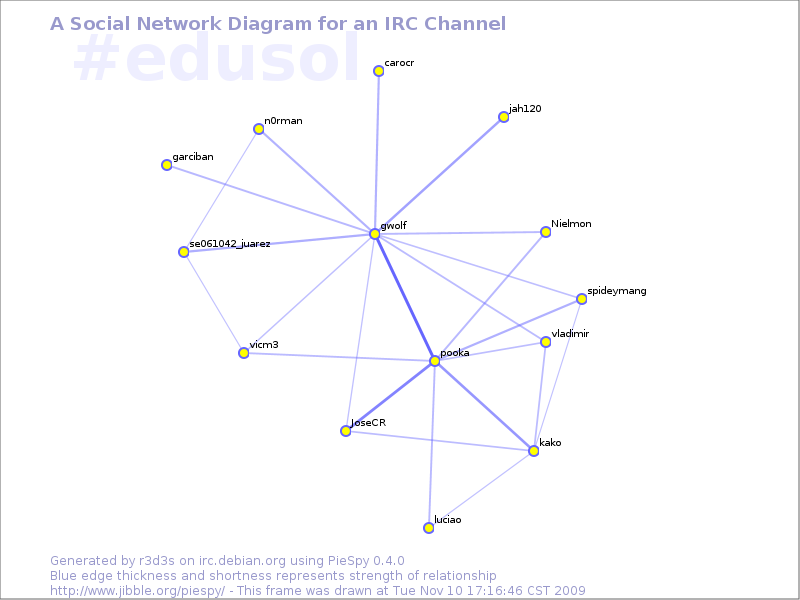
Gunnar Wolf: PieSpy: Modelling IRC interactions

As some of you know, yesterday we started the two weeks of activities for the Fifth On-line Encounter of Free Education, Culture and Software. This year, the main topic for the conference is social networks, but not in the twitter-facebook sense Social networks as ways of understanding and modelling human-to-human interactions. Of course, there is interest from many attendees in using and taking advantage of said social network systems (and others), but the topic is far broader. One of the core tools of EDUSOL, and the only tool that is constantly active through our two weeks of activity, is IRC Which is somewhat of a challenge, as we receive some not-tech-savvy users from all over the world. The first year or two we asked everybody to connect via an IRC client (and we had even decided that it would be a technological filter We thought we would not cater for people without the technical skills to install and use IRC). Life proved us wrong, and we ended up using two web-to-IRC gateways: One of them, via an instance of CGI:IRC, and the other one via a third-party service, Mibbit. Now, the core mind behind EDUSOL is Alejandro Miranda, Pooka; I am not really into education (it is a very interesting topic but far from what I am good at). Pooka has been invovled in on-line communities analysis for several years already, since we worked together at FES Iztacala. For a long time he wanted to graph the interactions at EDUSOL, which was obviously possible given it was all centered on three tools (IRC for live chat, Drupal for generic information and Moodle for the talks and workshops' material This has changed this year, as we are giving much more weight to Drupal and taking it off Moodle), and so last year he was finally able to generate a EDUSOL 2008 conference photo (warning: 2MB image, 4311x3352px), where each person's avatar appears where most of his interactions were. This photo was (unfortunately) achieved using non-free software, but is very much looking at! Now, this year Pooka stumbled upon a great tool, PieSpy (available in Debian package piespy). Piespy generates very interesting interaction graph for IRC channels, as you can see here: Piespy is a bot that sits in the IRC channel logging everything that any given user "says" directly to another one, and graphs it. Not much to say here, only that it generates a very good (and practically real-time) view of what happens on the channel. For this particular channel, and during EDUSOL, you can see here the latest IRC snapshots. Very fun to see - and somewhat addictive how it morphs across time :)
AttachmentSize
EDUSOL 2008 - Conference photo1.97 MB
Current (Monday+Tuesday) interaction graph for our IRC channel39.89 KB

Next.

Previous.