Nesse ano a MiniDebConf Brasil est de volta! A comunidade brasileira de
usu rios(as) e desenvolvedores(as) Debian convida a todos(as) a participarem da
MiniDebConf Bras lia 2023 que acontecer
durante 3 dias na capital federal.
Nos dias 25 e 26 de maio estaremos no Complexo Avan ado da C mara dos Deputados
- LabHacker/CEFOR, promovendo palestras, oficinas e outras atividades. E, no
- dia 27 de maio (s bado), estaremos em um coworking (local a definir) para
- colocar a m o na massa hackeando software e contribuindo para o Projeto Debian.
A MiniDebConf Bras lia 2023 um evento aberto a todos(as), independente do seu
n vel de conhecimento sobre Debian. O mais importante ser reunir a comunidade
para celebrar o maior projeto de Software Livre do mundo, por isso queremos
receber desde usu rios(as) inexperientes que est o iniciando o seu contato com o
Debian at Desenvolvedores(as) oficiais do projeto.
A programa o da MiniDebConf Bras lia 2023 ser composta de palestras de n vel
b sico e intermedi rio para aqueles(as) participantes que est o tendo o primeiro
contato com o Debian ou querem conhecer mais sobre determinados assuntos,
e workshops/oficinas de n vel intermedi rio e avan ado para usu rios(as) do
Debian que querem colocar a m o-na-massa durante o evento. No ltimo dia do
evento, teremos um Hacking Day em um espa o de coworking para que todos possam
interagir e de fato fazerem contribui es para o projeto.
Inscri o
A inscri o na MiniDebConf Bras lia 2023 totalmente gratuita e poder ser
feita no formul rio dispon vel no
site do evento. mandat ria a inscri o pr via para que todos(as) possam
acessar a C mara dos Deputados - devido a quest es de seguran a da casa. Al m de
auxiliar a organiza o no dimensionamento do evento.
O evento organizado de forma volunt ria, e toda ajuda bem-vinda. Portanto,
se voc gostaria de contribuir para a realiza o do evento, preencha o
formul rio para inscri o de volunt rios.
Os formul rios para inscri o (na MiniDebConf e para ajudar na organiza o) e
submiss o de atividades
ser o abertos no dia 1 de abril (n o tem nenhuma pegadinha, se inicia nesse dia
mesmo :)
Contato
Para entrar em contato com o time local, a
lista de emails debian-br-eventos,
o canal IRC #debian-bsb no OFTC e o
grupo no telegram DebianBras lia podem ser
utilizados. Al m do endere o de email: brasil.mini@debconf.org.
The diffoscope maintainers are pleased to announce the release of diffoscope
version 240. This version includes the following changes:
[ Holger Levsen ]
* Update Lintian override info format in debian/source/lintian-overrides.
* Add Lintian overrides for some "very long lines" in test cases.
* Update Lintian overrides for tests being tagged source-is-missing or
  prebuilt.
* Add Lintian override for very long lines for debian/tests/control.
* Re-add two Lintian overrides about (well-known) source-is-missing
  instances.
[ Mattia Rizzolo ]
* Drop the use of include_package_data=True in setup.py.
The importance of clean, fresh indoor air is one of the most tangible takeaways of the Covid-19 pandemic. In addition to being an effective risk mitigation strategy for reducing the spread of respiratory illnesses, clean, fresh air is necessary to enable effective cognitive performance.
Monitoring indoor air quality is relatively easy to do, but traditionally has not been a key focus. I believe air quality monitoring should be accessible for any indoor space, and for highly occupied indoor spaces should be provided on a continuous basis. This post explores the need and an opportunity for a business that can accelerate the adoption of ventilation monitoring through the following topics:
The importance of indoor air quality
Clean, fresh air is fundamental to life and health. That might sound obvious, but unfortunately being obvious is not enough to ensure the air we breathe is in fact always clean and healthy. Repeated studies have revealed that in many cases the air you re breathing at school, in the bus or at work and probably also at home falls well below the ideal of what clean, fresh air should be.
Unclean air has potential long-term health impacts and has also been shown to lower cognitive performance impacting the ability to learn and work as well as increasing the risk of transmission of respiratory illnesses like Covid-19 and the flu.
Ventilation (replacing old stale air with clean fresh air) is the most effective and economical method of improving and maintaining high indoor air quality. Most New Zealand buildings (including schools and houses) are designed to rely on manual ventilation (opening windows), while newer buildings, often including larger or commercial buildings may use mechanical ventilation involving fans and ducts. Mechanical ventilation including filtration may also be required in situations where the outdoor air is not clean and fresh such as in a city or next to a busy intersection.
Observing the invisible
Overall air quality is a complex topic involving many contributing factors, many of which are invisible and not perceptible to us until well after adverse effects or irritation occur. This complexity and lack of visible signal is a large contributing factor to the ignorance and lack of attention towards indoor air quality that is prevalent in most buildings and indoor spaces today. Our attention is biased towards the risks that we can see, and this default bias has not been helped by hesitation and resistance to the idea that aerosol transmission and air quality is an important factor in preventing disease transmission that has only recently started to change. Zeynep Tufekci has a great overview that provides fascinating context for how an overreaction to the early incorrect theories of bad air and miasma causing disease contributed to aerosol transmission and air quality being incorrectly neglected for so long.
Correcting this history of inattention to indoor air quality is going to take time and effort, but one significant step that we can take to help start the journey to ensuring all indoor spaces have clean, healthy air is to make the invisible part visible. The concentration of carbon dioxide (CO2) in a space is an incredibly effective and easy to measure proxy for the ventilation of a space. The atmospheric background level of CO2 is around 420 parts per million (ppm), while our exhaled breath has concentrations as high as 40,000 ppm. Without effective ventilation, one or more people breathing in an enclosed space will rapidly lead to an observable increase in CO2 concentration, which in turn provides a signal that the ventilation is insufficient and needs to be improved.
Monitoring CO2 and improving ventilation is not a panacea for all possible air quality issues, but for the majority of buildings and indoor spaces, using CO2 as a proxy for ventilation and increasing ventilation when CO2 levels rise above recommended levels is a simple, effective and achievable approach that will deliver improvements in cognitive performance and reduction in the risk of disease transmission with few, if any, downsides or risks. See this Public Health Communication Centre briefing for a more detailed explanation.
Adding clean air to our hygiene practices
We have well established expectations of hygiene for the food we eat and the water we drink and these expectations are codified in regulations that ensure those providing these services do so in a way that gives us confidence that we re not going to be at risk of illness. You may recall seeing food grade ratings prominently displayed on the walls of restaurants and cafes that you visit as an example of this.
Why should the air we breathe be treated any differently?
I think there is a strong argument that indoor air quality deserves regulation, both of the absolute quality of the air and ensuring that the practices and achieved air quality are clearly advertised and available. Ventilation monitoring via measurement of CO2 concentration provides an effective and achievable method that can be used to achieve this, and countries like Belgium and Japan are already starting to regulate indoor air quality. In the UK, the independent SAGE group of scientists has published Scores on the Doors , a proposal which demonstrates how CO2 monitoring can be helpful in providing information about the air quality of indoor spaces.
Unfortunately there is no movement in any of these directions in New Zealand yet, and no sign that regulation or even a basic campaign to raise awareness of ventilation and air quality is even being planned. This is disappointing, but even if such work was planned, it would still require appropriate ventilation monitoring products and services to enable it, and while there are some options available, it is not a fully solved space yet.
Existing ventilation monitoring options
Until recently the available offerings for ventilation monitoring have sat at two distinct ends of the price and quality spectrum:
Handheld air quality meters advertised as measuring CO2, but in reality reporting only an approximation. These meters do not contain actual CO2 sensors, and only approximate CO2 levels based on measurements of other components of the air. While cheap (often less than $100), these meters are not useful for providing reliable data that can be systematically used to assess and improve ventilation and should be avoided.
High-end building management systems (BMS), and industrial measurement products targeted at large buildings such as offices or commercial applications such as food production. These systems require specialist installation, often integrated with large whole-building air conditioning systems. These systems, if appropriately configured, can be a great solution for the types of buildings and spaces that can afford them, but by their nature and cost, they do not offer a solution for the majority of smaller buildings and indoor spaces where we tend to spend a lot of our time.
Over the last few years a growing number of companies have developed products that fit in between the unreliable air quality meters and the expensive BMS/industrial measurement products. Promising NZ-based options in this space include Air Suite, Tether and Monkeytronics. These products are wall mountable, resemble a smoke alarm and utilise a WiFi network to report their measurements to a supporting web service. Pricing varies between $200 and $300 ex GST per unit.
Aranet, while not NZ based, provides a handheld monitor the Aranet4 Home, which is well regarded for quality and accuracy. Aranet4 Home devices are the most expensive in this space, retailing at $386 ex GST and offer a clunkier and less convenient set of connectivity options via a Bluetooth connection to an associated phone. To obtain similar reporting functionality to the other products requires upgrading to their Pro model and purchasing a separate base station at a combined cost of $1255 ex GST.
Outside the commercial product offerings are a number of open source DIY options, which can be built by anyone with basic electronics knowledge. AirGradient is a leading example based in Thailand, and within New Zealand Oliver Seiler s CO2 Monitor provides similar functionality. These open source options have a parts cost in the $100-$150 range, depending on volume built and provide high-quality measurements via trusted CO2 sensors while also offering huge flexibility in terms of how they operate, interact with users and potential supporting web services.
An opportunity: Small businesses and organisations
While a growing number of high-quality CO2 monitors has the potential to help drive increased adoption of ventilation monitoring, the plethora of small businesses and organisations that own, operate and manage many of the indoor spaces we visit on a day-to-day basis do not appear to be well served by these existing products.
To deploy ventilation monitoring a small business or organisation needs to first become aware of the need or demand for it, and then have a simple and easy path to acquire and install the monitor and access the data. Little to no marketing or demand generation appears to be targeted towards this market from the existing businesses and tellingly, several of the products are not directly available for sale, requiring interaction with a salesperson to purchase. This indicates a focus on selling to larger customers who have a campus or portfolio of buildings and will purchase in larger quantities than the typical small business or organisation will.
Small businesses and organisations are likely to occupy smaller buildings and spaces where manual ventilation is the prevalent method of improving and maintaining air quality. Maintaining clean, fresh air via manual ventilation requires the occupants of the space to receive an obvious and straightforward signal when action (opening windows, etc) is required. While the products above all tend to provide some form of local feedback and display in the room, the indication provided and notification of when to take action is less obvious and prominent than would be ideal in a situation where manual ventilation is being relied upon.
Informally testing this opportunity with family and friends running small businesses over the last few months has resulted in promising feedback. One particular success story was the discovery of a fresh air duct on the air conditioning unit in a small office that had never been connected to the outside air and was simply recirculating air from the ceiling space back into an office! The resulting stuffiness and poor air quality had been noticed, but without the clear indication from the CO2 monitor that the air conditioning was actually making things worse, rather than better, the underlying issue had not been understood. With the issue fixed and the duct now connected, that business is now enjoying much more productive and healthy working conditions.
Next steps
Many small businesses and organisations are likely to have poor air quality and opportunities for improvement similar to the example above that are waiting to be found and fixed, and the existing products available are neither focused or ideal for the needs of this market.
I have spent some time over the past six months building a basic CO2 monitoring service that I have used to deploy ventilation monitoring to our local school, and a few other local businesses. There are a number of challenges that still need to be addressed in order to scale the business up, but I think there is a reasonable chance that I can build a viable business that offers an attractive and useful solution that would accelerate the deployment of ventilation monitoring for small businesses and organisations.
In an upcoming post, I will explain the foundations of the service that I have built to date, the challenges that need to be overcome and how I plan to evolve the service from the current prototype into a sustainable, bootstrapped business.
I recently mentioned on the internet I did work in this direction and a friend of mine asked me to write a blogpost on this. I didn t blog for a long time (keeping all the goodness for myself hehe), so here we go. To set the scene, let s assume we want to make an exectuable binary for x86_64 Linux that s supposed to be extremely portable. It should work on both Debian and Arch Linux. It should work on systems without glibc like Alpine Linux. It should even work in a FROM scratch Docker container. In a more serious setting you would statically link musl-libc with your Rust program, but today we re in a silly-goofy mood so we re going to try to make this work without a libc. And we re also going to use Rust for this, more specifically the stable release channel of Rust, so this blog post won t use any nightly-only features that might still change/break. If you re using a Rust 1.0 version that was recent at the time of writing or later (>= 1.68.0 according to my computer), you should be able to try this at home just fine .
This tutorial assumes you have no prior programming experience in any programming language, but it s going to involve some x86_64 assembly. If you already know what a syscall is, you ll be just fine. If this is your first exposure to programming you might still be able to follow along, but it might be a wild ride.
If you haven t already, install rustup (possibly also available in your package manager, who knows?)
# when asked, press enter to confirm default settings
curl --proto'=https'--tlsv1.2 -sSf https://sh.rustup.rs sh
This is going to install everything you need to use Rust on Linux (this tutorial assumes you re following along on Linux btw). Usually it s still using a system linker (by calling the cc binary, and errors out if none is present), but instead we re going to use rustup to install an additional target:
rustup target add x86_64-unknown-none
I don t know if/how this is made available by Linux distributions, so I recommend following along with rust installed from rustup.
Anyway, we re creating a new project with cargo, this creates a new directory that we can then change into (you might ve done this before):
cargo new hack-the-planet
cd hack-the-planet
There s going to be a file named Cargo.toml, we don t need to make any changes there, but the one that was auto-generated for me at the time of writing looks like this:
[package]name="hack-the-planet"version="0.1.0"edition="2021"# See more keys and their definitions at https://doc.rust-lang.org/cargo/reference/manifest.html[dependencies]
There s a second file named src/main.rs, it s going to contain some pre-generated hello world, but we re going to delete it and create a new, empty file:
rm src/main.rs
touch src/main.rs
Alrighty, leaving this file empty is not valid but we re going to walk through the individual steps so we re going to try to build with an empty file first. At this point I would like to credit this chapter of a fasterthanli.me series and a blogpost by Philipp Oppermann, this tutorial is merely an 2023 update and makes it work with stable Rust. Let s run the build:
$ cargo build --release --target x86_64-unknown-none
   Compiling hack-the-planet v0.1.0 (/hack-the-planet)
error[E0463]: can't find crate for  std

  = note: the  x86_64-unknown-none  target may not support the standard library
  = note:  std  is required by  hack_the_planet  because it does not declare  #![no_std]
error[E0601]:  main  function not found in crate  hack_the_planet

  = note: consider adding a  main  function to  src/main.rs
Some errors have detailed explanations: E0463, E0601.
For more information about an error, try  rustc --explain E0463 .
error: could not compile  hack-the-planet  due to 2 previous errors
Since this doesn t use a libc (oh right, I forgot to mention this up to this point actually), this also means there s no std standard library. Usually the standard library of Rust still uses the system libc to do syscalls, but since we specify our libc as none this means std won t be available (use std::fs::rename won t work). There are still other functions we can use and import, for example there s core that s effectively a second standard library, but much smaller.
To opt-out of the std standard library, we can put #![no_std] into src/main.rs:
Rust noticed we didn t define a main function and suggest we add one. This isn t what we want though so we ll politely decline and inform Rust we don t have a main and it shouldn t attempt to call it. We re adding #![no_main] to our file and src/main.rs now looks like this:
#![no_std]#![no_main]
Running the build again:
$ cargo build
   Compiling hack-the-planet v0.1.0 (/hack-the-planet)
error:  #[panic_handler]  function required, but not found
error: language item required, but not found:  eh_personality

  = note: this can occur when a binary crate with  #![no_std]  is compiled for a target where  eh_personality  is defined in the standard library
  = help: you may be able to compile for a target that doesn't need  eh_personality , specify a target with  --target  or in  .cargo/config
error: could not compile  hack-the-planet  due to 2 previous errors
Rust is asking us for a panic handler, basically I m going to jump to this address if something goes terribly wrong and execute whatever you put there . Eventually we would put some code there to just exit the program, but for now an infinitely loop will do. This is likely going to get stripped away anyway by the compiler if it notices our program has no code-branches leading to a panic and the code is unused. Our src/main.rs now looks like this:
$ objdump -d target/x86_64-unknown-none/release/hack-the-planet
target/x86_64-unknown-none/release/hack-the-planet:     file format elf64-x86-64
Ok that looks pretty from scratch to me . The file contains no cpu instructions. Also note how our infinity loop is not present (as predicted).
Making a basic program and executing it
Ok let s try to make a valid program that basically just cleanly exits. First let s try to add some cpu instructions and verify they re indeed getting executed. Lemme introduce, the INT 3 instruction in x86_64 assembly. In binary it s also known as the 0xCC opcode. It crashes our program in a slightly different way, so if the error message changes, we know it worked. The other tutorials use a #[naked] function for the entry point, but since this feature isn t stabilized at the time of writing we re going to use the global_asm! macro. Also don t worry, I m not going to introduce every assembly instruction individually. Our program now looks like this:
The error message of the crash is now slightly different because it s hitting our breakpoint cpu instruction. Funfact btw, if you run this in strace you can see this isn t making any system calls (aka not talking to the kernel at all, it just crashes):
Let s try to make a program that does a clean shutdown. To do this we inform the kernel with a system call that we may like to exit. We can get more info on this with man 2 exit and it defines exit like this:
[[noreturn]] void _exit(int status);
On Linux this syscall is actually called _exit and exit is implemented as a libc function, but we don t care about any of that today, it s going to do the job just fine. Also note how it takes a single argument of type int. In C-speak this means signed 32 bit , i32 in Rust.
Next we need to figure out the syscall number of this syscall. These numbers are cpu architecture specific for some reason (idk, idc). We re looking these numbers up with ripgrep in /usr/include/asm/:
Since we re on x86_64 the correct value is the one in unistd_64.h, 60. Also, on x86_64 the syscall number goes into the rax cpu register, the status argument goes in the rdi register. The return value of the syscall is going to be placed in the rax register after the syscall is done, but for exit the execution is never given back to us. Let s try to write 60 into the rax register and 69 into the rdi register. To copy into registers we re going to use the mov destination, source instruction to copy from source to destination. With these registers setup we can use the syscall cpu instruction to hand execution over to the kernel. Don t worry, there s only one more assembly instruction coming and for everything else we re going to use Rust.
Our code now looks like this:
Writing Rust
Ok but even though cpu instructions can be fun at times, I d rather not deal with them most of the time (this might strike you as odd, considering this blog post). Instead let s try to define a function in Rust and call into that instead. We re going to define this function as unsafe (btw none of this is taking advantage of the safety guarantees by Rust in case it wasn t obvious. This tutorial is mostly going to stick to unsafe Rust, but for bigger projects you can attempt to reduce your usage of unsafe to opt back into normal safe Rust), it also declares the function with #[no_mangle] so the function name is preserved as main and we can call it from our global_asm entry point. Lastely, when our program is started it s going to get the stack address passed in one of the cpu registers, this value is expected to be passed to our function as an argument. Our function declares ! as return type, which means it never returns:
#[no_mangle]unsafefnmain(_stack_top:*constu8)->!// TODO: this is missing
This won t compile yet, we need to add our assembly for the exit syscall back in.
This time we re using the asm! macro, this is a slightly more declarative approach. We want to run the syscall cpu instruction with 60 in the rax register, and this time we want the rdi register to be zero, to indicate a successful exit. We also use options(noreturn) so Rust knows it should assume execution does not resume after this assembly is executed (the Linux kernel guarantees this). We modify our global_asm! entrypoint to call our new main function, and to copy the stack address from rsp into the register for the first argument rdi because it would otherwise get lost forever:
After building and disassembling this the Rust compiler is slowly starting to do work for us:
$ cargo build --release --target x86_64-unknown-none
$ objdump -d target/x86_64-unknown-none/release/hack-the-planet
target/x86_64-unknown-none/release/hack-the-planet:     file format elf64-x86-64
Disassembly of section .text:
0000000000001210 <_start>:
    1210:	48 89 e7             	mov    %rsp,%rdi
    1213:	e8 08 00 00 00       	call   1220 <main>
    1218:	cc                   	int3
    1219:	cc                   	int3
    121a:	cc                   	int3
    121b:	cc                   	int3
    121c:	cc                   	int3
    121d:	cc                   	int3
    121e:	cc                   	int3
    121f:	cc                   	int3
0000000000001220 <main>:
    1220:	50                   	push   %rax
    1221:	b8 3c 00 00 00       	mov    $0x3c,%eax
    1226:	31 ff                	xor    %edi,%edi
    1228:	0f 05                	syscall
    122a:	0f 0b                	ud2
The mov and syscall instructions are still the same, but it noticed it can XOR the rdi register with itself to set it to zero. It s using x86 assembly language (the 32 bit variant of x86_64, that also happens to work on x86_64) to do so, that s why the register is refered to as edi in the disassembly. You can also see it s inserting a bunch of 0xCC instructions (for alignment) and Rust puts the opcodes 0x0F 0x0B at the end of the function to force an invalid opcode exception so the program is guaranteed to crash in case the exit syscall doesn t do it.
This code still executes as expected:
Adding functions
Ok we re getting closer but we aren t quite there yet. Let s try to write an exit function for our assembly that we can then call like a normal function. Remember that it takes a signed 32 bit integer that s supposed to go into rdi.
Actually, since this function doesn t take any raw pointers and any i32 is valid for this syscall we re going to remove the unsafe marker of this function. When doing this we still need to use unsafe within the function for our inline assembly.
Running this still works, but interestingly the generated assembly didn t change at all:
$ cargo build --release --target x86_64-unknown-none
$ objdump -d target/x86_64-unknown-none/release/hack-the-planet
target/x86_64-unknown-none/release/hack-the-planet:     file format elf64-x86-64
Disassembly of section .text:
0000000000001210 <_start>:
    1210:	48 89 e7             	mov    %rsp,%rdi
    1213:	e8 08 00 00 00       	call   1220 <main>
    1218:	cc                   	int3
    1219:	cc                   	int3
    121a:	cc                   	int3
    121b:	cc                   	int3
    121c:	cc                   	int3
    121d:	cc                   	int3
    121e:	cc                   	int3
    121f:	cc                   	int3
0000000000001220 <main>:
    1220:	50                   	push   %rax
    1221:	b8 3c 00 00 00       	mov    $0x3c,%eax
    1226:	31 ff                	xor    %edi,%edi
    1228:	0f 05                	syscall
    122a:	0f 0b                	ud2
Rust noticed there s no need to make it a separate function at runtime and instead merged the instructions of the exit function directly into our main. It also noticed the 0 argument in exit(0) means rdi is supposed to be zero and uses the XOR optimization mentioned before.
Since main is not calling any unsafe functions anymore we could mark it as safe too, but in the next few functions we re going to deal with file descriptors and raw pointers, so this is likely the only safe function we re going to write in this tutorial so let s just keep the unsafe marker.
Printing text
Ok let s try to do a quick hello world, to do this we re going to call the write syscall. Looking it up with man 2 write:
The write syscall takes 3 arguments and returns a signed size_t. In Rust this is called isize. In C size_t is an unsigned integer type that can hold any value of sizeof(...) for the given platform, ssize_t can only store half of that because it uses one of the bits to indicate an error has occured (the first s means signed, write returns -1 in case of an error).
The arguments for write are:
the file descriptor to write to. stdout is located on file descriptor 1.
a pointer/address to some memory.
the number of bytes that should be written, starting at the given address.
Now that s a lot of stuff at once. Since this syscall is actually going to hand execution back to our program we need to let Rust know which cpu registers the syscall is writing to, so Rust doesn t attempt to use them to store data (that would be silently overwritten by the syscall). inlateout("raw") 1 => r0 means we re writing a value to the register and want the result back in variable r0. in("rdi") fd means we want to write the value of fd into the rdi register. lateout("rcx") _ means the Linux kernel may write to that register (so the previous value may get lost), but we don t want to store the value anywhere (the underscore acts as a dummy variable name).
This doesn t compile just yet though
Rust has inferred the type of r0 is isize since that s what our function returns, but the type of the input value for the register was inferred to be i32. We re going to select a specific number type to fix this.
We need to set the number of bytes we want to write explicitly because there s no concept of null-byte termination in the write system call, it s quite literally write the next X bytes, starting from this address . Our program now looks like this:
This time there are 2 syscalls, first write, then exit. For write it s setting up the 3 arguments in our cpu registers (rdi, rsi, rdx). The lea instruction subtracts 0x102b from the rip register (the instruction pointer) and places the result in the rsi register. This is effectively saying an address relative to wherever this code was loaded into memory . The instruction pointer is going to point directly behind the opcodes of the lea instruction, so 0x1238 - 0x102b = 0x20d. This address is also pointed out in the disassembly as a comment.
We don t see the string in our disassembly but we can convert our 0x20d hex to 525 in decimal and use dd to read 12 bytes from that offset, and sure enough:
$ dd bs=1 skip=525 count=12 if=target/x86_64-unknown-none/release/hack-the-planet
Hello world
12+0 records in
12+0 records out
Execute our binary with strace also shows the new write syscall (and the bytes that are being written mixed up in the output).
$ strace -f ./hack-the-planet
execve("./hack-the-planet", ["./hack-the-planet"], 0x74493abe64a8 /* 39 vars */) = 0
write(1, "Hello world\n", 12Hello world
)           = 12
exit(0)                                 = ?
+++ exited with 0 +++
After running strip on it to remove some symbols the binary is so small, if you open it in a text editor it fits on a screenshot:
I ve used hardware-backed OpenPGP keys since 2006 when I imported newly generated rsa1024 subkeys to a FSFE Fellowship card. This worked well for several years, and I recall buying more ZeitControl cards for multi-machine usage and backup purposes. As a side note, I recall being unsatisfied with the weak 1024-bit RSA subkeys at the time my primary key was a somewhat stronger 1280-bit RSA key created back in 2002 but OpenPGP cards at the time didn t support more than 1024 bit RSA, and were (and still often are) also limited to power-of-two RSA key sizes which I dislike.
I had my master key on disk with a strong password for a while, mostly to refresh expiration time of the subkeys and to sign other s OpenPGP keys. At some point I stopped carrying around encrypted copies of my master key. That was my main setup when I migrated to a new stronger RSA 3744 bit key with rsa2048 subkeys on a YubiKey NEO back in 2014. At that point, signing other s OpenPGP keys was a rare enough occurrence that I settled with bringing out my offline machine to perform this operation, transferring the public key to sign on USB sticks. In 2019 I re-evaluated my OpenPGP setup and ended up creating a offline Ed25519 key with subkeys on a FST-01G running Gnuk. My approach for signing other s OpenPGP keys were still to bring out my offline machine and sign things using the master secret using USB sticks for storage and transport. Which meant I almost never did that, because it took too much effort. So my 2019-era Ed25519 key still only has a handful of signatures on it, since I had essentially stopped signing other s keys which is the traditional way of getting signatures in return.
None of this caused any critical problem for me because I continued to use my old 2014-era RSA3744 key in parallel with my new 2019-era Ed25519 key, since too many systems didn t handle Ed25519. However, during 2022 this changed, and the only remaining environment that I still used my RSA3744 key for was in Debian and they require OpenPGP signatures on the new key to allow it to replace an older key. I was in denial about this sub-optimal solution during 2022 and endured its practical consequences, having to use the YubiKey NEO (which I had replaced with a permanently inserted YubiKey Nano at some point) for Debian-related purposes alone.
In December 2022 I bought a new laptop and setup a FST-01SZ with my Ed25519 key, and while I have taken a vacation from Debian, I continue to extend the expiration period on the old RSA3744-key in case I will ever have to use it again, so the overall OpenPGP setup was still sub-optimal. Having two valid OpenPGP keys at the same time causes people to use both for email encryption (leading me to have to use both devices), and the WKD Key Discovery protocol doesn t like two valid keys either. At FOSDEM 23 I ran into Andre Heinecke at GnuPG and I couldn t help complain about how complex and unsatisfying all OpenPGP-related matters were, and he mildly ignored my rant and asked why I didn t put the master key on another smartcard. The comment sunk in when I came home, and recently I connected all the dots and this post is a summary of what I did to move my offline OpenPGP master key to a Nitrokey Start.
First a word about device choice, I still prefer to use hardware devices that are as compatible with free software as possible, but the FST-01G or FST-01SZ are no longer easily available for purchase. I got a comment about Nitrokey start in my last post, and had two of them available to experiment with. There are things to dislike with the Nitrokey Start compared to the YubiKey (e.g., relative insecure chip architecture, the bulkier form factor and lack of FIDO/U2F/OATH support) but as far as I know there is no more widely available owner-controlled device that is manufactured for an intended purpose of implementing an OpenPGP card. Thus it hits the sweet spot for me.
Nitrokey Start
The first step is to run latest firmware on the Nitrokey Start for bug-fixes and important OpenSSH 9.0 compatibility and there are reproducible-built firmware published that you can install using pynitrokey. I run Trisquel 11 aramo on my laptop, which does not include the Python Pip package (likely because it promotes installing non-free software) so that was a slight complication. Building the firmware locally may have worked, and I would like to do that eventually to confirm the published firmware, however to save time I settled with installing the Ubuntu 22.04 packages on my machine:
$ sha256sum python3-pip*
ded6b3867a4a4cbaff0940cab366975d6aeecc76b9f2d2efa3deceb062668b1c  python3-pip_22.0.2+dfsg-1ubuntu0.2_all.deb
e1561575130c41dc3309023a345de337e84b4b04c21c74db57f599e267114325  python3-pip-whl_22.0.2+dfsg-1ubuntu0.2_all.deb
$ doas dpkg -i python3-pip*
...
$ doas apt install -f
...
$
Installing pynitrokey downloaded a bunch of dependencies, and it would be nice to audit the license and security vulnerabilities for each of them. (Verbose output below slightly redacted.)
jas@kaka:~$ pip3 install --user pynitrokey
Collecting pynitrokey
  Downloading pynitrokey-0.4.34-py3-none-any.whl (572 kB)
Collecting frozendict~=2.3.4
  Downloading frozendict-2.3.5-cp310-cp310-manylinux_2_17_x86_64.manylinux2014_x86_64.whl (113 kB)
Requirement already satisfied: click<9,>=8.0.0 in /usr/lib/python3/dist-packages (from pynitrokey) (8.0.3)
Collecting ecdsa
  Downloading ecdsa-0.18.0-py2.py3-none-any.whl (142 kB)
Collecting python-dateutil~=2.7.0
  Downloading python_dateutil-2.7.5-py2.py3-none-any.whl (225 kB)
Collecting fido2<2,>=1.1.0
  Downloading fido2-1.1.0-py3-none-any.whl (201 kB)
Collecting tlv8
  Downloading tlv8-0.10.0.tar.gz (16 kB)
  Preparing metadata (setup.py) ... done
Requirement already satisfied: certifi>=14.5.14 in /usr/lib/python3/dist-packages (from pynitrokey) (2020.6.20)
Requirement already satisfied: pyusb in /usr/lib/python3/dist-packages (from pynitrokey) (1.2.1.post1)
Collecting urllib3~=1.26.7
  Downloading urllib3-1.26.15-py2.py3-none-any.whl (140 kB)
Collecting spsdk<1.8.0,>=1.7.0
  Downloading spsdk-1.7.1-py3-none-any.whl (684 kB)
Collecting typing_extensions~=4.3.0
  Downloading typing_extensions-4.3.0-py3-none-any.whl (25 kB)
Requirement already satisfied: cryptography<37,>=3.4.4 in /usr/lib/python3/dist-packages (from pynitrokey) (3.4.8)
Collecting intelhex
  Downloading intelhex-2.3.0-py2.py3-none-any.whl (50 kB)
Collecting nkdfu
  Downloading nkdfu-0.2-py3-none-any.whl (16 kB)
Requirement already satisfied: requests in /usr/lib/python3/dist-packages (from pynitrokey) (2.25.1)
Collecting tqdm
  Downloading tqdm-4.65.0-py3-none-any.whl (77 kB)
Collecting nrfutil<7,>=6.1.4
  Downloading nrfutil-6.1.7.tar.gz (845 kB)
  Preparing metadata (setup.py) ... done
Requirement already satisfied: cffi in /usr/lib/python3/dist-packages (from pynitrokey) (1.15.0)
Collecting crcmod
  Downloading crcmod-1.7.tar.gz (89 kB)
  Preparing metadata (setup.py) ... done
Collecting libusb1==1.9.3
  Downloading libusb1-1.9.3-py3-none-any.whl (60 kB)
Collecting pc_ble_driver_py>=0.16.4
  Downloading pc_ble_driver_py-0.17.0-cp310-cp310-manylinux_2_17_x86_64.manylinux2014_x86_64.whl (2.9 MB)
Collecting piccata
  Downloading piccata-2.0.3-py3-none-any.whl (21 kB)
Collecting protobuf<4.0.0,>=3.17.3
  Downloading protobuf-3.20.3-cp310-cp310-manylinux_2_12_x86_64.manylinux2010_x86_64.whl (1.1 MB)
Collecting pyserial
  Downloading pyserial-3.5-py2.py3-none-any.whl (90 kB)
Collecting pyspinel>=1.0.0a3
  Downloading pyspinel-1.0.3.tar.gz (58 kB)
  Preparing metadata (setup.py) ... done
Requirement already satisfied: pyyaml in /usr/lib/python3/dist-packages (from nrfutil<7,>=6.1.4->pynitrokey) (5.4.1)
Requirement already satisfied: six>=1.5 in /usr/lib/python3/dist-packages (from python-dateutil~=2.7.0->pynitrokey) (1.16.0)
Collecting pylink-square<0.11.9,>=0.8.2
  Downloading pylink_square-0.11.1-py2.py3-none-any.whl (78 kB)
Collecting jinja2<3.1,>=2.11
  Downloading Jinja2-3.0.3-py3-none-any.whl (133 kB)
Collecting bincopy<17.11,>=17.10.2
  Downloading bincopy-17.10.3-py3-none-any.whl (17 kB)
Collecting fastjsonschema>=2.15.1
  Downloading fastjsonschema-2.16.3-py3-none-any.whl (23 kB)
Collecting astunparse<2,>=1.6
  Downloading astunparse-1.6.3-py2.py3-none-any.whl (12 kB)
Collecting oscrypto~=1.2
  Downloading oscrypto-1.3.0-py2.py3-none-any.whl (194 kB)
Collecting deepmerge==0.3.0
  Downloading deepmerge-0.3.0-py2.py3-none-any.whl (7.6 kB)
Collecting pyocd<=0.31.0,>=0.28.3
  Downloading pyocd-0.31.0-py3-none-any.whl (12.5 MB)
Collecting click-option-group<0.6,>=0.3.0
  Downloading click_option_group-0.5.5-py3-none-any.whl (12 kB)
Collecting pycryptodome<4,>=3.9.3
  Downloading pycryptodome-3.17-cp35-abi3-manylinux_2_17_x86_64.manylinux2014_x86_64.whl (2.1 MB)
Collecting pyocd-pemicro<1.2.0,>=1.1.1
  Downloading pyocd_pemicro-1.1.5-py3-none-any.whl (9.0 kB)
Requirement already satisfied: colorama<1,>=0.4.4 in /usr/lib/python3/dist-packages (from spsdk<1.8.0,>=1.7.0->pynitrokey) (0.4.4)
Collecting commentjson<1,>=0.9
  Downloading commentjson-0.9.0.tar.gz (8.7 kB)
  Preparing metadata (setup.py) ... done
Requirement already satisfied: asn1crypto<2,>=1.2 in /usr/lib/python3/dist-packages (from spsdk<1.8.0,>=1.7.0->pynitrokey) (1.4.0)
Collecting pypemicro<0.2.0,>=0.1.9
  Downloading pypemicro-0.1.11-py3-none-any.whl (5.7 MB)
Collecting libusbsio>=2.1.11
  Downloading libusbsio-2.1.11-py3-none-any.whl (247 kB)
Collecting sly==0.4
  Downloading sly-0.4.tar.gz (60 kB)
  Preparing metadata (setup.py) ... done
Collecting ruamel.yaml<0.18.0,>=0.17
  Downloading ruamel.yaml-0.17.21-py3-none-any.whl (109 kB)
Collecting cmsis-pack-manager<0.3.0
  Downloading cmsis_pack_manager-0.2.10-py2.py3-none-manylinux1_x86_64.whl (25.1 MB)
Collecting click-command-tree==1.1.0
  Downloading click_command_tree-1.1.0-py3-none-any.whl (3.6 kB)
Requirement already satisfied: bitstring<3.2,>=3.1 in /usr/lib/python3/dist-packages (from spsdk<1.8.0,>=1.7.0->pynitrokey) (3.1.7)
Collecting hexdump~=3.3
  Downloading hexdump-3.3.zip (12 kB)
  Preparing metadata (setup.py) ... done
Collecting fire
  Downloading fire-0.5.0.tar.gz (88 kB)
  Preparing metadata (setup.py) ... done
Requirement already satisfied: wheel<1.0,>=0.23.0 in /usr/lib/python3/dist-packages (from astunparse<2,>=1.6->spsdk<1.8.0,>=1.7.0->pynitrokey) (0.37.1)
Collecting humanfriendly
  Downloading humanfriendly-10.0-py2.py3-none-any.whl (86 kB)
Collecting argparse-addons>=0.4.0
  Downloading argparse_addons-0.12.0-py3-none-any.whl (3.3 kB)
Collecting pyelftools
  Downloading pyelftools-0.29-py2.py3-none-any.whl (174 kB)
Collecting milksnake>=0.1.2
  Downloading milksnake-0.1.5-py2.py3-none-any.whl (9.6 kB)
Requirement already satisfied: appdirs>=1.4 in /usr/lib/python3/dist-packages (from cmsis-pack-manager<0.3.0->spsdk<1.8.0,>=1.7.0->pynitrokey) (1.4.4)
Collecting lark-parser<0.8.0,>=0.7.1
  Downloading lark-parser-0.7.8.tar.gz (276 kB)
  Preparing metadata (setup.py) ... done
Requirement already satisfied: MarkupSafe>=2.0 in /usr/lib/python3/dist-packages (from jinja2<3.1,>=2.11->spsdk<1.8.0,>=1.7.0->pynitrokey) (2.0.1)
Collecting asn1crypto<2,>=1.2
  Downloading asn1crypto-1.5.1-py2.py3-none-any.whl (105 kB)
Collecting wrapt
  Downloading wrapt-1.15.0-cp310-cp310-manylinux_2_5_x86_64.manylinux1_x86_64.manylinux_2_17_x86_64.manylinux2014_x86_64.whl (78 kB)
Collecting future
  Downloading future-0.18.3.tar.gz (840 kB)
  Preparing metadata (setup.py) ... done
Collecting psutil>=5.2.2
  Downloading psutil-5.9.4-cp36-abi3-manylinux_2_12_x86_64.manylinux2010_x86_64.manylinux_2_17_x86_64.manylinux2014_x86_64.whl (280 kB)
Collecting capstone<5.0,>=4.0
  Downloading capstone-4.0.2-py2.py3-none-manylinux1_x86_64.whl (2.1 MB)
Collecting naturalsort<2.0,>=1.5
  Downloading naturalsort-1.5.1.tar.gz (7.4 kB)
  Preparing metadata (setup.py) ... done
Collecting prettytable<3.0,>=2.0
  Downloading prettytable-2.5.0-py3-none-any.whl (24 kB)
Collecting intervaltree<4.0,>=3.0.2
  Downloading intervaltree-3.1.0.tar.gz (32 kB)
  Preparing metadata (setup.py) ... done
Collecting ruamel.yaml.clib>=0.2.6
  Downloading ruamel.yaml.clib-0.2.7-cp310-cp310-manylinux_2_17_x86_64.manylinux2014_x86_64.manylinux_2_24_x86_64.whl (485 kB)
Collecting termcolor
  Downloading termcolor-2.2.0-py3-none-any.whl (6.6 kB)
Collecting sortedcontainers<3.0,>=2.0
  Downloading sortedcontainers-2.4.0-py2.py3-none-any.whl (29 kB)
Requirement already satisfied: wcwidth in /usr/lib/python3/dist-packages (from prettytable<3.0,>=2.0->pyocd<=0.31.0,>=0.28.3->spsdk<1.8.0,>=1.7.0->pynitrokey) (0.2.5)
Building wheels for collected packages: nrfutil, crcmod, sly, tlv8, commentjson, hexdump, pyspinel, fire, intervaltree, lark-parser, naturalsort, future
  Building wheel for nrfutil (setup.py) ... done
  Created wheel for nrfutil: filename=nrfutil-6.1.7-py3-none-any.whl size=898520 sha256=de6f8803f51d6c26d24dc7df6292064a468ff3f389d73370433fde5582b84a10
  Stored in directory: /home/jas/.cache/pip/wheels/39/2b/9b/98ab2dd716da746290e6728bdb557b14c1c9a54cb9ed86e13b
  Building wheel for crcmod (setup.py) ... done
  Created wheel for crcmod: filename=crcmod-1.7-cp310-cp310-linux_x86_64.whl size=31422 sha256=5149ac56fcbfa0606760eef5220fcedc66be560adf68cf38c604af3ad0e4a8b0
  Stored in directory: /home/jas/.cache/pip/wheels/85/4c/07/72215c529bd59d67e3dac29711d7aba1b692f543c808ba9e86
  Building wheel for sly (setup.py) ... done
  Created wheel for sly: filename=sly-0.4-py3-none-any.whl size=27352 sha256=f614e413918de45c73d1e9a8dca61ca07dc760d9740553400efc234c891f7fde
  Stored in directory: /home/jas/.cache/pip/wheels/a2/23/4a/6a84282a0d2c29f003012dc565b3126e427972e8b8157ea51f
  Building wheel for tlv8 (setup.py) ... done
  Created wheel for tlv8: filename=tlv8-0.10.0-py3-none-any.whl size=11266 sha256=3ec8b3c45977a3addbc66b7b99e1d81b146607c3a269502b9b5651900a0e2d08
  Stored in directory: /home/jas/.cache/pip/wheels/e9/35/86/66a473cc2abb0c7f21ed39c30a3b2219b16bd2cdb4b33cfc2c
  Building wheel for commentjson (setup.py) ... done
  Created wheel for commentjson: filename=commentjson-0.9.0-py3-none-any.whl size=12092 sha256=28b6413132d6d7798a18cf8c76885dc69f676ea763ffcb08775a3c2c43444f4a
  Stored in directory: /home/jas/.cache/pip/wheels/7d/90/23/6358a234ca5b4ec0866d447079b97fedf9883387d1d7d074e5
  Building wheel for hexdump (setup.py) ... done
  Created wheel for hexdump: filename=hexdump-3.3-py3-none-any.whl size=8913 sha256=79dfadd42edbc9acaeac1987464f2df4053784fff18b96408c1309b74fd09f50
  Stored in directory: /home/jas/.cache/pip/wheels/26/28/f7/f47d7ecd9ae44c4457e72c8bb617ef18ab332ee2b2a1047e87
  Building wheel for pyspinel (setup.py) ... done
  Created wheel for pyspinel: filename=pyspinel-1.0.3-py3-none-any.whl size=65033 sha256=01dc27f81f28b4830a0cf2336dc737ef309a1287fcf33f57a8a4c5bed3b5f0a6
  Stored in directory: /home/jas/.cache/pip/wheels/95/ec/4b/6e3e2ee18e7292d26a65659f75d07411a6e69158bb05507590
  Building wheel for fire (setup.py) ... done
  Created wheel for fire: filename=fire-0.5.0-py2.py3-none-any.whl size=116951 sha256=3d288585478c91a6914629eb739ea789828eb2d0267febc7c5390cb24ba153e8
  Stored in directory: /home/jas/.cache/pip/wheels/90/d4/f7/9404e5db0116bd4d43e5666eaa3e70ab53723e1e3ea40c9a95
  Building wheel for intervaltree (setup.py) ... done
  Created wheel for intervaltree: filename=intervaltree-3.1.0-py2.py3-none-any.whl size=26119 sha256=5ff1def22ba883af25c90d90ef7c6518496fcd47dd2cbc53a57ec04cd60dc21d
  Stored in directory: /home/jas/.cache/pip/wheels/fa/80/8c/43488a924a046b733b64de3fac99252674c892a4c3801c0a61
  Building wheel for lark-parser (setup.py) ... done
  Created wheel for lark-parser: filename=lark_parser-0.7.8-py2.py3-none-any.whl size=62527 sha256=3d2ec1d0f926fc2688d40777f7ef93c9986f874169132b1af590b6afc038f4be
  Stored in directory: /home/jas/.cache/pip/wheels/29/30/94/33e8b58318aa05cb1842b365843036e0280af5983abb966b83
  Building wheel for naturalsort (setup.py) ... done
  Created wheel for naturalsort: filename=naturalsort-1.5.1-py3-none-any.whl size=7526 sha256=bdecac4a49f2416924548cae6c124c85d5333e9e61c563232678ed182969d453
  Stored in directory: /home/jas/.cache/pip/wheels/a6/8e/c9/98cfa614fff2979b457fa2d9ad45ec85fa417e7e3e2e43be51
  Building wheel for future (setup.py) ... done
  Created wheel for future: filename=future-0.18.3-py3-none-any.whl size=492037 sha256=57a01e68feca2b5563f5f624141267f399082d2f05f55886f71b5d6e6cf2b02c
  Stored in directory: /home/jas/.cache/pip/wheels/5e/a9/47/f118e66afd12240e4662752cc22cefae5d97275623aa8ef57d
Successfully built nrfutil crcmod sly tlv8 commentjson hexdump pyspinel fire intervaltree lark-parser naturalsort future
Installing collected packages: tlv8, sortedcontainers, sly, pyserial, pyelftools, piccata, naturalsort, libusb1, lark-parser, intelhex, hexdump, fastjsonschema, crcmod, asn1crypto, wrapt, urllib3, typing_extensions, tqdm, termcolor, ruamel.yaml.clib, python-dateutil, pyspinel, pypemicro, pycryptodome, psutil, protobuf, prettytable, oscrypto, milksnake, libusbsio, jinja2, intervaltree, humanfriendly, future, frozendict, fido2, ecdsa, deepmerge, commentjson, click-option-group, click-command-tree, capstone, astunparse, argparse-addons, ruamel.yaml, pyocd-pemicro, pylink-square, pc_ble_driver_py, fire, cmsis-pack-manager, bincopy, pyocd, nrfutil, nkdfu, spsdk, pynitrokey
  WARNING: The script nitropy is installed in '/home/jas/.local/bin' which is not on PATH.
  Consider adding this directory to PATH or, if you prefer to suppress this warning, use --no-warn-script-location.
Successfully installed argparse-addons-0.12.0 asn1crypto-1.5.1 astunparse-1.6.3 bincopy-17.10.3 capstone-4.0.2 click-command-tree-1.1.0 click-option-group-0.5.5 cmsis-pack-manager-0.2.10 commentjson-0.9.0 crcmod-1.7 deepmerge-0.3.0 ecdsa-0.18.0 fastjsonschema-2.16.3 fido2-1.1.0 fire-0.5.0 frozendict-2.3.5 future-0.18.3 hexdump-3.3 humanfriendly-10.0 intelhex-2.3.0 intervaltree-3.1.0 jinja2-3.0.3 lark-parser-0.7.8 libusb1-1.9.3 libusbsio-2.1.11 milksnake-0.1.5 naturalsort-1.5.1 nkdfu-0.2 nrfutil-6.1.7 oscrypto-1.3.0 pc_ble_driver_py-0.17.0 piccata-2.0.3 prettytable-2.5.0 protobuf-3.20.3 psutil-5.9.4 pycryptodome-3.17 pyelftools-0.29 pylink-square-0.11.1 pynitrokey-0.4.34 pyocd-0.31.0 pyocd-pemicro-1.1.5 pypemicro-0.1.11 pyserial-3.5 pyspinel-1.0.3 python-dateutil-2.7.5 ruamel.yaml-0.17.21 ruamel.yaml.clib-0.2.7 sly-0.4 sortedcontainers-2.4.0 spsdk-1.7.1 termcolor-2.2.0 tlv8-0.10.0 tqdm-4.65.0 typing_extensions-4.3.0 urllib3-1.26.15 wrapt-1.15.0
jas@kaka:~$
Then upgrading the device worked remarkable well, although I wish that the tool would have printed URLs and checksums for the firmware files to allow easy confirmation.
jas@kaka:~$ PATH=$PATH:/home/jas/.local/bin
jas@kaka:~$ nitropy start list
Command line tool to interact with Nitrokey devices 0.4.34
:: 'Nitrokey Start' keys:
FSIJ-1.2.15-5D271572: Nitrokey Nitrokey Start (RTM.12.1-RC2-modified)
jas@kaka:~$ nitropy start update
Command line tool to interact with Nitrokey devices 0.4.34
Nitrokey Start firmware update tool
Platform: Linux-5.15.0-67-generic-x86_64-with-glibc2.35
System: Linux, is_linux: True
Python: 3.10.6
Saving run log to: /tmp/nitropy.log.gc5753a8
Admin PIN:
Firmware data to be used:
- FirmwareType.REGNUAL: 4408, hash: ...b'72a30389' valid (from ...built/RTM.13/regnual.bin)
- FirmwareType.GNUK: 129024, hash: ...b'25a4289b' valid (from ...prebuilt/RTM.13/gnuk.bin)
Currently connected device strings:
Device:
    Vendor: Nitrokey
   Product: Nitrokey Start
    Serial: FSIJ-1.2.15-5D271572
  Revision: RTM.12.1-RC2-modified
    Config: *:*:8e82
       Sys: 3.0
     Board: NITROKEY-START-G
initial device strings: [ 'name': '', 'Vendor': 'Nitrokey', 'Product': 'Nitrokey Start', 'Serial': 'FSIJ-1.2.15-5D271572', 'Revision': 'RTM.12.1-RC2-modified', 'Config': '*:*:8e82', 'Sys': '3.0', 'Board': 'NITROKEY-START-G' ]
Please note:
- Latest firmware available is:
  RTM.13 (published: 2022-12-08T10:59:11Z)
- provided firmware: None
- all data will be removed from the device!
- do not interrupt update process - the device may not run properly!
- the process should not take more than 1 minute
Do you want to continue? [yes/no]: yes
...
Starting bootloader upload procedure
Device: Nitrokey Start FSIJ-1.2.15-5D271572
Connected to the device
Running update!
Do NOT remove the device from the USB slot, until further notice
Downloading flash upgrade program...
Executing flash upgrade...
Waiting for device to appear:
  Wait 20 seconds.....
Downloading the program
Protecting device
Finish flashing
Resetting device
Update procedure finished. Device could be removed from USB slot.
Currently connected device strings (after upgrade):
Device:
    Vendor: Nitrokey
   Product: Nitrokey Start
    Serial: FSIJ-1.2.19-5D271572
  Revision: RTM.13
    Config: *:*:8e82
       Sys: 3.0
     Board: NITROKEY-START-G
device can now be safely removed from the USB slot
final device strings: [ 'name': '', 'Vendor': 'Nitrokey', 'Product': 'Nitrokey Start', 'Serial': 'FSIJ-1.2.19-5D271572', 'Revision': 'RTM.13', 'Config': '*:*:8e82', 'Sys': '3.0', 'Board': 'NITROKEY-START-G' ]
finishing session 2023-03-16 21:49:07.371291
Log saved to: /tmp/nitropy.log.gc5753a8
jas@kaka:~$
jas@kaka:~$ nitropy start list
Command line tool to interact with Nitrokey devices 0.4.34
:: 'Nitrokey Start' keys:
FSIJ-1.2.19-5D271572: Nitrokey Nitrokey Start (RTM.13)
jas@kaka:~$
Before importing the master key to this device, it should be configured. Note the commands in the beginning to make sure scdaemon/pcscd is not running because they may have cached state from earlier cards. Change PIN code as you like after this, my experience with Gnuk was that the Admin PIN had to be changed first, then you import the key, and then you change the PIN.
jas@kaka:~$ gpg-connect-agent "SCD KILLSCD" "SCD BYE" /bye
OK
ERR 67125247 Slut p  fil <GPG Agent>
jas@kaka:~$ ps auxww grep -e pcsc -e scd
jas        11651  0.0  0.0   3468  1672 pts/0    R+   21:54   0:00 grep --color=auto -e pcsc -e scd
jas@kaka:~$ gpg --card-edit
Reader ...........: 20A0:4211:FSIJ-1.2.19-5D271572:0
Application ID ...: D276000124010200FFFE5D2715720000
Application type .: OpenPGP
Version ..........: 2.0
Manufacturer .....: unmanaged S/N range
Serial number ....: 5D271572
Name of cardholder: [not set]
Language prefs ...: [not set]
Salutation .......:
URL of public key : [not set]
Login data .......: [not set]
Signature PIN ....: forced
Key attributes ...: rsa2048 rsa2048 rsa2048
Max. PIN lengths .: 127 127 127
PIN retry counter : 3 3 3
Signature counter : 0
KDF setting ......: off
Signature key ....: [none]
Encryption key....: [none]
Authentication key: [none]
General key info..: [none]
gpg/card> admin
Admin commands are allowed
gpg/card> kdf-setup
gpg/card> passwd
gpg: OpenPGP card no. D276000124010200FFFE5D2715720000 detected
1 - change PIN
2 - unblock PIN
3 - change Admin PIN
4 - set the Reset Code
Q - quit
Your selection? 3
PIN changed.
1 - change PIN
2 - unblock PIN
3 - change Admin PIN
4 - set the Reset Code
Q - quit
Your selection? q
gpg/card> name
Cardholder's surname: Josefsson
Cardholder's given name: Simon
gpg/card> lang
Language preferences: sv
gpg/card> sex
Salutation (M = Mr., F = Ms., or space): m
gpg/card> login
Login data (account name): jas
gpg/card> url
URL to retrieve public key: https://josefsson.org/key-20190320.txt
gpg/card> forcesig
gpg/card> key-attr
Changing card key attribute for: Signature key
Please select what kind of key you want:
   (1) RSA
   (2) ECC
Your selection? 2
Please select which elliptic curve you want:
   (1) Curve 25519
   (4) NIST P-384
Your selection? 1
The card will now be re-configured to generate a key of type: ed25519
Note: There is no guarantee that the card supports the requested size.
      If the key generation does not succeed, please check the
      documentation of your card to see what sizes are allowed.
Changing card key attribute for: Encryption key
Please select what kind of key you want:
   (1) RSA
   (2) ECC
Your selection? 2
Please select which elliptic curve you want:
   (1) Curve 25519
   (4) NIST P-384
Your selection? 1
The card will now be re-configured to generate a key of type: cv25519
Changing card key attribute for: Authentication key
Please select what kind of key you want:
   (1) RSA
   (2) ECC
Your selection? 2
Please select which elliptic curve you want:
   (1) Curve 25519
   (4) NIST P-384
Your selection? 1
The card will now be re-configured to generate a key of type: ed25519
gpg/card>
jas@kaka:~$ gpg --card-edit
Reader ...........: 20A0:4211:FSIJ-1.2.19-5D271572:0
Application ID ...: D276000124010200FFFE5D2715720000
Application type .: OpenPGP
Version ..........: 2.0
Manufacturer .....: unmanaged S/N range
Serial number ....: 5D271572
Name of cardholder: Simon Josefsson
Language prefs ...: sv
Salutation .......: Mr.
URL of public key : https://josefsson.org/key-20190320.txt
Login data .......: jas
Signature PIN ....: not forced
Key attributes ...: ed25519 cv25519 ed25519
Max. PIN lengths .: 127 127 127
PIN retry counter : 3 3 3
Signature counter : 0
KDF setting ......: on
Signature key ....: [none]
Encryption key....: [none]
Authentication key: [none]
General key info..: [none]
jas@kaka:~$
Once setup, bring out your offline machine and boot it and mount your USB stick with the offline key. The paths below will be different, and this is using a somewhat unorthodox approach of working with fresh GnuPG configuration paths that I chose for the USB stick.
jas@kaka:/media/jas/2c699cbd-b77e-4434-a0d6-0c4965864296$ cp -a gnupghome-backup-masterkey gnupghome-import-nitrokey-5D271572
jas@kaka:/media/jas/2c699cbd-b77e-4434-a0d6-0c4965864296$ gpg --homedir $PWD/gnupghome-import-nitrokey-5D271572 --edit-key B1D2BD1375BECB784CF4F8C4D73CF638C53C06BE
gpg (GnuPG) 2.2.27; Copyright (C) 2021 Free Software Foundation, Inc.
This is free software: you are free to change and redistribute it.
There is NO WARRANTY, to the extent permitted by law.
Secret key is available.
sec  ed25519/D73CF638C53C06BE
     created: 2019-03-20  expired: 2019-10-22  usage: SC
     trust: ultimate      validity: expired
[ expired] (1). Simon Josefsson <simon@josefsson.org>
gpg> keytocard
Really move the primary key? (y/N) y
Please select where to store the key:
   (1) Signature key
   (3) Authentication key
Your selection? 1
sec  ed25519/D73CF638C53C06BE
     created: 2019-03-20  expired: 2019-10-22  usage: SC
     trust: ultimate      validity: expired
[ expired] (1). Simon Josefsson <simon@josefsson.org>
gpg>
Save changes? (y/N) y
jas@kaka:/media/jas/2c699cbd-b77e-4434-a0d6-0c4965864296$
At this point it is useful to confirm that the Nitrokey has the master key available and that is possible to sign statements with it, back on your regular machine:
jas@kaka:~$ gpg --card-status
Reader ...........: 20A0:4211:FSIJ-1.2.19-5D271572:0
Application ID ...: D276000124010200FFFE5D2715720000
Application type .: OpenPGP
Version ..........: 2.0
Manufacturer .....: unmanaged S/N range
Serial number ....: 5D271572
Name of cardholder: Simon Josefsson
Language prefs ...: sv
Salutation .......: Mr.
URL of public key : https://josefsson.org/key-20190320.txt
Login data .......: jas
Signature PIN ....: not forced
Key attributes ...: ed25519 cv25519 ed25519
Max. PIN lengths .: 127 127 127
PIN retry counter : 3 3 3
Signature counter : 1
KDF setting ......: on
Signature key ....: B1D2 BD13 75BE CB78 4CF4  F8C4 D73C F638 C53C 06BE
      created ....: 2019-03-20 23:37:24
Encryption key....: [none]
Authentication key: [none]
General key info..: pub  ed25519/D73CF638C53C06BE 2019-03-20 Simon Josefsson <simon@josefsson.org>
sec>  ed25519/D73CF638C53C06BE  created: 2019-03-20  expires: 2023-09-19
                                card-no: FFFE 5D271572
ssb>  ed25519/80260EE8A9B92B2B  created: 2019-03-20  expires: 2023-09-19
                                card-no: FFFE 42315277
ssb>  ed25519/51722B08FE4745A2  created: 2019-03-20  expires: 2023-09-19
                                card-no: FFFE 42315277
ssb>  cv25519/02923D7EE76EBD60  created: 2019-03-20  expires: 2023-09-19
                                card-no: FFFE 42315277
jas@kaka:~$ echo foo gpg -a --sign gpg --verify
gpg: Signature made Thu Mar 16 22:11:02 2023 CET
gpg:                using EDDSA key B1D2BD1375BECB784CF4F8C4D73CF638C53C06BE
gpg: Good signature from "Simon Josefsson <simon@josefsson.org>" [ultimate]
jas@kaka:~$
Finally to retrieve and sign a key, for example Andre Heinecke s that I could confirm the OpenPGP key identifier from his business card.
jas@kaka:~$ gpg --locate-external-keys aheinecke@gnupg.com
gpg: key 1FDF723CF462B6B1: public key "Andre Heinecke <aheinecke@gnupg.com>" imported
gpg: Total number processed: 1
gpg:               imported: 1
gpg: marginals needed: 3  completes needed: 1  trust model: pgp
gpg: depth: 0  valid:   2  signed:   7  trust: 0-, 0q, 0n, 0m, 0f, 2u
gpg: depth: 1  valid:   7  signed:  64  trust: 7-, 0q, 0n, 0m, 0f, 0u
gpg: next trustdb check due at 2023-05-26
pub   rsa3072 2015-12-08 [SC] [expires: 2025-12-05]
      94A5C9A03C2FE5CA3B095D8E1FDF723CF462B6B1
uid           [ unknown] Andre Heinecke <aheinecke@gnupg.com>
sub   ed25519 2017-02-13 [S]
sub   ed25519 2017-02-13 [A]
sub   rsa3072 2015-12-08 [E] [expires: 2025-12-05]
sub   rsa3072 2015-12-08 [A] [expires: 2025-12-05]
jas@kaka:~$ gpg --edit-key "94A5C9A03C2FE5CA3B095D8E1FDF723CF462B6B1"
gpg (GnuPG) 2.2.27; Copyright (C) 2021 Free Software Foundation, Inc.
This is free software: you are free to change and redistribute it.
There is NO WARRANTY, to the extent permitted by law.
pub  rsa3072/1FDF723CF462B6B1
     created: 2015-12-08  expires: 2025-12-05  usage: SC
     trust: unknown       validity: unknown
sub  ed25519/2978E9D40CBABA5C
     created: 2017-02-13  expires: never       usage: S
sub  ed25519/DC74D901C8E2DD47
     created: 2017-02-13  expires: never       usage: A
The following key was revoked on 2017-02-23 by RSA key 1FDF723CF462B6B1 Andre Heinecke <aheinecke@gnupg.com>
sub  cv25519/1FFE3151683260AB
     created: 2017-02-13  revoked: 2017-02-23  usage: E
sub  rsa3072/8CC999BDAA45C71F
     created: 2015-12-08  expires: 2025-12-05  usage: E
sub  rsa3072/6304A4B539CE444A
     created: 2015-12-08  expires: 2025-12-05  usage: A
[ unknown] (1). Andre Heinecke <aheinecke@gnupg.com>
gpg> sign
pub  rsa3072/1FDF723CF462B6B1
     created: 2015-12-08  expires: 2025-12-05  usage: SC
     trust: unknown       validity: unknown
 Primary key fingerprint: 94A5 C9A0 3C2F E5CA 3B09  5D8E 1FDF 723C F462 B6B1
     Andre Heinecke <aheinecke@gnupg.com>
This key is due to expire on 2025-12-05.
Are you sure that you want to sign this key with your
key "Simon Josefsson <simon@josefsson.org>" (D73CF638C53C06BE)
Really sign? (y/N) y
gpg> quit
Save changes? (y/N) y
jas@kaka:~$
This is on my day-to-day machine, using the NitroKey Start with the offline key. No need to boot the old offline machine just to sign keys or extend expiry anymore! At FOSDEM 23 I managed to get at least one DD signature on my new key, and the Debian keyring maintainers accepted my Ed25519 key. Hopefully I can now finally let my 2014-era RSA3744 key expire in 2023-09-19 and not extend it any further. This should finish my transition to a simpler OpenPGP key setup, yay!
The nineteenth release of littler as a
CRAN package
landed this morning, following in the now seventeen year history (!!) as
a package started by Jeff in 2006, and joined
by me a few weeks later.
littler
is the first command-line interface for R as it predates
Rscript. It allows for piping as well for shebang
scripting via #!, uses command-line arguments more
consistently and still starts
faster. It also always loaded the methods package which
Rscript only began to do in recent years.
littler
lives on Linux and Unix, has its difficulties on macOS due to
yet-another-braindeadedness there (who ever thought case-insensitive
filesystems as a default were a good idea?) and simply does not exist on
Windows (yet the build system could be extended see RInside for
an existence proof, and volunteers are welcome!). See the FAQ
vignette on how to add it to your PATH. A few examples
are highlighted at the Github repo, as well
as in the examples
vignette.
This release is somewhat unique is not having any maintenance of the
small core but rather focussing exclusively on changes to the (many !!)
scripts collected in examples/scripts/.
We added new ones and extended several existing ones including
install2.r thanks to patches by @eitsupi. Of the new scripts, I already
use tttl.r quite a bit for tests on co-maintained packages
that use testthat (but as I have made known before my heart
belongs firmly to tinytest as nobody should need thirty-plus
recursive dependencies to run a few test predicates) as well as the
very new installRub.r to directly add r-universe Ubuntu binaries
onto an r2u systems as
demonstrated in a first
and second
tweet (and corresponding toot) this week.
The full change description follows.
Changes in littler
version 0.3.18 (2023-03-25)
Changes in examples scripts
roxy.r can now set an additional
--libpath
getRStudioDesktop.r and
getRStudioServer.r have updated default download
file
install2.r and installGithub.r can set
--type
r2u.r now has a --suffix
option
tt.r removes a redundant library
call
tttl.r has been added for
testthat::test_local()
installRub.r has been added to install r-universe
binaries on Ubuntu
install2.r has updated error capture messages
(Tatsuya Shima and Dirk in #104)
My CRANberries
service provides a comparison to the
previous release. Full details for the littler
release are provided as usual at the ChangeLog
page, and also on the package docs website.
The code is available via the GitHub repo, from
tarballs and now of course also from its CRAN
page and via install.packages("littler"). Binary
packages are available directly in Debian (currently in experimental
due to a release freeze) as well as (in a day or two) Ubuntu binaries at
CRAN thanks to the tireless Michael Rutter and of course via r2u following its next
refresh.
Comments and suggestions are welcome at the GitHub repo.
If you like this or other open-source work I do, you can now sponsor me at
GitHub.
After my last
post,
B lint (who prompted it with his last
post)
suggested I should do a hybrid test of his tests and my extremes. He
suggested I should build the Linux kernel using my Raspberry Pi 4 (8GB
model), but using the Firebuild build
accelerator.
Before going any further: I must make clear that while Firebuild is
freely redistributable, it is not made available under a free
license. It
is free for personal use or commercial trial, but otherwise requires
licensing.
B lint managed to build a Linux kernel in just over 8 seconds. So,
how did my test go? My previous experiment, using -j 4, built Linux
in ~100 minutes; this was about a year ago, and I m now building linux
6.1, so I timed this again. To get a baseline, I built my kernel from
a just-unpacked tree, just as usual:
# cd /usr/src/linux-source-6.1
# make clean
# make defconfig
# time make -j4
(...)
real    117m30.588s
user    392m41.434s
sys     52m2.556s
Of course, having all of the object files built makes the rebuild
process quite faster (this is still done without firebuild). I
understand calling make defconfig without cleaning does not change
much, but I saw it often referenced in firebuild s docs, so I m
leaving it:
# time make -j 4
(...)
real    0m43.822s
user    1m36.577s
sys     0m40.805s
Then, I did a first run using firebuild. Firebuild is a caching
build optimizer, so the first run will naturally be somewhat slower
(but if you often rebuild your kernel, it should be seen as an
investment). Now, in the Raspberry Pi, that uses a slow SD card
interface for its storage It is a heavy investment. The first time
I built with firebuild, it meant almost a 100% build time hit:
# cd /usr/src/linux-source-6.1
# make clean
# make defconfig
# time firebuild make -j 4
(...)
real    212m58.647s
user    391m49.080s
sys     81m10.758s
Not only that; I am using a fairly decent and big 32GB card, but this
is quite a big price to pay in such a limited system!
# du -sh .cache/firebuild/
4.2G    .cache/firebuild/
I did a build without cleaning the build directory, using firebuild,
and it does help although not by so much as in higher performance
systems:
# cd /usr/src/linux-source-6.1
# make clean
# make defconfig
# time firebuild make -j 4
(...)
real    68m6.621s
user    98m32.514s
sys     31m41.643s
So, it built in roughly 65% of the time it would take to build
regularly. And what about rebuilding without cleaning?
# make defconfig
# time firebuild make -j 4
(...)
real    1m11.872s
user    2m5.807s
sys     1m46.178s
In this case, using firebuild worked roughly 30% slower than not
using it. I guess the high number of file ops inside
.cache/firebuild are to blame, as in the case of the media I m
using, those are quite expensive; make went its way basically
checking date stamps between *.c and *.o (yes, very roughly), and
while running under firebuild, I suppose each of these meant an extra
lookup inside the cache.
So Experiment requested, experiment performed!
Thief of Time is the 26th Discworld novel and the last Death novel,
although he still appears in subsequent books. It's the third book
starring Susan Sto Helit, so I don't recommend starting here.
Mort is the best starting point for the
Death subseries, and Reaper Man provides
a useful introduction to the villains.
Jeremy Clockson was an orphan raised by the Guild of Clockmakers. He is
very good at making clocks. He's not very good at anything else,
particularly people, but his clocks are the most accurate in Ankh-Morpork.
He is therefore the logical choice to receive a commission by a mysterious
noblewoman who wants him to make the most accurate possible clock: a clock
that can measure the tick of the universe, one that a fairy tale says had
been nearly made before. The commission is followed by a surprise
delivery of an Igor, to help with the clock-making.
People who live in places with lots of fields become farmers. People who
live where there is lots of iron and coal become blacksmiths. And people
who live in the mountains near the Hub, near the gods and full of magic,
become monks. In the highest valley are the History Monks, founded by Wen
the Eternally Surprised. Like most monks, they take apprentices with
certain talents and train them in their discipline. But Lobsang Ludd, an
orphan discovered in the Thieves Guild in Ankh-Morpork, is proving a
challenge. The monks decide to apprentice him to Lu-Tze the sweeper;
perhaps that will solve multiple problems at once.
Since Hogfather, Susan has moved from
being a governess to a schoolteacher. She brings to that job the same
firm patience, total disregard for rules that apply to other people, and
impressive talent for managing children. She is by far the most popular
teacher among the kids, and not only because she transports her class all
over the Disc so that they can see things in person. It is a job that she
likes and understands, and one that she's quite irate to have interrupted
by a summons from her grandfather. But the Auditors are up to something,
and Susan may be able to act in ways that Death cannot.
This was great. Susan has quickly become one of my favorite Discworld
characters, and this time around there is no (or, well, not much)
unbelievable romance or permanently queasy god to distract. The
clock-making portions of the book quickly start to focus on Igor, who is a
delightful perspective through whom to watch events unfold. And the
History Monks! The metaphysics of what they are actually doing (which I
won't spoil, since discovering it slowly is a delight) is perhaps my
favorite bit of Discworld world building to date. I am a sucker for
stories that focus on some process that everyone thinks happens
automatically and investigate the hidden work behind it.
I do want to add a caveat here that the monks are in part a parody of
Himalayan Buddhist monasteries, Lu-Tze is rather obviously a parody of
Laozi and Daoism in general, and Pratchett's parodies of non-western
cultures are rather ham-handed. This is not quite the insulting mess that
the Chinese parody in Interesting Times
was, but it's heavy on the stereotypes. It does not, thankfully,
rely on the stereotypes; the characters are great fun on their own
terms, with the perfect (for me) balance of irreverence and
thoughtfulness. Lu-Tze refusing to be anything other than a sweeper and
being irritatingly casual about all the rules of the order is a classic
bit that Pratchett does very well. But I also have the luxury of ignoring
stereotypes of a culture that isn't mine, and I think Pratchett is on
somewhat thin ice.
As one specific example, having Lu-Tze's treasured sayings be a collection
of banal aphorisms from a random Ankh-Morpork woman is both hilarious and
also arguably rather condescending, and I'm not sure where I landed. It's
a spot-on bit of parody of how a lot of people who get very into "eastern
religions" sound, but it's also equating the Dao De Jing with
advice from the Discworld equivalent of a English housewife. I think the
generous reading is that Lu-Tze made the homilies profound by looking at
them in an entirely different way than the woman saying them, and that's
not completely unlike Daoism and works surprisingly well. But that's
reading somewhat against the grain; Pratchett is clearly making fun of
philosophical koans, and while anything is fair game for some friendly
poking, it still feels a bit weird.
That isn't the part of the History Monks that I loved, though. Their
actual role in the story doesn't come out of the parody. It's something
entirely native to Discworld, and it's an absolute delight. The scene
with Lobsang and the procrastinators is perhaps my favorite Discworld set
piece to date. Everything about the technology of the History Monks, even
the Bond parody, is so good.
I grew up reading the Marvel Comics universe, and Thief of Time
reminds me of a classic John Byrne or Jim Starlin story, where the heroes
are dumped into the middle of vast interdimensional conflicts involving
barely-anthropomorphized cosmic powers and the universe is revealed to
work in ever more intricate ways at vastly expanding scales. The Auditors
are villains in exactly that tradition, and just like the best of those
stories, the fulcrum of the plot is questions about what it means to be
human, what it means to be alive, and the surprising alliances these
non-human powers make with humans or semi-humans. I devoured this kind of
story as a kid, and it turns out I still love it.
The one complaint I have about the plot is that the best part of this book
is the middle, and the end didn't entirely work for me. Ronnie Soak is at
his best as a supporting character about three quarters of the way through
the book, and I found the ending of his subplot much less interesting.
The cosmic confrontation was oddly disappointing, and there's a whole
extended sequence involving chocolate that I think was funnier in
Pratchett's head than it was in mine. The ending isn't bad, but
the middle of this book is my favorite bit of Discworld writing yet, and I
wish the story had carried that momentum through to the end.
I had so much fun with this book. The Discworld novels are clearly
getting better. None of them have yet vaulted into the ranks of my
all-time favorite books there's always some lingering quibble or sagging
bit but it feels like they've gone from reliably good books to more
reliably great books. The acid test is coming, though: the next book is a
Rincewind book, which are usually the weak spots.
Followed by The Last Hero in publication order. There is no direct
thematic sequel.
Rating: 8 out of 10
Github accidentally committed their SSH RSA private key to a repository, and now a bunch of people's infrastructure is broken because it needs to be updated to trust the new key. This is obviously bad, but what's frustrating is that there's no inherent need for it to be - almost all the technological components needed to both reduce the initial risk and to make the transition seamless already exist.
But first, let's talk about what actually happened here. You're probably used to the idea of TLS certificates from using browsers. Every website that supports TLS has an asymmetric pair of keys divided into a public key and a private key. When you contact the website, it gives you a certificate that contains the public key, and your browser then performs a series of cryptographic operations against it to (a) verify that the remote site possesses the private key (which prevents someone just copying the certificate to another system and pretending to be the legitimate site), and (b) generate an ephemeral encryption key that's used to actually encrypt the traffic between your browser and the site. But what stops an attacker from simply giving you a fake certificate that contains their public key? The certificate is itself signed by a certificate authority (CA), and your browser is configured to trust a preconfigured set of CAs. CAs will not give someone a signed certificate unless they prove they have legitimate ownership of the site in question, so (in theory) an attacker will never be able to obtain a fake certificate for a legitimate site.
This infrastructure is used for pretty much every protocol that can use TLS, including things like SMTP and IMAP. But SSH doesn't use TLS, and doesn't participate in any of this infrastructure. Instead, SSH tends to take a "Trust on First Use" (TOFU) model - the first time you ssh into a server, you receive a prompt asking you whether you trust its public key, and then you probably hit the "Yes" button and get on with your life. This works fine up until the point where the key changes, and SSH suddenly starts complaining that there's a mismatch and something awful could be happening (like someone intercepting your traffic and directing it to their own server with their own keys). Users are then supposed to verify whether this change is legitimate, and if so remove the old keys and add the new ones. This is tedious and risks users just saying "Yes" again, and if it happens too often an attacker can simply redirect target users to their own server and through sheer fatigue at dealing with this crap the user will probably trust the malicious server.
Why not certificates? OpenSSH actually does support certificates, but not in the way you might expect. There's a custom format that's significantly less complicated than the X509 certificate format used in TLS. Basically, an SSH certificate just contains a public key, a list of hostnames it's good for, and a signature from a CA. There's no pre-existing set of trusted CAs, so anyone could generate a certificate that claims it's valid for, say, github.com. This isn't really a problem, though, because right now nothing pays attention to SSH host certificates unless there's some manual configuration.
(It's actually possible to glue the general PKI infrastructure into SSH certificates. Please do not do this)
So let's look at what happened in the Github case. The first question is "How could the private key have been somewhere that could be committed to a repository in the first place?". I have no unique insight into what happened at Github, so this is conjecture, but I'm reasonably confident in it. Github deals with a large number of transactions per second. Github.com is not a single computer - it's a large number of machines. All of those need to have access to the same private key, because otherwise git would complain that the private key had changed whenever it connected to a machine with a different private key (the alternative would be to use a different IP address for every frontend server, but that would instead force users to repeatedly accept additional keys every time they connect to a new IP address). Something needs to be responsible for deploying that private key to new systems as they're brought up, which means there's ample opportunity for it to accidentally end up in the wrong place.
Now, best practices suggest that this should be avoided by simply placing the private key in a hardware module that performs the cryptographic operations, ensuring that nobody can ever get at the private key. The problem faced here is that HSMs typically aren't going to be fast enough to handle the number of requests per second that Github deals with. This can be avoided by using something like a Nitro Enclave, but you're still going to need a bunch of these in different geographic locales because otherwise your front ends are still going to be limited by the need to talk to an enclave on the other side of the planet, and now you're still having to deal with distributing the private key to a bunch of systems.
What if we could have the best of both worlds - the performance of private keys that just happily live on the servers, and the security of private keys that live in HSMs? Unsurprisingly, we can! The SSH private key could be deployed to every front end server, but every minute it could call out to an HSM-backed service and request a new SSH host certificate signed by a private key in the HSM. If clients are configured to trust the key that's signing the certificates, then it doesn't matter what the private key on the servers is - the client will see that there's a valid certificate and will trust the key, even if it changes. Restricting the validity of the certificate to a small window of time means that if a key is compromised an attacker can't do much with it - the moment you become aware of that you stop signing new certificates, and once all the existing ones expire the old private key becomes useless. You roll out a new private key with new certificates signed by the same CA and clients just carry on trusting it without any manual involvement.
Why don't we have this already? The main problem is that client tooling just doesn't handle this well. OpenSSH has no way to do TOFU for CAs, just the keys themselves. This means there's no way to do a git clone ssh://git@github.com/whatever and get a prompt asking you to trust Github's CA. Instead, you need to add a @cert-authority github.com (key) line to your known_hosts file by hand, and since approximately nobody's going to do that there's only marginal benefit in going to the effort to implement this infrastructure. The most important thing we can do to improve the security of the SSH ecosystem is to make it easier to use certificates, and that means improving the behaviour of the clients.
It should be noted that certificates aren't the only approach to handling key migration. OpenSSH supports a protocol for key rotation, basically by allowing the server to provide a set of multiple trusted keys that the client can cache, and then invalidating old ones. Unfortunately this still requires that the "new" private keys be deployed in the same way as the old ones, so any screwup that results in one private key being leaked may well also result in the additional keys being leaked. I prefer the certificate approach.
Finally, I've seen a couple of people imply that the blame here should be attached to whoever or whatever caused the private key to be committed to a repository in the first place. This is a terrible take. Humans will make mistakes, and your systems should be resilient against that. There's no individual at fault here - there's a series of design decisions that made it possible for a bad outcome to occur, and in a better universe they wouldn't have been necessary. Let's work on building that better universe.
Update on 2023-03-23: thanks to Daniel Roschka for mentioning the Mandos and TPM approaches, which might be better alternatives, depending on your options and needs. Peter Palfrader furthermore pointed me towards clevis-initramfs and tang.
A customer of mine runs dedicated servers inside a foreign data-center, remote hands only. In such an environment you might need a disk replacement because you need bigger or faster disks, though also a disk might (start to) fail and you need a replacement. One has to be prepared for such a scenario, but fully wiping your used disk then might not always be an option, especially once disks (start to) fail. On the other hand you don t want to end up with (partial) data on your disk handed over to someone unexpected.
By encrypting the data on your disks upfront you can prevent against this scenario. But if you have a fleet of servers you might not want to manually jump on servers during boot and unlock crypto volumes manually. It s especially annoying if it s about the root filesystem where a solution like dropbear-initramfs needs to be used for remote access during initramfs boot stage. So my task for the customer was to adjust encrypted LUKS devices such that no one needs to manually unlock the encrypted device during server boot (with some specific assumptions about possible attack vectors one has to live with, see the disclaimer at the end).
The documentation about this use-case was rather inconsistent, especially because special rules apply for the root filesystem (no key file usage), we see different behavior between what s supported by systemd (hello key file again), initramfs-tools and dracut, not to mention the changes between different distributions. Since tests with this tend to be rather annoying (better make sure to have a Grml live system available :)), I m hereby documenting what worked for us (Debian/bullseye with initramfs-tools and cryptsetup-initramfs).
The system was installed with LVM on-top of an encrypted Software-RAID device, only the /boot partition is unencrypted. But even if you don t use Software-RAID nor LVM the same instructions apply. The system looks like this:
The server will then boot without prompting for a crypto password.
Note that initramfs-tools by default uses an insecure umask of 0022, resulting in the initrd being accessible to everyone. But if you have the dropbear-initramfs package installed, its /usr/share/initramfs-tools/conf-hooks.d/dropbear sets UMASK=0077 , so the resulting /boot/initrd* file should automatically have proper permissions (0600). The cryptsetup hook warns about a permissive umask configuration during update-initramfs runs, but if you want to be sure, explicitly set it via e.g.:
# cat > /etc/initramfs-tools/conf.d/umask << EOF
# restrictive umask to avoid non-root access to initrd:
UMASK=0077
EOF
# update-initramfs -k all -u
Disclaimer: Of course you need to trust users with access to /etc/initramfs-tools/unlock.sh as well as the initramfs/initrd on your system. Furthermore you should wipe the boot partition (to destroy the keyfile information) before handing over such a disk. But that is a risk my customer can live with, YMMV.
Review: The Kaiju Preservation Society, by John Scalzi
Publisher:
Tor
Copyright:
2022
ISBN:
0-7653-8913-4
Format:
Kindle
Pages:
264
As this novel opens, Jamie Gray, our first-person narrator, is working for
the business side of a startup food delivery service named f dm d. He's
up for his six month performance review and has some great ideas for how
to improve the company's market standing going into pandemic lockdown.
His boss has other ideas: Jamie at the bottom of the corporate ladder,
delivering food door-to-door.
Tom is working for a semi-secret organization with a last-minute,
COVID-induced worker shortage. He needs someone who can lift things.
Jamie used to go to some of the same parties, can lift things, and is
conveniently available. And that's how Jamie ends up joining the Kaiju
Preservation Society, because it turns out the things that need lifting
are in a different dimension.
This book was so bad. I think this may be the worst-written novel at a
technical level that I have read since I started writing book reviews.
It's become trendy in some circles to hate Scalzi, so I want to be clear
that I normally get along fine with his writing. Scalzi is an unabashedly
commercial writer of light, occasionally humorous popcorn SF. It's not
great literature, and he's unlikely to write a new favorite novel, but his
books are easy to read and reliably deliver a few hours of comfortable
entertainment. The key word is "reliably"; Scalzi doesn't have a lot of
dynamic range, but you know what you're getting and can decide to read him
when that matches your mood.
When I give a book a bad review, it's usually because I found the ideas
deeply unpleasant (genocidal theology, for
instance, or creepy voyeuristic sexism). That's
not the problem here. The ideas are fine: a variation on the
Jurassic Park setup but with
kaiju and less commercialism,
an everyman narrator to look at everything for the reader, a few assholes
thrown in to provide some conflict sure, sign me up, sounds like the
kind of light entertainment I expect from a Scalzi novel. The excuse for
interdimensional portals was clever (and consistent with kaiju story
themes), and the biological handwaving created a lot of good story hooks.
The material for a fun novel is all present.
The problem, instead, is that this book was not finished. It's the bare
skeleton of a story with almost-nonexistent characters and plot, stuck in
a novel-shaped box and filled in with repetitive banter and dad jokes of
the approximate consistency of styrofoam packing material.
When I complain about the characterization, I fear people who haven't read
the book won't understand what I mean. He's always had dialogue quirks
that tend to show up in all of his characters and make them sound similar.
I noticed this in other books, but it wasn't a
big deal.
The characterization problems in this book are a big deal.
I can identify four characters, total, from the entire novel: the
first-person protagonist, the villain, the pilot, and the woman who does
the forest floor safety training. None of those characters are memorable
or interesting, but at least they're somewhat distinct. Apart from them,
you could write a computer program that randomly selected character names
for each dialogue line and I wouldn't be able to tell the
difference. I have never given up on character identity and started
ignoring all the dialogue tags in a book before. Everyone says the same
thing, makes the same jokes, has the same emotional reactions, and has the
same total lack of interiority or distinguishing characteristics. The
only way I can imagine telling the characters apart is if you memorized
the association between names and professions, and I have no idea why
you'd bother.
The descriptions are, if anything, worse. Scalzi is not a heavily
descriptive author, but usually he gives me something to hang my
imagination on. You would think that if you were writing a book about
kaiju one where kaiju are quite actively involved in the story,
fighting, roaring, menacing, being central to the plot you would
describe a kaiju at some point during the novel. They're visually
impressive giant monsters! This is an inherently visual story genre! And
at no point in this entire novel does Scalzi ever describe a kaiju in any
detail. Not once! The most we get is that one has tentacles and a sort
of eye spot. And sometimes there are wings. There are absolutely no
overall impressions, comparisons, attempts to sketch what the characters
are seeing, nothing.
Or, for another example, consider the base, the place where the characters
live for most of the story and where much of the dialogue happens. Here
is the sum total of all sensory information I can recall about the
characters' home: it has stairs, and there's a plant in Jamie's room.
(The person who left the plant, who never appears on screen, gets more
characterization in two pages than anyone else gets in the whole novel.)
What does the base look like from the outside? The inside? How many
stories does it have? What are the common spaces like? What does it
smell like? Does it feel institutional, or welcoming, or dirty, or
sparkling? How long does it take to get from one end of it to the other?
Does it make weird noises at night? I have no impressions of this place
whatsoever. Maybe a few of these things were mentioned in passing and I
missed them, but that's because the narrator of this book never describes
his surroundings in detail, stops to look at something eye-catching,
thinks about how he feels about a place, or otherwise gives the reader any
meaningful emotional engagement with the spaces around him.
And it's not like this story was instead stuffed with action. There is
barely a novelette's worth of plot and most of that is predictable: the
setup, the initial confrontation, the discovery of the evil plan, the
final confrontation. For most of the book, nothing of any consequence
happens. It's just endless pages of vaguely bantering dialogue between
totally indistinguishable characters while Jamie repeats "I lift things."
(That was funny the first couple of times; by the fifth time, the funny
wore off.) The climax, when it finally happens, is mostly monologuing and
half-hearted repartee that is cringeworthy and vaguely embarrassing for
everyone involved.
I don't really blame Scalzi for this book. I wish he had realized that it
was half-baked at best and needed some major revisions, but the author's
note at the end makes it clear that the process of bringing this book into
the world was a train wreck. It was written in two months, in a rush,
after Scalzi had already missed a deadline for a different book that
failed to come together. Life happens, and in 2020 and early 2021 a whole
lot of life was happening. The tone of the author's note is vaguely
apologetic; I think Scalzi realizes at some level that this is not his
best work.
The person I do blame is Patrick Nielsen Hayden, Scalzi's editor,
who is a multiple-Hugo-award-winning book editor and the managing editor
of science fiction at Tor and absolutely should have known better. It was
his responsibility to look at this book and say "this is not ready yet";
this is part of the function of the traditional publishing apparatus.
This could have been a good book. The ideas and the hook were there; it
just needed some actual substance in the middle and a whole lot of
character work. Instead, he was the one who made the decision to publish
the book in this state.
But, well, the joke's on me, because The Kaiju Preservation Society
sold a ton of copies, got nominated for several awards, won an
Alex Award, and made
Amazon's best of 2022 list, so I guess this was a brilliant publishing
decision and the book was everything it needed to be? Maybe I'm just bad
at reading and have no sense of humor? I have no explanation; I am truly
and completely baffled.
There are books that I don't like but that have obvious merits for people
who are not me. There are styles of writing that I don't like and other
people do. But I would have sworn this book was objectively unfinished
and half-assed at a craft and construction level, in ways that don't
depend as much on personal taste. I recommend quietly forgetting it was
ever published and waiting for a better Scalzi novel, but it has a 4.04
star rating on Goodreads with nearly 32,000 reviews, so what do I know.
Anyway, I was warned that I wasn't going to like this book and I read it
anyway for silly reasons because I figured it was a Scalzi novel and how
bad could it be, really. I brought this on myself, and I at least got the
fun of ranting about it. Apparently this book found its people and they
got a lot of joy out of it, and good for them.
Rating: 2 out of 10
Anti-national and Anti-India judges Kiren Rijiju, Law Minister.
For those who can t see the above poster says the following A handful of retired Supreme Court judges who are part of Anti-India and are trying to make Indian judiciary play role of the Opposition party. Law Minister Kiren Rijiju.
Now, just to give bit more of a context, the above has happened as the CJI (Chief Justice has not been listening or toeing their line)
The above is a statement given by CJI DY Chandrachud. He says and I quote Democracy needs truth to survive. Democracy and truth go hand in hand. Speaking truth to power is a right of every citizen in a democracy. It is equally a duty.
Another quote by him. I am personally averse to sealed covers. There has to be transparency in Court. This is about implementing the orders. What can be secrecy here.
Now I need to again give context of the various statements given. The law minister who gave this statement, his name incidentally came first under the radar sometime in 2013-2014 in a list given/shared by Union Home Secretary R K Singh (then in UPA, now in BJP) as an anti-India China sympathizer. Of course today all sorts of thugs use the brand nationalism he is one of them.
Now as far as the CJI is concerned, AFAIK I know he bent over backwards for them but they were not pleased with him. The latest sealed cover statement is because BJP wanted to put a sealed cover in the ongoing Udhav Thackeray vs Eknath Shinde case where BJP or the Eknath Shinde faction tried to give a sealed cover. The problem with sealed cover is for any defence there is nothing to fight against it. It could be a blank paper, it could be whole lot of gossip or innuendo, unless it s out in the open the prosecution in this case i.e. Udhav Thackeray team could not effectively fight as they do not know the contents of the said sealed cover. This goes against all judicial norms. The U.S. tried with sealed cover and ended the practise only after couple of cases. Even in the OROP case (One Rank One Pension) the Govt. tried the same trick.
As I have shared before, this actually comes Senator Joseph Mccarthy who started this whole thing in 1950 s, a bit of background on him. I probably had shared about him before but it bears to know and remember again and again. The same is what Mr. Trump has done time and again. It s a similar script. Bully your opponents and use sealed cover as no questions can be asked about it. The good news though is that the views of CJI have been changing. So, yes they would like to change the CJI, they actually have been trying to have their own man have keys to the judiciary but without success so far, soon though this bastion would also fall, if not today then tomorrow. The EC (Election Commission) has been thoroughly compromised. Would not share more as that EC s bending acts would use a whole blog post or two to share the numerous instances where BJP has been given all rights. In fact, via RTI it came to be known that many of the BJP leaders had given false statements about their education in the EC affidavit. That alone should have been grounds for throwing out the legislators but in their wisdom they see fit to remain blind. The latest case is of Mr. Nishikant Dubey.
Of course, even with the legal documents shared in public domain and EC having powers to verify such documents, they are choosing to remain silent. If one has lied about one thing in an affidavit, what or how many lies he has shared in that same document. And how are you supposed to trust anything that comes out of his mouth. This is the state of not just Mr. Dubey but a whole lot of people who are in BJP today. And EC as an institution seems to be let down. There was a time when it was lead by T.N. Seshan who was courageous, fearless and fair. He later went to become Speaker but even then he was harsh but fair. Perhaps people thought we will always have people like him. Hence instead of strong institutions having strong rules, we based our trust on people and hence we are where we are
There is much to share but some other day, Till later.
Russell published an interesting post about his first experience with Firebuild accelerating refpolicy s and the Linux kernel s build. It turned out a few small tweaks could accelerate the builds even more, crossing the 10 second barrier with Linux s build.
Build performance with 18 cores
The Linux kernel s build time is a widely used benchmark for compilers, making it a prime candidate to test a build accelerator as well. In the first run on Russell s 18 core test system the observed user+sys CPU time was cut by 44% with an actual increase in wall clock time which was quite unusual. Firebuild performed much better than that in prior tests. To replicate the results I ve set up a clean Debian Bookworm VM on my machine:
lxc launch images:debian/bookworm vm -c limits.cpu=18 -c limits.memory=16GB bookworm-vm
Compiling Linux 6.1.10 in this clean Debian VM showed build times closer to what I expected to see, ~72% less wall clock time and ~97% less user+sys CPU time:
$ make defconfig && time make bzImage -j18
real	1m31.157s
user	20m54.256s
sys	2m25.986s
$ make defconfig && time firebuild make bzImage -j18
# first run:
real	2m3.948s
user	21m28.845s
sys	4m16.526s
# second run
real	0m25.783s
user	0m56.618s
sys	0m21.622s
There are multiple differences between Russell s and my test system including having different CPUs (E5-2696v3 vs. virtualized Ryzen 5900X) and different file systems (BTRFS RAID-1 vs ext4), but I don t think those could explain the observed mismatch in performance. The difference may be worth further analysis, but let s get back to squeezing out more performance from Firebuild.
Firebuild was developed on Ubuntu. I was wondering if Firebuild was faster there, but I got only slightly better build times in an identical VM running Ubuntu 22.10 (Kinetic Kudu):
$ make defconfig && time make bzImage -j18
real	1m31.130s
user	20m52.930s
sys	2m12.294s
$ make defconfig && time firebuild make bzImage -j18
# first run:
real	2m3.274s
user	21m18.810s
sys	3m45.351s
# second run
real	0m25.532s
user	0m53.087s
sys	0m18.578s
The KVM virtualization certainly introduces an overhead, thus builds must be faster in LXC containers. Indeed, all builds are faster by a few percents:
$ lxc launch ubuntu:kinetic kinetic-container
...
$ make defconfig && time make bzImage -j18
real	1m27.462s
user	20m25.190s
sys	2m13.014s
$ make defconfig && time firebuild make bzImage -j18
# first run:
real	1m53.253s
user	21m42.730s
sys	3m41.067s
# second run
real	0m24.702s
user	0m49.120s
sys	0m16.840s
# Cache size:    1.85 GB
Apparently this ~72% reduction in wall clock time is what one should expect by simply prefixing the build command with firebuild on a similar configuration, but we should not stop here. Firebuild does not accelerate quicker commands by default to save cache space. This howto suggests letting firebuild accelerate all commands including even "sh by passing "-o 'processes.skip_cache = []' to firebuild.
Accelerating all commands in this build s case increases cache size by only 9%, and increases the wall clock time saving to 91%, not only making the build more than 10X faster, but finishing it in less than 8 seconds, which may be a new world record!:
$ make defconfig && time firebuild -o 'processes.skip_cache = []' make bzImage -j18
# first run:
real	1m54.937s
user	21m35.988s
sys	3m42.335s
# second run
real	0m7.861s
user	0m15.332s
sys	0m7.707s
# Cache size:    2.02 GB
There are even faster CPUs on the market than this 5900X. If you happen to have access to one please leave a comment if you could go below 5 seconds!
Scaling to higher core counts and comparison with ccache
Russell raised the very valid point about Firebuild s single threaded supervisor being a bottleneck on high core systems and comparison to ccache also came up in comments. Since ccache does not have a central supervisor it could scale better with more cores, but let s see if ccache could go below 10 seconds with the build times
firebuild -o processes.skip_cache = [] and ccache scaling to 24 cores
Well, no. The best time time for ccache is 18.81s, with -j24. Both firebuild and ccache keep gaining from extra cores up to 8 cores, but beyond that the wall clock time improvements diminish. The more interesting difference is that firebuild s user and sys time is basically constant from -j1 to -j24 similarly to ccache s user time, but ccache s sys time increases linearly or exponentially with the number of used cores. I suspect this is due to the many parallel ccache processes performing file operations to check if cache entries could be reused, while in firebuild s case the supervisor performs most of that work not requiring in-kernel synchronization across multiple cores.
It is true, that the single threaded firebuild supervisor is a bottleneck, but the supervisor also implements a central filesystem cache, thus checking if a command s cache entry can be reused can be implemented with much fewer system calls and much less user space hashing making the architecture more efficient overall than ccache s.
The beauty of Firebuild is not being faster than ccache, but being faster than ccache with basically no hard-coded information about how C compilers work. It can accelerate any other compiler or program that generates deterministic output from its input, just by observing what they did in their prior runs. It is like having ccache for every compiler including in-house developed ones, and also for random slow scripts.
If you're familiar with Elie Mystal's previous work (writer for The
Nation, previously editor for Above the Law, Twitter gadfly, and
occasional talking head on news commentary programs), you'll have a good
idea what to expect from this book: pointed liberal commentary, frequently
developing into rants once he works up a head of steam. The subtitle of
A Black Guy's Guide to the Constitution tells you that the topic is
US constitutional law, which is very on brand. You're going to get
succinct and uncompromising opinions at the intersection of law and
politics. If you agree with them, you'll probably find them funny; if you
disagree with them, you'll probably find them infuriating.
In other words, Elie Mystal is the sort of writer one reads less for "huh,
I disagreed with you but that's a good argument" and more for "yeah, you
tell 'em, Elie!" I will be very surprised if this book changes anyone's
mind about a significant political debate. I'm not sure if people who
disagree are even in the intended audience.
I'm leery of this sort of book. Usually its function is to feed
confirmation bias with some witty rejoinders and put-downs that only sound
persuasive to people who already agree with them. If I want that, I can
just read Twitter (and you will be unsurprised to know that Mystal has
nearly 500,000 Twitter followers). This style can also be boring at book
length if the author is repeating variations on a theme.
There is indeed a lot of that here, particularly in the first part of this
book. If you don't generally agree with Mystal already, save yourself the
annoyance and avoid this like the plague. It's just going to make you
mad, and I don't think you're going to get anything useful out of it. But
as I got deeper into this book, I think Mystal has another, more
interesting purpose that's aimed at people who do largely agree. He's
trying to undermine a very common US attitude (even on the left) about the
US constitution.
I don't know if most people from the US (particularly if they're white and
male) realize quite how insufferably smug we tend to be about the US
constitution. When you grow up here, the paeans to the constitution and
the Founding Fathers (always capitalized like deities) are so ubiquitous
and unremarked that it's difficult not to absorb them at a subconscious
level. There is a national mythology about the greatness of our charter
of government that crosses most political divides. In its modern form,
this comes with some acknowledgment that some of its original provisions
(the notorious three-fifths of a person clause, for instance) were bad,
but we subsequently fixed them and everything is good now. Nearly
everyone gets taught this in school, and it's almost never challenged.
Even the edifices of the US left, such as the ACLU and the NAACP, tend to
wrap themselves in the constitution.
It's an enlightening experience to watch someone from the US corner a
European with a discussion of the US constitution and watch the European
plan escape routes while their soul attempts to leave their body. And I
think it's telling that having that experience, as rare as it might be
given how oblivious we can be, is still more common than a white person
having a frank conversation with a black person in the US about the merits
of the constitution as written. For various reasons, mostly because this
is not very safe for the black person, this rarely happens.
This book is primarily Mystal giving his opinion on various current
controversies in constitutional law, but the underlying refrain is that
the constitution is a trash document written by awful people that sets up
a bad political system. That system has been aggressively defended by
reactionary Supreme Courts, which along with the designed difficulty of
the amendment process has prevented fixing many obviously broken parts.
This in turn has led to numerous informal workarounds and elaborate
"interpretations" to attempt to make the system vaguely functional.
In other words, Mystal is trying to tell the US reader to stop being so
precious about this specific document, and is using its truly egregious
treatment of black people as the main fulcrum for his argument. Along the
way, he gives an abbreviated tour of the highlights of constitutional law,
but if you're at all interested in politics you've probably heard most of
that before. The main point, I think, is to dig up any reverence left
over from a US education, haul it out into the light of day, and compare
it to the obvious failures of the constitution as a body of law and the
moral failings of its authors. Mystal then asks exactly why we should
care about original intent or be so reluctant to change the resulting
system of government.
(Did I mention you should not bother with this book if you don't agree
with Mystal politically? Seriously, don't do that to yourself.)
Readers of my reviews will know that I'm fairly far to the left
politically, particularly by US standards, and yet I found it fascinating
how much lingering reverence Mystal managed to dig out of me while reading
this book. I found myself getting defensive in places, which is absurd
because I didn't write this document. But I grew up surrounded by
nigh-universal social signaling that the US constitution was the greatest
political document ever, and in a religious tradition that often argued
that it was divinely inspired. If one is exposed to enough of this, it
becomes part of your background understanding of the world. Sometimes it
takes someone being deliberately provocative to haul it back up to the
surface where it can be examined.
This book is not solely a psychological intervention in national
mythology. Mystal gets into detailed legal arguments as well. I thought
the most interesting was the argument that the bizarre and unconvincing
"penumbras" and "emanations" reasoning in
Griswold
v. Connecticut (which later served as the basis of
Roe v. Wade) was
in part because the
Lochner
era Supreme Court had, in the course of trying to strike down all worker
protection laws, abused the concept of substantive due process so badly
that Douglas was unwilling to use it in the majority opinion and instead
made up entirely new law. Mystal argues that the Supreme Court should
have instead tackled the true meaning of substantive due process head-on
and decided Griswold on 14th Amendment equal protection and
substantive due process grounds. This is probably a well-known argument
in legal circles, but I'd not run into it before (and Mystal makes it far
more interesting and entertaining than my summary).
Mystal also joins the tradition of thinking of the Reconstruction
Amendments (the 13th, 14th, and 15th amendments passed after the Civil
War) as a second revolution and an attempt to write a substantially new
constitution on different legal principles, an attempt that subsequently
failed in the face of concerted and deadly reactionary backlash. I first
encountered this perspective via Jamelle Bouie, and it added a lot to my
understanding of Reconstruction to see it as a political fight about the
foundational principles of US government in addition to a fight over
continuing racism in the US south. Maybe I was unusually ignorant of it
(I know I need to read W.E.B. DuBois), but I think this line of reasoning
doesn't get enough attention in popular media. Mystal provides a good
introduction.
But, that being said, Allow Me to Retort is more of a vibes book
than an argument. As in his other writing, Mystal focuses on what he sees
as the core of a controversy and doesn't sweat the details too much. I
felt like he was less trying to convince me and more trying to model a
different way of thinking and talking about constitutional law that isn't
deferential to ideas that are not worthy of deference. He presents his
own legal analysis and possible solutions to current US political
challenges, but I don't think the specific policy proposals are the strong
part of this book. The point, instead, is to embrace a vigorous politics
based on a modern understanding of equality, democracy, and human rights,
without a lingering reverence for people who mostly didn't believe in any
of those things. The role of the constitution in that politics is a flawed
tool rather than a sacred text.
I think this book is best thought of as an internal argument in the US
left. That argument is entirely within the frame of the US legal
tradition, so if you're not in the US, it will be of academic interest at
best (and probably not even that). If you're on the US right, Mystal
offers lots of provocative pull quotes to enjoy getting outraged over, but
he provides that service on Twitter for free.
But if you are on the US left, I think Allow Me to Retort is worth
more consideration than I'd originally given it. There's something here
about how we engage with our legal history, and while Mystal's approach is
messy, maybe that's the only way you can get at something that's more
emotion than logic. In some places it degenerates into a Twitter rant,
but Mystal is usually entertaining even when he's ranting. I'm not sorry
I read it.
Rating: 7 out of 10
Posted on March 16, 2023
A few years ago a friend told me that her usual fabric shop was closing down and had a sale on all remaining stock.
While being sad for yet another brick and mortar shop that was going to be missed (at least it was because the owners were retiring, not because it wasn t sustainable anymore), of course I couldn t miss the opportunity.
So we drove a few hundred km, had some nice time with a friend that (because of said few hundred km) we rarely see, and spent a few hours looting the corps er helping the shop owner getting rid of stock before their retirement.
Among other things there was a cut of lightweight swiss embroidery cotton in blue which may or may not have been enthusiastically grabbed with plans of victorian underwear.
It was too nice to be buried under layers and layers of fabric (and I suspect that the embroidery wouldn t feel great directly on the skin under a corset), so the natural fit was something at the corset cover layer, and the fabric was enough for a combination garment of the kind often worn in the later Victorian age to prevent the accumulation of bulk at the waist.
It also has the nice advantage that in this time of corrupted morals it is perfectly suitable as outerwear as a nice summer dress.
Then life happened, the fabric remained in my stash for a long while, but finally this year I have a good late victorian block that I can adapt, and with spring coming it was a good time to start working on the summer wardrobe.
The block I ve used comes from The Cutters Practical Guide to the Cutting of Ladies Garments and is for a jacket, rather than a bodice, but the bodice block from the same book had a 4 part back, which was too much for this garment. I reduced the ease around the bust a bit, which I believe worked just fine.
The main pattern was easy enough to prepare, I just had to add skirt panels with a straight side towards the front and flaring out towards the back, and I did a quick mockup from an old sheet to check the fit (good) and the swish and volume of the skirt (just right at the first attempt!).
The mockup was also used to get an idea of a few possible necklines, and I opted for a relatively deep V, and a front opening with a partial placket down to halfway between the waist and the hips. I also opted for a self-fabric ruffle at the hem and armscyes.
The only design choice left was the pocket situation: I wanted to wear this garment both as underwear (where pockets aren t needed, and add unwanted bulk) and outerwear (where no pockets is not an option), and the fabric felt too thin to support the weight of the contents of a full pocket. So I decided to add slits into the seams, with just a modesty placket, and wear pockets under the dress as needed.
I decided to put the slits between the side and side back panels for two reasons: one is that this way the pockets can sit towards the back, where the fullness of the skirt is supposed to be, rather than under the flat front, and the other one is to keep the seams around the front panel clean, since they are the first ones to be changed when altering a garment for fit.
For the same reason, I didn t trim the excess allowance from that seam: it means that it is a bit more bulky, but the fabric is thin enought that it s not really noticeable, and it gives an additional cm for future alterations.
Then, as the garment was getting close to being finished I was measuring and storing some old cotton lace I had received as a gift, and there was a length of relatively small lace, and the finish on the neckline was pretty simple and called for embellishment, and who am I to deny embellishment to victorian inspired clothing?
First I had to finish attaching the ruffles, however, and this is when I cursed myself for not using the ruffler foot I have (it would have meant not having selvedges on all seams of the ruffle), and for pleating the ruffle rather than gathering it (I prefer the look of handsewn gathers, but here I m sewing everything by machine, and that s faster, right? (it probably wasn t)).
Also, this is where I started to get low on pins, and I had to use the ones from the vintage1 box I ve been keeping as decoration in the sewing room.
A few long sessions of pinning later, the ruffle was sewn and I could add the lace; I used white thread so that it would be hidden on the right side, but easily visible inside the garment in case I ll decide to remove or change it later.
A few buttons and buttonholes later, the garment was ready, and the only thing left was to edit the step-by-step pictures and publish the pattern: it s now available as #FreeSoftWear on my patterns website.
And Of course, I had to do a proper swish test of the finished dress with the ruffle, and I m happy to announce that it was fully passed.
Except, maybe I shouldn t carry heavy items in my pockets when doing it? Oh, well.
I have other plans for the same pattern, but they involve making some crochet lace, so I expect I can aim at making them wearable in summer 2024.
Now I just have to wait for the weather to be a bit warmer, and then I can start enjoing this one.
ok, even more vintage, since my usual pins come from a plastic box that has been probably bought in the 1980s.
Some notes on using debvm, an amazing piece of software I ve started using
only recently.
Create a new virtual machine:
$ debvm-create
You now have a virtual machine with Debian Sid of your host native
architecture (probably amd64). The image file is called rootfs.ext4. You ve
got 1G of disk space in the VM.
You can now just run the VM! You will be automatically logged is as root.
$ debvm-run
Experiment in the VM, run all the sort of tests you have in mind. For example,
one thing I commonly do is verifying that things work in a clean environment,
as opposed to "on my machine".
If anything goes wrong, or if you just want to repeat the test: shutdown the
guest, remove rootfs.ext4, and start again with debvm-create.
Now, especially if you intend creating and recreating VMs multiple times, it
helps to use a local apt mirror as a cache to avoid fetching all the required
packages from the internet over and over again. Install apt-cacher-ng on
your host machine and point debvm-create at it:
$ debvm-create -- http://10.0.3.1:3142/debian
The additional options after -- are passed to mmdebstrap. In this case
we re specifying http://10.0.3.1:3142/debian as the URL of our local apt
mirror. It is going to be used both for image creation and as the only entry in
/etc/apt/sources.list on the guest. This is the reason for using 10.0.3.1,
the IP address of the lxcbr0 interface used by qemu, instead of 127.0.0.1: to
make sure that the guest VM has access to it too.
For a slightly more advanced example, we now want to:
run a arm64 VM
have more disk space availably, say 2G
install additional packages (curl and locales)
allow SSH as root with the given public keys, in this example the
authorized_keys installed on the host
start the VM in the background with no console output
Core Python Packages, by Stefano Rivera
Just before the freeze, pip added support for PEP-668.
This is a scheme devised by Debian with other distributions and the Python
Packaging Authority, to allow distributors to mark Python installations as
being managed by a distribution package manager. When this EXTERNALLY-MANAGED
flag is present, installers like pip will refuse to install packages outside
a virtual environment. This protects users from breaking unrelated software
on their systems, when installing packages with pip or similar tools. Stefano
quickly got this version of pip into the archive, marked Debian s Python
interpreters as EXTERNALLY-MANAGED, and worked with the upstream to add a
mechanism to allow users to override the restriction. Debian bookworm will
likely be the first distro release to implement this change.
The transition from Python 3.10 to 3.11 was one of the last to complete before
the bookworm freeze (as 3.11 only released at the end of October 2022). Stefano
helped port some Python packages to 3.11, in January, and also kicked off the
final transition to remove Python 3.10 support.
Stefano did a big round of bug triage in the cPython interpreter (and related)
packages, applying some provided patches, and fixing some long-standing minor
bugs in the packaging.
To allow Debian packages to more accurately reflect upstream-specified
dependencies that only apply under specific Python interpreter versions, in the
future, Stefano
added more metadata
to the python3 binary package.
Python s unittest runner would successfully exit with 0 passed tests, if it
couldn t find any tests. This means that configuration / layout changes can
cause test failures to go unnoticed, because the tests aren t being run any
more in Debian packages. Stefano
proposed a change to Python
3.12 to change this behavior and treat 0 tests as a kind of failure.
debvm, by Helmut Grohne
With support from Johannes Schauer Marin Rodrigues, and Jochen Sprickerhof,
Helmut Grohne wrote debvm, a tool for
quickly creating and running Debian virtual machine images for various
architectures and Debian and Ubuntu releases. This is meant for development
and testing purposes and has already identified a number of bugs in e.g.
fakechroot (#1029490), Linux
(#1029270), and runit
(#1028181).
Rails 6 and Redmine 5 available in bullseye-backports, by Utkarsh Gupta
Bullseye users can now upgrade to the latest 6.1 branch of Rails, v6.1.7, and
the latest Redmine version, v5.0.4. The Ruby team received numerous requests
to backport the latest version of Rails and Redmine, especially since there was
no redmine shipped in the bullseye release itself. So this is big news for all
users as we ve not only successfully backported both the packages, but also
fixed all the CVEs and RC bugs in the process!
This work was sponsored by Entrouvert.
Patches metadata in the Package Tracker, by Rapha l Hertzog
Building on the great Ultimate Debian Database work of Lucas Nussbaum and on
his suggestion, Rapha l enhanced the
Debian Package Tracker to display action items
when the patches metadata indicate that some patches were not forwarded
upstream, or when the metadata were invalid. One can now also browse the
patches metadata from the Links panel on the right.
Fixed kernel bug that broke debian-installer on computers with Mediatek wifi devices, by Helmut Grohne
As part of our regular work on Kali Linux for OffSec,
they funded Helmut s work to fix the MT7921e driver. When being loaded without
firmware available, it would not register itself, but upon module release it
would unregister itself causing a kernel oops.
This was commonly observed in Kali Linux when reloading the module to add
firmware. Helmut Grohne identified the cause and
sent a patch, a
different variant of which is now
heading into Linux
and available from Kali Linux.
Printing in Debian, by Thorsten Alteholz
There are about 40 packages in Debian that take care of sending output to
printers, scan documents, or even send documents to fax machines. In the light
of the upcoming/already ongoing freeze, these packages had to be updated to
the latest version and bugs had to be fixed. Basically this applies to large
packages like cups, cups-filters, hplip but also the smaller ones that
shouldn t be neglected. All in all Thorsten uploaded 13 packages with new
upstream versions or improved packaging and could resolve 14 bugs. Further
triaging led to 35 bugs that could be closed, either because they were already
fixed and not closed in an earlier upload or they could not be reproduced with
current software versions.
There is also work to do to prepare for the future. Historically, printing on
Linux required finding a PPD file for your printer and finding some software
that is able to render your documents with this PPD. These days, driverless
printing is becoming more common and the use of PPD files has decreased.
In the upcoming version 3.0 of cups, PPD files are no longer supported and so
called printer applications need to be used. In order not to lose the ability
to print documents, this big transition needs to be carefully planned. This
started in the beginning of 2023 and will hopefully be finished with the
release of Debian Trixie. More information can be found in
this Debian Printing Wiki article.
In preparation for this transition Thorsten created three new packages.
Yade update, by Anton Gladky
Last month, Anton updated the yade package to the newest 2023.02a version,
which includes new features.
Yade is a software package for discrete element method (DEM) simulations, which
are widely used in scientific and engineering fields for the simulation of
granular systems. Yade is an open-source project that is being used worldwide
for different tasks, such as geomechanics, civil engineering, mining, and
materials science.
The Yade package in Debian supports different precision levels for its
simulations. This means that researchers and engineers can select the needed
precision level without recompiling the package, saving time and effort.
Miscellaneous contributions
Helmut Grohne continues to improve cross building (mostly Qt) and
architecture bootstrap (mostly loong64 and musl).
After reading B lint s blog post about Firebuild (a compile cache) [1] I decided to give it a go. It s non-free, the project web site [2] says that it s free for non-commercial use or commercial trials.
My first attempt at building a Debian package failed due to man-recode using a seccomp() sandbox, I filed Debian bug #1032619 [3] about this (thanks for the quick response B lint). The solution for me was to edit /etc/firebuild.conf and add man-recode to the dont_intercept list. The new version that s just been uploaded to Debian fixes it by disabling seccomp() and will presumably allow slightly better performance.
Here are the results of building the refpolicy package with Firebuild, a regular build, the first build with Firebuild (30% slower) and a rebuild with Firebuild that reduced the time by almost 42%.
real    1m32.026s
user    4m20.200s
sys     2m33.324s
real    2m4.111s
user    6m31.769s
sys     3m53.681s
real    0m53.632s
user    1m41.334s
sys     3m36.227s
Next I did a test of building a Linux 6.1.10 kernel with make bzImage -j18 , here are the results from a normal build, first build with firebuild, and second build. The real time is worse with firebuild for this on my machine. I think that the relative speeds of my CPU (reasonably fast 18 core) and storage (two of the slower NVMe devices in a BTRFS RAID-1) is the cause of the first build being relatively so much slower for make bzImage than for building the refpolicy, as the kernel build process involves a lot more data. For the final build I moved ~/.cache/firebuild to a tmpfs (I have 128G of RAM and not much running on my machine at the time of the tests), even then building with firebuild was slightly slower in real time but took significantly less CPU time (user+real being 20mins instead of 36m). I also ran several tests with the kernel source tree on a tmpfs but for unknown reasons those tests each took about 6 minutes. Does firebuild or the Linux kernel build process dislike tmpfs for some reason?
real    2m43.020s
user    31m30.551s
sys     5m15.279s
real    8m49.675s
user    64m11.258s
sys     19m39.016s
real    3m6.858s
user    7m47.556s
sys     9m22.513s
real    2m51.910s
user    10m53.870s
sys     9m21.307s
One thing I noticed from the kernel build tests is that the total CPU time taken by the firebuild process (as reported by ps) was more than 2/3 of the run time and top usually reported it as taking around 75% of a CPU core. It seems to me that the firebuild process itself is a bottleneck on build speed. Building refpolicy without firebuild has an average of 4.5 cores in use while building the kernel haas 13.5. Unless they make a multi-threaded version of firebuild it seems that it won t give the performance one would hope for from a CPU with 18+ cores. I presume that if I had been running with hyper-threading enabled then firebuild would have been even worse for kernel builds as it would sometimes get on the second thread of a core. It looks like firebuild would perform better on AMD CPUs as they tend to have fewer CPU cores with greater average performance per core so a single CPU core for firebuild will be less limited. I presume that the firebuild developers will make it perform better with large numbers of cores in future, the latest Intel laptop CPUs have 16+ cores and servers with 2*40core CPUs are common.
The performance improvement for refpolicy is significant as a portion of build time, but insignificant in terms of real time. A full build of refpolicy doesn t take enough time to get a Coke and reducing it doesn t offer a huge benefit, if Firebuild was available in past years when refpolicy took 20 minutes to build (when DDR2 was the best RAM available) then it would be a different story.
There is some potential to optimise the build of refpolicy for the non-firebuild case. Getting it to average more than 4.5 cores in use when there s 18 available should be possible, there are a number of shell for loops in the main Makefile and maybe some of them can be replaced by make constructs to allow running in parallel. If it used 7 cores on average then it would be faster in a regular build than it currently is with firebuild and a hot cache. Any advice from make experts would be appreciated.
The Framework is a 13.5" laptop body with swappable parts, which
makes it somewhat future-proof and certainly easily repairable,
scoring an "exceedingly rare" 10/10 score from ifixit.com.
There are two generations of the laptop's main board (both compatible
with the same body): the Intel 11th and 12th gen chipsets.
I have received my Framework, 12th generation "DIY", device in late
September 2022 and will update this page as I go along in the process
of ordering, burning-in, setting up and using the device over the
years.
Overall, the Framework is a good laptop. I like the keyboard, the
touch pad, the expansion cards. Clearly there's been some good work
done on industrial design, and it's the most repairable laptop I've
had in years. Time will tell, but it looks sturdy enough to survive me
many years as well.
This is also one of the most powerful devices I ever lay my hands
on. I have managed, remotely, more powerful servers, but this is the
fastest computer I have ever owned, and it fits in this tiny case. It
is an amazing machine.
On the downside, there's a bit of proprietary firmware required (WiFi,
Bluetooth, some graphics) and the Framework ships with a proprietary
BIOS, with currently no Coreboot support. Expect to need the
latest kernel, firmware, and hacking around a bunch of things to get
resolution and keybindings working right.
Like others, I have first found significant power management issues,
but many issues can actually be solved with some configuration. Some
of the expansion ports (HDMI, DP, MicroSD, and SSD) use power when
idle, so don't expect week-long suspend, or "full day" battery while
those are plugged in.
Finally, the expansion ports are nice, but there's only four of
them. If you plan to have a two-monitor setup, you're likely going to
need a dock.
Read on for the detailed review. For context, I'm moving from the
Purism Librem 13v4 because it
basically exploded on me. I
had, in the meantime, reverted back to an old ThinkPad X220, so I
sometimes compare the Framework with that venerable laptop as well.
This blog post has been maturing for months now. It started in
September 2022 and I declared it completed in March 2023. It's the
longest single article on this entire website, currently clocking at
about 13,000 words. It will take an average reader a full hour to go
through this thing, so I don't expect anyone to actually do
that. This introduction should be good enough for most people, read
the first section if you intend to actually buy a Framework. Jump
around the table of contents as you see fit for after you did buy the
laptop, as it might include some crucial hints on how to make it work
best for you, especially on (Debian) Linux.
Advice for buyers
Those are things I wish I would have known before buying:
consider buying 4 USB-C expansion cards, or at least a mix of 4
USB-A or USB-C cards, as they use less power than other cards and
you do want to fill those expansion slots otherwise they snag
around and feel insecure
you will likely need a dock or at least a USB hub if you want a
two-monitor setup, otherwise you'll run out of ports
you have to do some serious tuning to get proper (10h+ idle, 10
days suspend) power savings
in particular, beware that the HDMI, DisplayPort and
particularly the SSD and MicroSD cards take a significant amount
power, even when sleeping, up to 2-6W for the latter two
beware that the MicroSD card is what it says: Micro, normal SD
cards won't fit, and while there might be full sized one
eventually, it's currently only at the prototyping stage
Current status
I have the framework! It's setup with a fresh new Debian bookworm
installation. I've ran through a large number of tests and burn in.
I have decided to use the Framework as my daily driver, and had to buy
a USB-C dock to get my two monitors
connected, which was own adventure.
Update: Framework just (2023-03-23) just announced a whole bunch of
new stuff:
The recording is available in this video and it's not your
typical keynote. It starts ~25 minutes late, audio is crap, lightning
and camera are crap, clapping seems to be from whatever staff they
managed to get together in a room, decor is bizarre, colors are
shit. It's amazing.
Specifications
Those are the specifications of the 12th gen, in general terms. Your
build will of course vary according to your needs.
CPU: i5-1240P, i7-1260P, or i7-1280P (Up to 4.4-4.8 GHz, 4+8
cores), Iris Xe graphics
4 x USB-C user-selectable expansion ports, including
USB-C
USB-A
HDMI
DP
Ethernet
MicroSD
250-1000GB SSD
3.5mm combo headphone jack
Kill switches for microphone and camera
Battery: 55Wh
Camera: 1080p 60fps
Biometrics: Fingerprint Reader
Backlit keyboard
Power Adapter: 60W USB-C (or bring your own)
ships with a screwdriver/spludger
1 year warranty
base price: 1000$CAD, but doesn't give you much, typical builds
around 1500-2000$CAD
Actual build
This is the actual build I ordered. Amounts in CAD. (1CAD =
~0.75EUR/USD.)
Base configuration
CPU: Intel Core i5-1240P (AKA Alder Lake P 8 4.4GHz
P-threads, 8 3.2GHz E-threads, 16 total, 28-64W), 1079$
Memory: 16GB (1 x 16GB) DDR4-3200, 104$
Customization
Keyboard: US English, included
Expansion Cards
2 USB-C $24
3 USB-A $36
2 HDMI $50
1 DP $50
1 MicroSD $25
1 Storage 1TB $199
Sub-total: 384$
Accessories
Power Adapter - US/Canada $64.00
Total
Before tax: 1606$
After tax and duties: 1847$
Free shipping
Quick evaluation
This is basically the TL;DR: here, just focusing on broad pros/cons of
the laptop.
Pros
easily repairable (complete with QR codes pointing to repair
guides!), the 11th gen received a 10/10 score from
ifixit.com, which they call "exceedingly rare", the 12th gen
has a similar hardware design and would probably rate similarly
replaceable motherboard!!! can be reused as a NUC-like device, with a
3d-printed case, 12th gen board can be bought standalone and
retrofitted into an 11th gen case
not a passing fad: they made a first laptop with the 11th gen Intel
chipset in 2021, and a second motherboard with the 12th Intel
chipset in 2022
four modular USB-C ports which can fit HDMI, USB-C (pass-through,
can provide power on both sides), USB-A, DisplayPort, MicroSD,
external storage (250GB, 1TB), active modding community
nice power led indicating power level (charging, charged, etc) when
plugged
they used to have some difficulty keeping up with the orders: first
two batches shipped, third batch sold out, fourth batch should have
shipped in October 2021. they generally seem to keep up with
shipping. update (august 2022): they rolled out a second line of
laptops (12th gen), first batch shipped, second batch shipped
late, September 2022 batch was generally on time, see this
spreadsheet for a crowdsourced effort to track those
supply chain issues seem to be under control as of early 2023. I
got the Ethernet expansion card shipped within a week.
compared to my previous laptop (Purism Librem
13v4), it feels strangely
bulkier and heavier; it's actually lighter than the purism (1.3kg
vs 1.4kg) and thinner (15.85mm vs 18mm) but the design of the
Purism laptop (tapered edges) makes it feel thinner
no space for a 2.5" drive
rather bright LED around power button, but can be dimmed in the
BIOS (not low enough to my taste) I got used to it
fan quiet when idle, but can be noisy when running, for example if
you max a CPU for a while
battery described as "mediocre" by Ars Technica (above), confirmed
poor in my tests (see below)
no RJ-45 port, and attempts at designing ones are failing
because the modular plugs are too thin to fit (according to Linux
After Dark), so unlikely to have one in the future
Update: they cracked that nut and ship an 2.5 gbps Ethernet
expansion card with a realtek chipset, without any
firmware blob
a bit pricey for the performance, especially when compared to the
competition (e.g. Dell XPS, Apple M1)
12th gen Intel has glitchy graphics, seems like Intel hasn't fully
landed proper Linux support for that chipset yet
Initial hardware setup
A breeze.
Accessing the board
The internals are accessed through five TorX screws, but there's a nice
screwdriver/spudger that works well enough. The screws actually hold in
place so you can't even lose them.
The first setup is a bit counter-intuitive coming from the Librem
laptop, as I expected the back cover to lift and give me access to the
internals. But instead the screws is release the keyboard and touch
pad assembly, so you actually need to flip the laptop back upright and
lift the assembly off to get access to the internals. Kind of
scary.
I also actually unplugged a connector in lifting the assembly because
I lifted it towards the monitor, while you actually need to lift it
to the right. Thankfully, the connector didn't break, it just
snapped off and I could plug it back in, no harm done.
Once there, everything is well indicated, with QR codes all over the
place supposedly leading to online instructions.
Bad QR codes
Unfortunately, the QR codes I tested (in the expansion card slot, the
memory slot and CPU slots) did not actually work so I wonder how
useful those actually are.
After all, they need to point to something and that means a URL, a
running website that will answer those requests forever. I bet those
will break sooner than later and in fact, as far as I can tell, they
just don't work at all. I prefer the approach taken by the MNT reform
here which designed (with the 100 rabbits folks) an actual paper
handbook (PDF).
The first QR code that's immediately visible from the back of the
laptop, in an expansion cord slot, is a 404. It seems to be some
serial number URL, but I can't actually tell because, well, the page
is a 404.
I was expecting that bar code to lead me to an introduction page,
something like "how to setup your Framework laptop". Support actually
confirmed that it should point a quickstart guide. But in a
bizarre twist, they somehow sent me the URL with the plus (+) signs
escaped, like this:
(They have also "let the team know about this for feedback and help
resolve the problem with the link" which is a support code word for
"ha-ha! nope! not my problem right now!" Trust me, I know, my own
code word is "can you please make a ticket?")
Seating disks and memory
The "DIY" kit doesn't actually have that much of a setup. If you
bought RAM, it's shipped outside the laptop in a little plastic case,
so you just seat it in as usual.
Then you insert your NVMe drive, and, if that's your fancy, you also
install your own mPCI WiFi card. If you ordered one (which was my
case), it's pre-installed.
Closing the laptop is also kind of amazing, because the keyboard
assembly snaps into place with magnets. I have actually used the
laptop with the keyboard unscrewed as I was putting the drives in and
out, and it actually works fine (and will probably void your warranty,
so don't do that). (But you can.) (But don't, really.)
Hardware review
Keyboard and touch pad
The keyboard feels nice, for a laptop. I'm used to mechanical keyboard
and I'm rather violent with those poor things. Yet the key travel is
nice and it's clickety enough that I don't feel too disoriented.
At first, I felt the keyboard as being more laggy than my normal
workstation setup, but it turned out this was a graphics driver
issues. After enabling a composition manager, everything feels snappy.
The touch pad feels good. The double-finger scroll works well enough,
and I don't have to wonder too much where the middle button is, it
just works.
Taps don't work, out of the box: that needs to be enabled in Xorg,
with something like this:
But be aware that once you enable that tapping, you'll need to deal
with palm detection... So I have not actually enabled this in the end.
Power button
The power button is a little dangerous. It's quite easy to hit, as
it's right next to one expansion card where you are likely to plug in
a cable power. And because the expansion cards are kind of hard to
remove, you might squeeze the laptop (and the power key) when trying
to remove the expansion card next to the power button.
So obviously, don't do that. But that's not very helpful.
An alternative is to make the power button do something else. With
systemd-managed systems, it's actually quite easy. Add a
HandlePowerKey stanza to (say)
/etc/systemd/logind.conf.d/power-suspends.conf:
And the power button will suspend! Long-press to power off doesn't
actually work as the laptop immediately suspends...
Note that there's probably half a dozen other ways of doing this,
see this, this, or that.
Special keybindings
There is a series of "hidden" (as in: not labeled on the key)
keybindings related to the fn keybinding that I actually
find quite useful.
Key
Equivalent
Effect
Command
p
Pause
lock screen
xset s activate
b
Break
?
?
k
ScrLk
switch keyboard layout
N/A
It looks like those are defined in the microcontroller so it
would be possible to add some. For example, the SysRq key
is almost bound to fns in there.
Note that most other shortcuts like this are clearly documented
(volume, brightness, etc). One key that's less obvious is
F12 that only has the Framework logo on it. That actually
calls the keysym XF86AudioMedia which, interestingly, does
absolutely nothing here. By default, on Windows, it opens your
browser to the Framework website and, on Linux, your "default
media player".
The keyboard backlight can be cycled with fn-space. The
dimmer version is dim enough, and the keybinding is easy to find in
the dark.
A skinny elephant would be performed with altPrtScr (above F11) KEY, so for
example altfnF11b
should do a hard reset. This comment suggests you need to hold
the fnonly if "function lock" is on, but that's
actually the opposite of my experience.
Out of the box, some of the fn keys don't work. Mute,
volume up/down, brightness, monitor changes, and the airplane mode key
all do basically nothing. They don't send proper keysyms to Xorg at
all.
This is a known problem and it's related to the fact that the
laptop has light sensors to adjust the brightness
automatically. Somehow some of those keys (e.g. the brightness
controls) are supposed to show up as a different input device, but
don't seem to work correctly. It seems like the solution is for the
Framework team to write a driver specifically for this, but so far no
progress since July 2022.
In the meantime, the fancy functionality can be supposedly disabled with:
echo 'blacklist hid_sensor_hub' sudo tee /etc/modprobe.d/framework-als-blacklist.conf
Kill switches
The Framework has two "kill switches": one for the camera and the
other for the microphone. The camera one actually disconnects the USB
device when turned off, and the mic one seems to cut the circuit. It
doesn't show up as muted, it just stops feeding the sound.
Both kill switches are around the main camera, on top of the monitor,
and quite discreet. Then turn "red" when enabled (i.e. "red" means
"turned off").
Monitor
The monitor looks pretty good to my untrained eyes. I have yet to do
photography work on it, but some photos I looked at look sharp and the
colors are bright and lively. The blacks are dark and the screen is
bright.
I have yet to use it in full sunlight.
The dimmed light is very dim, which I like.
Screen backlight
I bind brightness keys to xbacklight in i3, but out of the box I get
this error:
sep 29 22:09:14 angela i3[5661]: No outputs have backlight property
It just requires this blob in /etc/X11/xorg.conf.d/backlight.conf:
This way I can control the actual backlight power with the brightness
keys, and they do significantly reduce power usage.
Multiple monitor support
I have been able to hook up my two old monitors to the HDMI and
DisplayPort expansion cards on the laptop. The lid closes without
suspending the machine, and everything works great.
I actually run out of ports, even with a 4-port USB-A hub, which gives
me a total of 7 ports:
power (USB-C)
monitor 1 (DisplayPort)
monitor 2 (HDMI)
USB-A hub, which adds:
keyboard (USB-A)
mouse (USB-A)
Yubikey
external sound card
Now the latter, I might be able to get rid of if I switch to a
combo-jack headset, which I do have (and still need to test).
But still, this is a problem. I'll probably need a powered USB-C dock
and better monitors, possibly with some Thunderbolt chaining, to
save yet more ports.
But that means more money into this setup, argh. And figuring out my
monitor situation is the kind of thing I'm not that big
of a fan of. And neither is shopping for USB-C (or is it Thunderbolt?)
hubs.
My normal autorandr setup doesn't work: I have tried saving a
profile and it doesn't get autodetected, so I also first need to do:
autorandr -l framework-external-dual-lg-acer
The magic:
autorandr -l horizontal
... also works well.
The worst problem with those monitors right now is that they have a
radically smaller resolution than the main screen on the laptop, which
means I need to reset the font scaling to normal every time I switch
back and forth between those monitors and the laptop, which means I
actually need to do this:
Expansion ports
I ordered a total of 10 expansion ports.
I did manage to initialize the 1TB drive as an encrypted storage,
mostly to keep photos as this is something that takes a massive amount
of space (500GB and counting) and that I (unfortunately) don't work on
very often (but still carry around).
The expansion ports are fancy and nice, but not actually that
convenient. They're a bit hard to take out: you really need to crimp
your fingernails on there and pull hard to take them out. There's a
little button next to them to release, I think, but at first it feels
a little scary to pull those pucks out of there. You get used to it
though, and it's one of those things you can do without looking
eventually.
There's only four expansion ports. Once you have two monitors, the
drive, and power plugged in, bam, you're out of ports; there's nowhere
to plug my Yubikey. So if this is going to be my daily driver, with a
dual monitor setup, I will need a dock, which means more crap firmware
and uncertainty, which isn't great. There are actually plans to make a
dual-USB card, but that is blocked on designing an actual
board for this.
I can't wait to see more expansion ports produced. There's a ethernet
expansion card which quickly went out of stock basically the day
it was announced, but was eventually restocked.
I would like to see a proper SD-card reader. There's a MicroSD card
reader, but that obviously doesn't work for normal SD cards, which
would be more broadly compatible anyways (because you can have a
MicroSD to SD card adapter, but I have never heard of the
reverse). Someone actually found a SD card reader that fits and
then someone else managed to cram it in a 3D printed case, which
is kind of amazing.
Still, I really like that idea that I can carry all those little
adapters in a pouch when I travel and can basically do anything I
want. It does mean I need to shuffle through them to find the right
one which is a little annoying. I have an elastic band to keep them
lined up so that all the ports show the same side, to make it easier
to find the right one. But that quickly gets undone and instead I have
a pouch full of expansion cards.
Another awesome thing with the expansion cards is that they don't just
work on the laptop: anything that takes USB-C can take those cards,
which means you can use it to connect an SD card to your phone, for
backups, for example. Heck, you could even connect an external display
to your phone that way, assuming that's supported by your phone of
course (and it probably isn't).
The expansion ports do take up some power, even when idle. See the
power management section below, and particularly the power usage
tests for details.
USB-C charging
One thing that is really a game changer for me is USB-C charging. It's
hard to overstate how convenient this is. I often have a USB-C cable
lying around to charge my phone, and I can just grab that thing and
pop it in my laptop. And while it will obviously not charge as fast as
the provided charger, it will stop draining the battery at least.
(As I wrote this, I had the laptop plugged in the Samsung charger that
came with a phone, and it was telling me it would take 6 hours to
charge the remaining 15%. With the provided charger, that flew down to
15 minutes. Similarly, I can power the laptop from the power grommet
on my desk, reducing clutter as I have that single wire out there
instead of the bulky power adapter.)
I also really like the idea that I can charge my laptop with a power
bank or, heck, with my phone, if push comes to shove. (And
vice-versa!)
This is awesome. And it works from any of the expansion ports, of
course. There's a little led next to the expansion ports as well,
which indicate the charge status:
red/amber: charging
white: charged
off: unplugged
I couldn't find documentation about this, but the forum
answered.
This is something of a recurring theme with the Framework. While it
has a good knowledge base and repair/setup guides (and the
forum is awesome) but it doesn't have a good "owner manual" that
shows you the different parts of the laptop and what they do. Again,
something the MNT reform did well.
Another thing that people are asking about is an external sleep
indicator: because the power LED is on the main keyboard assembly,
you don't actually see whether the device is active or not when the
lid is closed.
Finally, I wondered what happens when you plug in multiple power
sources and it turns out the charge controller is actually pretty
smart: it will pick the best power source and use it. The only
downside is it can't use multiple power sources, but that seems like
a bit much to ask.
Multimedia and other devices
Those things also work:
webcam: splendid, best webcam I've ever had (but my standards are
really low)
onboard mic: works well, good gain (maybe a bit much)
onboard speakers: sound okay, a little metal-ish, loud enough to be
annoying, see this thread for benchmarks, apparently pretty
good speakers
Combo jack mic tests
The Framework laptop ships with a combo jack on the left side, which
allows you to plug in a CTIA (source) headset. In human
terms, it's a device that has both a stereo output and a mono input,
typically a headset or ear buds with a microphone somewhere.
It works, which is better than the Purism (which only had audio
out), but is on par for the course for that kind of onboard
hardware. Because of electrical interference, such sound cards very
often get lots of noise from the board.
With a Jabra Evolve 40, the built-in USB sound card generates
basically zero noise on silence (invisible down to -60dB in Audacity)
while plugging it in directly generates a solid -30dB hiss. There is
a noise-reduction system in that sound card, but the difference is
still quite striking.
On a comparable setup (curie, a 2017 Intel NUC), there is
also a his with the Jabra headset, but it's quieter, more in the order
of -40/-50 dB, a noticeable difference. Interestingly, testing with my
Mee Audio Pro M6 earbuds leads to a little more hiss on curie, more on
the -35/-40 dB range, close to the Framework.
Also note that another sound card, the Antlion USB adapter that comes
with the ModMic 4, also gives me pretty close to silence on a quiet
recording, picking up less than -50dB of background noise. It's
actually probably picking up the fans in the office, which do make
audible noises.
In other words, the hiss of the sound card built in the Framework
laptop is so loud that it makes more noise than the quiet fans in the
office. Or, another way to put it is that two USB sound cards (the
Jabra and the Antlion) are able to pick up ambient noise in my office
but not the Framework laptop.
See also my audio page.
Performance tests
Compiling Linux 5.19.11
On a single core, compiling the Debian version of the Linux kernel
takes around 100 minutes:
I had to plug the normal power supply after a few minutes because
battery would actually run out using my desk's power grommet (34
watts).
During compilation, fans were spinning really hard, quite noisy, but
not painfully so.
The laptop was sucking 55 watts of power, steadily:
  Time    User  Nice   Sys  Idle    IO  Run Ctxt/s  IRQ/s Fork Exec Exit  Watts
-------- ----- ----- ----- ----- ----- ---- ------ ------ ---- ---- ---- ------
 Average  87.9   0.0  10.7   1.4   0.1 17.8 6583.6 5054.3 233.0 223.9 233.1  55.96
 GeoMean  87.9   0.0  10.6   1.2   0.0 17.6 6427.8 5048.1 227.6 218.7 227.7  55.96
  StdDev   1.4   0.0   1.2   0.6   0.2  3.0 1436.8  255.5 50.0 47.5 49.7   0.20
-------- ----- ----- ----- ----- ----- ---- ------ ------ ---- ---- ---- ------
 Minimum  85.0   0.0   7.8   0.5   0.0 13.0 3594.0 4638.0 117.0 111.0 120.0  55.52
 Maximum  90.8   0.0  12.9   3.5   0.8 38.0 10174.0 5901.0 374.0 362.0 375.0  56.41
-------- ----- ----- ----- ----- ----- ---- ------ ------ ---- ---- ---- ------
Summary:
CPU:  55.96 Watts on average with standard deviation 0.20
Note: power read from RAPL domains: package-0, uncore, package-0, core, psys.
These readings do not cover all the hardware in this device.
memtest86+
I ran Memtest86+ v6.00b3. It shows something like this:
Software setup
Once I had everything in the hardware setup, I figured, voil , I'm
done, I'm just going to boot this beautiful machine and I can get back
to work.
I don't understand why I am so na ve some times. It's mind boggling.
Obviously, it didn't happen that way at all, and I spent the best of
the three following days tinkering with the laptop.
Secure boot and EFI
First, I couldn't boot off of the NVMe drive I transferred from the
previous laptop (the Purism) and the
BIOS was not very helpful: it was just complaining about not finding
any boot device, without dropping me in the real BIOS.
At first, I thought it was a problem with my NVMe drive, because it's
not listed in the compatible SSD drives from upstream. But I
figured out how to enter BIOS (press F2 manically, of
course), which showed the NVMe drive was actually detected. It just
didn't boot, because it was an old (2010!!) Debian install without
EFI.
So from there, I disabled secure boot, and booted a grml image to
try to recover. And by "boot" I mean, I managed to get to the grml
boot loader which promptly failed to load its own root file system
somehow. I still have to investigate exactly what happened there, but
it failed some time after the initrd load with:
Unable to find medium containing a live file system
This, it turns out, was fixed in Debian lately, so a daily GRML
build will not have this problems. The upcoming 2022 release
(likely 2022.10 or 2022.11) will also get the fix.
I did manage to boot the development version of the Debian
installer which was a surprisingly good experience: it mounted the
encrypted drives and did everything pretty smoothly. It even offered
me to reinstall the boot loader, but that ultimately (and correctly, as
it turns out) failed because I didn't have a /boot/efi partition.
At this point, I realized there was no easy way out of this, and I
just proceeded to completely reinstall Debian. I had a spare NVMe
drive lying around (backups FTW!) so I just swapped that in, rebooted
in the Debian installer, and did a clean install. I wanted to switch
to bookworm anyways, so I guess that's done too.
Storage limitations
Another thing that happened during setup is that I tried to copy over
the internal 2.5" SSD drive from the Purism to the Framework 1TB
expansion card. There's no 2.5" slot in the new laptop, so that's
pretty much the only option for storage expansion.
I was tired and did something wrong. I ended up wiping the partition
table on the original 2.5" drive.
Oops.
It might be recoverable, but just restoring the partition table
didn't work either, so I'm not sure how I recover the data
there. Normally, everything on my laptops and workstations is designed
to be disposable, so that wasn't that big of a problem. I did manage
to recover most of the data thanks to git-annexreinit, but
that was a little hairy.
Bootstrapping Puppet
Once I had some networking, I had to install all the packages I
needed. The time I spent setting up my workstations with Puppet has
finally paid off. What I actually did was to restore two critical
directories:
/etc/ssh
/var/lib/puppet
So that I would keep the previous machine's identity. That way I could
contact the Puppet server and install whatever was missing. I used my
Puppet optimization
trick to do a batch
install and then I had a good base setup, although not exactly as it
was before. 1700 packages were installed manually on angela before
the reinstall, and not in Puppet.
I did not inspect each one individually, but I did go through /etc
and copied over more SSH keys, for backups and SMTP over SSH.
LVFS support
It looks like there's support for the (de-facto) standard LVFS
firmware update system. At least I was able to update the UEFI
firmware with a simple:
Those instructions come from the beta forum post. I performed the
BIOS update on 2023-01-16T16:00-0500.
Resolution tweaks
The Framework laptop resolution (2256px X 1504px) is big enough to
give you a pretty small font size, so welcome to the marvelous world
of "scaling".
The Debian wiki page has a few tricks for this.
Console
This will make the console and grub fonts more readable:
Xorg
Adding this to your .Xresources will make everything look much bigger:
! 1.5*96
Xft.dpi: 144
Apparently, some of this can also help:
! These might also be useful depending on your monitor and personal preference:
Xft.autohint: 0
Xft.lcdfilter:  lcddefault
Xft.hintstyle:  hintfull
Xft.hinting: 1
Xft.antialias: 1
Xft.rgba: rgb
It my experience it also makes things look a little fuzzier, which is
frustrating because you have this awesome monitor but everything looks
out of focus. Just bumping Xft.dpi by a 1.5 factor looks good to me.
The Debian Wiki has a page on HiDPI, but it's not as good as the
Arch Wiki, where the above blurb comes from. I am not using the
latter because I suspect it's causing some of the "fuzziness".
TODO: find the equivalent of this GNOME hack in i3? (gsettings set
org.gnome.mutter experimental-features
"['scale-monitor-framebuffer']"), taken from this Framework
guide
Issues
BIOS configuration
The Framework BIOS has some minor issues. One issue I personally
encountered is that I had disabled Quick boot and Quiet boot in
the BIOS to diagnose the above boot issues. This, in turn, triggers a
bug where the BIOS boot manager (F12) would just hang
completely. It would also fail to boot from an external USB drive.
The current fix (as of BIOS 3.03) is to re-enable both Quick
boot and Quiet boot. Presumably this is something that will get
fixed in a future BIOS update.
Note that the following keybindings are active in the BIOS POST
check:
Key
Meaning
F2
Enter BIOS setup menu
F12
Enter BIOS boot manager
Delete
Enter BIOS setup menu
WiFi compatibility issues
I couldn't make WiFi work at first. Obviously, the default Debian
installer doesn't ship with proprietary firmware (although that might
change soon) so the WiFi card didn't work out of the box. But even
after copying the firmware through a USB stick, I couldn't quite
manage to find the right combination of ip/iw/wpa-supplicant
(yes, after repeatedly copying a bunch more packages over to get
those bootstrapped). (Next time I should probably try something like
this post.)
Thankfully, I had a little USB-C dongle with a RJ-45 jack lying
around. That also required a firmware blob, but it was a single
package to copy over, and with that loaded, I had network.
Eventually, I did managed to make WiFi work; the problem was more on
the side of "I forgot how to configure a WPA network by hand from the
commandline" than anything else. NetworkManager worked fine and got
WiFi working correctly.
Note that this is with Debian bookworm, which has the 5.19 Linux
kernel, and with the firmware-nonfree (firmware-iwlwifi,
specifically) package.
Battery life
I was having between about 7 hours of battery on the Purism Librem
13v4, and that's after a year or two of battery life. Now, I still
have about 7 hours of battery life, which is nicer than my old
ThinkPad X220 (20 minutes!) but really, it's not that good for a new
generation laptop. The 12th generation Intel chipset probably improved
things compared to the previous one Framework laptop, but I don't have
a 11th gen Framework to compare with).
(Note that those are estimates from my status bar, not wall clock
measurements. They should still be comparable between the Purism and
Framework, that said.)
The battery life doesn't seem up to, say, Dell XPS 13, ThinkPad X1, and
of course not the Apple M1, where I would expect 10+ hours of battery
life out of the box.
That said, I do get those kind estimates when the machine is fully
charged and idle. In fact, when everything is quiet and nothing is
plugged in, I get dozens of hours of battery life estimated (I've
seen 25h!). So power usage fluctuates quite a bit depending on usage,
which I guess is expected.
Concretely, so far, light web browsing, reading emails and writing
notes in Emacs (e.g. this file) takes about 8W of power:
Expansion cards matter a lot in the battery life (see below for a
thorough discussion), my normal setup is 2xUSB-C and 1xUSB-A (yes,
with an empty slot, and yes, to save power).
Interestingly, playing a video in a (720p) window in a window takes up
more power (10.5W) than in full screen (9.5W) but I blame that on my
desktop setup (i3 + compton)... Not sure if mpv hits the
VA-API, maybe not in windowed mode. Similar results with 1080p,
interestingly, except the window struggles to keep up altogether. Full
screen playback takes a relatively comfortable 9.5W, which means a
solid 5h+ of playback, which is fine by me.
Fooling around the web, small edits, youtube-dl, and I'm at around 80%
battery after about an hour, with an estimated 5h left, which is a
little disappointing. I had a 7h remaining estimate before I started
goofing around Discourse, so I suspect the website is a pretty
big battery drain, actually. I see about 10-12 W, while I was probably at
half that (6-8W) just playing music with mpv in the background...
In other words, it looks like editing posts in Discourse with Firefox
takes a solid 4-6W of power. Amazing and gross.
(When writing about abusive power usage generates more power usage, is
that an heisenbug? Or schr dinbug?)
Power management
Compared to the Purism Librem 13v4, the ongoing power usage seems to
be slightly better. An anecdotal metric is that the Purism would take
800mA idle, while the more powerful Framework manages a little over
500mA as I'm typing this, fluctuating between 450 and 600mA. That is
without any active expansion card, except the storage. Those numbers
come from the output of tlp-stat -b and, unfortunately, the "ampere"
unit makes it quite hard to compare those, because voltage is not
necessarily the same between the two platforms.
TODO: i915 driver has a lot of parameters, including some about
power saving, see, again, the arch wiki, and particularly
enable_fbc=1
TL:DR; power management on the laptop is an issue, but there's various
tweaks you can make to improve it. Try:
powertop --auto-tune
apt install tlp && systemctl enable tlp
nvme.noacpi=1 mem_sleep_default=deep on the kernel command line
may help with standby power usage
keep only USB-C expansion cards plugged in, all others suck power
even when idle
consider upgrading the BIOS to latest beta (3.06 at the time of
writing), unverified power savings
latest Linux kernels (6.2) promise power savings as well
(unverified)
Update: also try to follow the official optimization guide. It
was made for Ubuntu but will probably also work for your distribution
of choice with a few tweaks. They recommend using tlpui but it's
not packaged in Debian. There is, however, a Flatpak
release. In my case, it resulted in the following diff to
tlp.conf: tlp.patch.
Background on CPU architecture
There were power problems in the 11th gen Framework laptop, according
to this report from Linux After Dark, so the issues with power
management on the Framework are not new.
The 12th generation Intel CPU (AKA "Alder Lake") is a big-little
architecture with "power-saving" and "performance" cores. There
used to be performance problems introduced by the scheduler in Linux
5.16 but those were eventually fixed in 5.18, which uses
Intel's hardware as an "intelligent, low-latency hardware-assisted
scheduler". According to Phoronix, the 5.19 release improved the
power saving, at the cost of some penalty cost. There were also patch
series to make the scheduler configurable, but it doesn't look
those have been merged as of 5.19. There was also a session about this
at the 2022 Linux Plumbers, but they stopped short of
talking more about the specific problems Linux is facing in Alder
lake:
Specifically, the kernel's energy-aware scheduling heuristics don't
work well on those CPUs. A number of features present there
complicate the energy picture; these include SMT, Intel's "turbo
boost" mode, and the CPU's internal power-management mechanisms. For
many workloads, running on an ostensibly more power-hungry Pcore can
be more efficient than using an Ecore. Time for discussion of the
problem was lacking, though, and the session came to a close.
All this to say that the 12gen Intel line shipped with this Framework
series should have better power management thanks to its
power-saving cores. And Linux has had the scheduler changes to make
use of this (but maybe is still having trouble). In any case, this
might not be the source of power management problems on my laptop,
quite the opposite.
Also note that the firmware updates for various chipsets are
supposed to improve things eventually.
On the other hand, The Verge simply declared the whole P-series
a mistake...
Attempts at improving power usage
I did try to follow some of the tips in this forum post. The
tricks powertop --auto-tune and tlp's
PCIE_ASPM_ON_BAT=powersupersave basically did nothing: I was stuck
at 10W power usage in powertop (600+mA in tlp-stat).
Apparently, I should be able to reach the C8 CPU power state (or
even C9, C10) in powertop, but I seem to be stock at
C7. (Although I'm not sure how to read that tab in powertop: in the
Core(HW) column there's only C3/C6/C7 states, and most cores are 85%
in C7 or maybe C6. But the next column over does show many CPUs in
C10 states...
As it turns out, the graphics card actually takes up a good chunk of
power unless proper power management is enabled (see below). After
tweaking this, I did manage to get down to around 7W power usage in
powertop.
Expansion cards actually do take up power, and so does the screen,
obviously. The fully-lit screen takes a solid 2-3W of power compared
to the fully dimmed screen. When removing all expansion cards and
making the laptop idle, I can spin it down to 4 watts power usage at
the moment, and an amazing 2 watts when the screen turned off.
Caveats
Abusive (10W+) power usage that I initially found could be a problem
with my desktop configuration: I have this silly status bar that
updates every second and probably causes redraws... The CPU certainly
doesn't seem to spin down below 1GHz. Also note that this is with an
actual desktop running with everything: it could very well be that
some things (I'm looking at you Signal Desktop) take up unreasonable
amount of power on their own (hello, 1W/electron, sheesh). Syncthing
and containerd (Docker!) also seem to take a good 500mW just sitting
there.
Beyond my desktop configuration, this could, of course, be a
Debian-specific problem; your favorite distribution might be better at
power management.
Idle power usage tests
Some expansion cards waste energy, even when unused. Here is a summary
of the findings from the powerstat page. I also include other
devices tested in this page for completeness:
Device
Minimum
Average
Max
Stdev
Note
Screen, 100%
2.4W
2.6W
2.8W
N/A
Screen, 1%
30mW
140mW
250mW
N/A
Backlight 1
290mW
?
?
?
fairly small, all things considered
Backlight 2
890mW
1.2W
3W?
460mW?
geometric progression
Backlight 3
1.69W
1.5W
1.8W?
390mW?
significant power use
Radios
100mW
250mW
N/A
N/A
USB-C
N/A
N/A
N/A
N/A
negligible power drain
USB-A
10mW
10mW
?
10mW
almost negligible
DisplayPort
300mW
390mW
600mW
N/A
not passive
HDMI
380mW
440mW
1W?
20mW
not passive
1TB SSD
1.65W
1.79W
2W
12mW
significant, probably higher when busy
MicroSD
1.6W
3W
6W
1.93W
highest power usage, possibly even higher when busy
Ethernet
1.69W
1.64W
1.76W
N/A
comparable to the SSD card
So it looks like all expansion cards but the USB-C ones are active,
i.e. they draw power with idle. The USB-A cards are the least concern,
sucking out 10mW, pretty much within the margin of error. But both the
DisplayPort and HDMI do take a few hundred miliwatts. It looks like
USB-A connectors have this fundamental flaw that they necessarily draw
some powers because they lack the power negotiation features of
USB-C. At least according to this post:
It seems the USB A must have power going to it all the time, that
the old USB 2 and 3 protocols, the USB C only provides power when
there is a connection. Old versus new.
Apparently, this is a problem specific to the USB-C to USB-A
adapter that ships with the Framework. Some people have actually
changed their orders to all USB-C because of this problem, but I'm
not sure the problem is as serious as claimed in the forums. I
couldn't reproduce the "one watt" power drains suggested elsewhere,
at least not repeatedly. (A previous version of this post did show
such a power drain, but it was in a less controlled test
environment than the series of more rigorous tests above.)
The worst offenders are the storage cards: the SSD drive takes at
least one watt of power and the MicroSD card seems to want to take all
the way up to 6 watts of power, both just sitting there doing
nothing. This confirms claims of 1.4W for the SSD (but not
5W) power usage found elsewhere. The former post has
instructions on how to disable the card in software. The MicroSD card
has been reported as using 2 watts, but I've seen it as high as 6
watts, which is pretty damning.
The Framework team has a beta update for the DisplayPort adapter
but currently only for Windows (LVFS technically possible, "under
investigation"). A USB-A firmware update is alsounder
investigation. It is therefore likely at least some of those power
management issues will eventually be fixed.
Note that the upcoming Ethernet card has a reported 2-8W power usage,
depending on traffic. I did my own power usage tests in
powerstat-wayland and they seem lower than 2W.
The upcoming 6.2 Linux kernel might also improve battery usage when
idle, see this Phoronix article for details, likely in early
2023.
Idle power usage tests under Wayland
Update: I redid those tests under Wayland, see powerstat-wayland
for details. The TL;DR: is that power consumption is either smaller or
similar.
Idle power usage tests, 3.06 beta BIOS
I redid the idle tests after the 3.06 beta BIOS update and ended
up with this results:
Device
Minimum
Average
Max
Stdev
Note
Baseline
1.96W
2.01W
2.11W
30mW
1 USB-C, screen off, backlight off, no radios
2 USB-C
1.95W
2.16W
3.69W
430mW
USB-C confirmed as mostly passive...
3 USB-C
1.95W
2.16W
3.69W
430mW
... although with extra stdev
1TB SSD
3.72W
3.85W
4.62W
200mW
unchanged from before upgrade
1 USB-A
1.97W
2.18W
4.02W
530mW
unchanged
2 USB-A
1.97W
2.00W
2.08W
30mW
unchanged
3 USB-A
1.94W
1.99W
2.03W
20mW
unchanged
MicroSD w/o card
3.54W
3.58W
3.71W
40mW
significant improvement! 2-3W power saving!
MicroSD w/ card
3.53W
3.72W
5.23W
370mW
new measurement! increased deviation
DisplayPort
2.28W
2.31W
2.37W
20mW
unchanged
1 HDMI
2.43W
2.69W
4.53W
460mW
unchanged
2 HDMI
2.53W
2.59W
2.67W
30mW
unchanged
External USB
3.85W
3.89W
3.94W
30mW
new result
Ethernet
3.60W
3.70W
4.91W
230mW
unchanged
Note that the table summary is different than the previous table: here
we show the absolute numbers while the previous table was doing a
confusing attempt at showing relative (to the baseline) numbers.
Conclusion: the 3.06 BIOS update did not significantly change idle
power usage stats except for the MicroSD card which has
significantly improved.
The new "external USB" test is also interesting: it shows how the
provided 1TB SSD card performs (admirably) compared to existing
devices. The other new result is the MicroSD card with a card which,
interestingly, uses less power than the 1TB SSD drive.
That's 8mAh per 10 minutes (and 2 seconds), or 48mA, or, with this
battery, about 127 hours or roughly 5 days of standby. Not bad!
In comparison, here is my really old x220, before:
sep 29 22:13:54 emma systemd-sleep[176315]: /sys/class/power_supply/BAT0/energy_now = 5070 [mWh]
... after:
sep 29 22:23:54 emma systemd-sleep[176486]: /sys/class/power_supply/BAT0/energy_now = 4980 [mWh]
... which is 90 mwH in 10 minutes, or a whopping 540mA, which was
possibly okay when this battery was new (62000 mAh, so about 100
hours, or about 5 days), but this battery is almost dead and has
only 5210 mAh when full, so only 10 hours standby.
And here is the Framework performing a similar test, before:
... which is 49mAh in a little over 10 minutes (and 4 seconds), or
292mA, much more than the Purism, but half of the X220. At this rate,
the battery would last on standby only 12 hours!! That is pretty
bad.
Note that this was done with the following expansion cards:
2 USB-C
1 1TB SSD drive
1 USB-A with a hub connected to it, with keyboard and LAN
Preliminary tests without the hub (over one minute) show that it
doesn't significantly affect this power consumption (300mA).
This guide also suggests booting with nvme.noacpi=1 but this
still gives me about 5mAh/min (or 300mA).
Adding mem_sleep_default=deep to the kernel command line does make a
difference. Before:
... which is 2mAh in 74 seconds, which is 97mA, brings us to a more
reasonable 36 hours, or a day and a half. It's still above the x220
power usage, and more than an order of magnitude more than the Purism
laptop. It's also far from the 0.4% promised by upstream, which
would be 14mA for the 3500mAh battery.
It should also be noted that this "deep" sleep mode is a little more
disruptive than regular sleep. As you can see by the timing, it took
more than 10 seconds for the laptop to resume, which feels a little
alarming as your banging the keyboard to bring it back to life.
You can confirm the current sleep mode with:
# cat /sys/power/mem_sleep
s2idle [deep]
In the above, deep is selected. You can change it on the fly with:
... better! 6 mAh in about 6 minutes, works out to 63.5mA, so more
than two days standby.
A longer test:
oct 01 09:22:56 angela systemd-sleep[62978]: /sys/class/power_supply/BAT1/charge_now                     =   3327 [mAh]
oct 01 12:47:35 angela systemd-sleep[63219]: /sys/class/power_supply/BAT1/charge_now                     =   3147 [mAh]
That's 180mAh in about 3.5h, 52mA! Now at 66h, or almost 3 days.
I wasn't sure why I was seeing such fluctuations in those tests, but
as it turns out, expansion card power tests show that they do
significantly affect power usage, especially the SSD drive, which can
take up to two full watts of power even when idle. I didn't control
for expansion cards in the above tests running them with whatever
card I had plugged in without paying attention so it's likely the
cause of the high power usage and fluctuations.
It might be possible to work around this problem by disabling USB
devices before suspend. TODO. See also this post.
In the meantime, I have been able to get much better suspend
performance by unplugging all modules. Then I get this result:
oct 04 11:15:38 angela systemd-sleep[257571]: /sys/class/power_supply/BAT1/charge_now                     =   3203 [mAh]
oct 04 15:09:32 angela systemd-sleep[257866]: /sys/class/power_supply/BAT1/charge_now                     =   3145 [mAh]
Which is 14.8mA! Almost exactly the number promised by Framework! With
a full battery, that means a 10 days suspend time. This is actually
pretty good, and far beyond what I was expecting when starting down
this journey.
So, once the expansion cards are unplugged, suspend power usage is
actually quite reasonable. More detailed standby tests are available
in the standby-tests page, with a summary below.
There is also some hope that the Chromebook edition
specifically designed with a specification of 14 days standby
time could bring some firmware improvements back down to the
normal line. Some of those issues were reported upstream in April
2022, but there doesn't seem to have been any progress there
since.
TODO: one final solution here is suspend-then-hibernate, which
Windows uses for this
TODO: consider implementing the S0ix sleep states , see also troubleshooting
TODO: consider https://github.com/intel/pm-graph
Standby expansion cards test results
This table is a summary of the more extensive standby-tests I have performed:
Device
Wattage
Amperage
Days
Note
baseline
0.25W
16mA
9
sleep=deep nvme.noacpi=1
s2idle
0.29W
18.9mA
~7
sleep=s2idle nvme.noacpi=1
normal nvme
0.31W
20mA
~7
sleep=s2idle without nvme.noacpi=1
1 USB-C
0.23W
15mA
~10
2 USB-C
0.23W
14.9mA
same as above
1 USB-A
0.75W
48.7mA
3
+500mW (!!) for the first USB-A card!
2 USB-A
1.11W
72mA
2
+360mW
3 USB-A
1.48W
96mA
<2
+370mW
1TB SSD
0.49W
32mA
<5
+260mW
MicroSD
0.52W
34mA
~4
+290mW
DisplayPort
0.85W
55mA
<3
+620mW (!!)
1 HDMI
0.58W
38mA
~4
+250mW
2 HDMI
0.65W
42mA
<4
+70mW
Conclusions:
USB-C cards take no extra power on suspend, possibly less
than empty slots, more testing required
USB-A cards take a lot more power on suspend
(300-500mW) than on regular idle (~10mW, almost negligible)
1TB SSD and MicroSD cards seem to take a reasonable
amount of power (260-290mW), compared to their runtime
equivalents (1-6W!)
DisplayPort takes a surprising lot of power (620mW), almost
double its average runtime usage (390mW)
HDMI cards take, surprisingly, less power (250mW) in
standby than the DP card (620mW)
and oddly, a second card adds less power usage (70mW?!) than the
first, maybe a circuit is used by both?
Standby expansion cards test results, 3.06 beta BIOS
Framework recently (2022-11-07) announced that they will publish
a firmware upgrade to address some of the USB-C issues, including
power management. This could positively affect the above result,
improving both standby and runtime power usage.
The update came out in December 2022 and I redid my analysis with
the following results:
Device
Wattage
Amperage
Days
Note
baseline
0.25W
16mA
9
no cards, same as before upgrade
1 USB-C
0.25W
16mA
9
same as before
2 USB-C
0.25W
16mA
9
same
1 USB-A
0.80W
62mA
3
+550mW!! worse than before
2 USB-A
1.12W
73mA
<2
+320mW, on top of the above, bad!
Ethernet
0.62W
40mA
3-4
new result, decent
1TB SSD
0.52W
34mA
4
a bit worse than before (+2mA)
MicroSD
0.51W
22mA
4
same
DisplayPort
0.52W
34mA
4+
upgrade improved by 300mW
1 HDMI
?
38mA
?
same
2 HDMI
?
45mA
?
a bit worse than before (+3mA)
Normal
1.08W
70mA
~2
Ethernet, 2 USB-C, USB-A
Full results in standby-tests-306. The big takeaway for me is that
the update did not improve power usage on the USB-A ports which is a
big problem for my use case. There is a notable improvement on the
DisplayPort power consumption which brings it more in line with the
HDMI connector, but it still doesn't properly turn off on suspend
either.
Even worse, the USB-A ports now sometimes fails to resume after
suspend, which is pretty annoying. This is a known problem
that will hopefully get fixed in the final release.
I looked at building this myself but failed to run it. I opened a
RFP in Debian so that we can ship this in Debian, and also documented
my work there.
Note that there is now a counter that tracks charge/discharge
cycles. It's visible in tlp-stat -b, which is a nice
improvement:
Ethernet expansion card
The Framework ethernet expansion card is a fancy little doodle:
"2.5Gbit/s and 10/100/1000Mbit/s Ethernet", the "clear housing lets
you peek at the RTL8156 controller that powers it". Which is another
way to say "we didn't completely finish prod on this one, so it kind
of looks like we 3D-printed this in the shop"....
The card is a little bulky, but I guess that's inevitable considering
the RJ-45 form factor when compared to the thin Framework laptop.
I have had a serious issue when trying it at first: the link LEDs
just wouldn't come up. I made a full bug report in the forum and
with upstream support, but eventually figured it out on my own. It's
(of course) a power saving issue: if you reboot the machine, the links
come up when the laptop is running the BIOS POST check and even when
the Linux kernel boots.
I first thought that the problem is likely related to the
powertop service which I run at boot time to tweak some power saving
settings.
It seems like this:
By default, USB power saving is active in the kernel, but not
force-enabled for incompatible drivers. That is, devices that
support suspension will suspend, drivers that do not, will not.
So the fix is actually to uninstall tlp or disable that setting by
adding this to /etc/tlp.conf:
USB_AUTOSUSPEND=0
... but that disables auto-suspend on all USB devices, which may
hurt other power usage performance. I have found that a a
combination of:
USB_AUTOSUSPEND=1
USB_DENYLIST="0bda:8156"
and this on the kernel commandline:
usbcore.quirks=0bda:8156:k
... actually does work correctly. I now have this in my
/etc/default/grub.d/framework-tweaks.cfg file:
# net.ifnames=0: normal interface names ffs (e.g. eth0, wlan0, not wlp166
s0)
# nvme.noacpi=1: reduce SSD disk power usage (not working)
# mem_sleep_default=deep: reduce power usage during sleep (not working)
# usbcore.quirk is a workaround for the ethernet card suspend bug: https:
//guides.frame.work/Guide/Fedora+37+Installation+on+the+Framework+Laptop/
108?lang=en
GRUB_CMDLINE_LINUX="net.ifnames=0 nvme.noacpi=1 mem_sleep_default=deep usbcore.quirks=0bda:8156:k"
# fix the resolution in grub for fonts to not be tiny
GRUB_GFXMODE=1024x768
Other than that, I haven't been able to max out the card because I
don't have other 2.5Gbit/s equipment at home, which is strangely
satisfying. But running against my Turris Omnia
router, I could pretty much max a gigabit fairly easily:
The card doesn't require any proprietary firmware blobs which is
surprising. Other than the power saving issues, it just works.
In my power tests (see powerstat-wayland), the Ethernet card seems
to use about 1.6W of power idle, without link, in the above "quirky"
configuration where the card is functional but without autosuspend.
Proprietary firmware blobs
The framework does need proprietary firmware to operate. Specifically:
the WiFi network card shipped with the DIY kit is a AX210 card that
requires a 5.19 kernel or later, and the firmware-iwlwifi non-free firmware package
the Bluetooth adapter also loads the firmware-iwlwifi
package (untested)
the graphics work out of the box without firmware, but certain
power management features come only with special proprietary
firmware, normally shipped in the firmware-misc-nonfree
but currently missing from the package
Note that, at the time of writing, the latest i915 firmware from
linux-firmware has a serious bug where loading all the
accessible firmware results in noticeable I estimate 200-500ms lag
between the keyboard (not the mouse!) and the display. Symptoms also
include tearing and shearing of windows, it's pretty nasty.
One workaround is to delete the two affected firmware files:
cd /lib/firmware && rm adlp_guc_70.1.1.bin adlp_guc_69.0.3.bin
update-initramfs -u
You will get the following warning during build, which is good as
it means the problematic firmware is disabled:
W: Possible missing firmware /lib/firmware/i915/adlp_guc_69.0.3.bin for module i915
W: Possible missing firmware /lib/firmware/i915/adlp_guc_70.1.1.bin for module i915
But then it also means that critical firmware isn't loaded, which
means, among other things, a higher battery drain. I was able to move
from 8.5-10W down to the 7W range after making the firmware work
properly. This is also after turning the backlight all the way down,
as that takes a solid 2-3W in full blast.
The proper fix is to use some compositing manager. I ended up using
compton with the following systemd unit:
compton is orphaned however, so you might be tempted to use
picom instead, but in my experience the latter uses much
more power (1-2W extra, similar experience). I also tried
compiz but it would just crash with:
anarcat@angela:~$ compiz --replace
compiz (core) - Warn: No XI2 extension
compiz (core) - Error: Another composite manager is already running on screen: 0
compiz (core) - Fatal: No manageable screens found on display :0
When running from the base session, I would get this instead:
Also note that the iwlwifi firmware also looks incomplete. Even with
the package installed, I get those errors in dmesg:
[   19.534429] Intel(R) Wireless WiFi driver for Linux
[   19.534691] iwlwifi 0000:a6:00.0: enabling device (0000 -> 0002)
[   19.541867] iwlwifi 0000:a6:00.0: firmware: failed to load iwlwifi-ty-a0-gf-a0-72.ucode (-2)
[   19.541881] iwlwifi 0000:a6:00.0: firmware: failed to load iwlwifi-ty-a0-gf-a0-72.ucode (-2)
[   19.541882] iwlwifi 0000:a6:00.0: Direct firmware load for iwlwifi-ty-a0-gf-a0-72.ucode failed with error -2
[   19.541890] iwlwifi 0000:a6:00.0: firmware: failed to load iwlwifi-ty-a0-gf-a0-71.ucode (-2)
[   19.541895] iwlwifi 0000:a6:00.0: firmware: failed to load iwlwifi-ty-a0-gf-a0-71.ucode (-2)
[   19.541896] iwlwifi 0000:a6:00.0: Direct firmware load for iwlwifi-ty-a0-gf-a0-71.ucode failed with error -2
[   19.541903] iwlwifi 0000:a6:00.0: firmware: failed to load iwlwifi-ty-a0-gf-a0-70.ucode (-2)
[   19.541907] iwlwifi 0000:a6:00.0: firmware: failed to load iwlwifi-ty-a0-gf-a0-70.ucode (-2)
[   19.541908] iwlwifi 0000:a6:00.0: Direct firmware load for iwlwifi-ty-a0-gf-a0-70.ucode failed with error -2
[   19.541913] iwlwifi 0000:a6:00.0: firmware: failed to load iwlwifi-ty-a0-gf-a0-69.ucode (-2)
[   19.541916] iwlwifi 0000:a6:00.0: firmware: failed to load iwlwifi-ty-a0-gf-a0-69.ucode (-2)
[   19.541917] iwlwifi 0000:a6:00.0: Direct firmware load for iwlwifi-ty-a0-gf-a0-69.ucode failed with error -2
[   19.541922] iwlwifi 0000:a6:00.0: firmware: failed to load iwlwifi-ty-a0-gf-a0-68.ucode (-2)
[   19.541926] iwlwifi 0000:a6:00.0: firmware: failed to load iwlwifi-ty-a0-gf-a0-68.ucode (-2)
[   19.541927] iwlwifi 0000:a6:00.0: Direct firmware load for iwlwifi-ty-a0-gf-a0-68.ucode failed with error -2
[   19.541933] iwlwifi 0000:a6:00.0: firmware: failed to load iwlwifi-ty-a0-gf-a0-67.ucode (-2)
[   19.541937] iwlwifi 0000:a6:00.0: firmware: failed to load iwlwifi-ty-a0-gf-a0-67.ucode (-2)
[   19.541937] iwlwifi 0000:a6:00.0: Direct firmware load for iwlwifi-ty-a0-gf-a0-67.ucode failed with error -2
[   19.544244] iwlwifi 0000:a6:00.0: firmware: direct-loading firmware iwlwifi-ty-a0-gf-a0-66.ucode
[   19.544257] iwlwifi 0000:a6:00.0: api flags index 2 larger than supported by driver
[   19.544270] iwlwifi 0000:a6:00.0: TLV_FW_FSEQ_VERSION: FSEQ Version: 0.63.2.1
[   19.544523] iwlwifi 0000:a6:00.0: firmware: failed to load iwl-debug-yoyo.bin (-2)
[   19.544528] iwlwifi 0000:a6:00.0: firmware: failed to load iwl-debug-yoyo.bin (-2)
[   19.544530] iwlwifi 0000:a6:00.0: loaded firmware version 66.55c64978.0 ty-a0-gf-a0-66.ucode op_mode iwlmvm
Some of those are available in the latest upstream firmware package
(iwlwifi-ty-a0-gf-a0-71.ucode, -68, and -67), but not all
(e.g. iwlwifi-ty-a0-gf-a0-72.ucode is missing) . It's unclear what
those do or don't, as the WiFi seems to work well without them.
I still copied them in from the latest linux-firmware package in the
hope they would help with power management, but I did not notice a
change after loading them.
There are also multiple knobs on the iwlwifi and iwlmvm
drivers. The latter has a power_schmeme setting which defaults to
2 (balanced), setting it to 3 (low power) could improve
battery usage as well, in theory. The iwlwifi driver also has
power_save (defaults to disabled) and power_level (1-5, defaults
to 1) settings. See also the output of modinfo iwlwifi and
modinfo iwlmvm for other driver options.
Graphics acceleration
After loading the latest upstream firmware and setting up a
compositing manager (compton, above), I tested the classic
glxgears.
Running in a window gives me odd results, as the gears basically grind
to a halt:
Running synchronized to the vertical refresh.  The framerate should be
approximately the same as the monitor refresh rate.
137 frames in 5.1 seconds = 26.984 FPS
27 frames in 5.4 seconds =  5.022 FPS
Ouch. 5FPS!
But interestingly, once the window is in full screen, it does hit the
monitor refresh rate:
300 frames in 5.0 seconds = 60.000 FPS
I'm not really a gamer and I'm not normally using any of that fancy
graphics acceleration stuff (except maybe my browser does?).
I installed intel-gpu-tools for the intel_gpu_top
command to confirm the GPU was engaged when doing those simulations. A
nice find. Other useful diagnostic tools include glxgears and
glxinfo (in mesa-utils) and (vainfo in vainfo).
Following to this post, I also made sure to have those settings
in my about:config in Firefox, or, in user.js:
user_pref("media.ffmpeg.vaapi.enabled", true);
Note that the guide suggests many other settings to tweak, but those
might actually be overkill, see this comment and its parents. I
did try forcing hardware acceleration by setting gfx.webrender.all
to true, but everything became choppy and weird.
The guide also mentions installing the intel-media-driver package,
but I could not find that in Debian.
The Arch wiki has, as usual, an excellent reference on hardware
acceleration in Firefox.
Chromium / Signal desktop bugs
It looks like both Chromium and Signal Desktop misbehave with my
compositor setup (compton + i3). The fix is to add a persistent
flag to Chromium. In Arch, it's conveniently in
~/.config/chromium-flags.conf but that doesn't actually work in
Debian. I had to put the flag in
/etc/chromium.d/disable-compositing, like this:
It's possible another one of the hundreds of flags might fix this
issue better, but I don't really have time to go through this entire,
incomplete, and unofficial list (!?!).
Signal Desktop is a similar problem, and doesn't reuse those flags
(because of course it doesn't). Instead I had to rewrite the wrapper
script in /usr/local/bin/signal-desktop to use this instead:
exec /usr/bin/flatpak run --branch=stable --arch=x86_64 org.signal.Signal --disable-gpu-compositing "$@"
This was mostly done in this Puppet commit.
I haven't figured out the root of this problem. I did try using
picom and xcompmgr; they both suffer from the same issue. Another
Debian testing user on Wayland told me they haven't seen this problem,
so hopefully this can be fixed by switching to
wayland.
Graphics card hangs
I believe I might have this bug which results in a total
graphical hang for 15-30 seconds. It's fairly rare so it's not too
disruptive, but when it does happen, it's pretty alarming.
The comments on that bug report are encouraging though: it seems this
is a bug in either mesa or the Intel graphics driver, which means many
people have this problem so it's likely to be fixed. There's actually
a merge request on mesa already (2022-12-29).
It could also be that bug because the error message I get is
actually:
Jan 20 12:49:10 angela kernel: Asynchronous wait on fence 0000:00:02.0:sway[104431]:cb0ae timed out (hint:intel_atomic_commit_ready [i915])
Jan 20 12:49:15 angela kernel: i915 0000:00:02.0: [drm] GPU HANG: ecode 12:0:00000000
Jan 20 12:49:15 angela kernel: i915 0000:00:02.0: [drm] Resetting chip for stopped heartbeat on rcs0
Jan 20 12:49:15 angela kernel: i915 0000:00:02.0: [drm] GuC firmware i915/adlp_guc_70.1.1.bin version 70.1
Jan 20 12:49:15 angela kernel: i915 0000:00:02.0: [drm] HuC firmware i915/tgl_huc_7.9.3.bin version 7.9
Jan 20 12:49:15 angela kernel: i915 0000:00:02.0: [drm] HuC authenticated
Jan 20 12:49:15 angela kernel: i915 0000:00:02.0: [drm] GuC submission enabled
Jan 20 12:49:15 angela kernel: i915 0000:00:02.0: [drm] GuC SLPC enabled
It's a solid 30 seconds graphical hang. Maybe the keyboard and
everything else keeps working. The latter bug report is quite long,
with many comments, but this one from January 2023 seems to say
that Sway 1.8 fixed the problem. There's also an earlier patch to
add an extra kernel parameter that supposedly fixes that too. There's
all sorts of other workarounds in there, for example this:
from this comment... So that one is unsolved, as far as the
upstream drivers are concerned, but maybe could be fixed through Sway.
Weird USB hangs / graphical glitches
I have had weird connectivity glitches better described in this
post, but basically: my USB keyboard and mice (connected over a
USB hub) drop keys, lag a lot or hang, and I get visual glitches.
The fix was to tighten the screws around the CPU on the motherboard
(!), which is, thankfully, a rather simple repair.
USB docks are hell
Note that the monitors are hooked up to angela through a USB-C /
Thunderbolt dock from Cable Matters, with the lovely name of
201053-SIL. It has issues, see this blog
post for an in-depth discussion.
Shipping details
I ordered the Framework in August 2022 and received it about a month
later, which is sooner than expected because the August batch was
late.
People (including me) expected this to have an impact on the September
batch, but it seems Framework have been able to fix the delivery
problems and keep up with the demand.
As of early 2023, their website announces that laptops ship "within 5
days". I have myself ordered a few expansion cards in November 2022,
and they shipped on the same day, arriving 3-4 days later.
The supply pipeline
There are basically 6 steps in the Framework shipping pipeline, each
(except the last) accompanied with an email notification:
pre-order
preparing batch
preparing order
payment complete
shipping
(received)
This comes from the crowdsourced spreadsheet, which should be
updated when the status changes here.
I was part of the "third batch" of the 12th generation laptop, which
was supposed to ship in September. It ended up arriving on my door
step on September 27th, about 33 days after ordering.
It seems current orders are not processed in "batches", but in real
time, see this blog post for details on shipping.
Shipping trivia
I don't know about the others, but my laptop shipped through no less
than four different airplane flights. Here are the hops it took:
I can't quite figure out how to calculate exactly how much mileage
that is, but it's huge. The ride through Alaska is surprising enough
but the bounce back through Winnipeg is especially weird. I guess
the route happens that way because of Fedex shipping hubs.
There was a related oddity when I had my Purism laptop shipped: it
left from the west coast and seemed to enter on an endless, two week
long road trip across the continental US.
 Nesse ano a MiniDebConf Brasil est de volta! A comunidade brasileira de
usu rios(as) e desenvolvedores(as) Debian convida a todos(as) a participarem da
MiniDebConf Bras lia 2023 que acontecer
durante 3 dias na capital federal.
Nos dias 25 e 26 de maio estaremos no Complexo Avan ado da C mara dos Deputados
- LabHacker/CEFOR, promovendo palestras, oficinas e outras atividades. E, no
- dia 27 de maio (s bado), estaremos em um coworking (local a definir) para
- colocar a m o na massa hackeando software e contribuindo para o Projeto Debian.
A MiniDebConf Bras lia 2023 um evento aberto a todos(as), independente do seu
n vel de conhecimento sobre Debian. O mais importante ser reunir a comunidade
para celebrar o maior projeto de Software Livre do mundo, por isso queremos
receber desde usu rios(as) inexperientes que est o iniciando o seu contato com o
Debian at Desenvolvedores(as) oficiais do projeto.
A programa o da MiniDebConf Bras lia 2023 ser composta de palestras de n vel
b sico e intermedi rio para aqueles(as) participantes que est o tendo o primeiro
contato com o Debian ou querem conhecer mais sobre determinados assuntos,
e workshops/oficinas de n vel intermedi rio e avan ado para usu rios(as) do
Debian que querem colocar a m o-na-massa durante o evento. No ltimo dia do
evento, teremos um Hacking Day em um espa o de coworking para que todos possam
interagir e de fato fazerem contribui es para o projeto.
Inscri o
A inscri o na MiniDebConf Bras lia 2023 totalmente gratuita e poder ser
feita no formul rio dispon vel no
site do evento. mandat ria a inscri o pr via para que todos(as) possam
acessar a C mara dos Deputados - devido a quest es de seguran a da casa. Al m de
auxiliar a organiza o no dimensionamento do evento.
O evento organizado de forma volunt ria, e toda ajuda bem-vinda. Portanto,
se voc gostaria de contribuir para a realiza o do evento, preencha o
formul rio para inscri o de volunt rios.
Os formul rios para inscri o (na MiniDebConf e para ajudar na organiza o) e
submiss o de atividades
ser o abertos no dia 1 de abril (n o tem nenhuma pegadinha, se inicia nesse dia
mesmo :)
Contato
Para entrar em contato com o time local, a
lista de emails debian-br-eventos,
o canal IRC #debian-bsb no OFTC e o
grupo no telegram DebianBras lia podem ser
utilizados. Al m do endere o de email: brasil.mini@debconf.org.
Nesse ano a MiniDebConf Brasil est de volta! A comunidade brasileira de
usu rios(as) e desenvolvedores(as) Debian convida a todos(as) a participarem da
MiniDebConf Bras lia 2023 que acontecer
durante 3 dias na capital federal.
Nos dias 25 e 26 de maio estaremos no Complexo Avan ado da C mara dos Deputados
- LabHacker/CEFOR, promovendo palestras, oficinas e outras atividades. E, no
- dia 27 de maio (s bado), estaremos em um coworking (local a definir) para
- colocar a m o na massa hackeando software e contribuindo para o Projeto Debian.
A MiniDebConf Bras lia 2023 um evento aberto a todos(as), independente do seu
n vel de conhecimento sobre Debian. O mais importante ser reunir a comunidade
para celebrar o maior projeto de Software Livre do mundo, por isso queremos
receber desde usu rios(as) inexperientes que est o iniciando o seu contato com o
Debian at Desenvolvedores(as) oficiais do projeto.
A programa o da MiniDebConf Bras lia 2023 ser composta de palestras de n vel
b sico e intermedi rio para aqueles(as) participantes que est o tendo o primeiro
contato com o Debian ou querem conhecer mais sobre determinados assuntos,
e workshops/oficinas de n vel intermedi rio e avan ado para usu rios(as) do
Debian que querem colocar a m o-na-massa durante o evento. No ltimo dia do
evento, teremos um Hacking Day em um espa o de coworking para que todos possam
interagir e de fato fazerem contribui es para o projeto.
Inscri o
A inscri o na MiniDebConf Bras lia 2023 totalmente gratuita e poder ser
feita no formul rio dispon vel no
site do evento. mandat ria a inscri o pr via para que todos(as) possam
acessar a C mara dos Deputados - devido a quest es de seguran a da casa. Al m de
auxiliar a organiza o no dimensionamento do evento.
O evento organizado de forma volunt ria, e toda ajuda bem-vinda. Portanto,
se voc gostaria de contribuir para a realiza o do evento, preencha o
formul rio para inscri o de volunt rios.
Os formul rios para inscri o (na MiniDebConf e para ajudar na organiza o) e
submiss o de atividades
ser o abertos no dia 1 de abril (n o tem nenhuma pegadinha, se inicia nesse dia
mesmo :)
Contato
Para entrar em contato com o time local, a
lista de emails debian-br-eventos,
o canal IRC #debian-bsb no OFTC e o
grupo no telegram DebianBras lia podem ser
utilizados. Al m do endere o de email: brasil.mini@debconf.org.
 The importance of clean, fresh indoor air is one of the most tangible takeaways of the Covid-19 pandemic. In addition to being an effective risk mitigation strategy for reducing the spread of respiratory illnesses, clean, fresh air is necessary to enable effective cognitive performance.
Monitoring indoor air quality is relatively easy to do, but traditionally has not been a key focus. I believe air quality monitoring should be accessible for any indoor space, and for highly occupied indoor spaces should be provided on a continuous basis. This post explores the need and an opportunity for a business that can accelerate the adoption of ventilation monitoring through the following topics:
The importance of clean, fresh indoor air is one of the most tangible takeaways of the Covid-19 pandemic. In addition to being an effective risk mitigation strategy for reducing the spread of respiratory illnesses, clean, fresh air is necessary to enable effective cognitive performance.
Monitoring indoor air quality is relatively easy to do, but traditionally has not been a key focus. I believe air quality monitoring should be accessible for any indoor space, and for highly occupied indoor spaces should be provided on a continuous basis. This post explores the need and an opportunity for a business that can accelerate the adoption of ventilation monitoring through the following topics:

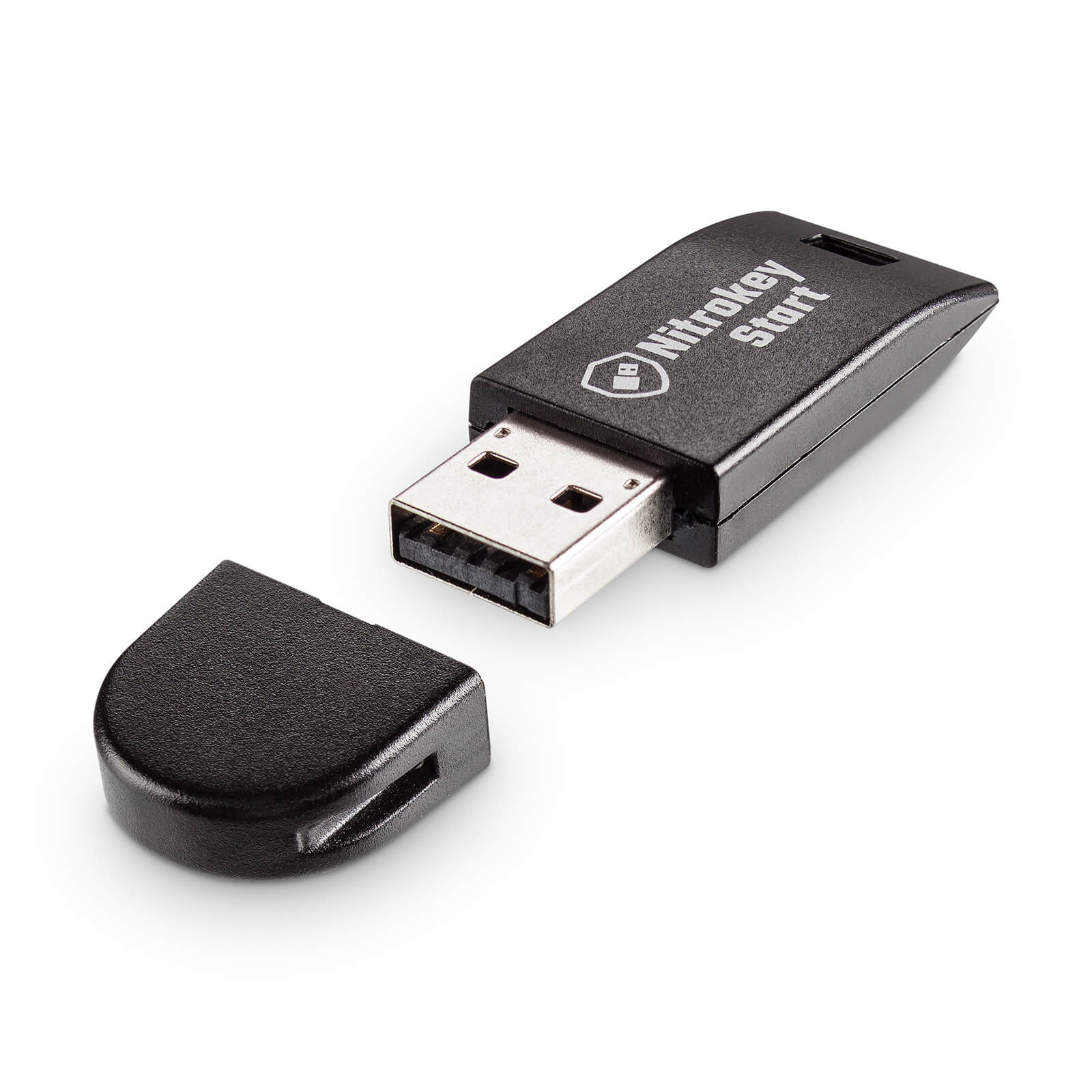 Nitrokey Start
 The nineteenth release of
  After
After  Github
  Update on 2023-03-23: thanks to Daniel Roschka for mentioning the
 Anti-national and Anti-India judges Kiren Rijiju, Law Minister.

 There is much to share but some other day, Till later.



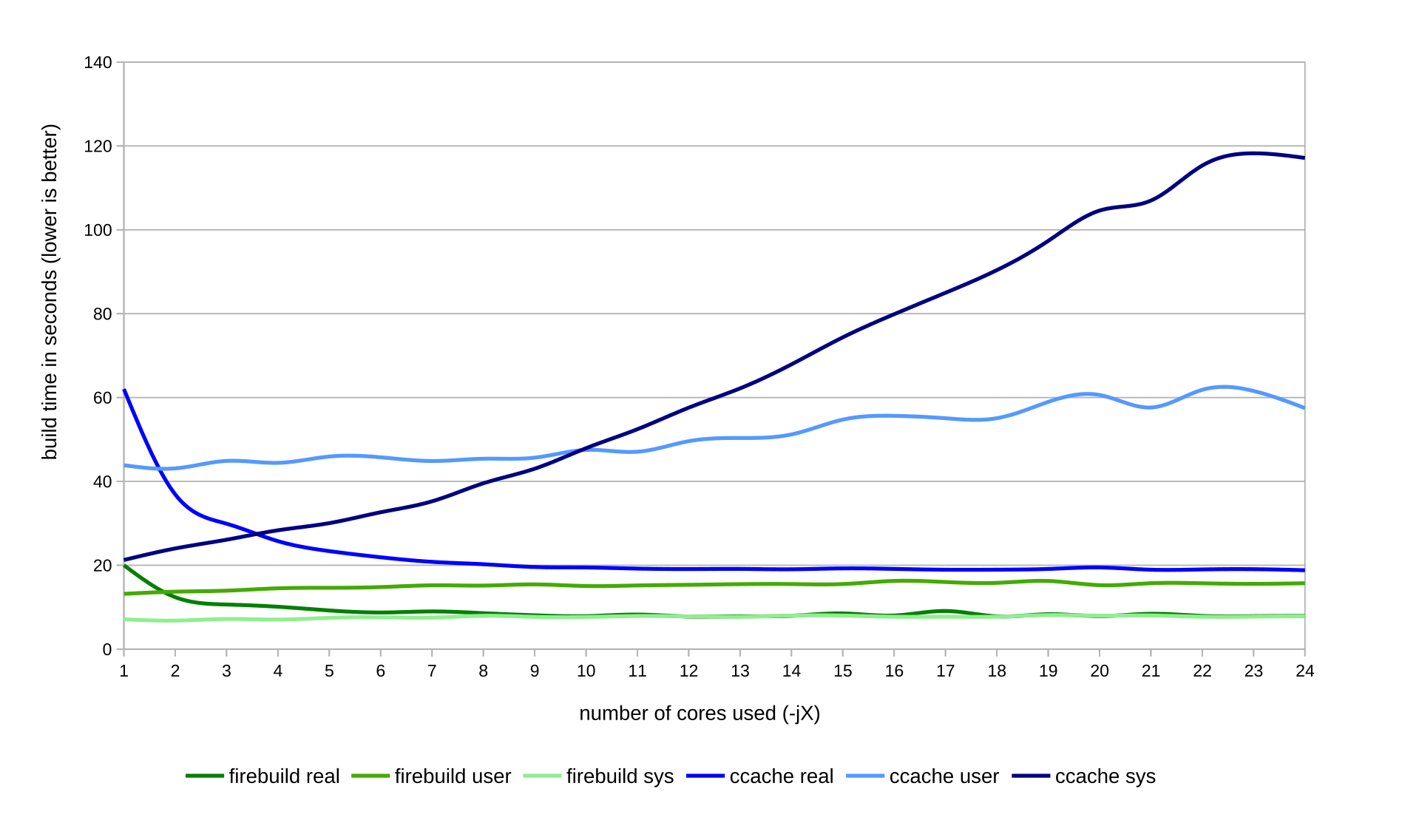
 A few years ago a friend told me that her usual fabric shop was closing down and had a sale on all remaining stock.
While being sad for yet another brick and mortar shop that was going to be missed (at least it was because the owners were retiring, not because it wasn t sustainable anymore), of course I couldn t miss the opportunity.
So we drove a few hundred km, had some nice time with a friend that (because of said few hundred km) we rarely see, and spent a few hours looting the corps er helping the shop owner getting rid of stock before their retirement.
A few years ago a friend told me that her usual fabric shop was closing down and had a sale on all remaining stock.
While being sad for yet another brick and mortar shop that was going to be missed (at least it was because the owners were retiring, not because it wasn t sustainable anymore), of course I couldn t miss the opportunity.
So we drove a few hundred km, had some nice time with a friend that (because of said few hundred km) we rarely see, and spent a few hours looting the corps er helping the shop owner getting rid of stock before their retirement.
 Among other things there was a cut of lightweight swiss embroidery cotton in blue which may or may not have been enthusiastically grabbed with plans of victorian underwear.
It was too nice to be buried under layers and layers of fabric (and I suspect that the embroidery wouldn t feel great directly on the skin under a corset), so the natural fit was something at the corset cover layer, and the fabric was enough for a combination garment of the kind often worn in the later Victorian age to prevent the accumulation of bulk at the waist.
It also has the nice advantage that in this time of corrupted morals it is perfectly suitable as outerwear as a nice summer dress.
Then life happened, the fabric remained in my stash for a long while, but finally this year I have a good late victorian block that I can adapt, and with spring coming it was a good time to start working on the summer wardrobe.
Among other things there was a cut of lightweight swiss embroidery cotton in blue which may or may not have been enthusiastically grabbed with plans of victorian underwear.
It was too nice to be buried under layers and layers of fabric (and I suspect that the embroidery wouldn t feel great directly on the skin under a corset), so the natural fit was something at the corset cover layer, and the fabric was enough for a combination garment of the kind often worn in the later Victorian age to prevent the accumulation of bulk at the waist.
It also has the nice advantage that in this time of corrupted morals it is perfectly suitable as outerwear as a nice summer dress.
Then life happened, the fabric remained in my stash for a long while, but finally this year I have a good late victorian block that I can adapt, and with spring coming it was a good time to start working on the summer wardrobe.
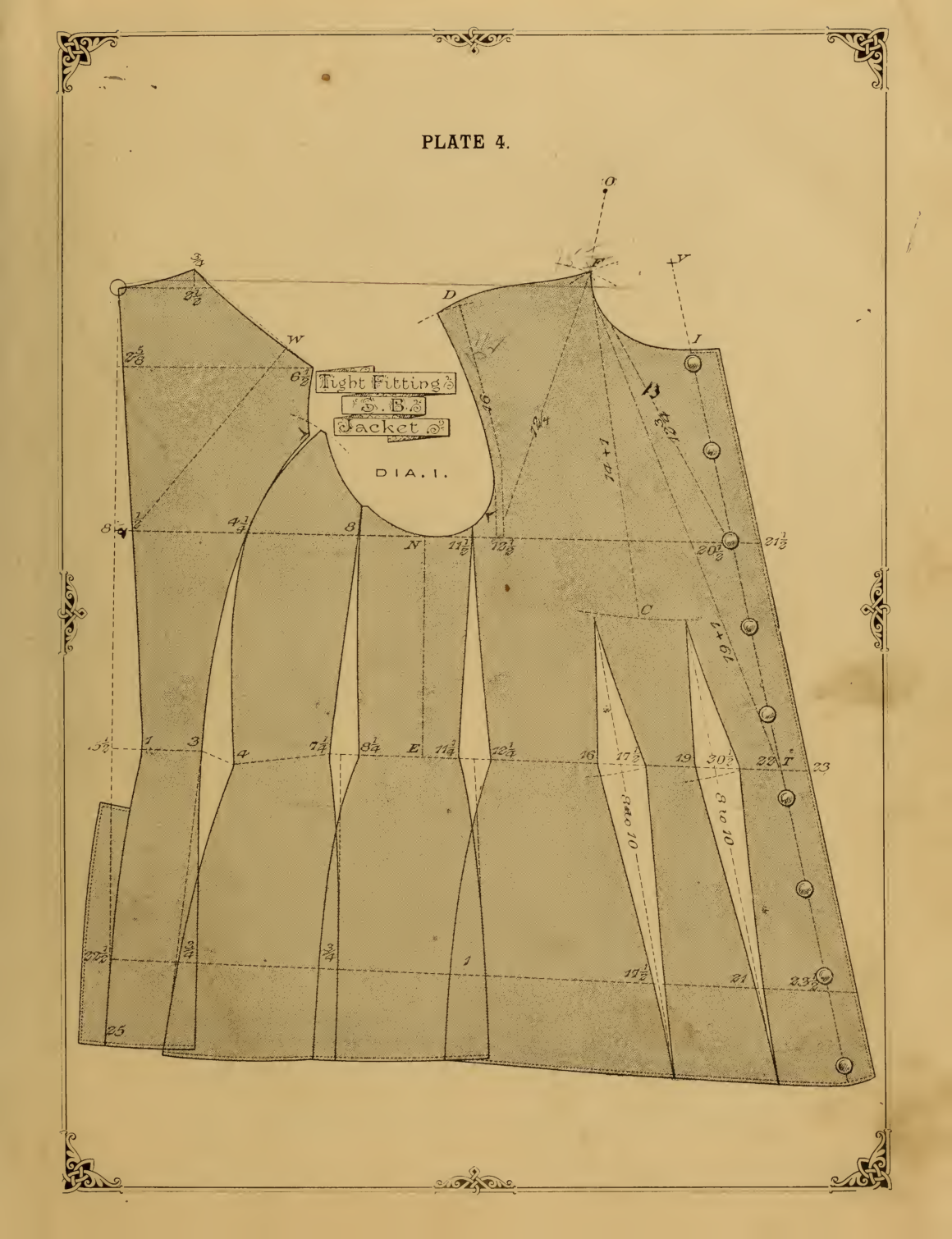 The block I ve used comes from
  The only design choice left was the pocket situation: I wanted to wear this garment both as underwear (where pockets aren t needed, and add unwanted bulk) and outerwear (where no pockets is not an option), and the fabric felt too thin to support the weight of the contents of a full pocket. So I decided to add slits into the seams, with just a modesty placket, and wear
  First I had to finish attaching the ruffles, however, and this is when I cursed myself for not using the ruffler foot I have (it would have meant not having selvedges on all seams of the ruffle), and for pleating the ruffle rather than gathering it (I prefer the look of handsewn gathers, but here I m sewing everything by machine, and that s faster, right? (it probably wasn t)).
 Also, this is where I started to get low on pins, and I had to use the ones from the vintage
 Except, maybe I shouldn t carry heavy items in my pockets when doing it? Oh, well.
I have other plans for the same pattern, but they involve making some crochet lace, so I expect I can aim at making them wearable in summer 2024.
Now I just have to wait for the weather to be a bit warmer, and then I can start enjoing this one.
Except, maybe I shouldn t carry heavy items in my pockets when doing it? Oh, well.
I have other plans for the same pattern, but they involve making some crochet lace, so I expect I can aim at making them wearable in summer 2024.
Now I just have to wait for the weather to be a bit warmer, and then I can start enjoing this one.

 (no site yet)
 in October 2021. they generally seem to keep up with
shipping. update (august 2022): they rolled out a second line of
laptops (12th gen), first batch shipped, second batch
in October 2021. they generally seem to keep up with
shipping. update (august 2022): they rolled out a second line of
laptops (12th gen), first batch shipped, second batch