Biella Coleman: New Zealand, a photo-round up
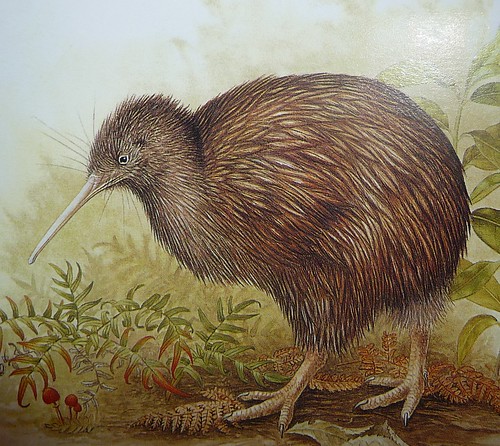 Kiwis have to be one of the cutest birds of all time. A bit chubby and clumsy looking, they are (to me, at least), walking, breathing icon of furry cuteness.
Kiwis have to be one of the cutest birds of all time. A bit chubby and clumsy looking, they are (to me, at least), walking, breathing icon of furry cuteness.

 In desperate need to organize my collection of scientific papers, I had a look at various tools which could help me organizing them. Probably one of the best out there is Mendeley. Mendeley seems to be a very good tool to keep your massive collection of pdfs under control. Unfortunately a very basic function, namely looking up a newly imported paper in Google Scholar to get attributes like: Authors, Year, etc. right, is bundled with a Mendeley account. I guess that s their way of forcing the user to participate to their community stuff, since without the Google Scholar lookup Mendeley is pretty useless unless you want to fill all the attributes manually.
So I decided to write my own tool to make the lookup. Unfortunately Google does not really want to give away that precious data: they don t provide an API and even block certain User-Agents from accessing the page. Then, there is also the problem of scraping the results page to get the right data.
The first problem can be trivially solved by setting a common User-Agent string, the second one can be elegantly circumvented by using the bibtex files provided in the search results. The bibtex entries are however only showed if you enabled them in the settings, which are stored in a cookie. After a few tries, I figured that the
CF attribute (citation format?) controls which bibliography format should be offered in the results page and CF=4 corresponds to bibtex. Generating a fake cookie is easy, but you have to know what must be included. In this case it looks like a 16 digit hex as ID and the CF attribute is sufficient. The ID is probably supposed to be your id, but a randomly generated one also works like a charm.
The resulting cookie looks like this: GSP=ID=762a112b5c765732:CF=4
All you have to do now is to query Google Scholar using the user string and the cookie:
...
# fake google id (looks like it is a 16 elements hex)
google_id = hashlib.md5(str(random.random())).hexdigest()[:16]
GOOGLE_SCHOLAR_URL =  http://scholar.google.com
HEADERS =  User-Agent  :  Mozilla/5.0 ,
         Cookie  :  GSP=ID=%s:CF=4  % google_id
def query(searchstr):
     "Return a list of bibtex items. "
    searchstr =  /scholar?q= +urllib2.quote(searchstr)
    url = GOOGLE_SCHOLAR_URL + searchstr
    request = urllib2.Request(url, headers=HEADERS)
    response = urllib2.urlopen(request)
    html = response.read()
    # grab the bibtex links
"/scholar.bib". Just search for those and download the targets.
The complete code is available on github. It can be used as a python library or a standalone application, you just call it like this: gscolar "some author or title" and it will print the first ten results in bibtex to stdout.

Why? I am pursuing this change because Debian has negotiated a revenue sharing deal with XXXXXI have nothing against ubuntu and I think it is a great distro. However, I believe that decisions like this go strongly against the principle of free software as we consider, in particular when it comes to putting the user first and not some cash deal. Forcing the user to choose for something because the company gave money for that is totally again this to me.
"--cumulative Daten von toten Kindern einbeziehen (als Summe zusammen mit den Eltern)"
"Sind Sie sich sicher, dass Sie die oben genannten Pakete installieren bzw. aufr sten wollen?"
Are you sure itself that you want to install and/or rig the packages specified above?

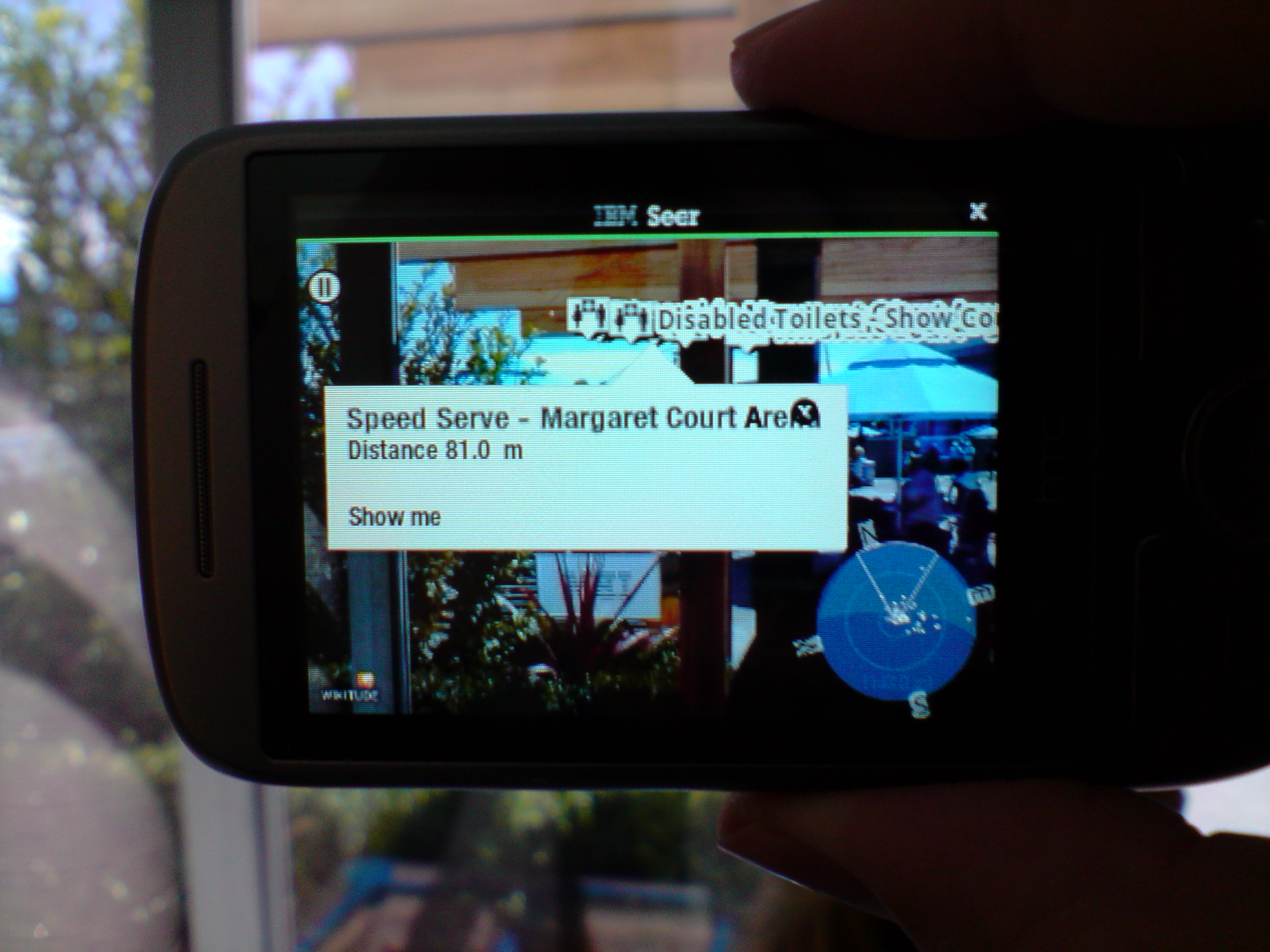 The first thing that they showed me was the IBM Seer software on the HTC Hero phone (which runs the Google Android OS). Seer can be freely downloaded from the Android store. The most noteworthy feature is that it uses the camera in the Android phone to display a picture of whatever you are looking at with points of interest superimposed (such as the above picture where I asked for locations of events and toilets). But it also displays a map view and has some other features I didn t get a chance to test such as viewing twitter data relevant to the event. We really need this augmented reality feature enabled with tourist data for major cities. I m sure that there s lots of interesting things I haven t seen in my own home city, if I could just pull out a phone and see a map of what s around me whenever I m bored I could see some of them. I think that this has the potential to change the way we use phones, in theory this was available as soon as Google Maps was released, but Seer seems to be the start of a whole new range of developments. One of the uses of this will be for identifying the background in tourist photos, no more of the me in front of old building descriptions.
Here is a Youtube Video of the Seer software in action [BMLgHGV4zWM].
The tour guide explained that to get the software to work on an iPhone would require the 3GS for navigation as the earlier iPhones don t have a compass. The Seer software was initially developed for The Championships, Wimbledon 2009 which happened at about the same time as the iPhone 3GS release. I expect that there will be enough iPhone 3GS units sold before Wimbledon 2010 to give IBM a good incentive to port Seer to the iPhone.
Three (my phone company at the moment) has just sold out of the HTC Magic which has a digital compass. They are selling the HTC Touch Pro and HTC Touch Diamond that appear to lack a digital compass. Vodaphone is offering a HTC Magic free on the $29 contract right now. The other Australian mobile phone companies don t seem to offer any Android phones. So it seems that the only option right now if I wanted to purchase a phone in Australia that can run Seer is the Vodaphone HTC Magic, and that s a phone that was released almost a year ago (a long time with recent progress in phone development it s the modem before the HTC Hero I tested) and which has only a 3.2MP camera (the LG U990 Viewty I used to take the picture for this post has a 5MP camera and is older than that). So I expect that there aren t many people using Seer in Australia.
If you happen to be in Melbourne and have an Android phone with a digital compass then you may want to visit the Australian open to try the Seer software. It should work equally well from outside the security fence
I ll write about the other things I saw over the next few days.
 Knowing full well that it will cause many of my readers to tut and roll their eyes at me I derive slight pleasure from confessing that I have now eaten at McDonalds on 6 continents. To make it worse I only did so in Asia and Australia so I could say I had.
 Just an update about
sgeps, because
it seems to have made a small stir (which is more than I expected).
emacs foo.gpg. Admittedly I found out while I
was developing sgeps, but I kept on my track anyway. The real
reason was that I was having fun, but I could also mention that
sgeps doesn't store data unencrypted on disk, not even
temporarily. I'm not sure about vim foo.gpg. (Update: Joey
Hess telle me it does the right thing.) Anyway, I don't want to
fire up an editor (or switch to an already opened one) just to get a
password.pwman too. My script started as
pwman.pl but it was renamed later. I like the simplicity of
sgeps better, especially the lack of any UI besides the CLI, but
pwman is probably good in its own way, but it doesn't fit my usage
pattern.sgeps is now packaged for Gentoo
Linux.sgeps --delete.
Thanks to him!sgeps should be able to store
notes as well as passwords. That wasn't a requirement I initially
had, but I won't reject the patch if it comes He also argues that
it should be able to push the password into the X11 paste buffer.
Again, why not, if it doesn't break anything. I've hooked one of my laptop's terminals up to the net, so anyone with IPv6
can telnet in and see it.
I've long wanted to be able to broadcast my terminal sessions on occasions
when it makes sense. Like when I'm fixing someone's bug, or closely
collaborating with someone distant.
I am also interested in finding things to host on IPv6. Right now, that means
only people who care will be able to access it. So it seems the trick is to
find places where that is a benefit. I plan to keep an eye out for more
things like this.
(A side benefit of using IPv6 is that it makes it easier to serve content
from my laptop, that moves from network to network.)
So, tune in to my termcast!
 termcast
 Following my questions on the freeness of the Nokia N900, I received quite a lot of comments. I m trying to summarize the most important points here.
 I'm glad you asked, since I've been pondering this for a while. $subject is my new project slogan. Now I'm not sure whether we can actually use it, because a) it's stolen from Debian, and b) another (commercial, proprietary) database product already uses the "universal database" line.

 Lucas asks about how free the N900 is, whether he can download and
recompile and reflash. I'll try to answer some of those questions.
No, you can't download all the source. Part of it is just not open.
I am not privy to Nokia's decisions on why or why not to open up, but
it seems like the user interface bits are only partially open. Hildon
itself is open so you can poke at widgets and see how those work. The
address book is not open. The telepathy component that talks to the
cellular modem is not open.
As for having to accept EULAs, I honestly don't remember accepting one
of those, but I'm not going to say there are none. There's at least
one which is every time you install a package where you have to check
a box saying "Yes, I know this package is third party and will not sue
Nokia if it causes my house to burn down, my wife to divorce me or
causes somebody to steal the car". It's annoying, but I'm willing to
live with it.
The contents of apt's
sources.list is:
deb https://downloads.maemo.nokia.com/fremantle/ssu/apps/ ./
deb https://downloads.maemo.nokia.com/fremantle/ssu/mr0 ./
deb https://downloads.maemo.nokia.com/fremantle/ovi/ ./
deb http://repository.maemo.org/extras/ fremantle free non-free
deb http://repository.maemo.org/extras-devel/ fremantle free non-free
/etc/apt/sources.list.d/hildon-application-manager.list, not
sources.list.)
I believe the built-in applications are generally not free, so
rebuilding everything that is free will for instance leave you without
any address book UI, the built-in map application or camera. Sadly,
the X driver is also proprietary, so you won't be able to see anything
either.
I don't think you can usefully install another free distro on the
N900. You might be able to, at some point, assuming somebody goes to
the effort.
The last question is "- Besides the non-free telephony stack, are
there any other antifeatures I should be aware of?". The telephony
stack is implemented around Telepathy, which is LGPL-ed free software.
While it's correct that telepathy-ring (which talks to the cellular
modem), the call UI and most of the address book are proprietary, the
rest of Telepathy is free. There are SIP and XMPP connection managers
that are free, and you can install more connection managers for MSN,
IRC and so on.
Also, I think it's important to emphasise that the telephony stack
does not contain any antifeatures. The closest thing you would be
able to find is probably the restriction to one active and one held
call at the same time, but as one of the developers said: "That's to
prevent the UI from going mad".
While I like to tout the N900 as a free phone, it is in no way
completely free. Large parts of it are free, and almost as
importantly: most of the programming interfaces are free and at least
somewhat documented, so if somebody wants to replace the built-in
camera application with a free one, they can replace the DBus
interface that the camera app provides. Ditto for maps applications,
the address book and so on.
 Recently, Eclipse started ignoring clicks on dialog buttons for me. This seems to be due to some changes in gtk 2.18. It does not use native windows for all widgets anymore, and SWT seems to rely on it.
Thanks to this blog post, I have this fix in my bashrc:
1 | alias eclipse="GDK_NATIVE_WINDOWS=true eclipse" |
 The XML-Editor Serna by Syntext has been published as Free Software a few months ago. This was very good news, because there was a lack of a good free XML editors with a good graphical view on DocBook documents, which I needed to recommend to users of zpub. Therefore, I investigated packaging Serna for Debian. I had to patch a few things to make it compile on and64 and to use components shipped by Debian where possible. Today, I could finally close the RFP bug filed by W. Martin Borgert, as the serna package was accepted by the ftp-masters. The first bug (SEGFAULT on startup on lenny) is already filed. I hope this is a good sign, as it shows that there is interest in the package.
For my packaging workflow, I used git-svn to import the upstream SVN branch into a git repository. I then use git-dpm by Bernhard R. Link to manage my changes as patches in the new 3.0 (quilt) debian source package. I must say that I prefer this approach to git-buildpackage, as there is only one git branch to publish. I hope that Bernhard uploads git-dpm to Debian soon.
Serna is quite a big software project and uses stuff that I know little about (Qt, C++ with python interaction etc.). Also, the package currently bundles the DITA-OT package, which should rather be packaged separately. Therefore, I d be glad if co-maintainers would join the effort.
 My Google Bugs page started off as a blog post back in 2006, but I ve moved it to a more permanent home and started to bring it up to date.
Recent additions include the China Controversy updated, a recent search bug added andDNS service added.
In just over a month, BathLitFest will be holding a debate on Is Google Good For You? Sunday 28 Feb, 1pm 2pm. The key questions are:
In the data-sharing and database age, how much information are we prepared to give away about ourselves and who, ultimately, controls that information? Is the price of convenient, high-speed communication an almost total loss of privacy? And is it right that one company knows more about us than our government, or even than we know ourselves?Tickets are on sale, priced 7. That s pretty much what I was pointing out back in 2006. I don t hate Google or anything, but we should be realistic: it is a for-profit company, so probably won t be doing anything truly for free. There s always a payback and we should recognise it as part of making an informed choice about whether to trade with them. It s nice to see these questions getting a more mainstream airing. If you ve got any updates for the Google Bugs page, please let me have them.
 So, a while back, Google started providing location services. This seemed pretty cool, but I kind of ignored it until recently when I was playing with my Android s location API. With the GPS off, and no cell towers visible (my basement gets terrible cell service), my phone knew within about 500 feet of where it actually was. All I was connected to was my wifi.
Bottom line: it seems that Google, among other methods, is likely wardriving while photographing for Street View. They are now able to pinpoint wifi access points if they happened to see it while driving through your city.
I m really rather astonished that no one is freaking out about this; I m a bit unnerved. I implemented the location-of-your-wifi API quickly, so I could terrify myself further. You can do lookups via my location website too, if you want.
UPDATE: yeah, it would seem to be crowd-sourced wifi and cell tower triangulation data. I should say Google is WarCrowding .
Next.