Search Results: "sten"

17 February 2017

Dirk Eddelbuettel: littler 0.3.2

max-heap image The third release of littler as a CRAN package is now available, following in the now more than ten-year history as a package started by Jeff in the summer of 2006, and joined by me a few weeks later. littler is the first command-line interface for R and predates Rscript. It is still faster, and in my very biased eyes better as it allows for piping as well shebang scripting via #!, uses command-line arguments more consistently and still starts faster. It prefers to live on Linux and Unix, has its difficulties on OS X due to yet-another-braindeadedness there (who ever thought case-insensitive filesystems where a good idea?) and simply does not exist on Windows (yet -- the build system could be extended -- see RInside for an existence proof, and volunteers welcome!). This release brings several new examples script to run package checks, use the extraordinary R Hub, download RStudio daily builds, and more -- see below for details. No internals were changed. The NEWS file entry is below.

Changes in littler version 0.3.2 (2017-02-14)
  • Changes in examples
    • New scripts getRStudioServer.r and getRStudioDesktop.r to download daily packages, currently defaults to Ubuntu amd64
    • New script c4c.r calling rhub::check_for_cran()
    • New script rd2md.r to convert Rd to markdown.
    • New script build.r to create a source tarball.
    • The installGitHub.r script now use package remotes (PR #44, #46)

Courtesy of CRANberries, there is a comparison to the previous release. Full details for the littler release are provided as usual at the ChangeLog page. The code is available via the GitHub repo, from tarballs off my littler page and the local directory here -- and now of course all from its CRAN page and via install.packages("littler"). Binary packages are available directly in Debian as well as soon via Ubuntu binaries at CRAN thanks to the tireless Michael Rutter. Comments and suggestions are welcome at the GitHub repo.

This post by Dirk Eddelbuettel originated on his Thinking inside the box blog. Please report excessive re-aggregation in third-party for-profit settings.

15 February 2017

Daniel Stender: APT programming snippets for Debian system maintenance

The Python API for the Debian package manager APT is useful for writing practical system maintenance scripts, which are going beyond shell scripting capabilities. There are Python2 and Python3 libraries for that available as packages, as well as a documentation in the package python-apt-doc. If that s also installed, the documentation then could be found in /usr/share/doc/python-apt-doc/html/index.html, and there are also a couple of example scripts shipped into /usr/share/doc/python-apt-doc/examples. The libraries mainly consists of Python bindings for the libapt-inst and libapt-pkg C++ core libraries of the APT package manager, which makes it processing very fast. Debugging symbols are also available as packages (python ,3 -apt-dbg). The module apt_inst provides features like reading from binary packages, while apt_pkg resembles the functions of the package manager. There is also the apt abstraction layer which provides more convenient access to the library, like apt.cache.Cache() could be used to behave like apt-get:
from apt.cache import Cache
mycache = Cache()
mycache.update()                   # apt-get update
mycache.open()                     # re-open
mycache.upgrade(dist_upgrade=True) # apt-get dist-upgrade
mycache.commit()                   # apply

boil out selections As widely known, there is a feature of dpkg which helps to move a package inventory from one installation to another by just using a text file with a list of installed packages. A selections list containing all installed package could be easily generated with $ dpkg --get-selections > selections.txt. The resulting file then looks something similar like this:
$ cat selections.txt
0ad                                 install
0ad-data                            install
0ad-data-common                     install
a2ps                                install
abi-compliance-checker              install
abi-dumper                          install
abigail-tools                       install
accountsservice                     install
acl                                 install
acpi                                install
The counterpart for this operation (--set-selections) could be used to reinstall (add) the complete package inventory on another installation resp. computer (that needs superuser rights), like that s explained in the manpage dpkg(1). No problem so far. The problem is, if that list contains a package which couldn t be found in any of the package inventories which are set up in /etc/apt/sources.list(.d/) on the target system, dpkg stops the whole process:
# dpkg --set-selections < selections.txt
dpkg: warning: package not in database at line 524: google-chrome-beta
dpkg: warning: found unknown packages; this might mean the available database
is outdated, and needs to be updated through a frontend method
Thus, manually downloaded and installed wild packages from unofficial package sources are problematic for this approach, because the package installer simply doesn t know where to get them. Luckily, dpkg puts out the relevant package names, but instead of having them removed manually with an editor this little Python script for python3-apt automatically deletes any of these packages from a selections file:
#!/usr/bin/env python3
import sys
import apt_pkg
apt_pkg.init()
cache = apt_pkg.Cache()
infile = open(sys.argv[1])
outfile_name = sys.argv[1] + '.boiled'
outfile = open(outfile_name, "w")
for line in infile:
    package = line.split()[0]
    if package in cache:
        outfile.write(line)
infile.close()
outfile.close()
sys.exit(0)
The script takes one argument which is the name of the selections file which has been generated by dpkg. The low level module apt_pkg first has to been initialized with apt_pkg.init(). Then apt_pkg.Cache() can be used to instantiate a cache object (here: cache). That object is iterable, thus it s easy to not perform something if a package from that list couldn t be found in the database, like not copying the corresponding line into the outfile (.boiled), while the others are copied. The result then looks something like this:
$ diff selections.txt selections.txt.boiled 
3780d3779
< python-timemachine   install
4438d4436
< wlan-supercracker    install
That script might be useful also for moving from one distribution resp. derivative to another (like from Ubuntu to Debian). For productive use, open() should be of course secured against FileNotFound and IOError-s to prevent program crashs on such events.

purge rc-s Like also widely known, deinstalled packages leave stuff like configuration files, maintainer scripts and logs on the computer, to save that if the package gets reinstalled at some point in the future. That happens if dpkg has been used with -r/--remove instead of -P/--purge, which also removes these files which are left otherwise. These packages are then marked as rc in the package archive, like:
$ dpkg -l   grep ^rc
rc  firebird2.5-common          2.5.6.27020.ds4-3   amd64   common files for firebird 2.5 servers and clients
rc  firebird2.5-server-common   2.5.6.27020.ds4-3   amd64   common files for firebird 2.5 servers
rc  firebird3.0-common          3.0.1.32609.ds4-8   all     common files for firebird 3.0 server, client and utilities
rc  imagemagick-common          8:6.9.6.2+dfsg-2    all     image manipulation programs -- infrastructure dummy package
It could be purged over them afterwards to completely remove them from the system. There are several shell coding snippets to be found on the net for completing this job automatically, like this one here:
dpkg -l   grep "^rc"   sed  e "s/^rc //"  e "s/ .*$//"   \
xargs dpkg  purge
The first thing which is needed to handle this by a Python script is the information that in apt_pkg, the package state rc per default is represented by the code 5:
>>> testpackage = cache['firebird2.5-common']
>>> testpackage.current_state
5
For changing things in the database apt_pkg.DepCache() could be docked onto an cache object to manipulate the installation state of a package within, like marking it to be removed resp. purged:
>>> mydepcache = apt_pkg.DepCache(mycache)
>>> mydepcache.mark_delete(testpackage, True) # True = purge
>>> mydepcache.marked_delete(testpackage)
True
That s basically all which is needed for an old package purging maintenance script in Python 3, another iterator as package filter and there you go:
#!/usr/bin/env python3
import sys
import apt_pkg
from apt.progress.text import AcquireProgress
from apt.progress.base import InstallProgress
acquire = AcquireProgress()
install = InstallProgress()
apt_pkg.init()
cache = apt_pkg.Cache()
depcache = apt_pkg.DepCache(cache)
for paket in cache.packages:
    if paket.current_state == 5:
        depcache.mark_delete(paket, True)
depcache.commit(acquire, install)
The method DepCache.commit() applies the changes to the package archive at the end, and it needs apt_progress to perform. Of course this script needs superuser rights to run. It then returns something like this:
$ sudo ./rc-purge 
Reading package lists... Done
Building dependency tree
Reading state information... Done
Fetched 0 B in 0s (0 B/s)
custom fork found
got pid: 17984
got pid: 0
got fd: 4
(Reading database ... 701434 files and directories currently installed.)
Purging configuration files for libmimic0:amd64 (1.0.4-2.3) ...
Purging configuration files for libadns1 (1.5.0~rc1-1) ...
Purging configuration files for libreoffice-sdbc-firebird (1:5.2.2~rc2-2) ...
Purging configuration files for vlc-nox (2.2.4-7) ...
Purging configuration files for librlog5v5 (1.4-4) ...
Purging configuration files for firebird3.0-common (3.0.1.32609.ds4-8) ...
Purging configuration files for imagemagick-common (8:6.9.6.2+dfsg-2) ...
Purging configuration files for firebird2.5-server-common (2.5.6.27020.ds4-3)
It s not yet production ready (like there s an infinite loop if dpkg returns error code 1 like from can t remove non empty folder ). But generally, ATTENTION: be very careful with typos and other mistakes if you want to use that code snippet, a false script performing changes on the package database might destroy the integrity of your system, and you don t want that to happen.

detect wild packages Like said above, installed Debian packages might be called wild if they have been downloaded from somewhere on the net and installed manually, like that is done from time to time on many systems. If you want to remove that whole class of packages again for any reason, the question would be how to detect them. A characteristic element is that there is no source connected to such a package, and that could be detected by Python scripting using again the bindings for the APT libraries. The package object doesn t have an associated method to query its source, because the origin is always connected to a specific package version, like some specific version might have come from security updates for example. The current version of a package can be queried with DepCache.get_candidate_ver() which returns a complex apt_pkg.Version object:
>>> import apt_pkg
>>> apt_pkg.init()
>>> mycache = apt_pkg.Cache()
Reading package lists... Done
Building dependency tree
Reading state information... Done
>>> mydepcache = apt_pkg.DepCache(mycache)
>>> testpackage = mydepcache.get_candidate_ver(mycache['nano'])
>>> testpackage
<apt_pkg.Version object: Pkg:'nano' Ver:'2.7.4-1' Section:'editors'  Arch:'amd64' Size:484790 ISize:2092032 Hash:33578 ID:31706 Priority:2>
For version objects there is the method file_list available, which returns a list containing PackageFile() objects:
>>> testpackage.file_list
[(<apt_pkg.PackageFile object: filename:'/var/lib/apt/lists/httpredir.debian.org_debian_dists_testing_main_binary-amd64_Packages'  a=testing,c=main,v=,o=Debian,l=Debian arch='amd64' site='httpredir.debian.org' IndexType='Debian Package Index' Size=38943764 ID:0>, 669901L)]
These file objects contain the index files which are associated with a specific package source (a downloaded package index), which could be read out easily (using a for-loop because there could be multiple file objects):
>>> for files in testpackage.file_list:
...     print(files[0].filename)
/var/lib/apt/lists/httpredir.debian.org_debian_dists_testing_main_binary-amd64_Packages
That explains itself: the nano binary package on this amd64 computer comes from httpredir.debian.org/debian testing main. If a package is wild that means it was installed manually, so there is no associated index file to be found, but only /var/lib/dpkg/status (libcudnn5 is not in the official package archives but distributed by Nvidia as a .deb package):
>>> testpackage2 = mydepcache.get_candidate_ver(mycache['libcudnn5'])
>>> for files in testpackage2.file_list:
...     print(files[0].filename)
/var/lib/dpkg/status
The simple trick now is to find all packages which have only /var/lib/dpkg/status as associated system file (that doesn t refer to what packages contain), an not an index file representing a package source. There s a little pitfall: that s truth also for virtual packages. But virtual packages commonly don t have an associated version (python-apt docs: to check whether a package is virtual; that is, it has no versions and is provided at least once ), and that can be queried by Package.has_versions. A filter to find out any packages that aren t virtual packages, are solely associated to one system file, and that file is /var/lib/dpkg/status, then goes like this:
for package in cache.packages:
    if package.has_versions:
        version = mydepcache.get_candidate_ver(package)
        if len(version.file_list) == 1:
            if 'dpkg/status' in version.file_list[0][0].filename:
                print(package.name)
On my Debian testing system this puts out a quite interesting list. It lists all the wild packages like libcudnn5, but also packages which are recently not in testing because they have been temporarily removed by AUTORM due to release critical bugs. Then there s all the obsolete stuff which have been installed from the package archives once and then being forgotten like old kernel header packages ( obsolete packages in dselect). So this snippet brings up other stuff, too. Thus, this might be more experimental stuff so far, though.

13 February 2017

Rapha&#235;l Hertzog: Freexian s report about Debian Long Term Support, January 2017

A Debian LTS logoLike each month, here comes a report about the work of paid contributors to Debian LTS. Individual reports In January, about 159 work hours have been dispatched among 13 paid contributors. Their reports are available: Evolution of the situation The number of sponsored hours increased slightly thanks to Exonet joining us. The security tracker currently lists 37 packages with a known CVE and the dla-needed.txt file 36. The situation is roughly similar to last month even though the number of open issues increased slightly. Thanks to our sponsors New sponsors are in bold.

No comment Liked this article? Click here. My blog is Flattr-enabled.

12 February 2017

Stefano Zacchiroli: Opening the Software Heritage archive

... one API (and one FOSDEM) at a time [ originally posted on the Software Heritage blog, reposted here with minor adaptations ] Last Saturday at FOSDEM we have opened up the public API of Software Heritage, allowing to programmatically browse its archive. We posted this while I was keynoting with Roberto at FOSDEM 2017, to discuss the role Software Heritage plays in preserving the Free Software commons. To accompany the talk we released our first public API, which allows to navigate the entire content of the Software Heritage archive as a graph of connected development objects (e.g., blobs, directories, commits, releases, etc.). Over the past months we have been busy working on getting source code (with full development history) into the archive, to minimize the risk that important bits of Free/Open Sources Software that are publicly available today disappear forever from the net, due to whatever reason --- crashes, black hat hacking, business decisions, you name it. As a result, our archive is already one of the largest collections of source code in existence, spanning a GitHub mirror, injections of important Free Software collections such as Debian and GNU, and an ongoing import of all Google Code and Gitorious repositories. Up to now, however, the archive was deposit-only. There was no way for the public to access its content. While there is a lot of value in archival per se, our mission is to Collect, Preserve, and Share all the material we collect with everybody. Plus, we totally get that a deposit-only library is much less exciting than a store-and-retrieve one! Last Saturday we took a first important step towards providing full access to the content of our archive: we released version 1 of our public API, which allows to navigate the Software Heritage archive programmatically. You can have a look at the API documentation for full details about how it works. But to briefly recap: conceptually, our archive is a giant Merkle DAG connecting together all development-related objects we encounter while crawling public VCS repositories, source code releases, and GNU/Linux distribution packages. Examples of the objects we store are: file contents, directories, commits, releases; as well as their metadata, such as: log messages, author information, permission bits, etc. The API we have just released allows to pointwise navigate this huge graph. Using the API you can lookup individual objects by their IDs, retrieve their metadata, and jump from one object to another following links --- e.g., from a commit to the corresponding directory or parent commits, from a release to the annotated commit, etc. Additionally, you can retrieve crawling-related information, such as the software origins we track (usually as VCS clone/checkout URLs), and the full list of visits we have done on any known software origin. This allows, for instance, to know when we took snapshots of a Git repository you care about and, for each visit, where each branch of the repo was pointing to at that time. Our resources for offering the API as a public service are still quite limited. This is the reason why you will encounter a couple of limitations. First, no download of the actual content of files we have stored is possible yet --- you can retrieve all content-related metadata (e.g., checksums, detected file types and languages, etc.), but not the actual content as a byte sequence. Second, some pretty severe rate limits apply; API access is entirely anonymous and users are identified by their IP address, each "user" will be able to do a little bit more than 100 requests/hour. This is to keep our infrastructure sane while we grow in capacity and focus our attention to developing other archive features. If you're interested in having rate limits lifted for a specific use case or experiment, please contact us and we will see what we can do to help. If you'd like to contribute to increase our resource pool, have a look at our sponsorship program!

10 February 2017

Rhonda D'Vine: Anouk

I need music to be more productive. Sitting in an open workspace it helps to shut off outside noice too. And often enough I just turn cmus into shuffle mode and let it play what comes along. Yesterday I just stumbled upon a singer again that I fell in love with her voice a long time ago. This is about Anouk. The song was on a compilation series that I followed because it so easily brought great groups to my attention in a genre that I simply love. It was called "Crossing All Over!" and featured several groups that I digged further into and still love to listen to. Anyway, don't want to delay the songs for you any longer, so here they are: Like always, enjoy!

/music permanent link Comments: 0 Flattr this

9 February 2017

Vincent Bernat: Integration of a Go service with systemd

Unlike other programming languages, Go s runtime doesn t provide a way to reliably daemonize a service. A system daemon has to supply this functionality. Most distributions ship systemd which would fit the bill. A correct integration with systemd is quite straightforward. There are two interesting aspects: readiness & liveness. As an example, we will daemonize this service whose goal is to answer requests with nifty 404 errors:
package main
import (
    "log"
    "net"
    "net/http"
)
func main()  
    l, err := net.Listen("tcp", ":8081")
    if err != nil  
        log.Panicf("cannot listen: %s", err)
     
    http.Serve(l, nil)
 
You can build it with go build 404.go. Here is the service file, 404.service1:
[Unit]
Description=404 micro-service
[Service]
Type=notify
ExecStart=/usr/bin/404
WatchdogSec=30s
Restart=on-failure
[Install]
WantedBy=multi-user.target

Readiness The classic way for an Unix daemon to signal its readiness is to daemonize. Technically, this is done by calling fork(2) twice (which also serves other intents). This is a very common task and the BSD systems, as well as some other C libraries, supply a daemon(3) function for this purpose. Services are expected to daemonize only when they are ready (after reading configuration files and setting up a listening socket, for example). Then, a system can reliably initialize its services with a simple linear script:
syslogd
unbound
ntpd -s
Each daemon can rely on the previous one being ready to do its work. The sequence of actions is the following:
  1. syslogd reads its configuration, activates /dev/log, daemonizes.
  2. unbound reads its configuration, listens on 127.0.0.1:53, daemonizes.
  3. ntpd reads its configuration, connects to NTP peers, waits for clock to be synchronized2, daemonizes.
With systemd, we would use Type=fork in the service file. However, Go s runtime does not support that. Instead, we use Type=notify. In this case, systemd expects the daemon to signal its readiness with a message to an Unix socket. go-systemd package handles the details for us:
package main
import (
    "log"
    "net"
    "net/http"
    "github.com/coreos/go-systemd/daemon"
)
func main()  
    l, err := net.Listen("tcp", ":8081")
    if err != nil  
        log.Panicf("cannot listen: %s", err)
     
    daemon.SdNotify(false, "READY=1") //  
    http.Serve(l, nil)                //  
 
It s important to place the notification after net.Listen() (in ): if the notification was sent earlier, a client would get connection refused when trying to use the service. When a daemon listens to a socket, connections are queued by the kernel until the daemon is able to accept them (in ). If the service is not run through systemd, the added line is a no-op.

Liveness Another interesting feature of systemd is to watch the service and restart it if it happens to crash (thanks to the Restart=on-failure directive). It s also possible to use a watchdog: the service sends watchdog keep-alives at regular interval. If it fails to do so, systemd will restart it. We could insert the following code just before http.Serve() call:
go func()  
    interval, err := daemon.SdWatchdogEnabled(false)
    if err != nil   interval == 0  
        return
     
    for  
        daemon.SdNotify(false, "WATCHDOG=1")
        time.Sleep(interval / 3)
     
 ()
However, this doesn t add much value: the goroutine is unrelated to the core business of the service. If for some reason, the HTTP part gets stuck, the goroutine will happily continue to send keep-alives to systemd. In our example, we can just do a HTTP query before sending the keep-alive. The internal loop can be replaced with this code:
for  
    _, err := http.Get("http://127.0.0.1:8081") //  
    if err == nil  
        daemon.SdNotify(false, "WATCHDOG=1")
     
    time.Sleep(interval / 3)
 
In , we connect to the service to check if it s still working. If we get some kind of answer, we send a watchdog keep-alive. If the service is unavailable or if http.Get() gets stuck, systemd will trigger a restart. There is no universal recipe. However, checks can be split into two groups:
  • Before sending a keep-alive, you execute an active check on the components of your service. The keep-alive is sent only if all checks are successful. The checks can be internal (like in the above example) or external (for example, check with a query to the database).
  • Each component reports its status, telling if it s alive or not. Before sending a keep-alive, you check the reported status of all components (passive check). If some components are late or reported fatal errors, don t send the keep-alive.
If possible, recovery from errors (for example, with a backoff retry) and self-healing (for example, by reestablishing a network connection) is always better, but the watchdog is a good tool to handle the worst cases and avoid too complex recovery logic. For example, if a component doesn t know how to recover from an exceptional condition3, instead of using panic(), it could signal its situation before dying. Another dedicated component could try to resolve the situation by restarting the faulty component. If it fails to reach an healthy state in time, the watchdog timer will trigger and the whole service will be restarted.

  1. Depending on the distribution, this should be installed in /lib/systemd/system or /usr/lib/systemd/system. Check with the output of the command pkg-config systemd --variable=systemdsystemunitdir.
  2. This highly depends on the NTP daemon used. OpenNTPD doesn t wait unless you use the -s option. ISC NTP doesn t either unless you use the --wait-sync option.
  3. An example of an exceptional condition is to reach the limit on the number of file descriptors. Self-healing from this situation is difficult and it s easy to get stuck in a loop.

Iustin Pop: Solarized colour theme

Solarized A while back I was looking for some information on the web, and happened upon a blog post about the subject. I don't remember what I was looking for, but on the same blog, there was a screen shot of what I then learned was the Solarized theme. This caught my eye that I decided to try it myself ASAP. Up until last year, I've been using for many years the 'black on light yellow' xterm scheme. This is good during the day, but too strong during night, so on some machines I switched to 'white on black', but this was not entirely satisfying. The solarized theme promises to have consistent colours over both light and dark background, which would help to make my setups finally consistent, and extends to a number of programs. Amongst these, there are themes for mutt on both light and dark backgrounds using only 16 colours. This was good, as my current hand-built theme is based on 256 colours, and this doesn't work well in the Linux console. So I tried changing my terminal to the custom colours, played with it for about 10 minutes, then decided that its contrast is too low, bordering on unreadable. I switch to another desktop where I still had open an xterm using white-on-black, and this being at night my eyes immediately go 'no no no too high contrast'. In about ten minutes I got so used to it that the old theme was really really uncomfortable. There was no turning back now Interestingly, the light theme was not that much better than black-on-light-yellow, as that theme is already pretty well behaved. But I still migrated for consistency. Programs/configs Starting from the home page and the internet, I found resources for: 16 vs 256 colours The solarized theme/configuration can be done in two ways: Upstream recommends the custom ones, as they are precisely tuned, instead of using the approximated ones; honestly I don't know if they would make a difference. It's too bad upstream went silent a few years back, as technically it's possible to override also colours above 16 in the 256-colour palette, but in any case, each of the two options has its own cons: So either way it's not perfect. Desktop-wide consistency Also not perfect is that for proper consistent look, many more programs would have to be changed; but I don't see that happening in today's world. I've seen for example 3 or 4 Midnight Commander themes, but none of them were actually in the spirit of solarized, even though they were tweaked for solarized. Even between vim and emacs, which both have one canonical solarized theme, the look is close but not really the same (looking at the markdown source for this blog post: URLs, headers and spelling mistakes are all different), but this might be due not necessarily the theme itself. So no global theme consistency (I'd wish), but still, I find this much better on the eyes and not lower on readability after getting used to it. Thanks Ethan!

8 February 2017

Alberto Garc a: QEMU and the qcow2 metadata checks

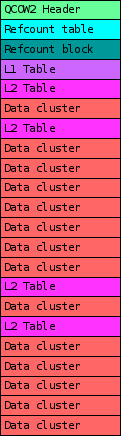
When choosing a disk image format for your virtual machine one of the factors to take into considerations is its I/O performance. In this post I ll talk a bit about the internals of qcow2 and about one of the aspects that can affect its performance under QEMU: its consistency checks. As you probably know, qcow2 is QEMU s native file format. The first thing that I d like to highlight is that this format is perfectly fine in most cases and its I/O performance is comparable to that of a raw file. When it isn t, chances are that this is due to an insufficiently large L2 cache. In one of my previous blog posts I wrote about the qcow2 L2 cache and how to tune it, so if your virtual disk is too slow, you should go there first. I also recommend Max Reitz and Kevin Wolf s qcow2: why (not)? talk from KVM Forum 2015, where they talk about a lot of internal details and show some performance tests. qcow2 clusters: data and metadata A qcow2 file is organized into units of constant size called clusters. The cluster size defaults to 64KB, but a different value can be set when creating a new image: qemu-img create -f qcow2 -o cluster_size=128K hd.qcow2 4G Clusters can contain either data or metadata. A qcow2 file grows dynamically and only allocates space when it is actually needed, so apart from the header there s no fixed location for any of the data and metadata clusters: they can appear mixed anywhere in the file. Here s an example of what it looks like internally:
In this example we can see the most important types of clusters that a qcow2 file can have: Metadata overlap checks In order to detect corruption when writing to qcow2 images QEMU (since v1.7) performs several sanity checks. They verify that QEMU does not try to overwrite sections of the file that are already being used for metadata. If this happens, the image is marked as corrupted and further access is prevented. Although in most cases these checks are innocuous, under certain scenarios they can have a negative impact on disk write performance. This depends a lot on the case, and I want to insist that in most scenarios it doesn t have any effect. When it does, the general rule is that you ll have more chances of noticing it if the storage backend is very fast or if the qcow2 image is very large. In these cases, and if I/O performance is critical for you, you might want to consider tweaking the images a bit or disabling some of these checks, so let s take a look at them. There are currently eight different checks. They re named after the metadata sections that they check, and can be divided into the following categories:
  1. Checks that run in constant time. These are equally fast for all kinds of images and I don t think they re worth disabling.
    • main-header
    • active-l1
    • refcount-table
    • snapshot-table
  2. Checks that run in variable time but don t need to read anything from disk.
    • refcount-block
    • active-l2
    • inactive-l1
  3. Checks that need to read data from disk. There is just one check here and it s only needed if there are internal snapshots.
    • inactive-l2
By default all tests are enabled except for the last one (inactive-l2), because it needs to read data from disk. Disabling the overlap checks Tests can be disabled or enabled from the command line using the following syntax: -drive file=hd.qcow2,overlap-check.inactive-l2=on
-drive file=hd.qcow2,overlap-check.snapshot-table=off It s also possible to select the group of checks that you want to enable using the following syntax: -drive file=hd.qcow2,overlap-check.template=none
-drive file=hd.qcow2,overlap-check.template=constant
-drive file=hd.qcow2,overlap-check.template=cached
-drive file=hd.qcow2,overlap-check.template=all Here, none means that no tests are enabled, constant enables all tests from group 1, cached enables all tests from groups 1 and 2, and all enables all of them. As I explained in the previous section, if you re worried about I/O performance then the checks that are probably worth evaluating are refcount-block, active-l2 and inactive-l1. I m not counting inactive-l2 because it s off by default. Let s look at the other three: Conclusion The qcow2 consistency checks are useful to detect data corruption, but they can affect write performance. If you re unsure and you want to check it quickly, open an image with overlap-check.template=none and see for yourself, but remember again that this will only affect write operations. To obtain more reliable results you should also open the image with cache=none in order to perform direct I/O and bypass the page cache. I ve seen performance increases of 50% and more, but whether you ll see them depends a lot on your setup. In many cases you won t notice any difference. I hope this post was useful to learn a bit more about the qcow2 format. There are other things that can help QEMU perform better, and I ll probably come back to them in future posts, so stay tuned! Acknowledgments My work in QEMU is sponsored by Outscale and has been made possible by Igalia and the help of the rest of the QEMU development team.

6 February 2017

Daniel Stender: Howto create a Debian 9 preview as Vagrant box with Packer

I ve got some little scripts and a template here to automatically create Vagrant boxes from cutting edge Debian testing daily snapshots (netinstall ISO image) using HashiCorp s Packer. To create Vagrant boxes with these, you first need a running binary of Packer. There is a Debian package available if that s also your working environment, but Packer is going to be introduced into the stable branch with the upcoming Stretch release itself. However, Ubuntu already has it, and some other derivatives, too. And there are prebuild binaries available from the developer s site which run fine out-of-the-box (you just have to put the single binary somewhere into you $PATH, or expand that to find it). The JSON template should run with any Packer which is available for any of the different systems. Vagrant itself isn t needed to build the box with Packer, but Virtualbox is of course needed to pre bake the machine image within a virtual machine. In Debian the base binaries of Virtualbox are in the contrib archive section, so that source might be added to /etc/apt/sources.list, if haven t already. The scripts have been tested to run with 5.1.10, and I haven t seen that any late versions are demanded in particular, but of course heavily outdated versions might not work properly. Packer installs the guest additions ISO file for Virtualbox into the virtual machine (and the shipped provisioning script then builds them inside). For that, the Debian package which ships that (which is in non-free) is recognized if it is installed, and then could be used by Packer. When the ISO isn t available in the places which Packer checks on the host the builder then automatically downloads the corresponding ISO from http://download.virtualbox.org/virtualbox. When the tarball with the scripts is unpacked, just do make create and the process should run through, if Packer and Virtualbox are available. If your environment doesn t have GNU Make nor wget you might want to copy the relevant lines from the Makefile and run it manually. But if it does, just do it like this:
/tmp/debian-testing-vagrantbox$ make create
virtualbox-iso output will be in this color.
==> virtualbox-iso: Downloading or copying Guest additions
    virtualbox-iso: Downloading or copying: file:///usr/share/virtualbox/VBoxGuestAdditions.iso
==> virtualbox-iso: Downloading or copying ISO
    virtualbox-iso: Downloading or copying: http://cdimage.debian.org/cdimage/daily-builds/daily/arch-latest/amd64/iso-cd/debian-testing-amd64-netinst.iso
    virtualbox-iso: Download progress: 10%
 ... 
    virtualbox-iso: Download progress: 96%
==> virtualbox-iso: Starting HTTP server on port 8219
==> virtualbox-iso: Creating virtual machine...
==> virtualbox-iso: Creating hard drive...
==> virtualbox-iso: Creating forwarded port mapping for communicator (SSH, WinRM, etc) (host port 2885)
==> virtualbox-iso: Starting the virtual machine...
==> virtualbox-iso: Waiting 10s for boot...
==> virtualbox-iso: Typing the boot command...
==> virtualbox-iso: Waiting for SSH to become available...
The Virtualbox window then pops up and the build process continues within the virtual machine for a while. You might want to file a Github issue when there s a problem on your machine, please! (please include the tail of your packer.log) The Packer template (debian-testing-vagrant.json) is described in the documentation of the virtualbox-iso builder. A preseeding script for the Debian Installer (preseed.cfg) is also included which gets injected into the virtual build environment during the build process. The creation progress of the Debian base installation could be easily monitored since the Virtualbox window is fully shown during the Packer run (if you loose your mouse pointer by clicking inside that window, do <Right>+<Control> to escape). For good performance, a fast internet connection is needed since a whole base system must be downloaded if that s available the whole automated process very only takes a couple of minutes to complete on a non-SSD machine. When Packer has finished and a fresh box is created (the size is about 690 MB), it then could be used with Vagrant. Just add the new box with:
/tmp/debian-testing-vagrantbox$ vagrant box add stretch-preview debian-testing-vagrant.box
==> box: Box file was not detected as metadata. Adding it directly...
==> box: Adding box 'stretch-preview' (v0) for provider: 
    box: Unpacking necessary files from: file:///tmp/debian-testing-vagrantbox/debian-testing-vagrant.box
==> box: Successfully added box 'stretch-preview' (v0) for 'virtualbox'!
It then could be initialized within a random working directory with:
/tmp/myproject$ vagrant init stretch-preview
A  Vagrantfile  has been placed in this directory. You are now
ready to  vagrant up  your first virtual environment! Please read
the comments in the Vagrantfile as well as documentation on
 vagrantup.com  for more information on using Vagrant.
After that, you could launch the virtual box with:
/tmp/myproject$ vagrant up
Bringing machine 'default' up with 'virtualbox' provider...
==> default: Importing base box 'stretch-preview'...
==> default: Matching MAC address for NAT networking...
==> default: Setting the name of the VM: myproject_default_1486321215067_75270
==> default: Clearing any previously set network interfaces...
==> default: Preparing network interfaces based on configuration...
    default: Adapter 1: nat
==> default: Forwarding ports...
    default: 22 (guest) => 2222 (host) (adapter 1)
==> default: Booting VM...
==> default: Waiting for machine to boot. This may take a few minutes...
    default: SSH address: 127.0.0.1:2222
    default: SSH username: vagrant
    default: SSH auth method: private key
    default: 
    default: Vagrant insecure key detected. Vagrant will automatically replace
    default: this with a newly generated keypair for better security.
    default: 
    default: Inserting generated public key within guest...
    default: Removing insecure key from the guest if it's present...
    default: Key inserted! Disconnecting and reconnecting using new SSH key...
==> default: Machine booted and ready!
==> default: Checking for guest additions in VM...
==> default: Mounting shared folders...
    default: /vagrant => /tmp/myproject
/tmp/myproject$
Then you can SSH into it by doing (touch is used here only to point to the shared folder):
/tmp/myproject$ touch hello!
/tmp/myproject$ vagrant ssh
The programs included with the Debian GNU/Linux system are free software;
the exact distribution terms for each program are described in the
individual files in /usr/share/doc/*/copyright.
Debian GNU/Linux comes with ABSOLUTELY NO WARRANTY, to the extent
permitted by applicable law.
/usr/bin/xauth:  file /home/vagrant/.Xauthority does not exist
vagrant@packer-virtualbox-iso-1486319595:~$ $ cat /etc/debian_version
9.0
vagrant@packer-virtualbox-iso-1486319595:~$ ls /vagrant/
hello!  Vagrantfile
vagrant@packer-virtualbox-iso-1486319595:~$ exit
logout
Connection to 127.0.0.1 closed.
/tmp/myproject$ vagrant halt
==> default: Attempting graceful shutdown of VM...
/tmp/myproject$
If you haven t worked with Vagrant before, maybe this is appealing. The user experience is somehwhat different from working with a chroot. Packer makes it very convenient to keep freshly created boxes for it coming. Have fun!

4 February 2017

Chris Lamb: The ChangeLog #237: Reproducible Builds and Secure Software

I recently appeared on the Changelog podcast to talk about the Reproducible Builds project:


Whilst I am an avid podcast listener, this was actually my first appearance on one. It was an curious and somewhat disconcerting feeling to be "just" talking to Adam and Jerod in the moment yet knowing all the time that anything and everything I said would be distributed more widely in the future.

Thorsten Alteholz: My Debian Activities in January 2017

FTP assistant This month I only marked 146 packages for accept and rejected 25 packages. I only sent 3 emails to maintainers asking questions. Nevertheless I could pass a big mark. All in all I accepted more than 10000 packages now! Debian LTS This was my thirty-first month that I did some work for the Debian LTS initiative, started by Raphael Hertzog at Freexian. This month my all in all workload has been 12.75h. During that time I did uploads of Unfortunately the upload of jasper had to be postponed, as there is no upstream fix for most of the open CVEs yet.
I also suggested to mark th slum-llnl CVE as , as the patch would be too invasive. Further I did another week of frontdesk work. Last but not least I took care of about 140 items of the TODO list[1]. Ok, it was not that much work, but the enormous number is impressing :-). I also had a look at [2] and filed bugs against two packages. Within hours the maintainers responded to that bugs, clarified everything to mark the CVEs as not-affected and nobody has to care about them anymore. This is a good example of how the knowledge of the maintainer can help the security teams! So, if you have some time left, have a look at [3] and take care of something. [1] https://security-tracker.debian.org/tracker/status/todo
[2] https://security-tracker.debian.org/tracker/status/unreported
[3] https://security-tracker.debian.org/tracker Other stuff This month I sponsored a new round of sidedoor and printrun. After advocating Dara Adib to become Debian Maintainer, I hope my activities as sponsor can be reduced again :-). Further I uploaded another version of setserial, but as you can see in #850762 it does not seem to satisfy everybody. I also uploaded new upstream versions of duktape and pipexec. As I didn t do any DOPOM in December I adopted two packages in January: pescetti and salliere. I dedicate those uploads to my aunt Birgit, who was a passionate bridge player. You will never be forgotten.

2 February 2017

Guido G nther: Debian Fun in January 2017

Debian LTS November marked the 21st month I contributed to Debian LTS under the Freexian umbrella. I had 8 hours allocated which I used for: Other Debian stuff Some other Free Software activites

Paul Wise: FLOSS Activities January 2017

Changes

Issues

Review

Administration
  • Debian: reboot 1 non-responsive VM, redirect 2 users to support channels, redirect 1 contributor to xkb upstream, redirect 1 potential contributor, redirect 1 bug reporter to mirror team, ping 7 folks about restarting processes with upgraded libs, manually restart the sectracker process due to upgraded libs, restart the package tracker process due to upgraded libs, investigate failures connecting to the XMPP service, investigate /dev/shm issue on abel.d.o, clean up after rename of the fedmsg group.
  • Debian mentors: lintian/security updates & reboot
  • Debian packages: deploy 2 contributions to the live server
  • Debian wiki: unblacklist 1 IP address, whitelist 10 email addresses, disable 18 accounts with bouncing email, update email for 2 accounts with bouncing email, reported 1 Debian member as MIA, redirect 1 user to support channels, add 4 domains to the whitelist.
  • Reproducible builds: rescheduled Debian pyxplot:amd64/unstable for themill.
  • Openmoko: security updates & reboots.

Debian derivatives
  • Send the annual activity ping mail.
  • Happy new year messages on IRC, forward to the list.
  • Note that SerbianLinux does not provide source packages.
  • Expand URL shortener on SerbianLinux page.
  • Invite PelicanHPC, Netrunner, DietPi, Hamara Linux (on IRC), BitKey to the census.
  • Add research publications link to the census template
  • Fix Symbiosis sources.list
  • Enquired about SalentOS downtime
  • Fixed and removed some 404 BlankOn links (blog, English homepage)
  • Fixed changes to AstraLinux sources.list
  • Welcome Netrunner to the census

Sponsors I renewed my support of Software Freedom Conservancy. The openchange 1:2.2-6+deb8u1 upload was sponsored by my employer. All other work was done on a volunteer basis.

31 January 2017

Michal &#268;iha&#345;: Weblate 2.11

Exactly on the schedule, Weblate 2.11 is out today. This release brings extended stats available to users and various other improvements and bug fixes. Full list of changes: If you are upgrading from older version, please follow our upgrading instructions. You can find more information about Weblate on https://weblate.org, the code is hosted on Github. If you are curious how it looks, you can try it out on demo server. You can login there with demo account using demo password or register your own user. Weblate is also being used on https://hosted.weblate.org/ as official translating service for phpMyAdmin, OsmAnd, Aptoide, FreedomBox, Weblate itself and many other projects. Should you be looking for hosting of translations for your project, I'm happy to host them for you or help with setting it up on your infrastructure. Further development of Weblate would not be possible without people providing donations, thanks to everybody who have helped so far! The roadmap for next release is just being prepared, you can influence this by expressing support for individual issues either by comments or by providing bounty for them.

Filed under: Debian English phpMyAdmin SUSE Weblate 0 comments

Chris Lamb: Free software activities in January 2017

Here is my monthly update covering what I have been doing in the free software world (previous month):
Reproducible builds

Whilst anyone can inspect the source code of free software for malicious flaws, most software is distributed pre-compiled to end users. The motivation behind the Reproducible Builds effort is to permit verification that no flaws have been introduced either maliciously or accidentally during this compilation process by promising identical results are always generated from a given source, thus allowing multiple third-parties to come to a consensus on whether a build was compromised. (I have previously been awarded a grant from the Core Infrastructure Initiative to fund my work in this area.) This month I:
I also made the following changes to our tooling:
diffoscope

diffoscope is our in-depth and content-aware diff utility that can locate and diagnose reproducibility issues.

  • Comparators:
    • Display magic file type when we know the file format but can't find file-specific details. (Closes: #850850).
    • Ensure our "APK metadata" file appears first, fixing non-deterministic tests. (998b288)
    • Fix APK extration with absolute filenames. (Closes: #850485).
    • Don't error if directory containing ELF debug symbols already exists. (Closes: #850807).
    • Support comparing .ico files (Closes: #850730).
    • If we don't have a tool (eg. apktool), don't blow up when attempting to unpack it.
  • Output formats:
    • Add Markdown output format. (Closes: #848141).
    • Add RestructuredText output format.
    • Use an optimised indentation routine throughout all presenters.
    • Move text presenter to use the Visitor pattern.
    • Correctly escape value of href="" elements (re. #849411).
  • Tests:
    • Prevent FTBFS by loading fixtures as UTF-8 in case surrounding terminal is not Unicode-aware. (Closes: #852926).
    • Skip tests if binutils can't handle the object file format. (Closes: #851588).
    • Actually compare the output of text/ReST/Markdown formats to fixtures.
    • Add tests for: Comparing two empty directories, HTML output, image.ICOImageFile, --html-dir, --text-color & no arguments (beyond the filenames) emits the text output.
  • Profiling:
    • Count the number of calls, not just the total time.
    • Skip as much profiling overhead when not enabled for a ~2% speedup.
  • Misc:
    • Alias an expensive Config() lookup for a 10% optimisation.
    • Avoid expensive regex creation until we actually need it, speeding up diff parsing by 2X.
    • Use Pythonic logging functions based on __name__, etc.
    • Drop milliseconds from logging output.

buildinfo.debian.net

buildinfo.debian.net is my experiment into how to process, store and distribute .buildinfo files after the Debian archive software has processed them.

  • Store files directly onto S3.
  • Drop big unique_together index to save disk space.
  • Show SHA256 checksums where space permits.


Debian LTS

This month I have been paid to work 12.75 hours on Debian Long Term Support (LTS). In that time I did the following:
  • "Frontdesk" duties, triaging CVEs, etc.
  • Issued DLA 773-1 for python-crypto fixing a vulnerability where calling AES.new with an invalid parameter could crash the Python interpreter.
  • Issued DLA 777-1 for libvncserver addressing two heap-based buffer overflow attacks based on invalid FramebufferUpdate data.
  • Issued DLA 778-1 for pcsc-lite correcting a use-after-free vulnerability.
  • Issued DLA 795-1 for hesiod which fixed a weak SUID check as well as removed the hard-coding of a fallback domain if the configuration file could not be found.
  • Issued DLA 810-1 for libarchive fixing a heap buffer overflow.

Uploads
  • python-django:
    • 1:1.10.5-1 New upstream stable release.
    • 1:1.11~alpha1-1 New upstream experimental release.
  • gunicorn (19.6.0-10) Moved debian/README.Debian to debian/NEWS so that the recent important changes will be displayed to users when upgrading to stretch.
  • redis:
    • 3:3.2.6-2 & 4:4.0-rc2-2 Tidy patches and rename RunTimeDirectory to RuntimeDirectory in .service files. (Closes: #850534)
    • 3:3.2.6-3 Remove a duplicate redis-server binary by symlinking /usr/bin/redis-check-rdb. This was found by the dedup service.
    • 3:3.2.6-4 Expand the documentation in redis-server.service and redis-sentinel.service regarding the default hardening options and how, in most installations, they can be increased.
    • 3:3.2.6-5, 3:3.2.6-6, 4:4.0-rc2-3 & 4:4.0-rc2-4 Add taskset calls to try and avoid build failures due to parallelism in upstream test suite.

I also made the following non-maintainer uploads:
  • cpio:
    • 2.12+dfsg-1 New upstream release (to experimental), refreshing all patches, etc.
    • 2.12+dfsg-2 Add missing autoconf to Build-Depends.
  • xjump (2.7.5-6.2) Make the build reproducible by passing -n to gzip calls in debian/rules. (Closes: #777354)
  • magicfilter (1.2-64.1) Make the build reproducible by passing -n to gzip calls in debian/rules. (Closes: #777478)


30 January 2017

Michal &#268;iha&#345;: See you at FOSDEM

This has become sort of tradition for me, but still worth mentioning - I'm going to to FOSDEM this weekend. This time I have no talk (I somehow failed to submit anything in time), but still I'm there to meet people and listen to some talks. As I've agreed to help Software Freedom Conservancy on stand (in the H building), it's quite likely that you will find me there. You will also have unique chance to grab phpMyAdmin stickers at this stand. Also if you spot somebody wearing Weblate t-shirt, then it's most likely me ;-).

Filed under: Debian English phpMyAdmin SUSE Weblate 1 comments

29 January 2017

Sam Hartman: Network Audio Visualization: Network Modeling

Previously, I wrote about my project to create an audio depiction of network traffic. In this second post, I explore how I model aspects of the network that will be captured in the audio representation. Before getting started, I'll pass along a link. This is not the first time someone has tried to put sound to packets flying through the ether: I was pointed at Peep. I haven't looked at Peep, but will do so after I finish my own write up. Not being an academic, I feel no obligation to compare and contrast my work to others:-)
I started with an idea of what I'd like to hear. One of my motivations was to explore some automated updates we run at work. So, I was hoping to capture the initial DNS and ARP traffic as the update discovered the systems it would contact. Then I was hoping to capture the ssh and other traffic of the actual update.
To Packet or Stream
One of the simplest things to do would simply be to model network packets. For DNS I chose that approach. I was dubious that a packet-based model would capture the aspects of TCP streams I typically care about. I care about the source and destination (both address and port) of course. However I also care about how much traffic is being carried over the stream and the condition of the stream. Are there retransmits? Are there a bunch of unanswered SYNs? But I don't care about the actual distribution of packets. Also, a busy TCP stream can generate thousands of packets a second. I doubted my ability to distinguish thousands of sounds a second at all, especially while trying to convey enough information to carry stream characteristics like overall traffic volume.
So, for TCP, I decided to model some characteristics of streams rather than individual packets.
For DNS, I decided to represent individual requests/replies.
I came up with something clever for ARPP. There, I model the request/reply as an outstanding request. A lot of unanswered ARPs can be a sign of a scan or a significant problem. The mornful sound of a TCP stream trailing off into an unanswered ARP as the cache times out on a broken network is certainly something I'd like to capture. So, I track when an ARP request is sent and when/if it is answered.
Sound or Music
I saw two approaches. First, I could use some sound to represent streams. As an example, a running diesel engine could make a great representation of a stream. The engine speed could represent overall traffic flow. There are many opportunities for detuning the engine to represent various problems that can happen with a stream. Perhaps using stereo separation and slightly different fundamental frequencies I could even represent a couple of streams and still be able to track them.
However, at least with me as a listener, that's not going to scale to a busy network. The other option I saw was to try and create melodic music with various musical phrases modified as conditions within the stream or network changed. That seemed a lot harder to do, but humans are good at listening to complicated music.
I ended up deciding that at least for the TCP streams, I was going to try and produce something more musical than sound. I was nervous: I kept having visions of a performance of "Peter and the Wolf" with different instruments representing all the characters that somehow went dreadfully wrong.
As an aside, the decision to approach music rather than sound depended heavily on what I was trying to capture. If I'm modeling more holistic properties of a system--for example, total network traffic without splitting into streams--I think parameterized sounds would be a better approach.
The decision to approach things musically affected the rest of the modeling. Somehow I was going to need to figure out notes to play. I'd already rejected the idea of modeling packets, so I wouldn't simply be able to play notes when a packet arrived.
Energy Decay
As I played with various options, I realized that the critical challenge would be figuring out how to focus the listener's attention on the important aspects of what was going on. Clutter was the great enemy. My job would be figuring out how to spend sound wisely. When something interesting happened, that part of the model should get more focus--more of the listener's energy.
Soon I found myself thinking a lot about managing the energy of network streams. I imagined streams getting energy when something happened, and spending that energy to convey that interesting event to the listener. Energy needed to accumulate fast enough that even low-traffic streams could be noticed. Energy needed to be spent fast enough that old events were not taking listener focus from new, interesting things going on. However, if the energy were spent slow enough, then network events could be smoothed out to give a better picture of the stream rather than individual packets.
This concept of managing some decaying quantity and managing the rate of decay proved useful at multiple levels of the model.
Two Layer Model
I started with a python script that parses tcpdump output. It associates a packet with a stream and batches packets together to avoid overloading other parts of the system.
The output of this script are stream events. Events include a source and destination address, a stream ID, traffic in each direction, and any special events on the stream.
For DNS, the script just outputs packet events. For ARP, the script outputs request start, reply, and timeout events. There's some initial support for UDP, but so far that doesn't make sound.
Right now, FINs are modeled, but SYNs and the interesting TCP conditions aren't directly modeled. If you get retransmissions you'll notice because packet flow will decrease. However, I'd love to explicitly sound retransmissions. I also think a window filling as an application fails to read is important. I imagine either narrowing a band-pass filter to clamp the audio bandwidth available to a stream with a full window. Or perhaps taking it the other direction and adding an echo.
The next layer down tracks the energy of each stream. But that, and how I map energy into music, is the topic of the next post.

Reproducible builds folks: Reproducible Builds: week 91 in Stretch cycle

What happened in the Reproducible Builds effort between Sunday January 15 and Saturday January 21 2017: Media Coverage Upcoming Events Toolchain development and fixes Ximin Luo continued work on data formats, code, and test cases for SOURCE_PREFIX_MAP. He also continued to talk with the rustc team on the topic. Chris Lamb submitted a patch to implement SOURCE_DATE_EPOCH for wordwarvi, a game which gave extra points to people who built it from source within one hour. This fixes Debian #786593. Launchpad bug 1657704 was filed for them to start accepting buildinfo files. Bugs filed Reviews of unreproducible packages 10 package reviews have been added, 149 have been updated and 153 have been removed in this week, adding to our knowledge about identified issues. 2 issue types have been updated: Weekly QA work During our reproducibility testing, the following FTBFS bugs have been detected and reported by: diffoscope development diffoscope 69 was uploaded to unstable by Chris Lamb. It included contributions from: Further development continued in Git, and will be released as version 70 next week: reproducible-builds.org website development tests.reproducible-builds.org Misc. This week's edition was written by Ximin Luo, Vagrant Cascadian, Holger Levsen & Chris Lamb and reviewed by a bunch of Reproducible Builds folks on IRC & the mailing lists.

27 January 2017

Rhonda D'Vine: Icona Pop

Last fall I went to a Silent Disco event. You get wireless headphones, a DJane and a DJ were playing music on different channels, and you enjoy the time with people around who can't hear what you hear. It's a pretty funny experience, and it was one of the last warm sunny days. There I heard a song that was just in the mood for the moment, and made me looking up the band to listen more closely to them. The band was Icona Pop, they have a mood enlighening pop sound that cheers you up. Here are the songs I want to present you today: Like always, enjoy!

/music permanent link Comments: 4 Flattr this

26 January 2017

John Goerzen: What is happening to America?

I still remember vividly my first visit to Europe, back in 2010. I had just barely gotten off a plane in Hamburg and on to a bus to Lubeck, and struck up a conversation with a friendly, well-educated German classical musician next to me. We soon started to discuss politics and religion. Over the course of the conversation, in response to his questions, I explained I had twice voted against George W. Bush, that I opposed the war in Iraq for many reasons, that I did thought there was an ethical imperative to work to defeat climate change, that I viewed health care as an important ethical and religious issue, that I thought evolution was well-established, and that I am a Christian. Finally, without any hint of insult intended, and rather a lot of surprise written all over his face, he said: Wow. You re an American, and a Christian, and you re so . normal! This, it seems to me, has a lot to do with Trump. Ouch It felt like a punch to the gut. The day after the election, having known that a man that appeared to stand for everything that honorable people are against won the election, like people all around the world, I was trying to make sense of how could this happen? As I ve watched since, as he stacks government with wealthy cronies with records nearly as colorful as his own, it is easy to feel even more depressed. Based on how Trump spoke and acted, it would be easy to conclude that the deplorables won the day that he was elected by a contingent of sexists or racists ascendent in power. But that would be too simple an explanation. This is, after all, the same country that elected Barack Obama twice. There are a many people that voted twice for a black man, and then for Trump. Why? Racism, while doubtless a factor, can t explain it all. How Trump could happen Russ Allbery made some excellent points recently:
[Many Americans are] hurt, and they re scared, and they feel like a lot of the United States just slammed the door in their faces. The status quo is not working for people. Technocratic government by political elites is not working for people. Business as usual is not working for people. Minor tweaks to increasingly arcane systems is not working for people. People are feeling lost in bureaucracy, disaffected by elections that do not present a clear alternate vision, and depressed by a slow slide into increasingly dismal circumstances. Government is not doing what we want it to do for us. And people are getting left behind. The left in the United States (of which I m part) has for many years been very concerned about the way blacks and other racial minorities are systematically pushed to the margins of our economy, and how women are pushed out of leadership roles. Those problems are real. But the loss of jobs in the industrial heartland, the inability of a white, rural, working-class man to support his family the way his father supported him, the collapse of once-vibrant communities into poverty and despair: those problems are real too. The status quo is not working for anyone except for a few lucky, highly-educated people on the coasts. People, honestly, like me, and like many of the other (primarily white and male) people who work in tech. We are one of the few beneficiaries of a system that is failing the vast majority of people in this country.
Russ is, of course, right. The Democrats have been either complicit in policies damaging to many, or ineffective in preventing them. They have often appeared unconcerned with the plight of people outside cities (even if that wasn t really the case). And it goes deeper. When s the last time you visited Kansas? I live in Kansas. The nearest paved road is about a 3-mile drive from my home. The nearest town, population 600, is a 6-mile drive. My governor whom I did not vote for cut taxes on the wealthy so much that our excellent local schools have been struggling for years. But my community is amazing, full of loving and caring people, the sort of people who you know you ll be living with for 40 years, and so you make sure you get along well with. I have visited tourist sites in Berlin, enjoyed an opera and a Broadway show in New York, taken a train across the country to Portland, explored San Francisco. I ve enjoyed all of them. Many rural people do get out and experience the world. I have been in so many conversations where I try to explain where I live to people that simply cannot fathom it. I have explained how the 18 acres I own is a very small amount where I am. How, yes, I do actually have electricity and Internet. How a bad traffic day is one where I have to wait for three cars to go past before turning onto the paved road. How I occasionally find a bull in my front yard, how I can walk a quarter mile and be at the creek on the edge of my property, how I can get to an airport faster than most New Yorkers and my kids can walk out the front door and play in a spot more peaceful than Central Park, and how all this is way cheaper than a studio apartment in a bad part of San Francisco. It is rare indeed to see visitors actually traveling to Kansas as a destination. People have no concept of the fact that my mechanic would drop everything and help me get my broken-down car to the shop for no charge, that any number of neighbors or uncles would bring a tractor and come plow the snow off my 1/4-mile driveway out of sheer kindness, that people around here really care for each other in a way you don t see in a city. There are people that I know see politics way differently than me, but I know them to be good people. They would also do anything for a person in need, no matter who they are. I may find the people that they vote for to be repugnant, but I cannot say I ve looked this person in the eyes and they are nothing but deplorable. And so, people in rural areas feel misunderstood. And they are right. Some perspectives on Trump As I ve said, I do find Trump to be deplorable, but not everyone that voted for him is. How, then, do people wind up voting for him? The New Yorker had an excellent story about a man named Mark Frisbie, owner of a welding and fab shop. The recession had been hard on his business. His wife s day-care center also closed. Health care was hard to find, and the long, slow decline had spanned politicians of every stripe. Mark and his wife supposedly did everything they were supposed to: they worked hard, were honest, were entrepreneurial, and yet he had lost his business, his family house, his health coverage, everything. He doesn t want a handout. He wants to be able to earn a living. Asked who he d vote for, he said, Is none of the above an option? The Washington Post had another insightful article, about a professor from Madison, WI interviewing people in rural areas. She said people would often say: All the decisions are made in Madison and Milwaukee and nobody s listening to us. Nobody s paying attention, nobody s coming out here and asking us what we think. Decisions are made in the cities, and we have to abide by them. She pushed back, hard, on the idea that Trump supporters are ignorant, and added that liberals that push that line of thinking are only making the problem worse. I would agree; seeing all the talk about universities dis-inviting speakers that don t hew to certain political views doesn t help either. A related article talks about the lack of empathy for Trump voters. And then we have a more recent CNN article: Where Tump support and Obamacare use soar together, explaining in great detail how it can be logical for someone to be on Obamacare but not like it. We can all argue that the Republicans may have as much to do with that as anything, but the problem exists. And finally, a US News article makes this point:
His supporters realize he s a joke. They do not care. They know he s authoritarian, nationalist, almost un-American, and they love him anyway, because he disrupts a broken political process and beats establishment candidates who ve long ignored their interests. When you re earning $32,000 a year and haven t had a decent vacation in over a decade, it doesn t matter who Trump appoints to the U.N., or if he poisons America s standing in the world, you just want to win again, whoever the victim, whatever the price. According to the Republican Party, the biggest threat to rural America was Islamic terrorism. According to the Democratic Party it was gun violence. In reality it was prescription drug abuse and neither party noticed until it was too late.
Are we leaving people out? All this reminded me of reading about Donald Knuth, the famous computer scientist and something of the father of modern computing, writing about his feelings of trepidation about sharing with his university colleagues that he was working on a project related to the Bible. I am concerned about the complaints about the PC culture , because I think it is good that people aren t making racist or anti-semitic jokes in public anymore. But, as some of these articles point out, in many circles, making fun of Christians and conservatives is still one of the accepted targets. Does that really help anything? (And as a Christian that is liberal, have all of you that aren t Christians so quickly forgotten how churches like the Episcopals blazed the way for marriage equality many years ago already?) But they don t get a free pass I have found a few things, however, absolutely scary. One was an article from December showing that Trump voters actually changed their views on Russia after Trump became the nominee. Another one from just today was a study on how people reacted when showed inauguration crowd photos. NPR ran a story today as well, on how Trump is treating journalists like China does. Chilling stuff indeed. Conclusion So where does this leave us? Heading into uncertain times, for sure, but perhaps just maybe with a greater understanding of our neighbors. Perhaps we will all be able to see past the rhetoric and polarization, and understand that there is something, well, normal about each other. Doing that is going to be the only way we can really take our country back.

Next.

Previous.