Akvorado collects network flows using IPFIX or sFlow. It stores them
in a ClickHouse database. A web console allows a user to query the data and
plot some graphs. A nice aspect of this console is how we can filter flows with
a SQL-like language:
Filter editor in Akvorado console
Often, web interfaces expose a querybuilder to build such filters. I think combining a
SQL-like language with an editor supporting completion, syntax
highlighting, and linting is a better approach.1
The language parser is built with pigeon (Go) from a parsing expression
grammar or PEG. The editor component is CodeMirror (TypeScript).
Language parser
PEG grammars are relatively recent2 and are an alternative to
context-free grammars. They are easier to write and they can generate better
error messages. Python switched from an LL(1)-based parser to a PEG-based
parser in Python 3.9.
pigeon generates a parser for Go. A grammar is a set of rules. Each rule is
an identifier, with an optional user-friendly label for error messages, an
expression, and an action in Go to be executed on match. You can find the
complete grammar in parser.peg. Here is a simplified rule:
The rule identifier is ConditionIPExpr. It case-insensitively matches
ExporterAddress, SrcAddr, or DstAddr. The action for each case returns the
proper case for the column name. That s what is stored in the column variable.
Then, it matches one of the possible operators. As there is no code block, it
stores the matched string directly in the operator variable. Then, it tries to
match the IP rule, which is defined elsewhere in the grammar. If it succeeds,
it stores the result of the match in the ip variable and executes the final
action. The action turns the column, operator, and IP into a proper expression
for ClickHouse. For example, if we have ExporterAddress = 203.0.113.15, we
get ExporterAddress = IPv6StringToNum('203.0.113.15').
The IP rule uses a rudimentary regular expression but checks if the matched
address is correct in the action block, thanks to netip.ParseAddr():
IP "IP address"[0-9A-Fa-f:.]+ ip,err:=netip.ParseAddr(string(c.text))iferr!=nilreturn"",errors.New("expecting an IP address")returnip.String(),nil
Our parser safely turns the filter into a WHERE clause accepted by
ClickHouse:3
Integration in CodeMirrorCodeMirror is a versatile code editor that can be easily integrated into
JavaScript projects. In Akvorado, the Vue.js component,
InputFilter, uses CodeMirror as its foundation and
leverages features such as syntax highlighting, linting, and completion. The
source code for these capabilities can be found in the
codemirror/lang-filter/ directory.
Syntax highlighting
The PEG grammar for Go cannot be utilized directly4 and the requirements
for parsers for editors are distinct: they should be error-tolerant and operate
incrementally, as code is typically updated character by character. CodeMirror
offers a solution through its own parser generator, Lezer.
We don t need this additional parser to fully understand the filter language.
Only the basic structure is needed: column names, comparison and logic
operators, quoted and unquoted values. The grammar is therefore quite short
and does not need to be updated often:
@topFilter
expression
expression
Not expression
"(" expression ")""(" expression ")" And expression
"(" expression ")" Or expression
comparisonExpression And expression
comparisonExpression Or expression
comparisonExpression
comparisonExpression
Column Operator Value
Value
String Literal ValueLParen ListOfValues ValueRParen
ListOfValues
ListOfValues ValueComma (String Literal)
String Literal
// [ ]@tokens// [ ]Column std.asciiLetter (std.asciiLetter std.digit)* Operator $[a-zA-Z!=><]+ String'"'(![\\\n"]"\\" _)* '"'?
"'"(![\\\n']"\\" _)* "'"?
Literal(std.digit std.asciiLetter $[.:/])+ // [ ]
The expression SrcAS = 12322 AND (DstAS = 1299 OR SrcAS = 29447) is parsed to:
Linting
We offload linting to the original parser in Go. The
/api/v0/console/filter/validate endpoint accepts a filter and returns a JSON
structure with the errors that were found:
"message":"at line 1, position 12: string literal not terminated","errors":[ "line":1,"column":12,"offset":11,"message":"string literal not terminated", ]
Completion
The completion system takes a hybrid approach. It splits the work between the
frontend and the backend to offer useful suggestions for completing filters.
The frontend uses the parser built with Lezer to determine the context of
the completion: do we complete a column name, an operator, or a value? It also
extracts the column name if we are completing something else. It forwards the
result to the backend through the /api/v0/console/filter/complete endpoint.
Walking the syntax tree was not as easy as I thought, but unit tests helped
a lot.
The backend uses the parser generated by pigeon to complete a column name
or a comparison operator. For values, the completions are either static or
extracted from the ClickHouse database. A user can complete an AS number from
an organization name thanks to the following snippet:
results:=[]structLabelstring ch:"label" Detailstring ch:"detail" columnName:="DstAS"sqlQuery:=fmt.Sprintf( SELECT concat('AS', toString(%s)) AS label, dictGet('asns', 'name', %s) AS detail FROM flows WHERE TimeReceived > date_sub(minute, 1, now()) AND detail != '' AND positionCaseInsensitive(detail, $1) >= 1 GROUP BY label, detail ORDER BY COUNT(*) DESC LIMIT 20,columnName,columnName)iferr:=conn.Select(ctx,&results,sqlQuery,input.Prefix);err!=nilc.r.Err(err).Msg("unable to query database")breakfor_,result:=rangeresultscompletions=append(completions,filterCompletionLabel:result.Label,Detail:result.Detail,Quoted:false, )
In my opinion, the completion system is a major factor in making the field
editor an efficient way to select flows. While a query builder may have been
more beginner-friendly, the completion system s ease of use and functionality
make it more enjoyable to use once you become familiar.
Moreover, building a query builder did not seem like a fun task for me.
The Dell T320
Almost 2 years ago I made a Dell PowerEdge T320 my home server [1]. It was a decent upgrade from the PowerEdge T110 II that I had used previously. One benefit of that system was that I needed more RAM and the PowerEdge T1xx series use unbuffered ECC RAM which is unreasonably expensive as well as the DIMMs tending to be smaller (no Load Reduced DIMMS) and only having 4 slots. As I had bought two T320s I put all the RAM in a single server getting a total of 96G and then put some cheap DIMMs in the other one and sold it with 48G.
The T320 has all the server reliability features including hot-swap redundant PSUs and hot-swap hard drives. One thing it doesn t have redundancy on is the motherboard management system known as iDRAC. 3 days ago my suburb had a power outage and when power came back on the T320 gave an error message about a failure to initialise the iDRAC and put all the fans on maximum speed, which is extremely loud. When a T320 is running in a room that s not particularly hot and it doesn t have SAS disks it s a very quiet server, one of the quietest I ve ever owned. When it goes into emergency cooling mode due to iDRAC failure it s loud enough to be heard from the other end of the house with doors closed in between.
Googling this failure gave a few possible answers. One was for some combinations of booting with the iDRAC button held down, turning off for a while and booting with the iDRAC button held down, etc (this didn t work). One was for putting a iDRAC firmware file on the SD card so iDRAC could automatically load it (which I tested even though I didn t have the flashing LED which indicates that it is likely to work, but it didn t do anything). The last was to enable serial console and configure the iDRAC to load new firmware via TFTP, I didn t get a iDRAC message from the serial console just the regular BIOS stuff.
So it looks like I ll have to sell the T320 for parts or find someone who wants to run it in it s current form. Currently to boot it I have to press F1 a few times to bypass BIOS messages (someone on the Internet reported making a device to key-jam F1). Then when it boots it s unreasonably loud, but apparently if you are really keen you can buy fans that have temperature sensors to control their own speed and bypass the motherboard control.
I d appreciate any advice on how to get this going. At this stage I m not going to go back to it but if I can get it working properly I can sell it for a decent price.
The HP Z640
I ve replaced the T320 with a HP Z640 workstation with 32G of RAM which I had recently bought to play with Stable Diffusion. There were hundreds of Z640 workstations with NVidia Quadro M6000 GPUs going on eBay for under $400 each, it looked like a company that did a lot of ML work had either gone bankrupt or upgraded all their employees systems. The price for the systems was surprisingly cheap, at regular eBay prices it seems that the GPU and the RAM go for about the same price as the system. It turned out that Stable Diffusion didn t like the video card in my setup for unknown reasons but also that the E5-1650v3 CPU could render an image in 15 minutes which is fast enough to test it out but not fast enough for serious use. I had been planning to blog about that.
When I bought the T320 server the DDR3 Registered ECC RAM it uses cost about $100 for 8*8G DIMMs, with 16G DIMMs being much more expensive. Now the DDR4 Registered ECC RAM used by my Z640 goes for about $120 for 2*16G DIMMs. In the near future I ll upgrade that system to 64G of RAM. It s disappointing that the Z640 only has 4 DIMM sockets per CPU so if you get a single-CPU version (as I did) and don t get the really expensive Load Reduced RAM then you are limited to 64G. So the supposed capacity benefit of going from DDR3 to DDR4 doesn t seem to apply to this upgrade.
The Z640 I got has 4 bays for hot-swap SAS/SATA 2.5 SSD/HDDs and 2 internal bays for 3.5 hard drives. The T320 has 8*3.5 hot swap bays and I had 3 hard drives in them in a BTRFS RAID-10 configuration. Currently I ve got one hard drive attached via USB but that s obviously not a long-term solution. The 3 hard drives are 4TB, they have worked since 4TB was a good size. I have a spare 8TB disk so I could buy a second ($179 for a shingle HDD) to make a 8TB RAID-1 array. The other option is to pay $369 for a 4TB SSD (or $389 for a 4TB NVMe + $10 for the PCIe card) to keep the 3 device RAID-10. As tempting as 4TB SSDs are I ll probably get a cheap 8TB disk which will take capacity from 6TB to 8TB and I could use some extra 4TB disks for backups.
I haven t played with the AMT/MEBX features on this system, I presume that they will work the same way as AMT/MEBX on the HP Z420 I ve used previously [2].
Update:
HP has free updates for the BIOS etc available here [3]. Unfortunately it seems to require loading a kernel module supplied by HP to do this. This is a bad thing, kernel code that isn t in the mainline kernel is either of poor quality or isn t licensed correctly.
I had to change my monitoring system to alert on temperatures over 100% of the high range while on the T320 I had it set at 95% of high and never got warnings. This is disappointing, enterprise class gear running in a reasonably cool environment (ambient temperature of about 22C) should be able to run all CPU cores at full performance without hitting 95% of the high temperature level.
It's been a year since I started exploring HLedger, and I'm still
going. The rollover to 2023 was an opportunity to revisit my approach.
Some time ago I stumbled across Dmitry Astapov's HLedger notes (fully-fledged
hledger, which I briefly
mentioned in eventual consistency) and decided to adopt some of its ideas.
new year, new journal
First up, Astapov encourages starting a new journal file for a new calendar
year. I do this for other, accounting-adjacent files as a matter of course,
and I did it for my GNUCash files prior to adopting HLedger. But the reason
for those is a general suspicion that a simple mistake with those softwares
could irrevocably corrupt my data. I'm much more confident with HLedger, so
rolling over at years end isn't necessary for that. But there are other
advantages. A quick obvious one is you can get rid of old accounts (such as
expense accounts tied to a particular project, now completed).
one journal per import
In the first year, I periodically imported account data via CSV exports
of transactions and HLedger's (excellent) CSV import system. I imported
all the transactions, once each, into a single, large journal file.
Astapov instead advocates for creating a separate journal
for each CSV that you wish to import, and keep around the CSV, leaving you
with a 1:1 mapping of CSV:journal. Then use HLedger's "include" mechanism to
pull them all into the main journal.
With the former approach, where the CSV data was imported precisely, once, it
was only exposed to your import rules once. The workflow ended up being:
import transactions; notice some that you could have matched with import rules
and auto-coded; write the rule for the next time. With Astapov's approach, you
can re-generate the journal from the CSV at any point in the future with an
updated set of import rules.
tracking dependencies
Now we get onto the job of driving the generation of all these derivative
journal files. Astapov has built a sophisticated system using Haskell's "Shake",
which I'm not yet familiar, but for my sins I'm quite adept at (GNU-flavoured)
UNIX Make, so I started building with that. An example rule
This captures the dependency between the journal and the underlying CSV
but also to the relevant rules file; if I modify that, and this target
is run in the future, all dependent journals should be re-generated.1
opening balances
It's all fine and well starting over in a new year, and I might be generous
to forgive debts, but I can't count on others to do the same. We need
to carry over some balance information from one year to the next. Astapov has
a more complex (or perhaps featureful) scheme for this involving a custom
Haskell program, but I bodged something with a pair of make targets:
I think this could be golfed into a year-generic rule with a little more work.
The nice thing about this approach is the opening balances for a given year
might change, if adjustments are made in prior years. They shouldn't, for
real accounts, but very well could for more "virtual" liabilities. (including:
deciding to write off debts.)
run lots of reports
Astapov advocates for running lots of reports, and automatically. There's a
really obvious advantage of that to me: there's no chance anyone except me
will actually interact with HLedger itself. For family finances, I need
reports to be able to discuss anything with my wife.
Extending my make rules to run reports is trivial. I've gone for HTML
reports for the most part, as they're the easiest on the eye. Unfortunately
the most useful report to discuss (at least at the moment) would be a list
of transactions in a given expense category, and the register/aregister
commands did not support HTML as an output format. I submitted my first
HLedger patch to add HTML output support to aregister:
https://github.com/simonmichael/hledger/pull/2000
addressing the virtual posting problem
I wrote in my original hledger blog post that I had to resort to
unbalanced virtual postings in order to record both a liability between
my personal cash and family, as well as categorise the spend. I still
haven't found a nice way around that.
But I suspect having broken out the journal into lots of other journals
paves the way to a better solution to the above.
The form of a solution I am thinking of is: some scheme whereby the two
destination accounts are combined together; perhaps, choose one as a primary
and encode the other information in sub-accounts under that. For example,
repeating the example from my hledger blog post:
(I note this is very similar to a solution proposed to me by someone
responding on twitter).
The next step is to recognise that sometimes when looking at the data I
care about one aspect, and at other times the other, but rarely both. So
for the case where I'm thinking about family finances, I could use
account aliases
to effectively flatten out the expense category portion and ignore it.
On the other hand, when I'm concerned about how I've spent my personal
cash and not about how much I owe the family account, I could use
aliases to do the opposite: rewrite-away the family:liabilities:jon
prefix and combine the transactions with the regular jon:expenses
account heirarchy.
(this is all speculative: I need to actually try this.)
catching errors after an import
When I import the transactions for a given real bank account, I check the
final balance against another source: usually a bank statement, to make
sure they agree. I wasn't using any of the myriad methods to make sure
that this remains true later on, and so there was the risk that I make an
edit to something and accidentally remove a transaction that contributed
to that number, and not notice (until the next import).
The CSV data my bank gives me for accounts (not for credit cards) also includes
a 'resulting balance' field. It was therefore trivial to extend the CSV import
rules to add balance
assertions to
the transactions that are generated. This catches the problem.
There are a couple of warts with balance assertions on every such
transaction: for example, dealing with the duplicate transaction for paying
a credit card: one from the bank statement, one from the credit card.
Removing one of the two is sufficient to correct the account balances but
sometimes they don't agree on the transaction date, or the transactions
within a given day are sorted slightly differently by HLedger than by the
bank. The simple solution is to just manually delete one or two assertions:
there remain plenty more for assurance.
going forward
I've only scratched the surface of the suggestions in Astapov's "full fledged
HLedger" notes. I'm up to step 2 of 14. I'm expecting to return to it once
the changes I've made have bedded in a little bit.
I suppose I could anonymize and share the framework (Makefile etc) that I am
using if anyone was interested. It would take some work, though, so I don't know
when I'd get around to it.
the rm latest bit is to clear up some state-tracking files that HLedger writes to avoid importing duplicate transactions. In this case, I know better than HLedger.
The diffoscope maintainers are pleased to announce the release of diffoscope
version 235. This version includes the following changes:
[ Akihiro Suda ]
* Update .gitlab-ci.yml to push versioned tags to the container registry.
  (Closes: reproducible-builds/diffoscope!119)
[ Chris Lamb ]
* Fix compatibility with PyPDF2. (Closes: reproducible-builds/diffoscope#331)
* Fix compatibility with ImageMagick 7.1.
  (Closes: reproducible-builds/diffoscope#330)
[ Daniel Kahn Gillmor ]
* Update from PyPDF2 to pypdf. (Closes: #1029741, #1029742)
[ FC Stegerman ]
* Add support for Android resources.arsc files.
  (Closes: reproducible-builds/diffoscope!116)
* Add support for dexdump. (Closes: reproducible-builds/diffoscope#134)
* Improve DexFile's FILE_TYPE_RE and add FILE_TYPE_HEADER_PREFIX, and remove
  "Dalvik dex file" from ApkFile's FILE_TYPE_RE as well.
[ Efraim Flashner ]
* Update external tool for isoinfo on guix.
  (Closes: reproducible-builds/diffoscope!124)
Very few highly-anticipated movies appear in January and February, as the bigger releases are timed so they can be considered for the Golden Globes in January and the Oscars in late February or early March, so film fans have the advantage of a few weeks after the New Year to collect their thoughts on the year ahead. In other words, I'm not actually late in outlining below the films I'm most looking forward to in 2023...
Barbie
No, seriously! If anyone can make a good film about a doll franchise, it's probably Greta Gerwig. Not only was Little Women (2019) more than admirable, the same could be definitely said for Lady Bird (2017). More importantly, I can't help feel she was the real 'Driver' behind Frances Ha (2012), one of the better modern takes on Claudia Weill's revelatory Girlfriends (1978). Still, whenever I remember that Barbie will be a film about a billion-dollar toy and media franchise with a nettlesome history, I recall I rubbished the "Facebook film" that turned into The Social Network (2010). Anyway, the trailer for Barbie is worth watching, if only because it seems like a parody of itself.
Blitz
It's difficult to overstate just how important the aerial bombing of London during World War II is crucial to understanding the British psyche, despite it being a constructed phenomenon from the outset. Without wishing to underplay the deaths of over 40,000 civilian deaths, Angus Calder pointed out in the 1990s that the modern mythology surrounding the event "did not evolve spontaneously; it was a propaganda construct directed as much at [then neutral] American opinion as at British." It will therefore be interesting to see how British Grenadian Trinidadian director Steve McQueen addresses a topic so essential to the British self-conception. (Remember the controversy in right-wing circles about the sole Indian soldier in Christopher Nolan's Dunkirk (2017)?) McQueen is perhaps best known for his 12 Years a Slave (2013), but he recently directed a six-part film anthology for the BBC which addressed the realities of post-Empire immigration to Britain, and this leads me to suspect he sees the Blitz and its surrounding mythology with a more critical perspective. But any attempt to complicate the story of World War II will be vigorously opposed in a way that will make the recent hullabaloo surrounding The Crown seem tame. All this is to say that the discourse surrounding this release may be as interesting as the film itself.
Dune, Part II
Coming out of the cinema after the first part of Denis Vileneve's adaptation of Dune (2021), I was struck by the conception that it was less of a fresh adaptation of the 1965 novel by Frank Herbert than an attempt to rehabilitate David Lynch's 1984 version and in a broader sense, it was also an attempt to reestablish the primacy of cinema over streaming TV and the myriad of other distractions in our lives. I must admit I'm not a huge fan of the original novel, finding within it a certain prurience regarding hereditary military regimes and writing about them with a certain sense of glee that belies a secret admiration for them... not to mention an eyebrow-raising allegory for the Middle East. Still, Dune, Part II is going to be a fantastic spectacle.
Ferrari
It'll be curious to see how this differs substantially from the recent Ford v Ferrari (2019), but given that Michael Mann's Heat (1995) so effectively re-energised the gangster/heist genre, I'm more than willing to kick the tires of this about the founder of the eponymous car manufacturer. I'm in the minority for preferring Mann's Thief (1981) over Heat, in part because the former deals in more abstract themes, so I'd have perhaps prefered to look forward to a more conceptual film from Mann over a story about one specific guy.
Indiana Jones and the Dial of Destiny
Given I had a strong dislike of Indiana Jones and the Kingdom of the Crystal Skull (2008), I seriously doubt I will enjoy anything this film has to show me, but with 1981's Raiders of the Lost Ark remaining one of my most treasured films (read my brief homage), I still feel a strong sense of obligation towards the Indiana Jones name, despite it feeling like the copper is being pulled out of the walls of this franchise today.
Kafka
I only know Polish filmmaker Agnieszka Holland through her Spoor (2017), an adaptation of Olga Tokarczuk's 2009 eco-crime novel Drive Your Plow Over the Bones of the Dead. I wasn't an unqualified fan of Spoor (nor the book on which it is based), but I am interested in Holland's take on the life of Czech author Franz Kafka, an author enmeshed with twentieth-century art and philosophy, especially that of central Europe. Holland has mentioned she intends to tell the story "as a kind of collage," and I can hope that it is an adventurous take on the over-furrowed biopic genre. Or perhaps Gregor Samsa will awake from uneasy dreams to find himself transformed in his bed into a huge verminous biopic.
The Killer
It'll be interesting to see what path David Fincher is taking today, especially after his puzzling and strangely cold Mank (2020) portraying the writing process behind Orson Welles' Citizen Kane (1941). The Killer is said to be a straight-to-Netflix thriller based on the graphic novel about a hired assassin, which makes me think of Fincher's Zodiac (2007), and, of course, Se7en (1995). I'm not as entranced by Fincher as I used to be, but any film with Michael Fassbender and Tilda Swinton (with a score by Trent Reznor) is always going to get my attention.
Killers of the Flower Moon
In Killers of the Flower Moon, Martin Scorsese directs an adaptation of a book about the FBI's investigation into a conspiracy to murder Osage tribe members in the early years of the twentieth century in order to deprive them of their oil-rich land. (The only thing more quintessentially American than apple pie is a conspiracy combined with a genocide.) Separate from learning more about this disquieting chapter of American history, I'd love to discover what attracted Scorsese to this particular story: he's one of the few top-level directors who have the ability to lucidly articulate their intentions and motivations.
Napoleon
It often strikes me that, despite all of his achievements and fame, it's somehow still possible to claim that Ridley Scott is relatively underrated compared to other directors working at the top level today. Besides that, though, I'm especially interested in this film, not least of all because I just read Tolstoy's War and Peace (read my recent review) and am working my way through the mind-boggling 431-minute Soviet TV adaptation, but also because several auteur filmmakers (including Stanley Kubrick) have tried to make a Napoleon epic and failed.
Oppenheimer
In a way, a biopic about the scientist responsible for the atomic bomb and the Manhattan Project seems almost perfect material for Christopher Nolan. He can certainly rely on stars to queue up to be in his movies (Robert Downey Jr., Matt Damon, Kenneth Branagh, etc.), but whilst I'm certain it will be entertaining on many fronts, I fear it will fall into the well-established Nolan mould of yet another single man struggling with obsession, deception and guilt who is trying in vain to balance order and chaos in the world.
The Way of the Wind
Marked by philosophical and spiritual overtones, all of Terrence Malick's films are perfumed with themes of transcendence, nature and the inevitable conflict between instinct and reason. My particular favourite is his stunning Days of Heaven (1978), but The Thin Red Line (1998) and A Hidden Life (2019) also touched me ways difficult to relate, and are one of the few films about the Second World War that don't touch off my sensitivity about them (see my remarks about Blitz above). It is therefore somewhat Malickian that his next film will be a biblical drama about the life of Jesus. Given Malick's filmography, I suspect this will be far more subdued than William Wyler's 1959 Ben-Hur and significantly more equivocal in its conviction compared to Paolo Pasolini's ardently progressive The Gospel According to St. Matthew (1964). However, little beyond that can be guessed, and the film may not even appear until 2024 or even 2025.
Zone of Interest
I was mesmerised by Jonathan Glazer's Under the Skin (2013), and there is much to admire in his borderline 'revisionist gangster' film Sexy Beast (2000), so I will definitely be on the lookout for this one. The only thing making me hesitate is that Zone of Interest is based on a book by Martin Amis about a romance set inside the Auschwitz concentration camp. I haven't read the book, but Amis has something of a history in his grappling with the history of the twentieth century, and he seems to do it in a way that never sits right with me. But if Paul Verhoeven's Starship Troopers (1997) proves anything at all, it's all in the adaption.
Welcome to the first report for 2023 from the Reproducible Builds project!
In these reports we try and outline the most important things that we have been up to over the past month, as well as the most important things in/around the community. As a quick recap, the motivation behind the reproducible builds effort is to ensure no malicious flaws can be deliberately introduced during compilation and distribution of the software that we run on our devices. As ever, if you are interested in contributing to the project, please visit our Contribute page on our website.
News
In a curious turn of events, GitHub first announced this month that the checksums of various Git archives may be subject to change, specifically that because:
the default compression for Git archives has recently changed. As result, archives downloaded from GitHub may have different checksums even though the contents are completely unchanged.
This change (which was brought up on our mailing list last October) would have had quite wide-ranging implications for anyone wishing to validate and verify downloaded archives using cryptographic signatures. However, GitHub reversed this decision, updating their original announcement with a message that We are reverting this change for now. More details to follow. It appears that this was informed in part by an in-depth discussion in the GitHub Community issue tracker.
The Bundesamt f r Sicherheit in der Informationstechnik (BSI) (trans: The Federal Office for Information Security ) is the agency in charge of managing computer and communication security for the German federal government. They recently produced a report that touches on attacks on software supply-chains (Supply-Chain-Angriff). (German PDF)
Contributor Seb35 updated our website to fix broken links to Tails Git repository [][], and Holger updated a large number of pages around our recent summit in Venice [][][][].
Noak J nsson has written an interesting paper entitled The State of Software Diversity in the Software Supply Chain of Ethereum Clients. As the paper outlines:
In this report, the software supply chains of the most popular Ethereum clients are cataloged and analyzed. The dependency graphs of Ethereum clients developed in Go, Rust, and Java, are studied. These client are Geth, Prysm, OpenEthereum, Lighthouse, Besu, and Teku. To do so, their dependency graphs are transformed into a unified format. Quantitative metrics are used to depict the software supply chain of the blockchain. The results show a clear difference in the size of the software supply chain required for the execution layer and consensus layer of Ethereum.
F-Droid & Android
There was a very large number of changes in the F-Droid and wider Android ecosystem this month:
On January 15th, a blog post entitled Towards a reproducible F-Droid was published on the F-Droid website, outlining the reasons why F-Droid signs published APKs with its own keys and how reproducible builds allow using upstream developers keys instead. In particular:
GitLab user Parwor discovered that the number of CPU cores can affect the reproducibility of .dex files. []
FC Stegerman also announced the 0.2.0 and 0.2.1 releases of reproducible-apk-tools, a suite of tools to help make .apk files reproducible. Several new subcommands and scripts were added, and a number of bugs were fixed as well [][]. They also updated the F-Droid website to improve the reproducibility-related documentation. [][]
A number of bugs related to reproducibility were discovered in Android itself. Firstly, the non-deterministic order of .zip entries in .apk files [] and then newline differences between building on Windows versus Linux that can make builds not reproducible as well. [] (Note that these links may require a Google account to view.)
Debian
As mentioned in last month s report, Vagrant Cascadian has been organising a series of online sprints in order to clear the huge backlog of reproducible builds patches submitted by performing NMUs (Non-Maintainer Uploads). During January, a sprint took place on the 10th, resulting in the following uploads:
During this sprint, Holger Levsen filed Debian bug #1028615 to request that the tracker.debian.org service display results of reproducible rebuilds, not just reproducible CI results.
Elsewhere in Debian, strip-nondeterminism is our tool to remove specific non-deterministic results from a completed build. This month, version 1.13.1-1 was uploaded to Debian unstable by Holger Levsen, including a fix by FC Stegerman (obfusk) to update a regular expression for the latest version of file(1) []. (#1028892)
Lastly, 65 reviews of Debian packages were added, 21 were updated and 35 were removed this month adding to our knowledge about identified issues.
Finally, an existing tool called rpmreproduce was (re-)discovered this month, which claims that given a buildinfo file from a RPM package, [it can] generate instructions for attempting to reproduce the binary packages built from the associated source and build information.
diffoscopediffoscope is our in-depth and content-aware diff utility. Not only can it locate and diagnose reproducibility issues, it can provide human-readable diffs from many kinds of binary formats. This month, Chris Lamb made the following changes to diffoscope, including preparing and uploading versions 231, 232, 233 and 234 to Debian:
No need for from __future__ import print_function import anymore. []
Comment and tidy the extras_require.json handling. []
Split inline Python code to generate test Recommends into a separate Python script. []
Update debian/tests/control after merging support for PyPDF support. []
Correctly catch segfaulting cd-iccdump binary. []
Drop some old debugging code. []
Allow ICC tests to (temporarily) fail. []
In addition, FC Stegerman (obfusk) made a number of changes, including:
Updating the test_text_proper_indentation test to support the latest version(s) of file(1). []
Use an extras_require.json file to store some build/release metadata, instead of accessing the internet. []
Updating an APK-related file(1) regular expression. []
Lastly, Sam James added support for PyPDF version 3 [] and Vagrant Cascadian updated a handful of tool references for GNU Guix. [][]
Upstream patches
The Reproducible Builds project attempts to fix as many currently-unreproducible packages as possible. This month, we wrote a large number of such patches, including:
Several patches for file(1) (which is used by reproducible builds tools like diffoscope and strip-nondeterminism) that improve detection of various file formats are now included in the Debian packaging. []
Testing framework
The Reproducible Builds project operates a comprehensive testing framework at tests.reproducible-builds.org in order to check packages and other artifacts for reproducibility. In January, the following changes were made by Holger Levsen:
Node changes:
Add three new nodes hosted at the Oregon State University Open Source Lab including integrating them into the DNS, maintenance and monitoring systems. [][][][][]
Debian-related changes:
Only keep diffoscope s HTML output (ie. no .json or .txt) for LTS suites and older in order to save diskspace on the Jenkins host. []
Re-create pbuilder base less frequently for the stretch, bookworm and experimental suites. []
OpenWrt-related changes:
Add gcc-multilib to OPENWRT_HOST_PACKAGES and install it on the nodes that need it. []
Detect more problems in the health check when failing to build OpenWrt. []
Misc changes:
Update the chroot-run script to correctly manage /dev and /dev/pts. [][][]
Update the Jenkins shell monitor script to collect disk stats less frequently [] and to include various directory stats. [][]
Update the real year in the configuration in order to be able to detect whether a node is running in the future or not. []
Bump copyright years in the default page footer. []
In addition, Christian Marangi submitted a patch to build OpenWrt packages with the V=s flag to enable debugging. []
If you are interested in contributing to the Reproducible Builds project, please visit the Contribute page on our website. You can get in touch with us via:
Prologue
For over a year now, Fre(i)e Software GmbH (my company) is involved in Ubuntu Touch development. The development effort currently is handled by a mix of paid and voluntary developers/contributors under the umbrella of the UBports Foundation. We are approaching the official first release of Ubuntu Touch 20.04 with rapid pace.
And, if you are a non-Englisch native speaker, we'd like to ask you for help... Read below.
light+love
Mike (aka sunweaver at debian.org, Mastodon, IRC, etc.)
Internationalization (i18n) of Ubuntu Touch 20.04
The UBports team has moved most of the translation workflows for localizing Ubuntu Touch over to Hosted Weblate:
The localization platform of all UBports / Lomiri components is sponsored by Hosted Weblate via their free hosting plan for Libre and Open Source Projects. Many thanks for providing this service.
Translating Lomiri
The translation components in the Lomiri project have already been set up and are ready for being updated by translators. Please expect some translation template changes for all those components to occur in the near future, but this should not hinder you from starting translation work right away.
Translating Lomiri will bring the best i18n experience to Ubuntu Touch 20.04 end users for the core libraries and the pre-installed (so called) Core Apps.
Translating Ubuntu Touch Apps
For App Developers (apps that are not among the Core Apps) we will now offer a translation slot under the UBports project on hosted.weblate.org:
If you are actively maintaining an Ubuntu Touch app, please ask for a translation component slot on hosted.weblate.org and we will set up your app's translation workflow for and with you. Using the translation service at Hosted Weblate is not a must for app developers, it's rather a service we offer to ease i18n work on Ubuntu Touch apps.
Who to contact?
To get translations for your app set up on Hosted Weblate, please get in touch with us on https://t.me/ubports, please highlight @sunweaver (Mike Gabriel), @BetaBreak (Raoul Kramer), @cibersheep and @Danfro with your request.
To achieve my goal of publishing one high-quality piece of writing per week this year, I ve put together a draft writing plan and a few organisational notes.
Please let me know what you think - what s missing? what would you like to read more/less of from me?
I aim for each piece of writing to generate discussion, inspire further writing, and raise my visibility and profile with potential customers and peers. Some of the writing will be opinion, but I expect a majority of it will take a learning by teaching approach - aiming to explain and present useful information to the reader while helping me learn more!
Topic Backlog
The majority of my writing is going to fit into 4 series, allowing me to plan out a set of posts and narrative rather than having to come up with something novel to write about every week. To start with for Feb, my aim is to get an initial post in each series out the door. Long-term, it s likely that the order of posts will reflect my work focus (e.g. if I m spending a few weeks deep-diving into a particular product idea then expect more writing on that), but I will try and maintain some variety across the different series as well.
This backlog will be maintained as a living page at https://www.mattb.nz/w/queue.
Thoughts on SRE
This series of posts will be pitched primarily at potential consulting customers who want to understand how I approach the development and operations of distributed software systems. Initial topics to cover include:
What is SRE? My philosophy on how it relates to DevOps, Platform Engineering and various other hot terms.
How SRE scales up and down in size.
My approach to managing oncall responsibilities, toil and operational work.
How to grow an SRE team, including the common futility of SRE transformations .
Learning from incidents, postmortems, incident response, etc.
Business plan drafts
I have an ever-growing list of potential software opportunities and products which I think would be fun to build, but which generally don t ever leave my head due to lack of time to develop the idea, or being unable to convince myself that there s a viable business case or market for it.
I d like to start sharing some very rudimentary business plan sketches for some of these ideas as a way of getting some feedback on my assessment of their potential. Whether that s confirmation that it s not worth pursuing, an expression of interest in the product, or potential partnership/collaboration opportunities - anything is better than the idea just sitting in my head.
Initial ideas include:
Business oriented Mastodon hosting.
PDF E-signing - e.g. A Docusign competitor, but with a local twist through RealMe or drivers license validation.
A framework to enable simple, performant per-tenant at-rest encryption for SaaS products - stop the data leaks.
Product development updates
For any product ideas that show merit and develop into a project, and particularly for the existing product ideas I ve already committed to exploring, I plan to document my product investigation and market research findings as a way of structuring and driving my learning in the space.
To start with this will involve:
A series of explanatory posts diving into how NZ s electricity system works with a particular focus on how operational data that will be critical to managing a more dynamic grid flows (or doesn t flow!) today, and what opportunities or needs exist for generating, managing or distributing data that might be solvable with a software system I could build.
A series of product reviews and deep dives into existing farm management software and platforms in use by NZ farmers today, looking at the functionality they provide, how they integrate and generally testing the anecdotal feedback I have to date that they re clunky, hard to use and not well integrated.
For co2mon.nz the focus will be less on market research and more on exploring potential distribution channels (e.g. direct advertising vs partnership with air conditioning suppliers) and pricing models (e.g. buy vs rent).
Debugging walk-throughs
Being able to debug and fix a system that you re not intimately familiar with is valuable skill and something that I ve always enjoyed, but it s also a skill that I observe many engineers are uncomfortable with. There s a set of techniques and processes that I ve honed and developed over the years for doing this which I think make the task of debugging an unfamiliar system more approachable.
The idea, is that each post will take a problem or situation I ve encountered, from the initial symptom or problem report and walk through the process of how to narrow down and identify the trigger or root cause of the behaviour. Along the way, discussing techniques used, their pros and cons. In addition to learning about the process of debugging itself, the aim is to illustrate lessons that can be applied when designing and building software systems that facilitate and improve our experiences in the operational stage of a systems lifecycle where debugging takes place.
Miscellaneous topics
In addition the regular series above, stand-alone posts on the other topics may include:
The pros/cons I see of bootstrapping a business vs taking VC or other funding.
Thoughts on remote work and hiring staff.
AI - a confessional on how I didn t think it would progress in my lifetime, but maybe I was wrong.
Reflections on 15 years at Google and thoughts on subsequent events since my departure.
AWS vs GCP. Fight! Or with less click-bait, a level-headed comparison of the pros/cons I see in each platform.
Logistics
Discussion and comments
A large part of my motivation for writing regularly is to seek feedback and generate discussion on these topics. Typically this is done by including comment functionality within the website itself. I ve decided not to do this - on-site commenting creates extra infrastructure to maintain, and limits the visibility and breadth of discussion to existing readers and followers.
To provide opportunities for comment and feedback I plan to share and post notification and summarised snippets of selected posts to various social media platforms. Links to these social media posts will be added to each piece of writing to provide a path for readers to engage and discuss further while enabling the discussion and visibility of the post to grow and extend beyond my direct followers and subscribers.
My current thinking is that I ll distribute via the following platforms:
Twitter @xleem - selected posts. I m trying to reduce Twitter usage in favour of Mastodon, but there s no denying that it s still where a significant number of people and discussions are happening.
LinkedIn - probably primarily for posts in the business plan series, and notable milestones in the product development process.
In all cases, my aim will be to post a short teaser or summary paragraph that poses an question or relays an interesting fact to give some immediate value and signal to readers as to whether they want to click through rather than simply spamming links into the feed.
Feedback
In addition to social media discussion I also plan to add a direct feedback path, particularly for readers who don t have time or inclination to participate in written discussion, by providing a simple thumbs up/thumbs down feedback widget to the bottom of each post, including those delivered via RSS and email.
Organisation
To enable subscription to subsets of my writing (particularly for places like Planet Debian, etc where the more business focused content is likely to be off-topic), I plan to place each post into a set of categories:
Business
Technology
General
In addition to the categories, I ll also use more free-form tags to group writing with linked themes or that falls within one of the series described above.
In one week from now, Twitter will block free API access. This prevents anyone who has written interesting bot accounts, integrations, or tooling from accessing Twitter without paying for it. A whole number of fascinating accounts will cease functioning, people will no longer be able to use tools that interact with Twitter, and anyone using a free service to do things like find Twitter mutuals who have moved to Mastodon or to cross-post between Twitter and other services will be blocked.
There's a cynical interpretation to this, which is that despite firing 75% of the workforce Twitter is still not profitable and Elon is desperate to not have Twitter go bust and also not to have to tank even more of his Tesla stock to achieve that. But let's go with the less cynical interpretation, which is that API access to Twitter is something that enables bot accounts that make things worse for everyone. Except, well, why would a hostile bot account do that?
To interact with an API you generally need to present some sort of authentication token to the API to prove that you're allowed to access it. It's easy enough to restrict issuance of those tokens to people who pay for the service. But, uh, how do the apps work? They need to be able to communicate with the service to tell it to post tweets, retrieve them, and so on. And the simple answer to that is that they use some hardcoded authentication tokens. And while registering for an API token yourself identifies that you're not using an official client, using the tokens embedded in the clients makes it look like you are. If you want to make it look like you're a human, you're already using tokens ripped out of the official clients.
The Twitter client API keys are widely known. Anyone who's pretending to be a human is using those already and will be unaffected by the shutdown of the free API tier. Services like movetodon.org do get blocked. This isn't an anti-abuse choice. It's one that makes it harder to move to other services. It's one that blocks a bunch of the integrations and accounts that bring value to the platform. It's one that hurts people who follow the rules, without hurting the ones who don't. This isn't an anti-abuse choice, it's about trying to consolidate control of the platform.
Sometimes you might want to run Docker containers on more than one host. Maybe you want to run some at one hosting facility, some at another, and so forth.
Maybe you d like run VMs at various places, and let them talk to Docker containers and bare metal servers wherever they are.
And maybe you d like to be able to easily migrate any of these from one provider to another.
There are all sorts of very complicated ways to set all this stuff up. But there s also a simple one: Yggdrasil.
My blog post Make the Internet Yours Again With an Instant Mesh Network explains some of the possibilities of Yggdrasil in general terms. Here I want to show you how to use Yggdrasil to solve some of these issues more specifically. Because Yggdrasil is always Encrypted, some of the security lifting is done for us.
Background
Often in Docker, we connect multiple containers to a single network that runs on a given host. That much is easy. Once you start talking about containers on multiple hosts, then you start adding layers and layers of complexity. Once you start talking multiple providers, maybe multiple continents, then the complexity can increase. And, if you want to integrate everything from bare metal servers to VMs into this well, there are ways, but they re not easy.
I m a believer in the KISS principle. Let s not make things complex when we don t have to.
Enter Yggdrasil
As I ve explained before, Yggdrasil can automatically form a global mesh network. This is pretty cool! As most people use it, they join it to the main Yggdrasil network. But Yggdrasil can be run entirely privately as well. You can run your own private mesh, and that s what we ll talk about here.
All we have to do is run Yggdrasil inside each container, VM, server, or whatever. We handle some basics of connectivity, and bam! Everything is host- and location-agnostic.
Setup in Docker
The installation of Yggdrasil on a regular system is pretty straightforward. Docker is a bit more complicated for several reasons:
It blocks IPv6 inside containers by default
The default set of permissions doesn t permit you to set up tunnels inside a container
It doesn t typically pass multicast (broadcast) packets
Normally, Yggdrasil could auto-discover peers on a LAN interface. However, aside from some esoteric Docker networking approaches, Docker doesn t permit that. So my approach is going to be setting up one or more Yggdrasil router containers on a given Docker host. All the other containers talk directly to the router container and it s all good.
Basic installation
In my Dockerfile, I have something like this:
This example uses my docker-debian-base images, so if you use them as well, you ll also need to add their parameters.
Note that it is NOT necessary to use --privileged. In fact, due to the network namespaces in use in Docker, this command does not let the container modify the host s networking (unless you use --net=host, which I do not recommend).
The --sysctl parameter was the result of a lot of banging my head against the wall. Apparently Docker tries to disable IPv6 in the container by default. Annoying.
Configuration of the router container(s)
The idea is that the router node (or more than one, if you want redundancy) will be the only ones to have an open incoming port. Although the normal Yggdrasil case of directly detecting peers in a broadcast domain is more convenient and more robust, this can work pretty well too.
You can, of course, generate a template yggdrasil.conf with yggdrasil -genconf like usual. Some things to note for this one:
You ll want to change Listen to something like Listen: ["tls://[::]:12345"] where 12345 is the port number you ll be listening on.
You ll want to disable the MulticastInterfaces entirely by just setting it to [] since it doesn t work anyway.
If you expose the port to the Internet, you ll certainly want to firewall it to only authorized peers. Setting AllowedPublicKeys is another useful step.
If you have more than one router container on a host, each of them will both Listen and act as a client to the others. See below.
Configuration of the non-router nodes
Again, you can start with a simple configuration. Some notes here:
You ll want to set Peers to something like Peers: ["tls://routernode:12345"] where routernode is the Docker hostname of the router container, and 12345 is its port number as defined above. If you have more than one local router container, you can simply list them all here. Yggdrasil will then fail over nicely if any one of them go down.
Listen should be empty.
As above, MulticastInterfaces should be empty.
Using the interfaces
At this point, you should be able to ping6 between your containers. If you have multiple hosts running Docker, you can simply set up the router nodes on each to connect to each other. Now you have direct, secure, container-to-container communication that is host-agnostic! You can also set up Yggdrasil on a bare metal server or VM using standard procedures and everything will just talk nicely!
Security notes
Yggdrasil s mesh is aggressively greedy. It will peer with any node it can find (unless told otherwise) and will find a route to anywhere it can. There are two main ways to make sure your internal comms stay private: by restricting who can talk to your mesh, and by firewalling the Yggdrasil interface. Both can be used, and they can be used simultaneously.
By disabling multicast discovery, you eliminate the chance for random machines on the LAN to join the mesh. By making sure that you firewall off (outside of Yggdrasil) who can connect to a Yggdrasil node with a listening port, you can authorize only your own machines. And, by setting AllowedPublicKeys on the nodes with listening ports, you can authenticate the Yggdrasil peers. Note that part of the benefit of the Yggdrasil mesh is normally that you don t have to propagate a configuration change to every participatory node that s a nice thing in general!
You can also run a firewall inside your container (I like firehol for this purpose) and aggressively firewall the IPs that are allowed to connect via the Yggdrasil interface. I like to set a stable interface name like ygg0 in yggdrasil.conf, and then it becomes pretty easy to firewall the services. The Docker parameters that allow Yggdrasil to run are also sufficient to run firehol.
Naming Yggdrasil peers
You probably don t want to hard-code Yggdrasil IPs all over the place. There are a few solutions:
You could run an internal DNS service
You can do a bit of scripting around Docker s --add-host command to add things to /etc/hosts
Other hints & conclusion
Here are some other helpful use cases:
If you are migrating between hosts, you could leave your reverse proxy up at both hosts, both pointing to the target containers over Yggdrasil. The targets will be automatically found from both sides of the migration while you wait for DNS caches to update and such.
This can make services integrate with local networks a lot more painlessly than they might otherwise.
This is just an idea. The point of Yggdrasil is expanding our ideas of what we can do with a network, so here s one such expansion. Have fun!
Note: This post also has a permanent home on my webiste, where it may be periodically updated.
A new release 0.2.18 of RInside
arrived on CRAN and in Debian today. This is the first
release in ten months since the 0.2.17 release. RInside
provides a set of convenience classes which facilitate embedding of R inside of C++ applications and
programs, using the classes and functions provided by Rcpp.
This release brings a contributed change to how the internal REPL is
called: Dominick found the
current form more reliable when embedding R on Windows. We also updated
a few other things around the package.
The list of changes since the last release:
Changes in RInside
version 0.2.18 (2023-02-01)
The random number initialization was updated as in R.
The main REPL is now running via 'run_Rmainloop()'.
Small routine update to package and continuous
integration.
This is the story of the currently progressing changes to secure boot
on Ubuntu and the history of how we got to where we are.
taking a step back: how does secure boot on Ubuntu work?
Booting on Ubuntu involves three components after the firmware:
shim
grub
linux
Each of these is a PE binary signed with a key. The shim is signed by Microsoft s
3rd party key and embeds a self-signed Canonical CA certificate, and optionally a
vendor dbx (a list of revoked certificates or binaries). grub and linux (and fwupd)
are then signed by a certificate issued by that CA
In Ubuntu s case, the CA certificate is sharded: Multiple people each have a part
of the key and they need to meet to be able to combine it and sign things, such as
new code signing certificates.
BootHole
When BootHole happened in 2020, travel was suspended and we hence could not rotate
to a new signing certificate. So when it came to updating our shim for the CVEs, we
had to revoke all previously signed kernels, grubs, shims, fwupds by their hashes.
This generated a very large vendor dbx which caused lots of issues as shim exported
them to a UEFI variable, and not everyone had enough space for such large variables.
Sigh.
We decided we want to rotate our signing key next time.
This was also when upstream added SBAT metadata to shim and grub. This gives
a simple versioning scheme for security updates and easy revocation using a
simple EFI variable that shim writes to and reads from.
Spring 2022 CVEs
We still were not ready for travel in 2021, but during BootHole we developed the
SBAT mechanism, so one could revoke a grub or shim by setting a single EFI variable.
We actually missed rotating the shim this cycle as a new vulnerability was reported
immediately after it, and we decided to hold on to it.
2022 key rotation and the fall CVEs
This caused some problems when the 2nd CVE round came, as we did not have a shim
with the latest SBAT level, and neither did a lot of others, so we ended up deciding
upstream to not bump the shim SBAT requirements just yet. Sigh.
Anyway, in October we were meeting again for the first time at a Canonical sprint,
and the shardholders got together and created three new signing keys: 2022v1, 2022v2,
and 2022v3. It took us until January before they were installed into the signing service
and PPAs setup to sign with them.
We also submitted a shim 15.7 with the old keys revoked which came back at around
the same time.
Now we were in a hurry. The 22.04.2 point release was scheduled for around middle
of February, and we had nothing signed with the new keys yet, but our new shim
which we need for the point release (so the point release media remains bootable
after the next round of CVEs), required new keys.
So how do we ensure that users have kernels, grubs, and fwupd signed with the
new key before we install the new shim?
upgrade ordering
grub and fwupd are simple cases: For grub, we depend on the new version. We decided
to backport grub 2.06 to all releases (which moved focal and bionic up from 2.04), and
kept the versioning of the -signed packages the same across all releases, so we were
able to simply bump the Depends for grub to specify the new minimum version. For fwupd-efi,
we added Breaks.
(Actually, we also had a backport of the CVEs for 2.04 based grub, and we did publish that
for 20.04 signed with the old keys before backporting 2.06 to it.)
Kernels are a different story: There are about 60 kernels out there. My initial idea was
that we could just add Breaks for all of them. So our meta package linux-image-generic which
depends on linux-image-$(uname -r)-generic, we d simply add Breaks: linux-image-generic ( 5.19.0-31)
and then adjust those breaks for each series. This would have been super annoying, but
ultimately I figured this would be the safest option. This however caused concern, because
it could be that apt decides to remove the kernel metapackage.
I explored checking the kernels at runtime and aborting if we don t have a trusted
kernel in preinst. This ensures that if you try to upgrade shim without having a kernel,
it would fail to install. But this ultimately has a couple of issues:
It aborts the entire transaction at that point, so users will be unable to run
apt upgrade until they have a recent kernel.
We cannot even guarantee that a kernel would be unpacked first. So even if you got
a new kernel, apt/dpkg might attempt to unpack it first and then the preinst would fail
because no kernel is present yet.
Ultimately we believed the danger to be too large given that no kernels had yet been released
to users. If we had kernels pushed out for 1-2 months already, this would have been a viable
choice.
So in the end, I ended up modifying the shim packaging to install both the latest shim and
the previous one, and an update-alternatives alternative to select between the two:
In it s post-installation maintainer script, shim-signed checks whether all kernels with a
version greater or equal to the running one are not revoked, and if so, it will setup the
latest alternative with priority 100 and the previous with a priority of 50.
If one or more of those kernels was signed with a revoked key, it will swap the priorities
around, so that the previous version is preferred.
Now this is fairly static, and we do want you to switch to the latest shim eventually, so
I also added hooks to the kernel install to trigger the shim-signed postinst script when
a new kernel is being installed. It will then update the alternatives based on the current
set of kernels, and if it now points to the latest shim, reinstall shim and grub to the
ESP.
Ultimately this means that once you install your 2nd non-revoked kernel, or you install
a non-revoked kernel and then reconfigure shim or the kernel, you will get the latest
shim. When you install your first non-revoked kernel, your currently booted kernel is
still revoked, so it s not upgraded immediately. This has a benefit in that you will
most likely have two kernels you can boot without disabling secure boot.
regressions
Of course, the first version I uploaded had still some remaining hardcoded shimx64
in the scripts and so failed to install on arm64 where shimaa64 is used. And if that
were not enough, I also forgot to include support for gzip compressed kernels there.
Sigh, I need better testing infrastructure to be able to easily run arm64 tests as
well (I only tested the actual booting there, not the scripts).
shim-signed migrated to the release pocket in lunar fairly quickly, but this caused
images to stop working, because the new shim was installed into images, but no
kernel was available yet, so we had to demote it to proposed and block migration.
Despite all the work done for end users, we need to be careful to roll this out for
image building.
another grub update for OOM issues.
We had two grubs to release: First there was the security update for the recent set
of CVEs, then there also was an OOM issue for large initrds which was blocking critical
OEM work.
We fixed the OOM issue by cherry-picking all 2.12 memory management patches, as well
as the red hat patches to the loader we take from there. This ended up a fairly large
patch set and I was hesitant to tie the security update to that, so I ended up pushing
the security update everywhere first, and then pushed the OOM fixes this week.
With the OOM patches, you should be able to boot initrds of between 400M and 1GB, it
also depends on the memory layout of your machine and your screen resolution and background
images. So OEM team had success testing 400MB irl, and I tested up to I think it was 1.2GB
in qemu, I ran out of FAT space then and stopped going higher :D
other features in this round
Intel TDX support in grub and shim
Kernels are allocated as CODE now not DATA as per the upstream mm changes, might fix boot on X13s
am I using this yet?
The new signing keys are used in:
shim-signed 1.54 on 22.10+, 1.51.3 on 22.04, 1.40.9 on 20.04, 1.37~18.04.13 on 18.04
grub2-signed 1.187.2~ or newer (binary packages grub-efi-amd64-signed or grub-efi-arm64-signed),
1.192 on 23.04.
fwupd-signed 1.51~ or newer
various linux updates. Check apt changelog linux-image-unsigned-$(uname -r) to see if
Revoke & rotate to new signing key (LP: #2002812) is mentioned in there to see if it
signed with the new key.
If you were able to install shim-signed, your grub and fwupd-efi will have the correct
version as that is ensured by packaging. However your shim may still point to the old one.
To check which shim will be used by grub-install, you can check the status of the shimx64.efi.signed
or (on arm64) shimaa64.efi.signed alternative. The best link needs to point to the file ending in
latest:
$ update-alternatives --display shimx64.efi.signed
shimx64.efi.signed - auto mode
  link best version is /usr/lib/shim/shimx64.efi.signed.latest
  link currently points to /usr/lib/shim/shimx64.efi.signed.latest
  link shimx64.efi.signed is /usr/lib/shim/shimx64.efi.signed
/usr/lib/shim/shimx64.efi.signed.latest - priority 100
/usr/lib/shim/shimx64.efi.signed.previous - priority 50
If it does not, but you have installed a new kernel compatible with the new shim, you can
switch immediately to the new shim after rebooting into the kernel by running dpkg-reconfigure shim-signed. You ll see in the output if the shim was updated, or you can check the output
of update-alternatives as you did above after the reconfiguration has finished.
For the out of memory issues in grub, you need grub2-signed 1.187.3~ (same binaries
as above).
how do I test this (while it s in proposed)?
upgrade your kernel to proposed and reboot into that
upgrade your grub-efi-amd64-signed, shim-signed, fwupd-signed to proposed.
If you already upgraded your shim before your kernel, don t worry:
upgrade your kernel and reboot
run dpkg-reconfigure shim-signed
And you ll be all good to go.
deep dive: uploading signed boot assets to Ubuntu
For each signed boot asset, we build one version in the latest stable release and the
development release. We then binary copy the built binaries from the latest stable release
to older stable releases. This process ensures two things: We know the next stable release
is able to build the assets and we also minimize the number of signed assets.
OK, I lied. For shim, we actually do not build in the development release but copy the
binaries upward from the latest stable, as each shim needs to go through external signing.
The entire workflow looks something like this:
Upload the unsigned package to one of the following build PPAs:
Copy the unsigned package back across all stable releases in the PPA
Upload the signed package for stable releases to the same PPA with ~<release>.1 appended to the version
Submit a request to canonical-signing-jobs to sign the uploads.
The signing job helper copies the binary -unsigned packages to the primary-2022v1 PPA where they are
signed, creating a signing tarball, then it copies the source package for the -signed package to the
same PPA which then downloads the signing tarball during build and places the signed assets into
the -signed deb.
Resulting binaries will be placed into the proposed PPA: https://launchpad.net/~ubuntu-uefi-team/+archive/ubuntu/proposed
Review the binaries themselves
Unembargo and binary copy the binaries from the proposed PPA to the proposed-public PPA: https://launchpad.net/~ubuntu-uefi-team/+archive/ubuntu/proposed-public.
This step is not strictly necessary, but it enables tools like sru-review to work, as they cannot access the packages from the normal private proposed PPA.
Binary copy from proposed-public to the proposed queue(s) in the primary archive
Lots of steps!
WIP
As of writing, only the grub updates have been released, other updates are still being
verified in proposed. An update for fwupd in bionic will be issued at a later point, removing
the EFI bits from the fwupd 1.2 packaging and using the separate fwupd-efi project instead
like later release series.
Welcome to the 39th post in the relatively randomly recurring rants,
or R4 for short. Today s
post picks up where the previous post #38:
Faster Feedback Systems started. As we argued in #38,
the need for fast feedback loops is fairly universal and
widespread. Fairly shortly after we posted #38,
useR! 2022 happened and one presentation had the key line
Waiting 1-24 minutes for a build to finish can be a massive time
suck.
which we would like to come back to today. Furthermore, the
unimitable @b0rk had a fabulous tweet just weeks later
stating the same point debugging
strategy: shorten your feedback loop as a key in a successful
debugging strategy.
So in sum: shorter is better. Nobody likes to wait. And shorter
i.e. faster is a key and recurrent theme in the R4 series. Today we
have a fairly nice illustration of two aspects we have stressed
before:
Fewer dependencies makes for faster installation time (apart from
other desirable robustness aspects); and
Using binaries makes for faster installation time as it removes
the need for compilations.
The combined effects can be staggering as we show below. The
example is motivated by a truly surprising (we are being generous
here) comment we received as an aside when discussing the eternal topic
of whether R users do, or do not, have a choice when picking packages,
or approaches, or verses. To our surprise, we were told that
packages are not substitutable . Which is both demonstrably
false (see below) and astonishing as it came from an academic.
I.e. someone trained and paid to abstract superfluous detail
away and recognise and compare core features of items under
investigation. Truly stunning. But I digress.
CRAN by now has many
packages, slowly moving in on 20,000 in total, and is a unique success
we commented-on time and time before. By now many packages shadow or
duplicate each other, reinvent one another, or revise/review. One
example is the pair of packages accessing PostgreSQL databases. There are
several, but two are key. The older one is RPostgreSQL
which has been around since Sameer Kumar Prayaga wrote it as a Google Summer of Code
student in 2008 under my mentorship. The package has now been maintained
well (if quietly) for many years by Tomoaki Nishiyama. The other
entrant is more recent, though not new, and is RPostgres by Kirill M ller and others. We will
for the remainder of this post refer to these two as the tiny
and the tidy version as either can been as being a
representative of a certain verse .
The aforementioned comment on non-substitutability struck us as
eminently silly, so we set out to prove just how absurd it really is. So
about a year ago we set up pair of GitHub repos with minimal code in a
pair we called lim-tiny
and lim-tidy.
Our conjecture was (and is!) that less is more just as post
#34
titled Less Is More argued with respect to package
dependencies. Each of the repos just does one thing: a query to a
(freely accessible but remote) PostgreSQL database. The tiny version
just retrieves a data frame using only the dependencies needed for RPostgreSQL
namely DBI and
nothing else. The tidy version retrieves a tibble and has access to
everything else that comes when installing RPostgres: DBI, dplyr, and magrittr plus
of course their respective dependencies. We were able to let the code
run in (very default) GitHub Actions on a weekly schedule without
intervention apart from one change to the SQL query when the remote
server (providing public bioinformatics data) changed its schema
slighly, plus one update to the action yaml code version. No other
changes.
We measure the time a standard continuous integration run takes in
total using the default GitHub Action setup in the tidy case (which
relies on RSPM/PPM binaries, caching, , and does not rebuild
from source each time), and our own r-ci script (introduced
in #32
for CI with R. It switched to using r2u during the course of
this experiment but already had access to binaries via c2d4u
so it is always binaries-based (see e.g.#37
or #13
for more). The chart shows the evolution of these run-times over the
course of the year with one weekly run each.
tiny vs tidy ci timing impact
chart
This study reveals a few things:
Yes, Veronica, we have a choice : one year of identical
results retrieving a data set via SQL from a PostgreSQL server. We can
often choose between alternative packages to get (or process) our
data.
There is a Free Lunch (TM) here: RPostgreSQL consistently
dominates RPostgres when measured in CI run-time for the same task.
While there is (considerable) variability (likely stemming from
heterogenous setups at GitHub Action) the tiny approach is on
average about twice as fast as the tidy approch.
You do have a choice. Would you rather wait x minutes for
CI, or 2x?
The key point there is that while the net-time to fire off a single
PostgreSQL is likely (near-)identical, the net cost of continuous
integration is not. In this setup, it is about twice the run-time
simply because Less Is More which (in this setup) comes out
to about being twice as fast. And that is a valid (and concrete, and
verifiable) illustration of the overall implicit cost of adding
dependencies to creating and using development, test, or run-time
environments.
Faster feedback loops make for faster builds and faster debugging.
Consider using fewer dependencies, and/or using binaries as provided by
r2u.
I read somewhere a nice meme about Linux: Do you want an operating system or do you want an adventure? I love
it, because it is so true. What you are about to read is my adventure to set a usable screen resolution in a fresh
Debian testing installation.
The context is that I have two different Lenovo Thinkpad laptops with 16 screen and nvidia graphic cards. They are both
installed with the latest Debian testing. I use the closed-source nvidia drivers (they seem to work better than the nouveau
module). The desktop manager and environment that I use is lightdm + XFCE4. The monitor native resolution in both machines
is very high: 3840x2160 (or 4K UHD if you will).
The thing is that both laptops show an identical problem: when freshly installed with the Debian default config,
the native resolution is in use. For a 16 screen laptop, this high resolution means that the font is tiny.
Therefore, the raw native resolution renders the machine almost unusable.
This is a picture of what you get by running htop in the console (tty1, the terminal you would get by
hitting CTRL+ALT+F1) with the default install:
Everything in the system is affected by this:
the grub menu is unreadable. Thanksfully the right option is selected by default.
the tty console, with the boot splash by systemd is unreadable as well. There are some colors, so you at least see some systemd stuff happening in green .
when lightdm starts, the resolution keeps being very high. Can barely click the login button.
when XFCE4 starts, it is a pain to navigate the menu and click the right buttons to set a more reasonable resolution.
The adventure begins after installing the system. Each of these four points must be fixed by hand by the user.
XFCE4
Point #4 is the easiest. Navigate with the mouse pointer to the tiny Applications menu, then Settings, then Displays.
This is more or less the same in every other desktop operating system. There are no further actions required to persist this
setting. Thanks you XFCE4.
lightdm
Point #3, about lightdm, is more tricky to solve. It involves running xrandr when lightdm sets up the display.
Nobody will tell you this trick. You have to search for it on the internet. Thankfully is a common problem, and a
person who knows what to search for can find good results.
The file /etc/lightdm/lightdm.conf needs to contain something like this:
[LightDM]
[Seat:*]
# set up correct display resolution
display-setup-script=sh -c -- "xrandr -s 1920x1080"
By the way, depending on your system hardware setup, you may also need an additional call to xrandr here. If you
want to plug in an HDMI monitor, chances are you require something like xrandr --setprovideroutputsource NVIDIA-G0 modesetting && xrandr --auto
to instruct the NVIDIA graphic card to work will with the kernel graphic system.
In my case, one of my laptops require it, so I have:
[LightDM]
[Seat:*]
# don't ask me to type my username
greeter-hide-users=false
# set up correct display resolution, and prepare NVIDIA card for HDMI output
display-setup-script=sh -c "xrandr -s 1920x1080 && xrandr --setprovideroutputsource NVIDIA-G0 modesetting && xrandr --auto"
grub
Point #1 about the grub menu is also not trivial to solve, but also widely known on the internet. Grub allows you to
set arbitrary graphical modes. In Debian systems, adding something like GRUB_GFXMODE=1024x768 to /etc/default/grub and then
running sudo update-grub should do the magic.
console
So we get to point #2 about the tty1 console. For months, I ve been investing my scarce personal time into trying to
solve this annoyance. There are a lot of conflicting information about this on the internet. Plenty of misleading solutions,
essays about framebuffer, kernel modeset, and other stuff I don t want to read just to get my tty1 in a readable status.
People point in different directions, like using GRUB_GFXPAYLOAD_LINUX=keep in /etc/default/grub. Which is a good solution,
but won t work: my best bet is that the kernel indeed keeps the resolution as told by grub, but the moment systemd loads the nvidia
driver, it enables 4K in the display and the console gets the high resolution.
Actually, for a few weeks, I blamed plymouth. Because the plymouth service is loaded early by
systemd, it could be responsible for setting some of the display settings. It actually contains some (undocummented)
DeviceScale configuration option that is seemingly aimed to integrate into high resolution scenarios. I played with it to no avail.
Some folks from IRC suggested reconfiguring the console-font package. Back-then unknown to me. Running
sudo dpkg-reconfigure console-font would indeed show a menu to select some preferences for the console, including font size.
But apparently, a freshly installed system already uses the biggest possible, so this was a dead end.
Other option I evaluted for a few days was touching the kernel framebuffer setting. I honestly don t understand this, and all the
solutions pointing to use fbset didn t work for me anyways. This is the default framebuffer configuration in one of the laptops:
Playing with these numbers, I was able to modify the geometry of the console, only to reduce the panel to a tiny square in the console
display (with equally small fonts anyway). If it was possible to scale or resize the panel in other way, I was unable to understand
how to do so by reading the associated docs.
One day, out of despair, I tried disabling kernel modesetting (or KMS). It indeed got me a more readable tty1, only to prevent
the whole graphic stack from starting, with Xorg complaining about the lack of kernel modeset.
After lots of wasted time, I decided to blame the NVIDIA graphic card. Because why not: a closed source module in my system looks fishy.
I registered in their official forum and wrote a message about my suspicion on the module, asking for advice on how
to modify the driver default resolution. I was hoping that something like modprobe nvidia my_desired_resolution=1920x1080 could
exist. Apparently not :-(
I was about to give up. I had walked every corner of the known internet. I even tried summoning the ancient gods, I used ChatGPT.
I asked the AI god for mercy, for a working solution to no avail.
Then I decided to change the kind of queries I was issuing the search engines (don t ask me, I no longer remember). Eventually I landed in
this askubuntu.com page. The question described the exact same problem I was experiencing. Finally, that was encouraging!
I was not alone in my adventure after all!
The solution section included a font size I hadn t seen before in my previous tests: 16x32. More excitement!
I did all the steps. I installed the xfonts-terminus package, and in the file /etc/default/console-setup I put:
Then I run setupcon from a tty, and the miracle happened! I finally got a bigger font in the tty1 console!
Turned out a potential solution was about playing with console-setup, which I had tried wihtout success before.
I m not even sure if the additional package was required.
This is how my console looks now:
The truth is the solution is satisfying only to a degree. I m a person with good eyesight and can work with
these bit larger fonts. I m not sure if I can get larger fonts using this method, honestly.
After some search, I discovered that some folks already managed to describe the problem in detail and
filed a proper bug report in Debian, see #595696 opened more than 10 years ago.
2023 is the year of linux on the desktop
Nope.
I honestly don t see how this disconnected pile of settings can be all reconciled together.
Can we please have a systemd-whatever that homogeinizes all of this mess?
I m referring to grub + kernel drivers + console + lightdm + XFCE4.
Next adventure
When I lock the desktop (with CTRL+ALT+L) and close the laptop lid to suspend it, then reopen it, type the login info
into the lightdm greeter, then the desktop environment never loads, black screen.
I have already tried the first few search results without luck. Perhaps the nvidia card is to blame this time? Perhaps
poorly coupled power management by the different system software pieces?
Who knows what s going on here. This will probably be my next Debian desktop adventure.
Just days after a build-fix
release (for aarch64) and still only a few weeks after the 0.2.0
release of RcppTOML
and its switch to toml++, we have
another bugfix release 0.2.2 on CRAN also bringing release 3.3.0 of
toml++ (even if we
had large chunks of 3.3.0 already incorporated).
TOML is a file format that is most
suitable for configurations, as it is meant to be edited by
humans but read by computers. It emphasizes strong readability
for humans while at the same time supporting strong typing
as well as immediate and clear error reports. On small typos
you get parse errors, rather than silently corrupted garbage. Much
preferable to any and all of XML, JSON or YAML though sadly these may
be too ubiquitous now. TOML is
frequently being used with the projects such as the Hugo static blog compiler, or the Cargo system of Crates (aka packages )
for the Rust
language.
The package was building fine on Intel-based macOS provided the
versions were recent enough. CRAN, however, aims for the
broadest possibly reach of binaries and builds on a fairly ancient macOS
10.13 with clang version 10. This confused toml++ into (wrongly)
concluding it could not build when it in fact can. After a hint from Simon that Apple in their infinite
wisdom redefines clang version ids, this has been reflected in version
3.3.0 of toml++ by
Mark so we should now build
everywhere. Big thanks to everybody for the help.
The short summary of changes follows.
Changes in version 0.2.2
(2023-01-29)
New toml++ version 3.3.0 with fix to permit
compilation on ancient macOS systems as used by CRAN for the Intel-based
builds.
Linux desktop systems
have
standardized how programs present themselves to the desktop
system. If a package include a .desktop file in
/usr/share/applications/, Gnome, KDE, LXDE, Xfce and the other desktop
environments will pick up the file and use its content to generate the
menu of available programs in the system. A lesser known fact is that
a package can also explain to the desktop system how to recognize the
files created by the program in question, and use it to open these
files on request, for example via a GUI file browser.
A while back I ran into a package that did not tell the desktop
system how to recognize its files and was not used to open its files
in the file browser and fixed it. In the process I wrote a simple
debian/tests/ script to ensure the setup keep working. It might be
useful for other packages too, to ensure any future version of the
package keep handling its own files.
For this to work the file format need a useful MIME type that can
be used to identify the format. If the file format do not yet have a
MIME type, it should define one and preferably also
register
it with IANA to ensure the MIME type string is reserved.
The script uses the xdg-mime program from xdg-utils to
query the database of standardized package information and ensure it
return sensible values. It also need the location of an example file
for xdg-mime to guess the format of.
#!/bin/sh
#
# Author: Petter Reinholdtsen
# License: GPL v2 or later at your choice.
#
# Validate the MIME setup, making sure motor types have
# application/vnd.openmotor+yaml associated with them and is connected
# to the openmotor desktop file.
retval=0
mimetype="application/vnd.openmotor+yaml"
testfile="test/data/real/o3100/motor.ric"
mydesktopfile="openmotor.desktop"
filemime="$(xdg-mime query filetype "$testfile")"
if [ "$mimetype" != "$filemime" ] ; then
    retval=1
    echo "error: xdg-mime claim motor file MIME type is $filemine, not $mimetype"
else
    echo "success: xdg-mime report correct mime type $mimetype for motor file"
fi
desktop=$(xdg-mime query default "$mimetype")
if [ "$mydesktopfile" != "$desktop" ]; then
    retval=1
    echo "error: xdg-mime claim motor file should be handled by $desktop, not $mydesktopfile"
else
    echo "success: xdg-mime agree motor file should be handled by $mydesktopfile"
fi
exit $retval
It is a simple way to ensure your users are not very surprised when
they try to open one of your file formats in their file browser.
As usual, if you use Bitcoin and want to show your support of my
activities, please send Bitcoin donations to my address
15oWEoG9dUPovwmUL9KWAnYRtNJEkP1u1b.
Greetings from Viluppuram, Tamil Nadu, South India!
As a preparation and warm-up for DebConf in September, the Debian
people in India have organized a miniDebConf. Well, I don t want to be
unfair to them They have been regularly organizing miniDebConfs for
over a decade, and while most of the attendees are students local to
this state in South India (the very tip of the country; Tamil Nadu
is the Eastern side, and Kerala, where Kochi is and DebConf will be
held, is the Western side), I have talked with attendees from very
different regions of this country.
This miniDebConf is somewhat similar to similarly-scoped events I have
attended in Latin America: It is mostly an outreach conference, but
it s also a great opportunity for DDs in India to meet in the famous
hallway track.
India is incredibly multicultural. Today at the hotel, I was somewhat
surprised to see people from Kerala trying to read a text written in
Tamil: Not only the languages are different, but the writing systems
also are. From what I read, Tamil script is a bit simpler to Kerala s
Mayalayam, although they come from similar roots.
Of course, my school of thought is that, whenever you visit a city,
culture or country that differs from the place you were born, a
fundamental component to explore and to remember is Food! And one
of the things I most looked forward for this trip was that
precisely. I arrived to the Chennai Airport
(MAA) 8:15 local time yesterday
morning, so I am far from an expert but I have been given (and most
happily received) three times biryani (pictured in the photo by this
paragraph).
It is delicious, although I cannot yet describe the borders of what
should or should not be considered proper biryani): The base dish is
rice, and you go mixing it with different sauces or foods. What
managed to surprise us foreigners is, strangely, well known for us
all: there is no spoon. No, the food is not pushed to your mouth
using metal or wooden utensils. Not even using a tortilla as back
home, or by breaking bits of the injera that serves also as a dish,
as in Ethiopia. Sure, there is naan, but it is completely optional,
and would be a bit too much for as big a big dish as what we have
got. Biryani is eaten With the tools natural to us primates: the
fingers. We have learnt some differnt techniques but so far, I am
still using the base technique (thumb-finger-middle).
I m closing the report with the photo of the closing of the conference
as it happens. And I will, of course, share our adventures as they
unfold in the next couple of days. Because Well, we finished with
the conference-y part of the trip, but we have a full week of
(pre-)DebConf work ahead of us!
The local government here has all the schools use an iCalendar feed for things like when school terms start and stop and other school events occur. The department s website also has events like public holidays. The issue is that all of them don t make it an all-day event but one that happens at midnight, or one past midnight.
The events synchronise fine, though Google s calendar is known for synchronising when it feels like it, not at any particular time you would like it to.
Even though a public holiday is all day, they are sent as appointments for midnight.
That means on my phone all the events are these tiny bars that appear right up the top of the screen and are easily missed, especially when the focus of the calendar is during the day.
On the phone, you can see the tiny purple bar at midnight. This is how the events appear. It s not the calendar s fault, as far as it knows the school events are happening at midnight.
You can also see Lunar New Year and Australia Day appear in the all-day part of the calendar and don t scroll away. That s where these events should be.
Why are all the events appearing at midnight? The reason is the feed is incorrectly set up and has the time. The events are sent in an iCalendar format and a typical event looks like this:
BEGIN:VEVENT
DTSTART;TZID=Australia/Sydney:20230206T000000
DTEND;TZID=Australia/Sydney:20230206T000000
SUMMARY:School Term starts
END:VEVENT
The event starting and stopping date and time are the DTSTART and DTEND lines. Both of them have the date of 2023/02/06 or 6th February 2023 and a time of 00:00:00 or midnight. So the calendar is doing the right thing, we need to fix the feed!
The Fix
I wrote a quick and dirty PHP script to download the feed from the real site, change the DTSTART and DTEND lines to all-day events and leave the rest of it alone.
It s pretty quick and nasty but gets the job done. So what is it doing?
Lines 2-10: Check the given variable s and match it to either site1 or site2 to obtain the URL. If you only had one site to fix you could just set the REMOTE_URL variable.
Lines 12-15: A typical fopen() and nasty error handling.
Line 16: set the content type to a calendar.
Line 17: A while loop to read the contents of the remote site line by line.
Line 18-21: This is where the magic happens, preg_replace is a Perl regular expression replacement. The PCRE is:
Finding lines starting with DTSTART or DTEND and store it in capture 1
Skip everything that isn t a colon. This is the timezone information. I wasn t sure if it was needed and how to combine it so I took it out. All the all-day events I saw don t have a time zone.
Find 8 numerics (this is for YYYYMMDD) and store it in capture 2.
Scan the Time part, a literal T then HHMMSS. Some sites use midnight some use one minute past, so it covers both.
Replace the line with either DTSTART or DTEND (capture 1), set the value type to DATE as the default is date/time and print the date (capture 2).
Line 22: Print either the modified or original line.
You need to save the script on your web server somewhere, possibly with an alias command.
The whole point of this is to change the type from a date/time to a date-only event and only print the date part of it for the start and end of it. The resulting iCalendar event looks like this:
BEGIN:VEVENT
DTSTART;VALUE=DATE:20230206
DTEND;VALUE=DATE:20230206
SUMMARY:School Term starts
END:VEVENT
The calendar then shows it properly as an all-day event. I would check the script works before doing the next step. You can use things like curl or wget to download it. If you use a normal browser, it will probably just download the translated file.
If you re not seeing the right thing then it s probably the PCRE failing. You can check it online with a regex checker such as https://regex101.com. The site has saved my PCRE and match so you got something to start with.
Calendar settings
The last thing to do is to change the URL in your calendar settings. Each calendar system has a different way of doing it. For Google Calendar they provide instructions and you want to follow the section titled Use a link to add a public Calendar .
The URL here is not the actual site s URL (which you would have put into the REMOTE_URL variable before) but the URL of your script plus the ?s=site1 part. So if you put your script aliased to /myical.php and the site ID was site1 and your website is www.example.com the URL would be https://www.example.com/myical.php?s=site1 .
You should then see the events appear as all-day events on your calendar.
After my previous efforts, I wrote up a PKCS#11 module of my own that had no odd restrictions about using non-RSA keys and I tested it. And things looked much better - ssh successfully obtained the key, negotiated with the server to determine that it was present in authorized_keys, and then went to actually do the key verification step. At which point things went wrong - the Sign() method in my PKCS#11 module was never called, and a strange debug1: identity_sign: sshkey_sign: error in libcrypto sign_and_send_pubkey: signing failed for ECDSA "testkey": error in libcrypto" error appeared in the ssh output. Odd. libcrypto was originally part of OpenSSL, but Apple ship the LibreSSL fork. Apple don't include the LibreSSL source in their public source repo, but do include OpenSSH. I grabbed the OpenSSH source and jumped through a whole bunch of hoops to make it build (it uses the macosx.internal SDK, which isn't publicly available, so I had to cobble together a bunch of headers from various places), and also installed upstream LibreSSL with a version number matching what Apple shipped. And everything worked - I logged into the server using a hardware-backed key.
Was the difference in OpenSSH or in LibreSSL? Telling my OpenSSH to use the system libcrypto resulted in the same failure, so it seemed pretty clear this was an issue with the Apple version of the library. The way all this works is that when OpenSSH has a challenge to sign, it calls ECDSA_do_sign(). This then calls ECDSA_do_sign_ex(), which in turn follows a function pointer to the actual signature method. By default this is a software implementation that expects to have the private key available, but you can also register your own callback that will be used instead. The OpenSSH PKCS#11 code does this by calling EC_KEY_set_method(), and as a result calling ECDSA_do_sign() ends up calling back into the PKCS#11 code that then calls into the module that communicates with the hardware and everything works.
Except it doesn't under macOS. Running under a debugger and setting a breakpoint on EC_do_sign(), I saw that we went down a code path with a function called ECDSA_do_sign_new(). This doesn't appear in any of the public source code, so seems to be an Apple-specific patch. I pushed Apple's libcrypto into Ghidra and looked at ECDSA_do_sign() and found something that approximates this:
nid = EC_GROUP_get_curve_name(curve);
if (nid == NID_X9_62_prime256v1)
  return ECDSA_do_sign_new(dgst,dgst_len,eckey);

return ECDSA_do_sign_ex(dgst,dgst_len,NULL,NULL,eckey);
What this means is that if you ask ECDSA_do_sign() to sign something on a Mac, and if the key in question corresponds to the NIST P256 elliptic curve type, it goes down the ECDSA_do_sign_new() path and never calls the registered callback. This is the only key type supported by the Apple Secure Enclave, so I assume it's special-cased to do something with that. Unfortunately the consequence is that it's impossible to use a PKCS#11 module that uses Secure Enclave keys with the shipped version of OpenSSH under macOS. For now I'm working around this with an SSH agent built using Go's agent module, forwarding most requests through to the default session agent but appending hardware-backed keys and implementing signing with them, which is probably what I should have done in the first place.
 It's been a year since I started exploring
  Very few highly-anticipated movies appear in January and February, as the bigger releases are timed so they can be considered for the


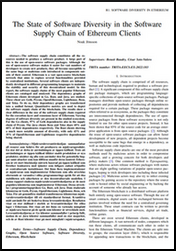





 Prologue
For over a year now, Fre(i)e Software GmbH (my company) is involved in Ubuntu Touch development. The development effort currently is handled by a mix of paid and voluntary developers/contributors under the umbrella of the UBports Foundation. We are approaching the official first release of Ubuntu Touch 20.04 with rapid pace.
And, if you are a non-Englisch native speaker, we'd like to ask you for help... Read below.
light+love
Prologue
For over a year now, Fre(i)e Software GmbH (my company) is involved in Ubuntu Touch development. The development effort currently is handled by a mix of paid and voluntary developers/contributors under the umbrella of the UBports Foundation. We are approaching the official first release of Ubuntu Touch 20.04 with rapid pace.
And, if you are a non-Englisch native speaker, we'd like to ask you for help... Read below.
light+love To achieve my
  In one week from now,
  A new release 0.2.18 of
 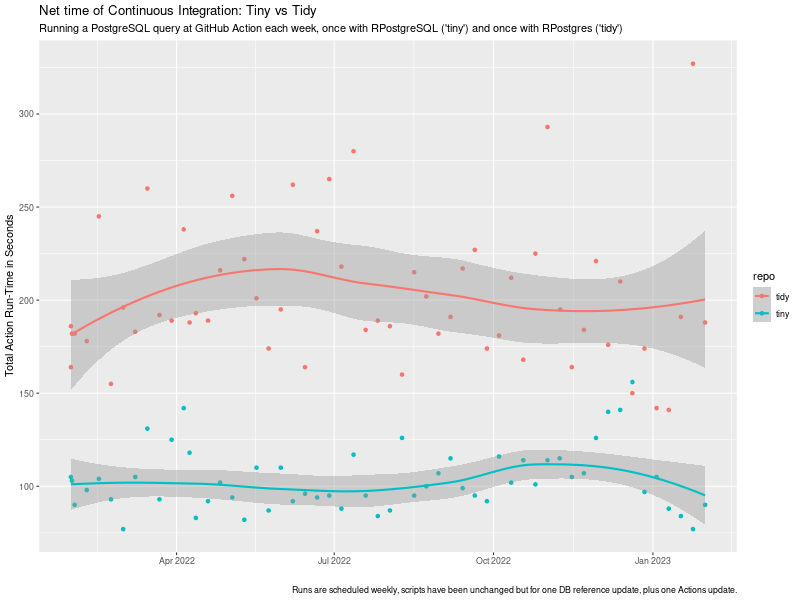 tiny vs tidy ci timing impact
chart
tiny vs tidy ci timing impact
chart
 I read somewhere a nice meme about Linux: Do you want an operating system or do you want an adventure? I love
it, because it is so true. What you are about to read is my adventure to set a usable screen resolution in a fresh
Debian testing installation.
The context is that I have two different Lenovo Thinkpad laptops with 16 screen and nvidia graphic cards. They are both
installed with the latest Debian testing. I use the closed-source nvidia drivers (they seem to work better than the nouveau
module). The desktop manager and environment that I use is lightdm + XFCE4. The monitor native resolution in both machines
is very high:
I read somewhere a nice meme about Linux: Do you want an operating system or do you want an adventure? I love
it, because it is so true. What you are about to read is my adventure to set a usable screen resolution in a fresh
Debian testing installation.
The context is that I have two different Lenovo Thinkpad laptops with 16 screen and nvidia graphic cards. They are both
installed with the latest Debian testing. I use the closed-source nvidia drivers (they seem to work better than the nouveau
module). The desktop manager and environment that I use is lightdm + XFCE4. The monitor native resolution in both machines
is very high: 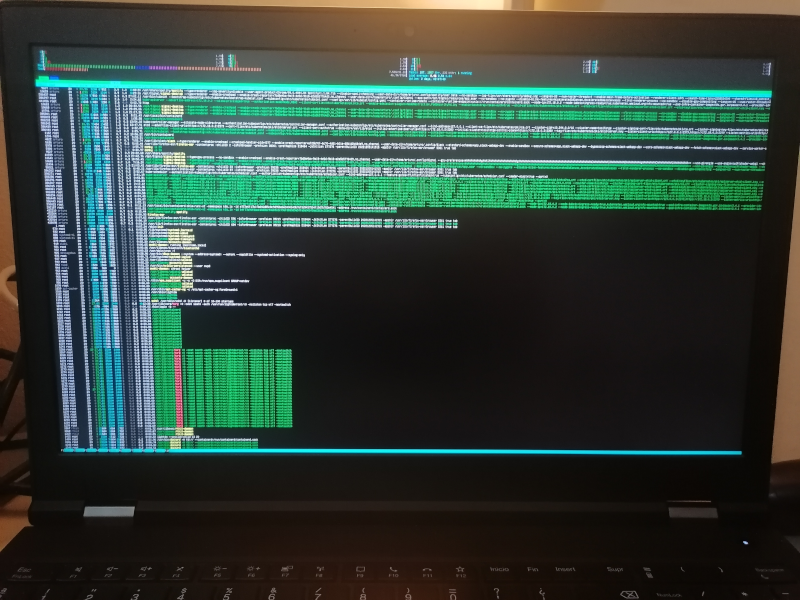 Everything in the system is affected by this:
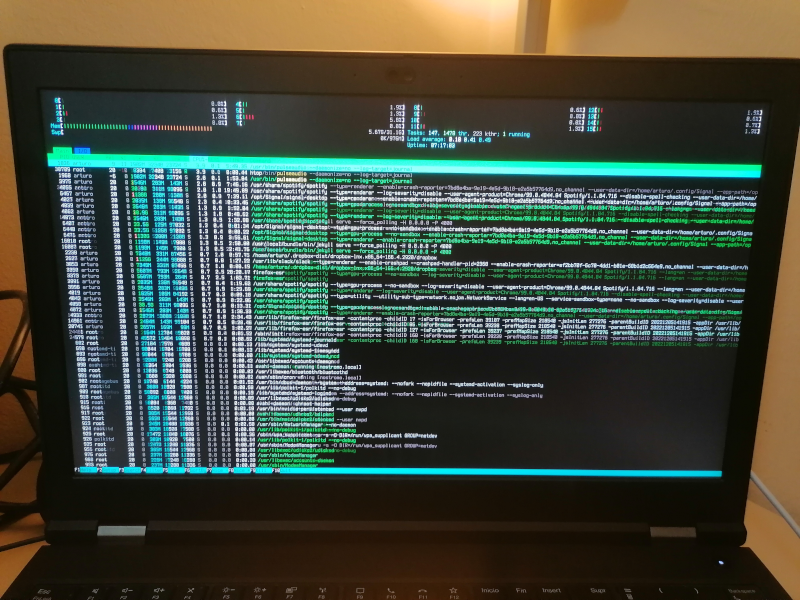 The truth is the solution is satisfying only to a degree. I m a person with good eyesight and can work with
these bit larger fonts. I m not sure if I can get larger fonts using this method, honestly.
After some search, I discovered that some folks already managed to describe the problem in detail and
filed a proper bug report in Debian, see
The truth is the solution is satisfying only to a degree. I m a person with good eyesight and can work with
these bit larger fonts. I m not sure if I can get larger fonts using this method, honestly.
After some search, I discovered that some folks already managed to describe the problem in detail and
filed a proper bug report in Debian, see  Greetings from Viluppuram, Tamil Nadu, South India!
 As a preparation and warm-up for DebConf in September, the Debian
people in India have organized a miniDebConf. Well, I don t want to be
unfair to them They have been regularly organizing miniDebConfs for
over a decade, and while most of the attendees are students local to
this state in South India (the very tip of the country; Tamil Nadu
is the Eastern side, and Kerala, where Kochi is and DebConf will be
held, is the Western side), I have talked with attendees from very
different regions of this country.
This miniDebConf is somewhat similar to similarly-scoped events I have
attended in Latin America: It is mostly an outreach conference, but
it s also a great opportunity for DDs in India to meet in the famous
hallway track.
India is incredibly multicultural. Today at the hotel, I was somewhat
surprised to see people from Kerala trying to read a text written in
Tamil: Not only the languages are different, but the writing systems
also are. From what I read, Tamil script is a bit simpler to Kerala s
Mayalayam, although they come from similar roots.
As a preparation and warm-up for DebConf in September, the Debian
people in India have organized a miniDebConf. Well, I don t want to be
unfair to them They have been regularly organizing miniDebConfs for
over a decade, and while most of the attendees are students local to
this state in South India (the very tip of the country; Tamil Nadu
is the Eastern side, and Kerala, where Kochi is and DebConf will be
held, is the Western side), I have talked with attendees from very
different regions of this country.
This miniDebConf is somewhat similar to similarly-scoped events I have
attended in Latin America: It is mostly an outreach conference, but
it s also a great opportunity for DDs in India to meet in the famous
hallway track.
India is incredibly multicultural. Today at the hotel, I was somewhat
surprised to see people from Kerala trying to read a text written in
Tamil: Not only the languages are different, but the writing systems
also are. From what I read, Tamil script is a bit simpler to Kerala s
Mayalayam, although they come from similar roots.