Russ Allbery: Review: Make It Stick
| Author: | Peter C. Brown |
| Author: | Henry L. Roediger III |
| Author: | Mark A. McDaniel |
| Publisher: | Belknap Press |
| Copyright: | 2014 |
| ISBN: | 0-674-72901-3 |
| Format: | Kindle |
| Pages: | 255 |
| Author: | Peter C. Brown |
| Author: | Henry L. Roediger III |
| Author: | Mark A. McDaniel |
| Publisher: | Belknap Press |
| Copyright: | 2014 |
| ISBN: | 0-674-72901-3 |
| Format: | Kindle |
| Pages: | 255 |
Upgrading my solar panels involved switching the house from 12 volts to 24
volts. No reasonably priced charge controllers can handle 1 KW of PV at 12
volts.
There might not be a lot of people who need to do this; entirely 12 volt
offgrid houses are not super common, and most upgrades these days probably
involve rooftop microinverters and so would involve a switch from DC to AC.
I did not find a lot of references online for converting a whole house's
voltage from 12V to 24V.
To prepare, I first checked that all the fuses and breakers were rated for
> 24 volts. (Actually, > 30 volts because it will be 26 volts or so when
charging.) Also, I checked for any shady wiring, and verified that all the
wires I could see in the attic and wiring closet were reasonably sized
(10AWG) and in good shape.
Then I:
I recently published a paper with Sayamindu Dasgupta that provides evidence in support of the idea that kids can learn to code more quickly when they are programming in their own language.
Millions of young people from around the world are learning to code. Often, during their learning experiences, these youth are using visual block-based programming languages like Scratch, App Inventor, and Code.org Studio. In block-based programming languages, coders manipulate visual, snap-together blocks that represent code constructs instead of textual symbols and commands that are found in more traditional programming languages.
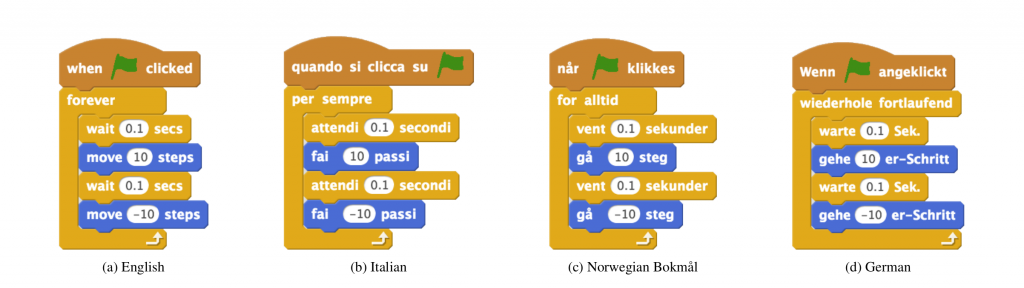
The textual symbols used in nearly all non-block-based programming languages are drawn from English consider if statements and for loops for common examples. Keywords in block-based languages, on the other hand, are often translated into different human languages. For example, depending on the language preference of the user, an identical set of computing instructions in Scratch can be represented in many different human languages:
Examples of a short piece of Scratch code shown in four different human languages: English, Italian, Norwegian Bokm l, and German.
Summary of the results of our model for two prototypical individuals.
Nageru 1.6.1 is on its way, and what was intended
to only be a release centered around monitoring improvements (more
specifically a full set of native Prometheus]
metrics) actually ended up getting a fairly substantial change to how Nageru
manages its frame queues.
To understand what's changing and why, it's useful to first understand the
history of Nageru's queue management. Nageru 1.0.0 started out with a fairly
simple scheme, but with some basics that are still relevant today: One of the
input cards was deemed the master card, and whenever it delivers a frame,
the master clock ticks and an output frame is produced. (There are some
subtleties about dropped frames and/or the master card changing frame rates,
but I'm going to ignore them, since they're not important to the
discussion.)
To this end, every card keeps a preallocated frame queue; when a card
delivers a frame, it's put into the queue, and when the master clock ticks,
it tries picking out one frame from each of the other card's queues to mix
together. Note that mix here could be as simple as picking one input and
throwing all the other ones away; the queueing algorithm doesn't care,
it just feeds all of them to the theme and lets that run whatever GPU code
it needs to match the user's preferences.
The only thing that really keeps the queues bounded is that the frames in
them are preallocated (in GPU memory), so if one queue gets longer than 16
frames, Nageru starts dropping it. But is 16 the right number? There are
two conflicting demands here, ignoring memory usage:
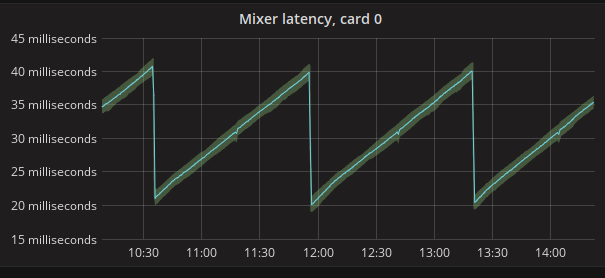
As you can see, the latency goes up, up, up until Nageru figures it's now
safe to drop a frame, and then does it in one clean drop event; no more
hundreds on drops involved. There are very late frame arrivals involved in
this run two extra frame drops, to be precise but the algorithm simply
determines immediately that they are outliers, and drops them without letting
them linger in the queue. (Immediate dropping is usually preferred to
sticking around for a bit and then dropping it later, as it means you only
get one disturbance event in your stream as opposed to two. Of course, you
can only do it if you're reasonably sure it won't lead to more underruns
later.)
Nageru 1.6.1 will ship before Solskogen, as I
intend to run it there :-) And there will probably be lovely premade
Grafana dashboards from the Prometheus data.
Although it would have been a lot nicer if Grafana were
more packaging-friendly, so I could pick it up from stock Debian and run it on
armhf. Hrmf. :-)
So recently I wrote a Linux Security Module (LSM) which would deny execution of commands, unless an extended attribute existed upon the filesystem belonging to the executables.
The whitelist-LSM worked well, but it soon became apparent that it was a little pointless. Most security changes are pointless unless you define what you're defending against - your "threat model".
In my case it was written largely as a learning experience, but also because I figured it seemed like it could be useful. However it wasn't actually as useful because you soon realize that you have to whitelist too much:
redis-server binary must be executable, to the redis-user, otherwise it won't run./usr/bin/git must be executable to the git user.alice must run executable blah. If alice can run it, then so can mallory. At which point you realize the exercise is not so useful.
Taking a step back I realized that what I wanted to to prevent was the execution of unknown/unexpected, and malicious binaries How do you identify known-good binaries? Well hashes & checksums are good. So for my second attempt I figured I'd not look for a mere "flag" on a binary, instead look for a valid hash.
Now my second LSM is invoked for every binary that is executed by a user:
sha1 hash is calculated of the files contents./usr/bin/perl is whitelisted then /usr/bin/perl /tmp/exploit.pl will succeed./usr/bin/python is whitelisted then the same applies.(Yes I know aboutPerhaps the only other thing to explore is the complexity in allowing/denying actions based on the user - in a human-readable fashion, not via UIDs. SoIMAandEVM- this was a simple project for learning purposes. Public-key signatures will be something I'll look at next/soon/later. :)
www-data can execute some programs, alice can run a different set of binaries, and git can only run /usr/bin/git.
Of course down that path lies apparmour, selinux, and madness..
A new minor version 0.2.3 of RcppCCTZ is now on CRAN.
RcppCCTZ uses Rcpp to bring CCTZ to R. CCTZ is a C++ library for translating between absolute and civil times using the rules of a time zone. In fact, it is two libraries. One for dealing with civil time: human-readable dates and times, and one for converting between between absolute and civil times via time zones. The RcppCCTZ page has a few usage examples and details.
This version ensures that we set the TZDIR environment variable correctly on the old dreaded OS that does not come with proper timezone information---an issue which had come up while preparing the next (and awesome, trust me) release of nanotime. It also appears that I failed to blog about 0.2.2, another maintenance release, so changes for both are summarised next.
We also have a diff to the previous version thanks to CRANberries. More details are at the RcppCCTZ page; code, issue tickets etc at the GitHub repository.Changes in version 0.2.3 (2017-06-19)
- On Windows, the
TZDIRenvironment variable is now set in.onLoad()- Replaced
init.cwith registration code inside ofRcppExports.cppthanks to Rcpp 0.12.11.Changes in version 0.2.2 (2017-04-20)
- Synchronized with upstream CCTZ
- The
time_pointobject is instantiated explicitly for nanosecond use which appears to be required on macOS
This post by Dirk Eddelbuettel originated on his Thinking inside the box blog. Please report excessive re-aggregation in third-party for-profit settings.
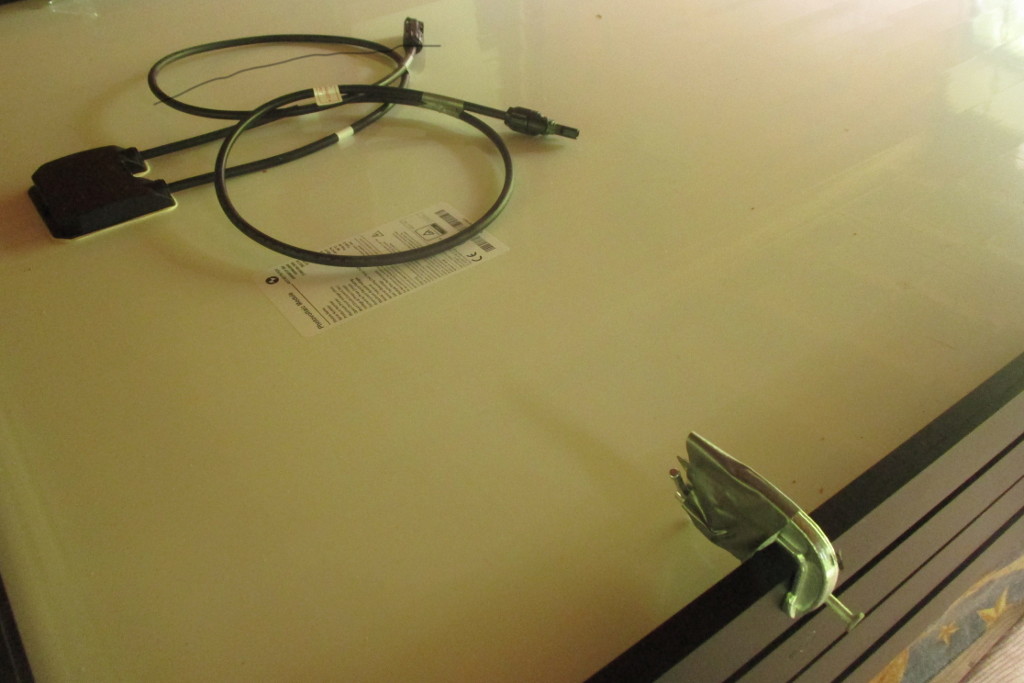
I've installed 1 kilowatt of solar panels on my roof, using professional
grade eqipment. The four panels are Astronergy 260 watt panels, and they're
mounted on IronRidge XR100 rails. Did it all myself, without help.
I had three goals for this install:
The last gotcha, which I luckily anticipated, is that panels will slide
down off the rails before you can get them bolted down. This is where a
second pair of hands would have been most useful. But, I macguyvered a
solution, attaching temporary clamps before bringing a panel up, that
stopped it sliding down while I was attaching it.
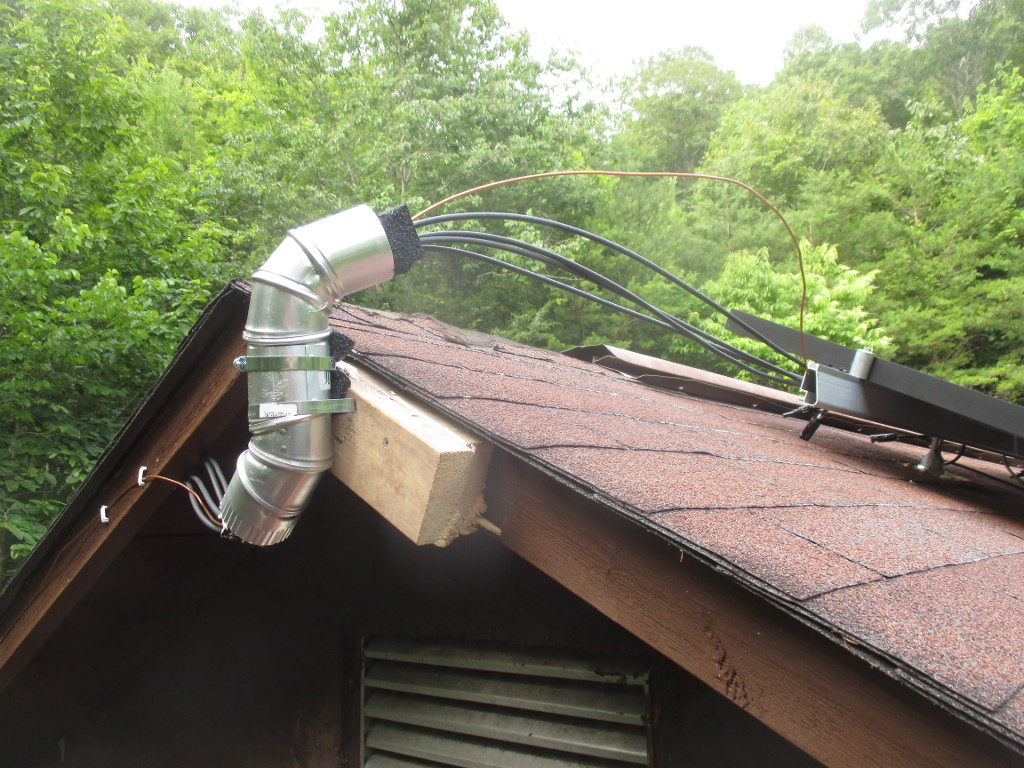
I also finished the outside wiring today. Including the one hack of this
install so far. Since the local hardware store didn't have a suitable
conduit to bring the cables off the roof, I cobbled one together from pipe,
with foam inserts to prevent chafing.
While I have 1 kilowatt of power on my roof now, I won't be able to use it
until next week. After ordering the upgrade, I realized that my old PWM
charge controller would be able to handle less than half the power, and to
get even that I would have needed to mount the fuse box near the top of the
roof and run down a large and expensive low-voltage high-amperage cable,
around OO AWG size. Instead, I'll be upgrading to a MPPT controller, and
running a single 150 volt cable to it.
Then, since the MPPT controller can only handle 1 kilowatt when it's
converting to 24 volts, not 12 volts, I'm gonna have to convert the
entire house over from 12V DC to 24V DC, including changing all the light
fixtures and rewiring the battery bank...
It may look that the decision for pagure as alioth replacement is already finalized, but that s not really true. I got a lot of feedback and tips in the last weeks, those made postpone my decision. Several alternative systems were recommended to me, here are a few examples:
and probably several others. I won t be able to evaluate all of those systems in
advance of our sprint.
That s where you come in: if you are familiar with one of those systems, or want to get familiar with them,
join us on our mailing list
and create a wiki page below https://wiki.debian.org/Alioth/GitNext with a review of
your system.
What do we need to know?
Apart from being somewhat slow, one of the downsides of the
original Raspberry Pi SoC was that it had an old ARM11 core which
implements the ARMv6 architecture. This was particularly
unfortunate as most common distributions (Debian, Ubuntu, Fedora,
etc) standardized on the ARMv7-A architecture as a minimum for
their ARM hardfloat ports. Which is one of the reasons for Raspbian
and the various other RPI specific distributions.
Happily, with the new Raspberry Pi
2 using Cortex-A7 Cores (which implement the ARMv7-A
architecture) this issue is out of the way, which means that a a
standard Debian hardfloat userland will run just fine. So the
obvious first thing to do when an RPI 2 appeared on my desk was to
put together a quick Debian Jessie image for it.
The result of which can be found at: https://images.collabora.co.uk/rpi2/
Login as root with password debian (Obviously do change the
password and create a normal user after booting). The image is 3G,
so should fit on any SD card marketed as 4G or bigger. Using
bmap-tools
for flashing is recommended, otherwise you'll be waiting for 2.5G
of zeros to be written to the card, which tends to be rather
boring. Note that the image is really basic and will just get you
to a login prompt on either serial or hdmi, batteries are very much
not included, but can be apt-getted :).
Technically, this image is simply a Debian Jessie debootstrap
with a extra packages for hardware support. Unlike Raspbian the
first partition (which contains the firmware & kernel files to
boot the system) is mounted on /boot/firmware rather then on /boot.
This is because the VideoCore expects the first partition to be a
FAT filesystem, but mounting FAT on /boot really doesn't work right
on Debian systems as it contains files managed by dpkg (e.g. the
kernel package) which requires a POSIX compatible filesystem.
Essentially the same reason why Debian is using /boot/efi for the
ESP partition on Intel systems rather the mounting it on /boot
directly.
For reference, the RPI2 specific packages in this image are from
https://repositories.collabora.co.uk/debian/
in the jessie distribution and rpi2 component (this repository is
enabled by default on the image). The relevant packages there
are:

domain=int.foobar.example
dhcp-range=192.168.0.240,192.168.0.242,255.255.255.0,1h
dhcp-boot=bootnetx64.efi
pxe-service=X86-64_EFI, "Boot UEFI PXE-64", bootnetx64.efi
enable-tftp
tftp-root=/usr/lib/debian-installer/images/8/amd64/text
dhcp-option=3,192.168.0.1
dhcp-host=00:c0:ff:ee:00:01,192.168.0.123,foobar-01
Now you've to link /usr/lib/debian-installer/images/8/amd64/text/bootnetx64.efi
to /usr/lib/debian-installer/images/8/amd64/text/debian-installer/amd64/bootnetx64.efi.
That got us of the ground and we had a working UEFI PXE boot that got
us into debian-installer.
Feeding d-i the preseed file
Next we added some grub.cfg settings and parameterized some basic stuff to
be handed over to d-i via the kernel command line. You'll find the correct
grub.cfg in
/usr/lib/debian-installer/images/8/amd64/text/debian-installer/amd64/grub/grub.cfg.
We added the following two lines to automate the start of the installer:
set default="0"
set timeout=5
and our kernel command line looks like this:
linux /debian-installer/amd64/linux vga=788 --- auto=true interface=eth1 netcfg/dhcp_timeout=60 netcfg/choose_interface=eth1 priority=critical preseed/url=tftp://192.168.0.2/preseed.cfg quiet
Important points:
# auto method must be lvm
d-i partman-auto/method string lvm
d-i partman-lvm/device_remove_lvm boolean true
d-i partman-md/device_remove_md boolean true
d-i partman-lvm/confirm boolean true
d-i partman-lvm/confirm_nooverwrite boolean true
d-i partman-basicfilesystems/no_swap boolean false
# Keep that one set to true so we end up with a UEFI enabled
# system. If set to false, /var/lib/partman/uefi_ignore will be touched
d-i partman-efi/non_efi_system boolean true
# enforce usage of GPT - a must have to use EFI!
d-i partman-basicfilesystems/choose_label string gpt
d-i partman-basicfilesystems/default_label string gpt
d-i partman-partitioning/choose_label string gpt
d-i partman-partitioning/default_label string gpt
d-i partman/choose_label string gpt
d-i partman/default_label string gpt
d-i partman-auto/choose_recipe select boot-root-all
d-i partman-auto/expert_recipe string \
boot-root-all :: \
538 538 1075 free \
$iflabel gpt \
$reusemethod \
method efi \
format \
. \
128 512 256 ext2 \
$defaultignore \
method format format \
use_filesystem filesystem ext2 \
mountpoint /boot \
. \
1024 4096 15360 ext4 \
$lvmok \
method format format \
use_filesystem filesystem ext4 \
mountpoint / \
. \
1024 4096 15360 ext4 \
$lvmok \
method format format \
use_filesystem filesystem ext4 \
mountpoint /var \
. \
1024 1024 -1 ext4 \
$lvmok \
method format format \
use_filesystem filesystem ext4 \
mountpoint /var/lib \
.
# This makes partman automatically partition without confirmation, provided
# that you told it what to do using one of the methods above.
d-i partman-partitioning/confirm_write_new_label boolean true
d-i partman/choose_partition select finish
d-i partman-md/confirm boolean true
d-i partman/confirm boolean true
d-i partman/confirm_nooverwrite boolean true
# This is fairly safe to set, it makes grub install automatically to the MBR
# if no other operating system is detected on the machine.
d-i grub-installer/only_debian boolean true
d-i grub-installer/with_other_os boolean true
d-i grub-installer/bootdev string /dev/sda
I hope that helps to ease the processes to setup automated UEFI PXE installations
for some other people out there still dealing with bare metal systems. Some
settings took us some time to figure out, for example
d-i partman-efi/non_efi_system boolean true required some searching on
codesearch.d.n (amazing ressource
if you're writing preseed files and need to find the correct templates) and
reading scripts on git.d.o where you'll
find the source for partman-* and grub-installer.
Kudos
Thanks especially to P.P. and M.K. to figure out all those details.
I recently finished a paper that presents a novel social computing system called the Wikipedia Adventure. The system was a gamified tutorial for new Wikipedia editors. Working with the tutorial creators, we conducted both a survey of its users and a randomized field experiment testing its effectiveness in encouraging subsequent contributions. We found that although users loved it, it did not affect subsequent participation rates.
Start screen for the Wikipedia Adventure.
The number of active, registered editors ( 5 edits per month) to Wikipedia over time. From Halfaker, Geiger, and Morgan 2012.The Wikipedia Adventure was designed to address issues that new editors frequently encountered while learning how to contribute to Wikipedia. It is structured into different missions that guide users through various aspects of participation on Wikipedia, including how to communicate with other editors, how to cite sources, and how to ensure that edits present a neutral point of view. The sequence of the missions gives newbies an overview of what they need to know instead of having to figure everything out themselves. Additionally, the theme and tone of the tutorial sought to engage new users, rather than just redirecting them to the troves of policy pages.
Those who play the tutorial receive automated badges on their user page for every mission they complete. This signals to veteran editors that the user is acting in good-faith by attempting to learn the norms of Wikipedia.
An example of a badge that a user receives after demonstrating the skills to communicate with other users on Wikipedia.
Survey responses about how users felt about TWA.
Survey responses about what users learned through TWA.
This blog post, and the open access paper that it describes, is a collaborative project with Sneha Narayan, Jake Orlowitz, Jonathan Morgan, and Aaron Shaw. Financial support came from the US National Science Foundation (grants IIS-1617129 and IIS-1617468), Northwestern University, and the University of Washington. We also published all the data and code necessary to reproduce our analysis in a repository in the Harvard Dataverse. Sneha posted the material in this blog post over on the Community Data Science Collective Blog.
Dear Lazyweb,
About a week ago, I learnt about the release of an interesting book by the fine people at Creative Commons: Made with Creative Commons. The book itself is, of course, CC BY-SA-licensed.
I downloaded it and started reading right away. Some minutes later, I ordered a dead-tree copy, which arrived a couple of days ago. (I'm linking to the publisher's page, but bought it from Amazon M xico... Shipping it from Denmark would not have been as cheap and fast, I guess).
Anyway, given my workplace, given the community I know, given I know something like this is much needed... I will start a Spanish translation of the content. There are at least two other people interested in participating, and I haven't yet publicized my intentions (this is the first public statement about it).
So, dear Lazyweb: What I need is a good framework for doing this. I started by creating a Git repository, and we were discussing to translate to Markdown (to later format according to the desired output) but then I thought... If we want the translation to be updateable, and to be able to properly accept other people's work, maybe a better format is warranted?
So, my current idea is to create a Markdown version for the English original, and find a way to shoehorn^Wseparate it by paragraphs and feed it to Gettext, which is the best translation framework I have used (but is meant for code translation, not for full-text)...
Dear lazyweb: What tools do you recommend me to use? Quite important to me: Are they Free tools? Are they easy to use by third-parties, maybe incorporating work via Git? Or, at least, via a Web front-end that allows me as a project lead to review and approve/fix/reject strings?
Thanks, lazyweb!
The new RcppArmadillo release 0.7.900.2.0 is now on CRAN, and the Debian package was just updated as well.
Armadillo is a powerful and expressive C++ template library for linear algebra aiming towards a good balance between speed and ease of use with a syntax deliberately close to a Matlab. RcppArmadillo integrates this library with the R environment and language--and is widely used by (currently) 350 other packages on CRAN---an increase of 32 since the last CRAN release of 0.7.800.2.0 in April!
With the 7.900.* series of Armadillo, Conrad has started to more fully utilize OpenMP (also see Wikipedia on OpenMP) for operations that can be parallelized. To use this in your package you need to update its src/Makevars ,.win file similarly to what the skeleton default now uses
PKG_CXXFLAGS = $(SHLIB_OPENMP_CXXFLAGS)
PKG_LIBS = $(SHLIB_OPENMP_CFLAGS) $(LAPACK_LIBS) $(BLAS_LIBS) $(FLIBS)
and you may want to enable C++11 while you are at it---though this may pose issues with older-than-ancient RHEL installations which are still (way too) pervasive so we do not do it by default (yet).
Here, we once again rely on the build infrastructure automagically provided by R itself: if and when OpenMP is available, R will use it via $(SHLIB_OPENMP_CXXFLAGS) etc; see the fine WRE manual for details. That said, some operating systems make this harder than other, and macOS usually takes the crown. See for example this blog post by James for surviving in that environment. I am a little short of details because on Linux these things just work, and have for well over a decade. The rcpp-devel mailing list will be the best place for questions.
Changes in this release relative to the previous CRAN release are as follows:
Courtesy of CRANberries, there is a diffstat report. More detailed information is on the RcppArmadillo page. Questions, comments etc should go to the rcpp-devel mailing list off the R-Forge page.Changes in RcppArmadillo version 0.7.900.2.0 (2017-06-02)
- Upgraded to Armadillo release 7.900.2 (Evil Banana Republic)
- Expanded
clamp()to handle cubes- Computationally expensive element-wise functions (such as
exp(),log(),cos(), etc) can now be automatically sped up via OpenMP; this requires a C++11/C++14 compiler with OpenMP 3.0+ support for GCC and clang compilers- One caveat: when using GCC, use of
-march=nativein conjunction with-fopenmpmay lead to speed regressions on recent processors- Added gcc 7 to support compiler check (James Balamuta in #128 addressing #126).
- A unit test helper function for
rmultinomwas corrected (#133).- OpenMP support was added to the skeleton helper in
inline.R
This post by Dirk Eddelbuettel originated on his Thinking inside the box blog. Please report excessive re-aggregation in third-party for-profit settings.
https://www.kuehlbox.wtf/index.php#repoHe was very helpful in getting me started on Linux with Husky and shared many of his config files with me. Big thanks for that! He also used our discussions to write a blog article about this. Although it's German only you can find the necessary config files. You can find that on:
https://www.stimpyrama.org/blog/17-computer/138-ftnsetupIt covers nearly all necessary aspects:
Tonight I read this weeks LWN quotes-page a little later than usual because I was busy at work for most of the day. Anyway as always LWNs content was awesome, and this particular list lead to an interesting discussion about a new Linux-Security-Module (LSM).
That read weirdly, what I was trying to say was that every Thursday morning I like to read LWN at work. Tonight is the first chance I had to get round to it.One of the later replies in the thread was particularly interesting as it said:
Suggestion:
Create an security module that looks for the attribute
security.WHITELISTED
on things being executed/mmapped and denys it if the attribute
isn't present. Create a program (whitelistd) that reads
/etc/whitelist.conf and scans the system to ensure that only
things on the list have the attribute.
So I figured that was a simple idea, and it didn't seem too hard even for myself as a non-kernel non-developer. There are several linux security modules included in the kernel-releases, beneath the top-level security/ directory, so I assumed I could copy & paste code around them to get something working.
During the course of all this work, which took about 90 minutes from start to Finnish (that pun never gets old), this online documentation was enormously useful:
Brief attr primer
If you're not familiar with the attr tool it's pretty simple. You can assign values to arbitrary labels on files. The only annoying thing is you have to use extra-flags to commands like rsync, tar, cp, etc, to preserve the damn things.
Set three attributes on the file named moi:
$ touch moi
$ attr -s forename -V "Steve" moi
$ attr -s surname -V "Kemp" moi
$ attr -s name -V "Steve Kemp" moi
Now list the attributes present:
$ attr -l moi
Attribute "name" has a 10 byte value for moi
Attribute "forename" has a 5 byte value for moi
Attribute "surname" has a 4 byte value for moi
And retrieve one?
$ attr -q -g name moi
Steve Kemp
LSM Skeleton
My initial starting point was to create "steve_lsm.c", with the following contents:
#include <linux/lsm_hooks.h>
/*
* Log things for the moment.
*/
static int steve_bprm_check_security(struct linux_binprm *bprm)
printk(KERN_INFO "STEVE LSM check of %s\n", bprm->filename);
return 0;
/*
* Only check exec().
*/
static struct security_hook_list steve_hooks[] =
LSM_HOOK_INIT(bprm_check_security, steve_bprm_check_security),
;
/*
* Somebody set us up the bomb.
*/
static void __init steve_init(void)
security_add_hooks(steve_hooks, ARRAY_SIZE(steve_hooks), "steve");
printk(KERN_INFO "STEVE LSM initialized\n");
With that in place I had to modify the various KBuild files beneath
security/ to make sure this could be selected as an LSM, and add in
a Makefile to the new directory security/steve/.
With the boiler-plate done though, and the host machine rebooted into my
new kernel it was simple to test things out.
Obviously the first step, post-boot, is to make sure that the module
is active, which can be done in two ways, looking at the output of dmesg,
and explicitly listing the modules available:
~# dmesg grep STEVE head -n2
STEVE LSM initialized
STEVE LSM check of /init
$ echo $(cat /sys/kernel/security/lsm)
capability,steve
Making the LSM functional
The next step was to make the module do more than mere logging. In short
this is what we want:
security.WHITELISTED.
__vfs_getxattr function. All in all our module becomes this:
#include <linux/xattr.h>
#include <linux/binfmts.h>
#include <linux/lsm_hooks.h>
#include <linux/sysctl.h>
#include <linux/ptrace.h>
#include <linux/prctl.h>
#include <linux/ratelimit.h>
#include <linux/workqueue.h>
#include <linux/string_helpers.h>
#include <linux/task_work.h>
#include <linux/sched.h>
#include <linux/spinlock.h>
#include <linux/lsm_hooks.h>
/*
* Perform a check of a program execution/map.
*
* Return 0 if it should be allowed, -EPERM on block.
*/
static int steve_bprm_check_security(struct linux_binprm *bprm)
// The current task & the UID it is running as.
const struct task_struct *task = current;
kuid_t uid = task->cred->uid;
// The target we're checking
struct dentry *dentry = bprm->file->f_path.dentry;
struct inode *inode = d_backing_inode(dentry);
// The size of the label-value (if any).
int size = 0;
// Root can access everything.
if ( uid.val == 0 )
return 0;
size = __vfs_getxattr(dentry, inode, "user.whitelisted", NULL, 0);
if ( size >= 0 )
printk(KERN_INFO "STEVE LSM check of %s resulted in %d bytes from 'user.whitelisted' - permitting access for UID %d\n", bprm->filename, size, uid.val );
return 0;
printk(KERN_INFO "STEVE LSM check of %s denying access for UID %d [ERRO:%d] \n", bprm->filename, uid.val, size );
return -EPERM;
/*
* The hooks we wish to be installed.
*/
static struct security_hook_list steve_hooks[] =
LSM_HOOK_INIT(bprm_check_security, steve_bprm_check_security),
;
/*
* Initialize our module.
*/
void __init steve_add_hooks(void)
/* register ourselves with the security framework */
security_add_hooks(steve_hooks, ARRAY_SIZE(steve_hooks), "steve");
printk(KERN_INFO "STEVE LSM initialized\n");
Once again we reboot with this new kernel, and we test that the LSM
is active. After the basic testing, as before, we can now test real
functionality. By default no binaries will have the attribute
we look for present - so we'd expect ALL commands to fail, unless
executed by root. Let us test that:
~# su - nobody -s /bin/sh
No directory, logging in with HOME=/
Cannot execute /bin/sh: Operation not permitted
That looks like it worked. Let us allow users to run /bin/sh:
~# attr -s whitelisted -V 1 /bin/sh
Unfortunately that fails, because symlinks are weird, but repeating the test with /bin/dash works as expected:
~# su - nobody -s /bin/dash
No directory, logging in with HOME=/
Cannot execute /bin/dash: Operation not permitted
~# attr -s whitelisted -V 1 /bin/dash
~# attr -s whitelisted -V 1 /usr/bin/id
~# su - nobody -s /bin/dash
No directory, logging in with HOME=/
$ id
uid=65534(nobody) gid=65534(nogroup) groups=65534(nogroup)
$ uptime
-su: 2: uptime: Operation not permitted
And our logging shows the useful results as we'd expect:
STEVE LSM check of /usr/bin/id resulted in 1 bytes from 'user.WHITELISTED' - permitting access for UID 65534
STEVE LSM check of /usr/bin/uptime denying access for UID 65534 [ERRO:-95]
Surprises
If you were paying careful attention you'll see that we changed what we
did part-way through this guide.
security.WHITELISTED.user.whitelisted.
whitelisted.user. prefix is added to the name.
Could be worth some research by somebody with more time on their hands than I have.
Anyway I don't expect this is a terribly useful module, but it was my first, and I think it should be pretty stable. Feedback on my code certainly welcome!
Introduction
I've written before about using a U2F key with PAM. This post
continues the theme and explains how to use a smartcard with GnuPG for
storing OpenPGP private keys. Specifically, a Yubikey 4 card, because
that's what I have, but any good GnuPG compatible card should work.
The Yubikey is both a GnuPG compatible smart card, and a U2F card. The
Yubikey 4 can handle keys up to 4096 bits. Older Yubikeys can only
handle keys up to 2095 bits.
The reason to do this is to make it harder for an attacker to steal
your encryption keys.
I will assume you don't already have an OpenPGP key, or are willing to
generate a new one. I will also assume you run Debian stretch; some of
the desktop environment setup details may differ between Debian
versions or between Linux distributions. You will need:
~/.gnupg/gpg.conf:
personal-digest-preferences SHA512
cert-digest-algo SHA512
default-preference-list SHA512 SHA384 SHA256 SHA224 AES256 AES192 AES CAST5 ZLIB BZIP2 ZIP Uncompressed
personal-cipher-preferences TWOFISH CAMELLIA256 AES 3DES
keyserver pool.sks-keyservers.net
$ gpg --full-generate-key
gpg (GnuPG) 2.1.18; Copyright (C) 2017 Free Software Foundation, Inc.
This is free software: you are free to change and redistribute it.
There is NO WARRANTY, to the extent permitted by law.
Please select what kind of key you want:
(1) RSA and RSA (default)
(2) DSA and Elgamal
(3) DSA (sign only)
(4) RSA (sign only)
Your selection? 4
RSA keys may be between 1024 and 4096 bits long.
What keysize do you want? (2048) 4096
Requested keysize is 4096 bits
Please specify how long the key should be valid.
0 = key does not expire
= key expires in n days
w = key expires in n weeks
m = key expires in n months
y = key expires in n years
Key is valid for? (0) 1y
Key expires at Tue 29 May 2018 06:43:54 PM EEST
Is this correct? (y/N) y
GnuPG needs to construct a user ID to identify your key.
Real name: Lars Wirzenius
Email address: liw@liw.fi
Comment: test key
You selected this USER-ID:
"Lars Wirzenius (test key) <liw@liw.fi>>"
Change (N)ame, (C)omment, (E)mail or (O)kay/(Q)uit? o
We need to generate a lot of random bytes. It is a good idea to perform
some other action (type on the keyboard, move the mouse, utilize the
disks) during the prime generation; this gives the random number
generator a better chance to gain enough entropy.
gpg: key 25FB738D6EE435F7 marked as ultimately trusted
gpg: directory '/home/liw/.gnupg/openpgp-revocs.d' created
gpg: revocation certificate stored as '/home/liw/.gnupg/openpgp-revocs.d/A734C10BF2DF39D19DC0F6C025FB738D6EE435F7.rev'
public and secret key created and signed.
Note that this key cannot be used for encryption. You may want to use
the command "--edit-key" to generate a subkey for this purpose.
pub rsa4096 2017-05-29 [SC] [expires: 2018-05-29]
A734C10BF2DF39D19DC0F6C025FB738D6EE435F7
uid Lars Wirzenius (test key) <liw@liw.fi>
$ gpg --list-secret-keys
/home/liw/.gnupg/pubring.kbx
----------------------------
sec rsa4096 2017-05-29 [SC] [expires: 2018-05-29]
A734C10BF2DF39D19DC0F6C025FB738D6EE435F7
uid [ultimate] Lars Wirzenius (test key) <liw@liw.fi>
keyid is the key identifier shown in the key
listing, A734C10BF2DF39D19DC0F6C025FB738D6EE435F7 above). Use the
--expert option to be able to add an authentication-only subkey.$ gpg --edit-key --expert A734C10BF2DF39D19DC0F6C025FB738D6EE435F7z
gpg (GnuPG) 2.1.18; Copyright (C) 2017 Free Software Foundation, Inc.
This is free software: you are free to change and redistribute it.
There is NO WARRANTY, to the extent permitted by law.
Secret key is available.
sec rsa4096/25FB738D6EE435F7
created: 2017-05-29 expires: 2018-05-29 usage: SC
trust: ultimate validity: ultimate
[ultimate] (1). Lars Wirzenius (test key) <liw@liw.fi>
gpg> addkey
Please select what kind of key you want:
(3) DSA (sign only)
(4) RSA (sign only)
(5) Elgamal (encrypt only)
(6) RSA (encrypt only)
(7) DSA (set your own capabilities)
(8) RSA (set your own capabilities)
(10) ECC (sign only)
(11) ECC (set your own capabilities)
(12) ECC (encrypt only)
(13) Existing key
Your selection? 4
RSA keys may be between 1024 and 4096 bits long.
What keysize do you want? (2048) 4096
Requested keysize is 4096 bits
Please specify how long the key should be valid.
0 = key does not expire
= key expires in n days
w = key expires in n weeks
m = key expires in n months
y = key expires in n years
Key is valid for? (0) 1y
Key expires at Tue 29 May 2018 06:44:52 PM EEST
Is this correct? (y/N) y
Really create? (y/N) y
We need to generate a lot of random bytes. It is a good idea to perform
some other action (type on the keyboard, move the mouse, utilize the
disks) during the prime generation; this gives the random number
generator a better chance to gain enough entropy.
sec rsa4096/25FB738D6EE435F7
created: 2017-05-29 expires: 2018-05-29 usage: SC
trust: ultimate validity: ultimate
ssb rsa4096/05F88308DFB71774
created: 2017-05-29 expires: 2018-05-29 usage: S
[ultimate] (1). Lars Wirzenius (test key) <liw@liw.fi>
gpg> addkey
Please select what kind of key you want:
(3) DSA (sign only)
(4) RSA (sign only
(5) Elgamal (encrypt only)
(6) RSA (encrypt only)
(7) DSA (set your own capabilities)
(8) RSA (set your own capabilities)
(10) ECC (sign only)
(11) ECC (set your own capabilities)
(12) ECC (encrypt only)
(13) Existing key
Your selection? 6
RSA keys may be between 1024 and 4096 bits long.
What keysize do you want? (2048) 4096
Requested keysize is 4096 bits
Please specify how long the key should be valid
0 = key does not expire
= key expires in n days
w = key expires in n weeks
m = key expires in n months
y = key expires in n years
Key is valid for? (0) 1y
Key expires at Tue 29 May 2018 06:45:22 PM EEST
Is this correct? (y/N) y
Really create? (y/N) y
We need to generate a lot of random bytes. It is a good idea to perform
some other action (type on the keyboard, move the mouse, utilize the
disks) during the prime generation; this gives the random number
generator a better chance to gain enough entropy.
sec rsa4096/25FB738D6EE435F7
created: 2017-05-29 expires: 2018-05-29 usage: SC
trust: ultimate validity: ultimate
ssb rsa4096/05F88308DFB71774
created: 2017-05-29 expires: 2018-05-29 usage: S
ssb rsa4096/2929E8A96CBA57C7
created: 2017-05-29 expires: 2018-05-29 usage: E
[ultimate] (1). Lars Wirzenius (test key) <liw@liw.fi>
gpg> addkey
Please select what kind of key you want:
(3) DSA (sign only)
(4) RSA (sign only)
(5) Elgamal (encrypt only)
(6) RSA (encrypt only)
(7) DSA (set your own capabilities)
(8) RSA (set your own capabilities)
(10) ECC (sign only)
(11) ECC (set your own capabilities)
(12) ECC (encrypt only)
(13) Existing key
Your selection? 8
Possible actions for a RSA key: Sign Encrypt Authenticate
Current allowed actions: Sign Encrypt
(S) Toggle the sign capability
(E) Toggle the encrypt capability
(A) Toggle the authenticate capability
(Q) Finished
Your selection? a
Possible actions for a RSA key: Sign Encrypt Authenticate
Current allowed actions: Sign Encrypt Authenticate
(S) Toggle the sign capability
(E) Toggle the encrypt capability
(A) Toggle the authenticate capability
(Q) Finished
Your selection? s
Possible actions for a RSA key: Sign Encrypt Authenticate
Current allowed actions: Encrypt Authenticate
(S) Toggle the sign capability
(E) Toggle the encrypt capability
(A) Toggle the authenticate capability
(Q) Finished
Your selection? e
Possible actions for a RSA key: Sign Encrypt Authenticate
Current allowed actions: Authenticate
(S) Toggle the sign capability
(E) Toggle the encrypt capability
(A) Toggle the authenticate capability
(Q) Finished
Your selection? q
RSA keys may be btween 1024 and 4096 bits long.
What keysize do you want? (2048) 4096
Requested keysize is 4096 bits
Please specify how long the key should be valid.
0 = key does not expire
= key expires in n days
w = key expires in n weeks
m = key expires in n months
y = key expires in n years
Key is valid for? (0) 1y
Key expires at Tue 29 May 2018 06:45:56 PM EEST
Is this correct? (y/N) y
Really create? (y/N) y
We need to generate a lot of random bytes. It is a good idea to perform
some other action (type on the keyboard, move the mouse, utilize the
disks) during the prime generation; this gives the random number
generator a better chance to gain enough entropy.
sec rsa4096/25FB738D6EE435F7
created: 2017-05-29 expires: 2018-05-29 usage: SC
trust: ultimate validity: ultimate
ssb rsa4096/05F88308DFB71774
created: 2017-05-29 expires: 2018-05-29 usage: S
ssb rsa4096/2929E8A96CBA57C7
created: 2017-05-29 expires: 2018-05-29 usage: E
ssb rsa4096/4477EB0AEF1C440A
created: 2017-05-29 expires: 2018-05-29 usage: A
[ultimate] (1). Lars Wirzenius (test key) <liw@liw.fi>
gpg> save
Export secret keys to files, make a backup
~/.gnupg directory. It is time to "export" the secret keys out
from there.$ gpg --export-secret-key --armor keyid > master.key
$ gpg --export-secret-subkeys --armor keyid > subkeys.key
$ gpg --delete-secret-key keyid
$ gpg --import subkeys.key
sec# (note the hash
mark, which indicates the key isn't available), and three lines
starting with ssb (no hash mark).
$ gpg -K
/home/liw/.gnupg/pubring.kbx
----------------------------
sec# rsa4096 2017-05-29 [SC] [expires: 2018-05-29]
A734C10BF2DF39D19DC0F6C025FB738D6EE435F7
uid [ultimate] Lars Wirzenius (test key) <liw@liw.fi>
ssb rsa4096 2017-05-29 [S] [expires: 2018-05-29]
ssb rsa4096 2017-05-29 [E] [expires: 2018-05-29]
ssb rsa4096 2017-05-29 [A] [expires: 2018-05-29]
Install subkeys on a Yubikey
$ gpg -card-edit
...
~/.gnupg
(check with gpg -K).$ gpg --edit-key liw
gpg (GnuPG) 2.1.18; Copyright (C) 2017 Free Software Foundation, Inc.
This is free software: you are free to change and redistribute it.
There is NO WARRANTY, to the extent permitted by law.
Secret key is available.
pub rsa4096/25FB738D6EE435F7
created: 2017-05-29 expires: 2018-05-29 usage: SC
trust: ultimate validity: ultimate
ssb rsa4096/05F88308DFB71774
created: 2017-05-29 expires: 2018-05-29 usage: S
ssb rsa4096/2929E8A96CBA57C7
created: 2017-05-29 expires: 2018-05-29 usage: E
ssb rsa4096/4477EB0AEF1C440A
created: 2017-05-29 expires: 2018-05-29 usage: A
[ultimate] (1). Lars Wirzenius (test key) <liw@liw.fi>
gpg> key 1
pub rsa4096/25FB738D6EE435F7
created: 2017-05-29 expires: 2018-05-29 usage: SC
trust: ultimate validity: ultimate
ssb* rsa4096/05F88308DFB71774
created: 2017-05-29 expires: 2018-05-29 usage: S
ssb rsa4096/2929E8A96CBA57C7
created: 2017-05-29 expires: 2018-05-29 usage: E
ssb rsa4096/4477EB0AEF1C440A
created: 2017-05-29 expires: 2018-05-29 usage: A
[ultimate] (1). Lars Wirzenius (test key) <liw@liw.fi>
gpg> keytocard
Please select where to store the key:
(1) Signature key
(3) Authentication key
Your selection? 1
pub rsa4096/25FB738D6EE435F7
created: 2017-05-29 expires: 2018-05-29 usage: SC
trust: ultimate validity: ultimate
ssb* rsa4096/05F88308DFB71774
created: 2017-05-29 expires: 2018-05-29 usage: S
ssb rsa4096/2929E8A96CBA57C7
created: 2017-05-29 expires: 2018-05-29 usage: E
ssb rsa4096/4477EB0AEF1C440A
created: 2017-05-29 expires: 2018-05-29 usage: A
[ultimate] (1). Lars Wirzenius (test key) <liw@liw.fi>
gpg> key 1
pub rsa4096/25FB738D6EE435F7
created: 2017-05-29 expires: 2018-05-29 usage: SC
trust: ultimate validity: ultimate
ssb rsa4096/05F88308DFB71774
created: 2017-05-29 expires: 2018-05-29 usage: S
ssb rsa4096/2929E8A96CBA57C7
created: 2017-05-29 expires: 2018-05-29 usage: E
ssb rsa4096/4477EB0AEF1C440A
created: 2017-05-29 expires: 2018-05-29 usage: A
[ultimate] (1). Lars Wirzenius (test key) <liw@liw.fi>
gpg> key 2
pub rsa4096/25FB738D6EE435F7
created: 2017-05-29 expires: 2018-05-29 usage: SC
trust: ultimate validity: ultimate
ssb rsa4096/05F88308DFB71774
created: 2017-05-29 expires: 2018-05-29 usage: S
ssb* rsa4096/2929E8A96CBA57C7
created: 2017-05-29 expires: 2018-05-29 usage: E
ssb rsa4096/4477EB0AEF1C440A
created: 2017-05-29 expires: 2018-05-29 usage: A
[ultimate] (1). Lars Wirzenius (test key) <liw@liw.fi>
gpg> keytocard
Please select where to store the key:
(2) Encryption key
Your selection? 2
pub rsa4096/25FB738D6EE435F7
created: 2017-05-29 expires: 2018-05-29 usage: SC
trust: ultimate validity: ultimate
ssb rsa4096/05F88308DFB71774
created: 2017-05-29 expires: 2018-05-29 usage: S
ssb* rsa4096/2929E8A96CBA57C7
created: 2017-05-29 expires: 2018-05-29 usage: E
ssb rsa4096/4477EB0AEF1C440A
created: 2017-05-29 expires: 2018-05-29 usage: A
[ultimate] (1). Lars Wirzenius (test key) <liw@liw.fi>
gpg> key 2
pub rsa4096/25FB738D6EE435F7
created: 2017-05-29 expires: 2018-05-29 usage: SC
trust: ultimate validity: ultimate
ssb rsa4096/05F88308DFB71774
created: 2017-05-29 expires: 2018-05-29 usage: S
ssb rsa4096/2929E8A96CBA57C7
created: 2017-05-29 expires: 2018-05-29 usage: E
ssb rsa4096/4477EB0AEF1C440A
created: 2017-05-29 expires: 2018-05-29 usage: A
[ultimate] (1). Lars Wirzenius (test key) <liw@liw.fi>
gpg> key 3
pub rsa4096/25FB738D6EE435F7
created: 2017-05-29 expires: 2018-05-29 usage: SC
trust: ultimate validity: ultimate
ssb rsa4096/05F88308DFB71774
created: 2017-05-29 expires: 2018-05-29 usage: S
ssb rsa4096/2929E8A96CBA57C7
created: 2017-05-29 expires: 2018-05-29 usage: E
ssb* rsa4096/4477EB0AEF1C440A
created: 2017-05-29 expires: 2018-05-29 usage: A
[ultimate] (1). Lars Wirzenius (test key) <liw@liw.fi>
gpg> keytocard
Please select where to store the key:
(3) Authentication key
Your selection? 3
pub rsa4096/25FB738D6EE435F7
created: 2017-05-29 expires: 2018-05-29 usage: SC
trust: ultimate validity: ultimate
ssb rsa4096/05F88308DFB71774
created: 2017-05-29 expires: 2018-05-29 usage: S
ssb rsa4096/2929E8A96CBA57C7
created: 2017-05-29 expires: 2018-05-29 usage: E
ssb* rsa4096/4477EB0AEF1C440A
created: 2017-05-29 expires: 2018-05-29 usage: A
[ultimate] (1). Lars Wirzenius (test key) <liw@liw.fi>
gpg> save
~/.gnupg)..gnupg/gpg-agent.conf:
enable-ssh-support
/etc/xdg/autostart/gnome-keyring-ssh.desktop to have the following
line, to prevent the GNOME ssh agent from starting up:
Hidden=true
/etc/X11/Xsession.options and remove or comment out the line
that says use-ssh-agent. This stops a system-started ssh-agent
from being started when the desktop start.~/.config/autostart/gpg-agent.desktop with the
following content:
[Desktop Entry]
Type=Application
Name=gpg-agent
Comment=gpg-agent
Exec=/usr/bin/gpg-agent --daemon
OnlyShowIn=GNOME;Unity;MATE;
X-GNOME-Autostart-Phase=PreDisplayServer
X-GNOME-AutoRestart=false
X-GNOME-Autostart-Notify=true
X-GNOME-Bugzilla-Bugzilla=GNOME
X-GNOME-Bugzilla-Product=gnome-keyring
X-GNOME-Bugzilla-Component=general
X-GNOME-Bugzilla-Version=3.20.0
$ ssh-add -l
The output should contain a line that looks like this:
4096 SHA256:PDCzyQPpd9tiWsELM8LwaLBsMDMm42J8/eEfezNgnVc cardno:000604626953 (RSA)
.ssh/authorized_keys, if
nothing else.$ gpg --export-ssh-key keyid > ssh.pub
gpg -K after removing secret master key.Once having used nbd0, only rebooting the system makes it possible to mount another image ... a little bit unpractical.What happened was this:
# modprobe nbd # NOO! Don't *EVER* do that! # qemu-nbd -c /dev/nbd0 file.vdi # kpartx -d /dev/nbd0 # mount /dev/nbd0 EHI! Where's /dev/nbdpp1 ?? # qemu-nbd -d /dev/nbd0 # rmmod nbd rmmod: ERROR: Module nbd is in use # kpartx -d /dev/nbd0 read error, sector 0 llseek error llseek error llseek error # rmmod nbd rmmod: ERROR: Module nbd is in use # WHAT THE
modprobe nbd max_part=16, otherwise max_part
defaults to, uhm, zero? really? and kpartx cannot create device mappings
because there are not enough (as in, not even a single one) partition devices
available.
At this point, however, kpartx did create some mappings connected to, uhm,
probably Ancient Beings from beyond spacetime, and because of those the device
is in use and cannot be removed, and unmapping doesn't work either because the
Ancient Beings from beyond spacetime are keeping the device busy by feeding on
it.
I energized the pentacle and tried a desperate ritual of banishment:
# # Reconnect nbd0 to the vdi file to Restore the Balance # qemu-nbd --verbose -c /dev/nbd0 file.vdi # # This works now # kpartx -vd /dev/nbd0 del devmap : nbd0p5 del devmap : nbd0p2 del devmap : nbd0p1 # # This too, the Ancient Beings lie asleep yet again # modprobe nbd -r
# modprobe nbd max_part=16 # qemu-nbd --verbose -c /dev/nbd0 file.vdi NBD device /dev/nbd0 is now connected to file.vdi # kpartx -va /dev/nbd0 add map nbd0p1 (254:12): 0 60260352 linear 43:0 2048 add map nbd0p2 (254:13): 0 2 linear 43:0 60264446 add map nbd0p5 (254:14): 0 2648064 linear 43:0 60264448 # mount /dev/nbd0p1 /mnt mount: /dev/nbd0p1 is already mounted or /mnt busy # # WHAT NOW?! # lsblk NAME MAJ:MIN RM SIZE RO TYPE MOUNTPOINT nbd0 43:0 0 30G 0 disk nbd0p1 43:1 0 28.8G 0 part nbd0p2 43:2 0 1K 0 part nbd0p5 43:5 0 1.3G 0 part nbd0p1 254:12 0 28.8G 0 part nbd0p2 254:13 0 1K 0 part nbd0p5 254:14 0 1.3G 0 part # # WHAAAT?!! # kpartx -vd /dev/nbd0 del devmap : nbd0p5 del devmap : nbd0p2 del devmap : nbd0p1 # lsblk NAME MAJ:MIN RM SIZE RO TYPE MOUNTPOINT nbd0 43:0 0 30G 0 disk nbd0p1 43:1 0 28.8G 0 part nbd0p2 43:2 0 1K 0 part nbd0p5 43:5 0 1.3G 0 part # mount /dev/nbd0p1 /mnt # # I got my file, my preciouss file! # umount /mnt # kpartx -vd /dev/nbd0 # qemu-nbd -d /dev/nbd0 # rmmod nbd # # sit in a corner hugging my precious file and sobbing quietly
If all this fervour seems extreme Inbox Zero was just a set of technical instructions for handling email, after all this was because email had become far more than a technical problem. It functioned as a kind of infinite to-do list, to which anyone on the planet could add anything at will.This is, as Burkeman develops in the essay, an important critique of time management techniques in general, not just Inbox Zero: perhaps you can become moderately more efficient, but what are you becoming more efficient at doing, and why does it matter? If there were a finite amount of things that you had to accomplish, with leisure the reward at the end of the fixed task list, doing those things more efficiently makes perfect sense. But this is not the case in most modern life. Instead, we live in a world governed by Parkinson's Law: "Work expands to fill the time available for its completion." Worse, we live in a world where the typical employer takes Parkinson's Law, not as a statement on the nature of ever-expanding to-do lists, but a challenge to compress the time made available for a task to try to force the work to happen faster. Burkeman goes farther into the politics, pointing out that a cui bono analysis of time management suggests that we're all being played by capitalist employers. I wholeheartedly agree, but that's worth a separate discussion; for those who want to explore that angle, David Graeber's Debt and John Kenneth Galbraith's The Affluent Society are worth your time. What I want to write about here is why I still read (and recommend) time management literature, and how my thinking on it has changed. I started in the same place that most people probably do: I had a bunch of work to juggle, I felt I was making insufficient forward progress on it, and I felt my day contained a lot of slack that could be put to better use. The alluring promise of time management is that these problems can be resolved with more organization and some focus techniques. And there is a huge surge of energy that comes with adopting a new system and watching it work, since the good ones build psychological payoff into the tracking mechanism. Starting a new time management system is fun! Finishing things is fun! I then ran into the same problem that I think most people do: after that initial surge of enthusiasm, I had lists, systems, techniques, data on where my time was going, and a far more organized intake process. But I didn't feel more comfortable with how I was spending my time, I didn't have more leisure time, and I didn't feel happier. Often the opposite: time management systems will often force you to notice all the things you want to do and how slow your progress is towards accomplishing any of them. This is my fundamental disagreement with Getting Things Done (GTD): David Allen firmly believes that the act of recording everything that is nagging at you to be done relieves the brain of draining background processing loops and frees you to be more productive. He argues for this quite persuasively; as you can see from my review, I liked his book a great deal, and used his system for some time. But, at least for me, this does not work. Instead, having a complete list of goals towards which I am making slow or no progress is profoundly discouraging and depressing. The process of maintaining and dwelling on that list while watching it constantly grow was awful, quite a bit worse psychologically than having no time management system at all. Mark Forster is the time management author who speaks the best to me, and one of the points he makes is that time management is the wrong framing. You're not going to somehow generate more time, and you're usually not managing minutes and seconds. A better framing is task management, or commitment management: the goal of the system is to manage what you mentally commit to accomplishing, usually by restricting that list to something far shorter than you would come up with otherwise. How, in other words, to limit your focus to a small enough set of goals that you can make meaningful progress instead of thrashing. That, for me, is now the merit and appeal of time (or task) management systems: how do I sort through all the incoming noise, distractions, requests, desires, and compelling ideas that life throws at me and figure out which of them are worth investing time in? I also benefit from structuring that process for my peculiar psychology, in which backlogs I have to look at regularly are actively dangerous for my mental well-being. Left unchecked, I can turn even the most enjoyable hobby into an obligation and then into a source of guilt for not meeting the (entirely artificial) terms of the obligation I created, without even intending to. And here I think it has a purpose, but it's not the purpose that the time management industry is selling. If you think of time management as a way to get more things done and get more out of each moment, you're going to be disappointed (and you're probably also being taken advantage of by the people who benefit from unsustainable effort without real, unstructured leisure time). I practice Inbox Zero, but the point wasn't to be more efficient at processing my email. The point was to avoid the (for me) psychologically damaging backlog of messages while acting on the knowledge that 99% of email should go immediately into the trash with no further action. Email is an endless incoming stream of potential obligations or requests for my time (even just to read a longer message) that I should normallly reject. I also take the time to notice patterns of email that I never care about and then shut off the source or write filters to delete that email for me. I can then reserve my email time for moments of human connection, directly relevant information, or very interesting projects, and spend the time on those messages without guilt (or at least much less guilt) about ignoring everything else. Prioritization is extremely difficult, particularly once you realize that true prioritization is not about first and later, but about soon or never. The point of prioritization is not to choose what to do first, it's to choose the 5% of things that you going to do at all, convince yourself to be mentally okay with never doing the other 95% (and not lying to yourself about how there will be some future point when you'll magically have more time), and vigorously defend your focus and effort for that 5%. And, hopefully, wholeheartedly enjoy working on those things, without guilt or nagging that there's something else you should be doing instead. I still fail at this all the time. But I'm better than I used to be. For me, that mental shift was by far the hardest part. But once you've made that shift, I do think the time management world has a lot of tools and techniques to help you make more informed choices about the 5%, and to help you overcome procrastination and loss of focus on your real goals. Those real goals should include true unstructured leisure and "because I want to" projects. And hopefully, if you're in a financial position to do it, include working less on what other people want you to do and more on the things that delight you. Or at least making a well-informed strategic choice (for the sake of money or some other concrete and constantly re-evaluated reason) to sacrifice your personal goals for some temporary external ones.
Distix is my distributed ticketing system. I initially wrote the
core of it as a bit of programming performance art, to celebrate my 30
years as a programmer. Distix is built on top of git and emails in
Maildirs. It is a silent listener to your issue and bug discussions:
as long as you ensure it gets a copy of each mail, it takes care of
automatically arranging things into separate tickets based on email
threading. Users and customers do not need to even know Distix is
being used. Only the "support staff" need ever interact with Distix,
and they mostly only need to close tickets that have been dealt with.
I've been using Distix for my own stuff for some time now, and
recently we've started using it at work. I slowly improve it as we
find problems.
It's not a sleek, smooth, finished tool. It's clunky, weird, and
probably not what you want. But it's what I want.
Changes in recent months:
Next.