I had a go at trying to figure out how to generate arbitrary MIDI events and
send them out over a JACK MIDI channel.
Setting up JACK and Pipewire
Pipewire has a JACK interface, which in theory means one could use JACK clients
out of the box without extra setup.
In practice, one need to tell JACK clients which set of libraries to use to
communicate to servers, and Pipewire's JACK server is not the default choice.
To tell JACK clients to use Pipewire's server, you can either:
- on a client-by-client basis, wrap the commands with
pw-jack
- to change the system default:
cp /usr/share/doc/pipewire/examples/ld.so.conf.d/pipewire-jack-*.conf /etc/ld.so.conf.d/ and run ldconfig (see the Debian wiki for details)
Programming with JACK
Python has a
JACK client library
that worked flawlessly for me so far.
Everything with JACK is designed around minimizing latency. Everything happens
around a callback that gets called form a separate thread, and which gets a
buffer to fill with events.
All the heavy processing needs to happen outside the callback, and the callback
is only there to do the minimal amount of work needed to shovel the data your
application produced into JACK channels.
Generating MIDI messages
The
Mido library can be used to parse
and create MIDI messages and it also worked flawlessly for me so far.
One needs to study a bit what kind of MIDI message one needs to generate (like
"note on", "note off", "program change") and what arguments they get.
It also helps to read about the
General MIDI
standard which defines mappings between well-known instruments and channels and
instrument numbers in MIDI messages.
A timed message queue
To keep a queue of events that happen over time, I implemented a
Delta
List that indexes events by
their future frame number.
I called the humble container for my audio experiments
pyeep
and
here's my delta list implementation.
A JACK player
The simple JACK MIDI player backend is
also in pyeep.
It needs to protect the delta list with a mutex since we are working across
thread boundaries, but it tries to do as little work under lock as possible, to
minimize the risk of locking the realtime thread for too long.
The
play method converts delays in seconds to frame counts, and the
on_process callback moves events from the queue to the jack output.
Here's
an example script that plays a simple drum pattern:
#!/usr/bin/python3
# Example JACK midi event generator
#
# Play a drum pattern over JACK
import time
from pyeep.jackmidi import MidiPlayer
# See:
# https://soundprogramming.net/file-formats/general-midi-instrument-list/
# https://www.pgmusic.com/tutorial_gm.htm
DRUM_CHANNEL = 9
with MidiPlayer("pyeep drums") as player:
    beat: int = 0
    while True:
        player.play("note_on", velocity=64, note=35, channel=DRUM_CHANNEL)
        player.play("note_off", note=38, channel=DRUM_CHANNEL, delay_sec=0.5)
        if beat == 0:
            player.play("note_on", velocity=100, note=38, channel=DRUM_CHANNEL)
            player.play("note_off", note=36, channel=DRUM_CHANNEL, delay_sec=0.3)
        if beat + 1 == 2:
            player.play("note_on", velocity=100, note=42, channel=DRUM_CHANNEL)
            player.play("note_off", note=42, channel=DRUM_CHANNEL, delay_sec=0.3)
        beat = (beat + 1) % 4
        time.sleep(0.3)
Running the example
I ran the
jack_drums script, and of course not much happened.
First I needed a MIDI synthesizer. I installed
fluidsynth, and ran it on the
command line with no arguments. it registered with JACK, ready to do its thing.
Then I connected things together. I used
qjackctl, opened the graph view, and
connected the MIDI output of "pyeep drums" to the "FLUID Synth input port".
fluidsynth's output was already automatically connected to the audio card and I
started hearing the drums playing!

 A new release 0.2.3 of pkgKitten
arrived on CRAN earlier, and
will be uploaded to Debian. pkgKitten
makes it simple to create new R packages via a simple function
invocation. A wrapper
A new release 0.2.3 of pkgKitten
arrived on CRAN earlier, and
will be uploaded to Debian. pkgKitten
makes it simple to create new R packages via a simple function
invocation. A wrapper 





 February ended up being a very short work month as I made a last minute decision to travel to Adelaide for the first 2 weeks of the month to help my brother with some house renovations he was undertaking. I thought I might be able to keep up with some work and my writing goals in the evenings while I was there, but days of hard manual labour are such an unfamiliar routine for me that I didn t have any energy left to make good on that intention.
The majority of my time and focus for the remaining one and half weeks of the month was catching up on the consulting work that I had pushed back while in Adelaide.
So while it doesn t make for a thrilling first month to look back and report on, overall I m not unhappy with what I achieved given the time available. Next month, I hope to be able to report some more exciting progress on the product development front as well.
February ended up being a very short work month as I made a last minute decision to travel to Adelaide for the first 2 weeks of the month to help my brother with some house renovations he was undertaking. I thought I might be able to keep up with some work and my writing goals in the evenings while I was there, but days of hard manual labour are such an unfamiliar routine for me that I didn t have any energy left to make good on that intention.
The majority of my time and focus for the remaining one and half weeks of the month was catching up on the consulting work that I had pushed back while in Adelaide.
So while it doesn t make for a thrilling first month to look back and report on, overall I m not unhappy with what I achieved given the time available. Next month, I hope to be able to report some more exciting progress on the product development front as well.
 On Tue 13 July 2021 there was a
 in the

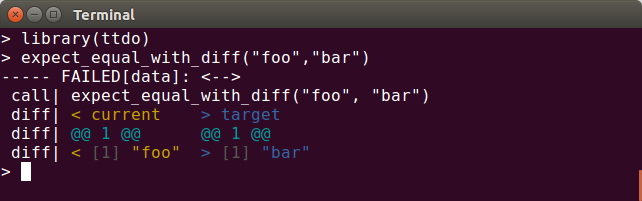 This release adds a versioned dependency on the just released
  As I've mentioned in the past I keep a work-log, or work-diary, recording my activities every day.
I have a bunch of standard things that I record, but one thing that often ends up happening is that I make references to external bug trackers, be they Jira, Bugzilla, or something else.
Today I hacked up a simple emacs minor-mode for converting these references to hyperlinks, automatically, via the use of regular expressions.
Given this configuration:
As I've mentioned in the past I keep a work-log, or work-diary, recording my activities every day.
I have a bunch of standard things that I record, but one thing that often ends up happening is that I make references to external bug trackers, be they Jira, Bugzilla, or something else.
Today I hacked up a simple emacs minor-mode for converting these references to hyperlinks, automatically, via the use of regular expressions.
Given this configuration:


 My point now is: since 2018 I got to know OSUOSL and every year I like them more.
They are super friendly, reliable (a working ticket system and a great IRC channel), offer help in various ways, be it with DNS names (and renamings...) or
finding new hardware suited to our needs or whatever else we come up with. They are really dedicated to help free software projects
and I'm grateful having the privilege to enjoy this since more than four years now.
To quote
My point now is: since 2018 I got to know OSUOSL and every year I like them more.
They are super friendly, reliable (a working ticket system and a great IRC channel), offer help in various ways, be it with DNS names (and renamings...) or
finding new hardware suited to our needs or whatever else we come up with. They are really dedicated to help free software projects
and I'm grateful having the privilege to enjoy this since more than four years now.
To quote  Thank you, everybody at OSUOSL! You rock and make a big difference for many projects!