Search Results: "dpk"

11 October 2007

Joey Hess: introducing mr

Mr. Who? No.. mr is a Multiple Repository management tool. With lots of people using svn with no real reason to switch, and some people using git because it's the cool thing of the day, I need a way to be able to checkout and update from multiple repositories, in multiple revison control systems. There are probably many scripts already written to do this; mr(1) is my attempt, and since it's very configurable and has a very short name, perhaps it will be useful to others in this situation. An example is probably worth 1347 words (according to wc -w mr). One thing not shown here is that it can look for .mrconfig files not just in the home directory, but inside the repositories it checks out.
joey@kodama:~/src> mr update
mr update: in /home/joey/src/dpkg
Already up-to-date.
Already up-to-date.
mr update: in /home/joey/src/linux-2.6
Already up-to-date.
mr update: in /home/joey/src/mr
Already up-to-date.
mr update: finished (3 sucessful; 1 skipped)
Here's my current ~/.mrconfig file.
[src/mr]
checkout = git clone ssh://git.kitenet.net/srv/git/kitenet.net/mr
[src/linux-2.6]
checkout = git clone git://git.kernel.org/pub/scm/linux/kernel/git/torvalds/linux-2.6.git
# I only check this out on kodama, otherwise skip it.
skip = test $(hostname) != kodama
[src/dpkg]
# A merge of the upstream dpkg git repo and my own personal branch.
checkout = git clone git://git.debian.org/git/dpkg/dpkg.git && \
        cd dpkg && \
        git remote add kite ssh://kitenet.net/srv/git/kitenet.net/dpkg && \
        git fetch kite && \
        git checkout -b sourcev3 kite/sourcev3
update = git pull origin master && git pull kite sourcev3
commit = git push kite
# My home directory, which I keep in svn.
[]
checkout = svn co svn+ssh://svn.kitenet.net/srv/svn/joey/trunk/home-$(hostname) joey
# run svnfix after each update
update = svn update && svnfix
PS, what should "mr clean" do?

10 October 2007

Martin F. Krafft: Packaging with Git

Introduction I gave a joint presentation with Manoj at Debconf7 about using distributed version control for Debian packaging, and I volunteered to do an on-line workshop about using Git for the task, so it's about time that I should know how to use Git for Debian packaging, but it turns out that I don't. Or well, didn't. After I made a pretty good mess out of the mdadm packaging repository (which is not a big problem as it's just ugly history up to the point when I start to get it right), I decided to get down with the topic and figure it out once and for all. I am writing this post as I put the pieces together. It's been cooking for a week, simply so I could gather enough feedback. I am aware that Git is not exactly a showcase of usability, so I took some extra care to not add to the confusion. It may be the first post in a series, because this time, I am just covering the case of mdadm, for which upstream also uses Git and where I am the only maintainer, and I shall pretend that I am importing mdadm to version control for the first time, so there won't be any history juggling. Future posts could well include tracking Subversion repositories with git-svn, and importing packages previously tracked therewith, but this ain't no promise! (well, that last post is already being drafted, but far from finished; you have been warned!) I realise that git-buildpackage exists, but imposes a rather strict branch layout and tagging scheme, which I don't want to adhere to. And gitpkg (Romain blogged about it recently), deserves another look since, according to its author, it does not impose anything on its user. But in any case, before using such tools (and possibly extending them to allow for other layouts), I'd really rather have done it by hand a couple of times to get the hang of it and find out where the culprits lie. Now, enough of the talking, just one last thing: I expect this blog post to change quite a bit as I get feedback. Changes shall be highlighted in bold typeface.
Setting up the infrastructure First, we prepare a shared repository on git.debian.org for later use (using collab-maint for illustration purposes), download the Debian source package we want to import (version 2.6.3+200709292116+4450e59-3 at time of writing, but I pretend it's -2 because we shall create -3 further down ), set up a local repository, and link it to the remote repository. Note that there are other ways to set up the infrastructure, but this happens to be the one I prefer, even though it's slightly more complicated:
$ ssh alioth
$ cd /git/collab-maint
$ ./setup-repository pkg-mdadm mdadm Debian packaging
$ exit
$ apt-get source --download-only mdadm
$ mkdir mdadm && cd mdadm
$ git init
$ git remote add origin ssh://git.debian.org/git/collab-maint/pkg-mdadm
$ git config branch.master.merge refs/heads/master
Now we can use git-pull and git-push, except the remote repository is empty and we can't pull from there yet. We'll save that for later. Instead, we tell the repository about upstream's Git repository. I am giving you the git.debian.org URL though, simply because I don't want upstream repository (which lives on an ADSL line) hammered in response to this blog post:
$ git remote add upstream-repo git://git.debian.org/git/pkg-mdadm/mdadm
Since we're using the upstream branch of the pkg-mdadm repository as source (and don't want all the other mess I created in that repository), we'll first limit the set of branches to be fetched (I could have used the -t option in the above git-remote command, but I prefer to make it explicit that we're doing things slightly differently to protect upstream's ADSL line).
$ git config remote.upstream-repo.fetch \
    +refs/heads/upstream:refs/remotes/upstream-repo/upstream
And now we can pull down upstream's history and create a local branch off it. The "no common commits" warning can be safely ignored since we don't have any commits at all at that point (so there can't be any in common between the local and remote repository), but we know what we're doing, even to the point that we can forcefully give birth to a branch, which is because we do not have a HEAD commit yet (our repository is still empty):
$ git fetch upstream-repo
warning: no common commits
[ ]
  # in the real world, we'd be branching off upstream-repo/master
$ git checkout -b upstream upstream-repo/upstream
warning: You appear to be on a branch yet to be born.
warning: Forcing checkout of upstream-repo/upstream.
Branch upstream set up to track remote branch
  refs/remotes/upstream-repo/upstream.
$ git branch
* upstream
$ ls   wc -l
77
Importing the Debian package Now it's time to import Debian's diff.gz remember how I pretend to use version control for package maintenance for the first time. Oh, and sorry about the messy file names, but I decided it's best to stick with real data in case you are playing along: Since we're applying the diff against version 2.6.3+200709292116+4450e59, we ought to make sure to have the repository at the same state. Upstream never "released" that version, but I encoded the commit ID of the tip when I snapshotted it: 4450e59, so we branch off there. Since we are actually tracking the git.debian.org pkg-mdadm repository instead of upstream, you can use the tag I made. Otherwise you could consider tagging yourself:
$ #git tag -s mdadm-2.6.3+200709292116+4450e59 4450e59
$ git checkout -b master mdadm-2.6.3+200709292116+4450e59
$ zcat ../mdadm_2.6.3+200709292116+4450e59-2.diff.gz   git apply
The local tree is now "debianised", but Git does not know about the new and changed files, which you can verify with git-status. We will split the changes made by Debian's diff.gz across several branches.
The idea of feature branches We could just create a debian branch, commit all changes made by the diff.gz there, and be done with it. However, we might want to keep certain aspects of Debianisation separate, and the way to do that is with feature branches (also known as "topic" branches). For the sake of this demonstration, let's create the following four branches in addition to the master branch, which holds the standard Debian files, such as debian/changelog, debian/control, and debian/rules:
  • upstream-patches will includes patches against the upstream code, which I submit for upstream inclusion.
  • deb/conffile-location makes /etc/mdadm/mdadm.conf the default over /etc/mdadm.conf and is Debian-specific (thus the deb/ prefix).
  • deb/initramfs includes the initramfs hook and script, which I want to treat separately but not submit upstream.
  • deb/docs similarly includes Debian-only documentation I add to the package as a service to Debian users.
If you're importing a Debian package using dpatch, you might want to convert every dpatch into a single branch, or at least collect logical units into separate branches. Up to you. For now, our simple example suffices. Keep in mind that it's easy to merge two branch and less trivial to split one into two. Why? Well, good question. As you will see further down, the separation between master and deb/initramfs actually makes things more complicated when you are working on an issue spanning across both. However, feature branches also bring a whole lot of flexibility. For instance, with the above separation, I could easily create mdadm packages without initramfs integration (see #434934), a disk-space-conscious distribution like grml might prefer to leave out the extra documentation, and maybe another derivative doesn't like the fact that the configuration file is in a different place from upstream. With feature branches, all these issues could be easily addressed by leaving out unwanted branches from the merge into the integration/build branch (see further down). Whether you use feature branches, and how many, or whether you'd like to only separate upstream and Debian stuff is entirely up to you. For the purpose of demonstration, I'll go the more complicated way.
Setting up feature branches So let's commit the individual files to the branches. The output of the git-checkout command shows modified files that have not been committed yet (which I trim after the first example); Git keeps these across checkouts/branch changes. Note that the ./debian/ directory does not show up as Git does not know about it yet (git-status will tell you that it's untracked, or rather: contains untracked files since Git does not track directories at all):
$ git checkout -b upstream-patches mdadm-2.6.3+200709292116+4450e59
M Makefile
M ReadMe.c
M mdadm.8
M mdadm.conf.5
M mdassemble.8
M super1.c
$ git add super1.c     #444682
$ git commit -s
  # i now branch off master, but that's the same as 4450e59 actually
  # i just do it so i can make this point 
$ git checkout -b deb/conffile-location master
$ git add Makefile ReadMe.c mdadm.8 mdadm.conf.5 mdassemble.8
$ git commit -s
$ git checkout -b deb/initramfs master
$ git add debian/initramfs/*
$ git commit -s
$ git checkout -b deb/docs master
$ git add RAID5_versus_RAID10.txt md.txt rootraiddoc.97.html
$ git commit -s
  # and finally, the ./debian/ directory:
$ git checkout master
$ chmod +x debian/rules
$ git add debian
$ git commit -s
$ git branch
  deb/conffile-location
  deb/docs
* master
  upstream
  upstream-patches
At this time, we push our work so it won't get lost if, at this moment, aliens land on the house, or any other completely plausible event of apocalypse descends upon you. We'll push our work to git.debian.org (the origin, which is the default destination and thus needs not be specified) by using git-push --all, which conveniently pushes all local branches, thus including the upstream code; you may not want to push the upstream code, but I prefer it since it makes it easier to work with the repository, and since most of the objects are needed for the other branches anyway after all, we branched off the upstream branch. Specifying --tags instead of --all pushes tags instead of heads (branches); you couldn't have guessed that! See this thread if you (rightfully) think that one should be able to do this in a single command (which is not git push refs/heads/* refs/tags/*)
$ git push --all
$ git push --tags
Done. Well, almost
Building the package (theory) Let's build the package. There seem to be two (sensible) ways we could do this, considering that we have to integrate (merge) the branches we just created, before we fire off the building scripts:
  1. by using a temporary (or "throw-away") branch off upstream, where we integrate all the branches we have just created, build the package, tag our master branch (it contains debian/changelog), and remove the temporary branch. When a new package needs to be built, we repeat the process.
  2. by using a long-living integration branch off upstream, into which we merge all our branches, tag the branch, and build the package off the tag. When a new package comes around, we re-merge our branches, tag, and build.
Both approaches have a certain appeal to me, but I settled for the second, for two reasons, the first of which leads to the second:
  1. When I upload a package to the Debian archive, I want to create a tag which captures the exact state of the tree from which the package was built, for posterity (I will return to this point later). Since the throw-away branches are not designed to persist and are not uploaded to the archive, tagging the merging commit makes no sense. Thus, the only way to properly identify a source tree across all involved branches would be to run git-tag $branch/$tagname $branch for each branch, which is purely semantic and will get messy sooner or later.
  2. As a result of the above: when Debian makes a new stable release, I would like to create a branch corresponding to the package in the stable archive at the time, for security and other proposed updates. I could rename my throw-away branch, if it still existed, or I could create a new branch and merge all other branches, using the (semantic) tags, but that seems rather unfavourable.
So instead, I use a long-living integration branch, notoriously tag the merge commits which produced the tree from which I built the package I uploaded, and when a certain version ends up in a stable Debian release, I create a maintenance branch off the one, single tag which corresponds to the very version of the package distributed as part of the Debian release. So much for the theory. Let's build, already!
Building the package (practise) So we need a long-living integration branch, and that's easier done than said:
$ git checkout -b build mdadm-2.6.3+200709292116+4450e59
Now we're ready to build, and the following procedure should really be automated. I thus write it like a script, called poor-mans-gitbuild, which takes as optional argument the name of the (upstream) tag to use, defaulting to upstream (the tip):
#!/bin/sh
set -eu
git checkout master
debver=$(dpkg-parsechangelog   sed -ne 's,Version: ,,p')
git checkout build
git merge $ 1:-upstream 
git merge upstream-patches
git merge master
for b in $(git for-each-ref --format='%(refname)' refs/heads/deb/*); do
  git merge -- $b
done
git tag -s debian/$debver
debuild   # will ignore .git automatically
git checkout master
Note how we are merging each branch in turn, instead of using the octopus merge strategy (which would create a commit with more than two parents) for reasons outlined in this post. An octopus-merge would actually work in our situation, but it will not always work, so better safe than sorry (although you could still achieve the same result). If you discover during the build that you forgot something, or the build script failed to run, just remove the tag, undo the merges, checkout the branch to which you need to commit to fix the issue, and then repeat the above build process:
$ git tag -d debian/$debver
$ git checkout build
$ git reset --hard upstream
$ git checkout master
$ editor debian/rules    # or whatever
$ git add debian/rules
$ git commit -s
$ poor-mans-gitbuild
Before you upload, it's a good idea to invoke gitk --all and verify that all goes according to plan:
screenshot of gitk after the above steps
When you're done and the package has been uploaded, push your work to git.debian.org, as before. Instead of using --all and --tags, I now specify exactly which refs to push. This is probably a good habit to get into to prevent publishing unwanted refs:
$ git push origin build tag debian/2.6.3+200709292116+4450e59-3
Now take your dog for a walk, or play outside, or do something else not involving a computer or entertainment device.
Uploading a new Debian version If you are as lucky as I am, the package you uploaded still has a bug in the upstream code and someone else fixes it before upstream releases a new version, then you might be in the position to release a new Debian version. Or maybe you just need to make some Debian-specific changes against the same upstream version. I'll let the commands speak for themselves:
$ git checkout upstream-patches
$ git-apply < patch-from-lunar.diff   #444682 again
$ git commit --author 'J r my Bobbio <lunar@debian.org>' -s
  # this should also be automated, see below
$ git checkout master
$ dch -i
$ dpkg-parsechangelog   sed -ne 's,Version: ,,p'
2.6.3+200709292116+4450e59-3
$ git commit -s debian/changelog
$ poor-mans-gitbuild
$ git push
$ git push origin tag debian/2.6.3+200709292116+4450e59-3
That first git-push may require a short explanation: without any arguments, git-push updates only the intersection of local and remote branches, so it would never push a new local branch (such as build above), but it updates all existing ones; thus, you cannot inadvertedly publish a local branch. Tags still need to be published explicitly.
Hacking on the software Imagine: on a rainy Saturday afternoon you get bored and decide to implement a better way to tell mdadm when to start which array. Since you're a genius, it'll take you only a day, but you do make mistakes here and there, so what could be better than to use version control? However, rather than having a branch that will live forever, you are just creating a local branch, which you will not publish. When you are done, you'll feed your work back into the existing branches. Git makes branching really easy and as you may have spotted, the poor-mans-gitbuild script reserves an entire branch namespace for people like you:
$ git checkout -b tmp/start-arrays-rework master
Unfortunately (or fortunately), fixing this issue will require work on two branches, since the initramfs script and hook are maintained in a separate branch. There are (again) two ways in which we can (sensibly) approach this:
  • create two separate, temporary branches, and switch between them as you work.
  • merge both into the temporary branch and later cherry-pick the commits into the appropriate branches.
I am undecided on this, but maybe the best would be a combination: merge both into a temporary branch and later cherry-pick the commits into two additional, temporary branches until you got it right, and then fast-forward the official branches to their tips:
$ git merge master deb/initramfs
$ editor debian/mdadm-raid                     #  
$ git commit -s debian/mdadm-raid
$ editor debian/initramfs/script.local-top     #  
$ git commit -s debian/initramfs/script.local-top
[many hours of iteration pass ]
[  until you are done]
$ git checkout -b tmp/start-arrays-rework-init master
  # for each commit $c in tmp/start-arrays-rework
  # applicable to the master branch:
$ git cherry-pick $c
$ git checkout -b tmp/start-arrays-rework-initramfs deb/initramfs
  # for each commit $c in tmp/start-arrays-rework
  # applicable to the deb/initramfs branch:
$ git cherry-pick $c
This is assuming that all your commits are logical units. If you find several commits which would better be bundled together into a single commit, this is the time to do it:
$ git cherry-pick --no-commit <commit7>
$ git cherry-pick --no-commit <commit4>
$ git cherry-pick --no-commit <commit5>
$ git commit -s
Before we now merge this into the official branches, let me briefly intervene and introduce the concept of a fast-forward. Git will "fast-forward" a branch to a new tip if it decides that no merge is needed. In the above example, we branched a temporary branch (T) off the tip of an official branch (O) and then worked on the temporary one. If we now merge the temporary one into the official one, Git determines that it can actually squash the ancestry into a single line and push the official branch tip to the same ref as the temporary branch tip. In cheap (poor man's), ASCII notation:
- - - O             >> merge T >>     - - - = - - OT
         - - T      >>  into O >>
This works because no new commits have been made on top of O (if there would be any, we might be able to rebase, but let's not go there quite yet; rebasing is how you shoot yourself in the foot with Git). Thus we can simply do the following:
$ git checkout deb/initramfs
$ git merge tmp/start-arrays-rework-initramfs
$ git checkout master
$ git merge tmp/start-arrays-rework-init
and test/build/push the result. Or well, since you are not an mdadm maintainer (We^W I have open job positions! Applications welcome!), you'll want to submit your work as patches via email:
$ git format-patch -s -M origin/master
This will create a number of files in the current directory, one corresponding for each commit you made since origin/master. Assuming each commit is a logical unit, you can now submit these to an email address. The --compose option lets you write an introductory message, which is optional:
$ git send-email --compose --to your@email.address <file1> <file2> < >
Once you've verified that everything is alright, swap your email address for the bug number (or the pkg-mdadm-devel list address). Thanks (in advance) for your contribution! Of course, you may also be working on a feature that you want to go upstream, in which case you'd probably branch off upstream-patches (if it depends on a patch not yet in upstream's repository), or upstream (if it does not):
$ git checkout -b tmp/cool-feature upstream
[ ]
when a new upstream version comes around After a while, upstream may have integrated your patches, in addition to various other changes, to give birth to mdadm-2.6.4. We thus first fetch all the new refs and merge them into our upstream branch:
$ git fetch upstream-repo
$ git checkout upstream
$ git merge upstream-repo/master
we could just as well have executed git-pull, which with the default configuration would have done the same; however, I prefer to separate the process into fetching and merging. Now comes the point when many Git people think about rebasing. And in fact, rebasing is exactly what you should be doing, iff you're still working on an unpublished branch, such as the previous tmp/cool-feature off upstream. By rebasing your branch onto the updated upstream branch, you are making sure that your patch will apply cleanly when upstream tries it, because potential merge conflicts would be handled by you as part of the rebase, rather than by upstream:
$ git checkout tmp/cool-feature
$ git rebase upstream
What rebasing does is quite simple actually: it takes every commit you made since you branched off the parent branch and records the diff and commit message. Then, for each diff/commit_message pair, it creates a new commit on top of the new parent branch tip, thus rewrites history, and orphans all your original commits. Thus, you should only do this if your branch has never been published or else you would leave people who cloned from your published branch with orphans.
If this still does not make sense, try it out: create a (source) repository, make a commit (with a meaningful commit message), branch B off the tip, make a commit on top of B (with a meaningful message), clone that repository and return to the source repository. There, checkout the master, make a commit (with a ), checkout B, rebase it onto the tip of master, make a commit (with a ), and now git-pull from the clone; use gitk to figure out what's going on.
So you should almost never rebase a published branch, and since all your branches outside of the tmp/* namespace are published on git.debian.org, you should not rebase those. But then again, Pierre actually rebases a published branch in his workflow, and he does so with reason: his patches branch is just a collection of branches to go upstream, from which upstream cherry-picks or which upstream merges, but which no one tracks (or should be tracking). But we can't (or at least will not at this point) do this for our feature branches (though we could treat upstream-patches that way), so we have to merge. At first, it suffices to merge the new upstream into the long-living build branch, and to call poor-mans-gitbuild, but if you run into merge conflicts or find that upstream's changes affect the functionality contained in your feature branches, you need to actually fix those. For instance, let's say that upstream started providing md.txt (which I previously provided in the deb/docs branch), then I need to fix that branch:
$ git checkout deb/docs
$ git rm md.txt
$ git commit -s
That was easy, since I could evade the conflict. But what if upstream made a change to Makefile, which got in the way with my configuration file location change? Then I'd have to merge upstream into deb/conffile-location, resolve the conflicts, and commit the change:
$ git checkout deb/conffile-location
$ git merge upstream
CONFLICT!
$ git-mergetool
$ git commit -s
When all conflicts have been resolved, I can prepare a new release, as before:
$ git checkout master
$ dch -i
$ dpkg-parsechangelog   sed -ne 's,Version: ,,p'
2.6.3+200709292116+4450e59-3
# git commit -s debian/changelog
$ poor-mans-gitbuild
# git push
$ git push origin tag debian/2.6.3+200709292116+4450e59-3
Note that Git often appears smart about commits that percolated upstream: since upstream included the two commits in upstream-patches in his 2.6.4 release, my upstream-patches branch got effectively annihilated, and Git was smart enough to figure that out without a conflict. But before you rejoice, let it be told that this does not always work.
Creating and using a maintenance branch Let's say Debian "lenny" is released with mdadm 2.7.6-1, then:
$ git checkout -b maint/lenny debian/2.7.6-1
You might do this to celebrate the release, or you may wait until the need arises. We've already left the domain of reality ("lenny" is not yet released), so the following is just theory. Now, assume that a security bug is found in mdadm 2.7.6 after "lenny" was released. Upstream is already on mdadm 2.7.8 and commits deadbeef and c0ffee fix the security issue, then you'd cherry-pick them into the maint/lenny branch:
$ git checkout upstream
$ git pull
$ git checkout maint/lenny
$ git cherry-pick deadbeef
$ git cherry-pick c0ffee
If there are no merge conflicts (which you'd resolve with git-mergetool), we can just go ahead to prepare the new package:
$ dch -i
$ dpkg-parsechangelog   sed -ne 's,Version: ,,p'
2.7.6-1lenny1
$ git commit -s debian/changelog
$ poor-mans-gitbuild
$ git push origin maint/lenny
$ git push origin tag debian/2.7.6-1lenny1
Future directions It should be trivial to create the Debian source package directly from the repository, and in fact, in response to a recent blog post of mine on the dispensability of pristine upstream tarballs, two people showed me their scripts to do it. My post also caused Joey Hess to clarify his position on pristine tarballs, before he went out to implement dpkg-source v3. This looks very promising. Yet, as Romain argues, there are benefits with simple patch management systems. Exciting times ahead! In addition to creating source packages from version control, a couple of other ideas have been around for a while:
  • create debian/changelog from commit log summaries when you merge into the build branch.
  • integrate version control with the BTS, bidirectionally:
    • given a bug report, create a temporary branch and apply any patches found in the bug report.
    • upon merging the temporary branch back into the feature branch it modifies, generate a patch, send it to the BTS and tag the bug report + pending patch.
And I am sure there are more. If you have any, I'd be interested to hear about them!
Wrapping up I hope this post was useful. Thank you for reading to the end, this was probably my longest blog post ever. I want to thank Pierre Habouzit, Johannes Schindelin, and all the others on the #git/freenode IRC channel for their tutelage. Thanks also to Manoj Srivastava, whose pioneering work on packaging with GNU arch got me started on most of the concepts I use in the above. And of course, the members of the the vcs-pkg mailing list for the various discussions on this subject, especially those who participated in the thread leading up to this post. Finally, thanks to Linus and Junio for Git and the continuously outstanding high level of support they give. If you are interested in the topic of using version control for distro packaging, I invite you to join the vcs-pkg mailing list and/or the #vcs-pkg/irc.oftc.net IRC channel. NP: Aphex Twin: Selected Ambient Works, Volume 2 (at least when I started writing )

8 October 2007

Neil Williams: dpkg-cross 2.0.0 - fragility expected!

OK, changes in dpkg-dev 1.14.7 have forced my hand a little and dpkg-cross 2.0.0 has now been uploaded to Debian unstable (not experimental).
apt-cross 0.2.9 has been uploaded to Emdebian unstable - dependent on
dpkg-cross >= 1.99
apt-cross 0.3.0 has been uploaded to Debian unstable but will spend some time in the NEW queue (hence the 0.2.9 upload to Emdebian). apt-cross 0.3.0 is functionally identical to 0.2.9
emdebian-tools 0.3.9 has been uploaded to Emdebian unstable - dependent on apt-cross >= 0.2.9 and dpkg-cross >= 1.99
All three comprise extensive rewrites. apt-cross, in particular, is barely recognisable. dpkg-cross is a shadow of the former package and v2.0.0 signals the beginning of the long goodbye to both packages. dpkg developers expect to be able to merge all dpkg-cross functionality into dpkg before Lenny. Once that is done, it should be trivial to merge apt-cross behaviour into apt.
Only the new libcache-apt-perl package (containing the modified NorthernCross code from virtuoso) will persist. Once this whole transition is over, I'll upload Cache::Apt::* to CPAN so that it can become its own source package in Debian once apt-cross is removed.

IMPORTANT
dpkg cross-building support is HIGHLY EXPERIMENTAL!
Significant changes are still pending, including remapping the build paths during the
dpkg-buildpackage build and utilising the updated dpkg-shlibdeps code which is a decade ahead of what we had in dpkg-cross 1.39.

  1. dpkg 1.14.7 included dpkg-buildpackage as a perl script instead of shell which breaks dpkg-cross <= 1.39 but the new code to support dpkg-cross >= 1.99 is not implemented yet.

  2. The breakage that Zumbi experienced when using the dpkg version from
    experimental will now occur in unstable.
    http://lists.debian.org/debian-embedded/2007/09/msg00067.html. Note that this breakage would be severity "critical" if filed as a bug because it prevents not only cross-builds but normal Debian builds.

  3. dpkg-cross 2.0.0 fixes this issue. Hence the urgency in uploading dpkg-cross 2.0.0

  4. dpkg-cross 2.0.0 removes the old diversions of dpkg-buildpackage and dpkg-shlibdeps.

  5. dpkg is set to support the removal of the dpkg-cross diversions and code to support this is coming this weekend. This means that there will be a GAP where cross-built packages will fail to find the correct shared libraries. HOWEVER, installing dpkg-cross 2.0.0 restores the ability to build normal Debian packages whilst keeping dpkg-cross installed. This is a far more important gain than a temporary problem in packages that hardly anyone is using yet (our Emdebian crossbuilt packages).

When dpkg-dev 1.14.8 becomes available, apt-cross, dpkg-cross and emdebian-tools will be updated to depend on this version.
Everyone: please note - cross-building support in Debian will be "fragile" for the next week or so. The rewritten packages are being uploaded against experimental dpkg support I expect bugs. :-(

The benefits of these changes are:
  1. The removal of diversions that are a decade out of date.

  2. The implementation of virtuoso's NorthernCross code that transforms apt-cross and fixes lots of awkward bugs.

  3. The incorporation of cross-building support in the heart of dpkg.

  4. The beginning of the long goodbye to dpkg-cross and apt-cross.


RESULTS
With the new packages installed, some packages will produce:
 emdebuild: ERROR /usr/bin/ contains files for the wrong architecture!


i.e. the build appears to succeed but until dpkg-dev 1.14.8 includes support for looking for the correct libraries in /usr/$arch/lib instead of /usr/lib, we get unusable packages. This at least means that packages can be test built and the patches updated.

6 October 2007

Joey Hess: an evolutionary change to the Debian source package format

Back around 1999, I was really interested in getting all of Debian imported into CVS (ugh!) so we could have all the benefits of pervasive version control. I've always been sad it didn't happen, especially since ubuntu did it. Although they seem to get less benefits from it than I would have thought at the time, go figure. I actually feel though that the model Debian has developed with alioth and now with VCS- fields, in which packages use version control, and debian integrates support for it without mandating it, or mandating which version control system is used, is has better legs than ubuntu's model. Ubuntu's model potentially leaves you where freebsd is now, nursing a cvs equivilant along as the world has moved on. Except, well, Debian actually picked a different version control system, and has been stuck with it for years. I refer to the diff, which is great for passing patches around by email, but not so great as a mechanism for recording the history of changes needed to debianise a package. So we have this whole set of things piled on top of the diff, like the loathsome dbs. We also have this whole set of problems in the source package format that cannot be expressed by diff and have to be messily worked around, like not being able to add/modify binary files, and not being able to (re)move files. (Wig and Pen addresses some of the worst limitations of the current format, but AFAIK noone is working on implementing support for generating Wig and Pen format packages, since doing so is unavoidably complicated.) Once I started looking at the diff in .diff.gz as a version control system, the natural thing was to think about adding support to other revision control systems, following down our path of debian supporting maintainers who choose to use a different one. So I arrived at the idea of a .git.tar.gz. Let a debian source package consist of just a .dsc and package_version.git.tar.gz, which contains only package/.git/*. Making changes to the source becomes very pleasant, since you can commit any change you like and not have to worry about how it will be repesented in the .diff.gz. And of course there's all kinds of benefits of having the history and branches and tagged upstream source available in there. Far too many benefits to list here, and only a few downsides. I look at this as very much of an evolutionary change, not a revolutionary change, to the debian source format. Most packages will continue to use .diff.gz for a long while, but packages whose maintainers chafe under that format will have another one to choose from. So, well, I implemented it. A dpkg-source that understands this format is available in the sourcev3 branch at git://kitenet.net/dpkg. I'll be posting some technical details and the patches to debian-dpkg, and I've put a FAQ about it in the wiki. A sample dpkg source package built using this is temporarily here. This demo package includes only the last 200 commits to the dpkg git repo, so it's more than 1 mb smaller than dpkg's normal .tar.gz!

3 October 2007

Neil Williams: Working Balloon3 board

After quite a few struggles with power supplies, serial cables, the never-ending pain of minicom and the (almost) solved pain of ethernet over usb, my recently received Balloon3 board it up and running. (i.e. recent = less than 12hrs old. 8 hours of that was spent trying to work if I had a compatible power supply and it's been running for nearly 3 hours already). I can ssh into it from anywhere on the network, I have the basic system installed and I've set the date and time. :-)
The task ahead is now clear:
  1. Continue to work with Guillem to merge dpkg-cross into dpkg so that the dpkg-cross transition can release the rewritten apt-cross and the dependent emdebian-tools

  2. Test and fix the Emdebian rootfs packages to at least support login to a chroot on the Balloon (which I've called genesis.codehelp)

  3. Simplify the installation with sensible defaults in the Emdebian packages and improvements to the emdebian-tools scripts that create and could install the chroot itself

  4. Document the process for the CELF tutorial in Austria in 30 days time.


Busy, busy . . .

30 September 2007

Frans Pop: debtree 0.6.0

I've just "released" debtree 0.6.0. The number of options has almost doubled! It's now possible to suppress Conflicts and to generate full dependency graphs (including packages that are excluded by default). Unknown packages are now marked with a light reddish shading; this could possibly help finding obsolete Conflicts. I've also added verbosity options and fixed a few minor issues. But I'm most exited by two completely new features. Build dependency graphs Besides dependency graphs for binary packages, debtree now also generates build dependency graphs for source packages. It shows both Build-Depends and Build-Depends-Indep dependencies. It also takes into account architecture conditionals (such as [!s390]). It is possible to show such conditionals in the graph, but by default it will just omit any build dependencies not relevant for the selected architecture. Here's an example for dpkg. I expected this to be a lot harder to implement, but it proved relatively straightforward. I've been quite pleased with how extensible this script has proven. Show installed packages With this feature debtree gets back to its original purpose: providing information about what packages will get installed and why. When this option is activated, debtree will shade packages that are already installed light green. So if a graph is generated for a package that is not yet installed, it is easy to see what dependencies are already satisfied and what new packages will be installed. More importantly, you can also see which dependencies could be avoided because they are only recommended or which extra suggested goodies could be installed. Here's an example for clamav. This feature can of course also be used for build dependency graphs. Want to give it a try? The script or the Debian package can be downloaded from the debtree web page. That also has usage information and more examples. P.S. I've found yet another example of an undesired dependency on gconf2.
Update: fixed broken link

29 September 2007

Maximilian Attems: happy git usage

Apparently Scott James Remnant in his article on version control systems confuses arch and git. One can only speculate that his short git usage stems from the pre 1.0 days, where you had to use higher level tools (called porcelain) to happily work on git. A funny anecdote is that Scott back in his dpkg hacking year promoted arch heavily. Ubuntu^Wbzr propaganda spreads speed gains as big bonus of the last major releases. In order to be able to do that you have to start with a terrible baseline. Testing bzr on middle sized repos is no fun at all. The bzr pain inside launchpad must be beyond imagination. Nowadays it is much easier to hack on mdadm than on lvm2. The reason is that later project uses rusty cvs. With git it is really easy to contribute back. Either you mail the patches or publish your repository. git will help you along on each way. The other very big bonus of git is the big community around git. It is a community excited around building and delivering the best version control system. The git development does regular surveys on git usages and incorporates back the wishlists. The most "funny" way to use git is to run it as cvsserver. You may believe me or not i have seen git cvsserver emulation usage in the wild.

Eddy Petri&#537;or: trains are my coding anti-cryptonite

Another weekend trip to my parents' meant another successful svn-buildpackage coding session.

I worked on expanding the svnMkdirP functionality to svn-buildpackage and checked svn-upgrade. So when the testing is done (don't know when that will happen :-( ) I'll merge the work done in the svnmkdir-p branch[1] into trunk and ask for a sponsor - I don't think that will be a problem :-P.


If you want to test, don't try trunk yet[*], your should try the svnmkdir-p branch[1]. Don't forget to bump down the version.


BTW, svn-buildpackage 0.6.22 should close .....


0 eddy@bounty ~/usr/src/svn-buildpackage/svnmkdir-p $ dpkg-parsechangelog grep ^Closes sed -r -e 's#Closes:##' -e 's#[0-9] 6 #1 +#g' -e 's#\+$##' bc
13

13 bugs.

Here are the bastards:
  1. 408690
  2. 411666
  3. 414581
  4. 419996
  5. 423487
  6. 428225
  7. 428689
  8. 433404
  9. 433536
  10. 434932
  11. 435746
  12. 436133
  13. 436554


[1] svn+ssh://svn.debian.org/svn/collab-maint/deb-maint/svn-buildpackage/branches/svnmkdir-p or svn://svn.debian.org/svn/collab-maint/deb-maint/svn-buildpackage/branches/svnmkdir-p

[*] the branch is not yet merged into trunk because it needs more thorough testing

28 September 2007

Frans Pop: Introducing debtree

Package dependency graphs on steroids
How an innocent and simple question can lead to strange development.
I was looking for a simple command that would tell me what the dependency path is from one package to some other package. That is, without having to go by trial-and-error using e.g. aptitude. Actually, I am getting quite annoyed by the fact that I regularly see e.g. gconf2 being pulled in when I install something on my (KDE-based) systems and I wanted to see how exactly they got pulled in. It should be possible to install e.g. xchat without being forced to install gconf2 too, right? For Sarge I had a similar issue with the gimp. Anyway, possibly there already is something to print dependency paths, but I did not find it. As I had some time free after dropping out of the Installer team, I decided to scratch my own itch. To get the paths I decided to recurse through dependencies using grep-available and friends, basically building a tree. An old wish was to play with dot, so I thought it would be nice to visualize the tree and so verify my code (conveniently forgetting about apt-cache dotty...). I soon had something basic working and after that it turned out to be irresistible (and surprisingly easy) to keep adding functionality. The result is that I can now produce graphs like: debtree example This is a fairly simple example. A lot of graphs are much more interesting. Oh, yes, it also answers my original question:
$ debtree xchat gconf2
xchat -> xchat-common (D) -> gconf2 (D)
The script is quite flexible and now looks solid enough for a first (Beta) release. After a few optimizations the shell script is even acceptably fast (or at least not slow) on my box. Euhh, what? Shell script? Yes. As I don't really know any of the popular languages used in Open Source, writing this in e.g. perl would just have taken too much time. OTOH, after some three years of working on D-I, I have become quite fluent in shell script. After all, about 80% of the installer (almost all functionality that does the actual installations — including the partitioner) is written in shell, so complex systems in shell are perfectly possible; thanks to Joey we even have a web server in shell! And it keeps surprising me how structured you can work in shell if you try a little. So there. Of course I'd like to see debtree re-implemented in another language, mainly to improve performance. Probably in C++ as that is what apt-cache is written in and its 'dotty' function could be a nice starting point. You'll understand from the above that I'm not going to do this myself, so if anybody is interested in working with me to do this, please contact me. debtree seems like it would be a nice addition to Debian, maybe even alongside apt-cache in apt... Enjoy!

26 September 2007

Eddy Petri&#537;or: svn-buildpackage pending changes

Just a few snippets:

Author: eddyp-guest
Date: Wed Sep 26 02:14:15 2007
New Revision: 4959

URL: http://svn.debian.org/wsvn/collab-maint/?sc=1&rev=4959
Log:
create a special branch for the svn "mkdir -p" like functionality until all scripts are converted to use this function and more tests are done

Added:
deb-maint/svn-buildpackage/branches/svnmkdir-p/
- copied from r4958, deb-maint/svn-buildpackage/trunk/

0 eddy@bounty ~/usr/src/svn-buildpackage/svnmkdir-p $ dpkg-parsechangelog
Source: svn-buildpackage
Version: 0.6.22
Distribution: UNRELEASED
Urgency: low
Maintainer: Eddy Petri or
Date: Wed, 26 Sep 2007 05:24:59 +0300
Closes: 408690 411666 414581 419996 423487 428225 428689 433404 433536 434932 435746 436133
Changes:
svn-buildpackage (0.6.22) UNRELEASED; urgency=low
.
[ Eddy Petri or ]
* IMPORTANT: changed default behaviour of saving the configuration in
.svn/deb-layout by default to avoid stale data to override the
configuration options that were updated in the repository.
(Closes: #414581)
As a consequence, a new option --svn-savecfg was added to allow a
mechanism for easily overriding options locally
.
[ Gon ri Le Bouder ]
* SDCommon::sd_exit: read the parameter correctly is SDCommon::nosave=1
(Closes: #428225)
.
[ Eddy Petri or ]
* s-u: when importing options from ~/.svn-buildpackage.conf, filter in
only the valid options (Closes: #428689)
* s-u: replace retcode with retval for consistency with svn-bp
* s-i: manpage still claimed layout 2 was not implmented (Closes: #433404)
* s-i: now really supports injects for layout 2 (with the disadvantage of
not creating the tag directory)
* s-i: no longer fails on initial checkout (Closes: 411666)
* when using origUrl, make sure the origDir exists before downloading
in it
* s-i: man page: document the missing -o option (Closes: 419996, 435746)
* s-u: complete the man page synopsis section (Closes: 436133)
* s-b: do not require the build deps to be present when exporting
(Closes: 423487); thanks Stefano Zacchiroli for the patch
* SDcommon.pm: enhance the guessing algo of the layout to make svn-upgrade
guess correctly on layout 2 repos; thanks Gregor Herrmann for the patch
(Closes: 434932)
* Makefile: the version of the package is placed quoted in "SDCommon.pm" so
that versions like "0.6.22~bpo40+1" don't cause s-b to barf
* SDCommon.pm: implemented a function that emulates a 'mkdir -p'
functionality for svn; this will allow a fix for #434932
* s-i: based on the mkdir-p functionality create missing directories on
inject (Closes: 433536, 408690)


14 September 2007

Jose Luis Rivas Contreras: Unable to build rtorrent 0.7.8

I cannot build the new upstream rtorrent package (at least not as should been built) because of libcurl4-openssl-dev and the dependency on libssh2-0-dev that's a virtual package right now on sid (#442198). But I couldn't wait until curl get fixed so I downloaded libssh2-0-dev for lenny and installed it in my machine so I could build it (not with pbuilder but is built! :-) ) So you can find libtorrent 0.11.8 and rtorrent 0.7.8 binaries (and source of course) for amd64 right now on my server, in some minutes I will have the i386 binaries as well. The most important option added in this new release is the peer exchange option and a lot of commands for XMLRPC that in debian we can't enjoy by the moment. BTW, if someone can take care of xmlrpc-c which seems to be forgotten (or with a MIA maintainer) I would appreciate it (and finally be able to build rtorrent with XMLRPC support!!) Anyway, having rtorrent 0.7.8 in debian unstable could take at least a week more :-/ (while curl get fixed) so if you really want it grab them from my server or built it with my dsc diff.gz and orig.tar.gz and dpkg-source -x package_version.dsc and remember if you're building rtorrent you need libssh2-0-dev installed.
13 September 2007

Neil Williams: apt-cross moves to Cache::Apt:: and GPL-3 or later

Just completed the migration of the next version of apt-cross that is due to be uploaded once dpkg-cross pre2 can be uploaded to experimental. (This in turn is waiting for dpkg to support removal of the dpkg-cross diversions: #439979.)
AptCross:: has gone, replaced by Cache::Apt:: and the Cache.pm from NorthernCross is now called Lookup.pm for clarity.
This update solves a lot of niggles with the old apt-cross behaviour when dealing with non-standard repositories, CDROM archives, proxied mirrors and various other stuff that apt can cope with but which wget found difficult. (#440929, #442012)
Also, the entire package has migrated to GPL v3 or later - all the code was GPL v2 or later.
This means that emdebian-tools will also be migrating to GPL v3 or later when that is updated to use the new apt-cross and dpkg-cross code.
Sometime after Lenny, Cache::Apt:: will migrate into a source package of its own (on CPAN), allowing the apt-cross functionality to be merged into apt and the module to support other tasks in Emdebian.
In other news, gpe-cash is coming along and highlighting a few issues in libqof1, libqof-backend-sqlite and libqofexpensesobjects so there are improvements due there too. gpe-cash and gpe-expenses are also GPL v3 or later, as are deb-gview, quicklist (experimental) and pilot-qof now too.
Most have some machine-operable fields in debian/copyright and most have the new dpkg fields in debian/control.
Got a fix for gpe-bluetooth to upload tonight as well as (hopefully) the last go at getting homebank through NEW.

11 September 2007

Eddy Petri&#537;or: dpkg i18n going backwards?

Now in dpkg I found this:

dpkg: no, cannot proceed with %s (--auto-deconfigure will help):\n
%s

Before there was something like:

dpkg: no, cannot remove %s (--auto-deconfigure will help):\n
%s


This is going backwards wrt to i18n since one of the basic rules of i18n is to have complete sentences, while keeping the verb covered behind some parameter is not a good way of doing that.

30 August 2007

Russell Coker: Identifying the Distribution of a Linux System

I just needed to test something so I mounted the filesystem of one of my Xen domains in the Dom0 and chroot’d into it (I didn’t need the overhead of running a DomU for a quick test). Then strangely I found that my chroot environment had no apt-get and no dpkg installed. After a small amount of thought I realised that I had accidentally mounted the filesystem for a Fedora image instead of a Debian image. It seems to me that it might be a good idea for distributions to have shell scripts replacing the package tools for other distributions. For example dpkg on a Fedora box could be a shell script that runs echo “This system is running Fedora, you want to use rpm instead of dpkg”. Such a command would have saved me a couple of minutes of thinking. This may sound trivial, but if you consider the number of people who make such mistakes (and the even larger number of people who don’t realise that there is even more than one package tool in existence) then wasting a few K of disk space on every system to help them seems like a good idea. The minimum size of new hard drives that you can purchase seems to be 36G nowadays. So it’s not as if this would really cost anything. Please leave comments to tell me if I’m being sensible or silly. If the idea is regarded as good I’ll start filing bug reports.

29 August 2007

John Goerzen: Desktop Linux: Gnome

I had been intending to write an entire series of posts about our corporate switch to Linux on the Desktop. To date, I wrote only one introducing the project and our reasons for switching from Windows. That was back in April.

Today I'd like to start talking about it all some more.

We have standardized on Gnome for our desktops. Given the Windows background of our user base, it was pretty much a given that we would have to use either Gnome or KDE. Something like fvwm or a non-integrated environment just wouldn't be a good option.

We evaluated both Gnome and KDE. The very "clean" appearance of Gnome was a nice thing for us. KDE seemed to be to "chatty", talked about entering in audiocd:/ when it shouldn't have needed to, and generally violated the KISS and principle of least surprise too often. That said, I continue to run KDE for my personal desktop because Gnome just doesn't have the flexibility that KDE does. It is too bad that Gnome has gone on this remove functionality kick, and KDE hasn't gotten the KISS religion yet.

Anyway, Gnome worked well for the most part. We have set some defaults in gconf for things like panel icons. We also set a few mandatory defaults. I fixed a couple of bugs in the vfs system related to nfs4 support, which manifested themselves as icons for files newly saved to the desktop never showing up.

We wanted to present a customized menu to people based on what their job function is. That is, we are using a single system image, so all apps will be installed on all machines. But we didn't want people to have to see a ton of software that they don't use. That was easily enough accomplished for custom apps by creating desktop files with mode 0640 and setting the group to the set of people that should see the program on their menu. We removed a few stock programs (such as the terminal) from the menu as well, using dpkg-statoverride. That was also quite easily done. However, I will say that the entire Gnome XDG menu thing is woefully under-documented.

We use Firefox for the standard web browser. It is integrated well enough with Gnome and we have no problems there, aside from sites that are IE-only. We solve that with a Windows terminal server, which I'll discuss later.

Our network printing was already based on Cups. The individual machines are set up as Cups clients only, which works fine. We did find, however, that gnome-cups-manager automatically installs a tray monitor for cups. This monitor puts little printer icons on the tray when printers are in use. Unfortunately, it figures out which printers are in use by polling the server, and it is turned on by default out of the box, with no good way to disable it short of dpkg-statoverriding it to 0000. You can imagine that hundreds of users times dozens of printers times numerous polls per minute created quite the load on the server. This was a really braindead design and the people that wrote it should have known better. It is also quite useless to have icons coming on for all the printers on the network, which on some networks could be thousands, and not even on the same continent as the user.

Printing is generally a bit iffy in Gnome. They seem to be transitioning between about 3 different printing toolkits, all of which have different print dialog boxes with different supported features and different ways of selecting printers. One chief annoyance is that the print box in evince (the document/PDF viewer) does not let people access printer-specific features such as hole punching and stapling. So we installed gtklp and xpdf for people. The people that print heavy PDFs are huge fans of gtklp these days; it's a nicer solution than we had in Windows. Nobody really likes evince. We also have had some trouble with evince generating PostScript output that some printers can't grok. It sounds like all this should be much better in newer versions of Gnome, which if true, would be welcome news.

The Gnome screenshot tool makes it easy to save off a screenshot to a file, or to drag it into an email, but it is difficult to print it (you have to save it first). That was a common complaint around here, so I wrote a little wrapper around xwd and gtklp for printing screenshots. People really like that because gtklp gives them lots of options about orientation and size of the image if they want it, or a simple "Print" button to click if they don't care. We set a gconf default to bind this to Ctrl-PrintScr and it works well. KDE's screenshot tool is much more capable, and if we were using KDE, we wouldn't have had any problem with screenshots.

The bottom line on Gnome is that we, and are users, are happy with it after we've made these customizations. But we have had to do more customization that we should have. I still think that Gnome has been better for our users than KDE, but I do wonder how long we'll be able to survive with our "no KDE libraries" policy, as people want ksnapshot, kolour, etc.

28 August 2007

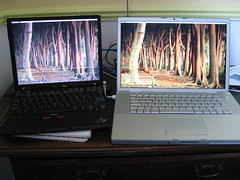
Kai Hendry: MBP versus X40

Thinkpad X40 vs MBP I’ve spent a bit of the bank holiday weekend by probably violating the warranty of a new 15” Macbook Pro (MBP) from work. I also was at the Debian bbq 2007 in Cambridge and met some friendly faces. :) More MBP & X40 porn So now I can boot into MacOSX and run Ubuntu or boot straight into Ubuntu from rEFIt. There are a couple of problems. There are some things I quite like about the MBP compared to the X40: Currently I remain not totally convinced about the Apple MBP. I’ll keep my Debian X40 my personal machine and the MBP for work. Now I can compile Webkit on Apple OSX (Debian can too) and see what’s happening in Ubuntu.

27 August 2007

Enrico Zini: pkgprune

Filtering Debian Packages file
pkgprune - Filter a Packages file
Usage: pkgprune Packages > Packages.filtered
Filters a Debian Packages file by removing either a list of packages (and
their reverse dependencies) or the packages that have given tags.
Dependencies in the filtered Packages file will still be satisfied.
Available via:
wget http://people.debian.org/~enrico/2007-08/pkgprune/pkgprune
or:
hg clone static-http://people.debian.org/~enrico/2007-08/pkgprune
The top of the script has a configuration section:
#
# Configuration
#
# Set of packages you don't want to have (the reverse dependencies will be
# removed as far as it's possible)
blacklist_pkgs = set(['gconf2'])
# List of sets of tags; the packages whose tag sets contain one of these tag
# sets will be removed
blacklist_tags = [ set(['implemented-in::php']) ]
Edit that before running the script. The idea is to be able to configure a system to run such a script after apt-get update, both to make dpkg faster on slow arches and to reduce the amount of packages displayed by an interface.

25 August 2007

Lior Kaplan: Bug triaging on various packages

In the end of the my last post, I’ve offered to package maintainers who need help with bug triaging to contact me. While no mails arrived, I decided to take a more active approach. Baruch Even referred me to “Status of Maintainer’s packages, ports and bugs“, from which I could find quite easily the maintainers who have a lot of bugs. After a few manual processing and checks, an offer of help mail was sent to the maintainers of openssh, cvs, grub, cupsys, apt, dpkg, bind9, postfix, util-linux, file, xmms, wine, xorg, xorg-server, xterm, iceweasel, aptitude and emacs21. Although only a few answered the mail, I think I got enough “work” to do. I’ve agreed about the goals for a bug triage for aptitude and ice weasl,dove,ape with their maintainers. I’m pleased with the openoffice.org triage method I used, although I got some comments and suggestions from people which I’d like to apply. I’ll try to use some of Ana Guerrero’s scripts for this end. Wish my luck (:

22 August 2007

Adrian von Bidder: /etc/apt/preferences

I use apt's preferences to give decreasing priorities to our Debian releases/suites. On my server, sarge has 800, etch has 750, lenny has 700 and unstable has 600. There are addtional values for backports and some other repositories. Generally, the newer, the lower the priority. So I can mix and match between these repositories and have aptitude upgrade generally do the "right thing" (and aptitude's dependency resolution is great to solve even complex issues). This is, for me, one of Debian's strongest points. But sometimes, there are these strange effects... Like when I decided that I'd follow etch and etch-volatile for clamav (the server is still in progress from sarge to etch), but then the new available version in sarge-volatile is higher than the currently installed version, which came from etch-volatile. I'm not sure if a "correct" solution is possible or if I would even want one - after all, I did specify sarge on a higher priority than etch, and by using volatile I stepped basically a bit "outside". It's probably just to keep me on my toes... But still, the clamav people win the award for the most illustrating use of multiple repositories and apt priorities I've seen so far.
clamav:
  Installed: 0.91.1-1~volatile1
  Candidate: 0.91.2-0volatile1
  Version table:
     0.91.2-1 0
        600 http://sunsite.cnlab-switch.ch unstable/main Packages
     0.91.2-1~volatile1 0
        750 http://mirror.switch.ch etch/volatile/main Packages
     0.91.2-0volatile1 0
        800 http://mirror.switch.ch sarge/volatile/main Packages
     0.91.1-1 0
        700 http://sunsite.cnlab-switch.ch lenny/main Packages
 *** 0.91.1-1~volatile1 0
        100 /var/lib/dpkg/status
     0.91.1-1~bpo.2 0
        740 http://www.backports.org etch-backports/main Packages
     0.91.1-1~bpo.1 0
        200 http://www.backports.org sarge-backports/main Packages
     0.90.1-3.1lenny3 0
        700 http://security.debian.org lenny/updates/main Packages
     0.90.1-3etch4 0
        750 http://security.debian.org etch/updates/main Packages
     0.90.1-3etch2 0
        750 http://sunsite.cnlab-switch.ch etch/main Packages
     0.84-2.sarge.17 0
        800 http://security.debian.org sarge/updates/main Packages
     0.84-2.sarge.15 0
        800 http://sunsite.cnlab-switch.ch sarge/main Packages

Neil Williams: Moving away from gedit to geany

gedit can be a real pain sometimes - mainly through what it still lacks: code folding, bookmarks and the ability to run two instances of gedit side by side (each with their own tabs) without having to start the second in a different workspace and then move it. Of these, code folding and bookmarks and the biggest problems with how I wanted to use gedit - for Perl source code.
Anjuta is overkill for perl (and doesn't support perl particularly well) and bluefish perl syntax highlighting is plain broken - it gets the syntax wrong frequently (especially when using copy and paste and then requires you to edit the line at which the syntax failed before it will move on and fail a few lines later. Bah!
So I've turned to geany - never used it before but it's great for Perl. It identifies all the objects in a Perl script or module and allows me to click on any object to go to that part of the file. It has code folding (and it works). It has bookmarks (although it would be nice to be able to click on a button to go from one mark to the next). It handles "projects" quite well too. It also makes no complaints about running in a second instance. This is really helpful because I can have apt-cross in one instance of geany - with all the relevant files in tabs - and dpkg-cross in another, with its files.
There's a 'scribble' area in geany too which is neat - no need to have an "untitled document" tab that takes up more space on the tab bar than it deserves AND nags you when you eventually close gedit.
I'll still use gedit for some things but I guess it's about time that I moved away from a simple but powerful text editor and used a proper IDE that can cope with Perl. For me, that is geany.

Next.

Previous.