Search Results: "tim"

31 July 2011

Mesutcan Kurt: Python Multi-Build for Python Extensions Packaging - Report 4

Hello,

This is the fourth report of my GSoC project for Debian. It has been a long time
since I wrote third report. So past four weeks a lot of things are implemented.

Firstly, I've changed tool's main script's name to py3build (removed .py suffix)
and make it executable so after you cloned my git repository you can use tool
with "./py3build".

I fixed a bug which occurs when the tool is invoked from somewhere except
its directory. If you invoke it like "./path/to/py3build/py3build" then the tool give
errors (f.e. could not find plugins etc.). Now this is fixed.

When I'm designing the API, I think if there is given build system (with
--system parameter) there is no need to invoke detect method but when
I'm writing autotools plugin, I realized that I need to learn which files are
exists and according to that information I'll invoke right thing (f.e. autoconf
or directly configure). So even if there is a given build system with --system
parameter its detect method invokes.

When I'm implementing plugins to tool, I need clean args (f.e. parameters
which are using with make clean) and install args (f.e. parameters with
make install) and I added it.

I added --dest-dir parameter this is passing to distutils plugin's root parameter.
In distutils plugin --install-dir parameter is passing as --install-platlib,
--install-purelib and --install-scripts so that maintainer can override it
with py3build's --install-args parameter.

Now, I implemented distutils, autotools, cmake plugins and working on
scons and packaging plugins. During the writing period of plugins I'm
testing them. After I finished these plugins I'm planning to write a patch
to dh and cdbs. After that I will write the tool and plugins for Python2.X.

John Goerzen: A 4-year-old, Linux command line, and microphone

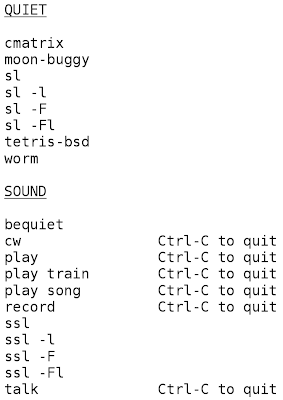
There are certain times when I m really glad that we have Linux on the house for our boys to play with. I ve already written how our 4-year-old Jacob has fun with bash and can chain together commands to draw ASCII animated steam locomotives. Today I thought it might be fun to install cw, a program that can take text on standard input and play it on the console speaker or sound card as Morse code. Just the sort of thing that I could see Jacob eventually getting a kick out of. But his PC was mute. We opened it up and discovered it didn t have a console speaker. So we traipsed downstairs, dug out an external speaker, and I figured out how to enable the on-board audio chipset in the BIOS. So now the cw command worked, but also there were a lot of other possibilities. We also brought up a microphone. While Jacob was busy with other things, I set to work getting things hooked up, volume levels adjusted, and wrote some shell scripts for him. I also printed out this reference sheet for Jacob: He is good at reading but not so good at spelling. I intentionally didn t write down what the commands do, hoping that this would provide some avenue for exploration for him. He already is generally familiar with the ones under the quiet category. I wrote a shell script called record . It simply records from the microphone and drops a timestamped WAV file in a holding directory. He can then type play to simply play back whatever he recorded most recently. Easy enough. But what he really wanted was sound for his ASCII steam locomotive. So with the help of a Google search for steam train mp3 , I wrote a script ssl (sound steam locomotive) that starts playing the sound in the background if it isn t already going, and then runs sl to show the animation. This was a big hit. I also set it up so he can type play train to hear that audio, or play song to play our favorite train song (Always a Train in My Dreams by Steve Gillette). Jacob typed that in and sat still for the entire 3 minutes listening to it. I had to hook up an Ethernet cable to his machine to do all this, and he was very interested that I was hooking his computer up to mine in some way. He thought all the stuff about cables in the walls was quite exciting. The last thing I did was install flite, a speech synthesis program. I wrote a small shell script called talk which reads a line at a time from stdin and invokes flite for each one (to give more instant feedback rather than not starting playback until after having read a large block from stdin). He had some fun hearing it say his name and other favorite words, but predictably the most fun was when he typed gibberish at it, and heard it try to pronounce or spell nonsense words. In all, he was so excited about this new world of computer sound opened up to him. I m sure there will be lots of happy experimentation and discovery going on.

Chris Lamb: Sysadmin-friendly deployment of Gunicorn in Debian

Over the last 18 months Gunicorn has replaced mod_wsgi as the de facto container for deploying Django projects. However, whilst it was first uploaded to Debian in April 2010, it was not particularly sysadmin friendly. In particular, it required custom initscripts (or some other mechanism) to manage each Gunicorn instance. To improve that, you can now place multiple configuration files inside /etc/gunicorn.d:
# /etc/gunicorn.d/django.example: defaults are commented out
CONFIG =  
    'mode': 'django',
    'environment':  
        'PYTHONPATH': '/path/to/custom/python/packages',
     ,
    # 'working_dir': '/',
    # 'user': 'www-data',
    # 'group': 'www-data',
    'args': (
        # '--bind=127.0.0.1:8000',
        '--workers=4',
        # '--worker-class=egg:gunicorn#sync',
        # '--timeout=30',
       'settings',
    ),
 
All instances can then be restarted using:
$ /etc/init.d/gunicorn restart
Stopping Gunicorn workers: [example] [site_a] [site_b].
Starting Gunicorn workers: [example] [site_a] [site_b].
Sites using plain WSGI can use the wsgi mode - see /etc/gunicorn.d/wsgi.example.

30 July 2011

Torsten Werner: DebConf11: Jigsaw Progress in Debian

Tom Marble and Guillaume Mazoyer gave a talk about Jigsaw Progress in Debian during DebConf11 in Banja Luka. Guillaume is a Google Summer of Code student mentored by Tom and Sylvestre Ledru. The project is about modularizing OpenJDK which replaces the old fashioned classpath by a modulepath that knows about versioned dependencies. It can reduce the memory footprint and the startup time for applications running in the JVM. It would be interesting to match Debian package versions to Jigsaw module versions. Debian could influence the JDK version 8 in this area. Upstream is already building Debian packages but they do not follow the Debian policy and do not use the Debian packaging tools. Guillaume has uploaded 2 packages (jtharness, jtreg) to Debian. These packages are needed to run the upstream testsuite which ships 3484 individual tests. More than 99% of them are working in Debian. There is a GIT repository of his Jigsaw work at http://anonscm.debian.org/gitweb/?p=pkg-java/jigsaw.git;a=summary. The slides of the talk are available at http://penta.debconf.org/dc11_schedule/events/718.en.html.

Wouter Verhelst: Re: Pere

Fellow Debian Developer Petter Reinholdsen, who is also on Planet Debian, recently blogged about two things that I just have to respond to. I'd post a comment on his blog, but unfortunately his blog does not support comments (booh!). In his first blog post, titled "What is missing in the Debian desktop, or why my parents use Kubuntu", he complains about the lack of a "simple GUI based upgrade of packages". That already exists and is in Debian; if you install the default GNOME desktop, you'll get an icon in the (freedesktop.org) system tray (so it's not a gnome applet) that will tell you when there're updates available. It uses a system tray thingy, so it's not gnome-specific, and you can still use it if you use KDE instead of gnome though I should add that it's something my parents keep ignoring, even after I've told them. Oh well. The same blog post contains two more items that I don't disagree with, and is then followed with a complain about "Better browser handling of some MIME types". This is actually a bug in Firefox upstream, not Debian; ubuntu may have patched their Firefox, but feature requests to fix this issue have been posted in the Firefox Bugzilla. Meanwhile, a workaround exists. His second blog post is about the boot process. Petter is involved with the sysvinit system, and has some valid points in that some scripts in rcS.d really don't belong there. Petter wants to move many scripts, including those setting up the network, out of rcS.d. I don't think that's a very good idea. Currently, a system admin has four options: boot to a 'normal' login prompt (just boot, don't modify the kernel command line); boot to a single-user system (by adding 'single' to the kernel command line; this runs rcS and rc1 scripts); boot to a very minimally set up system (by adding 'emergency'; this just mounts the root filesystem, does some very minor setup (like doing the keyboard mapping) and allows the user to get a root shell); or just boot to a shell, period (by adding 'init=/bin/bash'). While it makes obvious sense that rcS.d shouldn't contain too much stuff (otherwise you might as well not bother with having it at all), I'm not sure that moving the mounting of 'network-based filesystems mounted by default at bootup time' away from rcS.d is a good idea. Sometimes things go horribly wrong after the networked filesystems are mounted, because some things are misconfigured on those networked file systems. We currently have two states that bring the system up to 'networked filesystems mounted, system not fully booted', and two that bring the system up to 'root filesystem mounted, you figure it out from there'. That seems well divided, and I don't think changing that is a good idea.

Vincent Bernat: Plot benchmark results with matplotlib

In the past week, I ran a lot of benchmarks using a Spirent Avalanche which is an appliance providing performance testing of network related products (a load balancer, a router, a web server, ). The reporting module does not provide a lot of flexibility and the plots are not the most beautiful ones. Fortunately, the results are also exported as CSV. matplotlib is a python plotting library which produces great figures without making things hard when they should be easy. It is a good replacement for GNU Plot and you don t need a lot of Python knowledge to use it. The documentation includes a fine user s guide that should get you started in less than 20 minutes.

Quick introduction You can use matplotlib from IPython to experiment:
$ ipython -pylab
Python 2.6.7 (r267:88850, Jul 10 2011, 08:11:54) 
Type "copyright", "credits" or "license" for more information.
  Welcome to pylab, a matplotlib-based Python environment.
  For more information, type 'help(pylab)'.
> In [1]: plot([1,1,4,5,10,11])
When you are ready, you can build a simple Python script:
#!/usr/bin/env python
from matplotlib.pylab import *
plot([1,1,4,5,10,11])
savefig("my-plot.pdf")

Grabbing results from CSV Data are contained into a file named realtime.csv. It contains the raw data as well as some general information about the benchmark (test name, description, paramaters ). We need to skip those. Fortunately, csv2rec() allows to load data from a CSV file into a record array and skip the first rows if necessary.
from matplotlib.pylab import *
import sys, os
import gzip
skip = 0
for line in gzip.open(sys.argv[1]):
    if line.startswith("Seconds Elapsed,"):
        break
    skip = skip + 1
ava = csv2rec(gzip.open(sys.argv[1]),skiprows=skip)
Now, the Elapsed seconds column can be accessed with ava['elapsed_seconds'].

General structure I need 4 plots:
  • successful, unsuccesful and attempted transactions per second,
  • minimum, average and maximum response time per page,
  • Avalanche CPU usage,
  • incoming and outgoing bandwidth.
The most important plot is the first one. The second one is less important and the last ones are here only to check we did not hit some bottleneck during the benchmark. We want to produce a page like this: General structure matplotlib allows to plot subfigures. We create 4 subfigures sharing the same X axis (which the number of seconds elapsed since the beginning of the benchmark). We save the result to PDF.
# Create the figure (A4 format)
figure(num=None, figsize=(8.27, 11.69), dpi=100)
ax1 = subplot2grid((4, 2), (0, 0), rowspan=2, colspan=2)
# [...]
ax2 = subplot2grid((4, 2), (2, 0), colspan=2, sharex=ax1)
# [...]
ax3 = subplot2grid((4, 2), (3, 0), sharex=ax1)
# [...]
ax4 = subplot2grid((4, 2), (3, 1), sharex=ax1)
# [...]
# Save to PDF
savefig("%s.pdf" % TITLE)

Bandwidth plot Let s start with the easiest plot: bandwidth usage.
# Plot 4: Bandwidth
ax4 = subplot2grid((4, 2), (3, 1), sharex=ax1)
plot(ava['seconds_elapsed'], ava['incoming_traffic_kbps']/1000.,
     'b-', label='Incoming traffic')
plot(ava['seconds_elapsed'], -ava['outgoing_traffic_kbps']/1000.,
     'r-', label='Outgoing traffic')
grid(True, which="both", linestyle="dotted")
ylabel("Mbps", fontsize=7)
xticks(fontsize=7)
yticks(fontsize=7)
Here, in the suplot positioned in (3,1), we plot the number of seconds elapsed versus the incoming traffic with a blue line (b-). We also plot the seconds elapsed versus the outgoing traffic with a red line (r-). Here is the result: Bandwidth plot Most functions of matplotlib are exposed as a method of the object they refer to and as a global function. In the latest case, the function is applied to the latest created figure or plotting area. For example, plot() is called a function and therefore refer to the plotting area ax4. We could have written ax4.plot() instead.

CPU plot The average CPU utilization data available in the CSV file needs to be normalized. We assume the Avalanche to be mostly idle on start. The plotting part is pretty similar to our previous case.
# CPU
max = np.max(ava['average_cpu_utilization'])
order = 10**np.floor(np.log10(max))
max = np.ceil(max/order)*order
cpu = (max - ava['average_cpu_utilization'])*100/max
# Plot 3: CPU
ax3 = subplot2grid((4, 2), (3, 0), sharex=ax1)
plot(ava['seconds_elapsed'],
     cpu,
     'r-', label="Avalanche CPU")
grid(True, which="both", linestyle="dotted")
ylabel("Avalanche CPU%", fontsize=7)
xticks(fontsize=7)
yticks(fontsize=7)

Response time We would like to plot response time. We have three corresponding metrics: minimum response time, average response time, maximum response time. Because those metrics start from 0 ms up to several seconds, a logarithmic scale is used:
# Plot 2: response time
ax2 = subplot2grid((4, 2), (2, 0), colspan=2, sharex=ax1)
plot(ava['seconds_elapsed'], ava['minimum_response_time_per_page_msec'],
     'b-', label="Minimum response time")
plot(ava['seconds_elapsed'], ava['maximum_response_time_per_page_msec'],
     'r-', label="Maximum response time")
plot(ava['seconds_elapsed'], ava['average_response_time_per_page_msec'],
     'g-', linewidth=2, label="Average response time")
legend(loc='upper left', fancybox=True, shadow=True, prop=dict(size=8))
grid(True, which="major", linestyle="dotted")
yscale("log")
ylabel("Response time (msec)", fontsize=9)
xticks(fontsize=9)
yticks(fontsize=9)
This is also the first graphic with a legend. Response time plot

Transactions per second The most important plot is the number of transactions per second.
# Plot 1: TPS
ax1 = subplot2grid((4, 2), (0, 0), rowspan=2, colspan=2)
plot(ava['seconds_elapsed'], ava['desired_load_transactionssec'],
     '-', color='0.7', label="Desired Load")
plot(ava['seconds_elapsed'], ava['successful_transactionssecond'],
     'g:', label="Successful")
plot(ava['seconds_elapsed'], smooth(ava['successful_transactionssecond']),
     'g-', linewidth=2)
plot(ava['seconds_elapsed'], ava['attempted_transactionssecond'],
     'b-', label="Attempted")
plot(ava['seconds_elapsed'], ava['aborted_transactionssecond'],
     'k-', label="Aborted")
plot(ava['seconds_elapsed'][:-1], ava['unsuccessful_transactionssecond'][:-1],
     'r-', label="Unsuccessful")
legend(loc='upper left', fancybox=True, shadow=True, prop=dict(size=10))
grid(True, which="both", linestyle="dotted")
ylabel("Transactions/s")
The number of successful transactions is plotted twice: when the benchmarked equipment becomes overloaded, we get a lot of noise in this metric and it can be difficult to read. Therefore, we plot a smoothed version with the help of NumPy:
import numpy as np
def smooth(x, win=4):
    s = np.r_[x[win-1:0:-1],x,x[-1:-win:-1]]
    w = np.ones(win, 'd')
    y = np.convolve(w/w.sum(),s,mode='valid')
    return y[(win-1)/2:-(win-1)/2]
np.r_() is just here to extend our data by the size of the window. np.ones() build a weight vector of the size of the window. If the window is 4, we get [0.25, 0.25, 0.25, 0.25]. We use this vector to apply a convolution to the original data. Here is the result: Transactions plot The original data is a green dotted line while the smoothed one is a green thick line. What about the three annotations? matplotlib allows to put annotations on a figure. Here is how this is done:

# Noticeable points
count = 0
def highlight(index, reason):
    global count
    if index and index > 0:
        x,y = (ava['seconds_elapsed'][index],
               smooth(ava['successful_transactionssecond'])[index])
        plot([x], [y], 'ko')
        annotate('%d TPS\n(%s)' % (y,reason), xy=(x,y),
                 xytext=(20, -(count+4.7)*22), textcoords='axes points',
                 arrowprops=dict(arrowstyle="-",
                 connectionstyle="angle,angleA=0,angleB=80,rad=10"),
                 horizontalalignment='left',
                 verticalalignment='bottom',
                 fontsize=8)
        count = count + 1
highlight(np.argmax(smooth(ava['successful_transactionssecond'])), "Max TPS")
highlight(np.argmax(cpu > 99), "CPU>99%")
highlight(np.argmax(ava['average_response_time_per_page_msec'] > 500), ">500ms")
highlight(np.argmax(ava['average_response_time_per_page_msec'] > 100), ">100ms")
np.argmax() returns the index of the first maximum value. The trick here is that when I write ava['average_response_time_per_page_msec'] > 100, I get an array with 1 when the value is more than 100 and 0 otherwise. Therefore, np.argmax() will return the first index where the value is superior to 100 ms. The highlight() function will add a point (plot([x], [y], 'ko')) on the smoothed successful transactions par second plot and add an annotation with some fancy arrow. Look at this benchmark of nginx as SSL termination for a complete output of this script.

Tim Retout: Lessons

Some things I have learnt this week at DebConf: I have quietly resolved to spend more time doing things that I enjoy, that maximise the use of my skills, and which help other people; and spend less time on the opposite. So far, I have tidied up various outstanding commitments that were weighing on my mind, and offered mdbtools for adoption. I started doing some RC bug NMUs again, because on a good day they hit all three of my criteria. Some ideas are already forming in my mind of other things to do, so I shall never be short of tasks.

Petter Reinholdtsen: What should start from /etc/rcS.d/ in Debian? - almost nothing

In the Debian boot system, several packages include scripts that are started from /etc/rcS.d/. In fact, there is a bite more of them than make sense, and this causes a few problems. What kind of problems, you might ask. There are at least two problems. The first is that it is not possible to recover a machine after switching to runlevel 1. One need to actually reboot to get the machine back to the expected state. The other is that single user boot will sometimes run into problems because some of the subsystems are activated before the root login is presented, causing problems when trying to recover a machine from a problem in that subsystem. A minor additional point is that moving more scripts out of rcS.d/ and into the other rc#.d/ directories will increase the amount of scripts that can run in parallel during boot, and thus decrease the boot time. So, which scripts should start from rcS.d/. In short, only the scripts that _have_ to execute before the root login prompt is presented during a single user boot should go there. Everything else should go into the numeric runlevels. This means things like lm-sensors, fuse and x11-common should not run from rcS.d, but from the numeric runlevels. Today in Debian, there are around 115 init.d scripts that are started from rcS.d/, and most of them should be moved out. Do your package have one of them? Please help us make single user and runlevel 1 better by moving it. Scripts setting up the screen, keyboard, system partitions etc. should still be started from rcS.d/, but there is for example no need to have the network enabled before the single user login prompt is presented. As always, things are not so easy to fix as they sound. To keep Debian systems working while scripts migrate and during upgrades, the scripts need to be moved from rcS.d/ to rc2.d/ in reverse dependency order, ie the scripts that nothing in rcS.d/ depend on can be moved, and the next ones can only be moved when their dependencies have been moved first. This migration must be done sequentially while we ensure that the package system upgrade packages in the right order to keep the system state correct. This will require some coordination when it comes to network related packages, but most of the packages with scripts that should migrate do not have anything in rcS.d/ depending on them. Some packages have already been updated, like the sudo package, while others are still left to do. I wish I had time to work on this myself, but real live constrains make it unlikely that I will find time to push this forward.

Chris Lamb: Optimising directory navigation with multiple terminals

This simple shell snippet has saved me countless keystrokes and mental context switches. It works on the assumption that most tasks are based in or around a single directory such as a Git working tree.
s()  
        pwd > ~/.saved_dir
 
i()  
        cd "$(cat ~/.saved_dir)"
 
I typically use it like this:
$ cd /srv/long/path/that/is/tricky/to/autocomplete
$ ls
one   two   three
$ s
(Switch to another terminal tab or GNU Screen window, etc.)
$ pwd
/home/lamby
$ i
$ pwd
/srv/long/path/that/is/tricky/to/autocomplete
$ ls
one   two   three
This saves me having to navigate or even think about navigating to the deeply nested directory.

29 July 2011

Axel Beckert: Notes from the Emacs Skills Exchange Session at DebConf11

Thomas Koch asked at DebConf 11 for a Skills Exchange session about Emacs. As nobody stepped up for that session for quite some time, I did. But I knew just the answers to half of his questions by mind, so I left the remainder for someone else. Luckily Kan-Ru Chen and Sebastian Tennant stepped up for most of the remainder. We had a quite full meeting room and the notes that Kan-Ru and me prepared in Gobby (debian package) got collaboratively extended from being a braindump and guide what to talk about to a quite helpful, but compact and dense Emacs introduction. I ll probably use this as a base for an Emacs tutorial or workshop at some European FLOSS events, but I wouldn t be able to have such a good and comprehensive base for that without that Skills Exchange session. So thanks to all who contributed! Update, 02:31: There also seem to exist an Emacs Lisp implementation of the Obby protocol called Ebby, but it doesn t seem to support the 0.5 version of Gobby, only version 0.3.

Guido G nther: Puppet Git Hooks

During todays very interesting Puppet Skills Exchange given by Christian Hofstaedtler at Debconf 11 it was recommended to syntax check puppet manifests in git commit hooks. Since I wanted to do the same some time ago and I couldn't find anything that does manifests, ruby and erb I wrote some hooks that can be either used on commit or on the remote site when receiving the update. The git archive of this can be found at:
git clone git://honk.sigxcpu.org/git/puppet-helpers.git
This blog is flattr enabled.

Michael Prokop: The Zsh Pony

I was giving a skills exchange session about Zsh at DebConf 11. I wasn t expected to prepare the session, but since there was no video projector available in the meeting room I started to work on some notes. Looks like I suffer from presentation driven development, so the notes turned out to become bigger than expected. If you re interested in my Zsh pony then head over to grml.org/zsh-pony. PS: I plan to provide the zsh pony at github, but my org-mode file still causes an error 500 at github. Github support is already aware of it. In the meantime I m happy to receive feedback, patches and contributions via mail.

Petter Reinholdtsen: What is missing in the Debian desktop, or why my parents use Kubuntu

While at Debconf11, I have several times during discussions mentioned the issues I believe should be improved in Debian for its desktop to be useful for more people. The use case for this is my parents, which are currently running Kubuntu which solve the issues. I suspect these four missing features are not very hard to implement. After all, they are present in Ubuntu, so if we wanted to do this in Debian we would have a source.
  1. Simple GUI based upgrade of packages. When there are new packages available for upgrades, a icon in the KDE status bar indicate this, and clicking on it will activate the simple upgrade tool to handle it. I have no problem guiding both of my parents through the process over the phone. If a kernel reboot is required, this too is indicated by the status bars and the upgrade tool. Last time I checked, nothing with the same features was working in KDE in Debian.
  2. Simple handling of missing Firefox browser plugins. When the browser encounter a MIME type it do not currently have a handler for, it will ask the user if the system should search for a package that would add support for this MIME type, and if the user say yes, the APT sources will be searched for packages advertising the MIME type in their control file (visible in the Packages file in the APT archive). If one or more packages are found, it is a simple click of the mouse to add support for the missing mime type. If the package require the user to accept some non-free license, this is explained to the user. The entire process make it more clear to the user why something do not work in the browser, and make the chances higher for the user to blame the web page authors and not the browser for any missing features.
  3. Simple handling of missing multimedia codec/format handlers. When the media players encounter a format or codec it is not supporting, a dialog pop up asking the user if the system should search for a package that would add support for it. This happen with things like MP3, Windows Media or H.264. The selection and installation procedure is very similar to the Firefox browser plugin handling. This is as far as I know implemented using a gstreamer hook. The end result is that the user easily get access to the codecs that are present from the APT archives available, while explaining more on why a given format is unsupported by Ubuntu.
  4. Better browser handling of some MIME types. When displaying a text/plain file in my Debian browser, it will propose to start emacs to show it. If I remember correctly, when doing the same in Kunbutu it show the file as a text file in the browser. At least I know Opera will show text files within the browser. I much prefer the latter behaviour.
There are other nice features as well, like the simplified suite upgrader, but given that I am the one mostly doing the dist-upgrade, it do not matter much. I really hope we could get these features in place for the next Debian release. It would require the coordinated effort of several maintainers, but would make the end user experience a lot better.

28 July 2011

Ian Wienand: The quickest way to do nothing

As I was debugging something recently, an instruction popped up that seemed a little incongruous:
lea 0x0(%edi,%eiz,1),%edi
Now this is an interesting instruction on a few levels. Firstly, %eiz is a psuedo-register that simply equates to zero somewhat like MIPS r0; I don't think it is really in common usage. But when you look closer, this instruction is a fancy way of doing nothing. It's a little clearer in Intel syntax mode:
lea    edi,[edi+eiz*1+0x0]
So we can see that this is using scaled indexed addressing mode to load into %edi the value in %edi plus 0 * 1 with an offset of 0x0; i.e. put the value of %edi into %edi, i.e. do nothing. So why would this appear? What we can see from the disassembley is that this single instruction takes up an impressive 7 bytes:
8048489:	8d bc 27 00 00 00 00	lea    edi,[edi+eiz*1+0x0]
Now, compare that to a standard nop which requires just a single byte to encode. Thus to pad out 7 bytes of space would require 7 nop instructions to be issued, which is a significantly slower way of doing nothing! Let's investigate just how much... Below is a simple program that does nothing in a tight-loop; firstly using nops and then the lea do-nothing method.
#include <stdio.h>
#include <stdint.h>
#include <time.h>
typedef uint64_t cycle_t;
static inline cycle_t
i386_get_cycles(void)
 
        cycle_t result;
        __asm__ __volatile__("rdtsc" : "=A" (result));
        return result;
 
#define get_cycles i386_get_cycles
int main()  
	int i;
	uint64_t t1, t2;
	t1 = get_cycles();
	/* nop do nothing */
	while (i < 100000)  
		__asm__ __volatile__("nop;nop;nop");
		i++;
	 
	t2 = get_cycles();
	printf("%ld\n", t2 - t1);
	i = 0;
	t1 = get_cycles();
	/* lea do-nothing */
	while (i < 100000)  
		__asm__ __volatile__("lea 0x0(%edi,%eiz,1),%edi");
		i++;
	 
	t2 = get_cycles();
	printf("%ld\n", t2 - t1);
 
Firstly, you'll notice that rather than the 7-bytes mentioned before, we're comparing 3-byte sequences. That's because the lea instruction ends up encoded as:
 8048388:       8d 3c 27                lea    (%edi,%eiz,1),%edi
When you hand-code this instruction, you can't actually convince the assembler to pad out those extra zeros for the zero displacement because it realises it doesn't need them, so why would it waste the space! So, how did they get in there in the original disassembley? If gas is trying to align something by padding, it has built-in sequences for the most efficient way of doing that for different sizes (you can see it in i386_align_code of gas/config/tc-i386.c which adds the extra 4 bytes in directly). Anyway, we can build and test this out (note you need the special -mindex-reg flag passed to gas to use the %eiz syntax):
$ gcc -O3 -Wa,-mindex-reg  -o wait wait.c
$ ./wait
300072
189945
So, if you need 3-bytes of padding in your code for some reason, it's ~160% slower to pad out 3-bytes with no-ops rather than a single larger instruction (at least on my aging Pentium M laptop). So now you can rest easy knowing that even though your code is doing nothing, it is doing it in the most efficient manner possible!

Tim Retout: DebConf 11

It feels good to be at DebConf again, this time in Banja Luka. This is my fifth consecutive DebConf. Getting here was fairly painful; a flight from Split was delayed, so I had to get a later bus than planned from Zagreb. Still, I met a bunch of DebConf attendees getting the same bus, so at least there was conversation. Packaging-wise, I have been working on adding KiokuDB (and associated backends) into Debian. I wrote a patch for libossp-uuid-perl yesterday to fix a bug with its Data::UUID compatibility; this probably means I'll drop the Data::UUID ITP. Having looked at the code, I don't see how it can be easily fixed for multi-user systems. The Perl team's forthcoming move to git has come as a pleasant surprise; I've been trying out the new workflow. Earlier in the week I went running with bubulle et. al. - I must have missed the bit in the email where the very steep hill was mentioned. And the rain. So I had to slow down and turn around, and probably didn't quite do 15km in the end. :) Beer is half the price of Coca-Cola here. Awesome. So generally, I've been decompressing, and introspecting. The cafes are good for philosophical discussions; preferably when it's not raining. More later.

Aigars Mahinovs: Debconf 11 the group picture

Debconf 11 group photo
The group picture of the Debconf11 has been up for 33 hours now and finally I also had a moment of time to make the numbered version so you can add peoples names to it. I am pleased to say it is the one of the largest Debconf group photos yet with 263 people and 86 Mpix resolution. It took 10 separate images to stitch it together (from 44 images taken) and 15 fixes of stitching bugs deemed RC, 4 bugs were noted post-release, deemed minor. Most noticeable is on very skinny leg in the front row :) . Short links: http://is.gd/dc11group http://is.gd/dc11names

Dirk Eddelbuettel: Rcpp 0.9.6

A new maintenance release version 0.9.6 of Rcpp went onto CRAN and into Debian earlier today. This release contains a fix which helps the RppEigen package (mentioned previously on this blog), as well as an addition which permits user-defined finalizers for external pointer objects (following a suggestion on the mailing list). Two new examples where added: a Gibbs sampler illustration (blogged about as well) and a Rcpp-based Fibonacci implementation following a question on StackOverflow. And while that last example is clearly degenerate, the 700+ fold net speedup (as shown in my answer) is still pretty neat. The complete NEWS entry is below; more details are in the ChangeLog file in the package and on the Rcpp Changelog page.
0.9.6   2011-07-26
    o   Added helper traits to facilitate implementation of the RcppEigen
        package: The is_eigen_base traits identifies if a class derives from
        EigenBase using SFINAE; and new dispatch layer was added to wrap() to
        help RcppEigen
    o   XPtr now accepts a second template parameter, which is a function
        taking a pointer to the target class. This allows the developper to
        supply his/her own finalizer. The template parameter has a default
        value which retains the original behaviour (calling delete on the
        pointer)
    o   New example RcppGibbs, extending Sanjog Misra's Rcpp illustration of
        Darren Wilkinson's comparison of MCMC Gibbs Sampler implementations;
        also added short timing on Normal and Gaussian RNG draws between Rcpp
        and GSL as R's rgamma() is seen to significantly slower
    o   New example on recursively computing a Fibonacci number using Rcpp and
        comparing this to R and byte-compiled R for a significant speed gain
Thanks to CRANberries, you can also look at a diff to the previous release 0.9.5. As always, even fuller details are on the Rcpp Changelog page and the Rcpp page which also leads to the downloads, the browseable doxygen docs and zip files of doxygen output for the standard formats. A local directory has source and documentation too. Questions, comments etc should go to the rcpp-devel mailing list off the R-Forge page

27 July 2011

Thorsten Glaser: jupp: new release, new distro package

jupp 3.1.17 uploaded today, mostly thanks to user input suggesting I improve things, especially the syntax highlighting. (Maybe more to come.) I like users who don t complain but give helpful comments and send in patches even. Since the Debian FTP masters complain that the NEW queue is empty for the first time in ages, I also uploaded jupp to Debian proper (got requests, several, from actual users independent of each other). I originally thought I were the only user, it s not worth it, maybe too close to joe (which segfaults a lot more and has some ugly things, so I cherry-picked the better features of it instead of rebasing jupp), but it s had a package in mports (MidnightBSD ports) for ages, users submitted one to FreeBSD last year and keep it updated, there s even a WIP package in pkgsrc , and who knows where else or how many people are using my OpenSuSE Buildservice package or have had installed the previous DEB package I uploaded to my play repo. So now I feel it worth to upload. I even invested some major packaging rework, such as splitting the build-arch and build-indep parts from each other, and importing the upstream source into the packaging VCS, as I have learned in the packaging with git talk here at DebConf. (No guys, I will stick to CVS as git doesn t give me anything.)

Chris Lamb: Official Redis packages for Debian &quot;squeeze&quot;

Due to high demand I have prepared official Redis packages for Debian "squeeze":
  1. Add the following line to /etc/apt/sources.list:

    deb http://backports.debian.org/debian-backports squeeze-backports main
    
  2. Update your local package lists:

    sudo apt-get update
    
  3. Install redis-server with:

    sudo apt-get -t squeeze-backports install redis-server
    
The current version number in this repository may be found here. Bugs should be reported in the usual way. For the sections of the web community who insist on hitting problems solved years ago, here is why you should use these packages over installing Redis manually:

26 July 2011

Alexander Reichle-Schmehl: -273,15, aka Absolute Zero

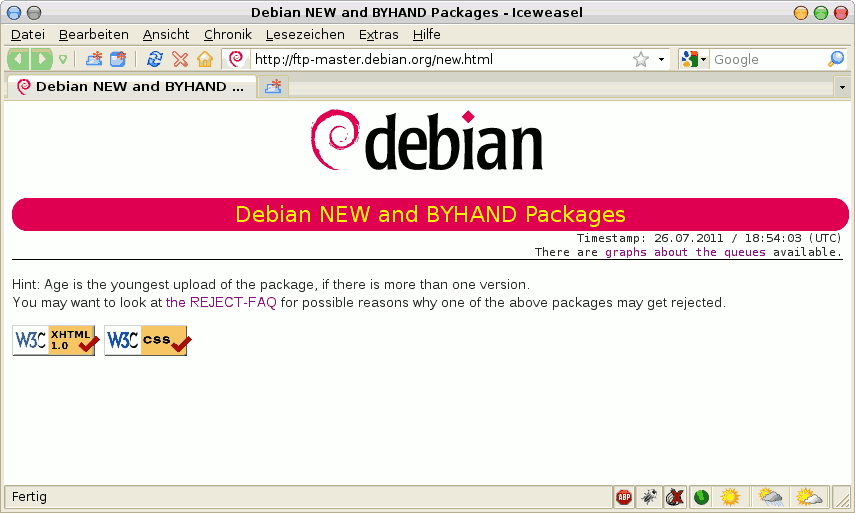
Continuing the shameless self-praise from our ftp-team talk, I'm now pleased to present you on behalf of the entire FTP-Team the following: As you can clearly see, you can see nothing. Yes, nothing! As of 18:55:52 UTC+2 the NEW queue, which at some times was well over 500, sometimes even 600 packages is now empty. Completely empty. To the best of my (and Ganneff's knowledge) the last time the NEW queue was empty was at least five years ago. Interesting enough, that triggered an yet undiscovered bug in dak, which refused to scan an empty directory...
Next.

Previous.

