Russell Coker: Modern Laptops Suck
One of the reasons why I m moving from a laptop to a cloud lifestyle [1] is that laptops suck nowadays.
Engineering Trade-offs
Laptops have always had disadvantages when compared to desktop systems. The screen has to be smaller, the keyboard is inconveniently small on the smaller laptops and netbooks, you don t get PCI slots (CardBus isn t nearly as good), you usually can t have multiple hard drives and expansion options for other things are limited. Also due to the difficulty in designing a computer that uses a small volume it s very difficult to repair a laptop and there are no realistic options for upgrading the motherboard to use a faster CPU etc. This is OK, it s engineering trade-offs that we have to deal with.
CPU Speed
Modern laptops however have some bad design choices. Firstly they appear to be trying to compete with desktop systems for CPU speed. This was reasonable when desktop systems had 200MHz CPUs which dissipated about 15W (see the Wikipedia page about CPU power dissipation) but now that desktop CPUs are dissipating 65W at the low end and more than 100W at the high end it s really not practical to try and compete. My Thinkpad T61 has a T7500 CPU that can dissipate 35W, getting that much heat out of a laptop case is a significant engineering challenge no matter how you do it.
It s a pity that no-one seems to be making laptops with large screens that have a low-power CPU. Sure it takes a moderate amount of CPU power to use a large display for games or playing video, but if you want to use a laptop for work purposes then not much CPU power is required. For tasks which take a lot of CPU power you can offload it to the cloud, I can ssh to a server to do compiles, and one of my clients is setting up an Adobe After Effects render farm [2] (in the broadest sense of the word Cloud can include a server accessed by ssh and a few servers on the LAN running After Effects).
Thin Laptops
The next problem is laptops being thin, it is really convenient to have a thin laptop, but the thinner it is the smaller the fans have to be and the faster the cooling air has to travel through small heat sinks. At the best of times this results in more noise from the cooling fan (which really isn t so bad). But it also increases the rate at which dust builds up inside the case and insulates the heat sink. When a laptop is thin and light for convenience and also wide to have a large display it just can t be that strong, so laptops tend to bend. If I put an Australian 10c piece (the size of a US Quarter) under one of the feet of my Thinkpad T61 the other three feet touch the desk! Presumably the laptop would bend in every way imaginable if you were to put it on your lap which of course you can t do because there are cooling vents in the bottom so it can give you a hot lap and an overheated laptop.
My first Thinkpad was 61mm high according to the IBM spec sheet. I measured my latest one at 34mm. As 61mm wasn t too bad I think I could survive now with a laptop that was 45mm high and had more strength and less cooling problems.
My Thinkpad T61 currently has some serious cooling problems, I suspect that something is broken inside. As it s out of warranty I took it apart but couldn t find anything wrong, so I guess I ll have to pay to get it repaired. This will be the third time I ve had a Thinkpad repaired because of cooling problems, but the first time one has been out of warranty. I blame the engineering trade-offs required to make them thin.
Portable Desktop/Server systems
If you want a small portable computer that delivers great performance then a Mac Mini seems to be a good option [3]. The people who use a laptop at their desk at work and their desk at home would probably be better served by a Mac Mini. The Mac Mini can be purchased with SSD storage to reduce the risk of data loss due to being dropped. Admittedly the Mac Mini needs to be plugged in before it can be used, but if you had a USB Ethernet device and a USB hub then only three cables would be required, power, USB, and video one more cable than the typical office laptop use with Ethernet and power.
Some modern laptop/netbook systems (such as the Thinkpad T61 and the EeePC 701) seem to be designed to use the keyboard as part of the cooling system. If you run it with the lid closed then it becomes significantly hotter. This makes laptops unsuitable for use as a portable server. Probably one exception to this is the Apple laptops which have a rubbery keyboard that doesn t allow air flow of course anyone who likes the feel of a real keyboard won t buy an Apple laptop for that reason (but a keyboard that has one really hot section above the CPU doesn t feel great either). In the past I ve used laptops as servers once they become unsuitable for their primary use, probably in future I won t be able to do that.
ARM Laptops
There are some laptops and tablets with ARM CPUs that should dissipate little heat. But I m not aware of any such devices that I consider to be practical Linux laptops. I ve done some work with iPaQ s running Familiar in the past, it was a nice system but it was a niche market and everything was different from every other system I ve ever used. That made all the work take longer.
What would be ideal is an ARM based laptop (not netbook a big screen is good) that boots from a regular CF or SD card (so the main storage can be installed in another machine to fix any boot failures) and which is supported by a major Linux distribution. Does anyone know of any work towards such a goal?

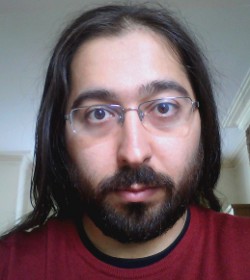 Even though Enrico is not smiling on this picture, he s one of the friendliest Debian person that I know. I always enjoy his presentations because he can t refrain from inserting jokes or other funny tricks.
 That said he s serious too, there s lots of good stuff that he has developed over the years (starting with Debtags) and he has put a lot of effort in reforming the New Maintainer process. Read on to learn more about his various projects.
Raphael: Who are you?
Enrico: Hi, I m Enrico Zini, a DD from Italy. I m 35 and I work as a freelance Free Software developer. One of my historical roles in Debian is taking care of Debtags, but that is not all I do: my paid work led me to write and maintain some weather forecast related software in Debian, and recently I gained a Front Desk hat, and then a DAM hat.
Raphael: How did you start contributing to Debian?
Enrico: It was 2001, I was at uni, I was using Debian. At some point I wanted to
learn packaging so I read through the whole Policy from top to bottom.
Then I thought: why package only for myself? . There were many DDs at
my uni, and it only seemed natural to me to join Debian as well.
Evidently this was also natural for Zack [Note from editor: Stefano Zacchiroli], who had become DD 6 months
earlier and didn t hesitate to advocate me.
I found the Policy and the Developer s Reference to be very interesting
things to read, and I welcomed my AM s questions as an excuse to learn
more. I completely understand those people who have fun trying to answer
all the questions in the NM templates while they wait for an AM.
With my super DAM powers I can see that my AM report was submitted on
October 16, 2001 by my AM Martin Michlmayr, and that James Troup created
my account 9 days later, on October 25.
Raphael: You have a special interest in the New Maintainer (NM) Process
since you are a Debian Account Manager (DAM) and a member of the NM Frontdesk.
Thanks to your work the process is much less academic/bureaucratic than it
used to be. Can you remember us the main changes?
Enrico: One of the first things I noticed when I become a Front Desk member is
that there was a tendency to advocate people too early, thinking by
the time they ll get an AM, they ll know enough .
Unfortunately, this didn t always work, and once the real NM process
started it would turn into a very long and demotivating experience both
for the applicant and for the AM. So we tried
 PostgreSQL 9.1 has had its first release candidate out for some two weeks without major problem reports, so it s time to promote this more heavily. If you use PostgreSQL, now is the time to try it out and report problems.
We always strive to minimize the number of major versions which we have to support. They not only mean more maintenance for developers, but also more upgrade cycles for the users.
9.0 has not been in any stable Debian or Ubuntu release, and 9.1 final will be released soon. So we recently updated the current Ubuntu development release for 11.10 ( oneiric )
 The CA model of SSL has always bothered me. The idea of a trusted
third party feels eerily close to maffia security: you believe this
person, whom you don't know, is who he claims he is on nothing more than
the word of this other person, whom you also don't know.
The DigiNotar story proves how problematic this model is, but you
don't really need that to understand its problems.
For the longest time, however, there simply was no better way to
properly do these things. But now that we have
 There was another question recently on StackOverflow that I had meant to
discuss in a follow-up post here. User deltanovember asked
 I have been a long-time user of
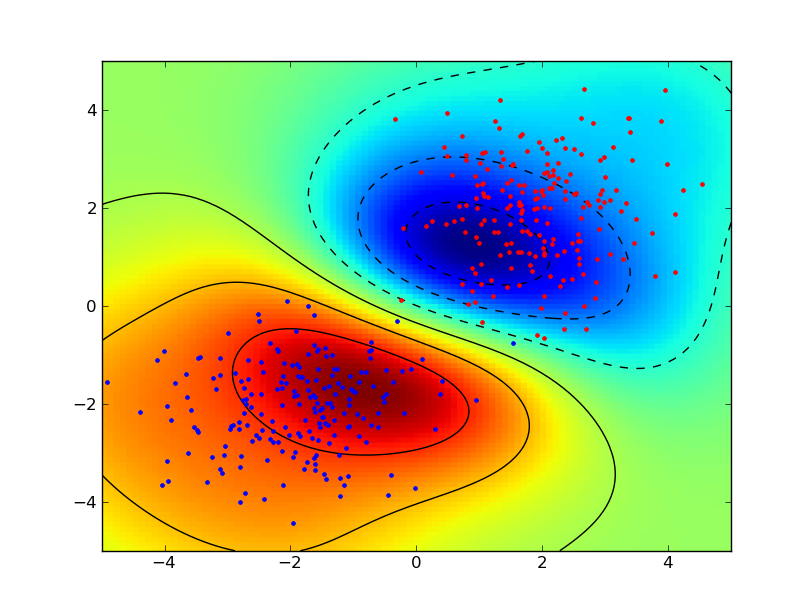
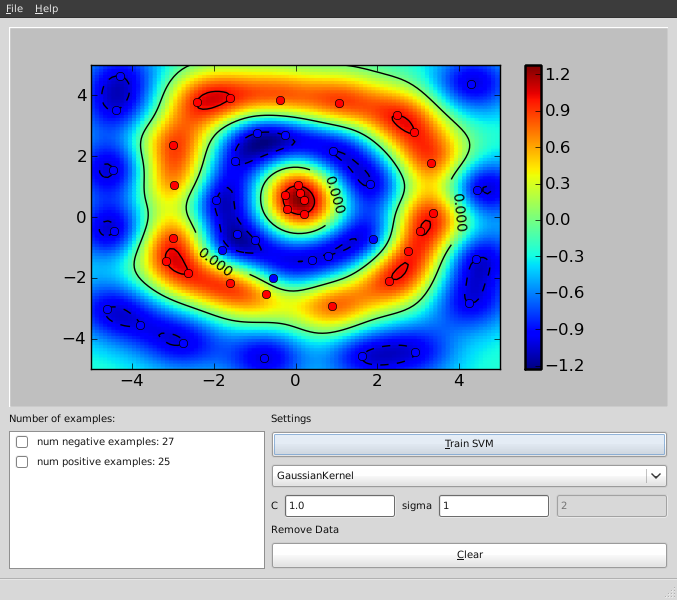
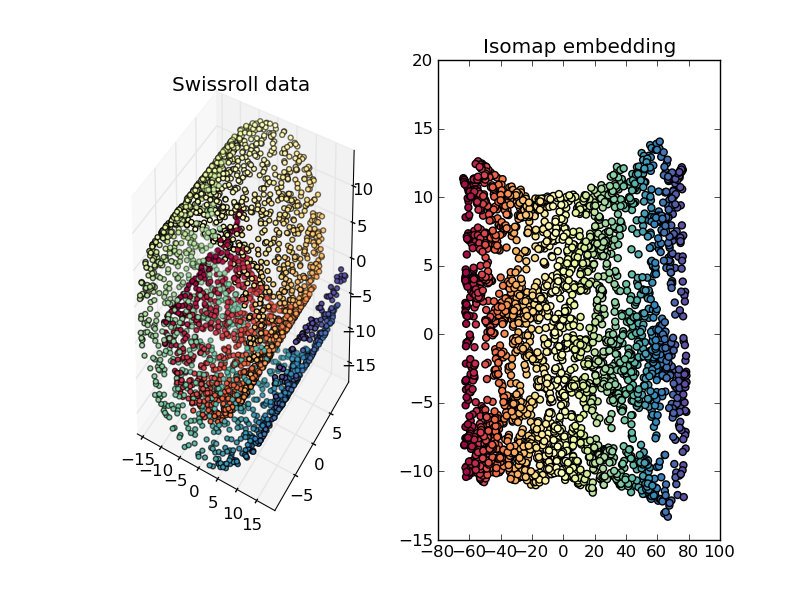

 After many years of successfully dodging doing any serious programming in PHP, I had to get my feet wet with PHP for my RL job: I was requested to develop a simple but non-trivial module for our Institute's Drupal-based webpage.
It basically meant two and a half weeks devoted to head-scratching: I had read the very good John van Dyk's
 This was the second most rainy day of the year, so far. 28 hours of solid
rain and counting. Good time to take stock of the water situation here at the
cabin after a year's experience.
The springs were as seasonal as I'd feared. After running strongly
all Spring, the main spring ebbed and died in the Summer months. By mid-July
there was no remaining source of potable water. If I had not been away so
much over the summer it would have been worse. As it was, I needed
only twenty gallons of water hauled from neighbor Lee's well.
The large cistern was filled in a single night during the most rainy period
this Spring, and provided wash water for two months of the summer, and that
only lowered it by a quarter. So I could have been less sparing with it,
and not relied so much on rain water catchment for supplimental wash water.
Today I replaced the pump, so I can use the pressure tank and have running
water in the house. I could have done this earlier, but what can I say; I
enjoy hauling buckets of water, when it doesn't involve breaking ice.
In the winter when there's firewood to haul instead, I'll enjoy the
indoor plumbing.
Also today, I may have finally fixed the pipe to the large cistern
properly, so it won't only fill at the heaviest rain times. Along with the
ability to cross-pump water from the small to the large cistern, it should
be easier to keep it filled, and I might be able to reduce the turbidity
enough that it's potable eventually. Will see.
I don't live in a dry region, but this is a relatively dry place for the
area. It's been interesting to get a taste of what it'd be like to live
somewhere where water is actually scarce.
 This is just a quick post to remind myself in the morning, as soon as I've made it I intend to turn my computer off and leave it off until I can re-organize my office.
I've been using mutt for my email for the past few years. Nothing compares to the flexibility of procmail/sieve for organizing server-side mail, and then mutt is ideal for reading them.
With the addition of the mutt-patched sidebar mode you can even go for a few days before realizing you're not in a graphical environment. But one thing I do long for is the ability to execute scripts at various times.
Thus far I've not actually planned what I'd like to do, but as a starting point imagine being able to execute a hook when new mail arrives? Or when you send a message matching a pattern in some fashion?
There are some things out there, such as the various hacks which are designed to abort sending a message if you mention "See attachment" in a message body but fail to add one before sendign the message. These hacks generally abuse the sendmail configuration such that they're extremely ad-hoc and hard to chain/nest.
I've mellowed out over the years and I have no interest in attempting to write a mail-client (though at the same time how hard can it be? Just restrict yourself to using inotify on ~/Maildir and offload delivery to exim and you're almost done? I guess the hard part is the UI, though I do like the mutt + sidebar layout. Write the whole thing in some scripty language?)
I'll re-examine notmuch and gnus over the next week or two, but I suspect both will continue to disappoint in various ways.
Anyway, for the moment I'm just pondering. But threading is an obvious concern. Most current mutt hooks relate to the local folder, or the local message. If I were viewing a message in one directory and a new mail notification fired for a delivery to both ~/Maildir and ~/Maildir/.people.foo I'd need to either serialise them or thread them.
Ponder ponder.
In other news I've been doing more photography recently. Nothing cohesive except for my recent experiment with shooting a "street-girl" outdoors in falling light, but that was an interesting challenge and the results were sufficient to make me want to try shooting outdoors in an organized fashion again. (Some random images have been linked to from my wee
 I'm in the middle of setting up new build machines for the armhf
port (see
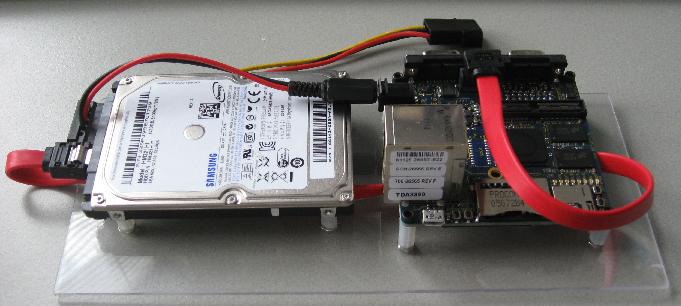 All of these machines are Freescale i.MX53 Quickstart (aka "loco")
development boards. They include a 1GHz i.MX53 CPU (based around the
ARM Cortex A8, one of the ARMv7-A family). They have 1GB of RAM and
native SATA. They're lovely little machines, measuring just 3 inches
square. To mount them usefully in a machine room, I've mounted each
board with a 320GB notebook hard drive and the necessary cabling onto
a small perspex card as you can see here. Then we can fit 6 such
machines and a normal PC-style ATX PSU into a 3U mini-rack. Well,
it almost fits - the power supply pokes out a little so we'll
need 4U of space when we come to mount it.
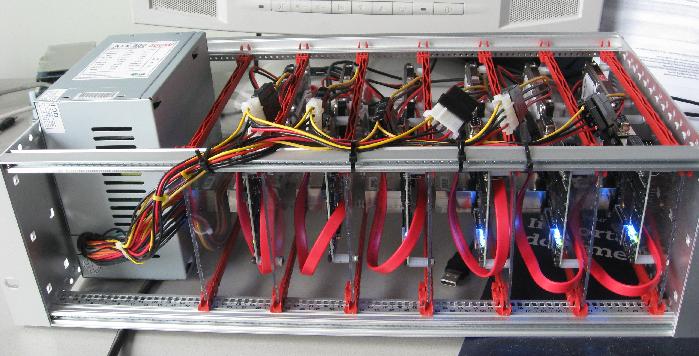 The Quickstart boards have been sponsored
by
 Both Bash and Zsh use several startup scripts: profile, bashrc, zlogin, zshrc, etc.
The existence of several startup scripts exists to allow you to apply
specific actions for interactive or login shells. For instance, you may want to
set up a fancy colour prompt or to enable a powerful completion system for
interactive shells only, as it would be pointless to apply it to non-interactive
shells (that is, for shell scripts). Or you may want to display a joke and the
weather forecast at login, but not each time you spawn a shell by other
means.Common
Both Bash and Zsh first execute a system-wide file, then the corresponding
user-specific one. For instance, /etc/profile then
~/.profile. For simplicity I shall only mention the
files' base names.
Bash
At startup, depending on the case:
 Am I online or not?
There is a summary at the end for the quick readers.
It is in many modern applications important to be able to more or less gracefully handle if the application user is online or not. For example, there is no need to try to fetch emails if the device (computer, phone, tablet, laptop, ) doesn t have network (wifi, cable, umts, ip over avian carriers, ..).
KDE has of course made nice functionality for this, and here I will try to describe how to make your app network status aware and what to be aware of in the process.
Solid background
All this is going on in Solid, using two parts of Solid and a bit of KDE s infrastructure: