Search Results: "tach"

8 December 2009

Matthew Garrett: Barnes & Noble's GPL fun

Barnes and Noble's new nook ebook reader is now shipping to people. Mine[1] is due to turn up tomorrow, but the instruction manual is available for download already. Quoting from it:

Notwithstanding anything to the contrary in this Agreement, certain components of the
Software are licensed subject to the General Public License Version 2.0, a copy of which is attached
as Exhibit A (the GPL License ). You may not use these components except in compliance with
the GPL License. In addition, you may have additional rights with respect to such components
under the GPL License, including, without limitation, the right to obtain the source code for such
components from us. You may obtain a copy of such source code by contacting us through the
contact information provided on the Web Site. We will provide such source code in accordance
with the GPL License.


Which is all very promising[2], except contacting them via either phone or email reveals that nobody has the faintest idea what I'm talking about. I can certainly imagine that they have other concerns right now (delaying your initial shipments by up to two weeks depending on how early people ordered suggests some kind of utter failure somewhere in the chain), but it's depressing that approximately nobody appears to be able to get this right.

Updated:

After further conversations with tech support, I was told that I'll be mailed a CD of source within two weeks.

[1] I had a Sony, which unfortunately had a bit of an accident. On the other hand, it was running 2.4, so maybe it was a lucky escape of some sort?
[2] Well, apart from the traditional confusion of the GPL as something that claims to restrict use

7 December 2009

Martin F. Krafft: Securing e-mail communication across clients/OSs

Dear lazyweb: I am in a dreadful situation! I need to secure e-mail communication between five types of users: To make matters worse: there is no common provider or server infrastructure, so the solution must work across providers and mailboxes.

Requirements
  • Human error should be anticipated and prevented.
  • Mail between all parties must be encrypted (and signed) automatically. If encryption is not possible, the mail must not be sent. This includes the situation where not all mail recipients keys are known;
  • Ideally, one can define rules (using wildcards or regular expressions) to enforce certain policies.
  • Mail to other parties may be signed, and it would be good to be able to turn this on and off by default;
  • The MIME standard should be employed so that the mail body is not altered, and attachments can be seamlessly encrypted too. Existing MIME parts should be encapsulated as children of a new multipart tree;
  • Incoming mail should be automatically and seamlessly decrypted/verified, and the user must be alerted if the verification fails.
Ideally, the solution will be open-source. However, if proprietary software performs better, then we will gladly use that where required.

Previous attempts So far, we ve tried (and were let down by)
  • GpgOL, which has very irky and brittle integration with Outlook and can only do inline signing/encryption.
  • S/MIME, which seems supported by all involved clients, but Outlook does not really allow you to specify policies. Encryption seems to be opportunistic at best, which is not enough.
  • GPGrelay, which is promising because transparent, but apparently messes with MIME, and I am unsure whether it can fit between Outlook and Exchange. I have yet to run real tests though. If you are a GPGrelay user, or you d like to try it (it s Windows-only), please get in touch.
  • WinGEAM, but that apparently no longer exists, and neither is the underlying GEAM.

Help! Does anyone have proper suggestions over what to use? In fact, if you are interested in devising a solution, or even deploying it, there s money to pay you for those services. Write in if you are interested.

4 December 2009

Erich Schubert: Tracking outgoing links with Google Analytics

Here's a code fragment to track outgoing links with Google Analytics. As usual, use it at your own risk. I can not give you support for Google products, for obvious reasons.To use it, you <me>need at least understand where to put it (call it in a try-catch in onLoad) and how to adjust the variable name of your page tracker (I'm not using the default).
function trackLinks() 
  var as=document.getElementsByTagName("a");
  var ig=["mydomain.tld","google-analytics.com"];
  for(var i=0; i<as.length; i++)  
    var ignore=false;
    var oc=as[i].getAttribute("onclick");
    if(oc!=null) 
      oc=String(oc);
      if(oc.indexOf('urchinTracker')>=0
        oc.indexOf('_trackPageview')>=0
        oc.indexOf('javascript:')>=0)
        continue;
     
    if(as[i].href.indexOf("mailto:")<0) 
      for(var j=0;j<ig.length;j++) 
        if (as[i].href.indexOf(ig[j])>=0)
          ignore=true;
       
     
    if(!ignore) 
      as[i].onclick = function() 
        var o=this.href.replace(/:\/*/,"/");
        pt._trackPageview('/out/'+o)+";"
        + ((oc!=null)?oc+";":"");
       ;


This code tries to attach an onload handler to any outgoing link, ignoring internal links or links that use JavaScript. If such a link is clicked, it generates a virtual page access with an "/out/" URL that can be analyzed in Google Analytics.A side benefit (apart from knowing which links are interesting to your visitors) is that you should get more accurate "time on page" statistics for your pages.

2 December 2009

Russell Coker: Noise Canceling Headphones

My patience with the noise of airlines has run out, on my trip from AU to US I didn t get any sleep due to the cramped seat and the noise of the plane. While I can t do anything about the cramped seat without spending a lot of money it seems that I can do something about the noise with moderate expense. I ve been researching Noise Canceling Headphones [1]. The principle of such devices is that they have a microphone on the outside and a speaker on the inside to generate sound that is 180 degrees out of phase which will then almost cancel out the ambient noise. Apparently such devices are very effective for low frequencies but less effective for high frequencies. High frequencies are more easily blocked by sound insulation, so the ideal seems to be around the ear headphones with lots of padding to passively stop noise with active noise canceling to deal with the lower frequencies. So I m now planning on buying a set of headphones before I leave the US. Choice Magazine (an Australian independent product review organisation) published a review of noise canceling headphones in 2007, it has some interesting information but is not suitable for buying advice today [2]. Choice gave the best results to the Jabra C820s which had just gone out of production when they published the review and by now could only be bought on eBay. The Jabra had an active cancellation of 14.3dB and a passive cancellation of 8.3dB. The best active cancellation of all the reviewed products was 19.5dB for the Bose QuietComfort 3 which incidentally only had a passive cancellation of 4.8dB. Both the Bose and Jabra products got good reviews in a mailing list discussion. It s a pity that Jabra is now only manufacturing products for call centers. I am not considering the headphones that go on top of the ears, they will inherently give less passive protection due to the design and they will annoy me. I am also not considering the ear-buds because I don t like putting things in my ears. I will note that there are some very positive reviews of some of the ear-bud devices. The Etymotic Research devices get very good reviews and are apparently on sale at reasonable prices in Apple stores (among other places) [3]. Anyone who wants noise-canceling headphones and disagrees with me about the desirability of ear-bud type devices should probably consider them. The Bose QuietComfort 15 is selling for $300 (NB for this post all prices will be in US dollars) [4]. It has microphones both inside and outside the ear cup to allow better detection of ambient sound. A single AAA battery is supposed to last 35 hours, it has a detachable audio cable (for use in just blocking noise), and comes with an airline adapter (for the two-port airline sockets). It does require being turned on to listen to audio, some headphones allow you to turn off the noise canceling feature to listen to music without a battery this doesn t matter for my planned use. They have a volume switch (low and high settings) to cope with airlines that set the volume too high. They are specifically designed for passengers in commercial jet aircraft. Surprisingly the Bose web site doesn t mention the number of dB of audio protection and none of the reviews I have read have mentioned it either. The store Brookstone was recommended, they have some unbranded noise canceling headphones, but as they are on the ear and more expensive than comparable Sony products ($130 vs $100) I eliminated them quickly. Sony has a good range of noise-canceling headphones [5]. They have ear-buds starting at $90 and on-ear headphones for as little as $50. They have two models of over the ear headphones that are advertised at $200 and $400. The MDR-NC60 costs $200 and reduces noise by 12dB at 200Hz while the MDR-NC500D costs $400 and reduces noise by 20dB at 160Hz. I don t know why they didn t measure both headphones at the same frequency or give any information on passive sound insulation. They state that the MDR-NC500D was voted as being better than the Bose QC2 and QC3 but made no such claim about the MDR-NC60 presumably the older Bose devices were rated as better than the MDR-NC60, and I have to wonder about how the Bose QC15 would compare to the MDR-NC500D. The MDR-NC500D has an internal Lithium-Ion battery that lasts 16 hours and can take a pair of AA batteries as well for a total of 28 hours. The Sennheiser PXC 350 claims up to 32dB of passive attenuation and up to 18dB of active noise compensation [6]. Their claims about NoiseGuard (TM) cause me to lack confidence in their products. The PXC 350 is advertised at $330 and the reviews that I have read suggest that the Bose might be a better product. Sennheiser also has PXC 450 which offers 23dB of active noise compensation and costs $450. I am not going to pay $450 for headphones. It seems that the choice for over the ear noise canceling headphones comes down to the Sony MDR-NC60 at $200 and the Bose QuietComfort 15 at $300. I have the impression that the Bose product is better, but whether it is $100 better is the question. Also while I haven t forgiven Sony for Rootkitting their customers [7], this is not going to prevent me from buying the headphones that best suit my needs. Does anyone have any suggestions? Did I miss a good brand that I should be considering? Does Sennheiser have some redeeming features that I missed?

1 December 2009

Dirk Eddelbuettel: Updated slides for 'Introduction to HPC with R' (now with correct URLs)

This is an updated version of yesterday's post with corrected URLs -- by copy-and-pasting I had still referenced the previous slides from UseR! 2009 in Rennes instead of last Friday's slides from the ISM presentation in Tokyo. The presentations page had the correct URLs, and this has been corrected below for this re-post. My apologies! As mentioned yesterday, I spent a few days last week in Japan as I had an opportunity to present the Introduction to High-Performance Computing with R tutorial at the Institute for Statistical Mathematics in Tachikawa near Tokyo thanks to an invitation by Junji Nakano. An updated version of the presentations slides (with a few typos corrected) is now available as is a 2-up handout version. Compared to previous versions, and reflecting the fact that this was the 'all-day variant' of almost five hours of lectures, the following changes were made: Comments and suggestions are, as always, appreciated.

Dirk Eddelbuettel: Updated slides for 'Introduction to HPC with R'

As mentioned yesterday, I spent a few days last week in Japan as I had an opportunity to present the Introduction to High-Performance Computing with R tutorial at the Institute for Statistical Mathematics in Tachikawa near Tokyo thanks to an invitation by Junji Nakano. An updated version of the presentations slides (with a few typos corrected) is now available as is a 2-up handout version. Compared to previous versions, and reflecting the fact that this was the 'all-day variant' of almost five hours of lectures, the following changes were made: Comments and suggestions are, as always, appreciated.

30 November 2009

Martin Meredith: (UK) The Gadget Show PC vs Mac

Today, an episode of The Gadget Show aired in which they compared PC and Mac to put on their wall of fame . I was shocked that there was no mention of Linux at all in their rundown. Here is the email I just sent to them in response to the show:-
Date: Mon, 30 Nov 2009 22:16:28 +0000
From: Martin Meredith <mez AT debian DOT org>
To: gadget.show AT northonetv DOT com
Subject: PC vs Mac Yes, you mention windows But both PC s and Mac s have the ability to run a little thing called Linux Linux is the base of an operating system that s been around for years, often
making innovations BEFORE Windows or Mac are able to. It s an Operating system that s written by the people, for the people, which
shows in the fact that there are hundreds (if not thousands) of distributions
available to download and use for FREE!!!! A large motive behind the Linux movement is the fact that it s completely free.
Both in the sense of Free Speech, and in the sense of Free Beer. You don t have to pay for it, and you can do what you like with it. Compare the above to a Mac. With a mac, you re limited to the hardware you can use, you re limited in the functionality, etc etc. Comparing to Windows, you can see the benefit of the price. Constantly upgrading windows can cost a LOT of money. Ok, Linux does have it s flaws. Some hardware isn t supported correctly, and a lot of the software you ll find on the shelves of your local shop probably won t work with it. But, nowadays, with the advent of the iPhone, and to a lesser extent, Android based Mobile Phones, people are coming to expect easily available software. Enter the package Manager. Most distributions of Linux now offer an easy way to find and install applications, and some go a step further and give you an application that makes life even easier (See attached screenshot) Linux also has the benefit that, like the Mac, the fact that it s not Windows,
and something that 90%+ of people use, it s not a target for Viruses. Add that
to the fact that it has Least Privileged Access built in (Think Windows Vista
are you sure that you want to run this program as an admin? ), and has done
since the very beginning, and it makes it one of the most secure operating
systems you can find. Linux has come along in leaps and bounds in recent years, and is surely a
competitor for any operating system out there. While it may be unfamiliar,
with the advent of new technology, it s perfectly placed. This has been shown
by the fact that until Microsoft made a sly move to relicence Windows XP for
netbooks, it was hard to find a netbook with anything but a Linux based OS on it (and all those who tried out my eeePC 701 when it was new and shiny out of the box tended to prefer what was on that than Windows!)
Regards,
Martin Meredith Freelance Writer for Future Publishing
Debian Developer http://www.debian.org/
Ubuntu Developer http://www.ubuntu.com/
Deputy IT Manager for Mobile Fun Ltd. http://www.mobilefun.co.uk/

Dirk Eddelbuettel: Back from Tokyo

Just got back from Tokyo a few hours ago: I had an opportunity to give my 'Introduction to High-Performance Computing with R' tutorial / lectures (for which previous slides can be found here). This was an all-day talk at the Institute for Statistical Mathematics at their new site in Tachikawa in the greater Tokyo area, thanks to an invitation by Junji Nakano. Lisa and I turned this into a brief one-week trip to Kyoto and Tokyo, and we had a truly wonderful time on what was our first visit to Japan. I should blog some more about it, but now I will give in to the jet lag and catch up on some sleep...

29 November 2009

Jan Wagner: [selfnote] Change CD-image while (HVM) domU is running

xm list grep <VMName>
xm block-list <VMName_Number>
xm block-detach <VMName_Number> <VMName_Vdev> -f
xm block-attach <VMName_Number> file:///iso/disk.iso \
hdc:cdrom r

25 November 2009

Russell Coker: Seatbelts and Transporting Computers

I ve just read an interesting post at Making Light about seat-belts [1]. In Australia seat-belt use is mandatory, you can be fined for failing to wear one and the police (who help clean up the mess when someone dies on the road) are apparently quite aggressive about enforcement. Even aside from the legal requirement the use of seat-belts is fairly ingrained in Australian culture, people tend to use them even when they won t get caught. One of the things I like to do in my spare time is to take unused computer gear from IT companies (which they regard as rubbish) and give it to home users for recreational and educational use. Due to that and my work for some smaller IT companies I ve helped many people load computer gear into their private cars and observed that most people will not take adequate care unless I coerce them. A CRT monitor tends to be large and heavy, you wouldn t want to get hit in the back of the head with one at 60Km/h. With some combinations of monitor and car you can fit a monitor in the front passenger foot-well, but usually the only place a monitor will fit is the back seat. The correct thing to do is to use the seat-belt to strap the monitor in place. It s most likely that the monitor stand (the only part that allows a seat-belt to be attached) would snap off in the event of a serious crash but this would at least slow the monitor down. Also don t put the monitor directly behind your seat if you can avoid it, put it behind the passenger seat. In a collision monitor might be able to push through your seat and cause you a back injury. Between 1992 and 2006 there were 78,000 acute computer-related injuries treated in US hospital emergency rooms [2]. The number of injuries caused by monitors peaked at 37% of the total in 2003 this was largely due to monitors falling on people. Even without the speed of a car a monitor can be a dangerous projectile. Hard drives have a lot of potential to cause damage, they are dense, hard, and the corners often aren t rounded. Storing them above the back seat behind the driver s head (as a friend once tried to do) is a really bad idea. Mythbusters showed that a box of tissues isn t going to kill you in a crash, but a hard drive is much more dangerous. The typical car glove box can store a few drives. If you need to transport a box full then the front passenger foot well is a reasonable place. If your car rolls then that would suck, but it seems that people usually die when they roll their car anyway so just try not to do that. A serious server (EG 2RU or bigger rack-mount) typically weighs 30Kg or more and is solidly constructed. The size and mass of such a machine makes it extremely difficult to safely store inside a car. The ideal place is the boot, but if that isn t an option then behind the passenger seat is the next best option. One final issue that I ve been wondering about is the safest option for laptops that are in use in a moving car. A 3Kg Thinkpad would have to hurt if it hit you in the back of the head at 60Km/h. The child-seat attachments are solid anchor points that can be used for other things. I wonder if a laptop security cable could be attached to one of the child seat points. According to an exhibit at a science museum I can throw a tennis ball at 115Km/h, so I presume that laptop security cables are designed not to break when someone swings the laptop at that speed. Therefore if a car was driving at a legal speed in Australia before crashing then a laptop security cable should be able to stop the laptop. Preventing the cable from injuring the passenger on the way would be the difficult part.

23 November 2009

Jorge Salamero Sanz: New ebox-radius module available

Since I came back from Dublin I had pending to release the new ebox-radius module. This new module for eBox Platform 1.2 brings integration of eBox LDAP users with FreeRADIUS allowing the deployment of WPA/WPA2 EAP wireless authentication using eBox. In fact is very simple as seen on the screenshot, you can choose whether all the users are able authenticate or just a group of them and the NAS clients that can query the RADIUS server.
ebox-radius

ebox-radius

This module is still in beta, but packages for Hardy are available from my PPA so you can try it in your eBox 1.2, a version for eBox 1.3 will be released very soon. FreeRADIUS packages where self builded because of #266299, I hope this can be fixed very soon, see Debian, EAP, and the OpenSSL and GPL incompatibility. If you give it a try, please give us feedback on the forum or the mailing lists.

20 November 2009

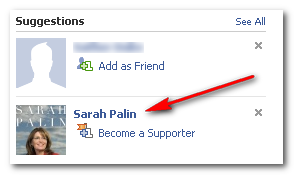
Adam Rosi-Kessel: Algorithmic Glitch

How did Facebook come up with this?

How did Facebook come up with this?

15 November 2009

Jonathan McDowell: Playing with an e-reader

I've always preferred dead tree to reading things on screen; I just find it easier. I've tried reading fiction in the past off a laptop and just didn't find it as enjoyable an experience; whether it was the form factor (hard to curl up with a laptop, even a netbook), the quality of the screen or the interface I don't know. Equally with technical documentation if it's something I'm using a lot I prefer a printed copy to flick through. However e-ink based e-readers are becoming much more common and affordable and I figured I should give the whole ebook experience another try.

I spent 3 weeks in October in the Bay Area on work, so I borrowed my Dad's Sony PR505 for the trip. First problem is that it's picky about USB charging - works fine if attached to a computer, but using a Blackberry charger looks like it's fine but then results in what looks like a hanging reader. However once charged it lasts for ages - I charged it before I went and only hooked it up to my laptop once during the trip to transfer some new content onto it. The form factor is also quite good; a bit heavier than a book, but not excessively so. Holdable in one hand, big enough screen that I wasn't squinting at it. Slightly too big physically to easily go in a coat pocket the way a paperback would unfortunately, but perfectly fine for taking to read at breakfast every morning in the hotel.

The screen was also much better than I'd expected. I knew the technology was different and supposed to be easier to read than traditional LCDs, but I was sceptical. Overall I had no problems with it. I was even quite impressed with the Sony's zoom function - one of the PDFs I was reading was too small when view full screen, so I zoomed in so it was readable. The nice feature was that then the "next page" button gave me the next bit of text to read, rather than the actual next page, so it remained very easy to navigate through as I read. A small touch, but very welcome.

This isn't intended to be a review of the Sony reader; that just happened to be the model I was easily able to borrow. I happened to see a Kindle in use on the plane and I was struck by how much bulkier it seemed, though having looked at the relative specs it seems this is entirely due to the keyboard rather than any difference in screen size. The Nook was also announced during my trip and I'd quite like a play with that as it looks quite nice.

Despite my positive experience with the Sony I'm not planning to go out and get one just yet. And that's the lack of sensibly priced content. When I bought my first mp3 player I could take my exising CD collection, rip it and be able to play it on my new device. This meant I got an immediate benefit of having my entire music collection with me all the time, just by buying the player. If I buy an e-reader then in order to get all my existing books on it I have to go and buy them again. What's worse is they'll cost me the same or more than I paid for the paperbacks. I can't go and exchange my Pratchett collection for the electronic versions for a nominal fee. I can't easily scan them in myself and produce some decent ebooks. I can't even go and buy the entire set for 20; I'd have to spend something like ten times that. With mp3s I can continue to buy the real item and also have it on my portable player. Or, while albums still don't seem to be much cheaper electronically than on CD, there is at least the ability to buy a single track if that's all I want. Books don't have a comparison. I'm not going to want to buy a single chapter, am I?

There are some sites out there that can provide cheaper ebooks - Rachel Willmer runs ebookprice.info which lets you compare pricing from different vendors. There's also Project Gutenberg if you're looking for out of copyright books. Finally Peter Corlett pointed me at the Baen Free Library, which I haven't downloaded anything from but will definitely investigate at some point. I still maintain that none of these are enough and that content provision will continue to be a hinderance for e-reader mass adoption until there is some fundemental change in the way its provision is handled.

14 November 2009

Adam Rosi-Kessel: Comcast Upgrade

Not bad!

Not bad!

11 November 2009

John Goerzen: In-Depth Review: Motorola Droid (with some iPhone comparisons)

The Motorola Droid A855 is the first Android 2.0 phone. I have been using one since Monday, having switched from a BlackBerry Pearl. I also wrote about Terah s iPod Touch recently, so I ll be making comparisons to it too. Here s my review. Hardware Physically, the device is very nice. It fits well in my hand. It comes in a fairly small box. It s surprisingly heavy for such a small device, but it isn t so heavy as to be a problem. It feels solid, sturdy, and durable throughout. Terah has the most recent iPod Touch 8GB, and compared to that, the Droid is thicker and heavier. The Droid s screen is awesome; a little longer but not as wide as the iPod Touch s. The iPod Touch screen seemed to offer less friction as I d slide my finger over it, which was nice but not a terribly big deal. I don t share some other people s annoyance with the keyboard. It is far better than the BlackBerry Pearl, or many other BlackBerries I ve seen. Along the bottom of the screen are some silkscreened buttons. My gripe with them is that they are easy to accidentally press. I ve done that more than once while using the phone in speakerphone mode, but you can lock the phone keyboard while you re on a call. I also don t share the complaint about battery life. It is excellent compared to the Pearl. Despite having a long-life battery, if I had it charged fully when leaving work at 5PM, by the next morning at 7AM it would often be completely discharged (though sometimes only half discharged). I believe that has to do with my home being in a poor reception area, and it spending a lot of energy looking for signals. In any case, the Droid has impressed me with its battery life and I have no complaints there. The screen, as I said, is brilliant and sharp. It is readable in various lighting conditions. By default, its brightness adjusts with the brightness of the ambient light. That s normally fine, but it can be annoying to stand in front of a light with the Droid in a shadow, watch its screen darken, and then shift a bit and it becomes bright again. There is a setting to disable automatic brightness. Button-wise, it has four physical buttons: the power/lock button at the top, volume up/down on the side, and a camera button on the side. The camera button only works when the phone isn t suspended (locked), and disappointingly can t be remapped to something actually useful. Just beneath the screen are four touch buttons: back, menu, home, and search. These are the ones I complained were easy to accidentally press. MicroSD and USB The Droid comes by default with a 16GB MicroSD card already installed. This is one huge advantage over the iPhone or iPod Touch: you can actually put things on the phone yourself, directly, without having to use iTunes and its limited features. I have, for instance, downloaded a PDF on the Droid and later copied it to my PC. I also copied a KeePassX encrypted password database from my Linux computer to the Android, for use with KeePassDroid. The iPhone/iPod Touch password programs don t support this kind of copying of files from your PC to the device, though one will let you put a database up on a webserver you control and download it from there. Plugging in a MicroUSB cable will start charging the Droid automatically. In order to make the SD card mountable, you must simply drag down the notification bar (which is how you get detail about what it s telling you normally) and touch the USB icon. When the SD is mounted on the computer, the Droid won t see it, of course. Touch the USB icon again to mount it on the Droid again, or just unplug USB. Wireless and Wifi The wifi support works like you might expect: pretty well. The cell phone reception works well, as does its Bluetooth support. It has an easily-activated airplane mode which disables all wireless features, which can then later be re-enabled. You can also individually disable wifi and Bluetooth. Oddly, you can t disable the cell phone network individually. The only way I could find to disable it is via Airplane Mode. User Interface The user interface, overall, is very slick and polished. However, I would have to say it is not as slick and polished as the iPhone/Touch interface. A few of the animated effects have a low framerate, which isn t really a big deal. More of a big deal is that settings and options can be scattered in many different locations, making them hard to track down at times. The device also offers fewer visual cues than the iPhone/Touch, though that is perhaps not significant. Like Apple s device, the Android 2.0 UI offers you three home panels, which you switch between by dragging your finger left and right. The iPhone shows some dots at the bottom of the screen, a standard UI indicator on that device that you can flick left/right, while there is no such indication on the Android. This is somewhat nitpicky though. I would put Android 2.0 and iPhone in the same general class of user interfaces, way above any other such device I ve tried. The Droid has an on-screen keyboard similar to the iPhone/Touch, though somehow it felt like the keys were smaller or easier to mistype. I m not sure why that is; maybe they really are smaller. The physical keyboard can be used at any point too, of course. Background Apps This is an area where Android really shines over iPhone. Android supports background apps everywhere. That means that your weather widget can be always correct, instead of being hardcoded at the factory to show 73 degrees as iPhone s weather icon does until you tap to open it. It means that more apps remember where you were and what you were doing when you switch to/from them. And it means that you can do things while that PDF downloads. Finally, it means that you can have native Jabber clients on the Android without having to do some mess with Apple push notifications plus third party servers, significantly reducing the complexity of such apps. Browser Now moving on to the applications preloaded on the phone, I ll start with the browser. It is, in a word, awesome. It is far faster and reliable than the browser in my N810. Compared to BlackBerries, of course, this is a real browser, not their limited one; and even so, it is still faster. It is also faster than the iPhone/Touch browser, sometimes significantly so. The pinch to zoom feature of the iPhone/Touch is lacking, and it must be said is both useful and pretty. Zooming softkeys appear on the screen when you tap, and do work well. It also automatically zooms if you tap on the page to fill out a form, for instance. The bookmarks save thumbnail images similar to the iPhone, and you can put bookmarks on your home screens as well. Rotating the Droid to landscape orientation causes the browser to also rotate, and on most websites it will also zoom in by default at that point, since it s got a wider orientation and doesn t have to shrink stuff to fit as much. The physical keyboard is very nice for filling in usernames and passwords. iPhone-optimized sites, such as Bloglines, work great on the Android. Though many of them fail to autodetect the Android as an iPhone-like device, and thus you have to manually ferret out their iPhone-optimized URLs. Email This is both a strong and a weak spot of the Droid. First off, it comes with two email client apps preinstalled: one for Gmail, and one for everything else. I haven t used the Gmail one, so this review doesn t consider it. You can connect the email program to your IMAP, POP, SMTP, or Exchange (ActiveSync) accounts in the predictable way. Each account can be configured with its own notification preferences, so you can easily see an icon, vibration, or beep when you get new mail on one account and not the other. All folders on an IMAP account are accessible, which is a very nice feature that is not shared by the BlackBerry. You can view your mail as a unified INBOX if you prefer. In such a few, a thin color bar to the left of each message summary tells you which account it came from by its color. This is a nice way to quickly deal with all new email, wherever it may be from, and ought to be emulated by some desktop clients. You can, of course, also view each account individually. The email program supports attachments, both viewing and sending. It does not appear to have the iPhone/Touch bug if failing to display emails forwarded as attachments. Now to the drawbacks. First of all, it inexplicably doesn t support the IMAP IDLE command. As a result, IMAP accounts are polling-only; there is no near-instant notification of new mail as there is with Exchange accounts, even though IMAP supports that trivially. Like the iPhone/Touch, Android 2.0 s mail program has a great deal of trouble with self-signed SSL certs, or SSL certs that are unusual in any way. Both devices refuse, by default, to talk to mail servers with self-signed SSL certs. Neither one offers to let you add an exception to recognize a particular cert in the manner that the built-in web browser on these devices would do. On the iPhone/Touch, at this point you need to obtain the cert by other means, stick it up on a web server, browse to it from the device, and add it that way. This trick doesn t work on Android 2.0, nor does adding it using the import from SD option. There appears to be absolutely no way to teach the mail program to use a self-signed cert on Android. The good(?) news is that you can choose to have Android accept any certificate. Many people in forums suggest that, and it does let it connect. Of course, it also removes much of the security benefit of using SSL/TLS in the first place, and is a terrible excuse for the lack of proper self-signed cert support. Both iPhone and Android devices have a horrible user experience in this area Quickoffice The Droid comes with some sort of Quickoffice software pre-installed. It can be used to view PDF, Word, and Excel files (at least; maybe more). But it is a rather strange beast. It has no icon on the applications screen. The only way to open Quickoffice is by opening a file that it supports in another app. So, for instance, tap on a PDF in the browser or open a Word attachment in email. I haven t played with it much, but I can say that it s read-only but seems to have high-quality rendering of all document types. Its PDF viewer is glacially slow on any page that has graphics. Flip the page to one with graphics and up pops a progress bar. And good thing too, because it might take 15-30 seconds to render a page. I will be looking for better PDF viewers in the Market; there are quite a few. Lack of file manager And that brings us to the next surprising limitation: there is no built-in file manager. I downloaded a PDF from the browser, and saved it to the SD card, but there was no way to look at it from the phone! Absolutely none. No way to delete it, rename it, etc. Several people recommended Astro, which solved all of those problems. Not having such a program built in is a weird glaring oversight. Of course, the iPhone/Touch doesn t have one built in, but in their case the glaring oversight is not having any files to manage Calender, Contacts, and PIM features This is an area of exceptional strength for the Android. I believe it s got the best PIM features of any mobile device out there, though it s not without its quirks. There are two calendar apps on the Droid, and they both have virtually identical interfaces and feature sets. I am rather at a loss as to why we are burdened with two separate apps. In any case, the app called Calendar works with a local calendar, or with Google Calendar syncing. It supports all the features you d expect, and plenty you wouldn t, including excellent support for meetings, viewing other people s calendars that you ve configured access to on google.com/calendar, viewing subscribed iCal calendars, etc. It has push syncing with Google Calendar, so new events appear in about 10 seconds. It is well-executed and completely flawless in every way I could see. Corporate Calendar is the same, but for hooking into Exchange or Exchange-compatible calendars via ActiveSync. We are evaluating groupware, and have so far tested it with Zimbra and Scalix. It worked well with Zimbra, and not so well with Scalix. That s not to say there were no problems. The meeting invitation emails Corporate Calendar generated appeared to have no body in the Zimbra mail client, or in Thunderbird (though if you look at the raw email, you see it does have a vcal entry in it). Meeting invitations sent to the Android can be displayed in the Email program, but the Email program doesn t offer accept/decline buttons, so you have to manually pull up the event on your calendar to accept or decline it. Other than that, it worked flawlessly with Zimbra. Scalix exhibited several data integrity issues that will probably make it unsuitable for syncing with an Android at this time. There is a built-in Calendar widget you can put on your home screen. It will show you the date and info about your next appointment. I miss the BlackBerry Pearl theme that showed me the next two appointments. There are some apps that claim to do this, but none of them work well. Contacts are also quite powerful. The contacts viewer aggregates your contacts from multiple sources into a single view, which is nice. It can sync in Gmail contacts, ActiveSync, and Facebook contacts. (How s that for a device with corporate and personal appeal?) The viewer works better than Apple s, and creating a new contact lets you choose which source you d like to add it to if you have more than one available. Continuing the trend of many recent devices, the Droid has no task/todo list support built in. Maps I ve heard people be all excited about Google Maps, saying it s the best maps ever in a phone (though I suspect they have forgotten that Garmin has added on a phone to their GPS products in the past). In general, they are probably right. And also they are probably irrelevant. The first thing that must be said is that the maps on the Android, like the iPhone/Touch and other such devices, are not actually installed on the Android. Consequently, for mapping or navigation to work, you must have a data signal, either wifi or CDMA. That immediately turns this into a GPS accessory, not a go-to device, because who wants to be stuck without a working GPS someplace without cell phone reception? (Such as several areas right near my house) I have a Garmin Nuvi 500 (see my review), and despite not being a terribly expensive GPS, it runs circles around the mapping in Android 2.0 (or iPhone for that matter). The 3D display on the Nuvi is very helpful for driving in dense city streets, and that s not available on Android or iPhone. The Nuvi has nice features such as one-touch detour calculation, excellent geocaching integration, accurate and sensitive receiver, etc. I will not be leaving it at home for trips just because the Android supports maps. That said, there is something to be said for having maps of Android s quality. It can be a nice crutch if you re somewhere unfamiliar but didn t expect to be, and thus left your GPS at home. It also can give you routing on transit sources, which Garmin can t, so if you re in an urban area with bus/subway options, the Android maps could be very helpful. I will probably try that out when we re in Chicago next and still pack the Garmin unit for driving around rural Indiana. The Phone The last built-in app to discuss is the phone feature. Yes, the Android is a phone. As expected, the phone integrates well with the system. There is not much of any great interest to discuss here. It s a phone. It integrates with contacts. It works. I use Google Voice, and have had their BlackBerry app for some time now. The Google Voice android app is far nicer. You have the option to make all calls via Google Voice, none via Google Voice, prompt each time, or only international calls via GV (which is presumably cheaper for such than your carrier). A couple of annoyances, though. One is that you have to touch a button to activate the keypad (to send touch-tone digits while you re on a call). It should be activated by default. Android Market vs. App Store I know some people love it, but to me the Apple App Store is like a cross between the sleazy guy selling watches from his car trunk and the tourist trap strip malls that sell 50-cent useless plastic memorabilia for $20. Yes, there are some quality apps in the App Store that aren t overpriced, don t violate your privacy, and do something useful. But you ll have to look hard. It still boggles the mind that most of the secure password storage tools for Android think they need access to the GPS, Internet, and at least one of your contacts, phone number, logs, etc. Yes, you heard me right. A password storage tool wants GPS and Internet access. And, being Apple, we all know how tight they ve locked down the App Store. Emulators are banned. Useful apps get arbitrarily banned at various points. Now, the Android App Market is better than the Apple App Store in the sense that it has a lower percentage of the crappy apps, and perhaps more useful apps, at least to my taste. That s not to say it s without crappy apps. It boggles my mind why most weather applets on the Market think they need to know my phone s status and identity, and why some apps that have nothing to do with the Internet or location services want to know all of the above. I don t install such apps. But there are gems out there. The small 400K weather applets that do what they advertise, and do it well. My absolute favorite is droid48, an emulator for my beloved HP 48GX calculator. Yes, an emulator. You can also find various NES, SNES, and C-64 emulators on the Market; Apple famously removed the latter from their App Store recently. And you re not tied to the Market either; you can install apps from wherever you like. KeePassDroid is another one. It reads the same database as KeePassX for Linux or KeePass (.kdb format only) for Windows. It s a secure password management system, and I can periodically copy the file from my desktop over to the Droid and have all my passwords at my fingertips but encrypted, of course. There is simply nothing that convenient for the iPhone/Touch because the device doesn t permit it. Music and Video I haven t played with these much, but the music player seems to just see MP3s placed anywhere on the SD and presents them as you d expect a music player to do. It looks fully-functional and easy to use. Conclusion Overall, I think the Droid is a very nice phone. It isn t perfect, but it bests the iPhone in a number of areas. I think it s probably the best phone for many right now, and the iPhone for some others. Update Nov 11: Two other annoyances I forgot to mention. One is that the power-button shortcut menu, as well as the lock screen, have a quick shortcut to put the phone into silent mode. Very well. Except, confusingly, these buttons not only enable silent mode but also disable vibrate mode while checking the silent mode checkbox in settings does nothing to vibrate mode. There is no built-in shortcut to enable vibrate mode; you d have to unlock the device, use the volume keys to go down the vibrate. The app Silent Mode Jammer helps with this. Second is that the documentation is as poor as any other cell phone around. For instance, there s a setting that says Voice Privacy. It s a checkbox. The description is Enable enhanced privacy mode. Thanks, but that tells me nothing. Nobody online seems to know either. A few overconfident forum posters claim it s encryption, linking to posts from 2003 about a Sony phone with a checkbox with the same name. Maybe it is encryption, but that is hardly definitive. The bottom line is it s not documented anywhere. Neither of these change my conclusion above though.

10 November 2009

Gunnar Wolf: PieSpy: Modelling IRC interactions

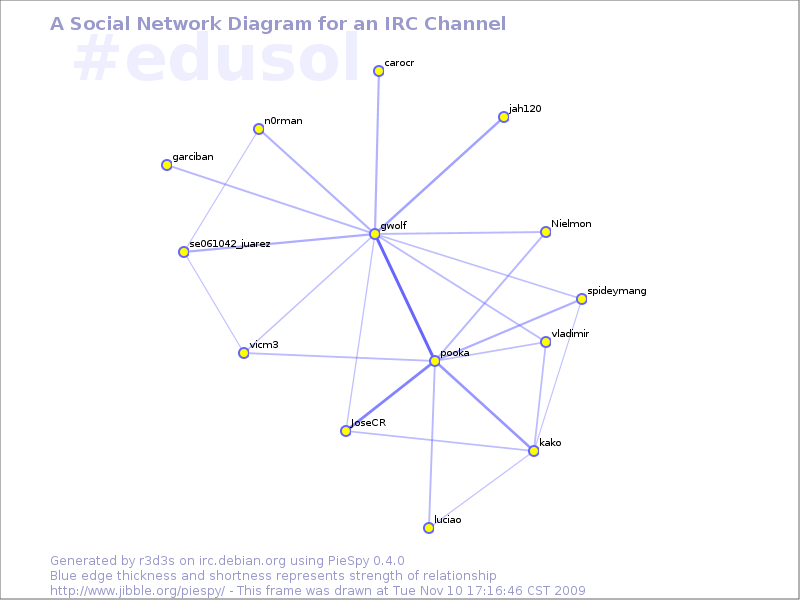
As some of you know, yesterday we started the two weeks of activities for the Fifth On-line Encounter of Free Education, Culture and Software. This year, the main topic for the conference is social networks, but not in the twitter-facebook sense Social networks as ways of understanding and modelling human-to-human interactions. Of course, there is interest from many attendees in using and taking advantage of said social network systems (and others), but the topic is far broader. One of the core tools of EDUSOL, and the only tool that is constantly active through our two weeks of activity, is IRC Which is somewhat of a challenge, as we receive some not-tech-savvy users from all over the world. The first year or two we asked everybody to connect via an IRC client (and we had even decided that it would be a technological filter We thought we would not cater for people without the technical skills to install and use IRC). Life proved us wrong, and we ended up using two web-to-IRC gateways: One of them, via an instance of CGI:IRC, and the other one via a third-party service, Mibbit. Now, the core mind behind EDUSOL is Alejandro Miranda, Pooka; I am not really into education (it is a very interesting topic but far from what I am good at). Pooka has been invovled in on-line communities analysis for several years already, since we worked together at FES Iztacala. For a long time he wanted to graph the interactions at EDUSOL, which was obviously possible given it was all centered on three tools (IRC for live chat, Drupal for generic information and Moodle for the talks and workshops' material This has changed this year, as we are giving much more weight to Drupal and taking it off Moodle), and so last year he was finally able to generate a EDUSOL 2008 conference photo (warning: 2MB image, 4311x3352px), where each person's avatar appears where most of his interactions were. This photo was (unfortunately) achieved using non-free software, but is very much looking at! Now, this year Pooka stumbled upon a great tool, PieSpy (available in Debian package piespy). Piespy generates very interesting interaction graph for IRC channels, as you can see here: Piespy is a bot that sits in the IRC channel logging everything that any given user "says" directly to another one, and graphs it. Not much to say here, only that it generates a very good (and practically real-time) view of what happens on the channel. For this particular channel, and during EDUSOL, you can see here the latest IRC snapshots. Very fun to see - and somewhat addictive how it morphs across time :)
AttachmentSize
EDUSOL 2008 - Conference photo1.97 MB
Current (Monday+Tuesday) interaction graph for our IRC channel39.89 KB

Michael Banck: 10 Nov 2009

Bug-Squashing-Party in Munich We are organizing a BSP in Munich on the last weekend of November (28th/29th). It will take place in the (new, they are moving to the neighboring building this week) LiMux office on Sonnenstr. 25, between U-Bahn stations "Stachus" and "Sendlinger Tor". If you are from outside Munich and want to attend the BSP, please let me know (mbanck@debian.org) so we can maybe arrange something like limited travel sponsorship or lodging (some of us can offer crash space at least). We specially invite people from within 150 km, like Nuremberg/Erlangen, Salzburg, Ulm, Augsburg and Innsbruck. We probably start the BSP at some point on Friday evening already, but the main action will be on Saturday and Sunday. As usual, people should bring their notebooks and possibly an ethernet cable. Wireless will be present as well, but a certain bandwidth cannot be guaranteed.

Matthew Garrett: The ACPI Embedded Controller

Of course, the event model I described before is far too simple to be worthy of a place in the ACPI spec. At the most basic level, there's more possible events than there are GPEs to attach them to, so there's a need for some further complexity. This manifests itself in the form of the ACPI embedded controller (EC).

The EC is typically a small microprocessor sitting on your motherboard, often implemented in the same hardware as the keyboard controller. It shares a lot in common with the keyboard controller - on PCs it'll usually appear in system io space, with one register for writing a command or reading a status, and a second register for passing data back and forth[1]. There's 256 registers available, so a typical interaction might be to write the READ command (0x80) to the command register, write the EC register address to the data register and then read back from the data register to get the EC register contents.

The embedded controller will often be responsible for tracking information about the hardware, such as the temperature. Attempting to read the temperature through ACPI will execute an ACPI method - in the case of the temperature being monitored by the embedded controller, this method will attempt to read from an EC register. The EC driver then performs the read and returns the result, which gets converted into decidegrees kelvin and passed back to whatever made the temperature query.

But, as mentioned above, the EC also generates events. These may be in response to a user initiated event like a hotkey press, or may be triggered by some change in hardware state like a thermal trip point being passed. The embedded controller will then raise a GPE.

Unlike normal GPEs, the EC GPE is not handled by looking for a _Lxx or _Exx method. Instead, the ACPI tables provide information about the GPE that the EC is using. This may be in the form of a _GPE definition in the EC object in the main ACPI tables, or alternatively may be provided in an ECDT (Embedded Controller Descriptor Table), an optional table that provides all the EC information. In either case, the OS knows which GPE will be triggered by the EC. It then installs a handler that will be called whenever the EC raises that GPE.

Things get a touch confusing at this point. The first thing this handler does is read the command byte, which functions as a status byte on reads. It then checks whether the SCI_EVT bit is set. This informs the system that the GPE was in response to a hardware event, and so the EC handler writes a query command to the EC command register and then reads back a value between 0 and 255 from the data register. This is then mapped to a _Qxx method, with xx representing the number of the EC event read from the data register. Like the _Lxx and _Exx methods, the _Qxx method is then executed.

The problem with all of this is that the EC isn't that fast. When a byte is written to it, it's necessary to read back the status byte and check whether the IBF bit is set. This is set when the OS writes a byte to the data register, and cleared once the EC has processed it. The straightforward way to deal with this is to poll the status byte until the bit is cleared, and then write the next byte, but polling is slow and wastes CPU time. The EC can instead be set to interrupt mode, where it'll fire a GPE when the IBF bit clears.

The EC has one additional function. The ACPI spec allows for an i2c bus to be implemented through the EC, with EC registers mapping to i2c registers. The observant among you will realise that this means that there's an indexed access protocol being implemented on top of indexed access hardware, which is more layers of indirection than seem sane. For additional humour, this is usually only used to add support for ACPI smart batteries. ACPI batteries are generally abstracted behind a set of ACPI methods that provide information. Smart batteries instead speak i2c directly to the OS[2] for no real benefit. Linux handles these devices fine, and while the chances are you probably don't have one, the chances are also that if you do you haven't noticed.

The final quirk of ACPI events is that there's yet another means of delivering events. The term "fixed feature" is used to describe an ACPI device that isn't described in the ACPI tables. A power button may be implemented as a fixed feature device rather than a normal ("control method") device. This is indicated by a flag in the fixed feature block. Hitting a fixed feature power button will generate an ACPI interrupt, but no GPE. Instead the OS has to read the fixed feature block and note that the power button flag is set there. It then notifies userspace appropriately. Sleep buttons can also be implemented this way, but other devices will be in the normal ACPI tables and will generate either GPEs or EC events.

[1] On my laptop, these are ports 0x62 and 0x66 - compare to the keyboard controller's use of ports 0x60 and 0x64

[2] As directly as indirection via the EC can be...

Gerfried Fuchs: Things that make me happy

Yeah! Actually, doing so shows several things: That the collaboration between Debian and Ubuntu actually works out. That people that feel more attached to Ubuntu also do care for Debian. And that those people started to realize that contributing things back to Debian actually does reduce their own workload with respect to not having to maintain seperate patches, with the benefit of all involved parties. So big kudos to you people being able to look over the corner of your little universe and see the bigger picture for the benefit of all!

9 November 2009

Matt Zimmerman: Ubuntu Server Edition 9.10: No hardware required


In the 9.10 release of Ubuntu Server Edition, we introduced something new for people who are exploring cloud computing using Amazon s Elastic Compute Cloud (EC2). If you haven t tried it yet, EC2 is essentially an API for managing virtual servers. Using a command line tool or script, you request a new VM, and moments later, it is ready for you to ssh in, preconfigured with your ssh public key. When you re finished, you shut it down, and receive a bill for only the time and Internet bandwidth you used (about $0.10 per hour and $0.10-$0.17 per gigabyte). There is no downloading, no installing, and no hardware required for you to set up a server. The first step is to boot it up. Starting with release 9.10, every release of Ubuntu Server Edition is simultaneously available on EC2. This means you can have a new Ubuntu server up and running using your EC2 account with a single command. Ready-to-run Ubuntu machine images are published on EC2 whenever a new Ubuntu release or milestone is available. All you need to know is the AMI, a short string which uniquely identifies the image you want. The AMIs for the 9.10 release are on the download page, in 32- and 64-bit versions for US and Europe zones. Similarly, all Server Edition development builds are available on EC2 as well. When the first builds of Lucid (Ubuntu 10.04) are created, there will be AMIs for those as well. If you want to test drive a new feature, or check compatibility with your application, just fire up a new instance on EC2, do your work, and then terminate it. The whole process can be completed in less than a minute. If you find a problem in our development builds, just run ubuntu-bug on the virtual machine as you normally would, and apport will automatically attach the relevant EC2 details to your bug report. As I mentioned above, EC2 does charge for Internet bandwidth. It does not charge for local bandwidth within your EC2 zone. For this reason, Canonical has set up Ubuntu archive mirrors within EC2, so that you can download all Ubuntu packages and updates for free. Ubuntu virtual machines inside EC2 are automatically configured to use the appropriate mirror, so you don t need to think about it. This is an exciting step forward in making Ubuntu more convenient and powerful to use on EC2, and I encourage you to give it a try. If you ve never used EC2 before, just follow our Starter s Guide to get set up.

Next.

Previous.