Search Results: "ag"

19 June 2014

Joachim Breitner: Another instance of Haskell Bytes

When I gave my Haskell Bytes talk on the runtime representation of Haskell values the first time, I wrote here It is in German, so [..] if you want me to translate it, then (convince your professor or employer to) invite me to hold the talk again . This has just happened: I got to hold the talk as a Tech Talk at Galois in Portland, so now you can fetch the text also in English. Thanks to Jason for inviting me!
This was on my way to the Oregon Summer School on Programming Languages in Eugene, where I m right now enjoying the shade of a tree next to the campus. We ve got a relatively packed program with lectures on dependent types, categorical logic and other stuff, and more student talks in the evening (which unfortunately always collide with the open board game evenings at the local board game store). So at least we started to have a round of diplomacy, where I am about to be crushed from four sides at once. (And no, I don t think that this has triggered the illegal download warning that the University of Oregon received about our internet use and threatens our internet connectivity.)

Alexander Wirt: About DMARC on lists.debian.org

DMARC (https://wordtothewise.com/2014/04/brief-dmarc-primer/) is a great thing. To protect our subscribers we (Debian listmasters) will probably have to reject mails from every domain that enforces rejects via DMARC (p=reject) in the future. If you want to follow the discussion subscribe to Bug #752084. That means that users of such providers will not be able anymore to post to our lists without using a third party service. I can only encourage users of such providers ( aol , yahoo I mean you!) to tell their providers how shitty DMARC is. By the way, rumors say that this will include all gmail users in the future. If you want to laugh, there are some solutions for handling DMARC:

Joey Hess: what does docker.io run -it debian sh run?

When you type docker.io run -it debian sh, it goes off and gets "debian" and runs it. But what is in this "debian" image? How was it built? The docker hub does not really say. All it tells us is this is a "(Semi) Official Debian base image" and that its sources.list uses http.debian.net for geolocation. There's a link to https://github.com/dotcloud/stackbrew/blob/master/library/debian which in turn uses a very strange git repository, owned by Debian maintainer Tianon Gravi, that contains compressed tarballs of Debian: http://github.com/tianon/docker-brew-debian "Git is not a fan of what we're doing here." The "source", such as it is, that is used to build this image consists of:
FROM scratch
ADD rootfs.tar.xz /
CMD ["/bin/bash"]
and
mkimage.sh -t tianon/debian:wheezy -d . debootstrap --variant=minbase --components=main --include=inetutils-ping,iproute wheezy http://http.debian.net/debian
I don't know where mkimage.sh is. [Update: Probably /usr/share/docker.io/contrib/mkimage-debootstrap.sh or a modified version] And anyway, I have no reason to trust that this image is built the way it claims to be built. So, the question remains: What is in this image? To find out, I did a debootstap --variant=minbase stable and diffed the entire docker debian image against it. The diff was 6738 lines, from which I found the following interesting differences. added packages The image has iputils-ping and netbase and iproute added. These are not in a minbase debootstrap, but are in a regular debootstrap. It's rather weird that the docker image is based on a minbase debootstrap, since this means they have to add back important stuff like this on an ad-hoc basis.
If the expectation is that an experienced Unix person who found it missing would say "What on earth is going on, where is 'foo'?", it must be an 'important' package. -- Debian Policy
apt hooks
DPkg::Post-Invoke   "rm -f /var/cache/apt/archives/*.deb /var/cache/apt/archives/partial/*.deb /var/cache/apt/*.bin   true";  ;
APT::Update::Post-Invoke   "rm -f /var/cache/apt/archives/*.deb /var/cache/apt/archives/partial/*.deb /var/cache/apt/*.bin   true";  ;
Dir::Cache::pkgcache "";
Dir::Cache::srcpkgcache "";
Acquire::Languages "none";
These are some strange modifications to apt's config. The intent is clearly to avoid wasting disk space, even at the expense of making apt slower (by disabling caches) and losing translations. I am curious if apt might ever invoke the DPkg::Post-Invoke twice in an upgrade in which it runs dpkg twice. I'm also curious whether deleting /var/cache/apt/archives/lock could cause a problem. unsafe-io dpkg is configured to use unsafe-io. motd
Linux viper 3.12.20-gentoo #1 SMP Sun May 18 12:36:24 MDT 2014 x86_64
Yes, that's "gentoo". Presumably this tells us something about the build host. policy-rc.d /usr/sbin/policy-rc.d contains "exit 101", which prevents daemons from being automatically started after they are installed. This may or may not be desirable, depending on what you're doing with docker. It notably also prevents restarting running daemons in this container if they're upgraded for eg, a security fix. It would almost certianly be better if this script allowed restarting running daemons. diversions /sbin/initctl is diverted and replaced with /bin/true. This is a workaround for a bug in sysvinit; when upgraded inside a docker container it hangs while trying to run initctl. missing devices Some versions of the debian image are missing things in /dev. See this bug. (I had listed some device files that I thought were missing, but I was wrong.) some gpg thing is different
Binary files pure-debootstrap/etc/apt/trustdb.gpg and from-docker/etc/apt/trustdb.gpg differ
Oh well, that can't be important.. Or can it? I did not check. conclusions I would hardly consider this to be an "(Semi) Official Debian image". Some of the changes are quite dubious. The build environment is not Debian. There is no guarantee you'll get the same image I examined. Diffing thousands of lines of filesystem changes is not particularly fun or reliable way to spot accidental or malicious changes. I'd recommend only trusting docker images you build yourself. I have some docker images published somewhere that are built with 100% straight debootstrap with no modifications (and even an armel image that can be used on an x86 system thanks to qemu). But I'm not going to link to them, because again, you should only trust docker images you built yourself. To help increase your mistrust of me, I present this IRC snippet:
<joeyh> I'll bet I could publish an image that just did a killall5 as root on startup and get plenty of people to nuke their container hosts
Here are some ideas for things Debian could do to improve this: PS, if this wasn't enough fun, just consider the tweaks made to the "Debian" images on all the VPS hosts out there.

Rapha&#235;l Hertzog: Convince your company to contribute to Debian Long Term Support

The press picked up the recent press release about Debian LTS but mainly to mention the fact that it s up and running. The call for help is almost never mentioned. It s a pity because while it s up, it s not really running satisfactorily yet. As of today (2014-06-19), 36 packages in squeeze need a security update, yet squeeze-lts has only seen 7 updates. debian-lts-periodsAs usual what we lack is contributors doing the required work, but in this specific case, there s a simple solution: pay people to do the required work. This extended support is mainly for the benefit of corporate users and if they see value in Debian LTS, it should not be too difficult to convince companies to support the project. With some other Debian developers, we have gone out of our way to make it super easy for companies to support the Debian LTS project. We have created a service offer for Debian-using companies. Freexian (my company) collects money from all contributing companies (by way of invoices) and then uses the money collected to pay Debian contributors who will prepare security updates. On top of this we added some concrete benefits for contributing companies such as the possibility to indicate which packages should have priority, or even the possibility to provide functional tests to ensure that a security update doesn t introduce a regression in their production setup. To make a good job of maintaining Debian Squeeze, our goal is to fund the equivalent of a full-time position. We re currently far from there with only 13 hours per month funded by 4 companies. That makes a current average of 3.25 hours/month funded by each contributing company, for a price of 276 EUR/month or 3315 EUR/year. This is not much if you compare it with the price those companies would have to pay to upgrade all their Debian 6 machines now instead of keeping them for two supplementary years. Assuming the average contribution level will stay the same, we only need the support of 50 other companies in the world. That s really not much compared to the thousands of companies using Debian. Can you convince your own company? Grab the subscription form and have a chat with your company management. Help us reach that goal, share this article and the link to Freexian s Debian LTS offer. Long Term Support is important if we want Debian to be a good choice for servers and big deployments. We need to make Squeeze LTS a success! Thank you!

5 comments Liked this article? Click here. My blog is Flattr-enabled.

Simon Josefsson: Creating a small JPEG photo for your OpenPGP key

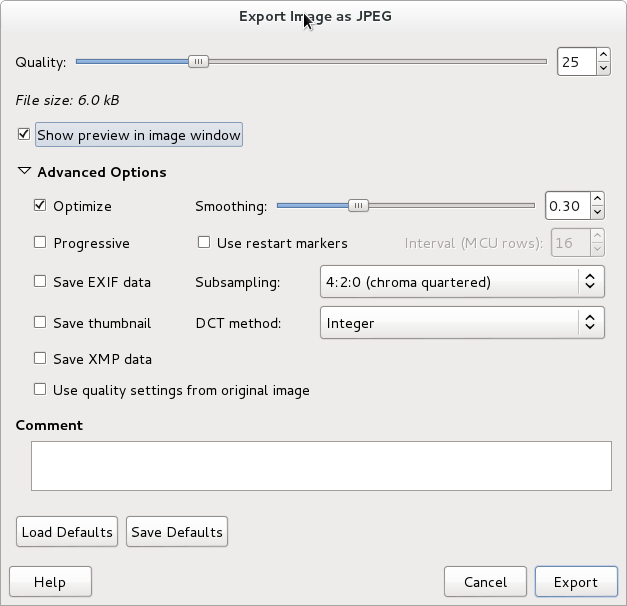
I m in the process of moving to a new OpenPGP key, and I want to include a small JPEG image of myself in it. The OpenPGP specification describes, in section 5.12.1 of RFC 4880, how an OpenPGP packet can contain an JPEG image. Unfortunately the document does not require or suggest any properties of images, nor does it warn about excessively large images. The GnuPG manual helpfully asserts that Note that a very large JPEG will make for a very large key. . Researching this further, it seems that proprietary PGP program suggests 120 144 as the maximum size, although I haven t found an authoritative source of that information. Looking at the GnuPG code, you can see that it suggests around 240 288 in a string saying Keeping the image close to 240 288 is a good size to use . Further, there is a warning displayed if the image is above 6144 bytes saying that This JPEG is really large . I think the 6kb warning point is on the low side today, however without any more researched recommendation of image size, I m inclined to go for a 6kb 240 288 image. Achieving this was not trivial, I ended up using GIMP to crop an image, resize it to 240 288, and then export it to JPEG. Chosing the relevant parameters during export is the tricky part. First, make sure to select Show preview in image window so that you get a file size estimate and a preview of how the photo will look. I found the following settings useful for reducing size: See screenshot below of the settings windows. GnuPG photo GIMP settings window Eventually, I managed to get a photo that I was reasonable happy with. It is 240 288 and is 6048 bytes large. GnuPG photo for Simon If anyone has further information, or opinions, on what image sizes makes sense for OpenPGP photos, let me know. Ideas on how to reduce size of JPEG images further without reducing quality as much would be welcome. flattr this!

Russell Coker: Phone Car Accessories

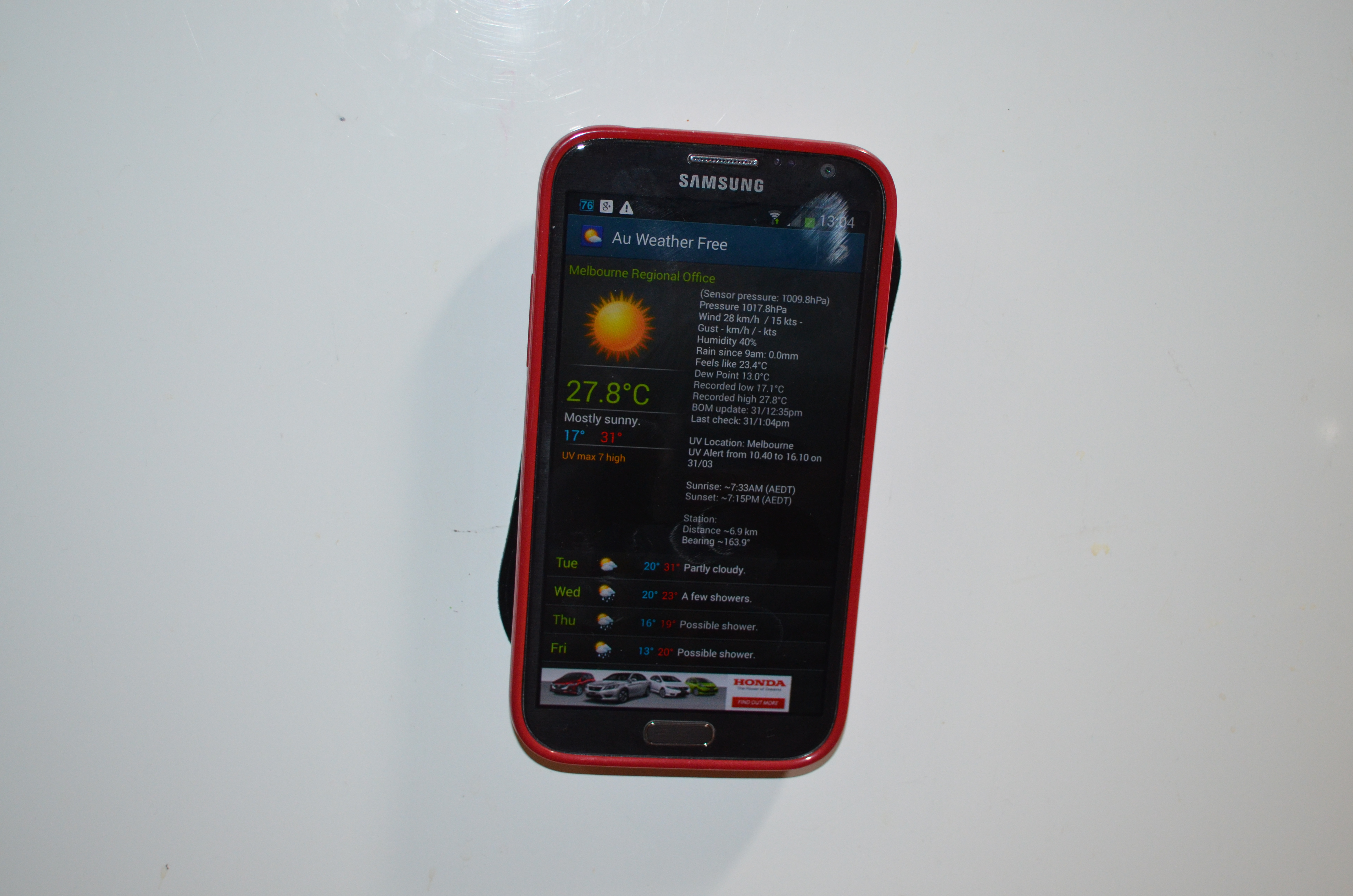
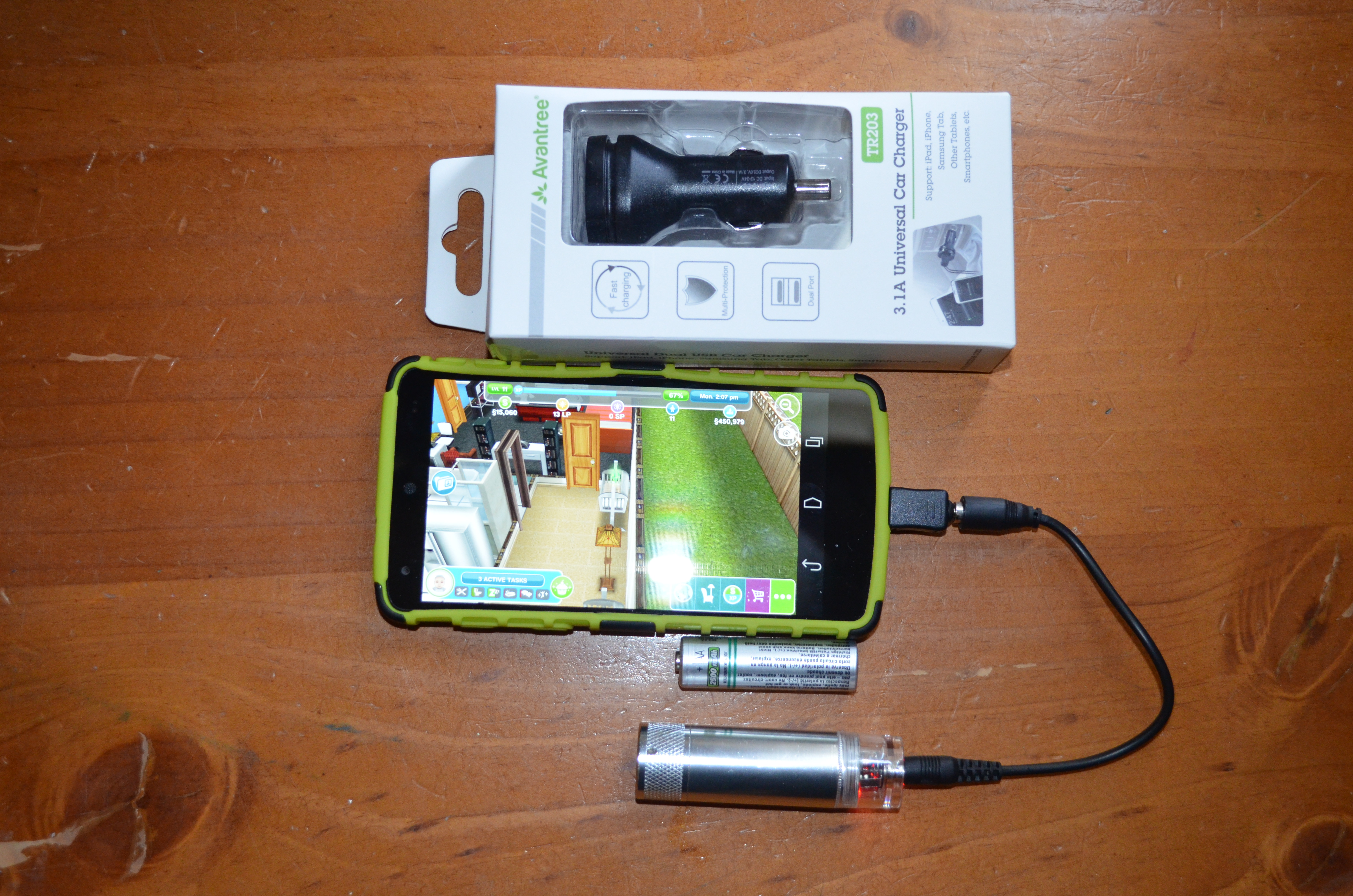
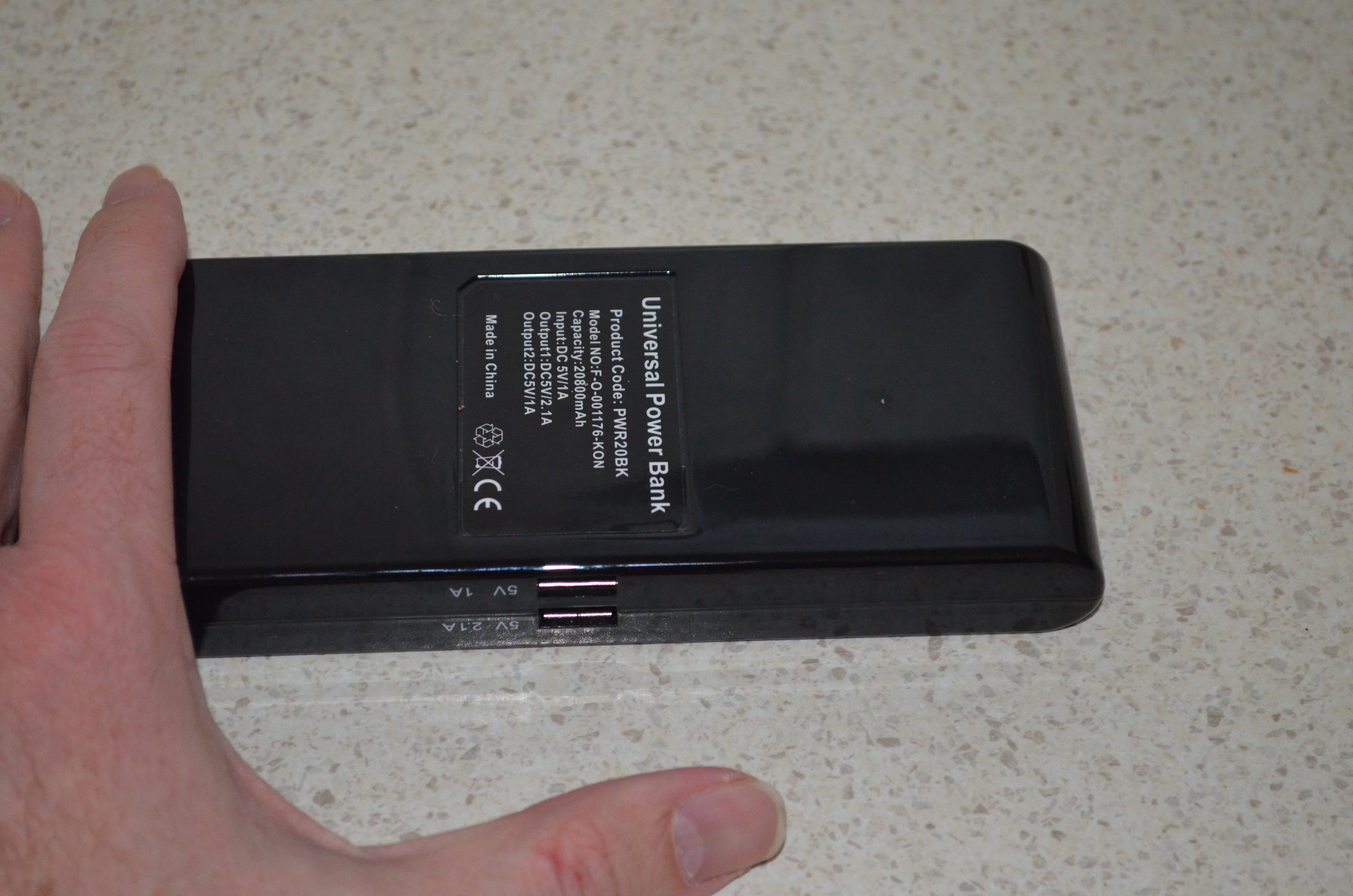
Tree Frog Dashboard Mat phone stuck to fridge I ve been given some more MobileZap products to review. The first is the Tree Frog anti-slip dashboard mat [1]. This is designed to allow a phone to stick to an angled surface of the inside of the car without slipping. The pictures on the web site show a phone stuck to a curved angular surface of a car dash. To test this I stuck my phone to my fridge, the flat metal surface of the fridge and the almost flat plastic surface of the gel case of my phone are pretty much ideal surfaces for the sticky mat to adhere to. But even so keeping my phone stuck to a vertical surface is impressive. This mat is cheap enough that it could be used for many other tasks than securing a phone in a car, for example it could be used to stick a phone to the wall of your office. It s apparently washable and can be expected to keep gripping things if washed regularly. One thing that could be improved in the mat would be to have some holes in it. When I detached my phone from the fridge some large air bubbles developed between the mat and the fridge, this would be a problem if I wanted to regularly stick my phone to a flat surface such as an office wall. When in my car it didn t work nearly as well. The pattern on the surface of the car dash which is designed to avoid glare when driving is difficult to stick to, it s a bit like trying to attach sticky-tape to unpainted wood for similar reasons. A phone will still remain in place on a 30 degree angle from the horizontal (which is significant) but the mat grips much more tightly to the phone than the dash, which is a little inconvenient as the mat stays attached to the phone when you remove it from the dash. Sorry for the boring picture, it s black and flat so there s not much scope for making it interesting. 3.1A USB Car Charger AA battery charger and 3.1A car charger Above is a picture of a 3.1A USB car charger and a AA battery charger. The car charger isn t particularly exciting, but providing 3.1A through two USB sockets is noteworthy it can charge one device at 2.1A (the maximum any device draws) or two devices for a total of up to 3.1A [2] (with protection against over-current). Previously in my car I used the 2.1A charger that shipped with my Galaxy Note 2 and an inverter to provide 240VAC as the devices I had to charge a phone from a car socket didn t provide enough current. This new device uses less space and also allows charging two phones at once. One problem with this device was finding USB cables that could handle the current, for benchmarking I used a phone that was running Ingress and acting as a Wifi access point. I discovered that the cables that Samsung ships with their recent devices (Galaxy Note 2 and Galaxy Note 10.1 tablet) seem to work best and support charging my Galaxy Note 2 or my wife s Nexus 5 while playing Ingress and running as a Wifi AP. Most of the other cables that I have in my collection won t even allow a phone to remain at the same charge level while playing Ingress. AA Emergency Phone Charger The AA phone charger is best suited for emergency use only, it takes one AA battery and has limited current capacity [3]. A NiMh rechargeable battery has a nominal Voltage of 1.2V, to provide 5V to charge a phone the Voltage has to be boosted by a factor of 4.16 which would reduce the current by a factor of 4.16 if the charger was 100% efficient. As 100% efficiency is impossible the current would be reduced even more. It seems unlikely that a AA battery would be able to sustain a current of 2A so the supply from that charger would be less than 500mA IE less than the least capable PC USB port or mains powered phone charger. A test with a Nexus 5 showed the phone charge level decreasing while being very lightly used (mostly just checking whether the charge level was increasing) when a NiMH battery was connected. A test with an alkaline battery and the same Nexus 5 showed the phone charge level increasing when lightly used but it probably wouldn t do so while playing Ingress. It seems that a single NiMH AA battery can only be used for charging a phone in a real emergency situation (IE an act of god type disaster not a need to level up in Ingress). If mains power was out then you could charge a phone while it s turned off (AFAIK all Android phones support this) and then use it once it s charged. This charger supports a wide range of phones (including LG phones from 5+ years ago and Nokia from ~10 years ago) so it could be good for charging an old phone in an emergency. Older phones need less power to charge and generally last longer between charges. With an alkaline battery the charger works a lot better, but it s still for emergency use as I generally only use rechargeable batteries. This is a device I might put in the bottom of my case when travelling, not a device that I ll use regularly. I don t think that this is a deficiency in the product, it s just a limit of what can be done with the power requirements of modern phones and the capabilities of AA batteries. If you want a battery to use while playing Ingress you definitely need something a lot larger. This charger is good for emergencies but not suitable for my main use (charging phones while playing Ingress) so I ll give it to my parents, they do a lot of hiking and camping and my father often goes fishing. Taking a few AA batteries to charge a phone would be much more convenient for such use than taking one of the larger batteries I use for Ingress. Also as the charger is relatively cheap there s less potential financial loss if you drop it in sea-water. 20800mAh Battery picture of 20800mAh USB battery Above is a picture of a 20800mAh battery pack that MobileZap sent me [4]. I haven t yet discovered what it s capacity is, during the recent Interitus anomaly it kept my Galaxy Note 2 and my wife s Nexus 5 adequately charged for 5 hours of intensive Ingress playing (we alternated between phones). Without an external battery it would be unusual for either of those phones to last for 2 hours. The battery has two ports labeled 1A and 2.1A which implies that it can supply a total of 3.1A. I am a little dubious of that implication. After the Interitus anomaly my wife and I had dinner with some friends and I let a friend charge her Samsung Galaxy S5 on the battery at the same time as my Note 2 (which claimed to be 2% charged). When I connected my friend s phone my phone instantly shut itself down due to lack of charge, so I presume that the supply on the 2.1A port is reduced when a demanding device is connected to the 1A port. The next day my wife and I went to the city again to play Ingress and attend a protest against some of the awful things that the Abbott government is doing. As an experiment I didn t charge this battery to see how it would go for two days of use charging two phones. Again there was no problem and it still claimed to be half charged when we got home. So far the only problem I ve found with this battery is that it never reports being fully charged, not even if I leave it on charge for days. That doesn t seem to be a great problem to me, if I disconnect it before it s fully charged then that won t hurt the battery life (unlike NiCd batteries that have to be fully charged every time) and even if it s not fully charged it will still charge phones for a long time. The battery is about 19cm long. I have jeans with unusually large pockets to fit large phones [5] so I can fit this battery in my pocket while a USB cable is connected to charge my phone. I also have a new winter jacket from Scottwear which has pockets that can fit the battery (and lots of other things). Anyone who doesn t have such clothing should plan to use a backpack, handbag, or some other bag this type of battery won t fit in the pockets in most clothing. MobileZap also has some other interesting Nexus 5 accessories [6].

B lint R czey: Run Wireshark on Android using Lil Debi!

Running Wireshark for Android has been an dream for a long time. Now it became a reality!
Wireshark running on Android using Lil'Debi

Wireshark running on Android using Lil Debi

You only need a rooted Android device with ~2GB free space, Internet connectivity and some patience to follow the steps below.
  1. Install Lil Debi from Google Play or F-Droid. Lil Debi will install a Debian root file system in a loop device separately from the Android file system allowing us running Debian side-by-side to the Android apps.
  2. Start Lil Debi and create the Debian system with 2000 MB image size. We will need some space for Wireshark, the graphical interface Wireshark depends on and for the capture files.
  3. Start the newly created Debian system and log in to it. You will see the error message bash: [: : integer expression expected , but you can continue.
  4. Now run the following commands at the command line to install all the packages Wireshark will need:
    # some important directories are missing from the PATH by default
    export PATH=/sbin:/usr/sbin/:$PATH
    # we will start an X server later
    export DISPLAY=127.0.0.1:0
    # install wireshark an a few things to make it nicer
    apt-get install openbox gnome-themes-standard tshark wireshark
    # gnome-settings-daemon depends on plenty of packages we don't need now,
    # but we need gnome-settings-daemon for the GNOME theme to be applied
    apt-get install --no-install-recommends gnome-settings-daemon
  5. To run graphical applications from the Debian chroot we need to set up an X server on Android because Android uses a different method for presenting the GUI. XServer XSDL is available from Google Play and from SourceForge. Install and start it. It will show the display it is serving which will most probably end with :0, so the DISPLAY environment variable we set before is correct. (If there is an other number after the : , fix your DISPLAY variable.)
  6. Start the openbox window manager, gnome-settings-daemon and finally wireshark in capturing mode:
    openbox &
    # if you would like to have bigger menu fonts skip starting gnome-settings-daemon
    gnome-settings-daemon &
    wireshark -k -i wlan0
    
  7. Switch to the X server to see wireshark starting up, close the warning dialogs start capturing traffic!
I tested the tests above using a Nexus 7 (Asus 2013 version) running CyanogenMod M7, thus root access was granted by default, Lil Debi 0.4.7, and XServer XSDL 1.11.14.

Ian Wienand: ip link up versus status UP

ip link show has an up filter which the man page describes as display running interfaces. The output also shows the state, e.g.
$ ip link
1: lo: <LOOPBACK,UP,LOWER_UP> mtu 65536 qdisc noqueue state UNKNOWN mode DEFAULT group default
  link/loopback 00:00:00:00:00:00 brd 00:00:00:00:00:00
2: eth0: <BROADCAST,MULTICAST> mtu 1500 qdisc noop state DOWN mode DEFAULT group default qlen 1000
  link/ether e8:03:9a:b6:46:b3 brd ff:ff:ff:ff:ff:ff
3: wlan0: <BROADCAST,MULTICAST,UP,LOWER_UP> mtu 1500 qdisc mq state UP mode DORMANT group default qlen 1000
  link/ether c4:85:08:2a:6e:3a brd ff:ff:ff:ff:ff:ff
It is not described what the difference is between these two. The state output is derived from IFLA_OPERSTATE as per this little bit in ip/ipaddress.c in iproute2
if (tb[IFLA_OPERSTATE])
  print_operstate(fp, rta_getattr_u8(tb[IFLA_OPERSTATE]));
as per operstates.txt a status of UP means that the interface is up and can be used to send packets. In contrast, ip link show up runs a different filter
if (filter.up && !(ifi->ifi_flags&IFF_UP))
  return 0;
Thus only interfaces that are in state IFF_UP are shown. This means it is administratively up, but this does not mean it is available and ready to send packets. This may make a difference if you're trying to use the output of ip link in any sort of automation where you have to probe the available network-interfaces and know where packets are going to get out or not.

Ian Wienand: Non-stick tortilla technique

I have never had much success with tortilla making, generally finding the fragile masa would stick to everything and tear easily. However I was listening to the Cook's Illustrated podcast where they mentioned that cooking a pizza on a stone with silicone-paper makes no difference over doing it on the stone directly. For some reason I had just never thought of cooking it with the silicone-paper on; I'd always frustrated myself trying to separate the pressed tortilla in various ways. So here's my technique:
  1. Mix the masa as on the packet; 2 cups to 2-half cups water
  2. Leave for 20 minutes or so
  3. Use plastic-wrap on the top of the tortilla press
  4. Cut a silicone-paper square for the bottom
  5. Ball the masa and press
  6. Now the plastic-wrap will peel easily off the top of the uncooked tortilla
  7. Take the silcone-paper and put the tortilla down on the pan/hotplate
  8. Give a slight press with the spatula around the edges
  9. After about 20 seconds, the silicone-paper should peel off the tortilla fairly easily.
  10. repeat!
I've tried mixing in suet, oil and copha and none of them are worth the extra calories over just plain masa in my opinion and don't help with sticking anyway. Enjoy!

18 June 2014

Aurelien Jarno: Debian is switching (back) to GLIBC

Five years ago Debian and most derivatives switched from the standard GNU C Library (GLIBC) to the Embedded GLIBC (EGLIBC). Debian is now about to take the reverse way switching back to GLIBC, as EGLIBC is now a dead project, the last release being the 2.19 one. At the time of writing the glibc package has been uploaded to experimental and sits in the NEW queue. EGLIBC is dead for a good reason: the GLIBC development has changed a lot in the recent years, due to two major events: Ulrich Drepper leaving Red Hat and the GLIBC development, and the GLIBC steering committe self-dissolving. This has resulted in a much more friendly development based on team work with good cooperation. The development is now based on peer review, which results in less buggy code (humans do make mistakes). It has also resulted in things that were clearly impossible before, like using the same repository for all architectures, and even getting rid of the ports/ directory. Before we used to have two sets of architectures, the main ones in the glibc repository with architectures like x86, SuperH or SPARC, and the secondary ones in the glibc-ports repository with architectures like ARM or MIPS. As you can see the separation was quite arbitrary, and often leaded to missing changes on the secondary architectures. We also got real stable branches, with regular fixes. The most important EGLIBC features have been merged to GLIBC, including for example the use of non-bash but POSIX shell, or the renaming of reserved keywords. The notable exception is the support for configurable components, which we originally planned to use for Debian-Installer, by building a smaller flavor using -Os and without NIS and RPC support. At the end we never worked on that, and it seems that the hardware targeted by Debian has grown faster than the GLIBC size, so that is not really a big loss. At the end, we ended up with only 5 missing patches from the EGLIBC tree: The package names are unchanged (except the source package and the binary package containing the sources) so the transition is fully transparent for the users. I would like to thank all the CodeSourcery employees who worked on EGLIBC, with a special thank to Joseph Myers who spent countless hours to merge the most important EGLIBC changes back to GLIBC, and sent regular emails about the merge status. I would also like to thanks all the people on the GLIBC side that made the change to happen, and all persons participating in the GLIBC development.

Matthias Klumpp: Tanglu 2 (Bartholomea annulata) status update #1

bartholomea-annulata

Bartholomea annulata (c) Kevin Bryant

It is time for a new Tanglu update, which has been overdue for a long time now! Many things happened in Tanglu development, so here is just a short overview of what was done in the past months. Infrastructure Debile The whole Tanglu distribution is now built with Debile, replacing Jenkins, which was difficult to use for package building purposes (although Jenkins is great for other things). You can see the Tanglu builders in action at buildd.tg.o. The migration to Debile took a lot of time (a lot more than expected), and blocked the Bartholomea development at the beginning, but now it is working smoothly. Many thanks to all people who have been involved with making Debile work for Tanglu, especially Jon Severinsson. And of course many thanks to the Debile developers for helping with the integration, Sylvestre Ledru and of course Paul Tagliamonte. Archive Server Migration Those who read the tanglu-announce mailinglist know this already: We moved the main archive server stuff at archive.tg.o to to a new location, and to a very powerful machine. We also added some additional security measures to it, to prevent attacks. The previous machine is now being used for the bugtracker at bugs.tg.o and for some other things, including an archive mirror and the new Tanglu User Forums. See more about that below :-) Transitions There is huge ongoing work on package transitions. Take a look at our transition tracker and the staging migration log to get a taste of it. Merging with Debian Unstable is also going on right now, and we are working on merging some of the Tanglu changes which are useful for Debian as well (or which just reduce the diff to Tanglu) back to their upstream packages. Installer Work on the Tanglu Live-Installer, although badly needed, has not yet been started (it s a task ready for taking by anyone who likes to do it!) however, some awesome progress has been made in making the Debian-Installer work for Tanglu, which allows us to perform minimal installations of the Tanglu base systems and allows easier support of alternative Tanglu falvours. The work on d-i also uncovered a bug which appeared with the latest version of findutils, which has been reported upstream before Debian could run into it. This awesome progress was possible thanks to the work of Philip Mu kovac and Thomas Funk (in really hard debug sessions).

Tanglu ForumsTanglu Users We finally have the long-awaited Tanglu user forums ready! As discussed in the last meeting, a popular demand on IRC and our mailing lists was a forum or Stackexchange-like service for users to communicate, since many people can work better with that than with mailinglists. Therefore, the new English TangluUsers forum is now ready at TangluUsers.org. The forum software is in an alpha version though, so we might experience some bugs which haven t been uncovered in the testing period. We will watch how the software performs and then decide if we stick to it or maybe switch to another one. But so far, we are really happy with the Misago Forums, and our usage of it already led to the inclusion of some patches against Misago. It also is actively maintained and has an active community. Misc Thingstanglu logo pure KDE We will ship with at least KDE Applications 4.13, maybe some 4.14 things as well (if we are lucky, since Tanglu will likely be in feature-freeze when this stuff is released). The other KDE parts will remain on their latest version from the 4.x series. For Tanglu 3, we might update KDE SC 4.x to KDE Frameworks 5 and use Plasma 5 though. GNOME Due to the lack manpower on the GNOME flavor, GNOME will ship in the same version available in Debian Sid maybe with some stuff pulled from Experimental, where it makes sense. A GNOME flavor is planned to be available. Common infrastructure We currently run with systemd 208, but a switch to 210 is planned. Tanglu 2 also targets the X.org server in version 1.16. For more changes, stay tuned. The kernel release for Bartholomea is also not yet decided. Artwork Work on the default Tanglu 2 design has started as well any artwork submissions are most welcome! Tanglu joins the OIN The Tanglu project is now a proud member (licensee) of the Open Invention Network (OIN), which build a pool of defensive patents to protect the Linux ecosystem from companies who are trying to use patents against Linux. Although the Tanglu community does not fully support the generally positive stance the OIN has about software patents, the OIN effort is very useful and we agree with it s goal. Therefore, Tanglu joined the OIN as licensee.

And that s the stuff for now! If you have further questions, just join us on #tanglu or #tanglu-devel on Freenode, or write to our newly created forum! You can, as always, also subscribe to our mailinglists to get in touch.

Ritesh Raj Sarraf: Laptop Mode Tools 1.65

I am very pleased to announce the release of Laptop Mode Tools, at version 1.65 This release took a toll given things have been changing for me, both personally and professionally. 1.64 was released on September 1st, 2013. So it was a full 9 month period, of which a good 2-3 months were procrastination. That said, this release has some pretty good bug fixes and I urge all distribution packagers to push it to their repositories soon. While I'd thank all contributors who have helped make this release, a special thank you to Stefan Huber. Stefan found/fixed many issues, did the messy code clean up etc.. Thank you. Worthy changes are mentioned below. For full details, please refer to the git commit logs. 1.65 - Wed Jun 18 19:22:35 IST 2014
* fix grep error on missing $device/uevent
* ethernet: replace sysfs/enabled by 'ip link down'
* wireless-iwl-power: sysfs attr enbable -> enabled
* wireless-iwl-power: Add iwlwifi support
* Use Runtime Power Managemet Framework is more robust now. Deprecates module
usb-autosuspend

* Fix multiple hibernate issue
* When resuming, run LMT in force initialization mode
* Add module for Intel PState driver
* GUI: Implement suspend/hibernate interface


AddThis:

Categories:

Keywords:

Wouter Verhelst: Belgium vs Algeria

Yesterday, the Belgian team played against Algeria, and won 2-1. Before the match, there was some criticism about coach Wilmots' decision not to field a number of top players in the team at the start of the match. Today, some journalists -- including, apparently, some Russian journalists -- seem to think that the team didn't play all that well, and that the Belgian team could be beaten by a better team. I don't think that's the case; I think the strategy of Wilmots was a stroke of genius. The Algerian coach fielded a wall of 5 defenders, and played a pretty good counter game. When the Belgian team had posession -- for about 65% of the time during the entire match -- the Algerians returned every man to their own half of the field. Whenever one of the Belgian strikers came close to the Algerian penalty area, at least two Algerian players would be near and block them off. How does one win from a team that doesn't want to give you a millimeter of room? One way is to wear them out, and that's exactly what the team did: by keeping the pressure on the Algerian defense, the Algerian defense had to run a lot. Running a lot makes you tired, and if you're tired you make mistakes, or you can't follow a fresh substitute player. During half-time, it was reported that Wilmots had relayed the message to his players that "the bench will make the difference". And indeed it did; some time into through the second half, Wilmots substituted three players -- two strikers and one offensive midfielder -- with the top players he'd kept on the bench. Two of these three players made the difference, scoring two goals to end up with 2-1. Reading some articles today, it seems like many analysts think that this was a spur of the moment thing by Wilmots; but I think it's more likely that this was a deliberate strategy. Making the opposing defense run a lot is certainly a good strategy; but the downside of that is that your own offensive players will need to run a lot, too. If you can swap those out for top players on the bench... It'll be interesting to see the next matches.

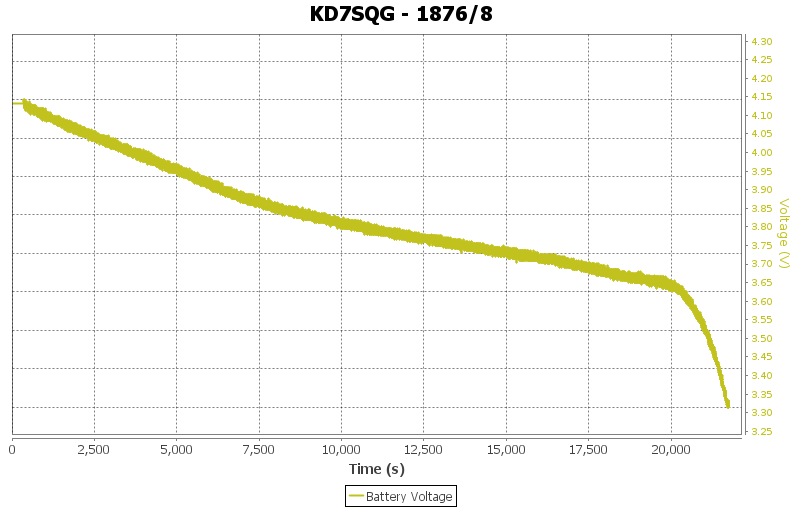
Keith Packard: TeleGPS-Battery-Life

TeleGPS Battery Life I charged up one of the 160mAh batteries that we sell. (The ones we ve got now are labeled 200mAh; the 160mAh rating is something like a minimum that we expect to be able to ever get at that size.) I connected the battery to a TeleGPS board, hooked up a telemetry monitoring setup on my laptop and set the device in the window of my office. This let me watch the battery voltage through the day without interrupting my other work. Of course, because the telemetry was logged to a file, I ve now got a complete plot of the voltage data: It looks like a pretty typical lithium polymer discharge graph; slightly faster drop from the 4.1V full charge voltage down to about 3.9V, then a gradual drop to 3.65 at which point it starts to dive as the battery is nearly discharged. Because we run the electronics at 3.3V, and the LDO has a dropout of about 100mV, it s best if the battery stays above 3.4V. That occurred at around 21500 seconds of run time, or almost exactly six hours. We also have an 850mAh battery in the shop; I d expect that to last a bit more than four times as long, or about a day. Maybe I ll get bored enough at some point to hook one up and verify that guess.
17 June 2014

Tiago Bortoletto Vaz: Little garden project

After three years living in Montr al we're still amazed by the fact that here we have er... seasons!! I believe that things have a special beauty when they don't last the time we want them to last, and seasons are all about it! (some people will exclude winter here) Anyways, taking pictures may give them more lifetime without compromising too much their beauty. And sharing them here and there is somewhat sharing our happiness, which might be a good balance in the end :)
/images/01.JPG

At the time we moved the garden was just a single white thing...

/images/02.JPG

then we realized that it provided some chairs, a table and a compost container, yay!

/images/03.JPG

But the grey ground was something to be fixed...

/images/04.JPG

so we hacked it and got some land :)

/images/05.JPG

Few months later and it's finally becoming chard, beets, carrots, spinach, berries, cheries, okra, tomatoes, basil, potatoes, sage, agastache and a saskatoon berry tree!

Petter Reinholdtsen: From English wiki to translated PDF and epub via Docbook

The Debian Edu / Skolelinux project provide an instruction manual for teachers, system administrators and other users that contain useful tips for setting up and maintaining a Debian Edu installation. This text is about how the text processing of this manual is handled in the project. One goal of the project is to provide information in the native language of its users, and for this we need to handle translations. But we also want to make sure each language contain the same information, so for this we need a good way to keep the translations in sync. And we want it to be easy for our users to improve the documentation, avoiding the need to learn special formats or tools to contribute, and the obvious way to do this is to make it possible to edit the documentation using a web browser. We also want it to be easy for translators to keep the translation up to date, and give them help in figuring out what need to be translated. Here is the list of tools and the process we have found trying to reach all these goals. We maintain the authoritative source of our manual in the Debian wiki, as several wiki pages written in English. It consist of one front page with references to the different chapters, several pages for each chapter, and finally one "collection page" gluing all the chapters together into one large web page (aka the AllInOne page). The AllInOne page is the one used for further processing and translations. Thanks to the fact that the MoinMoin installation on wiki.debian.org support exporting pages in the Docbook format, we can fetch the list of pages to export using the raw version of the AllInOne page, loop over each of them to generate a Docbook XML version of the manual. This process also download images and transform image references to use the locally downloaded images. The generated Docbook XML files are slightly broken, so some post-processing is done using the documentation/scripts/get_manual program, and the result is a nice Docbook XML file (debian-edu-wheezy-manual.xml) and a handfull of images. The XML file can now be used to generate PDF, HTML and epub versions of the English manual. This is the basic step of our process, making PDF (using dblatex), HTML (using xsltproc) and epub (using dbtoepub) version from Docbook XML, and the resulting files are placed in the debian-edu-doc-en binary package. But English documentation is not enough for us. We want translated documentation too, and we want to make it easy for translators to track the English original. For this we use the poxml package, which allow us to transform the English Docbook XML file into a translation file (a .pot file), usable with the normal gettext based translation tools used by those translating free software. The pot file is used to create and maintain translation files (several .po files), which the translations update with the native language translations of all titles, paragraphs and blocks of text in the original. The next step is combining the original English Docbook XML and the translation file (say debian-edu-wheezy-manual.nb.po), to create a translated Docbook XML file (in this case debian-edu-wheezy-manual.nb.xml). This translated (or partly translated, if the translation is not complete) Docbook XML file can then be used like the original to create a PDF, HTML and epub version of the documentation. The translators use different tools to edit the .po files. We recommend using lokalize, while some use emacs and vi, others can use web based editors like Poodle or Transifex. All we care about is where the .po file end up, in our git repository. Updated translations can either be committed directly to git, or submitted as bug reports against the debian-edu-doc package. One challenge is images, which both might need to be translated (if they show translated user applications), and are needed in different formats when creating PDF and HTML versions (epub is a HTML version in this regard). For this we transform the original PNG images to the needed density and format during build, and have a way to provide translated images by storing translated versions in images/$LANGUAGECODE/. I am a bit unsure about the details here. The package maintainers know more. If you wonder what the result look like, we provide the content of the documentation packages on the web. See for example the Italian PDF version or the German HTML version. We do not yet build the epub version by default, but perhaps it will be done in the future. To learn more, check out the debian-edu-doc package, the manual on the wiki and the translation instructions in the manual.

Steve Kemp: DNS is now resolved

I used to work for Bytemark, being a sysadmin and sometimes handling support requests from end-users, along with their clients. One thing that never got old was marking DNS-related tickets as "resolved", or managing to slip that word into replies. Similarly being married to a Finnish woman you'd be amazed how often Finnish and Finished become interchangable. Anyway that's enough pun-discussion. Over the past few days I've, obviously, been playing with DNS. There are two public results:
DHCP.io
This is my simple Dynamic-DNS host, which has now picked up a few users. I posted a token on previous entry, and I've had fun seeing how people keep changing the IP address of the host skx.dhcp.io.. I should revoke the token and actually claim the name - but to be honest it is more fun seeing it update. What is most interesting is that I can see it being used for real - I see from the access logs some people have actually scheduled curl to run on an hourly basis. Neat.
DNS-API.org
This is a simple lookup utility, allowing queries to be made, such as: Of the two sites this is perhaps the most useful, but again I expect it isn't unique.
That about wraps things up for the moment. It may well be the case that in the future there is some Git + DNS + Amazon integration for DNS-hosting, but I'm going to leave it alone for the moment. Despite writing about DNS several times in the past the only reason this flurry of activity arose is that I'm hacking some Amazon & CPanel integration at the moment - and I wanted to experiment with Amazon's API some more. So, we'll mark this activity as resolved, and I shall go make some coffee now this entry is Finnish. ObRandomUpdate: At least there was a productive side-effect here - I created/uploaded to CPAN CGI::Application::Plugin::Throttle.

Wouter Verhelst: Trying out bash completion

I've never liked the contents of the bash-completion package. I've found its results to be confusing, mildly buggy, and therefore terribly annoying. As such, for the longest time, one of the first things I used to do when installing a new system was to just remove it entirely -- or add "complete -r" or similar to my .bashrc on systems where I did not have sysadmin powers. However, that's not to say that I don't understand the reason for programmable completion. Filename completion is nice, but it's great if one can have things like command option completion, etc. As such, I've resolved to give the bash-completion another shot for, say, a month or so, and to actually file bugs when things happen that I think should not. Of course, it's very well possible that in the time since I last tried it, all those annoyingly small confusing bugs have been fixed. But somehow, I doubt that. I guess we'll find out.

Gunnar Wolf: My little Tor node: Alive again!

So, after writing my last blog post in frustration, several people knowing their way around Tor better than me wrote that I should just configure my machine not to be an exit relay, but a middle relay or a bridge. So, I set it up to be a bridge about five days ago. And, as they pointed out, I have not experienced any problems. Interesting: The traffic pattern is very different. Compare: Traffic pattern as an exit relay:
Traffic pattern as a bridge:
Anyway I'm happy to have Lobazal back online!

16 June 2014

Lars Wirzenius: Bald again

Another relative with cancer. Another very short haircut in sympathy.

Next.

Previous.