Search Results: "ed"

6 February 2015

Carl Chenet: Backup Checker 1.0, the fully automated backup checker

Follow me on Identi.ca or Twitter or Diaspora*diaspora-banner Backup Checker is the new name of the Brebis project. Backup Checker is a CLI software developed in Python 3.4, allowing users to verify the integrity of archives (tar,gz,bz2,lzma,zip,tree of files) and the state of the files inside an archive in order to find corruptions or intentional of accidental changes of states or removal of files inside an archive. Brebis version 0.9 was downloaded 1092 times. In order to keep the project growing, several steps were adopted recently: This new version 1.0 does not only provide project changes. Starting from 1.0, Backup Checker now verifies the owner name and the owner group name of a file inside an archive, enforcing the possible checks for both an archive and a tree of files. Moreover, the recent version 0.10 of Brebis published 9 days ago provided the following features As usual, any feedback is welcome, through bug reports, emails of the author or comments on this blog.

Gunnar Wolf: On the number of attempts on brute-force login attacks

I would expect brute-force login attacks to be more common. And yes, at some point I got tired of ssh scans, and added rate-limiting firewall rules, even switched the daemon to a nonstandard port... But I have very seldom received an IMAP brute-force attack. I have received countless phishing scams on my users, and I know some of them have bitten because the scammers then use their passwords on my servers to send tons of spam. Activity is clearly atypical. Anyway, yesterday we got a brute-force attack on IMAP. A very childish atack, attempted from an IP in the largest ISP in Mexico, but using only usernames that would not belong in our culture (mosty English firstnames and some usual service account names). What I find interesting to see is that each login was attempted a limited (and different) amount of times: Four account names were attempted only once, eight were attempted twice, and so on following this pattern:
 1  
 2  
 3  
 4  
 5  
 6  
 7  
 8  
 9  
10  
11  
12  
13  
14  
15  
16  
17  
18  
19  
20  
21  
22  
(each dot represents four attempts) So... What's significant in all this? Very little, if anything at all. But for such a na ve login attack, it's interesting to see the number of attempted passwords per login varies so much. Yes, 273 (over of the total) did 22 requests, and another 200 were 18 and more. The rest... Fell quite shorter. In case you want to play with the data, you can grab the list of attempts with the number of requests. I filtered out all other data, as i was basically meaningless. This file is the result of:
  1. $ grep LOGIN /var/log/syslog.1
  2. grep FAILED.*201.163.94.42
  3. awk ' print $7 " " $8 '
  4. sort uniq -c
AttachmentSize
logins.txt27.97 KB

Olivier Berger: Configuring the start of multiple docker container with Vagrant in a portable manner

I ve mentioned earlier the work that our students did on migrating part of the elements of the Database MOOC lab VM to docker. While docker seems quite cool, let s face it, participants to the MOOCs aren t all using Linux where docker can be available directly. Hence the need to use boot2docker, for instance on Windows. Then we re back quite close to the architecture of the Vagrang VM, which relies too on a VirtualBox VM to run a Linux machine (boot2docker does exactly that with a minimal Linux which runs docker). If VirtualBox is to be kept around, then why not stick to Vagrant also, as it offers a docker provider. This docker provider for Vagrant helps configure basic parameters of docker containers in a Vagrantfile, and basically uses the vagrant up command instead of using docker build + docker run. If on Linux, it only triggers docker, and if not, then it ll start boot2docker (or any other Linux box) in between. This somehow offers a unified invocation command, which renders a bit more portable the documentation. Now, there are some tricks when using this docker provider, in particular for debugging what s happening inside the VM. One nice feature is that you can debug on Linux what is to be executed on Windows, by explicitely requiring the start of the intermediary boot2docker VM even if it s not really needed. By using a custom secondary Vagrantfile for that VM, it is possible to tune some parameters of that VM (like its graphic memory to allow to start it with a GUI allowing to connect another alternative is to ssh -p 2222 docker@localhost once you know that its password is tcuser ). I ve committed an example of such a setup in the moocbdvm project s Git, which duplicates the docker provisioning files that our students had already published in the dedicated GitHub repo. Here s an interesting reference post about Vagrant + docker and multiple containers, btw.

5 February 2015

Holger Levsen: 20150205-lts-january-2015

My LTS January It was very nice to hear many appreciations for our work on Squeeze LTS during the last weekend at FOSDEM. People really seem to like and use LTS a lot - and start to rely on it. I was approached more than once about Wheezy LTS already... (Most of my FOSDEM time I spent with reproducible builds however, though this shall be the topic of another report, coming hopefully soon.) So, about LTS. First I'd like to describe some current practices clearly: I hope this clarifies things. And as usual, things are open for discussion and best practices will change over time. In January 2014 I spent 12h on Debian LTS work and managed to get four DLAs released, plus I've marked some CVEs as not affecting squeeze. The DLAs I released were: Thanks to everyone who is supporting Squeeze LTS in whatever form! We like to hear from you, we love your contributions, but it's also totally ok to silently enjoy a good old quality distribution :-) Finally, something for the future: checking for previous DLAs is currently best done via said mailing list archive, as DLAs are not yet integrated into the website due to a dependency loop of blocking bugs... see #761945 for a starting point.

Daniel Pocock: Debian Maintainer Dashboard now provides iCalendar feeds

Contributors to Debian can now monitor their list of pending activities using iCalendar clients on their desktop or mobile device. Thanks to the tremendous work of the Debian QA team, the Ultimate Debian Database has been scooping up data from all around the Debian universe and storing it in a PostgreSQL back-end. The Debian Maintainer Dashboard allows developers to see a summary of outstanding issues across all their packages in a range of different formats. With today's update, an aggregated list of Debian tasks and to-dos can now be rendered in iCalendar format and loaded into a range of productivity tools. Using the iCalendar URL Many productivity tools like Mozilla Lightning (Iceowl extension on Debian) allow you to poll any calendar or task list just using a URL. For UDD iCalendar feeds, the URLs look like this:
https://udd.debian.org/dmd/?format=ics&email1=daniel%40pocock.pro
You can also get the data by visiting the Debian Maintainer Dashboard, filling out the form and selecting the iCalendar output format. Next steps Currently, the priority and deadline attributes are not set on any of the tasks in the feed. The strategy of prioritizing issues has been raised in bug #777112. iCalendar also supports other possibilities such as categories and reminders/alarms. It is likely that each developer has their own personal preferences about using these features. Giving feedback through the Debian QA mailing list or the bug tracker is welcome. Screenshots

Patrick Matth i: OTRS 4 in Debian!

Hola, and finaly I have packaged, tested and uploaded otrs 4.0.5-1 to Debian experimental. :-)
Much fun with it!

Dirk Eddelbuettel: Introducing drat: Lightweight R Repositories

A new package of mine just got to CRAN in its very first version 0.0.1: drat. Its name stands for drat R Archive Template, and an introduction is provided at the drat page, the GitHub repository, and below. drat builds on a core strength of R: the ability to query multiple repositories. Just how one could always query, say, CRAN, BioConductor and OmegaHat---one can now adds drats of one or more other developers with ease. drat also builds on a core strength of GitHub. Every user automagically has a corresponding github.io address, and by appending drat we are getting a standardized URL. drat combines both strengths. So after an initial install.packages("drat") to get drat, you can just do either one of
library(drat)
addRepo("eddelbuettel")
or equally
drat:::add("eddelbuettel")
to register my drat. Now install.packages() will work using this new drat, as will update.packages(). The fact that the update mechanism works is a key strength: not only can you get a package, but you can gets its updates once its author replaces them into his drat. How does one do that? Easy! For a package foo_0.1.0.tar.gz we do
library(drat)
insertPackage("foo_0.1.0.tar.gz")
The default git repository locally is taken as the default ~/git/drat/ but can be overriden as both a local default (via options()) or directly on the command-line. Note that this also assumes that you a) have a gh-pages branch and b) have that branch as the currently active branch. Automating this / testing for this is left for a subsequent release. Also available is an alternative unexported short-hand function:
drat:::insert("foo_0.1.0.tar.gz", "/opt/myWork/git")
show here with the alternate use case of a local fileshare you can copy into and query from---something we do at work where we share packages only locally. The easiest way to obtain the corresponding file system layout may be to just fork the drat repository. So that is it. Two exported functions, and two unexported (potentially name-clobbering) shorthands. Now drat away! Courtesy of CRANberries, there is also a copy of the DESCRIPTION file for this initial release. More detailed information is on the drat page.

This post by Dirk Eddelbuettel originated on his Thinking inside the box blog. Please report excessive re-aggregation in third-party for-profit settings.

Daniel Pocock: Github iCalendar issue feed now scans all repositories

The Github iCalendar feed has now been updated to scan issues in all of your repositories. It is no longer necessary to list your repositories in the configuration file or remember to add new repositories to the configuration from time to time. Screenshot Below is a screenshot from Mozilla Lightning (known as Iceowl extension on Debian) showing the issues from a range of my projects on Github. Notice in the bottom left corner that I can switch each of my feeds on and off just by (un)ticking a box.

4 February 2015

Charles Plessy: News of the package mime-support.

The package mime-support is installed by default on Debian systems. It has two roles: first to provide the file /etc/mime.types that associates media types (formerly called MIME types) to suffixes of file names, and second to provide the mailcap system that associates media types with programs. I adopted this package at the end of the development cycle of Wheezy. Changes since Wheezy. The version distributed in Jessie brings a few additions in /etc/mime.types. Among them, application/vnd.debian.binary-package and text/vnd.debian.copyright, which as their name suggest describe two file formats designed by Debian. I registered these types to the IANA, which is more open to the addition of new types since the RFC 6838. The biggest change is the automatic extraction of the associations between programs and media types that are declared in the menu files in FreeDesktop format. Before, it was the maintainer of the Debian package who had to extract this information and translate it in mailcap format by hand. The automation is done via dpkg triggers. A big thank you to Kevin Ryde who gave me a precious help for the developments and corrections to the run-mailcap program, and to all the other contributors. Your help is always welcome! Security updates. In December, Debian has been contacted by Timothy D. Morgan, who found that an attacker could get run-mailcap to execute commands by inserting them in file names (CVE-2014-7209). This first security update for me went well, thanks to the help and instructions of Salvatore Bonaccorso from the Security team. The problem is solved in Wheezy, Jessie and Sid, as well as in Squeeze through its long term support. One of the consequences of this security update is that run-mailcap will systematically use the absolute path to the files to open. For harmless files, this is a bit ugly. This will perhaps be improved after Jessie is released. Future projects The file /etc/mime.types is kept up to date by hand; this is slow and inefficient. The package shared-mime-info contains similar information, that could be used to autogenerate this file, but that would require to parse a XML source that is quite complex. For the moment, I am considering to import Fedora's mailcap package, where the file /etc/mime.types is very well kept up to date. I have not yet decided how to do it, but maybe just by moving that file from one package to the other. In that case, we would have the mime-support package that would provide mailcap support, and the package whose source is Fedora's mailcap package who would provide /etc/mime.types. Perhaps it will be better to use clearer names, such as mailcap-support for the first and media-types for the second? Separating the two main functionalities of mime-support would have an interesting consequence: the possibility of not installing the support for the mailcap system, or to make it optional, and instead to use the FreeDesktop sytem (xdg-open), from the package xdg-utils. Something to keep in mind...

Christoph Berg: apt.postgresql.org statistics

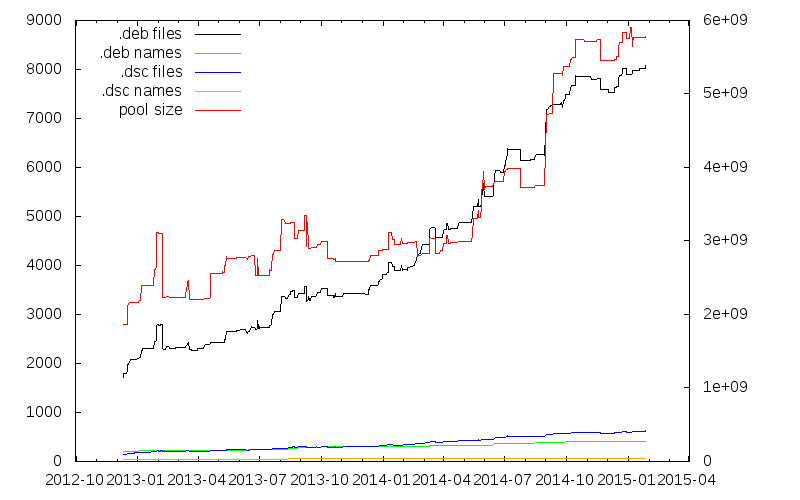
At this year's FOSDEM I gave a talk in the PostgreSQL devroom about Large Scale Quality Assurance in the PostgreSQL Ecosystem. The talk included a graph about the growth of the apt.postgresql.org repository that I want to share here as well: The yellow line at the very bottom is the number of different source package names, currently 71. From that, a somewhat larger number of actual source packages that include the "pgdgXX" version suffixes targeting the various distributions we have is built (blue). The number of different binary package names (green) is in about the same range. The dimension explosion then happens for the actual number of binary packages (black, almost 8000) targeting all distributions and architectures. The red line is the total size of the pool/ directory, currently a bit less than 6GB. (The graphs sometimes decrease when packages in the -testing distributions are promoted to the live distributions and the old live packages get removed.)

Vincent Bernat: Directory bookmarks with Zsh

There are numerous projects to implement directory bookmarks in your favorite shell. An inherent limitation of those implementations is they being only an enhanced cd command: you cannot use a bookmark in an arbitrary command. UPDATED: My initial implementation with Zsh was using dynamic named directories. I have been pointed on Twitter that there is a simpler way to implement bookmarks. The article has been updated to reflect that. As a side note, it is also possible to just use shell variables1. Zsh comes with a not well-known feature called static named directories. They are declared with the hash builtin and can be refered by prepending ~ to them:
$ hash -d -- -lldpd=/home/bernat/code/deezer/lldpd
$ echo ~-lldpd/README.md
/home/bernat/code/deezer/lldpd/README.md
$ head -n1 ~-lldpd/README.md
lldpd: implementation of IEEE 802.1ab (LLDP)
Because ~-lldpd is substituted during file name expansion, it is possible to use it in any command like a regular directory, like shown above. The - prefix is only here to avoid collision with home directories. Bookmarks are kept into a dedicated directory, $MARKPATH. Each bookmark is a symbolic link to the target directory: for example, ~-lldpd should be expanded to $MARKPATH/lldpd which points to the appropriate directory. Assuming that you have populated $MARKPATH with some links, here is how bookmarks are registered:
for link ($MARKPATH/*(N@))  
    hash -d -- -$ link:t =$ link:A 
 
You also automatically get completion and prompt expansion:
$ pwd
/home/bernat/code/deezer/lldpd/src/lib
$ echo $ (%):-%~ 
~-lldpd/src/lib
The last step is to manage bookmarks without adding or removing symbolic links manually. The following bookmark() function will display the existing bookmarks when called without arguments, will remove a bookmark when called with -d or add the current directory as a bookmark otherwise.
bookmark()  
    if (( $# == 0 )); then
        # When no arguments are provided, just display existing
        # bookmarks
        for link in $MARKPATH/*(N@); do
            local markname="$fg[green]$ link:t $reset_color"
            local markpath="$fg[blue]$ link:A $reset_color"
            printf "%-30s -> %s\n" $markname $markpath
        done
    else
        # Otherwise, we may want to add a bookmark or delete an
        # existing one.
        local -a delete
        zparseopts -D d=delete
        if (( $+delete[1] )); then
            # With  -d , we delete an existing bookmark
            command rm $MARKPATH/$1
        else
            # Otherwise, add a bookmark to the current
            # directory. The first argument is the bookmark
            # name.  .  is special and means the bookmark should
            # be named after the current directory.
            local name=$1
            [ $name == "." ] && name=$ PWD:t 
            ln -s $PWD $MARKPATH/$name
        fi
    fi
 
Find the complete version on GitHub.

Dynamic named directories Another (more complex) way to achieve the same thing is using dynamic named directories. I was initially using this solution but it is far more complex. This section is only here for historical reason. You can find the complete implementation in my GitHub repository. During file name expansion, a ~ followed by a string in square brackets is provided to the zsh_directory_name() function which will eventually reply with a directory name. This feature can be used to implement directory bookmarks:
$ cd ~[@lldpd]
$ pwd
/home/bernat/code/deezer/lldpd
$ echo ~[@lldpd]/README.md
/home/bernat/code/deezer/lldpd/README.md
$ head -n1 ~[@lldpd]/README.md
lldpd: implementation of IEEE 802.1ab (LLDP)
Like for static named directories, because ~[@lldpd] is substituted during file name expansion, it is possible to use it in any command like a regular directory.

Basic implementation Bookmarks are still kept into a dedicated directory, $MARKPATH and are still symbolic links. Here is how the core feature is implemented:
_bookmark_directory_name()  
    emulate -L zsh #  
    setopt extendedglob
    case $1 in
        n)
            [ [ $2 != ( #b)"@"(?*) ]] && return 1 #  
            typeset -ga reply
            reply=($ $ :-$MARKPATH/$match[1] :A ) #  
            return 0
            ;;
        *)
            return 1
            ;;
    esac
    return 0
 
add-zsh-hook zsh_directory_name _bookmark_directory_name
zsh_directory_name() is a function accepting hooks2: instead of defining it directly, we define another function and register it as a hook with add-zsh-hook. The hook is expected to handle different situations. The first one is to be able to transform a dynamic name into a regular directory name. In this case, the first parameter of the function is n and the second one is the dynamic name. In , the call to emulate will restore the pristine behaviour of Zsh and also ensure that any option set in the scope of the function will not have an impact outside. The function can then be reused safely in another environment. In , we check that the dynamic name starts with @ followed by at least one character. Otherwise, we declare we don t know how to handle it. Another hook will get the chance to do something. (#b) is a globbing flag. It activates backreferences for parenthesised groups. When a match is found, it is stored as an array, $match. In , we build the reply. We could have just returned $MARKPATH/$match[1] but to hide the symbolic link mechanism, we use the A modifier to ask Zsh to resolve symbolic links if possible. Zsh allows nested substitutions. It is therefore possible to use modifiers and flags on anything. $ :-$MARKPATH/$match[1] is a common trick to turn $MARKPATH/$match[1] into a parameter substitution and be able to apply the A modifier on it.

Completion Zsh is also able to ask for completion of a dynamic directory name. In this case, the completion system calls the hook function with c as the first argument.
_bookmark_directory_name()  
    # [...]
    case $1 in
        c)
            # Completion
            local expl
            local -a dirs
            dirs=($MARKPATH/*(N@:t)) #  
            dirs=("@"$ ^dirs ) #  
            _wanted dynamic-dirs expl 'bookmarked directory' compadd -S\] -a dirs
            return
            ;;
        # [...]
    esac
    # [...]
 
First, in , we create a list of possible bookmarks. In *(N@:t), N@ is a glob qualifier. N allows us to not return nothing if there is no match (otherwise, we would get an error) while @ only returns symbolic links. t is a modifier which will remove all leading pathname components. This is equivalent to use basename or $ something##*/ in POSIX shells but it plays nice with glob expressions. In , we just add @ before each bookmark name. If we have b1, b2 and b3 as bookmarks, $ ^dirs expands to b1,b2,b3 and therefore "@"$ ^dirs expands to the (@b1 @b2 @b3) array. The result is then feeded into the completion system.

Prompt expansion Many people put the name of the current directory in their prompt. It would be nice to have the bookmark name instead of the full name when we are below a bookmarked directory. That s also possible!
$ pwd
/home/bernat/code/deezer/lldpd/src/lib
$ echo $ (%):-%~ 
~[@lldpd]/src/lib
The prompt expansion system calls the hook function with d as first argument and the file name to transform.
_bookmark_directory_name()  
    # [...]
    case $1 in
        d)
            local link slink
            local -A links
            for link ($MARKPATH/*(N@))  
                links[$  #link:A $'\0'$ link:A ]=$ link:t  #  
             
            for slink ($ (@On)$ (k)links )  
                link=$ slink#*$'\0'  #  
                if [ [ $2 = ( #b)($ link )( /*) ]]; then
                    typeset -ga reply
                    reply=("@"$ links[$slink]  $(( $  #match[1]  )) )
                    return 0
                fi
             
            return 1
            ;;
        # [...]
    esac
    # [...]
 
OK. This is some black Zsh wizardry. Feel free to skip the explanation. This is a bit complex because we want to substitute the most specific bookmark, hence the need to sort bookmarks by their target lengths. In , the associative array $links is created by iterating on each symbolic link ($link) in the $MARKPATH directory. The goal is to map a target directory with the matching bookmark name. However, we need to iterate on this map from the longest to the shortest key. To achieve that, we prepend each key with its length. Remember, $ link:A is the absolute path with symbolic links resolved. So, $ #link:A is the length of this path. We concatenate the length of the target directory with the target directory name and use $'\0' as a separator because this is the only safe character for this purpose. The result is mapped to the bookmark name. The second loop is an iteration on the keys of the associative array $links (thanks to the use of the k parameter flag in $ (k)links ). Those keys are turned into an array (@ parameter flag) and sorted numerically in descending order (On parameter flag). Since the keys are directory names prefixed by their lengths, the first match will be the longest one. In , we extract the directory name from the key by removing the length and the null character at the beginning. Then, we check if the extracted directory name matches the file name we have been provided. Again, (#b) just activates backreferences. With extended globbing, we can use the or operator, . So, when either the file name matches exactly the directory name or is somewhere deeper, we create the reply which is an array whose first member is the bookmark name and the second member is the untranslated part of the file name.

Easy typing Typing ~[@ is cumbersome. Hopefully, Zsh line editor can be extended with additional bindings. The following snippet will substitute @@ (if typed without a pause) by ~[@:
vbe-insert-bookmark()  
    emulate -L zsh
    LBUFFER=$ LBUFFER "~[@"
 
zle -N vbe-insert-bookmark
bindkey '@@' vbe-insert-bookmark
In combination with the autocd option and completion, it is quite easy to jump to a bookmarked directory.

  1. For example:
    $ lldpd=/home/bernat/code/deezer/lldpd
    $ echo $lldpd/README.md
    /home/bernat/code/deezer/lldpd/README.md
    $ head -n1 $lldpd/README.md
    lldpd: implementation of IEEE 802.1ab (LLDP)
    
    The drawback is that you don t have a separate namespace for your bookmarks. You can still use a special prefix for that. Also, no prompt expansion.
  2. Other functions accepting hooks are chpwd() or precmd().

Tiago Bortoletto Vaz: Raspberry Pi Foundation moving away from its educational mission?

From the news:
"...we want to make Raspberry Pi more open over time, not less."
Right.
"For the last six months we ve been working closely with Microsoft to bring the forthcoming Windows 10 to Raspberry Pi 2"
Hmmm... From a comment:
I m sad to see Windows 10 as a selling point though. This community should not be supporting restrictive proprietary software The Pi is about tinkering and making things while Microsoft is about marketing and spying.
Right. From an answer:
"But I suggest you rethink your comments about MS, spying is going a bit far, don t you think?"
Wrong.

3 February 2015

Thorsten Alteholz: USB 3.0 hub and Gigabit LAN adapter

Recently I bought an USB 3.0 Hub with three USB 3.0 ports and one Gigabit LAN port. It is manufactured by Delock and I purchased it from Reichelt (Delock 62440). Under Wheezy the USB part is recognized without problems but the kernel (3.2.0-4) does not have a driver for the ethernet part.
The USB Id is idVendor=0b95 and idProduct=1790, the manufacturer is ASIX Elec. Corp. and the product is: AX88179. So Google led me to a product page at Asix, where I could download the driver for kernel 2.6.x and 3.x.

mkdir -p /usr/local/src/asix/ax88179
cd /usr/local/src/asix/ax88179
wget www.asix.com.tw/FrootAttach/driver/AX88179_178A_LINUX_DRIVER_v1.13.0_SOURCE.tar.bz2
tar -jxf AX88179_178A_LINUX_DRIVER_v1.13.0_SOURCE.tar.bz2
cd AX88179_178A_LINUX_DRIVER_v1.13.0_SOURCE
apt-get install module-assistant
module-assistant prepare
make
make install
modprobe ax88179_178a.ko
After editing /etc/network/interfaces and doing an ifup eth1, voila, I have a new network link. I hope the hardware is as good as the installation has been easy.

Thomas Goirand: OpenStack packaging activity, November 2014 to January 2015

November 2014:
Sunday 2nd:
Travel from Moscow to Paris Monday 3rd to Sunday 8th:
Summit in Paris Monday 10th:
Uploaded python-rudolf to Sid (needed by Fuel)
Uploaded python-invoke and python-invocations (needed to run fabric s unit tests)
Uploaded python-requests-kerberos/0.5-2 fixing CVE-2014-8650: failure to handle mutual authentication. Asked the release team for unblock.
Uploaded openstack-pkg-tools version 19 fixing startup with systemd in Jessie (added RuntimeDirectory directive). Asked the release team for unblock.
Opened ticket to remove TripleO, Tuskar and Ironic packages from Jessie. I don t consider them ready for a Debian stable release, and there s no long term support from upstream.
Fixed Designate Juno dbsync process which prevented it from being installed.
Fixed Ironic Juno unowned files after purge (policy 6.8, 10.8): /var/lib/ironic/ cache, ironicdb (eg: purging these folders on purge) Thuesday 11:
Fixed nova-api CVE-2014-3708: Nova network DoS through API filtering in both the Juno and Icehouse release. Asked the release team to unblock the Icehouse version for Jessie. See: https://bugs.debian.org/769163
Uploaded Cinder with Duch debconf translation fix and pt.po
Uploaded python-django-pyscss with upstream patch for Django 1.7 support instead of the Debian one that I wrote 2 months ago. Asked the release team to unblock which they did. Wednesday 12:
Uploaded fix for horizon (see #769101) unowned files after purge (policy 6.8, 10.8). Now purging /usr/share/openstack-dashboard/openstack_dashboard on purge.
Uploaded Ironic with Duch translations of debconf
Uploaded Designate with Duch translations of Debconf screens
Uploaded openstack-trove with Duch translations of Debconf screens
Uploaded Tuskar with Duch translations of Debconf screens
Updated python-oslotest in Experimental to version 1.2.0 Thursday 13:
Uploaded new packages: python-oslo.middleware and python-oslo.concurrency.
Opened a new packaging branch for Nova Kilo, and updated (build-)depends.
Uploaded fix for Icehouse Cinder: delete volume failed due to unicode problems , and asked for unblock.
Uploaded new package: python-pygit2 and python-xmlbuilder, needed for fuel-agent-ci.
Uploaded sheepdog with Duch debconf translation.
Uploaded python-daemonize to Sid (in FTP master NEW queue).
Re-uploaded python-invoke after FTP master rejection (missing copyright information) Friday 14:
Uploaded liberasurecode & python-pyeclib to Sid, now in the FTP masters NEW queue waiting for approval. This will soon be needed by Swift. Monday 17:
Worked on the Cobbler packaging (all day long ) Tuesday 18:
Worked on backporting all of Fuel packages to Wheezy. Done with fuelclient already.
Uploaded ruby-cstruct and ruby-rethtool to Sid (needed by nailgun-agent) Wednesday 19:
Uploaded pyeclib again, with fixes for the build-depends. Package is still in the NEW queue anyway.
Built a Debian-based bootstrap hardware discovery image for Fuel, and it seems that it works already (to be checked )! \o/
To be added as packages in the ISO:
* nailgun-mcagents
* nailgun-net-check
* fuel-agent
* python-tasklib Thursday 20:
Uploaded python-tasklib to Sid (now in NEW queue )
Continued working on the discovery bootstrap ISO Friday 21:
Documented Sahara procedure in Debian in the official install-guide: https://review.openstack.org/136237
Fixed oslo.messaging so it doesn t use PROTOCOL_SSLv3 because its support has been removed from Debian (due to possible protocol downgrade attacks): https://review.openstack.org/136278 and uploaded fixed packages for Sid and Experimental.
Uploaded fixed Neutron packages for CVE-2014-7821 in both Sid and Experimental (eg: Icehouse and Juno) Monday 24:
Uploaded new package: python-os-client-config (in NEW queue)
Installed new Xen server to be used as my new Jenkins build machine
Moved the juno-wheezy VM to it
Finished to package python-pymysql and uploaded to Sid. It s now running all unit tests successfully! \o/ Tuesday 25:
Uploaded fix for openstack-debian-images to add the -o compat=1.0 option when building an image with Qemu > 1.0. Opened bug to the release team to have it unblocked.
Continued working on unit tests for fuel-nailgun. Wednesday 26:
Uploaded python-os-net-config to Sid (new package)
Worked briefly on python-cassandra-driver. It needs cassandra to be in, which is a LOT of work.
Found a (not useable) hack to run nailgun unit tests. It works, however, it doesn t seem like fuel-nailgun is designed to be able to use unix socket for the postgres connection in its unit tests.
Uploaded python-pykmip to Sid (new package)
Updated the Debian wheezy backport repository for libvirt to version 1.2.9 from official wheezy-backports. Removed policykit-1 and libusb from there too, as it broke stuff to use a backported version (X and usb were not useable on my Wheezy laptop when using it ). Thursday 27 & Friday 28:
Uploaded new Javascript packages or dependencies for Fuel: libjs-autonumeric, libjs-backbone-deep-model, libjs-backbone.stickit, libjs-cocktail, libjs-i18next, libjs-require-css, libjs-requirejs, libjs-requirejs-text Sunday 30:
Uploaded debian/copyright fixes for libjs-backbone-deep-model, libjs-backbone.stickit and libjs-cocktail after the packages were accepted by the FTP masters and they gave remarks about copyright. DECEMBER 2014 Monday 01:
Uploaded new Debian image to MOX, after I unerstood the issue was about the architecture field that I was wrongly filling. I ll be able to use that for Tempest checking on my dev account. Tuesday 02:
Uploaded python-q-text-as-data to Sid (new awesome package!)
Uploaded Horizon with some triggers mechanisms to start the compress when one of its JS depends is updated. That s very important for security!
Uploaded a fixed version of heat-cfntools to Sid (it was missing the /usr/lib/python* folder). Asked the release team for an unblock so it can reach Jessie.
Fixed unit tests in fuel-nailgun, thanks to a patch from Sebastian Kalinowski. Now all unit tests are passing but one (for which I opened a launchpad bug: tests are trying to write in /var/log/nailgun, which is impossible at package build time). Wednesday 03:
Uploaded fixed version of ruby-rethtool after FTP master s rejection and upstream correction of licensing files.
Uploaded fixed version of libjs-require-css after FTP master s rejection
Fixed (in Git only) python-sysv-ipc missing build-depends on dh-python as per bug opened by James Page (this is not so important, but I did it still).
Continued working on the tempest-ci scripts.
Added to the image-guide docs about openstack-debian-images: https://review.openstack.org/#/c/138743/ Thursday 04:
Uploaded new package: python-proliantutils. Send patch to upstream about an issue in indentation (mix-up with space and tabs) which made the package uninstallable with Python 3.4. Friday 05:
Worked on the package CI. Monday 07:
Worked on the package CI. All works now, up to all of the Tempest tests for Keystone. Now need to fix the neutron config. Thuesday 08:
Continued working on the CI. Wednesday 09:
Uploaded fix for FTBFS of python-tasklib (Closes: #772606)
Uploaded fix for libjerasure-deb missing dependency on libgf-complete-dev, package already unblocked and will migrate to Jessie.
Uploaded fix for Designate Juno fail to upgrade from Icehouse: this was due to the database_connection directive renamed to connection =.
Uploaded fix for Designate purge in Sid (Icehouse release of Designate).
Commited to git updates of the German debconf translation in both Icehouse and Juno.
Updated nova to use libvirtd as init script dependency instead of libvirt-bin (this was renamed in the libvirt-daemon-system package).
Do not touch the db connection directive if user didn t ask for db handling by the package. Thursday 10 to Saturday 13:
Finally understood the issues with systemd service files not being activated by default. Fixed openstack-pkg-tools, and uploaded version 20 to Sid, after the release team accepted the changes. Sunday 14:
Uploaded Juno 2014.2.1 to Experimental: ceilometer, cinder, glance, python-glance-store, heat, horizon, keystone Monday 15:
Finished uploading Juno 2014.2.1 to Experimental: Nova, Neutron, Sahara Tuesday 16:
Added crontab to flush tokens in Icehouse Keystone
Some more CI work Wednesday 17:
Uploaded keystone with systemd fix and crontab to flush the token table in Sid (eg: Icehouse).
Uploaded nova Icehouse with a bunch of fixes in Sid. Thursday 18:
Updated some issues in Nova Icehouse (Sid/Jessie) Friday 19:
Started building a new Jenkins instance for building Kilo packages Monday 22:
Finished building the new Jenkins instance for building Kilo packages, and rebuilt every packages there, using Jessie as a base. Tuesday 23:
Updated version for the following packages: oslo.utils, oslo.middleware, stevedore, oslo.concurency, pecan, oslo.concurrency, python-oslo.vmware, python-glance-store
Built so far: Ceilometer, Keystone, python-glanceclient, cinder, glance Wednesday 24:
Continued packaging Kilo beta 1. Updated: nova, designate, neutron
Uploaded python-tempest-lib to Debian Unstable (new package) Wednesday 31:
Continued packaging Kilo beta 1. Updated: heat JANUARY 2015 Thursday 01:
Continued packaging Kilo beta 1. Updated: ironic, openstack-trove, openstack-doc-tools, ceilometer Friday 02:
Finished packaging Kilo beta 1. Updated: Sahara, Murano, Murano-dashboard, Murano-agent Sunday 04:
Started testing Kilo beta 1. Fixed a few issues on default configuration for Ceilometer and Glance. Monday 05:
Fixed openstack-pkg-tools which failed to create PID files at boot time, Uploaded to Sid, asked the release team for unblock.
Uploaded ceilometer & cinder to Sid, rebuilt against openstack-pkg-tools 21.
Did more testing of Kilo beta 1, fixed a few more minor issues. Tuesday 06:
Uploaded glance, neutron, nova, designate, keystone, heat, trove to Sid, so that all sysv-rc init scripts are fixed with the new openstack-pkg-tools 21. Designate, heat, keystone and trove contains other minor fixes reported to the Debian BTS. Wednesday 07:
Asked the Debian release team (open bugs with debdiff as attachment) for unblocks of glance, neutron, nova, designate, keystone, heat, trove so they migrate to Jessie.
Fixed a few minor issues tracked in the Debian BTS on various packages. Thesday 08:
James Page from Canonical informed me that they are now using openstack-pkg-tools for maintaining their daemons in Nova, Cinder and Keystone in Ubuntu. That s an awesome news : more QA for both platforms.
James Page found out that dh_installinit *must* be called *after* the call of dh_systemd_enable, otherwise, daemons aren t started automatically at the first install of packages, as the unmask of systemd happens after the invoke-rc.d. Friday 09:
Did some QA checks on the latest upload. Fixed Heat which broke because using the wrong template name (glance instead of heat). Monday 12:
Started re-running the automated openstack-deploy scrip in Icehouse, Juno and Kilo. Found out the issue in Keystone wasn t fixed in Juno (but was fixed in other releases), and fixed it.
Removed the use of ssl.PROTOCOL_SSLv3 from heat (removed form Debian). Uploaded the fixed package to Sid.
All of openstack-deploy (debian/kilo branch) now works and succesfully installs OpenStack again. If dh_installinit is called before, we have:
# Automatically added by dh_installinit
if [ -x "/etc/init.d/keystone" ]; then
update-rc.d keystone defaults >/dev/null
fi
if [ -x "/etc/init.d/keystone" ]   [ -e "/etc/init/keystone.conf" ]; then
invoke-rc.d keystone start   true
fi
# End automatically added section
# Automatically added by dh_systemd_enable
# This will only remove masks created by d-s-h on package removal.
deb-systemd-helper unmask keystone.service >/dev/null   true
# was-enabled defaults to true, so new installations run enable.
if deb-systemd-helper --quiet was-enabled keystone.service; then
# Enables the unit on first installation, creates new
# symlinks on upgrades if the unit file has changed.
deb-systemd-helper enable keystone.service >/dev/null   true
else
# Update the statefile to add new symlinks (if any), which need to be
# cleaned up on purge. Also remove old symlinks.
deb-systemd-helper update-state keystone.service >/dev/null   true
fi
# End automatically added section
If it s called after dh_systemd_enable, we have:
# Automatically added by dh_systemd_enable
# This will only remove masks created by d-s-h on package removal.
deb-systemd-helper unmask keystone.service >/dev/null   true
# was-enabled defaults to true, so new installations run enable.
if deb-systemd-helper --quiet was-enabled keystone.service; then
# Enables the unit on first installation, creates new
# symlinks on upgrades if the unit file has changed.
deb-systemd-helper enable keystone.service >/dev/null   true
else
# Update the statefile to add new symlinks (if any), which need to be
# cleaned up on purge. Also remove old symlinks.
deb-systemd-helper update-state keystone.service >/dev/null   true
fi
# End automatically added section
# Automatically added by dh_installinit
if [ -x "/etc/init.d/keystone" ]; then
update-rc.d keystone defaults >/dev/null
fi
if [ -x "/etc/init.d/keystone" ]   [ -e "/etc/init/keystone.conf" ]; then
invoke-rc.d keystone start   true
fi
# End automatically added section
As a consequence, I have to re-upload version 22 of openstack-pkg-tools and also re-upload all OpenStack core packages to Debian Sid. Fixed a number of issues like:
* dbc_upgrade = true check which shouldn t have been there in postinst.
* <project>/configure_db default value is now always false
* db_sync and pkgos_dbc_postinst are now only done if <project>/configure_db is set to true.
Rebuilt all packages in Juno and Kilo with the above changes. Tuesday 13:
Opened unblock bugs for the release team to unblock all fixed packages.
Made more tests in Juno and Kilo to make sure the fixed bugs in Icehouse are fixed there too.
Fixed numerous issues in Trove (missing trove-conductor.conf, wrong trove-api init file, etc.). More work will be needed for it for both Icehouse and newer releases. Wednesday 14:
Did a doc meeting about debconf. Some doc contributors still want to kill the debconf / debian manual, and I have to not agree.
Made a new patch to better document the keystone install procedure:
Did some bug triaging in the doc about Debian.
Uploaded new versions of core packages to Experimental (eg: Juno) built against openstack-pkg-tools >= 22~, and some fixes forward ported from Icehouse: Keystone, Ceilometer, Cinder, Glance, Heat, Ironic, Murano, Neutron, Nova, Saraha and Murano-agent. All where rebuilt in Juno (Wheezy + Trusty) and Kilo (Jessie only) on my Jenkins. Thuesday 15:
Succesfully booted a live-build Debian live image containing mcollective and nailgun-agent as a Debian replacement for the hardware discovery / boostrap image of Fuel. Now, I need to find a way to use just a kernel + initramfs Friday 16 to Tuesday 20:
Worked on the packaging CI. Wednesday 21:
Fixed https://bugs.debian.org/775636 (Horizon failed to build due to a Moscow timezone change and wrong test). Uploaded to Sid, asked for unblock.
Fixed https://bugs.debian.org/775926: CVE-2015-1195: Glance still allows users to download and delete any file in glance-api server (applied upstream patch). Uploaded to Sid, asked for unblock. Uploaded Juno version to Experimental.
Uploaded openstack-trove with the remaining fixes, asked release team for unblock.
Uploaded python-glanceclient 0.15.0 (Juno) to Experimental because it fixes an issue with HTTPS. Added to it a patch from James Page not yet merged, which fixes unit test with Python 2.7.9 (7 failures otherwise).
Uploaded python-xstatic-d3 as it can t be installed anymore in Sid after a new version of d3 was uploaded. Thursday 22:
Uploaded python-xstatic-smart-table and libjs-angularjs-smart-table to Sid (new packages, now in NEW queue). Friday 23:
Ask for the removal of the below list of packages from Jessie:
python-xstatic
python-xstatic-angular
python-xstatic-angular-cookies
python-xstatic-angular-mock
python-xstatic-bootstrap-datepicker
python-xstatic-bootstrap-scss
python-xstatic-d3
python-xstatic-font-awesome
python-xstatic-hogan
python-xstatic-jasmine
python-xstatic-jquery
python-xstatic-jquery-migrate
python-xstatic-jquery-ui
python-xstatic-jquery.bootstrap.wizard
python-xstatic-jquery.quicksearch
python-xstatic-jquery.tablesorter
python-xstatic-jsencrypt
python-xstatic-qunit
python-xstatic-rickshaw
python-xstatic-spin
libjs-jsencrypt
libjs-spin.js
libjs-twitter-bootstrap-datepicker
libjs-twitter-bootstrap-wizard They are used only in OpenStack Horizon starting on 2014.2 (aka Juno), and Jessie is shipped with Icehouse, so it s IMO best to not carry the burden of maintaining these packages for the life of Jessie. Monday 26:
Enhanced and review requested changes for https://review.openstack.org/147296 (ie: Keystone install with more details about what the package does).
Finished testing network on the CI install. Now need to automate all. Tuesday 27:
Closed all bugs on the rabbitmq-server package (2 correction, one bug triage).
Uploaded a fix for the missing conntrack dependency in neutron-l3-agent.
Restarted working on CI setup of Juno after success with manual install in a Xen domU.
Uploaded fix to make sheepdog build reproducible (patch from the Debian BTS). Thursday 28:
Fixed and uploaded to Sid openstack-debian-images 2 bugs reported by Steve McIntire. Official Debian images for OpenStack are now available at:
http://cdimage.debian.org/cdimage/openstack/ \o/
Note that this is the weekly build of testing. We wont get Debian Stable images before Jessie is out.
Documented the new image thing here: http://docs.openstack.org/image-guide/content/ch_obtaining_images.html#debian-images as a new patch: https://review.openstack.org/#/c/151015/
Fixed my patch for keystone debconf doc at: https://review.openstack.org/#/c/147296/ Wednesday 29:
Continued working on packaging CI Thursday 30:
Fixed CVE on Neutron (Juno): L3 agent denial of service with radvd 2.0+
Fixed CVE on Glance (Icehouse + Juno): Glance user storage quota bypass. Asked release team for unblock.
Fixed the image-guide patch after review (ie: https://review.openstack.org/151015)

Mike Hommey: Looking for a new project name for git-remote-hg

If you ve been following this blog, you know I ve been working on a (fast) git remote helper to access mercurial without a local mercurial clone, with the main goal to make it work for Gecko developers. The way git remote helpers work forces how their executable is named: For a foo:: remote prefix, the executable must be named git-remote-foo. So for hg::, it s git-remote-hg. As you may know, there already exists a project with that name. And when I picked the name for this new helper, I didn t really care to find a separate name, especially considering its prototype nature. Now that I m satisfied enough with it that I m close to release it with a version number (which will be 0.1.0), I m thinking that the confusion with the other project with that name is not really helpful, and an unfortunate implementation detail. So I m looking for a new project name and have no good idea. Dear lazy web, do you have good ideas?

2 February 2015

Thorsten Alteholz: My Debian Activities in January 2015

FTP assistant This month at the beginning of the year has been rather quiet as well. All in all I marked 50 packages for accept and rejected only 17 packages. Squeeze LTS This was my seventh month that I did some work for the Squeeze LTS initiative, started by Raphael Hertzog at Freexian. This month I got assigned a workload of 12h and I spent these hours to upload new versions of: In doing so, preparing the upload for php5 consumed most of the time as support from Upstream for the old version in Squeeze no longer exists. Oddly enough, a simple one-line-patch seems to have created a regression I also sponsored the upload of [DLA 133-1] unrtf security update, [DLA 134-1] curl security update and [DLA 130-1] firebird2.1 security update. Many thanks to Nguyen Cong from Toshiba who prepared the patches for these packages. I also uploaded two DLAs for polarssel ([DLA 129-1] polarssl security update and [DLA 144-1] polarssl security update) although no LTS sponsor indicated any interest. Other packages Thanks to the relentless QA work of Andreas Beckmann, his piuparts tests detected an issue in the greylistd package. If greylistd has been installed in Wheezy, removed but not purged afterwards, the whole system dist-upgraded to Jessie and afterwards greylistd is installed again, there would be an error message. RC bug taken, fixed package uploaded and unblock request approved.

Dirk Eddelbuettel: RcppStreams 0.1.0

Streamulus The new package RcppStreams arrived on CRAN on Saturday. RcppStreams brings the excellent Streamulus C++ template library for event stream processing to R. Streamulus, written by Irit Katriel, uses very clever template meta-programming (via Boost Fusion) to implement an embedded domain-specific event language created specifically for event stream processing. The packages wraps the four existing examples by Irit, all her unit tests and includes a slide deck from a workshop presentation. The framework is quite powerful, and it brings a very promising avenue for (efficient !!) stream event processing to R. The NEWS file entries follows below:
Changes in version 0.1.0 (2015-01-30)
  • First CRAN release
  • Contains all upstream examples and documentation from Streamulus
  • Added Rcpp Attributes wrapping and minimal manual pages
  • Added Travis CI unit testing
Courtesy of CRANberries, there is also a copy of the DESCRIPTION file for this initial release. More detailed information is on the RcppStreams page page and of course on the Streamulus page.

This post by Dirk Eddelbuettel originated on his Thinking inside the box blog. Please report excessive re-aggregation in third-party for-profit settings.

1 February 2015

Iustin Pop: Morning snow

Woke up on Sunday morning to see snow! It snowed during the night, such that there were around 5 or 6 centimetres of snow on the ground. The second surprise was that, from my window at least, it seemed the snow on the street and sidewalks was still there! To see snow, uncleaned, after eight in the morning, is a welcome surprise in Switzerland! So I wanted to quickly dress and go for a short run, but I was delayed by a page from work (oncall this weekend) it became a race between me solving the page and the people who ruin the snow by making it safe to walk. So I had to work fast, skip breakfast (I like running on an empty stomach), and a while later I was finally outside, and started my run. The snow right outside was pristine, untouched by anything. Further on, some signs of cleaning (and some people busy at work with shovels). Half of the sidewalks were already cleared, but the other half was mighty fun to run in - reasonably dry snow, and soft, not at all like running on pavement. By the time I was inside, the big and "serious" cleaning machines were out on the streets, ensuring the snow doesn't endanger cars. Sigh, living in a city. But all in all, a good Sunday morning start!

Ritesh Raj Sarraf: Debian GNU/Hurd on VirtualBox

One of the great things about Debian is the wide range of kernels it supports can run. This gives the user the flexibility to not spend time on the common userland stuff. For example, most apps, package management and system admin tasks are common across all Debian platforms. These platforms may not be optimal at par to Linux, but still, choice is good. For long, I had used Debian GNU/Hurd, only on a KVM hypervisor. Recently being involved in VirtualBox maintenance, I've almost beeing using VirtualBox for all my virtualization tasks. So it was time to try out Hurd on VirtualBox. All praises to the work the Debian Hurd team has put, it just works wonderfully. To try out Hurd on VirtualBox:
  1. You could download ready to use VirtualBox images from here.
  2. These are raw images. For VirtualBox, I'd recommend you convert the image to VDI format.
    1. rrs@learner:~/VirtualBox VMs$ VBoxManage convertdd debian-hurd-20150105.img debian-hurd-20150105.vdi --format VDI
      Converting from raw image file="debian-hurd-20150105.img" to file="debian-hurd-20150105.vdi"...
      Creating dynamic image with size 3146776576 bytes (3001MB)...
    2. The VDI format may help in with some of the goodies VirtualBox has to offer, like efficient snapshots.
  3. The rest remains the same. You need to configure the VM just as else. Currently supported arch is x86 only, so make the selections accordingly.
  4. The final VM config may look something like the following screenshot.
  5. And here's the result in a video captured on VirtualBox running Debian GNU/Hurd.

Categories:

Keywords:

Images:

Francois Marier: Upgrading Lenovo ThinkPad BIOS under Linux

The Lenovo support site offers downloadable BIOS updates that can be run either from Windows or from a bootable CD. Here's how to convert the bootable CD ISO images under Linux in order to update the BIOS from a USB stick.

Checking the BIOS version Before upgrading your BIOS, you may want to look up which version of the BIOS you are currently running. To do this, install the dmidecode package:
apt-get install dmidecode
then run:
dmidecode
or alternatively, look at the following file:
cat /sys/devices/virtual/dmi/id/bios_version

Updating the BIOS using a USB stick To update without using a bootable CD, install the genisoimage package:
apt-get install genisoimage
then use geteltorito to convert the ISO you got from Lenovo:
geteltorito -o bios.img gluj19us.iso
Insert a USB stick you're willing to erase entirely and then copy the image onto it (replacing sdX with the correct device name, not partition name, for the USB stick):
dd if=bios.img of=/dev/sdX
then restart and boot from the USB stick by pressing Enter, then F12 when you see the Lenovo logo.

Next.

Previous.