Piotr Roszatycki: VSTi on Linux
jack-dssi-host
dssi-vst.so:SUPERWAVEP8.dll and the instrument appeared as another MIDI and audio client in JACK
Audio Connection dialog.

Now I'm missing FL Studio on Linux
badly...
jack-dssi-host
dssi-vst.so:SUPERWAVEP8.dll and the instrument appeared as another MIDI and audio client in JACK
Audio Connection dialog.

Now I'm missing FL Studio on Linux
badly...
Override entries for your package: foo.deb - optional devel bar.udeb - extra admin foo2.0-1.dsc - source interpretersThat means you can now directly see if you have a different opinion of the override entries and change your package, avoiding a “Override disparity” mail with your next upload. And just because it was a nice rainy (and cold!) day today, I also went and rejected those two old packages we had in the queue. rte, real time encoder, was the first, and looks like it wont ever get included in Debian, containing non-free code. The other, more flame-attached package, is mplayer - which may get into the archive in the future, but needs a lot of work before that can actually get true. Now - people only need to stop uploading NEW packages, and we are all fine. :)
Bringing up the network (the laptop is configured to use NetworkManager): She found the networking subfolder of the computer folder in GNOME: "Why does it say 'Windows Network'? And why is that empty?". Later: "Why does 'Network tools' not configure the network?". She doesn't know if configuring network in Windows would be as bewildering, never having done it. She can't find anything useful about network configuration in the GNOME help system. Eventually I point out the Network Manager icon in the notification area. She selects a wireless network to connect to and enters the WPA password I give her. She then gets the GNOME Keyring dialog and doesn't understand what it is, wondering why she needs to give the WPA password a second time. She then proceeds to open some windows. "Minimization works, good." She is happy that there is a task bar at the bottom of the screen, and happens to find the "Show desktop" button there as well: "Oh, you can hide all the windows here if you have many." She finds mplayer and thinks it looks OK. She comments that she doesn't really care what player she uses, she uses several under Windows, too, and all of them have quirks. XChat has too many networks to choose from at startup. She's never had to choose an IRC network before, IRCnet being the default for Mirc (or the Mirc installation she has, anyway). She wonders why XChat didn't ask for a server to connect to after selecting the right network (XChat has a lot of servers configured for each network and chose one of them). She continues to configure XChat: "Oh Lord, NO spell checking." She finds the color selector in XChat (the GNOME or GTK+ default one) to be very confusing. The "Nicks not to highlight on" setting is bewildering, does it mean that XChat highlights by default all nicknames, even for other users? She'd like "shut up completely" setting for XChat sounds. Giving ops from a popup is intuitive. XChat in general seems intuitive to her. Next, Bittorrent, using the GNOME torrent downloader. The .torrent file is saved directly to the desktop, which is good. The downloaded file goes there too, which is good, too. Seems intuitive enough, but doesn't seem to have very many settings: it would be nice to be able to prioritize different parts of a multi-file download. She also can't get it to continue a download after restarting the client (possibly related to multi-file torrents). Next, OpenOffice.org. The Windows version doesn't split up into Base, Writer, Impress, etc, but finding the interesting one (Writer) is no problem. That Abiword was installed, too, was a bit confusing. Totem: space doesn't play/pause (except in full screen mode). Sound volume control is a bit confusing, since it has to be done using multiple slidebars (master, pcm, etc) in the GNOME sound control dialog, and also in Totem. After maximizing Totem, quitting it, restarting it, the window is now as big as the whole desktop (minus top and bottom panels), so maximizing and un-maximizing doesn't seem to have much effect, which is weird.Other problems have surfaced since. The big one was that I had configured a simple firewall for her that didn't let anyone connect to her laptop, meaning that torrenting was not working very well. I use the same firewall settings on my own laptop, but since I mostly torrent for Debian's ISO images, and those have really fast seeders, I've never noticed that I don't torrent outward. Ah well. She also doesn't like the GNOME torrent client very much. It lacks ways of monitoring and controlling the torrenting process that she cares about: seeder and peer counts especially, or (but less importantly) changing the order in which parts of a multi-file torrent are downloaded. We tried installing Azureus, but the version in Debian etch at the time seems quite broken. Firefox seems to occasionally also work very badly for her, taking tens of seconds to load pages, but this seems to be a known bug that will be fixed in the next upstream version. We'll upgrade when we can, and hope that fixes it. Firefox's default font size was too small. Same for the default window size. And sometimes, maximizing the window still doesn't make the contents become bigger (but it works under the Windows version of Firefox). I haven't seen this myself yet, but if I do and can replicate it, I'll file bugs. Another problem that was due to my bad installation: I had forgotten to install acpid, so every time she booted, she got an error message saying "Can't access ACPI events in var/run/acpid.socket". Her exact words when reporting this were: "I don't want to know. Really, I don't. But, just in case you do." That's it for now. I may write an updated report later, if there's any interest. (For the curious, I'm intentionally not naming her, to let her try the experiment in peace, rather than getting her mailbox full of well-intentioned advice on things to try or do.)
other
icons for different user types). I also probably should not hotlink to the .gifs on the livejournal servers.To do more advanced network and service monitoring, try nagios:
Test DHCP:
$ sudo ifdown eth0 $ sudo ifup eth0 $ ifconfigTest the DNS:
# See if the DNS machine is on # The network $ ping -n 192.168.0.1 # See if the DNS resolves names $ host www.dream.edu.etTest the gateway:
# Ping the gateway $ ping gateway # Ping an outside host $ ping -n 10.4.15.6Test the proxy:
# Ping the proxy $ ping proxy # Open a web page and see if it displays # See if it caches http_proxy=http://proxy.dream.edu.et:3030/ wget -S -O/dev/null http://www.enricozini.org 2>&1 grep X-CacheTest the mail server:
$ ping smtp $ nmap smtp -p 25 grep 25/tcp $ if nmap gateway -p 25 grep 25/tcp grep -q open ; then echo "It works"; fi $ send a mail and see if you receive it
New useful tools seen today:
wget - The non-interactive network downloader.Special devices:
Example uses:
- /dev/null:
- On read, there is no data.
- On write, discards data.
- /dev/zero:
- On read, reads an infininte amount of zero bits.
- On write, discards data.
- /dev/random, /dev/urandom
- On read, reads random bits.
- On write, discards data.
- Difference: /dev/random is cryptographically secure, but it can hang waiting for system events
wget -O/dev/null http://www.example.org dd if=/dev/zero of=testdisk bs=1M count=50 mke2fs testdisk sudo mount -o loop testdisk /mntTiny little commands:
Example uses:
- true - do nothing, successfully
- false - do nothing, unsuccessfully
- yes - output a string repeatedly until killed
while /bin/true; do echo ciao; done Using /bin/false as a shell yes boring-tool-that-asks-lots-of-silly-questionsSome more shell syntax:
Some people run commands ignoring the standard error:
- 2>&1 Redirects the standard error in the standard output
- 2> Redirects the standard error instead of the standard output
command 2> /dev/nullThis causes unexpected error messages to go unnoticed: please do not do it. What to check if a machine is very slow:
See if the ram is full:
$ freeIf it is, you see what are the fattest programs using top, pressing M to sort by memory usage.See if there are lots of programs competing for CPU:
$ topCheck if you have I/O bottlenecks:
$ vmstat(but I don't know how to read it)For a desktop on older hardware, you can try xubuntu instead of ubuntu
- y: copy ("yank")
- p: paste
- P: paste before
- d: cut ("delete")
- c: change
- i: insert
- a: append
- .: repeat last operation
The best way to learn more vim is always to run vimtutor.
- yw: copy word
- dw: cut word
- yy: copy line
- dd: cut line
- V (select lines) y: copy a selection of lines
- V (select lines) d: cut a selection of lines
- p: paste
To have different virtual hosts over HTTPS, you need to have a different IP for every virtual host: name based virtual hosts do not work on HTTPS. You can configure multiple IP addresses on the same computer: use network interfaces named: eth0:1, eth0:2, eth0:3... These are called interface aliases. You cannot setup interface aliases using the graphical network configuration and you need to add them in /etc/network/interfaces:
apt-get install squirrelmail
/usr/sbin/squirrelmail-config and configure IMAP and SMTP. In our case, since we use IMAPS, the IMAP server is imap.dream.edu.et, port 993, secure IMAP enabled and SMTP is smtp.dream.edu.et.
Read /usr/share/doc/squirrelmail/README.Debian.gz (with zless) for how to proceed with setup. A short summary:
- link /etc/squirrelmail/apache.conf into the apache conf.d directory
- customise /etc/squirrelmail/apache.conf for example setting up the virtual hosts, or running it only on SSL
iface eth0:1 inet static
address 192.168.0.201
netmask 255.255.255.0
gateway 192.168.0.3
auto eth0:1
This is the trick commonly used to put different virtual HTTPS hosts on the
same computer.
apt-get install qemu
qemu-img create -f qcow /path/to/xp.cow 1300M
qemu -hda /path/to/xp.cow -boot d -cdrom /dev/cdrom -m 384 -localtime
qemu -hda /path/to/xp.cow -boot c -m 384 -localtime -k de -usb
apt-get install openssh-serverThen you can login with:
$ ssh efossnet@proxy.dream.edu.etTo verify the host key fingerprint of a machine:
$ ssh-keygen -l -f /etc/ssh/ssh_host_rsa_key.pubNote: you need to verify it before logging in! More information at http://www.securityfocus.com/infocus/1806 Example ssh usages:
Warning about SSH: there are people who run automated scans for ssh servers and try to login using commonly used easy passwords. If you have an SSH server on the network, use strong passwords, or if you can it's even better to disable password authentication: in /etc/ssh/sshd_config, add:
To log in:
$ ssh efossnet@proxyTo run a command in the remote computer:
$ ssh efossnet@proxy "cat /etc/hosts"To copy a file to the remote computer:
$ scp Desktop/july-18.tar.gz efossnet@proxy:To copy a file from the remote computer:
$ scp efossnet@proxy:july-18.tar.gz /tmp/
PasswordAuthentication noTo log in using public/private keys:
If you use ssh often, read these:
Create your key:
ssh-keygen -t rsaCopy your public key to the machine where you want to log in:
ssh-copy-id -i .ssh/id_rsa.pub efossnet@proxyNow you can ssh using your RSA key
ssl does not work. Reason: squid tries to directly connect to the ssl server, but the AAU network wants us to go through their proxy. Ideal solution: none. There is no way to tell squid to use a parent proxy for SSL connections. Solution: update the documentation for the Dream university users telling to setup a different proxy for SSL connections. Longer term solution: get the AAU network admins to enable outgoing SSL connections from the Dream university proxy. Other things that can be done:
- report a bug on squid reporting the need and requesting the feature
- download squid source code and implement the feature ourselves, then submit the patch to the squid people
Browsing normal pages returns an error of 'Connection refused'. In the logs, the line is:
1153294204.912 887 192.168.0.200 TCP_MISS/503 1441 GET http://www.google.com.et/search? - NONE/- text/htmlThat "/503" is one of the HTTP error codes. Explanation of the error codes:Reason: the other proxy is refusing connections from our proxy. Solution: none so far. Will need to get in touch with the admins of the other proxy to try to find out why it refuses connection to our proxy, and how we can fix the problem.
Quick way to send test mails:
- The mail name is the name of the mail server you're setting up (TODO: need more details on what's it used for)
- The smarthost is the name of the mail server that will relay mail for you.
apt-get install mailx echo ciao mail efossnet@localhostTo configure a workstation not to do any mail delivery locally and send all mail produced locally to smtp.dream.edu.et:
To setup a webmail: apt-get install squirrelmail (on a working apache setup). To setup mailing lists: apt-get install mailman, then follow the instructions in /usr/share/doc. Mail server issues we encountered:
- install postfix choosing "Satellite system"
- put smtp.dream.edu.et as a smarthost.
When a mail is sent to efossnet@localhost, the system tries to send it to efossnet@yoseph.org
Cause: the user efossnet had forgotten that he or she had setup a .forward file in the home directory. Solution:
- Investigation:
- "yoseph.org" does not appear anywhere in /etc or /var/spool/postfix
- postfix configuration has been reloaded
- postfix logs show that the mail has been 'forwarded'
rm ~efossnet/.forward
cd /etc/apache2/sites-available
sudo cp default course
sudo vi course:
Remove the first line
Add a ServerName directive with the address of your server:
ServerName course.dream.edu.etCustomize the rest as needed: you at least want to remove the support for browsing /usr/share/doc and you want to use a different document root.
sudo a2ensite course
sudo /etc/init.d/apache2 reload
enrico:$1$3AJfasjJFHa234dfh230:13343:0:99999:7:::becomes:
enrico::13343:0:99999:7:::You can edit the file because, in the live CD system, you can always become root. After you do this, reboot the system: you can log in without password, and set yourself a new password using the command passwd.
Otherwise, apt-get --download-only install dnsmasq will download the package for you in /var/cache/apt/archives. You can install various previously downloaded debian packages with:
- apt-get --print-uris install dnsmasq
- Manually download the packages at the URLs that it gives you
dpkg -i *.deb
Some data requires exporting before backing it up:
dump (for ext2/ext3 file systems) or xfsdump (for xfs file systems). Makes a low-level dump of the file system. It must be used for every different partition. It makes the most exact backup possible, including inode numbers. It can do full and incremental backups. To see the type of the filesystems, use 'mount' with no parameters. To restore: restore or xfsrestore.
tar Filesystem independent. It can work accross partitions. It correctly backups permissions and hard links. It can do full and incremental backups. Example:
tar lzcpf backup.tar.gz /home /var /etc /usr/local tar lzcpf root.tar.gz /To restore:tar zxpf backup.tar.gzfaubackup Filesystem independent. Uses hard drive as backup storage. Always incremental. It cannot do compression. Unchanged files in new backups are just links to old backups, and do not occupy space. Any old backup can be deleted at any time without compromising the others. It can be used to provided a "yesterday's files" service to users (both locally and exported as a read-only samba share...). To restore, just copy the files from the backup area.
amanda apt-get install amanda-client amanda-server It is a network backup system. It can do full and incremental backups. You can have a backup server which handles the storage and various backup clients that send the files to backup to the server. It takes some studying to set up. To restore: it has its own tool.
You can schedule these dumps to be made one hour before the time you make backups.
To save the list of installed packages and the answer to configuration questions:
dpkg --get-selections > pkglist debconf-get-selections > pkgconfigTo restore:dpkg --set-selections < list debconf-set-selections < pkgconfig apt-get dselect-upgradeIf you do this, they you only need to backup /etc, /home, /usr/local, /var.To save the contents of a MySQL database:
mysqldump name-of-database gzip > name-of-database.dump.gzTo restore:zcat name-of-database.dump.gz mysql
crontab -eAs root: add a file in one of the /etc/cron.* directories. In cron. hourly,daily,weekly,monthly you put scripts. In the other directories you put crontab files (man 5 crontab). If the system is turned off during normal maintainance hours, you can do two things:
For scheduling one-shot tasks, use at(1):
- Change /etc/crontab to use different maintanance hours
- Install anacron (it's installed by default in ubuntu)
$ at 17:40 echo "Please tell Enrico that the lesson is finished" mail efossnet@dream.edu.et ^D
Start at step 1 and go to 2 or 3 if/when you actually need it. (credits to sto@debian.org: he's the one from which I heard it for the first time, said so well).
- First, you manage to do it yourself
- Then, you document it
- Then, you automate it
- rkhunter, chkrootkit
- checksecurity
- debsecan
- tiger
Therefore, if the terminal looks like it got stuck, try hitting ^Q.
- ^C: interrupt (sends SIGTERM)
- ^\: interrupt (send SIGQUIT)
- ^D: end of input
- ^S: stop scrolling
- ^Q: resume scrolling
Problems found yesterday and today:
Problem: mail to efossnet@dream.edu.et is accepted only if sent locally. Reason:
$ host -t mx dream.edu.et Host dream.edu.et not found: 3(NXDOMAIN)Solution: tell dnsmasq to handle a MX record also for dream.edu.et:mx-host=dream.edu.et,smtp.dream.edu.et,50The problem not solved with the previous solution. Reason: postfix was making complaints which mentioned localhost as a domain name. Solution: fixed by changing 'myhostname' in main.cf to something different than localhost. Note: solved by luck. Investigate why this happened.
there is no way to tell squid to use another proxy for SSL connections: it only does them directly
if you want to configure evolution to get mail from /var/mail/user, you need to explicitly enter the path. It would be trivially easier if evolution presented a good default, since it's easy to compute. It would also be useful if below the "Path" entry there were some text telling what path is being requested: the mail spool? the evolution mail storage?
In Evolution: IMAP or IMAPv4r1? What is the difference? Why should I care?
apt-get --print-uris doesn't print the URIs if the package is in the local cache, and there seems to be no way to have it do it.
in /etc/apache2/sites-available/default, is the NameVirtualHost * directive appropriate there? It gets in the way when using 'default' as a template for new sites. Otherwise, one can add a new (disabled) site that can be used as a template for new sites instead of default.
the default comments put by crontab -e are not that easy to read.
Keeping you up-to-date about my NM process, I have some good news since last time I wrote here. I was approved in the P&P! And I just sent the answers to T&S Part 1, by far, this was the most time intensive part of the NM until now. I had to fix RC-bugs, write shell script, write manpages and answer another round of questions. It is a hard part of the NM, IMHO, not because of the questions but because of the time required to prepare everything as good as possible. There is always something new to learn about Debian, how the project works, where to find information, how to help, it is really amazing. Extremadura i18n meeting is pretty close and we have a proposal to work in the debian-installer language packs (or something like that) trying to add more languages (and trying to save space or using another approach to load the languages).
Talking quickly about Brazil, August is almost there, our Debian User Group already find a place to celebrate Debian Anniversary, which is great and will allow us to prepare everything in the best way possible to have a very nice event. Translation work is a little bit delayed because CVS pserver is offline and translators without ssh access (non Debian Developers) can't work directly, we are routing our files and patches do debian-www, a huge thanks for all people helping us to get the files commited!
University classes are about to begin. Next week (August 31st), let's go for another round. I got visit from my cousing from Sao Paulo and also from my cousins from Netherlands, busy weekend (which delayed a little bit my NM answers, but it was all fun). :-)Hmmm, I would like to write more about lots of things. Not right know, but certainly pretty soon. And by the way, if you don't know, the idea is to get Debian GNU/Linux 4.0, codename "etch", in time for Christmas. :-)
I'm trying to get involved with DebConf Organization, we are in the middle of lots of changes. I'm working to get my packages uploaded to get them in "etch" and "in time". I'm also waiting for the new point release of Sarge (r3) so we can update Debian-BR-CDD (r1). Speaking about Debian-BR-CDD, we are ready to migrate to RT which will help to keep the tasks (DebConf Teams also use it).
In any event, I’ve never bought a CPU fan before, so I just picked out a random one that seemed better than what I had. Little did I know what I was getting. When I took the new fan and heatsink out of the box, I was reminded of Crocodile Dundee: That’s not a CPU fan, mate. This is a CPU fan.
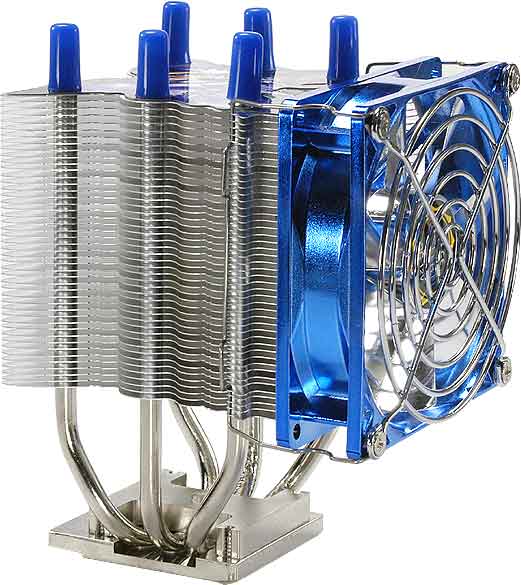
Pictured below is the TITAN TTC-NK15TB/SC(RB) I bought for the low price of $31. Although this image doesn’t show the Japanese anime decoration on the top, it captures the size. The old fan/heatsink combination was about 20% the size of this one, and not nearly as shiny.
I realize for all you case-modder/overclocker/slashdot/gamer types, this is probably a puny cooling apparatus, but for me it was pretty exciting. Now my hands are apparently permanently covered with blue thermal grease, and my CPU is running at a cool 40 degrees.
Oh, well, here is the top view:

Of course, no one ever sees that, except the person installing it.
Example use of vim block selection:
- always take note of what you do
- make yourself always able to explain to another person what you did
- keep a copy of the configuration files before changing them, so that you can see what you changed
- be always able to move the service to another computer
- make sure that it works after reboot
To change network configuration with config files, edit:
- ESC
- exits insert mode.
- ^V
- starts block selection. Move the arrows to form a rectangle.
- c
- change. Type the new content for the line.
- ESC
- gets out of insert mode, and the change will happen in all the lines.
/etc/network/interfacesTo also setup DNS in /etc/network/interfaces, use dns-search and dns-nameservers (for this to work, you need to have the package resolvconf):
dns-search dream.edu.et dns-nameservers 192.168.0.1 192.168.0.2To make a router that connects to the internet on demand using a modem:
apt-get install dialdTo see the path of network packets:
mtr 4.2.2.2Basic NAT script:
OUT=eth2 IN=eth0 modprobe iptable_nat iptables -t nat -A POSTROUTING -o $OUT -j MASQUERADE echo 1 > /proc/sys/net/ipv4/ip_forwardWhat happens at system startup:
To install a new startup script:
- the BIOS loads and runs the boot loader
- the boot loader loads the kernel and the inintrd ramdisk and runs the kernel
- the kernel runs the script 'init' in the initrd ramdisk
- the script 'init' mounts the root directory
- the script 'init' runs the command /sbin/init in the new root directory
- 'init' starts the system with the configuration in /etc/inittab
sudo ln -s /usr/local/sbin/firewall /etc/init.d sudo update-rc.d firewall defaults 16 75Normally you can just do:
sudo update-rc.d [servicename] defaultsTo have a look at the start and stop order numbers, look at /etc/rc2.d for other start scripts and /etc/rc0.d for other stop scripts To test a proxy, low level way:
$ telnet proxy 8080 Trying 192.168.0.6... Connected to proxy.dream.edu.et. Escape character is '^]'. GET http://www.google.com HTTP/1.0 [press enter twice]
latest .linux kernel involvesLiterally. From my "spammy" folder, with mails that score between 2 and 4 in my Spamassassin. Thats where most of my spam goes to. Another spam that would most likely have been blocked by greylisting - but it was forwarded via another mail box not being protected by greylisting. :-( Btw, I think greylisting could help reducing the load on master.debian.org, since it's really cheap on the CPU and disk. On my server it cut down email numbers to be handled by a huge amount. I don't have numbers on how well it works for larger mail servers though. I guess a pure sender-IP greylisting won't be too helpful, but a senderIP+destination greylisting (maybe just first 8 chars of destination, that should handle any +extensions etc.) should still work well.
HALVES HIV/AIDS
location
Next.