Search Results: "reg"

2 May 2023

Dirk Eddelbuettel: RQuantLib 0.4.18 on CRAN: Maintenance

A new release 0.4.18 of RQuantLib arrived at CRAN earlier today, and will be uploaded to Debian as well. QuantLib is a very comprehensice free/open-source library for quantitative finance; RQuantLib connects it to the R environment and language. This release of RQuantLib comes about six months after the previous maintenance release. It brings a few small updates triggered by small changes in the QuantLib releases 1.29 and 1.30. It also contains updates reflecting changes in the rgl package kindly contributed by Duncan Murdoch. Last but not least, Jeroen Ooms helped with two pull requests updating builds on, repspectively, macOS and Windows by updating the pre-made libraries of QuantLib.

Changes in RQuantLib version 0.4.18 (2023-05-01)
  • Use of several rgl functions was updated to a new naming scheme in the package (kindly contributed by Duncan Murdoch in #174)
  • A default argument is now given for option surface plots
  • Changed call from SwaptionVolCube1 to SabrSwaptionVolatilityCube (conditional on using QuantLib 1.30 or later)
  • Some other deprecation warnings were tweaked as in QL test file
  • Builds for macOS and Windows were updated with more library build (changes kindly contributed by Jeron Ooms in #176 and #175)
  • Some remaining throw calls were replace by Rcpp::stop

Courtesy of my CRANberries, there is also a diffstat report for the this release. As always, more detailed information is on the RQuantLib page. Questions, comments etc should go to the new rquantlib-devel mailing list. Issue tickets can be filed at the GitHub repo. If you like this or other open-source work I do, you can now sponsor me at GitHub.

This post by Dirk Eddelbuettel originated on his Thinking inside the box blog. Please report excessive re-aggregation in third-party for-profit settings.

1 May 2023

Gunnar Wolf: Scanning heaps of 8mm movies

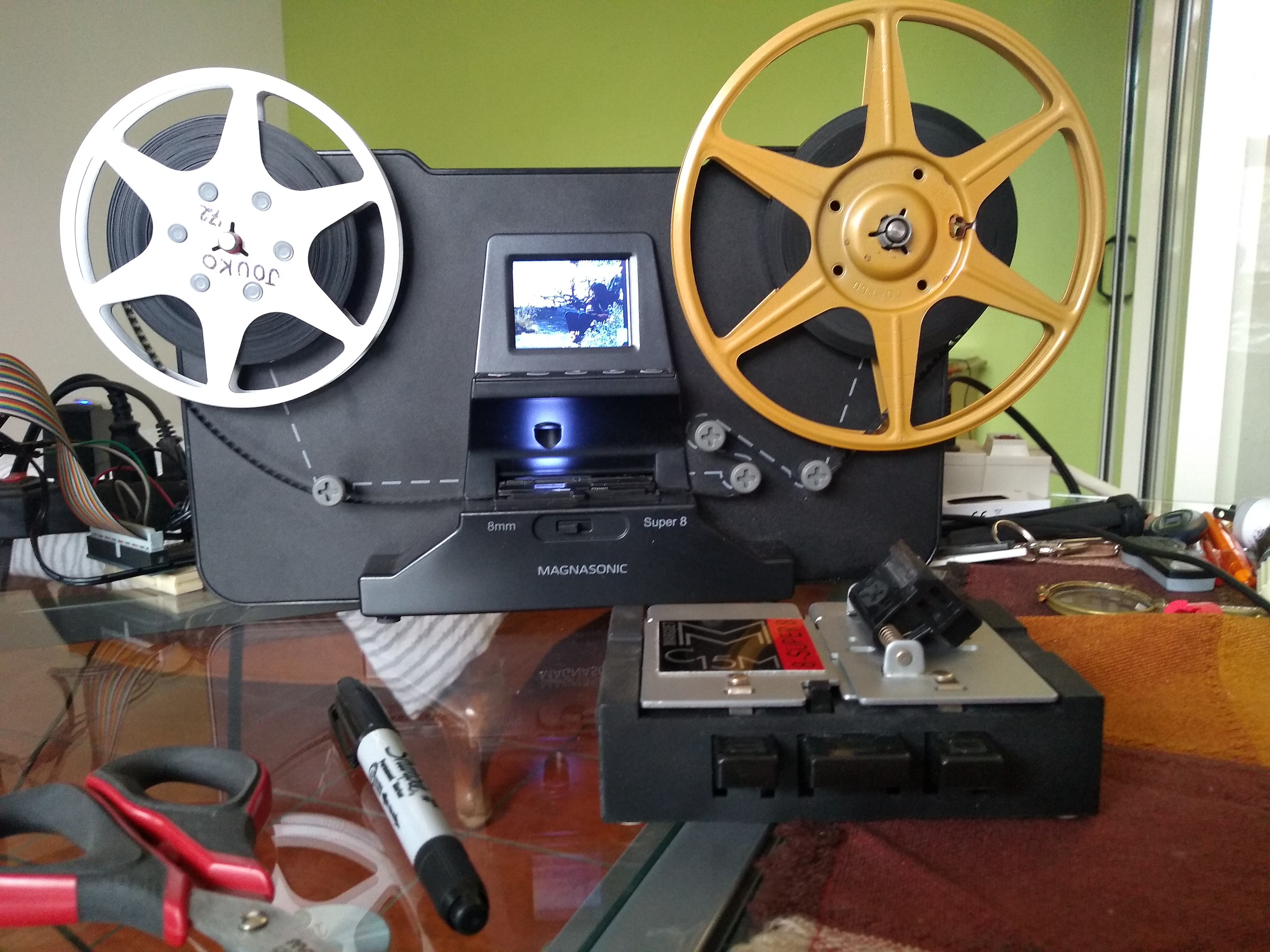
After my father passed away, I brought home most of the personal items he had, both at home and at his office. Among many, many (many, many, many) other things, I brought two of his personal treasures: His photo collection and a box with the 8mm movies he shot approximately between 1956 and 1989, when he was forced into modernity and got a portable videocassette recorder. I have talked with several friends, as I really want to get it all in a digital format, and while I ve been making slow but steady advances scanning the photo reels, I was particularly dismayed (even though it was most expected most personal electronic devices aren t meant to last over 50 years) to find out the 8mm projector was no longer in working conditions; the lamp and the fans work, but the spindles won t spin. Of course, it is quite likely it is easy to fix, but it is beyond my tinkering abilities and finding photographic equipment repair shops is no longer easy. Anyway, even if I got it fixed, filming a movie from a screen, even with a decent camera, is a lousy way to get it digitized. But almost by mere chance, I got in contact with my cousin Daniel, ho came to Mexico to visit his parents, and had precisely brought with him a 8mm/Super8 movie scanner! It is a much simpler piece of equipment than I had expected, and while it does present some minor glitches (i.e. the vertical framing slightly loses alignment over the course of a medium-length film scanning session, and no adjustment is possible while the scan is ongoing), this is something that can be decently fixed in post-processing, and a scanning session can be split with no ill effects. Anyway, it is quite uncommon a mid-length (5min) film can be done without interrupting i.e. to join a splice, mostly given my father didn t just film, but also edited a lot (this is, it s not just family pictures, but all different kinds of fiction and documentary work he did). So, Daniel lent me a great, brand new, entry-level film scanner; I rushed to scan as many movies as possible before his return to the USA this week, but he insisted he bought it to help preserve our family s memory, and given we are still several cousins living in Mexico, I could keep hold of it so any other of the cousins will find it more easily. Of course, I am thankful and delighted! So, this equipment is a Magnasonic FS81. It is entry-level, as it lacks some adjustment abilities a professional one would surely have, and I m sure a better scanner will make the job faster but it s infinitely superior to not having it! The scanner processes roughly two frames per second (while the nominal 8mm/Super8 speed is 24 frames per second), so a 3 minute film reel takes a bit over 35 minutes And a long, ~20 minute film reel takes Close to 4hr, if nothing gets in your way :- And yes, with longer reels, the probability of a splice breaking are way higher than with a short one not only because there is simply a longer film to process, but also because, both at the unwinding and at the receiving reels, mechanics play their roles. The films don t advance smoothly, but jump to position each frame in the scanner s screen, so every bit of film gets its fair share of gentle tugs. My professional consultant on how and what to do is my good friend Chema Serralde, who has stopped me from doing several things I would regret later otherwise (such as joining spliced tapes with acidic chemical adhesives such as Kola Loka, a.k.a. Krazy Glue even if it s a bit trickier to do it, he insisted me on best using simple transparent tape if I m not buying fancy things such as film-adhesive). Chema also explained me the importance of the loopers (las Lupes in his technical Spanish translation), which I feared increased the likelihood of breaking a bit of old glue due to the angle in which the film gets pulled but if skipped, result in films with too much jumping. Not all of the movies I have are for public sharing Some of them are just family movies, with high personal value, but probably of very little interest to others. But some are! I have been uploading some of the movies, after minor post-processing, to the Internet Archive. Among them: Anyway, I have a long way forward for scanning. I have 20 3min reels, 19 5min reels, and 8 20min reels. I want to check the scanning quality, but I think my 20min reels are mostly processed (we paid for scanning them some years ago). I mostly finished the 3min reels, but might have to go over some of them again due to the learning process. And Well, I m having quite a bit of fun in the process!

30 April 2023

Russell Coker: Links April 2023

Cory Doctorow has an insightful article Gig Work is the Opposite of Steampunk [1] about the horrors that companies like Amazon are forcing on their employees. Valerie Aurora and Leigh Honeywell wrote an insightful article about the al Capone theory of sexual harassment [2]. Why people who sexually harass others usually perform other anti-social activity that is also easier to prosecute. The IEEE has an interesting article about using ML for parts of the CPU design process, both the technical issues and the controversy about competing ideas which is probably caused by sexism [3]. Love and taxes are forever my heart is a line from an anime dating sim game that prepares US taxes [4]. Unfortunately it was removed from Steam. The existence of the game is a weird social commentary and removing the game because you can t have an anime hottie do taxes is bizarre but also understandable given liability issues. There s no mention in the review of whether male hotties are available for people who prefer dating guys. As an aside my accountant looks like he is allergic to exercise The Killdozer Book web site (which has an invalid SSL certificate so you have to click on advanced in Chrome to get to the content) has an insightful article debunking some of the stories about the Killdozer [5]. He wasn t some sort of hero of freedom, he was just a jerk who reneged on a deal hoping to get more money, thought that laws shouldn t apply to him, and killed himself because of it. Apparently some big tech companies are knowingly hiring people to not work unlike the usual large corporate case of unknowingly hiring people to not work [6]. Silicon Valley is a good TV show, and it s apparently realistic. Ron Garrett wrote in insightful blog post about theoretical attacks on Bitcoin and how Bitcoin could be used [7]. The conclusion is not good for Bitcoin. Compiler Explorer is a program that shows how various C++ compilers produce assembly code for various architectures, this site hosts the main active instance [8]. There are other instances, here is an instance that produces code for the Ruzzian Elbrus architecture [9]. The Elbrus Wikipedia page is interesting [10]. Apparently the Ruzzians don t want this information to be spread, LOL. The Smithsonian Magazine has an interesting article about pet parrots being taught to video call each other [11]. Apparently parrots are social animals and can develop psychological problems if kept alone, so the video calls can be good for them. Also the owners had to monitor the chats to ensure that they played nicely together, just like play-dates for kids! Phoronix has an amusing article about the drama regarding the AMD Spectral Chicken bit in the Linux kernel source [12]. This page listing bad free software licenses is amusing [13]. The ACS has an interesting article about how Samsung fakes photos of the moon and presumably could fake other photos of notable objects that don t change [14]. The way that they proved the forgery was interesting.

Matthew Palmer: dev-dependencies and Rust's unused_crate_dependencies lint

I m in the process of getting super-strict about the code quality of cretrit, the comparison-revealing encryption library that underlies the queryable encryption of the Enquo project. While I m going to write a whole big thing about Rust linting in the future, I bumped across a rather gnarly problem that I thought was worth sharing separately. The problem, in short, is that the unused_crate_dependencies lint interacts badly with crates that are only needed for benchmarking, such as (in my case) criterion. Rust has a whole bucketload of lints that can help your codebase adhere to certain standards, by warning (or exploding) if the problem is detected. The unused_crate_dependencies lint, as the name suggests, gets snippy when there s a crate listed in your Cargo.toml that doesn t appear to be used anywhere. All well and good so far. However, while Rust has the ability to specify crates needed for running the testsuite (the [dev-dependencies] section of Cargo.toml) separately from crates needed for actually using this thing ([dependencies]), it doesn t have a way to specify crates needed for running the benchmarks . That is a problem when you re using something like criterion for benchmarking, because it doesn t get refered to at all in your project code it only gets used in the benchmarks. When building your codebase for running the test suite, the compiler sees that you ve specified criterion as one of your testsuite dependencies , but it never gets used in your testsuite. This causes the unused_crate_dependencies lint to lose its tiny mind, and make your build look ugly (or fail). Thankfully, the solution is very simple, once you know the trick (this could be the unofficial theme song of the entire Rust ecosystem). You need to refer to the criterion crate somewhere in the code that gets built during the testsuite. The lint tells you most of what you need to do (like most things Rust, it tries hard to be helpful), but since it s a development dependency, you need a little extra secret sauce. All you need to do is add these two lines to the bottom of your src/lib.rs (or src/main.rs for a binary crate):
#[cfg(test)]
use criterion as _;
For the less Rust-literate, this means when the build-time configuration flag test is set, import the criterion crate, but don t, like, allow it to actually be referred to . This is enough to make the lint believe that the dependency is being used, and making it only happen when the test build-time config flag is set avoids the ugliness of it trying to refer to the crate during regular builds (which would fail, because criterion is only a dev-dependency). Simple? Yes. Did it take me a lot of skull-sweat to figure out? You betcha. That s why I m writing it down even if everyone else already knows this, at least future Matt will find this post next time he trips over this problem.

29 April 2023

Enrico Zini: Gtk4 model-backed radio button in Python

Gtk4 has interesting ways of splitting models and views. One that I didn't find very well documented, especially for Python bindings, is a set of radio buttons backed by a common model. The idea is to define an action that takes a string as a state. Each radio button is assigned a string matching one of the possible states, and when the state of the backend action is changed, the radio buttons are automatically updated. All the examples below use a string for a value type, but anything can be used that fits into a GLib.Variant. The model This defines the action. Note that enables all the usual declarative ways of a status change:
mode = Gio.SimpleAction.new_stateful(
        name="mode-selection",
        parameter_type=GLib.VariantType("s"),
        state=GLib.Variant.new_string(""))
gtk_app.add_action(self.mode)
The view
def add_radio(model: Gio.SimpleAction, id: str, label: str):
    button = Gtk.CheckButton(label=label)
    # Tell this button to activate when the model has the given value
    button.set_action_target_value(GLib.Variant.new_string(id))
    # Build the name under which the action is registesred, plus the state
    # value controlled by this button: clicking the button will set this state
    detailed_name = Gio.Action.print_detailed_name(
            "app." + model.get_name(),
            GLib.Variant.new_string(id))
    button.set_detailed_action_name(detailed_name)
    # If the model has no current value set, this sets the first radio button
    # as selected
    if not model.get_state().get_string():
        model.set_state(GLib.Variant.new_string(id))
Accessing the model To read the currently selected value:
current = model.get_state().get_string()
To set the currently selected value:
model.set_state(GLib.Variant.new_string(id))

Simon Josefsson: How To Trust A Machine

Let s reflect on some of my recent work that started with understanding Trisquel GNU/Linux, improving transparency into apt-archives, working on reproducible builds of Trisquel, strengthening verification of apt-archives with Sigstore, and finally thinking about security device threat models. A theme in all this is improving methods to have trust in machines, or generally any external entity. While I believe that everything starts by trusting something, usually something familiar and well-known, we need to deal with misuse of that trust that leads to failure to deliver what is desired and expected from the trusted entity. How can an entity behave to invite trust? Let s argue for some properties that can be quantitatively measured, with a focus on computer software and hardware: Essentially, this boils down to: Trust, Verify and Hold Accountable. To put this dogma in perspective, it helps to understand that this approach may be harmful to human relationships (which could explain the social awkwardness of hackers), but it remains useful as a method to improve the design of computer systems, and a useful method to evaluate safety of computer systems. When a system fails some of the criteria above, we know we have more work to do to improve it. How far have we come on this journey? Through earlier efforts, we are in a fairly good situation. Richard Stallman through GNU/FSF made us aware of the importance of free software, the Reproducible/Bootstrappable build projects made us aware of the importance of verifiability, and Certificate Transparency highlighted the need for accountable signature logs leading to efforts like Sigstore for software. None of these efforts would have seen the light of day unless people wrote free software and packaged them into distributions that we can use, and built hardware that we can run it on. While there certainly exists more work to be done on the software side, with the recent amazing full-source build of Guix based on a 357-byte hand-written seed, I believe that we are closing that loop on the software engineering side. So what remains? Some inspiration for further work: Onwards and upwards, happy hacking! Update 2023-05-03: Added the Liberating property regarding free software, instead of having it be part of the Verifiability and Transparency .

27 April 2023

Jonathan McDowell: Repurposing my C.H.I.P.

Way back at DebConf16 Gunnar managed to arrange for a number of Next Thing Co. C.H.I.P. boards to be distributed to those who were interested. I was lucky enough to be amongst those who received one, but I have to confess after some initial experimentation it ended up sitting in its box unused. The reasons for that were varied; partly about not being quite sure what best to do with it, partly due to a number of limitations it had, partly because NTC sadly went insolvent and there was less momentum around the hardware. I ve always meant to go back to it, poking it every now and then but never completing a project. I m finally almost there, and I figure I should write some of it up. TL;DR: My C.H.I.P. is currently running a mainline Linux 6.3 kernel with only a few DTS patches, an upstream u-boot v2022.1 with a couple of minor patches and an unmodified Debian bullseye armhf userspace.

Storage The main issue with the C.H.I.P. is that it uses MLC NAND, in particular mine has an 8MB H27QCG8T2E5R. That ended up unsupported in Linux, with the UBIFS folk disallowing operation on MLC devices. There s been subsequent work to enable an SLC emulation mode which makes the device more reliable at the cost of losing capacity by pairing up writes/reads in cells (AFAICT). Some of this hit for the H27UCG8T2ETR in 5.16 kernels, but I definitely did some experimentation with 5.17 without having much success. I should maybe go back and try again, but I ended up going a different route. It turned out that BytePorter had documented how to add a microSD slot to the NTC C.H.I.P., using just a microSD to full SD card adapter. Every microSD card I buy seems to come with one of these, so I had plenty lying around to test with. I started with ensuring the kernel could see it ok (by modifying the device tree), but once that was all confirmed I went further and built a more modern u-boot that talked to the SD card, and defaulted to booting off it. That meant no more relying on the internal NAND at all! I do see some flakiness with the SD card, which is possibly down to the dodgy way it s hooked up (I should probably do a basic PCB layout with JLCPCB instead). That s mostly been mitigated by forcing it into 1-bit mode instead of 4-bit mode (I tried lowering the frequency too, but that didn t make a difference). The problem manifests as:
sunxi-mmc 1c11000.mmc: data error, sending stop command
and then all storage access freezing (existing logins still work, if the program you re trying to run is in cache). I can t find a conclusive software solution to this; I m pretty sure it s the hardware, but I don t understand why the recovery doesn t generally work.

Random power offs After I had storage working I d see random hangs or power offs. It wasn t quite clear what was going on. So I started trying to work out how to find out the CPU temperature, in case it was overheating. It turns out the temperature sensor on the R8 is part of the touchscreen driver, and I d taken my usual approach of turning off all the drivers I didn t think I d need. Enabling it (CONFIG_TOUCHSCREEN_SUN4I) gave temperature readings and seemed to help somewhat with stability, though not completely. Next I ended up looking at the AXP209 PMIC. There were various scripts still installed (I d started out with the NTC Debian install and slowly upgraded it to bullseye while stripping away the obvious pieces I didn t need) and a start-up script called enable-no-limit. This turned out to not be running (some sort of expectation of i2c-dev being loaded and another failing check), but looking at the script and the data sheet revealed the issue. The AXP209 can cope with 3 power sources; an external DC source, a Li-battery, and finally a USB port. I was powering my board via the USB port, using a charger rated for 2A. It turns out that the AXP209 defaults to limiting USB current to 900mA, and that with wifi active and the CPU busy the C.H.I.P. can rise above that. At which point the AXP shuts everything down. Armed with that info I was able to understand what the power scripts were doing and which bit I needed - i2cset -f -y 0 0x34 0x30 0x03 to set no limit and disable the auto-power off. Additionally I also discovered that the AXP209 had a built in temperature sensor as well, so I added support for that via iio-hwmon.

WiFi WiFi on the C.H.I.P. is provided by an RTL8723BS SDIO attached device. It s terrible (and not just here, I had an x86 based device with one where it also sucked). Thankfully there s a driver in staging in the kernel these days, but I ve still found it can fall out with my house setup, end up connecting to a further away AP which then results in lots of retries, dropped frames and CPU consumption. Nailing it to the AP on the other side of the wall from where it is helps. I haven t done any serious testing with the Bluetooth other than checking it s detected and can scan ok.

Patches I patched u-boot v2022.01 (which shows you how long ago I was trying this out) with the following to enable boot from external SD:
u-boot C.H.I.P. external SD patch
diff --git a/arch/arm/dts/sun5i-r8-chip.dts b/arch/arm/dts/sun5i-r8-chip.dts
index 879a4b0f3b..1cb3a754d6 100644
--- a/arch/arm/dts/sun5i-r8-chip.dts
+++ b/arch/arm/dts/sun5i-r8-chip.dts
@@ -84,6 +84,13 @@
 		reset-gpios = <&pio 2 19 GPIO_ACTIVE_LOW>; /* PC19 */
 	 ;
 
+	mmc2_pins_e: mmc2@0  
+		pins = "PE4", "PE5", "PE6", "PE7", "PE8", "PE9";
+		function = "mmc2";
+		drive-strength = <30>;
+		bias-pull-up;
+	 ;
+
 	onewire  
 		compatible = "w1-gpio";
 		gpios = <&pio 3 2 GPIO_ACTIVE_HIGH>; /* PD2 */
@@ -175,6 +182,16 @@
 	status = "okay";
  ;
 
+&mmc2  
+	pinctrl-names = "default";
+	pinctrl-0 = <&mmc2_pins_e>;
+	vmmc-supply = <&reg_vcc3v3>;
+	vqmmc-supply = <&reg_vcc3v3>;
+	bus-width = <4>;
+	broken-cd;
+	status = "okay";
+ ;
+
 &ohci0  
 	status = "okay";
  ;
diff --git a/arch/arm/include/asm/arch-sunxi/gpio.h b/arch/arm/include/asm/arch-sunxi/gpio.h
index f3ab1aea0e..c0dfd85a6c 100644
--- a/arch/arm/include/asm/arch-sunxi/gpio.h
+++ b/arch/arm/include/asm/arch-sunxi/gpio.h
@@ -167,6 +167,7 @@ enum sunxi_gpio_number  
 
 #define SUN8I_GPE_TWI2		3
 #define SUN50I_GPE_TWI2		3
+#define SUNXI_GPE_SDC2		4
 
 #define SUNXI_GPF_SDC0		2
 #define SUNXI_GPF_UART0		4
diff --git a/board/sunxi/board.c b/board/sunxi/board.c
index fdbcd40269..f538cb7e20 100644
--- a/board/sunxi/board.c
+++ b/board/sunxi/board.c
@@ -433,9 +433,9 @@ static void mmc_pinmux_setup(int sdc)
 			sunxi_gpio_set_drv(pin, 2);
 		 
 #elif defined(CONFIG_MACH_SUN5I)
-		/* SDC2: PC6-PC15 */
-		for (pin = SUNXI_GPC(6); pin <= SUNXI_GPC(15); pin++)  
-			sunxi_gpio_set_cfgpin(pin, SUNXI_GPC_SDC2);
+		/* SDC2: PE4-PE9 */
+		for (pin = SUNXI_GPE(4); pin <= SUNXI_GPE(9); pin++)  
+			sunxi_gpio_set_cfgpin(pin, SUNXI_GPE_SDC2);
 			sunxi_gpio_set_pull(pin, SUNXI_GPIO_PULL_UP);
 			sunxi_gpio_set_drv(pin, 2);
 		 

I ve sent some patches for the kernel device tree upstream - there s an outstanding issue with the Bluetooth wake GPIO causing the serial port not to probe(!) that I need to resolve before sending a v2, but what s there works for me. The only remaining piece is patch to enable the external SD for Linux; I don t think it s appropriate to send upstream but it s fairly basic. This limits the bus to 1 bit rather than the 4 bits it s capable of, as mentioned above.
Linux C.H.I.P. external SD DTS patch diff diff --git a/arch/arm/boot/dts/sun5i-r8-chip.dts b/arch/arm/boot/dts/sun5i-r8-chip.dts index fd37bd1f3920..2b5aa4952620 100644 --- a/arch/arm/boot/dts/sun5i-r8-chip.dts +++ b/arch/arm/boot/dts/sun5i-r8-chip.dts @@ -163,6 +163,17 @@ &mmc0 status = "okay"; ; +&mmc2 + pinctrl-names = "default"; + pinctrl-0 = <&mmc2_4bit_pe_pins>; + vmmc-supply = <&reg_vcc3v3>; + vqmmc-supply = <&reg_vcc3v3>; + bus-width = <1>; + non-removable; + disable-wp; + status = "okay"; + ; + &ohci0 status = "okay"; ;

As for what I m doing with it, I think that ll have to be a separate post.

Arturo Borrero Gonz lez: Kubecon and CloudNativeCon 2023 Europe summary

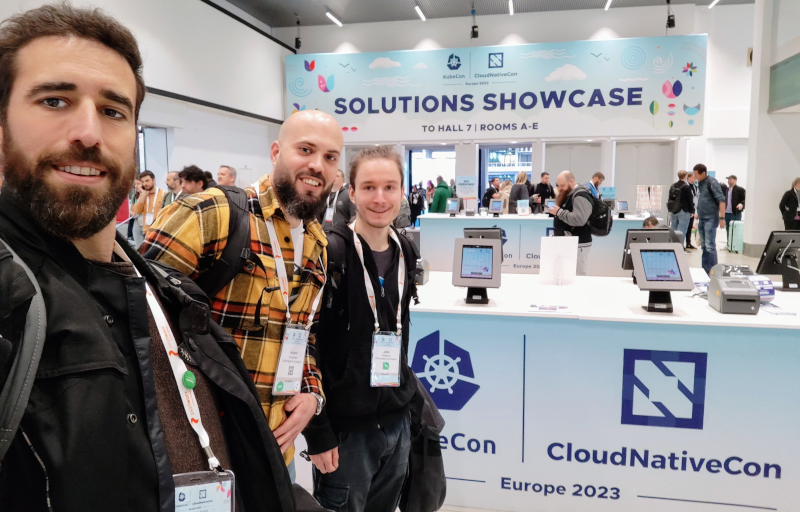
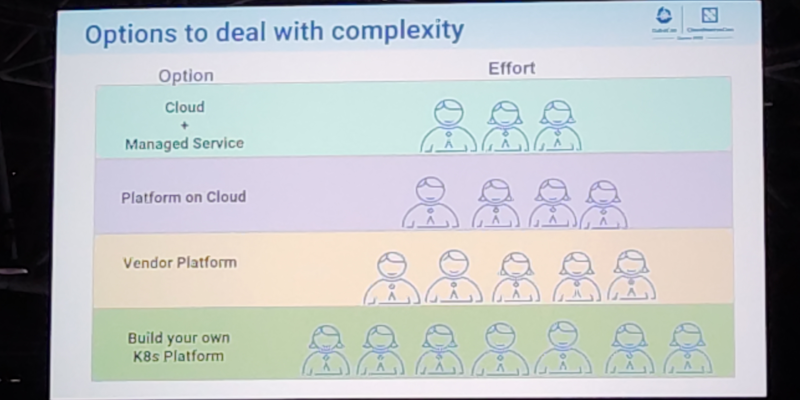
Post logo This post serves as a report from my attendance to Kubecon and CloudNativeCon 2023 Europe that took place in Amsterdam in April 2023. It was my second time physically attending this conference, the first one was in Austin, Texas (USA) in 2017. I also attended once in a virtual fashion. The content here is mostly generated for the sake of my own recollection and learnings, and is written from the notes I took during the event. The very first session was the opening keynote, which reunited the whole crowd to bootstrap the event and share the excitement about the days ahead. Some astonishing numbers were announced: there were more than 10.000 people attending, and apparently it could confidently be said that it was the largest open source technology conference taking place in Europe in recent times. It was also communicated that the next couple iteration of the event will be run in China in September 2023 and Paris in March 2024. More numbers, the CNCF was hosting about 159 projects, involving 1300 maintainers and about 200.000 contributors. The cloud-native community is ever-increasing, and there seems to be a strong trend in the industry for cloud-native technology adoption and all-things related to PaaS and IaaS. The event program had different tracks, and in each one there was an interesting mix of low-level and higher level talks for a variety of audience. On many occasions I found that reading the talk title alone was not enough to know in advance if a talk was a 101 kind of thing or for experienced engineers. But unlike in previous editions, I didn t have the feeling that the purpose of the conference was to try selling me anything. Obviously, speakers would make sure to mention, or highlight in a subtle way, the involvement of a given company in a given solution or piece of the ecosystem. But it was non-invasive and fair enough for me. On a different note, I found the breakout rooms to be often small. I think there were only a couple of rooms that could accommodate more than 500 people, which is a fairly small allowance for 10k attendees. I realized with frustration that the more interesting talks were immediately fully booked, with people waiting in line some 45 minutes before the session time. Because of this, I missed a few important sessions that I ll hopefully watch online later. Finally, on a more technical side, I ve learned many things, that instead of grouping by session I ll group by topic, given how some subjects were mentioned in several talks. On gitops and CI/CD pipelines Most of the mentions went to FluxCD and ArgoCD. At that point there were no doubts that gitops was a mature approach and both flux and argoCD could do an excellent job. ArgoCD seemed a bit more over-engineered to be a more general purpose CD pipeline, and flux felt a bit more tailored for simpler gitops setups. I discovered that both have nice web user interfaces that I wasn t previously familiar with. However, in two different talks I got the impression that the initial setup of them was simple, but migrating your current workflow to gitops could result in a bumpy ride. This is, the challenge is not deploying flux/argo itself, but moving everything into a state that both humans and flux/argo can understand. I also saw some curious mentions to the config drifts that can happen in some cases, even if the goal of gitops is precisely for that to never happen. Such mentions were usually accompanied by some hints on how to operate the situation by hand. Worth mentioning, I missed any practical information about one of the key pieces to this whole gitops story: building container images. Most of the showcased scenarios were using pre-built container images, so in that sense they were simple. Building and pushing to an image registry is one of the two key points we would need to solve in Toolforge Kubernetes if adopting gitops. In general, even if gitops were already in our radar for Toolforge Kubernetes, I think it climbed a few steps in my priority list after the conference. Another learning was this site: https://opengitops.dev/. Group On etcd, performance and resource management I attended a talk focused on etcd performance tuning that was very encouraging. They were basically talking about the exact same problems we have had in Toolforge Kubernetes, like api-server and etcd failure modes, and how sensitive etcd is to disk latency, IO pressure and network throughput. Even though Toolforge Kubernetes scale is small compared to other Kubernetes deployments out there, I found it very interesting to see other s approaches to the same set of challenges. I learned how most Kubernetes components and apps can overload the api-server. Because even the api-server talks to itself. Simple things like kubectl may have a completely different impact on the API depending on usage, for example when listing the whole list of objects (very expensive) vs a single object. The conclusion was to try avoiding hitting the api-server with LIST calls, and use ResourceVersion which avoids full-dumps from etcd (which, by the way, is the default when using bare kubectl get calls). I already knew some of this, and for example the jobs-framework-emailer was already making use of this ResourceVersion functionality. There have been a lot of improvements in the performance side of Kubernetes in recent times, or more specifically, in how resources are managed and used by the system. I saw a review of resource management from the perspective of the container runtime and kubelet, and plans to support fancy things like topology-aware scheduling decisions and dynamic resource claims (changing the pod resource claims without re-defining/re-starting the pods). On cluster management, bootstrapping and multi-tenancy I attended a couple of talks that mentioned kubeadm, and one in particular was from the maintainers themselves. This was of interest to me because as of today we use it for Toolforge. They shared all the latest developments and improvements, and the plans and roadmap for the future, with a special mention to something they called kubeadm operator , apparently capable of auto-upgrading the cluster, auto-renewing certificates and such. I also saw a comparison between the different cluster bootstrappers, which to me confirmed that kubeadm was the best, from the point of view of being a well established and well-known workflow, plus having a very active contributor base. The kubeadm developers invited the audience to submit feature requests, so I did. The different talks confirmed that the basic unit for multi-tenancy in kubernetes is the namespace. Any serious multi-tenant usage should leverage this. There were some ongoing conversations, in official sessions and in the hallway, about the right tool to implement K8s-whitin-K8s, and vcluster was mentioned enough times for me to be convinced it was the right candidate. This was despite of my impression that multiclusters / multicloud are regarded as hard topics in the general community. I definitely would like to play with it sometime down the road. On networking I attended a couple of basic sessions that served really well to understand how Kubernetes instrumented the network to achieve its goal. The conference program had sessions to cover topics ranging from network debugging recommendations, CNI implementations, to IPv6 support. Also, one of the keynote sessions had a reference to how kube-proxy is not able to perform NAT for SIP connections, which is interesting because I believe Netfilter Conntrack could do it if properly configured. One of the conclusions on the CNI front was that Calico has a massive community adoption (in Netfilter mode), which is reassuring, especially considering it is the one we use for Toolforge Kubernetes. Slide On jobs I attended a couple of talks that were related to HPC/grid-like usages of Kubernetes. I was truly impressed by some folks out there who were using Kubernetes Jobs on massive scales, such as to train machine learning models and other fancy AI projects. It is acknowledged in the community that the early implementation of things like Jobs and CronJobs had some limitations that are now gone, or at least greatly improved. Some new functionalities have been added as well. Indexed Jobs, for example, enables each Job to have a number (index) and process a chunk of a larger batch of data based on that index. It would allow for full grid-like features like sequential (or again, indexed) processing, coordination between Job and more graceful Job restarts. My first reaction was: Is that something we would like to enable in Toolforge Jobs Framework? On policy and security A surprisingly good amount of sessions covered interesting topics related to policy and security. It was nice to learn two realities:
  1. kubernetes is capable of doing pretty much anything security-wise and create greatly secured environments.
  2. it does not by default. The defaults are not security-strict on purpose.
It kind of made sense to me: Kubernetes was used for a wide range of use cases, and developers didn t know beforehand to which particular setup they should accommodate the default security levels. One session in particular covered the most basic security features that should be enabled for any Kubernetes system that would get exposed to random end users. In my opinion, the Toolforge Kubernetes setup was already doing a good job in that regard. To my joy, some sessions referred to the Pod Security Admission mechanism, which is one of the key security features we re about to adopt (when migrating away from Pod Security Policy). I also learned a bit more about Secret resources, their current implementation and how to leverage a combo of CSI and RBAC for a more secure usage of external secrets. Finally, one of the major takeaways from the conference was learning about kyverno and kubeaudit. I was previously aware of the OPA Gatekeeper. From the several demos I saw, it was to me that kyverno should help us make Toolforge Kubernetes more sustainable by replacing all of our custom admission controllers with it. I already opened a ticket to track this idea, which I ll be proposing to my team soon. Final notes In general, I believe I learned many things, and perhaps even more importantly I re-learned some stuff I had forgotten because of lack of daily exposure. I m really happy that the cloud native way of thinking was reinforced in me, which I still need because most of my muscle memory to approach systems architecture and engineering is from the old pre-cloud days. List of sessions I attended on the first day: List of sessions I attended on the second day: List of sessions I attended on third day: The videos have been published on Youtube.

24 April 2023

Jonathan Dowland: Separate hledgers

In a previous blog post I described the use of virtual postings to track accidental personal/family expenses. I've always been uncomfortable with that, and in hledger 1yr I outlined a potential scheme for finally addressing the virtual posting problem. separate journals My outline built on top of continuing to maintain both personal and family financial data in the same place, but I've decided that this can't work, because the different "directions" (or signs) of accidental transactions originating from either the family or personal side can't be addressed with any kind of alternate view on the same data. To illustrate with an example. A negative balance in family:liabilities:jon means "family owes jon". A coffee bought by mistake on the family credit card will have a negative posting on the credit card, and thus a positive one on the liabilities account. ("jon owes family"). That's fine. But what about when I buy family stuff on a personal card? The other side of of the transaction is also going to have a positive sign, so it can't be posted to family:liabilities:jon: it would have to go to somewhere else, like jon:liabilities:family. Now I have two accounts which track versions of the same thing, and they cannot be combined with a simple transaction since they're looking at the same value from opposite directions (and signs). Back when I first described the problem I was using a single journal file for all my transactions. After moving to lots of separate journal files (in hledger 1yr), it's become clearer to me that I don't need to maintain the Family and Personal data together, at all: they can be entirely separate journals. getting data between journals When I moved to a new set of ledger files for 2023, I needed to carry forward the balances from 2022 in the form of "opening balance" transactions. This was achieved by a report on the 2022 data, exported as CSV, and imported into the 2023 data (all following the scheme outlined by fully-fledged hledger.)) Separate Personal and Family journals need some information from each other, and I can achieve that in the same way as for opening balances: with an export of the relevant transactions as CSV, then imported on the other side. HLedger's CSV import system is flexible enough that we can effectively invert the sign of liabilities, addressing the problem above. Worked example We start with an accidental coffee purchased on the family card (and so this belongs to the Family ledger)
2022-08-20 coffee
    liabilities:creditcard             -3
    liabilities:jon:expenses:coffee     3
I've encoded the expense category that the Personal ledger will be interested in (the last bit, expenses:coffee) as a sub-account of the liabilities category that the Family ledger is interested in1 (the first bit, liabilities:jon). When viewed on the Family side, the expense category is not interesting, and we can hide it with HLedger's alias feature2:
    alias /^liabilities:jon(.*)$/ = liabilities:jon
It then looks like this from the Family side:
2022-08-20 coffee
    liabilities:creditcard             -3
    liabilities:jon                     3
This transaction (and others like it) are exported via
hledger reg -f family/2023-back.journal liabilities:jon: -O csv \
        jon/import/family/liabilities.csv
(The trailing colon on liabilities:jon: is important here!) In the resulting CSV file, the running example transaction looks like
"55","2022-08-20","","coffee","liabilities:jon:expenses:coffee","  3.00","  3.00"
This is then converted into a journal file by hledger import. The rules file for the import is very simple: the fields date, description, account1 and amount are taken as-is; account2 is hard-coded to liabilities:family. The resulting transaction looks like
2022-08-20 coffee
    liabilities:jon:expenses:coffee     3
    liabilities:family                 -3
Before this journal is included by the main one, we have to adjust the expense account, to remove the liabilities:jon: prefix. The import rules can't do this3 , so we use another journal file as a go-between with another alias rule:
    alias /^liabilities.jon:/ =
This results, finally, in the following transaction in the Personal ledger:
2022-08-20 coffee
    expenses:coffee                     3
    liabilities:family                 -3
avoiding double-counting There's one set of transactions that we don't want to export across this divide, and that's because they're already there: any time I transfer money from myself to the family accounts (or vice versa) to address the accrued debt, the transaction is visible from both my family and personal statements. To avoid exporting these and double-counting them, I make sure those transactions don't post to an account matching the pattern used in the hledger reg report. That's what the trailing colon is for: It ensures I only export transactions which are to a sub-account of liabilities:jon, and not to the root account liabilities:jon itself: which is where I put the repayment transactions. I could instead use a more explicit sub-account like liabilities:jon:repayments or similar, since the trailing colon is quite subtle, but this works for me. Wrap up I've been really on the fence as to whether the complexity of this scheme is worth it to avoid the virtual postings. The previous scheme was much simpler. I have definitely made some mistakes with it, which didn't get caught by the double-entry rules that virtual postings ignore, but they're for small sums of money anyway. On the other hand, a lot of the "machinery" of this already existed for getting opening balances between calendar years, and the gory details are written down and hidden inside the Makefile. I also expect that I will continue to see advantages in having Family and Personal entirely separate, as they can each develop and adapt to their own needs without having to consider the other side of things every time. It's a running experiment, and time will tell if it's a good idea.

  1. This scheme was originally suggested to me by Pranesh on Twitter (described in dues), but I discounted it at the time because of the exact arrangement they suggested, not realising the broader idea might work.
  2. I've hand-waved one problem with using hledger aliases here. If we use them as described, to hide the Personal expense details, we need them to not be applied when performing the CSV-generating report. Therefore, in practise I have them in a front-most family/2023.journal file, which imports the data from another family/2023-back.journal, and the CSV export is performed on the backing journal with the data and not the alias.
  3. HLedger import rules can't manipulate the fields from the CSV a great deal, but one change I proposed and started hacking on would allow for this: to expose Regexp match-groups as interpolatable tokens: https://github.com/simonmichael/hledger/issues/2009.

23 April 2023

Petter Reinholdtsen: Speech to text, she APTly whispered, how hard can it be?

While visiting a convention during Easter, it occurred to me that it would be great if I could have a digital Dictaphone with transcribing capabilities, providing me with texts to cut-n-paste into stuff I need to write. The background is that long drives often bring up the urge to write on texts I am working on, which of course is out of the question while driving. With the release of OpenAI Whisper, this seem to be within reach with Free Software, so I decided to give it a go. OpenAI Whisper is a Linux based neural network system to read in audio files and provide text representation of the speech in that audio recording. It handle multiple languages and according to its creators even can translate into a different language than the spoken one. I have not tested the latter feature. It can either use the CPU or a GPU with CUDA support. As far as I can tell, CUDA in practice limit that feature to NVidia graphics cards. I have few of those, as they do not work great with free software drivers, and have not tested the GPU option. While looking into the matter, I did discover some work to provide CUDA support on non-NVidia GPUs, and some work with the library used by Whisper to port it to other GPUs, but have not spent much time looking into GPU support yet. I've so far used an old X220 laptop as my test machine, and only transcribed using its CPU. As it from a privacy standpoint is unthinkable to use computers under control of someone else (aka a "cloud" service) to transcribe ones thoughts and personal notes, I want to run the transcribing system locally on my own computers. The only sensible approach to me is to make the effort I put into this available for any Linux user and to upload the needed packages into Debian. Looking at Debian Bookworm, I discovered that only three packages were missing, tiktoken, triton, and openai-whisper. For a while I also believed ffmpeg-python was needed, but as its upstream seem to have vanished I found it safer to rewrite whisper to stop depending on in than to introduce ffmpeg-python into Debian. I decided to place these packages under the umbrella of the Debian Deep Learning Team, which seem like the best team to look after such packages. Discussing the topic within the group also made me aware that the triton package was already a future dependency of newer versions of the torch package being planned, and would be needed after Bookworm is released. All required code packages have been now waiting in the Debian NEW queue since Wednesday, heading for Debian Experimental until Bookworm is released. An unsolved issue is how to handle the neural network models used by Whisper. The default behaviour of Whisper is to require Internet connectivity and download the model requested to ~/.cache/whisper/ on first invocation. This obviously would fail the deserted island test of free software as the Debian packages would be unusable for someone stranded with only the Debian archive and solar powered computer on a deserted island. Because of this, I would love to include the models in the Debian mirror system. This is problematic, as the models are very large files, which would put a heavy strain on the Debian mirror infrastructure around the globe. The strain would be even higher if the models change often, which luckily as far as I can tell they do not. The small model, which according to its creator is most useful for English and in my experience is not doing a great job there either, is 462 MiB (deb is 414 MiB). The medium model, which to me seem to handle English speech fairly well is 1.5 GiB (deb is 1.3 GiB) and the large model is 2.9 GiB (deb is 2.6 GiB). I would assume everyone with enough resources would prefer to use the large model for highest quality. I believe the models themselves would have to go into the non-free part of the Debian archive, as they are not really including any useful source code for updating the models. The "source", aka the model training set, according to the creators consist of "680,000 hours of multilingual and multitask supervised data collected from the web", which to me reads material with both unknown copyright terms, unavailable to the general public. In other words, the source is not available according to the Debian Free Software Guidelines and the model should be considered non-free. I asked the Debian FTP masters for advice regarding uploading a model package on their IRC channel, and based on the feedback there it is still unclear to me if such package would be accepted into the archive. In any case I wrote build rules for a OpenAI Whisper model package and modified the Whisper code base to prefer shared files under /usr/ and /var/ over user specific files in ~/.cache/whisper/ to be able to use these model packages, to prepare for such possibility. One solution might be to include only one of the models (small or medium, I guess) in the Debian archive, and ask people to download the others from the Internet. Not quite sure what to do here, and advice is most welcome (use the debian-ai mailing list). To make it easier to test the new packages while I wait for them to clear the NEW queue, I created an APT source targeting bookworm. I selected Bookworm instead of Bullseye, even though I know the latter would reach more users, is that some of the required dependencies are missing from Bullseye and I during this phase of testing did not want to backport a lot of packages just to get up and running. Here is a recipe to run as user root if you want to test OpenAI Whisper using Debian packages on your Debian Bookworm installation, first adding the APT repository GPG key to the list of trusted keys, then setting up the APT repository and finally installing the packages and one of the models:
curl https://geekbay.nuug.no/~pere/openai-whisper/D78F5C4796F353D211B119E28200D9B589641240.asc \
  -o /etc/apt/trusted.gpg.d/pere-whisper.asc
mkdir -p /etc/apt/sources.list.d
cat > /etc/apt/sources.list.d/pere-whisper.list <<EOF
deb https://geekbay.nuug.no/~pere/openai-whisper/ bookworm main
deb-src https://geekbay.nuug.no/~pere/openai-whisper/ bookworm main
EOF
apt update
apt install openai-whisper
The package work for me, but have not yet been tested on any other computer than my own. With it, I have been able to (badly) transcribe a 2 minute 40 second Norwegian audio clip to test using the small model. This took 11 minutes and around 2.2 GiB of RAM. Transcribing the same file with the medium model gave a accurate text in 77 minutes using around 5.2 GiB of RAM. My test machine had too little memory to test the large model, which I believe require 11 GiB of RAM. In short, this now work for me using Debian packages, and I hope it will for you and everyone else once the packages enter Debian. Now I can start on the audio recording part of this project. As usual, if you use Bitcoin and want to show your support of my activities, please send Bitcoin donations to my address 15oWEoG9dUPovwmUL9KWAnYRtNJEkP1u1b.

21 April 2023

Steve Kemp: Managing header-spacing in markdown/org-mode files

It seems I'm having a theme recently on this blog, of making emacs-related posts. Here's another. I write a bunch of stuff in markdown, such as my emacs init-file, blog-posts and other documents. I try to be quite consistent about vertical spacing, for example a post might look like this:
# header1
Some top-level stuff.
## header2
Some more details.
## header2
Some more things on a related topic.
# header2
Here I'm trying to breakup sections, so there is a "big gap" between H1 and smaller gaps between the lesser-level headings. After going over my init file recently, making some changes, I noticed that the spacing was not at all consistent. So I figured "How hard could it be to recognize headers and insert/remove newlines before them?" A trivial regexp search for "^#" identifies headers, and that counting the "#" characters lets you determine their depth. From their removing any previous newlines is the work of a moment, and inserting the appropriate number to ensure consistency is simple. I spent 15 minutes writing the initial implementation, which was markdown-specific, then another 30 minutes adding support for org-mode files - because my work-diary is written using the org-diary package (along with other helpers, such as the org-tag-cloud. Anyway the end result is that now when I save a markdown/org file the headers are updated automatically:

20 April 2023

Dirk Eddelbuettel: qlcal 0.0.5 on CRAN: Updates from QuantLib 1.3.0

The fifth release of the still new-ish qlcal package arrivied at CRAN just now. qlcal delivers the calendaring parts of QuantLib. It is provided (for the R package) as a set of included files, so the package is self-contained and does not depend on an external QuantLib library (which can be demanding to build). qlcal covers over sixty country / market calendars and can compute holiday lists, its complement (i.e. business day lists) and much more. This release brings updates to five calendars from the QuantLib 1.30 release from this week.

Changes in version 0.0.5 (2023-04-19)
  • Calendars routines for Australia, Denmark, New Zealand, Turkey and the US have been updated from QuantLib 1.30.
  • Support for 'Australia/ASX' has been added.
  • Added demo showing all US holidays in current year

We also added a quick little demo using xts to column-bind calendars produced from each of the different US sub-calendars. This is a slightly updated version of the sketch we tooted a few days ago. The output now is
> print(Reduce(cbind, Map(makeHol, cals)))
           LiborImpact NYSE GovernmentBond NERC FederalReserve
2023-01-02        TRUE TRUE           TRUE TRUE           TRUE
2023-01-16        TRUE TRUE           TRUE   NA           TRUE
2023-02-20        TRUE TRUE           TRUE   NA           TRUE
2023-04-07          NA TRUE             NA   NA             NA
2023-05-29        TRUE TRUE           TRUE TRUE           TRUE
2023-06-19        TRUE TRUE           TRUE   NA           TRUE
2023-07-04        TRUE TRUE           TRUE TRUE           TRUE
2023-09-04        TRUE TRUE           TRUE TRUE           TRUE
2023-10-09        TRUE   NA           TRUE   NA           TRUE
2023-11-10        TRUE   NA             NA   NA             NA
2023-11-23        TRUE TRUE           TRUE TRUE           TRUE
2023-12-25        TRUE TRUE           TRUE TRUE           TRUE
> 
(and we just discovered a tiny h -> hols bug in the demo so see the git repo sorry!). The release was finalized uploaded yesterday morning. But because we have to set CXX_STD=CXX14 as satisfy requirements of some of the Boost headers, we get ourselves a NOTE and with that a manual inspection and a delay of 1 1/2 days. Not really all that meaningful in the grand scheme of things but still suboptimal relative to the fully automated passage this release should have gotten. Oh well. Courtesy of my CRANberries, there is a diffstat report for this release. See the project page and package documentation for more details, and more examples. If you like this or other open-source work I do, you can now sponsor me at GitHub.

This post by Dirk Eddelbuettel originated on his Thinking inside the box blog. Please report excessive re-aggregation in third-party for-profit settings.

19 April 2023

Ian Jackson: The Rust Foundation's bad draft trademark policy

tl;dr The Rust Foundation s proposed new trademark policy is far too restrictive, and will cause (more) drama unless it is substantially revised. Process Rust is a trademark owned by the Foundation. The Rust Foundation still seems to be finding its feet. Evidently, one of the items on its backlog was to update the trademark policy. Apparently they have been working on this for some time, in an informal working group. In August, there was a survey. (I saw it in This Week In Rust, the community-curated newsletter where most important stuff appears, and responded.) I don t think the results of this survey have been published anywhere. Last week (12th April) the Foundation published an official Inside Rust blog post linking to a draft. They included a link to a feedback survey, closing on the 17th of April i.e., it was open for 5 days. This is far too short a period for formal feedback on such a draft. Especially given that this process has apparently already been generating significant controversy within parts of the Rust community. Substance Overall, this policy is poor. It is far too restrictive. It is likely to lead to (further) controversy and argument, including conflicts with Rust s downstreams. It does not serve the needs of the Rust community. In particular, the Rust community does not need the trademark to: The community does need the trademark to: It might be useful to use the trademark to strengthen licensing or CoC compliance. For example, good faith redistributions of a modified Rust, as Rust , would be Free Software, even though the copyright licence permits proprietary derivatives; so use of the Rust trademark should probably require use of a Free licence. There should be a series of blanket permissions to use the word Rust in for example: Currently there aren t. For example the current Debian practice of calling Rust libraries rust-<name-of-crate> is probably in violation. There are a number of more detailed problems with the wording. Values The policy has all the hallmarks of excessive influence from traditional trademark lawyers and not enough influence from the Free Software community. I would like to remind the Free Software activists on the inside of this process that the lawyers are there to serve you and the community. The values embodied in trademark law often conflict with the values of the Free Software community. The Rust Project should adopt a trademark policy which follows the community s values - even if that might weaken our ability to sue evildoers. Next steps The Foundation should take a step back and pause the process. Then, the Foundation should restart the process from a much earlier stage, with much wider publicity. Each stage should be widely advertised to the whole community, with opportunities for feedback. This should include publishing the results of the August 2022 survey. The Foundation should publish a sketch of the legal advice they have received, publicly say what the plausible options are and what their consequences might be (for the community, for downstreams, and for the Foundation s enforcement ability). (Some of this will no doubt repeat the work that has been done in the informal trademark working group. That work wasn t widely enough advertised.) Echoes of a dispute from 2006 Mozilla made a very similar mistake with Firefox in 2006. The official policy stated that no-one was allowed to distribute Firefox with any patches, unless those patches had been pre-approved by Mozilla. Debian is committed to Software Freedom. This must includes the freedom to modify the software as one sees fit, even if the original authors don t agree. Now, overly-restrictive trademark policies are hardly new. Debian often takes the practical view that usually the upstream with such a policy doesn t really mean it. But Mozilla decided they did mean it. They contacted Debian asking for Debian to get their patches approved. Since that wasn t acceptable to Debian, they stopped using the word Firefox . For a decade, Debian s Firefox browser was called Iceweasel . We don t want something similar happening to Rust .

comment count unavailable comments

18 April 2023

Matt Brown: co2mon.nz: Ventilation monitoring as a service

Previously, I explained why ventilation monitoring is important, and the opportunity I see to help accelerate deployment of high quality ventilation monitoring for small businesses and organisations. In this post, I m going to discuss my plans to tackle that opportunity:

My journey to ventilation monitoring I started looking into ventilation monitoring in detail last year when I wanted to ensure that the classrooms of our local primary school were well ventilated during the Omicron outbreak. That research revealed that the existing products on offer were challenging to deploy in a school environment from a cost perspective while also not providing perfect functionality. I built and deployed a set of monitors to our local school, along with a corresponding set of software and web services that provide management of the monitors and visibility into the collected data and trends. The benefit of the monitoring is evident - CO2 concentration drops immediately after a notification occurs, indicating the intended action of increasing ventilation is taking place. Initially this occurred more frequently, but over time low concentrations of CO2, indicating good ventilation levels, are regularly achieved across the school day thanks to simple changes in routine being established, such as leaving windows cracked open. As the benefits of the project to the school became clear, my ambition and vision for ventilation monitoring grew from wanting to see my children learn in a safe and effective environment to desiring safe and effective learning, working, living and social spaces for everyone.

co2mon.nz: Ventilation monitoring as a service prototype co2mon.nz is the service that I have launched to explore this opportunity. Based on the same hardware and software that I used for the school deployment I am selling both a physical CO2 monitor and an ongoing subscription service for the management and monitoring. Together, the monitor and software provide an effective and affordable path to understanding indoor air quality and ventilation status that anyone can use.

CO2 monitor The CO2 monitor hardware and firmware are based on Oliver Seiler s design using a Sensirion SCD40 module for CO2 measurement and providing immediate in-room feedback via an on-monitor screen as well as a red/orange/green traffic light . In addition to the immediate feedback provided by the monitor itself, a WiFi connection can be configured allowing every measurement to be reported back to the supporting monitoring and management service. At the current prototype stage, I am building all the hardware, 3D printing the plastic cases and assembling the circuit board from purchased components through a production line in my home workshop. The monitor is powered via a standard USB cable and wall adaptor for simplicity. The first batch of monitors I built have been operating smoothly for nearly a year now. Further refinement and development of the design is required but already I am impressed with the potential this combination of easily accessible components provides to enable widespread adoption and deployment of ventilation monitoring.

Monitoring and management service The web service provides a historical record of CO2 levels from each monitor through a set of graphs and other dashboards and allows for this data to be shared or published. This is useful both for providing visibility into ventilation status to those not directly present in the space (e.g. across an entire school) and to allow insights into trends and patterns in ventilation to be observed and acted upon. When I began the project I approached the software side as an opportunity to explore the real-world equivalents of many of the internal tools and components that I was used to using within Google. That s been a fun process, even though it means I ve invested far more time on the software than the current number of customers or business state can really justify. Communication with the monitors occurs via MQTT into a custom Go service responsible for maintaining the fleet and exposing the measurement data to Prometheus which acts as the storage layer. A second service (based on the Buffalo web framework) is responsible for serving the web interface containing the dashboards and configuration options. Alongside these core components another small Golang service manages a private X509 certificate authority to provide monitor identity and encryption of the measurement data and an automated pipeline of scripts and triggers takes care of firmware provisioning, sensor calibration and burn-in/failure testing when building batches of monitors. While simple, the design is easy to manage and could scale to support many, many more monitors without significant effort. I m hosting the infrastructure on AWS, which I ve found pleasant and easy to use, and while not a typical choice, I m very pleased with the performance and flexibility that Prometheus offers as a data storage layer.

Areas of development The prototype has been effective in proving the feasibility of offering ventilation monitoring as a service, but to evolve the prototype into an actual business is going to require further effort in the following areas:

Finding product market fit I m confident that what co2mon.nz is offering could provide a useful and needed service for many small business owners and numerous others, but the question of whether it s sufficiently compelling that a sizeable group of customers see enough value that they re willing to regularly pay for it and therefore sustain a business providing the service is not yet proven. While initial feedback on the idea has been positive, much of it has been from family and friends and I ve spent more time building the software (which has been fun and educational) than I have talking to actual potential customers and understanding their needs and wants. This is a classic trap that technical founders fall into, and I m guilty despite my best intentions it s comfortable and easy for me to work on the parts where I have existing experience and neglect putting time into the customer-facing sales, marketing and research which are more uncomfortable, new and challenging!

Scaling monitor production Scaling from the current prototype batches I have built to even modest levels (e.g. hundreds) of sales will require outsourcing. There are several potential New Zealand and overseas providers I can work with which look very promising, but will require iteration of the hardware design (e.g. to remove through-hole components which add complexity and expense to the PCB assembly process). The lead times I ve been quoted for working with these outsourced providers are in the order of 1-2 months per batch, and on top of this there are a number of other risks in terms of component availability and regulatory compliance that may add additional delays or time to resolve, particularly as my experience leans towards the software rather than the hardware. It seems counter-intuitive to worry about how to scale to meet demand that doesn t yet provably exist, but given the potentially long lead times involved in establishing outsourced production I think it s worth taking some risk in starting this journey early.

Next steps My aim now is to intentionally change my focus from the software to learning about the market and finding the right product to offer via two channels:
  1. Via online marketing, to reach a wide range of potential customers and allow rapid iteration and testing of a variety of product/service combinations, including referral options for existing customers.
  2. In-person with small businesses in my local area to seek out direct feedback and thoughts on the general issue of ventilation monitoring and the specific service I m offering.
One concrete possibility I m keen to test via both channels is a simple monthly price for the combined service, rather than purchasing a monitor and separate software subscription. This has the potential to be both simpler to market and explain to customers, while also opening the possibility of short-term rental or evaluation to customers who are not willing to make a long-term investment or commitment. In parallel to the customer-focused discovery work, but as an explicit lower priority, I ll order an initial small batch of outsourced monitors to begin gaining experience with that process accepting the risk that the time and cost may turn out to be wasted if the product is wrong or not a good match for customers needs.

17 April 2023

Matthew Garrett: Booting modern Intel CPUs

CPUs can't do anything without being told what to do, which leaves the obvious problem of how do you tell a CPU to do something in the first place. On many CPUs this is handled in the form of a reset vector - an address the CPU is hardcoded to start reading instructions from when power is applied. The address the reset vector points to will typically be some form of ROM or flash that can be read by the CPU even if no other hardware has been configured yet. This allows the system vendor to ship code that will be executed immediately after poweron, configuring the rest of the hardware and eventually getting the system into a state where it can run user-supplied code.

The specific nature of the reset vector on x86 systems has varied over time, but it's effectively always been 16 bytes below the top of the address space - so, 0xffff0 on the 20-bit 8086, 0xfffff0 on the 24-bit 80286, and 0xfffffff0 on the 32-bit 80386. Convention on x86 systems is to have RAM starting at address 0, so the top of address space could be used to house the reset vector with as low a probability of conflicting with RAM as possible.

The most notable thing about x86 here, though, is that when it starts running code from the reset vector, it's still in real mode. x86 real mode is a holdover from a much earlier era of computing. Rather than addresses being absolute (ie, if you refer to a 32-bit address, you store the entire address in a 32-bit or larger register), they are 16-bit offsets that are added to the value stored in a "segment register". Different segment registers existed for code, data, and stack, so a 16-bit address could refer to different actual addresses depending on how it was being interpreted - jumping to a 16 bit address would result in that address being added to the code segment register, while reading from a 16 bit address would result in that address being added to the data segment register, and so on. This is all in order to retain compatibility with older chips, to the extent that even 64-bit x86 starts in real mode with segments and everything (and, also, still starts executing at 0xfffffff0 rather than 0xfffffffffffffff0 - 64-bit mode doesn't support real mode, so there's no way to express a 64-bit physical address using the segment registers, so we still start just below 4GB even though we have massively more address space available).

Anyway. Everyone knows all this. For modern UEFI systems, the firmware that's launched from the reset vector then reprograms the CPU into a sensible mode (ie, one without all this segmentation bullshit), does things like configure the memory controller so you can actually access RAM (a process which involves using CPU cache as RAM, because programming a memory controller is sufficiently hard that you need to store more state than you can fit in registers alone, which means you need RAM, but you don't have RAM until the memory controller is working, but thankfully the CPU comes with several megabytes of RAM on its own in the form of cache, so phew). It's kind of ugly, but that's a consequence of a bunch of well-understood legacy decisions.

Except. This is not how modern Intel x86 boots. It's far stranger than that. Oh, yes, this is what it looks like is happening, but there's a bunch of stuff going on behind the scenes. Let's talk about boot security. The idea of any form of verified boot (such as UEFI Secure Boot) is that a signature on the next component of the boot chain is validated before that component is executed. But what verifies the first component in the boot chain? You can't simply ask the BIOS to verify itself - if an attacker can replace the BIOS, they can replace it with one that simply lies about having done so. Intel's solution to this is called Boot Guard.

But before we get to Boot Guard, we need to ensure the CPU is running in as bug-free a state as possible. So, when the CPU starts up, it examines the system flash and looks for a header that points at CPU microcode updates. Intel CPUs ship with built-in microcode, but it's frequently old and buggy and it's up to the system firmware to include a copy that's new enough that it's actually expected to work reliably. The microcode image is pulled out of flash, a signature is verified, and the new microcode starts running. This is true in both the Boot Guard and the non-Boot Guard scenarios. But for Boot Guard, before jumping to the reset vector, the microcode on the CPU reads an Authenticated Code Module (ACM) out of flash and verifies its signature against a hardcoded Intel key. If that checks out, it starts executing the ACM. Now, bear in mind that the CPU can't just verify the ACM and then execute it directly from flash - if it did, the flash could detect this, hand over a legitimate ACM for the verification, and then feed the CPU different instructions when it reads them again to execute them (a Time of Check vs Time of Use, or TOCTOU, vulnerability). So the ACM has to be copied onto the CPU before it's verified and executed, which means we need RAM, which means the CPU already needs to know how to configure its cache to be used as RAM.

Anyway. We now have an ACM loaded and verified, and it can safely be executed. The ACM does various things, but the most important from the Boot Guard perspective is that it reads a set of write-once fuses in the motherboard chipset that represent the SHA256 of a public key. It then reads the initial block of the firmware (the Initial Boot Block, or IBB) into RAM (or, well, cache, as previously described) and parses it. There's a block that contains a public key - it hashes that key and verifies that it matches the SHA256 from the fuses. It then uses that key to validate a signature on the IBB. If it all checks out, it executes the IBB and everything starts looking like the nice simple model we had before.

Except, well, doesn't this seem like an awfully complicated bunch of code to implement in real mode? And yes, doing all of this modern crypto with only 16-bit registers does sound like a pain. So, it doesn't. All of this is happening in a perfectly sensible 32 bit mode, and the CPU actually switches back to the awful segmented configuration afterwards so it's still compatible with an 80386 from 1986. The "good" news is that at least firmware can detect that the CPU has already configured the cache as RAM and can skip doing that itself.

I'm skipping over some steps here - the ACM actually does other stuff around measuring the firmware into the TPM and doing various bits of TXT setup for people who want DRTM in their lives, but the short version is that the CPU bootstraps itself into a state where it works like a modern CPU and then deliberately turns a bunch of the sensible functionality off again before it starts executing firmware. I'm also missing out the fact that this entire process only kicks off after the Management Engine says it can, which means we're waiting for an entirely independent x86 to boot an entire OS before our CPU even starts pretending to execute the system firmware.

Of course, as mentioned before, on modern systems the firmware will then reprogram the CPU into something actually sensible so OS developers no longer need to care about this[1][2], which means we've bounced between multiple states for no reason other than the possibility that someone wants to run legacy BIOS and then boot DOS on a CPU with like 5 orders of magnitude more transistors than the 8086.

tl;dr why can't my x86 wake up with the gin protected mode already inside it

[1] Ha uh except that on ACPI resume we're going to skip most of the firmware setup code so we still need to handle the CPU being in fucking 16-bit mode because suspend/resume is basically an extremely long reboot cycle

[2] Oh yeah also you probably have multiple cores on your CPU and well bad news about the state most of the cores are in when the OS boots because the firmware never started them up so they're going to come up in 16-bit real mode even if your boot CPU is already in 64-bit protected mode, unless you were using TXT in which case you have a different sort of nightmare that if we're going to try to map it onto real world nightmare concepts is one that involves a lot of teeth. Or, well, that used to be the case, but ACPI 6.4 (released in 2021) provides a mechanism for the OS to ask the firmware to wake the CPU up for it so this is invisible to the OS, but you're still relying on the firmware to actually do the heavy lifting here

comment count unavailable comments

14 April 2023

John Goerzen: Easily Accessing All Your Stuff with a Zero-Trust Mesh VPN

Probably everyone is familiar with a regular VPN. The traditional use case is to connect to a corporate or home network from a remote location, and access services as if you were there. But these days, the notion of corporate network and home network are less based around physical location. For instance, a company may have no particular office at all, may have a number of offices plus a number of people working remotely, and so forth. A home network might have, say, a PVR and file server, while highly portable devices such as laptops, tablets, and phones may want to talk to each other regardless of location. For instance, a family member might be traveling with a laptop, another at a coffee shop, and those two devices might want to communicate, in addition to talking to the devices at home. And, in both scenarios, there might be questions about giving limited access to friends. Perhaps you d like to give a friend access to part of your file server, or as a company, you might have contractors working on a limited project. Pretty soon you wind up with a mess of VPNs, forwarded ports, and tricks to make it all work. With the increasing prevalence of CGNAT, a lot of times you can t even open a port to the public Internet. Each application or device probably has its own gateway just to make it visible on the Internet, some of which you pay for. Then you add on the question of: should you really trust your LAN anyhow? With possibilities of guests using it, rogue access points, etc., the answer is probably no . We can move the responsibility for dealing with NAT, fluctuating IPs, encryption, and authentication, from the application layer further down into the network stack. We then arrive at a much simpler picture for all. So this page is fundamentally about making the network work, simply and effectively.

How do we make the Internet work in these scenarios? We re going to combine three concepts:
  1. A VPN, providing fully encrypted and authenticated communication and stable IPs
  2. Mesh Networking, in which devices automatically discover optimal paths to reach each other
  3. Zero-trust networking, in which we do not need to trust anything about the underlying LAN, because all our traffic uses the secure systems in points 1 and 2.
By combining these concepts, we arrive at some nice results:
  • You can ssh hostname, where hostname is one of your machines (server, laptop, whatever), and as long as hostname is up, you can reach it, wherever it is, wherever you are.
    • Combined with mosh, these sessions will be durable even across moving to other host networks.
    • You could just as well use telnet, because the underlying network should be secure.
  • You don t have to mess with encryption keys, certs, etc., for every internal-only service. Since IPs are now trustworthy, that s all you need. hosts.allow could make a comeback!
  • You have a way of transiting out of extremely restrictive networks. Every tool discussed here has a way of falling back on routing things via a broker (relay) on TCP port 443 if all else fails.
There might sometimes be tradeoffs. For instance:
  • On LANs faster than 1Gbps, performance may degrade due to encryption and encapsulation overhead. However, these tools should let hosts discover the locality of each other and not send traffic over the Internet if the devices are local.
  • With some of these tools, hosts local to each other (on the same LAN) may be unable to find each other if they can t reach the control plane over the Internet (Internet is down or provider is down)
Some other features that some of the tools provide include:
  • Easy sharing of limited access with friends/guests
  • Taking care of everything you need, including SSL certs, for exposing a certain on-net service to the public Internet
  • Optional routing of your outbound Internet traffic via an exit node on your network. Useful, for instance, if your local network is blocking tons of stuff.
Let s dive in.

Types of Mesh VPNs I ll go over several types of meshes in this article:
  1. Fully decentralized with automatic hop routing This model has no special central control plane. Nodes discover each other in various ways, and establish routes to each other. These routes can be direct connections over the Internet, or via other nodes. This approach offers the greatest resilience. Examples I ll cover include Yggdrasil and tinc.
  2. Automatic peer-to-peer with centralized control In this model, nodes, by default, communicate by establishing direct links between them. A regular node never carries traffic on behalf of other nodes. Special-purpose relays are used to handle cases in which NAT traversal is impossible. This approach tends to offer simple setup. Examples I ll cover include Tailscale, Zerotier, Nebula, and Netmaker.
  3. Roll your own and hybrid approaches This is a grab bag of other ideas; for instance, running Yggdrasil over Tailscale.

Terminology For the sake of consistency, I m going to use common language to discuss things that have different terms in different ecosystems:
  • Every tool discussed here has a way of dealing with NAT traversal. It may assist with establishing direct connections (eg, STUN), and if that fails, it may simply relay traffic between nodes. I ll call such a relay a broker . This may or may not be the same system that is a control plane for a tool.
  • All of these systems operate over lower layers that are unencrypted. Those lower layers may be a LAN (wired or wireless, which may or may not have Internet access), or the public Internet (IPv4 and/or IPv6). I m going to call the unencrypted lower layer, whatever it is, the clearnet .

Evaluation Criteria Here are the things I want to see from a solution:
  • Secure, with all communications end-to-end encrypted and authenticated, and prevention of traffic from untrusted devices.
  • Flexible, adapting to changes in network topology quickly and automatically.
  • Resilient, without single points of failure, and with devices local to each other able to communicate even if cut off from the Internet or other parts of the network.
  • Private, minimizing leakage of information or metadata about me and my systems
  • Able to traverse CGNAT without having to use a broker whenever possible
  • A lesser requirement for me, but still a nice to have, is the ability to include others via something like Internet publishing or inviting guests.
  • Fully or nearly fully Open Source
  • Free or very cheap for personal use
  • Wide operating system support, including headless Linux on x86_64 and ARM.

Fully Decentralized VPNs with Automatic Hop Routing Two systems fit this description: Yggdrasil and Tinc. Let s dive in.

Yggdrasil I ll start with Yggdrasil because I ve written so much about it already. It featured in prior posts such as:

Yggdrasil can be a private mesh VPN, or something more Yggdrasil can be a private mesh VPN, just like the other tools covered here. It s unique, however, in that a key goal of the project is to also make it useful as a planet-scale global mesh network. As such, Yggdrasil is a testbed of new ideas in distributed routing designed to scale up to massive sizes and all sorts of connection conditions. As of 2023-04-10, the main global Yggdrasil mesh has over 5000 nodes in it. You can choose whether or not to participate. Every node in a Yggdrasil mesh has a public/private keypair. Each node then has an IPv6 address (in a private address space) derived from its public key. Using these IPv6 addresses, you can communicate right away. Yggdrasil differs from most of the other tools here in that it does not necessarily seek to establish a direct link on the clearnet between, say, host A and host G for them to communicate. It will prefer such a direct link if it exists, but it is perfectly happy if it doesn t. The reason is that every Yggdrasil node is also a router in the Yggdrasil mesh. Let s sit with that concept for a moment. Consider:
  • If you have a bunch of machines on your LAN, but only one of them can peer over the clearnet, that s fine; all the other machines will discover this route to the world and use it when necessary.
  • All you need to run a broker is just a regular node with a public IP address. If you are participating in the global mesh, you can use one (or more) of the free public peers for this purpose.
  • It is not necessary for every node to know about the clearnet IP address of every other node (improving privacy). In fact, it s not even necessary for every node to know about the existence of all the other nodes, so long as it can find a route to a given node when it s asked to.
  • Yggdrasil can find one or more routes between nodes, and it can use this knowledge of multiple routes to aggressively optimize for varying network conditions, including combinations of, say, downloads and low-latency ssh sessions.
Behind the scenes, Yggdrasil calculates optimal routes between nodes as necessary, using a mesh-wide DHT for initial contact and then deriving more optimal paths. (You can also read more details about the routing algorithm.) One final way that Yggdrasil is different from most of the other tools is that there is no separate control server. No node is special , in charge, the sole keeper of metadata, or anything like that. The entire system is completely distributed and auto-assembling.

Meeting neighbors There are two ways that Yggdrasil knows about peers:
  • By broadcast discovery on the local LAN
  • By listening on a specific port (or being told to connect to a specific host/port)
Sometimes this might lead to multiple ways to connect to a node; Yggdrasil prefers the connection auto-discovered by broadcast first, then the lowest-latency of the defined path. In other words, when your laptops are in the same room as each other on your local LAN, your packets will flow directly between them without traversing the Internet.

Unique uses Yggdrasil is uniquely suited to network-challenged situations. As an example, in a post-disaster situation, Internet access may be unavailable or flaky, yet there may be many local devices perhaps ones that had never known of each other before that could share information. Yggdrasil meets this situation perfectly. The combination of broadcast auto-detection, distributed routing, and so forth, basically means that if there is any physical path between two nodes, Yggdrasil will find and enable it. Ad-hoc wifi is rarely used because it is a real pain. Yggdrasil actually makes it useful! Its broadcast discovery doesn t require any IP address provisioned on the interface at all (it just uses the IPv6 link-local address), so you don t need to figure out a DHCP server or some such. And, Yggdrasil will tend to perform routing along the contours of the RF path. So you could have a laptop in the middle of a long distance relaying communications from people farther out, because it could see both. Or even a chain of such things.

Yggdrasil: Security and Privacy Yggdrasil s mesh is aggressively greedy. It will peer with any node it can find (unless told otherwise) and will find a route to anywhere it can. There are two main ways to make sure you keep unauthorized traffic out: by restricting who can talk to your mesh, and by firewalling the Yggdrasil interface. Both can be used, and they can be used simultaneously. I ll discuss firewalling more at the end of this article. Basically, you ll almost certainly want to do this if you participate in the public mesh, because doing so is akin to having a globally-routable public IP address direct to your device. If you want to restrict who can talk to your mesh, you just disable the broadcast feature on all your nodes (empty MulticastInterfaces section in the config), and avoid telling any of your nodes to connect to a public peer. You can set a list of authorized public keys that can connect to your nodes listening interfaces, which you ll probably want to do. You will probably want to either open up some inbound ports (if you can) or set up a node with a known clearnet IP on a place like a $5/mo VPS to help with NAT traversal (again, setting AllowedPublicKeys as appropriate). Yggdrasil doesn t allow filtering multicast clients by public key, only by network interface, so that s why we disable broadcast discovery. You can easily enough teach Yggdrasil about static internal LAN IPs of your nodes and have things work that way. (Or, set up an internal gateway node or two, that the clients just connect to when they re local). But fundamentally, you need to put a bit more thought into this with Yggdrasil than with the other tools here, which are closed-only. Compared to some of the other tools here, Yggdrasil is better about information leakage; nodes only know details, such as clearnet IPs, of directly-connected peers. You can obtain the list of directly-connected peers of any known node in the mesh but that list is the public keys of the directly-connected peers, not the clearnet IPs. Some of the other tools contain a limited integrated firewall of sorts (with limited ACLs and such). Yggdrasil does not, but is fully compatible with on-host firewalls. I recommend these anyway even with many other tools.

Yggdrasil: Connectivity and NAT traversal Compared to the other tools, Yggdrasil is an interesting mix. It provides a fully functional mesh and facilitates connectivity in situations in which no other tool can. Yet its NAT traversal, while it exists and does work, results in using a broker under some of the more challenging CGNAT situations more often than some of the other tools, which can impede performance. Yggdrasil s underlying protocol is TCP-based. Before you run away screaming that it must be slow and unreliable like OpenVPN over TCP it s not, and it is even surprisingly good around bufferbloat. I ve found its performance to be on par with the other tools here, and it works as well as I d expect even on flaky 4G links. Overall, the NAT traversal story is mixed. On the one hand, you can run a node that listens on port 443 and Yggdrasil can even make it speak TLS (even though that s unnecessary from a security standpoint), so you can likely get out of most restrictive firewalls you will ever encounter. If you join the public mesh, know that plenty of public peers do listen on port 443 (and other well-known ports like 53, plus random high-numbered ones). If you connect your system to multiple public peers, there is a chance though a very small one that some public transit traffic might be routed via it. In practice, public peers hopefully are already peered with each other, preventing this from happening (you can verify this with yggdrasilctl debug_remotegetpeers key=ABC...). I have never experienced a problem with this. Also, since latency is a factor in routing for Yggdrasil, it is highly unlikely that random connections we use are going to be competitive with datacenter peers.

Yggdrasil: Sharing with friends If you re open to participating in the public mesh, this is one of the easiest things of all. Have your friend install Yggdrasil, point them to a public peer, give them your Yggdrasil IP, and that s it. (Well, presumably you also open up your firewall you did follow my advice to set one up, right?) If your friend is visiting at your location, they can just hop on your wifi, install Yggdrasil, and it will automatically discover a route to you. Yggdrasil even has a zero-config mode for ephemeral nodes such as certain Docker containers. Yggdrasil doesn t directly support publishing to the clearnet, but it is certainly possible to proxy (or even NAT) to/from the clearnet, and people do.

Yggdrasil: DNS There is no particular extra DNS in Yggdrasil. You can, of course, run a DNS server within Yggdrasil, just as you can anywhere else. Personally I just add relevant hosts to /etc/hosts and leave it at that, but it s up to you.

Yggdrasil: Source code, pricing, and portability Yggdrasil is fully open source (LGPLv3 plus additional permissions in an exception) and highly portable. It is written in Go, and has prebuilt binaries for all major platforms (including a Debian package which I made). There is no charge for anything with Yggdrasil. Listed public peers are free and run by volunteers. You can run your own peers if you like; they can be public and unlisted, public and listed (just submit a PR to get it listed), or private (accepting connections only from certain nodes keys). A peer in this case is just a node with a known clearnet IP address. Yggdrasil encourages use in other projects. For instance, NNCP integrates a Yggdrasil node for easy communication with other NNCP nodes.

Yggdrasil conclusions Yggdrasil is tops in reliability (having no single point of failure) and flexibility. It will maintain opportunistic connections between peers even if the Internet is down. The unique added feature of being able to be part of a global mesh is a nice one. The tradeoffs include being more prone to need to use a broker in restrictive CGNAT environments. Some other tools have clients that override the OS DNS resolver to also provide resolution of hostnames of member nodes; Yggdrasil doesn t, though you can certainly run your own DNS infrastructure over Yggdrasil (or, for that matter, let public DNS servers provide Yggdrasil answers if you wish). There is also a need to pay more attention to firewalling or maintaining separation from the public mesh. However, as I explain below, many other options have potential impacts if the control plane, or your account for it, are compromised, meaning you ought to firewall those, too. Still, it may be a more immediate concern with Yggdrasil. Although Yggdrasil is listed as experimental, I have been using it for over a year and have found it to be rock-solid. They did change how mesh IPs were calculated when moving from 0.3 to 0.4, causing a global renumbering, so just be aware that this is a possibility while it is experimental.

tinc tinc is the oldest tool on this list; version 1.0 came out in 2003! You can think of tinc as something akin to an older Yggdrasil without the public option. I will be discussing tinc 1.0.36, the latest stable version, which came out in 2019. The development branch, 1.1, has been going since 2011 and had its latest release in 2021. The last commit to the Github repo was in June 2022. Tinc is the only tool here to support both tun and tap style interfaces. I go into the difference more in the Zerotier review below. Tinc actually provides a better tap implementation than Zerotier, with various sane options for broadcasts, but I still think the call for an Ethernet, as opposed to IP, VPN is small. To configure tinc, you generate a per-host configuration and then distribute it to every tinc node. It contains a host s public key. Therefore, adding a host to the mesh means distributing its key everywhere; de-authorizing it means removing its key everywhere. This makes it rather unwieldy. tinc can do LAN broadcast discovery and mesh routing, but generally speaking you must manually teach it where to connect initially. Somewhat confusingly, the examples all mention listing a public address for a node. This doesn t make sense for a laptop, and I suspect you d just omit it. I think that address is used for something akin to a Yggdrasil peer with a clearnet IP. Unlike all of the other tools described here, tinc has no tool to inspect the running state of the mesh. Some of the properties of tinc made it clear I was unlikely to adopt it, so this review wasn t as thorough as that of Yggdrasil.

tinc: Security and Privacy As mentioned above, every host in the tinc mesh is authenticated based on its public key. However, to be more precise, this key is validated only at the point it connects to its next hop peer. (To be sure, this is also the same as how the list of allowed pubkeys works in Yggdrasil.) Since IPs in tinc are not derived from their key, and any host can assign itself whatever mesh IP it likes, this implies that a compromised host could impersonate another. It is unclear whether packets are end-to-end encrypted when using a tinc node as a router. The fact that they can be routed at the kernel level by the tun interface implies that they may not be.

tinc: Connectivity and NAT traversal I was unable to find much information about NAT traversal in tinc, other than that it does support it. tinc can run over UDP or TCP and auto-detects which to use, preferring UDP.

tinc: Sharing with friends tinc has no special support for this, and the difficulty of configuration makes it unlikely you d do this with tinc.

tinc: Source code, pricing, and portability tinc is fully open source (GPLv2). It is written in C and generally portable. It supports some very old operating systems. Mobile support is iffy. tinc does not seem to be very actively maintained.

tinc conclusions I haven t mentioned performance in my other reviews (see the section at the end of this post). But, it is so poor as to only run about 300Mbps on my 2.5Gbps network. That s 1/3 the speed of Yggdrasil or Tailscale. Combine that with the unwieldiness of adding hosts and some uncertainties in security, and I m not going to be using tinc.

Automatic Peer-to-Peer Mesh VPNs with centralized control These tend to be the options that are frequently discussed. Let s talk about the options.

Tailscale Tailscale is a popular choice in this type of VPN. To use Tailscale, you first sign up on tailscale.com. Then, you install the tailscale client on each machine. On first run, it prints a URL for you to click on to authorize the client to your mesh ( tailnet ). Tailscale assigns a mesh IP to each system. The Tailscale client lets the Tailscale control plane gather IP information about each node, including all detectable public and private clearnet IPs. When you attempt to contact a node via Tailscale, the client will fetch the known contact information from the control plane and attempt to establish a link. If it can contact over the local LAN, it will (it doesn t have broadcast autodetection like Yggdrasil; the information must come from the control plane). Otherwise, it will try various NAT traversal options. If all else fails, it will use a broker to relay traffic; Tailscale calls a broker a DERP relay server. Unlike Yggdrasil, a Tailscale node never relays traffic for another; all connections are either direct P2P or via a broker. Tailscale, like several others, is based around Wireguard; though wireguard-go rather than the in-kernel Wireguard. Tailscale has a number of somewhat unique features in this space:
  • Funnel, which lets you expose ports on your system to the public Internet via the VPN.
  • Exit nodes, which automate the process of routing your public Internet traffic over some other node in the network. This is possible with every tool mentioned here, but Tailscale makes switching it on or off a couple of quick commands away.
  • Node sharing, which lets you share a subset of your network with guests
  • A fantastic set of documentation, easily the best of the bunch.
Funnel, in particular, is interesting. With a couple of tailscale serve -style commands, you can expose a directory tree (or a development webserver) to the world. Tailscale gives you a public hostname, obtains a cert for it, and proxies inbound traffic to you. This is subject to some unspecified bandwidth limits, and you can only choose from three public ports, so it s not really a production solution but as a quick and easy way to demonstrate something cool to a friend, it s a neat feature.

Tailscale: Security and Privacy With Tailscale, as with the other tools in this category, one of the main threats to consider is the control plane. What are the consequences of a compromise of Tailscale s control plane, or of the credentials you use to access it? Let s begin with the credentials used to access it. Tailscale operates no identity system itself, instead relying on third parties. For individuals, this means Google, Github, or Microsoft accounts; Okta and other SAML and similar identity providers are also supported, but this runs into complexity and expense that most individuals aren t wanting to take on. Unfortunately, all three of those types of accounts often have saved auth tokens in a browser. Personally I would rather have a separate, very secure, login. If a person does compromise your account or the Tailscale servers themselves, they can t directly eavesdrop on your traffic because it is end-to-end encrypted. However, assuming an attacker obtains access to your account, they could:
  • Tamper with your Tailscale ACLs, permitting new actions
  • Add new nodes to the network
  • Forcibly remove nodes from the network
  • Enable or disable optional features
Of note is that they cannot just commandeer an existing IP. I would say the riskiest possibility here is that could add new nodes to the mesh. Because they could also tamper with your ACLs, they could then proceed to attempt to access all your internal services. They could even turn on service collection and have Tailscale tell them what and where all the services are. Therefore, as with other tools, I recommend a local firewall on each machine with Tailscale. More on that below. Tailscale has a new alpha feature called tailnet lock which helps with this problem. It requires existing nodes in the mesh to sign a request for a new node to join. Although this doesn t address ACL tampering and some of the other things, it does represent a significant help with the most significant concern. However, tailnet lock is in alpha, only available on the Enterprise plan, and has a waitlist, so I have been unable to test it. Any Tailscale node can request the IP addresses belonging to any other Tailscale node. The Tailscale control plane captures, and exposes to you, this information about every node in your network: the OS hostname, IP addresses and port numbers, operating system, creation date, last seen timestamp, and NAT traversal parameters. You can optionally enable service data capture as well, which sends data about open ports on each node to the control plane. Tailscale likes to highlight their key expiry and rotation feature. By default, all keys expire after 180 days, and traffic to and from the expired node will be interrupted until they are renewed (basically, you re-login with your provider and do a renew operation). Unfortunately, the only mention I can see of warning of impeding expiration is in the Windows client, and even there you need to edit a registry key to get the warning more than the default 24 hours in advance. In short, it seems likely to cut off communications when it s most important. You can disable key expiry on a per-node basis in the admin console web interface, and I mostly do, due to not wanting to lose connectivity at an inopportune time.

Tailscale: Connectivity and NAT traversal When thinking about reliability, the primary consideration here is being able to reach the Tailscale control plane. While it is possible in limited circumstances to reach nodes without the Tailscale control plane, it is a fairly brittle setup and notably will not survive a client restart. So if you use Tailscale to reach other nodes on your LAN, that won t work unless your Internet is up and the control plane is reachable. Assuming your Internet is up and Tailscale s infrastructure is up, there is little to be concerned with. Your own comfort level with cloud providers and your Internet should guide you here. Tailscale wrote a fantastic article about NAT traversal and they, predictably, do very well with it. Tailscale prefers UDP but falls back to TCP if needed. Broker (DERP) servers step in as a last resort, and Tailscale clients automatically select the best ones. I m not aware of anything that is more successful with NAT traversal than Tailscale. This maximizes the situations in which a direct P2P connection can be used without a broker. I have found Tailscale to be a bit slow to notice changes in network topography compared to Yggdrasil, and sometimes needs a kick in the form of restarting the client process to re-establish communications after a network change. However, it s possible (maybe even probable) that if I d waited a bit longer, it would have sorted this all out.

Tailscale: Sharing with friends I touched on the funnel feature earlier. The sharing feature lets you give an invite to an outsider. By default, a person accepting a share can make only outgoing connections to the network they re invited to, and cannot receive incoming connections from that network this makes sense. When sharing an exit node, you get a checkbox that lets you share access to the exit node as well. Of course, the person accepting the share needs to install the Tailnet client. The combination of funnel and sharing make Tailscale the best for ad-hoc sharing.

Tailscale: DNS Tailscale s DNS is called MagicDNS. It runs as a layer atop your standard DNS taking over /etc/resolv.conf on Linux and provides resolution of mesh hostnames and some other features. This is a concept that is pretty slick. It also is a bit flaky on Linux; dueling programs want to write to /etc/resolv.conf. I can t really say this is entirely Tailscale s fault; they document the problem and some workarounds. I would love to be able to add custom records to this service; for instance, to override the public IP for a service to use the in-mesh IP. Unfortunately, that s not yet possible. However, MagicDNS can query existing nameservers for certain domains in a split DNS setup.

Tailscale: Source code, pricing, and portability Tailscale is almost fully open source and the client is highly portable. The client is open source (BSD 3-clause) on open source platforms, and closed source on closed source platforms. The DERP servers are open source. The coordination server is closed source, although there is an open source coordination server called Headscale (also BSD 3-clause) made available with Tailscale s blessing and informal support. It supports most, but not all, features in the Tailscale coordination server. Tailscale s pricing (which does not apply when using Headscale) provides a free plan for 1 user with up to 20 devices. A Personal Pro plan expands that to 100 devices for $48 per year - not a bad deal at $4/mo. A Community on Github plan also exists, and then there are more business-oriented plans as well. See the pricing page for details. As a small note, I appreciated Tailscale s install script. It properly added Tailscale s apt key in a way that it can only be used to authenticate the Tailscale repo, rather than as a systemwide authenticator. This is a nice touch and speaks well of their developers.

Tailscale conclusions Tailscale is tops in sharing and has a broad feature set and excellent documentation. Like other solutions with a centralized control plane, device communications can stop working if the control plane is unreachable, and the threat model of the control plane should be carefully considered.

Zerotier Zerotier is a close competitor to Tailscale, and is similar to it in a lot of ways. So rather than duplicate all of the Tailscale information here, I m mainly going to describe how it differs from Tailscale. The primary difference between the two is that Zerotier emulates an Ethernet network via a Linux tap interface, while Tailscale emulates a TCP/IP network via a Linux tun interface. However, Zerotier has a number of things that make it be a somewhat imperfect Ethernet emulator. For one, it has a problem with broadcast amplification; the machine sending the broadcast sends it to all the other nodes that should receive it (up to a set maximum). I wouldn t want to have a lot of programs broadcasting on a slow link. While in theory this could let you run Netware or DECNet across Zerotier, I m not really convinced there s much call for that these days, and Zerotier is clearly IP-focused as it allocates IP addresses and such anyhow. Zerotier provides special support for emulated ARP (IPv4) and NDP (IPv6). While you could theoretically run Zerotier as a bridge, this eliminates the zero trust principle, and Tailscale supports subnet routers, which provide much of the same feature set anyhow. A somewhat obscure feature, but possibly useful, is Zerotier s built-in support for multipath WAN for the public interface. This actually lets you do a somewhat basic kind of channel bonding for WAN.

Zerotier: Security and Privacy The picture here is similar to Tailscale, with the difference that you can create a Zerotier-local account rather than relying on cloud authentication. I was unable to find as much detail about Zerotier as I could about Tailscale - notably I couldn t find anything about how sticky an IP address is. However, the configuration screen lets me delete a node and assign additional arbitrary IPs within a subnet to other nodes, so I think the assumption here is that if your Zerotier account (or the Zerotier control plane) is compromised, an attacker could remove a legit device, add a malicious one, and assign the previous IP of the legit device to the malicious one. I m not sure how to mitigate against that risk, as firewalling specific IPs is ineffective if an attacker can simply take them over. Zerotier also lacks anything akin to Tailnet Lock. For this reason, I didn t proceed much further in my Zerotier evaluation.

Zerotier: Connectivity and NAT traversal Like Tailscale, Zerotier has NAT traversal with STUN. However, it looks like it s more limited than Tailscale s, and in particular is incompatible with double NAT that is often seen these days. Zerotier operates brokers ( root servers ) that can do relaying, including TCP relaying. So you should be able to connect even from hostile networks, but you are less likely to form a P2P connection than with Tailscale.

Zerotier: Sharing with friends I was unable to find any special features relating to this in the Zerotier documentation. Therefore, it would be at the same level as Yggdrasil: possible, maybe even not too difficult, but without any specific help.

Zerotier: DNS Unlike Tailscale, Zerotier does not support automatically adding DNS entries for your hosts. Therefore, your options are approximately the same as Yggdrasil, though with the added option of pushing configuration pointing to your own non-Zerotier DNS servers to the client.

Zerotier: Source code, pricing, and portability The client ZeroTier One is available on Github under a custom business source license which prevents you from using it in certain settings. This license would preclude it being included in Debian. Their library, libzt, is available under the same license. The pricing page mentions a community edition for self hosting, but the documentation is sparse and it was difficult to understand what its feature set really is. The free plan lets you have 1 user with up to 25 devices. Paid plans are also available.

Zerotier conclusions Frankly I don t see much reason to use Zerotier. The virtual Ethernet model seems to be a weird hybrid that doesn t bring much value. I m concerned about the implications of a compromise of a user account or the control plane, and it lacks a lot of Tailscale features (MagicDNS and sharing). The only thing it may offer in particular is multipath WAN, but that s esoteric enough and also solvable at other layers that it doesn t seem all that compelling to me. Add to that the strange license and, to me anyhow, I don t see much reason to bother with it.

Netmaker Netmaker is one of the projects that is making noise these days. Netmaker is the only one here that is a wrapper around in-kernel Wireguard, which can make a performance difference when talking to peers on a 1Gbps or faster link. Also, unlike other tools, it has an ingress gateway feature that lets people that don t have the Netmaker client, but do have Wireguard, participate in the VPN. I believe I also saw a reference somewhere to nodes as routers as with Yggdrasil, but I m failing to dig it up now. The project is in a bit of an early state; you can sign up for an upcoming closed beta with a SaaS host, but really you are generally pointed to self-hosting using the code in the github repo. There are community and enterprise editions, but it s not clear how to actually choose. The server has a bunch of components: binary, CoreDNS, database, and web server. It also requires elevated privileges on the host, in addition to a container engine. Contrast that to the single binary that some others provide. It looks like releases are frequent, but sometimes break things, and have a somewhat more laborious upgrade processes than most. I don t want to spend a lot of time managing my mesh. So because of the heavy needs of the server, the upgrades being labor-intensive, it taking over iptables and such on the server, I didn t proceed with a more in-depth evaluation of Netmaker. It has a lot of promise, but for me, it doesn t seem to be in a state that will meet my needs yet.

Nebula Nebula is an interesting mesh project that originated within Slack, seems to still be primarily sponsored by Slack, but is also being developed by Defined Networking (though their product looks early right now). Unlike the other tools in this section, Nebula doesn t have a web interface at all. Defined Networking looks likely to provide something of a SaaS service, but for now, you will need to run a broker ( lighthouse ) yourself; perhaps on a $5/mo VPS. Due to the poor firewall traversal properties, I didn t do a full evaluation of Nebula, but it still has a very interesting design.

Nebula: Security and Privacy Since Nebula lacks a traditional control plane, the root of trust in Nebula is a CA (certificate authority). The documentation gives this example of setting it up:
./nebula-cert sign -name "lighthouse1" -ip "192.168.100.1/24"
./nebula-cert sign -name "laptop" -ip "192.168.100.2/24" -groups "laptop,home,ssh"
./nebula-cert sign -name "server1" -ip "192.168.100.9/24" -groups "servers"
./nebula-cert sign -name "host3" -ip "192.168.100.10/24"
So the cert contains your IP, hostname, and group allocation. Each host in the mesh gets your CA certificate, and the per-host cert and key generated from each of these steps. This leads to a really nice security model. Your CA is the gatekeeper to what is trusted in your mesh. You can even have it airgapped or something to make it exceptionally difficult to breach the perimeter. Nebula contains an integrated firewall. Because the ability to keep out unwanted nodes is so strong, I would say this may be the one mesh VPN you might consider using without bothering with an additional on-host firewall. You can define static mappings from a Nebula mesh IP to a clearnet IP. I haven t found information on this, but theoretically if NAT traversal isn t required, these static mappings may allow Nebula nodes to reach each other even if Internet is down. I don t know if this is truly the case, however.

Nebula: Connectivity and NAT traversal This is a weak point of Nebula. Nebula sends all traffic over a single UDP port; there is no provision for using TCP. This is an issue at certain hotel and other public networks which open only TCP egress ports 80 and 443. I couldn t find a lot of detail on what Nebula s NAT traversal is capable of, but according to a certain Github issue, this has been a sore spot for years and isn t as capable as Tailscale. You can designate nodes in Nebula as brokers (relays). The concept is the same as Yggdrasil, but it s less versatile. You have to manually designate what relay to use. It s unclear to me what happens if different nodes designate different relays. Keep in mind that this always happens over a UDP port.

Nebula: Sharing with friends There is no particular support here.

Nebula: DNS Nebula has experimental DNS support. In contrast with Tailscale, which has an internal DNS server on every node, Nebula only runs a DNS server on a lighthouse. This means that it can t forward requests to a DNS server that s upstream for your laptop s particular current location. Actually, Nebula s DNS server doesn t forward at all. It also doesn t resolve its own name. The Nebula documentation makes reference to using multiple lighthouses, which you may want to do for DNS redundancy or performance, but it s unclear to me if this would make each lighthouse form a complete picture of the network.

Nebula: Source code, pricing, and portability Nebula is fully open source (MIT). It consists of a single Go binary and configuration. It is fairly portable.

Nebula conclusions I am attracted to Nebula s unique security model. I would probably be more seriously considering it if not for the lack of support for TCP and poor general NAT traversal properties. Its datacenter connectivity heritage does show through.

Roll your own and hybrid Here is a grab bag of ideas:

Running Yggdrasil over Tailscale One possibility would be to use Tailscale for its superior NAT traversal, then allow Yggdrasil to run over it. (You will need a firewall to prevent Tailscale from trying to run over Yggdrasil at the same time!) This creates a closed network with all the benefits of Yggdrasil, yet getting the NAT traversal from Tailscale. Drawbacks might be the overhead of the double encryption and double encapsulation. A good Yggdrasil peer may wind up being faster than this anyhow.

Public VPN provider for NAT traversal A public VPN provider such as Mullvad will often offer incoming port forwarding and nodes in many cities. This could be an attractive way to solve a bunch of NAT traversal problems: just use one of those services to get you an incoming port, and run whatever you like over that. Be aware that a number of public VPN clients have a kill switch to prevent any traffic from egressing without using the VPN; see, for instance, Mullvad s. You ll need to disable this if you are running a mesh atop it.

Other

Combining with local firewalls For most of these tools, I recommend using a local firewal in conjunction with them. I have been using firehol and find it to be quite nice. This means you don t have to trust the mesh, the control plane, or whatever. The catch is that you do need your mesh VPN to provide strong association between IP address and node. Most, but not all, do.

Performance I tested some of these for performance using iperf3 on a 2.5Gbps LAN. Here are the results. All speeds are in Mbps.
Tool iperf3 (default) iperf3 -P 10 iperf3 -R
Direct (no VPN) 2406 2406 2764
Wireguard (kernel) 1515 1566 2027
Yggdrasil 892 1126 1105
Tailscale 950 1034 1085
Tinc 296 300 277
You can see that Wireguard was significantly faster than the other options. Tailscale and Yggdrasil were roughly comparable, and Tinc was terrible.

IP collisions When you are communicating over a network such as these, you need to trust that the IP address you are communicating with belongs to the system you think it does. This protects against two malicious actor scenarios:
  1. Someone compromises one machine on your mesh and reconfigures it to impersonate a more important one
  2. Someone connects an unauthorized system to the mesh, taking over a trusted IP, and uses the privileges of the trusted IP to access resources
To summarize the state of play as highlighted in the reviews above:
  • Yggdrasil derives IPv6 addresses from a public key
  • tinc allows any node to set any IP
  • Tailscale IPs aren t user-assignable, but the assignment algorithm is unknown
  • Zerotier allows any IP to be allocated to any node at the control plane
  • I don t know what Netmaker does
  • Nebula IPs are baked into the cert and signed by the CA, but I haven t verified the enforcement algorithm
So this discussion really only applies to Yggdrasil and Tailscale. tinc and Zerotier lack detailed IP security, while Nebula expects IP allocations to be handled outside of the tool and baked into the certs (therefore enforcing rigidity at that level). So the question for Yggdrasil and Tailscale is: how easy is it to commandeer a trusted IP? Yggdrasil has a brief discussion of this. In short, Yggdrasil offers you both a dedicated IP and a rarely-used /64 prefix which you can delegate to other machines on your LAN. Obviously by taking the dedicated IP, a lot more bits are available for the hash of the node s public key, making collisions technically impractical, if not outright impossible. However, if you use the /64 prefix, a collision may be more possible. Yggdrasil s hashing algorithm includes some optimizations to make this more difficult. Yggdrasil includes a genkeys tool that uses more CPU cycles to generate keys that are maximally difficult to collide with. Tailscale doesn t document their IP assignment algorithm, but I think it is safe to say that the larger subnet you use, the better. If you try to use a /24 for your mesh, it is certainly conceivable that an attacker could remove your trusted node, then just manually add the 240 or so machines it would take to get that IP reassigned. It might be a good idea to use a purely IPv6 mesh with Tailscale to minimize this problem as well. So, I think the risk is low in the default configurations of both Yggdrasil and Tailscale (certainly lower than with tinc or Zerotier). You can drive the risk even lower with both.

Final thoughts For my own purposes, I suspect I will remain with Yggdrasil in some fashion. Maybe I will just take the small performance hit that using a relay node implies. Or perhaps I will get clever and use an incoming VPN port forward or go over Tailscale. Tailscale was the other option that seemed most interesting. However, living in a region with Internet that goes down more often than I d like, I would like to just be able to send as much traffic over a mesh as possible, trusting that if the LAN is up, the mesh is up. I have one thing that really benefits from performance in excess of Yggdrasil or Tailscale: NFS. That s between two machines that never leave my LAN, so I will probably just set up a direct Wireguard link between them. Heck of a lot easier than trying to do Kerberos! Finally, I wrote this intending to be useful. I dealt with a lot of complexity and under-documentation, so it s possible I got something wrong somewhere. Please let me know if you find any errors.
This blog post is a copy of a page on my website. That page may be periodically updated.

12 April 2023

Freexian Collaborators: Debian Contributions: Debian Developer Survey Results, DebConf updates, and more! (by Utkarsh Gupta)

Contributing to Debian is part of Freexian s mission. This article covers the latest achievements of Freexian and their collaborators. All of this is made possible by organizations subscribing to our Long Term Support contracts and consulting services.

Results of the Debian Developer Survey, by Roberto C. S nchez In 2022, Freexian polled Debian Developers about the usage of money in Debian. More than 200 Debian Developers graciously participated, providing useful and constructive answers. Roberto and Utkarsh have worked on reviewing this feedback and summarizing it in a report recently published and announced to the project.

DebConf 23 Website, by Stefano Rivera In preparation for DebConf 23, Stefano did some work on the DebConf website s registration system. To support an expected large number of local registration requests, and a limited venue size, Stefano added a review system for registration requests. There was also some infrastructure work for the website framework. We use the same framework for miniconfs and DebConf, but without the full registration system. Since last DebConf, we have migrated from a pure-JS toolchain for the static assets, to django-compressor, to be friendlier to contributors and have a simpler dependency setup. This required some updates in the full-DebConf registration system that hadn t been noticed yet in miniDebConfs. Finally, with Utkarsh, we started to wind up the DebConf 22 travel bursary reimbursement process.

Debian Reimbursements Web App Progress, by Stefano Rivera In a project funded by Freexian s Project Funding initiative, Stefano made some more progress on the Debian Reimbursements Web App. The first rough implementation core request lifecycle is almost complete. Receipts can be collected and itemized, and the request can be submitted for a reimbursement request.

Debian Printing, by Thorsten Alteholz Due to the upcoming release, only bug fixing uploads are allowed in this part of the release cycle and Thorsten did uploads of three Debian Printing packages. The upload of hplip was rather straightforward and five bugs could be closed. cups-filters suddenly started to FTBFS and thus got an RC bug. It failed due to a compile error in a header file of some dependency. Luckily the maintainer of that dependency knew that his package now needed c++17, so the fix was to just remove an old compile flag that forced the compiler to use c++0x. This flag was once progressive but nowadays it is more of a hindrance than a help. The third package upload was for cups, which got some translation updates. Unfortunately this was the most tricky one as some translations did not appear in the binary packages. After debugging for some time, it turned out that the handling of links did not work properly. Now the version in Bookworm will be the cups version with the most translated man pages ever.

Miscellaneous contributions
  • Stefano Rivera updated a few Python modules in the Debian Python Team, to the latest upstream versions.
  • Stefano Rivera reviewed the current patch series applied to Python 3.12, as an Arch package maintainer had noticed that we dropped a patch by mistake, and reinstated it.
  • Anton Gladky prepared an upload of newer version (9.2.6) of vtk library and uploaded it into the experimental due to a freeze. VTK is the visualization kit - a library used mostly for scientific and engineering applications to visualize complex objects. Transition of dependent packages is planned on after-release phase.
  • Helmut Grohne, in the continual effort to improve Debian s cross-build support, provided 22 cross-build patches to packages in the archive.

8 April 2023

Evgeni Golov: Running autopkgtest with Docker inside Docker

While I am not the biggest fan of Docker, I must admit it has quite some reach across various service providers and can often be seen as an API for running things in isolated environments. One such service provider is GitHub when it comes to their Actions service. I have no idea what isolation technology GitHub uses on the outside of Actions, but inside you just get an Ubuntu system and can run whatever you want via Docker as that comes pre-installed and pre-configured. This especially means you can run things inside vanilla Debian containers, that are free from any GitHub or Canonical modifications one might not want ;-) So, if you want to run, say, lintian from sid, you can define a job to do so:
  lintian:
    runs-on: ubuntu-latest
    container: debian:sid
    steps:
      - [ do something to get a package to run lintian on ]
      - run: apt-get update
      - run: apt-get install -y --no-install-recommends lintian
      - run: lintian --info --display-info *.changes
This will run on Ubuntu (latest right now means 22.04 for GitHub), but then use Docker to run the debian:sid container and execute all further steps inside it. Pretty short and straight forward, right? Now lintian does static analysis of the package, it doesn't need to install it. What if we want to run autopkgtest that performs tests on an actually installed package? autopkgtest comes with various "virt servers", which are providing isolation of the testbed, so that it does not interfere with the host system. The simplest available virt server, autopkgtest-virt-null doesn't actually provide any isolation, as it runs things directly on the host system. This might seem fine when executed inside an ephemeral container in an CI environment, but it also means that multiple tests have the potential to influence each other as there is no way to revert the testbed to a clean state. For that, there are other, "real", virt servers available: chroot, lxc, qemu, docker and many more. They all have one in common: to use them, one needs to somehow provide an "image" (a prepared chroot, a tarball of a chroot, a vm disk, a container, , you get it) to operate on and most either bring a tool to create such an "image" or rely on a "registry" (online repository) to provide them. Most users of autopkgtest on GitHub (that I could find with their terrible search) are using either the null or the lxd virt servers. Probably because these are dead simple to set up (null) or the most "native" (lxd) in the Ubuntu environment. As I wanted to execute multiple tests that for sure would interfere with each other, the null virt server was out of the discussion pretty quickly. The lxd one also felt odd, as that meant I'd need to set up lxd (can be done in a few commands, but still) and it would need to download stuff from Canonical, incurring costs (which I couldn't care less about) and taking time which I do care about!). Enter autopkgtest-virt-docker, which recently was added to autopkgtest! No need to set things up, as GitHub already did all the Docker setup for me, and almost no waiting time to download the containers, as GitHub does heavy caching of stuff coming from Docker Hub (or at least it feels like that). The only drawback? It was added in autopkgtest 5.23, which Ubuntu 22.04 doesn't have. "We need to go deeper" and run autopkgtest from a sid container! With this idea, our current job definition would look like this:
  autopkgtest:
    runs-on: ubuntu-latest
    container: debian:sid
    steps:
      - [ do something to get a package to run autopkgtest on ]
      - run: apt-get update
      - run: apt-get install -y --no-install-recommends autopkgtest autodep8 docker.io
      - run: autopkgtest *.changes --setup-commands="apt-get update" -- docker debian:sid
(--setup-commands="apt-get update" is needed as the container comes with an empty apt cache and wouldn't be able to find dependencies of the tested package) However, this will fail:
# autopkgtest *.changes --setup-commands="apt-get update" -- docker debian:sid
autopkgtest [10:20:54]: starting date and time: 2023-04-07 10:20:54+0000
autopkgtest [10:20:54]: version 5.28
autopkgtest [10:20:54]: host a82a11789c0d; command line:
  /usr/bin/autopkgtest bley_2.0.0-1_amd64.changes '--setup-commands=apt-get update' -- docker debian:sid
Unexpected error:
Traceback (most recent call last):
  File "/usr/share/autopkgtest/lib/VirtSubproc.py", line 829, in mainloop
    command()
  File "/usr/share/autopkgtest/lib/VirtSubproc.py", line 758, in command
    r = f(c, ce)
        ^^^^^^^^
  File "/usr/share/autopkgtest/lib/VirtSubproc.py", line 692, in cmd_copydown
    copyupdown(c, ce, False)
  File "/usr/share/autopkgtest/lib/VirtSubproc.py", line 580, in copyupdown
    copyupdown_internal(ce[0], c[1:], upp)
  File "/usr/share/autopkgtest/lib/VirtSubproc.py", line 607, in copyupdown_internal
    copydown_shareddir(sd[0], sd[1], dirsp, downtmp_host)
  File "/usr/share/autopkgtest/lib/VirtSubproc.py", line 562, in copydown_shareddir
    shutil.copy(host, host_tmp)
  File "/usr/lib/python3.11/shutil.py", line 419, in copy
    copyfile(src, dst, follow_symlinks=follow_symlinks)
  File "/usr/lib/python3.11/shutil.py", line 258, in copyfile
    with open(dst, 'wb') as fdst:
         ^^^^^^^^^^^^^^^
FileNotFoundError: [Errno 2] No such file or directory: '/tmp/autopkgtest-virt-docker.shared.kn7n9ioe/downtmp/wrapper.sh'
autopkgtest [10:21:07]: ERROR: testbed failure: unexpected eof from the testbed
Running the same thing locally of course works, so there has to be something special about the setup at GitHub. But what?! A bit of digging revealed that autopkgtest-virt-docker tries to use a shared directory (using Dockers --volume) to exchange things with the testbed (for the downtmp-host capability). As my autopkgtest is running inside a container itself, nothing it tells the Docker deamon to mount will be actually visible to it. In retrospect this makes total sense and autopkgtest-virt-docker has a switch to "fix" the issue: --remote as the Docker deamon is technically remote when viewed from the place autopkgtest runs at. I'd argue this is not a bug in autopkgtest(-virt-docker), as the situation is actually cared for. There is even some auto-detection of "remote" daemons in the code, but that doesn't "know" how to detect the case where the daemon socket is mounted (vs being set as an environment variable). I've opened an MR (assume remote docker when running inside docker) which should detect the case of running inside a Docker container which kind of implies the daemon is remote. Not sure the patch will be accepted (it is a band-aid after all), but in the meantime I am quite happy with using --remote and so could you ;-)

Russell Coker: Storage Trends 2023

It s been 2 years since my last blog post about storage trends [1]. Minimum Storage <=2TB In 2021 I stated that as MSY had 2TB disks for $72 and 2TB SSD for $245 it was barely worth considering a 2TB disk and anything less than 2TB wasn t worth considering. Now for 2TB storage from MSY NVMe starts at $129, SATA SSD starts at $143, and hard disks start at $75. I guess that NVMe is slightly cheaper due to some combination of economies of scale for manufacture/sales and having less postage costs. It really doesn t make sense to consider hard disks for storing 2TB or less. For storage for a small system (PC or laptop) the cheapest storage device is $19 for a 128G SATA SSD. But it wouldn t make sense to buy that when you can get a 256G SATA SSD for $22 or a 240G NVMe device for $23, saving $3 on storage wouldn t make any sense. For 512G of storage the prices are $32 for NVMe and $33 for SATA SSD. For 1TB of storage the prices start at $68 for SATA SSD and $74 for NVMe. Probably for the vast majority of home users 1TB of SATA SSD or NVMe is the minimum storage capacity to consider, the $50 price difference isn t much when considering the entire price of a PC or laptop and anything less than 1TB will run out quickly with modern use. Larger Storage 4TB+ The price for 4TB of storage from MSY is NVMe starting at $349, SATA SSD starting at $369, and hard disks starting at $115. If you need 4TB of RAID-1 storage then it might be worth saving $470 and getting hard drives for a home user. For business use it wouldn t make sense. Some laptops have two NVMe sockets so 8TB of storage (or 4TB of RAID-1) in a laptop would be interesting. For 8TB of storage the MSY prices are SATA SSD for $739 and hard drives starting at $179. Probably hard drives are the best choice for most situations where there is a need to store 8TB or more of data. But the prices are low enough to make 8TB SSD something that can be considered for home use, it doesn t seem that long ago that the 4TB hard drives I bought for my home server were almost that expensive. Big Storage MSY doesn t have 8TB NVMe, such devices are on eBay for $1700 for regular M.2 NVMe and just under $1000 for U.2 (server hot-swap devices). So if you need more than 8TB of NVMe storage then probably buying a server with U.2 built in is the correct solution. For home users who need more than 8TB of storage hard drives are a good solution. One issue is that the more affordable and larger drives use Shingled Magnetic Recording (SMR) which has some different performance characteristics for certain workloads. Apparently SMR performs badly for anything other than large file storage. Why MSY? I primarily used MSY prices for this post because they are a reliable local store that has a list of prices that is easy to read. For everything in this post I can get better prices by using eBay, the StaticIce.com.au price comparison site [2], and the computing section of the OzBargain site that gamifies finding good prices [3]. But a good shopping strategy nowadays is to compare prices in a store to determine what items are in your price range and then shop around for price on the item you want. Checking all the different bargain sites for all these items would take much more time than I want to spend writing a blog post! Conclusion Hard drives don t make sense for the vast majority of systems. Not for laptops, not for typical desktop PCs, and not for small business servers (say 8TB or less of RAID storage). Hard drives only make sense for dozens or hundreds of TB of storage and even then finding out how to deal with SMR issues is going to increase the pain of deployment. Maybe using a combination of SSD and hard drives to deal with the SMR issues is going to be a competitive advantage for NAS vendors in future. NVMe looks like it s on the way to being cheaper than SATA SSD. There is likely to be a good market for systems with NVMe as the only internal storage option. The long term trend of systems without DVD drives and with maybe 2.5 SATA devices but no 3.5 SATA devices seems to lead to the GPU being the major part that needs to fit into a PC case that determines the overall size. Maybe there will be a new trend of GPUs connected to riser cards so they can be parallel to the motherboard for compact PCs. For business desktop systems (IE low powered graphics hardware as it s not for gaming) I expect that the trend will be towards NUC type devices which are already based around the M.2 as a storage device size.

7 April 2023

Matthew Palmer: Database Encryption: If It's So Good, Why Isn't Everyone Doing It?

a wordcloud of organisations who have been reported to have had data breaches in 2022 Just some of the organisations that leaked data in 2022

It seems like just about every day there s another report of another company getting hacked and having its sensitive data (or, worse, the sensitive data of its customers) stolen. Sometimes, people s most intimate information gets dumped for the world to see. Other times it s just used for identity theft, extortion, and other crimes. In the least worst case, the attacker gets cold feet, but people suffer stress and inconvenience from having to replace identity documents. A great way to protect information from being leaked is to encrypt it. We encrypt data while it s being sent over the Internet (with TLS), and we encrypt it when it s at rest (with disk or volume encryption). Yet, everyone s data seems to still get stolen on a regular basis. Why? Because the data is kept online in an unencrypted form, sitting in the database while its being used. This means that attackers can just connect to the database, or trick the application into dumping the database, and all the data is just lying there, waiting to be misused.

It s Not the Devs Fault, Though You may be thinking that leaving an entire database full of sensitive data unencrypted seems like a terrible idea. And you re right: it is a terrible idea. But it s seemingly unavoidable. The problem is that in order to do what a database does best (query, sort, and aggregate data), it needs to be able to know what the data is. When you encrypt data, however, all the database sees is a locked box.
a locked box Not very useful for a database
The database can t tell what s in the locked box whether it s a number equal to 42, or a date that s less than 2023-01-01, or a string that contains the substring foo . Every value is just an opaque blob of stuff , and the database is rendered completely useless. Since modern applications usually rely pretty heavily on their database, it s essentially impossible to build an application if you ve turned your database into a glorified flat-file by encrypting everything in it. Thus, it s hardly surprising that developers have to leave the data laying around unencrypted, for anyone to come along and take.

Introducing Enquo I said before that having data unencrypted in a database is seemingly unavoidable. That s because there are some innovative cryptographic techniques that can make it possible to query encrypted data.
Andy Dwyer being amazed Indeed
The purpose of the Enquo project is to provide a common set of cryptographic primitives that implement ENcrypted QUery Operations (ie Enquo ), and integrate those operations into databases, ORMs, and anywhere else that could benefit. The end goal is to provide the ability to encrypt all the data stored in any database server, while still allowing the data to be queried and aggregated. So far, the project consists of these components:
  • the enquo-core library, that implements queryable encrypted integers, dates, and text in Rust and Ruby;
  • a PostgreSQL extension, pg_enquo, that allows PostgreSQL to query encrypted data; and
  • a Rails ActiveRecord extension, ActiveEnquo, that augments ActiveRecord to do the encryption/decryption required.
Support for other languages and ORMs is designed to be as straightforward as possible, and integration with other databases is mostly dependent on their own extensibility. The project s core tenets emphasise both uncompromising security, and a friendly developer experience. Naturally, all Enquo code is open source, released under the MIT licence.

Would You Like To Know More?
Desire to know more intensifies Everyone who uses a database...
If all this sounds relevant to your interests:
  1. If you use Ruby on Rails and PostgreSQL, you re halfway home already. Follow the ActiveEnquo getting started tutorial and see how much of your data Enquo can already protect. When you find data you want to encrypt but can t, tell me about it.
    • If you use Ruby and PostgreSQL with another ORM, such as Sequel, writing a plugin to support Enquo shouldn t be too difficult. The ActiveEnquo code should give you a good start. If you get stuck, get in touch.
  2. If you use PostgreSQL with another programming language, tell me what language you use and we ll work together to get bindings for that library created.
  3. If you use another database server, support is coming for your database of choice eventually, but at present there s no timeline on support. On the off chance that you happen to be a hard-core database hacking expert, and would like to work on getting Enquo support in your preferred database server, I d love to talk to you.

Next.

Previous.