Search Results: "dom"

14 July 2020

Russell Coker: Debian PPC64EL Emulation

In my post on Debian S390X Emulation [1] I mentioned having problems booting a Debian PPC64EL kernel under QEMU. Giovanni commented that they had PPC64EL working and gave a link to their site with Debian QEMU images for various architectures [2]. I tried their image which worked then tried mine again which also worked it seemed that a recent update in Debian/Unstable fixed the bug that made QEMU not work with the PPC64EL kernel. Here are the instructions on how to do it. First you need to create a filesystem in an an image file with commands like the following:
truncate -s 4g /vmstore/ppc
mkfs.ext4 /vmstore/ppc
mount -o loop /vmstore/ppc /mnt/tmp
Then visit the Debian Netinst page [3] to download the PPC64EL net install ISO. Then loopback mount it somewhere convenient like /mnt/tmp2. The package qemu-system-ppc has the program for emulating a PPC64LE system, the qemu-user-static package has the program for emulating PPC64LE for a single program (IE a statically linked program or a chroot environment), you need this to run debootstrap. The following commands should be most of what you need.
apt install qemu-system-ppc qemu-user-static
update-binfmts --display
# qemu ppc64 needs exec stack to solve "Could not allocate dynamic translator buffer"
# so enable that on SE Linux systems
setsebool -P allow_execstack 1
debootstrap --foreign --arch=ppc64el --no-check-gpg buster /mnt/tmp file:///mnt/tmp2
chroot /mnt/tmp /debootstrap/debootstrap --second-stage
cat << END > /mnt/tmp/etc/apt/sources.list
deb http://mirror.internode.on.net/pub/debian/ buster main
deb http://security.debian.org/ buster/updates main
END
echo "APT::Install-Recommends False;" > /mnt/tmp/etc/apt/apt.conf
echo ppc64 > /mnt/tmp/etc/hostname
# /usr/bin/awk: error while loading shared libraries: cannot restore segment prot after reloc: Permission denied
# only needed for chroot
setsebool allow_execmod 1
chroot /mnt/tmp apt update
# why aren't they in the default install?
chroot /mnt/tmp apt install perl dialog
chroot /mnt/tmp apt dist-upgrade
chroot /mnt/tmp apt install bash-completion locales man-db openssh-server build-essential systemd-sysv ifupdown vim ca-certificates gnupg
# install kernel last because systemd install rebuilds initrd
chroot /mnt/tmp apt install linux-image-ppc64el
chroot /mnt/tmp dpkg-reconfigure locales
chroot /mnt/tmp passwd
cat << END > /mnt/tmp/etc/fstab
/dev/vda / ext4 noatime 0 0
#/dev/vdb none swap defaults 0 0
END
mkdir /mnt/tmp/root/.ssh
chmod 700 /mnt/tmp/root/.ssh
cp ~/.ssh/id_rsa.pub /mnt/tmp/root/.ssh/authorized_keys
chmod 600 /mnt/tmp/root/.ssh/authorized_keys
rm /mnt/tmp/vmlinux* /mnt/tmp/initrd*
mkdir /boot/ppc64
cp /mnt/tmp/boot/[vi]* /boot/ppc64
# clean up
umount /mnt/tmp
umount /mnt/tmp2
# setcap binary for starting bridged networking
setcap cap_net_admin+ep /usr/lib/qemu/qemu-bridge-helper
# afterwards set the access on /etc/qemu/bridge.conf so it can only
# be read by the user/group permitted to start qemu/kvm
echo "allow all" > /etc/qemu/bridge.conf
Here is an example script for starting kvm. It can be run by any user that can read /etc/qemu/bridge.conf.
#!/bin/bash
set -e
KERN="kernel /boot/ppc64/vmlinux-4.19.0-9-powerpc64le -initrd /boot/ppc64/initrd.img-4.19.0-9-powerpc64le"
# single network device, can have multiple
NET="-device e1000,netdev=net0,mac=02:02:00:00:01:04 -netdev tap,id=net0,helper=/usr/lib/qemu/qemu-bridge-helper"
# random number generator for fast start of sshd etc
RNG="-object rng-random,filename=/dev/urandom,id=rng0 -device virtio-rng-pci,rng=rng0"
# I have lockdown because it does no harm now and is good for future kernels
# I enable SE Linux everywhere
KERNCMD="net.ifnames=0 noresume security=selinux root=/dev/vda ro lockdown=confidentiality"
kvm -drive format=raw,file=/vmstore/ppc64,if=virtio $RNG -nographic -m 1024 -smp 2 $KERN -curses -append "$KERNCMD" $NET


12 July 2020

Antoine Beaupr : On contact tracing apps

I have strong doubts about the efficiency of any tracing app of the sort, and even less in the context where it is unlikely that a majority of the population will use it. There's also the problem that this app would need to work on Apple phones, or be incompatible with them, and cause significant "fracture" between those who have access to technology, and those who haven't. See this text for more details. Such an app would be a security and privacy liability at no benefit to public health. There are better options, see for this research on hardware tokens. But I doubt any contact tracing app or hardware will actually work anyways. I am a computer engineer with more than 20 years of experience in the domain, and I have been following this question closely. Please don't do this.
I wrote the above in a response to the Qu bec government's survey about a possible tracing app. Update: a previous version of this article was titled plainly "on contact tracing". In case that was not obvious, I definitely do not object to contact tracing per se. I believe it's a fundamental, critical, and important part of fighting the epidemic and I think we should do it. I do not believe any engineer has found a proper way of doing it with "apps" so far, but I do not deny the utility and importance of "contact tracing" itself. Apologies for the confusion.

Pour une raison que je m'explique mal, le sondage m' t envoy en anglais, et j'ai donc crit ma r ponse dans la langue de Shakespeare au lieu de celle de moli re... Je serai heureux de fournir une traduction fran aise ceux ou celles qui en ont besoin...

Dirk Eddelbuettel: drat 0.1.7: New functionality

drat user A new version of drat arrived on CRAN yesterday. Once again, this release is mostly the work of Felix Ernst who extended some work from the previous release, and added support for repository updates (outside of package insertion) and more. drat stands for drat R Archive Template, and helps with easy-to-create and easy-to-use repositories for R packages. Since its inception in early 2015 it has found reasonably widespread adoption among R users because repositories with marked releases is the better way to distribute code. As your mother told you: Friends don t let friends install random git commit snapshots. Rolled-up releases it is. drat is easy to use, documented by five vignettes and just works. The NEWS file summarises the release as follows:

Changes in drat version 0.1.7 (2020-07-10)
  • Functions insertPackages, archivePackages and prunePackages are now vectorised (Patrick Schratz and Felix Ernst in #93, #100).
  • The new functionality is supported by unit tests (Felix Ernst in #93, and #102 fixing #101).
  • Added new function updateRepo (Felix Ernst in #95, #97).

Courtesy of CRANberries, there is a comparison to the previous release. More detailed information is on the drat page. If you like this or other open-source work I do, you can now sponsor me at GitHub. For the first year, GitHub will match your contributions.

This post by Dirk Eddelbuettel originated on his Thinking inside the box blog. Please report excessive re-aggregation in third-party for-profit settings.

6 July 2020

Reproducible Builds: Reproducible Builds in June 2020

Welcome to the June 2020 report from the Reproducible Builds project. In these reports we outline the most important things that we and the rest of the community have been up to over the past month.

What are reproducible builds? One of the original promises of open source software is that distributed peer review and transparency of process results in enhanced end-user security. But whilst anyone may inspect the source code of free and open source software for malicious flaws, almost all software today is distributed as pre-compiled binaries. This allows nefarious third-parties to compromise systems by injecting malicious code into seemingly secure software during the various compilation and distribution processes.

News The GitHub Security Lab published a long article on the discovery of a piece of malware designed to backdoor open source projects that used the build process and its resulting artifacts to spread itself. In the course of their analysis and investigation, the GitHub team uncovered 26 open source projects that were backdoored by this malware and were actively serving malicious code. (Full article) Carl Dong from Chaincode Labs uploaded a presentation on Bitcoin Build System Security and reproducible builds to YouTube: The app intended to trace infection chains of Covid-19 in Switzerland published information on how to perform a reproducible build. The Reproducible Builds project has received funding in the past from the Open Technology Fund (OTF) to reach specific technical goals, as well as to enable the project to meet in-person at our summits. The OTF has actually also assisted countless other organisations that promote transparent, civil society as well as those that provide tools to circumvent censorship and repressive surveillance. However, the OTF has now been threatened with closure. (More info) It was noticed that Reproducible Builds was mentioned in the book End-user Computer Security by Mark Fernandes (published by WikiBooks) in the section titled Detection of malware in software. Lastly, reproducible builds and other ideas around software supply chain were mentioned in a recent episode of the Ubuntu Podcast in a wider discussion about the Snap and application stores (at approx 16:00).

Distribution work In the ArchLinux distribution, a goal to remove .doctrees from installed files was created via Arch s TODO list mechanism. These .doctree files are caches generated by the Sphinx documentation generator when developing documentation so that Sphinx does not have to reparse all input files across runs. They should not be packaged, especially as they lead to the package being unreproducible as their pickled format contains unreproducible data. Jelle van der Waa and Eli Schwartz submitted various upstream patches to fix projects that install these by default. Dimitry Andric was able to determine why the reproducibility status of FreeBSD s base.txz depended on the number of CPU cores, attributing it to an optimisation made to the Clang C compiler [ ]. After further detailed discussion on the FreeBSD bug it was possible to get the binaries reproducible again [ ]. For the GNU Guix operating system, Vagrant Cascadian started a thread about collecting reproducibility metrics and Jan janneke Nieuwenhuizen posted that they had further reduced their bootstrap seed to 25% which is intended to reduce the amount of code to be audited to avoid potential compiler backdoors. In openSUSE, Bernhard M. Wiedemann published his monthly Reproducible Builds status update as well as made the following changes within the distribution itself:

Debian Holger Levsen filed three bugs (#961857, #961858 & #961859) against the reproducible-check tool that reports on the reproducible status of installed packages on a running Debian system. They were subsequently all fixed by Chris Lamb [ ][ ][ ]. Timo R hling filed a wishlist bug against the debhelper build tool impacting the reproducibility status of 100s of packages that use the CMake build system which led to a number of tests and next steps. [ ] Chris Lamb contributed to a conversation regarding the nondeterministic execution of order of Debian maintainer scripts that results in the arbitrary allocation of UNIX group IDs, referencing the Tails operating system s approach this [ ]. Vagrant Cascadian also added to a discussion regarding verification formats for reproducible builds. 47 reviews of Debian packages were added, 37 were updated and 69 were removed this month adding to our knowledge about identified issues. Chris Lamb identified and classified a new uids_gids_in_tarballs_generated_by_cmake_kde_package_app_templates issue [ ] and updated the paths_vary_due_to_usrmerge as deterministic issue, and Vagrant Cascadian updated the cmake_rpath_contains_build_path and gcc_captures_build_path issues. [ ][ ][ ]. Lastly, Debian Developer Bill Allombert started a mailing list thread regarding setting the -fdebug-prefix-map command-line argument via an environment variable and Holger Levsen also filed three bugs against the debrebuild Debian package rebuilder tool (#961861, #961862 & #961864).

Development On our website this month, Arnout Engelen added a link to our Mastodon account [ ] and moved the SOURCE_DATE_EPOCH git log example to another section [ ]. Chris Lamb also limited the number of news posts to avoid showing items from (for example) 2017 [ ]. strip-nondeterminism is our tool to remove specific non-deterministic results from a completed build. It is used automatically in most Debian package builds. This month, Mattia Rizzolo bumped the debhelper compatibility level to 13 [ ] and adjusted a related dependency to avoid potential circular dependency [ ].

Upstream work The Reproducible Builds project attempts to fix unreproducible packages and we try to to send all of our patches upstream. This month, we wrote a large number of such patches including: Bernhard M. Wiedemann also filed reports for frr (build fails on single-processor machines), ghc-yesod-static/git-annex (a filesystem ordering issue) and ooRexx (ASLR-related issue).

diffoscope diffoscope is our in-depth diff-on-steroids utility which helps us diagnose reproducibility issues in packages. It does not define reproducibility, but rather provides a helpful and human-readable guidance for packages that are not reproducible, rather than relying essentially-useless binary diffs. This month, Chris Lamb uploaded versions 147, 148 and 149 to Debian and made the following changes:
  • New features:
    • Add output from strings(1) to ELF binaries. (#148)
    • Dump PE32+ executables (such as EFI applications) using objdump(1). (#181)
    • Add support for Zsh shell completion. (#158)
  • Bug fixes:
    • Prevent a traceback when comparing PDF documents that did not contain metadata (ie. a PDF /Info stanza). (#150)
    • Fix compatibility with jsondiff version 1.2.0. (#159)
    • Fix an issue in GnuPG keybox file handling that left filenames in the diff. [ ]
    • Correct detection of JSON files due to missing call to File.recognizes that checks candidates against file(1). [ ]
  • Output improvements:
    • Use the CSS word-break property over manually adding U+200B zero-width spaces as these were making copy-pasting cumbersome. (!53)
    • Downgrade the tlsh warning message to an info level warning. (#29)
  • Logging improvements:
  • Testsuite improvements:
    • Update tests for file(1) version 5.39. (#179)
    • Drop accidentally-duplicated copy of the --diff-mask tests. [ ]
    • Don t mask an existing test. [ ]
  • Codebase improvements:
    • Replace obscure references to WF with Wagner-Fischer for clarity. [ ]
    • Use a semantic AbstractMissingType type instead of remembering to check for both types of missing files. [ ]
    • Add a comment regarding potential security issue in the .changes, .dsc and .buildinfo comparators. [ ]
    • Drop a large number of unused imports. [ ][ ][ ][ ][ ]
    • Make many code sections more Pythonic. [ ][ ][ ][ ]
    • Prevent some variable aliasing issues. [ ][ ][ ]
    • Use some tactical f-strings to tidy up code [ ][ ] and remove explicit u"unicode" strings [ ].
    • Refactor a large number of routines for clarity. [ ][ ][ ][ ]
trydiffoscope is the web-based version of diffoscope. This month, Chris Lamb also corrected the location for the celerybeat scheduler to ensure that the clean/tidy tasks are actually called which had caused an accidental resource exhaustion. (#12) In addition Jean-Romain Garnier made the following changes:
  • Fix the --new-file option when comparing directories by merging DirectoryContainer.compare and Container.compare. (#180)
  • Allow user to mask/filter diff output via --diff-mask=REGEX. (!51)
  • Make child pages open in new window in the --html-dir presenter format. [ ]
  • Improve the diffs in the --html-dir format. [ ][ ]
Lastly, Daniel Fullmer fixed the Coreboot filesystem comparator [ ] and Mattia Rizzolo prevented warnings from the tlsh fuzzy-matching library during tests [ ] and tweaked the build system to remove an unwanted .build directory [ ]. For the GNU Guix distribution Vagrant Cascadian updated the version of diffoscope to version 147 [ ] and later 148 [ ].

Testing framework We operate a large and many-featured Jenkins-based testing framework that powers tests.reproducible-builds.org. Amongst many other tasks, this tracks the status of our reproducibility efforts across many distributions as well as identifies any regressions that have been introduced. This month, Holger Levsen made the following changes:
  • Debian-related changes:
    • Prevent bogus failure emails from rsync2buildinfos.debian.net every night. [ ]
    • Merge a fix from David Bremner s database of .buildinfo files to include a fix regarding comparing source vs. binary package versions. [ ]
    • Only run the Debian package rebuilder job twice per day. [ ]
    • Increase bullseye scheduling. [ ]
  • System health status page:
    • Add a note displaying whether a node needs to be rebooted for a kernel upgrade. [ ]
    • Fix sorting order of failed jobs. [ ]
    • Expand footer to link to the related Jenkins job. [ ]
    • Add archlinux_html_pages, openwrt_rebuilder_today and openwrt_rebuilder_future to known broken jobs. [ ]
    • Add HTML <meta> header to refresh the page every 5 minutes. [ ]
    • Count the number of ignored jobs [ ], ignore permanently known broken jobs [ ] and jobs on known offline nodes [ ].
    • Only consider the known offline status from Git. [ ]
    • Various output improvements. [ ][ ]
  • Tools:
    • Switch URLs for the Grml Live Linux and PureOS package sets. [ ][ ]
    • Don t try to build a disorderfs Debian source package. [ ][ ][ ]
    • Stop building diffoscope as we are moving this to Salsa. [ ][ ]
    • Merge several is diffoscope up-to-date on every platform? test jobs into one [ ] and fail less noisily if the version in Debian cannot be determined [ ].
In addition: Marcus Hoffmann was added as a maintainer of the F-Droid reproducible checking components [ ], Jelle van der Waa updated the is diffoscope up-to-date in every platform check for Arch Linux and diffoscope [ ], Mattia Rizzolo backed up a copy of a remove script run on the Codethink-hosted jump server [ ] and Vagrant Cascadian temporarily disabled the fixfilepath on bullseye, to get better data about the ftbfs_due_to_f-file-prefix-map categorised issue. Lastly, the usual build node maintenance was performed by Holger Levsen [ ][ ], Mattia Rizzolo [ ] and Vagrant Cascadian [ ][ ][ ][ ][ ].

If you are interested in contributing to the Reproducible Builds project, please visit our Contribute page on our website. However, you can get in touch with us via:

This month s report was written by Bernhard M. Wiedemann, Chris Lamb, Eli Schwartz, Holger Levsen, Jelle van der Waa and Vagrant Cascadian. It was subsequently reviewed by a bunch of Reproducible Builds folks on IRC and the mailing list.

5 July 2020

Russell Coker: Debian S390X Emulation

I decided to setup some virtual machines for different architectures. One that I decided to try was S390X the latest 64bit version of the IBM mainframe. Here s how to do it, I tested on a host running Debian/Unstable but Buster should work in the same way. First you need to create a filesystem in an an image file with commands like the following:
truncate -s 4g /vmstore/s390x
mkfs.ext4 /vmstore/s390x
mount -o loop /vmstore/s390x /mnt/tmp
Then visit the Debian Netinst page [1] to download the S390X net install ISO. Then loopback mount it somewhere convenient like /mnt/tmp2. The package qemu-system-misc has the program for emulating a S390X system (among many others), the qemu-user-static package has the program for emulating S390X for a single program (IE a statically linked program or a chroot environment), you need this to run debootstrap. The following commands should be most of what you need.
# Install the basic packages you need
apt install qemu-system-misc qemu-user-static debootstrap
# List the support for different binary formats
update-binfmts --display
# qemu s390x needs exec stack to solve "Could not allocate dynamic translator buffer"
# so you probably need this on SE Linux systems
setsebool allow_execstack 1
# commands to do the main install
debootstrap --foreign --arch=s390x --no-check-gpg buster /mnt/tmp file:///mnt/tmp2
chroot /mnt/tmp /debootstrap/debootstrap --second-stage
# set the apt sources
cat << END > /mnt/tmp/etc/apt/sources.list
deb http://YOURLOCALMIRROR/pub/debian/ buster main
deb http://security.debian.org/ buster/updates main
END
# for minimal install do not want recommended packages
echo "APT::Install-Recommends False;" > /mnt/tmp/etc/apt/apt.conf
# update to latest packages
chroot /mnt/tmp apt update
chroot /mnt/tmp apt dist-upgrade
# install kernel, ssh, and build-essential
chroot /mnt/tmp apt install bash-completion locales linux-image-s390x man-db openssh-server build-essential
chroot /mnt/tmp dpkg-reconfigure locales
echo s390x > /mnt/tmp/etc/hostname
chroot /mnt/tmp passwd
# copy kernel and initrd
mkdir -p /boot/s390x
cp /mnt/tmp/boot/vmlinuz* /mnt/tmp/boot/initrd* /boot/s390x
# setup /etc/fstab
cat << END > /mnt/tmp/etc/fstab
/dev/vda / ext4 noatime 0 0
#/dev/vdb none swap defaults 0 0
END
# clean up
umount /mnt/tmp
umount /mnt/tmp2
# setcap binary for starting bridged networking
setcap cap_net_admin+ep /usr/lib/qemu/qemu-bridge-helper
# afterwards set the access on /etc/qemu/bridge.conf so it can only
# be read by the user/group permitted to start qemu/kvm
echo "allow all" > /etc/qemu/bridge.conf
Some of the above can be considered more as pseudo-code in shell script rather than an exact way of doing things. While you can copy and past all the above into a command line and have a reasonable chance of having it work I think it would be better to look at each command and decide whether it s right for you and whether you need to alter it slightly for your system. To run qemu as non-root you need to have a helper program with extra capabilities to setup bridged networking. I ve included that in the explanation because I think it s important to have all security options enabled. The -object rng-random,filename=/dev/urandom,id=rng0 -device virtio-rng-ccw,rng=rng0 part is to give entropy to the VM from the host, otherwise it will take ages to start sshd. Note that this is slightly but significantly different from the command used for other architectures (the ccw is the difference). I m not sure if noresume on the kernel command line is required, but it doesn t do any harm. The net.ifnames=0 stops systemd from renaming Ethernet devices. For the virtual networking the ccw again is a difference from other architectures. Here is a basic command to run a QEMU virtual S390X system. If all goes well it should give you a login: prompt on a curses based text display, you can then login as root and should be able to run dhclient eth0 and other similar commands to setup networking and allow ssh logins.
qemu-system-s390x -drive format=raw,file=/vmstore/s390x,if=virtio -object rng-random,filename=/dev/urandom,id=rng0 -device virtio-rng-ccw,rng=rng0 -nographic -m 1500 -smp 2 -kernel /boot/s390x/vmlinuz-4.19.0-9-s390x -initrd /boot/s390x/initrd.img-4.19.0-9-s390x -curses -append "net.ifnames=0 noresume root=/dev/vda ro" -device virtio-net-ccw,netdev=net0,mac=02:02:00:00:01:02 -netdev tap,id=net0,helper=/usr/lib/qemu/qemu-bridge-helper
Here is a slightly more complete QEMU command. It has 2 block devices, for root and swap. It has SE Linux enabled for the VM (SE Linux works nicely on S390X). I added the lockdown=confidentiality kernel security option even though it s not supported in 4.19 kernels, it doesn t do any harm and when I upgrade systems to newer kernels I won t have to remember to add it.
qemu-system-s390x -drive format=raw,file=/vmstore/s390x,if=virtio -drive format=raw,file=/vmswap/s390x,if=virtio -object rng-random,filename=/dev/urandom,id=rng0 -device virtio-rng-ccw,rng=rng0 -nographic -m 1500 -smp 2 -kernel /boot/s390x/vmlinuz-4.19.0-9-s390x -initrd /boot/s390x/initrd.img-4.19.0-9-s390x -curses -append "net.ifnames=0 noresume security=selinux root=/dev/vda ro lockdown=confidentiality" -device virtio-net-ccw,netdev=net0,mac=02:02:00:00:01:02 -netdev tap,id=net0,helper=/usr/lib/qemu/qemu-bridge-helper
Try It Out I ve got a S390X system online for a while, ssh root@s390x.coker.com.au with password SELINUX to try it out. PPC64 I ve tried running a PPC64 virtual machine, I did the same things to set it up and then tried launching it with the following result:
qemu-system-ppc64 -drive format=raw,file=/vmstore/ppc64,if=virtio -nographic -m 1024 -kernel /boot/ppc64/vmlinux-4.19.0-9-powerpc64le -initrd /boot/ppc64/initrd.img-4.19.0-9-powerpc64le -curses -append "root=/dev/vda ro"
Above is the minimal qemu command that I m using. Below is the result, it stops after the 4. from 4.19.0-9 . Note that I had originally tried with a more complete and usable set of options, but I trimmed it to the minimal needed to demonstrate the problem.
  Copyright (c) 2004, 2017 IBM Corporation All rights reserved.
  This program and the accompanying materials are made available
  under the terms of the BSD License available at
  http://www.opensource.org/licenses/bsd-license.php
Booting from memory...
Linux ppc64le
#1 SMP Debian 4.
The kernel is from the package linux-image-4.19.0-9-powerpc64le which is a dependency of the package linux-image-ppc64el in Debian/Buster. The program qemu-system-ppc64 is from version 5.0-5 of the qemu-system-ppc package. Any suggestions on what I should try next would be appreciated.

3 July 2020

Dirk Eddelbuettel: #28: Welcome RSPM and test-drive with Bionic and Focal

Welcome to the 28th post in the relatively random R recommendations series, or R4 for short. Our last post was a double entry in this R4 series and the newer T4 video series and covered a topic touched upon in this R4 series multiple times: easy binary install, especially on Ubuntu. That post already previewed the newest kid on the block: RStudio s RSPM, now formally announced. In the post we were only able to show Ubuntu 18.04 aka bionic. With the formal release of RSPM support has been added for Ubuntu 20.04 aka focal and we are happy to announce that of course we added a corresponding Rocker r-rspm container. So you can now take full advantage of RSPM either via docker pull rocker/r-rspm:18.04 or via docker pull rocker/r-rspm:20.04 covering the two most recent LTS releases. RSPM is a nice accomplishment. Covering multiple Linux distributions is an excellent achievement. Allowing users to reason in terms of the CRAN packages (i.e. installing xml2, not r-cran-xml2) eases use. Doing it from via the standard R command install.packages() (or wrapper around it like our install.r from littler package) is very good too and an excellent technical achievement. There is, as best as I can tell, only one shortcoming, along with one small bit of false advertising. The shortcoming is technical. By bringing the package installation into the user application domain, it is separated from the system and lacks integration with system libraries. What do I mean here? If you were to add R to a plain Ubuntu container, say 18.04 or 20.04, then added the few lines to support RSPM and install xml2 it would install. And fail. Why? Because the system library libxml2 does not get installed with the RSPM package whereas the .deb from the distribution or PPAs does. So to help with some popular packages I added libxml2, libunits and a few more for geospatial work to the rocker/r-rspm containers. Being already present ensures packages xml2 and units can run immediately. Please file issue tickets at the Rocker repo if you come across other missing libraries we could preload. (A related minor nag is incomplete coverage. At least one of my CRAN packages does not (yet?) come as a RSPM binary. Then again, CRAN has 16k packages, and the RSPM coverage is much wider than the PPA one. But completeness would be neat. The final nag is lack of Debian support which seems, well, odd.) So what about the small bit of false advertising? Well it is claimed that RSPM makes installation so much faster on Linux . True, faster than the slowest possible installation from source. Also easier. But we had numerous posts on this blog showing other speed gains: Using ccache. And, of course, using binaries. And as the initial video mentioned above showed, installing from the PPAs is also faster than via RSPM. That is easy to replicate. Just set up the rocker/r-ubuntu:20.04 (or 18.04) container alongside the rocker/r-rspm:20.04 (or also 18.04) container. And then time install.r rstan (or install.r tinyverse) in the RSPM one against apt -y update; apt install -y r-cran-rstan (or ... r-cran-tinyverse). In every case I tried, the installation using binaries from the PPA was still faster by a few seconds. Not that it matters greatly: both are very, very quick compared to source installation (as e.g. shown here in 2017 (!!)) but the standard Ubuntu .deb installation is simply faster than using RSPM. (Likely due to better CDN usage so this may change over time. Neither method appears to do downloads in parallel so there is scope for both for doing better.) So in sum: Welcome to RSPM, and nice new tool and feel free to drive it using rocker/r-rspm:18.04 or rocker/r-rspm:20.04. If you like this or other open-source work I do, you can now sponsor me at GitHub. For the first year, GitHub will match your contributions.

This post by Dirk Eddelbuettel originated on his Thinking inside the box blog. Please report excessive re-aggregation in third-party for-profit settings.

2 July 2020

Russell Coker: Isolating PHP Web Sites

If you have multiple PHP web sites on a server in a default configuration they will all be able to read each other s files in a default configuration. If you have multiple PHP web sites that have stored data or passwords for databases in configuration files then there are significant problems if they aren t all trusted. Even if the sites are all trusted (IE the same person configures them all) if there is a security problem in one site it s ideal to prevent that being used to immediately attack all sites. mpm_itk The first thing I tried was mpm_itk [1]. This is a version of the traditional prefork module for Apache that has one process for each HTTP connection. When it s installed you just put the directive AssignUserID USER GROUP in your VirtualHost section and that virtual host runs as the user:group in question. It will work with any Apache module that works with mpm_prefork. In my experiment with mpm_itk I first tried running with a different UID for each site, but that conflicted with the pagespeed module [2]. The pagespeed module optimises HTML and CSS files to improve performance and it has a directory tree where it stores cached versions of some of the files. It doesn t like working with copies of itself under different UIDs writing to that tree. This isn t a real problem, setting up the different PHP files with database passwords to be read by the desired group is easy enough. So I just ran each site with a different GID but used the same UID for all of them. The first problem with mpm_itk is that the mpm_prefork code that it s based on is the slowest mpm that is available and which is also incompatible with HTTP/2. A minor issue of mpm_itk is that it makes Apache take ages to stop or restart, I don t know why and can t be certain it s not a configuration error on my part. As an aside here is a site for testing your server s support for HTTP/2 [3]. To enable HTTP/2 you have to be running mpm_event and enable the http2 module. Then for every virtual host that is to support it (generally all https virtual hosts) put the line Protocols h2 h2c http/1.1 in the virtual host configuration. A good feature of mpm_itk is that it has everything for the site running under the same UID, all Apache modules and Apache itself. So there s no issue of one thing getting access to a file and another not getting access. After a trial I decided not to keep using mpm_itk because I want HTTP/2 support. php-fpm Pools The Apache PHP module depends on mpm_prefork so it also has the issues of not working with HTTP/2 and of causing the web server to be slow. The solution is php-fpm, a separate server for running PHP code that uses the fastcgi protocol to talk to Apache. Here s a link to the upstream documentation for php-fpm [4]. In Debian this is in the php7.3-fpm package. In Debian the directory /etc/php/7.3/fpm/pool.d has the configuration for pools . Below is an example of a configuration file for a pool:
# cat /etc/php/7.3/fpm/pool.d/example.com.conf
[example.com]
user = example.com
group = example.com
listen = /run/php/php7.3-example.com.sock
listen.owner = www-data
listen.group = www-data
pm = dynamic
pm.max_children = 5
pm.start_servers = 2
pm.min_spare_servers = 1
pm.max_spare_servers = 3
Here is the upstream documentation for fpm configuration [5]. Then for the Apache configuration for the site in question you could have something like the following:
ProxyPassMatch "^/(.*\.php(/.*)?)$" "unix:/run/php/php7.3-example.com.sock fcgi://localhost/usr/share/wordpress/"
The fcgi://localhost part is just part of the way of specifying a Unix domain socket. From the Apache Wiki it appears that the method for configuring the TCP connections is more obvious [6]. I chose Unix domain sockets because it allows putting the domain name in the socket address. Matching domains for the web server to port numbers is something that s likely to be error prone while matching based on domain names is easier to check and also easier to put in Apache configuration macros. There was some additional hassle with getting Apache to read the files created by PHP processes (the options include running PHP scripts with the www-data group, having SETGID directories for storing files, and having world-readable files). But this got things basically working. Nginx My Google searches for running multiple PHP sites under different UIDs didn t turn up any good hits. It was only after I found the DigitalOcean page on doing this with Nginx [7] that I knew what to search for to find the way of doing it in Apache.

1 July 2020

Paul Wise: FLOSS Activities June 2020

Focus This month I didn't have any particular focus. I just worked on issues in my info bubble.

Changes

Issues

Review

Administration
  • Debian BTS: usertags QA
  • Debian IRC channels: fixed a channel mode lock
  • Debian wiki: unblock IP addresses, approve accounts, ping folks with bouncing email

Communication
  • Respond to queries from Debian users and developers on the mailing lists and IRC

Sponsors The ifenslave and apt-listchanges work was sponsored by my employer. All other work was done on a volunteer basis.

30 June 2020

Chris Lamb: Free software activities in June 2020

Here is my monthly update covering what I have been doing in the free software world during June 2020 (previous month): For Lintian, the static analysis tool for Debian packages:

Reproducible Builds One of the original promises of open source software is that distributed peer review and transparency of process results in enhanced end-user security. However, whilst anyone may inspect the source code of free and open source software for malicious flaws, almost all software today is distributed as pre-compiled binaries. This allows nefarious third-parties to compromise systems by injecting malicious code into ostensibly secure software during the various compilation and distribution processes. The motivation behind the Reproducible Builds effort is to ensure no flaws have been introduced during this compilation process by promising identical results are always generated from a given source, thus allowing multiple third-parties to come to a consensus on whether a build was compromised. The project is proud to be a member project of the Software Freedom Conservancy. Conservancy acts as a corporate umbrella allowing projects to operate as non-profit initiatives without managing their own corporate structure. If you like the work of the Conservancy or the Reproducible Builds project, please consider becoming an official supporter. This month, I:

Elsewhere in our tooling, I made the following changes to diffoscope including preparing and uploading versions 147, 148 and 149 to Debian: trydiffoscope is the web-based version of diffoscope. This month, I specified a location for the celerybeat scheduler to ensure that the clean/tidy tasks are actually called which had caused an accidental resource exhaustion. (#12)

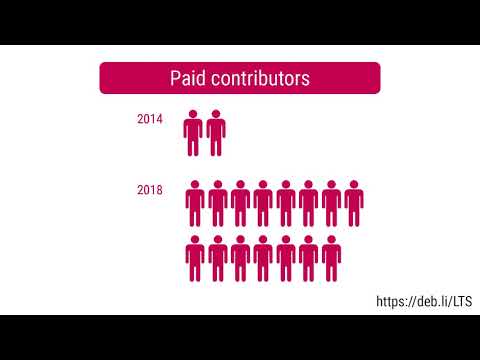
Debian I filed three bugs against: Debian LTS This month I have worked 18 hours on Debian Long Term Support (LTS) and 5 hours on its sister Extended LTS project. You can find out more about the project via the following video:
Uploads

Norbert Preining: TeX Live Debian update 20200629

More than a month has passed since the last update of TeX Live packages in Debian, so here is a new checkout!

All arch all packages have been updated to the tlnet state as of 2020-06-29, see the detailed update list below. Enjoy. New packages akshar, beamertheme-pure-minimalistic, biblatex-unified, biblatex-vancouver, bookshelf, commutative-diagrams, conditext, courierten, ektype-tanka, hvarabic, kpfonts-otf, marathi, menucard, namedef, pgf-pie, pwebmac, qrbill, semantex, shtthesis, tikz-lake-fig, tile-graphic, utf8add. Updated packages abnt, achemso, algolrevived, amiri, amscls, animate, antanilipsum, apa7, babel, bangtex, baskervillef, beamerappendixnote, beamerswitch, beamertheme-focus, bengali, bib2gls, biblatex-apa, biblatex-philosophy, biblatex-phys, biblatex-software, biblatex-swiss-legal, bibleref, bookshelf, bxjscls, caption, ccool, cellprops, changes, chemfig, circuitikz, cloze, cnltx, cochineal, commutative-diagrams, comprehensive, context, context-vim, cquthesis, crop, crossword, ctex, cweb, denisbdoc, dijkstra, doclicense, domitian, dps, draftwatermark, dvipdfmx, ebong, ellipsis, emoji, endofproofwd, eqexam, erewhon, erewhon-math, erw-l3, etbb, euflag, examplep, fancyvrb, fbb, fbox, fei, fira, fontools, fontsetup, fontsize, forest-quickstart, gbt7714, genealogytree, haranoaji, haranoaji-extra, hitszthesis, hvarabic, hyperxmp, icon-appr, kpfonts, kpfonts-otf, l3backend, l3build, l3experimental, l3kernel, latex-amsmath-dev, latexbangla, latex-base-dev, latexdemo, latexdiff, latex-graphics-dev, latexindent, latex-make, latexmp, latex-mr, latex-tools-dev, libertinus-fonts, libertinust1math, lion-msc, listings, logix, lshort-czech, lshort-german, lshort-polish, lshort-portuguese, lshort-russian, lshort-slovenian, lshort-thai, lshort-ukr, lshort-vietnamese, luamesh, lua-uca, luavlna, lwarp, marathi, memoir, mnras, moderntimeline, na-position, newcomputermodern, newpx, nicematrix, nodetree, ocgx2, oldstandard, optex, parskip, pdfcrop, pdfpc, pdftexcmds, pdfxup, pgf, pgfornament, pgf-pie, pgf-umlcd, pgf-umlsd, pict2e, plautopatch, poemscol, pst-circ, pst-eucl, pst-func, pstricks, pwebmac, pxjahyper, quran, rec-thy, reledmac, rest-api, sanskrit, sanskrit-t1, scholax, semantex, showexpl, shtthesis, suftesi, svg, tcolorbox, tex4ht, texinfo, thesis-ekf, thuthesis, tkz-doc, tlshell, toptesi, tuda-ci, tudscr, twemoji-colr, univie-ling, updmap-map, vancouver, velthuis, witharrows, wtref, xecjk, xepersian-hm, xetex-itrans, xfakebold, xindex, xindy, xltabular, yathesis, ydoc, yquant, zref.

27 June 2020

Russell Coker: Links June 2020

Bruce Schneier wrote an informative post about Zoom security problems [1]. He recommends Jitsi which has a Debian package of their software and it s free software. Axel Beckert wrote an interesting post about keyboards with small numbers of keys, as few as 28 [2]. It s not something I d ever want to use, but interesting to read from a computer science and design perspective. The Guardian has a disturbing article explaining why we might never get a good Covid19 vaccine [3]. If that happens it will change our society for years if not decades to come. Matt Palmer wrote an informative blog post about private key redaction [4]. I learned a lot from that. Probably the simplest summary is that you should never publish sensitive data unless you are certain that all that you are publishing is suitable, if you don t understand it then you don t know if it s suitable to be published! This article by Umair Haque on eand.co has some interesting points about how Freedom is interpreted in the US [5]. This article by Umair Haque on eand.co has some good points about how messed up the US is economically [6]. I think that his analysis is seriously let down by omitting the savings that could be made by amending the US healthcare system without serious changes (EG by controlling drug prices) and by reducing the scale of the US military (there will never be another war like WW2 because any large scale war will be nuclear). If the US government could significantly cut spending in a couple of major areas they could then put the money towards fixing some of the structural problems and bootstrapping a first-world economic system. The American Conservatrive has an insightful article Seven Reasons Police Brutality is Systemic Not Anecdotal [7]. Scientific American has an informative article about how genetic engineering could be used to make a Covid-19 vaccine [8]. Rike wrote an insightful post about How Language Changes Our Concepts [9]. They cover the differences between the French, German, and English languages based on gender and on how the language limits thoughts. Then conclude with the need to remove terms like master/slave and blacklist/whitelist from our software, with a focus on Debian but it s applicable to all software. Gunnar Wolf also wrote an insightful post On Masters and Slaves, Whitelists and Blacklists [10], they started with why some people might not understand the importance of the issue and then explained some ways of addressing it. The list of suggested terms includes Primary-secondary, Leader-follower, and some other terms which have slightly different meanings and allow more precision in describing the computer science concepts used. We can be more precise when describing computer science while also not using terms that marginalise some groups of people, it s a win-win! Both Rike and Gunnar were responding to a LWN article about the plans to move away from Master/Slave and Blacklist/Whitelist in the Linux kernel [11]. One of the noteworthy points in the LWN article is that there are about 70,000 instances of words that need to be changed in the Linux kernel so this isn t going to happen immediately. But it will happen eventually which is a good thing.

26 June 2020

Jonathan Dowland: Our Study

This is a fairly self-indulgent post, sorry! Encouraged by Evgeni, Michael and others, given I'm spending a lot more time at my desk in my home office, here's a picture of it:
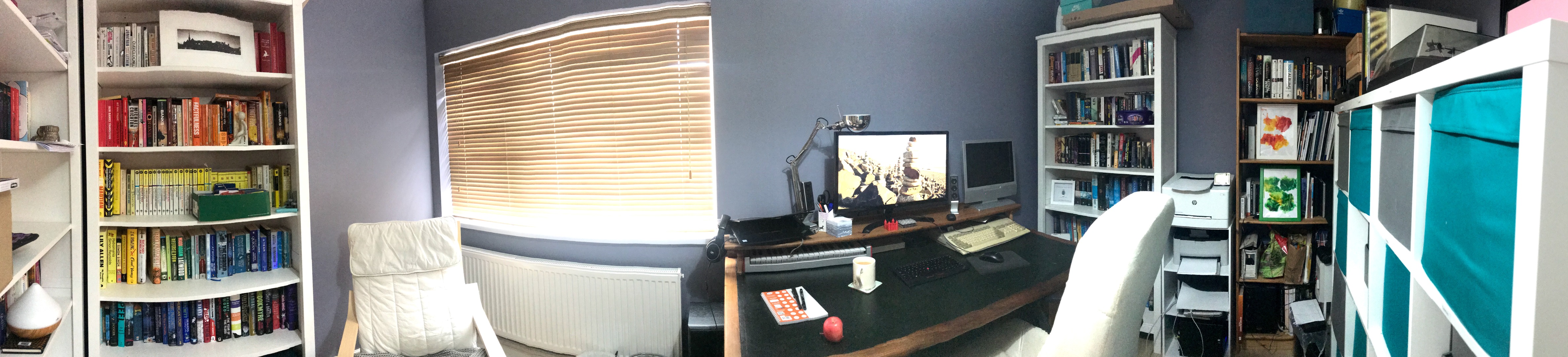
Fisheye shot of my home office Fisheye shot of my home office
Near enough everything in the study is a work in progress. The KALLAX behind my desk is a recent addition (under duress) because we have nowhere else to put it. Sadly I can't see it going away any time soon. On the up-side, since Christmas I've had my record player and collection in and on top of it, so I can listen to records whilst working. The arm chair is a recent move from another room. It's a nice place to take some work calls, serving as a change of scene, and I hope to add a reading light sometime. The desk chair is some Ikea model I can't recall, which is sufficient, and just fits into the desk cavity. (I'm fairly sure my Aeron, inaccessible elsewhere, would not fit.) I've had this old mahogany, leather-topped desk since I was a teenager and it's a blessing and a curse. Mostly a blessing: It's a lovely big desk. The main drawback is it's very much not height adjustable. At the back is a custom made, full-width monitor stand/shelf, a recent gift produced to specification by my Dad, a retired carpenter. On the top: my work Thinkpad T470s laptop, geared more towards portable than powerful (my normal preference), although for the forseeable future it's going to remain in the exact same place; an Ikea desk lamp (I can't recall the model); a 27" 4K LG monitor, the cheapest such I could find when I bought it; an old LCD Analog TV, fantastic for vintage consoles and the like. Underneath: An Alesis Micron 2 octave analog-modelling synthesizer; various hubs and similar things; My Amiga 500. Like Evgeni, my normal keyboard is a ThinkPad Compact USB Keyboard with TrackPoint. I've been using different generations of these styles of keyboards for a long time now, initially because I loved the trackpoint pointer. I'm very curious about trying out mechanical keyboards, as I have very fond memories of my first IBM Model M buckled-spring keyboard, but I haven't dipped my toes into that money-trap just yet. The Thinkpad keyboard is rubber-dome, but it's a good one. Wedged between the right-hand bookcases are a stack of IT-related things: new printer; deprecated printer; old/spare/play laptops, docks and chargers; managed network switch; NAS.

24 June 2020

Rapha&#235;l Hertzog: Freexian s report about Debian Long Term Support, May 2020

A Debian LTS logo Like each month, here comes a report about the work of paid contributors to Debian LTS. Individual reports In May, 198 work hours have been dispatched among 14 paid contributors. Their reports are available: Evolution of the situation In May 2020 we had our second (virtual) contributors meeting on IRC, Logs and minutes are available online. Then we also moved our ToDo from the Debian wiki to the issue tracker on salsa.debian.org.
Sadly three contributors went inactive in May: Adrian Bunk, Anton Gladky and Dylan A ssi. And while there are currently still enough active contributors to shoulder the existing work, we like to use this opportunity that we are always looking for new contributors. Please mail Holger if you are interested.
Finally, we like to remind you for a last time, that the end of Jessie LTS is coming in less than a month!
In case you missed it (or missed to act), please read this post about keeping Debian 8 Jessie alive for longer than 5 years. If you expect to have Debian 8 servers/devices running after June 30th 2020, and would like to have security updates for them, please get in touch with Freexian. The security tracker currently lists 6 packages with a known CVE and the dla-needed.txt file has 30 packages needing an update. Thanks to our sponsors New sponsors are in bold. With the upcoming start of Jessie ELTS, we are welcoming a few new sponsors and others should join soon.

No comment Liked this article? Click here. My blog is Flattr-enabled.

19 June 2020

Ingo Juergensmann: Jitsi Meet and ejabberd

Since the more or less global lockdown caused by Covid-19 there was a lot talk about video conferencing solutions that can be used for e.g. those people that try to coordinate with coworkers while in home office. One of the solutions is Jitsi Meet, which is NOT packaged in Debian. But there are Debian packages provided by Jitsi itself. Jitsi relies on an XMPP server. You can see the network overview in the docs. While Jitsi itself uses Prosody as XMPP and their docs only covers that one. But it's basically irrelevant which XMPP you want to use. Only thing is that you can't follow the official Jitsi documentation when you are not using Prosody but instead e.g. ejabberd. As always, it's sometimes difficult to find the correct/best non-official documentation or how-to, so I try to describe what helped me in configuring Jitsi Meet with ejabberd as XMPP server and my own coturn STUN/TURN server... This is not a step-by-step description, but anyway... here we go with some links: One of the first issues I stumpled across was that my Java was too old, but this can be quickly solved by update-alternatives:
There are 3 choices for the alternative java (providing /usr/bin/java). Selection Path Priority Status
------------------------------------------------------------
* 0 /usr/lib/jvm/java-11-openjdk-amd64/bin/java 1111 auto mode
1 /usr/lib/jvm/java-11-openjdk-amd64/bin/java 1111 manual mode
2 /usr/lib/jvm/java-8-openjdk-amd64/jre/bin/java 1081 manual mode
3 /usr/lib/jvm/jre-7-oracle-x64/bin/java 316 manual mode
It was set to jre-7, but I guess this was from years ago when I ran OpenFire as XMPP server. If something is not working with Jitsi Meet, it helps to not watch the log files only, but also to open the Debug Console in your web browser. That way I catched some XMPP Failures and saw that it tries to connect to some components where the DNS records were missing:
meet IN A yourIP
chat.meet IN A yourIP
focus.meet IN A yourIP
pubsub.meet IN A yourIP
Of course you also need to add some config to your ejabberd.yml:
host_config:
domain.net:
auth_password_format: scram
meet.domain.net:
## Disable s2s to prevent spam
s2s_access: none
auth_method: anonymous
allow_multiple_connections: true
anonymous_protocol: both
modules:
mod_bosh:
mod_caps:
mod_carboncopy:
#mod_disco:
mod_stun_disco:
secret: "YOURSECRETTURNCREDENTIALS"
services:
-
host: yourIP # Your coturn's public address.
type: stun
transport: udp
-
host: yourIP # Your coturn's public address.
type: stun
transport: tcp
-
host: yourIP # Your coturn's public address.
type: turn
transport: udp
mod_muc:
access: all
access_create: local
access_persistent: local
access_admin: admin
host: "chat.@"
mod_muc_admin:
mod_ping:
mod_pubsub:
access_createnode: local
db_type: sql
host: "pubsub.@"
ignore_pep_from_offline: false
last_item_cache: true
max_items_node: 5000 # For Jappix this must be set to 1000000
plugins:
- "flat"
- "pep" # requires mod_caps
force_node_config:
"eu.siacs.conversations.axolotl.*":
access_model: open
## Avoid buggy clients to make their bookmarks public
"storage:bookmarks":
access_model: whitelist
There is more config that needs to be done, but one of the XMPP Failures I spotted from debug console in Firefox was that it tried to connect to conference.domain.net while I prefer to use chat.domain.net for its brevity. If you prefer conference instead of chat, then you shouldn't be affected by this. Just make just that your config is consistent with what Jitsi Meet wants to connect to. Maybe not all of the above lines are necessary, but this works for me. Jitsi config is like this for me with short domains (/etc/jitsi/meet/meet.domain.net-config.js):
var config = hosts:
domain: 'domain.net',
anonymousdomain: 'meet.domain.net',
authdomain: 'meet.domain.net',
focus: 'focus.meet.domain.net',
muc: 'chat.hookipa.net'
, bosh: '//meet.domain.net:5280/http-bind',
//websocket: 'wss://meet.domain.net/ws',
clientNode: 'http://jitsi.org/jitsimeet',
focusUserJid: 'focus@domain.net', useStunTurn: true, p2p:
// Enables peer to peer mode. When enabled the system will try to
// establish a direct connection when there are exactly 2 participants
// in the room. If that succeeds the conference will stop sending data
// through the JVB and use the peer to peer connection instead. When a
// 3rd participant joins the conference will be moved back to the JVB
// connection.
enabled: true, // Use XEP-0215 to fetch STUN and TURN servers.
useStunTurn: true, // The STUN servers that will be used in the peer to peer connections
stunServers: [
// urls: 'stun:meet-jit-si-turnrelay.jitsi.net:443' ,
// urls: 'stun:stun.l.google.com:19302' ,
// urls: 'stun:stun1.l.google.com:19302' ,
// urls: 'stun:stun2.l.google.com:19302' ,
urls: 'stun:turn.domain.net:5349' ,
urls: 'stun:turn.domain.net:3478'
], ....
In the above config snippet one of the issues solved was to add the port to the bosh setting. Of course you can also take care that your bosh requests get forwarded by your webserver as reverse proxy. Using the port in the config might be a quick way to test whether or not your config is working. It's easier to solve one issue after the other and make one config change at a time instead of needing to make changes in several places. /etc/jitsi/jicofo/sip-communicator.properties:
org.jitsi.jicofo.auth.URL=XMPP:meet.domain.net
org.jitsi.jicofo.BRIDGE_MUC=jvbbrewery@chat.meet.domain.net
/etc/jitsi/videobridge/sip-communicator.properties:
org.jitsi.videobridge.ENABLE_STATISTICS=true
org.jitsi.videobridge.STATISTICS_TRANSPORT=muc
org.jitsi.videobridge.STATISTICS_INTERVAL=5000 org.jitsi.videobridge.xmpp.user.shard.HOSTNAME=localhost
org.jitsi.videobridge.xmpp.user.shard.DOMAIN=domain.net
org.jitsi.videobridge.xmpp.user.shard.USERNAME=jvb
org.jitsi.videobridge.xmpp.user.shard.PASSWORD=SECRET
org.jitsi.videobridge.xmpp.user.shard.MUC_JIDS=JvbBrewery@chat.meet.domain.net
org.jitsi.videobridge.xmpp.user.shard.MUC_NICKNAME=videobridge1 org.jitsi.videobridge.DISABLE_TCP_HARVESTER=true
org.jitsi.videobridge.TCP_HARVESTER_PORT=4443
org.ice4j.ice.harvest.NAT_HARVESTER_LOCAL_ADDRESS=yourIP
org.ice4j.ice.harvest.NAT_HARVESTER_PUBLIC_ADDRESS=yourIP
org.ice4j.ice.harvest.DISABLE_AWS_HARVESTER=true
org.ice4j.ice.harvest.STUN_MAPPING_HARVESTER_ADDRESSES=turn.domain.net:3478
org.ice4j.ice.harvest.ALLOWED_INTERFACES=eth0
Sometimes there might be stupid errors like (in my case) wrong hostnames like "chat.meet..domain.net" (a double dot in the domain), but you can spot those easily in the debug console of your browser. There tons of config options where you can easily make mistakes, but watching your logs and your debug console should really help you in sorting out these kind of errors. The other URLs above are helpful as well and more elaborate then my few lines here. Especially Mike Kuketz has some advanced configuration tips like disabling third party requests with "disableThirdPartyRequests: true" or limiting the number of video streams and such. Hope this helps...
Kategorie:

18 June 2020

Gunnar Wolf: On masters and slaves, whitelists and blacklists...

LWN published today yet another great piece of writing, Loaded terms in free software. I am sorry, the content will not be immediately available to anybody following at home, as LWN is based on a subscription model But a week from now, the article will be open for anybody to read. Or you can ask me (you most likely can find my contact addresses, as they are basically everywhere) for a subscriber link, I will happily provide it. In consonance with the current mood that started with the killing of George Floyd and sparked worldwide revolts against police brutality, racism (mostly related to police and law enforcement forces, but social as well) and the like, the debate that already started some months ago in technical communities has re-sparked: We have many terms that come with long histories attached to them, and we are usually oblivious to their obvious meaning. We? Yes, we, the main users and creators of technology. I never felt using master and slave to refer to different points of a protocol, bus, clock or whatever (do refer to the Wikipedia article for a fuller explanation) had any negative connotations but then again, those terms have never tainted my personal family. That is, I understand I speak from a position of privilege. A similar although less heated issue goes around the blacklist and whitelist terms, or other uses that use white to refer to good, law-abiding citizens, and black to refer to somewhat antisocial uses (i.e. the white hat and black hat hackers). For several years, this debate has been sparking and dying off. Some important changes have been made Particularly, in 2017 the Internet Software Consortium started recommending Primary and Secondary, Python dropped master/slave pairs after a quite thorough and deep review throughout 2018, GitHub changed the default branch from master to main earlier this week. The Internet Engineering Task Force has a draft (that lapsed and thus sadly didn t become an RFC, but still, is archived), Terminology, Power and Oppressive Language that lists suggested alternatives:

There are also many other relationships that can be used as metaphors, Eglash s research calls into question the accuracy of the master-slave metaphor. Fortunately, there are ample alternatives for the master-slave relationship. Several options are suggested here and should be chosen based on the pairing that is most clear in context:
  • Primary-secondary
  • Leader-follower
  • Active-standby
  • Primary-replica
  • Writer-reader
  • Coordinator-worker
  • Parent-helper
I ll add that I think we Spanish-speakers are not fully aware of the issue s importance, because the most common translation I have seen for master/slave is maestro/esclavo: Maestro is the word for teacher (although we do keep our slaves in place). But think whether it sounds any worse if you refer to device pairs, or members of a database high-availability cluster, or whatever as Amo and Esclavo. It does sound much worse I cannot add much of value to this debate. I am just happy issues like this are being recognized and dealt with. If the topic interests you, do refer to the LWN article! Some excrepts: I consider the following to be the core of Jonathan Corbet s writeup:
Recent events, though, have made it clear even to those of us who were happy to not question this view that the story of slavery and the wider racist systems around it is not yet finished. There are many people who are still living in the middle of it, and it is not a nice place to be. We are not so enlightened as we like to think we are. If there is no other lesson from the events of the last few weeks, we should certainly take to heart the point that we need to be listening to the people who have been saying, for many years, that they are still suffering. If there are people who are telling us that terms like slave or blacklist are a hurtful reminder of the inequities that persist in our society, we need to accept that as the truth and act upon it. Etymological discussions on what, say, master really means may be interesting, but they miss the point and are irrelevant to this discussion.
Part of a comment by user yokem_55:
Often, it seems to me that the replacement words are much more descriptive and precise than the old language. Allowlist is far more obviously a list of explicitly authorized entities than whitelist . Mainline has a more obvious meaning of a core stream of development than master . The benefit of moving past this language is more than just changing cultural norms, it s better, more precise communication across the board.
Another spot-on comment, by user alan:
From my perspective as a Black American male, I think that it s nice to see people willing to see and address racism in various spheres. I am concerned that some of these steps will be more performative than substantial. Terminology changes in software so as to be more welcoming is a nice thing. Ensuring that oppressed minorities have access to the tools and resources to help reduce inequity and ensuring equal protection under the laws is better. We ll get there one day I m sure. The current ask is much simpler, its just to stop randomly killing and terrorizing us. Please and thank you.
So Maybe the protests of this year caught special notoriety because the society is reacting after (or during, for many of us) the lockdown. In any case, I hope for their success in changing the planet s culture of oppression.

Comments Tomas Janousek 2020-06-19 10:04:32 +0200 In the blog post On masters and slaves, whitelists and blacklists you claim that GitHub changed the default branch from master to main earlier this week but I don t think that change is in effect yet. When you create a repo, the default branch is still named master . Gunnar Wolf 2020-06-19 11:52:30 -0500 Umh, seems you are right. Well, what can I say? I m reporting only what I have been able to find / read Now, given that said master branch does not carry any Git-specific meaning and is just a commonly used configuration I hope people start picking it up. No, I have not renamed master branches in any of my repos but intend to do so soonish. Tomas Janousek 2020-06-19 20:01:52 +0200 Yeah, don t worry. I just find it sad that so much inaccurate news is spreading from a single CEO tweet, and I wanted to help stop that. I m sure some change will happen eventually, but until it does, we shouldn t speak about it in the past tense. :-)

16 June 2020

Ritesh Raj Sarraf: Kodi PS3 BD Remote

Setting up a Sony PS3 Blu-Ray Disc Remote Controller with Kodi TLDR; Since most of the articles on the internet were either obsolete or broken, I ve chosen to write these notes down in the form of a blog post so that it helps me now and in future, and hopefully others too.

Raspberry Pi All this time, I have been using the Raspberry Pi for my HTPC needs. The first RPi I acquired was in 2014 and I have been very very happy with the amount of support in the community and quality of the HTPC offering it has. I also appreciate the RPi s form factor and the power consumption limits. And then, to add more sugar to it, it uses a derivative of Debian, Raspbian, which was very familiar and feel good to me.

Raspberry Pi Issues So primarily, I use my RPi with Kodi. There are a bunch of other (daemon) services but the primary use case is HTPC only. RPi + Kodi has a very very annoying issue wherein it loses its audio pitch during video playback. The loss is so bad that the audio is barely audible. The workaround is to seek the video playback either way and then it comes back to its actual audio level, just to fade again in a while. My suspicion was that it may be a problem with Kodi. Or at least, Kodi would have a workaround in software. But unfortunately, I wasted a lot of time in dealing with my suspicion with no fruitful result. This started becoming a PITA over time. And it seems the issue is with the hardware itself because after I moved my setup to a regular laptop, the audio loss is gone.

Laptop with Kodi Since I had my old Lenovo Yoga 2 13 lying on all the time, it made sense to make some more use of it, using as the HTPC. This machine comes with a Micro-HDMI Out port, so it felt ideal for my High Definition video rendering needs. It comes stock with just Intel HD Video with good driver support in Linux, so it was quite quick and easy getting Kodi charged up and running on it. And as I mentioned above, the sound issues are not seen on this setup. Some added benefits are that I get to run stock Debian on this machine. And I must say a big THANK YOU to the Debian Multimedia Maintainers, who ve done a pretty good job maintaining Kodi under Debian.

HDMI CEC Only after I decommissioned my RPi, I came to notice how convenient the HDMI CEC functionality is. Turns out no standard laptops ship CEC functionality onto them. Even the case of my laptop, which has a Micro HDMI Out port, but still no CEC capabilities. As far as I know, the RPi came with the Pulse-Eight CEC module, so obvious first thought was to opt for a compatible external module of the same; but it comes with a nice price tag, me not willing to spend.

WiFi Remotes Kodi has very well implemented network interface for almost all its features. One could take the Yatse or Music Pump Kodi Remote Android applications that work very very well with Kodi. But wifi can be flaky some times. Especially, my experience with the Realtek network devices hasn t been very good. The driver support in Linux is okay but there are many firmware bugs to deal with. In my case, the machine will lose wifi signal/network every once in a while. And it turns out, for this machine, with this network device type, I m not the only one running into such problems. And to add to that, this is an UltraBook, which means it doesn t have an Ethernet port. So I ve had not much choice other than to live and suffer deal with it. The WiFi chip also provides the Bluetooth module, which so far I had not used much. From my /etc/modprobe.d/blacklist-memstick.conf, all relevant BT modules were added to the blacklist, all this time.
rrs@lenovo:~$ cat /etc/modprobe.d/blacklist-memstick.conf 
blacklist memstick
blacklist rtsx_usb_ms
# And bluetooth too
#blacklist btusb
#blacklist btrtl
#blacklist btbcm
#blacklist btintel
#blacklist bluetooth
21:21            
Also to keep in mind is that the driver for my card gives a very misleading kernel message, which is one of the many reasons for this blog post, so that I don t forget it a couple of months later. The missing firmware error message is okay to ignore, as per this upstream comment.
Jun 14 17:17:08 lenovo kernel: usbcore: registered new interface driver btusb
Jun 14 17:17:08 lenovo systemd[1]: Mounted /boot/efi.
Jun 14 17:17:08 lenovo kernel: Bluetooth: hci0: RTL: examining hci_ver=06 hci_rev=000b lmp_ver=06 lmp_subver=8723
Jun 14 17:17:08 lenovo kernel: Bluetooth: hci0: RTL: rom_version status=0 version=1
Jun 14 17:17:08 lenovo kernel: Bluetooth: hci0: RTL: loading rtl_bt/rtl8723b_fw.bin
Jun 14 17:17:08 lenovo kernel: bluetooth hci0: firmware: direct-loading firmware rtl_bt/rtl8723b_fw.bin
Jun 14 17:17:08 lenovo kernel: Bluetooth: hci0: RTL: loading rtl_bt/rtl8723b_config.bin
Jun 14 17:17:08 lenovo kernel: bluetooth hci0: firmware: failed to load rtl_bt/rtl8723b_config.bin (-2)
Jun 14 17:17:08 lenovo kernel: firmware_class: See https://wiki.debian.org/Firmware for information about missing firmware
Jun 14 17:17:08 lenovo kernel: bluetooth hci0: Direct firmware load for rtl_bt/rtl8723b_config.bin failed with error -2
Jun 14 17:17:08 lenovo kernel: Bluetooth: hci0: RTL: cfg_sz -2, total sz 22496
This device s network + bt are on the same chip.
01:00.0 Network controller: Realtek Semiconductor Co., Ltd. RTL8723BE PCIe Wireless Network Adapter
And then, when the btusb module is initialed (along with the misleading driver message), you ll get the following in your USB device listing
Bus 002 Device 005: ID 0bda:b728 Realtek Semiconductor Corp. Bluetooth Radio

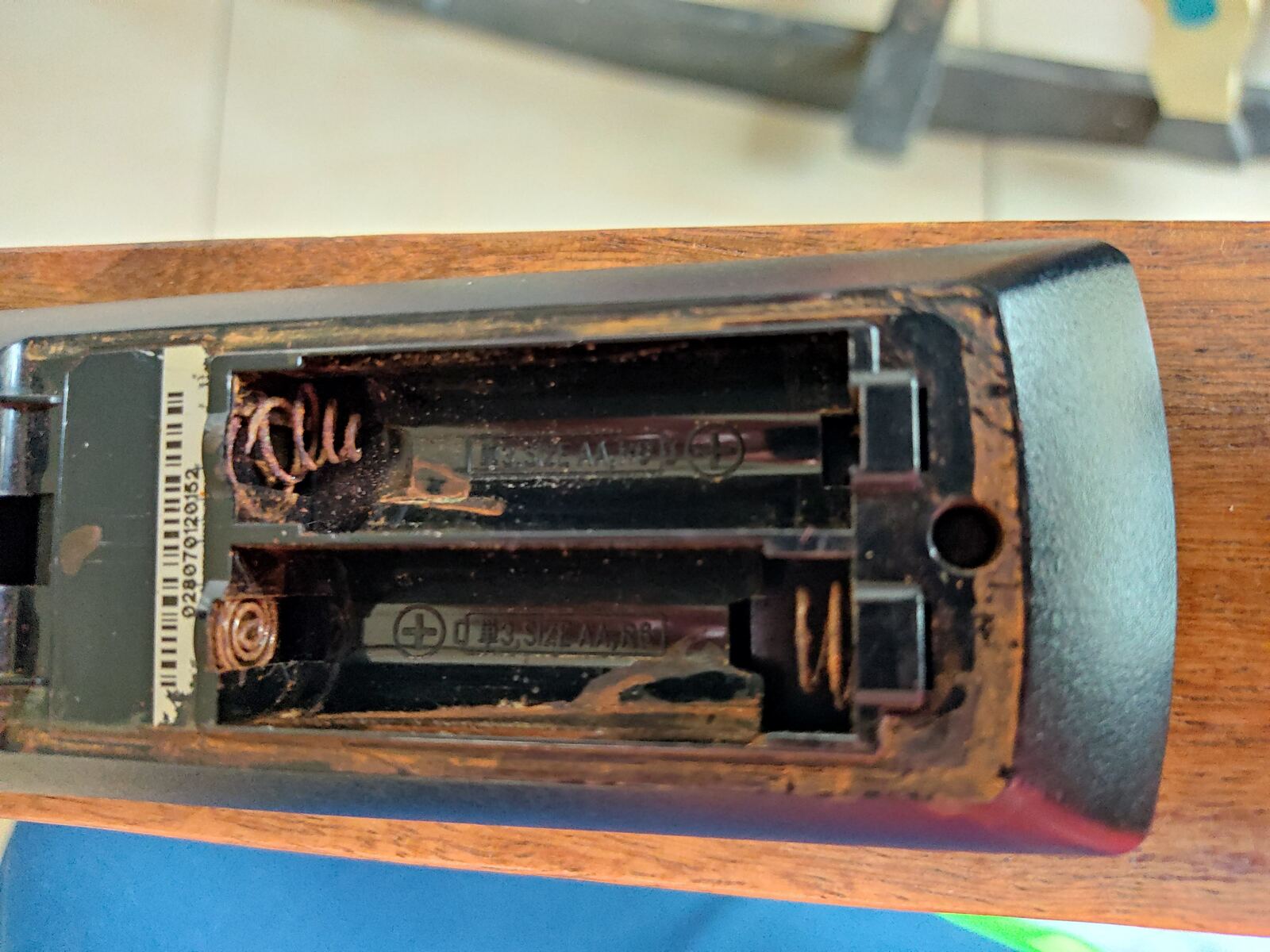
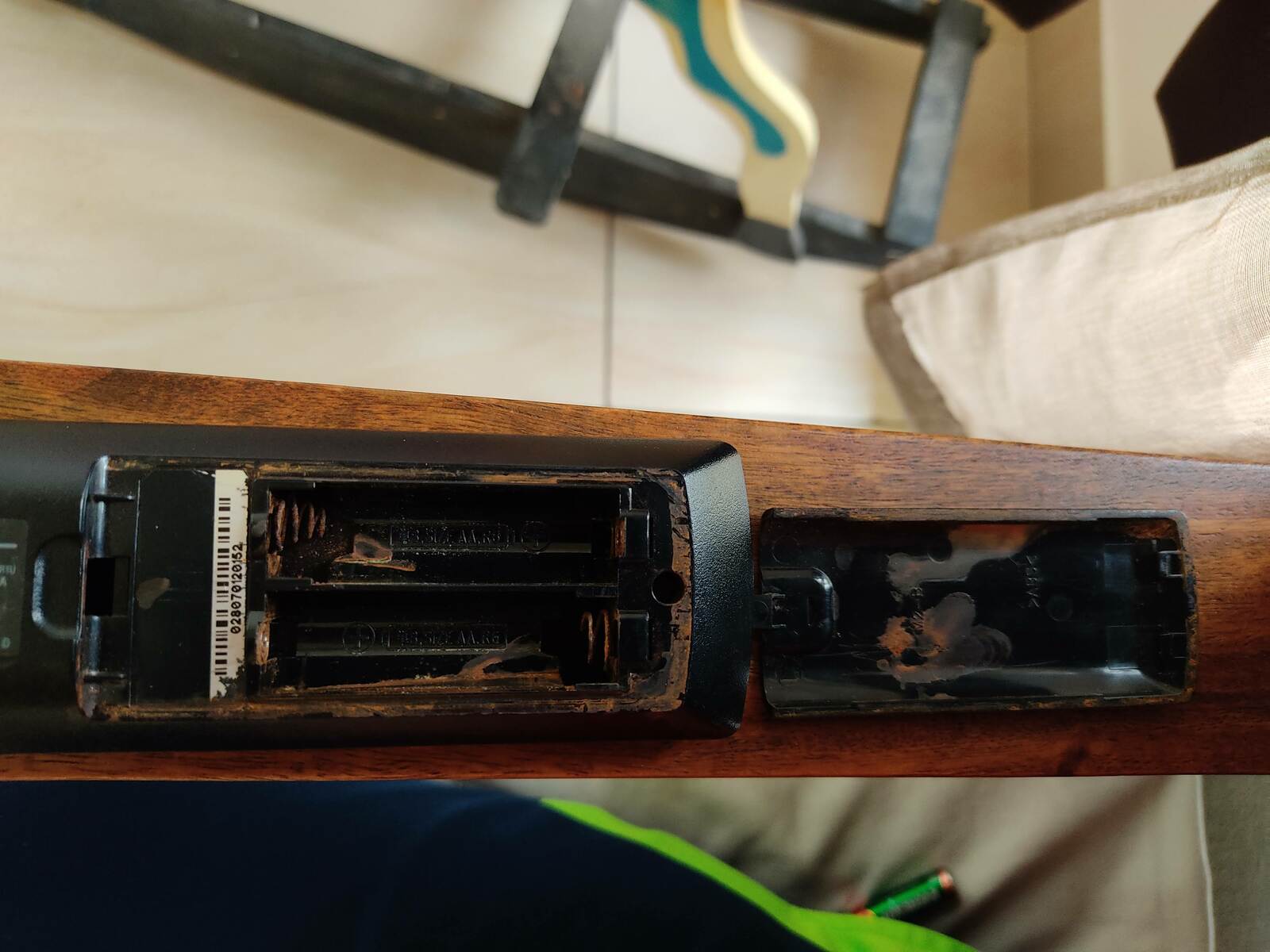
Sony PlayStation 3 BD Remote Almost 10 years ago, I bought the PS3 and many of its accessories. The remote has just been rotting in the shelf. It had rusted so bad that it is better described with these pics.
Rusted inside
Rusted inside
Rusted inside and cover
Rusted spring
Rusted spring
The rust was so much that the battery holding spring gave up. A little bit scrubbing and cleaning has gotten it working. I hope it lasts for some time before I find time to open it up and give it a full clean-up.

Pairing the BD Remote to laptop Honestly, with the condition of the hardware and software on both ends, I did not have much hopes of getting this to work. And in all the years on my computer usage, I hardly recollect much days when I ve made use of BT. Probably, because the full BT stack wasn t that well integrated in Linux, earlier. And I mostly used to disable them in hardware and software to save on battery. All yielded results from the internet talked about tools/scripts that were either not working, pointing to broken links etc. These days, bluez comes with a nice utility, bluetoothctl. It was a nice experience using it. First, start your bluetooth service and ensure that the device talks well with the kernel
rrs@lenovo:~$ systemctl status bluetooth                                                                                                          
  bluetooth.service - Bluetooth service                                                                                                           
     Loaded: loaded (/lib/systemd/system/bluetooth.service; enabled; vendor preset: enabled)                                                      
     Active: active (running) since Mon 2020-06-15 12:54:58 IST; 3s ago                                                                           
       Docs: man:bluetoothd(8)                                                                                                                    
   Main PID: 310197 (bluetoothd)                                                                                                                  
     Status: "Running"                                                                                                                            
      Tasks: 1 (limit: 9424)                                                                                                                      
     Memory: 1.3M                                                                                                                                 
     CGroup: /system.slice/bluetooth.service                                                                                                      
              310197 /usr/lib/bluetooth/bluetoothd                                                                                               
                                                                                                                                                  
Jun 15 12:54:58 lenovo systemd[1]: Starting Bluetooth service...                                                                                  
Jun 15 12:54:58 lenovo bluetoothd[310197]: Bluetooth daemon 5.50                                                                                  
Jun 15 12:54:58 lenovo systemd[1]: Started Bluetooth service.                                                                                     
Jun 15 12:54:58 lenovo bluetoothd[310197]: Starting SDP server                                                                                    
Jun 15 12:54:58 lenovo bluetoothd[310197]: Bluetooth management interface 1.15 initialized                                                        
Jun 15 12:54:58 lenovo bluetoothd[310197]: Sap driver initialization failed.                                                                      
Jun 15 12:54:58 lenovo bluetoothd[310197]: sap-server: Operation not permitted (1)                                                                
12:55                                                                                                                                       
Next, then is to discover and connect to your device
rrs@lenovo:~$ bluetoothctl 
Agent registered
[bluetooth]# devices
Device E6:3A:32:A4:31:8F MI Band 2
Device D4:B8:FF:43:AB:47 MI RC
Device 00:1E:3D:10:29:0F BD Remote Control
[CHG] Device 00:1E:3D:10:29:0F Connected: yes
[BD Remote Control]# info 00:1E:3D:10:29:0F
Device 00:1E:3D:10:29:0F (public)
        Name: BD Remote Control
        Alias: BD Remote Control
        Class: 0x0000250c
        Paired: no
        Trusted: yes
        Blocked: no
        Connected: yes
        LegacyPairing: no
        UUID: Human Interface Device... (00001124-0000-1000-8000-00805f9b34fb)
        UUID: PnP Information           (00001200-0000-1000-8000-00805f9b34fb)
        Modalias: usb:v054Cp0306d0100
[bluetooth]# 
In case of the Sony BD Remote, there s no need to pair. In fact, trying to pair fails. It prompts for the PIN code, but neither 0000 or 1234 are accepted. So, the working steps so far are to Trust the device and then Connect the device. For the sake of future use, I also populated /etc/bluetooth/input.conf based on suggestions on the internet. Note: The advertised keymappings in this config file do not work. Note: I m only using it for the power saving measures in instructing the BT connection to sleep after 3 minutes.
rrs@priyasi:/tmp$ cat input.conf 
# Configuration file for the input service
# This section contains options which are not specific to any
# particular interface
[General]
# Set idle timeout (in minutes) before the connection will
# be disconnect (defaults to 0 for no timeout)
IdleTimeout=3
# Enable HID protocol handling in userspace input profile
# Defaults to false (HIDP handled in HIDP kernel module)
#UserspaceHID=true
# Limit HID connections to bonded devices
# The HID Profile does not specify that devices must be bonded, however some
# platforms may want to make sure that input connections only come from bonded
# device connections. Several older mice have been known for not supporting
# pairing/encryption.
# Defaults to false to maximize device compatibility.
#ClassicBondedOnly=true
# LE upgrade security
# Enables upgrades of security automatically if required.
# Defaults to true to maximize device compatibility.
#LEAutoSecurity=true
#
#[00:1E:3D:10:29:0F]
[2c:33:7a:8e:d6:30]
[PS3 Remote Map]
# When the 'OverlayBuiltin' option is TRUE (the default), the keymap uses
# the built-in keymap as a starting point.  When FALSE, an empty keymap is
# the starting point.
#OverlayBuiltin = TRUE
#buttoncode = keypress    # Button label = action with default key mappings
#OverlayBuiltin = FALSE
0x16 = KEY_ESC            # EJECT = exit
0x64 = KEY_MINUS          # AUDIO = cycle audio tracks
0x65 = KEY_W              # ANGLE = cycle zoom mode
0x63 = KEY_T              # SUBTITLE = toggle subtitles
0x0f = KEY_DELETE         # CLEAR = delete key
0x28 = KEY_F8             # /TIME = toggle through sleep
0x00 = KEY_1              # NUM-1
0x01 = KEY_2              # NUM-2
0x02 = KEY_3              # NUM-3
0x03 = KEY_4              # NUM-4
0x04 = KEY_5              # NUM-5
0x05 = KEY_6              # NUM-6
0x06 = KEY_7              # NUM-7
0x07 = KEY_8              # NUM-8
0x08 = KEY_9              # NUM-9
0x09 = KEY_0              # NUM-0
0x81 = KEY_F2             # RED = red
0x82 = KEY_F3             # GREEN = green
0x80 = KEY_F4             # BLUE = blue
0x83 = KEY_F5             # YELLOW = yellow
0x70 = KEY_I              # DISPLAY = show information
0x1a = KEY_S              # TOP MENU = show guide
0x40 = KEY_M              # POP UP/MENU = menu
0x0e = KEY_ESC            # RETURN = back/escape/cancel
0x5c = KEY_R              # TRIANGLE/OPTIONS = cycle through recording options
0x5d = KEY_ESC            # CIRCLE/BACK = back/escape/cancel
0x5f = KEY_A              # SQUARE/VIEW = Adjust Playback timestretch
0x5e = KEY_ENTER          # CROSS = select
0x54 = KEY_UP             # UP = Up/Skip forward 10 minutes
0x56 = KEY_DOWN           # DOWN = Down/Skip back 10 minutes
0x57 = KEY_LEFT           # LEFT = Left/Skip back 5 seconds
0x55 = KEY_RIGHT          # RIGHT = Right/Skip forward 30 seconds
0x0b = KEY_ENTER          # ENTER = select
0x5a = KEY_F10            # L1 = volume down
0x58 = KEY_J              # L2 = decrease the play speed
0x51 = KEY_HOME           # L3 = commercial skip previous
0x5b = KEY_F11            # R1 = volume up
0x59 = KEY_U              # R2 = increase the play speed
0x52 = KEY_END            # R3 = commercial skip next
0x43 = KEY_F9             # PS button = mute
0x50 = KEY_M              # SELECT = menu (as per PS convention)
0x53 = KEY_ENTER          # START = select / Enter (matches terminology in mythwelcome)
0x30 = KEY_PAGEUP         # PREV = jump back (default 10 minutes)
0x76 = KEY_J              # INSTANT BACK (newer RCs only) = decrease the play speed
0x75 = KEY_U              # INSTANT FORWARD (newer RCs only) = increase the play speed
0x31 = KEY_PAGEDOWN       # NEXT = jump forward (default 10 minutes)
0x33 = KEY_COMMA          # SCAN BACK =  decrease scan forward speed / play
0x32 = KEY_P              # PLAY = play/pause
0x34 = KEY_DOT            # SCAN FORWARD decrease scan backard speed / increase playback speed; 3x, 5, 10, 20, 30, 60, 120, 180
0x60 = KEY_LEFT           # FRAMEBACK = Left/Skip back 5 seconds/rewind one frame
0x39 = KEY_P              # PAUSE = play/pause
0x38 = KEY_P              # STOP = play/pause
0x61 = KEY_RIGHT          # FRAMEFORWARD = Right/Skip forward 30 seconds/advance one frame
0xff = KEY_MAX
21:48                 
I have not spent much time finding out why not all the key presses work. Especially, given that most places on the internet mention these mappings. For me, some of the key scan codes aren t even reported. For keys like L1, L2, L3, R1, R2, R3, Next_Item, Prev_Item, they generate no codes in the kernel. If anyone has suggestions, ideas or fixes, I d appreciate if you can drop a comment or email me privately. But given my limited use to get a simple remote ready, to be usable with Kodi, I was apt with only some of the keys working.

Mapping the keys in Kodi With the limited number of keys detected, mapping those keys to what Kodi could use was the next step. Kodi has a very nice and easy to use module, Keymap Editor. It is very simple to use and map detected keys to functionalities you want. With it, I was able to get a functioning remote to use with my Kodi HTPC setup.

Update: Wed Jun 17 11:38:20 2020 One annoying problem that breaks the overall experience is the following bug on the driver side, that results in connections not being established instantly. Once the device goes into sleep mode, in random attempts, waking up and re-establishing a BT connection can be multi-poll affair. This can last from a couple of seconds to well over minute. Random suggestions on the internet mention disabling the autosuspend functionality for the device in the driver with btusb.enable_autosuspend=n, but that did not help in this case. Given that this device is enumberated over the USB Bus, it probably needs this feature applied to the whole USB tree of the device s chain. Something to investigate over the weekend.
Jun 16 20:41:23 lenovo kernel: Bluetooth: hci0: ACL packet for unknown connection handle 7
Jun 16 20:41:43 lenovo kernel: Bluetooth: hci0: ACL packet for unknown connection handle 8
Jun 16 20:41:59 lenovo kernel: Bluetooth: hci0: ACL packet for unknown connection handle 9
Jun 16 20:42:18 lenovo kernel: input: BD Remote Control as /devices/pci0000:00/0000:00:14.0/usb1/1-7/1-7:1.0/bluetooth/hci0/hci0:10/0005:054C:030>
Jun 16 20:42:18 lenovo kernel: sony 0005:054C:0306.0006: input,hidraw1: BLUETOOTH HID v1.00 Gamepad [BD Remote Control] on 2c:33:7a:8e:d6:30
Jun 16 20:51:59 lenovo kernel: input: BD Remote Control as /devices/pci0000:00/0000:00:14.0/usb1/1-7/1-7:1.0/bluetooth/hci0/hci0:11/0005:054C:030>
Jun 16 20:51:59 lenovo kernel: sony 0005:054C:0306.0007: input,hidraw1: BLUETOOTH HID v1.00 Gamepad [BD Remote Control] on 2c:33:7a:8e:d6:30
Jun 16 21:05:55 lenovo rtkit-daemon[1723]: Supervising 3 threads of 1 processes of 1 users.
Jun 16 21:05:55 lenovo rtkit-daemon[1723]: Successfully made thread 32747 of process 1646 owned by '1000' RT at priority 5.
Jun 16 21:05:55 lenovo rtkit-daemon[1723]: Supervising 4 threads of 1 processes of 1 users.
Jun 16 21:05:56 lenovo kernel: Bluetooth: hci0: ACL packet for unknown connection handle 12
Jun 16 21:06:12 lenovo kernel: Bluetooth: hci0: ACL packet for unknown connection handle 1
Jun 16 21:06:34 lenovo kernel: Bluetooth: hci0: ACL packet for unknown connection handle 2
Jun 16 21:06:59 lenovo kernel: input: BD Remote Control as /devices/pci0000:00/0000:00:14.0/usb1/1-7/1-7:1.0/bluetooth/hci0/hci0:3/0005:054C:0306>
Jun 16 21:06:59 lenovo kernel: sony 0005:054C:0306.0008: input,hidraw1: BLUETOOTH HID v1.00 Gamepad [BD Remote Control] on 2c:33:7a:8e:d6:30

Others There s a package, kodi-eventclients-ps3, which can be used to talk to the BD Remote. Unfortunately, it isn t up-to-date. When trying to make use of it, I ran into a couple of problems. First, the easy one is:
rrs@lenovo:~/ps3pair$ kodi-ps3remote localhost 9777
usr/share/pixmaps/kodi//bluetooth.png
Traceback (most recent call last):
  File "/usr/bin/kodi-ps3remote", line 220, in <module>
  File "/usr/bin/kodi-ps3remote", line 208, in main
    xbmc.connect(host, port)
    packet = PacketHELO(self.name, self.icon_type, self.icon_file)
  File "/usr/lib/python3/dist-packages/kodi/xbmcclient.py", line 285, in __init__
    with open(icon_file, 'rb') as f:
11:16         => 1  
This one was simple as it was just a broken path. The second issue with the tool is a leftover from python2 to python3 conversion.
rrs@lenovo:/etc/bluetooth$ kodi-ps3remote localhost
/usr/share/pixmaps/kodi//bluetooth.png
Searching for BD Remote Control
(Hold Start + Enter on remote to make it discoverable)
Redmi (E8:5A:8B:73:57:44) in range
Living Room TV (E4:DB:6D:24:23:E9) in range
Could not find BD Remote Control. Trying again...
Searching for BD Remote Control
(Hold Start + Enter on remote to make it discoverable)
Living Room TV (E4:DB:6D:24:23:E9) in range
Redmi (E8:5A:8B:73:57:44) in range
Could not find BD Remote Control. Trying again...
Searching for BD Remote Control
(Hold Start + Enter on remote to make it discoverable)
BD Remote Control (00:1E:3D:10:29:0F) in range
Found BD Remote Control with address 00:1E:3D:10:29:0F
Attempting to pair with remote
Remote Paired.
Traceback (most recent call last):
  File "/usr/bin/kodi-ps3remote", line 221, in <module>
    main()
  File "/usr/bin/kodi-ps3remote", line 212, in main
    if process_keys(remote, xbmc):
  File "/usr/bin/kodi-ps3remote", line 164, in process_keys
    keycode = data.encode("hex")[10:12]
AttributeError: 'bytes' object has no attribute 'encode'
11:24         => 1  
Fixing that too did not give me the desired result on using the BD Remote in the way I want. So eventually, I gave up and used Kodi s Keymap Editor instead.

Next Next in line, when I can manage to get some free time, is to improve the Kodi Video Scraper to have a fallback mode. Currently, for files where it cannot determine the content, it reject the file resulting in those files not showing up in your collection at all. A better approach would have been to have a fallback mode, that when the scraper cannot determine the content, it should fallback to using the filename scraper

15 June 2020

Arturo Borrero Gonz lez: A better Toolforge: a technical deep dive

Logos This post was originally published in the Wikimedia Tech blog, and is authored by Arturo Borrero Gonzalez and Brooke Storm. In the previous post, we shared the context on the recent Kubernetes upgrade that we introduced in the Toolforge service. Today we would like to dive a bit more in the technical details. Custom admission controllers One of the key components of the Toolforge Kubernetes are our custom admission controllers. We use them to validate and enforce that the usage of the service is what we intended for. Basically, we have 2 of them: The source code is written in Golang, which is pretty convenient for natively working in a Kubernetes environment. Both code repositories include extensive documentation: how to develop, test, use, and deploy them. We decided to go with custom admission controllers because we couldn t find any native (or built-in) Kubernetes mechanism to accomplish the same sort of checks on user activity. With the Ingress controller, we want to ensure that Ingress objects only handle traffic to our internal domains, which by the time of this writing, are toolforge.org (our new domain) and tools.wmflabs.org (legacy). We safe-list the kube-system namespace and the tool-fourohfour namespace because both need special consideration. More on the Ingress setup later. The registry controller is pretty simple as well. It ensures that only our internal docker registry is used for user-scheduled containers running in Kubernetes. Again, we exclude from the checks containers running in the kube-system namespace (those used by Kubernetes itself). Other than that, the validation itself is pretty easy. For some extra containers we run (like those related to Prometheus metrics) what we do is simply upload those docker images to our internal registry. The controls provided by this admission controller helps us validate that only FLOSS software is run in our environment, which is one of the core rules of Toolforge. RBAC and Pod Security Policy setup I would like to comment next on our RBAC and Pod Security Policy setup. Using the Pod Security Policies (or PSP) we establish a set of constraints on what containers can and can t do in our cluster. We have many PSP configured in our setup: Each user can interact with their own namespace (this is how we achieve multi-tenancy in the cluster). Kubernetes knows about each user by means of TLS certs, and for that we have RBAC. Each user has a rolebinding to a shared cluster-role that defines how Toolforge tools can use the Kubernetes API. The following diagram shows the design of our RBAC and PSP in our cluster: RBAC and PSP for Toolforge diagram RBAC and PSP for Toolforge, original image in wikitech I mentioned that we know about each user by means of TLS certificates. This is true, and in fact, there is a key component in our setup called maintain-kubeusers. This custom piece of Python software is run as a pod inside the cluster and is responsible for reading our external user database (LDAP) and generating the required credentials, namespaces, and other configuration bits for them. With the TLS cert, we basically create a kubeconfig file that is then written into the homes NFS share, so each Toolforge user has it in their shell home directory. Networking and Ingress setup With the basic security controls in place, we can move on to explaining our networking and Ingress setup. Yes, the Ingress word might be a bit overloaded already, but we refer here to Ingress as the path that end-users follow from their web browser in their local machine to a webservice running in the Toolforge cluster. Some additional context here. Toolforge is not only Kubernetes, but we also have a Son of GridEngine deployment, a job scheduler that covers some features not available in Kubernetes. The grid can also run webservices, although we are encouraging users to migrate them to Kubernetes. For compatibility reasons, we needed to adapt our Ingress setup to accommodate the old web grid. Deciding the layout of the network and Ingress was definitely something that took us some time to figure out because there is not a single way to do it right. The following diagram can be used to explain the different steps involved in serving a web service running in the new Toolforge Kubernetes. Toolforge k8s network topology diagram Toolforge k8s network topology, original image in Wikitech The end-user HTTP/HTTPs request first hits our front proxy in (1). Running here is NGINX with a custom piece of LUA code that is able to decide whether to contact the web grid or the new Kubernetes cluster. TLS termination happens here as well, for both domains (toolforge.org and tools.wmflabs.org). Note this proxy is reachable from the internet, as it uses a public IPv4 address, a floating IP from CloudVPS, the infrastructure service we provide based on Openstack. Remember that our Kubernetes is directly built in virtual machines a bare-metal type deployment. If the request is directed to a webservice running in Kubernetes, the request now reaches haproxy in (2), which knows the cluster nodes that are available for Ingress. The original 80/TCP packet is now translated to 30000/TCP; this is the TCP port we use internally for the Ingress traffic. This haproxy instance provides load-balancing also for the Kubernetes API as well, using 6443/TCP. It s worth mentioning that unlike the Ingress, the API is only reachable from within the cluster and not from the internet. We have a NGINX-Ingress NodePort service listening in 30000/TCP in every Kubernetes worker node in (3); this helps the request to eventually reach the actual NGINX-Ingress pod in (4), which is listening in 8080/TCP. You can see in the diagram how in the API server (5) we hook the Ingress admission controller (6) to validate Kubernetes Ingress configuration objects before allowing them in for processing by NGINX-Ingress (7). The NGINX-Ingress process knows which tools webservices are online and how to contact them by means of an intermediate Service object in (8). This last Service object means the request finally reaches the actual tool pod in (9). At this point, it is worth noting that our Kubernetes cluster uses internally kube-proxy and Calico, both using Netfilter components to handle traffic. tools-webservice Most user-facing operations are simplified by means of another custom piece of Python code: tools-webservice. This package provides users with the webservice command line utility in our shell bastion hosts. Typical usage is to just run webservice start stop status. This utility creates all the required Kubernetes objects on-demand like Deployment, ReplicaSet, Ingress and Service to ease deploying web apps in Toolforge. Of course, advanced users can interact directly with Kubernetes API and create their custom configuration objects. This utility is just a wrapper, a shortcut. tool-fourohfour and tool-k8s-status The last couple of custom components we would like to mention are the tool-fourohfour and tool-k8s-status web services. These two utilities run inside the cluster as if they were any other user-created tool. The fourohfour tool allows for a controlled handling of HTTP 404 errors, and it works as the default NGINX-Ingress backend. The k8s-status tool shows plenty of information about the cluster itself and each tool running in the cluster, including links to the Server Admin Log, an auto-generated grafana dashboard for metrics, and more. For metrics, we use an external Prometheus server that contacts the Kubernetes cluster to scrape metrics. We created a custom metrics namespace in which we deploy all the different components we use to observe the behavior of the system: All the Prometheus data we collect is used in several different Grafana dashboards, some of them directed for user information like the ones linked by the k8s-status tool and some others for internal use by us the engineers. These are for internal use but are still public, like the Ingress specific dashboard, or the cluster state dashboard. Working publicly, in a transparent way, is key for the success of CloudVPS in general and Toolforge in particular. Like we commented in the previous post, all the engineering work that was done here was shared by community members. By the community, for the community We think this post sheds some light on how the Toolforge Kubernetes service works, and we hope it could inspire others when trying to build similar services or, even better, help us improve Toolforge itself. Since this was first put into production some months ago we detected already some margin for improvement in a couple of the components. As in many other engineering products, we will follow an iterative approach for evolving the service. Mind that Toolforge is maintained by the Wikimedia Foundation, but you can think of it as a service by the community for the community. We will keep an eye on it and have a list of feature requests and things to improve in the future. We are looking forward to it! This post was originally published in the Wikimedia Tech blog, and is authored by Arturo Borrero Gonzalez and Brooke Storm.
Russ Allbery: Radical haul

Along with the normal selection of science fiction and fantasy, a few radical publishers have done book giveaways due to the current political crisis in the United States. I've been feeling for a while like I've not done my homework on diverse political theory, so I downloaded those. (That's the easy part; making time to read them is the hard part, and we'll see how that goes.) Yarimar Bonilla & Marisol LeBr n (ed.) Aftershocks of Disaster (non-fiction anthology)
Jordan T. Camp & Christina Heatherton (ed.) Policing the Planet (non-fiction anthology)
Zachary D. Carter The Price of Peace (non-fiction)
Justin Akers Chac n & Mike Davis No One is Illegal (non-fiction)
Grace Chang Disposable Domestics (non-fiction)
Suzanne Collins The Ballad of Songbirds and Snakes (sff)
Angela Y. Davis Freedom is a Constant Struggle (non-fiction)
Danny Katch Socialism... Seriously (non-fiction)
Naomi Klein The Battle for Paradise (non-fiction)
Naomi Klein No is Not Enough (non-fiction)
Naomi Kritzer Catfishing on CatNet (sff)
Derek K nsken The Quantum Magician (sff)
Rob Larson Bit Tyrants (non-fiction)
Michael L wy Ecosocialism (non-fiction)
Joe Macar , Maya Schenwar, et al. (ed.) Who Do You Serve, Who Do You Protect? (non-fiction anthology)
Tochi Onyebuchi Riot Baby (sff)
Sarah Pinsker A Song for a New Day (sff)
Lina Rather Sisters of the Vast Black (sff)
Marta Russell Capitalism and Disbility (non-fiction)
Keeanga-Yamahtta Taylor From #BlackLivesMatter to Black Liberation (non-fiction)
Keeanga-Yamahtta Taylor (ed.) How We Get Free (non-fiction anthology)
Linda Tirado Hand to Mouth (non-fiction)
Alex S. Vitale The End of Policing (non-fiction)
C.M. Waggoner Unnatural Magic (sff)
Martha Wells Network Effect (sff)
Kai Ashante Wilson Sorcerer of the Wildeeps (sff)

12 June 2020

Ulrike Uhlig: The right to demand change

Two women sit in an office, one asks: "What's the difference between being assertive and being aggressive?" The other replies: "Your gender." (Cartoon by Judy Horacek, 1999.) When a person of a marginalized group (read: a person with less privilege, a person with lower rank) is being framed and blamed as being aggressive, she is being told that her behavior is unacceptable. Marginalized people have learnt that they need to comply to fit, and are likely to suppress their feelings. By being framed as aggressive, the marginalized person is also being told that what they are saying cannot be listened to because the way they are saying it does not comply with expectations. There is a word for this: tone policing. This great comic by Robot Hugs has all the important details. Tone policing is a silencing tactic in which privileged participants of a discussion one-sidedly define the terms of the conversation. This tactic has the interesting side effect of shifting the responsibility to prove that one is not aggressive, hostile, explosive, a minefield, etc. to the person being framed and blamed - proving that one is worthy to be listened to. (Some of those words are actual quotes taken from real life.) Years ago, I worked in a company in which my female developer colleague would put herself in a state of overly expressed sorriness, all the while pretending to be stupid and helpless whenever she needed to ask anything from the sysadmins. When I confronted her with that, she replied: "I do it because it works." In the same company, another woman who generally asked assertively for what she needed ended up being insulted by one of the project managers using the word "dominatrix". While the example comes from my own experience, this kind of thing happens across any oppression/privilege boundaries. In some conversations, be they verbal or written, frustration and anger of one person are sometimes being mistaken by the communication partner for aggressiveness. Why is this happening? Asking a person with privilege to see, question, or change their behavior, questions their privilege. I'm thinking that it might be that most people think of themselves as "being good" and when they are being asked to question themselves or their behavior, their self-image is being challenged. "Me? But I did not do anything wrong! It's certainly not my fault if you are being oppressed! I sacrificed myself to reach my current position in life!" This comic by Toby Morris, "On a Plate", explains it quite nicely. So are we stuck with seeing conversations derail? I'd argue instead that while anger and frustration are unpleasant feelings, they're important: they show us that our boundaries have been crossed, that we want something to change, to stop, or that we need something different right now. We have the right to be angry and to demand change.

10 June 2020

Evgeni Golov: show your desk

Some days ago I posted a picture of my desk on Mastodon and Twitter. standing desk with a monitor, laptop etc After that I got multiple questions about the setup, so I thought "Michael and Michael did posts about their setups, you could too!" And well, here we are ;-) desk The desk is a Flexispot E5B frame with a 200 80 2.6cm oak table top. The Flexispot E5 (the B stands for black) is a rather cheap (as in not expensive) standing desk frame. It has a retail price of 379 , but you can often get it as low as 299 on sale. Add a nice table top from a local store (mine was like 99 ), a bit of wood oil and work and you get a nice standing desk for less than 500 . The frame has three memory positions, but I only use two: one for sitting, one for standing, and a "change position" timer that I never used so far. The table top has a bit of a swing when in standing position (mine is at 104cm according to the electronics in the table), but not enough to disturb typing on the keyboard or thinking. I certainly wouldn't place a sewing machine up there, but that was not a requirement anyways ;) To compare: the IKEA Bekant table has a similar, maybe even slightly stronger swing. chair Speaking of IKEA The chair is an IKEA Volmar. They don't seem to sell it since mid 2019 anymore though, so no link here. hardware laptop A Lenovo ThinkPad T480s, i7-8650U, 24GB RAM, running Fedora 32 Workstation. Just enough power while not too big and heavy. Full of stickers, because I stickers! It's connected to a Lenovo ThinkPad Thunderbolt 3 Dock (Gen 1). After 2 years with that thing, I'm still not sure what to think about it, as I had various issues with it over the time:
  • the internal USB hub just vanishing from existence until a full power cycle of the dock was performed, but that might have been caused by my USB-switch which I recently removed.
  • the NIC negotiating at 100MBit/s instead of 1000MBit/s and then keeping on re-negotiating every few minutes, disconnecting me from the network, but I've not seen that since the Fedora 32 upgrade.
  • the USB-attached keyboard not working during boot as it needs some Thunderbolt magic.
The ThinkPad stands on a Adam Hall Stands SLT001E, a rather simple stand for laptops and other equipment (primarily made for DJs I think). The Dock fits exactly between the two feet of the stand, so that is nice and saves space on the table. Using the stand I can use the laptop screen as a second screen when I want it - but most often I do not and have the laptop lid closed while working. workstation A Lenovo ThinkStation P410, Xeon E5-2620 v4, 96GB RAM, running Fedora 32 Workstation. That's my VM playground. Having lots of RAM really helps if you need/want to run many VMs with Foreman/Katello or Red Hat Satellite as they tend to be a bit memory hungry and throwing hardware at problems tend to be an easy solution for many of them. The ThinkStation is also connected to the monitor, and I used to have an USB switch to flip my keyboard, mouse and Yubikey from the laptop to the workstation and back. But as noted above, this switch somehow made the USB hub in the laptop dock unhappy (maybe because I was switching too quickly after resume or so), so it's currently removed from the setup and I use the workstation via SSH only. It's mounted under the table using a ROLINE PC holder. You won't get any design awards with it, but it's easy to assemble and allows the computer to move with the table, minimizing the number of cables that need to have a flexible length. monitor The monitor is an older Dell UltraSharp U2515H - a 25" 2560 1440 model. It sits on an Amazon Basics Monitor Arm (which is identical to an Ergotron LX to the best of my knowledge) and is accompanied by a Dell AC511 soundbar. I don't use the adjustable arm much. It's from the time I had no real standing desk and would use the arm and a cardboard box to lift the monitor and keyboard to a standing level. If you don't want to invest in a standing desk, that's the best and cheapest solution! The soundbar is sufficient for listening to music while working and for chatting with colleagues. webcam A Logitech C920 Pro, what else? Works perfectly under Linux with the UVC driver and has rather good microphones. Actually, so good that I never use a headset during video calls and so far nobody complained about bad audio. keyboard A ThinkPad Compact USB Keyboard with TrackPoint. The keyboard matches the one in my T480s, so my brain doesn't have to switch. It was awful when I still had the "old" model and had to switch between the two. UK layout. Sue me. I like the big return key. mouse A Logitech MX Master 2. I got the MX Revolution as a gift a long time ago, and at first I was like: WTF, why would anyone pay hundred bucks for a mouse?! Well, after some time I knew, it's just that good. And when it was time to get a new one (the rubber coating gets all slippery after some time) the decision was rather easy. I'm pondering if I should try the MX Ergo or the MX Vertical at some point, but not enough to go and buy one of them yet. other notepad I'm terrible at remembering things, so I need to write them down. And I'm terrible at remembering to look at my notes, so they need to be in my view. So there is a regular A5 notepad on my desk, that gets filled with check boxes and stuff, page after page. coaster It's a wooden table, you don't want to have liquids on it, right? Thankfully a friend of mine once made coasters out of old Xeon CPUs and epoxy. He gave me one in exchange for a busted X41 ThinkPad. I still think I made the better deal ;) yubikey Keep your secrets safe! Mine is used as a GnuPG smart card for both encryption and SSH authentication, U2F on various pages and 2FA for VPN. headphones I own a pair of Bose QuietComfort 25 with an aftermarket Bluetooth adapter and Anker SoundBuds Slim+. Both are used rather seldomly while working, as my office is usually quiet and no one is disturbed when I listen to music without headphones. what's missing? light I want to add more light to the setup, noth to have a better picture during video calls but also to have better light when doing something else on the table - like soldering. The plan is to add an IKEA Tertial with some Tr dfri smart LED in it, but the Tertial is currently not available for delivery at IKEA and I'm not going to visit one in the current situation. bigger monitor Currently pondering getting a bigger (27+ inch) 4K monitor. Still can't really decide which one to get. There are so many, and they all differ in some way. But it seems no affordable one is offering an integrated USB switch and sufficient amount of USB ports, so I'll probably get whatever can get me a good picture without any extra features at a reasonable price. Changing the monitor will probably also mean rethinking the sound output, as I'm sure mounting the Dell soundbar to anything but the designated 5 year old monitor won't work too well.

Next.

Previous.