Search Results: "will"

11 September 2010

Romain Beauxis: Liquidsoap 1.0 beta1 and 0.9.3 released!

We have finally released two new versions of Liquidsoap [1]! This is a very good news for the project because the 1.0 branch contains huge and exciting improvements in particular video support, dynamic source creation/destruction and support for different clocks/time flow. 1.0 beta is also the first release that runs natively on windows, when compiled using the ocaml cross-compiler [2]. 1.0 is still some time away but the beta is now considered solid enough to be considered for production. That's also where bugfixing will happen now. 0.9.3 is a bugfix release for 0.9.2 and will be the last 0.9.x release. The release also includes a bunch of new binding releases, namely:
  • ocaml-alsa: added resume and recover function, reworked exception handling
  • ocaml-cry: removed an extra crlf sent when using icecast source protocol
  • ocaml-dtools: added support for syslog
  • ocaml-duppy: minor win32 fixes..
  • ocaml-gavl: fixed Gc issue.
  • ocaml-mad: win32-related fixes.
  • ocaml-ogg: stricter parsing of ogg streams
  • ocaml-theora: support for theora 1.1 API
The custom debian packages have been updated for 0.9.3. For the beta, you can try the SVN daily package [3] Official Debian packages should come, but through experimental while squeeze is frozen.. The release notes and changelog can be read in the announcement mail [4]. Yeah!

[1] http://savonet.sf.net/ [2] https://fedoraproject.org/wiki/Feat... [3] the automatic build needs to be fixed, the cron script does not work now for some reasons although it is perfectly fine manually.. [4] https://sourceforge.net/mailarchive...

10 September 2010

Bernd Zeimetz: refactoring the guruplug server plus

As mentioned in my last blog post the GuruPlug Server Plus needs some major refactoring before it can be used. Not doing so will make you end up with a fried brick. There are various stories in the forums about cooling it properly, so you might want to have a look first instead of following mine blindly. And of course - whatever you do - it is your fault when you end up with a brick, not mine!.

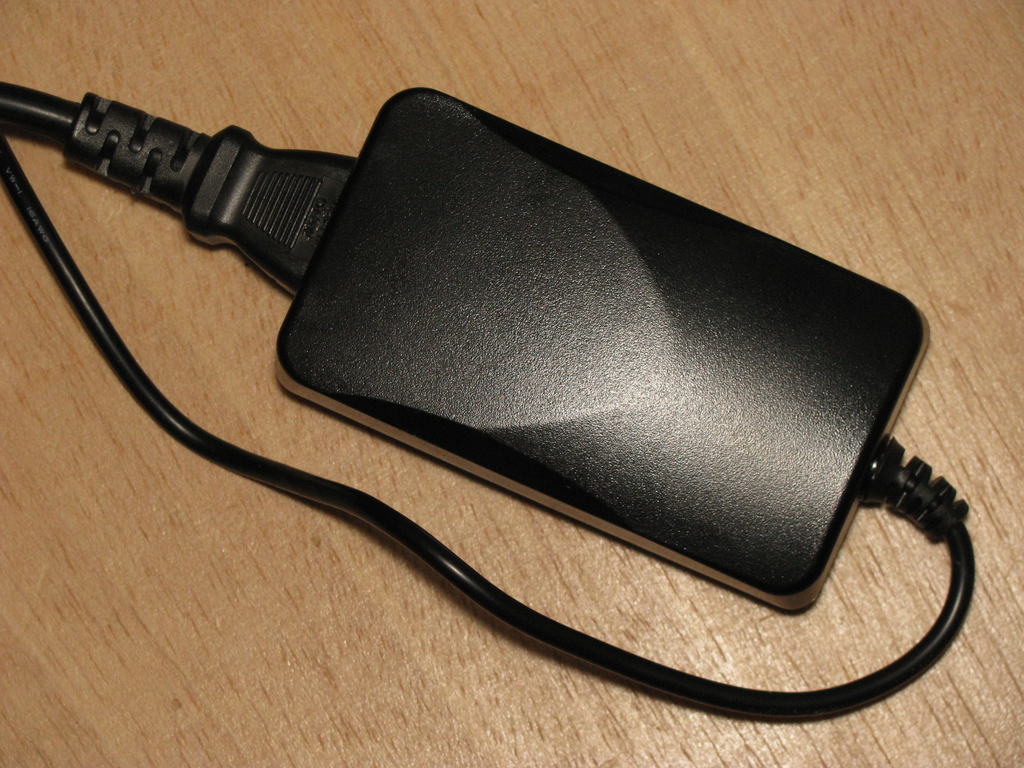
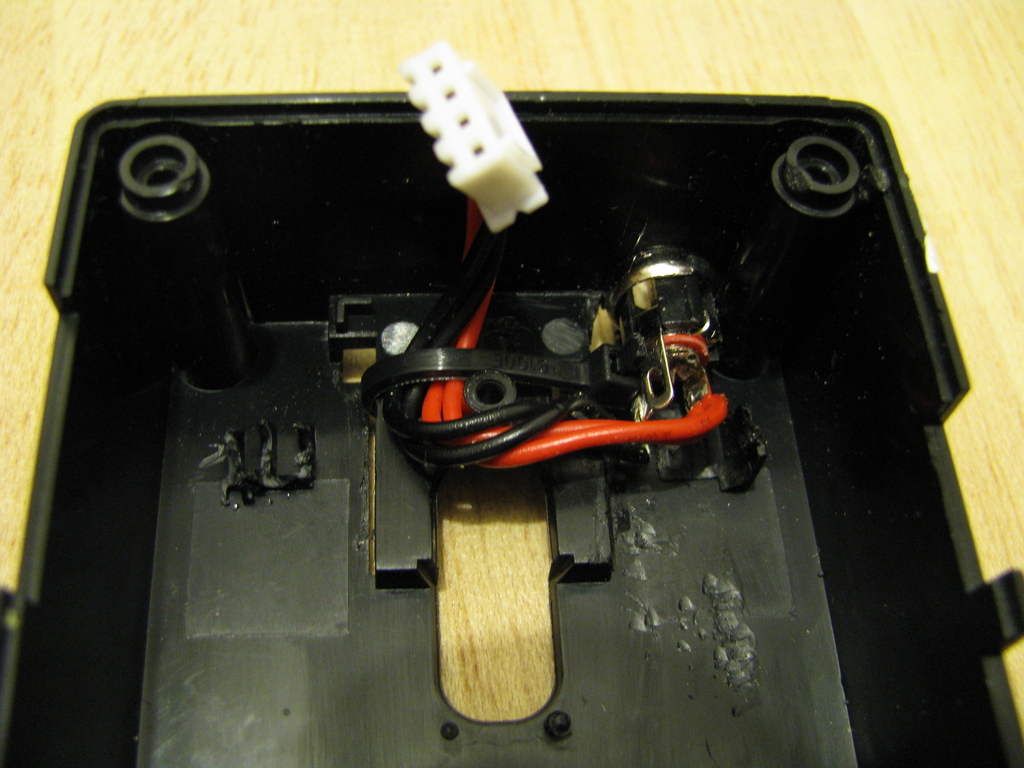
Replacing the power supply As I would never ever trust the PSU (see my last blog post for the gory details) and some additional free space in the case is necessary, it is time to rip it out. As replacement I've ordered an external 5V/20W PSU. To connect it to the plug I've drilled a hole into the case and added a proper connector after soldering the original cable from the old PSU to it. Make sure to add some retainer to stop the cable from touching the CPU/memory heat sinks later. GuruPlug Server Plus PSU replacement GuruPlug Server Plus PSU cabling

Proper heatsinks One of the biggest problems in the original GuruPlug design is the heat spreading and collecting piece of alloy, which probably makes things even worse than better. After some discussion in #debian-devel the idea came up, that the board should be able to run fine without a heatsink - at least when idling. That is the case, indeed. So let's get rid of that piece of alloy, together with the holders and springs. Unfortunately heat things are necessary to handle some work load. To mount them make sure you get some good thermal glue as you don't want to insulate the chips from their heat sinks. I've used Arctic Silver II thermal glue - not cheap, but working well. Make sure to clean the heat sinks and chips properly with alcohol (2-Propanol is my favourite for that), so there is no fat and dust left. When you use the glue be careful to read the documentation properly and make sure you apply only as much as necessary - a thin coating is enough. After applying the glue and mounting the heat sink you need a clamp to put some pressure on it while the glue dries.

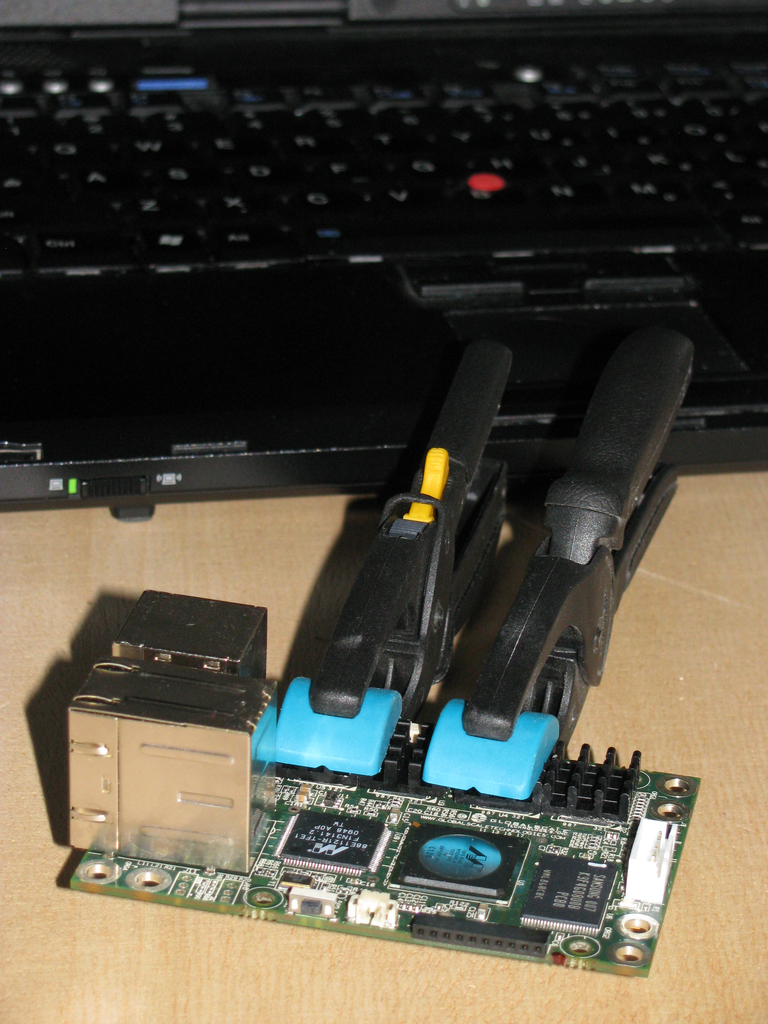
Heat sinks for the memory As there is a lot of space around the memory chips, I've got some 14x14x6mm heat sinks. Luckily there are only small parts on the other side of the board, so it was not hard to attach clamps to ensure the glue is able to dry properly. In case largish amounts of glue are squeezing out between heat sink and chip you probably want to start from scratch and clean everything (quickly!) with alcohol again. GuruPlug Server Plus memory heat sink clamping

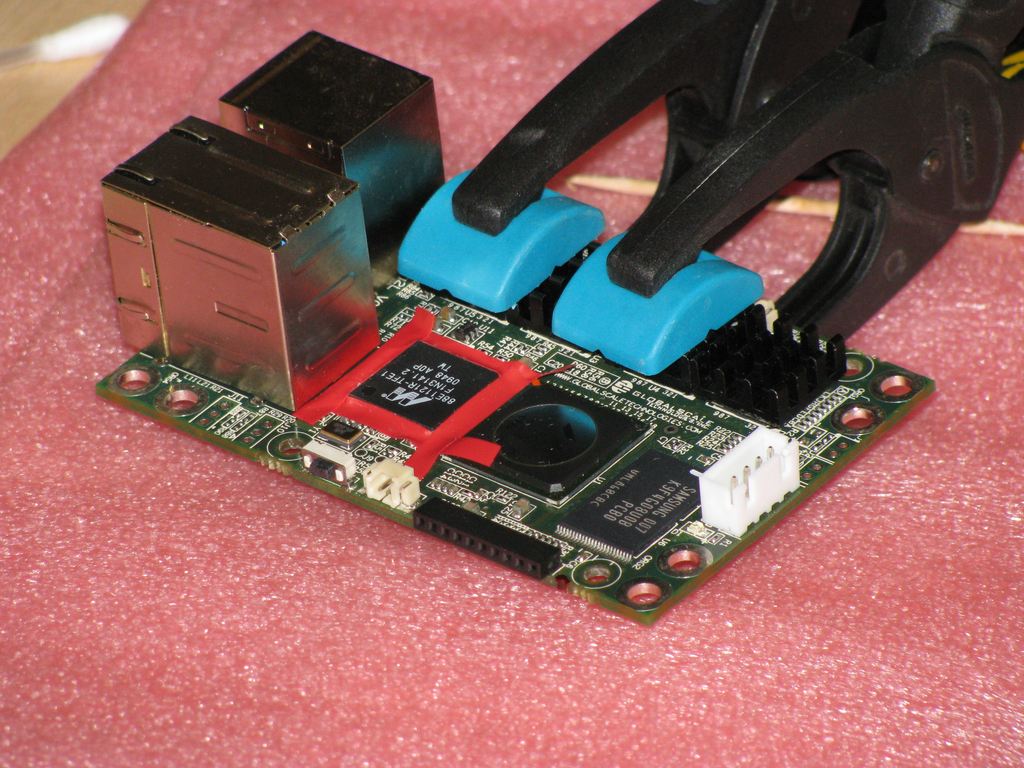
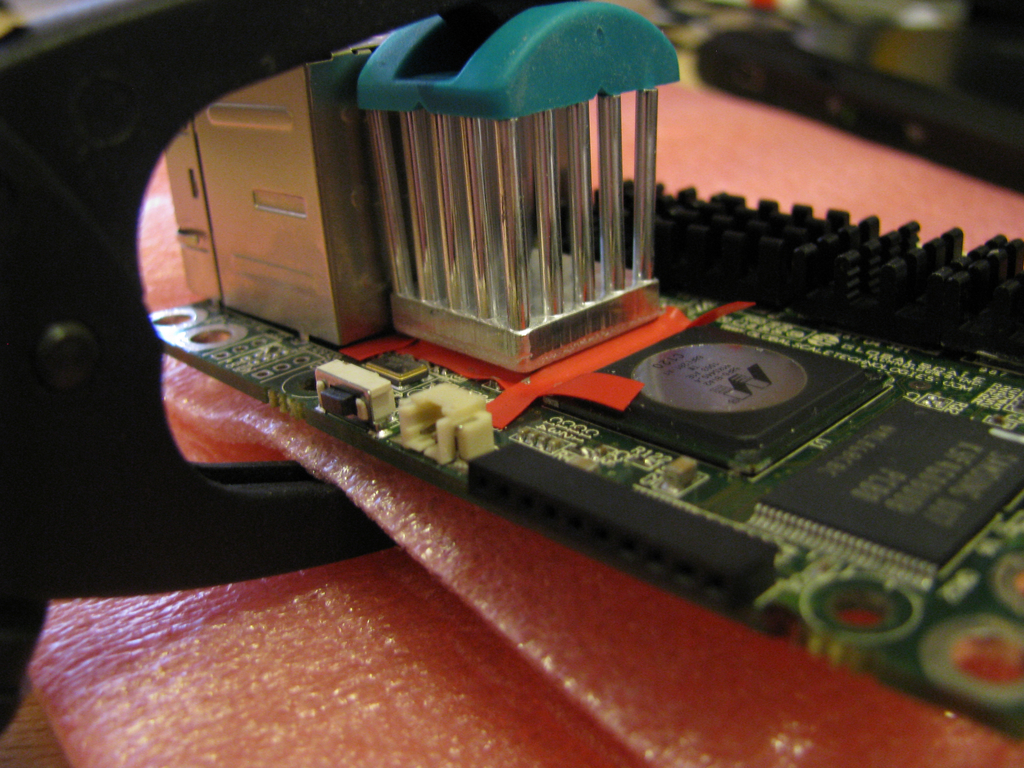
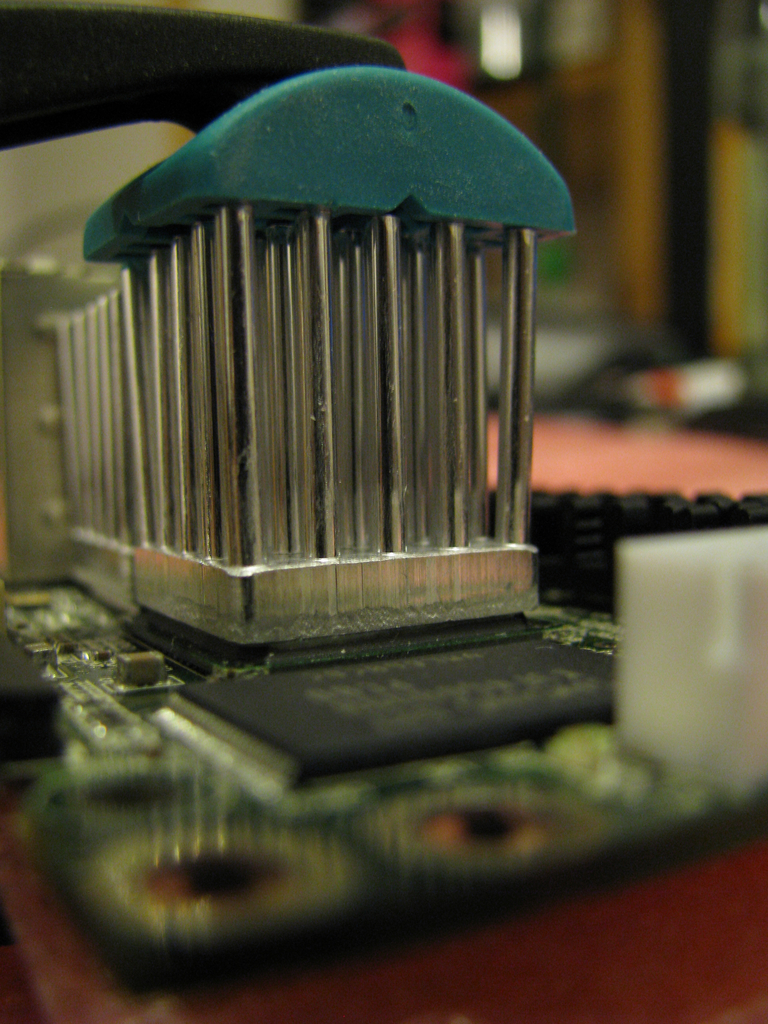
Gigabit Ethernet PHY and CPU heatsinks PHY and CPU need proper heatsinks as they're becoming pretty hot under load. Due to space limitations I had to stick with a 17x17x20mm heat sink for the PHY. I've tried to get a largish heat sink with BGA mount for the CPU, but I was not able to find one in short time and without ordering 1000 of them. So I've got another one of the 17x17x20mm model for the CPU. Later I found two other heat sinks which might fit on the GuruPlug's CPU: Malico 19x19x25mm or a Advanced Thermal Solutions Maxigrip. But for now the smaller one will have to do the job, also I'm scared to removed it without destroying the CPU. To mount the heat sink on the PHY a bit of preparation is necessary to ensure that the glue doesn't result in short cuts on the IC's pins. The arctic silver documentation recommends to use silicone on the pins to stop the glue. As I neither had the proper silicone nor did I want to make such a mess, I've decided to get a sticky insulating tape and some tooth picks to mount it properly on the IC pins. Make sure to do a proper job here! With good clamps you can work on the PHY while the memory heat sink glue is still drying. GuruPlug Server Plus - preparing the PHY The other problem on this side of the board is that some higher parts are mounted on the lower side of the board, so make sure to get some foam to protect them from your clamps. Except of the size of the heat sinks there is no real difference to the small ones: add glue, mount the heat sink and fix it with a clamp. GuruPlug Server Plus - mounting the PHY heatsink Before the glue dries completely make sure you remove the duct tape strips again. Be careful not to wipe any excess glue onto the IC pins. If you manage to do so you might want to remove and clean everything properly. So just be careful and everything should be fine. GuruPlug Server Plus - mounting the PHY heatsink 3 Mounting the heat sink on the CPU is easier as the CPU is a nice BGA package. No need to protect pins an there are none. GuruPlug Server Plus - mounting the CPU heatsink

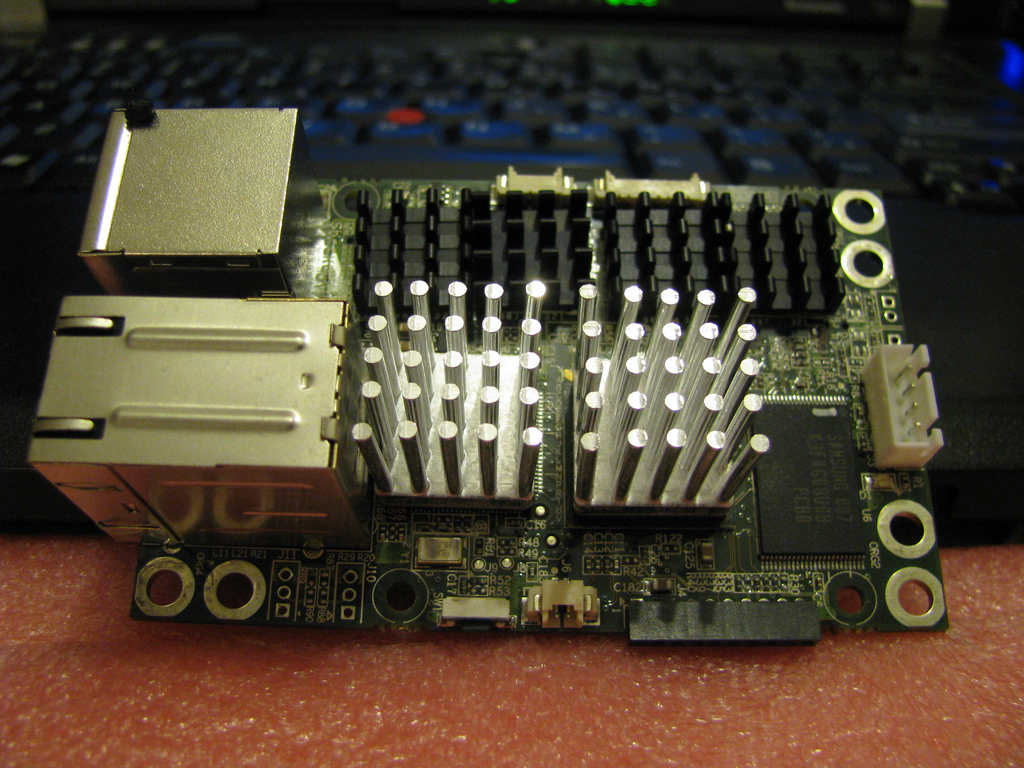
Finished As you're able to see on the photo I did not the very perfect job, but fine enough to work properly. GuruPlug Server Plus - heatsinks

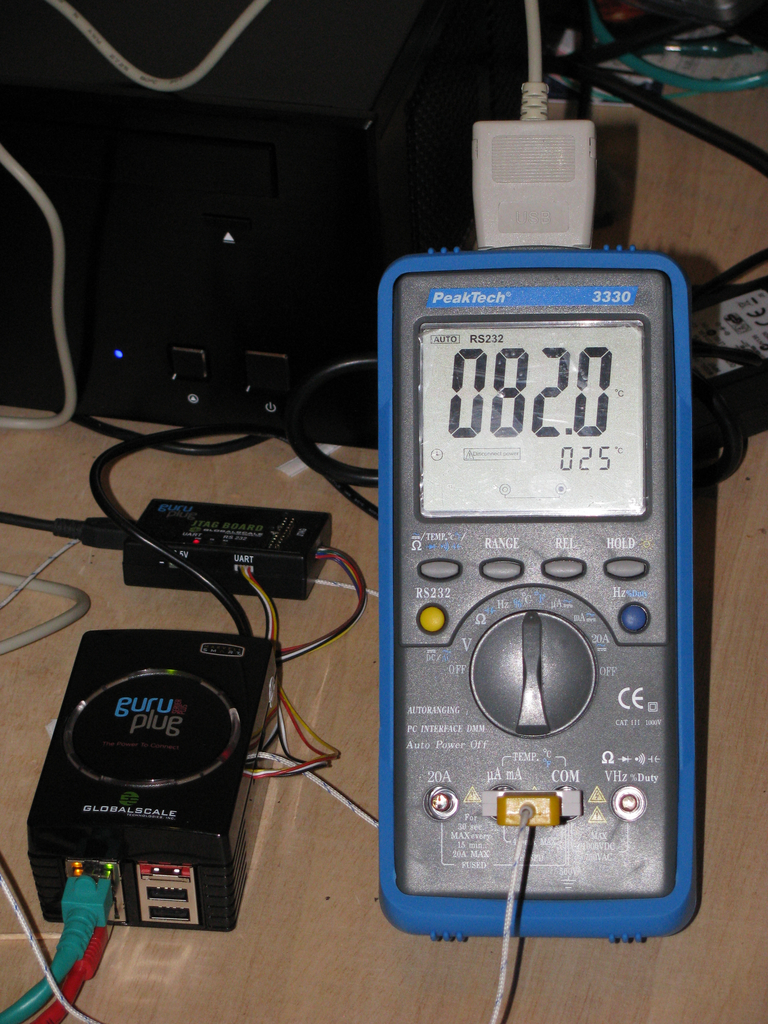
First tests with the new heatsinks Some tests with stress and some heavy network traffic showed quickly that the heat sinks are working well! But not well enough to be able to mount them into the original closed case (how the hell was this supposed to work before!?). Without any air to breath the temperature on the CPU heat sink went up to 85 deg C quickly. So on the CPU's die are > 100 deg C, which is at least close to the max allowed temperature. GuruPlug Server Plus - still too hot

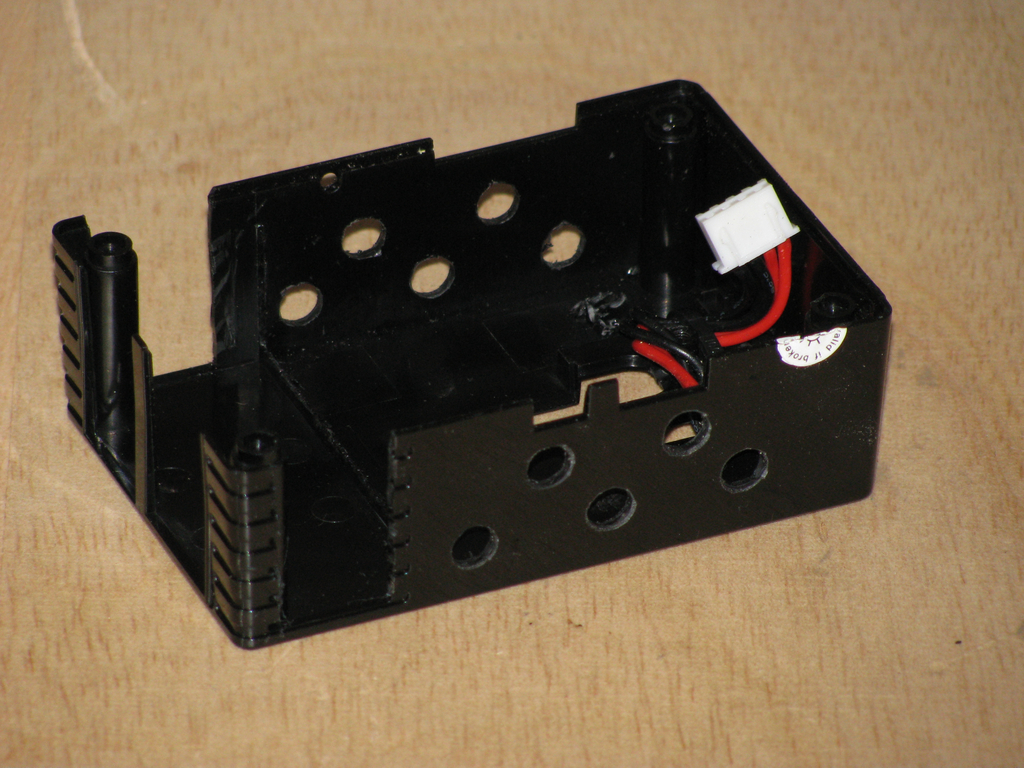
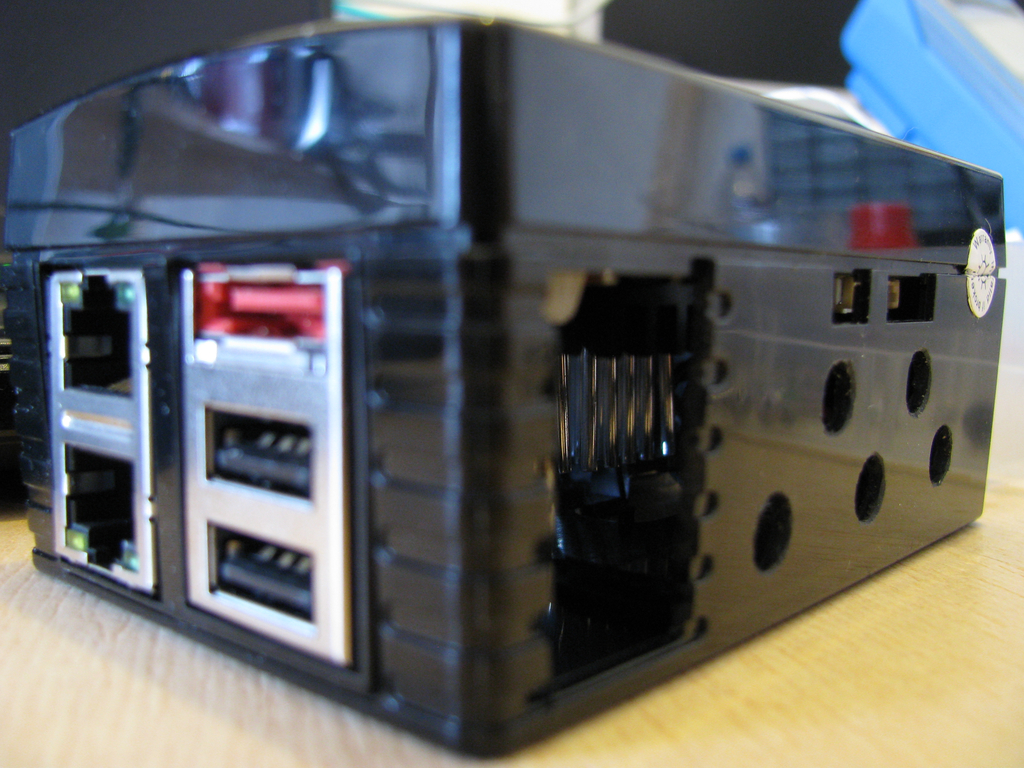
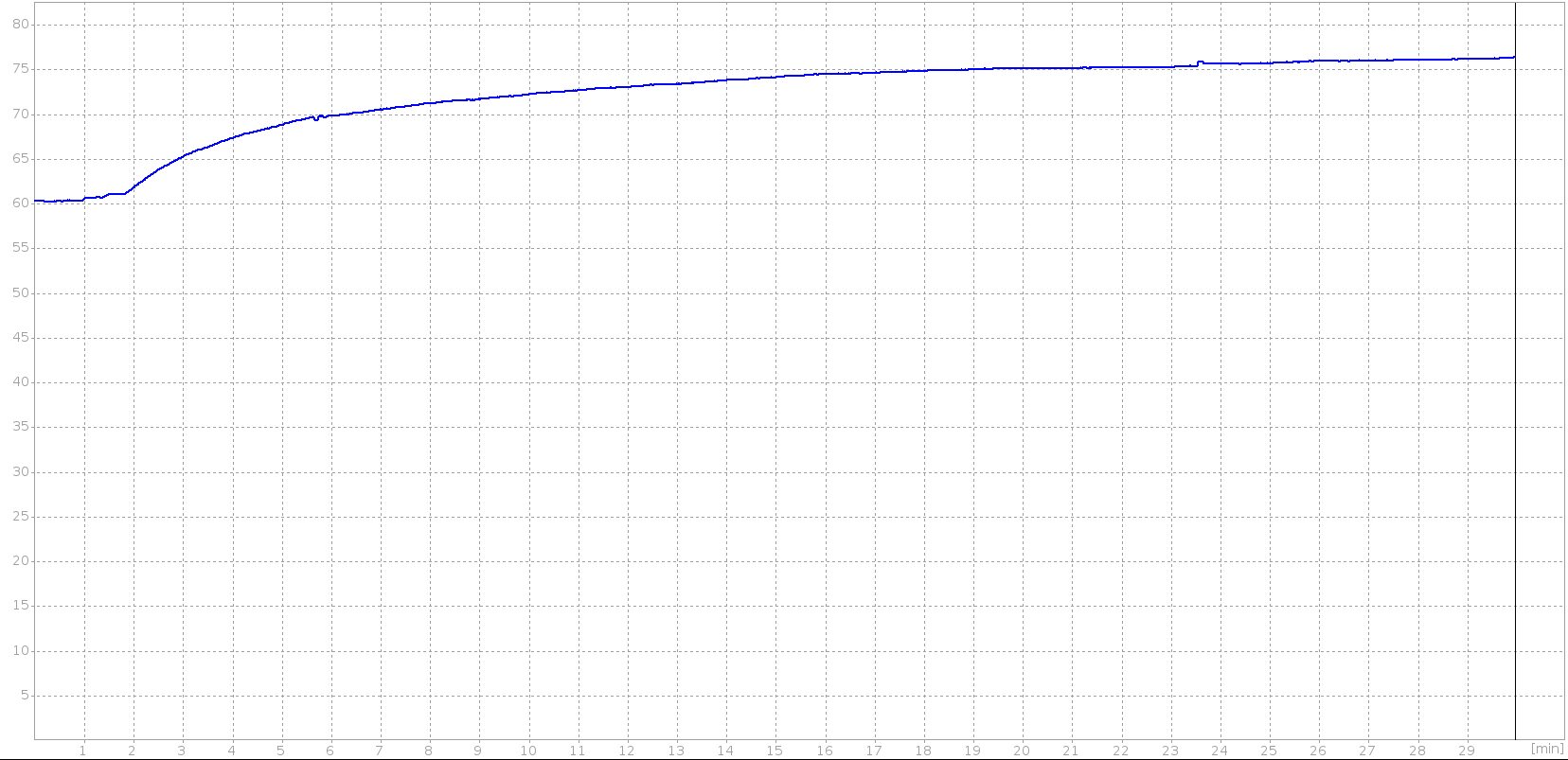
Adding air holes Obviously some additional air holes are necessary. After meeting my drill and cutter, the original case looks a bit like a piece of cheese now. GuruPlug Server Plus - case with air holes 1 GuruPlug Server Plus - case with air holes 2 Some more tests show that the temperature sticks around 76 deg C under heavy load now. That is still pretty hot, especially when the temperature in the room becomes hotter in summer. As I'm not going to run a lot of traffic trough it (my cable connection is limited to 20 MBit/s anyway), I guess it will work. Below is a graph I've recorded with my multimeter and qtdmm. It shows that the temperature rises to ~76 deg C and stays there. GuruPlug Server Plus - temperature curve Not sure if I could introuce some more load, the CPU had a load of 6 running stress. Network traffic was around 2x100MBit/s again. I could imagine with 2xGBit the CPU and PHY would become much hotter (no idea if it would be able to handle it at all, though). The PHY was usually a bit cooler than the CPU, so I didn't spend time to measure the temperature properly.

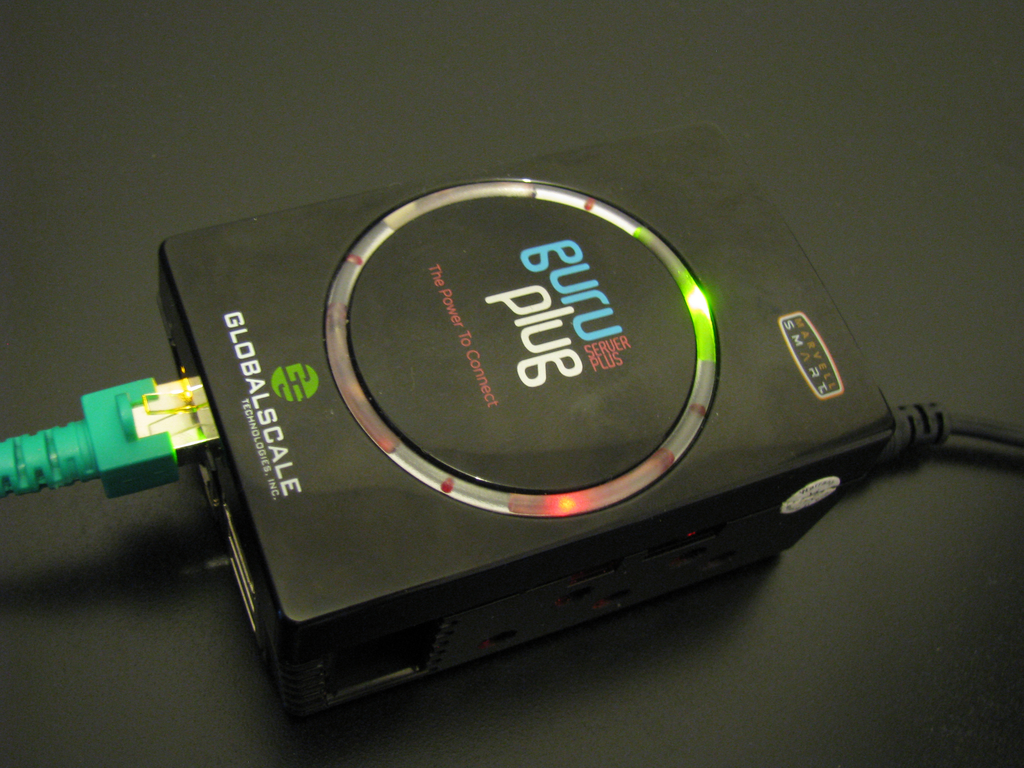
Conclusion My opinion is still the the original design of the plug is an insane QA and design failure. There is no way that it could ever work as shipped originally. If I'd have to design a new case for it, it should have a single insulated compartment for a PSU to ensure that no contact with high voltage is possible. The case around all other parts should be made of alloy with a lot of air holes. So the case could be used as heat sink (properly done, not with these insulating duct tape strips) and at the same time allow air circulation and a nice view on the LEDs on the board. Of course the case would be much more expensive than, but I'm sure it would work properly and would be worth the money. And if done peoperly, it would look much better than this blinking plastic thing. I could imagine it would sell well! So at the end I'm wondering what GlobalScale Technologies will do. I doubt it will be possible to create the 'professional upgrade kit' as they had announced before. Replacing all units is the only proper way. We'll see what happens. At least my GuruPlug is working well now and it will be used as replacement for my OpenWRT router soon. WiFi is not working, but that will be handled by my media center anyway. GuruPlug Server Plus - running plug

Joey Hess: sunny day

I'm back in town. After approximatly 4 full days of use, the first battery bank dropped to 9 volts, my cutoff point for safe use. Which turned out to be below the safe use point of my laptop power adapter, which burnt out while I was busy listening to music and adding power-saving caching stuff to my mpd setup. Irony not appreciated, world. I decided to come back while the other bank is still relatively full.
my modest PV array
Hurrying downtown to grab lunch in between work on Branchable, I noticed it was a beautiful sunny day, and I realized that this makes such days even better, because besides enjoying them, I know I'll be enjoying the yield on chilly nights sometime later. Well, in theory. Actually, the very antique charge controller in the house was dead and bypassed, so I removed it. I called its manufacturer wondering if it could be refurbished, but they suggested it belonged in a museum. So I've ordered a new controller, a Xantrex C-35. Until that comes, pretty days like today will charge, or possibly over-charge the batteries, which will then drain back out at night.

Sylvain Le Gall: Dirty fix for omlet vim extension

omlet (or here) is a vim extension for writing OCaml code. In my opinion, it has a better indentation than the standard OCaml vim support. Unfortunately, it has a cost: the indentation vim code is more complex. And it has a few bugs :-( The main bug is that it doesn't like unbalanced comment opening "(*" and closing "*)" tags. From time to time, it enters an infinite (or very long) loop when there such a tag left in your file. It can be very far away from the point you are editing. It isn't too problematic, because unbalanced tags are a syntax error. But the problem is that it matches these tags inside strings also. So whenever you start using regular expression like "(.*)" the whole indentation fails. But there is a very ugly solution to this problem! Problematic code:
 let parse_rgxp =
   Pcre.regexp ~flags:[ CASELESS] 
     "^(?<license>[A-Z0-9\\-]*[A-Z0-9]+)\
      (?<version>-[0-9\\.]+)?(?<later>\\+)?\
      ( *with *(?<exception>.*) *exception)?$"
Solution, add ignore"(*":
 let parse_rgxp =
   ignore "(*";
   Pcre.regexp ~flags:[ CASELESS] 
     "^(?<license>[A-Z0-9\\-]*[A-Z0-9]+)\
      (?<version>-[0-9\\.]+)?(?<later>\\+)?\
      ( *with *(?<exception>.*) *exception)?$"
Very very ugly coder: you balance comment tags in dead code -- very very bad ;-) ps: another solution when the plugin enters the infinite loop, hit Ctrl-C. This will stop it and let you define your own indentation.

Lior Kaplan: Hebrew translation and Bidi issues in Openoffice 3.3 (beta)

In the last few years the Israeli government founded some work on openoffice.org by Tk Open Systems Ltd. During the years, the work has resulted with an Israeli version , released after the official release and includes a lot of patches to improve support for Bidi and Hebrew specifically. Although most patches were submitted to the hamburg , a lot of them weren t used and are still waiting for inclusion. The funding the that projects stopped a year ago (9/2009), and the last release of the Israeli version is 3.1.1. Since then we had a quiet period in which 3.2 and 3.2.1 were released. While still enjoying the fruits of the projects in these version, it seems that it s time for the community to take over, as we lost hopes for yet another funds from the government. In may Netanel and I started talking about taking over the Hebrew translation, and in June we got Hebrew added to the openoffice.org pootle server. We started with about 80%, and got to 86% in time to get to the list of languages getting a language pack built for. This was a first achievement as Hebrew didn t have a language pack since early on the 2.x versions. I believe that working as part of the openoffice.org l10n group and with openoffice.org release schedule will only benefit for the Hebrew translation process. We used the language pack to test the translation and improve it. We also were able to get to 89% with the help of more volunteers.I believe it s now much more consistent than before. In the process with manually checked Writer thoroughly, while Calc and Impress got less attention due to the time frame. But we fixed some major translation issues in all of the three components. While testing the translation we also started to report Bidi issues we saw in 3.3 beta, hoping they will be fixed for the final release. For example, the main openoffice.org screen on windows has is getting repainted wrongly when moving the mouse over the options (text, spreadsheet..). This looks very badly as this is the main screen! See issue #97556 for details
Openoffice.org main screen in RTL UI

In RTL UI the main screen doesn't get repaited properly.

In addition to report new issues, we also started to keep track of the already opened issues regarding Bidi and Hebrew. I m following the issue system for a few years now, but seeing the list of issues organized in the wiki gave me a better orientation in the problems we have. E.g. finding some related or similar issues and mention each other in the comments, when someone goes to first one, he could also fixed the other as the problem is similar and probably comes from the same code. Organizing also the already closed bugs in 3.x, gave me a some kind of a changelog for the Bidi and Hebrew related issues. In that manner, version 3.1 was a very good for Bidi, thanks for a lot of efforts and work with the Bidi meta issue #79434. The wiki page is in Hebrew, but looks quite OK with Google translate (see here). Hoping to have 3.4 a major release (Bidi wise), I ve opened issue #114236 as another meta issue for Bidi related issues. I ve kept Hebrew specific issues out, as to get it more general and also relevant for Bidi users in other languages. Any help of those issues will be more than welcome (starting with votes and ending with patches).
Filed under: i18n & l10n, Israeli Community, Openoffice.org

Keith Packard: altos-release

AltOS The Altus Metrum Operating System Altos is the core of the software for all of the Altus Metrum products. It runs on the 8051-based micro-controllers within both the flight computer and the ground station devices. AltOS a small cooperatively multi-tasking operating system. AltOS Version 0.7.1 Released Bdale and I have just released AltOS version 0.7.1. Version 0.7.1 is the first release to include the new Java-based ground station software which runs on Linux, Mac OS X and various Windows flavors. AltOS Changes in 0.7.1
  1. Deal with Windows and Mac OSX USB stacks. These two operating systems do interesting things with USB and found some boundary conditions within the AltOS USB stack which couldn t be tested on Linux. With test cases discovered, the panic calls were turned into code that dealt with these cases correctly.
  2. Increase packet mode payload size and add callsigns. The callsigns are set by the master end of the packet link (normally the TeleDongle) so that the entire radio conversation conforms to regulatory requirements. Increasing the payload size makes data transfers go faster.
  3. Place configuration data in fixed flash addresses. This change makes it possible to read the serial number and radio calibration data back out of the flash data when reprogramming a device.
TeleMetrum Changes in 0.7.1
  1. Ensure GPS date information is written to on-board data logger. The GPS date information is used when constructing eeprom log file names; without this, the eeprom downloading tool would generate a filename based on the current date.
  2. Allow TeleMetrum to be used as a programming dongle. This means the user can reprogram a TeleDongle or another TeleMetrum using the TeleMetrum as a programming dongle. Before this, only the TeleDongle could be used to program other devices.
AltosUI - Ground Station Software for Altus Metrum devices Version 0.7.1 is the first release containing our new cross-platform Java-based user interface. AltosUI can: Three Operating Systems, One AltosUI AltosUI provides all of these features on the three target operating systems, Linux, Mac OS X (version 10.5 or newer) and Windows (XP, Vista or 7). The bulk of the software is written in Java and is built once and tested and delivered on all three target platforms. A tiny shim library is built on each system to provide access to the Altus Metrum devices connected over the USB link. Thanks to our contributors! We ve gotten lots of help getting this software built and tested: Future Plans With the basic AltOS and AltosUI functionality running, we ve got lots of ideas about where to take the system in the future. And, we d love to hear ideas from you as well. Some of the ideas we ve like to get done include:
  1. Google Earth file export. We had a Linux-based C program to export a KML (Keyhole Markup Language) file that Google Earth can read and present to the user overlayed on satellite photo data.
  2. Data Plotting. Being able to plot flight data right in the UI would be nice, and there are several Java plotting packages available to try out.
  3. State-dependent display. When the rocket is on the pad, you only want to know if it s ready to fly. When the rocket is descending on a chute, you want to know where it is in the sky and how fast its falling. Presenting a limited amount of information that is most likely interesting to the user should make the display more useful.
  4. Ejection charge testing. The TeleMetrum firmware has the ability to fire ejection charges over the USB or radio links. Safely hooking this up to the user interface will allow for wireless ejection system testing. The key here is safely , of course, which means figuring out a fool proof user interface.
I m sure there are any number of additions that could be made to this list; feel free to send along ideas that you ve got. Of course, all of this software is licensed under the GNU General Public License, so you can get the source and hack on it in the comfort of your own home.

9 September 2010

Cyril Brulebois: SD: Bugzilla gets history support

(Disclaimer: Possibly one of my longest post ever, you may want to scroll to the bottom and only look at the pictures.) So, what s new in SD since last week? Fetching everything From http://bugs.freedesktop.org/, it was possible to download all the bugs I reported there (that means 2 ), but trying to download those reported by Julien led to a crash without any trace. Dichotomy FTW, I came up with a bunch of bugs which would lead to the same result, which confirmed that the amount of bugs processed at once wasn t the issue. Playing around with strace, it appeared that exchanges with the remote server were apparently fine, so an issue on the client-side SOAP machinery got suspected. So let s enable tracing:
use SOAP::Lite +trace => 'all';
Tada! The issue was indeed local: malformed XML got received, leading to a die call issued from the XML-RPC layer. Thankfully, one can set up a fault handler, which I used to display the range of bug IDs which triggered that bug, so that people can look into it and determine what to add to the blacklist until the underlying issue s been investigated (presumably, bugzilla s at fault). Speeding things up With that blacklisting of buggy bugs, one can then try to move to other queries, dealing with more bugs. Some examples follow:
reporter=kibi@d.o
product=xorg&component=Driver/VMWare
product=xorg&component=Driver/nouveau
product=xorg&component=Server/general
product=xorg&component=Driver/intel
Moving from 2 bugs to 10-100 bugs (Julien s or VMWare s) was OK. But then moving to several hundreds of bugs (Driver/nouveau = 500+ bugs) led to noticeable performance issues. Not to mention what happened when one reaches several thousands of bugs (Driver/intel = 2500+ bugs). Indeed, even with network exchanges cached into a local file, processing data was taking up to several dozens of minutes. I knew about Perl s -d:DProf, which helps figuring out where time is spent, but was pointed to -d:NYTProf (and its accompanying tool, nytprofhtml). Some hotspots got noticed: Things got better, but not good enough. There are several Prophet (the engine under the hood) backends, so one can play with:
PROPHET_REPLICA_TYPE=sqlite   # the default for SD
PROPHET_REPLICA_TYPE=prophet
Switching to prophet was a big win, but still not good enough. Indeed, many tiny files are written, and most of the time is spent in I/O. Although I m nothing like a performance guru, I guessed that running on an average laptop, with ext3 and its default commit interval of 5 seconds might not be helping, so I gave a quick try to -o remount,commit=60, and that seemed to help. Even though there are probably other tricks to find in that area (which hopefully won t require root privileges ), there s already a patch which landed in prophet s master branch, replacing File::Spec->catfile with an optimized version: that function alone was eating 10% of runtime In the sqlite case, disabling the auto-commit feature helped reducing the I/O load, but a proper patch is still lacking for now (running into locked database issues, or into missing tables after having created them isn t fun, so I postponed debugging that). Since performance issues looked like they could be solved eventually, I switched back to implementing missing features. Handling more than comments Currently 3 types of stuff are currently fetched from the bugzilla server: (Yes, that means that attachments are totally ignored for now.) Until now, only bug comments were considered. The first comment was used to determine a pseudo-title (using its first line), the reporter, and the creation date. This approach was chosen to try and get a basic sync working quickly, so as to get: Now, the algorithm is the following: from the bug status, determine a set of properties of interest; then walk the history backwards, and update the properties incrementally until the (presumed) initial state is reached. Then create the ticket using this initial state . Adding the incremental property changes to that initial ticket makes it possible to represent the bug s life as a list of Prophet::ChangeSet objects. That s where the fun begins, since properties in the bug status may not match properties in the bug history, so one needs to establish property correspondence. Also, some properties can be multivalued for added fun. I believe that s where most of the time is going to be spent while developing a new replica type in SD: once one knows how to get a hand on needed info on the remote server, the main question is what to do with it. For now, I decided to ignore many fields to make it possible to do a big sync like Server/general, property support will be improved later on. Screenshots Instead of pasting lengthy terminal excerpt, let s use some screenshots instead (sorry, I m not sure how to present such things in an accessible way, suggestions welcome). Cloning Julien s bugs, listing all open tickets, listing all tickets, searching using a regular expression: Cloning, listing, searching Displaying bug 42 (that s the local ID): Displaying Now, let s start the embedded web server through sd server --port 1234 and point the browser there. List of RESOLVED bugs: List of RESOLVED bugs Status and comments for bug 42: Status and comments for bug 42 History for bug 42: History for bug 42 Compared to the original bugzilla page: Same bug on FreeDesktop.org Next time Some items which need work: Flattr this!

Joerg Jaspert: Debian work

It has been a pretty exhausting time since my last blog post in my area of Debian land . If you followed the news you should have seen some of it. Last weekend there was the point release. For those I have the (good?) position to sit in the middle of the working queue, where the hardest part (sorting out which stuff to include, getting it all build, etc) is already done. Still, due to the amount of steps neccessary to take its usually a multi-hour thing. This one release was even slower, as we had to wait for hours until the package lists had all been built - unfortunately the thing writing that keeps berkeley db files of data around as cache - and uses the FULL path to the files as key. How stupidly annoying when the path changes during a server move. Ohwell. The other big part that got a tiny bit of press coverage was the move from www.backports.org over to backports.debian.org. This was actually waiting for me for a good longish while already (err, well, since well before DC9 this was decided to happen) but now I finally got myself moved. This turned out to be much more work than I ever feared (which is part of the reason why it took so long), but some numbers: The db update alone took me a week to figure out which steps to do in which order. Good to have an automated system, if you the manage to have the updates run specific to the main archive. Ups. When I was done with the database (during which I managed to just erase all work done by formorer and rhonda on the webpage, ups^2) I had some code and config cleanups to do, and especially manage to get it all running with a new path layout. Much less complicated, but enough work to do, before I finally was far enough to get it all move so far that formorer could start testing it and we could turn off the old system. At this time I had to fix up our shell scripts for our cron jobs, but that (with one exception) was a nearly straight forward easy task. And on Wednesday I managed another goal - backports is fully running the master branch of dak, the exact same code as on ftp-master. The cronjobs are slightly different, as well as the config (of course, duh), but otherwise its the same. My current goal and the last things left on this move todo is to change the cronjobs so that debian as well as backports do run the SAME scripts, but their configs list which tools should be run when. Considering that my dinstall cron already contains something pretty much a state machine I think I m insane enough to get this in shell, but when I told that to Mark (you know, the second ftpmaster :) ), I heard something very much like vomiting (you know, 700km between us, this might mean something) and then the plea to use a real language for the task. Oh my. I like my shell. :)
There is one big black cloud on the horizon to see. I have to do something similar for security. They are at a dak (and database) version pretty similar to what bpo had. They do need to support this obnoxious spare new format too before they can support security for squeeze, so there is no way I can ignore that archive for much longer. I already asked DSA for a vm in which I can play (not good to interrupt security archive for long), but probably wont start on this before the upcoming FTPMaster meeting. Pretty busy otherwise. Wellwell, I hope it will be less painful, as I now know the steps already. :)

Matthew Garrett: Linux backlight control

Backlight control is one of those things that you'd think would be simple, but ha ha this is computing so of course it's an utter disaster and everything is a huge mess. There's three main classes of backlight control in the x86 world, all of which have drawbacks:
Right now, if there's an ACPI backlight interface then that's usually the only thing we'll show you. We can do that because we can identify if there's an ACPI backlight interface when we parse the ACPI tables at the start of booting, and that information can be registered before we start setting up any other backlights. The problem comes when we have no ACPI backlight interface. We don't have any idea whether there's a platform mechanism until a platform driver loads, which could be at any time. As a result, we've been reluctant to expose GPU-level backlight control because doing so would often give you two separate backlight controls and no indication as to which should be used. Userspace doesn't really have a way to make that decision either, so everyone ends up unhappy.

This is especially problematic with some machines which provide no ACPI or known platform control (or, in the case of some Samsungs, only provide platform control if you have a special Linux BIOS that Samsung won't give you) but can control the backlight via the gpu. Right now you get nothing, because giving you something would potentially break other systems and the needs of the many etc. Sorry! But this is obviously problematic in the long term, especially because multi-GPU machines tend to have multiple ACPI backlight interfaces, so I've been working on a better approach.

When a backlight device is registered, it appears under /sys/class/backlight. If it's an ACPI device it has a symlink pointing to some random ACPI device. If it's a platform device it's pointing at something like "dell-laptop" which is approximately unhelpful when it comes to figuring out what it controls. If it's a GPU-level device then it probably points at the PCI device, which is helpful except in the case where you have multiple backlight controls on a single GPU. So, by and large, you have no good way to identify which backlight control is preferable unless you keep a huge list of all possible backlights along with some scoring.

The first thing I've added to improve this is a "type" attribute. This tells you whether a given backlight is firmware-level (like ACPI), platform-level (like the various laptop drivers) or performs raw register writes (like a GPU driver). That lets userspace decide which interface is preferable. It'll typically be the ACPI interface, because that's the most likely to keep synchronisation and so avoid bizarre brightness bugs. The next thing has been to start fixing up the parent links. There's nothing we can do for the platform level devices, but the ACPI drivers could at least point at PCI devices rather than into ACPI space. That means that multi-GPU systems can now identify which interface to use based on the currently active GPU. Finally, I've started pointing the GPU-level backlight controls at the specific output rather than merely at the PCI device. This probably makes little difference for laptops as such, but once we start exposing backlight control for monitors that support ddcci it'll make things much easier as we'll know which backlight control corresponds to which monitor.

I've then written a small library that accepts information about the output and picks the "best" backlight for the device. It's obviously based on a pile of heuristics and there's a couple of bits of API that I suspect need to be nailed down yet, but it means that this code only needs to be written once. It's then simple to glue this into X drivers, which means that they can expose a "Backlight" xrandr property on each relevant display. That means that backlight control is then handled at the session level with the X server acting as the privileged agent, which simplifies a bunch of things and means we can finally let hal die entirely. Long-term this means we'll have unified backlight control for all of your displays, which is a wonderful thing.

Summary: We kind of suck right now, but there's a reasonably clear path to getting better.

Neil Williams: pbuilder not finding $ HOME /.pbuilderrc anymore?

This took a bit of searching, so it's here for reference. I'm sure it'll catch out people who upgrade from Lenny to Squeeze as the initial presentation can be deeply mysterious and frustrating.

I keep my pbuilder stuff outside /var/, so I have a file /home/neil/.pbuilderrc and until recently, this worked fine. Naturally, pbuilder needs sudo to call it, so sudo pbuilder update was a routine command. Then it suddenly stopped working and it was mysterious, pbuilder was looking for /home/root/.pbuilderrc which was just weird. root/.pbuilderrc might make a little more sense, /home/root is just plain wrong.

First, blame pbuilder, no, not changed recently - certainly not since I last ran the command successfully. Hmm.

sudo then? Recently updated, aha, the changes listed in the PTS describes something being documented in NEWS.Debian relating to pbuilder - dig, dig, the answer (indirectly) was in the README. Need to add a command to user lines in sudoers:
, env_keep+="HOME"

Also, act on this guidance in sudo visudo:
# Uncomment to allow members of group sudo to not need a password


Even more nastily, sudo does still need a password (because I've set rootpw later) but this line is still required.

Now restart sudo sudo invoke-rc.d sudo restart which is horribly recursive. (Yes, I did mess up visudo at one point and have to use just plain su to get back access.)

Ho hum. It works, so why do I feel that I've done something bad?

(comments still disabled because of spammers - captchas simply don't work, neither does OpenID, so don't blame me. Those who know me already know how to contact me. The details aren't exactly hidden.)

Kartik Mistry: non-free (web) services

* I was thinking to move out of as many as non-free (FaiF) web services after reading mako s this post and now zack wrote about it with good explanations and reasons. What things I m using? And its replacement: - GMail [and related stuffs] (I don t own server/email setup, may be next year s plan?)
- Facebook (Big question here how will I keep touch with my wife?)
- LinkedIn (My profile there is crap, half baked. Can leave it without worry)
- Twitter (Identi.ca)
- Orkut (Already not using much)
- Github (Gitorious) Thank God. WordPress is amazing and free. I can keep in touch with this amazing blue pill virtual world with blog posts at least. Starting acting on the list from bottom-up. Lets see how far I can go.

Biella Coleman: Experiential Amnesia

So, conventional wisdom is that once you experience something first hand, it sits close to you, so that you can learn from it, think about it, and possibly invoke it. This rings true for me, except for one particular type of experience finishing a large and complicated project like writing a dissertation, taking PhD qualifying exams, like writing a very complicated review article. Once it is done and over with and a few months have walked away, I no longer can fathom, at all, how I even did it. It is as if I went through the experience and then amnesia set in, erasing and wiping out the fibers of events, emotions, and thoughts that went into making and finishing the project. I find this unnerving, for various reasons. First, this di-juncture is not one I experience with other experiences, even unpleasant ones, like pain (broken collarbone, burnt hand, terrible earache), for I am able, nearly always, to shore up some shadow of those experience. More practically, when I am faced again with needing to conquer what feels unconquerable (which, unsurprisingly, is my current predicament), I have no experiential reserve to guide me. Instead, it is like I am standing at a new shore, for the first time. I tell myself, I have done and I can do it but there is no concomitant emotional register or memory that assures me that this is in fact true. Maybe a few more projects like these and there will be some imprint to steer me in the future but somehow I suspect my experiential amnesia will remain the same.

Christian Perrier: Care about samba in squeeze?

If you do care about having good samba packages in squeeze, you can help. If you're in a hurry and don't want to read the blah-blah, just skip to the end of this story and read the last paragraph. Thanks to the confidence of the release team, we (samba packagers) have been "authorized" to upload samba 3.5.4 in unstable, thus targeting having that version in squeeze. Up to July, we were indeed targeting 3.4.8 for squeeze, on the assumption that, as usual, samba upstream releases need some maturation before being strong guarantee that no regression happens. In July we were ready to move and finally upload in unstable the 3.5 packages we kept in experimental until then. The final decision was to be taken during DebConf10. It was roughly taken with Steve Langasek, but....I couldn't upload immediately (most people know that working on major packages during DebConf is a dream)...and had holidays afteer. In the meantime, the freeze happened so we got theoretically screwed... Still, I could manage to convince the release team that long term support for samba 3.5 will certainly be better than 3.4...and that functionality in that version (particularly several Win7-related fixes and a much improved code for printing support) and we got a notice "please upload to unstable and come back to us in a few weeks". That happened, finally. So, now, we need YOU, samba users and admins, to test these packages. Merging our packaging branches was hard (thanks, Steve Langasek, for your help) and glitches are always possible. So, please TEST these packages by installing samba, winbind, libsmbclient and friends from unstable....and report bugs, preferrably the release critical ones....

Stefano Zacchiroli: yes we can

(... achieve Debian world domination without endorsing Facebook) Yes Raphael, we can.
Nobody said it would have been easy, to reach Total World Domination endorsing Free Software only, but that's not a reason to stop trying. I've recently stumbled upon a very nice article by Benjamin Mako Hill, titled Free Software Needs Free Tools, which I believe it's the best possible commentary to the proposal of having an official Debian Facebook page. Of course there is nothing wrong in having non-official, or let's call them "fan" pages, about Debian on Facebook. As a matter of fact we already have one, as you point out. And I also agree that it would be better to know who is behind that page. Individuals, including Debian Developers, are obviously free to use whatever media they please to spread the cause of Debian. After all, as individuals, each of us decide upon her own personal trade-offs (for instance, a trade-off of mine is to have both identi.ca and twitter accounts and to post only to the former with forwarding to the latter). There is no way to have an official Debian Facebook page and pretend that we are not, de facto, endorsing Facebook. That's why I believe having official Debian presence on Facebook, or on any other non Free Software platform, will just weaken our cause. It will send out the message that Free Software it's something which is good for others to use, but not necessarily for Debian as a project. That does not mean that we live under a rock and that we consider social networks useless to promote the Debian cause. It just mean that we should be picky in choosing social networks that respect our Free Software principles, as we are picky in choosing licenses that are DSFG-free. For instance, I'm glad to mention here that the Debian publicity team has recently obtained access to http://identi.ca/debian and will start using it soon. Subscribe! :-) PS This post also gives me a chance to comment on a so called "community page" of mine on Facebook. As I've briefly commented a few days ago I've nothing to do with that page. TTBOMK its content is just automatically injected from Wikipedia. The "Stefano Zacchiroli is on Facebook" claim on the upper left is true only in the sense that there are other people with my name on Facebook. IANAL, but such a claim (not the page in itself) will probably be considered an abusive advertisement in many countries around the world. update: re-word the identi.ca/debian paragraph, to better blend with surrounding text
update: mention "Debian" in heading

Christoph Berg: belier

Sometimes remote accounts are only reachable with a series of ssh/su/sudo commands. Using ProxyCommands in .ssh/config works for simple cases, but not with several hops, or if passwords have to be entered. The belier tool takes as input a series of user@hostname strings and will produce an expect script that does the actual login work.
$ cat input
user@host1 root pw1
user2@host2 pw2
$ bel -e input
$ cat host2.sh
#!/usr/bin/expect -f
set timeout 10
spawn ssh -o NoHostAuthenticationForLocalhost=yes -o StrictHostKeyChecking=no  user@host1
expect -re  "(% # \\$) $"
send -- "su - root\r"
expect ":"
send -- "pw1\r"
expect -re  "(% # \\$) $"
send -- "ssh -o NoHostAuthenticationForLocalhost=yes -o StrictHostKeyChecking=no  user2@host2\r"
expect -re  @[^\n]*: 
send -- "pw2\r"
expect -re  "(% # \\$) $"
interact +++ return
The generated host2.sh script uses ugly ssh options, but is easily edited. Now I need the same thing for scp... Update: Carl Chenet, belier's author, kindly pointed me to the documentation which has examples how belier can set up ssh tunnels to copy files.

MJ Ray: Forthcoming Attractions

Members of our co-op will be attending: Further events are being planned. If you d like to suggest an event or arrange to meet at one of the above events, please contact us.

8 September 2010

Julien Danjou: Emacs, Org, whatever the weather!

Another week, another Emacs extension! I had (once again) a wonderful idea: what if I could have the weather forecasts in my Org agenda? Wouldn't that be wonderful? My quest started by looking for a service offering a good weather forecast API. I found nothing simple as the hidden Google Weather API, which is nice, but not documented. Not at all. Not a single line. Nah. Then, I wrote a google-weather extension, implementing a basic Emacs Lisp API to retrieve data from the Google service:

ELISP> (google-weather-data->forecast (google-weather-get-data "Paris"))
(((9 8 2010)
  (low "53")
  (high "63")
  (icon "http://www.google.com/ig/images/weather/rain.gif")
  (condition "Rain"))
 ((9 9 2010)
  (low "53")
  (high "69")
  (icon "http://www.google.com/ig/images/weather/chance_of_rain.gif")
  (condition "Scattered Showers"))
 ((9 10 2010)
  (low "54")
  (high "72")
  (icon "http://www.google.com/ig/images/weather/partly_cloudy.gif")
  (condition "Partly Cloudy"))
 ((9 11 2010)
  (low "55")
  (high "75")
  (icon "http://www.google.com/ig/images/weather/partly_cloudy.gif")
  (condition "Partly Cloudy")))
My API even implements data caching, which is nice to speed up the agenda display. By the way, I think my next job will be to hack on the url-cache feature of Emacs, which is utterly buggy and has probably never be used. But that's another topic. Finally, I just had to write another module on top of that to export the forecasts to Org. A screen shot is probably better than a long and boring explanation, so here's the result. My only regret is that the icons provided by Google are ugly squares, so I did not want to use them. On the other hand, I did not found any icon set that would have all the icons Google provides (around 20). So I felt back on the icon naming specification to map the Google images to standard images. Any better idea would be welcome, of course. All the information can be found on the Google Weather for Emacs extension homepage. Flattr this

Ingo Juergensmann: Solved: Problems with IPv6 and Bridging/Xen

Since I ordered a new dedicated rootserver, I had problems with my IPv6 setup. Thanks to Niggurath@#debian.de/ircnet and his tips, I finally found the reason for all the mess when I migrated from my old rootserver with Lenny to the new one running Squeeze. The problem was that in /etc/sysctl.conf there was the following setting on the old server:
net.ipv6.conf.all.forwarding=1
Due to a issue in Lenny, this setting had basically no effect on the old server. Sysctl.conf was called before the IPv6 interface went up, so this setting failed or never got active. Meanwhile in Squeeze IPv6 seems to be enabled at an earlier point in the boot process and the forwarding setting will succeed. This in return resulted in my not working IPv6 setup. When I disable the line in sysctl.conf everything works just fine: the domU honors the Router Advertisments of radvd again and everything is fine again. Sometimes the solution is so simple, you can't find it yourself. :-)

Roland Mas: Gnus, Dovecot, OfflineIMAP, search: a HOWTO

A long time ago, when I was first introduced to email, I was using the Mail program from Unix. I quickly converted to Elm, then Mutt, which were both better in terms of interface. Then I found out about Gnus, and I wouldn't dream of letting it go now. However, Gnus has started showing its age several times, and several times have I needed to upgrade the way I was using it: first because I needed to sort and split email, then because I took the sorting out of Gnus and into Procmail for more advanced filtering (including spam filtering), then because I switched to storing the emails on an IMAP server so I could read them remotely from several computers. My setup as of a few days ago was functional, but since I have grown over time to splitting emails into several hundred folders, checking for new messages was becoming more and more boring. So it's time to jump in with all the cool kids and switch to a modern solution: still Gnus of course, but with Dovecot, OfflineIMAP for synchronisation, and let's add email searches into the mix while we're at it. My web searches didn't turn up a simple step-by-step HOWTO, but I assembled bits from different places, and here's my attempt at documenting my new setup. Goals Assumptions Dovecot setup We'll use Dovecot as a local IMAP server. And since we're lazy, we'll access it over a pipe, and dispense with the network part. OfflineIMAP setup OfflineIMAP is basically an optimised two-way synchronisation mechanism between two email repositories . We'll use it in IMAP-to-IMAP mode.
 [general]
 accounts = MyAccount
 pythonfile = .offlineimap.py
 [Account MyAccount]
 localrepository = LocalIMAP
 remoterepository = RemoteIMAP
 # autorefresh = 5
 # postsynchook = notmuch new
 [Repository LocalIMAP]
 type = IMAP
 preauthtunnel = MAIL=maildir:$HOME/Maildir /usr/lib/dovecot/imap
 holdconnectionopen = yes
 [Repository RemoteIMAP]
 type = IMAP
 remotehost = mail.example.com
 remoteuser = jsmith
 remotepass = swordfish
 ssl = yes
 nametrans = lambda name: re.sub('^INBOX.', '', name)
 # folderfilter = lambda name: name in [ 'INBOX.important', 'INBOX.work' ]
 # folderfilter = lambda name: not (name in [ 'INBOX.spam', 'INBOX.commits' ])
 # holdconnectionopen = yes
 maxconnections = 3
 # foldersort = lld_cmp
 # Propagate gnus-expire flag
 from offlineimap import imaputil
 def lld_flagsimap2maildir(flagstring):
   flagmap =  '\\seen': 'S',
              '\\answered': 'R',
              '\\flagged': 'F',
              '\\deleted': 'T',
              '\\draft': 'D',
              'gnus-expire': 'E' 
   retval = []
   imapflaglist = [x.lower() for x in flagstring[1:-1].split()]
   for imapflag in imapflaglist:
       if flagmap.has_key(imapflag):
           retval.append(flagmap[imapflag])
   retval.sort()
   return retval
 def lld_flagsmaildir2imap(list):
   flagmap =  'S': '\\Seen',
              'R': '\\Answered',
              'F': '\\Flagged',
              'T': '\\Deleted',
              'D': '\\Draft',
              'E': 'gnus-expire' 
   retval = []
   for mdflag in list:
       if flagmap.has_key(mdflag):
           retval.append(flagmap[mdflag])
   retval.sort()
   return '(' + ' '.join(retval) + ')'
 imaputil.flagsmaildir2imap = lld_flagsmaildir2imap
 imaputil.flagsimap2maildir = lld_flagsimap2maildir
 # Grab some folders first, and archives later
 high = ['^important$', '^work$']
 low = ['^archives', '^spam$']
 import re
 def lld_cmp(x, y):
   for r in high:
       xm = re.search (r, x)
       ym = re.search (r, y)
       if xm and ym:
           return cmp(x, y)
       elif xm:
           return -1
       elif ym:
           return +1
   for r in low:
       xm = re.search (r, x)
       ym = re.search (r, y)
       if xm and ym:
           return cmp(x, y)
       elif xm:
           return +1
       elif ym:
           return -1
   return cmp(x, y)
The first part of this file adds a new flag that OfflineIMAP will propagate back and forth. By default, only the standard IMAP flags are propagated; we also want to synchronize the gnus-expire flag that Gnus uses to mark expirable articles. It's a hack, but it works for now (maybe someday OfflineIMAP will propagate all the flags it finds?). The second part of that file can be dispensed with (and won't be used unless the foldersort option is uncommented in .offlineimaprc): it's only there to ensure that some important folders are propagated first, and some others go last. I don't know exactly how they are sorted by default, but I'd like the most important ones to come first, so I can start reading them while the archives and the spam are still being fetched. Gnus configuration
(require 'offlineimap)
(add-hook 'gnus-before-startup-hook 'offlineimap)
Bonus: email searches The simple way:
(require 'nnir)
This goes in your .gnus. Then your group buffer will get a new command. Mark some folders with #, then M-x gnus-group-make-nnir-group (or use the G G shortcut), and type in a set of keywords. This search is performed by the IMAP server (Dovecot), which may or may not be very efficient, especially if you select many folders. Bonus+: email searches, faster The real cool kids use Notmuch nowadays, at least for email indexing and searching. It's fast, it allows complex queries, and it's generally cool. The downside is that it uses up quite some disk space for its indices, in addition to the actual emails. For that reason I'll keep it to my main computer, and I'll stick to nnir on my laptop (which has the same setup apart from that).
(require 'notmuch)
(add-hook 'gnus-group-mode-hook 'lld-notmuch-shortcut)
(require 'org-gnus)
(defun lld-notmuch-shortcut ()
(define-key gnus-group-mode-map "GG" 'notmuch-search)
)
(defun lld-notmuch-file-to-group (file)
"Calculate the Gnus group name from the given file name.
"
(let ((group (file-name-directory (directory-file-name (file-name-directory file)))))
  (setq group (replace-regexp-in-string ".*/Maildir/" "nnimap+local:" group))
  (setq group (replace-regexp-in-string "/$" "" group))
  (if (string-match ":$" group)
      (concat group "INBOX")
    (replace-regexp-in-string ":\\." ":" group))))
(defun lld-notmuch-goto-message-in-gnus ()
"Open a summary buffer containing the current notmuch
article."
(interactive)
(let ((group (lld-notmuch-file-to-group (notmuch-show-get-filename)))
      (message-id (replace-regexp-in-string
                   "^id:" "" (notmuch-show-get-message-id))))
  (if (and group message-id)
      (progn 
  (switch-to-buffer "*Group*")
  (org-gnus-follow-link group message-id))
    (message "Couldn't get relevant infos for switching to Gnus."))))
(define-key notmuch-show-mode-map (kbd "C-c C-c") 'lld-notmuch-goto-message-in-gnus)
Wrap-up This setup can be replicated on several computers, of course. I have it on two, and there's no reason I couldn't have more. The flags do get propagated back and forth, including the Gnus-specific expirable flag. Accessing the local Dovecot is much faster than going through the DSL to the master IMAP server, and I'm pretty convinced that OfflineIMAP and its multi-threading is also faster than Gnus is, even talking to the same remote server. The email searching with Notmuch is a nice bonus, especially since they're fast too (and this despite my 8-year-old computer). There are a few minor glitches. I can live with them, but I should let you know anyway. Apart from that, I'm pretty happy with this new setup. So I hope this documentation will be useful to others, so I can spread the happiness around. Send your thanks to the authors of the software involved (Gnus, Dovecot, OfflineIMAP, offlineimap.el, Procmail, and so on). Let's see how many years I'll keep that system!

Michal &#268;iha&#345;: Let's try flattr too

It looks like quite popular thing on Planet Debian to start using flattr. I registered most of software on which I'm involved already week ago, but I did not have much time publicizing it. Surprisingly people have found things just on flattr without any external links. You can see all of them listed on my flattr profile. Today I decided to add my blog as a thing and integrated it to my blog, so you can now see flattr button under each post. I decided not to spread this into RSS, at least for now :-). If you have not yet heard about flattr it is social micropayment site (lot of buzzwords included, so it has to be cool, right?), where you need to register, put there little amount of money and it will be spread each month among projects you "flattr". Sounds like a nice idea for appreciating free software.

Next.

Previous.