Search Results: "sto"

9 November 2008

Andrew Pollock: [tech] Keeping hard drives cool

I've had this crazy ATA over Ethernet SAN for my MythTV setup for as long as I've been running MythTV. I'm using minotaur, an old Pentium III 1RU VA Linux server as the "head". Originally, I had 4 IDE hard drives, attached to minotaur via IDE-USB adapters. This worked perfectly fine, but I missed the ability to query SMART information, and do other low-level drive tweaking with hddparm So a while ago, NewEgg had a sale on 750Gb SATA drives, and I bought a 4 port eSATA card, and took the plunge with SATA. That all went fine. The entire time, I've had the 4 hard drives themselves just sitting on top of minotaur, on cork trivets. The whole arrangement is in the bottom of our linen closet, as this is where the patch panel for the apartment is. I've graphed the temperature of linen closet for some time now, but the benefit of having hard drives connected via SATA was that I could easily graph the temperature of them as well, which I started doing recently. The catalyst for wanting to do this was that I had a drive fail, and I was concerned that they were getting too hot, just sitting in the closet with no airflow. Matt Bottrell's recent reminder of Google's research into hard drive failures also helped bring this concern to forefront. Seagate's product documentation for the Barracuda 7200.10 claims that ambient operating temperature must be between 0 C and 60 C. I'm assuming that's the environment the hard drive is in, and not the temperature of the drive itself as reported by something like hddtemp. The closet is typically in the high 30's. If you believe what SMART reports, it seems to imply that anything over 45 C is a Bad Thingtm. So after I had a drive fail, I figured I should probably try to do something about the temperature situation, and started looking around for an external enclosure. I'd previously had problems with the IEC-to-Molex power supplies I was using to power the disks, and think that they'd been the cause of some failures of my IDE disks, so was quite eager to stop using them as well, which was something else an external enclosure would give me. I had trouble finding an enclosure that presented 4 separate eSATA ports, and I was talking to Marc about SATA port multipliers, when he mentioned he had a brand-new unused full-height SCSI enclosure, for four disks, which was surplus to his requirements. Since all I really needed was external power and cooling, I thought I could cannibalise this to my needs. Sure enough, I could just remove the SCSI cables and their Centronics connectors, and feed the eSATA cables out the gap they left, and use the molex-SATA power splitters I already had. Because the enclosure was intended for full-height 3.5" hard drives, there was plenty of air space between each disk. The enclosure included two fans. The results? Well the graph speaks for itself:

Graph of hard drive temperatures (I'm not entirely sure why minotaur's internal disk occasionally reports a very low temperature) The added bonus is I've cleaned up the rats nest of cables in the linen closet. So thanks very much, Marc!

Christine Spang: Switching to Colemak

Way back in mid-late May, I switched keyboard layouts from standard US QWERTY to Colemak. I’d played around with the layout a bit before that and thought it seemed pretty solid, but it hadn’t been a good time to switch then. (I did, however, snag the idea of remapping Caps Lock to Backspace from that early trial though, and to this day that’s probably the most annoying thing about typing on QWERTY, because I associate Caps Lock with Backspace on both layouts now. Anyway.) This time, however, I strategically timed it to coincide with the end of classes, so I had no assignments due and could make a fool out of myself during the first few days of my summer job. Smashing success. It only took a couple days to get past the point of extremely frustrating slowness. Two weeks in I was up to 40wpm, which was about the point where I stopped noticing that I’d taken a backwards step in typing speed, as it didn’t really hinder anything I did on a regular basis. By the end of the summer I was back up to the same speed as I’d been prior to switching (around 75wpm). I didn’t really do any typing lessons after the first few days, as I found just doing whatever I would normally do on a computer much more interesting. The biggest hurdle after the initial adaptation of actually being able to type on the layout was, for a command-line lover like myself, dealing with “hjkl” not being a convenient way of navigating around in console apps like mutt, vim, aptitude, and less. After a bit of experimentation, I stole an idea from this page and started adapting my dotfiles to make these programs use ne for jk and st for hl, and that seems to be working out well. The worst key that this clobbers in general is n, but it’s pretty easy to remap that to QWERTY’s n, which is easy to remember and is the hardly-used k on the Colemak layout. For any interested others, I’ve thrown the relevant dotfile snippets up here. I’d been putting off blogging this because I wanted to finish setting up dotfiles/homedirs-in-git la Joey Hess beforehand, but I figure I’ll never actually get it done if I keep using that excuse. For mutt, the given snippet goes in your .muttrc (or whatever you source keybindings into your muttrc from). The same goes for vim. Aptitude keybindings go in .aptitude/config. For less, it’s a little more arcane: first you stick your keybindings in .lesskey, and then you run the command lesskey. I also remapped screen’s escape key to ctrl-t. Why not Dvorak? Dvorak seems to be the most well-known QWERTY alternative around, so why didn’t I switch to that if I wanted something better? I did try Dvorak first, but the incredibly uncomfortable combination of ls on the right pinky was a complete deal-breaker. I also found it very slow-going to try to adapt to Dvorak after typing on QWERTY for years. The Colemak FAQ has some more notes on Dvorak deficiencies that it addresses. Overall, I’ve found typing on Colemak to be remarkably lacking in anything that particularly bothers me. I still type on QWERTY a little, but mostly just for login prompts on Athena workstations and the desktop machine in my room which my roommate sometimes uses. I have to glance down at the keyboard when typing on QWERTY to get it back in my head, but generally I only need it for a few minutes anyway and it’s no big deal. As long as I glance down occasionally I can still maintain a speed level well above that of frustration. On the plus side, this means that if I look at the keyboard when typing normally in Colemak, I get screwed up because I start thinking in QWERTY. So it’s good touch-typing reinforcement in general.

Kees Cook: rooting the HTC G1 Android

People noticed that running telnetd seemed to run as root. Later it was discovered that everything you typed was being run by the root user also. So, that ends the first mystery: when you typed “telnetd” both the Terminal user and root ran it. It would fail (without error messages) for the Terminal user, and run successfully for the root user. So now, the question is, what the f is a root shell doing mirroring user input?! So, there is a much easier way to get root that doesn’t require network connectivity. While the /sdcard mount point is nosuid,noexec, it’ll still run scripts if you explicitly direct them to run. It seems that the weird background root shell doesn’t understand the alt-keys, so it can only run stuff that can be typed without using alt, shift, etc. So, put the following in /sdcard/pwn:

mount -o remount,rw -t yaffs2 /dev/block/mtdblock3 /system
cd /system/bin
cat sh > sh.root
chmod 4755 sh.root
mount -o remount,ro -t yaffs2 /dev/block/mtdblock3 /system
You can either do this by dropping the file in place over USB mass storage, or you can type it via the Terminal using “cat“. (Rebooting here might help get the root shell in a sane state.) Finally, just navigate there without slashes and run the script:

$ cd sdcard
$ sh pwn
You’ll see lots of errors (but these are only from the Terminal user). The script is, however, run by the root shell too. You can verify the results:

$ ls -l /system/bin/sh*
-rwxr-xr-x root          shell     86936 2008-09-13 00:13 sh
-rwsr-xr-x root          root      86936 2008-11-09 10:12 sh.root
Next up: cross-compiling a little helper to elevate to real UID 0, and require a password to keep malware from looking for setuid shells.

Adeodato Sim : Five films (#3)

After a summer during which I didn’t get to watch many movies, I’m back on track now. Here we go:

Simon McVittie: Spec-writing On A Plane

(Written on Friday 16th, posted on Monday)

As I write this, I'm on a plane off the coast of the Netherlands, on the way back from a couple of days designing APIs with Rob McQueen and the RTCom people at NRC Helsinki (who we work with on the chat and VoIP functionality for Nokia internet tablets).

We've had a very useful couple of days, mainly designing the next-generation channel requesting and dispatch API for Telepathy (the same APIs I've been doing preparatory work for on the Telepathy mailing list in the last couple of weeks). API sketches for review and comment are either on are on Merge Monkey or on the way there.

Before even reaching Nokia, Rob and I did a lot of design on the plane over to Helsinki, and I took some notes: here they are, by way of a glimpse at how the Telepathy design process works when we don't have a whiteboard[1] :-)

  • Geoloc looks good in principle, needs some more work
    • add more docstrings
    • add a way to ask people for uncached info (RequestLocations)
    • move access control to Co.I.Presence, call it RichPresenceAccessControl?
  • DeliveryReporting looks good, ish
    • improve wording of delivery-echo and rationale
    • when sending a delivery report, add a reason for the status (using Channel_Text_Send_Error?)
  • Uniqueness requirement for (channel, handle_type != 0, handle) is in the way - let's drop it
  • MSN should use "authentic" 1-1 chats, and use Ch.I.UpgradeableToRoom (name tbd) to migrate the underlying switchboard to be a room
  • XMPP should use Ch.I.UpgradeableToRoom too, but the 1-1 channel may also stay open
  • Mutable handle => handle 0 must stay (for requestotron's benefit)
  • bundles ftw
  • renaming: we want SelfHandleChanged in the core
  • TpC* - add ability to subscribe to ifaces ay construct time (blocks Ready) or later
  • Dispatching: when registering a c'handler, specify everything it can handle
  • If a new bundle can be handled in its entirety by the same handler (call it 'the bundle handler'), do it. Otherwise split it up completely (there is no 'bundle handler').
  • If a channel in an existing bundle can be handled by the bundle handler, send it there, else send to the default handler.
  • Group - add SelfHandleChanged, maybe? Also Connection
  • Add HandleOwners: prop a uu , HandleOwnersChanged(a uu , au)
  • Use TargetHandleType, TargetHandle
  • Stringified initiator handle as a separate property
  • Maybe even a FirstMessage property, although this stretches the definition of "immutable"
  • org.freedesktop.Telepathy.Client interface

Nokia's Mikhail Zabaluev kindly took notes for some further discussion we had with him and Alberto Mardegan about the dispatch API, which he already posted to the mailing list.

We hope this API will make it possible to integrate Telepathy into the desktop better - it should make it a lot easier to share connections between processes in a useful way and hand out incoming channels to the appropriate handlers, which was always a major goal for Telepathy. It should also let us and others implement exciting new notification mechanisms (hi to the people on IRC and the mailing list wanting to patch their media players to integrate with Telepathy! :-)
[1]When we do have a whiteboard, the design process is: "Robot101 scribbles on a whiteboard, smcv writes down <tp:rationale> elements"

Simon McVittie: Implementing D-Bus services with telepathy-glib

(Part 1 of an ongoing series: shiny things in telepathy-glib)
16:46 < epmf> tp-glib is made of magic

—#telepathy, 2008-04-15

Rob pointed out today that I'd been promising to blog about telepathy-glib for several months and still haven't done so. I think there's too much to cover in one blog post, so I'll start with the oldest part - implementing a service (typically a Telepathy connection manager).

While telepathy-glib is (obviously) intended for Telepathy implementors, I think the ideas we've been implementing are likely to be useful for any D-Bus API, particularly flexible/complex APIs where an object implements many interfaces.

Introduction to telepathy-glib telepathy-glib started out as a collection of code extracted from our XMPP connection manager, telepathy-gabble, but at some point it grew beyond that into a wrapper around/partial replacement for dbus-glib. We've been quite pleased with it, really :-) My first major round of work on telepathy-glib, during the first half of 2007, was to split it out from telepathy-gabble (versions up to 0.5.9 were released as part of Gabble 0.5.x tarballs, in fact), leading to the release of the 0.6.x stable branch in late September. This was very helpful for implementing connection managers - Salut, Idle and telepathy-sofiasip (our connection managers for link-local XMPP, IRC and SIP) all started off by forking/cargo-culting from Gabble, and achieved huge code reductions by porting to telepathy-glib. Also, Will Thompson used it in his Summer of Code project, telepathy-haze, to go from nothing to a working and useful Telepathy implementation based on libpurple in a matter of a few months. The second major round of work, which I'll discuss in a later article, added client code to telepathy-glib, obsoleting the older/worse libtelepathy and allowing client programs like Empathy and telepathy-stream-engine to be written using telepathy-glib. In the process, I accidentally reinvented DBusGProxy :-) More details to come later!
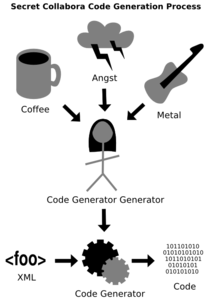
Some background: service-side code generation
The secret Collabora code-generation process

(credit: daf)

Supporting D-Bus in the GObject world has always involved quite a lot of code generation. The core API of dbus-glib is heavily reliant on varargs functions, which aren't type-safe and are easy to get wrong. dbus-glib contains a program called dbus-binding-tool, which is meant to generate reasonably sane GObject APIs for D-Bus objects. Unfortunately, it seems to be intended to generate a whole GObject at a time. Early versions of telepathy-gabble used dbus-binding-tool plus a script called gengobject.py to generate API stubs for the exported objects; developers then filled in the blanks, and hey presto, we had a GObject on D-Bus. This was fine up to a point, but had a couple of major drawbacks. Whenever we changed the D-Bus API (quite common during the early development of Telepathy), there was a very laborious and error-prone merging process. We ended up with the following process:
  • copy the D-Bus introspection XML from the telepathy-spec repository into a directory xml/pristine (actually, the canonical form for the spec was Python for a while, and we had a script that exported a contrived object onto D-Bus and introspected itself to get the XML - but that's another story!)
  • preprocess the introspection XML to add the dbus-glib CFunctionName annotation, resulting in a directory xml/modified
  • run dbus-binding-tool and a Python script gengobject.py to generate C source in xml/src
  • three-way-diff the old version of xml/src, the new version of xml/src, and the real C code in src to create a new version of src
  • pray that the diff process hadn't randomly exchanged functions' implementations
  • update the resulting code in src so it worked
  • check the whole mess back into darcs
  • hope that nobody else had made changes that would result in darcs conflicts
If you haven't yet gathered, this was a bit of a nightmare. Also, it was very easy to return the wrong thing from a method without noticing - because all the APIs were varargs, the compiler didn't notice, and the first we'd know about it was a mysterious segfault under certain circumstances.
How telepathy-glib fixes code generation telepathy-glib improves on this by taking advantage of this innocuous-looking feature in dbus-glib:
commit 355ef78d98d6fc65715845d56232199162cab12a
Author: Steve Fr cinaux <steve istique net>
Date:   Thu Aug 17 11:48:20 2006 +0200
    Interface support for bindings.
Instead of running dbus-binding-tool or creating GObjects with D-Bus interfaces, we put the entire Telepathy spec through glib-ginterface-gen.py, a distant descendant of Gabble's gengobject.py. For each interface in the spec, we generate a GInterface that mirrors the D-Bus interface. Any GObject that implements the GInterface automatically gets the D-Bus interface if it's exported onto D-Bus. There are a few non-obvious refinements, though:
  • The signature of the method implementation is always in the mode that dbus-glib calls "asynchronous", where the method implementation can either send a reply message before or after it returns. For "slow" methods, this is the only thing you can do. For instance, many Telepathy D-Bus methods can't return anything until some TCP round-trips to the server have happened. This is also the only thing you can do if you want to extract extra information, like the sender's unique name, from the method-call message (dbus-glib's "synchronous" API doesn't allow this to be done). For "fast" methods, sending a reply message before returning is just as easy as using the "synchronous" API (it's just a difference of syntax), and has an API consistent with that of the "slow" methods, making it easier for service authors.

  • The layout of the GInterface vtable is private, and (auto-generated) accessor functions are used to fill in implementations. This means our ABI doesn't change just because we re-ordered functions in the spec.

  • If no implementation is provided for a method, we just raise an appropriate error (org.freedesktop.Telepathy.Errors.NotImplemented), rather than suffering an assertion failure. This means we can safely add methods to an interface.

  • While we're generating code anyway, we generate some static inline wrapper functions which wrap dbus_g_method_return(), to have type-safe method returns. You can easily check that a method replies with correct types, by checking that the implementation of Foo() replies by calling tp_svc_some_interface_return_from_foo().

  • Similarly, we generate wrapper functions to emit signals, to get type-safe signal emission.

Not all interfaces are stable enough to be included in telepathy-glib's stable API and ABI, so some of our other projects include a copy of the telepathy-glib code-generation tools, and generate their own "mini-telepathy-glib" (traditionally in a /extensions/ directory) for their implementation-specific (drafts of) interfaces. This isn't yet as polished as it ought to be (mainly because we don't want to freeze the augmented-introspection-XML format that we write the Telepathy spec in, because it's rather ad-hoc and hackish in places) but it works quite well in practice. To see what this looks like in practice, have a look at the examples in telepathy-glib, or at a Telepathy connection manager like telepathy-gabble.
Mixins and base classes Another feature of telepathy-glib which makes life easier for connection manager authors is that it provides "mixins" and base classes which implement some of the GInterfaces. There's absolutely nothing magic about the base classes - they don't have any access to private implementation details of the GInterfaces, they just implement them like everyone else does. The "mixins" are only slightly more magical - they store some extra state inside the structures representing GObjects and their classes, and use it to provide default implementations of some or all of the methods on a particular interface (or two interfaces, in the case of the new TpMessageMixin). I'll leave it up to Rob to explain those in greater detail, since I seem to remember that he invented them :-P The examples and regression tests in telepathy-glib are quite good examples of how these work in practice.

Simon McVittie: Speeding up builds with ccache and icecc

Here's a script I use to speed up compilation at work. Since I work at Collabora, I call it collaboratively. It's a prefix to a command (used in the same way as sudo or nice) which sets up icecc (Icecream) and ccache to work nicely together.
#!/bin/sh
# ~/bin/collaboratively
# Typical usage: collaboratively make check
PATH=/usr/lib/ccache:/usr/lib/icecc/bin$(echo :$PATH   sed -e s@:/usr/lib/ccache@@g)
export PATH
MAKEFLAGS='-j -l3'
export MAKEFLAGS
exec "$@"
Some more explanation of what it does: apt-get install icecc-monitor and run icemon to see whether this is all working - if it is, you should see compile jobs going off to other hosts.

7 November 2008

John Goerzen: Search for Backup Tools

Since the last time I went looking for backup software, I've still be using rdiff-backup.

It's nice, except for one thing: it always keeps an uncompressed copy of your current state on the disk. This is becoming increasingly annoying.

I did some tests with dar and BackupPC, and both saved considerable disk space over rdiff-backup. The problem with dar, or compressed full/incrementals with tar, is that eventually you have to make a new full backup. You have to do that, *then* delete all your old fulls and incrementals, so there will be times when you have to store a full backup twice.

The hardlinking approach sounds good. It's got a few problems, too. One is that it can lose metadata about, ironically enough, hard links. Another is that few of the hard linking programs offer a compressed on-disk format. Here's what I've been looking at:

BackupPC

Nice on the service. I'm a bit annoyed that it's web-driven rather than commandline-driven, but I can look past that. I can also look past that it won't let me clamp down on ssh access as much as I'd like.

BackupPC writes metadata to disk alongside files, so it can restore hard links, symlinks, device entries, and the like. It also has the nice feature of being able to hard link identical files across machines, so if you're backing up /usr on a bunch of machines and have the same files installed, you save space. Nice.

BackupPC also can compress the files on your disk. It uses pre-compression md5sums for identifying files to hard link, which is nice.

Here's where I get nervous.

BackupPC doesn't just use regular compression, from say gzip or bzip2. It uses its own low-level algorithm centered around the Perl deflate library. And it does it in a nonstandard way owing to a supposed memory issue with zlib. Why they don't just pipe it through gzip or equivalent is beyond me.

This means that, first off, it's using a nonstandard compression format, which makes me nervous to begin with. If that weren't annoying enough, you have to install Perl plus a bunch of modules to extract the thing. This makes me nervous too.

Dirvish

Doesn't support compression.

faubackup

Doesn't support compression.

rdup

Supports compression and encryption. Does not preserve ownership of things unless the destination filesystem does (meaning you must run as root to store your backups.)

Killer lack of feature: it does not preserve knowledge about what was hardlinked on the source system, so when you restore your backup, all hardlinks are lost. Epic fail.

rsnapshot

Doesn't support compression.

StoreBackup

Does support compression, appears to restore metadata in a sane way. Supports backing up to a different machine on the LAN, but only if you set up NFS. Looks inappropriate for doing backups over VPN. Comprehensive, though confusing, manual. Looks like an oddball design with an oddball manual.

So, any suggestions?

John Goerzen: Wow

People often talk about "memorable moments" -- times where pretty much everybody in the country remembers where they were at that exact time.

There are probably only two of those moments I can remember: the 1989 earthquake during the World Series and the time 9/11 happened. My car was in for service that day, and I was sitting in the lobby of the mechanics watching it on TV.

So now I have a third: watching Barack Obama win the presidency.

We were installing some new blinds in the kitchen while listening to the coverage on NPR, periodically going over to the office to watch the TV coverage on the computer. (Our TV is upstairs right now, so that was more convenient.)

A few minutes before the election was called, I remember Brian Williams saying something like "We're going to go to local stations now, but you better not walk away. We'll have some amazing news at the top of the hour."

We watched that announcement, then saw McCain's speech, and finally Obama's speech (missed the first minute or two of it actually). What an amazing evening.

Then seeing the stories of people celebrating all around the country and around the world: the impromptu party in front of the White House Tuesday night, the small gathering at the Lincoln Memorial Wednesday morning, the Obama parties all around the world. And we watched it on TV in our house while Jacob slept. I feel like I missed out somehow.

6 November 2008

Pablo Lorenzzoni: Bash prompts: the essential

Bash is probably the most common command-line shell in the GNU/Linux world. Although a lot of people use alternate shells (such as Zsh), Bash is still shipped with most mainstream distros as the default. Once you have a lot of different remote machines, all running Bash as the shell, it becomes increasingly difficult to pay attention to the prompt, and typing reboot in a machine different from the one you wanted becomes more likely. I deal with that problem by changing Bash prompts First of all, the basics: Bash prompts are just environment variables with special characters you can set and export. Bash has four of these variables: PS1 to PS4, but usually only the first two matters (actually, just PS1 for a reference on the others, check the manpage). The most common PS1 string is:

spectra@home:~$ echo $PS1
\u@\h:\w\$
spectra@home:~$
This has 4 special characters, escaped with a backslash: \u informing us the username; \h informing us the hostname; \w, informing us the working directory; and \$, which gives us the $ in the end of the prompt (more on this later). So, essentially, one can change that string to anything else

spectra@home:~$ PS1="my_shell_prompt\$ " 
my_shell_prompt$
Pretty easy. You can check a complete reference of the special characters at the section PROMPTING of bash manpage, but the most useful IMHO are the following: Also, as part of the prompt string, one can use ANSI Colors enclosed as non-printing characters (that is between \[ and \]). ANSI sequences always begin with an ESC[ and end with an m . (Yes Really arbitrary but that s the way it is ). ESC can be represented as \e Here is a list of the most common colors in ANSI sequences: Now, notice that there are two numbers separated by a semi-colon the first is always 0 (zero) in the colors I pointed above, but it actually refers to an ANSI attribute called Select Graphic Rendition You can use 0 (zero) to normal colors, 1 for bold, 2 to faint, etc. So \e[0;30m refers to BLACK, \e[1;30m refers to DARK GREY. The Wikipedia has a good article on these escape sequences. Once you re satisfied with something printed in a color, to go back to the default (to reset), you issue the \e[0m escape sequence. So, back to my problem Each different machine gets a different color for the hostname. On hospital machine, for instance, my PS1 looks like:

spectra@hospital:~$ PS1="\[\e[1;33m\]\u\[\e[0m\]@\[\e[0;35m\]\h\[\e[0m\]:\[\e[0;32m\]\w\[\e[0m\]\$ " 
spectra@hospital:~$
With \e[0;35m (Purple) for the hostname. On home machine, it may be \e[0;34m (Blue)... On server , it may be \e[0;36m (Cyan), and so on After a while, you get used to the color and end up linking the color to the machine so that typing reboot on a machine with the wrong color gets harder than before. To make the changes permanent, put export PS1 in one of the config script of bash (.bashrc, .bash_profile, etc). On some systems, /etc/environment holds lots of environment variables definitions. I just scratched the surface That s just what works for me The Bash-Prompt-HOWTO has some interesting examples, and I actually have a friend who uses more esoterical stuff, such as fancybash or bashish, but I ll leave this up to you

Mike Hommey: Emptying a deleted file

Yesterday, at work, we had the typical case where df would say there is (almost) no space left on some device, while du doesn’t see as much data present as you would expect from this situation. This happens when you delete a file that another process has opened (and, obviously, not yet closed). In typical UNIX filesystems, files are actually only entries in a directory, pointing (linking) to the real information about the content, the inode. The inode contains the information about how many such links exist on the filesystem, the link count. When you create a hard link (ln without -s), you create another file entry in some directory, linking to the same inode as the “original” file. You also increase the link count for the inode. Likewise, when removing a file, the entry in the directory is removed (though most of the time, really only skipped, but that’s another story), and the link count decreased. When the link count is zero, usually, the inode is marked as deleted. Except when the usage count is not zero. When a process opens a file, the kernel keeps a usage count for the corresponding inode in memory. When some process is reading from a file, it doesn’t really expect it to disappear suddenly. So, as long as the usage count is not null, even when the link count in the inode is zero, the content is kept on the disk and still takes space on the filesystem. On the other hand, since there is no entry left in any directory linking to the inode, the size for this content can’t be added to du’s total. Back to our problem, the origin was that someone had to free some space on a 1GB filesystem, and thought a good idea would be to delete that 860MB log file that nobody cares about. Except that it didn’t really remove it, but he didn’t really check. Later, the “filesystem full” problem came back at someone else, who came to ask me what files from a small list he could remove. But the files were pretty small, and that wouldn’t have freed enough space. That gave me the feeling that we probably were in this typical case I introduced this post with, which du -sk confirmed: 970MB used on the filesystem according to df, but only 110MB worth of data… Just in case you would need to find the pid of the process having the deleted file still opened, or even better, get access to the file itself, you can use the following command:
find -L /proc/*/fd -type f -links 0
(this works on Linux ; remove -L on recent Solaris ; on other OSes, you can find the pid with lsof) Each path this command returns can be opened and its content accessed with a program, such as cat. That will give access to the deleted content. I already adressed how to re-link such a file, which somehow works under Linux, but in my case, all that mattered was to really remove the file, this time. But we didn’t know if it was safe to stop the process still holding the file, nor how to properly restart it. We were left without a possible resolution, but still needed to come up with something before the filesystem gets really full while waiting to be able to deal with the root of the problem. The first crazy idea I had was to attach a debugger to the process, and use it to close the file descriptor and open a new file instead (I think you can find some examples with google). But there was no debugger installed. So, I had this other crazy idea: would truncate() work on these /proc/$pid/fd files? You know what? It does work. So I bought us some time by running:
perl -e 'truncate("/proc/$pid/fd/$fd", 0);'
(somehow, there is no standard executable to do a truncate(), so I always resort to perl) Afterwards, I also verified the same works under Linux (where you wouldn’t really know what it’d do with these files that are symbolic links to somewhere that doesn’t exist). The even simpler following command works, too.
> /proc/$pid/fd/$fd
It doesn’t truncate() but open() with O_WRONLY O_CREAT O_TRUNC, and close() right after (to simplify), which has the same effect. Good to know, isn’t it?

Martin-&#201;ric Racine: Available for a new job

A couple of years ago, I started what has probably been the best job I've held so far, as a Business Development Manager for Artec Group where I focused on marketing and selling the ThinCan LTSP client. During that time, I used a combination of Guerrilla Marketing techniques to spread the word about this cool Estonian embedded platform in its LTSP client configuration and defined an extremely tight market-oriented focus that saw this relatively obscure electronic design start-up rise to the forefront of the LTSP hardware market and also brought the company commendable notoriety in the Coreboot community, thanks to its Programmable LPC Dongle, a low-cost ROM emulator that can be used to bootstrap various embedded hardware and test firmware images. Looking back at close to 3 years with Artec (if we include the stint I did at Linutop), I most fondly remember how I managed to bring the Estonian and Turkish nations closer together in collaborating on Innovation. On my first visit to Turkey, I had noticed that very little is know about Estonia in Turkey, even though both countries have a collaboration that dates back to the 1920's, so my tactic was to introduce Estonia's achievements as a whole, to establish confidence in Artec's offering. It worked: Among other things, my idea to organize an Estonian ICT Conference during the visit of Estonian PM Andrus Ansip in Turkey created a lot of extremely positive buzz that resulted in Estonia being mentioned as a trendy country in a prime time Turkish TV series. During this time, I've also made a lot of contacts among the Estonian and Turkish business communities and, more surprisingly, among the Estonian diplomacy who, much to my amazement, welcomed my ideas for better promoting Estonian interests abroad with great enthusiasm. Come December 2008, my time at Artec will become a page in my employment history. While the Thincan remains one of Artec's key products, current marketing and sales resources are focused on new markets and new technologies that completely fall outside my core expertise, which is why the company decided to let me go. I thus welcome offers from interested parties in Coreboot or LTSP markets. Other refreshing offers from outside the box - such as in business diplomacy - are equally welcome, as I've been pondering a career change for a long time.

Eddy Petri&#537;or: Coordinating localization via git

Note: this is quite long and might not be interesting for people not involved with /in either of: debian i18n, debian l10n, git, shell scripting.


For some time now I have been the de-facto coordinator of the Romanian localization team. During this time I was faced multiple times with problems related to motivation of the team members, setting goals for a release, coordination of the changes inside the team, integration of new translators in the team, loosing team members, my lack of time on some occasions and other problems.

I thought a lot about how to improve on those points and I was never satisfied with the answers I got. What I think was the worst problem in the team was the inability to set clear goals, especially during lenny's development cycle.

During sarge's and etch's development cycles we were in an infancy state and setting as the goal to have a fully translated installation process was really enough to keep people motivated. For sarge we missed by a small margin, but the translations were of poor quality, while for etch we worked more on improving the translations.


But during lenny it was bad, really bad. My free time had been shrinking for a while, starting with etch's release, and we were unable to set clear goal, since for etch we managed to have the installation process fully translated and a few other translations. There was no way for us to reach 100% translations during lenny's development cycle, so setting that as a goal was really unrealistic. Percents by themselves don't mean anything for people, and as long as there's no substance to those numbers, there's no motivation to reach for one arbitrary percent.

I tried to set as a goal translating the packages installed by default in a new installation, but that hit the eternal question How do we know easily which are those packages?. This remained sometimes unanswered or got an unsatisfying answer. Also, there was a goal to have correct diacritics for Romanian in lenny, to have aspell-ro that uses the correct diacritics.

I even got to a point that I, myself, lost my motivation and set myself a personal goal of overrunning the level the translations that the language just above Romanian had in the po-debconf l10n statistics (ranking between languages). This was nice way for me to keep myself motivated, but I had my reserves in making this motivation public out of fear of being misinterpreted, because, by a strange coincidence, that next language was Hungarian, and in Romania's history there was some friction between Hungaria and Romania, while there are still some tensions with the Hungarian minority in Romania, in areas where they represent the local majority.

I managed to reach my personal goal, but this wasn't addressing the big picture.


So, sometime around the start of this year I started thinking about ways to coordinate the Romanian localization team in order to have:
For short, a tool that would allow the team to work more efficiently while having the possibility to set clear goals in order to keep people motivated.


So after some pondering, I thought that creating a repository with the translations and the helper tools that would do the funky sync, checks, stats would be the best way to do that. So I started hacking on that somewhere around July-August and I published the result, but without much publicity, since it is still incomplete.

Some of the technical details are still in a haze, but I have a general idea and I got some basic functionality.


Today I decided that I should announce this semi-officially though my blog, maybe I get some input, ideas, or even contributions (I really should write a TODO).


I give you the Debian L10n Romanian coordination repository.

This is a git repository that has some tools to facilitate translation coordination and the translations that are current in the distro for the team.


Can be cloned with:

git clone git://git.debian.org/git/users/eddyp-guest/debian-ro-repo.git

or, if you're behind a restrictive firewall:

git clone http://git.debian.org/git/users/eddyp-guest/debian-ro-repo.git


Currently the work flow for updating a translation is as follows:
  1. source _bin/polibs (. _bin/polibs)
  2. cd foo
  3. po_refresh
  4. complete the translation
  5. po_rearrange "ro.po"
  6. git add "ro.po" && git commit -m "updated translation for foo"
  7. send the translation ("git format-patch origin" and send the patches by mail, or, alternatively, just "git push")


Features:
Planned features:

Problems:

I was hoping that the release notes for lenny would facilitate from this infrastructure, but unfortunately I was lately in a really inactive period wrt Debian.


Questions, suggestions, ideas are welcome.

Russell Coker: EC2 and IP Addresses

One of the exciting things about having a cloud computing service is how to talk to the rest of the world. It’s all very well to have a varying number of machines in various locations, but you need constant DNS names at least (and sometimes constant IP addresses) to do most useful things. I have previously described how to start an EC2 instance and login to it - which includes discovering it’s IP address [1]. It would not be difficult (in theory at least) to use nsupdate to change DNS records after an instance is started or terminated. One problem is that there is no way of knowing when an instance is undesirably terminated (IE killed by hardware failure) apart from polling ec2-describe-instances so it seems impossible to remove a DNS name before some other EC2 customer gets a dynamic IP address. So it seems that in most cases you will want a constant IP address (which Amazon calls an Elastic IP address) if you care about this possibility. For the case of an orderly shutdown you could have a script remove the DNS record, wait for the timeout period specified by the DNS server (so that all correctly operating DNS caches have purged the record) and then terminate the instance. One thing that interests me is the possibility of running front-end mail servers on EC2. Mail servers that receive mail from the net can take significant amounts of CPU time and RAM for spam and virus filters. Instead of having the expense of running enough MX servers to sustain the highest possible load even while one of the servers has experienced a hardware failure there is a possibility of running an extra EC2 instance at peak times with the possibility of running a large instance for a peak time when one of the dedicated servers has experienced a problem. The idea of having a mail server die and have someone else’s server take the IP address and receive the mail is too horrible to contemplate, so an Elastic IP address is required. It is quite OK to have a set of mail servers of which not all servers run all the time (this is why the MX record was introduced to the DNS) so having a server run periodically at periods of high load (one of the benefits of the EC2 service) will not require changes to the DNS. I think it’s reasonably important to minimise the amount of changes to the DNS due to the possibility of accidentally breaking it (which is a real catastrophe) and the possibility of servers caching DNS data for longer than they should. The alternative is to change the MX record to not point to the hostname of the server when the instance is terminated. I will be interested to read comments on this issue. The command ec2-allocate-address will allocate a public IP address for your use. Once the address is allocated it will cost $0.01 per hour whenever it is unused. There are also commands ec2-describe-addresses (to list all addresses allocated to you), ec2-release-address (to release an allocated address), ec2-associate-address to associate an IP address with a running instance, and ec2-disassociate-address to remove such an association. The command “ec2-associate-address -i INSTANCE ADDRESS” will associate an IP address with the specified instance (replace INSTANCE with the instance ID - a code starting with “i-” that is returned from ec2-describe-instances. The command “ec2-describe-instances grep ^INSTANCE cut -f2” will give you a list of all instance IDs in use - this is handy if your use of EC2 involves only one active instance at a time (all the EC2 API commands give output in tab-separated lists and can be easily manipulated with grep and cut). Associating an IP address with an instance is documented as taking several minutes, while Amazon provides no guarantees or precise figures as to how long the various operations take it seems that assigning an IP address is one of the slower operations. I expect that is due to the requirement for reconfiguring a firewall device (which services dozens or maybe hundreds of nodes) while creating or terminating an instance is an operation that is limited in scope to a single Xen host. One result that I didn’t expect was that associating an elastic address is that the original address that was assigned to the instance is removed. I had a ssh connection open to an instance when I assigned an elastic address and my connection was broken. It makes sense to remove addresses that aren’t needed (IPv4 addresses are a precious commodity) and further reading of the documentation revealed that this is the documented behavior. One thing I have not yet investigated is whether assigning an IP address from one instance to another is atomic. Taking a few minutes to assign an IP address is usually no big deal, but having an IP address be unusable for a few minutes while in the process of transitioning between servers would be quite inconvenient. It seems that a reasonably common desire would be to have a small instance running and to then transition the IP address to a large (or high-CPU) instance if the load gets high, having this happen without the users noticing would be a good thing.

5 November 2008

Russ Allbery: After the storm

After the storm Where I was for the past two and a half weeks. Why yes, I enjoyed my vacation tremendously.

Neil Williams: Componentisation of Debian/Emdebian

OK, I know I've been very quiet on the blog for weeks now but I have my reasons and all will become clear, eventually. I'm principally waiting for the Lenny release before being able to start full discussions about certain ideas that have been consuming a lot of my time recently. I continue to do what I can to get Lenny out of the door because the wait is driving me nuts. (Fixed another RC bug yesterday, yippee!)

Anyway, something I can talk about is Emdebian Grip. Emdebian has always wanted to support "in-between" devices that don't need the full-on cross-build everything approach of the current Emdebian packages for ARM but don't quite have room for a full Debian install either. Until I had at least a basic package set available via the cross-building system, I didn't want to start working on an intermediate system, for reasons of simplicity mainly, but also because I knew that getting a cross-building package set would involve changes to the tools needed for the intermediary set.

Bah, I'm waffling again. For the background, see Emdebian, Squeeze, Grip and Crush.

The good news is that Emdebian Grip, once running, will take far, far less time (for everyone) than the full-on cross-building malarkey of Emdebian Crush. Grip can be 99.9% automated by breaking Debian into discrete package sets or 'components'.
Componentising Debian for Emdebian
Emdebian Grip is about a smaller Debian, nothing more. No changes in functionality, no changes in dependencies; only changes in final installation size and Packages.gz size. It means using the code from dpkg-cross to unpack packages, remove unwanted files and repack the .deb. Yes, yes, this can be done one package at a time at a trivial level. Emdebian Grip seeks to bring a standard method for this operation that will work for all packages on any architecture for any architecture from any suite, creating and maintaining repositories of "gripped" packages for use in devices like my Acer Aspire1 where you just don't need documentation, manpages and the rest. Squeeze is the obvious target release but any release supported by the current version of dpkg could be "gripped" too, like oldstable.

The componentisation comes in at the level of the Packages.gz file. If the device cannot realistically be expected to run CAD software or has no fancy graphics or other power-hungry hardware, why should packages that need such resources clutter up the apt-cache list? This data isn't just slowing down searching for packages you do want, it slows down every installation process (that bit about 'Reading database . . . . . '), it slows down the process of getting the updated cache data in the first place because there is more of it, it wastes space on your device in several different places when the whole point of Emdebian is that disc space is not cheap and it wastes your precious battery power if you need to do simple package management stuff away from the mains. What is needed is a mini-repository, a mini-mirror that just contains the parts of Debian that your machine needs - a "well-trimmed" mirror with sources and all dependencies satisfied, a mirror that can be automatically updated but which doesn't keep getting NEW packages that you won't use. New dependencies will be added, yes. New packages unrelated to what you currently use? Absolutely not. You could even keep a mini-mirror on your home network, updating and "gripping" while you sleep, because a mini-mirror should be a lot, lot smaller than a standard Debian mirror.

I now have a script that will do the work, what I've lacked is the idea on how to "feed" packages to the Gripper. :-)

So, I'm going to be exploring this method:
  1. An arbitrary package set - say the output of 'dpkg -l' from the target machine setup by an expert, or 'dpkg --get-selections' or just the packages from a normal debootstrap - the basic idea is to start with only the packages you absolutely must have for your target device.

  2. A very small wrapper for some debootstrap code that downloads those .debs from the Debian mirrors - debootstrap can cope with choosing the mirror, the architecture, the suite etc. (already written, landing in Emdebian SVN soon).

  3. Parse the list of packages (.debs) and use 'apt-cache showsrc' to convert into a list of source packages. (Script done).

  4. 'apt-get source' to match the source package to the binary. At this point, we have what amounts to a partial mirror but with very well defined limits. There are other ways of doing the same thing so anything that gets you to this point is as equal as the steps above, as long as the .debs exist alongside the .dsc and all associated source package files. What you need is full control over the list of packages at this stage, we'll worry about dependencies later.

  5. Simple scripting parses the .dsc to create suitable debian/files content (done).

  6. dpkg-genchanges regenerates the .changes file - critical for keeping the Gripped packages with the correct source packages in the final Grip repository

  7. Now run 'emgrip' against the .changes file to convert the .debs, update the .changes file with the new, smaller, .deb details and copy everything into a suitable incoming/ directory.

  8. point your repository software (tested with reprepro) at the incoming/ directory and generate your Gripped repository - which only contains the packages you listed at the start, just smaller. reprepro has a neat way of allowing foobar-1.2.3-2 to be included even if foobar-1.2.3-1 does not exist in the repository, as long as foobar_1.2.3.orig.tar.gz exists somewhere that reprepro can find and even though foobar-1.2.3-2.dsc does not mention the .orig.tar.gz. Neat! (Tested and working.)

  9. Run 'edos-debcheck' against the repository and "catch-up" with whatever packages are needed to make the repository as a whole "trimmed" (no unresolved dependencies).

  10. Keep the update script running as a cron task to pull updated packages from incoming.debian.org, run the .changes through emgrip and update your repository.

  11. Clean out the .debs, leave the source packages and restart the process for another architecture. (Crafty!)

  12. Possibly, to support those who can afford to do a small amount of compilation on their Emdebian Grip device, add a second repository that provides the Build-Depends that may be missing from the initial package set - stuff like automake and pkgconfig. Depending on how that works out, it might not be many packages and it may be easier to fold them into the mini-mirror anyway.

  13. Instead of 20,000 packages, I'm expecting something closer to 2,000, per mini-mirror.

  14. The process of "gripping" a package also drops numerous control fields (like Homepage and VCS*), as well as Recommends, Suggests and Enhances as well as truncating the long description at a maximum of four lines - all in the name of reduced package data sizes.

  15. The end result is that each mini-mirror contains a component package set for Emdebian Grip, using Debian packages. Mini-mirrors are still "well-trimmed" (no unresolved dependencies) because you get to choose which packages you include and if a particular package tries to bring in both Gtk and KDE dependencies, you can choose to omit that package and use a different one.

  16. Whether Emdebian Grip will or should support dropping certain binary packages from the repository is a difficult issue - Emdebian Crush is probably the preferred route if you need to start optimising an Emdebian Grip mini-mirror that harshly.

  17. Another wrapper will be needed to clean out cruft (old dependencies, outdated packages etc.) - that one may be harder to achieve by automation.


The first Emdebian Grip repositories will be for ARM, armel and i386, based on an XFCE environment package set.

"Gripping" all the packages in my /var/cache/apt/archives (about 1Gb) took about 30 minutes on a fast laptop that was doing other things at the time - the real packages will be "gripped" on the Emdebian server and for multiple architectures in sequence. It's certainly conceivable that any number of mini-mirrors can exist with any number of package sets (components), all with "gripped" packages. You can choose to "grip" .debs upon download from a normal Debian mirror but that wastes time if there is more than one device, it wastes space in /var/lib/apt/lists and /var/lib/dpkg/ and wastes bandwidth. For portable devices that you want to be using, not updating, I think that a mini-mirror is a worthwhile bonus.

Expect a 20% reduction in installation size (for more, you'll need the cross-building, functionality-modifying Emdebian Crush shebang) but a large decrease in the size of all the apt-cache data and dpkg status data. I'm hoping to push towards 30% reductions but most of these figures are guesswork right now.

And beyond the mini-mirrors? Debian-Installer, of course. I really need to set some time aside to prepare an Emdebian Grip installer using current D-I. Simple things like:

It really, really annoys me that I have to spend ages getting devices like the Acer Aspire1 working properly under Debian and that I have to take particular care during the installer to change the Debian default to something more sane for that kind of device. For Debian to be The Universal Operating System, the installer needs to be as smooth on an NSLU2* as on a standard desktop, a fast server and a cluster. This isn't just an architecture thing, there are big and small devices in all architectures, it needs to be a machine:variant thing. Mini-mirrors of single components are a start and part of the bigger answer is to support machine-specific configuration packages in these mini-mirrors. Packages that only exist in a specific mini-mirror and are specifically designed to setup a host of machine-specific settings, blacklist certain modules and enable others, set sensible settings in /etc/fstab and other places based on results from things like powertop, turning off features for some devices and turning them on for others. The whole point of such packages is that what they do would be insane on what would currently be considered a "typical Debian machine".

*(I'm not talking about an NSLU2 with an external hard drive here, I'm talking about fitting Emdebian Crush into the 6.4Mb of space on the NSLU2 itself so that external hard drives can be hot-plugged, as well as devices like the OpenMoko and iPAQs etc.)

Don't get me wrong, D-I does a fantastic job for the kinds of devices Debian currently supports but there are a host of other devices out there that need customised solutions where a mini-mirror and a machine-specific configuration package can remove huge amounts of hassle from the actual installation process. Emdebian Crush already uses machine:variant specific packages and the current Emdebian packages repository is, itself, a mini-mirror, albeit not well trimmed.

Let's make the most of "Debian Squeeze" - let's squeeze it onto more devices and make it even easier to get Debian onto anything.

4 November 2008

Ross Burton: OfflineIMAP, ConsoleKit, GNOME Keyring

Over the weekend I finally got fed up with Evolution struggling to connect to work's "IMAP" server (Exchange 2007), and switched to using OfflineIMAP to sync the mail to a local Maildir. This as expected worked pretty well, and I'm now hidden from the nasty lag on the server. However, I've had to write my top secret Intel password into .offlineimaprc, which sucks. Then I had a cunning plan... GNOME Keyring will store passwords in a pretty secure manner, so somehow I need to fetch the password from there. A quick look at the OfflineIMAP manual revealed that I can write Python functions which return the password, so I should be abe to hook into the keyring from OfflineIMAP. This should be fairly simple:
import gobject, gnomekeyring
# The keyring needs to know the application name
if gobject.get_application_name() is None:
  gobject.set_application_name("offlineimap")
def keyring(user, host):
  keys = gnomekeyring.find_network_password_sync(user=user, server=host, protocol="imap")
  # First one will do nicely thanks
  return keys[0]["password"]
...
remotepasseval = keyring("rburton", "imapmail.intel.com")
After writing a small tool to add the key to the keyring, to my surprise this worked first time. I bounced with glee, but ten minutes later I had error messages from OfflineIMAP running from cron in my inbox... GNOME Keyring uses an environment variable to find the daemon, which isn't set in a cron environment. GNOME Keyring will fall back to using DBus to find the daemon, but the DBus session bus environment variable isn't set. DBus will fall back to reading the session bus address from the X root window, but DISPLAY isn't set so that doesn't work either... EPIC FAIL. But, I thought, I upgraded to Network Manager 0.7 last week which bought in ConsoleKit. If I ask ConsoleKit for my sessions I should be able to find a session with has an X connection, then I can set DISPLAY appropriately and then the chain described above will work, and I'll have my password. Shockingly, this worked first time too:
import dbus, os
if not os.getenv("DISPLAY"):
  # Get the ConsoleKit manager
  bus = dbus.SystemBus()
  manager_obj = bus.get_object('org.freedesktop.ConsoleKit', '/org/freedesktop/ConsoleKit/Manager')
  manager = dbus.Interface(manager_obj, 'org.freedesktop.ConsoleKit.Manager')
  
  # For each of my sessions..
  for ssid in manager.GetSessionsForUnixUser(os.getuid()):
    obj = bus.get_object('org.freedesktop.ConsoleKit', ssid)
    session = dbus.Interface(obj, 'org.freedesktop.ConsoleKit.Session')
    # Get the X11 display name
    dpy = session.GetX11Display()
    if dpy:
      # If we have a display, set the environment variable
      os.putenv("DISPLAY", dpy);
      break
(man, I really with python-dbus had a better syntax for getting objects with a specific interface) So there you go, integrating OfflineIMAP with the GNOME Keyring via ConsoleKit and DBus. Surprisingly this was pretty easy to do, thanks to DBus and the magic provided by ConsoleKit it is 100% hack free.

Russell Coker: Basics of EC2

I have previously written about my work packaging the tools to manage Amazon EC2 [1]. First you need to login and create a certificate (you can upload your own certificate - but this is probably only beneficial if you have two EC2 accounts and want to use the same certificate for both). Download the X509 private key file (named pk-X.pem) and the public key (named cert-X.pem). My Debian package of the EC2 API tools will look for the key files in the ~/.ec2 and /etc/ec2 directories and will take the first one it finds by default. To override the certificate (when using my Debian package) or to just have it work when using the code without my package you set the variables EC2_PRIVATE_KEY and EC2_CERT. This Amazon page describes some of the basics of setting up the client software and RSA keys [2]. I will describe some of the most important things now: The command “ec2-add-keypair gsg-keypair > id_rsa-gsg-keypair” creates a new keypair for logging in to an EC2 instance. The public key goes to amazon and the private key can be used by any ssh client to login as root when you creat an instance. To create an instance with that key you use the “-k gsg-keypair” option, so it seems a requirement to use the same working directory for creating all instances. Note that gsg-keypair could be replaced by any other string, if you are doing something really serious with EC2 you might use one account to create instances that are run by different people with different keys. But for most people I think that a single key is all that is required. Strangely they don’t provide a way of getting access to the public key, you have to create an instance and then copy the /root/.ssh/authorized_keys file for that. This Amazon page describes how to set up sample images [3]. The first thing it describes is the command ec2-describe-images -o self -o amazon which gives a list of all images owned by yourself and all public images owned by Amazon. It’s fairly clear that Amazon doesn’t expect you to use their images. The i386 OS images that they have available are Fedora Core 4 (four configurations with two versions of each) and Fedora 8 (a single configuration with two versions) as well as three other demo images that don’t indicate the version. The AMD64 OS images that they have available are Fedora Core 6 and Fedora Core 8. Obviously if they wanted customers to use their own images (which seems like a really good idea to me) they would provide images of CentOS (or one of the other recompiles of RHEL) and Debian. I have written about why I think that this is a bad idea for security [4], please make sure that you don’t use the ancient Amazon images for anything other than testing! To test choose an i386 image from Amazon’s list, i386 is best for testing because it allows the cheapest instances (currently $0.10 per hour). Before launching an instance allow ssh access to it with the command “ec2-authorize default -p 22“. Note that this command permits access for the entire world. There are options to limit access to certain IP address ranges, but at this stage it’s best to focus on getting something working. Of course you don’t want to actually use your first attempt at creating an instance, I think that setting up an instance to run in a secure and reliable manner would require many attempts and tests. As all the storage of the instance is wiped when it terminates (as we aren’t using S3 yet) and you won’t have any secret data online security doesn’t need to be the highest priority. A sample command to run an instance is “ec2-run-instances ami-2b5fba42 -k gsg-keypair” where ami-2b5fba42 is a public Fedora 8 image available at this moment. This will give output similar to the following: RESERVATION r-281fc441 999999999999 default
INSTANCE i-0c999999 ami-2b5fba42 pending gsg-keypair 0 m1.small 2008-11-04T06:03:09+0000 us-east-1c aki-a71cf9ce ari-a51cf9cc The parameter after the word INSTANCE is the serial number of the instance. The command “ec2-describe-instances i-0c999999” will provide information on the instance, once it is running (which may be a few minutes after you request it) you will see output such as the following: RESERVATION r-281fc441 999999999999 default
INSTANCE i-0c999999 ami-2b5fba42 ec2-10-11-12-13.compute-1.amazonaws.com domU-12-34-56-78-9a-bc.compute-1.internal running gsg-keypair 0 m1.small 2008-11-04T06:03:09+0000 us-east-1c aki-a71cf9ce ari-a51cf9cc The command “ssh -i id_rsa-gsg-keypair root@ec2-10-11-12-13.compute-1.amazonaws.com” will then grant you root access. The part of the name such as 10-11-12-13 is the public IP address. Naturally you won’t see 10.11.12.13, it will instead be public addresses in the Amazon range - I replaced the addresses to avoid driving bots to their site. The name domU-12-34-56-78-9a-bc.compute-1.internal is listed in Amazon’s internal DNS and returns the private IP address (in the 10.0.0.0/8 range) which is used for the instance. The instance has no public IP address, all connections (both inbound and outbound) run through some sort of NAT. This shouldn’t be a problem for HTTP, SMTP, and most protocols that are suitable for running on such a service. But for FTP or UDP based services it might be a problem. The part of the name such as12-34-56-78-9a-bc is the MAC address of the eth0 device. To halt a service you can run shutdown or halt as root in the instance, or run the ec2-terminate-instances command and give it the instance ID that you want to terminate. It seems to me that the best way of terminating an instance would be to run a script that produces a summary of whatver the instance did (you might not want to preserve all the log data, but some summary information would be useful), and give all operations that are in progress time to stop before running halt. A script could run on the management system to launch such an orderly shutdown script on the instance and then uses ec2-terminate-instances if the instance does not terminate quickly enough. In the near future I will document many aspects of using EC2. This will include dynamic configuration of the host, dynamic DNS, and S3 storage among other things.

Jeff Bailey: Watching an election go by...

Tomorrow I get the joy of watching an election go by that I can't participate in. I think Sen. Obama doesn't need one more voice from me at this point, but let's look at the California propositions:

Prop 1A - High speed rail. California really needs something like this. In fact, the whole US does, and maybe they'll get it once California shows that trains really can work on this side of the Atlantic.

Prop 2 - Increasing the sizes of cages for confined farm animals. I admit that I actually don't much care about this one either. I'd probably vote yet on it, but a cage is still a cage. =(

Prop 3 - Funding Children's hospitals. Uhhh. Why does this take a ballot measure? I'd do this one. Especially if it were seen as a path to the socialisation of health care.

Prop 4 - Parental notification before termination of pregnancy. Sounds like a great way to have more teen moms dead in back alleys. People either get illegal abortions or legal ones. Legal ones are much safer. This is a no-brainer for a no. If you think the incidence rate of abortions in teens is too high, fund some sex ed.

Prop 5 - Drug treatment facilities, good. Easier parole for drug-related offenses probably also good. Increased parole for serious and violent felonies? It's not clear to me that there's an actual problem here to solve. Is there really a problem with repeat offenders here that is going to be solved by this? I'd probably skip this one because there just isn't enough info.

Prop 6 - A bunch of gang related funding and such. It seems to me that if the legislature thought this was a real problem, they'd have solved it. The US already spends a stupid amount on policing, with the result of a lot of people in jail, and seemingly not alot of reduction in crime. Sounds like throwing good money after bad, then. I'd say no.

Prop 7 - Require utilities to focus on renewable energy. My electric company is already ~50% renewable according to their pamphlets. They also already are introducing smart meters, remote power cuts for air conditioning units, and have an offset program that isn't just cutting down trees. From what I understand, getting more than what they do is problematic because of reliability of supply. I don't think legislation will solve that. This legislation is probably too soon, sadly. A reluctant no from me here.

Prop 8 - A bill to remove existing rights from citizens. If you don't know my opinion on this one, you're clearly just tuning in. "no". It did occur to me today that what people should've been doing was trying to muddy the issue and put up billboards that said "In Defense of Marriage, No on prop 8". Because I really think that a yes here lessens the value of my marriage - it means that I'll be sharing in something I can't in turn wish for everyone else. And that would be sad.

Prop 9 - Victims rights bill. I wish there were more background on this site. It's not clear that there's a problem here that people are solving. A criminal sentence is supposed to be society's version of just punishment. Just because you personally still feel like crap doesn't mean that the punishment wasn't served. I don't see what relationship a person getting out of jail has to the victim at that point either than staying away from one another. No here.

Prop 10 - Funding for alternative fuels. I'm thinking back to "Who killed the electric car?" We're not doing what we can with the technology we already have. It would've been nice to perhaps see the old requirements kicked by in of a certain amount of cars having to be zero-emission or something like that now that we *know* we can do it. There are lots of electric car options now. I'd say no here.

Prop 11 - Redistricting. Nice to see that this includes people who belong to neither party in the requirements makeup. Taking the districts out of the hands of the representatives is probably a good idea. I hope the committee will opt to do something sane like simple cluster diagrams or something. I was talking with some folks at work about polling station finding and stuff, and it sounds really miserable.

Prop 12 - Veteran's bonds. Umm, sure? Are vets particularly hard hit by the current economic crisis? It seems odd to single them out. But the US has a culture of celebrating veterans that I've never understood. At home I suspect most people just don't know any. As opposed to a pile of their schoolmates *being* veterans.

Wow. That was exhausting. Do you guys have to do this every time you go to the polls?

3 November 2008

Isaac Clerencia: Not again

Every Democrat was pretty sure Al Gore was going to win in 2000. Most polls said John Kerry was going to win in 2004. And yet both times they managed to snatch defeat from the jaws of victory. Just remember how you felt then and try your best so it doesn’t happen again. There is so much at stake … the US and the world can’t afford 4 more years of a Republican US President. Even if the GOP seems to be defeated, shattered and panicking, Republican voters always end up voting for their guy on election day, while Democrats have great problems closing the deal. It has to be different this time. We need Obama to win tomorrow, and we need him to win big. And a Democratic wave to get a filibuster-proof Senate majority and a comfortable victory in the House of Representatives, so they can enact a progressive agenda in the upcoming years and restore some of the damage from the last two Bush terms. We also need a solid ‘no’ to Proposition 8 in California and similar ones in other states, so no excuse to stay at your place just because you are in one of the bluest states. I would like to ask you to do your best tomorrow, but probably Larry Lessig does a better job at it. Once we are past this, the hard work starts, trying to hold every elected representative accountable, draft better candidates for future elections, spot DINOs, …, but for now, let’s focus on tomorrow. I am hoping for the best, and I wish I could do more about it, but it’s up to you Americans. Do the right thing and leave everything on the road, you don’t want to regret it tomorrow.

Next.

Previous.