
Search Results: "nate"

13 December 2022

Dirk Eddelbuettel: RcppSpdlog 0.0.11 on CRAN: Small Enhancement

Version 0.0.11 of RcppSpdlog is now on CRAN and in Debian. RcppSpdlog bundles spdlog, a wonderful header-only C++ logging library with all the bells and whistles you would want that was written by Gabi Melman, and also includes fmt by Victor Zverovich. This release adds support for a basic file logger as a alternative to the console logger. This can be helpful with code which suppresses or hides console output as for example unit test code does. We also expose the formatting helper function for direct use at the C level from other packages, and mention the handy wrapper spdl in the README. The NEWS entry for this release follows.

Changes in RcppSpdlog version 0.0.11 (2022-12-13)
  • Export the formatter at C level
  • Mention package spdl in README.md
  • Support simple file-based logger

Courtesy of my CRANberries, there is also a diffstat report. More detailed information is on the RcppSpdlog page, or the package documention site. If you like this or other open-source work I do, you can sponsor me at GitHub.

This post by Dirk Eddelbuettel originated on his Thinking inside the box blog. Please report excessive re-aggregation in third-party for-profit settings.

12 December 2022

Dirk Eddelbuettel: digest 0.6.31 on CRAN: snprintf Update

Release 0.6.31 of the digest package arrived at CRAN this weekend, and is being uploaded to Debian as well. digest creates hash digests of arbitrary R objects (using the md5, sha-1, sha-256, sha-512, crc32, xxhash32, xxhash64, murmur32, spookyhash, and blake3 algorithms) permitting easy comparison of R language objects. It is a mature and widely-used as many tasks may involve caching of objects for which it provides convenient general-purpose hash key generation to quickly identify the various objects. This release contains the tiny change (in maybe a dozen places) triggered recently by macOS and now checked for by r-devel which consists of replacing (v)sprintf calls with (v)snprintf. No more, no less. My CRANberries provides the usual summary of changes to the previous version. For questions or comments use the issue tracker off the GitHub repo. If you like this or other open-source work I do, you can now sponsor me at GitHub.

This post by Dirk Eddelbuettel originated on his Thinking inside the box blog. Please report excessive re-aggregation in third-party for-profit settings.

10 December 2022

Simon Josefsson: Trisquel 11 on NV41PZ: First impressions

My NovaCustom NV41PZ laptop arrived a couple of days ago, and today I had some time to install it. You may want to read about my purchasing decision process first. I expected a rough ride to get it to work, given the number of people claiming that modern laptops can t run fully free operating systems. I first tried the Trisquel 10 live DVD and it booted fine including network, but the mouse trackpad did not work. Before investigating it, I noticed a forum thread about Trisquel 11 beta3 images, and being based on Ubuntu 22.04 LTS and has Linux-libre 5.15 it seemed better to start with more modern software. After installing through the live DVD successfully, I realized I didn t like MATE but wanted to keep using GNOME. I reverted back to installing a minimal environment through the netinst image, and manually installed GNOME (apt-get install gnome) since I prefer that over MATE, together with a bunch of other packages. I ve been running it for a couple of hours now, and here is a brief summary of the hardware components that works.
CPUAlder Lake Intel i7-1260P
Memory2x32GB Kingston DDR4 SODIMM 3200MHz
StorageSamsung 980 Pro 2TB NVME
BIOSDasharo Coreboot
GraphicsIntel Xe
Screen (internal)14 1920 1080
Screen (HDMI)Connected to Dell 27 2560 1440
Screen (USB-C)Connected to Dell 27 2560 1440 via Wavlink port extender
WebcamBuiltin 1MP Camera
MicrophoneIntel Alder Lake
KeyboardISO layout, all function keys working
MouseTrackpad, tap clicking and gestures
Ethernet RJ45Realtek RTL8111/8168/8411 with r8169 driver
Memory cardO2 Micro comes up as /dev/mmcblk0
Docking stationWavlink 4xUSB, 2xHDMI, DP, RJ45,
ConnectivityUSB-A, USB-C
AudioIntel Alder Lake
Hardware components and status
So what s not working? Unfortunately, NovaCustom does not offer any WiFi or Bluetooth module that is compatible with Trisquel, so the AX211 (1675x) Wifi/Bluetooth card in it is just dead weight. I imagine it would be possible to get the card to work if non-free firmware is loaded. I don t need Bluetooth right now, and use the Technoetic N-150 USB WiFi dongle when I m not connected to wired network. Compared against my X201, the following factors have improved. I m still unhappy about the following properties with both the NV41PZ and the X201. Hopefully my next laptop will have improved on this further. I hope to be able to resolve the WiFi part by replacing the WiFi module, there appears to be options available but I have not tested them on this laptop yet. Does anyone know of a combined WiFi and Bluetooth M.2 module that would work on Trisquel? While I haven t put the laptop to heavy testing yet, everything that I would expect a laptop to be able to do seems to work fine. Including writing this blog post!

Russ Allbery: Review: Trust

Review: Trust, by Mary Sisson
Series: Trang #2
Publisher: Mary Sisson
Copyright: 2012
Printing: December 2013
ASIN: B0087KQDQ0
Format: Kindle
Pages: 375
Trust is a direct sequel to Trang and should not be read out of order. Both the primary and secondary plot deal with the consequences of the ending of Trang and thus spoil it heavily. After a dodgy and unethical debriefing under mental probe (which took far too long to become relevant to the story) Philippe Trang is back at work as the human diplomat to a space station full of aliens in intergalactic space. At first, interspecies relations have not changed much, but soon Philippe will be drawn farther into the consequences of Trang's dramatic conclusion than he would have expected. And there are other complications: a new group of Special Forces soldiers, an extremely grumpy alien who disapproves of his species' current culture, and the continuing incomprehensible behavior of the Magic Man. I was hoping this series would be a hidden gem of diplomatic SF, a subgenre that I want to exist. Unfortunately, this entry takes a strong turn towards more conventional territory: a Star Trek plot. One of the merits of the first novel is that Trang, and the humans in general, didn't have much power. Humans were meeting aliens as equals or inferiors, and both sides were attempting to understand. Although the humans became central to the plot (probably unavoidable when they're the protagonists), it was somewhat by accident. I was hoping Sisson would lean into that setup, stress the equal footing, and focus on the complex diplomacy. Instead, Trust puts Trang in a position of considerable authority over one of the alien races. Like most Star Trek plots, this book is primarily about mapping strange alien behavior onto human morality to solve the problem of the week. As an entry in that genre, it's... okay. I still like Trang as a character, Sisson does an adequate job showing how weird aliens can be (although mostly by jumbling together extremes of human behavior instead of finding something truly alien), and the opinions of the aliens continue to matter. But I feel like this series is sliding towards making the humans central to everything, and I was not enthused by a plot that requires Trang sort out complex political problems for an entire alien race he knows next to nothing about. This book also adds more viewpoints, giving us several chapters from the perspective of one of Trang's escort soldiers and one from one of the aliens. I liked the alien perspective; it was probably the best chapter of the book. Seeing the human characters from an external perspective was amusing, and I liked how both the humans and the aliens surprised and confused each other. That said, it also felt like a bit of a cheat to tell the reader about the cultural forces at play that Trang was missing. I already thought Trang was being exceptionally dim about the alien gifts he was given, pocketing them without attempting to understand them and then never studying them later. Being shown more things he should have tried to figure out didn't help. You're a diplomat in an extended first contact situation: please have some basic curiosity about what's going on and talk it over with the people around you, rather than treating aliens like children. The soldier perspective adds a secondary plot that was okay but a bit silly, and I'm not sure why Sisson needed to introduce a second perspective to tell it. I think the same secondary plot would have been more interesting if she'd stuck with Trang's perspective and forced him to reconstruct what had been happening when he wasn't paying attention. As is, the plot relied too much on people being stupid and not talking to each other. There was nothing seriously wrong with this book, but it's also not fulfilling the potential of the first book of the series. It felt like okay self-published science fiction; that's not nothing, but there are a lot of books like that, and I wanted diplomatic science fiction that goes somewhere different. I may give the third book a chance, but I'm feeling less enthused now. Followed by Tribulations. Rating: 6 out of 10

John Goerzen: Music Playing: Both Whole-House and Mobile

It s been nearly 8 years since I last made choices about music playing. At the time, I picked Logitech Media Server (LMS, aka Slimserver and Squeezebox server) for whole-house audio and Ampache with the DSub Android app. It s time to revisit that approach. Here are the things I m looking for: The current setup Here are the current components: LMS makes an excellent whole-house audio system. I can pull up the webpage (or use an Android app like Squeezer) to browse my music library, queue things up to play, and so forth. I can also create playlists, which it saves as m3u files. This whole setup is boringly reliable. It just works, year in, year out. The main problem with this is that LMS has no real streaming/offline mobile support. It is also a rather dated system, with a painful UI for playlist management, and in general doesn t feel very modern. (It s written largely in Perl also!) So, I paired with it is Ampache. As a streaming player, Ampache is fantastic; I can access it from a web browser, and it will transcode my FLAC files to the quality I ve set in my user prefs. The DSub app for Android is fantastic and remembers my last-play locations and such. The problem is that Ampache doesn t write its playlists back to m3u format, so I can t use them with LMS. I have to therefore maintain all the playlists in LMS, and it has a smallish limit on the number of tracks per playlist. Ampache also doesn t auto-update from LMS playlists, so I have to delete and recreate the playlists catalog periodically to get updates into Ampache. Not fun. The new experiment I m trying out a new system based on these components: This looks a lot more complicated than what I had before, but in reality it only has one additional layer. Since Snapcast is a general audio syncing tool, and Jellyfin doesn t itself output audio, Mopidy and its extensions is the glue . There s a lot to like about this setup. There is one single canonical source for music and playlists. Jellyfin can do a lot more besides music, and its mobile app gives me video access also. The setup, in general, works pretty well. There are a few minor glitches, but nothing huge. For instance, Jellyfin fails to clear the play queue on the mopidy side. But there is one problem, though: when playing a playlist, it is played out of order. Jellyfin itself has the same issue internally, so I m unsure where the bug lies. Rejected option: Jellyfin with jellycli This could be a nice option; instead of mopidy with a plugin, just run jellycli in headless mode as a more native client. It also has the playlist ordering bug, and in addition, fails to play a couple of my albums which Mopidy-Jellyfin handles fine. But, if those bugs were addressed, it has a ton of promise as a simpler glue between Jellyfin and Snapcast than Mopidy. Rejected option: Mopidy-Subidy Plugin with Ampache Mopidy has a Subsonic plugin, and Ampache implements the Subsonic API. This would theoretically let me use a Mopidy client to play things on the whole-house system, coming from the same Ampache system. Although I did get this connected with some trial and error (legacy auth on, API version 1.13.0), it was extremely slow. Loading the list of playlists took minutes, the list of albums and artists many seconds. It didn t cache any answers either, so it was unusably slow. Rejected option: Ampache localplay with mpd Ampache has a feature called localplay which allows it to control a mpd server. I tested this out with mpd and snapcast. It works, but is highly limited. Basically, it causes Ampache to send a playlist a literal list of URLs to the mpd server. Unfortunately, seeking within a track is impossible from within the Ampache interface. I will note that once a person is using mpd, snapcast makes a much easier whole-house solution than the streaming option I was trying to get working 8 years ago.

9 December 2022

Matthew Garrett: End-to-end encrypted messages need more than libsignal

(Disclaimer: I'm not a cryptographer, and I do not claim to be an expert in Signal. I've had this read over by a couple of people who are so with luck there's no egregious errors, but any mistakes here are mine)

There are indications that Twitter is working on end-to-end encrypted DMs, likely building on work that was done back in 2018. This made use of libsignal, the reference implementation of the protocol used by the Signal encrypted messaging app. There seems to be a fairly widespread perception that, since libsignal is widely deployed (it's also the basis for WhatsApp's e2e encryption) and open source and has been worked on by a whole bunch of cryptography experts, choosing to use libsignal means that 90% of the work has already been done. And in some ways this is true - the security of the protocol is probably just fine. But there's rather more to producing a secure and usable client than just sprinkling on some libsignal.

(Aside: To be clear, I have no reason to believe that the people who were working on this feature in 2018 were unaware of this. This thread kind of implies that the practical problems are why it didn't ship at the time. Given the reduction in Twitter's engineering headcount, and given the new leadership's espousal of political and social perspectives that don't line up terribly well with the bulk of the cryptography community, I have doubts that any implementation deployed in the near future will get all of these details right)

I was musing about this last night and someone pointed out some prior art. Bridgefy is a messaging app that uses Bluetooth as its transport layer, allowing messaging even in the absence of data services. The initial implementation involved a bunch of custom cryptography, enabling a range of attacks ranging from denial of service to extracting plaintext from encrypted messages. In response to criticism Bridgefy replaced their custom cryptographic protocol with libsignal, but that didn't fix everything. One issue is the potential for MITMing - keys are shared on first communication, but the client provided no mechanism to verify those keys, so a hostile actor could pretend to be a user, receive messages intended for that user, and then reencrypt them with the user's actual key. This isn't a weakness in libsignal, in the same way that the ability to add a custom certificate authority to a browser's trust store isn't a weakness in TLS. In Signal the app key distribution is all handled via Signal's servers, so if you're just using libsignal you need to implement the equivalent yourself.

The other issue was more subtle. libsignal has no awareness at all of the Bluetooth transport layer. Deciding where to send a message is up to the client, and these routing messages were spoofable. Any phone in the mesh could say "Send messages for Bob here", and other phones would do so. This should have been a denial of service at worst, since the messages for Bob would still be encrypted with Bob's key, so the attacker would be able to prevent Bob from receiving the messages but wouldn't be able to decrypt them. However, the code to decide where to send the message and the code to decide which key to encrypt the message with were separate, and the routing decision was made before the encryption key decision. An attacker could send a message saying "Route messages for Bob to me", and then another saying "Actually lol no I'm Mallory". If a message was sent between those two messages, the message intended for Bob would be delivered to Mallory's phone and encrypted with Mallory's key.

Again, this isn't a libsignal issue. libsignal encrypted the message using the key bundle it was told to encrypt it with, but the client code gave it a key bundle corresponding to the wrong user. A race condition in the client logic allowed messages intended for one person to be delivered to and readable by another.

This isn't the only case where client code has used libsignal poorly. The Bond Touch is a Bluetooth-connected bracelet that you wear. Tapping it or drawing gestures sends a signal to your phone, which culminates in a message being sent to someone else's phone which sends a signal to their bracelet, which then vibrates and glows in order to indicate a specific sentiment. The idea is that you can send brief indications of your feelings to someone you care about by simply tapping on your wrist, and they can know what you're thinking without having to interrupt whatever they're doing at the time. It's kind of sweet in a way that I'm not, but it also advertised "Private Spaces", a supposedly secure way to send chat messages and pictures, and that seemed more interesting. I grabbed the app and disassembled it, and found it was using libsignal. So I bought one and played with it, including dumping the traffic from the app. One important thing to realise is that libsignal is just the protocol library - it doesn't implement a server, and so you still need some way to get information between clients. And one of the bits of information you have to get between clients is the public key material.

Back when I played with this earlier this year, key distribution was implemented by uploading the public key to a database. The other end would download the public key, and everything works out fine. And this doesn't sound like a problem, given that the entire point of a public key is to be, well, public. Except that there was no access control on this database, and the filenames were simply phone numbers, so you could overwrite anyone's public key with one of your choosing. This didn't let you cause messages intended for them to be delivered to you, so exploiting this for anything other than a DoS would require another vulnerability somewhere, but there are contrived situations where this would potentially allow the privacy expectations to be broken.

Another issue with this app was its handling of one-time prekeys. When you send someone new a message via Signal, it's encrypted with a key derived from not only the recipient's identity key, but also from what's referred to as a "one-time prekey". Users generate a bunch of keypairs and upload the public half to the server. When you want to send a message to someone, you ask the server for one of their one-time prekeys and use that. Decrypting this message requires using the private half of the one-time prekey, and the recipient deletes it afterwards. This means that an attacker who intercepts a bunch of encrypted messages over the network and then later somehow obtains the long-term keys still won't be able to decrypt the messages, since they depended on keys that no longer exist. Since these one-time prekeys are only supposed to be used once (it's in the name!) there's a risk that they can all be consumed before they're replenished. The spec regarding pre-keys says that servers should consider rate-limiting this, but the protocol also supports falling back to just not using one-time prekeys if they're exhausted (you lose the forward secrecy benefits, but it's still end-to-end encrypted). This implementation not only implemented no rate-limiting, making it easy to exhaust the one-time prekeys, it then also failed to fall back to running without them. Another easy way to force DoS.

(And, remember, a successful DoS on an encrypted communications channel potentially results in the users falling back to an unencrypted communications channel instead. DoS may not break the encrypted protocol, but it may be sufficient to obtain plaintext anyway)

And finally, there's ClearSignal. I looked at this earlier this year - it's avoided many of these pitfalls by literally just being a modified version of the official Signal client and using the existing Signal servers (it's even interoperable with Actual Signal), but it's then got a bunch of other weirdness. The Signal database (I /think/ including the keys, but I haven't completely verified that) gets backed up to an AWS S3 bucket, identified using something derived from a key using KERI, and I've seen no external review of that whatsoever. So, who knows. It also has crash reporting enabled, and it's unclear how much internal state it sends on crashes, and it's also based on an extremely old version of Signal with the "You need to upgrade Signal" functionality disabled.

Three clients all using libsignal in one form or another, and three clients that do things wrong in ways that potentially have a privacy impact. Again, none of these issues are down to issues with libsignal, they're all in the code that surrounds it. And remember that Twitter probably has to worry about other issues as well! If I lose my phone I'm probably not going to worry too much about whether the messages sent through my weird bracelet app being gone forever, but losing all my Twitter DMs would be a significant change in behaviour from the status quo. But that's not an easy thing to do when you're not supposed to have access to any keys! Group chats? That's another significant problem to deal with. And making the messages readable through the web UI as well as on mobile means dealing with another set of key distribution issues. Get any of this wrong in one way and the user experience doesn't line up with expectations, get it wrong in another way and the worst case involves some of your users in countries with poor human rights records being executed.

Simply building something on top of libsignal doesn't mean it's secure. If you want meaningful functionality you need to build a lot of infrastructure around libsignal, and doing that well involves not just competent development and UX design, but also a strong understanding of security and cryptography. Given Twitter's lost most of their engineering and is led by someone who's alienated all the cryptographers I know, I wouldn't be optimistic.

comment count unavailable comments

Russell Coker: USB-PD and GaN

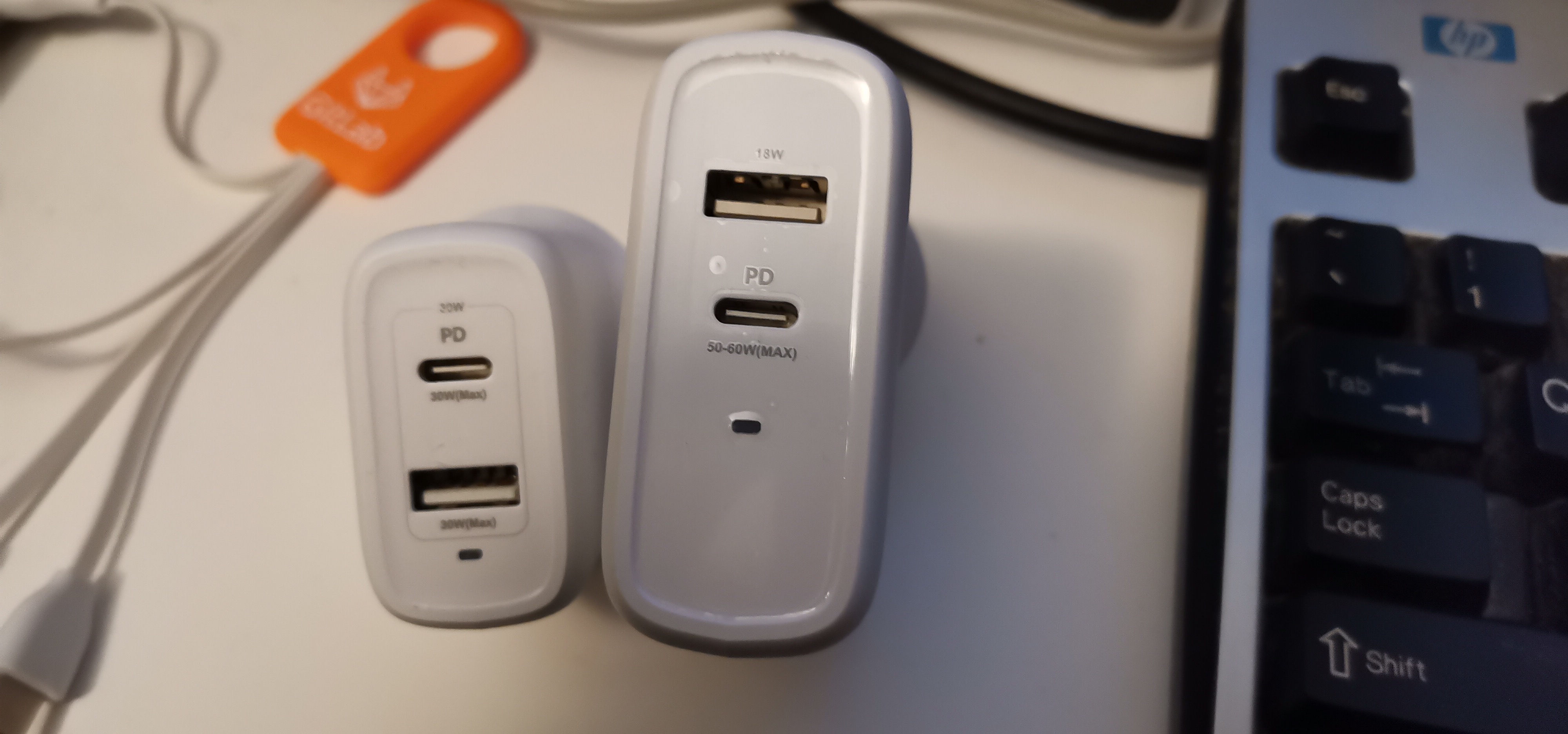
photo of 2 USB-PD chargers A recent development is cheap Gallium Nitride based power supplies that provide better efficiency in a smaller space than other technologies. Kogan recently had a special on such devices so I decided to try them out with my new Thinkpad X1 Carbon Gen 5 [1]. Google searches for power supplies for that Thinkpad included results for 30W PSUs which implies that any 30W USB-C PSU should work. I bought a 30W charger for $10 that can supply 15V/2A or 20V/1.5A on a single USB-C port or 15W on the USB-C port and 15W on the USB-2 port at the same time and expected it to work as a laptop charger. Unfortunately it didn t, I don t know whether the adverts for 30W Thinkpad PSUs were false or whether the claim of the GaN charger I bought being 30W was false, all I know is that the KDE power applet said that the PSU couldn t supply enough power. I then bought a 68W charger for $28 that can supply 20.0V/3.0A on a single USB-C port if the USB-2 port isn t used and 50W on the USB-C port if the USB-2 port is also being used. This worked well which wasn t a great surprise as I had previously run the laptop on 45W PSUs. If I connect a phone to the USB-2 port while the laptop is being charged then the laptop will be briefly cut off, presumably the voltage and current are being renegotiated when that happens. As you can see the 68W charger is significantly larger than the 30W charger, but still small enough to easily fit in a jacket pocket and smaller than a regular laptop charger. One of my uses for this will be to put it in a jacket pocket when I have my laptop in another pocket. Another use will be for charging in my car as the cables from the inverter to convert 12VDC to 240VAC takes enough space. I will probably get a ~50W USB-PD charger that connects to a car cigarette lighter socket when a GaN version of such a charger becomes available.

Dirk Eddelbuettel: AsioHeaders 1.22.1-2 on CRAN: Small Update

An new minor revision of the AsioHeaders package arrived at CRAN earlier today. Asio provides a cross-platform C++ library for network and low-level I/O programming. It is also included in Boost but requires linking when used as part of Boost. This standalone version of Asio is a header-only C++ library which can be used without linking (just like our BH package with parts of Boost). This minor update avoid use of (v)sprintf which CRAN now flags in r-devel (for all R builds), following the decision by Apple to deprecated it for macOS. Winston had notified me about email he had gotten for for his websocket package also highlighting the issue for both iptools and ipaddress. As the issue ticket dialog shows I was initially a little hamfisted about replicating, falsely thinking I would need an updated compiler. But this really is just a change in r-devel once again scanning shared libraries for symbols now warned about. Upstream has newer minor releases but they did not yet cover this; however I found a commit mentioning Xcode and snprint from three days ago which I essentially ported. We needed one more change, and that addressed the issue in websocket. But as it is good to increase the number of random acts of kindness, I also looked into iptools and ipaddress as CRAN has its eyes on them too for this. Turned out they needed simple and limited changes from sprint to snprintf so made those and sent them PRs: iptools PR #42 and ipaddress PR #79. The short NEWS entry for AsioHeaders follows.

Changes in version 1.22.1-2 (2022-12-07)
  • Switch a handful of upstream (v)sprint uses to (v)snprintf.

Thanks to my CRANberries, there is also a diffstat report relative to the previous release. Comments and suggestions about AsioHeaders are welcome via the issue tracker at the GitHub repo. If you like this or other open-source work I do, you can now sponsor me at GitHub.

This post by Dirk Eddelbuettel originated on his Thinking inside the box blog. Please report excessive re-aggregation in third-party for-profit settings.

8 December 2022

Louis-Philippe V ronneau: Debian Python Team 2022 Sprint Report

This is the report for the Debian Python Team remote sprint that took place on December 2-3-4 2022. Many thanks to those who participated, namely: Here is a list of issues we worked on: pybuild autodep8 feature About a year ago, Antonio Terceiro contributed code to pybuild to make it possible to automatically run the upstream test suite as autopkgtests. This feature has now been merged and uploaded to unstable. Although you can find out more about it in the pybuild-autopkgtest manpage, an email providing more details should be sent to the debian-python mailing list relatively soon. Fixing packages that run tests via python3 setup.py test Last August, Stefano Rivera poked the team about the deprecation of the python3 setup.py test command to run tests in pybuild. Although this feature has been deprecated upstream for 6 years now, many packages in the archive still use it to run the upstream test suite during build. Around 29 of the 67 packages that are team-maintained by the Debian Python Team were fixed during the sprint. Ideally, all of them would be before the feature is removed from pybuild. if a package you maintain still runs this command, please consider fixing it! Fixing packages that use nose nose, provided by the python3-nose package, is an obsolete testing framework for Python and has been unmaintained since 2015. During the sprint, people worked on fixing some of the many bugs filled against packages still running tests via nose, but there are still around 240 packages affected by this issue in the archive. Again, if a package you maintain still runs this command, please consider fixing it! Removal of the remaining Python2 packages With the upload of dh-python 5.20221202, Stefano Rivera officially removed support for dh_python2 and dh_pypy, thus closing the "Python2 removal in sid/bullseye" bug. It seems some work still needs to be done for complete Python2 removal from Sid, but I expect this will be done in time for the Bookworm release. Working on Lintian tags for the Team During the sprint, I managed to work on some Lintian issues that we had targeted, namely: I also worked on a few other Lintian tags, but they were unrelated to the Debian Python Team itself. I'm also happy to report many of the tags I wrote for the team in the past few months were merged by the awesome Russ Allbery and should land in unstable as soon as a new release is made. I'm particularly looking forward the new "uses-python-distutils" tag that should help us flag packages that still use the deprecated distutils library. Patching distro-tracker (tracker.debian.org) to show pending team MRs It's often hard to have a good overview of pending merge requests when working with team-maintained packages, as by default, Salsa doesn't notify anyone when a MR is opened. Although our workflow typically does not involve creating merge requests, some people still do and they end up sitting there, unnoticed. During the sprint, Kurt Kremitzki worked on solving this issue by having distro-tracker show the pending MRs on our team's tracker page. Sadly, it seems little progress was made, as the removal of python3-django-jsonfield from the archive and breaking changes in python3-selenium has broken the test suite. Migrate packages building with the flit plugin to the generic pyproject one pybuild has been supporting building with PEP-517 style pyproject.toml files via a generic plugin (pybuild-plugin-pyproject) for a while now. As this plugin supersedes the old flit plugin, we've been thinking of deprecating it in time for the Bookworm release. To make this possible, most of the packages in the archive that still used this plugin were migrated to the generic one and I opened bugs on the last handful of packages that were not team-maintained. Other work Many other things were done during the sprint, such as: Thanks Thanks again to everyone who joined the sprint, and three big cheers for all the folks who donate to Debian and made it possible for us to have a food budget for the event.

7 December 2022

Matthew Garrett: Making an Orbic Speed RC400L autoboot when USB power is attached

As I mentioned a couple of weeks ago, I've been trying to hack an Orbic Speed RC400L mobile hotspot so it'll automatically boot when power is attached. When plugged in it would flash a "Welcome" screen and then switch to a display showing the battery charging - it wouldn't show up on USB, and didn't turn on any networking. So, my initial assumption was that the bootloader was making a policy decision not to boot Linux. After getting root (as described in the previous post), I was able to cat /proc/mtd and see that partition 7 was titled "aboot". Aboot is a commonly used Android bootloader, based on Little Kernel - LK provides the hardware interface, aboot is simply an app that runs on top of it. I was able to find the source code for Quectel's aboot, which is intended to run on the same SoC that's in this hotspot, so it was relatively easy to line up a bunch of the Ghidra decompilation with actual source (top tip: find interesting strings in your decompilation and paste them into github search, and see whether you get a repo back).

Unfortunately looking through this showed various cases where bootloader policy decisions were made, but all of them seemed to result in Linux booting. Patching them and flashing the patched loader back to the hotspot didn't change the behaviour. So now I was confused: it seemed like Linux was loading, but there wasn't an obvious point in the boot scripts where it then decided not to do stuff. No boot logs were retained between boots, which made things even more annoying. But then I realised that, well, I have root - I can just do my own logging. I hacked in an additional init script to dump dmesg to /var, powered it down, and then plugged in a USB cable. It booted to the charging screen. I hit the power button and it booted fully, appearing on USB. I adb shelled in, checked the logs, and saw that it had booted twice. So, we were definitely entering Linux before showing the charging screen. But what was the difference?

Diffing the dmesg showed that there was a major distinction on the kernel command line. The kernel command line is data populated by the bootloader and then passed to the kernel - it's how you provide arguments that alter kernel behaviour without having to recompile it, but it's also exposed to userland by the running kernel so it also serves as a way for the bootloader to pass information to the running userland. The boot that resulted in the charging screen had a androidboot.poweronreason=USB argument, the one that booted fully had androidboot.poweronreason=PWRKEY. Searching the filesystem for androidboot.poweronreason showed that the script that configures USB did not enable USB if poweronreason was USB, and the same string also showed up in a bunch of other applications. The bootloader was always booting Linux, but it was telling Linux why it had booted, and if that reason was "USB" then Linux was choosing not to enable USB and not starting the networking stack.

One approach would be to modify every application that parsed this data and make it work even if the power on reason was "USB". That would have been tedious. It seemed easier to modify the bootloader. Looking for that string in Ghidra showed that it was reading a register from the power management controller and then interpreting that to determine the reason it had booted. In effect, it was doing something like:
boot_reason = read_pmic_boot_reason();
switch(boot_reason)  
case 0x10:
  bootparam = strdup("androidboot.poweronreason=PWRKEY");
  break;
case 0x20:
  bootparam = strdup("androidboot.poweronreason=USB");
  break;
default:
  bootparam = strdup("androidboot.poweronreason=Hard_Reset");
 
Changing the 0x20 to 0xff meant that the USB case would never be detected, and it would fall through to the default. All the userland code was happy to accept "Hard_Reset" as a legitimate reason to boot, and now plugging in USB results in the modem booting to a functional state. Woo.

If you want to do this yourself, dump the aboot partition from your device, and search for the hex sequence "03 02 00 0a 20"". Change the final 0x20 to 0xff, copy it back to the device, and write it to mtdblock7. If it doesn't work, feel free to curse me, but I'm almost certainly going to be no use to you whatsoever. Also, please, do not just attempt to mechanically apply this to other hotspots. It's not going to end well.

comment count unavailable comments

1 December 2022

Dirk Eddelbuettel: spdl 0.0.2 on CRAN: First Update

A first update to the recently-released package spdl is now om CRAN. The key focus of spdl is a offering the same interface from both R and C++ for logging by relying on spdlog via my RcppSpdlog package. This release exposes simple helpers fmt() (to format text according to the included fmt library) and cat() which formats and prints. The very short NEWS entry for this release follows.

Changes in spld version 0.0.2 (2022-12-01)
  • Helper functions fmt() and cat() have been added

Courtesy of my CRANberries, there is also a diffstat report. More detailed information is on the spdl page. If you like this or other open-source work I do, you can sponsor me at GitHub.

This post by Dirk Eddelbuettel originated on his Thinking inside the box blog. Please report excessive re-aggregation in third-party for-profit settings.

30 November 2022

Matthew Garrett: Making unphishable 2FA phishable

One of the huge benefits of WebAuthn is that it makes traditional phishing attacks impossible. An attacker sends you a link to a site that looks legitimate but isn't, and you type in your credentials. With SMS or TOTP-based 2FA, you type in your second factor as well, and the attacker now has both your credentials and a legitimate (if time-limited) second factor token to log in with. WebAuthn prevents this by verifying that the site it's sending the secret to is the one that issued it in the first place - visit an attacker-controlled site and said attacker may get your username and password, but they won't be able to obtain a valid WebAuthn response.

But what if there was a mechanism for an attacker to direct a user to a legitimate login page, resulting in a happy WebAuthn flow, and obtain valid credentials for that user anyway? This seems like the lead-in to someone saying "The Aristocrats", but unfortunately it's (a) real, (b) RFC-defined, and (c) implemented in a whole bunch of places that handle sensitive credentials. The villain of this piece is RFC 8628, and while it exists for good reasons it can be used in a whole bunch of ways that have unfortunate security consequences.

What is the RFC 8628-defined Device Authorization Grant, and why does it exist? Imagine a device that you don't want to type a password into - either it has no input devices at all (eg, some IoT thing) or it's awkward to type a complicated password (eg, a TV with an on-screen keyboard). You want that device to be able to access resources on behalf of a user, so you want to ensure that that user authenticates the device. RFC 8628 describes an approach where the device requests the credentials, and then presents a code to the user (either on screen or over Bluetooth or something), and starts polling an endpoint for a result. The user visits a URL and types in that code (or is given a URL that has the code pre-populated) and is then guided through a standard auth process. The key distinction is that if the user authenticates correctly, the issued credentials are passed back to the device rather than the user - on successful auth, the endpoint the device is polling will return an oauth token.

But what happens if it's not a device that requests the credentials, but an attacker? What if said attacker obfuscates the URL in some way and tricks a user into clicking it? The user will be presented with their legitimate ID provider login screen, and if they're using a WebAuthn token for second factor it'll work correctly (because it's genuinely talking to the real ID provider!). The user will then typically be prompted to approve the request, but in every example I've seen the language used here is very generic and doesn't describe what's going on or ask the user. AWS simply says "An application or device requested authorization using your AWS sign-in" and has a big "Allow" button, giving the user no indication at all that hitting "Allow" may give a third party their credentials.

This isn't novel! Christoph Tafani-Dereeper has an excellent writeup on this topic from last year, which builds on Nestori Syynimaa's earlier work. But whenever I've talked about this, people seem surprised at the consequences. WebAuthn is supposed to protect against phishing attacks, but this approach subverts that protection by presenting the user with a legitimate login page and then handing their credentials to someone else.

RFC 8628 actually recognises this vector and presents a set of mitigations. Unfortunately nobody actually seems to implement these, and most of the mitigations are based around the idea that this flow will only be used for physical devices. Sadly, AWS uses this for initial authentication for the aws-cli tool, so there's no device in that scenario. Another mitigation is that there's a relatively short window where the code is valid, and so sending a link via email is likely to result in it expiring before the user clicks it. An attacker could avoid this by directing the user to a domain under their control that triggers the flow and then redirects the user to the login page, ensuring that the code is only generated after the user has clicked the link.

Can this be avoided? The best way to do so is to ensure that you don't support this token issuance flow anywhere, or if you do then ensure that any tokens issued that way are extremely narrowly scoped. Unfortunately if you're an AWS user, that's probably not viable - this flow is required for the cli tool to perform SSO login, and users are going to end up with broadly scoped tokens as a result. The logs are also not terribly useful.

The infuriating thing is that this isn't necessary for CLI tooling. The reason this approach is taken is that you need a way to get the token to a local process even if the user is doing authentication in a browser. This can be avoided by having the process listen on localhost, and then have the login flow redirect to localhost (including the token) on successful completion. In this scenario the attacker can't get access to the token without having access to the user's machine, and if they have that they probably have access to the token anyway.

There's no real moral here other than "Security is hard". Sorry.

comment count unavailable comments

Russell Coker: Links November 2022

Here s the US Senate Statement of Frances Haugen who used to work for Facebook countering misinformation and espionage [1]. She believes that Facebook is capable of dealing with the online radicalisation and promotion of bad things on it s platform but is unwilling to do so for financial reasons. We need strong regulation of Facebook and it probably needs to be broken up. Interesting article from The Atlantic about filtered cigarettes being more unhealthy than unfiltered [2]. Every time I think I know how evil tobacco companies are I get surprised by some new evidence. Cory Doctorow wrote an insightful article about resistance to rubber hose cryptanalysis [3]. Cory Doctorow wrote an interesting article When Automation Becomes Enforcement with a new way of thinking about Snapchat etc [4]. Cory Doctorow wrote an insightful and informative article Big Tech Isn t Stealing News Publishers Content, It s Stealing Their Money [5] which should be read by politicians from all countries that are trying to restrict quoting news on the Internet. Interesting articl;e on Santiago Genoves who could be considered as a pioneer of reality TV for deliberately creating disputes between a group of young men and women on a raft in the Atlantic for 3 months [6]. Matthew Garrett wrote an interesting review of the Freedom Phone, seems that it s not good for privacy and linked to some companies doing weird stuff [7]. Definitely worth reading. Cory Doctorow wrote an interesting and amusing article about backdoors for machine learning [8] Petter Reinholdtsen wrote an informative post on how to make a bootable USB stick image from an ISO file [9]. Apparently Lenovo provides ISO images to update laptops that don t have DVD drives. :( Barry Gander wrote an interesting article about the fall of Rome and the decline of the US [10]. It s a great concern that the US might fail in the same way as Rome. Ethan Siegel wrote an interesting article about Iapetus, a moon of Saturn that is one of the strangest objects in the solar system [11]. Cory Doctorow s article Revenge of the Chickenized Reverse-Centaurs has some good insights into the horrible things that companies like Amazon are doing to their employees and how we can correct that [12]. Charles Stross wrote an insightful blog post about Billionaires [13]. They can t do much for themselves with the extra money beyond about $10m or $100m (EG Steve Jobs was unable to extend his own life much when he had cancer) and their money is trivial when compared to the global economy. They are however effective parasites capable of performing great damage to the country that hosts them. Cory Doctorow has an interesting article about how John Deere is being evil again [14]. This time with potentially catastrophic results.

26 November 2022

Matthew Garrett: Poking a mobile hotspot

I've been playing with an Orbic Speed, a relatively outdated device that only speaks LTE Cat 4, but the towers I can see from here are, uh, not well provisioned so throughput really isn't a concern (and refurbs are $18, so). As usual I'm pretty terrible at just buying devices and using them for their intended purpose, and in this case it has the irritating behaviour that if there's a power cut and the battery runs out it doesn't boot again when power returns, so here's what I've learned so far.

First, it's clearly running Linux (nmap indicates that, as do the headers from the built-in webserver). The login page for the web interface has some text reading "Open Source Notice" that highlights when you move the mouse over it, but that's it - there's code to make the text light up, but it's not actually a link. There's no exposed license notices at all, although there is a copy on the filesystem that doesn't seem to be reachable from anywhere. The notice tells you to email them to receive source code, but doesn't actually provide an email address.

Still! Let's see what else we can figure out. There's no open ports other than the web server, but there is an update utility that includes some interesting components. First, there's a copy of adb, the Android Debug Bridge. That doesn't mean the device is running Android, it's common for embedded devices from various vendors to use a bunch of Android infrastructure (including the bootloader) while having a non-Android userland on top. But this is still slightly surprising, because the device isn't exposing an adb interface over USB. There's also drivers for various Qualcomm endpoints that are, again, not exposed. Running the utility under Windows while the modem is connected results in the modem rebooting and Windows talking about new hardware being detected, and watching the device manager shows a bunch of COM ports being detected and bound by Qualcomm drivers. So, what's it doing?

Sticking the utility into Ghidra and looking for strings that correspond to the output that the tool conveniently leaves in the logs subdirectory shows that after finding a device it calls vendor_device_send_cmd(). This is implemented in a copy of libusb-win32 that, again, has no offer for source code. But it's also easy to drop that into Ghidra and discover thatn vendor_device_send_cmd() is just a wrapper for usb_control_msg(dev,0xc0,0xa0,0,0,NULL,0,1000);. Sending that from Linux results in the device rebooting and suddenly exposing some more USB endpoints, including a functional adb interface. Although, annoyingly, the rndis interface that enables USB tethering via the modem is now missing.

Unfortunately the adb user is unprivileged, but most files on the system are world-readable. data/logs/atfwd.log is especially interesting. This modem has an application processor built into the modem chipset itself, and while the modem implements the Hayes Command Set there's also a mechanism for userland to register that certain AT commands should be pushed up to userland. These are handled by the atfwd_daemon that runs as root, and conveniently logs everything it's up to. This includes having logged all the communications executed when the update tool was run earlier, so let's dig into that.

The system sends a bunch of AT+SYSCMD= commands, each of which is in the form of echo (stuff) >>/usrdata/sec/chipid. Once that's all done, it sends AT+CHIPID, receives a response of CHIPID:PASS, and then AT+SER=3,1, at which point the modem reboots back into the normal mode - adb is gone, but rndis is back. But the logs also reveal that between the CHIPID request and the response is a security check that involves RSA. The logs on the client side show that the text being written to the chipid file is a single block of base64 encoded data. Decoding it just gives apparently random binary. Heading back to Ghidra shows that atfwd_daemon is reading the chipid file and then decrypting it with an RSA key. The key is obtained by calling a series of functions, each of which returns a long base64-encoded string. Decoding each of these gives 1028 bytes of high entropy data, which is then passed to another function that decrypts it using AES CBC using a key of 000102030405060708090a0b0c0d0e0f and an initialization vector of all 0s. This is somewhat weird, since there's 1028 bytes of data and 128 bit AES works on blocks of 16 bytes. The behaviour of OpenSSL is apparently to just pad the data out to a multiple of 16 bytes, but that implies that we're going to end up with a block of garbage at the end. It turns out not to matter - despite the fact that we decrypt 1028 bytes of input only the first 200 bytes mean anything, with the rest just being garbage. Concatenating all of that together gives us a PKCS#8 private key blob in PEM format. Which means we have not only the private key, but also the public key.

So, what's in the encrypted data, and where did it come from in the first place? It turns out to be a JSON blob that contains the IMEI and the serial number of the modem. This is information that can be read from the modem in the first place, so it's not secret. The modem decrypts it, compares the values in the blob to its own values, and if they match sets a flag indicating that validation has succeeeded. But what encrypted it in the first place? It turns out that the json blob is just POSTed to http://pro.w.ifelman.com/api/encrypt and an encrypted blob returned. Of course, the fact that it's being encrypted on the server with the public key and sent to the modem that decrypted with the private key means that having access to the modem gives us the public key as well, which means we can just encrypt our own blobs.

What does that buy us? Digging through the code shows the only case that it seems to matter is when parsing the AT+SER command. The first argument to this is the serial mode to transition to, and the second is whether this should be a temporary transition or a permanent one. Once parsed, these arguments are passed to /sbin/usb/compositions/switch_usb which just writes the mode out to /usrdata/mode.cfg (if permanent) or /usrdata/mode_tmp.cfg (if temporary). On boot, /data/usb/boot_hsusb_composition reads the number from this file and chooses which USB profile to apply. This requires no special permissions, except if the number is 3 - if so, the RSA verification has to be performed first. This is somewhat strange, since mode 9 gives the same rndis functionality as mode 3, but also still leaves the debug and diagnostic interfaces enabled.

So what's the point of all of this? I'm honestly not sure! It doesn't seem like any sort of effective enforcement mechanism (even ignoring the fact that you can just create your own blobs, if you change the IMEI on the device somehow, you can just POST the new values to the server and get back a new blob), so the best I've been able to come up with is to ensure that there's some mapping between IMEI and serial number before the device can be transitioned into production mode during manufacturing.

But, uh, we can just ignore all of this anyway. Remember that AT+SYSCMD= stuff that was writing the data to /usrdata/sec/chipid in the first place? Anything that's passed to AT+SYSCMD is just executed as root. Which means we can just write a new value (including 3) to /usrdata/mode.cfg in the first place, without needing to jump through any of these hoops. Which also means we can just adb push a shell onto there and then use the AT interface to make it suid root, which avoids needing to figure out how to exploit any of the bugs that are just sitting there given it's running a 3.18.48 kernel.

Anyway, I've now got a modem that's got working USB tethering and also exposes a working adb interface, and I've got root on it. Which let me dump the bootloader and discover that it implements fastboot and has an oem off-mode-charge command which solves the problem I wanted to solve of having the device boot when it gets power again. Unfortunately I still need to get into fastboot mode. I haven't found a way to do it through software (adb reboot bootloader doesn't do anything), but this post suggests it's just a matter of grounding a test pad, at which point I should just be able to run fastboot oem off-mode-charge and it'll be all set. But that's a job for tomorrow.

Edit: Got into fastboot mode and ran fastboot oem off-mode-charge 0 but sadly it doesn't actually do anything, so I guess next is going to involve patching the bootloader binary. Since it's signed with a cert titled "General Use Test Key (for testing only)" it apparently doesn't have secure boot enabled, so this should be easy enough.

comment count unavailable comments

25 November 2022

Russ Allbery: podlators 5.00

podlators is my collection of POD formatting modules, which generate *roff or text (possibly with escape sequence markup) from the documentation format used by Perl and some other packages. This is a major release, the biggest since the Pod::Simple rewrite in 2005. The headline news is that after some fairly extensive investigation, this release of Pod::Man finally changes the default output format to Unicode. No more replacement of characters in people's names, or text in non-English languages, with ugly X characters! There is a new encoding option to set the output encoding, and new options groff (which uses the groff extension for Unicode code points and is the default on EBCDIC systmes) and roff (which does the old, broken X substitution). Since this was a major backward-incompatible change, I also finally removed most of the formatting touch-ups that Pod::Man tried to do for troff output but which would be invisible for the (by far more commonly used) nroff output. These have been an endless source of bugs and are very difficult to maintain, most of them were of marginal utility, and I am dubious many people are using troff to print Perl manual pages these days instead of, say, printing the rendered output from one of the many excellent POD to HTML modules. There is some remaining somewhat-Perl-specific guesswork applied to the formatting, which is much simpler, but even that can now be turned off with the new guesswork option. This will allow people using POD to generate manual pages for things other than Perl modules to disable the Perl-specific markup logic. Pod::Text also now supports encoding and gets some major encoding cleanups, including using Encode instead of PerlIO encoding layers for its output. There are also numerous other fixes and improvements: a new language option to Pod::Man to configure (in an unfortunately groff-specific way) the line-breaking rules for languages like Chinese and Japanese, conversion of zero-width spaces to the *roff \: equivalent, a fix for wrapping L<> inside S<>, and various other bug fixes. Perhaps the most interesting is a fix to a long-standing problem with the Pod::Man output where bold and italic text would extend too far if used in combination with C<> fixed-width text. This bug has been around forever without being noticed, and then two different people noticed it while I was preparing this release. You can get the latest release from CPAN or from the podlators distribution page. These changes should be incorporated into Perl core in due course, although given the substantial changes, that may require a baking period.

22 November 2022

Dirk Eddelbuettel: spdl 0.0.1 on CRAN: New Package!

A new package made it to CRAN today: spdl. It provides a very simple interface to spdlog with the key focus being that provides the same interface from both R and C++. I had brought spdlog to R a little while ago via RcppSpdlog, but its use was generally limited to C++ code where we would write something like (taken from one of the examples included in the package)
spdlog::info("Welcome to spdlog!");
I then provided C-level exports from the package accessible in other package but with that the signature only became longer as it also included the package name, here RcppSpdlog. So I experimented a little with that and added another more compactly named namespace spdl around it. So then it becomes
spdl::info("Info message with values   and  ", 42, 1.23);  // C++ code
which now also shows the power of the included fmt library. And I got quite used to that and now wanted to same from R! But to create a new namespace, we need a new package. So we made one. Now from R too:
spdl::info("Info message with values   and  ", 42L, 1.23)  # R code
We layered a very simple wrapper for fmt over this. All R argument are passed to format() and we simply send a vector of strings over the C interface to the RcppSpdlog package where the templated formatter of fmt is invoked but for character values. You can equally well format the string locally first. Everything works: from paste() to sprintf() to any of the existing string interpolators all of which are nice. But none works just like fmt and I wanted to have the same formatter in both languages, and like how fmt works. By tradition, the NEWS entry for this release follows.
Changes in spld version 0.0.1 (2022-11-21)
  • Initial release of R and C++ loggers using spdl::* namespace

More detailed information is on the spdl page. If you like this or other open-source work I do, you can sponsor me at GitHub.

This post by Dirk Eddelbuettel originated on his Thinking inside the box blog. Please report excessive re-aggregation in third-party for-profit settings.

21 November 2022

Dirk Eddelbuettel: RcppClassic 0.9.13 on CRAN: Minor Update

A maintenance release 0.9.14 of the RcppClassic package arrived earlier today on CRAN. This package provides a maintained version of the otherwise deprecated initial Rcpp API which no new projects should use as the normal Rcpp API is so much better. The changes is. CRAN was reporting (for all four macOS builds, and only there) that an absolute path was embedded, so we updated the (old ) call to install_name_tool use on that (and only that) OS. No other changes were made. CRANberries also reports the changes relative to the previous release from nearly three years ago. Questions, comments etc should go to the rcpp-devel mailing list off the R-Forge page. If you like this or other open-source work I do, you can now sponsor me at GitHub.

This post by Dirk Eddelbuettel originated on his Thinking inside the box blog. Please report excessive re-aggregation in third-party for-profit settings.

18 November 2022

Dirk Eddelbuettel: RcppSpdlog 0.0.10 on CRAN: New Features

A version 0.0.10 of RcppSpdlog is now on CRAN and in Debian. RcppSpdlog bundles spdlog, a wonderful header-only C++ logging library with all the bells and whistles you would want that was written by Gabi Melman, and also includes fmt by Victor Zverovich. This release continues on the path started less than two weeks ago with the RcppSpdlog 0.0.9 release. We continue to support both R and C++ access by adding a (simple) variadic template formatter exposing fmt::format() (by focusing on just string arguments). This can be accessed from R via the exact same formatting strings that fmt uses, and which we have come to like for its simplicity. Of course if one prefers a different string interpolation method, or plain sprintf(), or even paste: they all work as all that matters is that a character variable gets passed on. We also added a little bit of new documentation in the vignette. The NEWS entry for this release follows.

Changes in RcppSpdlog version 0.0.10 (2022-11-17)
  • Support variadic templates with fmt::format
  • Add R formatting helper which converts arguments to character taking advantage of variadic template logger: fmt logging from R
  • Expand vignette

Courtesy of my CRANberries, there is also a diffstat report. More detailed information is on the RcppSpdlog page, or the package documention site. If you like this or other open-source work I do, you can sponsor me at GitHub.

This post by Dirk Eddelbuettel originated on his Thinking inside the box blog. Please report excessive re-aggregation in third-party for-profit settings.

16 November 2022

Ian Jackson: Stop writing Rust linked list libraries!

tl;dr: Don t write a Rust linked list library: they are hard to do well, and usually useless. Use VecDeque, which is great. If you actually need more than VecDeque can do, use one of the handful of libraries that actually offer a significantly more useful API. If you are writing your own data structure, check if someone has done it already, and consider slotmap or generation_arena, (or maybe Rc/Arc). Contents Survey of Rust linked list libraries I have updated my Survey of Rust linked list libraries. Background In 2019 I was writing plag-mangler, a tool for planar graph layout. I needed a data structure. Naturally I looked for a library to help. I didn t find what I needed, so I wrote rc-dlist-deque. However, on the way I noticed an inordinate number of linked list libraries written in Rust. Most all of these had no real reason for existing. Even the one in the Rust standard library is useless. Results Now I have redone the survey. The results are depressing. In 2019 there were 5 libraries which, in my opinion, were largely useless. In late 2022 there are now thirteen linked list libraries that ought probably not ever to be used. And, a further eight libraries for which there are strictly superior alternatives. Many of these have the signs of projects whose authors are otherwise competent: proper documentation, extensive APIs, and so on. There is one new library which is better for some applications than those available in 2019. (I m referring to generational_token_list, which makes a plausible alternative to dlv-list which I already recommended in 2019.) Why are there so many poor Rust linked list libraries ? Linked lists and Rust do not go well together. But (and I m guessing here) I presume many people are taught in programming school that a linked list is a fundamental data structure; people are often even asked to write one as a teaching exercise. This is a bad idea in Rust. Or maybe they ve heard that writing linked lists in Rust is hard and want to prove they can do it. Double-ended queues One of the main applications for a linked list in a language like C, is a queue, where you put items in at one end, and take them out at the other. The Rust standard library has a data structure for that, VecDeque. Five of the available libraries: For these you could, and should, just use VecDeque instead. The Cursor concept A proper linked list lets you identify and hold onto an element in the middle of the list, and cheaply insert and remove elements there. Rust s ownership and borrowing rules make this awkward. One idea that people have many times reinvented and reimplemented, is to have a Cursor type, derived from the list, which is a reference to an element, and permits insertion and removal there. Eight libraries have implemented this in the obvious way. However, there is a serious API limitation: To prevent a cursor being invalidated (e.g. by deletion of the entry it points to) you can t modify the list while the cursor exists. You can only have one cursor (that can be used for modification) at a time. The practical effect of this is that you cannot retain cursors. You can make and use such a cursor for a particular operation, but you must dispose of it soon. Attempts to do otherwise will see you losing a battle with the borrow checker. If that s good enough, then you could just use a VecDeque and use array indices instead of the cursors. It s true that deleting or adding elements in the middle involves a lot of copying, but your algorithm is O(n) even with the single-cursor list libraries, because it must first walk the cursor to the desired element. Formally, I believe any algorithm using these exclusive cursors can be rewritten, in an obvious way, to simply iterate and/or copy from the start or end (as one can do with VecDeque) without changing the headline O() performance characteristics. IMO the savings available from avoiding extra copies etc. are not worth the additional dependency, unsafe code, and so on, especially as there are other ways of helping with that (e.g. boxing the individual elements). Even if you don t find that convincing, generational_token_list and dlv_list are strictly superior since they offer a more flexible and convenient API and better performance, and rely on much less unsafe code. Rustic approaches to pointers-to-and-between-nodes data structures Most of the time a VecDeque is great. But if you actually want to hold onto (perhaps many) references to the middle of the list, and later modify it through those references, you do need something more. This is a specific case of a general class of problems where the naive approach (use Rust references to the data structure nodes) doesn t work well. But there is a good solution: Keep all the nodes in an array (a Vec<Option<T>> or similar) and use the index in the array as your node reference. This is fast, and quite ergonomic, and neatly solves most of the problems. If you are concerned that bare indices might cause confusion, as newly inserted elements would reuse indices, add a per-index generation count. These approaches have been neatly packaged up in libraries like slab, slotmap, generational-arena and thunderdome. And they have been nicely applied to linked lists by the authors of generational_token_list. and dlv-list. The alternative for nodey data structures in safe Rust: Rc/Arc Of course, you can just use Rust s interior mutability and reference counting smart pointers, to directly implement the data structure of your choice. In many applications, a single-threaded data structure is fine, in which case Rc and Cell/RefCell will let you write safe code, with cheap refcount updates and runtime checks inserted to defend against unexpected aliasing, use-after-free, etc. I took this approach in rc-dlist-deque, because I wanted each node to be able to be on multiple lists. Rust s package ecosystem demonstrating software s NIH problem The Rust ecosystem is full of NIH libraries of all kinds. In my survey, there are: five good options; seven libraries which are plausible, but just not as good as the alternatives; and fourteen others. There is a whole rant I could have about how the whole software and computing community is pathologically neophilic. Often we seem to actively resist reusing ideas, let alone code; and are ignorant and dismissive of what has gone before. As a result, we keep solving the same problems, badly - making the same mistakes over and over again. In some subfields, working software, or nearly working software, is frequently replaced with something worse, maybe more than once. One aspect of this is a massive cultural bias towards rewriting rather than reusing, let alone fixing and using. Many people can come out of a degree, trained to be a programmer, and have no formal training in selecting and evaluating software; this is even though working effectively with computers requires making good use of everyone else s work. If one isn t taught these skills (when and how to search for prior art, how to choose between dependencies, and so on) one must learn it on the job. The result is usually an ad-hoc and unsystematic approach, often dominated by fashion rather than engineering. The package naming paradox The more experienced and competent programmer is aware of all the other options that exist - after all they have evaluated other choices before writing their own library. So they will call their library something like generational_token_list or vecdeque-stableix. Whereas the novice straight out of a pre-Rust programming course just thinks what they are doing is the one and only obvious thing (even though it s a poor idea) and hasn t even searched for a previous implementation. So they call their package something obvious like linked list . As a result, the most obvious names seem to refer to the least useful libraries.
Edited 2022-11-16 23:55 UTC to update numbers of libraries in various categories following updates to the survey (including updates prompted by feedback received after this post first published).


comment count unavailable comments

Antoine Beaupr : Wayland: i3 to Sway migration

I started migrating my graphical workstations to Wayland, specifically migrating from i3 to Sway. This is mostly to address serious graphics bugs in the latest Framwork laptop, but also something I felt was inevitable. The current status is that I've been able to convert my i3 configuration to Sway, and adapt my systemd startup sequence to the new environment. Screen sharing only works with Pipewire, so I also did that migration, which basically requires an upgrade to Debian bookworm to get a nice enough Pipewire release. I'm testing Wayland on my laptop, but I'm not using it as a daily driver because I first need to upgrade to Debian bookworm on my main workstation. Most irritants have been solved one way or the other. My main problem with Wayland right now is that I spent a frigging week doing the conversion: it's exciting and new, but it basically sucked the life out of all my other projects and it's distracting, and I want it to stop. The rest of this page documents why I made the switch, how it happened, and what's left to do. Hopefully it will keep you from spending as much time as I did in fixing this. TL;DR: Wayland is mostly ready. Main blockers you might find are that you need to do manual configurations, DisplayLink (multiple monitors on a single cable) doesn't work in Sway, HDR and color management are still in development. I had to install the following packages:
apt install \
    brightnessctl \
    foot \
    gammastep \
    gdm3 \
    grim slurp \
    pipewire-pulse \
    sway \
    swayidle \
    swaylock \
    wdisplays \
    wev \
    wireplumber \
    wlr-randr \
    xdg-desktop-portal-wlr
And did some of tweaks in my $HOME, mostly dealing with my esoteric systemd startup sequence, which you won't have to deal with if you are not a fan.

Why switch? I originally held back from migrating to Wayland: it seemed like a complicated endeavor hardly worth the cost. It also didn't seem actually ready. But after reading this blurb on LWN, I decided to at least document the situation here. The actual quote that convinced me it might be worth it was:
It s amazing. I have never experienced gaming on Linux that looked this smooth in my life.
... I'm not a gamer, but I do care about latency. The longer version is worth a read as well. The point here is not to bash one side or the other, or even do a thorough comparison. I start with the premise that Xorg is likely going away in the future and that I will need to adapt some day. In fact, the last major Xorg release (21.1, October 2021) is rumored to be the last ("just like the previous release...", that said, minor releases are still coming out, e.g. 21.1.4). Indeed, it seems even core Xorg people have moved on to developing Wayland, or at least Xwayland, which was spun off it its own source tree. X, or at least Xorg, in in maintenance mode and has been for years. Granted, the X Window System is getting close to forty years old at this point: it got us amazingly far for something that was designed around the time the first graphical interface. Since Mac and (especially?) Windows released theirs, they have rebuilt their graphical backends numerous times, but UNIX derivatives have stuck on Xorg this entire time, which is a testament to the design and reliability of X. (Or our incapacity at developing meaningful architectural change across the entire ecosystem, take your pick I guess.) What pushed me over the edge is that I had some pretty bad driver crashes with Xorg while screen sharing under Firefox, in Debian bookworm (around November 2022). The symptom would be that the UI would completely crash, reverting to a text-only console, while Firefox would keep running, audio and everything still working. People could still see my screen, but I couldn't, of course, let alone interact with it. All processes still running, including Xorg. (And no, sorry, I haven't reported that bug, maybe I should have, and it's actually possible it comes up again in Wayland, of course. But at first, screen sharing didn't work of course, so it's coming a much further way. After making screen sharing work, though, the bug didn't occur again, so I consider this a Xorg-specific problem until further notice.) There were also frustrating glitches in the UI, in general. I actually had to setup a compositor alongside i3 to make things bearable at all. Video playback in a window was laggy, sluggish, and out of sync. Wayland fixed all of this.

Wayland equivalents This section documents each tool I have picked as an alternative to the current Xorg tool I am using for the task at hand. It also touches on other alternatives and how the tool was configured. Note that this list is based on the series of tools I use in desktop. TODO: update desktop with the following when done, possibly moving old configs to a ?xorg archive.

Window manager: i3 sway This seems like kind of a no-brainer. Sway is around, it's feature-complete, and it's in Debian. I'm a bit worried about the "Drew DeVault community", to be honest. There's a certain aggressiveness in the community I don't like so much; at least an open hostility towards more modern UNIX tools like containers and systemd that make it hard to do my work while interacting with that community. I'm also concern about the lack of unit tests and user manual for Sway. The i3 window manager has been designed by a fellow (ex-)Debian developer I have a lot of respect for (Michael Stapelberg), partly because of i3 itself, but also working with him on other projects. Beyond the characters, i3 has a user guide, a code of conduct, and lots more documentation. It has a test suite. Sway has... manual pages, with the homepage just telling users to use man -k sway to find what they need. I don't think we need that kind of elitism in our communities, to put this bluntly. But let's put that aside: Sway is still a no-brainer. It's the easiest thing to migrate to, because it's mostly compatible with i3. I had to immediately fix those resources to get a minimal session going:
i3 Sway note
set_from_resources set no support for X resources, naturally
new_window pixel 1 default_border pixel 1 actually supported in i3 as well
That's it. All of the other changes I had to do (and there were actually a lot) were all Wayland-specific changes, not Sway-specific changes. For example, use brightnessctl instead of xbacklight to change the backlight levels. See a copy of my full sway/config for details. Other options include:
  • dwl: tiling, minimalist, dwm for Wayland, not in Debian
  • Hyprland: tiling, fancy animations, not in Debian
  • Qtile: tiling, extensible, in Python, not in Debian (1015267)
  • river: Zig, stackable, tagging, not in Debian (1006593)
  • velox: inspired by xmonad and dwm, not in Debian
  • vivarium: inspired by xmonad, not in Debian

Status bar: py3status waybar I have invested quite a bit of effort in setting up my status bar with py3status. It supports Sway directly, and did not actually require any change when migrating to Wayland. Unfortunately, I had trouble making nm-applet work. Based on this nm-applet.service, I found that you need to pass --indicator for it to show up at all. In theory, tray icon support was merged in 1.5, but in practice there are still several limitations, like icons not clickable. Also, on startup, nm-applet --indicator triggers this error in the Sway logs:
nov 11 22:34:12 angela sway[298938]: 00:49:42.325 [INFO] [swaybar/tray/host.c:24] Registering Status Notifier Item ':1.47/org/ayatana/NotificationItem/nm_applet'
nov 11 22:34:12 angela sway[298938]: 00:49:42.327 [ERROR] [swaybar/tray/item.c:127] :1.47/org/ayatana/NotificationItem/nm_applet IconPixmap: No such property  IconPixmap 
nov 11 22:34:12 angela sway[298938]: 00:49:42.327 [ERROR] [swaybar/tray/item.c:127] :1.47/org/ayatana/NotificationItem/nm_applet AttentionIconPixmap: No such property  AttentionIconPixmap 
nov 11 22:34:12 angela sway[298938]: 00:49:42.327 [ERROR] [swaybar/tray/item.c:127] :1.47/org/ayatana/NotificationItem/nm_applet ItemIsMenu: No such property  ItemIsMenu 
nov 11 22:36:10 angela sway[313419]: info: fcft.c:838: /usr/share/fonts/truetype/dejavu/DejaVuSans.ttf: size=24.00pt/32px, dpi=96.00
... but that seems innocuous. The tray icon displays but is not clickable. Note that there is currently (November 2022) a pull request to hook up a "Tray D-Bus Menu" which, according to Reddit might fix this, or at least be somewhat relevant. If you don't see the icon, check the bar.tray_output property in the Sway config, try: tray_output *. The non-working tray was the biggest irritant in my migration. I have used nmtui to connect to new Wifi hotspots or change connection settings, but that doesn't support actions like "turn off WiFi". I eventually fixed this by switching from py3status to waybar, which was another yak horde shaving session, but ultimately, it worked.

Web browser: Firefox Firefox has had support for Wayland for a while now, with the team enabling it by default in nightlies around January 2022. It's actually not easy to figure out the state of the port, the meta bug report is still open and it's huge: it currently (Sept 2022) depends on 76 open bugs, it was opened twelve (2010) years ago, and it's still getting daily updates (mostly linking to other tickets). Firefox 106 presumably shipped with "Better screen sharing for Windows and Linux Wayland users", but I couldn't quite figure out what those were. TL;DR: echo MOZ_ENABLE_WAYLAND=1 >> ~/.config/environment.d/firefox.conf && apt install xdg-desktop-portal-wlr

How to enable it Firefox depends on this silly variable to start correctly under Wayland (otherwise it starts inside Xwayland and looks fuzzy and fails to screen share):
MOZ_ENABLE_WAYLAND=1 firefox
To make the change permanent, many recipes recommend adding this to an environment startup script:
if [ "$XDG_SESSION_TYPE" == "wayland" ]; then
    export MOZ_ENABLE_WAYLAND=1
fi
At least that's the theory. In practice, Sway doesn't actually run any startup shell script, so that can't possibly work. Furthermore, XDG_SESSION_TYPE is not actually set when starting Sway from gdm3 which I find really confusing, and I'm not the only one. So the above trick doesn't actually work, even if the environment (XDG_SESSION_TYPE) is set correctly, because we don't have conditionals in environment.d(5). (Note that systemd.environment-generator(7) do support running arbitrary commands to generate environment, but for some some do not support user-specific configuration files... Even then it may be a solution to have a conditional MOZ_ENABLE_WAYLAND environment, but I'm not sure it would work because ordering between those two isn't clear: maybe the XDG_SESSION_TYPE wouldn't be set just yet...) At first, I made this ridiculous script to workaround those issues. Really, it seems to me Firefox should just parse the XDG_SESSION_TYPE variable here... but then I realized that Firefox works fine in Xorg when the MOZ_ENABLE_WAYLAND is set. So now I just set that variable in environment.d and It Just Works :
MOZ_ENABLE_WAYLAND=1

Screen sharing Out of the box, screen sharing doesn't work until you install xdg-desktop-portal-wlr or similar (e.g. xdg-desktop-portal-gnome on GNOME). I had to reboot for the change to take effect. Without those tools, it shows the usual permission prompt with "Use operating system settings" as the only choice, but when we accept... nothing happens. After installing the portals, it actualyl works, and works well! This was tested in Debian bookworm/testing with Firefox ESR 102 and Firefox 106. Major caveat: we can only share a full screen, we can't currently share just a window. The major upside to that is that, by default, it streams only one output which is actually what I want most of the time! See the screencast compatibility for more information on what is supposed to work. This is actually a huge improvement over the situation in Xorg, where Firefox can only share a window or all monitors, which led me to use Chromium a lot for video-conferencing. With this change, in other words, I will not need Chromium for anything anymore, whoohoo! If slurp, wofi, or bemenu are installed, one of them will be used to pick the monitor to share, which effectively acts as some minimal security measure. See xdg-desktop-portal-wlr(1) for how to configure that.

Side note: Chrome fails to share a full screen I was still using Google Chrome (or, more accurately, Debian's Chromium package) for some videoconferencing. It's mainly because Chromium was the only browser which will allow me to share only one of my two monitors, which is extremely useful. To start chrome with the Wayland backend, you need to use:
chromium  -enable-features=UseOzonePlatform -ozone-platform=wayland
If it shows an ugly gray border, check the Use system title bar and borders setting. It can do some screensharing. Sharing a window and a tab seems to work, but sharing a full screen doesn't: it's all black. Maybe not ready for prime time. And since Firefox can do what I need under Wayland now, I will not need to fight with Chromium to work under Wayland:
apt purge chromium
Note that a similar fix was necessary for Signal Desktop, see this commit. Basically you need to figure out a way to pass those same flags to signal:
--enable-features=WaylandWindowDecorations --ozone-platform-hint=auto

Email: notmuch See Emacs, below.

File manager: thunar Unchanged.

News: feed2exec, gnus See Email, above, or Emacs in Editor, below.

Editor: Emacs okay-ish Emacs is being actively ported to Wayland. According to this LWN article, the first (partial, to Cairo) port was done in 2014 and a working port (to GTK3) was completed in 2021, but wasn't merged until late 2021. That is: after Emacs 28 was released (April 2022). So we'll probably need to wait for Emacs 29 to have native Wayland support in Emacs, which, in turn, is unlikely to arrive in time for the Debian bookworm freeze. There are, however, unofficial builds for both Emacs 28 and 29 provided by spwhitton which may provide native Wayland support. I tested the snapshot packages and they do not quite work well enough. First off, they completely take over the builtin Emacs they hijack the $PATH in /etc! and certain things are simply not working in my setup. For example, this hook never gets ran on startup:
(add-hook 'after-init-hook 'server-start t) 
Still, like many X11 applications, Emacs mostly works fine under Xwayland. The clipboard works as expected, for example. Scaling is a bit of an issue: fonts look fuzzy. I have heard anecdotal evidence of hard lockups with Emacs running under Xwayland as well, but haven't experienced any problem so far. I did experience a Wayland crash with the snapshot version however. TODO: look again at Wayland in Emacs 29.

Backups: borg Mostly irrelevant, as I do not use a GUI.

Color theme: srcery, redshift gammastep I am keeping Srcery as a color theme, in general. Redshift is another story: it has no support for Wayland out of the box, but it's apparently possible to apply a hack on the TTY before starting Wayland, with:
redshift -m drm -PO 3000
This tip is from the arch wiki which also has other suggestions for Wayland-based alternatives. Both KDE and GNOME have their own "red shifters", and for wlroots-based compositors, they (currently, Sept. 2022) list the following alternatives: I configured gammastep with a simple gammastep.service file associated with the sway-session.target.

Display manager: lightdm gdm3 Switched because lightdm failed to start sway:
nov 16 16:41:43 angela sway[843121]: 00:00:00.002 [ERROR] [wlr] [libseat] [common/terminal.c:162] Could not open target tty: Permission denied
Possible alternatives:

Terminal: xterm foot One of the biggest question mark in this transition was what to do about Xterm. After writing two articles about terminal emulators as a professional journalist, decades of working on the terminal, and probably using dozens of different terminal emulators, I'm still not happy with any of them. This is such a big topic that I actually have an entire blog post specifically about this. For starters, using xterm under Xwayland works well enough, although the font scaling makes things look a bit too fuzzy. I have also tried foot: it ... just works! Fonts are much crisper than Xterm and Emacs. URLs are not clickable but the URL selector (control-shift-u) is just plain awesome (think "vimperator" for the terminal). There's cool hack to jump between prompts. Copy-paste works. True colors work. The word-wrapping is excellent: it doesn't lose one byte. Emojis are nicely sized and colored. Font resize works. There's even scroll back search (control-shift-r). Foot went from a question mark to being a reason to switch to Wayland, just for this little goodie, which says a lot about the quality of that software. The selection clicks are a not quite what I would expect though. In rxvt and others, you have the following patterns:
  • single click: reset selection, or drag to select
  • double: select word
  • triple: select quotes or line
  • quadruple: select line
I particularly find the "select quotes" bit useful. It seems like foot just supports double and triple clicks, with word and line selected. You can select a rectangle with control,. It correctly extends the selection word-wise with right click if double-click was first used. One major problem with Foot is that it's a new terminal, with its own termcap entry. Support for foot was added to ncurses in the 20210731 release, which was shipped after the current Debian stable release (Debian bullseye, which ships 6.2+20201114-2). A workaround for this problem is to install the foot-terminfo package on the remote host, which is available in Debian stable. This should eventually resolve itself, as Debian bookworm has a newer version. Note that some corrections were also shipped in the 20211113 release, but that is also shipped in Debian bookworm. That said, I am almost certain I will have to revert back to xterm under Xwayland at some point in the future. Back when I was using GNOME Terminal, it would mostly work for everything until I had to use the serial console on a (HP ProCurve) network switch, which have a fancy TUI that was basically unusable there. I fully expect such problems with foot, or any other terminal than xterm, for that matter. The foot wiki has good troubleshooting instructions as well. Update: I did find one tiny thing to improve with foot, and it's the default logging level which I found pretty verbose. After discussing it with the maintainer on IRC, I submitted this patch to tweak it, which I described like this on Mastodon:
today's reason why i will go to hell when i die (TRWIWGTHWID?): a 600-word, 63 lines commit log for a one line change: https://codeberg.org/dnkl/foot/pulls/1215
It's Friday.

Launcher: rofi rofi?? rofi does not support Wayland. There was a rather disgraceful battle in the pull request that led to the creation of a fork (lbonn/rofi), so it's unclear how that will turn out. Given how relatively trivial problem space is, there is of course a profusion of options:
Tool In Debian Notes
alfred yes general launcher/assistant tool
bemenu yes, bookworm+ inspired by dmenu
cerebro no Javascript ... uh... thing
dmenu-wl no fork of dmenu, straight port to Wayland
Fuzzel ITP 982140 dmenu/drun replacement, app icon overlay
gmenu no drun replacement, with app icons
kickoff no dmenu/run replacement, fuzzy search, "snappy", history, copy-paste, Rust
krunner yes KDE's runner
mauncher no dmenu/drun replacement, math
nwg-launchers no dmenu/drun replacement, JSON config, app icons, nwg-shell project
Onagre no rofi/alfred inspired, multiple plugins, Rust
menu no dmenu/drun rewrite
Rofi (lbonn's fork) no see above
sirula no .desktop based app launcher
Ulauncher ITP 949358 generic launcher like Onagre/rofi/alfred, might be overkill
tofi yes, bookworm+ dmenu/drun replacement, C
wmenu no fork of dmenu-wl, but mostly a rewrite
Wofi yes dmenu/drun replacement, not actively maintained
yofi no dmenu/drun replacement, Rust
The above list comes partly from https://arewewaylandyet.com/ and awesome-wayland. It is likely incomplete. I have read some good things about bemenu, fuzzel, and wofi. A particularly tricky option is that my rofi password management depends on xdotool for some operations. At first, I thought this was just going to be (thankfully?) impossible, because we actually like the idea that one app cannot send keystrokes to another. But it seems there are actually alternatives to this, like wtype or ydotool, the latter which requires root access. wl-ime-type does that through the input-method-unstable-v2 protocol (sample emoji picker, but is not packaged in Debian. As it turns out, wtype just works as expected, and fixing this was basically a two-line patch. Another alternative, not in Debian, is wofi-pass. The other problem is that I actually heavily modified rofi. I use "modis" which are not actually implemented in wofi or tofi, so I'm left with reinventing those wheels from scratch or using the rofi + wayland fork... It's really too bad that fork isn't being reintegrated... For now, I'm actually still using rofi under Xwayland. The main downside is that fonts are fuzzy, but it otherwise just works. Note that wlogout could be a partial replacement (just for the "power menu").

Image viewers: geeqie ? I'm not very happy with geeqie in the first place, and I suspect the Wayland switch will just make add impossible things on top of the things I already find irritating (Geeqie doesn't support copy-pasting images). In practice, Geeqie doesn't seem to work so well under Wayland. The fonts are fuzzy and the thumbnail preview just doesn't work anymore (filed as Debian bug 1024092). It seems it also has problems with scaling. Alternatives: See also this list and that list for other list of image viewers, not necessarily ported to Wayland. TODO: pick an alternative to geeqie, nomacs would be gorgeous if it wouldn't be basically abandoned upstream (no release since 2020), has an unpatched CVE-2020-23884 since July 2020, does bad vendoring, and is in bad shape in Debian (4 minor releases behind). So for now I'm still grumpily using Geeqie.

Media player: mpv, gmpc / sublime This is basically unchanged. mpv seems to work fine under Wayland, better than Xorg on my new laptop (as mentioned in the introduction), and that before the version which improves Wayland support significantly, by bringing native Pipewire support and DMA-BUF support. gmpc is more of a problem, mainly because it is abandoned. See 2022-08-22-gmpc-alternatives for the full discussion, one of the alternatives there will likely support Wayland. Finally, I might just switch to sublime-music instead... In any case, not many changes here, thankfully.

Screensaver: xsecurelock swaylock I was previously using xss-lock and xsecurelock as a screensaver, with xscreensaver "hacks" as a backend for xsecurelock. The basic screensaver in Sway seems to be built with swayidle and swaylock. It's interesting because it's the same "split" design as xss-lock and xsecurelock. That, unfortunately, does not include the fancy "hacks" provided by xscreensaver, and that is unlikely to be implemented upstream. Other alternatives include gtklock and waylock (zig), which do not solve that problem either. It looks like swaylock-plugin, a swaylock fork, which at least attempts to solve this problem, although not directly using the real xscreensaver hacks. swaylock-effects is another attempt at this, but it only adds more effects, it doesn't delegate the image display. Other than that, maybe it's time to just let go of those funky animations and just let swaylock do it's thing, which is display a static image or just a black screen, which is fine by me. In the end, I am just using swayidle with a configuration based on the systemd integration wiki page but with additional tweaks from this service, see the resulting swayidle.service file. Interestingly, damjan also has a service for swaylock itself, although it's not clear to me what its purpose is...

Screenshot: maim grim, pubpaste I'm a heavy user of maim (and a package uploader in Debian). It looks like the direct replacement to maim (and slop) is grim (and slurp). There's also swappy which goes on top of grim and allows preview/edit of the resulting image, nice touch (not in Debian though). See also awesome-wayland screenshots for other alternatives: there are many, including X11 tools like Flameshot that also support Wayland. One key problem here was that I have my own screenshot / pastebin software which will needed an update for Wayland as well. That, thankfully, meant actually cleaning up a lot of horrible code that involved calling xterm and xmessage for user interaction. Now, pubpaste uses GTK for prompts and looks much better. (And before anyone freaks out, I already had to use GTK for proper clipboard support, so this isn't much of a stretch...)

Screen recorder: simplescreenrecorder wf-recorder In Xorg, I have used both peek or simplescreenrecorder for screen recordings. The former will work in Wayland, but has no sound support. The latter has a fork with Wayland support but it is limited and buggy ("doesn't support recording area selection and has issues with multiple screens"). It looks like wf-recorder will just do everything correctly out of the box, including audio support (with --audio, duh). It's also packaged in Debian. One has to wonder how this works while keeping the "between app security" that Wayland promises, however... Would installing such a program make my system less secure? Many other options are available, see the awesome Wayland screencasting list.

RSI: workrave nothing? Workrave has no support for Wayland. activity watch is a time tracker alternative, but is not a RSI watcher. KDE has rsiwatcher, but that's a bit too much on the heavy side for my taste. SafeEyes looks like an alternative at first, but it has many issues under Wayland (escape doesn't work, idle doesn't work, it just doesn't work really). timekpr-next could be an alternative as well, and has support for Wayland. I am also considering just abandoning workrave, even if I stick with Xorg, because it apparently introduces significant latency in the input pipeline. And besides, I've developed a pretty unhealthy alert fatigue with Workrave. I have used the program for so long that my fingers know exactly where to click to dismiss those warnings very effectively. It makes my work just more irritating, and doesn't fix the fundamental problem I have with computers.

Other apps This is a constantly changing list, of course. There's a bit of a "death by a thousand cuts" in migrating to Wayland because you realize how many things you were using are tightly bound to X.
  • .Xresources - just say goodbye to that old resource system, it was used, in my case, only for rofi, xterm, and ... Xboard!?
  • keyboard layout switcher: built-in to Sway since 2017 (PR 1505, 1.5rc2+), requires a small configuration change, see this answer as well, looks something like this command:
     swaymsg input 0:0:X11_keyboard xkb_layout de
    
    or using this config:
     input *  
         xkb_layout "ca,us"
         xkb_options "grp:sclk_toggle"
      
    
    That works refreshingly well, even better than in Xorg, I must say. swaykbdd is an alternative that supports per-window layouts (in Debian).
  • wallpaper: currently using feh, will need a replacement, TODO: figure out something that does, like feh, a random shuffle. swaybg just loads a single image, duh. oguri might be a solution, but unmaintained, used here, not in Debian. wallutils is another option, also not in Debian. For now I just don't have a wallpaper, the background is a solid gray, which is better than Xorg's default (which is whatever crap was left around a buffer by the previous collection of programs, basically)
  • notifications: currently using dunst in some places, which works well in both Xorg and Wayland, not a blocker, salut a possible alternative (not in Debian), damjan uses mako. TODO: install dunst everywhere
  • notification area: I had trouble making nm-applet work. based on this nm-applet.service, I found that you need to pass --indicator. In theory, tray icon support was merged in 1.5, but in practice there are still several limitations, like icons not clickable. On startup, nm-applet --indicator triggers this error in the Sway logs:
     nov 11 22:34:12 angela sway[298938]: 00:49:42.325 [INFO] [swaybar/tray/host.c:24] Registering Status Notifier Item ':1.47/org/ayatana/NotificationItem/nm_applet'
     nov 11 22:34:12 angela sway[298938]: 00:49:42.327 [ERROR] [swaybar/tray/item.c:127] :1.47/org/ayatana/NotificationItem/nm_applet IconPixmap: No such property  IconPixmap 
     nov 11 22:34:12 angela sway[298938]: 00:49:42.327 [ERROR] [swaybar/tray/item.c:127] :1.47/org/ayatana/NotificationItem/nm_applet AttentionIconPixmap: No such property  AttentionIconPixmap 
     nov 11 22:34:12 angela sway[298938]: 00:49:42.327 [ERROR] [swaybar/tray/item.c:127] :1.47/org/ayatana/NotificationItem/nm_applet ItemIsMenu: No such property  ItemIsMenu 
     nov 11 22:36:10 angela sway[313419]: info: fcft.c:838: /usr/share/fonts/truetype/dejavu/DejaVuSans.ttf: size=24.00pt/32px, dpi=96.00
    
    ... but it seems innocuous. The tray icon displays but, as stated above, is not clickable. If you don't see the icon, check the bar.tray_output property in the Sway config, try: tray_output *. Note that there is currently (November 2022) a pull request to hook up a "Tray D-Bus Menu" which, according to Reddit might fix this, or at least be somewhat relevant. This was the biggest irritant in my migration. I have used nmtui to connect to new Wifi hotspots or change connection settings, but that doesn't support actions like "turn off WiFi". I eventually fixed this by switching from py3status to waybar.
  • window switcher: in i3 I was using this bespoke i3-focus script, which doesn't work under Sway, swayr an option, not in Debian. So I put together this other bespoke hack from multiple sources, which works.
  • PDF viewer: currently using atril (which supports Wayland), could also just switch to zatura/mupdf permanently, see also calibre for a discussion on document viewers
See also this list of useful addons and this other list for other app alternatives.

More X11 / Wayland equivalents For all the tools above, it's not exactly clear what options exist in Wayland, or when they do, which one should be used. But for some basic tools, it seems the options are actually quite clear. If that's the case, they should be listed here:
X11 Wayland In Debian
arandr wdisplays yes
autorandr kanshi yes
xdotool wtype yes
xev wev yes
xlsclients swaymsg -t get_tree yes
xrandr wlr-randr yes
lswt is a more direct replacement for xlsclients but is not packaged in Debian. See also: Note that arandr and autorandr are not directly part of X. arewewaylandyet.com refers to a few alternatives. We suggest wdisplays and kanshi above (see also this service file) but wallutils can also do the autorandr stuff, apparently, and nwg-displays can do the arandr part. Neither are packaged in Debian yet. So I have tried wdisplays and it Just Works, and well. The UI even looks better and more usable than arandr, so another clean win from Wayland here. TODO: test kanshi as a autorandr replacement

Other issues

systemd integration I've had trouble getting session startup to work. This is partly because I had a kind of funky system to start my session in the first place. I used to have my whole session started from .xsession like this:
#!/bin/sh
. ~/.shenv
systemctl --user import-environment
exec systemctl --user start --wait xsession.target
But obviously, the xsession.target is not started by the Sway session. It seems to just start a default.target, which is really not what we want because we want to associate the services directly with the graphical-session.target, so that they don't start when logging in over (say) SSH. damjan on #debian-systemd showed me his sway-setup which features systemd integration. It involves starting a different session in a completely new .desktop file. That work was submitted upstream but refused on the grounds that "I'd rather not give a preference to any particular init system." Another PR was abandoned because "restarting sway does not makes sense: that kills everything". The work was therefore moved to the wiki. So. Not a great situation. The upstream wiki systemd integration suggests starting the systemd target from within Sway, which has all sorts of problems:
  • you don't get Sway logs anywhere
  • control groups are all messed up
I have done a lot of work trying to figure this out, but I remember that starting systemd from Sway didn't actually work for me: my previously configured systemd units didn't correctly start, and especially not with the right $PATH and environment. So I went down that rabbit hole and managed to correctly configure Sway to be started from the systemd --user session. I have partly followed the wiki but also picked ideas from damjan's sway-setup and xdbob's sway-services. Another option is uwsm (not in Debian). This is the config I have in .config/systemd/user/: I have also configured those services, but that's somewhat optional: You will also need at least part of my sway/config, which sends the systemd notification (because, no, Sway doesn't support any sort of readiness notification, that would be too easy). And you might like to see my swayidle-config while you're there. Finally, you need to hook this up somehow to the login manager. This is typically done with a desktop file, so drop sway-session.desktop in /usr/share/wayland-sessions and sway-user-service somewhere in your $PATH (typically /usr/bin/sway-user-service). The session then looks something like this:
$ systemd-cgls   head -101
Control group /:
-.slice
 user.slice (#472)
    user.invocation_id: bc405c6341de4e93a545bde6d7abbeec
    trusted.invocation_id: bc405c6341de4e93a545bde6d7abbeec
   user-1000.slice (#10072)
      user.invocation_id: 08f40f5c4bcd4fd6adfd27bec24e4827
      trusted.invocation_id: 08f40f5c4bcd4fd6adfd27bec24e4827
     user@1000.service   (#10156)
        user.delegate: 1
        trusted.delegate: 1
        user.invocation_id: 76bed72a1ffb41dca9bfda7bb174ef6b
        trusted.invocation_id: 76bed72a1ffb41dca9bfda7bb174ef6b
       session.slice (#10282)
         xdg-document-portal.service (#12248)
           9533 /usr/libexec/xdg-document-portal
           9542 fusermount3 -o rw,nosuid,nodev,fsname=portal,auto_unmount,subt 
         xdg-desktop-portal.service (#12211)
           9529 /usr/libexec/xdg-desktop-portal
         pipewire-pulse.service (#10778)
           6002 /usr/bin/pipewire-pulse
         wireplumber.service (#10519)
           5944 /usr/bin/wireplumber
         gvfs-daemon.service (#10667)
           5960 /usr/libexec/gvfsd
         gvfs-udisks2-volume-monitor.service (#10852)
           6021 /usr/libexec/gvfs-udisks2-volume-monitor
         at-spi-dbus-bus.service (#11481)
           6210 /usr/libexec/at-spi-bus-launcher
           6216 /usr/bin/dbus-daemon --config-file=/usr/share/defaults/at-spi2 
           6450 /usr/libexec/at-spi2-registryd --use-gnome-session
         pipewire.service (#10403)
           5940 /usr/bin/pipewire
         dbus.service (#10593)
           5946 /usr/bin/dbus-daemon --session --address=systemd: --nofork --n 
       background.slice (#10324)
         tracker-miner-fs-3.service (#10741)
           6001 /usr/libexec/tracker-miner-fs-3
       app.slice (#10240)
         xdg-permission-store.service (#12285)
           9536 /usr/libexec/xdg-permission-store
         gammastep.service (#11370)
           6197 gammastep
         dunst.service (#11958)
           7460 /usr/bin/dunst
         wterminal.service (#13980)
           69100 foot --title pop-up
           69101 /bin/bash
           77660 sudo systemd-cgls
           77661 head -101
           77662 wl-copy
           77663 sudo systemd-cgls
           77664 systemd-cgls
         syncthing.service (#11995)
           7529 /usr/bin/syncthing -no-browser -no-restart -logflags=0 --verbo 
           7537 /usr/bin/syncthing -no-browser -no-restart -logflags=0 --verbo 
         dconf.service (#10704)
           5967 /usr/libexec/dconf-service
         gnome-keyring-daemon.service (#10630)
           5951 /usr/bin/gnome-keyring-daemon --foreground --components=pkcs11 
         gcr-ssh-agent.service (#10963)
           6035 /usr/libexec/gcr-ssh-agent /run/user/1000/gcr
         swayidle.service (#11444)
           6199 /usr/bin/swayidle -w
         nm-applet.service (#11407)
           6198 /usr/bin/nm-applet --indicator
         wcolortaillog.service (#11518)
           6226 foot colortaillog
           6228 /bin/sh /home/anarcat/bin/colortaillog
           6230 sudo journalctl -f
           6233 ccze -m ansi
           6235 sudo journalctl -f
           6236 journalctl -f
         afuse.service (#10889)
           6051 /usr/bin/afuse -o mount_template=sshfs -o transform_symlinks - 
         gpg-agent.service (#13547)
           51662 /usr/bin/gpg-agent --supervised
           51719 scdaemon --multi-server
         emacs.service (#10926)
            6034 /usr/bin/emacs --fg-daemon
           33203 /usr/bin/aspell -a -m -d en --encoding=utf-8
         xdg-desktop-portal-gtk.service (#12322)
           9546 /usr/libexec/xdg-desktop-portal-gtk
         xdg-desktop-portal-wlr.service (#12359)
           9555 /usr/libexec/xdg-desktop-portal-wlr
         sway.service (#11037)
           6037 /usr/bin/sway
           6181 swaybar -b bar-0
           6209 py3status
           6309 /usr/bin/i3status -c /tmp/py3status_oy4ntfnq
           6969 Xwayland :0 -rootless -terminate -core -listen 29 -listen 30 - 
       init.scope (#10198)
         5909 /lib/systemd/systemd --user
         5911 (sd-pam)
     session-7.scope (#10440)
       5895 gdm-session-worker [pam/gdm-password]
       6028 /usr/libexec/gdm-wayland-session --register-session sway-user-serv 
[...]
I think that's pretty neat.

Environment propagation At first, my terminals and rofi didn't have the right $PATH, which broke a lot of my workflow. It's hard to tell exactly how Wayland gets started or where to inject environment. This discussion suggests a few alternatives and this Debian bug report discusses this issue as well. I eventually picked environment.d(5) since I already manage my user session with systemd, and it fixes a bunch of other problems. I used to have a .shenv that I had to manually source everywhere. The only problem with that approach is that it doesn't support conditionals, but that's something that's rarely needed.

Pipewire This is a whole topic onto itself, but migrating to Wayland also involves using Pipewire if you want screen sharing to work. You can actually keep using Pulseaudio for audio, that said, but that migration is actually something I've wanted to do anyways: Pipewire's design seems much better than Pulseaudio, as it folds in JACK features which allows for pretty neat tricks. (Which I should probably show in a separate post, because this one is getting rather long.) I first tried this migration in Debian bullseye, and it didn't work very well. Ardour would fail to export tracks and I would get into weird situations where streams would just drop mid-way. A particularly funny incident is when I was in a meeting and I couldn't hear my colleagues speak anymore (but they could) and I went on blabbering on my own for a solid 5 minutes until I realized what was going on. By then, people had tried numerous ways of letting me know that something was off, including (apparently) coughing, saying "hello?", chat messages, IRC, and so on, until they just gave up and left. I suspect that was also a Pipewire bug, but it could also have been that I muted the tab by error, as I recently learned that clicking on the little tiny speaker icon on a tab mutes that tab. Since the tab itself can get pretty small when you have lots of them, it's actually quite frequently that I mistakenly mute tabs. Anyways. Point is: I already knew how to make the migration, and I had already documented how to make the change in Puppet. It's basically:
apt install pipewire pipewire-audio-client-libraries pipewire-pulse wireplumber 
Then, as a regular user:
systemctl --user daemon-reload
systemctl --user --now disable pulseaudio.service pulseaudio.socket
systemctl --user --now enable pipewire pipewire-pulse
systemctl --user mask pulseaudio
An optional (but key, IMHO) configuration you should also make is to "switch on connect", which will make your Bluetooth or USB headset automatically be the default route for audio, when connected. In ~/.config/pipewire/pipewire-pulse.conf.d/autoconnect.conf:
context.exec = [
      path = "pactl"        args = "load-module module-always-sink"  
      path = "pactl"        args = "load-module module-switch-on-connect"  
    #  path = "/usr/bin/sh"  args = "~/.config/pipewire/default.pw"  
]
See the excellent as usual Arch wiki page about Pipewire for that trick and more information about Pipewire. Note that you must not put the file in ~/.config/pipewire/pipewire.conf (or pipewire-pulse.conf, maybe) directly, as that will break your setup. If you want to add to that file, first copy the template from /usr/share/pipewire/pipewire-pulse.conf first. So far I'm happy with Pipewire in bookworm, but I've heard mixed reports from it. I have high hopes it will become the standard media server for Linux in the coming months or years, which is great because I've been (rather boldly, I admit) on the record saying I don't like PulseAudio. Rereading this now, I feel it might have been a little unfair, as "over-engineered and tries to do too many things at once" applies probably even more to Pipewire than PulseAudio (since it also handles video dispatching). That said, I think Pipewire took the right approach by implementing existing interfaces like Pulseaudio and JACK. That way we're not adding a third (or fourth?) way of doing audio in Linux; we're just making the server better.

Keypress drops Sometimes I lose keyboard presses. This correlates with the following warning from Sway:
d c 06 10:36:31 curie sway[343384]: 23:32:14.034 [ERROR] [wlr] [libinput] event5  - SONiX USB Keyboard: client bug: event processing lagging behind by 37ms, your system is too slow 
... and corresponds to an open bug report in Sway. It seems the "system is too slow" should really be "your compositor is too slow" which seems to be the case here on this older system (curie). It doesn't happen often, but it does happen, particularly when a bunch of busy processes start in parallel (in my case: a linter running inside a container and notmuch new). The proposed fix for this in Sway is to gain real time privileges and add the CAP_SYS_NICE capability to the binary. We'll see how that goes in Debian once 1.8 gets released and shipped.

Improvements over i3

Tiling improvements There's a lot of improvements Sway could bring over using plain i3. There are pretty neat auto-tilers that could replicate the configurations I used to have in Xmonad or Awesome, see:

Display latency tweaks TODO: You can tweak the display latency in wlroots compositors with the max_render_time parameter, possibly getting lower latency than X11 in the end.

Sound/brightness changes notifications TODO: Avizo can display a pop-up to give feedback on volume and brightness changes. Not in Debian. Other alternatives include SwayOSD and sway-nc, also not in Debian.

Debugging tricks The xeyes (in the x11-apps package) will run in Wayland, and can actually be used to easily see if a given window is also in Wayland. If the "eyes" follow the cursor, the app is actually running in xwayland, so not natively in Wayland. Another way to see what is using Wayland in Sway is with the command:
swaymsg -t get_tree

Other documentation

Conclusion In general, this took me a long time, but it mostly works. The tray icon situation is pretty frustrating, but there's a workaround and I have high hopes it will eventually fix itself. I'm also actually worried about the DisplayLink support because I eventually want to be using this, but hopefully that's another thing that will hopefully fix itself before I need it.

A word on the security model I'm kind of worried about all the hacks that have been added to Wayland just to make things work. Pretty much everywhere we need to, we punched a hole in the security model: Wikipedia describes the security properties of Wayland as it "isolates the input and output of every window, achieving confidentiality, integrity and availability for both." I'm not sure those are actually realized in the actual implementation, because of all those holes punched in the design, at least in Sway. For example, apparently the GNOME compositor doesn't have the virtual-keyboard protocol, but they do have (another?!) text input protocol. Wayland does offer a better basis to implement such a system, however. It feels like the Linux applications security model lacks critical decision points in the UI, like the user approving "yes, this application can share my screen now". Applications themselves might have some of those prompts, but it's not mandatory, and that is worrisome.

Next.

Previous.