Search Results: "dom"

23 August 2020

Vincent Bernat: Zero-Touch Provisioning for Cisco IOS

The official documentation to automatically upgrade and configure on first boot a Cisco switch running on IOS, like a Cisco Catalyst 2960-X Series switch, is scarce on details. This note explains how to configure the ISC DHCP Server for this purpose.
When booting for the first time, Cisco IOS sends a DHCP request on all ports:
Dynamic Host Configuration Protocol (Discover)
    Message type: Boot Request (1)
    Hardware type: Ethernet (0x01)
    Hardware address length: 6
    Hops: 0
    Transaction ID: 0x0000117c
    Seconds elapsed: 0
    Bootp flags: 0x8000, Broadcast flag (Broadcast)
    Client IP address: 0.0.0.0
    Your (client) IP address: 0.0.0.0
    Next server IP address: 0.0.0.0
    Relay agent IP address: 0.0.0.0
    Client MAC address: Cisco_6c:12:c0 (b4:14:89:6c:12:c0)
    Client hardware address padding: 00000000000000000000
    Server host name not given
    Boot file name not given
    Magic cookie: DHCP
    Option: (53) DHCP Message Type (Discover)
    Option: (57) Maximum DHCP Message Size
    Option: (61) Client identifier
        Length: 25
        Type: 0
        Client Identifier: cisco-b414.896c.12c0-Vl1
    Option: (55) Parameter Request List
        Length: 12
        Parameter Request List Item: (1) Subnet Mask
        Parameter Request List Item: (66) TFTP Server Name
        Parameter Request List Item: (6) Domain Name Server
        Parameter Request List Item: (15) Domain Name
        Parameter Request List Item: (44) NetBIOS over TCP/IP Name Server
        Parameter Request List Item: (3) Router
        Parameter Request List Item: (67) Bootfile name
        Parameter Request List Item: (12) Host Name
        Parameter Request List Item: (33) Static Route
        Parameter Request List Item: (150) TFTP Server Address
        Parameter Request List Item: (43) Vendor-Specific Information
        Parameter Request List Item: (125) V-I Vendor-specific Information
    Option: (255) End
It requests a number of options, including the Bootfile name option 67, the TFTP server address option 150 and the Vendor-Identifying Vendor-Specific Information Option 125 or VIVSO. Option 67 provides the name of the configuration file located on the TFTP server identified by option 150. Option 125 includes the name of the file describing the Cisco IOS image to use to upgrade the switch. This file only contains the name of the tarball embedding the image.1 Configuring the ISC DHCP Server to answer with the TFTP server address and the name of the configuration file is simple enough:
filename "ob2-p2.example.com";
option tftp-server-address 172.16.15.253;
However, if you want to also provide the image for upgrade, you have to specify a hexadecimal-encoded string:2
option vivso 00:00:00:09:24:05:22:63:32:39:36:30:2d:6c:61:6e:62:61:73:65:6b:39:2d:74:61:72:2e:31:35:30:2d:32:2e:53:45:31:31:2e:74:78:74;
Having a large hexadecimal-encoded string inside a configuration file is quite unsatisfying. Instead, the ISC DHCP Server allows you to express this information in a more readable way using the option space statement:
# Create option space for Cisco and encapsulate it in VIVSO/vendor space
option space cisco code width 1 length width 1;
option cisco.auto-update-image code 5 = text;
option vendor.cisco code 9 = encapsulate cisco;
# Image description for Cisco IOS ZTP
option cisco.auto-update-image = "c2960-lanbasek9-tar.150-2.SE11.txt";
# Workaround for VIVSO option 125 not being sent
option vendor.iana code 0 = string;
option vendor.iana = 01:01:01;
Without the workaround mentioned in the last block, the ISC DHCP Server would not send back option 125. With such a configuration, it returns the following answer, including a harmless additional enterprise 0 encapsulated into option 125:
Dynamic Host Configuration Protocol (Offer)
    Message type: Boot Reply (2)
    Hardware type: Ethernet (0x01)
    Hardware address length: 6
    Hops: 0
    Transaction ID: 0x0000117c
    Seconds elapsed: 0
    Bootp flags: 0x8000, Broadcast flag (Broadcast)
    Client IP address: 0.0.0.0
    Your (client) IP address: 172.16.15.6
    Next server IP address: 0.0.0.0
    Relay agent IP address: 0.0.0.0
    Client MAC address: Cisco_6c:12:c0 (b4:14:89:6c:12:c0)
    Client hardware address padding: 00000000000000000000
    Server host name not given
    Boot file name: ob2-p2.example.com
    Magic cookie: DHCP
    Option: (53) DHCP Message Type (Offer)
    Option: (54) DHCP Server Identifier (172.16.15.252)
    Option: (51) IP Address Lease Time
    Option: (1) Subnet Mask (255.255.248.0)
    Option: (6) Domain Name Server
    Option: (3) Router
    Option: (150) TFTP Server Address
        Length: 4
        TFTP Server Address: 172.16.15.252
    Option: (125) V-I Vendor-specific Information
        Length: 49
        Enterprise: Reserved (0)
        Enterprise: ciscoSystems (9)
            Length: 36
            Option 125 Suboption: 5
                Length: 34
                Data: 63323936302d6c616e626173656b392d7461722e3135302d 
    Option: (255) End

  1. The reason of this indirection is still puzzling me. I suppose it could be because updating the image name directly in option 125 is quite a hassle.
  2. It contains the following information:
    • 0x00000009: Cisco s Enterprise Number,
    • 0x24: length of the enclosed data,
    • 0x05: Cisco s auto-update sub-option,
    • 0x22: length of the sub-option data, and
    • filename of the image description (c2960-lanbasek9-tar.150-2.SE11.txt).

20 August 2020

Ritesh Raj Sarraf: LUKS Headless Laptop

As we grow old, so do our computing machines. And just like we don t decommission ourselves, so should be the case of the machines. They should be semi-retired, delegating major tasks to newer machines while they can still serve some less demaning work: File Servers, UPNP Servers et cetera. It is common on a Debian installer based derivative, and otherwise too, to use block encryption on Linux. With machines from this decade, I think we ve always had CPU extension for encryption. So, as would be the usual case, all my laptops are block encrypted. But as they reach the phase of their life to retire and serving as a headless boss, it becomes cumbersome to keep feeding it a password and all the logistics involved to feed it. As such, I wanted to get rid of feeding it the password. Then, there s also the case of bad/faulty hardware, many of which mostly can temporarily fix their functionality when reset, which usually is to reboot the machine. I still recollect words of my Linux Guru - Dhiren Raj Bhandari - that many of the unexplainable errors can be resolved by just rebooting the machine. This was more than 20 years ago in the prime era of Microsoft Windows OS and the context back then was quite different, but yes, some bits of that saying still apply today. So I wanted my laptop, which had LUKS set up for 2 disks, to go password-less now. I stumbled across a slightly dated article where the author achieved similar results with keyscript. So the thing was doable. To my delight, Debian cryptsetup has the best setup and documentation in place to do it with just adding keyfiles
rrs@lenovo:~$ dd if=/dev/random of=sda7.key bs=1 count=512
512+0 records in
512+0 records out
512 bytes copied, 0.00540209 s, 94.8 kB/s
19:19            
rrs@lenovo:~$ dd if=/dev/random of=sdb1.key bs=1 count=512
512+0 records in
512+0 records out
512 bytes copied, 0.00536747 s, 95.4 kB/s
19:20            
rrs@lenovo:~$ sudo cryptsetup luksAddKey /dev/sda7 sda7.key 
[sudo] password for rrs: 
Enter any existing passphrase: 
No key available with this passphrase.
19:20         => 2  
rrs@lenovo:~$ sudo cryptsetup luksAddKey /dev/sda7 sda7.key 
Enter any existing passphrase: 
19:20            
rrs@lenovo:~$ sudo cryptsetup luksAddKey /dev/sdb1 sdb1.key 
Enter any existing passphrase: 
19:21            
and the nice integration in crypttab to ensure your keys propagate to initramfs
rrs@lenovo:~$ cat /etc/cryptsetup-initramfs/conf-hook 
#
# Configuration file for the cryptroot initramfs hook.
#
#
# KEYFILE_PATTERN: ...
#
# The value of this variable is interpreted as a shell pattern.
# Matching key files from the crypttab(5) are included in the initramfs
# image.  The associated devices can then be unlocked without manual
# intervention.  (For instance if /etc/crypttab lists two key files
# /etc/keys/ root,swap .key, you can set KEYFILE_PATTERN="/etc/keys/*.key"
# to add them to the initrd.)
#
# If KEYFILE_PATTERN if null or unset (default) then no key file is
# copied to the initramfs image.
#
# Note that the glob(7) is not expanded for crypttab(5) entries with a
# 'keyscript=' option.  In that case, the field is not treated as a file
# name but given as argument to the keyscript.
#
# WARNING: If the initramfs image is to include private key material,
# you'll want to create it with a restrictive umask in order to keep
# non-privileged users at bay.  For instance, set UMASK=0077 in
# /etc/initramfs-tools/initramfs.conf
#
KEYFILE_PATTERN="/etc/luks/sd*.key"
19:44            
The whole thing took me around 20-25 minutes, including drafting this post. From Retired Head and Password Prompt to Headless and Password-less. The beauty of Debian and FOSS

14 August 2020

Russell Coker: Jitsi on Debian

I ve just setup an instance of the Jitsi video-conference software for my local LUG. Here is an overview of how to set it up on Debian. Firstly create a new virtual machine to run it. Jitsi is complex and has lots of inter-dependencies. It s packages want to help you by dragging in other packages and configuring them. This is great if you have a blank slate to start with, but if you already have one component installed and running then it can break things. It wants to configure the Prosody Jabber server and a web server and my first attempt at an install failed when it tried to reconfigure the running instances of Prosody and Apache. Here s the upstream install docs [1]. They cover everything fairly well, but I ll document the configuration I wanted (basic public server with password required to create a meeting). Basic Installation The first thing to do is to get a short DNS name like j.example.com. People will type that every time they connect and will thank you for making it short. Using Certbot for certificates is best. It seems that you need them for j.example.com and auth.j.example.com.
apt install curl certbot
/usr/bin/letsencrypt certonly --standalone -d j.example.com,auth.j.example.com -m you@example.com
curl https://download.jitsi.org/jitsi-key.gpg.key   gpg --dearmor > /etc/apt/jitsi-keyring.gpg
echo "deb [signed-by=/etc/apt/jitsi-keyring.gpg] https://download.jitsi.org stable/" > /etc/apt/sources.list.d/jitsi-stable.list
apt-get update
apt-get -y install jitsi-meet
When apt installs jitsi-meet and it s dependencies you get asked many questions for configuring things. Most of it works well. If you get the nginx certificate wrong or don t have the full chain then phone clients will abort connections for no apparent reason, it seems that you need to edit /etc/nginx/sites-enabled/j.example.com.conf to use the following ssl configuration:
ssl_certificate /etc/letsencrypt/live/j.example.com/fullchain.pem;
ssl_certificate_key /etc/letsencrypt/live/j.example.com/privkey.pem;
Then you have to edit /etc/prosody/conf.d/j.example.com.cfg.lua to use the following ssl configuration:
key = "/etc/letsencrypt/live/j.example.com/privkey.pem";
certificate = "/etc/letsencrypt/live/j.example.com/fullchain.pem";
It seems that you need to have an /etc/hosts entry with the public IP address of your server and the names j.example.com j auth.j.example.com . Jitsi also appears to use the names speakerstats.j.example.com conferenceduration.j.example.com lobby.j.example.com conference.j.example.com conference.j.example.com internal.auth.j.example.com but they aren t required for a basic setup, I guess you could add them to /etc/hosts to avoid the possibility of strange errors due to it not finding an internal host name. There are optional features of Jitsi which require some of these names, but so far I ve only used the basic functionality. Access Control This section describes how to restrict conference creation to authenticated users. The secure-domain document [2] shows how to restrict access, but I ll summarise the basics. Edit /etc/prosody/conf.avail/j.example.com.cfg.lua and use the following line in the main VirtualHost section:
        authentication = "internal_hashed"
Then add the following section:
VirtualHost "guest.j.example.com"
        authentication = "anonymous"
        c2s_require_encryption = false
        modules_enabled =  
            "turncredentials";
         
Edit /etc/jitsi/meet/j.example.com-config.js and add the following line:
        anonymousdomain: 'guest.j.example.com',
Edit /etc/jitsi/jicofo/sip-communicator.properties and add the following line:
org.jitsi.jicofo.auth.URL=XMPP:j.example.com
Then run commands like the following to create new users who can create rooms:
prosodyctl register admin j.example.com
Then restart most things (Prosody at least, maybe parts of Jitsi too), I rebooted the VM. Now only the accounts you created on the Prosody server will be able to create new meetings. You should be able to add, delete, and change passwords for users via prosodyctl while it s running once you have set this up. Conclusion Once I gave up on the idea of running Jitsi on the same server as anything else it wasn t particularly difficult to set up. Some bits were a little fiddly and hopefully this post will be a useful resource for people who have trouble understanding the documentation. Generally it s not difficult to install if it is the only thing running on a VM.

11 August 2020

Jonathan Carter: GameMode in Debian

What is GameMode, what does it do? About two years ago, I ran into some bugs running a game on Debian, so installed Windows 10 on a spare computer and ran it on there. I learned that when you launch a game in Windows 10, it automatically disables notifications, screensaver, reduces power saving measures and gives the game maximum priority. I thought Oh, that s actually quite nice, but we probably won t see that kind of integration on Linux any time soon . The very next week, I read the initial announcement of GameMode, a tool from Feral Interactive that does a bunch of tricks to maximise performance for games running on Linux. When GameMode is invoked it:

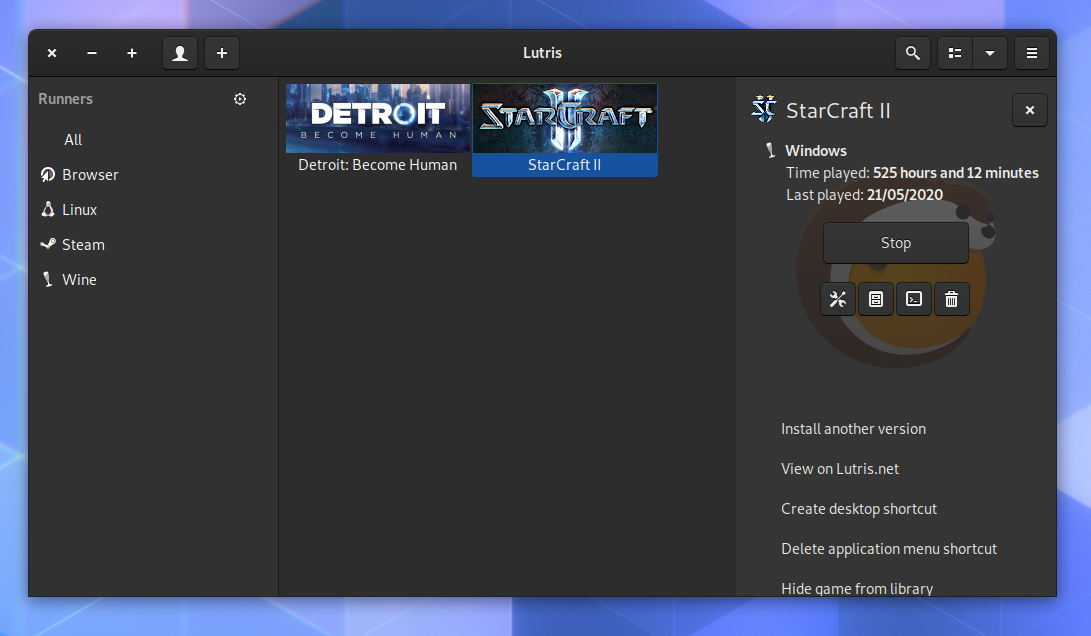
How GameMode is invoked Some newer games (proprietary games like Rise of the Tomb Raider , Total War Saga: Thrones of Britannia , Total War: WARHAMMER II , DiRT 4 and Total War: Three Kingdoms ) will automatically invoke GameMode if it s installed. For games that don t, you can manually evoke it using the gamemoderun command. Lutris is a tool that makes it easy to install and run games on Linux, and it also integrates with GameMode. (Lutris is currently being packaged for Debian, hopefully it will make it in on time for Bullseye).

Screenshot of Lutris, a tool that makes it easy to install your non-Linux games, which also integrates with GameMode.

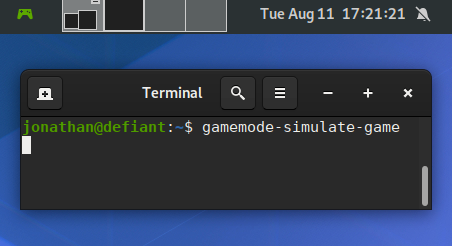
GameMode in Debian The latest GameMode is packaged in Debian (Stephan Lachnit and I maintain it in the Debian Games Team) and it s also available for Debian 10 (Buster) via buster-backports. All you need to do to get up and running with GameMode is to install the gamemode package. GameMode in Debian supports 64 bit and 32 bit mode, so running it with older games (and many proprietary games) still work. Some distributions (like Arch Linux), have dropped 32 bit support, so 32 bit games on such systems lose any kind of integration with GameMode even if you can get those games running via other wrappers on such systems. We also include a binary called gamemode-simulate-game (installed under /usr/games/). This is a minimalistic program that will invoke gamemode automatically for 10 seconds and then exit without an error if it was successful. Its source code might be useful if you d like to add GameMode support to your game, or patch a game in Debian to automatically invoke it. In Debian we install Gamemode s example config file to /etc/gamemode.ini where a user can customise their system-wide preferences, or alternatively they can place a copy of that in ~/.gamemode.ini with their personal preferences. In this config file, you can also choose to explicitly allow or deny games. GameMode might also be useful for many pieces of software that aren t games. I haven t done any benchmarks on such software yet, but it might be great for users who use CAD programs or use a combination of their CPU/GPU to crunch a large amount of data. I ve also packaged an extension for GNOME called gamemode-extension. The Debian package is called gnome-shell-extension-gamemode . You ll need to enable it using gnome-tweaks after installation, it will then display a green controller in your notification area whenever GameMode is active. It s only in testing/bullseye since it relies on a newer gnome-shell than what s available in buster.

Running gamemode-simulate-game, with the shell extension showing that it s activated in the top left corner.

10 August 2020

Arnaud Rebillout: GoAccess 1.4, a detailed tutorial

GoAccess v1.4 was just released a few weeks ago! Let's take this chance to write a loooong tutorial. We'll go over every steps to install and operate GoAccess. This is a tutorial aimed at those who don't play sysadmin every day, and that's why it's so long, I did my best to provide thorough explanations all along, so that it's more than just a "copy-and-paste" kind of tutorial. And for those who do play sysadmin everyday: please try not to fall asleep while reading, and don't hesitate to drop me an e-mail if you spot anything inaccurate in here. Thanks! Introduction So what's GoAccess already? GoAccess is a web log analyzer, and it allows you to visualize the traffic for your website, and get to know a bit more about your visitors: how many visitors and hits, for which pages, coming from where (geolocation, operating system, web browser...), etc... It does so by parsing the access logs from your web server, be it Apache, NGINX or whatever. GoAccess gives you different options to display the statistics, and in this tutorial we'll focus on producing a HTML report. Meaning that you can see the statistics for your website straight in your web browser, under the form of a single HTML page. For an example, you can have a look at the stats of my blog here: http://goaccess.arnaudr.io. GoAccess is written in C, it has very few dependencies, it had been around for about 10 years, and it's distributed under the MIT license. Assumptions This tutorial is about installing and configuring, so I'll assume that all the commands are run as root. I won't prefix each of them with sudo. I use the Apache web server, running on a Debian system. I don't think it matters so much for this tutorial though. If you're using NGINX it's fine, you can keep reading. Also, I will just use the name SITE for the name of the website that we want to analyze with GoAccess. Just replace that with the real name of your site. I also assume the following locations for your stuff: If you have your stuff in /srv/SITE/ log,www instead, no worries, just adjust the paths accordingly, I bet you can do it. Installation The latest version of GoAccess is v1.4, and it's not yet available in the Debian repositories. So for this part, you can follow the instructions from the official GoAccess download page. Install steps are explained in details, so there's nothing left for me to say :) When this is done, let's get started with the basics. We're talking about the latest version v1.4 here, let's make sure:
$ goaccess --version
GoAccess - 1.4.
...
Now let's try to create a HTML report. I assume that you already have a website up and running. GoAccess needs to parse the access logs. These logs are optional, they might or might not be created by your web server, depending on how it's configured. Usually, these log files are named access.log, unsurprisingly. You can check if those logs exist on your system by running this command:
find /var/log -name access.log
Another important thing to know is that these logs can be in different formats. In this tutorial we'll assume that we work with the combined log format, because it seems to be the most common default. To check what kind of access logs your web server produces, you must look at the configuration for your site. For an Apache web server, you should have such a line in the file /etc/apache2/sites-enabled/SITE.conf:
CustomLog $ APACHE_LOG_DIR /SITE/access.log combined
For NGINX, it's quite similar. The configuration file would be something like /etc/nginx/sites-enabled/SITE, and the line to enable access logs would be something like:
access_log /var/log/nginx/SITE/access.log
Note that NGINX writes the access logs in the combined format by default, that's why you don't see the word combined anywhere in the line above: it's implicit. Alright, so from now on we assume that yes, you have access log files available, and yes, they are in the combined log format. If that's the case, then you can already run GoAccess and generate a report, for example for the log file /var/log/apache2/access.log
goaccess \
    --log-format COMBINED \
    --output /tmp/report.html \
    /var/log/apache2/access.log
It's possible to give GoAccess more than one log files to process, so if you have for example the file access.log.1 around, you can use it as well:
goaccess \
    --log-format COMBINED \
    --output /tmp/report.html \
    /var/log/apache2/access.log \
    /var/log/apache2/access.log.1
If GoAccess succeeds (and it should), you're on the right track! All is left to do to complete this test is to have a look at the HTML report created. It's a single HTML page, so you can easily scp it to your machine, or just move it to the document root of your site, and then open it in your web browser. Looks good? So let's move on to more interesting things. Web server configuration This part is very short, because in terms of configuration of the web server, there's very little to do. As I said above, the only thing you want from the web server is to create access log files. Then you want to be sure that GoAccess and your web server agree on the format for these files. In the part above we used the combined log format, but GoAccess supports many other common log formats out of the box, and even allows you to parse custom log formats. For more details, refer to the option --log-format in the GoAccess manual page. Another common log format is named, well, common. It even has its own Wikipedia page. But compared to combined, the common log format contains less information, it doesn't include the referrer and user-agent values, meaning that you won't have it in the GoAccess report. So at this point you should understand that, unsurprisingly, GoAccess can only tell you about what's in the access logs, no more no less. And that's all in term of web server configuration. Configuration to run GoAccess unprivileged Now we're going to create a user and group for GoAccess, so that we don't have to run it as root. The reason is that, well, for everything running unattended on your server, the less code runs as root, the better. It's good practice and common sense. In this case, GoAccess is simply a log analyzer. So it just needs to read the logs files from your web server, and there is no need to be root for that, an unprivileged user can do the job just as well, assuming it has read permissions on /var/log/apache2 or /var/log/nginx. The log files of the web server are usually part of the adm group (though it might depend on your distro, I'm not sure). This is something you can check easily with the following command:
ls -l /var/log   grep -e apache2 -e nginx
As a result you should get something like that:
drwxr-x--- 2 root adm 20480 Jul 22 00:00 /var/log/apache2/
And as you can see, the directory apache2 belongs to the group adm. It means that you don't need to be root to read the logs, instead any unprivileged user that belongs to the group adm can do it. So, let's create the goaccess user, and add it to the adm group:
adduser --system --group --no-create-home goaccess
addgroup goaccess adm
And now, let's run GoAccess unprivileged, and verify that it can still read the log files:
setpriv \
    --reuid=goaccess --regid=goaccess \
    --init-groups --inh-caps=-all \
    -- \
    goaccess \
    --log-format COMBINED \
    --output /tmp/report2.html \
    /var/log/apache2/access.log
setpriv is the command used to drop privileges. The syntax is quite verbose, it's not super friendly for tutorials, but don't be scared and read the manual page to learn what it does. In any case, this command should work, and at this point, it means that you have a goaccess user ready, and we'll use it to run GoAccess unprivileged. Integration, option A - Run GoAccess once a day, from a logrotate hook In this part we wire things together, so that GoAccess processes the log files once a day, adds the new logs to its internal database, and generates a report from all that aggregated data. The result will be a single HTML page. Introducing logrotate In order to do that, we'll use a logrotate hook. logrotate is a little tool that should already be installed on your server, and that runs once a day, and that is in charge of rotating the log files. "Rotating the logs" means moving access.log to access.log.1 and so on. With logrotate, a new log file is created every day, and log files that are too old are deleted. That's what prevents your logs from filling up your disk basically :) You can check that logrotate is indeed installed and enabled with this command (assuming that your init system is systemd):
systemctl status logrotate.timer
What's interesting for us is that logrotate allows you to run scripts before and after the rotation is performed, so it's an ideal place from where to run GoAccess. In short, we want to run GoAccess just before the logs are rotated away, in the prerotate hook. But let's do things in order. At first, we need to write a little wrapper script that will be in charge of running GoAccess with the right arguments, and that will process all of your sites. The wrapper script This wrapper is made to process more than one site, but if you have only one site it works just as well, of course. So let me just drop it on you like that, and I'll explain afterward. Here's my wrapper script:
 1
 2
 3
 4
 5
 6
 7
 8
 9
10
11
12
13
14
15
16
17
18
19
20
21
22
23
24
25
26
27
28
29
30
31
32
33
34
35
36
37
38
39
40
41
42
43
44
45
46
47
48
49
50
#!/bin/bash
# Process log files /var/www/apache2/SITE/access.log,
# only if /var/lib/goaccess-db/SITE exists.
# Create HTML reports in $1, a directory that must exist.
set -eu
OUTDIR=
LOGDIR=/var/log/apache2
DBDIR=/var/lib/goaccess-db
fail()   echo >&2 "$@"; exit 1;  
[ $# -eq 1 ]   fail "Usage: $(basename $0) OUTPUT_DIRECTORY"
OUTDIR=$1
[ -d "$OUTDIR" ]   fail "'$OUTDIR' is not a directory"
[ -d "$LOGDIR" ]   fail "'$LOGDIR' is not a directory"
[ -d "$DBDIR"  ]   fail "'$DBDIR' is not a directory"
for d in $(find "$LOGDIR" -mindepth 1 -maxdepth 1 -type d); do
    site=$(basename "$sitedir")
    dbdir=$DBDIR/$site
    logfile=$d/access.log
    outfile=$OUTDIR/$site.html
    if [ ! -d "$dbdir" ]   [ ! -e "$logfile" ]; then
        echo "  Skipping site '$site'"
        continue
    else
        echo "  Processing site '$site'"
    fi
    setpriv \
        --reuid=goaccess --regid=goaccess \
        --init-groups --inh-caps=-all \
        -- \
    goaccess \
        --agent-list \
        --anonymize-ip \
        --persist \
        --restore \
        --config-file /etc/goaccess/goaccess.conf \
        --db-path "$dbdir" \
        --log-format "COMBINED" \
        --output "$outfile" \
        "$logfile"
done
So you'd install this script at /usr/local/bin/goaccess-wrapper for example, and make it executable:
chmod +x /usr/local/bin/goaccess-wrapper
A few things to note: As is, the script makes the assumption that the logs for your site are logged in a sub-directory /var/log/apache2/SITE/. If it's not the case, adjust that in the wrapper accordingly. The name of this sub-directory is then used to find the GoAccess database directory /var/lib/goaccess-db/SITE/. This directory is expected to exist, meaning that if you don't create it yourself, the wrapper won't process this particular site. It's a simple way to control which sites are processed by this GoAccess wrapper, and which sites are not. So if you want goaccess-wrapper to process the site SITE, just create a directory with the name of this site under /var/lib/goaccess-db:
mkdir -p /var/lib/goaccess-db/SITE
chown goaccess:goaccess /var/lib/goaccess-db/SITE
Now let's create an output directory:
mkdir /tmp/goaccess-reports
chown goaccess:goaccess /tmp/goaccess-reports
And let's give a try to the wrapper script:
goaccess-wrapper /tmp/goaccess-reports
ls /tmp/goaccess-reports
Which should give you:
SITE.html
At the same time, you can check that GoAccess populated the database with a bunch of files:
ls /var/lib/goaccess-db/SITE
Setting up the logrotate prerotate hook At this point, we have the wrapper in place. Let's now add a pre-rotate hook so that goaccess-wrapper runs once a day, just before the logs are rotated away. The logrotate config file for Apache2 is located at /etc/logrotate.d/apache2, and for NGINX it's at /etc/logrotate.d/nginx. Among the many things you'll see in this file, here's what is of interest for us: In the config file, there is also this snippet:
prerotate
    if [ -d /etc/logrotate.d/httpd-prerotate ]; then \
        run-parts /etc/logrotate.d/httpd-prerotate; \
    fi; \
endscript
It indicates that scripts in the directory /etc/logrotate.d/httpd-prerotate/ will be executed before the rotation takes place. Refer to the man page run-parts(8) for more details... Putting all of that together, it means that logs from the web server are rotated once a day, and if we want to run scripts just before the rotation, we can just drop them in the httpd-prerotate directory. Simple, right? Let's first create this directory if it doesn't exist:
mkdir -p /etc/logrotate.d/httpd-prerotate/
And let's create a tiny script at /etc/logrotate.d/httpd-prerotate/goaccess:
1
2
#!/bin/sh
exec goaccess-wrapper /tmp/goaccess-reports
Don't forget to make it executable:
chmod +x /etc/logrotate.d/httpd-prerotate/goaccess
As you can see, the only thing that this script does is to invoke the wrapper with the right argument, ie. the output directory for the HTML reports that are generated. And that's all. Now you can just come back tomorrow, check the logs, and make sure that the hook was executed and succeeded. For example, this kind of command will tell you quickly if it worked:
journalctl   grep logrotate
Integration, option B - Run GoAccess once a day, from a systemd service OK so we've just seen how to use a logrotate hook. One downside with that is that we have to drop privileges in the wrapper script, because logrotate runs as root, and we don't want to run GoAccess as root. Hence the rather convoluted syntax with setpriv. Rather than embedding this kind of thing in a wrapper script, we can instead run the wrapper script from a [systemd][] service, and define which user runs the wrapper straight in the systemd service file. Introducing systemd niceties So we can create a systemd service, along with a systemd timer that fires daily. We can then set the user and group that execute the script straight in the systemd service, and there's no need for setpriv anymore. It's a bit more streamlined. We can even go a bit further, and use systemd parameterized units (also called templates), so that we have one service per site (instead of one service that process all of our sites). That will simplify the wrapper script a lot, and it also looks nicer in the logs. With this approach however, it seems that we can't really run exactly before the logs are rotated away, like we did in the section above. But that's OK. What we'll do is that we'll run once a day, no matter the time, and we'll just make sure to process both log files access.log and access.log.1 (ie. the current logs and the logs from yesterday). This way, we're sure not to miss any line from the logs. Note that GoAccess is smart enough to only consider newer entries from the log files, and discard entries that are already in the database. In other words, it's safe to parse the same log file more than once, GoAccess will do the right thing. For more details see "INCREMENTAL LOG PROCESSING" from man goaccess. systemd]: https://freedesktop.org/wiki/Software/systemd/ Implementation And here's how it all looks like. First, a little wrapper script for GoAccess:
 1
 2
 3
 4
 5
 6
 7
 8
 9
10
11
12
13
14
15
16
17
18
19
20
21
22
23
24
25
26
27
28
29
30
31
32
#!/bin/bash
# Usage: $0 SITE DBDIR LOGDIR OUTDIR
set -eu
SITE=$1
DBDIR=$2
LOGDIR=$3
OUTDIR=$4
LOGFILES=()
for ext in log log.1; do
    logfile="$LOGDIR/access.$ext"
    [ -e "$logfile" ] && LOGFILES+=("$logfile")
done
if [ $ #LOGFILES[@]  -eq 0 ]; then
    echo "No log files in '$LOGDIR'"
    exit 0
fi
goaccess \
    --agent-list \
    --anonymize-ip \
    --persist \
    --restore \
    --config-file /etc/goaccess/goaccess.conf \
    --db-path "$DBDIR" \
    --log-format "COMBINED" \
    --output "$OUTDIR/$SITE.html" \
    "$ LOGFILES[@] "
This wrapper does very little. Actually, the only thing it does is to check for the existence of the two log files access.log and access.log.1, to be sure that we don't ask GoAccess to process a file that does not exist (GoAccess would not be happy about that). Save this file under /usr/local/bin/goaccess-wrapper, don't forget to make it executable:
chmod +x /usr/local/bin/goaccess-wrapper
Then, create a systemd parameterized unit file, so that we can run this wrapper as a systemd service. Save it under /etc/systemd/system/goaccess@.service:
[Unit]
Description=Update GoAccess report - %i
ConditionPathIsDirectory=/var/lib/goaccess-db/%i
ConditionPathIsDirectory=/var/log/apache2/%i
ConditionPathIsDirectory=/tmp/goaccess-reports
PartOf=goaccess.service
[Service]
Type=oneshot
User=goaccess
Group=goaccess
Nice=19
ExecStart=/usr/local/bin/goaccess-wrapper \
 %i \
 /var/lib/goaccess-db/%i \
 /var/log/apache2/%i \
 /tmp/goaccess-reports
So, what is a systemd parameterized unit? It's a service to which you can pass an argument when you enable it. The %i in the unit definition will be replaced by this argument. In our case, the argument will be the name of the site that we want to process. As you can see, we use the directive ConditionPathIsDirectory= extensively, so that if ever one of the required directories does not exist, the unit will just be skipped (and marked as such in the logs). It's a graceful way to fail. We run the wrapper as the user and group goaccess, thanks to User= and Group=. We also use Nice= to give a low priority to the process. At this point, it's already possible to test. Just make sure that you created a directory for the GoAccess database:
mkdir -p /var/lib/goaccess-db/SITE
chown goaccess:goaccess /var/lib/goaccess-db/SITE
Also make sure that the output directory exists:
mkdir /tmp/goaccess-reports
chown goaccess:goaccess /tmp/goaccess-reports
Then reload systemd and fire the unit to see if it works:
systemctl daemon-reload
systemctl start goaccess@SITE.service
journalctl   tail
And that should work already. As you can see, the argument, SITE, is passed in the systemctl start command. We just append it after the @, in the name of the unit. Now, let's create another GoAccess service file, which sole purpose is to group all the parameterized units together, so that we can start them all in one go. Note that we don't use a systemd target for that, because ultimately we want to run it once a day, and that would not be possible with a target. So instead we use a dummy oneshot service. So here it is, saved under /etc/systemd/system/goaccess.service:
[Unit]
Description=Update GoAccess reports
Requires= \
 goaccess@SITE1.service \
 goaccess@SITE2.service
[Service]
Type=oneshot
ExecStart=true
As you can see, we simply list the sites that we want to process in the Requires= directive. In this example we have two sites named SITE1 and SITE2. Let's ensure that everything is still good:
systemctl daemon-reload
systemctl start goaccess.service
journalctl   tail
Check the logs, both sites SITE1 and SITE2 should have been processed. And finally, let's create a timer, so that systemd runs goaccess.service once a day. Save it under /etc/systemd/system/goaccess.timer.
[Unit]
Description=Daily update of GoAccess reports
[Timer]
OnCalendar=daily
RandomizedDelaySec=1h
Persistent=true
[Install]
WantedBy=timers.target
Finally, enable the timer:
systemctl daemon-reload
systemctl enable --now goaccess.timer
At this point, everything should be OK. Just come back tomorrow and check the logs with something like:
journalctl   grep goaccess
Last word: if you have only one site to process, of course you can simplify, for example you can hardcode all the paths in the file goaccess.service instead of using a parameterized unit. Up to you. Daily operations So in this part, we assume that you have GoAccess all setup and running, once a day or so. Let's just go over a few things worth noting. Serve your report Up to now in this tutorial, we created the reports in /tmp/goaccess-reports, but that was just for the sake of the example. You will probably want to save your reports in a directory that is served by your web server, so that, well, you can actually look at it in your web browser, that was the point, right? So how to do that is a bit out of scope here, and I guess that if you want to monitor your website, you already have a website, so you will have no trouble serving the GoAccess HTML report. However there's an important detail to be aware of: GoAccess shows all the IP addresses of your visitors in the report. As long as the report is private it's OK, but if ever you make your GoAccess report public, then you should definitely invoke GoAccess with the option --anonymize-ip. Keep an eye on the logs In this tutorial, the reports we create, along with the GoAccess databases, will grow bigger every day, forever. It also means that the GoAccess processing time will grow a bit each day. So maybe the first thing to do is to keep an eye on the logs, to see how long it takes to GoAccess to do its job every day. Also, maybe you'd like to keep an eye on the size of the GoAccess database with:
du -sh /var/lib/goaccess-db/SITE
If your site has few visitors, I suspect it won't be a problem though. You could also be a bit pro-active in preventing this problem in the future, and for example you could break the reports into, say, monthly reports. Meaning that every month, you would create a new database in a new directory, and also start a new HTML report. This way you'd have monthly reports, and you make sure to limit the GoAccess processing time, by limiting the database size to a month. This can be achieved very easily, by including something like YEAR-MONTH in the database directory, and in the HTML report. You can handle that automatically in the wrapper script, for example:
sfx=$(date +'%Y-%m')
mkdir -p $DBDIR/$sfx
goaccess \
    --db-path $DBDIR/$sfx \
    --output "$OUTDIR/$SITE-$sfx.html" \
    ...
You get the idea. Further notes Migration from older versions With the --persist option, GoAccess keeps all the information from the logs in a database, so that it can re-use it later. In prior versions, GoAccess used the Tokyo Cabinet key-value store for that. However starting from v1.4, GoAccess dropped this dependency and now uses its own database format. As a result, the previous database can't be used anymore, you will have to remove it and restart from zero. At the moment there is no way to convert the data from the old database to the new one. If you're interested, this is discussed upstream at [#1783][bug-1783]. Another thing that changed with this new version is the name for some of the command-line options. For example, --load-from-disk was dropped in favor of --restore, and --keep-db-files became --persist. So you'll have to look at the documentation a bit, and update your script(s) accordingly. Other ways to use GoAccess It's also possible to do it completely differently. You could keep GoAccess running, pretty much like a daemon, with the --real-time-html option, and have it process the logs continuously, rather than calling it on a regular basis. It's also possible to see the GoAccess report straight in the terminal, thanks to libncurses, rather than creating a HTML report. And much more, GoAccess is packed with features. Conclusion I hope that this tutorial helped some of you folks. Feel free to drop an e-mail for comments.

Arnaud Rebillout: GoAccess 1.4, a detailed tutorial

GoAccess v1.4 was just released a few weeks ago! Let's take this chance to write a loooong tutorial. We'll go over every steps to install and operate GoAccess. This is a tutorial aimed at those who don't play sysadmin every day, and that's why it's so long, I did my best to provide thorough explanations all along, so that it's more than just a "copy-and-paste" kind of tutorial. And for those who do play sysadmin everyday: please try not to fall asleep while reading, and don't hesitate to drop me an e-mail if you spot anything inaccurate in here. Thanks! Introduction So what's GoAccess already? GoAccess is a web log analyzer, and it allows you to visualize the traffic for your website, and get to know a bit more about your visitors: how many visitors and hits, for which pages, coming from where (geolocation, operating system, web browser...), etc... It does so by parsing the access logs from your web server, be it Apache, NGINX or whatever. GoAccess gives you different options to display the statistics, and in this tutorial we'll focus on producing a HTML report. Meaning that you can see the statistics for your website straight in your web browser, under the form of a single HTML page. For an example, you can have a look at the stats of my blog here: https://goaccess.arnaudr.io. GoAccess is written in C, it has very few dependencies, it had been around for about 10 years, and it's distributed under the MIT license. Assumptions This tutorial is about installing and configuring, so I'll assume that all the commands are run as root. I won't prefix each of them with sudo. I use the Apache web server, running on a Debian system. I don't think it matters so much for this tutorial though. If you're using NGINX it's fine, you can keep reading. Also, I will just use the name SITE for the name of the website that we want to analyze with GoAccess. Just replace that with the real name of your site. I also assume the following locations for your stuff: If you have your stuff in /srv/SITE/ log,www instead, no worries, just adjust the paths accordingly, I bet you can do it. Installation The latest version of GoAccess is v1.4, and it's not yet available in the Debian repositories. So for this part, you can follow the instructions from the official GoAccess download page. Install steps are explained in details, so there's nothing left for me to say :) When this is done, let's get started with the basics. We're talking about the latest version v1.4 here, let's make sure:
$ goaccess --version
GoAccess - 1.4.
...
Now let's try to create a HTML report. I assume that you already have a website up and running. GoAccess needs to parse the access logs. These logs are optional, they might or might not be created by your web server, depending on how it's configured. Usually, these log files are named access.log, unsurprisingly. You can check if those logs exist on your system by running this command:
find /var/log -name access.log
Another important thing to know is that these logs can be in different formats. In this tutorial we'll assume that we work with the combined log format, because it seems to be the most common default. To check what kind of access logs your web server produces, you must look at the configuration for your site. For an Apache web server, you should have such a line in the file /etc/apache2/sites-enabled/SITE.conf:
CustomLog $ APACHE_LOG_DIR /SITE/access.log combined
For NGINX, it's quite similar. The configuration file would be something like /etc/nginx/sites-enabled/SITE, and the line to enable access logs would be something like:
access_log /var/log/nginx/SITE/access.log
Note that NGINX writes the access logs in the combined format by default, that's why you don't see the word combined anywhere in the line above: it's implicit. Alright, so from now on we assume that yes, you have access log files available, and yes, they are in the combined log format. If that's the case, then you can already run GoAccess and generate a report, for example for the log file /var/log/apache2/access.log
goaccess \
    --log-format COMBINED \
    --output /tmp/report.html \
    /var/log/apache2/access.log
It's possible to give GoAccess more than one log files to process, so if you have for example the file access.log.1 around, you can use it as well:
goaccess \
    --log-format COMBINED \
    --output /tmp/report.html \
    /var/log/apache2/access.log \
    /var/log/apache2/access.log.1
If GoAccess succeeds (and it should), you're on the right track! All is left to do to complete this test is to have a look at the HTML report created. It's a single HTML page, so you can easily scp it to your machine, or just move it to the document root of your site, and then open it in your web browser. Looks good? So let's move on to more interesting things. Web server configuration This part is very short, because in terms of configuration of the web server, there's very little to do. As I said above, the only thing you want from the web server is to create access log files. Then you want to be sure that GoAccess and your web server agree on the format for these files. In the part above we used the combined log format, but GoAccess supports many other common log formats out of the box, and even allows you to parse custom log formats. For more details, refer to the option --log-format in the GoAccess manual page. Another common log format is named, well, common. It even has its own Wikipedia page. But compared to combined, the common log format contains less information, it doesn't include the referrer and user-agent values, meaning that you won't have it in the GoAccess report. So at this point you should understand that, unsurprisingly, GoAccess can only tell you about what's in the access logs, no more no less. And that's all in term of web server configuration. Configuration to run GoAccess unprivileged Now we're going to create a user and group for GoAccess, so that we don't have to run it as root. The reason is that, well, for everything running unattended on your server, the less code runs as root, the better. It's good practice and common sense. In this case, GoAccess is simply a log analyzer. So it just needs to read the logs files from your web server, and there is no need to be root for that, an unprivileged user can do the job just as well, assuming it has read permissions on /var/log/apache2 or /var/log/nginx. The log files of the web server are usually part of the adm group (though it might depend on your distro, I'm not sure). This is something you can check easily with the following command:
ls -l /var/log   grep -e apache2 -e nginx
As a result you should get something like that:
drwxr-x--- 2 root adm 20480 Jul 22 00:00 /var/log/apache2/
And as you can see, the directory apache2 belongs to the group adm. It means that you don't need to be root to read the logs, instead any unprivileged user that belongs to the group adm can do it. So, let's create the goaccess user, and add it to the adm group:
adduser --system --group --no-create-home goaccess
addgroup goaccess adm
And now, let's run GoAccess unprivileged, and verify that it can still read the log files:
setpriv \
    --reuid=goaccess --regid=goaccess \
    --init-groups --inh-caps=-all \
    -- \
    goaccess \
    --log-format COMBINED \
    --output /tmp/report2.html \
    /var/log/apache2/access.log
setpriv is the command used to drop privileges. The syntax is quite verbose, it's not super friendly for tutorials, but don't be scared and read the manual page to learn what it does. In any case, this command should work, and at this point, it means that you have a goaccess user ready, and we'll use it to run GoAccess unprivileged. Integration, option A - Run GoAccess once a day, from a logrotate hook In this part we wire things together, so that GoAccess processes the log files once a day, adds the new logs to its internal database, and generates a report from all that aggregated data. The result will be a single HTML page. Introducing logrotate In order to do that, we'll use a logrotate hook. logrotate is a little tool that should already be installed on your server, and that runs once a day, and that is in charge of rotating the log files. "Rotating the logs" means moving access.log to access.log.1 and so on. With logrotate, a new log file is created every day, and log files that are too old are deleted. That's what prevents your logs from filling up your disk basically :) You can check that logrotate is indeed installed and enabled with this command (assuming that your init system is systemd):
systemctl status logrotate.timer
What's interesting for us is that logrotate allows you to run scripts before and after the rotation is performed, so it's an ideal place from where to run GoAccess. In short, we want to run GoAccess just before the logs are rotated away, in the prerotate hook. But let's do things in order. At first, we need to write a little wrapper script that will be in charge of running GoAccess with the right arguments, and that will process all of your sites. The wrapper script This wrapper is made to process more than one site, but if you have only one site it works just as well, of course. So let me just drop it on you like that, and I'll explain afterward. Here's my wrapper script:
 1
 2
 3
 4
 5
 6
 7
 8
 9
10
11
12
13
14
15
16
17
18
19
20
21
22
23
24
25
26
27
28
29
30
31
32
33
34
35
36
37
38
39
40
41
42
43
44
45
46
47
48
49
50
#!/bin/bash
# Process log files /var/www/apache2/SITE/access.log,
# only if /var/lib/goaccess-db/SITE exists.
# Create HTML reports in $1, a directory that must exist.
set -eu
OUTDIR=
LOGDIR=/var/log/apache2
DBDIR=/var/lib/goaccess-db
fail()   echo >&2 "$@"; exit 1;  
[ $# -eq 1 ]   fail "Usage: $(basename $0) OUTPUT_DIRECTORY"
OUTDIR=$1
[ -d "$OUTDIR" ]   fail "'$OUTDIR' is not a directory"
[ -d "$LOGDIR" ]   fail "'$LOGDIR' is not a directory"
[ -d "$DBDIR"  ]   fail "'$DBDIR' is not a directory"
for d in $(find "$LOGDIR" -mindepth 1 -maxdepth 1 -type d); do
    site=$(basename "$sitedir")
    dbdir=$DBDIR/$site
    logfile=$d/access.log
    outfile=$OUTDIR/$site.html
    if [ ! -d "$dbdir" ]   [ ! -e "$logfile" ]; then
        echo "  Skipping site '$site'"
        continue
    else
        echo "  Processing site '$site'"
    fi
    setpriv \
        --reuid=goaccess --regid=goaccess \
        --init-groups --inh-caps=-all \
        -- \
    goaccess \
        --agent-list \
        --anonymize-ip \
        --persist \
        --restore \
        --config-file /etc/goaccess/goaccess.conf \
        --db-path "$dbdir" \
        --log-format "COMBINED" \
        --output "$outfile" \
        "$logfile"
done
So you'd install this script at /usr/local/bin/goaccess-wrapper for example, and make it executable:
chmod +x /usr/local/bin/goaccess-wrapper
A few things to note: As is, the script makes the assumption that the logs for your site are logged in a sub-directory /var/log/apache2/SITE/. If it's not the case, adjust that in the wrapper accordingly. The name of this sub-directory is then used to find the GoAccess database directory /var/lib/goaccess-db/SITE/. This directory is expected to exist, meaning that if you don't create it yourself, the wrapper won't process this particular site. It's a simple way to control which sites are processed by this GoAccess wrapper, and which sites are not. So if you want goaccess-wrapper to process the site SITE, just create a directory with the name of this site under /var/lib/goaccess-db:
mkdir -p /var/lib/goaccess-db/SITE
chown goaccess:goaccess /var/lib/goaccess-db/SITE
Now let's create an output directory:
mkdir /tmp/goaccess-reports
chown goaccess:goaccess /tmp/goaccess-reports
And let's give a try to the wrapper script:
goaccess-wrapper /tmp/goaccess-reports
ls /tmp/goaccess-reports
Which should give you:
SITE.html
At the same time, you can check that GoAccess populated the database with a bunch of files:
ls /var/lib/goaccess-db/SITE
Setting up the logrotate prerotate hook At this point, we have the wrapper in place. Let's now add a pre-rotate hook so that goaccess-wrapper runs once a day, just before the logs are rotated away. The logrotate config file for Apache2 is located at /etc/logrotate.d/apache2, and for NGINX it's at /etc/logrotate.d/nginx. Among the many things you'll see in this file, here's what is of interest for us: In the config file, there is also this snippet:
prerotate
    if [ -d /etc/logrotate.d/httpd-prerotate ]; then \
        run-parts /etc/logrotate.d/httpd-prerotate; \
    fi; \
endscript
It indicates that scripts in the directory /etc/logrotate.d/httpd-prerotate/ will be executed before the rotation takes place. Refer to the man page run-parts(8) for more details... Putting all of that together, it means that logs from the web server are rotated once a day, and if we want to run scripts just before the rotation, we can just drop them in the httpd-prerotate directory. Simple, right? Let's first create this directory if it doesn't exist:
mkdir -p /etc/logrotate.d/httpd-prerotate/
And let's create a tiny script at /etc/logrotate.d/httpd-prerotate/goaccess:
1
2
#!/bin/sh
exec goaccess-wrapper /tmp/goaccess-reports
Don't forget to make it executable:
chmod +x /etc/logrotate.d/httpd-prerotate/goaccess
As you can see, the only thing that this script does is to invoke the wrapper with the right argument, ie. the output directory for the HTML reports that are generated. And that's all. Now you can just come back tomorrow, check the logs, and make sure that the hook was executed and succeeded. For example, this kind of command will tell you quickly if it worked:
journalctl   grep logrotate
Integration, option B - Run GoAccess once a day, from a systemd service OK so we've just seen how to use a logrotate hook. One downside with that is that we have to drop privileges in the wrapper script, because logrotate runs as root, and we don't want to run GoAccess as root. Hence the rather convoluted syntax with setpriv. Rather than embedding this kind of thing in a wrapper script, we can instead run the wrapper script from a [systemd][] service, and define which user runs the wrapper straight in the systemd service file. Introducing systemd niceties So we can create a systemd service, along with a systemd timer that fires daily. We can then set the user and group that execute the script straight in the systemd service, and there's no need for setpriv anymore. It's a bit more streamlined. We can even go a bit further, and use systemd parameterized units (also called templates), so that we have one service per site (instead of one service that process all of our sites). That will simplify the wrapper script a lot, and it also looks nicer in the logs. With this approach however, it seems that we can't really run exactly before the logs are rotated away, like we did in the section above. But that's OK. What we'll do is that we'll run once a day, no matter the time, and we'll just make sure to process both log files access.log and access.log.1 (ie. the current logs and the logs from yesterday). This way, we're sure not to miss any line from the logs. Note that GoAccess is smart enough to only consider newer entries from the log files, and discard entries that are already in the database. In other words, it's safe to parse the same log file more than once, GoAccess will do the right thing. For more details see "INCREMENTAL LOG PROCESSING" from man goaccess. systemd]: https://freedesktop.org/wiki/Software/systemd/ Implementation And here's how it all looks like. First, a little wrapper script for GoAccess:
 1
 2
 3
 4
 5
 6
 7
 8
 9
10
11
12
13
14
15
16
17
18
19
20
21
22
23
24
25
26
27
28
29
30
31
32
#!/bin/bash
# Usage: $0 SITE DBDIR LOGDIR OUTDIR
set -eu
SITE=$1
DBDIR=$2
LOGDIR=$3
OUTDIR=$4
LOGFILES=()
for ext in log log.1; do
    logfile="$LOGDIR/access.$ext"
    [ -e "$logfile" ] && LOGFILES+=("$logfile")
done
if [ $ #LOGFILES[@]  -eq 0 ]; then
    echo "No log files in '$LOGDIR'"
    exit 0
fi
goaccess \
    --agent-list \
    --anonymize-ip \
    --persist \
    --restore \
    --config-file /etc/goaccess/goaccess.conf \
    --db-path "$DBDIR" \
    --log-format "COMBINED" \
    --output "$OUTDIR/$SITE.html" \
    "$ LOGFILES[@] "
This wrapper does very little. Actually, the only thing it does is to check for the existence of the two log files access.log and access.log.1, to be sure that we don't ask GoAccess to process a file that does not exist (GoAccess would not be happy about that). Save this file under /usr/local/bin/goaccess-wrapper, don't forget to make it executable:
chmod +x /usr/local/bin/goaccess-wrapper
Then, create a systemd parameterized unit file, so that we can run this wrapper as a systemd service. Save it under /etc/systemd/system/goaccess@.service:
[Unit]
Description=Update GoAccess report - %i
ConditionPathIsDirectory=/var/lib/goaccess-db/%i
ConditionPathIsDirectory=/var/log/apache2/%i
ConditionPathIsDirectory=/tmp/goaccess-reports
PartOf=goaccess.service
[Service]
Type=oneshot
User=goaccess
Group=goaccess
Nice=19
ExecStart=/usr/local/bin/goaccess-wrapper \
 %i \
 /var/lib/goaccess-db/%i \
 /var/log/apache2/%i \
 /tmp/goaccess-reports
So, what is a systemd parameterized unit? It's a service to which you can pass an argument when you enable it. The %i in the unit definition will be replaced by this argument. In our case, the argument will be the name of the site that we want to process. As you can see, we use the directive ConditionPathIsDirectory= extensively, so that if ever one of the required directories does not exist, the unit will just be skipped (and marked as such in the logs). It's a graceful way to fail. We run the wrapper as the user and group goaccess, thanks to User= and Group=. We also use Nice= to give a low priority to the process. At this point, it's already possible to test. Just make sure that you created a directory for the GoAccess database:
mkdir -p /var/lib/goaccess-db/SITE
chown goaccess:goaccess /var/lib/goaccess-db/SITE
Also make sure that the output directory exists:
mkdir /tmp/goaccess-reports
chown goaccess:goaccess /tmp/goaccess-reports
Then reload systemd and fire the unit to see if it works:
systemctl daemon-reload
systemctl start goaccess@SITE.service
journalctl   tail
And that should work already. As you can see, the argument, SITE, is passed in the systemctl start command. We just append it after the @, in the name of the unit. Now, let's create another GoAccess service file, which sole purpose is to group all the parameterized units together, so that we can start them all in one go. Note that we don't use a systemd target for that, because ultimately we want to run it once a day, and that would not be possible with a target. So instead we use a dummy oneshot service. So here it is, saved under /etc/systemd/system/goaccess.service:
[Unit]
Description=Update GoAccess reports
Requires= \
 goaccess@SITE1.service \
 goaccess@SITE2.service
[Service]
Type=oneshot
ExecStart=true
As you can see, we simply list the sites that we want to process in the Requires= directive. In this example we have two sites named SITE1 and SITE2. Let's ensure that everything is still good:
systemctl daemon-reload
systemctl start goaccess.service
journalctl   tail
Check the logs, both sites SITE1 and SITE2 should have been processed. And finally, let's create a timer, so that systemd runs goaccess.service once a day. Save it under /etc/systemd/system/goaccess.timer.
[Unit]
Description=Daily update of GoAccess reports
[Timer]
OnCalendar=daily
RandomizedDelaySec=1h
Persistent=true
[Install]
WantedBy=timers.target
Finally, enable the timer:
systemctl daemon-reload
systemctl enable --now goaccess.timer
At this point, everything should be OK. Just come back tomorrow and check the logs with something like:
journalctl   grep goaccess
Last word: if you have only one site to process, of course you can simplify, for example you can hardcode all the paths in the file goaccess.service instead of using a parameterized unit. Up to you. Daily operations So in this part, we assume that you have GoAccess all setup and running, once a day or so. Let's just go over a few things worth noting. Serve your report Up to now in this tutorial, we created the reports in /tmp/goaccess-reports, but that was just for the sake of the example. You will probably want to save your reports in a directory that is served by your web server, so that, well, you can actually look at it in your web browser, that was the point, right? So how to do that is a bit out of scope here, and I guess that if you want to monitor your website, you already have a website, so you will have no trouble serving the GoAccess HTML report. However there's an important detail to be aware of: GoAccess shows all the IP addresses of your visitors in the report. As long as the report is private it's OK, but if ever you make your GoAccess report public, then you should definitely invoke GoAccess with the option --anonymize-ip. Keep an eye on the logs In this tutorial, the reports we create, along with the GoAccess databases, will grow bigger every day, forever. It also means that the GoAccess processing time will grow a bit each day. So maybe the first thing to do is to keep an eye on the logs, to see how long it takes to GoAccess to do its job every day. Also, maybe you'd like to keep an eye on the size of the GoAccess database with:
du -sh /var/lib/goaccess-db/SITE
If your site has few visitors, I suspect it won't be a problem though. You could also be a bit pro-active in preventing this problem in the future, and for example you could break the reports into, say, monthly reports. Meaning that every month, you would create a new database in a new directory, and also start a new HTML report. This way you'd have monthly reports, and you make sure to limit the GoAccess processing time, by limiting the database size to a month. This can be achieved very easily, by including something like YEAR-MONTH in the database directory, and in the HTML report. You can handle that automatically in the wrapper script, for example:
sfx=$(date +'%Y-%m')
mkdir -p $DBDIR/$sfx
goaccess \
    --db-path $DBDIR/$sfx \
    --output "$OUTDIR/$SITE-$sfx.html" \
    ...
You get the idea. Further notes Migration from older versions With the --persist option, GoAccess keeps all the information from the logs in a database, so that it can re-use it later. In prior versions, GoAccess used the Tokyo Cabinet key-value store for that. However starting from v1.4, GoAccess dropped this dependency and now uses its own database format. As a result, the previous database can't be used anymore, you will have to remove it and restart from zero. At the moment there is no way to convert the data from the old database to the new one. If you're interested, this is discussed upstream at [#1783][bug-1783]. Another thing that changed with this new version is the name for some of the command-line options. For example, --load-from-disk was dropped in favor of --restore, and --keep-db-files became --persist. So you'll have to look at the documentation a bit, and update your script(s) accordingly. Other ways to use GoAccess It's also possible to do it completely differently. You could keep GoAccess running, pretty much like a daemon, with the --real-time-html option, and have it process the logs continuously, rather than calling it on a regular basis. It's also possible to see the GoAccess report straight in the terminal, thanks to libncurses, rather than creating a HTML report. And much more, GoAccess is packed with features. Conclusion I hope that this tutorial helped some of you folks. Feel free to drop an e-mail for comments.

7 August 2020

Antonio Terceiro: When community service providers fail

I'm starting a new blog, and instead of going into the technical details on how it's made, or on how I migrated my content from the previous ones, I want focus on why I did it. It's been a while since I have written a blog post. I wanted to get back into it, but also wanted to finally self-host my blog/homepage because I have been let down before. And sadly, I was not let down by a for-profit, privacy invading corporation, but by a free software organization. The sad story of wiki.softwarelivre.org My first blog that was hosted in a blog engine written by me, which was hosted in a TWiki, and later Foswiki instance previously available at wiki.softwarelivre.org, hosted by ASL.org. I was the one who introduced the tool to the organization in the first place. I had come from a previous, very fruitful experience on the use of wikis for creation of educational material while in university, which ultimately led me to become a core TWiki, and then Foswiki developer. In 2004, I had just moved to Porto Alegre, got involved in ASL.org, and there was a demand for a tool like that. 2 years later, I left Porto Alegre, and some time after that the daily operations of ASL.org when it became clear that it was not really prepared for remote participation. I was still maintaing the wiki software and the OS for quite some years after, until I wasn't anymore. In 2016, the server that hosted it went haywire, and there were no backups. A lot of people and free software groups lost their content forever. My blog was the least important content in there. To mention just a few examples, here are some groups that lost their content in there: Some of this can still be reached via the Internet Archive Wayback Machine, but that is only useful for recovering content, not for it to be used by the public. The announced tragedy of softwarelivre.org My next blog after that was hosted at softwarelivre.org, a Noosfero instance also hosted by ASL.org. When it was introduced in 2010, this Noosfero instance became responsible for the main domain softwarelivre.org name. This was a bold move by ASL.org, and was a demonstration of trust in a local free software project, led by a local free software cooperative (Colivre). I was a lead developer in the Noosfero project for a long time, and I was also involved in maintaining that server as well. However, for several years there is little to no investment in maintaining that service. I already expect that it will probably blow up at some point as the wiki did, or that it may be just shut down on purpose. On the responsibility of organizations Today, a large part of wast mot people consider "the internet" is controlled by a handful of corporations. Most popular services on the internet might look like they are gratis (free as in beer), but running those services is definitely not without costs. So when you use services provided by for-profit companies and are not paying for them with money, you are paying with your privacy and attention. Society needs independent organizations to provide alternatives. The market can solve a part of the problem by providing ethical services and charging for them. This is legitimate, and as long as there is transparency about how peoples' data and communications are handled, there is nothing wrong with it. But that only solves part of the problem, as there will always be people who can't afford to pay, and people and communities who can afford to pay, but would rather rely on a nonprofit. That's where community-based services, provided by nonprofits, are also important. We should have more of them, not less. So it makes me worry to realize ASL.org left the community in the dark. Losing the wiki wasn't even the first event of its kind, as the listas.softwarelivre.org mailing list server, with years and years of community communications archived in it, broke with no backups in 2012. I do not intend to blame the ASL.org leadership personally, they are all well meaning and good people. But as an organization, it failed to recognize the importance of this role of service provider. I can even include myself in it: I was member of the ASL.org board some 15 years ago; I was involved in the deployment of both the wiki and Noosfero, the former as a volunteer and the later professionally. Yet, I did nothing to plan the maintenance of the infrastructure going forward. When well meaning organizations fail, people who are not willing to have their data and communications be exploited for profit are left to their own devices. I can afford a virtual private server, and have the technical knowledge to import my old content into a static website generator, so I did it. But what about all the people who can't, or don't? Of course, these organizations have to solve the challenge of being sustainable, and being able to pay professionals to maintain the services that the community relies on. We should be thankful to these organizations, and their leadership needs to recognize the importance of those services, and actively plan for them to be kept alive.

Antonio Terceiro: When community service providers fail

I'm starting a new blog, and instead of going into the technical details on how it's made, or on how I migrated my content from the previous ones, I want to focus on why I did it. It's been a while since I have written a blog post. I wanted to get back into it, but also wanted to finally self-host my blog/homepage because I have been let down before. And sadly, I was not let down by a for-profit, privacy invading corporation, but by a free software organization. The sad story of wiki.softwarelivre.org My first blog that was hosted in a blog engine written by me, which was hosted in a TWiki, and later Foswiki instance previously available at wiki.softwarelivre.org, hosted by ASL.org. I was the one who introduced the tool to the organization in the first place. I had come from a previous, very fruitful experience on the use of wikis for creation of educational material while in university, which ultimately led me to become a core TWiki, and then Foswiki developer. In 2004, I had just moved to Porto Alegre, got involved in ASL.org, and there was a demand for a tool like that. 2 years later, I left Porto Alegre, and some time after that the daily operations of ASL.org when it became clear that it was not really prepared for remote participation. I was still maintaing the wiki software and the OS for quite some years after, until I wasn't anymore. In 2016, the server that hosted it went haywire, and there were no backups. A lot of people and free software groups lost their content forever. My blog was the least important content in there. To mention just a few examples, here are some groups that lost their content in there: Some of this can still be reached via the Internet Archive Wayback Machine, but that is only useful for recovering content, not for it to be used by the public. The announced tragedy of softwarelivre.org My next blog after that was hosted at softwarelivre.org, a Noosfero instance also hosted by ASL.org. When it was introduced in 2010, this Noosfero instance became responsible for the main domain softwarelivre.org name. This was a bold move by ASL.org, and was a demonstration of trust in a local free software project, led by a local free software cooperative (Colivre). I was a lead developer in the Noosfero project for a long time, and I was also involved in maintaining that server as well. However, for several years there is little to no investment in maintaining that service. I already expect that it will probably blow up at some point as the wiki did, or that it may be just shut down on purpose. On the responsibility of organizations Today, a large part of wast mot people consider "the internet" is controlled by a handful of corporations. Most popular services on the internet might look like they are gratis (free as in beer), but running those services is definitely not without costs. So when you use services provided by for-profit companies and are not paying for them with money, you are paying with your privacy and attention. Society needs independent organizations to provide alternatives. The market can solve a part of the problem by providing ethical services and charging for them. This is legitimate, and as long as there is transparency about how peoples' data and communications are handled, there is nothing wrong with it. But that only solves part of the problem, as there will always be people who can't afford to pay, and people and communities who can afford to pay, but would rather rely on a nonprofit. That's where community-based services, provided by nonprofits, are also important. We should have more of them, not less. So it makes me worry to realize ASL.org left the community in the dark. Losing the wiki wasn't even the first event of its kind, as the listas.softwarelivre.org mailing list server, with years and years of community communications archived in it, broke with no backups in 2012. I do not intend to blame the ASL.org leadership personally, they are all well meaning and good people. But as an organization, it failed to recognize the importance of this role of service provider. I can even include myself in it: I was member of the ASL.org board some 15 years ago; I was involved in the deployment of both the wiki and Noosfero, the former as a volunteer and the later professionally. Yet, I did nothing to plan the maintenance of the infrastructure going forward. When well meaning organizations fail, people who are not willing to have their data and communications be exploited for profit are left to their own devices. I can afford a virtual private server, and have the technical knowledge to import my old content into a static website generator, so I did it. But what about all the people who can't, or don't? Of course, these organizations have to solve the challenge of being sustainable, and being able to pay professionals to maintain the services that the community relies on. We should be thankful to these organizations, and their leadership needs to recognize the importance of those services, and actively plan for them to be kept alive.

4 August 2020

Osamu Aoki: exim4 configuration for Desktop (better gmail support)

Since gmail rewrites "From:" address now (2020) and keep changing access limitation, it is wise not to use it as smarthost any more. (If you need to access multiple gmail addresses from mutt etc, use esmtp etc.)

---
For most of our Desktop PC running with stock exim4 and mutt, I think sending out mail is becoming a bit rough since using random smarthost causes lots of trouble due to the measures taken to prevent spams.

As mentioned in Exim4 user FAQ , /etc/hosts should have FQDN with external DNS resolvable domain name listed instead of localdomain to get the correct EHLO/HELO line. That's the first step.

The stock configuration of exim4 only allows you to use single smarthost for all your mails. I use one address for my personal use which is checked by my smartphone too. The other account is for subscribing to the mailing list. So I needed to tweak ...

Usually, mutt is smart enough to set the From address since my .muttrc has

# Set default for From: for replyes for alternates.
set reverse_name

So how can I teach exim4 to send mails depending on the mail accounts listed in the From header.

For my gmail accounts, each mail should be sent to the account specific SMTP connection matching your From header to get all the modern SPAM protection data in right state. DKIM, SPF, DMARC... (Besides, they overwrite From: header anyway if you use wrong connection.)

For my debian.org mails, mails should be sent from my shell account on people.debian.org so it is very unlikely to be blocked. Sometimes, I wasn't sure some of these debian.org mails sent through my ISP's smarthost are really getting to the intended person.

To these ends, I have created small patches to the /etc/exim4/conf.d files and reported it to Debian BTS: #869480 Support multiple smarthosts (gmail support). These patches are for the source package.

To use my configuration tweak idea, you have easier route no matter which exim version you are using. Please copy and read pertinent edited files from my github site to your installed /etc/exim4/conf.d files and get the benefits.
If you really wish to keep envelope address etc. to match From: header, please rewite agressively using the From: header using eddited rewrite/31_exim4-config_rewriting as follows:

 .ifndef NO_EAA_REWRITE_REWRITE
*@+local_domains "$ lookup $ local_part lsearch /etc/email-addresses \
$value fail " f
# identical rewriting rule for /etc/mailname
*@ETC_MAILNAME "$ lookup $ local_part lsearch /etc/email-addresses \
$value fail " f
.endif
* "$h_from:" Frs

So far its working fine for me but if you find bug, let me know.

Osamu

3 August 2020

Arnaud Rebillout: GoAccess 1.4, a detailed tutorial

GoAccess v1.4 was just released a few weeks ago! Let's take this chance to write a loooong tutorial. We'll go over every steps to install and operate GoAccess. This is a tutorial aimed at those who don't play sysadmin every day, and that's why it's so long, I did my best to provide thorough explanations all along, so that it's more than just a "copy-and-paste" kind of tutorial. And for those who do play sysadmin everyday: please try not to fall asleep while reading, and don't hesitate to drop me an e-mail if you spot anything inaccurate in here. Thanks! Introduction So what's GoAccess already? GoAccess is a web log analyzer, and it allows you to visualize the traffic for your website, and get to know a bit more about your visitors: how many visitors and hits, for which pages, coming from where (geolocation, operating system, web browser...), etc... It does so by parsing the access logs from your web server, be it Apache, NGINX or whatever. GoAccess gives you different options to display the statistics, and in this tutorial we'll focus on producing a HTML report. Meaning that you can see the statistics for your website straight in your web browser, under the form of a single HTML page. For an example, you can have a look at the stats of my blog here: http://goaccess.arnaudr.io. GoAccess is written in C, it has very few dependencies, it had been around for about 10 years, and it's distributed under the MIT license. Assumptions This tutorial is about installing and configuring, so I'll assume that all the commands are run as root. I won't prefix each of them with sudo. I use the Apache web server, running on a Debian system. I don't think it matters so much for this tutorial though. If you're using NGINX it's fine, you can keep reading. Also, I will just use the name SITE for the name of the website that we want to analyze with GoAccess. Just replace that with the real name of your site. I also assume the following locations for your stuff: If you have your stuff in /srv/SITE/ log,www instead, no worries, just adjust the paths accordingly, I bet you can do it. Installation The latest version of GoAccess is v1.4, and it's not yet available in the Debian repositories. So for this part, you can follow the instructions from the official GoAccess download page. Install steps are explained in details, so there's nothing left for me to say :) When this is done, let's get started with the basics. We're talking about the latest version v1.4 here, let's make sure:
$ goaccess --version
GoAccess - 1.4.
...
Now let's try to create a HTML report. I assume that you already have a website up and running. GoAccess needs to parse the access logs. These logs are optional, they might or might not be created by your web server, depending on how it's configured. Usually, these log files are named access.log, unsurprisingly. You can check if those logs exist on your system by running this command:
find /var/log -name access.log
Another important thing to know is that these logs can be in different formats. In this tutorial we'll assume that we work with the combined log format, because it seems to be the most common default. To check what kind of access logs your web server produces, you must look at the configuration for your site. For an Apache web server, you should have such a line in the file /etc/apache2/sites-enabled/SITE.conf:
CustomLog $ APACHE_LOG_DIR /SITE/access.log combined
For NGINX, it's quite similar. The configuration file would be something like /etc/nginx/sites-enabled/SITE, and the line to enable access logs would be something like:
access_log /var/log/nginx/SITE/access.log
Note that NGINX writes the access logs in the combined format by default, that's why you don't see the word combined anywhere in the line above: it's implicit. Alright, so from now on we assume that yes, you have access log files available, and yes, they are in the combined log format. If that's the case, then you can already run GoAccess and generate a report, for example for the log file /var/log/apache2/access.log
goaccess \
    --log-format COMBINED \
    --output /tmp/report.html \
    /var/log/apache2/access.log
It's possible to give GoAccess more than one log files to process, so if you have for example the file access.log.1 around, you can use it as well:
goaccess \
    --log-format COMBINED \
    --output /tmp/report.html \
    /var/log/apache2/access.log \
    /var/log/apache2/access.log.1
If GoAccess succeeds (and it should), you're on the right track! All is left to do to complete this test is to have a look at the HTML report created. It's a single HTML page, so you can easily scp it to your machine, or just move it to the document root of your site, and then open it in your web browser. Looks good? So let's move on to more interesting things. Web server configuration This part is very short, because in terms of configuration of the web server, there's very little to do. As I said above, the only thing you want from the web server is to create access log files. Then you want to be sure that GoAccess and your web server agree on the format for these files. In the part above we used the combined log format, but GoAccess supports many other common log formats out of the box, and even allows you to parse custom log formats. For more details, refer to the option --log-format in the GoAccess manual page. Another common log format is named, well, common. It even has its own Wikipedia page. But compared to combined, the common log format contains less information, it doesn't include the referrer and user-agent values, meaning that you won't have it in the GoAccess report. So at this point you should understand that, unsurprisingly, GoAccess can only tell you about what's in the access logs, no more no less. And that's all in term of web server configuration. Configuration to run GoAccess unprivileged Now we're going to create a user and group for GoAccess, so that we don't have to run it as root. The reason is that, well, for everything running unattended on your server, the less code runs as root, the better. It's good practice and common sense. In this case, GoAccess is simply a log analyzer. So it just needs to read the logs files from your web server, and there is no need to be root for that, an unprivileged user can do the job just as well, assuming it has read permissions on /var/log/apache2 or /var/log/nginx. The log files of the web server are usually part of the adm group (though it might depend on your distro, I'm not sure). This is something you can check easily with the following command:
ls -l /var/log   grep -e apache2 -e nginx
As a result you should get something like that:
drwxr-x--- 2 root adm 20480 Jul 22 00:00 /var/log/apache2/
And as you can see, the directory apache2 belongs to the group adm. It means that you don't need to be root to read the logs, instead any unprivileged user that belongs to the group adm can do it. So, let's create the goaccess user, and add it to the adm group:
adduser --system --group --no-create-home goaccess
addgroup goaccess adm
And now, let's run GoAccess unprivileged, and verify that it can still read the log files:
setpriv \
    --reuid=goaccess --regid=goaccess \
    --init-groups --inh-caps=-all \
    -- \
    goaccess \
    --log-format COMBINED \
    --output /tmp/report2.html \
    /var/log/apache2/access.log
setpriv is the command used to drop privileges. The syntax is quite verbose, it's not super friendly for tutorials, but don't be scared and read the manual page to learn what it does. In any case, this command should work, and at this point, it means that you have a goaccess user ready, and we'll use it to run GoAccess unprivileged. Integration, option A - Run GoAccess once a day, from a logrotate hook In this part we wire things together, so that GoAccess processes the log files once a day, adds the new logs to its internal database, and generates a report from all that aggregated data. The result will be a single HTML page. Introducing logrotate In order to do that, we'll use a logrotate hook. logrotate is a little tool that should already be installed on your server, and that runs once a day, and that is in charge of rotating the log files. "Rotating the logs" means moving access.log to access.log.1 and so on. With logrotate, a new log file is created every day, and log files that are too old are deleted. That's what prevents your logs from filling up your disk basically :) You can check that logrotate is indeed installed and enabled with this command (assuming that your init system is systemd):
systemctl status logrotate.timer
What's interesting for us is that logrotate allows you to run scripts before and after the rotation is performed, so it's an ideal place from where to run GoAccess. In short, we want to run GoAccess just before the logs are rotated away, in the prerotate hook. But let's do things in order. At first, we need to write a little wrapper script that will be in charge of running GoAccess with the right arguments, and that will process all of your sites. The wrapper script This wrapper is made to process more than one site, but if you have only one site it works just as well, of course. So let me just drop it on you like that, and I'll explain afterward. Here's my wrapper script:
 1
 2
 3
 4
 5
 6
 7
 8
 9
10
11
12
13
14
15
16
17
18
19
20
21
22
23
24
25
26
27
28
29
30
31
32
33
34
35
36
37
38
39
40
41
42
43
44
45
46
47
48
49
50
#!/bin/bash
# Process log files /var/www/apache2/SITE/access.log,
# only if /var/lib/goaccess-db/SITE exists.
# Create HTML reports in $1, a directory that must exist.
set -eu
OUTDIR=
LOGDIR=/var/log/apache2
DBDIR=/var/lib/goaccess-db
fail()   echo >&2 "$@"; exit 1;  
[ $# -eq 1 ]   fail "Usage: $(basename $0) OUTPUT_DIRECTORY"
OUTDIR=$1
[ -d "$OUTDIR" ]   fail "'$OUTDIR' is not a directory"
[ -d "$LOGDIR" ]   fail "'$LOGDIR' is not a directory"
[ -d "$DBDIR"  ]   fail "'$DBDIR' is not a directory"
for d in $(find "$LOGDIR" -mindepth 1 -maxdepth 1 -type d); do
    site=$(basename "$sitedir")
    dbdir=$DBDIR/$site
    logfile=$d/access.log
    outfile=$OUTDIR/$site.html
    if [ ! -d "$dbdir" ]   [ ! -e "$logfile" ]; then
        echo "  Skipping site '$site'"
        continue
    else
        echo "  Processing site '$site'"
    fi
    setpriv \
        --reuid=goaccess --regid=goaccess \
        --init-groups --inh-caps=-all \
        -- \
    goaccess \
        --agent-list \
        --anonymize-ip \
        --persist \
        --restore \
        --config-file /etc/goaccess/goaccess.conf \
        --db-path "$dbdir" \
        --log-format "COMBINED" \
        --output "$outfile" \
        "$logfile"
done
So you'd install this script at /usr/local/bin/goaccess-wrapper for example, and make it executable:
chmod +x /usr/local/bin/goaccess-wrapper
A few things to note: As is, the script makes the assumption that the logs for your site are logged in a sub-directory /var/log/apache2/SITE/. If it's not the case, adjust that in the wrapper accordingly. The name of this sub-directory is then used to find the GoAccess database directory /var/lib/goaccess-db/SITE/. This directory is expected to exist, meaning that if you don't create it yourself, the wrapper won't process this particular site. It's a simple way to control which sites are processed by this GoAccess wrapper, and which sites are not. So if you want goaccess-wrapper to process the site SITE, just create a directory with the name of this site under /var/lib/goaccess-db:
mkdir -p /var/lib/goaccess-db/SITE
chown goaccess:goaccess /var/lib/goaccess-db/SITE
Now let's create an output directory:
mkdir /tmp/goaccess-reports
chown goaccess:goaccess /tmp/goaccess-reports
And let's give a try to the wrapper script:
goaccess-wrapper /tmp/goaccess-reports
ls /tmp/goaccess-reports
Which should give you:
SITE.html
At the same time, you can check that GoAccess populated the database with a bunch of files:
ls /var/lib/goaccess-db/SITE
Setting up the logrotate prerotate hook At this point, we have the wrapper in place. Let's now add a pre-rotate hook so that goaccess-wrapper runs once a day, just before the logs are rotated away. The logrotate config file for Apache2 is located at /etc/logrotate.d/apache2, and for NGINX it's at /etc/logrotate.d/nginx. Among the many things you'll see in this file, here's what is of interest for us: In the config file, there is also this snippet:
prerotate
    if [ -d /etc/logrotate.d/httpd-prerotate ]; then \
        run-parts /etc/logrotate.d/httpd-prerotate; \
    fi; \
endscript
It indicates that scripts in the directory /etc/logrotate.d/httpd-prerotate/ will be executed before the rotation takes place. Refer to the man page run-parts(8) for more details... Putting all of that together, it means that logs from the web server are rotated once a day, and if we want to run scripts just before the rotation, we can just drop them in the httpd-prerotate directory. Simple, right? Let's first create this directory if it doesn't exist:
mkdir -p /etc/logrotate.d/httpd-prerotate/
And let's create a tiny script at /etc/logrotate.d/httpd-prerotate/goaccess:
1
2
#!/bin/sh
exec goaccess-wrapper /tmp/goaccess-reports
Don't forget to make it executable:
chmod +x /etc/logrotate.d/httpd-prerotate/goaccess
As you can see, the only thing that this script does is to invoke the wrapper with the right argument, ie. the output directory for the HTML reports that are generated. And that's all. Now you can just come back tomorrow, check the logs, and make sure that the hook was executed and succeeded. For example, this kind of command will tell you quickly if it worked:
journalctl   grep logrotate
Integration, option B - Run GoAccess once a day, from a systemd service OK so we've just seen how to use a logrotate hook. One downside with that is that we have to drop privileges in the wrapper script, because logrotate runs as root, and we don't want to run GoAccess as root. Hence the rather convoluted syntax with setpriv. Rather than embedding this kind of thing in a wrapper script, we can instead run the wrapper script from a [systemd][] service, and define which user runs the wrapper straight in the systemd service file. Introducing systemd niceties So we can create a systemd service, along with a systemd timer that fires daily. We can then set the user and group that execute the script straight in the systemd service, and there's no need for setpriv anymore. It's a bit more streamlined. We can even go a bit further, and use systemd parameterized units (also called templates), so that we have one service per site (instead of one service that process all of our sites). That will simplify the wrapper script a lot, and it also looks nicer in the logs. With this approach however, it seems that we can't really run exactly before the logs are rotated away, like we did in the section above. But that's OK. What we'll do is that we'll run once a day, no matter the time, and we'll just make sure to process both log files access.log and access.log.1 (ie. the current logs and the logs from yesterday). This way, we're sure not to miss any line from the logs. Note that GoAccess is smart enough to only consider newer entries from the log files, and discard entries that are already in the database. In other words, it's safe to parse the same log file more than once, GoAccess will do the right thing. For more details see "INCREMENTAL LOG PROCESSING" from man goaccess. systemd]: https://freedesktop.org/wiki/Software/systemd/ Implementation And here's how it all looks like. First, a little wrapper script for GoAccess:
 1
 2
 3
 4
 5
 6
 7
 8
 9
10
11
12
13
14
15
16
17
18
19
20
21
22
23
24
25
26
27
28
29
30
31
32
#!/bin/bash
# Usage: $0 SITE DBDIR LOGDIR OUTDIR
set -eu
SITE=$1
DBDIR=$2
LOGDIR=$3
OUTDIR=$4
LOGFILES=()
for ext in log log.1; do
    logfile="$LOGDIR/access.$ext"
    [ -e "$logfile" ] && LOGFILES+=("$logfile")
done
if [ $ #LOGFILES[@]  -eq 0 ]; then
    echo "No log files in '$LOGDIR'"
    exit 0
fi
goaccess \
    --agent-list \
    --anonymize-ip \
    --persist \
    --restore \
    --config-file /etc/goaccess/goaccess.conf \
    --db-path "$DBDIR" \
    --log-format "COMBINED" \
    --output "$OUTDIR/$SITE.html" \
    "$ LOGFILES[@] "
This wrapper does very little. Actually, the only thing it does is to check for the existence of the two log files access.log and access.log.1, to be sure that we don't ask GoAccess to process a file that does not exist (GoAccess would not be happy about that). Save this file under /usr/local/bin/goaccess-wrapper, don't forget to make it executable:
chmod +x /usr/local/bin/goaccess-wrapper
Then, create a systemd parameterized unit file, so that we can run this wrapper as a systemd service. Save it under /etc/systemd/system/goaccess@.service:
[Unit]
Description=Update GoAccess report - %i
ConditionPathIsDirectory=/var/lib/goaccess-db/%i
ConditionPathIsDirectory=/var/log/apache2/%i
ConditionPathIsDirectory=/tmp/goaccess-reports
PartOf=goaccess.service
[Service]
Type=oneshot
User=goaccess
Group=goaccess
Nice=19
ExecStart=/usr/local/bin/goaccess-wrapper \
 %i \
 /var/lib/goaccess-db/%i \
 /var/log/apache2/%i \
 /tmp/goaccess-reports
So, what is a systemd parameterized unit? It's a service to which you can pass an argument when you enable it. The %i in the unit definition will be replaced by this argument. In our case, the argument will be the name of the site that we want to process. As you can see, we use the directive ConditionPathIsDirectory= extensively, so that if ever one of the required directories does not exist, the unit will just be skipped (and marked as such in the logs). It's a graceful way to fail. We run the wrapper as the user and group goaccess, thanks to User= and Group=. We also use Nice= to give a low priority to the process. At this point, it's already possible to test. Just make sure that you created a directory for the GoAccess database:
mkdir -p /var/lib/goaccess-db/SITE
chown goaccess:goaccess /var/lib/goaccess-db/SITE
Also make sure that the output directory exists:
mkdir /tmp/goaccess-reports
chown goaccess:goaccess /tmp/goaccess-reports
Then reload systemd and fire the unit to see if it works:
systemctl daemon-reload
systemctl start goaccess@SITE.service
journalctl   tail
And that should work already. As you can see, the argument, SITE, is passed in the systemctl start command. We just append it after the @, in the name of the unit. Now, let's create another GoAccess service file, which sole purpose is to group all the parameterized units together, so that we can start them all in one go. Note that we don't use a systemd target for that, because ultimately we want to run it once a day, and that would not be possible with a target. So instead we use a dummy oneshot service. So here it is, saved under /etc/systemd/system/goaccess.service:
[Unit]
Description=Update GoAccess reports
Requires= \
 goaccess@SITE1.service \
 goaccess@SITE2.service
[Service]
Type=oneshot
ExecStart=true
As you can see, we simply list the sites that we want to process in the Requires= directive. In this example we have two sites named SITE1 and SITE2. Let's ensure that everything is still good:
systemctl daemon-reload
systemctl start goaccess.service
journalctl   tail
Check the logs, both sites SITE1 and SITE2 should have been processed. And finally, let's create a timer, so that systemd runs goaccess.service once a day. Save it under /etc/systemd/system/goaccess.timer.
[Unit]
Description=Daily update of GoAccess reports
[Timer]
OnCalendar=daily
RandomizedDelaySec=1h
Persistent=true
[Install]
WantedBy=timers.target
Finally, enable the timer:
systemctl daemon-reload
systemctl enable --now goaccess.timer
At this point, everything should be OK. Just come back tomorrow and check the logs with something like:
journalctl   grep goaccess
Last word: if you have only one site to process, of course you can simplify, for example you can hardcode all the paths in the file goaccess.service instead of using a parameterized unit. Up to you. Daily operations So in this part, we assume that you have GoAccess all setup and running, once a day or so. Let's just go over a few things worth noting. Serve your report Up to now in this tutorial, we created the reports in /tmp/goaccess-reports, but that was just for the sake of the example. You will probably want to save your reports in a directory that is served by your web server, so that, well, you can actually look at it in your web browser, that was the point, right? So how to do that is a bit out of scope here, and I guess that if you want to monitor your website, you already have a website, so you will have no trouble serving the GoAccess HTML report. However there's an important detail to be aware of: GoAccess shows all the IP addresses of your visitors in the report. As long as the report is private it's OK, but if ever you make your GoAccess report public, then you should definitely invoke GoAccess with the option --anonymize-ip. Keep an eye on the logs In this tutorial, the reports we create, along with the GoAccess databases, will grow bigger every day, forever. It also means that the GoAccess processing time will grow a bit each day. So maybe the first thing to do is to keep an eye on the logs, to see how long it takes to GoAccess to do its job every day. Also, maybe you'd like to keep an eye on the size of the GoAccess database with:
du -sh /var/lib/goaccess-db/SITE
If your site has few visitors, I suspect it won't be a problem though. You could also be a bit pro-active in preventing this problem in the future, and for example you could break the reports into, say, monthly reports. Meaning that every month, you would create a new database in a new directory, and also start a new HTML report. This way you'd have monthly reports, and you make sure to limit the GoAccess processing time, by limiting the database size to a month. This can be achieved very easily, by including something like YEAR-MONTH in the database directory, and in the HTML report. You can handle that automatically in the wrapper script, for example:
sfx=$(date +'%Y-%m')
mkdir -p $DBDIR/$sfx
goaccess \
    --db-path $DBDIR/$sfx \
    --output "$OUTDIR/$SITE-$sfx.html" \
    ...
You get the idea. Further notes Migration from older versions With the --persist option, GoAccess keeps all the information from the logs in a database, so that it can re-use it later. In prior versions, GoAccess used the Tokyo Cabinet key-value store for that. However starting from v1.4, GoAccess dropped this dependency and now uses its own database format. As a result, the previous database can't be used anymore, you will have to remove it and restart from zero. At the moment there is no way to convert the data from the old database to the new one. If you're interested, this is discussed upstream at [#1783][bug-1783]. Another thing that changed with this new version is the name for some of the command-line options. For example, --load-from-disk was dropped in favor of --restore, and --keep-db-files became --persist. So you'll have to look at the documentation a bit, and update your script(s) accordingly. Other ways to use GoAccess It's also possible to do it completely differently. You could keep GoAccess running, pretty much like a daemon, with the --real-time-html option, and have it process the logs continuously, rather than calling it on a regular basis. It's also possible to see the GoAccess report straight in the terminal, thanks to libncurses, rather than creating a HTML report. And much more, GoAccess is packed with features. Conclusion I hope that this tutorial helped some of you folks. Feel free to drop an e-mail for comments.

31 July 2020

Chris Lamb: Free software activities in July 2020

Here is my monthly update covering what I have been doing in the free and open source software world during July 2020 (previous month): For Lintian, the static analysis tool for Debian packages:

Reproducible Builds One of the original promises of open source software is that distributed peer review and transparency of process results in enhanced end-user security. However, whilst anyone may inspect the source code of free and open source software for malicious flaws, almost all software today is distributed as pre-compiled binaries. This allows nefarious third-parties to compromise systems by injecting malicious code into ostensibly secure software during the various compilation and distribution processes. The motivation behind the Reproducible Builds effort is to ensure no flaws have been introduced during this compilation process by promising identical results are always generated from a given source, thus allowing multiple third-parties to come to a consensus on whether a build was compromised. The project is proud to be a member project of the Software Freedom Conservancy. Conservancy acts as a corporate umbrella allowing projects to operate as non-profit initiatives without managing their own corporate structure. If you like the work of the Conservancy or the Reproducible Builds project, please consider becoming an official supporter. This month, I:

diffoscope Elsewhere in our tooling, I made the following changes to diffoscope, including preparing and uploading versions 150, 151, 152, 153 & 154 to Debian:

Debian In Debian, I made the following uploads this month:

Debian LTS This month I have worked 18 hours on Debian Long Term Support (LTS) and 12 for the Extended LTS project. This included: You can find out more about the project via the following video:

28 July 2020

Steve Kemp: I'm a bit of a git (hacker?)

Sometimes I enjoy reading the source code to projects I like, use, or am about to install for the first time. This was something I used to do on a very regular basis, looking for security issues to report. Nowadays I don't have so much free time, but I still like to inspect the source code to new applications I install, and every now and again I'll find the time to look at the source to random projects. Reading code is good. Reading code is educational. One application I've looked at multiple times is redis, which is a great example of clean and well-written code. That said when reading the redis codebase I couldn't help noticing that there were a reasonably large number of typos/spelling mistakes in the comments, so I submitted a pull-request: Sadly that particular pull-request didn't receive too much attention, although a previous one updating the configuration file was accepted. I was recently reminded of these pull-requests when I was when I was doing some other work. So I figured I'd have a quick scan of a couple of other utilities. In the past I'd just note spelling mistakes when I came across them, usually I'd be opening each file in a project one by one and reading them from top to bottom. (Sometimes I'd just open files in emacs and run "M-x ispell-comments-and-strings", but more often I'd just notice them with my eyes). It did strike me that if I were to do this in a more serious fashion it would be good to automate it. So this time round I hacked up a simple "dump comments" utility, which would scan named files and output the contents of any comments (be they single-line, or multi-line). Once I'd done that I could spell-check easily:
 $ go run dump-comments.go *.c > comments
 $ aspell -c comments
Anyway the upshot of that was a pull-request against git: We'll see if that makes its way live sometime. In case I get interested in doing this again I've updated my sysbox-utility collection to have a comments sub-command. That's a little more robust and reliable than my previous hack:
$ sysbox comments -pretty=true $(find . -name '*.c')
..
..
The comments sub-command has support for: Adding new support would be trivial, I just need a start and end pattern to search against. Pull-requests welcome:

27 July 2020

Russ Allbery: Review: Rise of the Warrior Cop

Review: Rise of the Warrior Cop, by Radley Balko
Publisher: PublicAffairs
Copyright: 2013
ISBN: 1-61039-212-4
Format: Kindle
Pages: 336
As the United States tries, in fits and starts, to have a meaningful discussion about long-standing police racism, brutality, overreach, corruption, and murder, I've realized that my theoretical understanding of the history of and alternative frameworks for law enforcement is woefully lacking. Starting with a book by a conservative white guy is not the most ideal of approaches, but it's what I already had on hand, and it won't be the last book I read and review on this topic. (Most of my research so far has been in podcast form. I don't review those here, but I can recommend Ezra Klein's interviews with Ta-Nehisi Coates, Paul Butler, and, most strongly, sujatha baliga.) Rise of the Warrior Cop is from 2013 and has had several moments of fame, no doubt helped by Balko's connections to the conservative and libertarian right. One of the frustrating facts of US politics is that critiques of the justice system from the right (and from white men) get more media attention than critiques from the left. That said, it's a generally well-respected book on the factual history of the topic, and police brutality and civil rights are among the points on which I have stopped-clock agreements with US libertarians. This book is very, very libertarian. In my callow youth, I was an ardent libertarian, so I've read a lot of US libertarian literature. It's a genre with its own conventions that become obvious when you read enough of it, and Rise of the Warrior Cop goes through them like a checklist. Use the Roman Republic (never the Roman Empire) as the starting point for any political discussion, check. Analyze the topic in the context of pre-revolutionary America, check. Spend considerable effort on discerning the opinions of the US founders on the topic since their opinions are always relevant to the modern world, check. Locate some point in the past (preferably before 1960) where the political issue was as good as it has ever been, check. Frame all changes since then as an erosion of rights through government overreach, check. Present your solution as a return to a previous era of respect for civil rights, check. Once you start recognizing the genre conventions, their prevalence in libertarian writing is almost comical. The framing chapters therefore leave a bit to be desired, but the meat of the book is a useful resource. Starting with the 1970s and its use as a campaigning tool by Nixon, Balko traces a useful history of the war on drugs. And starting with the 1980s, the number of cites to primary sources and the evidence of Balko's own research increases considerably. If you want to know how US police turned into military cosplayers with body armor, heavy weapons, and armored vehicles, this book provides a lot of context and history. One of the reasons why I view libertarians as allies of convenience on this specific issue is that drug legalization and disgust with the war on drugs have been libertarian issues for decades. Ideologically honest libertarians (and Balko appears to be one) are inherently skeptical of the police, so when the police overreach in an area of libertarian interest, they notice. Balko makes a solid argument, backed up with statistics, specific programs, legislation, and court cases, that the drug war and its accompanying lies about heavily-armed drug dealers and their supposed threat to police officers was the fuel for the growth of SWAT teams, no-knock search warrants, erosion of legal protections for criminal defendants, and de facto license for the police to ignore the scope and sometimes even the existence of warrants. This book is useful support for the argument that fears for the safety of officers underlying the militarization of police forces are imaginary. One telling point that Balko makes repeatedly and backs with statistical and anecdotal evidence is that the police generally do not use raid tactics on dangerous criminals. On the contrary, aggressive raids are more likely to be used on the least dangerous criminals because they're faster, they're fun for the police (they provide an adrenaline high and let them play with toys), and they're essentially risk-free. If the police believe someone is truly dangerous, they're more likely to use careful surveillance and to conduct a quiet arrest at an unexpected moment. The middle-of-the-night armed break-ins with battering rams, tear gas, and flash-bangs are, tellingly, used against the less dangerous suspects. This is part of Balko's overall argument that police equipment and tactics have become untethered from any realistic threat and have become cultural. He traces an acceleration of that trend to 9/11 and the resulting obsession with terrorism, which further opened the spigot of military hardware and "special forces" training. This became a point of competition between police departments, with small town forces that had never seen a terrorist and had almost no chance of a terrorist incident demanding their own armored vehicles. I've encountered this bizarre terrorism justification personally; one of the reasons my local police department gave in a public hearing for not having a policy against shooting at moving vehicles was "but what if terrorism?" I don't believe there has ever been a local terrorist attack. SWAT in such places didn't involve the special training or dedicated personnel of large city forces; instead, it was a part-time duty for normal police officers, and frequently they were encouraged to practice SWAT tactics by using them at random for some otherwise normal arrest or search. Balko argues that those raids were more exciting than normal police work, leading to a flood of volunteers for that duty and a tendency to use them as much as possible. That in turn normalizes disconnecting police tactics from the underlying crime or situational risk. So far, so good. But despite the information I was able to extract from it, I have mixed feelings about Rise of the Warrior Cop as a whole. At the least, it has substantial limitations. First, I don't trust the historical survey of policing in this book. Libertarian writing makes for bad history. The constraints of the genre require overusing only a few points of reference, treating every opinion of the US founders as holy writ, and tying forward progress to a return to a previous era, all of which interfere with good analysis. Balko also didn't do the research for the historical survey, as is clear from the footnotes. The citations are all to other people's histories, not to primary sources. He's summarizing other people's histories, and you'll almost certainly get better history by finding well-respected historians who cover the same ground. (That said, if you're not familiar with Peel's policing principles, this is a good introduction.) Second, and this too is unfortunately predictable in a libertarian treatment, race rarely appears in this book. If Balko published the same book today, I'm sure he would say more about race, but even in 2013 its absence is strange. I was struck while reading by how many examples of excessive police force were raids on west coast pot farms; yes, I'm sure that was traumatic, but it's not the demographic I would name as the most vulnerable to or affected by police brutality. West coast pot growers are, however, mostly white. I have no idea why Balko made that choice. Perhaps he thought his target audience would be more persuaded by his argument if he focused on white victims. Perhaps he thought it was an easier and less complicated story to tell. Perhaps, like a lot of libertarians, he doesn't believe racism has a significant impact on society because it would be a market failure. Perhaps those were the people who more readily came to mind. But to talk about police militarization, denial of civil rights, and police brutality in the United States without putting race at the center of both the history and the societal effects leaves a gaping hole in the analysis. Given that lack of engagement, I also am dubious of Balko's policy prescriptions. His reform suggestions aren't unreasonable, but they stay firmly in the centrist and incrementalist camp and would benefit white people more than black people. Transparency, accountability, and cultural changes are all fine and good, but the cultural change Balko is focused on is less aggressive arrest tactics, more use of mediation, and better physical fitness. I would not object to those things (well, maybe the last, which seemed odd), but we need to have a discussion about police white supremacist organizations, the prevalence of spousal abuse, and the police tendency to see themselves not as public servants but as embattled warriors who are misunderstood by the naive sheep they are defending. And, of course, you won't find in Rise of the Warrior Cop any thoughtful wrestling with whether there are alternative approaches to community safety, whether punitive rather than restorative justice is effective, or whether crime is a symptom of deeper societal problems we could address but refuse to. The most radical suggestion Balko has is to legalize drugs, which is both the predictable libertarian position and, as we have seen from recent events in the United States, far from the only problem of overcriminalization. I understand why this book is so frequently mentioned on-line, and its author's political views may make it more palatable to some people than a more race-centered or radical perspective. But I don't think this is the best or most useful book on police violence that one could read today. I hope to find a better one in upcoming reviews. Rating: 6 out of 10

23 July 2020

Raphaël Hertzog: Freexian s report about Debian Long Term Support, June 2020

A Debian LTS logo Like each month, here comes a report about the work of paid contributors to Debian LTS. Individual reports In June, 202.00 work hours have been dispatched among 12 paid contributors. Their reports are available: Evolution of the situation June was the last month of Jessie LTS which ended on 2020-06-20. If you still need to run Jessie somewhere, please read the post about keeping Debian 8 Jessie alive for longer than 5 years.
So, as (Jessie) LTS is dead, long live the new LTS, Stretch LTS! Stretch has received its last point release, so regular LTS operations can now continue.
Accompanying this, for the first time, we have prepared a small survey about our users and contributors, who they are and why they are using LTS. Filling out the survey should take less than 10 minutes. We would really appreciate if you could participate in the survey online! On July 27th 2020 we will close the survey, so please don t hesitate and participate now! After that, there will be a followup with the results. The security tracker for Stretch LTS currently lists 29 packages with a known CVE and the dla-needed.txt file has 44 packages needing an update in Stretch LTS. Thanks to our sponsors New sponsors are in bold. We welcome CoreFiling this month!

No comment Liked this article? Click here. My blog is Flattr-enabled.

20 July 2020

Dominique Dumont: Security gotcha with log collection on Azure Kubernetes cluster.

Azure Kubernetes Service provides a nice way to set up Kubernetes
cluster in the cloud. It s quite practical as AKS is setup by default
with a rich monitoring and reporting environment. By default, all
container logs are collected, CPU and disk data are gathered.  I used AKS to setup a cluster for my first client as a
freelance. Everything was nice until my client asked me why logs
collection was as expensive as the computer resources. Ouch  My first reflex was to reduce the amount of logs produced by all our
containers, i.e. start logging at warn level instead of info
level
. This reduced the amount of logs quite a lot. But this did not reduce the cost of collecting logs, which looks like
to a be a common issue. Thanks to the documentation provided by Microsoft, I was able to find
that ContainerInventory data table was responsible of more than 60%
of our logging costs. What is ContainerInventory ? It s a facility to monitor the content
of all environment variables from all containers. Wait What ?  Should we be worried about our database credentials which are, legacy
oblige, stored in environment variables ? Unfortunately, the query shown below confirmed that, yes, we should:
the logs aggregated by Azure contains the database credentials of my
client.
ContainerInventory
  where TimeGenerated > ago(1h)
Having credentials collected in logs is lackluster from a security
point of view.  And we don t need it because our environment variables do not change. Well, it s now time to fix these issues.  We re going to:

  1. disable the collection of environment variables in Azure, which
    will reduce cost and plug the potential credential leak
  2. renew all DB credentials, because the previous credentials can be
    considered as compromised (The renewal of our DB passwords is quite
    easy with the script I provided to my client)
  3. pass credentials with files instead of environment variables.
In summary, the service provided by Azure is still nice, but beware of
the default configuration which may contain surprises. I m a freelance, available for hire. The https://code-straight.fr site
describes how I can help your projects. All the best

18 July 2020

Chris Lamb: The comedy is over

By now everyone must have seen the versions of comedy shows with the laugh track edited out. The removal of the laughter doesn't just reveal the artificial nature of television and how it conscripts the viewer into laughing along; by subverting key conversational conventions, it reveals some of the myriad and subtle ways humans communicate with one another:
Although the show's conversation is ostensibly between two people, the viewer serves as a silent third actor through which they and therefore we are meant to laugh along with. Then, when this third character is forcibly muted, viewers not only have to endure the stilted gaps, they also sense an uncanny loss of familiarity by losing their 'own' part in the script. A similar phenomenon can be seen in other art forms. In Garfield Minus Garfield, the forced negative spaces that these pauses introduce are discomfiting, almost to the level of performance art:
But when the technique is applied to other TV shows such as The Big Bang Theory, it is unsettling in entirely different ways, exposing the dysfunctional relationships and the adorkable mysogny at the heart of the show:
Once you start to look for it, the ur-elements of the audience, response and timing in the way we communicate are everywhere, from the gaps we leave so that others instinctively know when you have finished speaking, to the myriad of ways you can edit a film. These components are always present, it is only when one of them is taken away that they become more apparent. Today, the small delays added by videoconferencing adds an uncanny awkwardness to many of our everyday interactions too. It is said that "comedy is tragedy plus timing", so it is unsurprising that Zoom's undermining of timing leads, by this simple calculus of human interactions, to feelings of... tragedy.

Leaving aside the usual comments about Pavlovian conditioning and the shows that are the exceptions, complaints against canned laughter are the domain of the pub bore. I will therefore only add two brief remarks. First, rather than being cynically added to artificially inflate the lack of 'real' comedy, laugh tracks were initially added to replicate the live audience of existing shows. In other words, without a laugh track, these new shows might have ironically appeared almost as eerie as the fan edits cited above are today. Secondly, although laugh tracks are described as "false", this is not entirely correct. After all, someone did actually laugh, even if it was for an entirey different joke. In his Simulacra and Simulation, cultural theorist Jean Baudrillard might have poetically identified canned laughter as a "reflection of a profound reality", rather than an outright falsehood. One day, when this laughter becomes entirely algorithmically generated, Baudrillard would describe it as "an order of sorcery", placing it metaphysically on the same level as the entirely pumpkin-free Pumpkin Spiced Latte.

For a variety of reasons I recently decided to try interacting with various social media platforms in new ways. One way of loosening my addiction to this pornography of the amygdala was to hide the number of replies, 'likes' and related numbers:
The effect of installing this extension was immediate. I caught my eyes darting to where the numbers had been and realised I had been subconsciously looking for the input and perhaps even the outright validation of the masses. To be sure, these numbers can be relevant and sometimes useful, but they do implicitly involve delegating part of your responsibility of thinking for yourself to the vox populi, or the Greek chorus of the 21st century. Like many of you reading this, I am sure I told myself that the number of 'likes' has no bearing on whether I should agree with something, but hiding the numbers reveals much of this might have been a convenient fiction; as an entire century of discoveries in behavioural economics has demonstrated, all the pleasingly-satisfying arguments for rational free-market economics stand no chance against our inherent buggy mammalian brains.

Tying a few things together, when attempting to doomscroll through social media without these numbers, I realised that social media without the scorecard of engagement is almost exactly like watching these shows without the laugh track. Without the number of 'retweets', the lazy prompts to remind you exactly when, how and for how much to respond are removed, and replaced with the same stilted silences of those edited scenes from Friends. At times, the existential loneliness of Garfield Minus Garfield creeps in too, and there is more than enough of the dysfunctional, validation-seeking and parasocial 'conversations' of The Big Bang Theory. Most of all, the whole exercise permits a certain level of detached, critical analysis, allowing one to observe that the platforms often feel like a pre-written script with your 'friends' cast as actors, all perpetuated on the heady fumes of rows INSERT-ed into a database on the other side of the world. I'm not quite sure how this will affect my usage of the platforms, and any time spent away from these sites may mean fewer online connections at a time when we all need them the most. But as the Karal Marling, professor at the University of Minnesota wrote about artificial audiences: "Let me be the laugh track."

Dirk Eddelbuettel: drat 0.1.8: Minor test fix

drat user A new version of drat arrived on CRAN today. This is a follow-up release to 0.1.7 from a week ago. It contains a quick follow-up by Felix Ernst to correct on of the tests which misbehaved under the old release of R still being tested at CRAN. drat stands for drat R Archive Template, and helps with easy-to-create and easy-to-use repositories for R packages. Since its inception in early 2015 it has found reasonably widespread adoption among R users because repositories with marked releases is the better way to distribute code. As your mother told you: Friends don t let friends install random git commit snapshots. Rolled-up releases it is. drat is easy to use, documented by five vignettes and just works. The NEWS file summarises the release as follows:

Changes in drat version 0.1.8 (2020-07-18)
  • The archive pruning test code was corrected for r-oldrel (Felix Ernst in #105 fixing #104).

Courtesy of CRANberries, there is a comparison to the previous release. More detailed information is on the drat page. If you like this or other open-source work I do, you can now sponsor me at GitHub. For the first year, GitHub will match your contributions.

This post by Dirk Eddelbuettel originated on his Thinking inside the box blog. Please report excessive re-aggregation in third-party for-profit settings.

16 July 2020

Dima Kogan: Visualizing a broken internet connection

We've all seen our ISPs crap out periodically. Things feel slow, we then go ping some server, and see lost packets or slow response times. When bitching to the ISP it's useful to have evidence so you can clearly explain exactly how they are fucking up. This happened to me again last week, so I wrote a quick oneliner to do the visualization. Here it is:
( echo '# i dt'; ping 8.8.8.8   perl -ne 'BEGIN   $ =1  next if /PING/; s/.*seq=([0-9]+).*time=([0-9]+).*/\1 \2/ && print')   tee /tmp/ping.vnl   vnl-filter --stream -p i,dt,di='diff(i)'   vnl-filter --stream --has di   feedgnuplot  --domain --stream --with 'linespoints pt 7 palette' --tuplesizeall 3 --ymin 0 --set 'cbrange [1:]' --xlabel "ping index" --ylabel "Response time (ms)" --title "ping 8.8.8.8 response times. Consecutive indices shown as colors"
You run that, and you get a realtime-updating plot of ping times and missed packets. The one-liner also logs the data to a file, so the saved data can be re-visualized. Showing what happens on my currently-working internet connection:
< /tmp/ping.vnl vnl-filter -p i,dt,di='diff(i)'   vnl-filter --has di   feedgnuplot  --domain --with 'linespoints pt 7 palette' --tuplesizeall 3 --ymin 0 --set 'cbrange [1:]' --xlabel "ping index" --ylabel "Response time (ms)" --title "ping 8.8.8.8 response times. Consecutive indices shown as colors" --hardcopy /tmp/isp-good.svg
good.svg
On a broken network it looks like this (I edited the log to show the kind of broken-ness I was seeing earlier):
bad.svg
The x axis is the ping index. The y axis is the response time. Misses responses are shows as gaps in the points and also as colors, for legibility. As usual, this uses the vnlog and feedgnuplot tools, so
sudo apt install feedgnuplot vnlog
if you want to try this

Russell Coker: Windows 10 on Debian under KVM

Here are some things that you need to do to get Windows 10 running on a Debian host under KVM. UEFI Booting UEFI is big and complex, but most of what it does isn t needed at all. If all you want to do is boot from an image of a disk with a GPT partition table then you just install the package ovmf and add something like the following to your KVM start script:
UEFI"-drive if=pflash,format=raw,readonly,file=/usr/share/OVMF/OVMF_CODE.fd -drive if=pflash,format=raw,readonly,file=/usr/share/OVMF/OVMF_VARS.fd"
Note that some of the documentation on this doesn t have the OVMF_VARS.fd file set to readonly. Allowing writes to that file means that the VM boot process (and maybe later) can change EFI variables that affect later boots and other VMs if they all share the same file. For a basic boot you don t need to change variables so you want it read-only. Also having it read-only is necessary if you want to run KVM as non-root. As an experiment I tried booting without the OVMF_VARS.fd file, it didn t boot and then even after configuring it to use the OVMF_VARS.fd file again Windows gave a boot error about the boot configuration data file that required booting from recovery media. Apparently configuration mistakes with EFI can mess up the Windows installation, so be careful and backup the Windows installation regularly! Linux can boot from EFI but you generally don t want to unless the boot device is larger than 2TB. It s relatively easy to convert a Linux installation on a GPT disk to a virtual image on a DOS partition table disk or on block devices without partition tables and that gives a faster boot. If the same person runs the host hardware and the VMs then the best choice for Linux is to have no partition tables just one filesystem per block device (which makes resizing much easier) and have the kernel passed as a parameter to kvm. So booting a VM from EFI is probably only useful for booting Windows VMs and for Linux boot loader development and testing. As an aside, the Debian Wiki page about Secure Boot on a VM [4] was useful for this. It s unfortunate that it and so much of the documentation about UEFI is about secure boot which isn t so useful if you just want to boot a system without regard to the secure boot features. Emulated IDE Disks Debian kernels (and probably kernels from many other distributions) are compiled with the paravirtualised storage device drivers. Windows by default doesn t support such devices so you need to emulate an IDE/SATA disk so you can boot Windows and install the paravirtualised storage driver. The following configuration snippet has a commented line for paravirtualised IO (which is fast) and an uncommented line for a virtual IDE/SATA disk that will allow an unmodified Windows 10 installation to boot.
#DRIVE="-drive format=raw,file=/home/kvm/windows10,if=virtio"
DRIVE="-drive id=disk,format=raw,file=/home/kvm/windows10,if=none -device ahci,id=ahci -device ide-drive,drive=disk,bus=ahci.0"
Spice Video Spice is an alternative to VNC, Here is the main web site for Spice [1]. Spice has many features that could be really useful for some people, like audio, sharing USB devices from the client, and streaming video support. I don t have a need for those features right now but it s handy to have options. My main reason for choosing Spice over VNC is that the mouse cursor in the ssvnc doesn t follow the actual mouse and can be difficult or impossible to click on items near edges of the screen. The following configuration will make the QEMU code listen with SSL on port 1234 on all IPv4 addresses. Note that this exposes the Spice password to anyone who can run ps on the KVM server, I ve filed Debian bug #965061 requesting the option of a password file to address this. Also note that the qxl virtual video hardware is VGA compatible and can be expected to work with OS images that haven t been modified for virtualisation, but that they work better with special video drivers.
KEYDIR=/etc/letsencrypt/live/kvm.example.com-0001
-spice password=xxxxxxxx,x509-cacert-file=$KEYDIR/chain.pem,x509-key-file=$KEYDIR/privkey.pem,x509-cert-file=$KEYDIR/cert.pem,tls-port=1234,tls-channel=main -vga qxl
To connect to the Spice server I installed the spice-client-gtk package in Debian and ran the following command:
spicy -h kvm.example.com -s 1234 -w xxxxxxxx
Note that this exposes the Spice password to anyone who can run ps on the system used as a client for Spice, I ve filed Debian bug #965060 requesting the option of a password file to address this. This configuration with an unmodified Windows 10 image only supported 800*600 resolution VGA display. Networking To setup bridged networking as non-root you need to do something like the following as root:
chgrp kvm /usr/lib/qemu/qemu-bridge-helper
setcap cap_net_admin+ep /usr/lib/qemu/qemu-bridge-helper
mkdir -p /etc/qemu
echo "allow all" > /etc/qemu/bridge.conf
chgrp kvm /etc/qemu/bridge.conf
chmod 640 /etc/qemu/bridge.conf
Windows 10 supports the emulated Intel E1000 network card. Configuration like the following configures networking on a bridge named br0 with an emulated E1000 card. MAC addresses that have a 1 in the second least significant bit of the first octet are locally administered (like IPv4 addresses starting with 10. ), see the Wikipedia page about MAC Address for details. The following is an example of network configuration where $ID is an ID number for the virtual machine. So far I haven t come close to 256 VMs on one network so I ve only needed one octet.
NET="-device e1000,netdev=net0,mac=02:00:00:00:01:$ID -netdev tap,id=net0,helper=/usr/lib/qemu/qemu-bridge-helper,br=br0"
Final KVM Settings
KEYDIR=/etc/letsencrypt/live/kvm.example.com-0001
SPICE="-spice password=xxxxxxxx,x509-cacert-file=$KEYDIR/chain.pem,x509-key-file=$KEYDIR/privkey.pem,x509-cert-file=$KEYDIR/cert.pem,tls-port=1234,tls-channel=main -vga qxl"
UEFI="-drive if=pflash,format=raw,readonly,file=/usr/share/OVMF/OVMF_CODE.fd -drive if=pflash,format=raw,readonly,file=/usr/share/OVMF/OVMF_VARS.fd"
DRIVE="-drive format=raw,file=/home/kvm/windows10,if=virtio"
NET="-device e1000,netdev=net0,mac=02:00:00:00:01:$ID -netdev tap,id=net0,helper=/usr/lib/qemu/qemu-bridge-helper,br=br0"
kvm -m 4000 -smp 2 $SPICE $UEFI $DRIVE $NET
Windows Settings The Spice Download page has a link for spice-guest-tools that has the QNX video driver among other things [2]. This seems to be needed for resolutions greater than 800*600. The Virt-Manager Download page has a link for virt-viewer which is the Spice client for Windows systems [3], they have MSI files for both i386 and AMD64 Windows. It s probably a good idea to set display and system to sleep after never (I haven t tested what happens if you don t do that, but there s no benefit in sleeping). Before uploading an image I disabled the pagefile and set the partition to the minimum size so I had less data to upload. Problems Here are some things I haven t solved yet. The aSpice Android client for the Spice protocol fails to connect with the QEMU code at the server giving the following message on stderr: error:14094418:SSL routines:ssl3_read_bytes:tlsv1 alert unknown ca:../ssl/record/rec_layer_s3.c:1544:SSL alert number 48 . Spice is supposed to support dynamic changes to screen resolution on the VM to match the window size at the client, this doesn t work for me, not even with the Red Hat QNX drivers installed. The Windows Spice client doesn t seem to support TLS, I guess running some sort of proxy for TLS would work but I haven t tried that yet.

15 July 2020

Antoine Beaupr : Goatcounter analytics in ikiwiki

I have started using Goatcounter for analytics after reading this LWN article called "Lightweight alternatives to Google Analytics". Goatcounter has an interesting approach to privacy in that it:
tracks sessions using a hash of the browser's user agent and IP address to identify the client without storing any personal information. The salt used to generate these hashes is rotated every 4 hours with a sliding window.
There was no Debian package for the project, so I filed a request for package and instead made a fork of the project to add a Docker image. This page documents how Goatcounter was setup from there...

Server configuration
  1. build the image from this fork
    docker build -t zgoat/goatcounter .
    
  2. create volume for db:
    docker volume create goatcounter
    
  3. start the server:
    exec docker run --restart=unless-stopped --volume="goatcounter:/home/user/db/" --publish 127.0.0.1:8081:8080 --detach zgoat/goatcounter serve -listen :8080 -tls none
    
  4. apache configuration:
    <VirtualHost *:80>
                ServerName analytics.anarc.at
                Redirect / https://analytics.anarc.at/
                DocumentRoot /var/www/html/
        </VirtualHost>
    <VirtualHost *:443>
            ServerName analytics.anarc.at
            Use common-letsencrypt-ssl analytics.anarc.at
            DocumentRoot /var/www/html/
            ProxyPass /.well-known/ !
            ProxyPass / http://localhost:8081/
            ProxyPassReverse / http://localhost:8081/
            ProxyPreserveHost on
    </VirtualHost>
    
  5. add analytics.anarc.at to DNS
  6. create a TLS cert with LE:
    certbot certonly --webroot  -d analytics.anarc.at --webroot-path /var/www/html/
    
    note that goatcounter has code to do this on its own, but we avoid it to follow our existing policies and simplify things
  7. create site:
    docker run -it --rm --volume="goatcounter:/home/user/db/" zgoat/goatcounter create -domain analytics.anarc.at -email anarcat+rapports@anarc.at
    
  8. add to ikiwiki template
  9. rebuild wiki:
    ikiwiki --setup ikiwiki.setup --rebuild --verbose
    

Remaining issues
  • Docker image should be FROM scratch, this is statically built golang stuff after all...
  • move to Docker Compose or podman instead of just starting the thing by hand
  • this is all super janky and should be put in config management somehow
  • remove "anarc.at" test site (the site is the analytics site, not the tracked site), seems like this is not possible yet
  • do log parsing instead of Javascript or 1x1 images?
  • compare with goaccess logs, probably at the end of july, to have two full weeks to compare

Fixed issues
  • cache headers are wrong (120ms!) deployed workaround in apache, reported as a bug upstream
  • remove self-referer done, just a matter of configuring the URL in the settings. could this be automated too?
  • add pixel tracking for noscript users done, but required a patch to ikiwi (and I noticed another bug while doing it)
  • goatcounter monitor doesn't with sqlite (fixed upstream!)
  • the :8080 port leaks in some places, namely in the "Site config" documentation that is because i was using -port 8080 which was not necessary.

Next.

Previous.