Search Results: "mak"

31 January 2010

Russell Coker: My Ideal Mobile Phone

Based on my experience testing the IBM Seer software on an Android phone [1] I have been considering what type of mobile phone to get when my current contract expires. Here are the features above what is common in current smart phones that I think most people will sorely miss if they don t have them for the 2011-2012 period:
  1. Camera that takes reasonable quality pictures at a 5MP resolution.
  2. High resolution screen (VGA or better).
  3. GPS (for navigation and augmented reality.
  4. Digital compass for augmented reality.
  5. An open market for applications which allows free software to be installed such as OpenSSH.
The first two items shouldn t be a problem, there has been a constant trend towards better cameras and higher resolution screens in phones. The difficult ones are GPS and a Digital compass which require phone software to use them. I get the impression that Android and iPhone are going to share the market for fully functional smart phones (because they have the market of applications). So I predict that by 2012 the phone market will have iPhone and Android fully functional smart phones as well as budget phones that don t support running applications (and will probably lack a compass and GPS). Here are the features that while not essential, will greatly increase the experience of using a phone for serious users:
  1. At least 2G of storage built in installing a 2G micro-SD card is not adequate.
  2. A screen that can be easily read during the day maybe Pixel Qi.
  3. The ability to give a good quality of sound for playing video and audio recordings with a regular headphone jack (so I can use my Bose headset).
For my use a hardware keyboard (such as is used in the Motorolla A855 Droid ) is essential. I want to have a pocket sized ssh client for emergencies, and I want to be able to type notes reasonably quickly. I wonder what portion of the smart-phone user base actually needs a keyboard. I ve seen many people who use a smart-phone as just a regular phone that can exchange photos. Even among people who are moderately serious about smart-phone use there are probably many who only want to take high resolution photos and tag them with GPS data. Currently there are no Android phones on sale in Australia that have a hardware keyboard, I m worried that this may be an ongoing trend which will result in people with my requirements being forced to either pay significantly more or compromise on features due to the market meeting the needs of average people. Finally I would like to have a smart-phone that has a regular USB port for plugging in devices (which would of course require an adapter as the size of a phone doesn t permit a regular USB port). That would permit copying files from USB flash devices, driving a digital SLR camera, and printing photos directly to a USB printer. It would also allow connecting a USB video device, keyboard, and mouse to make a mobile phone work as a desktop workstation. Current smart phones have a lot more compute power than the desktop machines I was using in 1998, so there s no reason that one couldn t be used as a workstation with the appropriate peripherals.

Thorsten Glaser: Hello, Debian!

I got an eMail tonight. I guess this means I can say hello officially now. (Everything else is details, waiting and fixing some bugs and technicalities, or so.) Thanks to everyone involved, I learned a lot already. Oh, and I had a look into madduck's book (the old sarge edition, which I got for free recently) and found a nice graphic explaining what non-native english speakers (I even had latin first, and 3 programming languages!) don't, from the Debian constitution. Congratulations XTaran for making it as well, even visible on the website already! Please don't file an "Please package mksh R39b" bug again, I am aware there's a new version ;-) as I'm upstream too. I'm just short of time at the moment, and I'd like to put out high-quality packages. Besides, the webpage needs fixing first (while the checksums and the changelog for the release are there, no proper announcement is yet, and I'd like, for this version, to add a "upgrading caveats" section, since due to bugfixes and better standards compliance some scripts need to be updated; some of the pdksh behaviour favoured Bourne over POSIX even!

Cyril Brulebois: Saving Private G-I

(Disclaimer: this post is not about G.I.) Graphical installer Josselin posted his thoughts about g-i, and given at least the first parts sound doable, I m tempted to have a look at dealing with the needed udebs. Never touched anything like this before, but oh well, one learns every day. Time to learn a bit more about X11 as well. It looks like generating a new mini.iso (using d-i s trunk) wasn t that difficult, so hopefully once I m done with a few udebs, it should be possible to add them to this image and make sure those are usable, at least when loaded manually. Once that finished, gluing everything together is probably going to be another story, but hopefully that won t be impossible. Unrelated stories

30 January 2010

Josselin Mouette: Please save the graphical installer

The current state of g-i, the graphical version of the Debian installer is very concerning. Currently, the GTK+ version in squeeze (2.18 and soon 2.20) has very serious bugs in the DirectFB backend, which make it unusable for g-i. Because of that, the first alpha version of d-i will ship without graphical installer support. Unless someone steps up and does something, this will be the end of the graphical installer. Among other things, it means the end of support for several languages: Indic scripts, Thai, Amharic, and all RTL languages. Option 1: fix GTK+ DirectFB support Until now, we always found some good wills who volunteered to fix GTK+ so that g-i worked again. I d like to thank Attilio Fiandrotti and Sven Neumann for their past work, but unfortunately it seems they have better things to do now. If someone takes over their work and hacks on GTK+ to get it to work correctly again on DirectFB, we will be able to go on this way at least for the squeeze release. This requires someone with serious DirectFB knowledge who will not be afraid to dig into the GDK internals. Option 2: switch to X11 If GTK+ doesn t work on DirectFB, there is another plan, but it needs to happen fast. It should be possible to make the installer work on X11. This has the advantage that we know X11 works fine and is maintained in the long term, and so does the X11 GTK+ backend. This has also the drawback to make the installation media slightly larger. This requires quite some work on udebs: It looks like a lot, but there s nothing complicated in it. Anyone familiar enough with Debian can do this, with a little support from the maintainers of said packages. So this could well be you. Assuming you re interested in keeping g-i alive. Alternatives Other possibilities to support complex languages include:

29 January 2010

Siegfried Gevatter: Confession

My dear Ubuntu, I think the time has come that I make a confession. You may be wondering why I haven t spent much time with you those last months, and you have the right to know. The case is, I have another one. She s called Debian. No, it s not because of you. It s also not because of your parents; while they aren t perfect, they are great in many ways and I certainly don t want to run away from then. Just wait and let me explain this. You surely remember that I spent a week with her some time ago? Well, now that I want to join Debian s family, I decided that after all that wasn t much time to get to know here, so I gave her another chance, and with this second experience I fell in love with her unstable character. Ubuntu, you are really extraordinary, and I m still telling anyone who wants to listen about your wonders, but you just can t appease my desire for trying out new things as well as Debian does. Now, this doesn t mean we won t see each other anymore. I ll still take you with me whenever I travel, and I ll continue helping you with the household. In fact, all this wouldn t signify a big change at all, if it wasn t that at the same time I also decided to refocus most of my efforts on raising children, which is what really reduced the time I spent helping you. So, while currently I m not seeing you as much as before, I hope you all the best, and I ll still try to help you advance, be it indirectly (1, 2) or, while probably to a lesser degree, continuing with direct contributions. By the way, hello Planet Debian!
3 comments
Siegfried-Angel Gevatter Pujals, 2010. Permalink License Post tags:

Siegfried Gevatter: Confession

My dear Ubuntu, I think the time has come that I make a confession. You may be wondering why I haven t spent much time with you those last months, and you have the right to know. The case is, I have another one. She s called Debian. No, it s not because of you. It s also not because of your parents; while they aren t perfect, they are great in many ways and I certainly don t want to run away from then. Just wait and let me explain this. You surely remember that I spent a week with her some time ago? Well, now that I want to join Debian s family, I decided that after all that wasn t much time to get to know here, so I gave her another chance, and with this second experience I fell in love with her unstable character. Ubuntu, you are really extraordinary, and I m still telling anyone who wants to listen about your wonders, but you just can t appease my desire for trying out new things as well as Debian does. Now, this doesn t mean we won t see each other anymore. I ll still take you with me whenever I travel, and I ll continue helping you with the household. In fact, all this wouldn t signify a big change at all, if it wasn t that at the same time I also decided to refocus most of my efforts on raising children, which is what really reduced the time I spent helping you. So, while currently I m not seeing you as much as before, I hope you all the best, and I ll still try to help you advance, be it indirectly (1, 2) or, while probably to a lesser degree, continuing with direct contributions. By the way, hello Planet Debian!
4 comments
Siegfried-Angel Gevatter Pujals, 2010. Permalink License Post tags: , ,

John Goerzen: Hands On with Thinkpad X200s and Debian Squeeze

I have recently been evaluating small laptops, and wound up purchasing the Thinkpad X200s. It arrived a few days ago, so here are some first impressions. The Hardware The X200s is, in a word, awesome. It is light and portable, built solidly, and very fast. With the 6-cell battery, it feels light. The 9-cell makes it physically bigger and heavier, but even so, it is still a light unit even then. The fans run only rarely, and battery life looks to be towards the upper range of what I was expecting, so I am pleased with that. The screen is a very high-DPI one, and quite bright. However, it is also one of the only drawbacks: its vertical viewing angle is quite poor compared to most other screens I ve used recently, meaning I m frequently adjusting it to get the best angle relative to my head. The keyboard is a pleasant change after having using the Eee 901 for so long. I hadn t realized just how much of a pleasant change it would be. I was concerned about the lack of a touchpad, but it appears that the touchpoint device is a lot better than it was on the Thinkpads I used a few years back. I miss a touchpad, but not very much, and far less than I thought I would. Debian Squeeze Of course, one of the first things I did with it was to wipe off Windows 7 and install Debian. Now a word about Debian. I rarely do fresh installs. I normally tar up my machine and move it over to new hardware when needed, and upgrade the software over time. However, I wanted to make this a 64-bit install and had no suitable image to move over. I decided to try the default Gnome install in squeeze since I hadn t tried Gnome in awhile and was about due to give it a shot. I was very impressed. Squeeze will make an awesome desktop OS. Everything worked perfectly out of the box. It suspended and resumed. X came up in full resolution without me having to do anything. Ethernet worked, and I was helpfully invited to supply the non-free firmware for the wifi on a USB stick during install time. Hardware brightness and volume keys work. The docking station is fully compatible with Linux. Sound works. The hardware lock screen key even works. Bluetooth works out of the box. It is a well-integrated, extremely fast, and smooth setup. Cups is installed out of the box by default, and accepts network printer broadcasts by default too. So I snapped in an Ethernet cable, and when I went to print a few minutes later, I just could. It didn t even strike me as special until later. Yes, that s right I plugged it into the network and, with absolutely zero action on my part, could print to all the printers at work or at home. The update-manager that Gnome uses by default (I wonder if Debian s KDE installs yet use one? I have never seen one in KDE) is a wonderful work of simplicity compared to Windows 7 s madness. You click the update icon, click the button to start updating, and 30 seconds later get a message that 45 updates have been installed. With no ominous reboot now message. This is no surprise to me as a long-time Debian developer, but I just wanted to highlight it here. I think I should file a wishlist bug on update-manager asking them to improve the wording in the box to say There is no need to reboot your computer :-) I still have my gripes about Gnome. It only lets me choose some pre-defined settings for screensaver timeouts, for instance. I still feel that KDE gives me more control. But Gnome seems to be better integrated with the entire system, faster, and less buggy. This difference is especially acute at login time. This laptop logs me in far faster than my Core 2 Quad machine at home running KDE (from sid) does. So, of course, my next task is to integrate xmonad with Gnome. Should be fun. Now, a final word on why I wrote this. None of these components have been a surprise really to me (aside from the completeness of the hardware support for this laptop). But what I want to bust is the myth that somehow Debian is difficult to use on the desktop. It isn t. This setup was easier by far than the Windows 7 install I did on a different machine recently. Although it has less eye candy than Windows 7, it exudes solidity, performance, power, and yes, ease of use in every way.

Joey Hess: xmonad layouts for netbooks

How a window manager with tiling layouts makes a 1024x600 resolution livable. I spend a lot of time in front of a screen, and for the past year I have used only my netbook. No desktops, no laptops. Just a cheap $200 computer that is nearly a kid's toy. The most challenging thing about this is dealing with the 1024x600 screen resolution. When I moved to this screen from something with many more pixels, it at first seemed very cramped. After a year, I think that the most important part of coping with the small screen is the flexability and customizability of layouts provided by the Xmonad window manager. In this post I will explain a few layouts I have developed for fitting specific tasks onto the netbook screen. (I assume that you know maybe 0.1% of Haskell (about what I do), and can read Haskell code without having a brain aneurysm.) web browsing
It's important that the web browser have as few toolbars and other cruft as possible, as horizontal space is especially at a premium. I've configured both Epiphany and Firefox to put everything in one tool bar. But now I use Chromium, which comes pre-configured that way.
What the netbook is designed for. You just want a web browser, taking up the full screen, and with its own tabs. So far, so easy: that's Xmonad's Full layout. But, you sometimes want to see two websites side-by-side. This layout accomplishes that, allowing the sizes to be adjusted as needed. It also uses Xmonad's Magnifier to zoom the smaller window when it's focused, which is useful if you briefly need to see more of a web site.
mySplit = magnifiercz' 1.4 $ Tall nmaster delta ratio
    where
        -- The default number of windows in the master pane
        nmaster = 1
        -- Percent of screen to increment by when resizing panes
        delta   = 3/100
        -- Default proportion of screen occupied by master pane
        ratio   = 60/100
screenshot screenshot web development If you're doing web development, you'll want probably one big web browser window, but also with a nice wide terminal on the same screen, in order to see web server logs. A simple way to do this is to mirror Xmonad's Tall layout by 90 degrees.
myWide = Mirror $ Tall nmaster delta ratio
    where
        -- The default number of windows in the master pane
        nmaster = 1
        -- Percent of screen to increment by when resizing panes
        delta   = 3/100
        -- Default proportion of screen occupied by master pane
        ratio   = 80/100
The myWide layout uses the full screen width for a single terminal, and splits the width when there are more. This is sufficient for viewing logs and doing minor things at the shell prompt, in between testing the result in the web browser. Of course a terminal can be temporarily moved to the master area by pressing mod-return, if you need it to be larger. screenshot screenshot chat
Tips on configuring Pidgin for a netbook: Set it up to use vertical tabs to save horizontal space. Configure the input area to only 1 line tall, and turn off as much other cruft as you can. The menu bars, sadly, cannot be disabled, nor can the excessively large borders. In my screenshots, you can see that stuff wasting space that could be used to show four more lines of text.
For chat, you want to put the buddy list on the side of the screen, and use the rest for conversation windows. Xmonad's IM module takes care of allocating a sidebar on the screen for the buddy window. The rest of the screen can be occupied by any layout you choose. I like to have the conversation windows be as wide as possible, and typically only want to see two conversations at a time. But sometimes I might have a dozen visible. A good layout to cope with those needs is Grid.
myChat' l = withIM size roster l
    where
        -- Ratio of screen roster will occupy
        size = 1%5
        -- Match roster window
        roster = Title "Buddy List"
myChat = myChat' Grid
The withIM layout puts the buddy list on the left; I prefer it on the right for some reason, so I tweaked my layout to do that. All it took was using the reflectHoriz layout modifier to get a mirror image of the layout. Then I reflect the inner layout back to its normal orientation. Being able to throw in a few function calls and mutate a layout like that is where Xmonad shines.
myChat' l = reflectHoriz $ withIM size roster $
            reflectHoriz $ l
screenshot screenshot logs
Ever notice that tail -f wastes the last line of the terminal? On a netbook this matters. shorttail lets the last line be used.
I have a dedidated workspace that I use to tail logs, and as a place to send long-running tasks (such as compiles). The layout for this needs to keep windows wide, to see whole logged lines, but they need only be five or so lines tall. And it's convenient to have one bigger window with the small ones below. Xmonad has a perfect layout for this, called Dishes, because it's sorta like a stack of plates.
myDish = limitWindows 5 $ Dishes nmaster ratio
    where
        -- The default number of windows in the master pane
        nmaster = 1
        -- Default proportion of screen occupied by other panes
        ratio = 1/5
screenshot screenshot
In the second screenshot above, I have 6 windows open, but only 5 are visible. The limitWindows 5 accomplishes this. It's handy mostly because gnome-terminal has a bad habit of crashing when resized to 0x0. (That's gotta be a bug in something!)
Notice that the screenshots above also have Procmeter in a sidebar on the right. I (ab)used the withIM layout to do that:
myLogs' l = reflectHoriz $ withIM procmeterSize procmeter $
              reflectHoriz $ l
    where
        -- Ratio of screen procmeter will occupy
        procmeterSize = 1%7
        -- Match procmeter
        procmeter = ClassName "ProcMeter3"
myLogs = myLogs' myDish
coding Everything above was easy. Doing coding (or writing) on a small screen is where it gets hard. When I'm coding I want to have one window that is exactly 80 columns wide, and as tall as possible, where I do the main development. Then I need a minimum of two other windows also visible: one action window for running tests and the like, and one to view references (emails, man pages, other files, etc). I may need to view any of these windows fullscreen at any time, of course.
As an example of the three window rule: While I'm writing this post, I have a reference window open with my .xmonad/xmonad.hs, and an action window open where I am managing screenshots.
Often, deep into something, I will accumulate many other reference and action windows. But three seems to be the magic, minimum number for me; use of screen or anything else doesn't reduce it; if I can't see all three at once, I will waste time and concentration flipping back and forth. The Xmonad layout I've developed to handle this is based on the handy FixedColumn layout, which automatically keeps the master window 80 columns wide. I modify this by adding the Magnifier, so that my action and reference windows "pop out" over the master window when focused.
myCode = limitWindows 3 $ magnifiercz' 1.4 $ FixedColumn 1 20 80 10
The 1.4 was carefully tuned, to magnify a window to be big enough to be usable for editing, reading, or command-line, while not obscuring too much of the other two windows. And again I use limitWindows, to only show three windows, in order to keep them all as big as possible. Other windows are hidden offscreen, but I can rotate to them with alt-tab as needed. screenshot screenshot reading ebooks When I'm reading an ebook, I want to have the reader in the middle of the screen. But a widescreen netbook like mine is too wide to comfortably read text all the way across, so it's nice to have margins. (In the margins, I put terminals, or notes.) The ThreeColumns module has a layout that does just that.
myBook = ThreeColMid nmaster delta ratio
    where
        nmaster = 1
        -- Percent of screen to increment by when resizing panes
        delta   = 3/100
        -- Default proportion of screen occupied by master pane
        ratio   = 2/3
screenshot putting it all together I join all my layouts together, so Xmonad will allow switching between them. These three combinations all have the same layouts, only ordered differently, so that different workspaces can have different default layouts.
codeFirst  = myCode    myWide    myGrid    myDish
dishFirst  = myDish    myCode    myWide    myGrid
gridFirst  = myGrid    myDish    myCode    myWide
Xmonad layouts can be decorated with things like title bars. To save horizontal space, I leave off the title bars on layouts where they are not needed to disambiguate windows. Two helper functions can be applied to add or remove titles (and also cause the layout to avoid the Gnome panel.)
withTitles l = noFrillsDeco shrinkText myTheme (desktopLayoutModifiers l)
noTitles l = desktopLayoutModifiers l
I have semi-dedicated workspaces; one for each of the above activities. To assign a layout to a workspace, I use the PerWorkspace module.
Notice that the "web" workspace has only two available layouts. Meanwhile, the "book" workspace always uses the specialized myBook layout; I don't use that layout elsewhere.
perWS = onWorkspace "logs" (withTitles $ myLogs' dishFirst) $
        onWorkspace "web"  (noTitles   $ (mySplit   myWide)) $
        onWorkspace "chat" (noTitles   $ myChat' gridFirst) $
        onWorkspace "book" (noTitles   $ myBook) $
                           (withTitles $ codeFirst)
Finally, I allow toggling between the currently selected layout and fullscreen mode, and use smartBorders to avoid displaying borders when there is only one window onscreen.
myLayout = smartBorders $ toggleLayouts Full perWS
Xmonad layout optimised for the small screen of a netbook: Done! (For now...)
screenshots screenshots screenshots screenshots screenshots
PS: Thanks to #xmonad regulars for always having the answer I need up their sleeves.

28 January 2010

Martin F. Krafft: Adopted passwdqc

Tollef forced me to take over libpam-passwdqc after I had reported bug #517967. passwdqc is a toolset that can be used to enforce password strength policies at exactly the right place: there s a PAM module, and with the next version, you can also use a library and command-line tools read on below. The toolset gives administrators flexibility in defining the minimum password length based on the number of character classes a user tries to use. It also includes libpam-cracklib functionality and prevents the use of trivial passwords. I appreciate this functionality, so I had little choice but to make the best out of it: Debhelper 7 is really nice. Thanks, Joey.

Martin F. Krafft: DistroSummit 2010

Linux.conf.au 2010 has come to an end and I am looking back at an intense week of conferencing. A big shout out to the organisers for their excellent work. I think LCA (as well as DebConf) just keeps getting better every year. This does not at all discredit previous organisers, because they were the best at their times and then passed on the wisdom and experience to help make it even better in the following year. The week started off with the DistroSummit, which Fabio and I organised. Slides are forthcoming, as I failed to get them off the speakers right after their talks it s interesting how stress levels and adrenaline can cause one to forget the most obvious things. This is where experience comes in. I ll be there again next year, I hope, to do things better. The theme of the day was cross-distro collaboration, and we started the day a little bit on the Debian-side with Lucas Nussbaum telling us about quality assurance in Debian, alongside an overview of available resources. We hoped to give people from other distros pointers, and solicit feedback that would enable us to tie quality assurance closer together. Next up was Bdale Garbee who talked about the status of the Linux Standard Base. While I am really interested in such standardisation efforts, I realised during his talks that I had considerable difficulties paying attention because as organiser of the conference, I had all sorts of other things occupying my thoughts. I proceeded to tell the audience the room was mostly filled throughout the day with an estimated 40 50 folks, and I d say about half of them stayed throughout, while the other half came in and left the room between talks. I could not get the projector to work with my laptop after the upgrade to Kernel Mode Setting, and thus used the whiteboard to give a brief introduction to vcs-pkg.org, talk about the current state of affairs, summarise the trends in discussions around patch management and collaboration, give an outlook of what s up next, and solicit some discussion. Sadly, just like during Bdale s talk, I found myself worrying over the organisation of the day, rather than actually taking in most of the discussion. Fortunately, others have written about the most important points, so I defer to them. Michael Homer then told us about GoboLinux s Aliens system, which is a way to integrate domain-specific packages with distro-specific package maintenance e.g. how to get APT to handle CPAN directly, or how to let YUM manage Python packages. The ensuing discussion was interesting, and we carried it over to the next slot, because Scott, the next speaker, was stuck in traffic. To summarise briefly: scripting languages have a lot of NIH-style solutions because it works for them, but these are a nightmare to distro packagers. One symptom of the status quo is that complex software packages like Zimbra are forced to distribute all required components in their installation packages, which make distro packaging, quality assurance, and security support even harder. I don t think we found a solution, other than the need for further standardisation (like the LSB), but the road seems to be a long and windy one. Laszlo Peter introduced the audience to SourceJuicer, a new build system used by OpenSolaris. The idea is that contributors submit packages via a web interface, kicking off a workflow incorporating discussion and vetting, and only after changes have been signed-off are packages forwarded to auto-builders and eventually end up in the package repository. This is very similar to upload ideas I ve had a while ago, which I ve started to (finally) implement. Unfortunately, SourceJuicer seems very specific to OpenSolaris, as well as non-modular, so that I probably won t be able to reuse e.g. the web interface on top of a Debian-specific package builder. After the break, Dustin Kirkland stepped up to tell us about his user experience of Launchpad. Unfortunately, I found his talk a bit too enthusiastic. Launchpad undoubtedly has some very cool features and ideas, but it s just one of the available solutions. The dicussion of Launchpad also dominated the next talk, in which Lucas Nussbaum told us about the Debian-Ubuntu relationship. While his presentation showed that the relationship was improving (Matt Zimmerman made the point that there are rather many relationships, rather than one relationship), I was a bit disturbed by the comments of Launchpad developers in the room, ranging from Debian is declining anyway to Just use Launchpad if you want to collaborate with others and not go down . There was a slight aura of arrogance in their comments which tainted my experience of the otherwise constructive discussions of the day. Overall I had a great time. Debian and Ubuntu made up the vast majority of attendants, with only a handful of representatives from other distros present. I wonder why that would be. One reason might be that around 70% of LCA attendants declared themselves Debian or Ubuntu users, and so there weren t many other distros around. Another might be that I still haven t spread the word enough. Let s hope to do better next year! Thanks to all the speakers. We may have organised the day, but you made it happen and interesting! Slides and recordings of the talks will be linked from the archived website when they become available (yes, the archive page does not exist yet either).

John Goerzen: Greek Mythology and the Old Testament

I have lately been reading Homer s epic poems: first The Iliad, and now I am nearly done with The Odyssey. I figure there isn t anyone alive today that believes that Zeus literally caused thunder in answer to a prayer, or that Athene really transformed Ulysses between having a youthful and an aged physical appearance at a whim. Despite our understanding that these poems don t reflect a literal truth, we still find meaning and truth in them. It is for this reason that they are read by high school and college students all over the world. This same reason drives our reading of more modern plays and novels everything from King Lear to Catcher in the Rye. We learn something of the author s world, something about our world, and if we are truly lucky, a deeper understanding of the universal truths of human life. And it is with that preface that I suggest that the Old Testament or parts of it, at least ought to be read in the same manner. Modern Christianity speaks of a loving, caring God, one who is deeply concerned for the wellbeing of all. Under this understanding, forgiveness is more desired than retribution, and helping the week is better than enslaving them. How then can one square that with a literal reading of the Old Testament? This was a key question I asked over a span of perhaps 15 years. I was perplexed that the God of Love ought to turn someone into a pillar of salt for turning her head the right way, that almost all life on earth might be extinguished by a flood, that slavery is condoned and regulated, and all sorts of people being stoned to death, animals killed for no reason. In short, the God of the Torah, at least, didn t seem to me to be even the same person as the God the Church talks about. I raised this question with many people, and there was even a seminar on it at a convention I went to in 2001. The answers I got usually were of one of two types: 1) God is beyond our comprehension, and this is one of the mysteries we will never understand because that s just the way it is; or 2) the arrival of Jesus changed things, and it s impossible for a modern person to fully appreciate the laws as they existed prior to that. These are really two sides of the same stick: they re both saying, Yep, that s odd. But we have to believe that the Bible is inerrant and literally true, so we just have to accept the mystery and move on. Except I m not so good at accepting mysteries and moving on. It strikes me as odd that nobody even mentioned the third option: that some of the stuff in the Old Testament is, to be blunt, made up. This even though I have come to learn later that some of those people probably believed this to be the most correct explanation. Now, that doesn t mean it has no value or that is doesn t show us truth. Romeo & Juliet was made up, but we learn from it. A typical example of this is the creation myth. There are some that are very defensive about it, perhaps thinking that it weakens their religion to admit it might not be literally true. To me, I find that insisting upon its literal truth weakens the religion; can we not see how a piece of literature speaks to us today and leave it at that? Need we say that Shakespeare s Julius Caesar is an inferior play because it is a work of historical fiction? The position I suggest here is not some crazy nutjob position. Wikipedia has a concise overview of some of the scholarship surrounding these ideas. I now count myself as somewhat inspired by Homer to read the Old Testament in the same way that I read Homer: as a story that can speak to us today, one that inspired a nation in captivity and after, and launched perhaps the most amazing religious movement in history. I only wish that more people would admit the possibility of a non-literal reading of the Bible. This return to an earlier era of Christianity is, in my mind, the only way that Christianity can maintain its relevance in this age. Update: A note I received suggests I ought to make a bit of a clarification. I am not bothered by the fact that people have differing opinions about the historicity of Genesis. I m all for putting all the opinions out there for sure. I think that really the concern over whether Genesis is literally true or not is mostly irrelevant. I have no problem with Christians that find Genesis to be literally true. What I m lamenting is the attitude that you re not Christian if you re not sure that Genesis is literally true or saying anything else about Genesis undermines Christianity. I believe neither of those statements, and would really rather that we collectively got past the creationism vs. evolution debate already. Update 2: It appears that my use of a bit of technical language has caused some confusion. A creation myth can be defined as a supernatural story or explanation that describes the beginnings of humanity, earth, life, and the universe (cosmogony), often as a deliberate act by one or more deities. It is a category of explanations. Simply calling the Genesis story a creation myth is an act of categorization only, and doesn t imply anything about its accuracy or value.

27 January 2010

Craig Small: Manilla, Git and Gjay

Work doesn't often send to me places as great as Manilla in the Philippines, but here I am. It's a reasonably modern place and to me feels more like America than Asia in so many ways, posssibly because of its history. One thing is for sure, noone follows road rules here. Red lights are a suggestion and a zebra crossing is just some painted lines that you do need to stop at.

As for food, it's not that different, in fact this sad lot is about what was different:
Generally though the food has been pretty good but nothing I could get at home.

Good news about Gjay, the previous maintainer said it was ok for SourceForge to hand over the control of the program to me so I've set it up in git and started working on it. Most of the work was getting the code up-to-date to the later gtk APIs and making it work with audacious instead of xmms. It's almost ready for (re)initial release and there is even an ITP ready to go.

Git is a rather interesting and new (for me at least) version control system. I've been using cvs for more years than I'd care to think about and svn but while it is a bit different as you'd expect I haven't had it get in my way. In fact I've been so impressed with Git I have put a few other projects into it, mainly with the collab maintence Debian project for a few of my packages.

<script defer="defer" src="http://static.zemanta.com/readside/loader.js" type="text/javascript"></script>

Gunnar Wolf: Packaging PKP OJS (Open Journals System)

New guidelines for periodic publications' websites at my University favor the different journals we have to use a standardized system And it makes quite a bit of sense. It is quite hard to explain to the people I work with that the content is not only meant to be consumed by humans, but also by other systems; the reasons behind rich content tagging and deep hierarchies for what they would just see as a list of words (think list of authors for an article, list of keywords, and so on). After all, aggregator databases such as Latindex and SciELO have achieved getting this understanding through. And I must be quite grateful, as the University's guidelines point to what appears to be a very well-thought and thorough system, the Open Journal Systems by the Public Knowledge Project, co-funded by several well-regarded universities. OJS is a GPL-2-covered PHP bundle. Anyway I am very glad at least one of my Institute's journal accepted the challenge and decided to go OJS. I know I will quite probably be administering this system long-term. And, being as snobbish as I am, I know I loathe anything installed in my machines that is not either developed by myself or comes in a Debian package. So, as it was not packaged, I made the package Note that I am still not filing an ITP (which means, I have not yet decided whether I will upload this to Debian) because I want first to make sure I do have the needed long-term commitment Besides, I am by far not a PHP person, and being responsible for a package Carries a nontrivial weight. Still, you might be interested in getting it. If you are interested, you can either download the .deb package or add it to your apt repositories (and stay updated with any new releases), by adding this to your /etc/apt/sources.list: deb http://www.iiec.unam.mx/apt/ lenny misc
deb-src http://www.iiec.unam.mx/apt/ lenny misc
Note: My packaging has still a small bug: The installer fails to create the PostgreSQL database. The MySQL database works fine. I will look into it soon So far, I am quite impressed with this program's functionality and the depth/quality of its (online) documentation. Besides, its usage statistics speak for themselves: So, it is quite possible I will be uploading this into Debian in a couple of weeks (hopefully in time to be considered for Squeeze). The reasons I am making it available in my personal repository now is:

Christian Perrier: Translations: LOL, but after?

Of course, one would expect me to react to this post. Apparently, from my cumulated experience, joking about funny translations is a very widespread game among german-speaking developers (of course, as everybody knows, us French do translate everissing and no single Frainche DiDi will make such fun abaouttel10n wouhorke, aha). I'd say: more generally widespread among people .who jargonize about computing so often in their daily work that they often forget that not everybody, even in a country where people are as clever about English as German/Austrian/Swiss folks are (we all know that 100% population in these places speak a very perfect English) do understand what "downgrade" means. Seriously, "funny" translations are our (translators) daily nightmare. We hate them because we know people hate us (or make jokes about our work) when they face them. The example taken by Patrick is a nice case as "downgrade" is tricky for all of us. For instance, French translators have chosen "revenir la version pr c dente" as "bring back to former version". This is about the only "right" way to say what's being done ("d grader" is another option but that has a negative connotation). Of course, I often *hear* people (incl. me) say "downgrader" which is an horrible neologism....and of course doesn't say anything to people who are clueless in English. English is, unfortunately, often a very compact language. This is our daily pain. So, as German translation of "to downgrade", what do *you* propose, Patrick? "Downgradieren"? Tricky, eh? Taken from APT for "downgrade": Hint: you can see this with "apt-get source aptitude" and look in po/ for you favorite language. That sounds funny to you? Fine. But as usual in free software, please report.....and patches welcome...

Bastian Venthur: Query Google Scholar using Python

In desperate need to organize my collection of scientific papers, I had a look at various tools which could help me organizing them. Probably one of the best out there is Mendeley. Mendeley seems to be a very good tool to keep your massive collection of pdfs under control. Unfortunately a very basic function, namely looking up a newly imported paper in Google Scholar to get attributes like: Authors, Year, etc. right, is bundled with a Mendeley account. I guess that s their way of forcing the user to participate to their community stuff, since without the Google Scholar lookup Mendeley is pretty useless unless you want to fill all the attributes manually. So I decided to write my own tool to make the lookup. Unfortunately Google does not really want to give away that precious data: they don t provide an API and even block certain User-Agents from accessing the page. Then, there is also the problem of scraping the results page to get the right data. The first problem can be trivially solved by setting a common User-Agent string, the second one can be elegantly circumvented by using the bibtex files provided in the search results. The bibtex entries are however only showed if you enabled them in the settings, which are stored in a cookie. After a few tries, I figured that the CF attribute (citation format?) controls which bibliography format should be offered in the results page and CF=4 corresponds to bibtex. Generating a fake cookie is easy, but you have to know what must be included. In this case it looks like a 16 digit hex as ID and the CF attribute is sufficient. The ID is probably supposed to be your id, but a randomly generated one also works like a charm. The resulting cookie looks like this: GSP=ID=762a112b5c765732:CF=4 All you have to do now is to query Google Scholar using the user string and the cookie:

...
# fake google id (looks like it is a 16 elements hex)
google_id = hashlib.md5(str(random.random())).hexdigest()[:16]
GOOGLE_SCHOLAR_URL =  http://scholar.google.com 
HEADERS =  User-Agent  :  Mozilla/5.0 ,
         Cookie  :  GSP=ID=%s:CF=4  % google_id  
def query(searchstr):
     "Return a list of bibtex items. " 
    searchstr =  /scholar?q= +urllib2.quote(searchstr)
    url = GOOGLE_SCHOLAR_URL + searchstr
    request = urllib2.Request(url, headers=HEADERS)
    response = urllib2.urlopen(request)
    html = response.read()
    # grab the bibtex links
     

And Google Scholar will offer you links to the bibtex files of the results. Getting those links is easy since they all start with "/scholar.bib". Just search for those and download the targets. The complete code is available on github. It can be used as a python library or a standalone application, you just call it like this: gscolar "some author or title" and it will print the first ten results in bibtex to stdout.

Jonathan McDowell: Sinful admission

Knowing full well that it will cause many of my readers to tut and roll their eyes at me I derive slight pleasure from confessing that I have now eaten at McDonalds on 6 continents. To make it worse I only did so in Asia and Australia so I could say I had.

It does lead me into a slightly more valid ramble. I'm not particularly bothered about eating on my own. I like food (even if I'm picky about what I like), but I prefer it with company. This means I'm not particularly great about being organised to cook complicated things when I'm on my own; largely the whole thing just turns into dealing with hunger. It also mean I'm bad at finding nice places to eat out while travelling. Which, when you're travelling for a month to some interesting places, is a bit of a bugger. I've got a bit better at actually going to nice places, and trying not to bolt my food into me so I can get out ASAP but instead enjoy it. A book helps. Also places that aren't quite as busy (which if you have no agenda is nicely achieved by letting your body clock desync from the world around you). Unfortunately I didn't really do so until after Hong Kong. Guess I'll just have to go back at some point...

(More on my travels at some point, maybe. I've started the tortuous journey home now.)

Russell Coker: Costs and Benefits of Search Engines

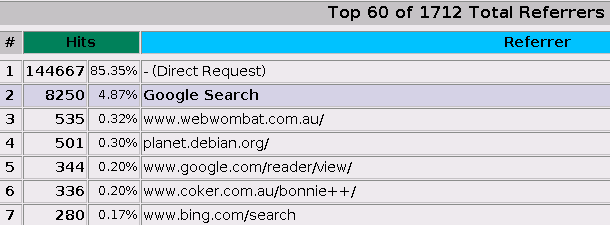
Chris Smart writes about the latest money making schemes for OS distributors, Canonical is getting paid by Yahoo to make them stop using Google as the default Firefox search engine [1]. I think this is OK, the user can easily change it back if desired and it allows them to pay the salaries of more employees who contribute code back to upstream projects. MSN uses 455M, Google uses 189M, and Yahoo uses 109MGoogle referrs 8250 hits, but Bing only refers 280 Above are sections of my Webalizer output related to my blog which show the data transfer use of search.msn.com (Bing presumably) which is 50% greater than that of Google and Yahoo combined. Why does MSN need to do 455MB of transfer so far this month to scan my blog when Google gets the job done with 189M and Yahoo only takes 109M? Also judging by the referrals Bing is only 3% as much use to me as Google. MSN uses 525M, Yahoo uses 132M, and Google only uses 35M Above is a sample of the Webalizer output from www.coker.com.au, MSN is using 525MB of data to scan the site which contains about 1.2G of static files that change very rarely. A Russian malware site seems to be downloading it three times a month, and Google only takes 35MB of data transfer to scan the site (which is probably still excessive). If Bing was a quality search engine that returned appropriate results then this could be forgiven. But however it is a very poor search engine that returns bad results. For example if you query Google or Yahoo for bonnie++ you will get an entire page of search results concerning my Bonnie++ benchmark, and those results are ordered in a sensible way. If you ask Bing then the first four results concern Bonnie (three women and a plant) and most of the first page don t concern my benchmark. Some time ago I had blocked MSN from scanning a server that I ran. The server in question had all the web servers for my domain plus quite a few other small domains. The total MSN data transfer was 3G per month which was almost half the data allowance for the server in question (data plans in Australia suck that s why my web servers are hosted in Germany now), so it was a question of whether to allow normal operation of the business or MSN searches. With Microsoft not running a popular search engine (then or now) it was an easy decision. I think that anyone who accepts money from Microsoft/Bing is doing their users a mis-service. Bing is simply an inferior search engine, it gets bad results and imposes excessive costs on service providers. Yahoo however seems to be a reasonable service, not as good as Google for the web hosters but not too bad. I wonder what would happen if Yahoo offered some sponsorship money to the Debian project in exchange for being the default search engine. I m sure it would be dramatic.

26 January 2010

Marco d'Itri: Dell Latitude, VT support and KVM

If you have a recent Dell Laptop (I tested this on a Latitude E6400) and even if VT support is enabled in the BIOS setup you get this error when you try to load kvm-intel:
kvm: disabled by bios
then make sure that the "Trusted Execution" feature in the "Virtualization Support" menu is disabled. Should I blame Dell or the KVM developers?

Roland Mas: sgeps follow-up

Just an update about sgeps, because it seems to have made a small stir (which is more than I expected).

Joey Hess: started termcasting

I've hooked one of my laptop's terminals up to the net, so anyone with IPv6 can telnet in and see it. I've long wanted to be able to broadcast my terminal sessions on occasions when it makes sense. Like when I'm fixing someone's bug, or closely collaborating with someone distant. I am also interested in finding things to host on IPv6. Right now, that means only people who care will be able to access it. So it seems the trick is to find places where that is a benefit. I plan to keep an eye out for more things like this. (A side benefit of using IPv6 is that it makes it easier to serve content from my laptop, that moves from network to network.) So, tune in to my termcast! termcast

Next.

Previous.