Search Results: "ag"

12 October 2014

Iustin Pop: Day trip on the Olympic Peninsula

Day trip on the Olympic Peninsula TL;DR: drove many kilometres on very nice roads, took lots of pictures, saw sunshine and fog and clouds, an angry ocean and a calm one, a quiet lake and lots and lots of trees: a very well spent day. Pictures at http://photos.k1024.org/Daytrips/Olympic-Peninsula-2014/. Sometimes I travel to the US on business, and as such I've been a few times in the Seattle area. Until this summer, when I had my last trip there, I was content to spend any extra days (weekend or such) just visiting Seattle itself, or shopping (I can spend hours in the REI store!), or working on my laptop in the hotel. This summer though, I thought - I should do something a bit different. Not too much, but still - no sense in wasting both days of the weekend. So I thought maybe driving to Mount Rainier, or something like that. On the Wednesday of my first week in Kirkland, as I was preparing my drive to the mountain, I made the mistake of scrolling the map westwards, and I saw for the first time the Olympic Peninsula; furthermore, I was zoomed in enough that I saw there was a small road right up to the north-west corner. Intrigued, I zoomed further and learned about Cape Flattery ( the northwestern-most point of the contiguous United States! ), so after spending a bit time reading about it, I was determined to go there. Easier said than done - from Kirkland, it's a 4h 40m drive (according to Google Maps), so it would be a full day on the road. I was thinking of maybe spending the night somewhere on the peninsula then, in order to actually explore the area a bit, but from Wednesday to Saturday it was a too short notice - all hotels that seemed OK-ish were fully booked. I spent some time trying to find something, even not directly on my way, but I failed to find any room. What I did manage to do though, is to learn a bit about the area, and to realise that there's a nice loop around the whole peninsula - the 104 from Kirkland up to where it meets the 101N on the eastern side, then take the 101 all the way to Port Angeles, Lake Crescent, near Lake Pleasant, then south toward Forks, crossing the Hoh river, down to Ruby Beach, down along the coast, crossing the Queets River, east toward Lake Quinault, south toward Aberdeen, then east towards Olympia and back out of the wilderness, into the highway network and back to Kirkland. This looked like an awesome road trip, but it is as long as it sounds - around 8 hours (continuous) drive, though skipping Cape Flattery. Well, I said to myself, something to keep in mind for a future trip to this area, with a night in between. I was still planning to go just to Cape Flattery and back, without realising at that point that this trip was actually longer (as you drive on smaller, lower-speed roads). Preparing my route, I read about the queues at the Edmonds-Kingston ferry, so I was planning to wake up early on the weekend, go to Cape Flattery, and go right back (maybe stop by Lake Crescent). Saturday comes, I - of course - sleep longer than my trip schedule said, and start the day in a somewhat cloudy weather, driving north from my hotel on Simonds Road, which was quite nicer than the usual East-West or North-South roads in this area. The weather was becoming nicer, however as I was nearing the ferry terminal and the traffic was getting denser, I started suspecting that I'll spend a quite a bit of time waiting to board the ferry. And unfortunately so it was (photo altered to hide some personal information): Waiting for the ferry. The weather at least was nice, so I tried to enjoy it and simply observe the crowd - people were looking forward to a weekend relaxing, so nobody seemed annoyed by the wait. After almost half an hour, time to get on the ferry - my first time on a ferry in US, yay! But it was quite the same as in Europe, just that the ship was much larger. Once I secured the car, I went up deck, and was very surprised to be treated with some excellent views: Harbour view Looking towards the sun   and away from it The crossing was not very short, but it seemed so, because of the view, the sun, the water and the wind. Soon we were nearing the other shore; also, see how well panorama software deals with waves :P! Near the other shore And I was finally on the "real" part of the trip. The road was quite interesting. Taking the 104 North, crossing the "Hood Canal Floating Bridge" (my, what a boring name), then finally joining the 101 North. The environment was quite varied, from bare plains and hills, to wooded areas, to quite dense forests, then into inhabited areas - quite a long stretch of human presence, from the Sequim Bay to Port Angeles. Port Angeles surprised me: it had nice views of the ocean, and an interesting port (a few big ships), but it was much smaller than I expected. The 101 crosses it, and in less than 10 minutes or so it was already over. I expected something nicer, based on the name, but Anyway, onwards! Soon I was at a crossroads and had to decide: I could either follow the 101, crossing the Elwha River and then to Lake Crescent, then go north on the 113/112, or go right off 101 onto 112, and follow it until close to my goal. I took the 112, because on the map it looked "nicer", and closer to the shore. Well, the road itself was nice, but quite narrow and twisty here and there, and there was some annoying traffic, so I didn't enjoy this segment very much. At least it had the very interesting property (to me) that whenever I got closer to the ocean, the sun suddenly disappeared, and I was finding myself in the fog: Foggy road So my plan to drive nicely along the coast failed. At one point, there was even heavy smoke (not fog!), and I wondered for a moment how safe was to drive out there in the wilderness (there were other cars though, so I was not alone). Only quite a bit later, close to Neah Bay, did I finally see the ocean: I saw a small parking spot, stopped, and crossing a small line of trees I found myself in a small cove? bay? In any case, I had the impression I stepped out of the daily life in the city and out into the far far wilderness: Dead trees on the beach Trees growing on a rock Small panorama of the cove There was a couple, sitting on chairs, just enjoying the view. I felt very much intruding, behaving like I did as a tourist: running in, taking pictures, etc., so I tried at least to be quiet . I then quickly moved on, since I still had some road ahead of me. Soon I entered Neah Bay, and was surprised to see once more blue, and even more blue. I'm a sucker for blue, whether sky blue or sea blue , so I took a few more pictures (watch out for the evil fog in the second one): View towards Neah Bay port Sea view from Neah Bay Well, the town had some event, and there were lots of people, so I just drove on, now on the last stretch towards the cape. The road here was also very interesting, yet another environment - I was driving on Cape Flattery Road, which cuts across the tip of the peninsula (quite narrow here) along the Waatch River and through its flooding plains (at least this is how it looked to me). Then it finally starts going up through the dense forest, until it reaches the parking lot, and from there, one goes on foot towards the cape. It's a very easy and nice walk (not a hike), and the sun was shining very nicely through the trees: Sunny forest Sun shinning down Wooden path But as I reached the peak of the walk, and started descending towards the coast, I was surprised, yet again, by fog: Ugly fog again! I realised that probably this means the cape is fully in fog, so I won't have any chance to enjoy the view. Boy, was I wrong! There are three viewpoints on the cape, and at each one I was just "wow" and "aah" at the view. Even thought it was not a sunny summer view, and there was no blue in sight, the combination between the fog (which was hiding the horizon and even the closer islands), the angry ocean which was throwing wave after wave at the shore, making a loud noise, and the fact that even this seemingly inhospitable area was just teeming with life, was both unexpected and awesome. I took here waay to many pictures, here are just a couple inlined: First view at the cape Birds 'enjoying' the weather Foggy shore I spent around half an hour here, just enjoying the rawness of nature. It was so amazing to see life encroaching on each bit of land, even though it was not what I would consider a nice place. Ah, how we see everything through our own eyes! The walk back was through fog again, and at one point it switched over back to sunny. Driving back on the same road was quite different, knowing what lies at its end. On this side, the road had some parking spots, so I managed to stop and take a picture - even though this area was much less wild, it still has that outdoors flavour, at least for me: Waatch River Back in Neah Bay, I stopped to eat. I had a place in mind from TripAdvisor, and indeed - I was able to get a custom order pizza at "Linda's Woodfired Kitchen". Quite good, and I ate without hurry, looking at the people walking outside, as they were coming back from the fair or event that was taking place. While eating, a somewhat disturbing thought was going through my mind. It was still early, around two to half past two, so if I went straight back to Kirkland I would be early at the hotel. But it was also early enough that I could - in theory at least - still do the "big round-trip". I was still rummaging the thought as I left On the drive back I passed once more near Sekiu, Washington, which is a very small place but the map tells me it even has an airport! Fun, and the view was quite nice (a bit of blue before the sea is swallowed by the fog): Sekiu view After passing Sekiu and Clallam Bay, the 112 curves inland and goes on a bit until you are at the crossroads: to the left the 112 continues, back the same way I came; to the right, it's the 113, going south until it meets the 101. I looked left - remembering the not-so-nice road back, I looked south - where a very appealing, early afternoon sun was beckoning - so I said, let's take the long way home! It's just a short stretch on the 113, and then you're on the 101. The 101 is a very nice road, wide enough, and it goes through very very nice areas. Here, west to south-west of the Olympic Mountains, it's a very different atmosphere from the 112/101 that I drove on in the morning; much warmer colours, a bit different tree types (I think), and more flat. I soon passed through Forks, which is one of the places I looked at when searching for hotels. I did so without any knowledge of the town itself (its wikipedia page is quite drab), so imagine my surprise when a month later I learned from a colleague that this is actually a very important place for vampire-book fans. Oh my, and I didn't even stop! This town also had some event, so I just drove on, enjoying the (mostly empty) road. My next planned waypoint was Ruby Beach, and I was looking forward to relaxing a bit under the warm sun - the drive was excellent, weather perfect, so I was watching the distance countdown on my Garmin. At two miles out, the "Near waypoint Ruby Beach" message appeared, and two seconds later the sun went out. What the I was hoping this is something temporary, but as I slowly drove the remaining mile I couldn't believe my eyes that I was, yet again, finding myself in the fog I park the car, thinking that asking for a refund would at least allow me to feel better - but it was I who planned the trip! So I resigned myself, thinking that possibly this beach is another special location that is always in the fog. However, getting near the beach it was clear that it was not so - some people were still in their bathing suits, just getting dressed, so it seems I was just unlucky with regards to timing. However, I the beach itself was nice, even in the fog (I later saw online sunny pictures, and it is quite beautiful), the the lush trees reach almost to the shore, and the way the rocks are sitting on the beach: A lonely dinghy Driftwood  and human construction People on the beach Since the weather was not that nice, I took a few more pictures, then headed back and started driving again. I was soo happy that the weather didn't clear at the 2 mile mark (it was not just Ruby Beach!), but alas - it cleared as soon as the 101 turns left and leaves the shore, as it crosses the Queets river. Driving towards my next planned stop was again a nice drive in the afternoon sun, so I think it simply was not a sunny day on the Pacific shore. Maybe seas and oceans have something to do with fog and clouds ! In Switzerland, I'm very happy when I see fog, since it's a somewhat rare event (and seeing mountains disappearing in the fog is nice, since it gives the impression of a wider space). After this day, I was a bit fed up with fog for a while Along the 101 one reaches Lake Quinault, which seemed pretty nice on the map, and driving a bit along the lake - a local symbol, the "World's largest spruce tree". I don't know what a spruce tree is, but I like trees, so I was planning to go there, weather allowing. And the weather did cooperate, except that the tree was not so imposing as I thought! In any case, I was glad to stretch my legs a bit: Path to largest spruce tree Largest spruce tree, far view Largest spruce tree, closer view Very short path back to the road However, the most interesting thing here in Quinault was not this tree, but rather - the quiet little town and the view on the lake, in the late afternoon sun: Quinault Quinault Lake view The entire town was very very quiet, and the sun shining down on the lake gave an even stronger sense of tranquillity. No wind, not many noises that tell of human presence, just a few, and an overall sense of peace. It was quite the opposite of the Cape Flattery and a very nice way to end the trip. Well, almost end - I still had a bit of driving ahead. Starting from Quinault, driving back and entering the 101, driving down to Aberdeen: Afternoon ride then turning east towards Olympia, and back onto the highways. As to Aberdeen and Olympia, I just drove through, so I couldn't make any impression of them. The old harbour and the rusted things in Aberdeen were a bit interesting, but the day was late so I didn't stop. And since the day shouldn't end without any surprises, during the last profile change between walking and driving in Quinault, my GPS decided to reset its active maps list and I ended up with all maps activated. This usually is not a problem, at least if you follow a pre-calculated route, but I did trigger recalculation as I restarted my driving, so the Montana was trying to decide on which map to route me - between the Garmin North America map and the Open StreeMap one, the result was that it never understood which road I was on. It always said "Drive to I5", even though I was on I5. Anyway, thanks to road signs, and no thanks to "just this evening ramp closures", I was able to arrive safely at my hotel. Overall, a very successful, if long trip: around 725 kilometres, 10h:30m moving, 13h:30m total: Track picture There were many individual good parts, but the overall think about this road trip was that I was able to experience lots of different environments of the peninsula on the same day, and that overall it's a very very nice area. The downside was that I was in a rush, without being able to actually stop and enjoy the locations I visited. And there's still so much to see! A two nights trip sound just about right, with some long hikes in the rain forest, and afternoons spent on a lake somewhere. Another not so optimal part was that I only had my "travel" camera (a Nikon 1 series camera, with a small sensor), which was a bit overwhelmed here and there by the situation. It was fortunate that the light was more or less good, but looking back at the pictures, how I wish that I had my "serious" DSLR So, that means I have two reasons to go back! Not too soon though, since Mount Rainier is also a good location to visit . If the pictures didn't bore you yet, the entire gallery is on my smugmug site. In any case, thanks for reading!

Giuseppe Iuculano: apt-get purge chromium

As you may know, I was the Debian chromium maintainer for many years. Some week ago, I decided to stop working in the chromium package because it is not possible anymore to contribute and work in the team. In fact, Michael Gilbert started to work in a manner that prevent people to help maintain the package. In the last period the git repository rarely was updated, and my requests were systematically ignored. Having an updated git repository is mandatory in a big package like Chromium, and if you don t push your changes, other people will lost their time Now, after deciding to stop maintaining Chromium, I also decided to purge it and switch to the Google Chrome binary. Why? Chromium is a pain. Huge commits not documented in changelog that caused stupid bugs because no one can double check them. In this moment we have an unusable [1] [2] [3] version of Chromium in testing because maintainer demoted grave bugs with the recommendation to rm -rf ./config/chromium and nobody can understand the sense of latest commits. flattr this!

Mario Lang: soundCLI works again

I recently ranted about my frustration with GStreamer in a SoundCloud command-line client written in Ruby. Well, it turns out that there was quite a bit confusion going on. I still haven't figured out why my initial tries resulted in an error regarding $DISPLAY not being set. But now that I have played a bit with gst-launch-1.0, I can positively confirm that this was very likely not the fault of GStreamer. THe actual issue is, that ruby-gstreamer is assuming gstreamer-1.0, while soundCLI was still written against the gstreamer-0.10 API. Since the ruby gst module doesn't have the Gstreamer API version in its name, and since Ruby is a dynamic language that only detects most errors at runtime, this led to all sorts of cascaded errors. It turns out I only had to correct the use of query_position, query_duration, and get_state, as well as switching from playbin2 to playbin. soundCLI is now running in the background and playing my SoundCloud stream. A pull request against soundCLI has also been opened. On a somewhat related note, I found a GCC bug (ICE SIGSEGV) this weekend. My first one. It is related to C++11 bracketed initializers. Given that I have heard GCC 5.0 aims to remove the experimental nature of C++11 (and maybe also C++14), this seems like a good time to hit this one. I guess that means I should finally isolate the C++ regex (runtime) segfault I recently stumbled across.

Guido G nther: Testing a NetworkManager VPN plugin password dialog

Testing the password dialog of a NetworkManager VPN plugin is as simple as:
echo -e 'DATA_KEY=foo\nDATA_VAL=bar\nDONE\nQUIT\n'   ./auth-dialog/nm-iodine-auth-dialog -n test -u $(uuid) -i
The above is for the iodine plugin when run from the built source tree. This allows one to test these dialogs although one didn't see them since ages since GNOME shell uses the external UI mode to query for the password. This blog is flattr enabled.

John Goerzen: First impressions of systemd, and they re not good

Well, I finally bit the bullet. My laptop, which runs jessie, got dist-upgraded for the first time in a few months. My brightness keys stopped working, and it no longer would suspend to RAM when the lid was closed, and upon chasing things down from XFCE to policykit, eventually it appears that suddenly major parts of the desktop breaks without systemd in jessie. Sigh. So apt-get install systemd-sysv (and watch sysvinit-core get uninstalled) and reboot. Only, my system doesn t come back up. In fact, over several hours of trying to make it boot with systemd, it failed in numerous spectacular and hilarious (or, would be hilarious if my laptop would boot) ways. I had text obliterating the cryptsetup password prompt almost every time. Sometimes there were two processes trying to read a cryptsetup password at once. Sometimes a process was trying to read that while another one was trying to read an emergency shell password. Many times it tried to write to /var and /tmp before they were mounted, meaning they *wouldn t* mount because there was stuff there. I noticed it not doing much with ZFS, complaining of a dependency loop between zfs-mount and $local-fs. I fixed that, but it still wouldn t boot. In fact, it simply hung after writing something about wall passwords. I ve dug into systemd, finding a unit generator for fstab (whatever the hack that is, it s not at all made clear by systemd-fstab-generator(8)). In some cases, there s info in journalctl, but if I can t even get to an emergency mode prompt, the practice of hiding all stdout and stderr output is not all that pleasant. I remember thinking what s all the flaming about? systemd wasn t my first choice (I always thought if it ain t broke, don t fix it about sysvinit), but basically ignored the thousands of messages, thinking whatever happens, jessie will still boot. Now I m not so sure. Even if the thing boots out of the box, it seems like the boot process with systemd is colossally fragile. For now, at least zfs rollback can undo upgrades to 800 packages in about 2 seconds. But I can t stay at some early jessie checkpoint forever. Have we made a vast mistake that can t be undone? (If things like even *brightness keys* now require systemd )

11 October 2014

Dirk Eddelbuettel: RPushbullet 0.1.0 with a lot more awesome

A new release 0.1.0 of the RPushbullet package (interfacing the neat Pushbullet service) landed on CRAN today. It brings a number of goodies relative to the first release 0.0.2 of a few months ago: There is a whole boat load of more wickedness in the Pushbullet API so if anybody feels compelled to add it, fire off pull requests at GitHub. More details about the package are at the RPushbullet webpage and the RPushbullet GitHub repo. Courtesy of CRANberries, there is also a diffstat report for this release.

This post by Dirk Eddelbuettel originated on his Thinking inside the box blog. Please report excessive re-aggregation in third-party for-profit settings.

10 October 2014

Matthias Klumpp: Listaller + Glick: Some new ideas

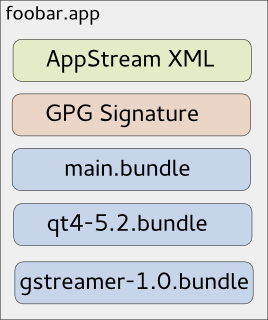
As you might know, due to invasive changes in PackageKit, I am currently rewriting the 3rd-party application installer Listaller. Since I am not the only one looking at the 3rd-party app-installation issue (there is a larger effort going on at GNOME, based on Lennarts ideas), it makes sense to redesign some concepts of Listaller. Currently, dependencies and applications are installed into directories in /opt, and Listaller contains some logic to make applications find dependencies, and to talk to the package manager to install missing things. This has some drawbacks, like the need to install an application before using it, the need for applications to be relocatable, and application-installations being non-atomic. Glick2 There is/was another 3rd-party app installer approach on the GNOME side, by Alexander Larsson, called Glick2. Glick uses application bundles (do you remember Klik from back in the days?) mounted via FUSE. This allows some neat features, like atomic installations and software upgrades, no need for relocatable apps and no need to install the application. However, it also has disadvantages. Quoting the introduction document for Glick2: Bundling isn t perfect, there are some well known disadvantages. Increased disk footprint is one, although current storage space size makes this not such a big issues. Another problem is with security (or bugfix) updates in bundled libraries. With bundled libraries its much harder to upgrade a single library, as you need to find and upgrade each app that uses it. Better tooling and upgrader support can lessen the impact of this, but not completely eliminate it. This is what Listaller does better, since it was designed to do a large effort to avoid duplication of code. Also, currently Glick doesn t have support for updates and software-repositories, which Listaller had. Combining Listaller and Glick ideas So, why not combine the ideas of Listaller and Glick? In order to have Glick share resources, the system needs to know which shared resources are available. This is not possible if there is one huge Glick bundle containing all of the application s dependencies. So I modularized Glick bundles to contain just one software component, which is e.g. GTK+ or Qt, GStreamer or could even be a larger framework (e.g. GNOME 3.14 Platform ). These components are identified using AppStream XML metadata, which allows them to be installed from the distributor s software repositories as well, if that is wanted. If you now want to deploy your application, you first create a Glick bundle for it. Then, in a second step, you bundle your application bundle with it s dependencies in one larger tarball, which can also be GPG signed and can contain additional metadata. The resulting metabundle will look like this: glick-libundle This doesn t look like we share resources yet, right? The dependencies are still bundled with the application requiring them. The trick lies in the installation step: While the application above can be executed right away without installing it, there will also be an option to install it. For the user, this will mean that the application shows up in GNOME-Shell s overview or KDEs Plasma launcher, gets properly registered with mimetypes and is if installed for all users available system-wide. Technically, this will mean that the application s main bundle is extracted and moved to a special location on the file system, so are the dependency-bundles. If bundles already exist, they will not be installed again, and the new application will simply use the existing software. Since the bundles contain information about their dependencies, the system is able to determine which software is needed and which can simply be deleted from the installation directories. If the application is started now, the bundles are combined and mounted, so the application can see the libraries it depends on. Additionally, this concept allows secure updates of applications and shared resources. The bundle metadata contains an URL which points to a bundle repository. If new versions are released, the system s auto-updater can automatically pick these up and install them this means e.g. the Qt bundle will receive security updates, even if the developer who shipped it with his/her app didn t think of updating it. Conclusion So far, no productive code exists for this I just have a proof-of-concept here. But I pretty much like the idea, and I am thinking about going further in that direction, since it allows deploying applications on the Linux desktop as well as deploying software on servers in a way which plays nice with the native package manager, and which does not duplicate much code (less risk of having not-updated libraries with security flaws around). However, there might be issues I haven t thought about yet. Also, it makes sense to look at GNOME to see how the whole 3rd-party app deployment issue develops. In case I go further with Listaller-NEXT, it is highly likely that it will make use of the ideas sketched above (comments and feedback are more than welcome!).

Mario Lang

GStreamer and the command-line? I was recently looking for a command-line client for SoundCloud. soundCLI on GitHub appeared to be what I want. But wait, there is a problem with its implementation. soundCLI uses gstreamer's playbin2 to play audio data. But that apparently requires $DISPLAY to be set. So no, soundCLI is not a command-line client. It is a command-line client for X11 users. Ahem. A bit of research on Stackoverflow and related sites did not tell me how to modify playbin2 usage such that it does not require X11, while it is only playing AUDIO data. What the HECK is going on here. Are the graphical people trying to silently overtake the world? Is Linux becoming the new Windows? The distinction between CLI and GUI has become more and more blurry in the recent years. I fear for my beloved platform. If you know how to patch soundCLI to not require X11, please let me know. My current work-around is to replace all gstreamer usage with a simple "system" call to vlc. That works, but it does not give me comment display (since soundCLI doesn't know the playback position anymore) and hangs after every track, requiring me to enter "quit" manually on the VLC prompt. I really would have liked to use mplayer2 for this, but alas, mplayer2 does not support https. Oh well, why would it need to, in this day and age where everyone seems to switch to https by default. Oh well.

Martin Pitt: Running autopkgtests in the cloud

It s great to see more and more packages in Debian and Ubuntu getting an autopkgtest. We now have some 660, and soon we ll get another ~ 4000 from Perl and Ruby packages. Both Debian s and Ubuntu s autopkgtest runner machines are currently static manually maintained machines which ache under their load. They just don t scale, and at least Ubuntu s runners need quite a lot of handholding. This needs to stop. To quote Tim The Tool Man Taylor: We need more power!. This is a perfect scenario to be put into a cloud with ephemeral VMs to run tests in. They scale, there is no privacy problem, and maintenance of the hosts then becomes Somebody Else s Problem. I recently brushed up autopkgtest s ssh runner and the Nova setup script. Previous versions didn t support revert yet, tests that leaked processes caused eternal hangs due to the way ssh works, and image building wasn t yet supported well. autopkgtest 3.5.5 now gets along with all that and has a dozen other fixes. So let me introduce the Binford 6100 variable horsepower DEP-8 engine python-coated cloud test runner! While you can run adt-run from your home machine, it s probably better to do it from an autopkgtest controller cloud instance as well. Testing frequently requires copying files and built package trees between testbeds and controller, which can be quite slow from home and causes timeouts. The requirements on the controller node are quite low you either need the autopkgtest 3.5.5 package installed (possibly a backport to Debian Wheezy or Ubuntu 12.04 LTS), or run it from git ($checkout_dir/run-from-checkout), and other than that you only need python-novaclient and the usual $OS_* OpenStack environment variables. This controller can also stay running all the time and easily drive dozens of tests in parallel as all the real testing action is happening in the ephemeral testbed VMs. The most important preparation step to do for testing in the cloud is quite similar to testing in local VMs with adt-virt-qemu: You need to have suitable VM images. They should be generated every day so that the tests don t have to spend 15 minutes on dist-upgrading and rebooting, and they should be minimized. They should also be as similar as possible to local VM images that you get with vmdebootstrap or adt-buildvm-ubuntu-cloud, so that test failures can easily be reproduced by developers on their local machines. To address this, I refactored the entire knowledge how to turn a pristine default vmdebootstrap or cloud image into an autopkgtest environment into a single /usr/share/autopkgtest/adt-setup-vm script. adt-buildvm-ubuntu-cloud now uses this, you shold use it with vmdebootstrap --customize (see adt-virt-qemu(1) for details), and it s also easy to run for building custom cloud images: Essentially, you pick a suitable pristine image, nova boot an instance from it, run adt-setup-vm through ssh, then turn this into a new adt specific "daily" image with nova image-create. I wrote a little script create-nova-adt-image.sh to demonstrate and automate this, the only parameter that it gets is the name of the pristine image to base on. This was tested on Canonical's Bootstack cloud, so it might need some adjustments on other clouds. Thus something like this should be run daily (pick the base images from nova image-list):

  $ ./create-nova-adt-image.sh ubuntu-utopic-14.10-beta2-amd64-server-20140923-disk1.img
  $ ./create-nova-adt-image.sh ubuntu-utopic-14.10-beta2-i386-server-20140923-disk1.img
This will generate adt-utopic-i386 and adt-utopic-amd64. Now I picked 34 packages that have the "most demanding" tests, in terms of package size (libreoffice), kernel requirements (udisks2, network manager), reboot requirement (systemd), lots of brittle tests (glib2.0, mysql-5.5), or needing Xvfb (shotwell):
  $ cat pkglist
  apport
  apt
  aptdaemon
  apache2
  autopilot-gtk
  autopkgtest
  binutils
  chromium-browser
  cups
  dbus
  gem2deb
  glib-networking
  glib2.0
  gvfs
  kcalc
  keystone
  libnih
  libreoffice
  lintian
  lxc
  mysql-5.5
  network-manager
  nut
  ofono-phonesim
  php5
  postgresql-9.4
  python3.4
  sbuild
  shotwell
  systemd-shim
  ubiquity
  ubuntu-drivers-common
  udisks2
  upstart
Now I created a shell wrapper around adt-run to work with the parallel tool and to keep the invocation in a single place:
$ cat adt-run-nova
#!/bin/sh -e
adt-run "$1" -U -o "/tmp/adt-$1" --- ssh -s nova -- \
    --flavor m1.small --image adt-utopic-i386 \
    --net-id 415a0839-eb05-4e7a-907c-413c657f4bf5
Please see /usr/share/autopkgtest/ssh-setup/nova for details of the arguments. --image is the image name we built above, --flavor should use a suitable memory/disk size from nova flavor-list and --net-id is an "always need this constant to select a non-default network" option that is specific to Canonical Bootstack. Finally, let' run the packages from above with using ten VMs in parallel:
  parallel -j 10 ./adt-run-nova -- $(< pkglist)
After a few iterations of bug fixing there are now only two failures left which are due to flaky tests, the infrastructure now seems to hold up fairly well. Meanwhile, Vincent Ladeuil is working full steam to integrate this new stuff into the next-gen Ubuntu CI engine, so that we can soon deploy and run all this fully automatically in production. Happy testing!

9 October 2014

Ingo Juergensmann: Buildd.Net: update-buildd.net v0.99 released

Buildd.Net offers a buildd centric view to autobuilder network such as previously Debians autobuilder network or nowadays the autobuilder network of debian-ports.org. The policy of debian-ports.org requires a GPG key for the buildd to sign packages for upload that is valid for 1 year. Buildd admins are usually lazy people. At least they are running a buildd instead of building those packages all manually. Being a lazy buildd admin it might happen that you miss to renew your GPG key, which will render your buildd unable to upload newly built packages. When participating in Buildd.Net you need to run update-buildd.net, a small script that transmits some statistical data about your package building. I added now a GPG key expiry check to that script that will warn the buildd admin by mail and text on the Buildd.Net arch status page, such as for m68k. So, either your client updates automatically to the new version or you can download the script yourself.
Kategorie:

Jan Wagner: Updated Monitoring Plugins Version is coming soon

Three months ago version 2.0 of Monitoring Plugins was released. Since then many changes were integrated. You can find a quick overview in the upstream NEWS. Now it's time to move forward and a new release is expected soon. It would be very welcome if you could give the latest source snapshot a try. You also can give the Debian packages a go and grab them from my 'unstable' and 'wheezy-backports' repositories at http://ftp.cyconet.org/. Right after the stable release, the new packages will be uploaded into Debian unstable. The whole packaging changes can be observed in the changelog. Feedback is very appreciated via Issue tracker or the Monitoring Plugins Development Mailinglist. Update: The official call for testing is available.

8 October 2014

Jonathan Dowland: Ansible

I've just recently built the large bulk of VMs that we use for first semester teaching. This year that was 112. We use the same general approach for these as our others: get a generic base image up and running, with just enough configuration complete so a puppet client starts up; get it talking to our master; let puppet take it from there. There are pragmatic balances between how much we do in the kickstart versus how much we do in puppet, but also when we build a new VM from scratch versus when we clone an existing image, and how specialisation we do in the clone image. Unfortunately this year we ended up in a situation where our clone image wouldn't talk to our puppet master out of the box, due to some changes we'd made to our master set up since the clone image was prepared. We didn't really have enough time to re-clone the entire set of VMs from a fixed base image, and instead needed to fix them whilst up. However we couldn't rely on puppet to do that, since they wouldn't talk to the puppet master. We needed to manually reset the puppet client state per VM and then re-establish a trust relationship with the correct master (which is not the default master hostname in our environment anymore). Luckily, we deploy a local account with a known passphrase via the kickstart, which also has sudo access, as an interim measure before puppet strips it back out again and sets up proper LDAP and Kerberos authentication. So we can at least get into the boxes. However logging into 112 VMs by hand is not a particularly pleasant task. In the past I might have tried to achieve this using something like clusterssh but this year I decided to give ansible a try instead. Ansible started life, I believe, as a tool that would let you run arbitrary commands on remote hosts, including navigating ssh and sudo as required, without needing any agent software on the remote end. It has since seemed to grow into an enterprise product in its own right, seemingly in competition with puppet, chef, cfengine et al. Looking at the Ansible website now I'd be rather put off by just how "enterprisey" it has become - much as I am by the puppet website, if I'm honest - but if you persevere past the webinars, testimonials, etc. etc., you can find yourself to the documentation, and running an arbitrary command is as simple as The hosts file format is simple
[somehosts]
host1
host2
...
[otherhosts]
host3
The command line can be a little bit more complex, especially if you need to use one username for ssh, another for sudo, and you don't want to use ssh key auth:
ansible -i ./hostsfile somehosts -k -u someuser \
    --sudo -K -a 'puppet agent --onetime --no-daemonize --verbose 
"all" would work where I've used somehosts in the example above. So there you go: using one configuration management system to bootstrap another. I'm sure I've reserved myself a special place in hell for this.

Ian Donnelly: A Comparison of Elektra Merge and Git Merge

Hi everybody, We have gotten some inquires about how Elektra s merge functionality compares to the merge functionality built into git: git merge-file. I am glad to say that Elektra outperforms git s merge functionality in the same ways it outperforms diff3 when applied to configuration files. Obviously, git s merge functionality does a much better job with source-code as that is not the goal of elektra. In that previous example, I showed that because diff3 is lined based, where Elektra is not (unless you mount a file using the line plugin). The example I used before, and I will go over again, is using smb.conf and in-line comments. Many of our storage plug-ins understand the difference between comments and actual configuration data. So if a configuration file has an inline comment like so:
max log size = 10000 ; Controls the size of the log file (in KiB)
we can compare the actual Keys, value pairs between versions max log size = 10000 and deal with the comments separately. As a result, if we have a base:
max log size = 1000 ; Size in KiB

Ours:
max log size = 10000 ; Size in KiB

Theirs:
max log size = 1000 ; Controls the size of the log file (in KiB)

The result using elektra-merge would be:
max log size = 10000 ; Controls the size of the log file (in KiB)
Just like diff3, git merge-file can only compare these lines as lines, and thus there is a conflict. When running git merge-file smb.conf.ours smb.conf.base smb.conf.theirs we get the following output showing a conflict:
<<<<<<< smb.conf.ours
max log size = 2000 ; Size in KiB
=======
max log size = 1000 ; Controls the size of the log file (in KiB)
>>>>>>> smb.conf.theirs
This really shows the strength of Elektra s plugin system and why it makes merge an obvious use-case of Elektra. I hope this example makes it clear why using Elektra s merge functionality is advantageous over git s merge functionality. Once again I would like to stress the importance of quality storage plug-ins for Elektra. The more quality plugins we have the more powerful Elektra can be. If you are interested in plugins and would like to help us by adding functionality to Elektra by creating a new plug-in be sure to read my basic tutorial on how to do so. Sincerely,
Ian Donnelly

EvolvisForge blog: PSA: #shellshock still unfixed except in Debian unstable

I just installed, for work, Hanno B ck s bashcheck utility on our monitoring system, and watched all systems go blue. All but two. One is not executing remote scripts from the monitoring for security reasons, the other is my desktop which runs Debian sid (unstable). (Update, 2014-10-20: jessie, precise, trusty are also green now.) This means that all those distributions still have unfixed #shellshock bugs. I don t know if/when all distributions will have patched their packages but thought you d want to know the hysteria isn t over yet however, I hope you were not stupid enough to follow the advice of this site which suggests you to download some random file over the net and execute it with superuser permissions, unchecked. (I think the Ruby people were the first to spread this extremely insecure, stupid and reprehensible technique.) Updates: Thanks to tarent for letting me do this work during $dayjob time!

Jan Wagner: Updated Monitoring Plugins Version is coming soon

Three months ago version 2.0 of Monitoring Plugins was released. Since then many changes were integrated. You can find a quick overview in the upstream NEWS. Now it's time to move forward and a new release is expected soon. It would be very welcome if you could give the latest source snapshot a try. You also can give the Debian packages a go and grab them from my 'unstable' and 'wheezy-backports' repositories at http://ftp.cyconet.org/. Right after the stable release, the new packages will be uploaded into Debian unstable. The whole packaging changes can be observed in the changelog. Feedback is very appreciated via Issue tracker or the Monitoring Plugins Development Mailinglist.

Michal &#268;iha&#345;: Wammu 0.37

It has been more than three years since last release of Wammu and I've decided it's time to push changes made in the Git repos to the users. So here comes Wammu 0.37. The list of changes is not really huge, but in total that means 1470 commits in git (most of that are translations): I will not make any promises for future releases (if there will be any) as the tool is not really in active development.

Filed under: English Gammu Wammu 0 comments Flattr this!

7 October 2014

Joachim Breitner: New website layout

After 10 years I finally got around to re-decorating my website. One reason was ICFP, where just too many people told me that I don t look like on my old website any more (which is very true). Another reason was that I was visting my brother, who is very good at web design (check out his portfolio), who could help me a bit. I wanted something practical and maybe a bit staid, so I drew inspiration from typical Latex typography, and also from Edward Z. Yang s blog: A serif font (Utopia) for the main body, justified and hyphenated text. Large section headers in a knobbly bold sans-serif font (Latin Modern Sans, which reasonably resembles Computer Modern). To intensify that impression, I put the main text on a white box that lies like a paper on the background. As a special gimmic the per-page navigation (or, in the case of the blog, the list of categories) is marked up like a figure in a paper. Of course this would be very dire without a suitable background. I really like the procedural art by Jared Tarbell, espcially substrate and interAggregate. Both have been turned into screensavers shipped with xscreensaver, so I hacked the substrate code to generate a seamless tile and took a screenshot of the result. I could not make up my mind yet how dense it has to be to look good, so I for every page I randomly pick one of six variants randomly for now. I simplified the navigation a bit. The old News section has been removed recently already. The Links section is gone I guess link lists on homepages are so 90s. The section Contact and About me are merged and awaiting some cleanup. The link to the satire news Heisse News is demoted to a mention on the Contents section. This hopefully helps to make the site navigatable on mobile devices (the old homepage was unusable). CSS media queries adjust the layout slightly on narrow screens, and separately for print devices. Being the nostaltic I am, I still keep the old design, as well as the two designs before that, around and commented their history.

Joachim Breitner: ghc-heap-view for GHC 7.8

Since the last release of ghc-heap-view, which was compatible with GHC-7.6, I got 8 requests for a GHC-7.8 compatible version. I started working on it in January, but got stuck and then kept putting it off. Today, I got the ninths request, and I did not want to wait for the tenth, so I finally finished the work and you can use the new ghc-heap-view-0.5.2 with GHC-7.8. I used this chance to migrate its source repository from Darcs to git (mirrored on GitHub), so maybe this means that when 7.10 comes out, the requests to update it come with working patches :-). I also added a small test script so that travis can check it: ghc-heap-view I did not test it very thoroughly yet. In particular, I did not test whether ghc-vis works as expected. I still think that the low-level interface that ghc-heap-view creates using custom Cmm code should move into GHC itself, so that it does not break that easily, but I still did not get around to propose a patch for that.

Andrea Veri: The GNOME Infrastructure is now powered by FreeIPA!

As preannounced here the GNOME Infrastructure switched to a new Account Management System which is reachable at https://account.gnome.org. All the details will follow. Introduction It s been a while since someone actually touched the underlaying authentication infrastructure that powers the GNOME machines. The very first setup was originally configured by Jonathan Blandford (jrb) who configured an OpenLDAP istance with several customized schemas. (pServer fields in the old CVS days, pubAuthorizedKeys and GNOME modules related fields in recent times) While OpenLDAP-server was living on the GNOME machine called clipboard (aka ldap.gnome.org) the clients were configured to synchronize users, groups, passwords through the nslcd daemon. After several years Jeff Schroeder joined the Sysadmin Team and during one cold evening (date is Tue, February 1st 2011) spent some time configuring SSSD to replace the nslcd daemon which was missing one of the most important SSSD features: caching. What surely convinced Jeff to adopt SSSD (a very new but promising sofware at that time as the first release happened right before 2010 s Christmas) and as the commit log also states ( New sssd module for ldap information caching ) was SSSD s caching feature. It was enough for a certain user to log in once and the /var/lib/sss/db directory was populated with its login information preventing the LDAP daemon in charge of picking up login details (from the LDAP server) to query the LDAP server itself every single time a request was made against it. This feature has definitely helped in many occasions especially when the LDAP server was down for a particular reason and sysadmins needed to access a specific machine or service: without SSSD this wasn t ever going to work and sysadmins were probably going to be locked out from the machines they were used to manage. (except if you still had /etc/passwd , /etc/group and /etc/shadow entries as fallback) Things were working just fine except for a few downsides that appeared later on:
  1. the web interface (view) on our LDAP user database was managed by Mango, an outdated tool which many wanted to rewrite in Django that slowly became a huge dinosaur nobody ever wanted to look into again
  2. the Foundation membership information were managed through a MySQL database, so two databases, two sets of users unrelated to each other
  3. users were not able to modify their own account information on their own but even a single e-mail change required them to mail the GNOME Accounts Team which was then going to authenticate their request and finally update the account.
Today s infrastructure changes are here to finally say the issues outlined at (1, 2, 3) are now fixed. What has changed? The GNOME Infrastructure is now powered by Red Hat s FreeIPA which bundles several FOSS softwares into one big bundle all surrounded by an easy and intuitive web UI that will help users update their account information on their own without the need of the Accounts Team or any other administrative entity. Users will also find two custom fields on their Overview page, these being Foundation Member since and Last Renewed on date . As you may have understood already we finally managed to migrate the Foundation membership database into LDAP itself to store the information we want once and for all. As a side note it might be possible that some users that were Foundation members in the past won t find any detail stored on the Foundation fields outlined above. That is actually expected as we were able to migrate all the current and old Foundation members that had an LDAP account registered at the time of the migration. If that s your case and you still would like the information to be stored on the new setup please get in contact with the Membership Committee at stating so. Where can I get my first login credentials? Let s make a little distinction between users that previously had access to Mango (usually maintainers) and users that didn t. If you were used to access Mango before you should be able to login on the new Account Management System by entering your GNOME username and the password you were used to use for loggin in into Mango. (after loggin in the very first time you will be prompted to update your password, please choose a strong password as this account will be unique across all the GNOME Infrastructure) If you never had access to Mango, you lost your password or the first time you read the word Mango on this post you thought why is he talking about a fruit now? you should be able to reset it by using the following command:
ssh -l yourgnomeuserid account.gnome.org
The command will start an SSH connection between you and account.gnome.org, once authenticated (with the SSH key you previously had registered on our Infrastructure) you will trigger a command that will directly send your brand new password on the e-mail registered for your account. From my tests seems GMail sees the e-mail as a phishing attempt probably because the body contains the word password twice. That said if the e-mail won t appear on your INBOX, please double-check your Spam folder. Now that Mango is gone how can I request a new account? With Mango we used to have a form that automatically e-mailed the maintainer of the selected GNOME module which was then going to approve / reject the request. From there and in the case of a positive vote from the maintainer the Accounts Team was going to create the account itself. With the recent introduction of a commit robot directly on l10n.gnome.org the number of account requests reduced its numbers. In addition to that users will now be able to perform pretty much all the needed maintenance on their accounts themselves. That said and while we will probably work on building a form in the future we feel that requesting accounts can definitely be achieved directly by mailing the Accounts Team itself which will mail the maintainer of the respective module and create the account. As just said the number of account creations has become very low and the queue is currently clear. The documentation has been updated to reflect these changes at: https://wiki.gnome.org/AccountsTeam
https://wiki.gnome.org/AccountsTeam/NewAccounts The migration of all the user data and ACLs has been massive and I ve been spending a lot of time reviewing the existing HBAC rules trying to spot possible errors or misconfigurations. If you happen to not being able to access a certain service as you were used to in the past, please get in contact with the Sysadmin Team. All the possible ways to contact us are available at https://wiki.gnome.org/Sysadmin/Contact. What is missing still? Now that the Foundation membership information has been moved to LDAP I ll be looking at porting some of the existing membership scripts to it. What I managed to port already are welcome e-mails for new or existing members. (renewals) Next step will be generating a membership page from LDAP (to populate http://www.gnome.org/foundation/membership) and all the your-membership-is-going-to-lapse e-mails that were being sent till today. Other news /home/users mount on master.gnome.org You will notice that loggin in into master.gnome.org will result in your home directory being empty, don t worry, you did not lose any of your files but master.gnome.org is now currently hosting your home directories itself. As you may have been aware of adding files to the public_html directory on master resulted in them appearing on your people.gnome.org/~userid space. That was unfortunately expected as both master and webapps2 (the machine serving people.gnome.org s webspaces) were mounting the same GlusterFS share. We wanted to prevent that behaviour to happen as we wanted to know who has access to what resource and where. From today master s home directories will be there just as a temporary spot for your tarballs, just scp and use ftpadmin against them, that should be all you need from master. If you are interested in receiving or keeping using your people.gnome.org s webspace please mail stating so. Other news a shiny and new error 500 page has been deployed Thanks to Magdalen Berns (magpie) a new error 500 web page has been deployed on all the Apache istances we host. The page contains an iframe of status.gnome.org and will appear every single time the web server behind the service you are trying to reach will be unreachable for maintenance or other purposes. While I hope you won t see the page that often you can still enjoy it at https://static.gnome.org/error-500/500.html. Make sure to whitelist status.gnome.org on your browser as it currently loads it without https. (as the service is currently hosted on OpenShift which provides us with a *.rhcloud.com wildcard certificate, which differs from the CN the browser would expect it to be)

Andrea Veri: The GNOME Infrastructure is now powered by FreeIPA!

As preannounced here the GNOME Infrastructure switched to a new Account Management System which is reachable at https://account.gnome.org. All the details will follow. Introduction It s been a while since someone actually touched the underlying authentication infrastructure that powers the GNOME machines. The very first setup was originally configured by Jonathan Blandford (jrb) who configured an OpenLDAP istance with several customized schemas. (pServer fields in the old CVS days, pubAuthorizedKeys and GNOME modules related fields in recent times) While OpenLDAP-server was living on the GNOME machine called clipboard (aka ldap.gnome.org) the clients were configured to synchronize users, groups, passwords through the nslcd daemon. After several years Jeff Schroeder joined the Sysadmin Team and during one cold evening (date is Tue, February 1st 2011) spent some time configuring SSSD to replace the nslcd daemon which was missing one of the most important SSSD features: caching. What surely convinced Jeff to adopt SSSD (a very new but promising sofware at that time as the first release happened right before 2010 s Christmas) and as the commit log also states ( New sssd module for ldap information caching ) was SSSD s caching feature. It was enough for a certain user to log in once and the /var/lib/sss/db directory was populated with its login information preventing the LDAP daemon in charge of picking up login details (from the LDAP server) to query the LDAP server itself every single time a request was made against it. This feature has definitely helped in many occasions especially when the LDAP server was down for a particular reason and sysadmins needed to access a specific machine or service: without SSSD this wasn t ever going to work and sysadmins were probably going to be locked out from the machines they were used to manage. (except if you still had /etc/passwd , /etc/group and /etc/shadow entries as fallback) Things were working just fine except for a few downsides that appeared later on:
  1. the web interface (view) on our LDAP user database was managed by Mango, an outdated tool which many wanted to rewrite in Django that slowly became a huge dinosaur nobody ever wanted to look into again
  2. the Foundation membership information were managed through a MySQL database, so two databases, two sets of users unrelated to each other
  3. users were not able to modify their own account information on their own but even a single e-mail change required them to mail the GNOME Accounts Team which was then going to authenticate their request and finally update the account.
Today s infrastructure changes are here to finally say the issues outlined at (1, 2, 3) are now fixed. What has changed? The GNOME Infrastructure is now powered by Red Hat s FreeIPA which bundles several FOSS softwares into one big bundle all surrounded by an easy and intuitive web UI that will help users update their account information on their own without the need of the Accounts Team or any other administrative entity. Users will also find two custom fields on their Overview page, these being Foundation Member since and Last Renewed on date . As you may have understood already we finally managed to migrate the Foundation membership database into LDAP itself to store the information we want once and for all. As a side note it might be possible that some users that were Foundation members in the past won t find any detail stored on the Foundation fields outlined above. That is actually expected as we were able to migrate all the current and old Foundation members that had an LDAP account registered at the time of the migration. If that s your case and you still would like the information to be stored on the new setup please get in contact with the Membership Committee at stating so. Where can I get my first login credentials? Let s make a little distinction between users that previously had access to Mango (usually maintainers) and users that didn t. If you were used to access Mango before you should be able to login on the new Account Management System by entering your GNOME username and the password you were used to use for loggin in into Mango. (after loggin in the very first time you will be prompted to update your password, please choose a strong password as this account will be unique across all the GNOME Infrastructure) If you never had access to Mango, you lost your password or the first time you read the word Mango on this post you thought why is he talking about a fruit now? you should be able to reset it by using the following command:
ssh -l yourgnomeuserid account.gnome.org
The command will start an SSH connection between you and account.gnome.org, once authenticated (with the SSH key you previously had registered on our Infrastructure) you will trigger a command that will directly send your brand new password on the e-mail registered for your account. From my tests seems GMail sees the e-mail as a phishing attempt probably because the body contains the word password twice. That said if the e-mail won t appear on your INBOX, please double-check your Spam folder. Now that Mango is gone how can I request a new account? With Mango we used to have a form that automatically e-mailed the maintainer of the selected GNOME module which was then going to approve / reject the request. From there and in the case of a positive vote from the maintainer the Accounts Team was going to create the account itself. With the recent introduction of a commit robot directly on l10n.gnome.org the number of account requests reduced its numbers. In addition to that users will now be able to perform pretty much all the needed maintenance on their accounts themselves. That said and while we will probably work on building a form in the future we feel that requesting accounts can definitely be achieved directly by mailing the Accounts Team itself which will mail the maintainer of the respective module and create the account. As just said the number of account creations has become very low and the queue is currently clear. The documentation has been updated to reflect these changes at: https://wiki.gnome.org/AccountsTeam
https://wiki.gnome.org/AccountsTeam/NewAccounts I was used to have access to a specific service but I don t anymore, what should I do? The migration of all the user data and ACLs has been massive and I ve been spending a lot of time reviewing the existing HBAC rules trying to spot possible errors or misconfigurations. If you happen to not being able to access a certain service as you were used to in the past, please get in contact with the Sysadmin Team. All the possible ways to contact us are available at https://wiki.gnome.org/Sysadmin/Contact. What is missing still? Now that the Foundation membership information has been moved to LDAP I ll be looking at porting some of the existing membership scripts to it. What I managed to port already are welcome e-mails for new or existing members. (renewals) Next step will be generating a membership page from LDAP (to populate http://www.gnome.org/foundation/membership) and all the your-membership-is-going-to-lapse e-mails that were being sent till today. Other news /home/users mount on master.gnome.org You will notice that loggin in into master.gnome.org will result in your home directory being empty, don t worry, you did not lose any of your files but master.gnome.org is now currently hosting your home directories itself. As you may have been aware of adding files to the public_html directory on master resulted in them appearing on your people.gnome.org/~userid space. That was unfortunately expected as both master and webapps2 (the machine serving people.gnome.org s webspaces) were mounting the same GlusterFS share. We wanted to prevent that behaviour to happen as we wanted to know who has access to what resource and where. From today master s home directories will be there just as a temporary spot for your tarballs, just scp and use ftpadmin against them, that should be all you need from master. If you are interested in receiving or keeping using your people.gnome.org s webspace please mail <accounts AT gnome DOT org> stating so. Other news a shiny and new error 500 page has been deployed Thanks to Magdalen Berns (magpie) a new error 500 web page has been deployed on all the Apache istances we host. The page contains an iframe of status.gnome.org and will appear every single time the web server behind the service you are trying to reach will be unreachable for maintenance or other purposes. While I hope you won t see the page that often you can still enjoy it at https://static.gnome.org/error-500/500.html. Make sure to whitelist status.gnome.org on your browser as it currently loads it without https. (as the service is currently hosted on OpenShift which provides us with a *.rhcloud.com wildcard certificate, which differs from the CN the browser would expect it to be) Updates UPDATE on status.gnome.org s SSL certificate: the certificate has been provisioned and it should result in the 500 s page to be displayed correctly with no warnings from your browser. UPDATE from Adam Young on Kerberos ports being closed on many DC s firewalls:
The next version of upstream MIT Kerberos will have support for fetching a ticket via ports 443 and marshalling the request over HTTPS. We ll need to run a proxy on the server side, but we should be able to make it work: Read up here
http://adam.younglogic.com/2014/06/kerberos-firewalls

Next.

Previous.