Search Results: "weasel"

9 March 2012

Petter Reinholdtsen: Debian Edu interview: Nigel Barker

Inspired by the interview series conducted by Raphael, I started a Norwegian interview series with people involved in the Debian Edu / Skolelinux community. This was so popular that I believe it is time to move to a more international audience. While Debian Edu and Skolelinux originated in France and Norway, and have most users in Europe, there are users all around the globe. One of those far away from me is Nigel Barker, a long time Debian Edu system administrator and contributor. It is thanks to him that Debian Edu is adjusted to work out of the box in Japan. I got him to answer a few questions, and am happy to share the response with you. :) Who are you, and how do you spend your days? My name is Nigel Barker, and I am British. I am married to Yumiko, and we have three lovely children, aged 15, 14 and 4(!) I am the IT Coordinator at Hiroshima International School, Japan. I am also a teacher, and in fact I spend most of my day teaching Mathematics, Science, IT, and Chemistry. I was originally a Chemistry teacher, but I have always had an interest in computers. Another teacher teaches primary school IT, but apart from that I am the only computer person, so that means I am the network manager, technician and webmaster, also, and I help people with their computer problems. I teach python to beginners in an after-school club. I am way too busy, so I really appreciate the simplicity of Skolelinux. How did you get in contact with the Skolelinux/Debian Edu project? In around 2004 or 5 I discovered the ltsp project, and set up a server in the IT lab. I wanted some way to connect it to our central samba server, which I was also quite poor at configuring. I discovered Edubuntu when it came out, but it didn't really improve my setup. I did various desperate searches for things like "school Linux server" and ended up in a document called "Drift" something or other. Reading there it became clear that Skolelinux was going to solve all my problems in one go. I was very excited, but apprehensive, because my previous attempts to install Debian had ended in failure (I used Mandrake for everything - ltsp, samba, apache, mail, ns...). I downloaded a beta version, had some problems, so subscribed to the Debian Edu list for help. I have remained subscribed ever since, and my school has run a Skolelinux network since Sarge. What do you see as the advantages of Skolelinux/Debian Edu? For me the integrated setup. This is not just the server, or the workstation, or the ltsp. Its all of them, and its all configured ready to go. I read somewhere in the early documentation that it is designed to be setup and managed by the Maths or Science teacher, who doesn't necessarily know much about computers, in a small Norwegian school. That describes me perfectly if you replace Norway with Japan. What do you see as the disadvantages of Skolelinux/Debian Edu? The desktop is fairly plain. If you compare it with Edubuntu, who have fun themes for children, or with distributions such as Mint, who make the desktop beautiful. They create a good impression on people who don't need to understand how to use any of it, but who might be important to the school. School administrators or directors, for instance, or parents. Even kids. Debian itself usually has ugly default theme settings. It was my dream a few years back that some kind of integration would allow Edubuntu to do the desktop stuff and Debian Edu the servers, but now I realise how impossible that is. A second disadvantage is that if something goes wrong, or you need to customise something, then suddenly the level of expertise required multiplies. For example, backup wasn't working properly in Lenny. It took me ages to learn how to set up my own server to do rsync backups. I am afraid of anything to do with ldap, but perhaps Gosa will help. Which free software do you use daily? Nowadays I only use Debian on my personal computers. I have one for studio work (I play guitar and write songs), running AV Linux (customised Debian) a netbook running Squeeze, and a bigger laptop still running Skolelinux Lenny workstation. I have a Tjener in my house, that's very useful for the family photos and music. At school the students only use Skolelinux. (Some teachers and the office still have windows). So that means we only use free software all day every day. Open office, The GIMP, Firefox/Iceweasel, VLC and Audacity are installed on every computer in school, irrespective of OS. We also have Koha on Debian for the library, and Apache, Moodle, b2evolution and Etomite on Debian for the www. The firewall is Untangle. Which strategy do you believe is the right one to use to get schools to use free software? Current trends are in our favour. Open source is big in industry, and ordinary people have heard of it. The spread of Android and the popularity of Apple have helped to weaken the impression that you have to have Microsoft on everything. People complain to me much less about file formats and Word than they did 5 years ago. The Edu aspect is also a selling point. This is all customised for schools. Where is the Windows-edu, or the Mac-edu? But of course the main attraction is budget.The trick is to convince people that the quality is not compromised when you stop paying and use free software instead. That is one reason why I say the desktop experience is a weakness. People are not impressed when their USB drive doesn't work, or their browser doesn't play flash, for example.
22 February 2012

Cyril Brulebois: Wrench days

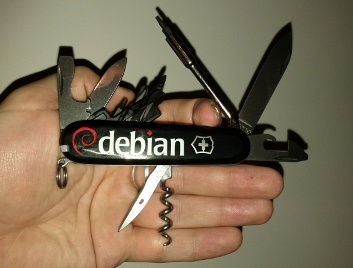
Fixing hardware Thanks to the nice Debian Swiss Knives initiative! Fixing software Besides trying to maintain the whole X stack as usual, and preparing the funky wayland, mesa, and weston trio for experimental, I got myself into other areas. Debugging gzip Jakup Wilk noticed a while ago that some multiarchified packages couldn t be co-installed due to gzipped files being different between architectures. That was reported as #647522 against the gzip package. While some developers consider the lack of determinism (as in: it s not in the gzip specification, and the current implementation generates different packages anyway!) as a dead-end for the multiarch experiment, it didn t look like undebuggable or unfixable. And indeed, as confirmed by a quick analysis: a lack of clean-up when several files are processed at once can lead to different results, depending on the order in which files are specified on the command line; the patch for that is trivial, and was later made smaller and the need for it was explained. Working in the Release Team I reviewed/approved a few packages for squeeze, but also took care of handling or finishing a few transitions (as seen in my hints file), among which the funny iceweasel9/libmozjs ones; release tools are nice, but one gets to learn lots of stuff at once (which isn t a negative aspect). I hacked a tiny collision detector so that packages involved in several transitions can be easily spotted. Given the huge number of ongoing transitions we had lately, that didn t look overkill. Squashing bugs It had been a very long time since my last working on totally random RC bugs. The Bug Squashing Party organized at IRILL was a very nice opportunity to get back to totally crazy bugs in unknown packages, but also to meet with other Debian contributors; sponsoring maintainers with good patches on their first try was nice, but walking other contributors through their first patches sent to the BTS or through their first NMUs was nice too. Waving good bye to yada Back in the M rida QA meeting I attended in 2007, there were already jokes about how bad yada was, and how it should die in a fire etc. When I started looking at the RC bug list, I quickly switched to scrolling it backwards, and I wondered how much work was left. The details can be seen in #660548, and the result is: yada is gone! sanity++; packages.debian.org Both long descriptions and translations for packages in some suites disappeared after the switch to Description-md5. Thanks to a quick and reduced packages.debian.org setup (mostly: en+de for squeeze+sid+experimental), I managed to find my way through Perl and DB files to propose patches for #657557. I m still waiting for a confirmation, but in case it works fine, we could even get a fix for DDTP/DDTSS.

18 February 2012

Mike Hommey: Debian Mozilla news

Here are the few noteworthy news about Mozilla packages in Debian:

30 January 2012

Jordi Mallach: GNOME Shell 3.2 in wheezy: a retrospective

When you read this, GNOME Shell 3.2 will (hopefully!) have finally transitioned to Debian s testing suite. Planet GNOME readers might think Debian now has outdated versions of software even in their development versions, or the distribution s development marches at glacial pace. Wheezy GNOME users will finally have a Shell that matches the rest of their GNOME components, something that works with the Shell extensions website and much less problems and limitations compared to 3.0.2. The reality is that GNOME 3.2 s packaging was quite ready back when it was released in late September, but a number of not-so-desirable situations held GNOME Shell from transitioning to testing until today, four months later. So, what happened? TL;DR: transitioning from GNOME 2 GNOME 3 is not so easy if you want to keep testing in a sane state, and when you need to deal with dozens of indirectly related packages, for more than 10 architectures but it shouldn t take nearly a full year, either Let s go back to the last months of 2010. Debian squeeze is in very deep freeze, and the release team and many Debian developers are focusing on squashing as many release critical bugs as they can, in order to make Debian 6.0 the great release it ended up being. The GNOME project has recently delayed the big launch of GNOME 3.0 again, until March 2011; Debian has already settled on GNOME 2.28 for its release, although it will end up cherry-picking many updates from the 2.30 release modules. With most of the stabilization work being done, many Debian GNOME team members were at that time working on packaging very early versions of what would end up being GNOME 3.0 technology: GTK+3.0, GNOME Shell, Mutter and some brave users even tried to use it via the experimental archive. On February 6th, Debian 6.0 was released, and soon after, on April 6th, GNOME made a huge step forward with the much anticipated release of GNOME 3.0. At that time, Debian developers were busy breaking unstable as much as they could, as it s tradition on the weeks following a major release, and the Debian GNOME team was able to start moving some GNOME 3.0 libraries (those which were parallel-installable with their GTK+2.0 versions) to unstable. However, moving the bulk of GNOME 3.0 to unstable wasn t so easy. When you start doing that, you need to be sure you re ready to have all affected packages in a transitionable state as soon as possible, to minimise the chances of blocking transitions of unrelated packages via the dependencies they pick up with rebuilds. All the packages involved in a transition need to be ready to go in the same testing run , for all supported architectures. When you re dealing with dozens of GNOME source packages at the same time, many of which introduce new libraries, or worse, introduce incompatible APIs that affect many more unrelated packages, things get hairy, and you need a plan. So, Joss outlined what a sane approach to this monster transition could look like. The amount of work to do was what we call fun on #debian-gnome. In a nutshell, we had to deal with quite a few transitions, starting with having a newer version of libnotify in unstable, and a pre-requisite for that was making sure all the packages using libnotify1 were ready to use the source-incompatible libnotify4, and this meant preparing patches and NMUs for many of our packages, as well as many others not under our control. Before starting a controlled transition like this one, we had to get an ACK from the release team, who was busy enough handling other huge transitions like Perl 5.12, so by the time we got our own slot, we were well into Summer. With libnotify done in August, it was time to get our hands dirty with more exciting stuff, like getting Nautilus in testing. This meant bumping a soname and requiring all packages providing Nautilus extensions to migrate to GTK+3.0, or drop the extension entirely, as you can t mix GTK+2.0 and GTK+3.0 symbols in the same process. However, in GNOME 3.0, automounting code had moved from Nautilus to gnome-settings-daemon, so in order to not break filesystem automounting in testing for an unreasonable amount of time, both Nautilus and g-s-d needed to go in at the same time. The fun thing is that g-s-d dragged glib2.0, gvfs, gnome-control-center, gdm3, gnome-media, gnome-session and gnome-panel into the equation, so this transition needed extra planning and a lot more work than initially expected: migrating all nautilus extensions, plus ensuring all Panel applets had migrated to GTK+3.0 and the new libpanel-applet-4 interface. In short, this was the monster transition we were trying to avoid. By the time all this mess was sorted out, GNOME 3.2 had been released, and for what users said, it was a lot better than 3.0. We still had no more than a few bits and pieces of 3.0 in testing, and we were working hard to get 3.0 in wheezy. With all the excitement around 3.2, at times it was difficult to explain outsiders why we were beating a dead 3.0 horse Going back to our huge transition, it was just a matter of time before all the packages would be built and be ready to enter, on the same run, in testing. A few weeks later, in early November and after several rounds of mass-bug-filings, fixing unrelated FTBFS, many NMUs, package removal requests and dealing with any possible problem that could block our transition, everything seemed to be set, and our release team magicians had everything in place for the big magic to happen. However, our first clash with the rest of Debian happened a few hours before our victory, in the form of an unannounced ruby-gnome2 upload which resetted the count for everyone. It was fun to see the release team trying all sorts of black magic in an attempt to mitigate the damage. Fortunately, after a few tries they managed to fool britney (the script that handles package transitions from unstable to testing) somehow, and the hardest part of the job was done with just one day of delay. At last, the core of GNOME 3 was in testing, and testing users found soon after. The rest of the week saw a cascade of hate posts against GNOME 3 in Planet Debian, and personally I didn t find that especially motivating to keep on working on the rest of GNOME bits. With experimental clear of GNOME 3.0 stuff, we finally were able to focus on packaging whatever GNOME 3.2 components were not already done, and preparing for what should be a plain simple transition of GNOME 3.0 to 3.2. After our share of wait for a transition slot, as Perl 5.14, ICU and OpenSSL were in the line before us, and after dealing with a minor tracker 0.12 transition, we were ready for our next episode: evolution-data-server. At first sight, we thought this would be a lot easier, but it still got a bit hairy due to evo-data-server massive soname bumps. We were given our slot just before Christmas, after a few weeks of wait for others to finish their migration rounds, and most of the pack entered wheezy a few days before the new year. No rejoicing, though, as GNOME Shell 3.2 didn t make it. First, we discovered it was FTBFS on kFreeBSD architectures, as NetworkManager had been promoted from optional to required, for apparently no good reason, leaving the BSD world in the cold, including our exotic GNU/kFreeBSD architectures. Now, let s clarify that I m a supporter of the Debian kFreeBSD architectures and was really happy to see it accepted as a technology preview in squeeze. However, as you know, GNOME Shell currently requires hardware acceleration to run, a requirement hardly met in kFreeBSD, unless you re using a DRI1 X driver. We seriously doubted anyone had ever ran a GNOME 3 session on kfreebsd-*. However, if it didn t build, it was a blocker bug for GNOME Shell. We considered creating different meta-packages for kFreeBSD architectures, to conclude it d be a mess, so our awesome Michael Biebl ended up cooking up a patch that restored the ability to build the Shell without NetworkManager support. With this out of our way, we just needed to upload Michael s fix and watch the buildds do their part of the job. Or maybe not? Enter Iceweasel 9. In parallel, and with incredible bad timing, Iceweasel 9.0 was uploaded to Debian the very same day it was released by Mozilla. Again, it greeted us with a nasty surprise: yet another mozjs API change, which made gjs FTBFS, which meant our kFreeBSD fixes would be unusable until someone who knew Gjs internals well enough bit the bullet and worked around the new API changes. Again, Michael Biebl tried to be our saviour, but unfortunately wasn t able to fix all the problems, so we tried to focus on plan B. Mozilla had released a fork of the mozjs that is included in Firefox, so that embedders would have a bit less of a hard time with these recurrent API changes. This was based on Firefox 4, and was already being packaged by Ubuntu. Gjs would build using this older version just fine, so we just needed to get it in Debian as soon as possible. We just needed to find a sucke^Wvolunteer that would be inclined to maintain the beast. Only after a few weeks we managed to get Chris Coulson, the Ubuntu packager, to maintain the package directly through the Debian archive via package syncs. However, his package had only been auto-compiled in the three Ubuntu architectures, that is amd64, armel and i386. It s late January 2012, and we ve been fighting this war for 10 months. After getting some help from Michael to get the new package in shape for Debian standards, we were excited to sponsor it for Chris. Duh, after a few days in the NEW fridge, it was rejected by the ftp-masters. The license statement was missing quite a few details, so I went ahead and sacrificed a few hours of my copious free time to get this sorted out. A few days later, mozjs was accepted, but the result was horrible. It was very red. mozjs didn t build on half of our targets. Mike Hommey was quick to file a bug and point us to the most obvious fuckups. As he had dealt with this in the past as the Iceweasel maintainer, all of these issues were fixed and patches were ready to be applied verbatim or with minimal changes to our sources. With mozjs finally built successfully (although with severe problems on ia64), we were finally able to rebuild Gjs against it, upload GNOME Shell with our kFreeBSD fixes and wait until today for this mess to be over. Whew. I can t say I ve enjoyed all the stages of this ride. Some bumps on the road were clearly there to test our patience, but it has helped me get back in touch with non-leaf GNOME packaging, which was all I was doing for a while due to being super-busy lately with studies. It also reminds me of the privilege of working side by side with some awesome people, not only Joss, Michael, Sjoerd, Laurent or Gustavo, to name just a few Debian GNOME team members, but also the receptive release team members like Julien or Cyril, and NEW-processing record-breaking ftp-master Luca. Without them, we might be trying to figure out the Nautilus transition since last Summer. We really hope GNOME 3.4 will be a piece of cake compared to this. ;)

22 January 2012

Nikita Youshchenko: squeeze + iceweasel backport = no printing in gimp

Looks like installing iceweasel backport packages from

deb http://mozilla.debian.net squeeze-backports iceweasel-release

causes installation of backport of libcairo2 1.10 which breaks printing from GIMP, as described in this ubuntu bug. Does anybody know a fix/workaround? Update: looks like running gimp with LD_LIBRARY_PATH set to directory containing library files from squeeze libcairo2 package (1.8.10-6) workarounds this. But this story makes me think again that bundling libraries with applications is not that bad idea at least for users who need to get things done.

19 January 2012

Obey Arthur Liu: State of the Aptitude (week 12)

Hi folks!

We're almost done for the official Summer of Code program and I thought that I couldn't let it end without another update, so here we are (you may thank Daniel Burrows for additional poking).

The Gtk+ interface for Aptitude is making great progress. The product is not final yet but already implements many of the planned ideas, with others to come.
Here are the screenies:


So, let's see the tasks presented in my previous update:

In some more details: we are now much closer to the final interface. Some things are not done yet, for example, notification bars la Iceweasel (or is it Firefox ?) are in the works for unobtrusive notifications about important things and a little guidance.

We are much more reliable now. We eliminated lots of memory management problems that resulted from, mmh, imperfect coding discipline. We also lock the interface when important backend stuff reload to prevent the user from shooting himself in the foot when triggering an install when the APT cache is reloading for example.. The backend refactoring took a sizable part of this second term but it was worth it. The code is now much cleaner and uses no more (at least much fewer) ugly unscalable hacks.

One very important feature of Aptitude is the ability to easily display all kinds of dependencies and navigate through them by hyperlinking. It's now working in the Gtk+ interface as well. Feel free to click on whatever looks like a package or a package version.

We now support the powerful Aptitude package searching syntax. Daniel Burrows is talking with Enrico Zini to bring the power of apt-xapian-index to Aptitude: autocompletion! lightning fast full-text searches! tag clouds! ponies!

There is still a lot to be done. I'm not going away after the GSoC program. I'm here to stay, for Aptitude and Debian. Daniel Burrows has been very helpful and supportive. The Debian community is as awesome as I knew it before participating in the program.

Daniel Burrows is planning to merge the Gtk+ interface into the main branch in September and packages may appear into Experimental. With the very interesting evolutions of the upcoming Adept-3, Lenny+1 will show very interesting changes in the area of packages managers.

Now for you. I need you to test my interface. All necessary instructions are on the development trac : http://dev.graffit.net/aptitude/trac.

18 January 2012

Tanguy Ortolo: Debian buttons for Firefox/Iceweasel

As a Debian administrator, power user or contributor, one often goes to look for information about a package, a bug, a developer or a message from the mailing lists. If you are in this case, you may be interested in the Firefox/Iceweasel extension Debian buttons , written by Damyan Ivanov and packaged by myself.
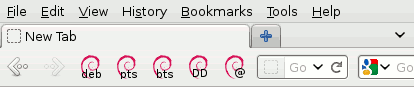
An Iceweasel toolbar with five Debian-related buttons
Description When installed, this extension provides five buttons, that you can place in your Firefox or Iceweasel toolbar. These buttons take the text from the X11 PRIMARY selection and act as shortcuts to the web pages corresponding to: Typical use case Let us imagine you see the following sentence on IRC:
12:42 < Tanguy> I am packaging a cool Firefox/Iceweasel extension (ITP #654896)!
If you want to check out the corresponding ITP report, just double-click on the bug number to select it (do not worry about the leading hash or even the possible trailing bracket, it will be handled), and click on the BTS button on your browser toolbar: here you are! Depending on your needs and habits, this extension may considerably speed up and simplify your quests for information. At least, it does for me, so I hope you will enjoy it too!

16 January 2012

Eddy Petri&#537;or: What's common between Windows 7 and GNOME 3 / gnome-shell?

Update: I managed to make sound work. For some weird reason, a mute switch option of some the many (and who knows how useful) switches of my sound card was enabled. Now the damn thing works. Did I mention that since I did the upgrade all my sound cards (I have a USB sound card, too) have listed as available inputs all the inputs of my internal sound card (mic, front mic, line in, CD, etc.) in Audacity? That makes for a very confusing and loooong sound input sources list! The upside is that I can finally record clips from televisions that do not provide such a feature and FastVideoDownload doesn't handle.

I also seem to have found a possible fix for the caps-ctrl issue in Xfce4 (obviously, setting "-option ctrl:swapcap" in ~/.Xkbmap, instead of that Alt modifier).


As I said in my previous post, I will tell you what do GNOME 3 and Windows 7 have in common.

Before everything else, I want to make it clear that when I am saying GNOME 3, I am referring to Debian Wheezy's GNOME 3, since I recently upgraded from Squeeze on my laptop. I'll probably drop a line or two about that, too.

First, I'll tell you about the (boring, probably for many) experience with Windows 7. As I said before, my new job requires me to use a Windows machine, so up until a few months ago I was using Windows XP with some additional software and tweaks to make it usable. Then came the Windows 7 upgrade . I am using quotes since the more appropriate term would be fresh installation on a new partition , not even close to what Debian users are used to call an upgrade.

So after a fresh Windows 7 installation, my first shock was the fact there was NO Quick Launch*. Some of you might be laughing, but I had never used Windows 7 up until then, just saw it on a laptop of a friend of mine (Ovidiu, one of the guys with whom I am doing this podcast, went to Denkfest with, and made these interviews). That was the first shock. Initial discussions about this with Windows users lead me to believe Quick Launch was dead and for some unexplained reason, I believed them. Later, much later, a week ago, to be precise, I found out that you can bring back the Quick Launch through some convoluted way**. Up until that point I had to have some icons pinned to the task bar, but some others on the desktop (and I hate that) because some of them, like Cygwin, if pinned, would start a cmd console, since Win 7 pins the process, not the starting script.

Among other things which broke in Win 7 and used to work fine in XP, the Virtual Dimension application which provides me with a virtual desktop, was the first one which was broken. I have been using a liniar 4 desktops-wide virtual desktop for over 5 years and I am worthless and inefficient if all my apps are on the same desktop. Mail application is always on the first desktop, work and file managers are on the second, the third is for extras and multimedia editing while the fourth is my gateway to the internet, containing the browser, instant messenger, or whatever.

The shortcuts I use to get to the various desktops are Win+1 ... Win+4 keyboard shortcuts, but the M$ Evil Empire decided that those shortcuts are going to start or bring foreward the first, second and so on applications pinned on the task bar. And you can't change those shortcuts***. Nor is disabling just those possible since they are all disabled through a huge switch which disables ALL Win+x keyboard shortcuts, among which Win+E (file expolrer) and Win+D (Show Desktop) were also. Luckly, Win+L (lock screen) was not disabled. So I disabled al those Win+ shortcuts, since I need virtual desktops.

Now, imagine if I had to start a Cygwin console and I had all sorts of apps open! Win+D was disabled, so I had to minimize the apps covering the desktop shortcut for Cygwin, click on the icon to start it, bring back the minimized windows and go on with my work. What a waste of clicks, mouse movement, energy and time, just because some dudes thought a Quick Launch-like feature was useless****.


You might wonder already what do those '*' sings mean. Well, sadly, that's what GNOME 3 / gnome-shell and Windows 7 have in common.

Gnome 3 was a shock for me. An empty desktop right after upgrade. No panels, no shortcuts*, no power indicators, no wicd indicator, no virtual desktops, no desktop icons, (I have a few dirs and docs there). Sounds like an Evil Empire decision, doesn't it?

Luckly I have been using Tilda as my always-ready console and I could fire up iceweasel from the console in order to understand where my panel disappeared.

I then realised that the upgrade brought me Network Manager, that app which wicd replaced. As a consequence, I had no working wlan since Network Manager made sure to mess up with the network manager I chose.

After looking through the documentation of Network Manager and realising I either had it set up to leave wlan0 alone or I didn't understood NM's documentation, I simply stopped the service, which let Wicd its job flawlessly.

The first thing I searched was Gnome 3 panel or something of that sort and I was confronted with the obvious option to appeal to the Forced Fallback Mode which was disabled. I figured I either had an old version, or Debian disabled this feature (hoping they provided an alternative). There was also the option to conform to this convoluted way of working** with Actions and such uselessness like that. I still wonder, what is the purpose of the Favourites bar on the left side, since it's accessible only after wasting a lot of mouse movement and time? For Joe's Pesci sake, I use focus under mouse just to avoid needless mouse and keyboard manipulation. Why? Why? WHY would I want every time I need to start or SWITCH to another application to move the mouse to the upper-left corner then take my hands off the mouse to type, move the mouse downwards or move across the whole width of the screen to get to my beloved virtual desktops and pick the app I want?

Making a long story short, after even trying XFCE4 (which for some unknown reason resets almost immediately my keyboard layout to the default layout with the Caps on Caps, instead of my preferred and set Ctrl on Caps - yes, it's global), I managed to find GNOME Shell Frippery** which made the experience better.

Later I found out that GNOME 3's file manager, Nautilus, has decided that an up on level button is useless, since the default is to use that uncopy-pastable button location bar instead of a sane text location bar. And it seems the GNOME developers decided this*** and I should conform to it.

To add insult to injury, those icons on my old panel are apparently useless**** and even in the fallback version I can't get them back. Or so the GNOME developers decided.

At some point this sunday, don't know how or why this change happened, producing sound was impossible. I know the problem is pulseaudio since when I kill the pulseaudio daemon from the console I can play audio. BTW, great timing, just when I needed sound the most, before releasing episode 32 of our podcast (yay, I reaslised that xfce just decided to reset my caps to be caps, after setting to ctrl a few minutes ago).

I know I praised pulseaudio when I first tried it, but failing to make it work out of the box or after some tinkering is a deal breaker for me, so I removed it. Now I find it that is a default in GNOME, yet all it manages to do is prevent audio from working. At least on my machine.

Other problems? Gnome Power Manager manages to hang and block my session, GNOME managed somehow to fail to start at some point. Yeah, and that sound problem which I didn't fix yet, didn't went away after removing all the pulseaudio packages which could be removed (e.g.: ryhtmbox depends on libpulse0, same do some other apps like audacity, so I couldn't remove all pulse related packages).

I got involved with Debian and GNU/Linux because it was tweakable and customisable, didn't use to force all sorts of option on me and now I find with its increasing popularity it becomes more and more like a product of a corporation which decides to change some things just to change and totally disregadring user experience and uses.

So, in the light of all of these problems I think it's time to probably consider trying KDE. Is it any good lately?

10 January 2012

Petter Reinholdtsen: Changing the default Iceweasel start page in Debian Edu/Squeeze

In the Squeeze version of Debian Edu / Skolelinux soon to be released, users of the system will get their default browser start page set from LDAP, allowing the system administrator to point all users to the school web page by updating one setting in LDAP. In addition to setting the default start page when a machine boots, users are shown the same page as a welcome page when they log in for the first time. The LDAP object dc=skole,dc=skolelinux,dc=no have an attribute labeledURI with "http://www/ LDAP for Debian Edu/Skolelinux" as the default content. By changing this value to another URL, all users get to see the page behind this new URL. An easy way to update it is by using the ldapvi tool. It can be called as "ldapvi -ZD '(cn=admin)'' to update LDAP with the new setting. We have written the code to adjust the default start page and show the welcome page, and I wonder if there is an easier way to do this from within Iceweasel instead.

16 December 2011

Jamie McClelland: Privilege Separation

What are the biggest security threats to my laptop? Almost all the software I install is vetted and signed by a member of the Debian team. I run reliable virus software on our mail server. My disk is encrypted and xscreensaver locks my screen after a few minutes of inactivity. What else? The two biggest threats I've recently considered are: web browsing and non-free software or software that doesn't come from Debian (I regularly have to use skype and zimbra, for example). To mitigate these risks, I've configured these programs to run as their own users, thus adding a layer of separation between the programs and my primary user account, which has access to my gpg/ssh keys and email. With a program like zimbra it's fairly easy. I created a zimbra user, added my primary account's public ssh key to /home/zimbra/.ssh/authorized_keys, and add the following stanza to ~/.ssh/config:
Host zimbra 
Hostname localhost 
User zimbra 
ForwardX11 yes
Now I can start zimbra with:
ssh zimbra ./zdesktop-launch
Skype was a little harder, since the skype client has to access the audio system. With pulseaudio, though, it's a snap. I copied /etc/pulse/default.pa to ~/.pulse/ and added the line:
load-module module-native-protocol-tcp auth-ip-acl=127.0.0.1
Then, I added /home/skype/.pulse/client.conf with the contents:
default-server = 127.0.0.1
[Note: Jamie Rollins and dkg have pointed out that this arrangement allows any user on my laptop to send arbitrary data to pulseaudio, running as my primay account. They suggested configuring pulseaudio to listen on a unix-domain socket, and then configuring pulseaudio to only permit access to users in a particular group.] iceweasel is the most complicated. In addition to the pulseaudio trick, I had to make two other allowances. First, there are a lot of processes that launch a web browser in a number of different ways (sometimes asking for a new session, other times adding a tab to an existing one, sometimes passing an URL as an argument, etc). The one that I got the most stuck on was mutt. Sometimes I want to see how an HTML message looks in iceweasel. Via mailcap, mutt creates a temp file with the html content and then launches a web browser to view the file. As can be reasonably expected, this temp file is owned by my primary user, and only read-able by the owner. That means my iceweasel user can't read it. Eventually, I decided the easiest way to deal with these various scenarios was to write a simple bash script to launch my web browser (see below). I registered it via update-alternatives, so most reasonable programs that want to launch a web browser will use it. The second issue is that I use the monkeysphere xul plugin to verify TLS certificates, which requires iceweasel to communicate with my monkeysphere validation agent. My agent runs as my primary user and by default only responds to queries from my primary user. Fortunately, monkeysphere is well-designed and can handle this situation. As you can see from my web launcher script, I pass MONKEYSPHEREVALIDATIONAGENTSOCKET=$MONKEYSPHEREVALIDATIONAGENTSOCKET when calling iceweasel. In addition, I added the following before I exec monkeysphere-validation-agent:
export MSVA_ALLOWED_USERS="iceweasel jamie"
With this simple infrastructure setup, it's possible to easily isolate future programs as well. Lastly... here's the script for launching iceweasel.
#!/bin/bash
stdin=
new_session=no
url=
for arg in "$@"; do
  if <span class="createlink"> &#34;&#36;arg&#34; &#61;&#126; &#94;-- </span>; then 
    if [ "$arg" = "--new-session" ]; then
      new_session=yes
    elif [ "$arg" = "--from-stdin" ]; then
      stdin=yes
    fi
  else
    url="$1"
  fi
done
if [ "$stdin" = "yes" ]; then
  temp=$(mktemp)
  while read line; do
    echo "$line" >> "$temp"
  done
  # it must be readable by the iceweasel user
  chmod 755 "$temp"
  url="file:///$temp"
fi
args=
if [ "$new_session" = "yes" ]; then
  args="--no-remote -ProfileManager"
fi
if [ -n "$url" ]; then
  args="$args '$url'"
fi
ssh iceweasel "MONKEYSPHERE_VALIDATION_AGENT_SOCKET=$MONKEYSPHERE_VALIDATION_AGENT_SOCKET iceweasel $args" &
[ -f "$temp" ] && sleep 5 && rm "$temp"
Comments by email... Hi, http://current.workingdirectory.net/posts/2011/privilege-separation/ has good intentions but afaik it does not improve security much. X applications can sniff your passwords and inject commands to your terminal emulators. I personally use xpra to get a similar solution without the hazards of X. I've been using it for two months now both at work and home. There are still bugs but svn version is getting better all the time. See for example my reply to https://grepular.com/ProtectingaLaptopfromSimpleandSophisticated_Attacks Timo

7 December 2011

Benjamin Mako Hill: Wide Scream

<object data="https://upload.wikimedia.org/wikipedia/commons/d/de/Aspect-ratio-4x3.svg" type="image/svg+xml"> https://upload.wikimedia.org/wikipedia/commons/d/de/Aspect-ratio-4x3.svg</object> <object data="https://upload.wikimedia.org/wikipedia/commons/f/f8/Aspect-ratio-16x9.svg" type="image/svg+xml"> https://upload.wikimedia.org/wikipedia/commons/f/f8/Aspect-ratio-16x9.svg</object> It seems that nearly all computer monitors have now switched from a 4:3 aspect ratio popular several years ago to a "wide screen" 16:10 and now mostly to an even wider 16:9. But screen sizes are usually measured by their diagonal length and those sizes have not changed. For example, before I had my Thinkpad X201, I had a X60 and a X35. They are similar laptops in the same product line with 12.1" screens. But 12.1" describes the size along the diagonal and the aspect ratio switched from 4:3 to 16:10 between the X60 and the X201. As the screen stretched out but maintained the same diagonal length, the area shrunk: from 453 square centimeters to 425. But screens are not only getting smaller, they are also getting less useful. The switch to wider aspect ratios is done so that people can watch wide screen movies while using a larger proportion of their screens. Of course, the vast majority of people's time on their laptops is not spent watching wide screen movies but in programs like browsers, word processors, and editors. Because most of our writing systems lay out documents from top to bottom, the tools we most frequently use to display (and then scroll through) the things we read primarily use vertical screen space -- the dimension that is shrinking. If you have a desktop monitor, you might rotate the whole thing 90 degrees and "solve" the problem. If you're on a laptop though (as I usually am) this is clearly not an option. I am not the first person to be annoyed by this trend. In fact, many recent desktop UI changes are designed to work around this issue. In the free software world, both Unity and GNOME 3 have made efforts to hide, merge, or otherwise get ride of title bars, menu bars, and panels that take up dwindling vertical space. I use Awesome which I've mostly set up to do two side-by-side terminals with very little in the way of menu bars. /copyrighteous/images/awesome_screenshot_2011-small.png Applications are the worst offenders and the solutions for those things that won't run in a terminal (or people that don't want to live there) are still lacking. I have been using Firefox's Tree Style Tab extension to move tabs to the side and hand-customized toolbars that squeeze everything I need (i.e., back, forward, stop, refresh, and URL bar) onto a single menu bar. /copyrighteous/images/iceweasel_menu_eg_screenshot_2011-small.png But the situation still drives me crazy. I'd love to hear what others are doing.

3 December 2011

Evgeni Golov: git rocks even when it sucks

Today I wanted to clone my dotfiles repository (no, not available online, too much private stuff in there) to a remote machine and noticed that it has grown way too big (20MiB working directory and about 200MiB in .git), so I decided to clean it up. git gc did clean up a couple of megabytes, but .git was still about 190MiB, so I wasn t satisfied. Short thinking revealed the lost megabytes are somewhere in the history when I accidentally added some files and removed them afterwards (iceweasel, icedove, it s you I m blaming ;)). But how the heck do I find and remove them? git filter-branch -f --index-filter 'git rm --cached --ignore-unmatch FILE' -- --all will remove FILE from all commits, says git-filter-branch(1), but how to find those files? They are not in my working directory anymore and I do not want to checkout every revision and look for big files in there. Let s ask git itself :)
for commit in git log --all --pretty=format:%H ; do git ls-tree -r -l $commit; done awk ' print $4 " " $5 ' sort -nu will show all files (actually all versions of all files) ever known to git, with the biggest ones at the end. Just identify the really big (unused) ones and remove them as above, thats what you think, right? Right, but .git won t be any smaller. Huh? Read git-filter-branch(1) again, just create a clone and it will be smaller, so mission accomplished! Now I had just 6MiB to push (compressed). For reference, the old tree would have used something about 150MiB to push.

12 November 2011

Kai Wasserb ch: New Greasemonkey script available for WotC's Magic section

No matter whether you're a professional or hobby player, if you play Magic: The Gathering, you certainly visit Wizards of the Coast's homepage from time to time. And while other parts of the WotC's page have been made unusable without ECMAScript enabled, the MTG part can be used without it mostly. The one part, that didn't work (and I needed) was card links. They have some ECMAScript to fetch the image from the Gatherer and overlay that on the current page, if you hover over a card link. If you click, it's again some script, that opens a Gatherer window. I just want all card links to be plain links pointing to the respective entries in the rather lightweight magiccards.info card search, which displays all relevant data in a compact layout. Today I finally got around to throw the ten or so lines of ECMAScript together, Greasemonkey needs to make that happen. If you like to give it a try, you can download it from my Greasemonkey script collection (direct link for the impatient: wotc_with_noscript_and_card_links.user.js). As an additional note: I'd like to point out, that there are other scripts available from userscripts.org which can do the same. But all those scripts did a lot else (like using jQuery to fetch the image on mouse over from magiccards.info).

8 November 2011

Jonathan McDowell: The cost of progress

You should probably ignore this post. I'm just venting. I'll be better after a nice cup of tea. Things that are causing me to fume about the fact Gnome Shell just hit Debian/Testing: I update my testing boxes (work + home laptops) almost every day. It rarely breaks, and certainly when it does I accept that's what I get for doing rolling upgrades. I can't remember the last time I did an upgrade that actually made me angry. Also I suspect this thing is going to have a complete fit on my binary nVidia/hacked up DisplayLink configuration at work (the DisplayLink side refuses to do 3D for starters). Perhaps better not to upgrade there until I have a sufficient block of free time. Maybe it's time to go back to evilwm. I only stopped because I wanted a dock for wifi/bluetooth etc applets on my laptop that didn't get hidden when I fullscreened things. Implementing _NET_WM_STRUT might make that doable... (I'm sure some of this is just dealing with the change but it's a bit bloody difficult to deal with a complete change in user interface that hasn't even managed to carry across settings from the old one.)

4 November 2011

Kai Wasserb ch: Greasemonkey scripts on dev.carbon-project.org

If you value your privacy, you might want to use a search engine like Ixquick which tries to protect your privacy. But if you value your privacy you probably have NoScript installed and have it hide <noscript> elements, as many pages hide tracking methods for users with deactivated JS in such tags. That makes every result page (but the first) inaccessible, because Ixquick has its non-JS navigation in noscript tags too. Now you could either activate JavaScript for Ixquick or work around this problem. Thanks to Greasemonkey and a little script I wrote, working around this issue is really easy. At this point, there is only this one script on dev.carbon-project.org, but in case I write another one, it'll end up there too. ;-)

Paul Wise: Migrating from Galeon to Iceweasel/Firefox

I have been a long-time user of the Galeon web browser, which, while powerful for its time, is getting a bit long in the teeth and has been abandoned for a long time. As a result I need to find something new. As Galeon uses the Mozilla engine I figure switching to Iceweasel/Firefox will be the least amount of pain since they share similar formats for lots of the user configuration and data (with the exception of history). Switching to Firefox also gives me access to a lot of configurability and a vast sea of extensions all written in RDF, JavaScript and zoooool (ahem, XUL). Another plus was that I was already using Firebug for the occasional web development project. Looking at the Mozilla addons site is like entering someone's shed. There will be the few beautiful unfinished projects still being worked on, one polished finished scuplture gathering dust but still admirable, things with power plugs from a bygone era, some things that have a coin slot on them, some cryptic machines with no visible screws or manuals, some spiders and their cobwebs and a few rats and mice chewing through things. A place where you can find some excellent, well documented, useful and Free Software extensions alongside lots of crud. Luckily for me the good stuff that I wanted to use was already in Debian or the friendly Debian Mozilla extension maintainers team was willing to package them for me. In my quest for freedom from Galeon I first noticed that there is no up button in Iceweasel. Bummer, I use that a lot so I went searching for extensions. I soon found one extension, but it hadn't kept up with the ever-changing Mozilla APIs so it fell by the wayside. Thanks to the leavers of breadcrumbs I picked up the trail to a new shiny and working extension. Lo-and-behold I found Uppity, which was all about going up and as it turns out, much better at that than Galeon. Thanks to MozExt team, thats solved, next! The next glaring problem was the lack of Galeon-style smart bookmarks. Before you ask, yes, Firefox smart keyword bookmarks are not the same thing. This was rediculously hard to search for due to the wording used by both projects being same same but different. Some folks switched to Epiphany to get the extra search boxes on their toolbars. Like this guy I was not interested in that, mainly due to the addons I would be missing out on. I tried a few different tacks, even searching for a way to have multiple search boxes in the Firefox toolbars. I soon gave up on finding an extension that would do this like Galeon does so I figured its time to roll up the sleeves and learn some zzzoooool. I already know a little bit about JavaScript and CSS so... First slap a dash of a tutorial about adding toolbar buttons, add a slither of adding extensions without installing them, stare down some Mozilla reference manuals, thrown in a pinch of favicons, give up on a wild goose chase or two, add a big fat blob of zoooool and sautee in fugly hacks. Soon enough you will have something hardcoded that works like Galeon smart bookmarks but looks even better. A screenshot of hacky galeon smart bookmarks in Iceweasel I may eventually turn this into a proper and functionally equivalent extension for Galeon-stlye smart bookmarks but for now it will remain a useful hack. If you want to get your hands dirty with zzzoooooool and try this out after modifying it to use your personal search URLs, please feel free to contact me. For now the only remaining issue I can see is that the forward/back buttons in Iceweasel don't have the explict menu buttons. This is a minor issue for me so now it is time for me to figure out how to migrate my data and config1 before permanently switching away from Galeon. Wish me luck! 1. Of course the data and config are fugly, but that is a something for another, much broader and more complicated hack

1 November 2011

Philipp Kern: Useful Firefox extensions

Many people around me switched to Chrome or Chromium. I also used it for a bit, but I was a bit disappointed about the extensions available. To show why, here's a list of the extensions I've currently installed:
If Firefox on Android were quicker to start and faster overall, I might even use it there. But as-is it's not very useful. Sadly this also means that I can't use Firefox Sync on my phone and as I don't use Chrome on my desktop I also can't use Chrome to Phone. So I usually go and build a QR code on my laptop and read that with Android's Barcode Scanner.

Of course I'm actually using Iceweasel and I'm very grateful for Mike Hommey's efforts to track the release channel on mozilla.debian.net.

26 October 2011

Ingo Juergensmann: Roundcube doesn't work anymore because of suhosin

Well, yesterday out of nothing my webmailer roundcube started to refuse to work. At least as I remember it. For some reasons reloading the Inbox just showed the "Loading..." message on the screen, but there was no list of mails anymore. Funny enough other folders do actually work as before. But anyway, doing an update did not help and improve anything. (I really don't know whether I updated before or after because of the first occurence of this issue.) There's an entry in syslog when loading the Inbox folder:
Oct 26 07:24:59 muaddib suhosin[32432]: ALERT - Include filename ('http://www.gnu.org/s/hello/manual/automake/ ?.php') is an URL that is not allowed (attacker '127.0.0.1', file '/usr/share/roundcube/program/include/iniset.php', line 110
This lead to bug #1488086 in the Roundcube issue tracker which states:
This messages made me wonder why suhosin thinks there's an include going on. Line 111 of iniset.php shows: include_once("$filename.php"); It seems like roundcube wants to include what is displayed in the subject, which happens to be a url - and suhosin legitimately blocks this attempt. In short, I can send an email to a user on a suhosin protected mail server and make his inbox unavailable. Needless to say, the user cannot delete this email himself via RoundCube. In my case, I had to delete the email file on the server to make roundcube show the inbox again.
In Debian there's bug #619411 that is related to PATH setting in iniset.php, but I'm not sure if this is really related to #1488086 in the Roundcube issue tracker and my problem? However, disabling suhosin doesn't seem the right way to "solve" this issue and the trac issue tracker suggests a security related problem. Anyway, I filed this as bug #646675 in Debian, waiting for the bug number. But when someone else knows some quick fixes or something I can try, please speak up! :-) UPDATE: It seems as if some mail triggered this issue like reported in the Roundcube ticket. After filtering my mails with Iceweasel, I'm being able to read my Inbox now again.

25 October 2011

Kai Wasserb ch: Removal of sun-java6 and ElsterOnline

Reading Sylvestre Ledru's announcement, that sun-java6 was removed from the archives, I'd like to point out, that the recommended immediate purge of any binary packages built by sun-java6 should be postponed until you did have time to check, that important applications are working for you with the OpenJDK implementation. I need to retain sun-java6-plugin until upstream bug #588 for icedtea-plugin is fixed. If you have equal requirements (using ELSTER is required by tax law for me), make sure everything works with OpenJDK/IcedTea, otherwise you need to fetch the latest shipped version from snapshot.debian.org or install something directly from Oracle. Now, as security issues were mentioned in Sylvestre's post, I'm NOT recommending to have sun-java6-plugin running in your browser on default. Just switch the Java plugins before you really need it. For Iceweasel you can (de-)activate plugins in the add-on manager's plugin tab. Apart from that I'd recommend to not surf with any scripting or plugins active at all, NoScript! is a great way to do this conveniently.

28 September 2011

Alexander Reichle-Schmehl: How to properly route packages on hosts with multiple NICs?

Dear lazyweb, I'm encountering a routing problem on one of my Linux machine, for which I haven't found a solution so far. I have a machine which has several network interfaces in different network (it's our monitoring system). So I have eth0 with 192.168.1.2 and eth1 with 10.0.0.2, and an dns entry pointing from myname to 192.168.1.2. Problems occur, if hosts in the 10.x.x.x network try to access the hosts. Accessing it via it's IP address in that network works, however if they try to access him via his other IP address 192.168.1.2 (e.g. because they resolve it via dns), it leads to some problems: The host send their packet to his IP address (which works), however when my machine sends the answer, it takes a shortcut, and sends them directly via eth1 and with 10.0.0.2 as source IP. This however gets filtered by a (stateful) firewall somewhere in between, as packet send to 192.168.1.2 are suddenly answered by 10.0.0.2. So far I found two solutions: Adjust the DNS to resolve to different IPs depending on the source of the request (ugly) or tell all firewalls to always let packet from my host pass, despite the changes source IP (also ugly, and probably quite some work). Is there anything else I can do? What I would really like, would be a way to tell my linux box to always respond with the IP it was talked to, even if there would be a shorter way to the origin according to the routing rable. So, if a host 10.0.0.42 contacts my host via the IP 192.168.1.2, the answer packet should come from 192.168.1.2 via eth0 instead of instead of having a source IP set to 10.0.0.2, it should be send via eth1. Is that somehow possible? Update: Wow, that was fast! The ink of my blog is still fresh, and I already got the answer! The solution to my problem is policy based routing. Thanks to weasel, Peter and Dale for their pointers! More information available at http://lartc.org/howto/lartc.rpdb.html, http://www.itbuzzer.net/corner/2007/09/how-to-implement-source-routing-with.asp or http://wiki.georgweiss.de/Linux/source_routing.

Next.

Previous.


