Search Results: "uli"

18 March 2025

Sergio Talens-Oliag: Using actions to build this site

As promised on my previous post, on this entry I ll explain how I ve set up forgejo actions on the source repository of this site to build it using a runner instead of doing it on the public server using a webhook to trigger the operation.

Setting up the systemThe first thing I ve done is to disable the forgejo webhook call that was used to publish the site, as I don t want to run it anymore. After that I added a new workflow to the repository that does the following things:
  • build the site using my hugo-adoc image.
  • push the result to a branch that contains the generated site (we do this because the server is already configured to work with the git repository and we can use force pushes to keep only the last version of the site, removing the need of extra code to manage package uploads and removals).
  • uses curl to send a notification to an instance of the webhook server installed on the remote server that triggers a script that updates the site using the git branch.

Setting up the webhook serviceOn the server machine we have installed and configured the webhook service to run a script that updates the site. To install the application and setup the configuration we have used the following script:
#!/bin/sh
set -e
# ---------
# VARIABLES
# ---------
ARCH="$(dpkg --print-architecture)"
WEBHOOK_VERSION="2.8.2"
DOWNLOAD_URL="https://github.com/adnanh/webhook/releases/download"
WEBHOOK_TGZ_URL="$DOWNLOAD_URL/$WEBHOOK_VERSION/webhook-linux-$ARCH.tar.gz"
WEBHOOK_SERVICE_NAME="webhook"
# Files
WEBHOOK_SERVICE_FILE="/etc/systemd/system/$WEBHOOK_SERVICE_NAME.service"
WEBHOOK_SOCKET_FILE="/etc/systemd/system/$WEBHOOK_SERVICE_NAME.socket"
WEBHOOK_TML_TEMPLATE="/srv/blogops/action/webhook.yml.envsubst"
WEBHOOK_YML="/etc/webhook.yml"
# Config file values
WEBHOOK_USER="$(id -u)"
WEBHOOK_GROUP="$(id -g)"
WEBHOOK_LISTEN_STREAM="172.31.31.1:4444"
# ----
# MAIN
# ----
# Install binary from releases (on Debian only version 2.8.0 is available, but
# I need the 2.8.2 version to support the systemd activation mode).
curl -fsSL -o "/tmp/webhook.tgz" "$WEBHOOK_TGZ_URL"
tar -C /tmp -xzf /tmp/webhook.tgz
sudo install -m 755 "/tmp/webhook-linux-$ARCH/webhook" /usr/local/bin/webhook
rm -rf "/tmp/webhook-linux-$ARCH" /tmp/webhook.tgz
# Service file
sudo sh -c "cat >'$WEBHOOK_SERVICE_FILE'" <<EOF
[Unit]
Description=Webhook server
[Service]
Type=exec
ExecStart=webhook -nopanic -hooks $WEBHOOK_YML
User=$WEBHOOK_USER
Group=$WEBHOOK_GROUP
EOF
# Socket config
sudo sh -c "cat >'$WEBHOOK_SOCKET_FILE'" <<EOF
[Unit]
Description=Webhook server socket
[Socket]
# Set FreeBind to listen on missing addresses (the VPN can be down sometimes)
FreeBind=true
# Set ListenStream to the IP and port you want to listen on
ListenStream=$WEBHOOK_LISTEN_STREAM
[Install]
WantedBy=multi-user.target
EOF
# Config file
BLOGOPS_TOKEN="$(uuid)" \
  envsubst <"$WEBHOOK_TML_TEMPLATE"   sudo sh -c "cat >$WEBHOOK_YML"
chmod 0640 "$WEBHOOK_YML"
chwon "$WEBHOOK_USER:$WEBHOOK_GROUP" "$WEBHOOK_YML"
# Restart and enable service
sudo systemctl daemon-reload
sudo systemctl stop "$WEBHOOK_SERVICE_NAME.socket"
sudo systemctl start "$WEBHOOK_SERVICE_NAME.socket"
sudo systemctl enable "$WEBHOOK_SERVICE_NAME.socket"
# ----
# vim: ts=2:sw=2:et:ai:sts=2
As seen on the code, we ve installed the application using a binary from the project repository instead of a package because we needed the latest version of the application to use systemd with socket activation. The configuration file template is the following one:
- id: "update-blogops"
  execute-command: "/srv/blogops/action/bin/update-blogops.sh"
  command-working-directory: "/srv/blogops"
  trigger-rule:
    match:
      type: "value"
      value: "$BLOGOPS_TOKEN"
      parameter:
        source: "header"
        name: "X-Blogops-Token"
The version on /etc/webhook.yml has the BLOGOPS_TOKEN adjusted to a random value that has to exported as a secret on the forgejo project (see later). Once the service is started each time the action is executed the webhook daemon will get a notification and will run the following update-blogops.sh script to publish the updated version of the site:
#!/bin/sh
set -e
# ---------
# VARIABLES
# ---------
# Values
REPO_URL="ssh://git@forgejo.mixinet.net/mixinet/blogops.git"
REPO_BRANCH="html"
REPO_DIR="public"
MAIL_PREFIX="[BLOGOPS-UPDATE-ACTION] "
# Address that gets all messages, leave it empty if not wanted
MAIL_TO_ADDR="blogops@mixinet.net"
# Directories
BASE_DIR="/srv/blogops"
PUBLIC_DIR="$BASE_DIR/$REPO_DIR"
NGINX_BASE_DIR="$BASE_DIR/nginx"
PUBLIC_HTML_DIR="$NGINX_BASE_DIR/public_html"
ACTION_BASE_DIR="$BASE_DIR/action"
ACTION_LOG_DIR="$ACTION_BASE_DIR/log"
# Files
OUTPUT_BASENAME="$(date +%Y%m%d-%H%M%S.%N)"
ACTION_LOGFILE_PATH="$ACTION_LOG_DIR/$OUTPUT_BASENAME.log"
# ---------
# Functions
# ---------
action_log()  
  echo "$(date -R) $*" >>"$ACTION_LOGFILE_PATH"
 
action_check_directories()  
  for _d in "$ACTION_BASE_DIR" "$ACTION_LOG_DIR"; do
    [ -d "$_d" ]   mkdir "$_d"
  done
 
action_clean_directories()  
  # Try to remove empty dirs
  for _d in "$ACTION_LOG_DIR" "$ACTION_BASE_DIR"; do
    if [ -d "$_d" ]; then
      rmdir "$_d" 2>/dev/null   true
    fi
  done
 
mail_success()  
  to_addr="$MAIL_TO_ADDR"
  if [ "$to_addr" ]; then
    subject="OK - updated blogops site"
    mail -s "$ MAIL_PREFIX $ subject " "$to_addr" <"$ACTION_LOGFILE_PATH"
  fi
 
mail_failure()  
  to_addr="$MAIL_TO_ADDR"
  if [ "$to_addr" ]; then
    subject="KO - failed to update blogops site"
    mail -s "$ MAIL_PREFIX $ subject " "$to_addr" <"$ACTION_LOGFILE_PATH"
  fi
  exit 1
 
# ----
# MAIN
# ----
ret="0"
# Check directories
action_check_directories
# Go to the base directory
cd "$BASE_DIR"
# Remove the old build dir if present
if [ -d "$PUBLIC_DIR" ]; then
  rm -rf "$PUBLIC_DIR"
fi
# Update the repository checkout
action_log "Updating the repository checkout"
git fetch --all >>"$ACTION_LOGFILE_PATH" 2>&1   ret="$?"
if [ "$ret" -ne "0" ]; then
  action_log "Failed to update the repository checkout"
  mail_failure
fi
# Get it from the repo branch & extract it
action_log "Downloading and extracting last site version using 'git archive'"
git archive --remote="$REPO_URL" "$REPO_BRANCH" "$REPO_DIR" \
    tar xf - >>"$ACTION_LOGFILE_PATH" 2>&1   ret="$?"
# Fail if public dir was missing
if [ "$ret" -ne "0" ]   [ ! -d "$PUBLIC_DIR" ]; then
  action_log "Failed to download or extract site"
  mail_failure
fi
# Remove old public_html copies
action_log 'Removing old site versions, if present'
find $NGINX_BASE_DIR -mindepth 1 -maxdepth 1 -name 'public_html-*' -type d \
  -exec rm -rf   \; >>"$ACTION_LOGFILE_PATH" 2>&1   ret="$?"
if [ "$ret" -ne "0" ]; then
  action_log "Removal of old site versions failed"
  mail_failure
fi
# Switch site directory
TS="$(date +%Y%m%d-%H%M%S)"
if [ -d "$PUBLIC_HTML_DIR" ]; then
  action_log "Moving '$PUBLIC_HTML_DIR' to '$PUBLIC_HTML_DIR-$TS'"
  mv "$PUBLIC_HTML_DIR" "$PUBLIC_HTML_DIR-$TS" >>"$ACTION_LOGFILE_PATH" 2>&1  
    ret="$?"
fi
if [ "$ret" -eq "0" ]; then
  action_log "Moving '$PUBLIC_DIR' to '$PUBLIC_HTML_DIR'"
  mv "$PUBLIC_DIR" "$PUBLIC_HTML_DIR" >>"$ACTION_LOGFILE_PATH" 2>&1  
    ret="$?"
fi
if [ "$ret" -ne "0" ]; then
  action_log "Site switch failed"
  mail_failure
else
  action_log "Site updated successfully"
  mail_success
fi
# ----
# vim: ts=2:sw=2:et:ai:sts=2

The hugo-adoc workflowThe workflow is defined in the .forgejo/workflows/hugo-adoc.yml file and looks like this:
name: hugo-adoc
# Run this job on push events to the main branch
on:
  push:
    branches:
      - 'main'
jobs:
  build-and-push:
    if: $  vars.BLOGOPS_WEBHOOK_URL != '' && secrets.BLOGOPS_TOKEN != ''  
    runs-on: docker
    container:
      image: forgejo.mixinet.net/oci/hugo-adoc:latest
    # Allow the job to write to the repository (not really needed on forgejo)
    permissions:
      contents: write
    steps:
      - name: Checkout the repo
        uses: actions/checkout@v4
        with:
          submodules: 'true'
      - name: Build the site
        shell: sh
        run:  
          rm -rf public
          hugo
      - name: Push compiled site to html branch
        shell: sh
        run:  
          # Set the git user
          git config --global user.email "blogops@mixinet.net"
          git config --global user.name "BlogOps"
          # Create a new orphan branch called html (it was not pulled by the
          # checkout step)
          git switch --orphan html
          # Add the public directory to the branch
          git add public
          # Commit the changes
          git commit --quiet -m "Updated site @ $(date -R)" public
          # Push the changes to the html branch
          git push origin html --force
          # Switch back to the main branch
          git switch main
      - name: Call the blogops update webhook endpoint
        shell: sh
        run:  
          HEADER="X-Blogops-Token: $  secrets.BLOGOPS_TOKEN  "
          curl --fail -k -H "$HEADER" $  vars.BLOGOPS_WEBHOOK_URL  
The only relevant thing is that we have to add the BLOGOPS_TOKEN variable to the project secrets (its value is the one included on the /etc/webhook.yml file created when installing the webhook service) and the BLOGOPS_WEBHOOK_URL project variable (its value is the URL of the webhook server, in my case http://172.31.31.1:4444/hooks/update-blogops); note that the job includes the -k flag on the curl command just in case I end up using TLS on the webhook server in the future, as discussed previously.

ConclusionNow that I have forgejo actions on my server I no longer need to build the site on the public server as I did initially, a good thing when the server is a small OVH VPS that only runs a couple of containers and a web server directly on the host. I m still using a notification system to make the server run a script to update the site because that way the forgejo server does not need access to the remote machine shell, only the webhook server which, IMHO, is a more secure setup.

17 March 2025

Sergio Talens-Oliag: Configuring forgejo actions

Last week I decided I wanted to try out forgejo actions to build this blog instead of using webhooks, so I looked the documentation and started playing with it until I had it working as I wanted. This post is to describe how I ve installed and configured a forgejo runner, how I ve added an oci organization to my instance to build, publish and mirror container images and added a couple of additional organizations (actions and docker for now) to mirror interesting actions. The changes made to build the site using actions will be documented on a separate post, as I ll be using this entry to test the new setup on the blog project.

Installing the runnerThe first thing I ve done is to install a runner on my server, I decided to use the OCI image installation method, as it seemed to be the easiest and fastest one. The commands I ve used to setup the runner are the following:
$ cd /srv
$ git clone https://forgejo.mixinet.net/blogops/forgejo-runner.git
$ cd forgejo-runner
$ sh ./bin/setup-runner.sh
The setup-runner.sh script does multiple things:
  • create a forgejo-runner user and group
  • create the necessary directories for the runner
  • create a .runner file with a predefined secret and the docker label
The setup-runner.sh code is available here. After running the script the runner has to be registered with the forgejo server, it can be done using the following command:
$ forgejo forgejo-cli actions register --name "$RUNNER_NAME" \
    --secret "$FORGEJO_SECRET"
The RUNNER_NAME variable is defined on the setup-runner.sh script and the FORGEJO_SECRET must match the value used on the .runner file.

Starting it with docker-composeTo launch the runner I m going to use a docker-compose.yml file that starts two containers, a docker in docker service to run the containers used by the workflow jobs and another one that runs the forgejo-runner itself. The initial version used a TCP port to communicate with the dockerd server from the runner, but when I tried to build images from a workflow I noticed that the containers launched by the runner were not going to be able to execute another dockerd inside the dind one and, even if they were, it was going to be expensive computationally. To avoid the issue I modified the dind service to use a unix socket on a shared volume that can be used by the runner service to communicate with the daemon and also re-shared with the job containers so the dockerd server can be used from them to build images.
Warning: The use of the same docker server that runs the jobs from them has security implications, but this instance is for a home server where I am the only user, so I am not worried about it and this way I can save some resources (in fact, I could use the host docker server directly instead of using a dind service, but just in case I want to run other containers on the host I prefer to keep the one used for the runner isolated from it). For those concerned about sharing the same server an alternative would be to launch a second dockerd only for the jobs (i.e. actions-dind) using the same approach (the volume with its socket will have to be shared with the runner service so it can be re-shared, but the runner does not need to use it).
The final docker-compose.yaml file is as follows:
services:
  dind:
    image: docker:dind
    container_name: 'dind'
    privileged: 'true'
    command: ['dockerd', '-H', 'unix:///dind/docker.sock', '-G', '$RUNNER_GID']
    restart: 'unless-stopped'
    volumes:
      - ./dind:/dind
  runner:
    image: 'data.forgejo.org/forgejo/runner:6.2.2'
    links:
      - dind
    depends_on:
      dind:
        condition: service_started
    container_name: 'runner'
    environment:
      DOCKER_HOST: 'unix:///dind/docker.sock'
    user: $RUNNER_UID:$RUNNER_GID
    volumes:
      - ./config.yaml:/config.yaml
      - ./data:/data
      - ./dind:/dind
    restart: 'unless-stopped'
    command: '/bin/sh -c "sleep 5; forgejo-runner daemon -c /config.yaml"'
There are multiple things to comment about this file:
  1. The dockerd server is started with the -H unix:///dind/docker.sock flag to use the unix socket to communicate with the daemon instead of using a TCP port (as said, it is faster and allows us to share the socket with the containers started by the runner).
  2. We are running the dockerd daemon with the RUNNER_GID group so the runner can communicate with it (the socket gets that group which is the same used by the runner).
  3. The runner container mounts three volumes: the data directory, the dind folder where docker creates the unix socket and a config.yaml file used by us to change the default runner configuration.
The config.yaml file was originally created using the forgejo-runner:
$ docker run --rm data.forgejo.org/forgejo/runner:6.2.2 \
    forgejo-runner generate-config > config.yaml
The changes to it are minimal, the runner capacity has been increased to 2 (that allows it to run two jobs at the same time) and the /dind/docker.sock value has been added to the valid_volumes key to allow the containers launched by the runner to mount it when needed; the diff against the default version is as follows:
@@ -13,7 +13,8 @@
   # Where to store the registration result.
   file: .runner
   # Execute how many tasks concurrently at the same time.
-  capacity: 1
+  # STO: Allow 2 concurrent tasks
+  capacity: 2
   # Extra environment variables to run jobs.
   envs:
     A_TEST_ENV_NAME_1: a_test_env_value_1
@@ -87,7 +88,9 @@
   # If you want to allow any volume, please use the following configuration:
   # valid_volumes:
   #   - '**'
-  valid_volumes: []
+  # STO: Allow to mount the /dind/docker.sock on the containers
+  valid_volumes:
+    - /dind/docker.sock
   # overrides the docker client host with the specified one.
   # If "-" or "", an available docker host will automatically be found.
   # If "automount", an available docker host will automatically be found and ...
To start the runner we export the RUNNER_UID and RUNNER_GID variables and call docker-compose up to start the containers on the background:
$ RUNNER_UID="$(id -u forgejo-runner)" RUNNER_GID="$(id -g forgejo-runner)" \
    docker compose up -d
If the server was configured right we are now able to start using actions with this runner.

Preparing the system to run things locallyTo avoid unnecessary network traffic we are going to create a multiple organizations in our forgejo instance to maintain our own actions and container images and mirror remote ones. The rationale behind the mirror use is that we reduce a lot the need to connect to remote servers to download the actions and images, which is good for performance and security reasons. In fact, we are going to build our own images for some things to install the tools we want without needing to do it over and over again on the workflow jobs.

Mirrored actionsThe actions we are mirroring are on the actions and docker organizations, we have created the following ones for now (the mirrors were created using the forgejo web interface and we have disabled manually all the forgejo modules except the code one for them):
To use our actions by default (i.e., without needing to add the server URL on the uses keyword) we have added the following section to the app.ini file of our forgejo server:
[actions]
ENABLED = true
DEFAULT_ACTIONS_URL = https://forgejo.mixinet.net

Setting up credentials to push imagesTo be able to push images to the oci organization I ve created a token with package:write permission for my own user because I m a member of the organization and I m authorized to publish packages on it (a different user could be created, but as I said this is for personal use, so there is no need to complicate things for now). To allow the use of those credentials on the actions I have added a secret (REGISTRY_PASS) and a variable (REGISTRY_USER) to the oci organization to allow the actions to use them. I ve also logged myself on my local docker client to be able to push images to the oci group by hand, as I it is needed for bootstrapping the system (as I m using local images on the worflows I need to push them to the server before running the ones that are used to build the images).

Local and mirrored imagesOur images will be stored on the packages section of a new organization called oci, inside it we have created two projects that use forgejo actions to keep things in shape:
  • images: contains the source files used to generate our own images and the actions to build, tag and push them to the oci organization group.
  • mirrors: contains a configuration file for the regsync tool to mirror containers and an action to run it.
On the next sections we are going to describe the actions and images we have created and mirrored from those projects.

The oci/images projectThe images project is a monorepo that contains the source files for the images we are going to build and a couple of actions. The image sources are on sub directories of the repository, to be considered an image the folder has to contain a Dockerfile that will be used to build the image. The repository has two workflows:
  • build-image-from-tag: Workflow to build, tag and push an image to the oci organization
  • multi-semantic-release: Workflow to create tags for the images using the multi-semantic-release tool.
As the workflows are already configured to use some of our images we pushed some of them from a checkout of the repository using the following commands:
registry="forgejo.mixinet.net/oci"
for img in alpine-mixinet node-mixinet multi-semantic-release; do
  docker build -t $registry/$img:1.0.0 $img
  docker tag $registry/$img:1.0.0 $registry/$img:latest
  docker push $registry/$img:1.0.0
  docker push $registry/$img:latest
done
On the next sub sections we will describe what the workflows do and will show their source code.

build-image-from-tag workflowThis workflow uses a docker client to build an image from a tag on the repository with the format image-name-v[0-9].[0-9].[0-9]+. As the runner is executed on a container (instead of using lxc) it seemed unreasonable to run another dind container from that one, that is why, after some tests, I decided to share the dind service server socket with the runner container and enabled the option to mount it also on the containers launched by the runner when needed (I only do it on the build-image-from-tag action for now). The action was configured to run using a trigger or when new tags with the right format were created, but when the tag is created by multi-semantic-release the trigger does not work for some reason, so now it only runs the job on triggers and checks if it is launched for a tag with the right format on the job itself. The source code of the action is as follows:
name: build-image-from-tag
on:
  workflow_dispatch:
jobs:
  build:
    # Don't build the image if the registry credentials are not set, the ref is not a tag or it doesn't contain '-v'
    if: $  vars.REGISTRY_USER != '' && secrets.REGISTRY_PASS != '' && startsWith(github.ref, 'refs/tags/') && contains(github.ref, '-v')  
    runs-on: docker
    container:
      image: forgejo.mixinet.net/oci/node-mixinet:latest
      # Mount the dind socket on the container at the default location
      options: -v /dind/docker.sock:/var/run/docker.sock
    steps:
      - name: Extract image name and tag from git and get registry name from env
        id: job_data
        run:  
          echo "::set-output name=img_name::$ GITHUB_REF_NAME%%-v* "
          echo "::set-output name=img_tag::$ GITHUB_REF_NAME##*-v "
          echo "::set-output name=registry::$(
            echo "$  github.server_url  "   sed -e 's%https://%%'
          )"
          echo "::set-output name=oci_registry_prefix::$(
            echo "$  github.server_url  /oci"   sed -e 's%https://%%'
          )"
      - name: Checkout the repo
        uses: actions/checkout@v4
      - name: Export build dir and Dockerfile
        id: build_data
        run:  
          img="$  steps.job_data.outputs.img_name  "
          build_dir="$(pwd)/$ img "
          dockerfile="$ build_dir /Dockerfile"
          if [ -f "$dockerfile" ]; then
            echo "::set-output name=build_dir::$build_dir"
            echo "::set-output name=dockerfile::$dockerfile"
          else
            echo "Couldn't find the Dockerfile for the '$img' image"
            exit 1
          fi
      - name: Login to the Container Registry
        uses: docker/login-action@v3
        with:
          registry: $  steps.job_data.outputs.registry  
          username: $  vars.REGISTRY_USER  
          password: $  secrets.REGISTRY_PASS  
      - name: Set up Docker Buildx
        uses: docker/setup-buildx-action@v3
      - name: Build and Push
        uses: docker/build-push-action@v6
        with:
          push: true
          tags:  
            $  steps.job_data.outputs.oci_registry_prefix  /$  steps.job_data.outputs.img_name  :$  steps.job_data.outputs.img_tag  
            $  steps.job_data.outputs.oci_registry_prefix  /$  steps.job_data.outputs.img_name  :latest
          context: $  steps.build_data.outputs.build_dir  
          file: $  steps.build_data.outputs.dockerfile  
          build-args:  
            OCI_REGISTRY_PREFIX=$  steps.job_data.outputs.oci_registry_prefix  /
Some notes about this code:
  1. The if condition of the build job is not perfect, but it is good enough to avoid wrong uses as long as nobody uses manual tags with the wrong format and expects things to work (it checks if the REGISTRY_USER and REGISTRY_PASS variables are set, if the ref is a tag and if it contains the -v string).
  2. To be able to access the dind socket we mount it on the container using the options key on the container section of the job (this only works if supported by the runner configuration as explained before).
  3. We use the job_data step to get information about the image from the tag and the registry URL from the environment variables, it is executed first because all the information is available without checking out the repository.
  4. We use the job_data step to get the build dir and Dockerfile paths from the repository (right now we are assuming fixed paths and checking if the Dockerfile exists, but in the future we could use a configuration file to get them, if needed).
  5. As we are using a docker daemon that is already running there is no need to use the docker/setup-docker-action to install it.
  6. On the build and push step we pass the OCI_REGISTRY_PREFIX build argument to the Dockerfile to be able to use it on the FROM instruction (we are using it in our images).

multi-semantic-release workflowThis workflow is used to run the multi-semantic-release tool on pushes to the main branch. It is configured to create the configuration files on the fly (it prepares things to tag the folders that contain a Dockerfile using a couple of template files available on the repository s .forgejo directory) and run the multi-semantic-release tool to create tags and push them to the repository if new versions are to be built. Initially we assumed that the tag creation pushed by multi-semantic-release would be enough to run the build-tagged-image-task action, but as it didn t work we removed the rule to run the action on tag creation and added code to trigger the action using an api call for the newly created tags (we get them from the output of the multi-semantic-release execution). The source code of the action is as follows:
name: multi-semantic-release
on:
  push:
    branches:
      - 'main'
jobs:
  multi-semantic-release:
    runs-on: docker
    container:
      image: forgejo.mixinet.net/oci/multi-semantic-release:latest
    steps:
      - name: Checkout the repo
        uses: actions/checkout@v4
      - name: Generate multi-semantic-release configuration
        shell: sh
        run:  
          # Get the list of images to work with (the folders that have a Dockerfile)
          images="$(for img in */Dockerfile; do dirname "$img"; done)"
          # Generate a values.yaml file for the main packages.json file
          package_json_values_yaml=".package.json-values.yaml"
          echo "images:" >"$package_json_values_yaml"
          for img in $images; do
            echo " - $img" >>"$package_json_values_yaml"
          done
          echo "::group::Generated values.yaml for the project"
          cat "$package_json_values_yaml"
          echo "::endgroup::"
          # Generate the package.json file validating that is a good json file with jq
          tmpl -f "$package_json_values_yaml" ".forgejo/package.json.tmpl"   jq . > "package.json"
          echo "::group::Generated package.json for the project"
          cat "package.json"
          echo "::endgroup::"
          # Remove the temporary values file
          rm -f "$package_json_values_yaml"
          # Generate the package.json file for each image
          for img in $images; do
            tmpl -v "img_name=$img" -v "img_path=$img" ".forgejo/ws-package.json.tmpl"   jq . > "$img/package.json"
            echo "::group::Generated package.json for the '$img' image"
            cat "$img/package.json"
            echo "::endgroup::"
          done
      - name: Run multi-semantic-release
        shell: sh
        run:  
          multi-semantic-release   tee .multi-semantic-release.log
      - name: Trigger builds
        shell: sh
        run:  
          # Get the list of tags published on the previous steps
          tags="$(
            sed -n -e 's/^\[.*\] \[\(.*\)\] .* Published release \([0-9]\+\.[0-9]\+\.[0-9]\+\) on .*$/\1-v\2/p' \
              .multi-semantic-release.log
          )"
          rm -f .multi-semantic-release.log
          if [ "$tags" ]; then
            # Prepare the url for building the images
            workflow="build-image-from-tag.yaml"
            dispatch_url="$  github.api_url  /repos/$  github.repository  /actions/workflows/$workflow/dispatches"
            echo "$tags"   while read -r tag; do
              echo "Triggering build for tag '$tag'"
              curl \
                -H "Content-Type:application/json" \
                -H "Authorization: token $  secrets.GITHUB_TOKEN  " \
                -d " \"ref\":\"$tag\" " "$dispatch_url"
            done
          fi
Notes about this code:
  1. The use of the tmpl tool to process the multi-semantic-release configuration templates comes from previous uses, but on this case we could use a different approach (i.e. envsubst could be used) but we left it because it keeps things simple and can be useful in the future if we want to do more complex things with the template files.
  2. We use tee to show and dump to a file the output of the multi-semantic-release execution.
  3. We get the list of pushed tags using sed against the output of the multi-semantic-release execution and for each one found we use curl to call the forgejo API to trigger the build job; as the call is against the same project we can use the GITHUB_TOKEN generated for the workflow to do it, without creating a user token that has to be shared as a secret.
The .forgejo/package.json.tmpl file is the following one:
 
  "name": "multi-semantic-release",
  "version": "0.0.0-semantically-released",
  "private": true,
  "multi-release":  
    "tagFormat": "$ name -v$ version "
   ,
  "workspaces":   .images   toJson  
 
As can be seen it only needs a list of paths to the images as argument (the file we generate contains the names and paths, but it could be simplified). And the .forgejo/ws-package.json.tmpl file is the following one:
 
  "name": "  .img_name  ",
  "license": "UNLICENSED",
  "release":  
    "plugins": [
      [
        "@semantic-release/commit-analyzer",
         
          "preset": "conventionalcommits",
          "releaseRules": [
              "breaking": true, "release": "major"  ,
              "revert": true, "release": "patch"  ,
              "type": "feat", "release": "minor"  ,
              "type": "fix", "release": "patch"  ,
              "type": "perf", "release": "patch"  
          ]
         
      ],
      [
        "semantic-release-replace-plugin",
         
          "replacements": [
             
              "files": [ "  .img_path  /msr.yaml" ],
              "from": "^version:.*$",
              "to": "version: $ nextRelease.version ",
              "allowEmptyPaths": true
             
          ]
         
      ],
      [
        "@semantic-release/git",
         
          "assets": [ "msr.yaml" ],
          "message": "ci(release):   .img_name  -v$ nextRelease.version \n\n$ nextRelease.notes "
         
      ]
    ],
    "branches": [ "main" ]


The oci/mirrors projectThe repository contains a template for the configuration file we are going to use with regsync (regsync.envsubst.yml) to mirror images from remote registries using a workflow that generates a configuration file from the template and runs the tool. The initial version of the regsync.envsubst.yml file is prepared to mirror alpine containers from version 3.21 to 3.29 (we explicitly remove version 3.20) and needs the forgejo.mixinet.net/oci/node-mixinet:latest image to run (as explained before it was pushed manually to the server):
version: 1
creds:
  - registry: "$REGISTRY"
    user: "$REGISTRY_USER"
    pass: "$REGISTRY_PASS"
sync:
  - source: alpine
    target: $REGISTRY/oci/alpine
    type: repository
    tags:
      allow:
        - "latest"
        - "3\\.2\\d+"
        - "3\\.2\\d+.\\d+"
      deny:
        - "3\\.20"
        - "3\\.20.\\d+"

mirror workflowThe mirror workflow creates a configuration file replacing the value of the REGISTRY environment variable (computed by removing the protocol from the server_url), the REGISTRY_USER organization value and the REGISTRY_PASS secret using the envsubst command and running the regsync tool to mirror the images using the configuration file. The action is configured to run daily, on push events when the regsync.envsubst.yml file is modified on the main branch and can also be triggered manually. The source code of the action is as follows:
.forgejo/workflows/mirror.yaml
name: mirror
on:
  schedule:
    - cron: '@daily'
  push:
    branches:
      - main
    paths:
      - 'regsync.envsubst.yml'
  workflow_dispatch:
jobs:
  mirror:
    if: $  vars.REGISTRY_USER != '' && secrets.REGISTRY_PASS != ''  
    runs-on: docker
    container:
      image: forgejo.mixinet.net/oci/node-mixinet:latest
    steps:
      - name: Checkout
        uses: actions/checkout@v4
      - name: Sync images
        run:  
          REGISTRY="$(echo "$  github.server_url  "   sed -e 's%https://%%')" \
          REGISTRY_USER="$  vars.REGISTRY_USER  " \
          REGISTRY_PASS="$  secrets.REGISTRY_PASS  " \
            envsubst <regsync.envsubst.yml >.regsync.yml
          regsync --config .regsync.yml once
          rm -f .regsync.yml

ConclusionWe have installed a forgejo-runner and configured it to run actions for our own server and things are working fine. This approach allows us to have a powerful CI/CD system on a modest home server, something very useful for maintaining personal projects and playing with things without needing SaaS platforms like github or gitlab.

14 March 2025

Dima Kogan: Getting precise timings out of RS-232 output

For uninteresting reasons I need very regular 58Hz pulses coming out of an RS-232 Tx line: the time between each pulse should be as close to 1/58s as possible. I produce each pulse by writing an \xFF byte to the device. The start bit is the only active-voltage bit being sent, and that produces my pulse. I wrote this obvious C program:
#include <stdio.h>
#include <stdlib.h>
#include <stdbool.h>
#include <sys/ioctl.h>
#include <unistd.h>
#include <fcntl.h>
#include <termios.h>
#include <stdint.h>
#include <sys/time.h>
static uint64_t gettimeofday_uint64()
 
    struct timeval tv;
    gettimeofday(&tv, NULL);
    return (uint64_t) tv.tv_sec * 1000000ULL + (uint64_t) tv.tv_usec;
 
int main(int argc, char* argv[])
 
    // open the serial device, and make it as raw as possible
    const char* device = "/dev/ttyS0";
    const speed_t baud = B9600;
    int fd = open(device, O_WRONLY O_NOCTTY);
    tcflush(fd, TCIOFLUSH);
    struct termios options =  .c_iflag = IGNBRK,
                              .c_cflag = CS8   CREAD   CLOCAL ;
    cfsetspeed(&options, baud);
    tcsetattr(fd, TCSANOW, &options);
    const uint64_t T_us = (uint64_t)(1e6 / 58.);
    const uint64_t t0 = gettimeofday_uint64();
    for(int i=0; ; i++)
     
        const uint64_t t_target = t0 + T_us*i;
        const uint64_t t1       = gettimeofday_uint64();
        if(t_target > t1)
            usleep(t_target - t1);
        write(fd, &((char) '\xff' ), 1);
     
    return 0;
 
This tries to make sure that each write() call happens at 58Hz. I need these pulses to be regular, so I need to also make sure that the time between each userspace write() and when the edge actually hits the line is as short as possible or, at least, stable. Potential reasons for timing errors:
  1. The usleep() doesn't wake up exactly when it should. This is subject to the Linux scheduler waking up the trigger process
  2. The write() almost certainly ends up scheduling a helper task to actually write the \xFF to the hardware. This helper task is also subject to the Linux scheduler waking it up.
  3. Whatever the hardware does. RS-232 doesn't give you any guarantees about byte-byte timings, so this could be an unfixable source of errors
The scheduler-related questions are observable without any extra hardware, so let's do that first. I run the ./trigger program, and look at diagnostics while that's running. I look at some device details:
# ls -lh /dev/ttyS0
crw-rw---- 1 root dialout 4, 64 Mar  6 18:11 /dev/ttyS0
# ls -lh /sys/dev/char/4:64/
total 0
-r--r--r-- 1 root root 4.0K Mar  6 16:51 close_delay
-r--r--r-- 1 root root 4.0K Mar  6 16:51 closing_wait
-rw-r--r-- 1 root root 4.0K Mar  6 16:51 console
-r--r--r-- 1 root root 4.0K Mar  6 16:51 custom_divisor
-r--r--r-- 1 root root 4.0K Mar  6 16:51 dev
lrwxrwxrwx 1 root root    0 Mar  6 16:51 device -> ../../../0000:00:16.3:0.0
-r--r--r-- 1 root root 4.0K Mar  6 16:51 flags
-r--r--r-- 1 root root 4.0K Mar  6 16:51 iomem_base
-r--r--r-- 1 root root 4.0K Mar  6 16:51 iomem_reg_shift
-r--r--r-- 1 root root 4.0K Mar  6 16:51 io_type
-r--r--r-- 1 root root 4.0K Mar  6 16:51 irq
-r--r--r-- 1 root root 4.0K Mar  6 16:51 line
-r--r--r-- 1 root root 4.0K Mar  6 16:51 port
drwxr-xr-x 2 root root    0 Mar  6 16:51 power
-rw-r--r-- 1 root root 4.0K Mar  6 16:51 rx_trig_bytes
lrwxrwxrwx 1 root root    0 Mar  6 16:51 subsystem -> ../../../../../../../class/tty
-r--r--r-- 1 root root 4.0K Mar  6 16:51 type
-r--r--r-- 1 root root 4.0K Mar  6 16:51 uartclk
-rw-r--r-- 1 root root 4.0K Mar  6 16:51 uevent
-r--r--r-- 1 root root 4.0K Mar  6 16:51 xmit_fifo_size
Unsurprisingly, this is a part of the tty subsystem. I don't want to spend the time to really figure out how this works, so let me look at all the tty kernel calls and also at all the kernel tasks scheduled by the trigger process, since I suspect that the actual hardware poke is happening in a helper task. I see this:
# bpftrace -e 'k:*tty* /comm=="trigger"/
                 printf("%d %d %s\n",pid,tid,probe);  
               t:sched:sched_wakeup /comm=="trigger"/
                 printf("switching to %s(%d); current backtrace:", args.comm, args.pid); print(kstack());   '
...
3397345 3397345 kprobe:tty_ioctl
3397345 3397345 kprobe:tty_check_change
3397345 3397345 kprobe:__tty_check_change
3397345 3397345 kprobe:tty_wait_until_sent
3397345 3397345 kprobe:tty_write
3397345 3397345 kprobe:file_tty_write.isra.0
3397345 3397345 kprobe:tty_ldisc_ref_wait
3397345 3397345 kprobe:n_tty_write
3397345 3397345 kprobe:tty_hung_up_p
switching to kworker/0:1(3400169); current backtrace:
        ttwu_do_activate+268
        ttwu_do_activate+268
        try_to_wake_up+605
        kick_pool+92
        __queue_work.part.0+582
        queue_work_on+101
        rpm_resume+1398
        __pm_runtime_resume+75
        __uart_start+85
        uart_write+150
        n_tty_write+1012
        file_tty_write.isra.0+373
        vfs_write+656
        ksys_write+109
        do_syscall_64+130
        entry_SYSCALL_64_after_hwframe+118
3397345 3397345 kprobe:tty_update_time
3397345 3397345 kprobe:tty_ldisc_deref
... repeated with each pulse ...
Looking at the sources I see that uart_write() calls __uart_start(), which schedules a task to call serial_port_runtime_resume() which eventually calls serial8250_tx_chars(), which calls some low-level functions to actually send the bits. I look at the time between two of those calls to quantify the scheduler latency:
pulserate=58
sudo zsh -c \
  '( echo "# dt_write_ns dt_task_latency_ns";
     bpftrace -q -e "k:vfs_write /comm==\"trigger\" && arg2==1/
                      \$t=nsecs(); if(@t0)   @dt_write = \$t-@t0;   @t0=\$t; 
                     k:serial8250_tx_chars /@dt_write/
                      \$t=nsecs(); printf(\"%d %d\\n\", @dt_write, \$t-@t0); "
   )' \
  vnl-filter                  \
    --stream -p dt_write_ms="dt_write_ns/1e6 - 1e3/$pulserate",dt_task_latency_ms=dt_task_latency_ns/1e6 \
  feedgnuplot  \
    --stream   \
    --lines    \
    --points   \
    --xlen 200 \
    --vnl      \
    --autolegend \
    --xlabel 'Pulse index' \
    --ylabel 'Latency (ms)'
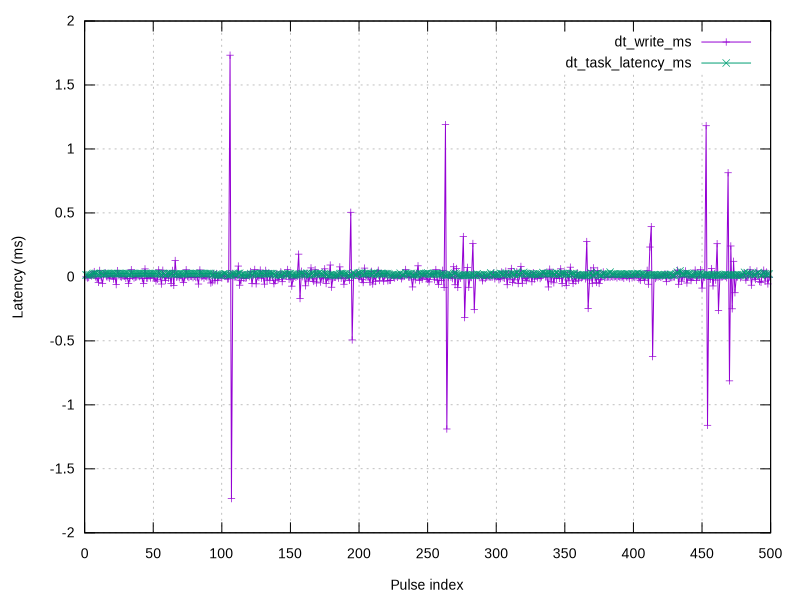
Here I'm making a realtime plot showing The raw data as I tweak things lives here. Initially I see big latency spikes:
timings.scheduler.1.noise.svg
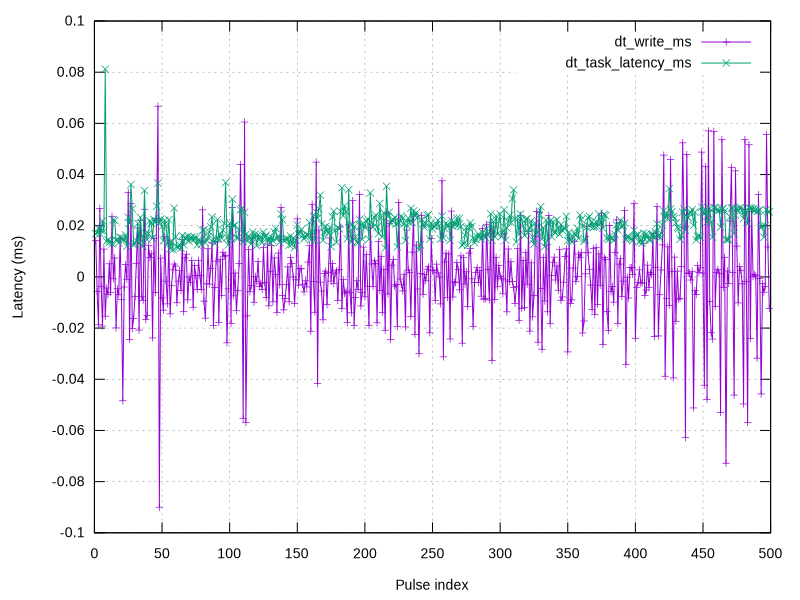
These can be fixed by adjusting the priority of the trigger task. This tells the scheduler to wake that task up first, even if something else is currently using the CPU. I do this:
sudo chrt -p 90  pidof trigger 
And I get better-looking latencies:
timings.scheduler.2.clean.svg
During some experiments (not in this dataset) I would see high helper-task timing instabilities as well. These could be fixed by prioritizing the helper task. In this kernel (6.12) the helper task is called kworker/N where N is the CPU index. I tie the trigger process to cpu 0, and priorities all the relevant helpers:
taskset -c 0 ./trigger 58
pgrep -f kworker/0   while   read pid     sudo chrt -p 90 $pid  
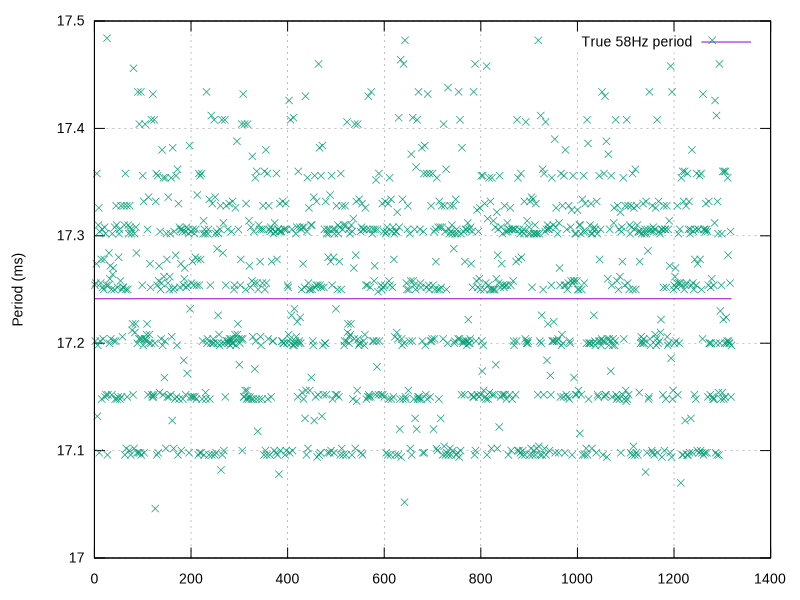
This fixes the helper-task latency spikes. OK, so it looks like on the software side we're good to within 0.1ms of the true period. This is in the ballpark of the precision I need; even this might be too high. It's possible to try to push the software to do better: one could look at the kernel sources a bit more, to do smarter things with priorities or to try an -rt kernel. But all this doesn't matter if the serial hardware adds unacceptable delays. Let's look. Let's look at it with a logic analyzer. I use a saleae logic analyzer with sigrok. The tool spits out the samples as it gets them, and an awk script finds the edges and reports the timings to give me a realtime plot.
samplerate=500000;
pulserate=58.;
sigrok-cli -c samplerate=$samplerate -O csv --continuous -C D1 \
  mawk -Winteractive  \
    "prev_logic==0 && \$0==1 \
       
       iedge = NR;
       if(prev_iedge)
        
         di = iedge -prev_iedge;
         dt = di/$samplerate;
         print(dt*1000);
        
       prev_iedge = iedge;
      
      
       prev_logic=\$0;
       "   feedgnuplot --stream --ylabel 'Period (ms)' --equation "1000./$pulserate title \"True $ pulserate Hz period\""
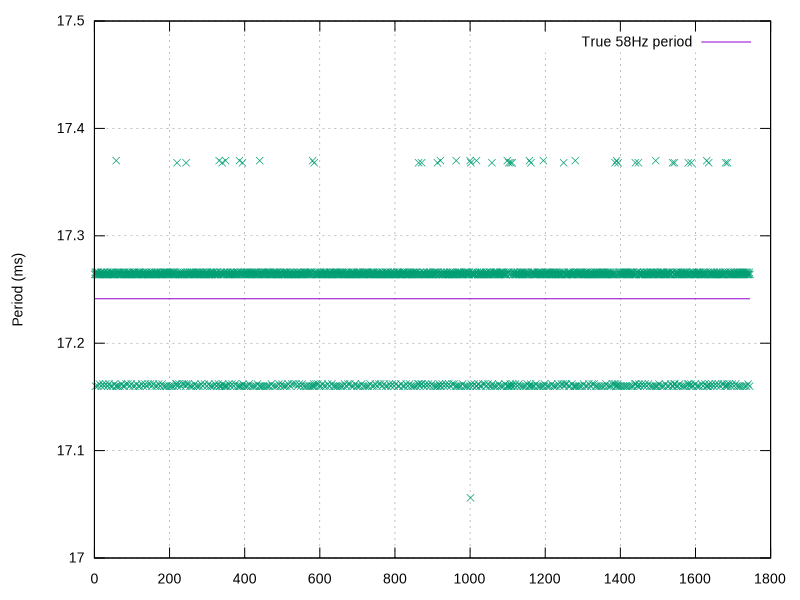
On the server I was using (physical RS-232 port, ancient 3.something kernel):
timings.hw.serial-server.svg
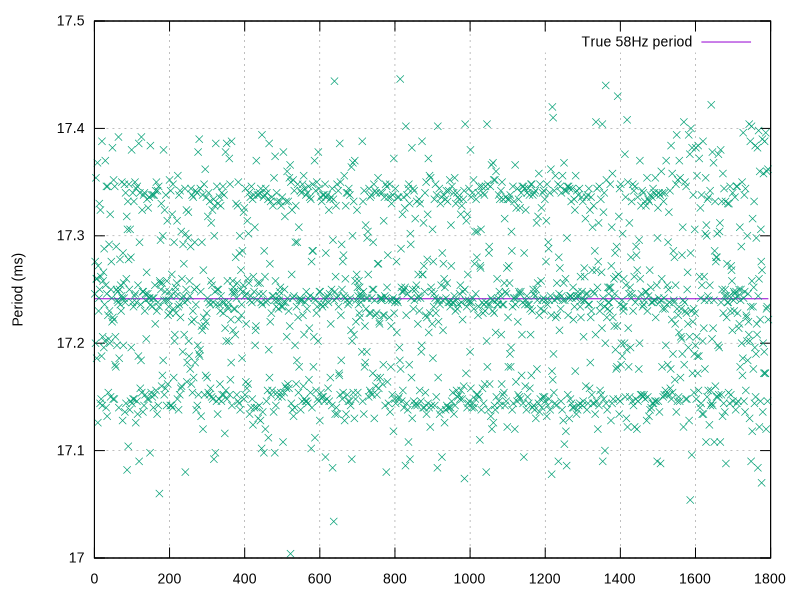
OK This is very discrete for some reason, and generally worse than 0.1ms. What about my laptop (physical RS-232 port, recent 6.12 kernel)?
timings.hw.serial-laptop.svg
Not discrete anymore, but not really any more precise. What about using a usb-serial converter? I expect this to be worse.
timings.hw.usbserial.svg
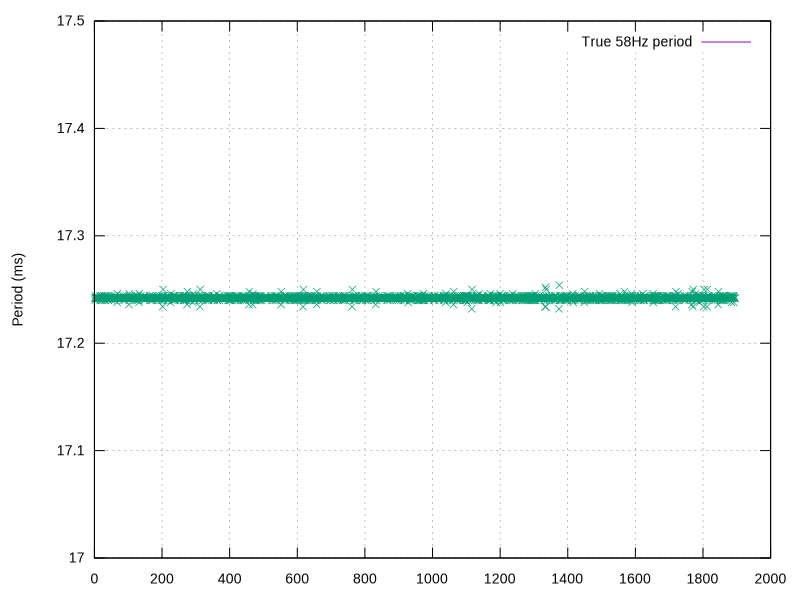
Yeah, looks worse. For my purposes, an accuracy of 0.1ms is marginal, and the hardware adds non-negligible errors. So I cut my losses, and use an external signal generator:
timings.hw.generator.svg
Yeah. That's better, so that's what I use.

10 March 2025

Joachim Breitner: Extrinsic termination proofs for well-founded recursion in Lean

A few months ago I explained that one reason why this blog has become more quiet is that all my work on Lean is covered elsewhere. This post is an exception, because it is an observation that is (arguably) interesting, but does not lead anywhere, so where else to put it than my own blog Want to share your thoughts about this? Please join the discussion on the Lean community zulip!

Background When defining a function recursively in Lean that has nested recursion, e.g. a recusive call that is in the argument to a higher-order function like List.map, then extra attention used to be necessary so that Lean can see that xs.map applies its argument only elements of the list xs. The usual idiom is to write xs.attach.map instead, where List.attach attaches to the list elements a proof that they are in that list. You can read more about this my Lean blog post on recursive definitions and our new shiny reference manual, look for Example Nested Recursion in Higher-order Functions . To make this step less tedious I taught Lean to automatically rewrite xs.map to xs.attach.map (where suitable) within the construction of well-founded recursion, so that nested recursion just works (issue #5471). We already do such a rewriting to change if c then else to the dependent if h : c then else , but the attach-introduction is much more ambitious (the rewrites are not definitionally equal, there are higher-order arguments etc.) Rewriting the terms in a way that we can still prove the connection later when creating the equational lemmas is hairy at best. Also, we want the whole machinery to be extensible by the user, setting up their own higher order functions to add more facts to the context of the termination proof. I implemented it like this (PR #6744) and it ships with 4.18.0, but in the course of this work I thought about a quite different and maybe better way to do this, and well-founded recursion in general:

A simpler fix Recall that to use WellFounded.fix
WellFounded.fix : (hwf : WellFounded r) (F : (x :  )   ((y :  )   r y x   C y)   C x) (x :  ) : C x
we have to rewrite the functorial of the recursive function, which naturally has type
F : ((y :  )    C y)   ((x :  )   C x)
to the one above, where all recursive calls take the termination proof r y x. This is a fairly hairy operation, mangling the type of matcher s motives and whatnot. Things are simpler for recursive definitions using the new partial_fixpoint machinery, where we use Lean.Order.fix
Lean.Order.fix : [CCPO  ] (F :      ) (hmono : monotone F) :  
so the functorial s type is unmodified (here will be ((x : ) C x)), and everything else is in the propositional side-condition montone F. For this predicate we have a syntax-guided compositional tactic, and it s easily extensible, e.g. by
theorem monotone_mapM (f :         m  ) (xs : List  ) (hmono : monotone f) :
    monotone (fun x => xs.mapM (f x)) 
Once given, we don t care about the content of that proof. In particular proving the unfolding theorem only deals with the unmodified F that closely matches the function definition as written by the user. Much simpler!

Isabelle has it easier Isabelle also supports well-founded recursion, and has great support for nested recursion. And it s much simpler! There, all you have to do to make nested recursion work is to define a congruence lemma of the form, for List.map something like our List.map_congr_left
List.map_congr_left : (h :   a   l, f a = g a) :
    List.map f l = List.map g l
This is because in Isabelle, too, the termination proofs is a side-condition that essentially states the functorial F calls its argument f only on smaller arguments .

Can we have it easy, too? I had wished we could do the same in Lean for a while, but that form of congruence lemma just isn t strong enough for us. But maybe there is a way to do it, using an existential to give a witness that F can alternatively implemented using the more restrictive argument. The following callsOn P F predicate can express that F calls its higher-order argument only on arguments that satisfy the predicate P:
section setup
variable   : Sort u 
variable   :     Sort v 
variable   : Sort w 
def callsOn (P :     Prop) (F : (  y,   y)    ) :=
    (F': (  y, P y     y)    ),   f, F' (fun y _ => f y) = F f
variable (R :         Prop)
variable (F : (  y,   y)   (  x,   x))
local infix:50 "   " => R
def recursesVia : Prop :=   x, callsOn (    x) (fun f => F f x)
noncomputable def fix (wf : WellFounded R) (h : recursesVia R F) : (  x,   x) :=
  wf.fix (fun x => (h x).choose)
def fix_eq (wf : WellFounded R) h x :
    fix R F wf h x = F (fix R F wf h) x := by
  unfold fix
  rw [wf.fix_eq]
  apply (h x).choose_spec
This allows nice compositional lemmas to discharge callsOn predicates:
theorem callsOn_base (y :  ) (hy : P y) :
    callsOn P (fun (f :   x,   x) => f y) := by
  exists fun f => f y hy
  intros; rfl
@[simp]
theorem callsOn_const (x :  ) :
    callsOn P (fun (_ :   x,   x) => x) :=
   fun _ => x, fun _ => rfl 
theorem callsOn_app
      : Sort uu    : Sort ww 
    (F  :  (  y,   y)        ) -- can this also support dependent types?
    (F  :  (  y,   y)    )
    (h  : callsOn P F )
    (h  : callsOn P F ) :
    callsOn P (fun f => F  f (F  f)) := by
  obtain  F ', h  := h 
  obtain  F ', h  := h 
  exists (fun f => F ' f (F ' f))
  intros; simp_all
theorem callsOn_lam
      : Sort uu 
    (F :     (  y,   y)    ) -- can this also support dependent types?
    (h :   x, callsOn P (F x)) :
    callsOn P (fun f x => F x f) := by
  exists (fun f x => (h x).choose f)
  intro f
  ext x
  apply (h x).choose_spec
theorem callsOn_app2
      : Sort uu    : Sort ww 
    (g :          )
    (F  :  (  y,   y)    ) -- can this also support dependent types?
    (F  :  (  y,   y)    )
    (h  : callsOn P F )
    (h  : callsOn P F ) :
    callsOn P (fun f => g (F  f) (F  f)) := by
  apply_rules [callsOn_app, callsOn_const]
With this setup, we can have the following, possibly user-defined, lemma expressing that List.map calls its arguments only on elements of the list:
theorem callsOn_map (  : Type uu) (  : Type ww)
    (P :     Prop) (F : (  y,   y)        ) (xs : List  )
    (h :   x, x   xs   callsOn P (fun f => F f x)) :
    callsOn P (fun f => xs.map (fun x => F f x)) := by
  suffices callsOn P (fun f => xs.attach.map (fun  x, h  => F f x)) by
    simpa
  apply callsOn_app
    apply callsOn_app
      apply callsOn_const
      apply callsOn_lam
      intro  x', hx' 
      dsimp
      exact (h x' hx')
    apply callsOn_const
end setup
So here is the (manual) construction of a nested map for trees:
section examples
structure Tree (  : Type u) where
  val :  
  cs : List (Tree  )
-- essentially
-- def Tree.map (f :      ) : Tree     Tree   :=
--   fun t =>  f t.val, t.cs.map Tree.map )
noncomputable def Tree.map (f :      ) : Tree     Tree   :=
  fix (sizeOf   < sizeOf  ) (fun map t =>  f t.val, t.cs.map map )
    (InvImage.wf (sizeOf  ) WellFoundedRelation.wf) <  by
  intro  v, cs 
  dsimp only
  apply callsOn_app2
    apply callsOn_const
    apply callsOn_map
    intro t' ht'
    apply callsOn_base
    -- ht' : t'   cs -- !
    --   sizeOf t' < sizeOf   val := v, cs := cs  
    decreasing_trivial
end examples
This makes me happy! All details of the construction are now contained in a proof that can proceed by a syntax-driven tactic and that s easily and (likely robustly) extensible by the user. It also means that we can share a lot of code paths (e.g. everything related to equational theorems) between well-founded recursion and partial_fixpoint. I wonder if this construction is really as powerful as our current one, or if there are certain (likely dependently typed) functions where this doesn t fit, but the above is dependent, so it looks good. With this construction, functions defined by well-founded recursion will reduce even worse in the kernel, I assume. This may be a good thing.

The cake is a lie What unfortunately kills this idea, though, is the generation of the functional induction principles, which I believe is not (easily) possible with this construction: The functional induction principle is proved by massaging F to return a proof, but since the extra assumptions (e.g. for ite or List.map) only exist in the termination proof, they are not available in F. Oh wey, how anticlimactic.

PS: Path dependencies Curiously, if we didn t have functional induction at this point yet, then very likely I d change Lean to use this construction, and then we d either not get functional induction, or it would be implemented very differently, maybe a more syntactic approach that would re-prove termination. I guess that s called path dependence.

5 March 2025

Reproducible Builds: Reproducible Builds in February 2025

Welcome to the second report in 2025 from the Reproducible Builds project. Our monthly reports outline what we ve been up to over the past month, and highlight items of news from elsewhere in the increasingly-important area of software supply-chain security. As usual, however, if you are interested in contributing to the Reproducible Builds project, please visit our Contribute page on our website. Table of contents:
  1. Reproducible Builds at FOSDEM 2025
  2. Reproducible Builds at PyCascades 2025
  3. Does Functional Package Management Enable Reproducible Builds at Scale?
  4. reproduce.debian.net updates
  5. Upstream patches
  6. Distribution work
  7. diffoscope & strip-nondeterminism
  8. Website updates
  9. Reproducibility testing framework

Reproducible Builds at FOSDEM 2025 Similar to last year s event, there was considerable activity regarding Reproducible Builds at FOSDEM 2025, held on on 1st and 2nd February this year in Brussels, Belgium. We count at least four talks related to reproducible builds. (You can also read our news report from last year s event in which Holger Levsen presented in the main track.)
Jelle van der Waa, Holger Levsen and kpcyrd presented in the Distributions track on A Tale of several distros joining forces for a common goal. In this talk, three developers from two different Linux distributions (Arch Linux and Debian), discuss this goal which is, of course, reproducible builds. The presenters discuss both what is shared and different between the two efforts, touching on the history and future challenges alike. The slides of this talk are available to view, as is the full video (30m02s). The talk was also discussed on Hacker News.
Zbigniew J drzejewski-Szmek presented in the ever-popular Python track a on Rewriting .pyc files for fun and reproducibility, i.e. the bytecode files generated by Python in order to speed up module imports: It s been known for a while that those are not reproducible: on different architectures, the bytecode for exactly the same sources ends up slightly different. The slides of this talk are available, as is the full video (28m32s).
In the Nix and NixOS track, Julien Malka presented on the Saturday asking How reproducible is NixOS: We know that the NixOS ISO image is very close to be perfectly reproducible thanks to reproducible.nixos.org, but there doesn t exist any monitoring of Nixpkgs as a whole. In this talk I ll present the findings of a project that evaluated the reproducibility of Nixpkgs as a whole by mass rebuilding packages from revisions between 2017 and 2023 and comparing the results with the NixOS cache. Unfortunately, no video of the talk is available, but there is a blog and article on the results.
Lastly, Simon Tournier presented in the Open Research track on the confluence of GNU Guix and Software Heritage: Source Code Archiving to the Rescue of Reproducible Deployment. Simon s talk describes design and implementation we came up and reports on the archival coverage for package source code with data collected over five years. It opens to some remaining challenges toward a better open and reproducible research. The slides for the talk are available, as is the full video (23m17s).

Reproducible Builds at PyCascades 2025 Vagrant Cascadian presented at this year s PyCascades conference which was held on February 8th and 9th February in Portland, OR, USA. PyCascades is a regional instance of PyCon held in the Pacific Northwest. Vagrant s talk, entitled Re-Py-Ducible Builds caught the audience s attention with the following abstract:
Crank your Python best practices up to 11 with Reproducible Builds! This talk will explore Reproducible Builds by highlighting issues identified in Python projects, from the simple to the seemingly inscrutable. Reproducible Builds is basically the crazy idea that when you build something, and you build it again, you get the exact same thing or even more important, if someone else builds it, they get the exact same thing too.
More info is available on the talk s page.

Does Functional Package Management Enable Reproducible Builds at Scale? On our mailing list last month, Julien Malka, Stefano Zacchiroli and Th o Zimmermann of T l com Paris in-house research laboratory, the Information Processing and Communications Laboratory (LTCI) announced that they had published an article asking the question: Does Functional Package Management Enable Reproducible Builds at Scale? (PDF). This month, however, Ludovic Court s followed up to the original announcement on our mailing list mentioning, amongst other things, the Guix Data Service and how that it shows the reproducibility of GNU Guix over time, as described in a GNU Guix blog back in March 2024.

reproduce.debian.net updates The last few months have seen the introduction of reproduce.debian.net. Announced first at the recent Debian MiniDebConf in Toulouse, reproduce.debian.net is an instance of rebuilderd operated by the Reproducible Builds project. Powering this work is rebuilderd, our server which monitors the official package repositories of Linux distributions and attempt to reproduce the observed results there. This month, however, Holger Levsen:
  • Split packages that are not specific to any architecture away from amd64.reproducible.debian.net service into a new all.reproducible.debian.net page.
  • Increased the number of riscv64 nodes to a total of 4, and added a new amd64 node added thanks to our (now 10-year sponsor), IONOS.
  • Discovered an issue in the Debian build service where some new incoming build-dependencies do not end up historically archived.
  • Uploaded the devscripts package, incorporating changes from Jochen Sprickerhof to the debrebuild script specifically to fix the handling the Rules-Requires-Root header in Debian source packages.
  • Uploaded a number of Rust dependencies of rebuilderd (rust-libbz2-rs-sys, rust-actix-web, rust-actix-server, rust-actix-http, rust-actix-server, rust-actix-http, rust-actix-web-codegen and rust-time-tz) after they were prepared by kpcyrd :
Jochen Sprickerhof also updated the sbuild package to:
  • Obey requests from the user/developer for a different temporary directory.
  • Use the root/superuser for some values of Rules-Requires-Root.
  • Don t pass --root-owner-group to old versions of dpkg.
and additionally requested that many Debian packages are rebuilt by the build servers in order to work around bugs found on reproduce.debian.net. [ ][[ ][ ]
Lastly, kpcyrd has also worked towards getting rebuilderd packaged in NixOS, and Jelle van der Waa picked up the existing pull request for Fedora support within in rebuilderd and made it work with the existing Koji rebuilderd script. The server is being packaged for Fedora in an unofficial copr repository and in the official repositories after all the dependencies are packaged.

Upstream patches The Reproducible Builds project detects, dissects and attempts to fix as many currently-unreproducible packages as possible. We endeavour to send all of our patches upstream where appropriate. This month, we wrote a large number of such patches, including:

Distribution work There as been the usual work in various distributions this month, such as: In Debian, 17 reviews of Debian packages were added, 6 were updated and 8 were removed this month adding to our knowledge about identified issues.
Fedora developers Davide Cavalca and Zbigniew J drzejewski-Szmek gave a talk on Reproducible Builds in Fedora (PDF), touching on SRPM-specific issues as well as the current status and future plans.
Thanks to an investment from the Sovereign Tech Agency, the FreeBSD project s work on unprivileged and reproducible builds continued this month. Notable fixes include:
The Yocto Project has been struggling to upgrade to the latest Go and Rust releases due to reproducibility problems in the newer versions. Hongxu Jia tracked down the issue with Go which meant that the project could upgrade from the 1.22 series to 1.24, with the fix being submitted upstream for review (see above). For Rust, however, the project was significantly behind, but has made recent progress after finally identifying the blocking reproducibility issues. At time of writing, the project is at Rust version 1.82, with patches under review for 1.83 and 1.84 and fixes being discussed with the Rust developers. The project hopes to improve the tests for reproducibility in the Rust project itself in order to try and avoid future regressions. Yocto continues to maintain its ability to binary reproduce all of the recipes in OpenEmbedded-Core, regardless of the build host distribution or the current build path.
Finally, Douglas DeMaio published an article on the openSUSE blog on announcing that the Reproducible-openSUSE (RBOS) Project Hits [Significant] Milestone. In particular:
The Reproducible-openSUSE (RBOS) project, which is a proof-of-concept fork of openSUSE, has reached a significant milestone after demonstrating a usable Linux distribution can be built with 100% bit-identical packages.
This news was also announced on our mailing list by Bernhard M. Wiedemann, who also published another report for openSUSE as well.

diffoscope & strip-nondeterminism diffoscope is our in-depth and content-aware diff utility that can locate and diagnose reproducibility issues. This month, Chris Lamb made the following changes, including preparing and uploading versions 288 and 289 to Debian:
  • Add asar to DIFFOSCOPE_FAIL_TESTS_ON_MISSING_TOOLS in order to address Debian bug #1095057) [ ]
  • Catch a CalledProcessError when calling html2text. [ ]
  • Update the minimal Black version. [ ]
Additionally, Vagrant Cascadian updated diffoscope in GNU Guix to version 287 [ ][ ] and 288 [ ][ ] as well as submitted a patch to update to 289 [ ]. Vagrant also fixed an issue that was breaking reprotest on Guix [ ][ ]. strip-nondeterminism is our sister tool to remove specific non-deterministic results from a completed build. This month version 1.14.1-2 was uploaded to Debian unstable by Holger Levsen.

Website updates There were a large number of improvements made to our website this month, including:

Reproducibility testing framework The Reproducible Builds project operates a comprehensive testing framework running primarily at tests.reproducible-builds.org in order to check packages and other artifacts for reproducibility. In January, a number of changes were made by Holger Levsen, including:
  • reproduce.debian.net-related:
    • Add a helper script to manually schedule packages. [ ][ ][ ][ ][ ]
    • Fix a link in the website footer. [ ]
    • Strip the emojis from package names on the manual rebuilder in order to ease copy-and-paste. [ ]
    • On the various statistics pages, provide the number of affected source packages [ ][ ] as well as provide various totals [ ][ ].
    • Fix graph labels for the various architectures [ ][ ] and make them clickable too [ ][ ][ ].
    • Break the displayed HTML in blocks of 256 packages in order to address rendering issues. [ ][ ]
    • Add monitoring jobs for riscv64 archicture nodes and integrate them elsewhere in our infrastructure. [ ][ ]
    • Add riscv64 architecture nodes. [ ][ ][ ][ ][ ]
    • Update much of the documentation. [ ][ ][ ]
    • Make a number of improvements to the layout and style. [ ][ ][ ][ ][ ][ ][ ]
    • Remove direct links to JSON and database backups. [ ]
    • Drop a Blues Brothers reference from frontpage. [ ]
  • Debian-related:
    • Deal with /boot/vmlinuz* being called vmlinux* on the riscv64 architecture. [ ]
    • Add a new ionos17 node. [ ][ ][ ][ ][ ]
    • Install debian-repro-status on all Debian trixie and unstable jobs. [ ]
  • FreeBSD-related:
    • Switch to run latest branch of FreeBSD. [ ]
  • Misc:
    • Fix /etc/cron.d and /etc/logrotate.d permissions for Jenkins nodes. [ ]
    • Add support for riscv64 architecture nodes. [ ][ ]
    • Grant Jochen Sprickerhof access to the o4 node. [ ]
    • Disable the janitor-setup-worker. [ ][ ]
In addition:
  • kpcyrd fixed the /all/api/ API endpoints on reproduce.debian.net by altering the nginx configuration. [ ]
  • James Addison updated reproduce.debian.net to display the so-called bad reasons hyperlink inline [ ] and merged the Categorized issues links into the Reproduced builds column [ ].
  • Jochen Sprickerhof also made some reproduce.debian.net-related changes, adding support for detecting a bug in the mmdebstrap package [ ] as well as updating some documentation [ ].
  • Roland Clobus continued their work on reproducible live images for Debian, making changes related to new clustering of jobs in openQA. [ ]
And finally, both Holger Levsen [ ][ ][ ] and Vagrant Cascadian performed significant node maintenance. [ ][ ][ ][ ][ ]
If you are interested in contributing to the Reproducible Builds project, please visit our Contribute page on our website. However, you can get in touch with us via:

Dima Kogan: Shop scheduling with PuLP

I recently used the PuLP modeler to solve a work scheduling problem to assign workers to shifts. Here are notes about doing that. This is a common use case, but isn't explicitly covered in the case studies in the PuLP documentation. Here's the problem: The tool is supposed to allocate workers to the shifts to try to cover all the shifts, give everybody work, and try to match their preferences. I implemented the tool:
#!/usr/bin/python3
import sys
import os
import re
def report_solution_to_console(vars):
    for w in days_of_week:
        annotation = ''
        if human_annotate is not None:
            for s in shifts.keys():
                m = re.match(rf' w  - ', s)
                if not m: continue
                if vars[human_annotate][s].value():
                    annotation = f" ( human_annotate  SCHEDULED)"
                    break
            if not len(annotation):
                annotation = f" ( human_annotate  OFF)"
        print(f" w annotation ")
        for s in shifts.keys():
            m = re.match(rf' w  - ', s)
            if not m: continue
            annotation = ''
            if human_annotate is not None:
                annotation = f" ( human_annotate   shifts[s][human_annotate] )"
            print(f"    ----  s[m.end():] annotation ")
            for h in humans:
                if vars[h][s].value():
                    print(f"          h  ( shifts[s][h] )")
def report_solution_summary_to_console(vars):
    print("\nSUMMARY")
    for h in humans:
        print(f"--  h ")
        print(f"   benefit:  benefits[h].value():.3f ")
        counts = dict()
        for a in availabilities:
            counts[a] = 0
        for s in shifts.keys():
            if vars[h][s].value():
                counts[shifts[s][h]] += 1
        for a in availabilities:
            print(f"    counts[a]   a ")
human_annotate = None
days_of_week = ('SUNDAY',
                'MONDAY',
                'TUESDAY',
                'WEDNESDAY',
                'THURSDAY',
                'FRIDAY',
                'SATURDAY')
humans = ['ALICE', 'BOB',
          'CAROL', 'DAVID', 'EVE', 'FRANK', 'GRACE', 'HEIDI', 'IVAN', 'JUDY']
shifts =  'SUNDAY - SANDING 9:00 AM - 4:00 PM':
           'ALICE': 'NEUTRAL',
           'BOB':   'NEUTRAL',
           'CAROL': 'PREFERRED',
           'DAVID': 'PREFERRED',
           'EVE':   'PREFERRED',
           'FRANK': 'PREFERRED',
           'GRACE': 'DISFAVORED',
           'HEIDI': 'DISFAVORED',
           'IVAN':  'PREFERRED',
           'JUDY':  'NEUTRAL' ,
          'WEDNESDAY - SAWING 7:30 AM - 2:30 PM':
           'ALICE': 'NEUTRAL',
           'BOB':   'NEUTRAL',
           'CAROL': 'PREFERRED',
           'DAVID': 'PREFERRED',
           'FRANK': 'PREFERRED',
           'GRACE': 'NEUTRAL',
           'HEIDI': 'DISFAVORED',
           'IVAN':  'PREFERRED',
           'EVE':   'REFUSED',
           'JUDY':  'REFUSED' ,
          'THURSDAY - SANDING 9:00 AM - 4:00 PM':
           'ALICE': 'NEUTRAL',
           'BOB':   'NEUTRAL',
           'CAROL': 'PREFERRED',
           'DAVID': 'PREFERRED',
           'EVE':   'PREFERRED',
           'FRANK': 'PREFERRED',
           'GRACE': 'PREFERRED',
           'HEIDI': 'DISFAVORED',
           'IVAN':  'PREFERRED',
           'JUDY':  'PREFERRED' ,
          'SATURDAY - SAWING 7:30 AM - 2:30 PM':
           'ALICE': 'NEUTRAL',
           'BOB':   'NEUTRAL',
           'CAROL': 'PREFERRED',
           'DAVID': 'PREFERRED',
           'FRANK': 'PREFERRED',
           'HEIDI': 'DISFAVORED',
           'IVAN':  'PREFERRED',
           'EVE':   'REFUSED',
           'JUDY':  'REFUSED',
           'GRACE': 'REFUSED' ,
          'SUNDAY - SAWING 9:00 AM - 4:00 PM':
           'ALICE': 'NEUTRAL',
           'BOB':   'NEUTRAL',
           'CAROL': 'PREFERRED',
           'DAVID': 'PREFERRED',
           'EVE':   'PREFERRED',
           'FRANK': 'PREFERRED',
           'GRACE': 'DISFAVORED',
           'IVAN':  'PREFERRED',
           'JUDY':  'PREFERRED',
           'HEIDI': 'REFUSED' ,
          'MONDAY - SAWING 9:00 AM - 4:00 PM':
           'ALICE': 'NEUTRAL',
           'BOB':   'NEUTRAL',
           'CAROL': 'PREFERRED',
           'DAVID': 'PREFERRED',
           'EVE':   'PREFERRED',
           'FRANK': 'PREFERRED',
           'GRACE': 'PREFERRED',
           'IVAN':  'PREFERRED',
           'JUDY':  'PREFERRED',
           'HEIDI': 'REFUSED' ,
          'TUESDAY - SAWING 9:00 AM - 4:00 PM':
           'ALICE': 'NEUTRAL',
           'BOB':   'NEUTRAL',
           'CAROL': 'PREFERRED',
           'DAVID': 'PREFERRED',
           'EVE':   'PREFERRED',
           'FRANK': 'PREFERRED',
           'GRACE': 'NEUTRAL',
           'IVAN':  'PREFERRED',
           'JUDY':  'PREFERRED',
           'HEIDI': 'REFUSED' ,
          'WEDNESDAY - PAINTING 7:30 AM - 2:30 PM':
           'ALICE': 'NEUTRAL',
           'BOB':   'NEUTRAL',
           'CAROL': 'PREFERRED',
           'FRANK': 'PREFERRED',
           'GRACE': 'NEUTRAL',
           'HEIDI': 'DISFAVORED',
           'IVAN':  'PREFERRED',
           'EVE':   'REFUSED',
           'JUDY':  'REFUSED',
           'DAVID': 'REFUSED' ,
          'THURSDAY - SAWING 9:00 AM - 4:00 PM':
           'ALICE': 'NEUTRAL',
           'BOB':   'NEUTRAL',
           'CAROL': 'PREFERRED',
           'DAVID': 'PREFERRED',
           'EVE':   'PREFERRED',
           'FRANK': 'PREFERRED',
           'GRACE': 'PREFERRED',
           'IVAN':  'PREFERRED',
           'JUDY':  'PREFERRED',
           'HEIDI': 'REFUSED' ,
          'FRIDAY - SAWING 9:00 AM - 4:00 PM':
           'ALICE': 'NEUTRAL',
           'BOB':   'NEUTRAL',
           'CAROL': 'PREFERRED',
           'DAVID': 'PREFERRED',
           'EVE':   'PREFERRED',
           'FRANK': 'PREFERRED',
           'GRACE': 'PREFERRED',
           'IVAN':  'PREFERRED',
           'JUDY':  'DISFAVORED',
           'HEIDI': 'REFUSED' ,
          'SATURDAY - PAINTING 7:30 AM - 2:30 PM':
           'ALICE': 'NEUTRAL',
           'BOB':   'NEUTRAL',
           'CAROL': 'PREFERRED',
           'FRANK': 'PREFERRED',
           'HEIDI': 'DISFAVORED',
           'IVAN':  'PREFERRED',
           'EVE':   'REFUSED',
           'JUDY':  'REFUSED',
           'GRACE': 'REFUSED',
           'DAVID': 'REFUSED' ,
          'SUNDAY - PAINTING 9:45 AM - 4:45 PM':
           'ALICE': 'NEUTRAL',
           'BOB':   'NEUTRAL',
           'CAROL': 'NEUTRAL',
           'EVE':   'PREFERRED',
           'FRANK': 'PREFERRED',
           'GRACE': 'DISFAVORED',
           'IVAN':  'PREFERRED',
           'JUDY':  'PREFERRED',
           'HEIDI': 'REFUSED',
           'DAVID': 'REFUSED' ,
          'MONDAY - PAINTING 9:45 AM - 4:45 PM':
           'ALICE': 'NEUTRAL',
           'BOB':   'NEUTRAL',
           'CAROL': 'NEUTRAL',
           'EVE':   'PREFERRED',
           'FRANK': 'PREFERRED',
           'GRACE': 'PREFERRED',
           'IVAN':  'PREFERRED',
           'JUDY':  'NEUTRAL',
           'HEIDI': 'REFUSED',
           'DAVID': 'REFUSED' ,
          'TUESDAY - PAINTING 9:45 AM - 4:45 PM':
           'ALICE': 'NEUTRAL',
           'BOB':   'NEUTRAL',
           'CAROL': 'NEUTRAL',
           'EVE':   'PREFERRED',
           'FRANK': 'PREFERRED',
           'GRACE': 'NEUTRAL',
           'IVAN':  'PREFERRED',
           'JUDY':  'PREFERRED',
           'HEIDI': 'REFUSED',
           'DAVID': 'REFUSED' ,
          'WEDNESDAY - SANDING 9:45 AM - 4:45 PM':
           'ALICE': 'NEUTRAL',
           'BOB':   'NEUTRAL',
           'CAROL': 'NEUTRAL',
           'DAVID': 'PREFERRED',
           'FRANK': 'PREFERRED',
           'GRACE': 'NEUTRAL',
           'HEIDI': 'DISFAVORED',
           'IVAN':  'PREFERRED',
           'JUDY':  'NEUTRAL',
           'EVE':   'REFUSED' ,
          'THURSDAY - PAINTING 9:45 AM - 4:45 PM':
           'ALICE': 'NEUTRAL',
           'BOB':   'NEUTRAL',
           'CAROL': 'NEUTRAL',
           'EVE':   'PREFERRED',
           'FRANK': 'PREFERRED',
           'GRACE': 'NEUTRAL',
           'IVAN':  'PREFERRED',
           'JUDY':  'PREFERRED',
           'HEIDI': 'REFUSED',
           'DAVID': 'REFUSED' ,
          'FRIDAY - PAINTING 9:45 AM - 4:45 PM':
           'ALICE': 'NEUTRAL',
           'BOB':   'NEUTRAL',
           'CAROL': 'NEUTRAL',
           'EVE':   'PREFERRED',
           'FRANK': 'PREFERRED',
           'GRACE': 'PREFERRED',
           'IVAN':  'PREFERRED',
           'JUDY':  'DISFAVORED',
           'HEIDI': 'REFUSED',
           'DAVID': 'REFUSED' ,
          'SATURDAY - SANDING 9:45 AM - 4:45 PM':
           'ALICE': 'NEUTRAL',
           'BOB':   'NEUTRAL',
           'CAROL': 'NEUTRAL',
           'DAVID': 'PREFERRED',
           'FRANK': 'PREFERRED',
           'HEIDI': 'DISFAVORED',
           'IVAN':  'PREFERRED',
           'EVE':   'REFUSED',
           'JUDY':  'REFUSED',
           'GRACE': 'REFUSED' ,
          'SUNDAY - PAINTING 11:00 AM - 6:00 PM':
           'ALICE': 'NEUTRAL',
           'BOB':   'NEUTRAL',
           'CAROL': 'NEUTRAL',
           'EVE':   'DISFAVORED',
           'FRANK': 'NEUTRAL',
           'GRACE': 'NEUTRAL',
           'HEIDI': 'PREFERRED',
           'IVAN':  'NEUTRAL',
           'JUDY':  'NEUTRAL',
           'DAVID': 'REFUSED' ,
          'MONDAY - PAINTING 12:00 PM - 7:00 PM':
           'ALICE': 'NEUTRAL',
           'BOB':   'NEUTRAL',
           'CAROL': 'NEUTRAL',
           'EVE':   'DISFAVORED',
           'FRANK': 'NEUTRAL',
           'GRACE': 'PREFERRED',
           'IVAN':  'NEUTRAL',
           'JUDY':  'NEUTRAL',
           'HEIDI': 'REFUSED',
           'DAVID': 'REFUSED' ,
          'TUESDAY - PAINTING 12:00 PM - 7:00 PM':
           'ALICE': 'NEUTRAL',
           'BOB':   'NEUTRAL',
           'CAROL': 'NEUTRAL',
           'EVE':   'DISFAVORED',
           'FRANK': 'NEUTRAL',
           'GRACE': 'NEUTRAL',
           'IVAN':  'NEUTRAL',
           'HEIDI': 'REFUSED',
           'JUDY':  'REFUSED',
           'DAVID': 'REFUSED' ,
          'WEDNESDAY - PAINTING 12:00 PM - 7:00 PM':
           'ALICE': 'NEUTRAL',
           'BOB':   'NEUTRAL',
           'CAROL': 'NEUTRAL',
           'FRANK': 'NEUTRAL',
           'GRACE': 'NEUTRAL',
           'IVAN':  'NEUTRAL',
           'JUDY':  'PREFERRED',
           'EVE':   'REFUSED',
           'HEIDI': 'REFUSED',
           'DAVID': 'REFUSED' ,
          'THURSDAY - PAINTING 12:00 PM - 7:00 PM':
           'ALICE': 'NEUTRAL',
           'BOB':   'NEUTRAL',
           'CAROL': 'NEUTRAL',
           'EVE':   'DISFAVORED',
           'FRANK': 'NEUTRAL',
           'GRACE': 'NEUTRAL',
           'IVAN':  'NEUTRAL',
           'JUDY':  'PREFERRED',
           'HEIDI': 'REFUSED',
           'DAVID': 'REFUSED' ,
          'FRIDAY - PAINTING 12:00 PM - 7:00 PM':
           'ALICE': 'NEUTRAL',
           'BOB':   'NEUTRAL',
           'CAROL': 'NEUTRAL',
           'EVE':   'DISFAVORED',
           'FRANK': 'NEUTRAL',
           'GRACE': 'NEUTRAL',
           'IVAN':  'NEUTRAL',
           'JUDY':  'DISFAVORED',
           'HEIDI': 'REFUSED',
           'DAVID': 'REFUSED' ,
          'SATURDAY - PAINTING 12:00 PM - 7:00 PM':
           'ALICE': 'NEUTRAL',
           'BOB':   'NEUTRAL',
           'CAROL': 'NEUTRAL',
           'FRANK': 'NEUTRAL',
           'IVAN':  'NEUTRAL',
           'JUDY':  'DISFAVORED',
           'EVE':   'REFUSED',
           'HEIDI': 'REFUSED',
           'GRACE': 'REFUSED',
           'DAVID': 'REFUSED' ,
          'SUNDAY - SAWING 12:00 PM - 7:00 PM':
           'ALICE': 'PREFERRED',
           'BOB':   'PREFERRED',
           'CAROL': 'NEUTRAL',
           'EVE':   'DISFAVORED',
           'FRANK': 'NEUTRAL',
           'GRACE': 'NEUTRAL',
           'IVAN':  'NEUTRAL',
           'JUDY':  'PREFERRED',
           'HEIDI': 'REFUSED',
           'DAVID': 'REFUSED' ,
          'MONDAY - SAWING 2:00 PM - 9:00 PM':
           'ALICE': 'PREFERRED',
           'BOB':   'PREFERRED',
           'CAROL': 'DISFAVORED',
           'EVE':   'DISFAVORED',
           'FRANK': 'NEUTRAL',
           'GRACE': 'NEUTRAL',
           'IVAN':  'DISFAVORED',
           'JUDY':  'DISFAVORED',
           'HEIDI': 'REFUSED',
           'DAVID': 'REFUSED' ,
          'TUESDAY - SAWING 2:00 PM - 9:00 PM':
           'ALICE': 'PREFERRED',
           'BOB':   'PREFERRED',
           'CAROL': 'DISFAVORED',
           'EVE':   'DISFAVORED',
           'FRANK': 'NEUTRAL',
           'GRACE': 'NEUTRAL',
           'IVAN':  'DISFAVORED',
           'HEIDI': 'REFUSED',
           'JUDY':  'REFUSED',
           'DAVID': 'REFUSED' ,
          'WEDNESDAY - SAWING 2:00 PM - 9:00 PM':
           'ALICE': 'PREFERRED',
           'BOB':   'PREFERRED',
           'CAROL': 'DISFAVORED',
           'FRANK': 'NEUTRAL',
           'GRACE': 'NEUTRAL',
           'IVAN':  'DISFAVORED',
           'JUDY':  'DISFAVORED',
           'EVE':   'REFUSED',
           'HEIDI': 'REFUSED',
           'DAVID': 'REFUSED' ,
          'THURSDAY - SAWING 2:00 PM - 9:00 PM':
           'ALICE': 'PREFERRED',
           'BOB':   'PREFERRED',
           'CAROL': 'DISFAVORED',
           'EVE':   'DISFAVORED',
           'FRANK': 'NEUTRAL',
           'GRACE': 'NEUTRAL',
           'IVAN':  'DISFAVORED',
           'JUDY':  'DISFAVORED',
           'HEIDI': 'REFUSED',
           'DAVID': 'REFUSED' ,
          'FRIDAY - SAWING 2:00 PM - 9:00 PM':
           'ALICE': 'PREFERRED',
           'BOB':   'PREFERRED',
           'CAROL': 'DISFAVORED',
           'EVE':   'DISFAVORED',
           'FRANK': 'NEUTRAL',
           'GRACE': 'NEUTRAL',
           'IVAN':  'DISFAVORED',
           'HEIDI': 'REFUSED',
           'JUDY':  'REFUSED',
           'DAVID': 'REFUSED' ,
          'SATURDAY - SAWING 2:00 PM - 9:00 PM':
           'ALICE': 'PREFERRED',
           'BOB':   'PREFERRED',
           'CAROL': 'DISFAVORED',
           'FRANK': 'NEUTRAL',
           'IVAN':  'DISFAVORED',
           'JUDY':  'DISFAVORED',
           'EVE':   'REFUSED',
           'HEIDI': 'REFUSED',
           'GRACE': 'REFUSED',
           'DAVID': 'REFUSED' ,
          'SUNDAY - PAINTING 12:15 PM - 7:15 PM':
           'ALICE': 'NEUTRAL',
           'BOB':   'NEUTRAL',
           'CAROL': 'PREFERRED',
           'EVE':   'DISFAVORED',
           'FRANK': 'NEUTRAL',
           'GRACE': 'NEUTRAL',
           'HEIDI': 'NEUTRAL',
           'IVAN':  'DISFAVORED',
           'JUDY':  'NEUTRAL',
           'DAVID': 'REFUSED' ,
          'MONDAY - PAINTING 2:00 PM - 9:00 PM':
           'ALICE': 'NEUTRAL',
           'BOB':   'NEUTRAL',
           'CAROL': 'DISFAVORED',
           'EVE':   'DISFAVORED',
           'FRANK': 'NEUTRAL',
           'GRACE': 'NEUTRAL',
           'HEIDI': 'NEUTRAL',
           'IVAN':  'DISFAVORED',
           'JUDY':  'DISFAVORED',
           'DAVID': 'REFUSED' ,
          'TUESDAY - PAINTING 2:00 PM - 9:00 PM':
           'ALICE': 'NEUTRAL',
           'BOB':   'NEUTRAL',
           'CAROL': 'DISFAVORED',
           'EVE':   'DISFAVORED',
           'FRANK': 'NEUTRAL',
           'GRACE': 'NEUTRAL',
           'HEIDI': 'NEUTRAL',
           'IVAN':  'DISFAVORED',
           'JUDY':  'REFUSED',
           'DAVID': 'REFUSED' ,
          'WEDNESDAY - PAINTING 2:00 PM - 9:00 PM':
           'ALICE': 'NEUTRAL',
           'BOB':   'NEUTRAL',
           'CAROL': 'DISFAVORED',
           'FRANK': 'NEUTRAL',
           'GRACE': 'NEUTRAL',
           'HEIDI': 'NEUTRAL',
           'IVAN':  'DISFAVORED',
           'JUDY':  'DISFAVORED',
           'EVE':   'REFUSED',
           'DAVID': 'REFUSED' ,
          'THURSDAY - PAINTING 2:00 PM - 9:00 PM':
           'ALICE': 'NEUTRAL',
           'BOB':   'NEUTRAL',
           'CAROL': 'DISFAVORED',
           'EVE':   'DISFAVORED',
           'FRANK': 'NEUTRAL',
           'GRACE': 'NEUTRAL',
           'HEIDI': 'NEUTRAL',
           'IVAN':  'DISFAVORED',
           'JUDY':  'DISFAVORED',
           'DAVID': 'REFUSED' ,
          'FRIDAY - PAINTING 2:00 PM - 9:00 PM':
           'ALICE': 'NEUTRAL',
           'BOB':   'NEUTRAL',
           'CAROL': 'DISFAVORED',
           'EVE':   'DISFAVORED',
           'FRANK': 'NEUTRAL',
           'GRACE': 'NEUTRAL',
           'HEIDI': 'NEUTRAL',
           'IVAN':  'DISFAVORED',
           'JUDY':  'REFUSED',
           'DAVID': 'REFUSED' ,
          'SATURDAY - PAINTING 2:00 PM - 9:00 PM':
           'ALICE': 'NEUTRAL',
           'BOB':   'NEUTRAL',
           'CAROL': 'DISFAVORED',
           'FRANK': 'NEUTRAL',
           'HEIDI': 'NEUTRAL',
           'IVAN':  'DISFAVORED',
           'JUDY':  'DISFAVORED',
           'EVE':   'REFUSED',
           'GRACE': 'REFUSED',
           'DAVID': 'REFUSED' 
availabilities = ['PREFERRED', 'NEUTRAL', 'DISFAVORED']
import pulp
prob = pulp.LpProblem("Scheduling", pulp.LpMaximize)
vars = pulp.LpVariable.dicts("Assignments",
                             (humans, shifts.keys()),
                             None,None, # bounds; unused, since these are binary variables
                             pulp.LpBinary)
# Everyone works at least 2 shifts
Nshifts_min = 2
for h in humans:
    prob += (
        pulp.lpSum([vars[h][s] for s in shifts.keys()]) >= Nshifts_min,
        f" h  works at least  Nshifts_min  shifts",
    )
# each shift is ~ 8 hours, so I limit everyone to 40/8 = 5 shifts
Nshifts_max = 5
for h in humans:
    prob += (
        pulp.lpSum([vars[h][s] for s in shifts.keys()]) <= Nshifts_max,
        f" h  works at most  Nshifts_max  shifts",
    )
# all shifts staffed and not double-staffed
for s in shifts.keys():
    prob += (
        pulp.lpSum([vars[h][s] for h in humans]) == 1,
        f" s  is staffed",
    )
# each human can work at most one shift on any given day
for w in days_of_week:
    for h in humans:
        prob += (
            pulp.lpSum([vars[h][s] for s in shifts.keys() if re.match(rf' w  ',s)]) <= 1,
            f" h  cannot be double-booked on  w "
        )
#### Some explicit constraints; as an example
# DAVID can't work any PAINTING shift and is off on Thu and Sun
h = 'DAVID'
prob += (
    pulp.lpSum([vars[h][s] for s in shifts.keys() if re.search(r'- PAINTING',s)]) == 0,
    f" h  can't work any PAINTING shift"
)
prob += (
    pulp.lpSum([vars[h][s] for s in shifts.keys() if re.match(r'THURSDAY SUNDAY',s)]) == 0,
    f" h  is off on Thursday and Sunday"
)
# Do not assign any "REFUSED" shifts
for s in shifts.keys():
    for h in humans:
        if shifts[s][h] == 'REFUSED':
            prob += (
                vars[h][s] == 0,
                f" h  is not available for  s "
            )
# Objective. I try to maximize the "happiness". Each human sees each shift as
# one of:
#
#   PREFERRED
#   NEUTRAL
#   DISFAVORED
#   REFUSED
#
# I set a hard constraint to handle "REFUSED", and arbitrarily, I set these
# benefit values for the others
benefit_availability = dict()
benefit_availability['PREFERRED']  = 3
benefit_availability['NEUTRAL']    = 2
benefit_availability['DISFAVORED'] = 1
# Not used, since this is a hard constraint. But the code needs this to be a
# part of the benefit. I can ignore these in the code, but let's keep this
# simple
benefit_availability['REFUSED' ] = -1000
benefits = dict()
for h in humans:
    benefits[h] = \
        pulp.lpSum([vars[h][s] * benefit_availability[shifts[s][h]] \
                    for s in shifts.keys()])
benefit_total = \
    pulp.lpSum([benefits[h] \
                for h in humans])
prob += (
    benefit_total,
    "happiness",
)
prob.solve()
if pulp.LpStatus[prob.status] == "Optimal":
    report_solution_to_console(vars)
    report_solution_summary_to_console(vars)
The set of workers is in the humans variable, and the shift schedule and the workers' preferences are encoded in the shifts dict. The problem is defined by a vars dict of dicts, each a boolean variable indicating whether a particular worker is scheduled for a particular shift. We define a set of constraints to these worker allocations to restrict ourselves to valid solutions. And among these valid solutions, we try to find the one that maximizes some benefit function, defined here as:
benefit_availability = dict()
benefit_availability['PREFERRED']  = 3
benefit_availability['NEUTRAL']    = 2
benefit_availability['DISFAVORED'] = 1
benefits = dict()
for h in humans:
    benefits[h] = \
        pulp.lpSum([vars[h][s] * benefit_availability[shifts[s][h]] \
                    for s in shifts.keys()])
benefit_total = \
    pulp.lpSum([benefits[h] \
                for h in humans])
So for instance each shift that was scheduled as somebody's PREFERRED shift gives us 3 benefit points. And if all the shifts ended up being PREFERRED, we'd have a total benefit value of 3*Nshifts. This is impossible, however, because that would violate some constraints in the problem. The exact trade-off between the different preferences is set in the benefit_availability dict. With the above numbers, it's equally good for somebody to have a NEUTRAL shift and a day off as it is for them to have DISFAVORED shifts. If we really want to encourage the program to work people as much as possible (days off discouraged), we'd want to raise the DISFAVORED threshold. I run this program and I get:
....
Result - Optimal solution found
Objective value:                108.00000000
Enumerated nodes:               0
Total iterations:               0
Time (CPU seconds):             0.01
Time (Wallclock seconds):       0.01
Option for printingOptions changed from normal to all
Total time (CPU seconds):       0.02   (Wallclock seconds):       0.02
SUNDAY
    ---- SANDING 9:00 AM - 4:00 PM
         EVE (PREFERRED)
    ---- SAWING 9:00 AM - 4:00 PM
         IVAN (PREFERRED)
    ---- PAINTING 9:45 AM - 4:45 PM
         FRANK (PREFERRED)
    ---- PAINTING 11:00 AM - 6:00 PM
         HEIDI (PREFERRED)
    ---- SAWING 12:00 PM - 7:00 PM
         ALICE (PREFERRED)
    ---- PAINTING 12:15 PM - 7:15 PM
         CAROL (PREFERRED)
MONDAY
    ---- SAWING 9:00 AM - 4:00 PM
         DAVID (PREFERRED)
    ---- PAINTING 9:45 AM - 4:45 PM
         IVAN (PREFERRED)
    ---- PAINTING 12:00 PM - 7:00 PM
         GRACE (PREFERRED)
    ---- SAWING 2:00 PM - 9:00 PM
         ALICE (PREFERRED)
    ---- PAINTING 2:00 PM - 9:00 PM
         HEIDI (NEUTRAL)
TUESDAY
    ---- SAWING 9:00 AM - 4:00 PM
         DAVID (PREFERRED)
    ---- PAINTING 9:45 AM - 4:45 PM
         EVE (PREFERRED)
    ---- PAINTING 12:00 PM - 7:00 PM
         FRANK (NEUTRAL)
    ---- SAWING 2:00 PM - 9:00 PM
         BOB (PREFERRED)
    ---- PAINTING 2:00 PM - 9:00 PM
         HEIDI (NEUTRAL)
WEDNESDAY
    ---- SAWING 7:30 AM - 2:30 PM
         DAVID (PREFERRED)
    ---- PAINTING 7:30 AM - 2:30 PM
         IVAN (PREFERRED)
    ---- SANDING 9:45 AM - 4:45 PM
         FRANK (PREFERRED)
    ---- PAINTING 12:00 PM - 7:00 PM
         JUDY (PREFERRED)
    ---- SAWING 2:00 PM - 9:00 PM
         BOB (PREFERRED)
    ---- PAINTING 2:00 PM - 9:00 PM
         ALICE (NEUTRAL)
THURSDAY
    ---- SANDING 9:00 AM - 4:00 PM
         GRACE (PREFERRED)
    ---- SAWING 9:00 AM - 4:00 PM
         CAROL (PREFERRED)
    ---- PAINTING 9:45 AM - 4:45 PM
         EVE (PREFERRED)
    ---- PAINTING 12:00 PM - 7:00 PM
         JUDY (PREFERRED)
    ---- SAWING 2:00 PM - 9:00 PM
         BOB (PREFERRED)
    ---- PAINTING 2:00 PM - 9:00 PM
         ALICE (NEUTRAL)
FRIDAY
    ---- SAWING 9:00 AM - 4:00 PM
         DAVID (PREFERRED)
    ---- PAINTING 9:45 AM - 4:45 PM
         FRANK (PREFERRED)
    ---- PAINTING 12:00 PM - 7:00 PM
         GRACE (NEUTRAL)
    ---- SAWING 2:00 PM - 9:00 PM
         BOB (PREFERRED)
    ---- PAINTING 2:00 PM - 9:00 PM
         HEIDI (NEUTRAL)
SATURDAY
    ---- SAWING 7:30 AM - 2:30 PM
         CAROL (PREFERRED)
    ---- PAINTING 7:30 AM - 2:30 PM
         IVAN (PREFERRED)
    ---- SANDING 9:45 AM - 4:45 PM
         DAVID (PREFERRED)
    ---- PAINTING 12:00 PM - 7:00 PM
         FRANK (NEUTRAL)
    ---- SAWING 2:00 PM - 9:00 PM
         ALICE (PREFERRED)
    ---- PAINTING 2:00 PM - 9:00 PM
         BOB (NEUTRAL)
SUMMARY
-- ALICE
   benefit: 13.000
   3 PREFERRED
   2 NEUTRAL
   0 DISFAVORED
-- BOB
   benefit: 14.000
   4 PREFERRED
   1 NEUTRAL
   0 DISFAVORED
-- CAROL
   benefit: 9.000
   3 PREFERRED
   0 NEUTRAL
   0 DISFAVORED
-- DAVID
   benefit: 15.000
   5 PREFERRED
   0 NEUTRAL
   0 DISFAVORED
-- EVE
   benefit: 9.000
   3 PREFERRED
   0 NEUTRAL
   0 DISFAVORED
-- FRANK
   benefit: 13.000
   3 PREFERRED
   2 NEUTRAL
   0 DISFAVORED
-- GRACE
   benefit: 8.000
   2 PREFERRED
   1 NEUTRAL
   0 DISFAVORED
-- HEIDI
   benefit: 9.000
   1 PREFERRED
   3 NEUTRAL
   0 DISFAVORED
-- IVAN
   benefit: 12.000
   4 PREFERRED
   0 NEUTRAL
   0 DISFAVORED
-- JUDY
   benefit: 6.000
   2 PREFERRED
   0 NEUTRAL
   0 DISFAVORED
So we have a solution! We have 108 total benefit points. But it looks a bit uneven: Judy only works 2 days, while some people work many more: David works 5 for instance. Why is that? I update the program with =human_annotate = 'JUDY'=, run it again, and it tells me more about Judy's preferences:
Objective value:                108.00000000
Enumerated nodes:               0
Total iterations:               0
Time (CPU seconds):             0.01
Time (Wallclock seconds):       0.01
Option for printingOptions changed from normal to all
Total time (CPU seconds):       0.01   (Wallclock seconds):       0.02
SUNDAY (JUDY OFF)
    ---- SANDING 9:00 AM - 4:00 PM (JUDY NEUTRAL)
         EVE (PREFERRED)
    ---- SAWING 9:00 AM - 4:00 PM (JUDY PREFERRED)
         IVAN (PREFERRED)
    ---- PAINTING 9:45 AM - 4:45 PM (JUDY PREFERRED)
         FRANK (PREFERRED)
    ---- PAINTING 11:00 AM - 6:00 PM (JUDY NEUTRAL)
         HEIDI (PREFERRED)
    ---- SAWING 12:00 PM - 7:00 PM (JUDY PREFERRED)
         ALICE (PREFERRED)
    ---- PAINTING 12:15 PM - 7:15 PM (JUDY NEUTRAL)
         CAROL (PREFERRED)
MONDAY (JUDY OFF)
    ---- SAWING 9:00 AM - 4:00 PM (JUDY PREFERRED)
         DAVID (PREFERRED)
    ---- PAINTING 9:45 AM - 4:45 PM (JUDY NEUTRAL)
         IVAN (PREFERRED)
    ---- PAINTING 12:00 PM - 7:00 PM (JUDY NEUTRAL)
         GRACE (PREFERRED)
    ---- SAWING 2:00 PM - 9:00 PM (JUDY DISFAVORED)
         ALICE (PREFERRED)
    ---- PAINTING 2:00 PM - 9:00 PM (JUDY DISFAVORED)
         HEIDI (NEUTRAL)
TUESDAY (JUDY OFF)
    ---- SAWING 9:00 AM - 4:00 PM (JUDY PREFERRED)
         DAVID (PREFERRED)
    ---- PAINTING 9:45 AM - 4:45 PM (JUDY PREFERRED)
         EVE (PREFERRED)
    ---- PAINTING 12:00 PM - 7:00 PM (JUDY REFUSED)
         FRANK (NEUTRAL)
    ---- SAWING 2:00 PM - 9:00 PM (JUDY REFUSED)
         BOB (PREFERRED)
    ---- PAINTING 2:00 PM - 9:00 PM (JUDY REFUSED)
         HEIDI (NEUTRAL)
WEDNESDAY (JUDY SCHEDULED)
    ---- SAWING 7:30 AM - 2:30 PM (JUDY REFUSED)
         DAVID (PREFERRED)
    ---- PAINTING 7:30 AM - 2:30 PM (JUDY REFUSED)
         IVAN (PREFERRED)
    ---- SANDING 9:45 AM - 4:45 PM (JUDY NEUTRAL)
         FRANK (PREFERRED)
    ---- PAINTING 12:00 PM - 7:00 PM (JUDY PREFERRED)
         JUDY (PREFERRED)
    ---- SAWING 2:00 PM - 9:00 PM (JUDY DISFAVORED)
         BOB (PREFERRED)
    ---- PAINTING 2:00 PM - 9:00 PM (JUDY DISFAVORED)
         ALICE (NEUTRAL)
THURSDAY (JUDY SCHEDULED)
    ---- SANDING 9:00 AM - 4:00 PM (JUDY PREFERRED)
         GRACE (PREFERRED)
    ---- SAWING 9:00 AM - 4:00 PM (JUDY PREFERRED)
         CAROL (PREFERRED)
    ---- PAINTING 9:45 AM - 4:45 PM (JUDY PREFERRED)
         EVE (PREFERRED)
    ---- PAINTING 12:00 PM - 7:00 PM (JUDY PREFERRED)
         JUDY (PREFERRED)
    ---- SAWING 2:00 PM - 9:00 PM (JUDY DISFAVORED)
         BOB (PREFERRED)
    ---- PAINTING 2:00 PM - 9:00 PM (JUDY DISFAVORED)
         ALICE (NEUTRAL)
FRIDAY (JUDY OFF)
    ---- SAWING 9:00 AM - 4:00 PM (JUDY DISFAVORED)
         DAVID (PREFERRED)
    ---- PAINTING 9:45 AM - 4:45 PM (JUDY DISFAVORED)
         FRANK (PREFERRED)
    ---- PAINTING 12:00 PM - 7:00 PM (JUDY DISFAVORED)
         GRACE (NEUTRAL)
    ---- SAWING 2:00 PM - 9:00 PM (JUDY REFUSED)
         BOB (PREFERRED)
    ---- PAINTING 2:00 PM - 9:00 PM (JUDY REFUSED)
         HEIDI (NEUTRAL)
SATURDAY (JUDY OFF)
    ---- SAWING 7:30 AM - 2:30 PM (JUDY REFUSED)
         CAROL (PREFERRED)
    ---- PAINTING 7:30 AM - 2:30 PM (JUDY REFUSED)
         IVAN (PREFERRED)
    ---- SANDING 9:45 AM - 4:45 PM (JUDY REFUSED)
         DAVID (PREFERRED)
    ---- PAINTING 12:00 PM - 7:00 PM (JUDY DISFAVORED)
         FRANK (NEUTRAL)
    ---- SAWING 2:00 PM - 9:00 PM (JUDY DISFAVORED)
         ALICE (PREFERRED)
    ---- PAINTING 2:00 PM - 9:00 PM (JUDY DISFAVORED)
         BOB (NEUTRAL)
SUMMARY
-- ALICE
   benefit: 13.000
   3 PREFERRED
   2 NEUTRAL
   0 DISFAVORED
-- BOB
   benefit: 14.000
   4 PREFERRED
   1 NEUTRAL
   0 DISFAVORED
-- CAROL
   benefit: 9.000
   3 PREFERRED
   0 NEUTRAL
   0 DISFAVORED
-- DAVID
   benefit: 15.000
   5 PREFERRED
   0 NEUTRAL
   0 DISFAVORED
-- EVE
   benefit: 9.000
   3 PREFERRED
   0 NEUTRAL
   0 DISFAVORED
-- FRANK
   benefit: 13.000
   3 PREFERRED
   2 NEUTRAL
   0 DISFAVORED
-- GRACE
   benefit: 8.000
   2 PREFERRED
   1 NEUTRAL
   0 DISFAVORED
-- HEIDI
   benefit: 9.000
   1 PREFERRED
   3 NEUTRAL
   0 DISFAVORED
-- IVAN
   benefit: 12.000
   4 PREFERRED
   0 NEUTRAL
   0 DISFAVORED
-- JUDY
   benefit: 6.000
   2 PREFERRED
   0 NEUTRAL
   0 DISFAVORED
This tells us that on Monday Judy does not work, although she marked the SAWING shift as PREFERRED. Instead David got that shift. What would happen if David gave that shift to Judy? He would lose 3 points, she would gain 3 points, and the total would remain exactly the same at 108. How would we favor a more even distribution? We need some sort of tie-break. I want to add a nonlinearity to strongly disfavor people getting a low number of shifts. But PuLP is very explicitly a linear programming solver, and cannot solve nonlinear problems. Here we can get around this by enumerating each specific case, and assigning it a nonlinear benefit function. The most obvious approach is to define another set of boolean variables: vars_Nshifts[human][N]. And then using them to add extra benefit terms, with values nonlinearly related to Nshifts. Something like this:
benefit_boost_Nshifts = \
     2: -0.8,
     3: -0.5,
     4: -0.3,
     5: -0.2 
for h in humans:
    benefits[h] = \
        ... + \
        pulp.lpSum([vars_Nshifts[h][n] * benefit_boost_Nshifts[n] \
                    for n in benefit_boost_Nshifts.keys()])
So in the previous example we considered giving David's 5th shift to Judy, for her 3rd shift. In that scenario, David's extra benefit would change from -0.2 to -0.3 (a shift of -0.1), while Judy's would change from -0.8 to -0.5 (a shift of +0.3). So the balancing out the shifts in this way would work: the solver would favor the solution with the higher benefit function. Great. In order for this to work, we need the vars_Nshifts[human][N] variables to function as intended: they need to be binary indicators of whether a specific person has that many shifts or not. That would need to be implemented with constraints. Let's plot it like this:
#!/usr/bin/python3
import numpy as np
import gnuplotlib as gp
Nshifts_eq  = 4
Nshifts_max = 10
Nshifts = np.arange(Nshifts_max+1)
i0 = np.nonzero(Nshifts != Nshifts_eq)[0]
i1 = np.nonzero(Nshifts == Nshifts_eq)[0]
gp.plot( # True value: var_Nshifts4==0, Nshifts!=4
         ( np.zeros(i0.shape),
           Nshifts[i0],
           dict(_with     = 'points pt 7 ps 1 lc "red"') ),
         # True value: var_Nshifts4==1, Nshifts==4
         ( np.ones(i1.shape),
           Nshifts[i1],
           dict(_with     = 'points pt 7 ps 1 lc "red"') ),
         # False value: var_Nshifts4==1, Nshifts!=4
         ( np.ones(i0.shape),
           Nshifts[i0],
           dict(_with     = 'points pt 7 ps 1 lc "black"') ),
         # False value: var_Nshifts4==0, Nshifts==4
         ( np.zeros(i1.shape),
           Nshifts[i1],
           dict(_with     = 'points pt 7 ps 1 lc "black"') ),
        unset=('grid'),
        _set = (f'xtics ("(Nshifts== Nshifts_eq ) == 0" 0, "(Nshifts== Nshifts_eq ) == 1" 1)'),
        _xrange = (-0.1, 1.1),
        ylabel = "Nshifts",
        title = "Nshifts equality variable: not linearly separable",
        hardcopy = "/tmp/scheduling-Nshifts-eq.svg")
scheduling-Nshifts-eq.svg
So a hypothetical vars_Nshifts[h][4] variable (plotted on the x axis of this plot) would need to be defined by a set of linear AND constraints to linearly separate the true (red) values of this variable from the false (black) values. As can be seen in this plot, this isn't possible. So this representation does not work. How do we fix it? We can use inequality variables instead. I define a different set of variables vars_Nshifts_leq[human][N] that are 1 iff Nshifts <= N. The equality variable from before can be expressed as a difference of these inequality variables: vars_Nshifts[human][N] = vars_Nshifts_leq[human][N]-vars_Nshifts_leq[human][N-1] Can these vars_Nshifts_leq variables be defined by a set of linear AND constraints? Yes:
#!/usr/bin/python3
import numpy as np
import numpysane as nps
import gnuplotlib as gp
Nshifts_leq = 4
Nshifts_max = 10
Nshifts = np.arange(Nshifts_max+1)
i0 = np.nonzero(Nshifts >  Nshifts_leq)[0]
i1 = np.nonzero(Nshifts <= Nshifts_leq)[0]
def linear_slope_yintercept(xy0,xy1):
    m = (xy1[1] - xy0[1])/(xy1[0] - xy0[0])
    b = xy1[1] - m * xy1[0]
    return np.array(( m, b ))
x01     = np.arange(2)
x01_one = nps.glue( nps.transpose(x01), np.ones((2,1)), axis=-1)
y_lowerbound = nps.inner(x01_one,
                         linear_slope_yintercept( np.array((0, Nshifts_leq+1)),
                                                  np.array((1, 0)) ))
y_upperbound = nps.inner(x01_one,
                         linear_slope_yintercept( np.array((0, Nshifts_max)),
                                                  np.array((1, Nshifts_leq)) ))
y_lowerbound_check = (1-x01) * (Nshifts_leq+1)
y_upperbound_check = Nshifts_max - x01*(Nshifts_max-Nshifts_leq)
gp.plot( # True value: var_Nshifts_leq4==0, Nshifts>4
         ( np.zeros(i0.shape),
           Nshifts[i0],
           dict(_with     = 'points pt 7 ps 1 lc "red"') ),
         # True value: var_Nshifts_leq4==1, Nshifts<=4
         ( np.ones(i1.shape),
           Nshifts[i1],
           dict(_with     = 'points pt 7 ps 1 lc "red"') ),
         # False value: var_Nshifts_leq4==1, Nshifts>4
         ( np.ones(i0.shape),
           Nshifts[i0],
           dict(_with     = 'points pt 7 ps 1 lc "black"') ),
         # False value: var_Nshifts_leq4==0, Nshifts<=4
         ( np.zeros(i1.shape),
           Nshifts[i1],
           dict(_with     = 'points pt 7 ps 1 lc "black"') ),
         ( x01, y_lowerbound, y_upperbound,
           dict( _with     = 'filledcurves lc "green"',
                 tuplesize = 3) ),
         ( x01, nps.cat(y_lowerbound_check, y_upperbound_check),
           dict( _with     = 'lines lc "green" lw 2',
                 tuplesize = 2) ),
        unset=('grid'),
        _set = (f'xtics ("(Nshifts<= Nshifts_leq ) == 0" 0, "(Nshifts<= Nshifts_leq ) == 1" 1)',
                'style fill transparent pattern 1'),
        _xrange = (-0.1, 1.1),
        ylabel = "Nshifts",
        title = "Nshifts inequality variable: linearly separable",
        hardcopy = "/tmp/scheduling-Nshifts-leq.svg")
scheduling-Nshifts-leq.svg
So we can use two linear constraints to make each of these variables work properly. To use these in the benefit function we can use the equality constraint expression from above, or we can use these directly:
# I want to favor people getting more extra shifts at the start to balance
# things out: somebody getting one more shift on their pile shouldn't take
# shifts away from under-utilized people
benefit_boost_leq_bound = \
     2: .2,
     3: .3,
     4: .4,
     5: .5 
# Constrain vars_Nshifts_leq variables to do the right thing
for h in humans:
    for b in benefit_boost_leq_bound.keys():
        prob += (pulp.lpSum([vars[h][s] for s in shifts.keys()])
                 >= (1 - vars_Nshifts_leq[h][b])*(b+1),
                 f" h  at least  b  shifts: lower bound")
        prob += (pulp.lpSum([vars[h][s] for s in shifts.keys()])
                 <= Nshifts_max - vars_Nshifts_leq[h][b]*(Nshifts_max-b),
                 f" h  at least  b  shifts: upper bound")
benefits = dict()
for h in humans:
    benefits[h] = \
        ... + \
        pulp.lpSum([vars_Nshifts_leq[h][b] * benefit_boost_leq_bound[b] \
                    for b in benefit_boost_leq_bound.keys()])
In this scenario, David would get a boost of 0.4 from giving up his 5th shift, while Judy would lose a boost of 0.2 from getting her 3rd, for a net gain of 0.2 benefit points. The exact numbers will need to be adjusted on a case by case basis, but this works. The full program, with this and other extra features is available here.

28 February 2025

Antoine Beaupr : testing the fish shell

I have been testing fish for a couple months now (this file started on 2025-01-03T23:52:15-0500 according to stat(1)), and those are my notes. I suspect people will have Opinions about my comments here. Do not comment unless you have some Constructive feedback to provide: I don't want to know if you think I am holding it Wrong. Consider that I might have used UNIX shells for longer that you have lived. I'm not sure I'll keep using fish, but so far it's the first shell that survived heavy use outside of zsh(1) (unless you count tcsh(1), but that was in another millenia). My normal shell is bash(1), and it's still the shell I used everywhere else than my laptop, as I haven't switched on all the servers I managed, although it is available since August 2022 on torproject.org servers. I first got interested in fish because they ported to Rust, making it one of the rare shells out there written in a "safe" and modern programming language, released after an impressive ~2 year of work with Fish 4.0.

Cool things Current directory gets shortened, ~/wikis/anarc.at/software/desktop/wayland shows up as ~/w/a/s/d/wayland Autocompletion rocks. Default prompt rocks. Doesn't seem vulnerable to command injection assaults, at least it doesn't trip on the git-landmine. It even includes pipe status output, which was a huge pain to implement in bash. Made me realized that if the last command succeeds, we don't see other failures, which is the case of my current prompt anyways! Signal reporting is better than my bash implementation too. So far the only modification I have made to the prompt is to add a printf '\a' to output a bell. By default, fish keeps a directory history (but separate from the pushd stack), that can be navigated with cdh, prevd, and nextd, dirh shows the history.

Less cool I feel there's visible latency in the prompt creation. POSIX-style functions (foo() true ) are unsupported. Instead, fish uses whitespace-sensitive definitions like this:
function foo
    true
end
This means my (modest) collection of POSIX functions need to be ported to fish. Workaround: simple functions can be turned into aliases, which fish supports (but implements using functions). EOF heredocs are considered to be "minor syntactic sugar". I find them frigging useful. Process substitution is split on newlines, not whitespace. you need to pipe through string split -n " " to get the equivalent. <(cmd) doesn't exist: they claim you can use cmd foo - as a replacement, but that's not correct: I used <(cmd) mostly where foo does not support - as a magic character to say 'read from stdin'. Documentation is... limited. It seems mostly geared the web docs which are... okay (but I couldn't find out about ~/.config/fish/conf.d there!), but this is really inconvenient when you're trying to browse the manual pages. For example, fish thinks there's a fish_prompt manual page, according to its own completion mechanism, but man(1) cannot find that manual page. I can't find the manual for the time command (which is actually a keyword!) Fish renders multi-line commands with newlines. So if your terminal looks like this, say:
anarcat@angela:~> sq keyring merge torproject-keyring/lavamind-
95F341D746CF1FC8B05A0ED5D3F900749268E55E.gpg torproject-keyrin
g/weasel-E3ED482E44A53F5BBE585032D50F9EBC09E69937.gpg   wl-copy
... but it's actually one line, when you copy-paste the above, in foot(1), it will show up exactly like this, newlines and all:
sq keyring merge torproject-keyring/lavamind-
95F341D746CF1FC8B05A0ED5D3F900749268E55E.gpg torproject-keyrin
g/weasel-E3ED482E44A53F5BBE585032D50F9EBC09E69937.gpg   wl-copy
Whereas it should show up like this:
sq keyring merge torproject-keyring/lavamind-95F341D746CF1FC8B05A0ED5D3F900749268E55E.gpg torproject-keyring/weasel-E3ED482E44A53F5BBE585032D50F9EBC09E69937.gpg   wl-copy
Note that this is an issue specific to foot(1), alacritty(1) and gnome-terminal(1) don't suffer from that issue. I have already filed it upstream in foot and it is apparently fixed already. Globbing is driving me nuts. You can't pass a * to a command unless fish agrees it's going to match something. You need to escape it if it doesn't immediately match, and then you need the called command to actually support globbing. 202[345] doesn't match folders named 2023, 2024, 2025, it will send the string 202[345] to the command.

Blockers () is like $(): it's process substitution, and not a subshell. This is really impractical: I use ( cd foo ; do_something) all the time to avoid losing the current directory... I guess I'm supposed to use pushd for this, but ouch. This wouldn't be so bad if it was just for cd though. Clean constructs like this:
( git grep -l '^#!/.*bin/python' ; fdfind .py )   sort -u
Turn into what i find rather horrible:
begin; git grep -l '^#!/.*bin/python' ; fdfind .py ; end   sort -ub
It... works, but it goes back to "oh dear, now there's a new langage again". I only found out about this construct while trying:
  git grep -l '^#!/.*bin/python' ; fdfind .py     sort -u 
... which fails and suggests using begin/end, at which point: why not just support the curly braces? FOO=bar is not allowed. It's actually recognized syntax, but creates a warning. We're supposed to use set foo bar instead. This really feels like a needless divergence from standard. Aliases are... peculiar. Typical constructs like alias mv="\mv -i" don't work because fish treats aliases as a function definition, and \ is not magical there. This can be worked around by specifying the full path to the command, with e.g. alias mv="/bin/mv -i". Another problem is trying to override a built-in, which seems completely impossible. In my case, I like the time(1) command the way it is, thank you very much, and fish provides no way to bypass that builtin. It is possible to call time(1) with command time, but it's not possible to replace the command keyword so that means a lot of typing. Again: you can't use \ to bypass aliases. This is a huge annoyance for me. I would need to learn to type command in long form, and I use that stuff pretty regularly. I guess I could alias command to c or something, but this is one of those huge muscle memory challenges. alt . doesn't always work the way i expect.

14 February 2025

Freexian Collaborators: Monthly report about Debian Long Term Support, January 2025 (by Roberto C. S nchez)

Like each month, have a look at the work funded by Freexian s Debian LTS offering.

Debian LTS contributors In January, 20 contributors have been paid to work on Debian LTS, their reports are available:
  • Abhijith PA did 8.0h (out of 14.0h assigned), thus carrying over 6.0h to the next month.
  • Adrian Bunk did 36.5h (out of 47.75h assigned and 52.25h from previous period), thus carrying over 63.5h to the next month.
  • Andrej Shadura did 11.0h (out of 11.0h assigned and 4.0h from previous period), thus carrying over 4.0h to the next month.
  • Arturo Borrero Gonzalez did 9.0h (out of 10.0h assigned), thus carrying over 1.0h to the next month.
  • Bastien Roucari s did 22.0h (out of 22.0h assigned).
  • Ben Hutchings did 8.0h (out of 21.0h assigned and 3.0h from previous period), thus carrying over 16.0h to the next month.
  • Chris Lamb did 18.0h (out of 18.0h assigned).
  • Daniel Leidert did 20.0h (out of 23.0h assigned and 3.0h from previous period), thus carrying over 6.0h to the next month.
  • Emilio Pozuelo Monfort did 34.0h (out of 7.0h assigned and 27.75h from previous period), thus carrying over 0.75h to the next month.
  • Guilhem Moulin did 3.25h (out of 20.0h assigned), thus carrying over 16.75h to the next month.
  • Jochen Sprickerhof did 23.0h (out of 15.0h assigned and 8.0h from previous period).
  • Lee Garrett did 15.75h (out of 8.5h assigned and 51.5h from previous period), thus carrying over 44.25h to the next month.
  • Lucas Kanashiro did 8.0h (out of 32.0h assigned and 32.0h from previous period), thus carrying over 56.0h to the next month.
  • Markus Koschany did 40.0h (out of 40.0h assigned).
  • Roberto C. S nchez did 14.75h (out of 13.5h assigned and 10.5h from previous period), thus carrying over 9.25h to the next month.
  • Santiago Ruano Rinc n did 21.75h (out of 18.75h assigned and 6.25h from previous period), thus carrying over 3.25h to the next month.
  • Sean Whitton did 8.5h (out of 8.5h assigned).
  • Sylvain Beucler did 10.5h (out of 0.0h assigned and 49.5h from previous period), thus carrying over 39.0h to the next month.
  • Thorsten Alteholz did 11.0h (out of 11.0h assigned).
  • Tobias Frost did 12.0h (out of 12.0h assigned).

Evolution of the situation In January, we have released 33 DLAs. There were numerous security and non-security updates to Debian 11 (codename bullseye ) during January.
  • Notable security updates:
    • rsync, prepared by Thorsten Alteholz, fixed several CVEs (including information leak and path traversal vulnerabilities)
    • tomcat9, prepared by Markus Koschany, fixed several CVEs (including denial of service and information disclosure vulnerabilities)
    • ruby2.7, prepared by Bastien Roucari s, fixed several CVEs (including denial of service vulnerabilities)
    • tiff, prepared by Adrian Bunk, fixed several CVEs (including NULL ptr, buffer overflow, use-after-free, and segfault vulnerabilities)
  • Notable non-security updates:
    • linux-6.1, prepared by Ben Hutchings, has been packaged for bullseye (this was done specifically to provide a supported upgrade path for systems that currently use kernel packages from the bullseye-backports suite)
    • debian-security-support, prepared by Santiago Ruano Rinc n, which formalized the EOL of intel-mediasdk and node-matrix-js-sdk
In addition to the security and non-security updates targeting bullseye , various LTS contributors have prepared uploads targeting Debian 12 (codename bookworm ) with fixes for a variety of vulnerabilities. Abhijith PA prepared an upload of puma; Bastien Roucari s prepared an upload of node-postcss with fixes for data processing and denial of service vulnerabilities; Daniel Leidert prepared updates for setuptools, python-asyncssh, and python-tornado; Lee Garrett prepared an upload of ansible-core; and Guilhem Moulin prepared updates for python-urllib3, sqlparse, and opensc. Santiago Ruano Rinc n also worked on tracking and filing some issues about packages that need an update in recent releases to avoid regressions on upgrade. This relates to CVEs that were fixed in buster or bullseye, but remain open in bookworm. These updates, along with Santiago s work on identifying and tracking similar issues, underscore the LTS Team s commitment to ensuring that the work we do as part of LTS also benefits the current Debian stable release. LTS contributor Sean Whitton also prepared an upload of jinja2 and Santiago Ruano Rinc n prepared an upload of openjpeg2 for Debian unstable (codename sid ), as part of the LTS Team effort to assist with package uploads to unstable.

Thanks to our sponsors Sponsors that joined recently are in bold.

13 February 2025

Bits from Debian: DebConf25 Logo Contest Results

Last November, the DebConf25 Team asked the community to help design the logo for the 25th Debian Developers' Conference and the results are in! The logo contest received 23 submissions and we thank all the 295 people who took the time to participate in the survey. There were several amazing proposals, so choosing was not easy. We are pleased to announce that the winner of the logo survey is 'Tower with red Debian Swirl originating from blue water' (option L), by Juliana Camargo and licensed CC BY-SA 4.0. [DebConf25 Logo Contest Winner] Juliana also shared with us a bit of her motivation, creative process and inspiration when designing her logo:
The idea for this logo came from the city's landscape, the place where the medieval tower looks over the river that meets the sea, almost like guarding it. The Debian red swirl comes out of the blue water splash as a continuous stroke, and they are also the French flag colours. I tried to combine elements from the city when I was sketching in the notebook, which is an important step for me as I feel that ideas flow much more easily, but the swirl + water with the tower was the most refreshing combination, so I jumped to the computer to design it properly. The water bit was the most difficult element, and I used the Debian swirl as a base for it, so both would look consistent. The city name font is a modern calligraphy style and the overall composition is not symmetric but balanced with the different elements. I am glad that the Debian community felt represented with this logo idea!

Congratulations, Juliana, and thank you very much for your contribution to Debian! The DebConf25 Team would like to take this opportunity to remind you that DebConf, the annual international Debian Developers Conference, needs your help. If you want to help with the DebConf 25 organization, don't hesitate to reach out to us via the #debconf-team channel on OFTC. Furthermore, we are always looking for sponsors. DebConf is run on a non-profit basis, and all financial contributions allow us to bring together a large number of contributors from all over the globe to work collectively on Debian. Detailed information about the sponsorship opportunities is available on the DebConf 25 website. See you in Brest!

12 February 2025

Dirk Eddelbuettel: RcppUUID 1.2.0 on CRAN: Adding Clock-based UUIDs

The RcppUUID package on CRAN has been providing UUIDs (based on the underlying Boost library) for several years. Written by Artem Klemsov and maintained in this gitlab repo, the package is a very nice example of clean and straightforward library binding. As it had dropped off CRAN over a relatively minor issue, I descided to adopted it with the previous 1.1.2 release made quite recently. This release adds new high-resolution clock-based UUIDs accordingt to the v7 spec. Internally 100ns increments are represented. The resulting UUIDs are both unique and sortable. I added this recent example to the README.md which illustrated both the implicit ordering and uniqueness. The unit tests check this with a much larger N.
> RcppUUID::uuid_generate_time(5)
[1] "0194d8fa-7add-735c-805b-6bbf22b78b9e" "0194d8fa-7add-735e-8012-3e0e53895b19"
[3] "0194d8fa-7add-735e-81af-bc67bb435ade" "0194d8fa-7add-735e-82b1-405bf57963ad"
[5] "0194d8fa-7add-735f-801e-efe57078b2e7"
>
While one can revert from the UUID object to the clock object, I am not aware of a text parser so there is currently no inverse function (as ulid offers) for the character representation. The NEWS entry for the two releases follows.

Changes in version 1.2.0 (2025-02-12)
  • Time-based UUIDs, ie version 7, can now be generated (requiring Boost 1.86 or newer as in the current BH package)

Changes in version 1.1.2 (2025-01-31)
  • New maintainer to resurrect package on CRAN

Courtesy of my CRANberries, there is also a diffstat report. More detailed information is on the RcppUUID page, or the github repo.

This post by Dirk Eddelbuettel originated on his Thinking inside the box blog. If you like this or other open-source work I do, you can sponsor me at GitHub.

5 February 2025

Reproducible Builds: Reproducible Builds in January 2025

Welcome to the first report in 2025 from the Reproducible Builds project! Our monthly reports outline what we ve been up to over the past month and highlight items of news from elsewhere in the world of software supply-chain security when relevant. As usual, though, if you are interested in contributing to the Reproducible Builds project, please visit our Contribute page on our website. Table of contents:
  1. reproduce.debian.net
  2. Two new academic papers
  3. Distribution work
  4. On our mailing list
  5. Upstream patches
  6. diffoscope
  7. Website updates
  8. Reproducibility testing framework

reproduce.debian.net The last few months saw the introduction of reproduce.debian.net. Announced at the recent Debian MiniDebConf in Toulouse, reproduce.debian.net is an instance of rebuilderd operated by the Reproducible Builds project. Powering that is rebuilderd, our server designed monitor the official package repositories of Linux distributions and attempt to reproduce the observed results there. This month, however, we are pleased to announce that in addition to the existing amd64.reproduce.debian.net and i386.reproduce.debian.net architecture-specific pages, we now build for a three more architectures (for a total of five) arm64 armhf and riscv64.

Two new academic papers Giacomo Benedetti, Oreofe Solarin, Courtney Miller, Greg Tystahl, William Enck, Christian K stner, Alexandros Kapravelos, Alessio Merlo and Luca Verderame published an interesting article recently. Titled An Empirical Study on Reproducible Packaging in Open-Source Ecosystem, the abstract outlines its optimistic findings:
[We] identified that with relatively straightforward infrastructure configuration and patching of build tools, we can achieve very high rates of reproducible builds in all studied ecosystems. We conclude that if the ecosystems adopt our suggestions, the build process of published packages can be independently confirmed for nearly all packages without individual developer actions, and doing so will prevent significant future software supply chain attacks.
The entire PDF is available online to view.
In addition, Julien Malka, Stefano Zacchiroli and Th o Zimmermann of T l com Paris in-house research laboratory, the Information Processing and Communications Laboratory (LTCI) published an article asking the question: Does Functional Package Management Enable Reproducible Builds at Scale?. Answering strongly in the affirmative, the article s abstract reads as follows:
In this work, we perform the first large-scale study of bitwise reproducibility, in the context of the Nix functional package manager, rebuilding 709,816 packages from historical snapshots of the nixpkgs repository[. We] obtain very high bitwise reproducibility rates, between 69 and 91% with an upward trend, and even higher rebuildability rates, over 99%. We investigate unreproducibility causes, showing that about 15% of failures are due to embedded build dates. We release a novel dataset with all build statuses, logs, as well as full diffoscopes: recursive diffs of where unreproducible build artifacts differ.
As above, the entire PDF of the article is available to view online.

Distribution work There as been the usual work in various distributions this month, such as:
  • 10+ reviews of Debian packages were added, 11 were updated and 10 were removed this month adding to our knowledge about identified issues. A number of issue types were updated also.
  • The FreeBSD Foundation announced that a planned project to deliver zero-trust builds has begun in January 2025 . Supported by the Sovereign Tech Agency, this project is centered on the various build processes, and that the primary goal of this work is to enable the entire release process to run without requiring root access, and that build artifacts build reproducibly that is, that a third party can build bit-for-bit identical artifacts. The full announcement can be found online, which includes an estimated schedule and other details.

On our mailing list On our mailing list this month:
  • Following-up to a substantial amount of previous work pertaining the Sphinx documentation generator, James Addison asked a question pertaining to the relationship between SOURCE_DATE_EPOCH environment variable and testing that generated a number of replies.
  • Adithya Balakumar of Toshiba asked a question about whether it is possible to make ext4 filesystem images reproducible. Adithya s issue is that even the smallest amount of post-processing of the filesystem results in the modification of the Last mount and Last write timestamps.
  • James Addison also investigated an interesting issue surrounding our disorderfs filesystem. In particular:
    FUSE (Filesystem in USErspace) filesystems such as disorderfs do not delete files from the underlying filesystem when they are deleted from the overlay. This can cause seemingly straightforward tests for example, cases that expect directory contents to be empty after deletion is requested for all files listed within them to fail.

Upstream patches The Reproducible Builds project detects, dissects and attempts to fix as many currently-unreproducible packages as possible. We endeavour to send all of our patches upstream where appropriate. This month, we wrote a large number of such patches, including:

diffoscope diffoscope is our in-depth and content-aware diff utility that can locate and diagnose reproducibility issues. This month, Chris Lamb made the following changes, including preparing and uploading versions 285, 286 and 287 to Debian:
  • Security fixes:
    • Validate the --css command-line argument to prevent a potential Cross-site scripting (XSS) attack. Thanks to Daniel Schmidt from SRLabs for the report. [ ]
    • Prevent XML entity expansion attacks. Thanks to Florian Wilkens from SRLabs for the report.. [ ][ ]
    • Print a warning if we have disabled XML comparisons due to a potentially vulnerable version of pyexpat. [ ]
  • Bug fixes:
    • Correctly identify changes to only the line-endings of files; don t mark them as Ordering differences only. [ ]
    • When passing files on the command line, don t call specialize( ) before we ve checked that the files are identical or not. [ ]
    • Do not exit with a traceback if paths are inaccessible, either directly, via symbolic links or within a directory. [ ]
    • Don t cause a traceback if cbfstool extraction failed.. [ ]
    • Use the surrogateescape mechanism to avoid a UnicodeDecodeError and crash when any decoding zipinfo output that is not UTF-8 compliant. [ ]
  • Testsuite improvements:
    • Don t mangle newlines when opening test fixtures; we want them untouched. [ ]
    • Move to assert_diff in test_text.py. [ ]
  • Misc improvements:
    • Drop unused subprocess imports. [ ][ ]
    • Drop an unused function in iso9600.py. [ ]
    • Inline a call and check of Config().force_details; no need for an additional variable in this particular method. [ ]
    • Remove an unnecessary return value from the Difference.check_for_ordering_differences method. [ ]
    • Remove unused logging facility from a few comparators. [ ]
    • Update copyright years. [ ][ ]
In addition, fridtjof added support for the ASAR .tar-like archive format. [ ][ ][ ][ ] and lastly, Vagrant Cascadian updated diffoscope in GNU Guix to version 285 [ ][ ] and 286 [ ][ ].
strip-nondeterminism is our sister tool to remove specific non-deterministic results from a completed build. This month version 1.14.1-1 was uploaded to Debian unstable by Chris Lamb, making the following the changes:
  • Clarify the --verbose and non --verbose output of bin/strip-nondeterminism so we don t imply we are normalizing files that we are not. [ ]
  • Bump Standards-Version to 4.7.0. [ ]

Website updates There were a large number of improvements made to our website this month, including:

Reproducibility testing framework The Reproducible Builds project operates a comprehensive testing framework running primarily at tests.reproducible-builds.org in order to check packages and other artifacts for reproducibility. In January, a number of changes were made by Holger Levsen, including:
  • reproduce.debian.net-related:
    • Add support for rebuilding the armhf architecture. [ ][ ]
    • Add support for rebuilding the arm64 architecture. [ ][ ][ ][ ]
    • Add support for rebuilding the riscv64 architecture. [ ][ ]
    • Move the i386 builder to the osuosl5 node. [ ][ ][ ][ ]
    • Don t run our rebuilders on a public port. [ ][ ]
    • Add database backups on all builders and add links. [ ][ ]
    • Rework and dramatically improve the statistics collection and generation. [ ][ ][ ][ ][ ][ ]
    • Add contact info to the main page [ ], thumbnails [ ] as well as the new, missing architectures. [ ]
    • Move the amd64 worker to the osuosl4 and node. [ ]
    • Run the underlying debrebuild script under nice. [ ]
    • Try to use TMPDIR when calling debrebuild. [ ][ ]
  • buildinfos.debian.net-related:
    • Stop creating buildinfo-pool_$ suite _$ arch .list files. [ ]
    • Temporarily disable automatic updates of pool links. [ ]
  • FreeBSD-related:
    • Fix the sudoers to actually permit builds. [ ]
    • Disable debug output for FreeBSD rebuilding jobs. [ ]
    • Upgrade to FreeBSD 14.2 [ ] and document that bmake was installed on the underlying FreeBSD virtual machine image [ ].
  • Misc:
    • Update the real year to 2025. [ ]
    • Don t try to install a Debian bookworm kernel from backports on the infom08 node which is running Debian trixie. [ ]
    • Don t warn about system updates for systems running Debian testing. [ ]
    • Fix a typo in the ZOMBIES definition. [ ][ ]
In addition:
  • Ed Maste modified the FreeBSD build system to the clean the object directory before commencing a build. [ ]
  • Gioele Barabucci updated the rebuilder stats to first add a category for network errors [ ] as well as to categorise failures without a diffoscope log [ ].
  • Jessica Clarke also made some FreeBSD-related changes, including:
    • Ensuring we clean up the object directory for second build as well. [ ][ ]
    • Updating the sudoers for the relevant rm -rf command. [ ]
    • Update the cleanup_tmpdirs method to to match other removals. [ ]
  • Jochen Sprickerhof:
  • Roland Clobus:
    • Update the reproducible_debstrap job to call Debian s debootstrap with the full path [ ] and to use eatmydata as well [ ][ ].
    • Make some changes to deduce the CPU load in the debian_live_build job. [ ]
Lastly, both Holger Levsen [ ] and Vagrant Cascadian [ ] performed some node maintenance.
If you are interested in contributing to the Reproducible Builds project, please visit our Contribute page on our website. However, you can get in touch with us via:

2 February 2025

Joachim Breitner: Coding on my eInk Tablet

For many years I wished I had a setup that would allow me to work (that is, code) productively outside in the bright sun. It s winter right now, but when its summer again it s always a bit. this weekend I got closer to that goal. TL;DR: Using code-server on a beefy machine seems to be quite neat.
Passively lit coding Passively lit coding

Personal history Looking back at my own old blog entries I find one from 10 years ago describing how I bought a Kobo eBook reader with the intent of using it as an external monitor for my laptop. It seems that I got a proof-of-concept setup working, using VNC, but it was tedious to set up, and I never actually used that. I subsequently noticed that the eBook reader is rather useful to read eBooks, and it has been in heavy use for that every since. Four years ago I gave this old idea another shot and bought an Onyx BOOX Max Lumi. This is an A4-sized tablet running Android and had the very promising feature of an HDMI input. So hopefully I d attach it to my laptop and it just works . Turns out that this never worked as well as I hoped: Even if I set the resolution to exactly the tablet s screen s resolution I got blurry output, and it also drained the battery a lot, so I gave up on this. I subsequently noticed that the tablet is rather useful to take notes, and it has been in sporadic use for that. Going off on this tangent: I later learned that the HDMI input of this device appears to the system like a camera input, and I don t have to use Boox s monitor app but could other apps like FreeDCam as well. This somehow managed to fix the resolution issues, but the setup still wasn t as convenient to be used regularly. I also played around with pure terminal approaches, e.g. SSH ing into a system, but since my usual workflow was never purely text-based (I was at least used to using a window manager instead of a terminal multiplexer like screen or tmux) that never led anywhere either.

VSCode, working remotely Since these attempts I have started a new job working on the Lean theorem prover, and working on or with Lean basically means using VSCode. (There is a very good neovim plugin as well, but I m using VSCode nevertheless, if only to make sure I am dogfooding our default user experience). My colleagues have said good things about using VSCode with the remote SSH extension to work on a beefy machine, so I gave this a try now as well, and while it s not a complete game changer for me, it does make certain tasks (rebuilding everything after a switching branches, running the test suite) very convenient. And it s a bit spooky to run these work loads without the laptop s fan spinning up. In this setup, the workspace is remote, but VSCode still runs locally. But it made me wonder about my old goal of being able to work reasonably efficient on my eInk tablet. Can I replicate this setup there? VSCode itself doesn t run on Android directly. There are project that run a Linux chroot or in termux on the Android system, and then you can VNC to connect to it (e.g. on Andronix) but that did not seem promising. It seemed fiddly, and I probably should take it easy on the tablet s system.

code-server, running remotely A more promising option is code-server. This is a fork of VSCode (actually of VSCodium) that runs completely on the remote machine, and the client machine just needs a browser. I set that up this weekend and found that I was able to do a little bit of work reasonably.

Access With code-server one has to decide how to expose it safely enough. I decided against the tunnel-over-SSH option, as I expected that to be somewhat tedious to set up (both initially and for each session) on the android system, and I liked the idea of being able to use any device to work in my environment. I also decided against the more involved reverse proxy behind proper hostname with SSL setups, because they involve a few extra steps, and some of them I cannot do as I do not have root access on the shared beefy machine I wanted to use. That left me with the option of using a code-server s built-in support for self-signed certificates and a password:
$ cat .config/code-server/config.yaml
bind-addr: 1.2.3.4:8080
auth: password
password: xxxxxxxxxxxxxxxxxxxxxxxx
cert: true
With trust-on-first-use this seems reasonably secure. Update: I noticed that the browsers would forget that I trust this self-signed cert after restarting the browser, and also that I cannot install the page (as a Progressive Web App) unless it has a valid certificate. But since I don t have superuser access to that machine, I can t just follow the official recommendation of using a reverse proxy on port 80 or 431 with automatic certificates. Instead, I pointed a hostname that I control to that machine, obtained a certificate manually on my laptop (using acme.sh) and copied the files over, so the configuration now reads as follows:
bind-addr: 1.2.3.4:3933
auth: password
password: xxxxxxxxxxxxxxxxxxxxxxxx
cert: .acme.sh/foobar.nomeata.de_ecc/foobar.nomeata.de.cer
cert-key: .acme.sh/foobar.nomeata.de_ecc/foobar.nomeata.de.key
(This is getting very specific to my particular needs and constraints, so I ll spare you the details.)

Service To keep code-server running I created a systemd service that s managed by my user s systemd instance:
~ $ cat ~/.config/systemd/user/code-server.service
[Unit]
Description=code-server
After=network-online.target
[Service]
Environment=PATH=/home/joachim/.nix-profile/bin:/nix/var/nix/profiles/default/bin:/usr/local/bin:/usr/bin:/bin:/usr/local/games:/usr/games
ExecStart=/nix/var/nix/profiles/default/bin/nix run nixpkgs#code-server
[Install]
WantedBy=default.target
(I am using nix as a package manager on a Debian system there, hence the additional PATH and complex ExecStart. If you have a more conventional setup then you do not have to worry about Environment and can likely use ExecStart=code-server. For this to survive me logging out I had to ask the system administrator to run loginctl enable-linger joachim, so that systemd allows my jobs to linger.

Git credentials The next issue to be solved was how to access the git repositories. The work is all on public repositories, but I still need a way to push my work. With the classic VSCode-SSH-remote setup from my laptop, this is no problem: My local SSH key is forwarded using the SSH agent, so I can seamlessly use that on the other side. But with code-server there is no SSH key involved. I could create a new SSH key and store it on the server. That did not seem appealing, though, because SSH keys on Github always have full access. It wouldn t be horrible, but I still wondered if I can do better. I thought of creating fine-grained personal access tokens that only me to push code to specific repositories, and nothing else, and just store them permanently on the remote server. Still a neat and convenient option, but creating PATs for our org requires approval and I didn t want to bother anyone on the weekend. So I am experimenting with Github s git-credential-manager now. I have configured it to use git s credential cache with an elevated timeout, so that once I log in, I don t have to again for one workday.
$ nix-env -iA nixpkgs.git-credential-manager
$ git-credential-manager configure
$ git config --global credential.credentialStore cache
$ git config --global credential.cacheOptions "--timeout 36000"
To login, I have to https://github.com/login/device on an authenticated device (e.g. my phone) and enter a 8-character code. Not too shabby in terms of security. I only wish that webpage would not require me to press Tab after each character This still grants rather broad permissions to the code-server, but at least only temporarily

Android setup On the client side I could now open https://host.example.com:8080 in Firefox on my eInk Android tablet, click through the warning about self-signed certificates, log in with the fixed password mentioned above, and start working! I switched to a theme that supposedly is eInk-optimized (eInk by Mufanza). It s not perfect (e.g. git diffs are unhelpful because it is not possible to distinguish deleted from added lines), but it s a start. There are more eInk themes on the official Visual Studio Marketplace, but because code-server is a fork it cannot use that marketplace, and for example this theme isn t on Open-VSX. For some reason the F11 key doesn t work, but going fullscreen is crucial, because screen estate is scarce in this setup. I can go fullscreen using VSCode s command palette (Ctrl-P) and invoking the command there, but Firefox often jumps out of the fullscreen mode, which is annoying. I still have to pay attention to when that s happening; maybe its the Esc key, which I am of course using a lot due to me using vim bindings. A more annoying problem was that on my Boox tablet, sometimes the on-screen keyboard would pop up, which is seriously annoying! It took me a while to track this down: The Boox has two virtual keyboards installed: The usual Google ASOP keyboard, and the Onyx Keyboard. The former is clever enough to stay hidden when there is a physical keyboard attached, but the latter isn t. Moreover, pressing Shift-Ctrl on the physical keyboard rotates through the virtual keyboards. Now, VSCode has many keyboard shortcuts that require Shift-Ctrl (especially on an eInk device, where you really want to avoid using the mouse). And the limited settings exposed by the Boox Android system do not allow you configure that or disable the Onyx keyboard! To solve this, I had to install the KISS Launcher, which would allow me to see more Android settings, and in particular allow me to disable the Onyx keyboard. So this is fixed. I was hoping to improve the experience even more by opening the web page as a Progressive Web App (PWA), as described in the code-server FAQ. Unfortunately, that did not work. Firefox on Android did not recognize the site as a PWA (even though it recognizes a PWA test page). And I couldn t use Chrome either because (unlike Firefox) it would not consider a site with a self-signed certificate as a secure context, and then code-server does not work fully. Maybe this is just some bug that gets fixed in later versions. Now that I use a proper certificate, I can use it as a Progressive Web App, and with Firefox on Android this starts the app in full-screen mode (no system bars, no location bar). The F11 key still does t work, and using the command palette to enter fullscreen does nothing visible, but then Esc leaves that fullscreen mode and I suddenly have the system bars again. But maybe if I just don t do that I get the full screen experience. We ll see. I did not work enough with this yet to assess how much the smaller screen estate, the lack of colors and the slower refresh rate will bother me. I probably need to hide Lean s InfoView more often, and maybe use the Error Lens extension, to avoid having to split my screen vertically. I also cannot easily work on a park bench this way, with a tablet and a separate external keyboard. I d need at least a table, or some additional piece of hardware that turns tablet + keyboard into some laptop-like structure that I can put on my, well, lap. There are cases for Onyx products that include a keyboard, and maybe they work on the lap, but they don t have the Trackpoint that I have on my ThinkPad TrackPoint Keyboard II, and how can you live without that?

Conclusion After this initial setup chances are good that entering and using this environment is convenient enough for me to actually use it; we will see when it gets warmer. A few bits could be better. In particular logging in and authenticating GitHub access could be both more convenient and more safe I could imagine that when I open the page I confirm that on my phone (maybe with a fingerprint), and that temporarily grants access to the code-server and to specific GitHub repositories only. Is that easily possible?

29 January 2025

Sergio Talens-Oliag: Testing DeepSeek with Ollama and Open WebUI

With all the recent buzz about DeepSeek and its capabilities, I ve decided to give it a try using Ollama and Open WebUI on my work laptop which has an NVIDIA GPU:
$ lspci   grep NVIDIA
0000:01:00.0 3D controller: NVIDIA Corporation GA107GLM [RTX A2000 8GB Laptop GPU]
             (rev a1)
For the installation I initially I looked into the approach suggested on this article, but after reviewing it I decided to go for a docker only approach, as it leaves my system clean and updates are easier.

Step 0: Install dockerI already had it on my machine, so nothing to do here.

Step 1: Install the nvidia-container-toolkit packageAs it is needed to use the NVIDIA GPU with docker I followed the instructions to install the package using apt from the NVIDIA website.

Step 2: Run the Open WebUI container bundled with OllamaI could install ollama directly on linux or run it on docker, but I found out that there is a container with Open WebUI bundled with Ollama, so I decided to use it instead. To start the container I ve executed the following command:
docker run -d \
  -e OLLAMA_HOST="0.0.0.0:11434" -p 127.0.0.1:11434:11434 \
  -p 127.0.0.1:3000:8080 \
  -v ollama:/root/.ollama \
  -v open-webui:/app/backend/data \
  --gpus=all --name open-webui --restart always \
  ghcr.io/open-webui/open-webui:ollama
Once the container is up and running, I can access the Open WebUI on http://localhost:3000/ and the Ollama API on http://localhost:11434/ (I added the OLLAMA_HOST environment variable to be bind the server to all the container IPs, as it is needed to export it to the host).

Step 3: Install DeepSeek-R1 model from Open WebUIAfter creating an admin user on the Open WebUI, I went to the select a model button and asked to download the deepseek-r1 model (at the time of writing this it matches version deepseek-r1:7b, which uses 4.7GB of space). After the download was completed I was able to start chatting with the model on my local machine.

Step 4: Ask a questionThe first question I asked was Can you tell me what is Debian? and the answer I got was:
Debian is one of the most popular Linux distributions used worldwide. It is an
open-source operating system that has been around since 1993 and is known for
its stability, security, and reliability. Debian is widely used in servers, data
centers, and enterprise environments because it provides a robust base platform
with excellent documentation, tools, and community support.
### Key Features of Debian:

1. **History**:
   - Debian started as a project called "Pop!!" (Pootle) led by Lars Knutsen, a
     developer from Denmark.
   - It was initially forked from the Linux distribution Red Hat's RH-Debian to
     gain independence and reduce reliance on Red Hat.

2. **Use Cases**:
   - Debian is commonly used as an operating system for servers due to its
     reliability and ease of use in enterprise environments.
   - It is also used for individual user machines (laptops, desktops) because it
     offers a smooth and stable experience.
   - Debian provides the foundation for many popular derivatives like Ubuntu,
     which are designed for consumer use.

3. **Supported Architectures**:
   - Debian supports all major Linux architectures, including 32-bit and 64-bit
     systems, and runs on a wide range of hardware from old servers to modern
     smartphones.

4. **Package Management**:
   - Debian comes with a robust package management system called **Debian Policy
     Language (DPL)**, which allows users to easily install, update, and manage
     software packages.
   - This makes it easy for users to keep their systems up to date without
     needing to download multiple repositories or deal with version conflicts.

5. **Security Focus**:
   - Debian is known for its strong security practices. It has a reputation for
     being one of the most stable Linux distributions, making it a favorite
     among organizations that prioritize security.
   - The distribution regularly updates its software packages to patch
     vulnerabilities and protect against common attacks.

6. **Compatibility with Servers**:
   - Debian is widely used in data centers because it provides a consistent and
     reliable environment for running servers and applications.
   - Many open-source projects are compatible with Debian, making it an ideal
     choice for developers who want to work on servers or distributed systems.

7. **Popularity**:
   - Debian has a large and active community of users and contributors.
   - It is one of the most widely used Linux distributions in the world, with
     many enterprise organizations relying on it as their primary operating
     system.
### Comparison with Other Distributions:
- **Ubuntu**: Ubuntu is based on Debian but adds graphical user interfaces (like
  Gutsy Gibbon), modern tools (like GIMP and LibreOffice), and integrates with
  Microsoft services.
- **RHEL (Red Hat Enterprise Linux)**: RHEL is a derivative of Red Hat's
  distribution, which forked from Debian. It focuses more heavily on enterprise
  security and support compared to Debian.
### Why Debian?
Debian is popular because:
- It is free and open-source, making it accessible to anyone.
- It provides excellent documentation and tools for system administrators.
- It has a strong focus on stability and reliability.
- It supports a wide range of hardware and software needs.
If you're looking for a reliable and flexible Linux distribution that works well
in both personal and enterprise environments, Debian is an excellent choice.
Haven t tried the same question with ChatGPT, but the History, Package Management and Comparison with Other Distributions sections are hilarious, but they provided me with important data:
  • Now I know that APT is the real Debian Project Leader, what don t know is why we have elections each year ;)
  • Linux Distributions are recursive Debian was a fork of Red Hat, which was a fork of Debian, which was a fork of Red Hat,
As everybody is testing the model I will not talk more about the chat and the results, I just thought that this answer was really funny.

Step 5: Install the DeepSeek Coder and DeepSeek Coder v2 models from Open WebUIAs done before, to download the models I went to the select a model button and asked to download the deepseek-coder and deepseek-coder-v2 models (the default version of version one is said to be really quick and small, while version two is supposed to be better but slower and bigger, so I decided to install both for testing).

Step 6: Integrate Ollama with NeovimSince some months ago I ve been using Github Copilot with Neovim; I don t feel it has been very helpful in the general case, but I wanted to try it and it comes handy when you need to perform repetitive tasks when programming. It seems that there are multiple neovim plugins that support ollama, for now I ve installed and configured the codecompanion plugin on my config.lua file using packer:
require('packer').startup(function()
  [...]
  -- Codecompanion plugin
  use  
    "olimorris/codecompanion.nvim",
    requires =  
      "nvim-lua/plenary.nvim",
      "nvim-treesitter/nvim-treesitter",
     
   
  [...]
end)
[...]
-- --------------------------------
-- BEG: Codecompanion configuration
-- --------------------------------
-- Module setup
local codecompanion = require('codecompanion').setup( 
  adapters =  
    ollama = function()
      return require('codecompanion.adapters').extend('ollama',  
        schema =  
          model =  
            default = 'deepseek-coder-v2:latest',
           
         ,
       )
    end,
   ,
  strategies =  
    chat =   adapter = 'ollama',  ,
    inline =   adapter = 'ollama',  ,
   ,
 )
-- --------------------------------
-- END: Codecompanion configuration
-- --------------------------------
I ve tested it a little bit and it seems to work fine, but I ll have to test it more to see if it is really useful, I ll try to do it on future projects.

ConclusionAt a personal level I don t like nor trust AI systems, but as long as they are treated as tools and not as a magical thing you must trust they have their uses and I m happy to see that open source tools like Ollama and models like DeepSeek available for everyone to use.

25 January 2025

Steve Kemp: The CP/M emulator now works better!

I keep saying I'm "done" with my CP/M emulator, but then I keep overhauling it in significant ways. Today is no exception. In the past the emulator used breakpoints to detect when calls to the system BIOS, or BDOS, were made. That was possible because the BIOS and BDOS entry points are at predictable locations. For example a well-behaved program might make a system call with code like this:
    LD A,42
    LD C,4
    CALL 0x0005
So setting a breakpoint on 0x0005 would let you detect a system-call was being made, inspect the registers to see which system-call was being made and then carry out the appropriate action in your emulator before returning control back to the program. Unfortunately some binaries patch the RAM, changing the contents of the entry points, or changing internal jump-tables, etc. The end result is that sometimes code running at the fixed addresses is not your BIOS at all, but something else. By trapping/faulting/catching execution here you break things, badly. So today's new release fixes that! No more breakpoints. Instead we deploy a "real BDOS" in RAM that will route system-calls to our host emulator via a clever trick. For BDOS functions the C-register will contain the system call to operate, our complete BDOS implementation is:
    OUT (C),C
    RET
The host program can catch writes to output ports, and will know that "OUT (3), 3" means "Invoke system call #3", for example. This means binary patches to entry-points, or any internal jump-tables won't confuse things and so long as control eventually reaches my BIOS or BDOS code areas things will work. I also added a new console-input driver, since I have a notion of pluggable input and output devices, which just reads input from a file. Now I can prove that my code works. Pass the following file to the input-driver and we have automated testing:
A:
ERA HELLO.COM
ERA HELLO.HEX
ERA HELLO.PRN
hello
ASM HELLO
LOAD HELLO
DDT HELLO.com
t
t
t
t
t
t
t
t
t
C-c
EXIT
Here we: I can test the output and confirm there are no regressions. Neat. Anyway new release, today. Happy.

16 January 2025

Sergio Talens-Oliag: Command line tools to process templates

I ve always been a fan of template engines that work with text files, mainly to work with static site generators, but also to generate code, configuration files, and other text-based files. For my own web projects I used to go with Jinja2, as all my projects were written in Python, while for static web sites I used the template engines included with the tools I was using, i.e. Liquid with Jekyll and Go Templates (based on the text/template and the html/template go packages) for Hugo. When I needed to generate code snippets or configuration files from shell scripts I used to go with sed and/or envsubst, but lately things got complicated and I started to use a command line application called tmpl that uses the Go Template Language with functions from the Sprig library.

tmplI ve been using my fork of the tmpl program to process templates on CI/CD pipelines (gitlab-ci) to generate configuration files and code snippets because it uses the same syntax used by helm (easier to use by other DevOps already familiar with the format) and the binary is small and can be easily included into the docker images used by the pipeline jobs. One interesting feature of the tmpl tool is that it can read values from command line arguments and from multiple files in different formats (YAML, JSON, TOML, etc) and merge them into a single object that can be used to render the templates. There are alternatives to the tmpl tool and I ve looked at them (i.e. simple ones like go-template-cli or complex ones like gomplate), but I haven t found one that fits my needs. For my next project I plan to evaluate a move to a different tool or template format, as tmpl is not being actively maintained (as I said, I m using my own fork) and it is not included on existing GNU/Linux distributions (I packaged it for Debian and Alpine, but I don t want to maintain something like that without an active community and I m not interested in being the upstream myself, as I m trying to move to Rust instead of Go as the compiled programming language for my projects).

Mini JinjaLooking for alternate tools to process templates on the command line I found the minijinja rust crate, a minimal implementation of the Jinja2 template engine that also includes a small command line utility (minijinja-cli) and I believe I ll give it a try on the future for various reasons:
  • I m already familiar with the Jinja2 syntax and it is widely used on the industry.
  • On my code I can use the original Jinja2 module for Python projects and MiniJinja for Rust programs.
  • The included command line utility is small and easy to use, and the binaries distributed by the project are good enough to add them to the docker container images used by CI/CD pipelines.
  • As I want to move to Rust I can try to add functionalities to the existing command line client or create my own version of it if they are needed (don t think so, but who knows).

14 January 2025

Dirk Eddelbuettel: RProtoBuf 0.4.23 on CRAN: Mulitple Updates

A new maintenance release 0.4.23 of RProtoBuf arrived on CRAN earlier today, about one year after the previous update. RProtoBuf provides R with bindings for the Google Protocol Buffers ( ProtoBuf ) data encoding and serialization library used and released by Google, and deployed very widely in numerous projects as a language and operating-system agnostic protocol. This release brings a number of contributed PRs which are truly appreciate. As the package dates back fifteen+ years, some code corners can be crufty which was addressed in several PRs, as were two updates for ongoing changes / new releases of ProtoBuf itself. I also made the usual changes one does to continuous integrations, README badges and URL as well as correcting one issue the checkbashism script complained about. The following section from the NEWS.Rd file has full details.

Changes in RProtoBuf version 0.4.23 (2022-12-13)
  • More robust tests using toTextFormat() (Xufei Tan in #99 addressing #98)
  • Various standard packaging updates to CI and badges (Dirk)
  • Improvements to string construction in error messages (Michael Chirico in #102 and #103)
  • Accommodate ProtoBuf 26.x and later (Matteo Gianella in #104)
  • Accommodate ProtoBuf 6.30.9 and later (Lev Kandel in #106)
  • Correct bashism issues in configure.ac (Dirk)

Thanks to my CRANberries, there is a diff to the previous release. The RProtoBuf page has copies of the (older) package vignette, the quick overview vignette, and the pre-print of our JSS paper. Questions, comments etc should go to the GitHub issue tracker off the GitHub repo.

This post by Dirk Eddelbuettel originated on his Thinking inside the box blog. If you like this or other open-source work I do, you can sponsor me at GitHub.

13 January 2025

Kentaro Hayashi: Stick to boot from 6.11 linux-image

Since Dec 2024, there is a compatibility issue with linux-image 6.12 and nvidia-driver 535.216.03. #1089513 - nvidia-driver: crash in drm_open_helper on Linux 6.12.3 - Debian Bug report logs It seems that the upstream was already fixed this issue in newer release, but not available yet on Debian sid. If you keep installed linux-image-amd64 or linux-headers-amd64, it will be booted from 6.12 by default. Surely it will boot, but it still has the resolution issue. It can't be your daily driver. Thus workaround is sticking to boot from 6.11 linux-image. As usually older image was listed in "Advanced options for ..." submenu, you need to explicitly choose 6.11 image during booting. In such a case, the changing default boot image is useful. (another option is just purge all 6.12 linux-image, linux-image-amd64 and linux-headers-amd64, but it's out of scope in this article) See /boot/grub/grub.cfg and collect each menuentry_id_option. You need to collect the following menuentry id. Then, edit GRUB_DEFAULT entry in /etc/default/grub. GRUB_DEFAULT should be combination with [1] and [2] which is concatenated with ">" e.g. NOTE: the actual value might vary on your environment
GRUB_DEFAULT="gnulinux-advanced-2e0e7dd0-7e10-4b58-92f7-518dabb5b547>gnulinux-6.11.10-amd64-advanced-2e0e7dd0-7e10-4b58-92f7-518dabb5b547"
After that, update grub entry with sudo update-grub. /boot/grub/grub.cfg will be updated correctly.

Freexian Collaborators: Monthly report about Debian Long Term Support, December 2024 (by Roberto C. S nchez)

Like each month, have a look at the work funded by Freexian s Debian LTS offering.

Debian LTS contributors In December, 19 contributors have been paid to work on Debian LTS, their reports are available:
  • Abhijith PA did 14.0h (out of 14.0h assigned).
  • Adrian Bunk did 47.75h (out of 53.0h assigned and 47.0h from previous period), thus carrying over 52.25h to the next month.
  • Andrej Shadura did 6.0h (out of 17.0h assigned and -7.0h from previous period after hours given back), thus carrying over 4.0h to the next month.
  • Bastien Roucari s did 22.0h (out of 22.0h assigned).
  • Ben Hutchings did 15.0h (out of 0.0h assigned and 18.0h from previous period), thus carrying over 3.0h to the next month.
  • Chris Lamb did 18.0h (out of 18.0h assigned).
  • Daniel Leidert did 23.0h (out of 17.0h assigned and 9.0h from previous period), thus carrying over 3.0h to the next month.
  • Emilio Pozuelo Monfort did 32.25h (out of 40.5h assigned and 19.5h from previous period), thus carrying over 27.75h to the next month.
  • Guilhem Moulin did 22.5h (out of 9.75h assigned and 12.75h from previous period).
  • Jochen Sprickerhof did 2.0h (out of 3.5h assigned and 6.5h from previous period), thus carrying over 8.0h to the next month.
  • Lee Garrett did 8.5h (out of 14.75h assigned and 45.25h from previous period), thus carrying over 51.5h to the next month.
  • Lucas Kanashiro did 32.0h (out of 10.0h assigned and 54.0h from previous period), thus carrying over 32.0h to the next month.
  • Markus Koschany did 40.0h (out of 20.0h assigned and 20.0h from previous period).
  • Roberto C. S nchez did 13.5h (out of 6.75h assigned and 17.25h from previous period), thus carrying over 10.5h to the next month.
  • Santiago Ruano Rinc n did 18.75h (out of 24.75h assigned and 0.25h from previous period), thus carrying over 6.25h to the next month.
  • Sean Whitton did 6.0h (out of 2.0h assigned and 4.0h from previous period).
  • Sylvain Beucler did 10.5h (out of 21.5h assigned and 38.5h from previous period), thus carrying over 49.5h to the next month.
  • Thorsten Alteholz did 11.0h (out of 11.0h assigned).
  • Tobias Frost did 12.0h (out of 12.0h assigned).

Evolution of the situation In December, we have released 29 DLAs. The LTS Team has published updates to several notable packages. Contributor Guilhem Moulin published an update of php7.4, a widely-used open source general purpose scripting language, which addressed denial of service, authorization bypass, and information disclosure vulnerabilities. Contributor Lucas Kanashiro published an update of clamav, an antivirus toolkit for Unix and Linux, which addressed denial of service and authorization bypass vulnerabilities. Finally, contributor Tobias Frost published an update of intel-microcode, the microcode for Intel microprocessors, which well help to ensure that processor hardware is protected against several local privilege escalation and local denial of service vulnerabilities. Beyond our customary LTS package updates, the LTS Team has made contributions to Debian s stable bookworm release and its experimental section. Notably, contributor Lee Garrett published a stable update of dnsmasq. The LTS update was previously published in November and in December Lee continued working to bring the same fixes (addressing the high profile KeyTrap and NSEC3 vulnerabilities) to the dnsmasq package in Debian bookworm. This package was accepted for inclusion in the Debian 12.9 point release scheduled for January 2025. Addititionally, contributor Sean Whitton provided assistance, via upload sponsorships, to the Debian maintainers of xen. This assistance resulted in two uploads of xen into Debian s experimental section, which will contribute to the next Debian stable release having a version of xen with better longterm support from the upstream development team.

Thanks to our sponsors Sponsors that joined recently are in bold.

10 January 2025

Sergio Talens-Oliag: Testing New User Tools

On recent weeks I ve had some time to scratch my own itch on matters related to tools I use daily on my computer, namely the desktop / window manager and my text editor of choice. This post is a summary of what I tried, how it worked out and my short and medium-term plans related to them.

Desktop / WMOn the desktop / window manager front I ve been using Cinnamon on Debian and Ubuntu systems since Gnome 3 was published (I never liked version 3, so I decided to move to something similar to Gnome 2, including the keyboard shortcuts). In fact I ve never been a fan of Desktop environments, before Gnome I used OpenBox and IceWM because they where a lot faster than desktop systems on my hardware at the time and I was using them only to place one or two windows on multiple workspaces using mainly the keyboard for my interactions (well, except for the web browsers and the image manipulation programs). Although I was comfortable using Cinnamon, some years ago I tried to move to i3, a tilling window manager for X11 that looked like a good choice for me, but I didn t have much time to play with it and never used it enough to make me productive with it (I didn t prepare a complete configuration nor had enough time to learn the new shortcuts, so I went back to Cinnamon and never tried again). Anyway, some weeks ago I updated my work machine OS (it was using Ubuntu 22.04 LTS and I updated it to the 24.04 LTS version) and the Cinnamon systray applet stopped working as it used to do (in fact I still have to restart Cinnamon after starting a session to make it work) and, as I had some time, I decided to try a tilling window manager again, but now I decided to go for SwayWM, as it uses Wayland instead of X11.

Sway configurationOn my ~/.config/sway/config I tuned some things:
  • Set fuzzel as the application launcher.
  • Installed manually the shikane application and created a configuration to be executed always when sway is started / reloaded (I adjusted my configuration with wdisplays and used shikanectl to save it).
  • Added support for running the xdg-desktop-portal-wlr service.
  • Enabled the swayidle command to lock the screen after some time of inactivity.
  • Adjusted the keyboard to use the es key map
  • Added some keybindings to make my life easier, including the use of grimm and swappy to take screenshots
  • Configured waybar as the environment bar.
  • Added a shell script to start applications when sway is started (it uses swaymsg to execute background commands and the i3toolwait script to wait for the
    #!/bin/sh
    # VARIABLES
    CHROMIUM_LOCAL_STATE="$HOME/.config/google-chrome/Local State"
    I3_TOOLWAIT="$HOME/.config/sway/scripts/i3-toolwait"
    # Functions
    chromium_profile_dir()  
      jq -r ".profile.info_cache to_entries map( (.value.name): .key ) add .\"$1\" // \"\"" "$CHROMIUM_LOCAL_STATE"
     
    # MAIN
    IGZ_PROFILE_DIR="$(chromium_profile_dir "sergio.talens@intelygenz.com")"
    OURO_PROFILE_DIR="$(chromium_profile_dir "sergio.talens@nxr.global")"
    PERSONAL_PROFILE_DIR="$(chromium_profile_dir "stalens@gmail.com")"
    # Common programs
    swaymsg "exec nextcloud --background"
    swaymsg "exec nm-applet"
    # Run spotify on the first workspace (it is mapped to the laptop screen)
    swaymsg -q "workspace 1"
    $ I3_TOOLWAIT  "spotify"
    # Run tmux on the
    swaymsg -q "workspace 2"
    $ I3_TOOLWAIT  -- foot tmux a -dt sto
    wp_num="3"
    if [ "$OURO_PROFILE_DIR" ]; then
      swaymsg -q "workspace $wp_num"
      $ I3_TOOLWAIT  -m ouro-browser -- google-chrome --profile-directory="$OURO_PROFILE_DIR"
      wp_num="$((wp_num+1))"
    fi
    if [ "$IGZ_PROFILE_DIR" ]; then
      swaymsg -q "workspace $wp_num"
      $ I3_TOOLWAIT  -m igz-browser -- google-chrome --profile-directory="$IGZ_PROFILE_DIR"
      wp_num="$((wp_num+1))"
    fi
    if [ "$PERSONAL_PROFILE_DIR" ]; then
      swaymsg -q "workspace $wp_num"
      $ I3_TOOLWAIT  -m personal-browser -- google-chrome --profile-directory="$PERSONAL_PROFILE_DIR"
      wp_num="$((wp_num+1))"
    fi
    # Open the browser without setting the profile directory if none was found
    if [ "$wp_num" = "3" ]; then
      swaymsg -q "workspace $wp_num"
      $ I3_TOOLWAIT  google-chrome
      wp_num="$((wp_num+1))"
    fi
    swaymsg -q "workspace $wp_num"
    $ I3_TOOLWAIT  evolution
    wp_num="$((wp_num+1))"
    swaymsg -q "workspace $wp_num"
    $ I3_TOOLWAIT  slack
    wp_num="$((wp_num+1))"
    # Open a private browser and a console in the last workspace
    swaymsg -q "workspace $wp_num"
    $ I3_TOOLWAIT  -- google-chrome --incognito
    $ I3_TOOLWAIT  foot
    # Go back to the second workspace for keepassxc
    swaymsg "workspace 2"
    $ I3_TOOLWAIT  keepassxc

ConclusionAfter using Sway for some days I can confirm that it is a good choice for me, but some of the components needed to make it work as I want are too new and not available on the Ubuntu 24.04 LTS repositories, so I decided to go back to Cinnamon and try Sway again in the future, although I added more workspaces to my setup (now they are only available on the main monitor, the laptop screen is fixed while there is a big monitor connected), added some additional keyboard shortcuts and installed or updated some applets.

Text editorWhen I started using Linux many years ago I used vi/vim and emacs as my text editors (vi for plain text and emacs for programming and editing HTML/XML), but eventually I moved to vim as my main text editor and I ve been using it since (well, I moved to neovim some time ago, although I kept my old vim configuration). To be fair I m not as expert as I could be with vim, but I m productive with it and it has many plugins that make my life easier on my machines, while keeping my ability to edit text and configurations on any system that has a vi compatible editor installed. For work reasons I tried to use Visual Studio Code last year, but I ve never really liked it and almost everything I do with it I can do with neovim (i. e. I even use copilot with it). Besides, I m a heavy terminal user (I use tmux locally and via ssh) and I like to be able to use my text editor on my shell sessions, and code does not work like that. The only annoying thing about vim/neovim is its configuration (well, the problem is that I have a very old one and probably should spend some time fixing and updating it), but, as I said, it s been working well for me for a long time, so I never really had the motivation to do it. Anyway, after finishing my desktop tests I saw that I had the Helix editor installed for some time but I never tried it, so I decided to give it a try and see if it could be a good replacement for neovim on my environments (the only drawback is that as it is not vi compatible, I would need to switch back to vi mode when working on remote systems, but I guess I could live with that). I ran the helix tutorial and I liked it, so I decided to configure and install the Language Servers I can probably take advantage of on my daily work on my personal and work machines and see how it works.

Language server installationsA lot of manual installations are needed to get the language servers working what I did on my machines is more or less the following:
# AWK
sudo npm i -g 'awk-language-server@>=0.5.2'
# BASH
sudo apt-get install shellcheck shfmt
sudo npm i -g bash-language-server
# C/C++
sudo apt-get install clangd
# CSS, HTML, ESLint, JSON, SCS
sudo npm i -g vscode-langservers-extracted
# Docker
sudo npm install -g dockerfile-language-server-nodejs
# Docker compose
sudo npm install -g @microsoft/compose-language-service
# Helm
app="helm_ls_linux_amd64"
url="$(
  curl -s https://api.github.com/repos/mrjosh/helm-ls/releases/latest  
    jq -r ".assets[]   select(.name == \"$app\")   .browser_download_url"
)"
curl -L "$url" --output /tmp/helm_ls
sudo install /tmp/helm_ls /usr/local/bin
rm /tmp/helm_ls
# Markdown
app="marksman-linux-x64"
url="$(
  curl -s https://api.github.com/repos/artempyanykh/marksman/releases/latest  
    jq -r ".assets[]   select(.name == \"$app\")   .browser_download_url"
)"
curl -L "$url" --output /tmp/marksman
sudo install /tmp/marksman /usr/local/bin
rm /tmp/marksman
# Python
sudo npm i -g pyright
# Rust
rustup component add rust-analyzer
# SQL
sudo npm i -g sql-language-server
# Terraform
sudo apt-get install terraform-ls
# TOML
cargo install taplo-cli --locked --features lsp
# YAML
sudo npm install --global yaml-language-server
# JavaScript, TypeScript
sudo npm install -g typescript-language-server typescript
sudo npm install -g --save-dev --save-exact @biomejs/biome

Helix configurationThe helix configuration is done on a couple of toml files that are placed on the ~/.config/helix directory, the config.toml file I used is this one:
theme = "solarized_light"
[editor]
line-number = "relative"
mouse = false
[editor.statusline]
left = ["mode", "spinner"]
center = ["file-name"]
right = ["diagnostics", "selections", "position", "file-encoding", "file-line-ending", "file-type"]
separator = " "
mode.normal = "NORMAL"
mode.insert = "INSERT"
mode.select = "SELECT"
[editor.cursor-shape]
insert = "bar"
normal = "block"
select = "underline"
[editor.file-picker]
hidden = false
[editor.whitespace]
render = "all"
[editor.indent-guides]
render = true
character = " " # Some characters that work well: " ", " ", " ", " "
skip-levels = 1
And to configure the language servers I used the following language-servers.toml file:
[[language]]
name = "go"
auto-format = true
formatter =   command = "goimports"  
[[language]]
name = "javascript"
language-servers = [
  "typescript-language-server", # optional
  "vscode-eslint-language-server",
]
[language-server.rust-analyzer.config.check]
command = "clippy"
[language-server.sql-language-server]
command = "sql-language-server"
args = ["up", "--method", "stdio"]
[[language]]
name = "sql"
language-servers = [ "sql-language-server" ]
[[language]]
name = "hcl"
language-servers = [ "terraform-ls" ]
language-id = "terraform"
[[language]]
name = "tfvars"
language-servers = [ "terraform-ls" ]
language-id = "terraform-vars"
[language-server.terraform-ls]
command = "terraform-ls"
args = ["serve"]
[[language]]
name = "toml"
formatter =   command = "taplo", args = ["fmt", "-"]  
[[language]]
name = "typescript"
language-servers = [
  "typescript-language-server",
  "vscode-eslint-language-server",
]

Neovim configurationAfter a little while I noticed that I was going to need some time to get used to helix and the most interesting thing for me was the easy configuration and the language server integrations, but as I am already comfortable with neovim and just had installed the language server support tools on my machines I just need to configure them for neovim and I can keep using it for a while. As I said my configuration is old, to configure neovim I have the following init.vim file on my ~/.config/nvim folder:
set runtimepath^=~/.vim runtimepath+=~/.vim/after
let &packpath=&runtimepath
source ~/.vim/vimrc
" load lua configuration
lua require('config')
With that configuration I keep my old vimrc (it is a little bit messy, but it works) and I use a lua configuration file for the language servers and some additional neovim plugins on the ~/.config/nvim/lua/config.lua file:
-- -----------------------
-- BEG: LSP Configurations
-- -----------------------
-- AWS (awk_ls)
require'lspconfig'.awk_ls.setup 
-- Bash (bashls)
require'lspconfig'.bashls.setup 
-- C/C++ (clangd)
require'lspconfig'.clangd.setup 
-- CSS (cssls)
require'lspconfig'.cssls.setup 
-- Docker (dockerls)
require'lspconfig'.dockerls.setup 
-- Docker Compose
require'lspconfig'.docker_compose_language_service.setup 
-- Golang (gopls)
require'lspconfig'.gopls.setup 
-- Helm (helm_ls)
require'lspconfig'.helm_ls.setup 
-- Markdown
require'lspconfig'.marksman.setup 
-- Python (pyright)
require'lspconfig'.pyright.setup 
-- Rust (rust-analyzer)
require'lspconfig'.rust_analyzer.setup 
-- SQL (sqlls)
require'lspconfig'.sqlls.setup 
-- Terraform (terraformls)
require'lspconfig'.terraformls.setup 
-- TOML (taplo)
require'lspconfig'.taplo.setup 
-- Typescript (ts_ls)
require'lspconfig'.ts_ls.setup 
-- YAML (yamlls)
require'lspconfig'.yamlls.setup 
  settings =  
    yaml =  
      customTags =   "!reference sequence"  


-- -----------------------
-- END: LSP Configurations
-- -----------------------
-- ---------------------------------
-- BEG: Autocompletion configuration
-- ---------------------------------
-- Ref: https://github.com/neovim/nvim-lspconfig/wiki/Autocompletion
--
-- Pre requisites:
--
--   # Packer
--   git clone --depth 1 https://github.com/wbthomason/packer.nvim \
--      ~/.local/share/nvim/site/pack/packer/start/packer.nvim
--
--   # Start nvim and run :PackerSync or :PackerUpdate
-- ---------------------------------
local use = require('packer').use
require('packer').startup(function()
  use 'wbthomason/packer.nvim' -- Packer, useful to avoid removing it with PackerSync / PackerUpdate
  use 'neovim/nvim-lspconfig' -- Collection of configurations for built-in LSP client
  use 'hrsh7th/nvim-cmp' -- Autocompletion plugin
  use 'hrsh7th/cmp-nvim-lsp' -- LSP source for nvim-cmp
  use 'saadparwaiz1/cmp_luasnip' -- Snippets source for nvim-cmp
  use 'L3MON4D3/LuaSnip' -- Snippets plugin
end)
-- Add additional capabilities supported by nvim-cmp
local capabilities = require("cmp_nvim_lsp").default_capabilities()
local lspconfig = require('lspconfig')
-- Enable some language servers with the additional completion capabilities offered by nvim-cmp
local servers =   'clangd', 'rust_analyzer', 'pyright', 'ts_ls'  
for _, lsp in ipairs(servers) do
  lspconfig[lsp].setup  
    -- on_attach = my_custom_on_attach,
    capabilities = capabilities,
   
end
-- luasnip setup
local luasnip = require 'luasnip'
-- nvim-cmp setup
local cmp = require 'cmp'
cmp.setup  
  snippet =  
    expand = function(args)
      luasnip.lsp_expand(args.body)
    end,
   ,
  mapping = cmp.mapping.preset.insert( 
    ['<C-u>'] = cmp.mapping.scroll_docs(-4), -- Up
    ['<C-d>'] = cmp.mapping.scroll_docs(4), -- Down
    -- C-b (back) C-f (forward) for snippet placeholder navigation.
    ['<C-Space>'] = cmp.mapping.complete(),
    ['<CR>'] = cmp.mapping.confirm  
      behavior = cmp.ConfirmBehavior.Replace,
      select = true,
     ,
    ['<Tab>'] = cmp.mapping(function(fallback)
      if cmp.visible() then
        cmp.select_next_item()
      elseif luasnip.expand_or_jumpable() then
        luasnip.expand_or_jump()
      else
        fallback()
      end
    end,   'i', 's'  ),
    ['<S-Tab>'] = cmp.mapping(function(fallback)
      if cmp.visible() then
        cmp.select_prev_item()
      elseif luasnip.jumpable(-1) then
        luasnip.jump(-1)
      else
        fallback()
      end
    end,   'i', 's'  ),
   ),
  sources =  
      name = 'nvim_lsp'  ,
      name = 'luasnip'  ,
   ,
 
-- ---------------------------------
-- END: Autocompletion configuration
-- ---------------------------------

ConclusionI guess I ll keep helix installed and try it again on some of my personal projects to see if I can get used to it, but for now I ll stay with neovim as my main text editor and learn the shortcuts to use it with the language servers.

27 December 2024

Wouter Verhelst: Writing an extensible JSON-based DSL with Moose

At work, I've been maintaining a perl script that needs to run a number of steps as part of a release workflow. Initially, that script was very simple, but over time it has grown to do a number of things. And then some of those things did not need to be run all the time. And then we wanted to do this one exceptional thing for this one case. And so on; eventually the script became a big mess of configuration options and unreadable flow, and so I decided that I wanted it to be more configurable. I sat down and spent some time on this, and eventually came up with what I now realize is a domain-specific language (DSL) in JSON, implemented by creating objects in Moose, extensible by writing more object classes. Let me explain how it works. In order to explain, however, I need to explain some perl and Moose basics first. If you already know all that, you can safely skip ahead past the "Preliminaries" section that's next.

Preliminaries

Moose object creation, references. In Moose, creating a class is done something like this:
package Foo;
use v5.40;
use Moose;
has 'attribute' => (
    is  => 'ro',
    isa => 'Str',
    required => 1
);
sub say_something  
    my $self = shift;
    say "Hello there, our attribute is " . $self->attribute;
 
The above is a class that has a single attribute called attribute. To create an object, you use the Moose constructor on the class, and pass it the attributes you want:
use v5.40;
use Foo;
my $foo = Foo->new(attribute => "foo");
$foo->say_something;
(output: Hello there, our attribute is foo) This creates a new object with the attribute attribute set to bar. The attribute accessor is a method generated by Moose, which functions both as a getter and a setter (though in this particular case we made the attribute "ro", meaning read-only, so while it can be set at object creation time it cannot be changed by the setter anymore). So yay, an object. And it has methods, things that we set ourselves. Basic OO, all that. One of the peculiarities of perl is its concept of "lists". Not to be confused with the lists of python -- a concept that is called "arrays" in perl and is somewhat different -- in perl, lists are enumerations of values. They can be used as initializers for arrays or hashes, and they are used as arguments to subroutines. Lists cannot be nested; whenever a hash or array is passed in a list, the list is "flattened", that is, it becomes one big list. This means that the below script is functionally equivalent to the above script that uses our "Foo" object:
use v5.40;
use Foo;
my %args;
$args attribute  = "foo";
my $foo = Foo->new(%args);
$foo->say_something;
(output: Hello there, our attribute is foo) This creates a hash %args wherein we set the attributes that we want to pass to our constructor. We set one attribute in %args, the one called attribute, and then use %args and rely on list flattening to create the object with the same attribute set (list flattening turns a hash into a list of key-value pairs). Perl also has a concept of "references". These are scalar values that point to other values; the other value can be a hash, a list, or another scalar. There is syntax to create a non-scalar value at assignment time, called anonymous references, which is useful when one wants to remember non-scoped values. By default, references are not flattened, and this is what allows you to create multidimensional values in perl; however, it is possible to request list flattening by dereferencing the reference. The below example, again functionally equivalent to the previous two examples, demonstrates this:
use v5.40;
use Foo;
my $args =  ;
$args-> attribute  = "foo";
my $foo = Foo->new(%$args);
$foo->say_something;
(output: Hello there, our attribute is foo) This creates a scalar $args, which is a reference to an anonymous hash. Then, we set the key attribute of that anonymous hash to bar (note the use arrow operator here, which is used to indicate that we want to dereference a reference to a hash), and create the object using that reference, requesting hash dereferencing and flattening by using a double sigil, %$. As a side note, objects in perl are references too, hence the fact that we have to use the dereferencing arrow to access the attributes and methods of Moose objects. Moose attributes don't have to be strings or even simple scalars. They can also be references to hashes or arrays, or even other objects:
package Bar;
use v5.40;
use Moose;
extends 'Foo';
has 'hash_attribute' => (
    is => 'ro',
    isa => 'HashRef[Str]',
    predicate => 'has_hash_attribute',
);
has 'object_attribute' => (
    is => 'ro',
    isa => 'Foo',
    predicate => 'has_object_attribute',
);
sub say_something  
    my $self = shift;
    if($self->has_object_attribute)  
        $self->object_attribute->say_something;
     
    $self->SUPER::say_something unless $self->has_hash_attribute;
    say "We have a hash attribute!"
 
This creates a subclass of Foo called Bar that has a hash attribute called hash_attribute, and an object attribute called object_attribute. Both of them are references; one to a hash, the other to an object. The hash ref is further limited in that it requires that each value in the hash must be a string (this is optional but can occasionally be useful), and the object ref in that it must refer to an object of the class Foo, or any of its subclasses. The predicates used here are extra subroutines that Moose provides if you ask for them, and which allow you to see if an object's attribute has a value or not. The example script would use an object like this:
use v5.40;
use Bar;
my $foo = Foo->new(attribute => "foo");
my $bar = Bar->new(object_attribute => $foo, attribute => "bar");
$bar->say_something;
(output: Hello there, our attribute is foo) This example also shows object inheritance, and methods implemented in child classes. Okay, that's it for perl and Moose basics. On to...

Moose Coercion Moose has a concept of "value coercion". Value coercion allows you to tell Moose that if it sees one thing but expects another, it should convert is using a passed subroutine before assigning the value. That sounds a bit dense without example, so let me show you how it works. Reimaginging the Bar package, we could use coercion to eliminate one object creation step from the creation of a Bar object:
package "Bar";
use v5.40;
use Moose;
use Moose::Util::TypeConstraints;
extends "Foo";
coerce "Foo",
    from "HashRef",
    via   Foo->new(%$_)  ;
has 'hash_attribute' => (
    is => 'ro',
    isa => 'HashRef',
    predicate => 'has_hash_attribute',
);
has 'object_attribute' => (
    is => 'ro',
    isa => 'Foo',
    coerce => 1,
    predicate => 'has_object_attribute',
);
sub say_something  
    my $self = shift;
    if($self->has_object_attribute)  
        $self->object_attribute->say_something;
     
    $self->SUPER::say_something unless $self->has_hash_attribute;
    say "We have a hash attribute!"
 
Okay, let's unpack that a bit. First, we add the Moose::Util::TypeConstraints module to our package. This is required to declare coercions. Then, we declare a coercion to tell Moose how to convert a HashRef to a Foo object: by using the Foo constructor on a flattened list created from the hashref that it is given. Then, we update the definition of the object_attribute to say that it should use coercions. This is not the default, because going through the list of coercions to find the right one has a performance penalty, so if the coercion is not requested then we do not do it. This allows us to simplify declarations. With the updated Bar class, we can simplify our example script to this:
use v5.40;
use Bar;
my $bar = Bar->new(attribute => "bar", object_attribute =>   attribute => "foo"  );
$bar->say_something
(output: Hello there, our attribute is foo) Here, the coercion kicks in because the value object_attribute, which is supposed to be an object of class Foo, is instead a hash ref. Without the coercion, this would produce an error message saying that the type of the object_attribute attribute is not a Foo object. With the coercion, however, the value that we pass to object_attribute is passed to a Foo constructor using list flattening, and then the resulting Foo object is assigned to the object_attribute attribute. Coercion works for more complicated things, too; for instance, you can use coercion to coerce an array of hashes into an array of objects, by creating a subtype first:
package MyCoercions;
use v5.40;
use Moose;
use Moose::Util::TypeConstraints;
use Foo;
subtype "ArrayOfFoo", as "ArrayRef[Foo]";
subtype "ArrayOfHashes", as "ArrayRef[HashRef]";
coerce "ArrayOfFoo", from "ArrayOfHashes", via   [ map   Foo->create(%$_)   @ $_  ]  ;
Ick. That's a bit more complex. What happens here is that we use the map function to iterate over a list of values. The given list of values is @ $_ , which is perl for "dereference the default value as an array reference, and flatten the list of values in that array reference". So the ArrayRef of HashRefs is dereferenced and flattened, and each HashRef in the ArrayRef is passed to the map function. The map function then takes each hash ref in turn and passes it to the block of code that it is also given. In this case, that block is Foo->create(%$_) . In other words, we invoke the create factory method with the flattened hashref as an argument. This returns an object of the correct implementation (assuming our hash ref has a type attribute set), and with all attributes of their object set to the correct value. That value is then returned from the block (this could be made more explicit with a return call, but that is optional, perl defaults a return value to the rvalue of the last expression in a block). The map function then returns a list of all the created objects, which we capture in an anonymous array ref (the [] square brackets), i.e., an ArrayRef of Foo object, passing the Moose requirement of ArrayRef[Foo]. Usually, I tend to put my coercions in a special-purpose package. Although it is not strictly required by Moose, I find that it is useful to do this, because Moose does not allow a coercion to be defined if a coercion for the same type had already been done in a different package. And while it is theoretically possible to make sure you only ever declare a coercion once in your entire codebase, I find that doing so is easier to remember if you put all your coercions in a specific package. Okay, now you understand Moose object coercion! On to...

Dynamic module loading Perl allows loading modules at runtime. In the most simple case, you just use require inside a stringy eval:
my $module = "Foo";
eval "require $module";
This loads "Foo" at runtime. Obviously, the $module string could be a computed value, it does not have to be hardcoded. There are some obvious downsides to doing things this way, mostly in the fact that a computed value can basically be anything and so without proper checks this can quickly become an arbitrary code vulnerability. As such, there are a number of distributions on CPAN to help you with the low-level stuff of figuring out what the possible modules are, and how to load them. For the purposes of my script, I used Module::Pluggable. Its API is fairly simple and straightforward:
package Foo;
use v5.40;
use Moose;
use Module::Pluggable require => 1;
has 'attribute' => (
    is => 'ro',
    isa => 'Str',
);
has 'type' => (
    is => 'ro',
    isa => 'Str',
    required => 1,
);
sub handles_type  
    return 0;
 
sub create  
    my $class = shift;
    my %data = @_;
    foreach my $impl($class->plugins)  
        if($impl->can("handles_type") && $impl->handles_type($data type ))  
            return $impl->new(%data);
         
     
    die "could not find a plugin for type " . $data type ;
 
sub say_something  
    my $self = shift;
    say "Hello there, I am a " . $self->type;
 
The new concept here is the plugins class method, which is added by Module::Pluggable, and which searches perl's library paths for all modules that are in our namespace. The namespace is configurable, but by default it is the name of our module; so in the above example, if there were a package "Foo::Bar" which
  • has a subroutine handles_type
  • that returns a truthy value when passed the value of the type key in a hash that is passed to the create subroutine,
  • then the create subroutine creates a new object with the passed key/value pairs used as attribute initializers.
Let's implement a Foo::Bar package:
package Foo::Bar;
use v5.40;
use Moose;
extends 'Foo';
has 'type' => (
    is => 'ro',
    isa => 'Str',
    required => 1,
);
has 'serves_drinks' => (
    is => 'ro',
    isa => 'Bool',
    default => 0,
);
sub handles_type  
    my $class = shift;
    my $type = shift;
    return $type eq "bar";
 
sub say_something  
    my $self = shift;
    $self->SUPER::say_something;
    say "I serve drinks!" if $self->serves_drinks;
 
We can now indirectly use the Foo::Bar package in our script:
use v5.40;
use Foo;
my $obj = Foo->create(type => bar, serves_drinks => 1);
$obj->say_something;
output:
Hello there, I am a bar.
I serve drinks!
Okay, now you understand all the bits and pieces that are needed to understand how I created the DSL engine. On to...

Putting it all together We're actually quite close already. The create factory method in the last version of our Foo package allows us to decide at run time which module to instantiate an object of, and to load that module at run time. We can use coercion and list flattening to turn a reference to a hash into an object of the correct type. We haven't looked yet at how to turn a JSON data structure into a hash, but that bit is actually ridiculously trivial:
use JSON::MaybeXS;
my $data = decode_json($json_string);
Tada, now $data is a reference to a deserialized version of the JSON string: if the JSON string contained an object, $data is a hashref; if the JSON string contained an array, $data is an arrayref, etc. So, in other words, to create an extensible JSON-based DSL that is implemented by Moose objects, all we need to do is create a system that
  • takes hash refs to set arguments
  • has factory methods to create objects, which
    • uses Module::Pluggable to find the available object classes, and
    • uses the type attribute to figure out which object class to use to create the object
  • uses coercion to convert hash refs into objects using these factory methods
In practice, we could have a JSON file with the following structure:
 
    "description": "do stuff",
    "actions": [
         
            "type": "bar",
            "serves_drinks": true,
         ,
         
            "type": "bar",
            "serves_drinks": false,
         
    ]
 
... and then we could have a Moose object definition like this:
package MyDSL;
use v5.40;
use Moose;
use MyCoercions;
has "description" => (
    is => 'ro',
    isa => 'Str',
);
has 'actions' => (
    is => 'ro',
    isa => 'ArrayOfFoo'
    coerce => 1,
    required => 1,
);
sub say_something  
    say "Hello there, I am described as " . $self->description . " and I am performing my actions: ";
    foreach my $action(@ $self->actions )  
        $action->say_something;
     
 
Now, we can write a script that loads this JSON file and create a new object using the flattened arguments:
use v5.40;
use MyDSL;
use JSON::MaybeXS;
my $input_file_name = shift;
my $args = do  
    local $/ = undef;
    open my $input_fh, "<", $input_file_name or die "could not open file";
    <$input_fh>;
 ;
$args = decode_json($args);
my $dsl = MyDSL->new(%$args);
$dsl->say_something
Output:
Hello there, I am described as do stuff and I am performing my actions:
Hello there, I am a bar
I am serving drinks!
Hello there, I am a bar
In some more detail, this will:
  • Read the JSON file and deserialize it;
  • Pass the object keys in the JSON file as arguments to a constructor of the MyDSL class;
  • The MyDSL class then uses those arguments to set its attributes, using Moose coercion to convert the "actions" array of hashes into an array of Foo::Bar objects.
  • Perform the say_something method on the MyDSL object
Once this is written, extending the scheme to also support a "quux" type simply requires writing a Foo::Quux class, making sure it has a method handles_type that returns a truthy value when called with quux as the argument, and installing it into the perl library path. This is rather easy to do. It can even be extended deeper, too; if the quux type requires a list of arguments rather than just a single argument, it could itself also have an array attribute with relevant coercions. These coercions could then be used to convert the list of arguments into an array of objects of the correct type, using the same schema as above. The actual DSL is of course somewhat more complex, and also actually does something useful, in contrast to the DSL that we define here which just says things. Creating an object that actually performs some action when required is left as an exercise to the reader.

Next.

Previous.