Search Results: "rkd"

15 June 2023

Jonathan Dowland: containers as first-class network citizens

I've moved to having containers be first-class citizens on my home network, so any local machine (laptop, phone,tablet) can communicate directly with them all, but they're not (by default) exposed to the wider Internet. Here's why, and how. After I moved containers from docker to Podman and systemd, it became much more convenient to run web apps on my home server, but the default approach to networking (each container gets an address on a private network between the host server and containers) meant tedious work (maintaining and reconfiguring a HTTP reverse proxy) to make them reachable by other devices. A more attractive arrangement would be if each container received an IP from the range used by my home LAN, and were automatically addressable from any device on it. To make the containers first-class citizens on my home LAN, first I needed to configure a Linux network bridge and attach the host machine's interface to it (I've done that many times before); then define a new Podman network, of type "bridge". podman-network-create (1) serves as reference, but the blog post Exposing Podman containers fully on the network is an easier read (skip past the macvlan bit). I've opted to choose IP addresses for each container by hand. The Podman network is narrowly defined to a range of IPs that are within the subnet that my ISP-provided router uses, but outside the range of IPs that it allocates. When I start up a container by hand for the first time, I choose a free IP from the sub-range by hand and add a line to /etc/avahi/hosts on the parent machine, e.g.
192.168.1.33 octoprint.local
I then start the container specifying that address, e.g.
podman run --rm -d --name octoprint \
        ...
        --network bridge_local --ip 192.168.1.33 \
        octoprint/octoprint
I can now access that container from any device in my house (laptop, phone, tablet...) via octoprint.local. What's next Although it's not a huge burden, it would be nice to not need to statically define the addresses in /etc/avahi/hosts (perhaps via "IPAM"). I've also been looking at WireGuard (which should be the subject of a future blog post) and combining this with that would be worthwhile.

10 May 2023

Charles Plessy: Upvote to patch Firefox to render Markdown

I previously wrote that when Firefox receives a file whose media type is text/markdown, it prompts the user to download it, whereas other browsers display rendered results. Now it is possible to upvote a proposal on connect.mozilla.org asking that Firefox renders Markdown by default.

21 April 2023

Steve Kemp: Managing header-spacing in markdown/org-mode files

It seems I'm having a theme recently on this blog, of making emacs-related posts. Here's another. I write a bunch of stuff in markdown, such as my emacs init-file, blog-posts and other documents. I try to be quite consistent about vertical spacing, for example a post might look like this:
# header1
Some top-level stuff.
## header2
Some more details.
## header2
Some more things on a related topic.
# header2
Here I'm trying to breakup sections, so there is a "big gap" between H1 and smaller gaps between the lesser-level headings. After going over my init file recently, making some changes, I noticed that the spacing was not at all consistent. So I figured "How hard could it be to recognize headers and insert/remove newlines before them?" A trivial regexp search for "^#" identifies headers, and that counting the "#" characters lets you determine their depth. From their removing any previous newlines is the work of a moment, and inserting the appropriate number to ensure consistency is simple. I spent 15 minutes writing the initial implementation, which was markdown-specific, then another 30 minutes adding support for org-mode files - because my work-diary is written using the org-diary package (along with other helpers, such as the org-tag-cloud. Anyway the end result is that now when I save a markdown/org file the headers are updated automatically:

6 March 2023

Vincent Bernat: DDoS detection and remediation with Akvorado and Flowspec

Akvorado collects sFlow and IPFIX flows, stores them in a ClickHouse database, and presents them in a web console. Although it lacks built-in DDoS detection, it s possible to create one by crafting custom ClickHouse queries.

DDoS detection Let s assume we want to detect DDoS targeting our customers. As an example, we consider a DDoS attack as a collection of flows over one minute targeting a single customer IP address, from a single source port and matching one of these conditions:
  • an average bandwidth of 1 Gbps,
  • an average bandwidth of 200 Mbps when the protocol is UDP,
  • more than 20 source IP addresses and an average bandwidth of 100 Mbps, or
  • more than 10 source countries and an average bandwidth of 100 Mbps.
Here is the SQL query to detect such attacks over the last 5 minutes:
SELECT *
FROM (
  SELECT
    toStartOfMinute(TimeReceived) AS TimeReceived,
    DstAddr,
    SrcPort,
    dictGetOrDefault('protocols', 'name', Proto, '???') AS Proto,
    SUM(((((Bytes * SamplingRate) * 8) / 1000) / 1000) / 1000) / 60 AS Gbps,
    uniq(SrcAddr) AS sources,
    uniq(SrcCountry) AS countries
  FROM flows
  WHERE TimeReceived > now() - INTERVAL 5 MINUTE
    AND DstNetRole = 'customers'
  GROUP BY
    TimeReceived,
    DstAddr,
    SrcPort,
    Proto
)
WHERE (Gbps > 1)
   OR ((Proto = 'UDP') AND (Gbps > 0.2)) 
   OR ((sources > 20) AND (Gbps > 0.1)) 
   OR ((countries > 10) AND (Gbps > 0.1))
ORDER BY
  TimeReceived DESC,
  Gbps DESC
Here is an example output1 where two of our users are under attack. One from what looks like an NTP amplification attack, the other from a DNS amplification attack:
TimeReceived DstAddr SrcPort Proto Gbps sources countries
2023-02-26 17:44:00 ::ffff:203.0.113.206 123 UDP 0.102 109 13
2023-02-26 17:43:00 ::ffff:203.0.113.206 123 UDP 0.130 133 17
2023-02-26 17:43:00 ::ffff:203.0.113.68 53 UDP 0.129 364 63
2023-02-26 17:43:00 ::ffff:203.0.113.206 123 UDP 0.113 129 21
2023-02-26 17:42:00 ::ffff:203.0.113.206 123 UDP 0.139 50 14
2023-02-26 17:42:00 ::ffff:203.0.113.206 123 UDP 0.105 42 14
2023-02-26 17:40:00 ::ffff:203.0.113.68 53 UDP 0.121 340 65

DDoS remediation Once detected, there are at least two ways to stop the attack at the network level:
  • blackhole the traffic to the targeted user (RTBH), or
  • selectively drop packets matching the attack patterns (Flowspec).

Traffic blackhole The easiest method is to sacrifice the attacked user. While this helps the attacker, this protects your network. It is a method supported by all routers. You can also offload this protection to many transit providers. This is useful if the attack volume exceeds your internet capacity. This works by advertising with BGP a route to the attacked user with a specific community. The border router modifies the next hop address of these routes to a specific IP address configured to forward the traffic to a null interface. RFC 7999 defines 65535:666 for this purpose. This is known as a remote-triggered blackhole (RTBH) and is explained in more detail in RFC 3882. It is also possible to blackhole the source of the attacks by leveraging unicast Reverse Path Forwarding (uRPF) from RFC 3704, as explained in RFC 5635. However, uRPF can be a serious tax on your router resources. See NCS5500 uRPF: Configuration and Impact on Scale for an example of the kind of restrictions you have to expect when enabling uRPF. On the advertising side, we can use BIRD. Here is a complete configuration file to allow any router to collect them:
log stderr all;
router id 192.0.2.1;
protocol device  
  scan time 10;
 
protocol bgp exporter  
  ipv4  
    import none;
    export where proto = "blackhole4";
   ;
  ipv6  
    import none;
    export where proto = "blackhole6";
   ;
  local as 64666;
  neighbor range 192.0.2.0/24 external;
  multihop;
  dynamic name "exporter";
  dynamic name digits 2;
  graceful restart yes;
  graceful restart time 0;
  long lived graceful restart yes;
  long lived stale time 3600;  # keep routes for 1 hour!
 
protocol static blackhole4  
  ipv4;
  route 203.0.113.206/32 blackhole  
    bgp_community.add((65535, 666));
   ;
  route 203.0.113.68/32 blackhole  
    bgp_community.add((65535, 666));
   ;
 
protocol static blackhole6  
  ipv6;
 
We use BGP long-lived graceful restart to ensure routes are kept for one hour, even if the BGP connection goes down, notably during maintenance. On the receiver side, if you have a Cisco router running IOS XR, you can use the following configuration to blackhole traffic received on the BGP session. As the BGP session is dedicated to this usage, The community is not used, but you can also forward these routes to your transit providers.
router static
 vrf public
  address-family ipv4 unicast
   192.0.2.1/32 Null0 description "BGP blackhole"
  !
  address-family ipv6 unicast
   2001:db8::1/128 Null0 description "BGP blackhole"
  !
 !
!
route-policy blackhole_ipv4_in_public
  if destination in (0.0.0.0/0 le 31) then
    drop
  endif
  set next-hop 192.0.2.1
  done
end-policy
!
route-policy blackhole_ipv6_in_public
  if destination in (::/0 le 127) then
    drop
  endif
  set next-hop 2001:db8::1
  done
end-policy
!
router bgp 12322
 neighbor-group BLACKHOLE_IPV4_PUBLIC
  remote-as 64666
  ebgp-multihop 255
  update-source Loopback10
  address-family ipv4 unicast
   maximum-prefix 100 90
   route-policy blackhole_ipv4_in_public in
   route-policy drop out
   long-lived-graceful-restart stale-time send 86400 accept 86400
  !
  address-family ipv6 unicast
   maximum-prefix 100 90
   route-policy blackhole_ipv6_in_public in
   route-policy drop out
   long-lived-graceful-restart stale-time send 86400 accept 86400
  !
 !
 vrf public
  neighbor 192.0.2.1
   use neighbor-group BLACKHOLE_IPV4_PUBLIC
   description akvorado-1
When the traffic is blackholed, it is still reported by IPFIX and sFlow. In Akvorado, use ForwardingStatus >= 128 as a filter. While this method is compatible with all routers, it makes the attack successful as the target is completely unreachable. If your router supports it, Flowspec can selectively filter flows to stop the attack without impacting the customer.

Flowspec Flowspec is defined in RFC 8955 and enables the transmission of flow specifications in BGP sessions. A flow specification is a set of matching criteria to apply to IP traffic. These criteria include the source and destination prefix, the IP protocol, the source and destination port, and the packet length. Each flow specification is associated with an action, encoded as an extended community: traffic shaping, traffic marking, or redirection. To announce flow specifications with BIRD, we extend our configuration. The extended community used shapes the matching traffic to 0 bytes per second.
flow4 table flowtab4;
flow6 table flowtab6;
protocol bgp exporter  
  flow4  
    import none;
    export where proto = "flowspec4";
   ;
  flow6  
    import none;
    export where proto = "flowspec6";
   ;
  # [ ]
 
protocol static flowspec4  
  flow4;
  route flow4  
    dst 203.0.113.68/32;
    sport = 53;
    length >= 1476 && <= 1500;
    proto = 17;
   
    bgp_ext_community.add((generic, 0x80060000, 0x00000000));
   ;
  route flow4  
    dst 203.0.113.206/32;
    sport = 123;
    length = 468;
    proto = 17;
   
    bgp_ext_community.add((generic, 0x80060000, 0x00000000));
   ;
 
protocol static flowspec6  
  flow6;
 
If you have a Cisco router running IOS XR, the configuration may look like this:
vrf public
 address-family ipv4 flowspec
 address-family ipv6 flowspec
!
router bgp 12322
 address-family vpnv4 flowspec
 address-family vpnv6 flowspec
 neighbor-group FLOWSPEC_IPV4_PUBLIC
  remote-as 64666
  ebgp-multihop 255
  update-source Loopback10
  address-family ipv4 flowspec
   long-lived-graceful-restart stale-time send 86400 accept 86400
   route-policy accept in
   route-policy drop out
   maximum-prefix 100 90
   validation disable
  !
  address-family ipv6 flowspec
   long-lived-graceful-restart stale-time send 86400 accept 86400
   route-policy accept in
   route-policy drop out
   maximum-prefix 100 90
   validation disable
  !
 !
 vrf public
  address-family ipv4 flowspec
  address-family ipv6 flowspec
  neighbor 192.0.2.1
   use neighbor-group FLOWSPEC_IPV4_PUBLIC
   description akvorado-1
Then, you need to enable Flowspec on all interfaces with:
flowspec
 vrf public
  address-family ipv4
   local-install interface-all
  !
  address-family ipv6
   local-install interface-all
  !
 !
!
As with the RTBH setup, you can filter dropped flows with ForwardingStatus >= 128.

DDoS detection (continued) In the example using Flowspec, the flows were also filtered on the length of the packet:
route flow4  
  dst 203.0.113.68/32;
  sport = 53;
  length >= 1476 && <= 1500;
  proto = 17;
 
  bgp_ext_community.add((generic, 0x80060000, 0x00000000));
 ;
This is an important addition: legitimate DNS requests are smaller than this and therefore not filtered.2 With ClickHouse, you can get the 10th and 90th percentiles of the packet sizes with quantiles(0.1, 0.9)(Bytes/Packets). The last issue we need to tackle is how to optimize the request: it may need several seconds to collect the data and it is likely to consume substantial resources from your ClickHouse database. One solution is to create a materialized view to pre-aggregate results:
CREATE TABLE ddos_logs (
  TimeReceived DateTime,
  DstAddr IPv6,
  Proto UInt32,
  SrcPort UInt16,
  Gbps SimpleAggregateFunction(sum, Float64),
  Mpps SimpleAggregateFunction(sum, Float64),
  sources AggregateFunction(uniqCombined(12), IPv6),
  countries AggregateFunction(uniqCombined(12), FixedString(2)),
  size AggregateFunction(quantiles(0.1, 0.9), UInt64)
) ENGINE = SummingMergeTree
PARTITION BY toStartOfHour(TimeReceived)
ORDER BY (TimeReceived, DstAddr, Proto, SrcPort)
TTL toStartOfHour(TimeReceived) + INTERVAL 6 HOUR DELETE ;
CREATE MATERIALIZED VIEW ddos_logs_view TO ddos_logs AS
  SELECT
    toStartOfMinute(TimeReceived) AS TimeReceived,
    DstAddr,
    Proto,
    SrcPort,
    sum(((((Bytes * SamplingRate) * 8) / 1000) / 1000) / 1000) / 60 AS Gbps,
    sum(((Packets * SamplingRate) / 1000) / 1000) / 60 AS Mpps,
    uniqCombinedState(12)(SrcAddr) AS sources,
    uniqCombinedState(12)(SrcCountry) AS countries,
    quantilesState(0.1, 0.9)(toUInt64(Bytes/Packets)) AS size
  FROM flows
  WHERE DstNetRole = 'customers'
  GROUP BY
    TimeReceived,
    DstAddr,
    Proto,
    SrcPort
The ddos_logs table is using the SummingMergeTree engine. When the table receives new data, ClickHouse replaces all the rows with the same sorting key, as defined by the ORDER BY directive, with one row which contains summarized values using either the sum() function or the explicitly specified aggregate function (uniqCombined and quantiles in our example).3 Finally, we can modify our initial query with the following one:
SELECT *
FROM (
  SELECT
    TimeReceived,
    DstAddr,
    dictGetOrDefault('protocols', 'name', Proto, '???') AS Proto,
    SrcPort,
    sum(Gbps) AS Gbps,
    sum(Mpps) AS Mpps,
    uniqCombinedMerge(12)(sources) AS sources,
    uniqCombinedMerge(12)(countries) AS countries,
    quantilesMerge(0.1, 0.9)(size) AS size
  FROM ddos_logs
  WHERE TimeReceived > now() - INTERVAL 60 MINUTE
  GROUP BY
    TimeReceived,
    DstAddr,
    Proto,
    SrcPort
)
WHERE (Gbps > 1)
   OR ((Proto = 'UDP') AND (Gbps > 0.2)) 
   OR ((sources > 20) AND (Gbps > 0.1)) 
   OR ((countries > 10) AND (Gbps > 0.1))
ORDER BY
  TimeReceived DESC,
  Gbps DESC

Gluing everything together To sum up, building an anti-DDoS system requires to following these steps:
  1. define a set of criteria to detect a DDoS attack,
  2. translate these criteria into SQL requests,
  3. pre-aggregate flows into SummingMergeTree tables,
  4. query and transform the results to a BIRD configuration file, and
  5. configure your routers to pull the routes from BIRD.
A Python script like the following one can handle the fourth step. For each attacked target, it generates both a Flowspec rule and a blackhole route.
import socket
import types
from clickhouse_driver import Client as CHClient
# Put your SQL query here!
SQL_QUERY = " "
# How many anti-DDoS rules we want at the same time?
MAX_DDOS_RULES = 20
def empty_ruleset():
    ruleset = types.SimpleNamespace()
    ruleset.flowspec = types.SimpleNamespace()
    ruleset.blackhole = types.SimpleNamespace()
    ruleset.flowspec.v4 = []
    ruleset.flowspec.v6 = []
    ruleset.blackhole.v4 = []
    ruleset.blackhole.v6 = []
    return ruleset
current_ruleset = empty_ruleset()
client = CHClient(host="clickhouse.akvorado.net")
while True:
    results = client.execute(SQL_QUERY)
    seen =  
    new_ruleset = empty_ruleset()
    for (t, addr, proto, port, gbps, mpps, sources, countries, size) in results:
        if (addr, proto, port) in seen:
            continue
        seen[(addr, proto, port)] = True
        # Flowspec
        if addr.ipv4_mapped:
            address = addr.ipv4_mapped
            rules = new_ruleset.flowspec.v4
            table = "flow4"
            mask = 32
            nh = "proto"
        else:
            address = addr
            rules = new_ruleset.flowspec.v6
            table = "flow6"
            mask = 128
            nh = "next header"
        if size[0] == size[1]:
            length = f"length =  int(size[0]) "
        else:
            length = f"length >=  int(size[0])  && <=  int(size[1]) "
        header = f"""
# Time:  t 
# Source:  address , protocol:  proto , port:  port 
# Gbps/Mpps:  gbps:.3 / mpps:.3 , packet size:  int(size[0]) <=X<= int(size[1]) 
# Flows:  flows , sources:  sources , countries:  countries 
"""
        rules.append(
                f""" header 
route  table   
  dst  address / mask ;
  sport =  port ;
   length ;
   nh  =  socket.getprotobyname(proto) ;
 
  bgp_ext_community.add((generic, 0x80060000, 0x00000000));
 ;
"""
        )
        # Blackhole
        if addr.ipv4_mapped:
            rules = new_ruleset.blackhole.v4
        else:
            rules = new_ruleset.blackhole.v6
        rules.append(
            f""" header 
route  address / mask  blackhole  
  bgp_community.add((65535, 666));
 ;
"""
        )
        new_ruleset.flowspec.v4 = list(
            set(new_ruleset.flowspec.v4[:MAX_DDOS_RULES])
        )
        new_ruleset.flowspec.v6 = list(
            set(new_ruleset.flowspec.v6[:MAX_DDOS_RULES])
        )
        # TODO: advertise changes by mail, chat, ...
        current_ruleset = new_ruleset
        changes = False
        for rules, path in (
            (current_ruleset.flowspec.v4, "v4-flowspec"),
            (current_ruleset.flowspec.v6, "v6-flowspec"),
            (current_ruleset.blackhole.v4, "v4-blackhole"),
            (current_ruleset.blackhole.v6, "v6-blackhole"),
        ):
            path = os.path.join("/etc/bird/", f" path .conf")
            with open(f" path .tmp", "w") as f:
                for r in rules:
                    f.write(r)
            changes = (
                changes or not os.path.exists(path) or not samefile(path, f" path .tmp")
            )
            os.rename(f" path .tmp", path)
        if not changes:
            continue
        proc = subprocess.Popen(
            ["birdc", "configure"],
            stdin=subprocess.DEVNULL,
            stdout=subprocess.PIPE,
            stderr=subprocess.PIPE,
        )
        stdout, stderr = proc.communicate(None)
        stdout = stdout.decode("utf-8", "replace")
        stderr = stderr.decode("utf-8", "replace")
        if proc.returncode != 0:
            logger.error(
                "  error:\n \n ".format(
                    "birdc reconfigure",
                    "\n".join(
                        [" O:  ".format(line) for line in stdout.rstrip().split("\n")]
                    ),
                    "\n".join(
                        [" E:  ".format(line) for line in stderr.rstrip().split("\n")]
                    ),
                )
            )

Until Akvorado integrates DDoS detection and mitigation, the ideas presented in this blog post provide a solid foundation to get started with your own anti-DDoS system.

  1. ClickHouse can export results using Markdown format when appending FORMAT Markdown to the query.
  2. While most DNS clients should retry with TCP on failures, this is not always the case: until recently, musl libc did not implement this.
  3. The materialized view also aggregates the data at hand, both for efficiency and to ensure we work with the right data types.

15 February 2023

Lukas M rdian: Netplan v0.106 is now available

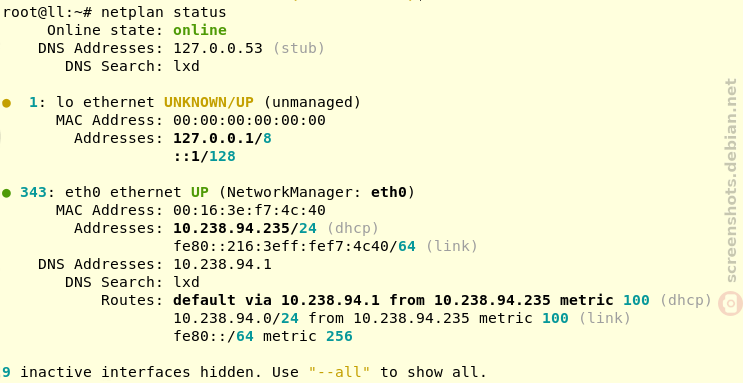
I m happy to announce that Netplan version 0.106 is now available on GitHub and is soon to be deployed into an Ubuntu/Debian/Fedora installation near you! Six months and 65 commits after the previous version, this release is brought to you by 4 free software contributors from around the globe. Highlights Highlights of this release include the new netplan status command, which queries your system for IP addresses, routes, DNS information, etc in addition to the Netplan backend renderer (NetworkManager/networkd) in use and the relevant Netplan YAML configuration ID. It displays all this in a nicely formatted way (or alternatively in machine readable YAML/JSON format).
Furthermore, we implemented a clean libnetplan API which can be used by external tools to parse Netplan configuration, migrated away from non-inclusive language (PR#303) and improved the overall Netplan documentation. Another change that should be noted, is that the match.macaddress stanza now only matches on PermanentMACAddress= on the systemd-networkd backend, as has been the case on the NetworkManager backend ever since (see PR#278 for background information on this slight change in behavior). Changelog Bug fixes:

6 February 2023

Vincent Bernat: Fast and dynamic encoding of Protocol Buffers in Go

Protocol Buffers are a popular choice for serializing structured data due to their compact size, fast processing speed, language independence, and compatibility. There exist other alternatives, including Cap n Proto, CBOR, and Avro. Usually, data structures are described in a proto definition file (.proto). The protoc compiler and a language-specific plugin convert it into code:
$ head flow-4.proto
syntax = "proto3";
package decoder;
option go_package = "akvorado/inlet/flow/decoder";
message FlowMessagev4  
  uint64 TimeReceived = 2;
  uint32 SequenceNum = 3;
  uint64 SamplingRate = 4;
  uint32 FlowDirection = 5;
$ protoc -I=. --plugin=protoc-gen-go --go_out=module=akvorado:. flow-4.proto
$ head inlet/flow/decoder/flow-4.pb.go
// Code generated by protoc-gen-go. DO NOT EDIT.
// versions:
//      protoc-gen-go v1.28.0
//      protoc        v3.21.12
// source: inlet/flow/data/schemas/flow-4.proto
package decoder
import (
        protoreflect "google.golang.org/protobuf/reflect/protoreflect"
Akvorado collects network flows using IPFIX or sFlow, decodes them with GoFlow2, encodes them to Protocol Buffers, and sends them to Kafka to be stored in a ClickHouse database. Collecting a new field, such as source and destination MAC addresses, requires modifications in multiple places, including the proto definition file and the ClickHouse migration code. Moreover, the cost is paid by all users.1 It would be nice to have an application-wide schema and let users enable or disable the fields they need. While the main goal is flexibility, we do not want to sacrifice performance. On this front, this is quite a success: when upgrading from 1.6.4 to 1.7.1, the decoding and encoding performance almost doubled!
goos: linux
goarch: amd64
pkg: akvorado/inlet/flow
cpu: AMD Ryzen 5 5600X 6-Core Processor
                              initial.txt                 final.txt               
                                 sec/op        sec/op     vs base                 
Netflow/with_encoding-12      12.963    2%   7.836    1%  -39.55% (p=0.000 n=10)
Sflow/with_encoding-12         19.37    1%   10.15    2%  -47.63% (p=0.000 n=10)

Faster Protocol Buffers encoding I use the following code to benchmark both the decoding and encoding process. Initially, the Decode() method is a thin layer above GoFlow2 producer and stores the decoded data into the in-memory structure generated by protoc. Later, some of the data will be encoded directly during flow decoding. This is why we measure both the decoding and the encoding.2
func BenchmarkDecodeEncodeSflow(b *testing.B)  
    r := reporter.NewMock(b)
    sdecoder := sflow.New(r)
    data := helpers.ReadPcapPayload(b,
        filepath.Join("decoder", "sflow", "testdata", "data-1140.pcap"))
    for _, withEncoding := range []bool true, false   
        title := map[bool]string 
            true:  "with encoding",
            false: "without encoding",
         [withEncoding]
        var got []*decoder.FlowMessage
        b.Run(title, func(b *testing.B)  
            for i := 0; i < b.N; i++  
                got = sdecoder.Decode(decoder.RawFlow 
                    Payload: data,
                    Source: net.ParseIP("127.0.0.1"),
                 )
                if withEncoding  
                    for _, flow := range got  
                        buf := []byte 
                        buf = protowire.AppendVarint(buf, uint64(proto.Size(flow)))
                        proto.MarshalOptions .MarshalAppend(buf, flow)


         )
     
 
The canonical Go implementation for Protocol Buffers, google.golang.org/protobuf is not the most efficient one. For a long time, people were relying on gogoprotobuf. However, the project is now deprecated. A good replacement is vtprotobuf.3
goos: linux
goarch: amd64
pkg: akvorado/inlet/flow
cpu: AMD Ryzen 5 5600X 6-Core Processor
                              initial.txt               bench-2.txt              
                                sec/op        sec/op     vs base                 
Netflow/with_encoding-12      12.96    2%   10.28    2%  -20.67% (p=0.000 n=10)
Netflow/without_encoding-12   8.935    2%   8.975    2%        ~ (p=0.143 n=10)
Sflow/with_encoding-12        19.37    1%   16.67    2%  -13.93% (p=0.000 n=10)
Sflow/without_encoding-12     14.62    3%   14.87    1%   +1.66% (p=0.007 n=10)

Dynamic Protocol Buffers encoding We have our baseline. Let s see how to encode our Protocol Buffers without a .proto file. The wire format is simple and rely a lot on variable-width integers. Variable-width integers, or varints, are an efficient way of encoding unsigned integers using a variable number of bytes, from one to ten, with small values using fewer bytes. They work by splitting integers into 7-bit payloads and using the 8th bit as a continuation indicator, set to 1 for all payloads except the last.
Variable-width integers encoding in Protocol Buffers: conversion of 150 to a varint
Variable-width integers encoding in Protocol Buffers
For our usage, we only need two types: variable-width integers and byte sequences. A byte sequence is encoded by prefixing it by its length as a varint. When a message is encoded, each key-value pair is turned into a record consisting of a field number, a wire type, and a payload. The field number and the wire type are encoded as a single variable-width integer called a tag.
Message encoded with Protocol Buffers: three varints, two sequences of bytes
Message encoded with Protocol Buffers
We use the following low-level functions to build the output buffer: Our schema abstraction contains the appropriate information to encode a message (ProtobufIndex) and to generate a proto definition file (fields starting with Protobuf):
type Column struct  
    Key       ColumnKey
    Name      string
    Disabled  bool
    // [ ]
    // For protobuf.
    ProtobufIndex    protowire.Number
    ProtobufType     protoreflect.Kind // Uint64Kind, Uint32Kind,  
    ProtobufEnum     map[int]string
    ProtobufEnumName string
    ProtobufRepeated bool
 
We have a few helper methods around the protowire functions to directly encode the fields while decoding the flows. They skip disabled fields or non-repeated fields already encoded. Here is an excerpt of the sFlow decoder:
sch.ProtobufAppendVarint(bf, schema.ColumnBytes, uint64(recordData.Base.Length))
sch.ProtobufAppendVarint(bf, schema.ColumnProto, uint64(recordData.Base.Protocol))
sch.ProtobufAppendVarint(bf, schema.ColumnSrcPort, uint64(recordData.Base.SrcPort))
sch.ProtobufAppendVarint(bf, schema.ColumnDstPort, uint64(recordData.Base.DstPort))
sch.ProtobufAppendVarint(bf, schema.ColumnEType, helpers.ETypeIPv4)
For fields that are required later in the pipeline, like source and destination addresses, they are stored unencoded in a separate structure:
type FlowMessage struct  
    TimeReceived uint64
    SamplingRate uint32
    // For exporter classifier
    ExporterAddress netip.Addr
    // For interface classifier
    InIf  uint32
    OutIf uint32
    // For geolocation or BMP
    SrcAddr netip.Addr
    DstAddr netip.Addr
    NextHop netip.Addr
    // Core component may override them
    SrcAS     uint32
    DstAS     uint32
    GotASPath bool
    // protobuf is the protobuf representation for the information not contained above.
    protobuf      []byte
    protobufSet   bitset.BitSet
 
The protobuf slice holds encoded data. It is initialized with a capacity of 500 bytes to avoid resizing during encoding. There is also some reserved room at the beginning to be able to encode the total size as a variable-width integer. Upon finalizing encoding, the remaining fields are added and the message length is prefixed:
func (schema *Schema) ProtobufMarshal(bf *FlowMessage) []byte  
    schema.ProtobufAppendVarint(bf, ColumnTimeReceived, bf.TimeReceived)
    schema.ProtobufAppendVarint(bf, ColumnSamplingRate, uint64(bf.SamplingRate))
    schema.ProtobufAppendIP(bf, ColumnExporterAddress, bf.ExporterAddress)
    schema.ProtobufAppendVarint(bf, ColumnSrcAS, uint64(bf.SrcAS))
    schema.ProtobufAppendVarint(bf, ColumnDstAS, uint64(bf.DstAS))
    schema.ProtobufAppendIP(bf, ColumnSrcAddr, bf.SrcAddr)
    schema.ProtobufAppendIP(bf, ColumnDstAddr, bf.DstAddr)
    // Add length and move it as a prefix
    end := len(bf.protobuf)
    payloadLen := end - maxSizeVarint
    bf.protobuf = protowire.AppendVarint(bf.protobuf, uint64(payloadLen))
    sizeLen := len(bf.protobuf) - end
    result := bf.protobuf[maxSizeVarint-sizeLen : end]
    copy(result, bf.protobuf[end:end+sizeLen])
    return result
 
Minimizing allocations is critical for maintaining encoding performance. The benchmark tests should be run with the -benchmem flag to monitor allocation numbers. Each allocation incurs an additional cost to the garbage collector. The Go profiler is a valuable tool for identifying areas of code that can be optimized:
$ go test -run=__nothing__ -bench=Netflow/with_encoding \
>         -benchmem -cpuprofile profile.out \
>         akvorado/inlet/flow
goos: linux
goarch: amd64
pkg: akvorado/inlet/flow
cpu: AMD Ryzen 5 5600X 6-Core Processor
Netflow/with_encoding-12             143953              7955 ns/op            8256 B/op        134 allocs/op
PASS
ok      akvorado/inlet/flow     1.418s
$ go tool pprof profile.out
File: flow.test
Type: cpu
Time: Feb 4, 2023 at 8:12pm (CET)
Duration: 1.41s, Total samples = 2.08s (147.96%)
Entering interactive mode (type "help" for commands, "o" for options)
(pprof) web
After using the internal schema instead of code generated from the proto definition file, the performance improved. However, this comparison is not entirely fair as less information is being decoded and previously GoFlow2 was decoding to its own structure, which was then copied to our own version.
goos: linux
goarch: amd64
pkg: akvorado/inlet/flow
cpu: AMD Ryzen 5 5600X 6-Core Processor
                              bench-2.txt                bench-3.txt              
                                 sec/op        sec/op     vs base                 
Netflow/with_encoding-12      10.284    2%   7.758    3%  -24.56% (p=0.000 n=10)
Netflow/without_encoding-12    8.975    2%   7.304    2%  -18.61% (p=0.000 n=10)
Sflow/with_encoding-12         16.67    2%   14.26    1%  -14.50% (p=0.000 n=10)
Sflow/without_encoding-12      14.87    1%   13.56    2%   -8.80% (p=0.000 n=10)
As for testing, we use github.com/jhump/protoreflect: the protoparse package parses the proto definition file we generate and the dynamic package decodes the messages. Check the ProtobufDecode() method for more details.4 To get the final figures, I have also optimized the decoding in GoFlow2. It was relying heavily on binary.Read(). This function may use reflection in certain cases and each call allocates a byte array to read data. Replacing it with a more efficient version provides the following improvement:
goos: linux
goarch: amd64
pkg: akvorado/inlet/flow
cpu: AMD Ryzen 5 5600X 6-Core Processor
                              bench-3.txt                bench-4.txt              
                                 sec/op        sec/op     vs base                 
Netflow/with_encoding-12       7.758    3%   7.365    2%   -5.07% (p=0.000 n=10)
Netflow/without_encoding-12    7.304    2%   6.931    3%   -5.11% (p=0.000 n=10)
Sflow/with_encoding-12        14.256    1%   9.834    2%  -31.02% (p=0.000 n=10)
Sflow/without_encoding-12     13.559    2%   9.353    2%  -31.02% (p=0.000 n=10)
It is now easier to collect new data and the inlet component is faster!

Notice Some paragraphs were editorialized by ChatGPT, using editorialize and keep it short as a prompt. The result was proofread by a human for correctness. The main idea is that ChatGPT should be better at English than me.


  1. While empty fields are not serialized to Protocol Buffers, empty columns in ClickHouse take some space, even if they compress well. Moreover, unused fields are still decoded and they may clutter the interface.
  2. There is a similar function using NetFlow. NetFlow and IPFIX protocols are less complex to decode than sFlow as they are using a simpler TLV structure.
  3. vtprotobuf generates more optimized Go code by removing an abstraction layer. It directly generates the code encoding each field to bytes:
    if m.OutIfSpeed != 0  
        i = encodeVarint(dAtA, i, uint64(m.OutIfSpeed))
        i--
        dAtA[i] = 0x6
        i--
        dAtA[i] = 0xd8
     
    
  4. There is also a protoprint package to generate proto definition file. I did not use it.

28 January 2023

Emmanuel Kasper: Table of correspondence between AWS / Azure / Red Hat OpenShift Container Platform / upstream projects

If you know the Amazon Web Services or Azure portfolio, and you are interested in OpenShift or the OKD OpenShift community distribution, this is a table of corresponding technologies. OpenShift is Red Hat s Kubernetes distribution: it is basically the upstream Kubernetes delivered with monitoring, logging, CI/CD, underlying OS, tested upgrade paths not found with a manual kubernetes.io kubeadm install. After passing the two corresponding certifications, my opinion on cloud operators is that it is very much a step back in the direction of proprietary software. You can rebuild their cloud stack with opensource components, but it is also a lot of integration work, similar to using the Linux from scratch distribution instead of something like Debian. A good middle point are the OpenShift and OKD Kubernetes distributions, who integrate the most common cloud components, but allow an installation on your own hardware or cloud provider of your choice.
AWS Azure OpenShift *OpenShift upstream project&
Cloud Trail Kubernetes API Server audit log Kubernetes
Cloud Watch Azure Monitor, Azure Log Analytics OpenShift Monitoring Prometheus, Kubernetes Metrics
AWS Artifact Compliance Operator OpenSCAP
AWS Trusted Advisor Azure Advisor Insights
AWS Marketplace Red Hat Market place Operator Hub
AWS Identity and Access Management (IAM) Azure Active Directory, Azure AD DS Red Hat SSO Keycloack
AWS Elastisc Beanstalk Azure App Services OpenShift Source2Image (S2I) Source2Image (S2I)
AWS S3 Azure Blob Storage** ODF Rados Gateway Rook RGW
AWS Elastic Block Storage Azure Disk Storage ODF Rados Block Device Rook RBD
AWS Elastic File System Azure Files ODF Ceph FS Rook CephFS
AWS ELB Classic Azure Load Balancer MetalLB Operator MetalLB
AWS ELB Application Load Balancer Azure Application Gateway OpenShift Router HAProxy
Amazon Simple Notification Service OpenShift Streams for Apache Kafka Apache Kafka
Amazon Guard Duty Microsoft Defender for Cloud API Server audit log review, ACS Runtime detection Stackrox
Amazon Inspector Microsoft Defender for Cloud Quay.io container scanner, ACS Vulnerability Assessment Clair, Stackrox
AWS Lambda Azure Serverless Openshift Serverless* Knative
AWS Key Management System Azure Key Vault could be done with Hashicorp Vault Vault
AWS WAF NGINX Ingress Controller Operator with ModSecurity NGINX ModSecurity
Amazon Elasticache Redis Enterprise Operator Redis, memcached as alternative
AWS Relational Database Service Azure SQL Crunchy Data Operator PostgreSQL
Azure Arc OpenShift ACM Open Cluster Management
AWS Scaling Group Azure Scale Set OpenShift Autoscaler OKD Autoscaler
* OpenShift Serverless requires the application to be packaged as a container, something AWS Lambda does not require. ** Azure Blob Storage covers the object storage use case of S3, but is itself not S3 compatible

19 January 2023

Antoine Beaupr : Mastodon comments in ikiwiki

Today I noticed bounces in my mail box. They were from ikiwiki trying to send registration confirmation email to users who probably never asked for it. I'm getting truly fed up with spam in my wiki. At this point, all comments are manually approved and I still get trouble: now it's scammers spamming the registration form with dummy accounts, which bounce back to me when I make new posts, or just generate backscatter spam for the confirmation email. It's really bad. I have hundreds of users registered on my blog, and I don't know which are spammy, which aren't. So. I'm considering ditching ikiwiki comments altogether. I am testing Mastodon as a commenting platforms. Others (e.g. JAK) have implemented this as a server but a simpler approach is toload them dynamically from Mastodon, which is what Carl Shwan has done. They are using Hugo, however, so they can easily embed page metadata in the template to load the right server with the right comment ID. I wasn't sure how to do this in ikiwiki: it's typically hard to access page-specific metadata in templates. Even the page name is not there, for example. I have tried using templates, and that (obviously?) fails because the <script> stuff gets sanitized away. It seems I would need to split the JavaScript out of the template into a base template and then make the page template refer to a function in there. It's kind of horrible and messy. I wish there was a way to just access page metadata from the page template itself... I found out the meta plugin passes along its metadata, but that's not (easily) extensible. So i'd need to either patch that module, and my history of merged patches is not great so far. So: another plugin. I have something that kind of works that's a combination of a page.tmpl patch and a plugin. The plugin adds a mastodon directive that feeds the page.tmpl with the right stuff. On clicking a button, it injects comments from the Mastodon API, with a JavaScript callback. It's not pretty (it's not themed at all!), but it works. If you want to do this at home, you need this page.tmpl (or at least this patch and that one) and the mastodon.pm plugin from my mastodon-plugin branch. I'm not sure this is a good idea. The first test I did was a "test comment" which led to half a dozen "test reply". I then realized I couldn't redact individual posts from there. I don't even know if, when I mute a user, it actually gets hidden from everyone else too... So I'll test this for a while, I guess. I have also turned off all CGI on this site. It will keep users from registering while I cleanup this mess and think about next steps. I have other options as well if push comes to shove, but I'm unlikely to go back to ikiwiki comments. Mastodon comments are nice because they don't require me to run any extra software: either I have my own federated service I reuse, or I use someone else's, but I don't need to run something extra. And, of course, comments are published in a standard way that's interoperable with everything... On the other hand, now I won't have comments enabled until the blog is posted on Mastodon... Right now this happens only when feed2exec runs and the HTTP cache expires, which can take up to a day. I should probably do this some other way, like flush the cache when a new post arrives, or run post-commit hooks, but for now, this will have to do. Update: I figured out a way to make this work in a timely manner:
  1. there's a post-merge hook in my ikiwiki git repository which calls feed2exec in /home/w-anarcat/source/.git/hooks/ took me a while to find it! I tried post-update and post-receive first, but ikiwiki actually pulls from the bare directory in the source directory, so only post-merge fires (even though it's not a merge)
  2. feed2exec then finds new blog posts (if any!) and fires up the new ikiwikitoot plugin which then...
  3. posts the toot using the toot command (it just works, why reinvent the wheel), keeping the toot URL
  4. finds the Markdown source file associated with the post, and adds the magic mastodon directive
  5. commits and pushes the result
This will make the interaction with Mastodon much smoother: as soon as a blog post is out of "draft" (i.e. when it hits the RSS feeds), this will immediately trigger and post the blog entry to Mastodon, enabling comments. It's kind of a tangled mess of stuff, but it works! I have briefly considered not using feed2exec for this, but it turns out it does an important job of parsing the result of ikiwiki's rendering. Otherwise I would have to guess which post is really a blog post, is this just an update or is it new, is it a draft, and so on... all sorts of questions where the business logic already resides in ikiwiki, and that I would need to reimplement myself. Plus it goes alongside moving more stuff (like my feed reader) to dedicated UNIX accounts (in this case, the blog sandbox) for security reasons. Whee!

12 January 2023

Jonathan McDowell: Building a read-only Debian root setup: Part 1

I mentioned in the post about upgrading my home internet that part of the work I did was creating a read-only Debian root with a squashfs image. This post covers the details of how I boot with that image; a later post will cover how I build the squashfs image. First, David Reader kindly pointed me at his rodebian setup, which was helpful in making me think about the whole problem but ultimately not the direction I went. Primarily because on the old router (an RB3011) I am space constrained, with only 120M of usable flash, and so ideally I wanted as much as possible of the system in a well compressed filesystem. squashfs seemed like the best option for that, and ultimately I ended up with a 39M image. I ve then used overlayfs to mount a tmpfs, so I get what looks like a writeable system without having to do too many tweaks to the actual install. On the plus side I can then see exactly what is getting written where and decide whether I need to update something in the squashfs. I don t boot with an initrd - for initial testing I booted directly off a USB stick. I ve actually ended up continuing to do this in production, because I ve had no pressing reason to move it all to booting off internal flash (I ve ended up with a Sandisk SDCZ430-032G-G46 which is tiny). However nothing I m going to describe is dependent on that - this would work perfectly well for a initial UBIFS rootfs on internal NAND. So the basic overview is I boot off a minimal rootfs, mount a squashfs, create an appropriate tmpfs, mount an overlayfs that combines the two, then pivotroot into the overlayfs and exec its init so it becomes the rootfs. For the minimal rootfs I started with busybox, in particular I used the armhf busybox-static package from Debian. My RB5009 is an ARM64, but I wanted to be able to test on the RB3011 as well, which is ARMv7. Picking an armhf binary for the minimal rootfs lets me use the same image for both. Using the static build helps reduce the number of pieces involved in putting it all together. The busybox binary goes in /bin. I was able to cheat and chroot into the empty rootfs and call busybox --install -s to create symlinks for all the tools it provides, but I could have done this manually. There s only a handful that are actually needed, but it s amazing how much is crammed into a 1.2M binary. /sbin/init is a shell script:
Contents
#!/bin/ash
# Make sure we have a sane date
if [ -e /data/saved-date ]; then
        CURRENT_DATE=$(date -Iseconds)
        if [ "$ CURRENT_DATE:0:4 " -lt "2022" -o \
                        "$ CURRENT_DATE:0:4 " -gt "2030" ]; then
                echo Setting initial date
                date -s "$(cat /data/saved-date)"
        fi
fi
# Work out what platform we're on
ARCH=$(uname -m)
if [ "$ ARCH " == "aarch64" ]; then
        ARCH=arm64
else
        ARCH=armhf
fi
# Mount a tmpfs to store the changes
mount -t tmpfs root-rw /mnt/overlay/rw
# Make the directories we need in the tmpfs
mkdir /mnt/overlay/rw/upper
mkdir /mnt/overlay/rw/work
# Mount the squashfs and build an overlay root filesystem of it + the tmpfs
mount -t squashfs -o loop /data/router.$ ARCH .squashfs /mnt/overlay/lower
mount -t overlay \
        -o lowerdir=/mnt/overlay/lower,upperdir=/mnt/overlay/rw/upper,workdir=/mnt/overlay/rw/work \
        overlayfs-root /mnt/root
# Build the directories we need within the new root
mkdir /mnt/root/mnt/flash
mkdir /mnt/root/mnt/overlay
mkdir /mnt/root/mnt/overlay/lower
mkdir /mnt/root/mnt/overlay/rw
# Copy any stored state
if [ -e /data/state.$ ARCH .tar ]; then
        echo Restoring stored state
        cd /mnt/root
        tar xf /data/state.$ ARCH .tar
fi
cd /mnt/root
pivot_root . mnt/flash
echo Switching into root filesystem
exec chroot . sh -c "$(cat <<END
mount --move /mnt/flash/mnt/overlay/lower /mnt/overlay/lower
mount --move /mnt/flash/mnt/overlay/rw /mnt/overlay/rw
exec /sbin/init
END
)"
Most of what the script is doing is sorting out the squashfs + tmpfs backed overlayfs that becomes the full root filesystems, but there are a few other bits to note. First, we pick up a saved date from /data/saved-date - the router has no RTC and while it ll sort itself out with NTP once it gets networking up it s useful to make sure we don t end up comically far in the past or future. Second, the script looks at what architecture we re running and picks up an appropriate squashfs image from /data based on that. This let me use the same USB stick for testing on both the RB3011 and the RB5011. Finally we allow for a /data/state.$ ARCH .tar file to let us pick up changes to the rootfs at boot time - this prevents having to rebuild the squashfs image every time there s a persistent change. The other piece that doesn t show up in the script is that the kernel and its modules are all installed into this initial rootfs (and then symlinked from the squashfs). This lets me build a mostly modular kernel, as long as all the necessary drivers to mount the USB stick are built in. Once the system is fully booted the initial rootfs is available at /mnt/flash, by default mounted read-only (to avoid inadvertent writes), but able to be remounted to update the squashfs image, install a new kernel, or update the state tarball. /mnt/overlay/rw/upper/ is where updates to the overlayfs are written, which provides an easy way to see what files are changing, initially to determine what might need tweaked in the squashfs creation process and subsequently to be able to see what needs updated in the state tarball.

Dirk Eddelbuettel: linl 0.0.5 on CRAN: Extended Background Support

A new release of our linl package for writing LaTeX letters with (R)markdown is now on CRAN. linl makes it easy to write letters in markdown, with some extra bells and whistles thanks to some cleverness chiefly by Aaron. This version add extended header and footer placement support thanks to an included copy of wallpaper.sty as added in a nice PR by I aki. As the previous release was well over three years ago, we also enhanced continuous integration in the process. The repository README.md shows some screenshots of input and output files. The NEWS entry follows:

Changes in linl version 0.0.5 (2023-01-11)
  • Several updates to continuous integration and testing
  • Enhanced placment functionality for images in header and footer via wallpaper.sty and new x and y offset variable (I aki Ucar in #30)

Courtesy of CRANberries, there is a comparison to the previous release. More information is on the linl page. For questions or comments use the issue tracker off the GitHub repo. If you like this or other open-source work I do, you can now sponsor me at GitHub.

This post by Dirk Eddelbuettel originated on his Thinking inside the box blog. Please report excessive re-aggregation in third-party for-profit settings.

8 January 2023

Charles Plessy: Could somebody patch Firefox to display Markdown files?

When Firefox receives a file with media type text/markdown, it prompts the user to download it, while other browsers display it as plain text. In the ticket 1319262, it is proposed to display Markdown files by default, but there needs a patch

4 January 2023

Enrico Zini: Staticsite redesign

These are some notes about my redesign work in staticsite 2.x. Maping constraints and invariants I started keeping notes of constraints and invariants, and this helped a lot in keeping bounds on the cognitive efforts of design. I particularly liked how mapping the set of constraints added during site generation has helped breaking down processing into a series of well defined steps. Code that handles each step now has a specific task, and can rely on clear assumptions. Declarative page metadata I designed page metadata as declarative fields added to the Page class. I used typed descriptors for the fields, so that metadata fields can now have logic and validation, and are self-documenting! This is the core of the Field implementation. Lean core I tried to implement as much as possible in feature plugins, leaving to the staticsite core only what is essential to create the structure for plugins to build on. The core provides a tree structure, an abstract Page object that can render to a file and resolve references to other pages, a Site that holds settings and controls the various loading steps, and little else. The only type of content supported by the core is static asset files: Markdown, RestructuredText, images, taxonomies, feeds, directory indices, and so on, are all provided via feature plugins. Feature plugins Feature plugins work by providing functions to be called at the various loading steps, and mixins to be added to site pages. Mixins provided by feature plugins can add new declarative metadata fields, and extend Page methods: this ends up being very clean and powerful, and plays decently well with mypy's static type checking, too! See for example the code of the alias feature, that allows a page to declare aliases that redirect to it, useful for example when moving content around. It has a mixin (AliasPageMixin) that adds an aliases field that holds a list of page paths. During the "generate" step, when autogenerated pages can be created, the aliases feature iterates through all pages that defined an aliases metadata, and generates the corresponding redirection pages. Self-documenting code Staticsite can list loaded features, features can list the page subclasses that they use, and pages can list metadata fields. As a result, each feature, each type of page, and each field of each page can generate documentation about itself: the staticsite reference is autogenerated in that way, mostly from Feature, Page, and Field docstrings. Understand the language, stay close to the language Python has matured massively in the last years, and I like to stay on top of the language and standard library release notes for each release. I like how what used to be dirty hacks have now found a clean way into the language:

Enrico Zini: Released staticsite 2.x

In theory I wanted to announce the release of staticsite 2.0, but then I found bugs that prevented me from writing this post, so I'm also releasing 2.1 2.2 2.3 :grin: staticsite is the static site generator that I ended up writing after giving other generators a try. I did a big round of cleanup of the code, which among other things allowed me to implement incremental builds. It turned out that staticsite is fast enough that incremental builds are not really needed, however, a bug in caching rendered markdown made me forget about that. Now I fixed that bug, too, and I can choose between running staticsite fast, and ridiculously fast. My favourite bit of this work is the internal cleanup: I found a way to simplify the core design massively, and now the core and plugin system is simple enough that I can explain it, and I'll probably write a blog post or two about it in the next days. On top of that, staticsite is basically clean with mypy running in strict mode! Getting there was a great ride which prompted a lot of thinking about designing code properly, as mypy is pretty good at flagging clumsy hacks. If you want to give it a try, check out the small tutorial A new blog in under one minute.

2 January 2023

Emmanuel Kasper: Ensuring someone is listening before telling a joke

  • Alice (speaking to Bob): Bob, I have a good joke to tell, can I call you at 12:00 ?
  • Bob (turns head towards Alice): OK, fine for me, but can we make it at 13:00 ?
  • Alice (nodding): Works for me.
  • At 13:00, Alice starts telling a joke.
Did you recognize the three way TCP handshake ? Protagonists:
  • Alice: Client
  • Bob: Server
Dialog:
  • I have a good joke to tell: TCP segment with SYN flag
  • 12:00: initial sequence number
  • OK: TCP segment with SYN and ACK flag
  • 13:00: acknowledgment number (initial sequence number + 1)
  • Works for me: TCP segment with ACK flag, acknowledgment of the server acknowledgment
More details on this in https://www.linuxjournal.com/article/6447 and remember tcpdump uses a dot( . ) to indicate segments with the ACK flag.

8 December 2022

Reproducible Builds: Reproducible Builds in November 2022

Welcome to yet another report from the Reproducible Builds project, this time for November 2022. In all of these reports (which we have been publishing regularly since May 2015) we attempt to outline the most important things that we have been up to over the past month. As always, if you interested in contributing to the project, please visit our Contribute page on our website.

Reproducible Builds Summit 2022 Following-up from last month s report about our recent summit in Venice, Italy, a comprehensive report from the meeting has not been finalised yet watch this space! As a very small preview, however, we can link to several issues that were filed about the website during the summit (#38, #39, #40, #41, #42, #43, etc.) and collectively learned about Software Bill of Materials (SBOM) s and how .buildinfo files can be seen/used as SBOMs. And, no less importantly, the Reproducible Builds t-shirt design has been updated

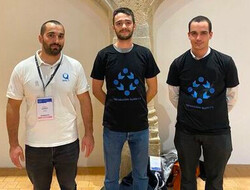
Reproducible Builds at European Cyber Week 2022 During the European Cyber Week 2022, a Capture The Flag (CTF) cybersecurity challenge was created by Fr d ric Pierret on the subject of Reproducible Builds. The challenge consisted in a pedagogical sense based on how to make a software release reproducible. To progress through the challenge issues that affect the reproducibility of build (such as build path, timestamps, file ordering, etc.) were to be fixed in steps in order to get the final flag in order to win the challenge. At the end of the competition, five people succeeded in solving the challenge, all of whom were awarded with a shirt. Fr d ric Pierret intends to create similar challenge in the form of a how to in the Reproducible Builds documentation, but two of the 2022 winners are shown here:

On business adoption and use of reproducible builds Simon Butler announced on the rb-general mailing list that the Software Quality Journal published an article called On business adoption and use of reproducible builds for open and closed source software. This article is an interview-based study which focuses on the adoption and uses of Reproducible Builds in industry, with a focus on investigating the reasons why organisations might not have adopted them:
[ ] industry application of R-Bs appears limited, and we seek to understand whether awareness is low or if significant technical and business reasons prevent wider adoption.
This is achieved through interviews with software practitioners and business managers, and touches on both the business and technical reasons supporting the adoption (or not) of Reproducible Builds. The article also begins with an excellent explanation and literature review, and even introduces a new helpful analogy for reproducible builds:
[Users are] able to perform a bitwise comparison of the two binaries to verify that they are identical and that the distributed binary is indeed built from the source code in the way the provider claims. Applied in this manner, R-Bs function as a canary, a mechanism that indicates when something might be wrong, and offer an improvement in security over running unverified binaries on computer systems.
The full paper is available to download on an open access basis. Elsewhere in academia, Beatriz Michelson Reichert and Rafael R. Obelheiro have published a paper proposing a systematic threat model for a generic software development pipeline identifying possible mitigations for each threat (PDF). Under the Tampering rubric of their paper, various attacks against Continuous Integration (CI) processes:
An attacker may insert a backdoor into a CI or build tool and thus introduce vulnerabilities into the software (resulting in an improper build). To avoid this threat, it is the developer s responsibility to take due care when making use of third-party build tools. Tampered compilers can be mitigated using diversity, as in the diverse double compiling (DDC) technique. Reproducible builds, a recent research topic, can also provide mitigation for this problem. (PDF)

Misc news
On our mailing list this month:

Debian & other Linux distributions Over 50 reviews of Debian packages were added this month, another 48 were updated and almost 30 were removed, all of which adds to our knowledge about identified issues. Two new issue types were added as well. [ ][ ]. Vagrant Cascadian announced on our mailing list another online sprint to help clear the huge backlog of reproducible builds patches submitted by performing NMUs (Non-Maintainer Uploads). The first such sprint took place on September 22nd, but others were held on October 6th and October 20th. There were two additional sprints that occurred in November, however, which resulted in the following progress: Lastly, Roland Clobus posted his latest update of the status of reproducible Debian ISO images on our mailing list. This reports that all major desktops build reproducibly with bullseye, bookworm and sid as well as that no custom patches needed to applied to Debian unstable for this result to occur. During November, however, Roland proposed some modifications to live-setup and the rebuild script has been adjusted to fix the failing Jenkins tests for Debian bullseye [ ][ ].
In other news, Miro Hron ok proposed a change to clamp build modification times to the value of SOURCE_DATE_EPOCH. This was initially suggested and discussed on a devel@ mailing list post but was later written up on the Fedora Wiki as well as being officially proposed to Fedora Engineering Steering Committee (FESCo).

Upstream patches The Reproducible Builds project detects, dissects and attempts to fix as many currently-unreproducible packages as possible. We endeavour to send all of our patches upstream where appropriate. This month, we wrote a large number of such patches, including:

diffoscope diffoscope is our in-depth and content-aware diff utility. Not only can it locate and diagnose reproducibility issues, it can provide human-readable diffs from many kinds of binary formats. This month, Chris Lamb prepared and uploaded versions 226 and 227 to Debian:
  • Support both python3-progressbar and python3-progressbar2, two modules providing the progressbar Python module. [ ]
  • Don t run Python decompiling tests on Python bytecode that file(1) cannot detect yet and Python 3.11 cannot unmarshal. (#1024335)
  • Don t attempt to attach text-only differences notice if there are no differences to begin with. (#1024171)
  • Make sure we recommend apksigcopier. [ ]
  • Tidy generation of os_list. [ ]
  • Make the code clearer around generating the Debian substvars . [ ]
  • Use our assert_diff helper in test_lzip.py. [ ]
  • Drop other copyright notices from lzip.py and test_lzip.py. [ ]
In addition to this, Christopher Baines added lzip support [ ], and FC Stegerman added an optimisation whereby we don t run apktool if no differences are detected before the signing block [ ].
A significant number of changes were made to the Reproducible Builds website and documentation this month, including Chris Lamb ensuring the openEuler logo is correctly visible with a white background [ ], FC Stegerman de-duplicated by email address to avoid listing some contributors twice [ ], Herv Boutemy added Apache Maven to the list of affiliated projects [ ] and boyska updated our Contribute page to remark that the Reproducible Builds presence on salsa.debian.org is not just the Git repository but is also for creating issues [ ][ ]. In addition to all this, however, Holger Levsen made the following changes:
  • Add a number of existing publications [ ][ ] and update metadata for some existing publications as well [ ].
  • Hide draft posts on the website homepage. [ ]
  • Add the Warpforge build tool as a participating project of the summit. [ ]
  • Clarify in the footer that we welcome patches to the website repository. [ ]

Testing framework The Reproducible Builds project operates a comprehensive testing framework at tests.reproducible-builds.org in order to check packages and other artifacts for reproducibility. In October, the following changes were made by Holger Levsen:
  • Improve the generation of meta package sets (used in grouping packages for reporting/statistical purposes) to treat Debian bookworm as equivalent to Debian unstable in this specific case [ ] and to parse the list of packages used in the Debian cloud images [ ][ ][ ].
  • Temporarily allow Frederic to ssh(1) into our snapshot server as the jenkins user. [ ]
  • Keep some reproducible jobs Jenkins logs much longer [ ] (later reverted).
  • Improve the node health checks to detect failures to update the Debian cloud image package set [ ][ ] and to improve prioritisation of some kernel warnings [ ].
  • Always echo any IRC output to Jenkins output as well. [ ]
  • Deal gracefully with problems related to processing the cloud image package set. [ ]
Finally, Roland Clobus continued his work on testing Live Debian images, including adding support for specifying the origin of the Debian installer [ ] and to warn when the image has unmet dependencies in the package list (e.g. due to a transition) [ ].
If you are interested in contributing to the Reproducible Builds project, please visit our Contribute page on our website. You can get in touch with us via:

16 November 2022

Antoine Beaupr : A ZFS migration

In my tubman setup, I started using ZFS on an old server I had lying around. The machine is really old though (2011!) and it "feels" pretty slow. I want to see how much of that is ZFS and how much is the machine. Synthetic benchmarks show that ZFS may be slower than mdadm in RAID-10 or RAID-6 configuration, so I want to confirm that on a live workload: my workstation. Plus, I want easy, regular, high performance backups (with send/receive snapshots) and there's no way I'm going to use BTRFS because I find it too confusing and unreliable. So off we go.

Installation Since this is a conversion (and not a new install), our procedure is slightly different than the official documentation but otherwise it's pretty much in the same spirit: we're going to use ZFS for everything, including the root filesystem. So, install the required packages, on the current system:
apt install --yes gdisk zfs-dkms zfs zfs-initramfs zfsutils-linux
We also tell DKMS that we need to rebuild the initrd when upgrading:
echo REMAKE_INITRD=yes > /etc/dkms/zfs.conf

Partitioning This is going to partition /dev/sdc with:
  • 1MB MBR / BIOS legacy boot
  • 512MB EFI boot
  • 1GB bpool, unencrypted pool for /boot
  • rest of the disk for zpool, the rest of the data
     sgdisk --zap-all /dev/sdc
     sgdisk -a1 -n1:24K:+1000K -t1:EF02 /dev/sdc
     sgdisk     -n2:1M:+512M   -t2:EF00 /dev/sdc
     sgdisk     -n3:0:+1G      -t3:BF01 /dev/sdc
     sgdisk     -n4:0:0        -t4:BF00 /dev/sdc
    
That will look something like this:
    root@curie:/home/anarcat# sgdisk -p /dev/sdc
    Disk /dev/sdc: 1953525168 sectors, 931.5 GiB
    Model: ESD-S1C         
    Sector size (logical/physical): 512/512 bytes
    Disk identifier (GUID): [REDACTED]
    Partition table holds up to 128 entries
    Main partition table begins at sector 2 and ends at sector 33
    First usable sector is 34, last usable sector is 1953525134
    Partitions will be aligned on 16-sector boundaries
    Total free space is 14 sectors (7.0 KiB)
    Number  Start (sector)    End (sector)  Size       Code  Name
       1              48            2047   1000.0 KiB  EF02  
       2            2048         1050623   512.0 MiB   EF00  
       3         1050624         3147775   1024.0 MiB  BF01  
       4         3147776      1953525134   930.0 GiB   BF00
Unfortunately, we can't be sure of the sector size here, because the USB controller is probably lying to us about it. Normally, this smartctl command should tell us the sector size as well:
root@curie:~# smartctl -i /dev/sdb -qnoserial
smartctl 7.2 2020-12-30 r5155 [x86_64-linux-5.10.0-14-amd64] (local build)
Copyright (C) 2002-20, Bruce Allen, Christian Franke, www.smartmontools.org
=== START OF INFORMATION SECTION ===
Model Family:     Western Digital Black Mobile
Device Model:     WDC WD10JPLX-00MBPT0
Firmware Version: 01.01H01
User Capacity:    1 000 204 886 016 bytes [1,00 TB]
Sector Sizes:     512 bytes logical, 4096 bytes physical
Rotation Rate:    7200 rpm
Form Factor:      2.5 inches
Device is:        In smartctl database [for details use: -P show]
ATA Version is:   ATA8-ACS T13/1699-D revision 6
SATA Version is:  SATA 3.0, 6.0 Gb/s (current: 6.0 Gb/s)
Local Time is:    Tue May 17 13:33:04 2022 EDT
SMART support is: Available - device has SMART capability.
SMART support is: Enabled
Above is the example of the builtin HDD drive. But the SSD device enclosed in that USB controller doesn't support SMART commands, so we can't trust that it really has 512 bytes sectors. This matters because we need to tweak the ashift value correctly. We're going to go ahead the SSD drive has the common 4KB settings, which means ashift=12. Note here that we are not creating a separate partition for swap. Swap on ZFS volumes (AKA "swap on ZVOL") can trigger lockups and that issue is still not fixed upstream. Ubuntu recommends using a separate partition for swap instead. But since this is "just" a workstation, we're betting that we will not suffer from this problem, after hearing a report from another Debian developer running this setup on their workstation successfully. We do not recommend this setup though. In fact, if I were to redo this partition scheme, I would probably use LUKS encryption and setup a dedicated swap partition, as I had problems with ZFS encryption as well.

Creating pools ZFS pools are somewhat like "volume groups" if you are familiar with LVM, except they obviously also do things like RAID-10. (Even though LVM can technically also do RAID, people typically use mdadm instead.) In any case, the guide suggests creating two different pools here: one, in cleartext, for boot, and a separate, encrypted one, for the rest. Technically, the boot partition is required because the Grub bootloader only supports readonly ZFS pools, from what I understand. But I'm a little out of my depth here and just following the guide.

Boot pool creation This creates the boot pool in readonly mode with features that grub supports:
    zpool create \
        -o cachefile=/etc/zfs/zpool.cache \
        -o ashift=12 -d \
        -o feature@async_destroy=enabled \
        -o feature@bookmarks=enabled \
        -o feature@embedded_data=enabled \
        -o feature@empty_bpobj=enabled \
        -o feature@enabled_txg=enabled \
        -o feature@extensible_dataset=enabled \
        -o feature@filesystem_limits=enabled \
        -o feature@hole_birth=enabled \
        -o feature@large_blocks=enabled \
        -o feature@lz4_compress=enabled \
        -o feature@spacemap_histogram=enabled \
        -o feature@zpool_checkpoint=enabled \
        -O acltype=posixacl -O canmount=off \
        -O compression=lz4 \
        -O devices=off -O normalization=formD -O relatime=on -O xattr=sa \
        -O mountpoint=/boot -R /mnt \
        bpool /dev/sdc3
I haven't investigated all those settings and just trust the upstream guide on the above.

Main pool creation This is a more typical pool creation.
    zpool create \
        -o ashift=12 \
        -O encryption=on -O keylocation=prompt -O keyformat=passphrase \
        -O acltype=posixacl -O xattr=sa -O dnodesize=auto \
        -O compression=zstd \
        -O relatime=on \
        -O canmount=off \
        -O mountpoint=/ -R /mnt \
        rpool /dev/sdc4
Breaking this down:
  • -o ashift=12: mentioned above, 4k sector size
  • -O encryption=on -O keylocation=prompt -O keyformat=passphrase: encryption, prompt for a password, default algorithm is aes-256-gcm, explicit in the guide, made implicit here
  • -O acltype=posixacl -O xattr=sa: enable ACLs, with better performance (not enabled by default)
  • -O dnodesize=auto: related to extended attributes, less compatibility with other implementations
  • -O compression=zstd: enable zstd compression, can be disabled/enabled by dataset to with zfs set compression=off rpool/example
  • -O relatime=on: classic atime optimisation, another that could be used on a busy server is atime=off
  • -O canmount=off: do not make the pool mount automatically with mount -a?
  • -O mountpoint=/ -R /mnt: mount pool on / in the future, but /mnt for now
Those settings are all available in zfsprops(8). Other flags are defined in zpool-create(8). The reasoning behind them is also explained in the upstream guide and some also in [the Debian wiki][]. Those flags were actually not used:
  • -O normalization=formD: normalize file names on comparisons (not storage), implies utf8only=on, which is a bad idea (and effectively meant my first sync failed to copy some files, including this folder from a supysonic checkout). and this cannot be changed after the filesystem is created. bad, bad, bad.
[the Debian wiki]: https://wiki.debian.org/ZFS#Advanced_Topics

Side note about single-disk pools Also note that we're living dangerously here: single-disk ZFS pools are rumoured to be more dangerous than not running ZFS at all. The choice quote from this article is:
[...] any error can be detected, but cannot be corrected. This sounds like an acceptable compromise, but its actually not. The reason its not is that ZFS' metadata cannot be allowed to be corrupted. If it is it is likely the zpool will be impossible to mount (and will probably crash the system once the corruption is found). So a couple of bad sectors in the right place will mean that all data on the zpool will be lost. Not some, all. Also there's no ZFS recovery tools, so you cannot recover any data on the drives.
Compared with (say) ext4, where a single disk error can recovered, this is pretty bad. But we are ready to live with this with the idea that we'll have hourly offline snapshots that we can easily recover from. It's trade-off. Also, we're running this on a NVMe/M.2 drive which typically just blinks out of existence completely, and doesn't "bit rot" the way a HDD would. Also, the FreeBSD handbook quick start doesn't have any warnings about their first example, which is with a single disk. So I am reassured at least.

Creating mount points Next we create the actual filesystems, known as "datasets" which are the things that get mounted on mountpoint and hold the actual files.
  • this creates two containers, for ROOT and BOOT
     zfs create -o canmount=off -o mountpoint=none rpool/ROOT &&
     zfs create -o canmount=off -o mountpoint=none bpool/BOOT
    
    Note that it's unclear to me why those datasets are necessary, but they seem common practice, also used in this FreeBSD example. The OpenZFS guide mentions the Solaris upgrades and Ubuntu's zsys that use that container for upgrades and rollbacks. This blog post seems to explain a bit the layout behind the installer.
  • this creates the actual boot and root filesystems:
     zfs create -o canmount=noauto -o mountpoint=/ rpool/ROOT/debian &&
     zfs mount rpool/ROOT/debian &&
     zfs create -o mountpoint=/boot bpool/BOOT/debian
    
    I guess the debian name here is because we could technically have multiple operating systems with the same underlying datasets.
  • then the main datasets:
     zfs create                                 rpool/home &&
     zfs create -o mountpoint=/root             rpool/home/root &&
     chmod 700 /mnt/root &&
     zfs create                                 rpool/var
    
  • exclude temporary files from snapshots:
     zfs create -o com.sun:auto-snapshot=false  rpool/var/cache &&
     zfs create -o com.sun:auto-snapshot=false  rpool/var/tmp &&
     chmod 1777 /mnt/var/tmp
    
  • and skip automatic snapshots in Docker:
     zfs create -o canmount=off                 rpool/var/lib &&
     zfs create -o com.sun:auto-snapshot=false  rpool/var/lib/docker
    
    Notice here a peculiarity: we must create rpool/var/lib to create rpool/var/lib/docker otherwise we get this error:
     cannot create 'rpool/var/lib/docker': parent does not exist
    
    ... and no, just creating /mnt/var/lib doesn't fix that problem. In fact, it makes things even more confusing because an existing directory shadows a mountpoint, which is the opposite of how things normally work. Also note that you will probably need to change storage driver in Docker, see the zfs-driver documentation for details but, basically, I did:
    echo '  "storage-driver": "zfs"  ' > /etc/docker/daemon.json
    
    Note that podman has the same problem (and similar solution):
    printf '[storage]\ndriver = "zfs"\n' > /etc/containers/storage.conf
    
  • make a tmpfs for /run:
     mkdir /mnt/run &&
     mount -t tmpfs tmpfs /mnt/run &&
     mkdir /mnt/run/lock
    
We don't create a /srv, as that's the HDD stuff. Also mount the EFI partition:
mkfs.fat -F 32 /dev/sdc2 &&
mount /dev/sdc2 /mnt/boot/efi/
At this point, everything should be mounted in /mnt. It should look like this:
root@curie:~# LANG=C df -h -t zfs -t vfat
Filesystem            Size  Used Avail Use% Mounted on
rpool/ROOT/debian     899G  384K  899G   1% /mnt
bpool/BOOT/debian     832M  123M  709M  15% /mnt/boot
rpool/home            899G  256K  899G   1% /mnt/home
rpool/home/root       899G  256K  899G   1% /mnt/root
rpool/var             899G  384K  899G   1% /mnt/var
rpool/var/cache       899G  256K  899G   1% /mnt/var/cache
rpool/var/tmp         899G  256K  899G   1% /mnt/var/tmp
rpool/var/lib/docker  899G  256K  899G   1% /mnt/var/lib/docker
/dev/sdc2             511M  4.0K  511M   1% /mnt/boot/efi
Now that we have everything setup and mounted, let's copy all files over.

Copying files This is a list of all the mounted filesystems
for fs in /boot/ /boot/efi/ / /home/; do
    echo "syncing $fs to /mnt$fs..." && 
    rsync -aSHAXx --info=progress2 --delete $fs /mnt$fs
done
You can check that the list is correct with:
mount -l -t ext4,btrfs,vfat   awk ' print $3 '
Note that we skip /srv as it's on a different disk. On the first run, we had:
root@curie:~# for fs in /boot/ /boot/efi/ / /home/; do
        echo "syncing $fs to /mnt$fs..." && 
        rsync -aSHAXx --info=progress2 $fs /mnt$fs
    done
syncing /boot/ to /mnt/boot/...
              0   0%    0.00kB/s    0:00:00 (xfr#0, to-chk=0/299)  
syncing /boot/efi/ to /mnt/boot/efi/...
     16,831,437 100%  184.14MB/s    0:00:00 (xfr#101, to-chk=0/110)
syncing / to /mnt/...
 28,019,293,280  94%   47.63MB/s    0:09:21 (xfr#703710, ir-chk=6748/839220)rsync: [generator] delete_file: rmdir(var/lib/docker) failed: Device or resource busy (16)
could not make way for new symlink: var/lib/docker
 34,081,267,990  98%   50.71MB/s    0:10:40 (xfr#736577, to-chk=0/867732)    
rsync error: some files/attrs were not transferred (see previous errors) (code 23) at main.c(1333) [sender=3.2.3]
syncing /home/ to /mnt/home/...
rsync: [sender] readlink_stat("/home/anarcat/.fuse") failed: Permission denied (13)
 24,456,268,098  98%   68.03MB/s    0:05:42 (xfr#159867, ir-chk=6875/172377) 
file has vanished: "/home/anarcat/.cache/mozilla/firefox/s2hwvqbu.quantum/cache2/entries/B3AB0CDA9C4454B3C1197E5A22669DF8EE849D90"
199,762,528,125  93%   74.82MB/s    0:42:26 (xfr#1437846, ir-chk=1018/1983979)rsync: [generator] recv_generator: mkdir "/mnt/home/anarcat/dist/supysonic/tests/assets/\#346" failed: Invalid or incomplete multibyte or wide character (84)
*** Skipping any contents from this failed directory ***
315,384,723,978  96%   76.82MB/s    1:05:15 (xfr#2256473, to-chk=0/2993950)    
rsync error: some files/attrs were not transferred (see previous errors) (code 23) at main.c(1333) [sender=3.2.3]
Note the failure to transfer that supysonic file? It turns out they had a weird filename in their source tree, since then removed, but still it showed how the utf8only feature might not be such a bad idea. At this point, the procedure was restarted all the way back to "Creating pools", after unmounting all ZFS filesystems (umount /mnt/run /mnt/boot/efi && umount -t zfs -a) and destroying the pool, which, surprisingly, doesn't require any confirmation (zpool destroy rpool). The second run was cleaner:
root@curie:~# for fs in /boot/ /boot/efi/ / /home/; do
        echo "syncing $fs to /mnt$fs..." && 
        rsync -aSHAXx --info=progress2 --delete $fs /mnt$fs
    done
syncing /boot/ to /mnt/boot/...
              0   0%    0.00kB/s    0:00:00 (xfr#0, to-chk=0/299)  
syncing /boot/efi/ to /mnt/boot/efi/...
              0   0%    0.00kB/s    0:00:00 (xfr#0, to-chk=0/110)  
syncing / to /mnt/...
 28,019,033,070  97%   42.03MB/s    0:10:35 (xfr#703671, ir-chk=1093/833515)rsync: [generator] delete_file: rmdir(var/lib/docker) failed: Device or resource busy (16)
could not make way for new symlink: var/lib/docker
 34,081,807,102  98%   44.84MB/s    0:12:04 (xfr#736580, to-chk=0/867723)    
rsync error: some files/attrs were not transferred (see previous errors) (code 23) at main.c(1333) [sender=3.2.3]
syncing /home/ to /mnt/home/...
rsync: [sender] readlink_stat("/home/anarcat/.fuse") failed: Permission denied (13)
IO error encountered -- skipping file deletion
 24,043,086,450  96%   62.03MB/s    0:06:09 (xfr#151819, ir-chk=15117/172571)
file has vanished: "/home/anarcat/.cache/mozilla/firefox/s2hwvqbu.quantum/cache2/entries/4C1FDBFEA976FF924D062FB990B24B897A77B84B"
315,423,626,507  96%   67.09MB/s    1:14:43 (xfr#2256845, to-chk=0/2994364)    
rsync error: some files/attrs were not transferred (see previous errors) (code 23) at main.c(1333) [sender=3.2.3]
Also note the transfer speed: we seem capped at 76MB/s, or 608Mbit/s. This is not as fast as I was expecting: the USB connection seems to be at around 5Gbps:
anarcat@curie:~$ lsusb -tv   head -4
/:  Bus 02.Port 1: Dev 1, Class=root_hub, Driver=xhci_hcd/6p, 5000M
    ID 1d6b:0003 Linux Foundation 3.0 root hub
     __ Port 1: Dev 4, If 0, Class=Mass Storage, Driver=uas, 5000M
        ID 0b05:1932 ASUSTek Computer, Inc.
So it shouldn't cap at that speed. It's possible the USB adapter is failing to give me the full speed though. It's not the M.2 SSD drive either, as that has a ~500MB/s bandwidth, acccording to its spec. At this point, we're about ready to do the final configuration. We drop to single user mode and do the rest of the procedure. That used to be shutdown now, but it seems like the systemd switch broke that, so now you can reboot into grub and pick the "recovery" option. Alternatively, you might try systemctl rescue, as I found out. I also wanted to copy the drive over to another new NVMe drive, but that failed: it looks like the USB controller I have doesn't work with older, non-NVME drives.

Boot configuration Now we need to enter the new system to rebuild the boot loader and initrd and so on. First, we bind mounts and chroot into the ZFS disk:
mount --rbind /dev  /mnt/dev &&
mount --rbind /proc /mnt/proc &&
mount --rbind /sys  /mnt/sys &&
chroot /mnt /bin/bash
Next we add an extra service that imports the bpool on boot, to make sure it survives a zpool.cache destruction:
cat > /etc/systemd/system/zfs-import-bpool.service <<EOF
[Unit]
DefaultDependencies=no
Before=zfs-import-scan.service
Before=zfs-import-cache.service
[Service]
Type=oneshot
RemainAfterExit=yes
ExecStart=/sbin/zpool import -N -o cachefile=none bpool
# Work-around to preserve zpool cache:
ExecStartPre=-/bin/mv /etc/zfs/zpool.cache /etc/zfs/preboot_zpool.cache
ExecStartPost=-/bin/mv /etc/zfs/preboot_zpool.cache /etc/zfs/zpool.cache
[Install]
WantedBy=zfs-import.target
EOF
Enable the service:
systemctl enable zfs-import-bpool.service
I had to trim down /etc/fstab and /etc/crypttab to only contain references to the legacy filesystems (/srv is still BTRFS!). If we don't already have a tmpfs defined in /etc/fstab:
ln -s /usr/share/systemd/tmp.mount /etc/systemd/system/ &&
systemctl enable tmp.mount
Rebuild boot loader with support for ZFS, but also to workaround GRUB's missing zpool-features support:
grub-probe /boot   grep -q zfs &&
update-initramfs -c -k all &&
sed -i 's,GRUB_CMDLINE_LINUX.*,GRUB_CMDLINE_LINUX="root=ZFS=rpool/ROOT/debian",' /etc/default/grub &&
update-grub
For good measure, make sure the right disk is configured here, for example you might want to tag both drives in a RAID array:
dpkg-reconfigure grub-pc
Install grub to EFI while you're there:
grub-install --target=x86_64-efi --efi-directory=/boot/efi --bootloader-id=debian --recheck --no-floppy
Filesystem mount ordering. The rationale here in the OpenZFS guide is a little strange, but I don't dare ignore that.
mkdir /etc/zfs/zfs-list.cache
touch /etc/zfs/zfs-list.cache/bpool
touch /etc/zfs/zfs-list.cache/rpool
zed -F &
Verify that zed updated the cache by making sure these are not empty:
cat /etc/zfs/zfs-list.cache/bpool
cat /etc/zfs/zfs-list.cache/rpool
Once the files have data, stop zed:
fg
Press Ctrl-C.
Fix the paths to eliminate /mnt:
sed -Ei "s /mnt/? / " /etc/zfs/zfs-list.cache/*
Snapshot initial install:
zfs snapshot bpool/BOOT/debian@install
zfs snapshot rpool/ROOT/debian@install
Exit chroot:
exit

Finalizing One last sync was done in rescue mode:
for fs in /boot/ /boot/efi/ / /home/; do
    echo "syncing $fs to /mnt$fs..." && 
    rsync -aSHAXx --info=progress2 --delete $fs /mnt$fs
done
Then we unmount all filesystems:
mount   grep -v zfs   tac   awk '/\/mnt/  print $3 '   xargs -i  umount -lf  
zpool export -a
Reboot, swap the drives, and boot in ZFS. Hurray!

Benchmarks This is a test that was ran in single-user mode using fio and the Ars Technica recommended tests, which are:
  • Single 4KiB random write process:
     fio --name=randwrite4k1x --ioengine=posixaio --rw=randwrite --bs=4k --size=4g --numjobs=1 --iodepth=1 --runtime=60 --time_based --end_fsync=1
    
  • 16 parallel 64KiB random write processes:
     fio --name=randwrite64k16x --ioengine=posixaio --rw=randwrite --bs=64k --size=256m --numjobs=16 --iodepth=16 --runtime=60 --time_based --end_fsync=1
    
  • Single 1MiB random write process:
     fio --name=randwrite1m1x --ioengine=posixaio --rw=randwrite --bs=1m --size=16g --numjobs=1 --iodepth=1 --runtime=60 --time_based --end_fsync=1
    
Strangely, that's not exactly what the author, Jim Salter, did in his actual test bench used in the ZFS benchmarking article. The first thing is there's no read test at all, which is already pretty strange. But also it doesn't include stuff like dropping caches or repeating results. So here's my variation, which i called fio-ars-bench.sh for now. It just batches a bunch of fio tests, one by one, 60 seconds each. It should take about 12 minutes to run, as there are 3 pair of tests, read/write, with and without async. My bias, before building, running and analysing those results is that ZFS should outperform the traditional stack on writes, but possibly not on reads. It's also possible it outperforms it on both, because it's a newer drive. A new test might be possible with a new external USB drive as well, although I doubt I will find the time to do this.

Results All tests were done on WD blue SN550 drives, which claims to be able to push 2400MB/s read and 1750MB/s write. An extra drive was bought to move the LVM setup from a WDC WDS500G1B0B-00AS40 SSD, a WD blue M.2 2280 SSD that was at least 5 years old, spec'd at 560MB/s read, 530MB/s write. Benchmarks were done on the M.2 SSD drive but discarded so that the drive difference is not a factor in the test. In practice, I'm going to assume we'll never reach those numbers because we're not actually NVMe (this is an old workstation!) so the bottleneck isn't the disk itself. For our purposes, it might still give us useful results.

Rescue test, LUKS/LVM/ext4 Those tests were performed with everything shutdown, after either entering the system in rescue mode, or by reaching that target with:
systemctl rescue
The network might have been started before or after the test as well:
systemctl start systemd-networkd
So it should be fairly reliable as basically nothing else is running. Raw numbers, from the ?job-curie-lvm.log, converted to MiB/s and manually merged:
test read I/O read IOPS write I/O write IOPS
rand4k4g1x 39.27 10052 212.15 54310
rand4k4g1x--fsync=1 39.29 10057 2.73 699
rand64k256m16x 1297.00 20751 1068.57 17097
rand64k256m16x--fsync=1 1290.90 20654 353.82 5661
rand1m16g1x 315.15 315 563.77 563
rand1m16g1x--fsync=1 345.88 345 157.01 157
Peaks are at about 20k IOPS and ~1.3GiB/s read, 1GiB/s write in the 64KB blocks with 16 jobs. Slowest is the random 4k block sync write at an abysmal 3MB/s and 700 IOPS The 1MB read/write tests have lower IOPS, but that is expected.

Rescue test, ZFS This test was also performed in rescue mode. Raw numbers, from the ?job-curie-zfs.log, converted to MiB/s and manually merged:
test read I/O read IOPS write I/O write IOPS
rand4k4g1x 77.20 19763 27.13 6944
rand4k4g1x--fsync=1 76.16 19495 6.53 1673
rand64k256m16x 1882.40 30118 70.58 1129
rand64k256m16x--fsync=1 1865.13 29842 71.98 1151
rand1m16g1x 921.62 921 102.21 102
rand1m16g1x--fsync=1 908.37 908 64.30 64
Peaks are at 1.8GiB/s read, also in the 64k job like above, but much faster. The write is, as expected, much slower at 70MiB/s (compared to 1GiB/s!), but it should be noted the sync write doesn't degrade performance compared to async writes (although it's still below the LVM 300MB/s).

Conclusions Really, ZFS has trouble performing in all write conditions. The random 4k sync write test is the only place where ZFS outperforms LVM in writes, and barely (7MiB/s vs 3MiB/s). Everywhere else, writes are much slower, sometimes by an order of magnitude. And before some ZFS zealot jumps in talking about the SLOG or some other cache that could be added to improved performance, I'll remind you that those numbers are on a bare bones NVMe drive, pretty much as fast storage as you can find on this machine. Adding another NVMe drive as a cache probably will not improve write performance here. Still, those are very different results than the tests performed by Salter which shows ZFS beating traditional configurations in all categories but uncached 4k reads (not writes!). That said, those tests are very different from the tests I performed here, where I test writes on a single disk, not a RAID array, which might explain the discrepancy. Also, note that neither LVM or ZFS manage to reach the 2400MB/s read and 1750MB/s write performance specification. ZFS does manage to reach 82% of the read performance (1973MB/s) and LVM 64% of the write performance (1120MB/s). LVM hits 57% of the read performance and ZFS hits barely 6% of the write performance. Overall, I'm a bit disappointed in the ZFS write performance here, I must say. Maybe I need to tweak the record size or some other ZFS voodoo, but I'll note that I didn't have to do any such configuration on the other side to kick ZFS in the pants...

Real world experience This section document not synthetic backups, but actual real world workloads, comparing before and after I switched my workstation to ZFS.

Docker performance I had the feeling that running some git hook (which was firing a Docker container) was "slower" somehow. It seems that, at runtime, ZFS backends are significant slower than their overlayfs/ext4 equivalent:
May 16 14:42:52 curie systemd[1]: home-docker-overlay2-17e4d24228decc2d2d493efc401dbfb7ac29739da0e46775e122078d9daf3e87\x2dinit-merged.mount: Succeeded.
May 16 14:42:52 curie systemd[5161]: home-docker-overlay2-17e4d24228decc2d2d493efc401dbfb7ac29739da0e46775e122078d9daf3e87\x2dinit-merged.mount: Succeeded.
May 16 14:42:52 curie systemd[1]: home-docker-overlay2-17e4d24228decc2d2d493efc401dbfb7ac29739da0e46775e122078d9daf3e87-merged.mount: Succeeded.
May 16 14:42:53 curie dockerd[1723]: time="2022-05-16T14:42:53.087219426-04:00" level=info msg="starting signal loop" namespace=moby path=/run/docker/containerd/daemon/io.containerd.runtime.v2.task/moby/af22586fba07014a4d10ab19da10cf280db7a43cad804d6c1e9f2682f12b5f10 pid=151170
May 16 14:42:53 curie systemd[1]: Started libcontainer container af22586fba07014a4d10ab19da10cf280db7a43cad804d6c1e9f2682f12b5f10.
May 16 14:42:54 curie systemd[1]: docker-af22586fba07014a4d10ab19da10cf280db7a43cad804d6c1e9f2682f12b5f10.scope: Succeeded.
May 16 14:42:54 curie dockerd[1723]: time="2022-05-16T14:42:54.047297800-04:00" level=info msg="shim disconnected" id=af22586fba07014a4d10ab19da10cf280db7a43cad804d6c1e9f2682f12b5f10
May 16 14:42:54 curie dockerd[998]: time="2022-05-16T14:42:54.051365015-04:00" level=info msg="ignoring event" container=af22586fba07014a4d10ab19da10cf280db7a43cad804d6c1e9f2682f12b5f10 module=libcontainerd namespace=moby topic=/tasks/delete type="*events.TaskDelete"
May 16 14:42:54 curie systemd[2444]: run-docker-netns-f5453c87c879.mount: Succeeded.
May 16 14:42:54 curie systemd[5161]: run-docker-netns-f5453c87c879.mount: Succeeded.
May 16 14:42:54 curie systemd[2444]: home-docker-overlay2-17e4d24228decc2d2d493efc401dbfb7ac29739da0e46775e122078d9daf3e87-merged.mount: Succeeded.
May 16 14:42:54 curie systemd[5161]: home-docker-overlay2-17e4d24228decc2d2d493efc401dbfb7ac29739da0e46775e122078d9daf3e87-merged.mount: Succeeded.
May 16 14:42:54 curie systemd[1]: run-docker-netns-f5453c87c879.mount: Succeeded.
May 16 14:42:54 curie systemd[1]: home-docker-overlay2-17e4d24228decc2d2d493efc401dbfb7ac29739da0e46775e122078d9daf3e87-merged.mount: Succeeded.
Translating this:
  • container setup: ~1 second
  • container runtime: ~1 second
  • container teardown: ~1 second
  • total runtime: 2-3 seconds
Obviously, those timestamps are not quite accurate enough to make precise measurements... After I switched to ZFS:
mai 30 15:31:39 curie systemd[1]: var-lib-docker-zfs-graph-41ce08fb7a1d3a9c101694b82722f5621c0b4819bd1d9f070933fd1e00543cdf\x2dinit.mount: Succeeded. 
mai 30 15:31:39 curie systemd[5287]: var-lib-docker-zfs-graph-41ce08fb7a1d3a9c101694b82722f5621c0b4819bd1d9f070933fd1e00543cdf\x2dinit.mount: Succeeded. 
mai 30 15:31:40 curie systemd[1]: var-lib-docker-zfs-graph-41ce08fb7a1d3a9c101694b82722f5621c0b4819bd1d9f070933fd1e00543cdf.mount: Succeeded. 
mai 30 15:31:40 curie systemd[5287]: var-lib-docker-zfs-graph-41ce08fb7a1d3a9c101694b82722f5621c0b4819bd1d9f070933fd1e00543cdf.mount: Succeeded. 
mai 30 15:31:41 curie dockerd[3199]: time="2022-05-30T15:31:41.551403693-04:00" level=info msg="starting signal loop" namespace=moby path=/run/docker/containerd/daemon/io.containerd.runtime.v2.task/moby/42a1a1ed5912a7227148e997f442e7ab2e5cc3558aa3471548223c5888c9b142 pid=141080 
mai 30 15:31:41 curie systemd[1]: run-docker-runtime\x2drunc-moby-42a1a1ed5912a7227148e997f442e7ab2e5cc3558aa3471548223c5888c9b142-runc.ZVcjvl.mount: Succeeded. 
mai 30 15:31:41 curie systemd[5287]: run-docker-runtime\x2drunc-moby-42a1a1ed5912a7227148e997f442e7ab2e5cc3558aa3471548223c5888c9b142-runc.ZVcjvl.mount: Succeeded. 
mai 30 15:31:41 curie systemd[1]: Started libcontainer container 42a1a1ed5912a7227148e997f442e7ab2e5cc3558aa3471548223c5888c9b142. 
mai 30 15:31:45 curie systemd[1]: docker-42a1a1ed5912a7227148e997f442e7ab2e5cc3558aa3471548223c5888c9b142.scope: Succeeded. 
mai 30 15:31:45 curie dockerd[3199]: time="2022-05-30T15:31:45.883019128-04:00" level=info msg="shim disconnected" id=42a1a1ed5912a7227148e997f442e7ab2e5cc3558aa3471548223c5888c9b142 
mai 30 15:31:45 curie dockerd[1726]: time="2022-05-30T15:31:45.883064491-04:00" level=info msg="ignoring event" container=42a1a1ed5912a7227148e997f442e7ab2e5cc3558aa3471548223c5888c9b142 module=libcontainerd namespace=moby topic=/tasks/delete type="*events.TaskDelete" 
mai 30 15:31:45 curie systemd[1]: run-docker-netns-e45f5cf5f465.mount: Succeeded. 
mai 30 15:31:45 curie systemd[5287]: run-docker-netns-e45f5cf5f465.mount: Succeeded. 
mai 30 15:31:45 curie systemd[1]: var-lib-docker-zfs-graph-41ce08fb7a1d3a9c101694b82722f5621c0b4819bd1d9f070933fd1e00543cdf.mount: Succeeded. 
mai 30 15:31:45 curie systemd[5287]: var-lib-docker-zfs-graph-41ce08fb7a1d3a9c101694b82722f5621c0b4819bd1d9f070933fd1e00543cdf.mount: Succeeded.
That's double or triple the run time, from 2 seconds to 6 seconds. Most of the time is spent in run time, inside the container. Here's the breakdown:
  • container setup: ~2 seconds
  • container run: ~4 seconds
  • container teardown: ~1 second
  • total run time: about ~6-7 seconds
That's a two- to three-fold increase! Clearly something is going on here that I should tweak. It's possible that code path is less optimized in Docker. I also worry about podman, but apparently it also supports ZFS backends. Possibly it would perform better, but at this stage I wouldn't have a good comparison: maybe it would have performed better on non-ZFS as well...

Interactivity While doing the offsite backups (below), the system became somewhat "sluggish". I felt everything was slow, and I estimate it introduced ~50ms latency in any input device. Arguably, those are all USB and the external drive was connected through USB, but I suspect the ZFS drivers are not as well tuned with the scheduler as the regular filesystem drivers...

Recovery procedures For test purposes, I unmounted all systems during the procedure:
umount /mnt/boot/efi /mnt/boot/run
umount -a -t zfs
zpool export -a
And disconnected the drive, to see how I would recover this system from another Linux system in case of a total motherboard failure. To import an existing pool, plug the device, then import the pool with an alternate root, so it doesn't mount over your existing filesystems, then you mount the root filesystem and all the others:
zpool import -l -a -R /mnt &&
zfs mount rpool/ROOT/debian &&
zfs mount -a &&
mount /dev/sdc2 /mnt/boot/efi &&
mount -t tmpfs tmpfs /mnt/run &&
mkdir /mnt/run/lock

Offsite backup Part of the goal of using ZFS is to simplify and harden backups. I wanted to experiment with shorter recovery times specifically both point in time recovery objective and recovery time objective and faster incremental backups. This is, therefore, part of my backup services. This section documents how an external NVMe enclosure was setup in a pool to mirror the datasets from my workstation. The final setup should include syncoid copying datasets to the backup server regularly, but I haven't finished that configuration yet.

Partitioning The above partitioning procedure used sgdisk, but I couldn't figure out how to do this with sgdisk, so this uses sfdisk to dump the partition from the first disk to an external, identical drive:
sfdisk -d /dev/nvme0n1   sfdisk --no-reread /dev/sda --force

Pool creation This is similar to the main pool creation, except we tweaked a few bits after changing the upstream procedure:
zpool create \
        -o cachefile=/etc/zfs/zpool.cache \
        -o ashift=12 -d \
        -o feature@async_destroy=enabled \
        -o feature@bookmarks=enabled \
        -o feature@embedded_data=enabled \
        -o feature@empty_bpobj=enabled \
        -o feature@enabled_txg=enabled \
        -o feature@extensible_dataset=enabled \
        -o feature@filesystem_limits=enabled \
        -o feature@hole_birth=enabled \
        -o feature@large_blocks=enabled \
        -o feature@lz4_compress=enabled \
        -o feature@spacemap_histogram=enabled \
        -o feature@zpool_checkpoint=enabled \
        -O acltype=posixacl -O xattr=sa \
        -O compression=lz4 \
        -O devices=off \
        -O relatime=on \
        -O canmount=off \
        -O mountpoint=/boot -R /mnt \
        bpool-tubman /dev/sdb3
The change from the main boot pool are: Main pool creation is:
zpool create \
        -o ashift=12 \
        -O encryption=on -O keylocation=prompt -O keyformat=passphrase \
        -O acltype=posixacl -O xattr=sa -O dnodesize=auto \
        -O compression=zstd \
        -O relatime=on \
        -O canmount=off \
        -O mountpoint=/ -R /mnt \
        rpool-tubman /dev/sdb4

First sync I used syncoid to copy all pools over to the external device. syncoid is a thing that's part of the sanoid project which is specifically designed to sync snapshots between pool, typically over SSH links but it can also operate locally. The sanoid command had a --readonly argument to simulate changes, but syncoid didn't so I tried to fix that with an upstream PR. It seems it would be better to do this by hand, but this was much easier. The full first sync was:
root@curie:/home/anarcat# ./bin/syncoid -r  bpool bpool-tubman
CRITICAL ERROR: Target bpool-tubman exists but has no snapshots matching with bpool!
                Replication to target would require destroying existing
                target. Cowardly refusing to destroy your existing target.
          NOTE: Target bpool-tubman dataset is < 64MB used - did you mistakenly run
                 zfs create bpool-tubman  on the target? ZFS initial
                replication must be to a NON EXISTENT DATASET, which will
                then be CREATED BY the initial replication process.
INFO: Sending oldest full snapshot bpool/BOOT@test (~ 42 KB) to new target filesystem:
44.2KiB 0:00:00 [4.19MiB/s] [========================================================================================================================] 103%            
INFO: Updating new target filesystem with incremental bpool/BOOT@test ... syncoid_curie_2022-05-30:12:50:39 (~ 4 KB):
2.13KiB 0:00:00 [ 114KiB/s] [===============================================================>                                                         ] 53%            
INFO: Sending oldest full snapshot bpool/BOOT/debian@install (~ 126.0 MB) to new target filesystem:
 126MiB 0:00:00 [ 308MiB/s] [=======================================================================================================================>] 100%            
INFO: Updating new target filesystem with incremental bpool/BOOT/debian@install ... syncoid_curie_2022-05-30:12:50:39 (~ 113.4 MB):
 113MiB 0:00:00 [ 315MiB/s] [=======================================================================================================================>] 100%
root@curie:/home/anarcat# ./bin/syncoid -r  rpool rpool-tubman
CRITICAL ERROR: Target rpool-tubman exists but has no snapshots matching with rpool!
                Replication to target would require destroying existing
                target. Cowardly refusing to destroy your existing target.
          NOTE: Target rpool-tubman dataset is < 64MB used - did you mistakenly run
                 zfs create rpool-tubman  on the target? ZFS initial
                replication must be to a NON EXISTENT DATASET, which will
                then be CREATED BY the initial replication process.
INFO: Sending oldest full snapshot rpool/ROOT@syncoid_curie_2022-05-30:12:50:51 (~ 69 KB) to new target filesystem:
44.2KiB 0:00:00 [2.44MiB/s] [===========================================================================>                                             ] 63%            
INFO: Sending oldest full snapshot rpool/ROOT/debian@install (~ 25.9 GB) to new target filesystem:
25.9GiB 0:03:33 [ 124MiB/s] [=======================================================================================================================>] 100%            
INFO: Updating new target filesystem with incremental rpool/ROOT/debian@install ... syncoid_curie_2022-05-30:12:50:52 (~ 3.9 GB):
3.92GiB 0:00:33 [ 119MiB/s] [======================================================================================================================>  ] 99%            
INFO: Sending oldest full snapshot rpool/home@syncoid_curie_2022-05-30:12:55:04 (~ 276.8 GB) to new target filesystem:
 277GiB 0:27:13 [ 174MiB/s] [=======================================================================================================================>] 100%            
INFO: Sending oldest full snapshot rpool/home/root@syncoid_curie_2022-05-30:13:22:19 (~ 2.2 GB) to new target filesystem:
2.22GiB 0:00:25 [90.2MiB/s] [=======================================================================================================================>] 100%            
INFO: Sending oldest full snapshot rpool/var@syncoid_curie_2022-05-30:13:22:47 (~ 5.6 GB) to new target filesystem:
5.56GiB 0:00:32 [ 176MiB/s] [=======================================================================================================================>] 100%            
INFO: Sending oldest full snapshot rpool/var/cache@syncoid_curie_2022-05-30:13:23:22 (~ 627.3 MB) to new target filesystem:
 627MiB 0:00:03 [ 169MiB/s] [=======================================================================================================================>] 100%            
INFO: Sending oldest full snapshot rpool/var/lib@syncoid_curie_2022-05-30:13:23:28 (~ 69 KB) to new target filesystem:
44.2KiB 0:00:00 [1.40MiB/s] [===========================================================================>                                             ] 63%            
INFO: Sending oldest full snapshot rpool/var/lib/docker@syncoid_curie_2022-05-30:13:23:28 (~ 442.6 MB) to new target filesystem:
 443MiB 0:00:04 [ 103MiB/s] [=======================================================================================================================>] 100%            
INFO: Sending oldest full snapshot rpool/var/lib/docker/05c0de7fabbea60500eaa495d0d82038249f6faa63b12914737c4d71520e62c5@266253254 (~ 6.3 MB) to new target filesystem:
6.49MiB 0:00:00 [12.9MiB/s] [========================================================================================================================] 102%            
INFO: Updating new target filesystem with incremental rpool/var/lib/docker/05c0de7fabbea60500eaa495d0d82038249f6faa63b12914737c4d71520e62c5@266253254 ... syncoid_curie_2022-05-30:13:23:34 (~ 4 KB):
1.52KiB 0:00:00 [27.6KiB/s] [============================================>                                                                            ] 38%            
INFO: Sending oldest full snapshot rpool/var/lib/flatpak@syncoid_curie_2022-05-30:13:23:36 (~ 2.0 GB) to new target filesystem:
2.00GiB 0:00:17 [ 115MiB/s] [=======================================================================================================================>] 100%            
INFO: Sending oldest full snapshot rpool/var/tmp@syncoid_curie_2022-05-30:13:23:55 (~ 57.0 MB) to new target filesystem:
61.8MiB 0:00:01 [45.0MiB/s] [========================================================================================================================] 108%            
INFO: Clone is recreated on target rpool-tubman/var/lib/docker/ed71ddd563a779ba6fb37b3b1d0cc2c11eca9b594e77b4b234867ebcb162b205 based on rpool/var/lib/docker/05c0de7fabbea60500eaa495d0d82038249f6faa63b12914737c4d71520e62c5@266253254
INFO: Sending oldest full snapshot rpool/var/lib/docker/ed71ddd563a779ba6fb37b3b1d0cc2c11eca9b594e77b4b234867ebcb162b205@syncoid_curie_2022-05-30:13:23:58 (~ 218.6 MB) to new target filesystem:
 219MiB 0:00:01 [ 151MiB/s] [=======================================================================================================================>] 100%
Funny how the CRITICAL ERROR doesn't actually stop syncoid and it just carries on merrily doing when it's telling you it's "cowardly refusing to destroy your existing target"... Maybe that's because my pull request broke something though... During the transfer, the computer was very sluggish: everything feels like it has ~30-50ms latency extra:
anarcat@curie:sanoid$ LANG=C top -b  -n 1   head -20
top - 13:07:05 up 6 days,  4:01,  1 user,  load average: 16.13, 16.55, 11.83
Tasks: 606 total,   6 running, 598 sleeping,   0 stopped,   2 zombie
%Cpu(s): 18.8 us, 72.5 sy,  1.2 ni,  5.0 id,  1.2 wa,  0.0 hi,  1.2 si,  0.0 st
MiB Mem :  15898.4 total,   1387.6 free,  13170.0 used,   1340.8 buff/cache
MiB Swap:      0.0 total,      0.0 free,      0.0 used.   1319.8 avail Mem 
    PID USER      PR  NI    VIRT    RES    SHR S  %CPU  %MEM     TIME+ COMMAND
     70 root      20   0       0      0      0 S  83.3   0.0   6:12.67 kswapd0
4024878 root      20   0  282644  96432  10288 S  44.4   0.6   0:11.43 puppet
3896136 root      20   0   35328  16528     48 S  22.2   0.1   2:08.04 mbuffer
3896135 root      20   0   10328    776    168 R  16.7   0.0   1:22.93 zfs
3896138 root      20   0   10588    788    156 R  16.7   0.0   1:49.30 zfs
    350 root       0 -20       0      0      0 R  11.1   0.0   1:03.53 z_rd_int
    351 root       0 -20       0      0      0 S  11.1   0.0   1:04.15 z_rd_int
3896137 root      20   0    4384    352    244 R  11.1   0.0   0:44.73 pv
4034094 anarcat   30  10   20028  13960   2428 S  11.1   0.1   0:00.70 mbsync
4036539 anarcat   20   0    9604   3464   2408 R  11.1   0.0   0:00.04 top
    352 root       0 -20       0      0      0 S   5.6   0.0   1:03.64 z_rd_int
    353 root       0 -20       0      0      0 S   5.6   0.0   1:03.64 z_rd_int
    354 root       0 -20       0      0      0 S   5.6   0.0   1:04.01 z_rd_int
I wonder how much of that is due to syncoid, particularly because I often saw mbuffer and pv in there which are not strictly necessary to do those kind of operations, as far as I understand. Once that's done, export the pools to disconnect the drive:
zpool export bpool-tubman
zpool export rpool-tubman

Raw disk benchmark Copied the 512GB SSD/M.2 device to another 1024GB NVMe/M.2 device:
anarcat@curie:~$ sudo dd if=/dev/sdb of=/dev/sdc bs=4M status=progress conv=fdatasync
499944259584 octets (500 GB, 466 GiB) copi s, 1713 s, 292 MB/s
119235+1 enregistrements lus
119235+1 enregistrements  crits
500107862016 octets (500 GB, 466 GiB) copi s, 1719,93 s, 291 MB/s
... while both over USB, whoohoo 300MB/s!

Monitoring ZFS should be monitoring your pools regularly. Normally, the [[!debman zed]] daemon monitors all ZFS events. It is the thing that will report when a scrub failed, for example. See this configuration guide. Scrubs should be regularly scheduled to ensure consistency of the pool. This can be done in newer zfsutils-linux versions (bullseye-backports or bookworm) with one of those, depending on the desired frequency:
systemctl enable zfs-scrub-weekly@rpool.timer --now
systemctl enable zfs-scrub-monthly@rpool.timer --now
When the scrub runs, if it finds anything it will send an event which will get picked up by the zed daemon which will then send a notification, see below for an example. TODO: deploy on curie, if possible (probably not because no RAID) TODO: this should be in Puppet

Scrub warning example So what happens when problems are found? Here's an example of how I dealt with an error I received. After setting up another server (tubman) with ZFS, I eventually ended up getting a warning from the ZFS toolchain.
Date: Sun, 09 Oct 2022 00:58:08 -0400
From: root <root@anarc.at>
To: root@anarc.at
Subject: ZFS scrub_finish event for rpool on tubman
ZFS has finished a scrub:
   eid: 39536
 class: scrub_finish
  host: tubman
  time: 2022-10-09 00:58:07-0400
  pool: rpool
 state: ONLINE
status: One or more devices has experienced an unrecoverable error.  An
        attempt was made to correct the error.  Applications are unaffected.
action: Determine if the device needs to be replaced, and clear the errors
        using 'zpool clear' or replace the device with 'zpool replace'.
   see: https://openzfs.github.io/openzfs-docs/msg/ZFS-8000-9P
  scan: scrub repaired 0B in 00:33:57 with 0 errors on Sun Oct  9 00:58:07 2022
config:
        NAME        STATE     READ WRITE CKSUM
        rpool       ONLINE       0     0     0
          mirror-0  ONLINE       0     0     0
            sdb4    ONLINE       0     1     0
            sdc4    ONLINE       0     0     0
        cache
          sda3      ONLINE       0     0     0
errors: No known data errors
This, in itself, is a little worrisome. But it helpfully links to this more detailed documentation (and props up there: the link still works) which explains this is a "minor" problem (something that could be included in the report). In this case, this happened on a server setup on 2021-04-28, but the disks and server hardware are much older. The server itself (marcos v1) was built around 2011, over 10 years ago now. The hard drive in question is:
root@tubman:~# smartctl -i -qnoserial /dev/sdb
smartctl 7.2 2020-12-30 r5155 [x86_64-linux-5.10.0-15-amd64] (local build)
Copyright (C) 2002-20, Bruce Allen, Christian Franke, www.smartmontools.org
=== START OF INFORMATION SECTION ===
Model Family:     Seagate BarraCuda 3.5
Device Model:     ST4000DM004-2CV104
Firmware Version: 0001
User Capacity:    4,000,787,030,016 bytes [4.00 TB]
Sector Sizes:     512 bytes logical, 4096 bytes physical
Rotation Rate:    5425 rpm
Form Factor:      3.5 inches
Device is:        In smartctl database [for details use: -P show]
ATA Version is:   ACS-3 T13/2161-D revision 5
SATA Version is:  SATA 3.1, 6.0 Gb/s (current: 3.0 Gb/s)
Local Time is:    Tue Oct 11 11:02:32 2022 EDT
SMART support is: Available - device has SMART capability.
SMART support is: Enabled
Some more SMART stats:
root@tubman:~# smartctl -a -qnoserial /dev/sdb   grep -e  Head_Flying_Hours -e Power_On_Hours -e Total_LBA -e 'Sector Sizes'
Sector Sizes:     512 bytes logical, 4096 bytes physical
  9 Power_On_Hours          0x0032   086   086   000    Old_age   Always       -       12464 (206 202 0)
240 Head_Flying_Hours       0x0000   100   253   000    Old_age   Offline      -       10966h+55m+23.757s
241 Total_LBAs_Written      0x0000   100   253   000    Old_age   Offline      -       21107792664
242 Total_LBAs_Read         0x0000   100   253   000    Old_age   Offline      -       3201579750
That's over a year of power on, which shouldn't be so bad. It has written about 10TB of data (21107792664 LBAs * 512 byte/LBA), which is about two full writes. According to its specification, this device is supposed to support 55 TB/year of writes, so we're far below spec. Note that are still far from the "non-recoverable read error per bits" spec (1 per 10E15), as we've basically read 13E12 bits (3201579750 LBAs * 512 byte/LBA = 13E12 bits). It's likely this disk was made in 2018, so it is in its fourth year. Interestingly, /dev/sdc is also a Seagate drive, but of a different series:
root@tubman:~# smartctl -qnoserial  -i /dev/sdb
smartctl 7.2 2020-12-30 r5155 [x86_64-linux-5.10.0-15-amd64] (local build)
Copyright (C) 2002-20, Bruce Allen, Christian Franke, www.smartmontools.org
=== START OF INFORMATION SECTION ===
Model Family:     Seagate BarraCuda 3.5
Device Model:     ST4000DM004-2CV104
Firmware Version: 0001
User Capacity:    4,000,787,030,016 bytes [4.00 TB]
Sector Sizes:     512 bytes logical, 4096 bytes physical
Rotation Rate:    5425 rpm
Form Factor:      3.5 inches
Device is:        In smartctl database [for details use: -P show]
ATA Version is:   ACS-3 T13/2161-D revision 5
SATA Version is:  SATA 3.1, 6.0 Gb/s (current: 3.0 Gb/s)
Local Time is:    Tue Oct 11 11:21:35 2022 EDT
SMART support is: Available - device has SMART capability.
SMART support is: Enabled
It has seen much more reads than the other disk which is also interesting:
root@tubman:~# smartctl -a -qnoserial /dev/sdc   grep -e  Head_Flying_Hours -e Power_On_Hours -e Total_LBA -e 'Sector Sizes'
Sector Sizes:     512 bytes logical, 4096 bytes physical
  9 Power_On_Hours          0x0032   059   059   000    Old_age   Always       -       36240
240 Head_Flying_Hours       0x0000   100   253   000    Old_age   Offline      -       33994h+10m+52.118s
241 Total_LBAs_Written      0x0000   100   253   000    Old_age   Offline      -       30730174438
242 Total_LBAs_Read         0x0000   100   253   000    Old_age   Offline      -       51894566538
That's 4 years of Head_Flying_Hours, and over 4 years (4 years and 48 days) of Power_On_Hours. The copyright date on that drive's specs goes back to 2016, so it's a much older drive. SMART self-test succeeded.

Remaining issues
  • TODO: move send/receive backups to offsite host, see also zfs for alternatives to syncoid/sanoid there
  • TODO: setup backup cron job (or timer?)
  • TODO: swap still not setup on curie, see zfs
  • TODO: document this somewhere: bpool and rpool are both pools and datasets. that's pretty confusing, but also very useful because it allows for pool-wide recursive snapshots, which are used for the backup system

fio improvements I really want to improve my experience with fio. Right now, I'm just cargo-culting stuff from other folks and I don't really like it. stressant is a good example of my struggles, in the sense that it doesn't really work that well for disk tests. I would love to have just a single .fio job file that lists multiple jobs to run serially. For example, this file describes the above workload pretty well:
[global]
# cargo-culting Salter
fallocate=none
ioengine=posixaio
runtime=60
time_based=1
end_fsync=1
stonewall=1
group_reporting=1
# no need to drop caches, done by default
# invalidate=1
# Single 4KiB random read/write process
[randread-4k-4g-1x]
rw=randread
bs=4k
size=4g
numjobs=1
iodepth=1
[randwrite-4k-4g-1x]
rw=randwrite
bs=4k
size=4g
numjobs=1
iodepth=1
# 16 parallel 64KiB random read/write processes:
[randread-64k-256m-16x]
rw=randread
bs=64k
size=256m
numjobs=16
iodepth=16
[randwrite-64k-256m-16x]
rw=randwrite
bs=64k
size=256m
numjobs=16
iodepth=16
# Single 1MiB random read/write process
[randread-1m-16g-1x]
rw=randread
bs=1m
size=16g
numjobs=1
iodepth=1
[randwrite-1m-16g-1x]
rw=randwrite
bs=1m
size=16g
numjobs=1
iodepth=1
... except the jobs are actually started in parallel, even though they are stonewall'd, as far as I can tell by the reports. I sent a mail to the fio mailing list for clarification. It looks like the jobs are started in parallel, but actual (correctly) run serially. It seems like this might just be a matter of reporting the right timestamps in the end, although it does feel like starting all the processes (even if not doing any work yet) could skew the results.

Hangs during procedure During the procedure, it happened a few times where any ZFS command would completely hang. It seems that using an external USB drive to sync stuff didn't work so well: sometimes it would reconnect under a different device (from sdc to sdd, for example), and this would greatly confuse ZFS. Here, for example, is sdd reappearing out of the blue:
May 19 11:22:53 curie kernel: [  699.820301] scsi host4: uas
May 19 11:22:53 curie kernel: [  699.820544] usb 2-1: authorized to connect
May 19 11:22:53 curie kernel: [  699.922433] scsi 4:0:0:0: Direct-Access     ROG      ESD-S1C          0    PQ: 0 ANSI: 6
May 19 11:22:53 curie kernel: [  699.923235] sd 4:0:0:0: Attached scsi generic sg2 type 0
May 19 11:22:53 curie kernel: [  699.923676] sd 4:0:0:0: [sdd] 1953525168 512-byte logical blocks: (1.00 TB/932 GiB)
May 19 11:22:53 curie kernel: [  699.923788] sd 4:0:0:0: [sdd] Write Protect is off
May 19 11:22:53 curie kernel: [  699.923949] sd 4:0:0:0: [sdd] Write cache: enabled, read cache: enabled, doesn't support DPO or FUA
May 19 11:22:53 curie kernel: [  699.924149] sd 4:0:0:0: [sdd] Optimal transfer size 33553920 bytes
May 19 11:22:53 curie kernel: [  699.961602]  sdd: sdd1 sdd2 sdd3 sdd4
May 19 11:22:53 curie kernel: [  699.996083] sd 4:0:0:0: [sdd] Attached SCSI disk
Next time I run a ZFS command (say zpool list), the command completely hangs (D state) and this comes up in the logs:
May 19 11:34:21 curie kernel: [ 1387.914843] zio pool=bpool vdev=/dev/sdc3 error=5 type=2 offset=71344128 size=4096 flags=184880
May 19 11:34:21 curie kernel: [ 1387.914859] zio pool=bpool vdev=/dev/sdc3 error=5 type=2 offset=205565952 size=4096 flags=184880
May 19 11:34:21 curie kernel: [ 1387.914874] zio pool=bpool vdev=/dev/sdc3 error=5 type=2 offset=272789504 size=4096 flags=184880
May 19 11:34:21 curie kernel: [ 1387.914906] zio pool=bpool vdev=/dev/sdc3 error=5 type=1 offset=270336 size=8192 flags=b08c1
May 19 11:34:21 curie kernel: [ 1387.914932] zio pool=bpool vdev=/dev/sdc3 error=5 type=1 offset=1073225728 size=8192 flags=b08c1
May 19 11:34:21 curie kernel: [ 1387.914948] zio pool=bpool vdev=/dev/sdc3 error=5 type=1 offset=1073487872 size=8192 flags=b08c1
May 19 11:34:21 curie kernel: [ 1387.915165] zio pool=bpool vdev=/dev/sdc3 error=5 type=2 offset=272793600 size=4096 flags=184880
May 19 11:34:21 curie kernel: [ 1387.915183] zio pool=bpool vdev=/dev/sdc3 error=5 type=2 offset=339853312 size=4096 flags=184880
May 19 11:34:21 curie kernel: [ 1387.915648] WARNING: Pool 'bpool' has encountered an uncorrectable I/O failure and has been suspended.
May 19 11:34:21 curie kernel: [ 1387.915648] 
May 19 11:37:25 curie kernel: [ 1571.558614] task:txg_sync        state:D stack:    0 pid:  997 ppid:     2 flags:0x00004000
May 19 11:37:25 curie kernel: [ 1571.558623] Call Trace:
May 19 11:37:25 curie kernel: [ 1571.558640]  __schedule+0x282/0x870
May 19 11:37:25 curie kernel: [ 1571.558650]  schedule+0x46/0xb0
May 19 11:37:25 curie kernel: [ 1571.558670]  schedule_timeout+0x8b/0x140
May 19 11:37:25 curie kernel: [ 1571.558675]  ? __next_timer_interrupt+0x110/0x110
May 19 11:37:25 curie kernel: [ 1571.558678]  io_schedule_timeout+0x4c/0x80
May 19 11:37:25 curie kernel: [ 1571.558689]  __cv_timedwait_common+0x12b/0x160 [spl]
May 19 11:37:25 curie kernel: [ 1571.558694]  ? add_wait_queue_exclusive+0x70/0x70
May 19 11:37:25 curie kernel: [ 1571.558702]  __cv_timedwait_io+0x15/0x20 [spl]
May 19 11:37:25 curie kernel: [ 1571.558816]  zio_wait+0x129/0x2b0 [zfs]
May 19 11:37:25 curie kernel: [ 1571.558929]  dsl_pool_sync+0x461/0x4f0 [zfs]
May 19 11:37:25 curie kernel: [ 1571.559032]  spa_sync+0x575/0xfa0 [zfs]
May 19 11:37:25 curie kernel: [ 1571.559138]  ? spa_txg_history_init_io+0x101/0x110 [zfs]
May 19 11:37:25 curie kernel: [ 1571.559245]  txg_sync_thread+0x2e0/0x4a0 [zfs]
May 19 11:37:25 curie kernel: [ 1571.559354]  ? txg_fini+0x240/0x240 [zfs]
May 19 11:37:25 curie kernel: [ 1571.559366]  thread_generic_wrapper+0x6f/0x80 [spl]
May 19 11:37:25 curie kernel: [ 1571.559376]  ? __thread_exit+0x20/0x20 [spl]
May 19 11:37:25 curie kernel: [ 1571.559379]  kthread+0x11b/0x140
May 19 11:37:25 curie kernel: [ 1571.559382]  ? __kthread_bind_mask+0x60/0x60
May 19 11:37:25 curie kernel: [ 1571.559386]  ret_from_fork+0x22/0x30
May 19 11:37:25 curie kernel: [ 1571.559401] task:zed             state:D stack:    0 pid: 1564 ppid:     1 flags:0x00000000
May 19 11:37:25 curie kernel: [ 1571.559404] Call Trace:
May 19 11:37:25 curie kernel: [ 1571.559409]  __schedule+0x282/0x870
May 19 11:37:25 curie kernel: [ 1571.559412]  ? __kmalloc_node+0x141/0x2b0
May 19 11:37:25 curie kernel: [ 1571.559417]  schedule+0x46/0xb0
May 19 11:37:25 curie kernel: [ 1571.559420]  schedule_preempt_disabled+0xa/0x10
May 19 11:37:25 curie kernel: [ 1571.559424]  __mutex_lock.constprop.0+0x133/0x460
May 19 11:37:25 curie kernel: [ 1571.559435]  ? nvlist_xalloc.part.0+0x68/0xc0 [znvpair]
May 19 11:37:25 curie kernel: [ 1571.559537]  spa_all_configs+0x41/0x120 [zfs]
May 19 11:37:25 curie kernel: [ 1571.559644]  zfs_ioc_pool_configs+0x17/0x70 [zfs]
May 19 11:37:25 curie kernel: [ 1571.559752]  zfsdev_ioctl_common+0x697/0x870 [zfs]
May 19 11:37:25 curie kernel: [ 1571.559758]  ? _copy_from_user+0x28/0x60
May 19 11:37:25 curie kernel: [ 1571.559860]  zfsdev_ioctl+0x53/0xe0 [zfs]
May 19 11:37:25 curie kernel: [ 1571.559866]  __x64_sys_ioctl+0x83/0xb0
May 19 11:37:25 curie kernel: [ 1571.559869]  do_syscall_64+0x33/0x80
May 19 11:37:25 curie kernel: [ 1571.559873]  entry_SYSCALL_64_after_hwframe+0x44/0xa9
May 19 11:37:25 curie kernel: [ 1571.559876] RIP: 0033:0x7fcf0ef32cc7
May 19 11:37:25 curie kernel: [ 1571.559878] RSP: 002b:00007fcf0e181618 EFLAGS: 00000246 ORIG_RAX: 0000000000000010
May 19 11:37:25 curie kernel: [ 1571.559881] RAX: ffffffffffffffda RBX: 000055b212f972a0 RCX: 00007fcf0ef32cc7
May 19 11:37:25 curie kernel: [ 1571.559883] RDX: 00007fcf0e181640 RSI: 0000000000005a04 RDI: 000000000000000b
May 19 11:37:25 curie kernel: [ 1571.559885] RBP: 00007fcf0e184c30 R08: 00007fcf08016810 R09: 00007fcf08000080
May 19 11:37:25 curie kernel: [ 1571.559886] R10: 0000000000080000 R11: 0000000000000246 R12: 000055b212f972a0
May 19 11:37:25 curie kernel: [ 1571.559888] R13: 0000000000000000 R14: 00007fcf0e181640 R15: 0000000000000000
May 19 11:37:25 curie kernel: [ 1571.559980] task:zpool           state:D stack:    0 pid:11815 ppid:  3816 flags:0x00004000
May 19 11:37:25 curie kernel: [ 1571.559983] Call Trace:
May 19 11:37:25 curie kernel: [ 1571.559988]  __schedule+0x282/0x870
May 19 11:37:25 curie kernel: [ 1571.559992]  schedule+0x46/0xb0
May 19 11:37:25 curie kernel: [ 1571.559995]  io_schedule+0x42/0x70
May 19 11:37:25 curie kernel: [ 1571.560004]  cv_wait_common+0xac/0x130 [spl]
May 19 11:37:25 curie kernel: [ 1571.560008]  ? add_wait_queue_exclusive+0x70/0x70
May 19 11:37:25 curie kernel: [ 1571.560118]  txg_wait_synced_impl+0xc9/0x110 [zfs]
May 19 11:37:25 curie kernel: [ 1571.560223]  txg_wait_synced+0xc/0x40 [zfs]
May 19 11:37:25 curie kernel: [ 1571.560325]  spa_export_common+0x4cd/0x590 [zfs]
May 19 11:37:25 curie kernel: [ 1571.560430]  ? zfs_log_history+0x9c/0xf0 [zfs]
May 19 11:37:25 curie kernel: [ 1571.560537]  zfsdev_ioctl_common+0x697/0x870 [zfs]
May 19 11:37:25 curie kernel: [ 1571.560543]  ? _copy_from_user+0x28/0x60
May 19 11:37:25 curie kernel: [ 1571.560644]  zfsdev_ioctl+0x53/0xe0 [zfs]
May 19 11:37:25 curie kernel: [ 1571.560649]  __x64_sys_ioctl+0x83/0xb0
May 19 11:37:25 curie kernel: [ 1571.560653]  do_syscall_64+0x33/0x80
May 19 11:37:25 curie kernel: [ 1571.560656]  entry_SYSCALL_64_after_hwframe+0x44/0xa9
May 19 11:37:25 curie kernel: [ 1571.560659] RIP: 0033:0x7fdc23be2cc7
May 19 11:37:25 curie kernel: [ 1571.560661] RSP: 002b:00007ffc8c792478 EFLAGS: 00000246 ORIG_RAX: 0000000000000010
May 19 11:37:25 curie kernel: [ 1571.560664] RAX: ffffffffffffffda RBX: 000055942ca49e20 RCX: 00007fdc23be2cc7
May 19 11:37:25 curie kernel: [ 1571.560666] RDX: 00007ffc8c792490 RSI: 0000000000005a03 RDI: 0000000000000003
May 19 11:37:25 curie kernel: [ 1571.560667] RBP: 00007ffc8c795e80 R08: 00000000ffffffff R09: 00007ffc8c792310
May 19 11:37:25 curie kernel: [ 1571.560669] R10: 000055942ca49e30 R11: 0000000000000246 R12: 00007ffc8c792490
May 19 11:37:25 curie kernel: [ 1571.560671] R13: 000055942ca49e30 R14: 000055942aed2c20 R15: 00007ffc8c795a40
Here's another example, where you see the USB controller bleeping out and back into existence:
mai 19 11:38:39 curie kernel: usb 2-1: USB disconnect, device number 2
mai 19 11:38:39 curie kernel: sd 4:0:0:0: [sdd] Synchronizing SCSI cache
mai 19 11:38:39 curie kernel: sd 4:0:0:0: [sdd] Synchronize Cache(10) failed: Result: hostbyte=DID_ERROR driverbyte=DRIVER_OK
mai 19 11:39:25 curie kernel: INFO: task zed:1564 blocked for more than 241 seconds.
mai 19 11:39:25 curie kernel:       Tainted: P          IOE     5.10.0-14-amd64 #1 Debian 5.10.113-1
mai 19 11:39:25 curie kernel: "echo 0 > /proc/sys/kernel/hung_task_timeout_secs" disables this message.
mai 19 11:39:25 curie kernel: task:zed             state:D stack:    0 pid: 1564 ppid:     1 flags:0x00000000
mai 19 11:39:25 curie kernel: Call Trace:
mai 19 11:39:25 curie kernel:  __schedule+0x282/0x870
mai 19 11:39:25 curie kernel:  ? __kmalloc_node+0x141/0x2b0
mai 19 11:39:25 curie kernel:  schedule+0x46/0xb0
mai 19 11:39:25 curie kernel:  schedule_preempt_disabled+0xa/0x10
mai 19 11:39:25 curie kernel:  __mutex_lock.constprop.0+0x133/0x460
mai 19 11:39:25 curie kernel:  ? nvlist_xalloc.part.0+0x68/0xc0 [znvpair]
mai 19 11:39:25 curie kernel:  spa_all_configs+0x41/0x120 [zfs]
mai 19 11:39:25 curie kernel:  zfs_ioc_pool_configs+0x17/0x70 [zfs]
mai 19 11:39:25 curie kernel:  zfsdev_ioctl_common+0x697/0x870 [zfs]
mai 19 11:39:25 curie kernel:  ? _copy_from_user+0x28/0x60
mai 19 11:39:25 curie kernel:  zfsdev_ioctl+0x53/0xe0 [zfs]
mai 19 11:39:25 curie kernel:  __x64_sys_ioctl+0x83/0xb0
mai 19 11:39:25 curie kernel:  do_syscall_64+0x33/0x80
mai 19 11:39:25 curie kernel:  entry_SYSCALL_64_after_hwframe+0x44/0xa9
mai 19 11:39:25 curie kernel: RIP: 0033:0x7fcf0ef32cc7
mai 19 11:39:25 curie kernel: RSP: 002b:00007fcf0e181618 EFLAGS: 00000246 ORIG_RAX: 0000000000000010
mai 19 11:39:25 curie kernel: RAX: ffffffffffffffda RBX: 000055b212f972a0 RCX: 00007fcf0ef32cc7
mai 19 11:39:25 curie kernel: RDX: 00007fcf0e181640 RSI: 0000000000005a04 RDI: 000000000000000b
mai 19 11:39:25 curie kernel: RBP: 00007fcf0e184c30 R08: 00007fcf08016810 R09: 00007fcf08000080
mai 19 11:39:25 curie kernel: R10: 0000000000080000 R11: 0000000000000246 R12: 000055b212f972a0
mai 19 11:39:25 curie kernel: R13: 0000000000000000 R14: 00007fcf0e181640 R15: 0000000000000000
mai 19 11:39:25 curie kernel: INFO: task zpool:11815 blocked for more than 241 seconds.
mai 19 11:39:25 curie kernel:       Tainted: P          IOE     5.10.0-14-amd64 #1 Debian 5.10.113-1
mai 19 11:39:25 curie kernel: "echo 0 > /proc/sys/kernel/hung_task_timeout_secs" disables this message.
mai 19 11:39:25 curie kernel: task:zpool           state:D stack:    0 pid:11815 ppid:  2621 flags:0x00004004
mai 19 11:39:25 curie kernel: Call Trace:
mai 19 11:39:25 curie kernel:  __schedule+0x282/0x870
mai 19 11:39:25 curie kernel:  schedule+0x46/0xb0
mai 19 11:39:25 curie kernel:  io_schedule+0x42/0x70
mai 19 11:39:25 curie kernel:  cv_wait_common+0xac/0x130 [spl]
mai 19 11:39:25 curie kernel:  ? add_wait_queue_exclusive+0x70/0x70
mai 19 11:39:25 curie kernel:  txg_wait_synced_impl+0xc9/0x110 [zfs]
mai 19 11:39:25 curie kernel:  txg_wait_synced+0xc/0x40 [zfs]
mai 19 11:39:25 curie kernel:  spa_export_common+0x4cd/0x590 [zfs]
mai 19 11:39:25 curie kernel:  ? zfs_log_history+0x9c/0xf0 [zfs]
mai 19 11:39:25 curie kernel:  zfsdev_ioctl_common+0x697/0x870 [zfs]
mai 19 11:39:25 curie kernel:  ? _copy_from_user+0x28/0x60
mai 19 11:39:25 curie kernel:  zfsdev_ioctl+0x53/0xe0 [zfs]
mai 19 11:39:25 curie kernel:  __x64_sys_ioctl+0x83/0xb0
mai 19 11:39:25 curie kernel:  do_syscall_64+0x33/0x80
mai 19 11:39:25 curie kernel:  entry_SYSCALL_64_after_hwframe+0x44/0xa9
mai 19 11:39:25 curie kernel: RIP: 0033:0x7fdc23be2cc7
mai 19 11:39:25 curie kernel: RSP: 002b:00007ffc8c792478 EFLAGS: 00000246 ORIG_RAX: 0000000000000010
mai 19 11:39:25 curie kernel: RAX: ffffffffffffffda RBX: 000055942ca49e20 RCX: 00007fdc23be2cc7
mai 19 11:39:25 curie kernel: RDX: 00007ffc8c792490 RSI: 0000000000005a03 RDI: 0000000000000003
mai 19 11:39:25 curie kernel: RBP: 00007ffc8c795e80 R08: 00000000ffffffff R09: 00007ffc8c792310
mai 19 11:39:25 curie kernel: R10: 000055942ca49e30 R11: 0000000000000246 R12: 00007ffc8c792490
mai 19 11:39:25 curie kernel: R13: 000055942ca49e30 R14: 000055942aed2c20 R15: 00007ffc8c795a40
I understand those are rather extreme conditions: I would fully expect the pool to stop working if the underlying drives disappear. What doesn't seem acceptable is that a command would completely hang like this.

References See the zfs documentation for more information about ZFS, and tubman for another installation and migration procedure.

3 November 2022

Arturo Borrero Gonz lez: New OpenPGP key and new email

Post logo I m trying to replace my old OpenPGP key with a new one. The old key wasn t compromised or lost or anything bad. Is still valid, but I plan to get rid of it soon. It was created in 2013. The new key id fingerprint is: AA66280D4EF0BFCC6BFC2104DA5ECB231C8F04C4 I plan to use the new key for things like encrypted emails, uploads to the Debian archive, and more. Also, the new key includes an identity with a newer personal email address I plan to use soon: arturo.bg@arturo.bg The new key has been uploaded to some public keyservers. If you would like to sign the new key, please follow the steps in the Debian wiki.
-----BEGIN PGP PUBLIC KEY BLOCK-----
mQINBGNjvX4BEADE4w5x0SQmxWLAI1R17RCC98ngTkD/FMyos0GF5xmv0VJeLYhw
x6oJRmiNGHY8+gjq7SyVCWmlwbLKBEPFNI1k5WcrTB+ClgGkWB5KBnbLKm6CSP4N
ccSbrUQrZW+zxk3Q5h3CJljZpmflB2dvRfnDMSSaw8zOc37EtszW3AVVKNYAu3wj
mXpfwI72/OSELhSvhkr51L+ZlEYUMCITeO+jpiWsnU+sA8oKKPjW4+X8cjrN4eFa
1PAPILDf+Omst5SKM2aV5LGZ8rBzb5wNJF6yDexDw2XmfbFWLOfYzFRY6GTXJz/p
8Fh6O1wkHM9RnwmesCXTtkaGQsVFiVsoqGFyzrkIdWPUruB3RG5EzOkapWi/cnbD
1sy7yrUgy99Ew5yzmLaZ40hmRyq/gBBw4yRkdQaddbkErx+9hT+2tJELa5wrmWkb
FtaVZ38xC6gacOZqRjp0Xqtr0jobI0vED8vzIyY0zJwWM0Hu6qqq4hkLWZHjCy8a
T5Oe/Cb78Kqwa2mzJfncDahPxcgxpnbkYdvKokRtNBDftLVEz+Do8Dczw7Me4BoK
HmU8wLyeGeDTmeoBXpxKH90T+rQokgsiiD13bWZ+nBxILun1tjOTVVONG6SHdP3f
unolq8SU3K+m67lLa+pWjyYcNRS2OTWGOz/1zsH2R39ZOyfGD09/10aAKwARAQAB
tC1BcnR1cm8gQm9ycmVybyBHb256YWxleiA8YXJ0dXJvLmJnQGFydHVyby5iZz6J
AlQEEwEKAD4WIQSqZigNTvC/zGv8IQTaXssjHI8ExAUCY2O9fgIbAwUJA8JnAAUL
CQgHAwUVCgkICwUWAgMBAAIeAQIXgAAKCRDaXssjHI8ExCZdD/9Z3vR4sV7vBED4
+mCjdNWWf/mw5YlkZo+XQiMVVss4HfQLdt7VxXgGdcOz5Hond9ax3+qeCEo4DdXq
TC0ACpSCu/TPil6vzbE/kO6i6a4oZjFyteAbbcMXP35stbtDM0U5EZH0adIKknfF
msIPTIdJ/dpkcshtBJIoPqjuuTEBa7bF3OYCajHVqwP4Wsgjy4TvDOwl3hy7bhrQ
ZZHqbh7kW40+alQYaJ8jDvbDh/jhN1/pEiZS9ETu0JfBAF3PYPRLW6XedvwZiPWd
jTXwJd0E+vN5LE1Go8OaYvZb9iitZ21UaYOUnFuhw7SEOSQGfEUBs39+41gBj6vW
05HKCEA6kda9NpfptMbUoSSU+hwRfNA5TdnlxtcRv4NqUigzqa1LoXLdxTsyus+K
BL7dRpKXc72JCrEA3vClisD2FgsxLLRCCSDVM8UM/it/YW7tv42XuhQkTW+okQX4
c5laMzTL+ZV8UOoshseTDOsQsdXhskdnWbnuSwAez2/Dd1gHczuN/+lPiiEnyaTF
XgH17K/F25+92MmwPQcFRVPQcYcbyx1VylA6aCgK6gOEqHCejlZv5XLouzbQh1j1
k6MjUR1ncz8vPV5xSuOMAISqozJ9GxUZT2O3o9Vc9pNg5UEzqTvyURgLOdie8yM4
T93S3nKuHVZ++ZVxEOlPnfEfbFP+xbQrQXJ0dXJvIEJvcnJlcm8gR29uemFsZXog
PGFydHVyb0BkZWJpYW4ub3JnPokCVAQTAQoAPhYhBKpmKA1O8L/Ma/whBNpeyyMc
jwTEBQJjY73LAhsDBQkDwmcABQsJCAcDBRUKCQgLBRYCAwEAAh4BAheAAAoJENpe
yyMcjwTEMKQQAIe18Np+jdhwxHEFZNppBQ69BtyrnPQg4K5VngZ0NUZdVi+/FU7q
Tc9Z1qNydnXgmav3dafL2/l5zDX9wz7mQD2F0a6luOxZwl1PE6iP5f3cUD7uC9zb
148i1bZGEJbO4iNZKTlJKlbNR9m1PG47pv964CHZnNGp6lsnEspxe2G8DJD48Pje
gbhYukgOtIhQ1CaB1fc8aVwZvXZVSbNBLAqp7pAGhTFJqzHE8/U0sn1/V/wPzFAd
TZtWzKfYAkIIFJI5Rr6LVApIwIe7nWymTdgH4crCd2GZkGR+d6ihPKVSxUAUfoAx
EJQUSJY8rYi39gSDhPuEoK8BYXS1nWFGJiNV1o8xaljQo8rNT9myCaeZuQBLX41/
LRzK4XrxYPvjZpKNucc7fSK+UFriQGzdcAaWtW45Kp/8GmAoLVyCD0DPZNWNJdxp
IORhB33aWakhvDKgaLQa16MJ8fSc3ytn/1lxWzDXA1j05i81y/AOKPtCwBKzQWPF
biuZs3kJgZagLq6L6VOQDHlKqf+jqfl1fWeo04iDg98e0TYKABUfiTz8/MdQcV/X
8VkCgtuZ8BcPPyYzBjvuXWZTvdu0n2pikqAPL4u2cbWfD8JIP2AVCJp9HMGKvENo
XcJgY4h6T3rrC/9EidxECfXlsDbUJxLq0WfJLik84+LRtde3kZiReaIRtC5BcnR1
cm8gQm9ycmVybyBHb256YWxleiA8YXJ0dXJvQG5ldGZpbHRlci5vcmc+iQJUBBMB
CgA+FiEEqmYoDU7wv8xr/CEE2l7LIxyPBMQFAmNjvd8CGwMFCQPCZwAFCwkIBwMF
FQoJCAsFFgIDAQACHgECF4AACgkQ2l7LIxyPBMSP/g/+MHmxCAi/X+NMHodg9Qou
wEG4Vf1uluAE6c+c1QECCdtSsRjBs1dZoJzGsA23t4LWqluyaptuLDWJQEz+EVKR
mG0bvvropNaoOEShnY069pg7lUHuO/GLeDRhfEH3KT45sIVbLly8QkoGaINSCDLe
RBNaHC6feIC8NfQzQEt72nbi4SgdSQUg0F3lj4WxxECVhXsw/YCqh1d3QYqwRVEE
lCGQ4EbavjtRhO8U7dcL1VwHemKHNq3XvM3PJf1OoPgxWqFW5rHbAdlXdN3WAI6u
DAy7kY+qihz3w6rIDTFq6I3YBTrZ44J+5mN21ZC2iDXAsa/C3Uam0vFsjs/pizuq
WgGI9Vmsyap+bOOjuRSX4hemZoOT4a2GC723fS1dFresYWo3MmwfA3sjgV5tK3ZN
XIpxYIvi6HAHLOAarDaE8Sha1GHvrmPwfZ+cEgTL0mqW3efSF3AFmGHduMB+agzK
rM9sksrRQhbY2fHnBLo1t06SQx3rmhlz5mD1ljQEIzna9D6QKleRu4hgImRLHnCB
CN3o+mZa1MHhaIFzViaD2i3Fv2+bYgT7vnS4QAneLW8O/ZgpAc2MUxMoci5JNyfJ
mWdae7Kbs4Z8rrt/mH2gYyioSB0po4VtVwKWEUW9cLtZusA6mFnMviFpfjakb9TX
MimBAv9hAYpxd+HdfHinmqS0MEFydHVybyBCb3JyZXJvIEdvbnphbGV6IDxhYm9y
cmVyb0B3aWtpbWVkaWEub3JnPokCVAQTAQoAPhYhBKpmKA1O8L/Ma/whBNpeyyMc
jwTEBQJjY735AhsDBQkDwmcABQsJCAcDBRUKCQgLBRYCAwEAAh4BAheAAAoJENpe
yyMcjwTEGooP/20PR5N34m7CNtyaO96H5W0ULuAuSNuoXaKWDo5LGU6zzDriXbIu
ryYtR66vWF5suf7fHZYX8Ufq4PEsG1UNYEGA9hnjPg3oVwGzBJI7f6Rl2P5Pc8wJ
Eq2kN/xKmfUKIrvgh1f5xgFqC4hzcLDkVlLsPowZWfep8dLY4mtVrsrCD1URhelw
zRDGZ3rTVHWXmfXbSHWR2bgZIIrCtVF8BHStg5b6HuAWpj4Oa0eMfBde0N2RZkLE
ye/r2y/lraHfpT7MXnRMcEmltrv8fic7yvj/Nh4ESWr7UmfbV+GiSw9dc/AlVMXM
ihaW0eXv4F5uMtLJOiqI7bv3UfWSvoqwf2a8EPnzOeBBHhQOOJN7O4UzKBK5GAO8
C3k0I1AV3cTmrXrqT/5yoYAHSekDFCIPES//6Y/pO0ITtCbXkA5e8vaulJbtyXpE
g0Z7I7M1kikL6reZ2PuzsR0psEb/x81bWXODIegyOJolPXMRAY7n9J0xpCnSW9yr
CN4j6YT3Oame04JslwX5Xg1cyheuiusotETYNSKRaGaYBCxYffOWoTLNIBa+RCGc
SVOzJq5pd8fVRM1h2ZZFnfpPJBUb62qPsbk6VwmesGoGevB70zcNQYEI+c35kRfM
IOuJWRIN3Wxx0rpxb5E3i/3TASHM86Dix1VW9vsC/atGU/cgaoTOiNVztDdBcnR1
cm8gQm9ycmVybyBHb256YWxleiA8YXJ0dXJvLmJvcnJlcm8uZ2xlekBnbWFpbC5j
b20+iQJUBBMBCgA+FiEEqmYoDU7wv8xr/CEE2l7LIxyPBMQFAmNjvg8CGwMFCQPC
ZwAFCwkIBwMFFQoJCAsFFgIDAQACHgECF4AACgkQ2l7LIxyPBMS7NA/9F7OL/j7a
xnTDjxAHEiyrCzrBQc/DEAM/yim8E+0UBeTJSZR/bShtbvLbSukeL43tKksPhN/X
skjRF8sJ8KWUnpmSWjv1DQTh7AtkJqACnq7+VtQZq3yuKUCNRNpM8lSFxtmYDUqE
XXD4eMXKoJfdphQ+qpViba+RGXg6sd69Dq739zT/OFMuKZ33z8h7hVNXmoWGcBz6
txvN3cWVJhTLdiBvtn38/0dX7IupQLypLOtP0oZdjoUjkRxTo5biOxt3hUGnxS4x
97PPeRGc4j7lv5ADwFV8bo+g54ZMGRjOcyZmA7dlWFN51JrTx3udW2jgXkYqm7UM
xP4lNwDs9TmT3jan6wR08uwlDakOXfDm3gCQEviN+350sJs2tY+JKBN4QR7NpqeU
2aDFOo0G/0ggf0QbFsMkaTSozerVHRGXMdAi+pbYA6pPWPu8lHIkvvdoj4xUu+Ko
cHX0DCRxmL9mylTbZEanrp5gSpne79McrkbQX2/Yc8lWykCtL5/jHVTD4iNiO5Rf
IJYPAVmC2nlj2URfzwGjjoL5apTStZfng4H2Ccq+3cmhwOXI7pb+PsGeI5PND00A
qHFxe590HFhPxLHoftMIlspstoCvHYGcWQxHNbXW6ccmhHdNYT8Pn4ecKgfr6pCt
0ysilOD2ppPJ88hffKA4nTdtX2Tz2ZwOYwG5Ag0EY2O9fgEQALrapVuv1IcLDit8
9gejdA/Dtlufb2/baImVaQD+dTx2QdMxxEiNKl00a5OhMzXDj9tFrB1Lv4z0t8cY
iDJ+NuydDGgz3MlJgWW0GlpAz8yiul2iqTnkWl3cWeiI+VaX8wzL+acmmkPvlrN8
hM7I55BPr8uBWVIQ7VDmI+ts8gi73xE+Etzzrh13GSSnnYnezfGUQrNfYFcip7D0
hB3bpUIGiPdQ45vSZqXUQx/B6FlabiIGRau8Rt4vaEBGXGFZ9rIR+rMJWx6GqYX4
uY1KM2JZ3SKHk++MWGYdzHdM2oaP6xckZq+u/WiwutkYLLO2hnr03lcAu1IDT1C1
YNPrbTKfqUt+3r0oUK5BrG1Cjdc1mZqcXzYcexOLp79FJLb0t5wPdfgU8dT10kjE
uQxeSYiS4oSpikVQkKoFk++/U95d/z/y/81A6v+cfRus6mW+wRSFSwks7Q5ct7zW
UyKELLC4i4EDgnJXmavVcBD0TWzhH/rZpz9FsO4Mb18IYwbV1/144019/RjiPk5Z
MMNdsjorjV2MtrCIoeAGRgZhbFP2P7CcZOp6ZWzjj40ENlElbLp3VCfkYcTiPHJv
2iaiDz2Mhfmhb1Q/5d/a9tYTYINPmv2QVo+m5Zf+1/U29d2HZMRhD4aqDsivvgtd
GpAnKeus6ePSMqpwjO6v2bmQhjpbABEBAAGJAjwEGAEKACYWIQSqZigNTvC/zGv8
IQTaXssjHI8ExAUCY2O9fgIbDAUJA8JnAAAKCRDaXssjHI8ExA5AD/9VWS1/jHM9
aE3HKCDL4CpiXQPc4ds+3/ft6LXwuCMA/tkt8I4svKZGCCi/X5NfiQetVD+cSzVO
nmloctMt/24yjnGNNSFsDozkn/RqzZIhLJBI69gX4JWR4wpeh4kXMItNM5ZlYw3H
DmuLrf/ey8E2NzbFdzj1VQNoENuwtL2pIJrvK92AcS7acvP0FpiS8riLc5a933SW
oPgelQ1j/04WAH8cyKXB/pruq3OhtK0/b8ylIeI0f7a57dxQj5wysyBVKl+EJd/n
UhypVqMDRWL7N0FttGb9gZ6OVvQnt7iwbtS3tYqAK479+GZwi/Wh/RB2dCDyz8jk
zE0j6y7huP4XzpbBbPVntLDdVAYmpW6iIaTWYxlu79FEUw4JmZdY7hJoEDpHuDIz
ylo0YQgjnRfRfWSdnGCosFrY5UgThPVTaQAILCPtdVyWY4/6s1UaeNs3H0PRA5mz
UT4vDKxGq9gXHnE+qg3dfwMcLR3cDPPWUFVeTfNitZ3Y9eV7SdbQXt5NeOXzFadz
DBc9ZzNx3rBEyUUooU0MEmbltyUFM7R/hVcdpFxs12SgHrvgh13tuxVVVNBXTwwo
pSxmap42vHJERQ8ZJQ4lrvnxNZcuwLHSZK7xVzb0b/1wMooNnhw18vlStMWQJwKl
DiXs/L/ifab2amg9jshULAPgVSw7QeP2OQ==
=UABf
-----END PGP PUBLIC KEY BLOCK-----
If you are curious about what that long code block contains, check this https://cirw.in/gpg-decoder/ For the record, the old key fingerprint is: DD9861AB23DC3333892E07A968E713981D1515F8 Cheers!

1 November 2022

Dirk Eddelbuettel: tint 0.1.4 on CRAN: Miscellaneous Updates

A new version 0.1.4 of the tint package arrived at CRAN today. tint provides a style not unlike Tufte for use in html and pdf documents created from markdown. The github repo shows several examples in its README, more as usual in the package documentation. This is the first release in over two years and it brings a few incremental changes which are described in detail below. The trigger was an email from CRAN desiring compacted pdf files inside the package sources. Which, coincidentally, was made a default about a year ago in the build.r script from littler I use to make packages. But as we had not updated tint this has not reached CRAN. So there. The set of changes follows, which includes a helpful contributed PR for which we are always thankful. I also improved table rendering, most other changes are packaging mechanics.

Changes in tint version 0.1.4 (2022-11-01)
  • Added continuous integration at GitHub using run.sh
  • Non-margin reference in html mode now have an improved display (David Selby and Dirk in #47)
  • The LaTeX package array is now installed for improved table support (Dirk addressing #48)
  • Minor updates made the package directory and README.md
  • GitHub Actions were updated to checkout version 3.
  • Several http:// URLs were updated to https://

Courtesy of CRANberries, there is a comparison to the previous release. More information is on the tint page. For questions or comments use the issue tracker off the GitHub repo.

This post by Dirk Eddelbuettel originated on his Thinking inside the box blog. Please report excessive re-aggregation in third-party for-profit settings.

28 October 2022

Antoine Beaupr : Debating VPN options

In my home lab(s), I have a handful of machines spread around a few points of presence, with mostly residential/commercial cable/DSL uplinks, which means, generally, NAT. This makes monitoring those devices kind of impossible. While I do punch holes for SSH, using jump hosts gets old quick, so I'm considering adding a virtual private network (a "VPN", not a VPN service) so that all machines can be reachable from everywhere. I see three ways this can work:
  1. a home-made Wireguard VPN, deployed with Puppet
  2. a Wireguard VPN overlay, with Tailscale or equivalent
  3. IPv6, native or with tunnels
So which one will it be?

Wireguard Puppet modules As is (unfortunately) typical with Puppet, I found multiple different modules to talk with Wireguard.
module score downloads release stars watch forks license docs contrib issue PR notes
halyard 3.1 1,807 2022-10-14 0 0 0 MIT no requires firewall and Configvault_Write modules?
voxpupuli 5.0 4,201 2022-10-01 2 23 7 AGPLv3 good 1/9 1/4 1/61 optionnally configures ferm, uses systemd-networkd, recommends systemd module with manage_systemd to true, purges unknown keys
abaranov 4.7 17,017 2021-08-20 9 3 38 MIT okay 1/17 4/7 4/28 requires pre-generated private keys
arrnorets 3.1 16,646 2020-12-28 1 2 1 Apache-2 okay 1 0 0 requires pre-generated private keys?
The voxpupuli module seems to be the most promising. The abaranov module is more popular and has more contributors, but it has more open issues and PRs. More critically, the voxpupuli module was written after the abaranov author didn't respond to a PR from the voxpupuli author trying to add more automation (namely private key management). It looks like setting up a wireguard network would be as simple as this on node A:
wireguard::interface   'wg0':
  source_addresses => ['2003:4f8:c17:4cf::1', '149.9.255.4'],
  public_key       => $facts['wireguard_pubkeys']['nodeB'],
  endpoint         => 'nodeB.example.com:53668',
  addresses        => [ 'Address' => '192.168.123.6/30', , 'Address' => 'fe80::beef:1/64' ,],
 
This configuration come from this pull request I sent to the module to document how to use that fact. Note that the addresses used here are examples that shouldn't be reused and do not confirm to RFC5737 ("IPv4 Address Blocks Reserved for Documentation", 192.0.2.0/24 (TEST-NET-1), 198.51.100.0/24 (TEST-NET-2), and 203.0.113.0/24 (TEST-NET-3)) or RFC3849 ("IPv6 Address Prefix Reserved for Documentation", 2001:DB8::/32), but that's another story. (To avoid boostrapping problems, the resubmit-facts configuration could be used so that other nodes facts are more immediately available.) One problem with the above approach is that you explicitly need to take care of routing, network topology, and addressing. This can get complicated quickly, especially if you have lots of devices, behind NAT, in multiple locations (which is basically my life at home, unfortunately). Concretely, basic Wireguard only support one peer behind NAT. There are some workarounds for this, but they generally imply a relay server of some sort, or some custom registry, it's kind of a mess. And this is where overlay networks like Tailscale come in.

Tailscale Tailscale is basically designed to deal with this problem. It's not fully opensource, but pretty close, and they have an interesting philosophy behind that. The client is opensource, and there is an opensource version of the server side, called headscale. They have recently (late 2022) hired the main headscale developer while promising to keep supporting it, which is pretty amazing. Tailscale provides an overlay network based on Wireguard, where each peer basically has a peer-to-peer encrypted connexion, with automatic key rotation. They also ship a multitude of applications and features on top of that like file sharing, keyless SSH access, and so on. The authentication layer is based on an existing SSO provider, you don't just register with Tailscale with new account, you login with Google, Microsoft, or GitHub (which, really, is still Microsoft). The Headscale server ships with many features out of that:
  • Full "base" support of Tailscale's features
  • Configurable DNS
    • Split DNS
    • MagicDNS (each user gets a name)
  • Node registration
    • Single-Sign-On (via Open ID Connect)
    • Pre authenticated key
  • Taildrop (File Sharing)
  • Access control lists
  • Support for multiple IP ranges in the tailnet
  • Dual stack (IPv4 and IPv6)
  • Routing advertising (including exit nodes)
  • Ephemeral nodes
  • Embedded DERP server (AKA NAT-to-NAT traversal)
Neither project (client or server) is in Debian (RFP 972439 for the client, none filed yet for the server), which makes deploying this for my use case rather problematic. Their install instructions are basically a curl bash but they also provide packages for various platforms. Their Debian install instructions are surprisingly good, and check most of the third party checklist we're trying to establish. (It's missing a pin.) There's also a Puppet module for tailscale, naturally. What I find a little disturbing with Tailscale is that you not only need to trust Tailscale with authorizing your devices, you also basically delegate that trust also to the SSO provider. So, in my case, GitHub (or anyone who compromises my account there) can penetrate the VPN. A little scary. Tailscale is also kind of an "all or nothing" thing. They have MagicDNS, file transfers, all sorts of things, but those things require you to hook up your resolver with Tailscale. In fact, Tailscale kind of assumes you will use their nameservers, and have suffered great lengths to figure out how to do that. And naturally, here, it doesn't seem to work reliably; my resolv.conf somehow gets replaced and the magic resolution of the ts.net domain fails. (I wonder why we can't opt in to just publicly resolve the ts.net domain. I don't care if someone can enumerate the private IP addreses or machines in use in my VPN, at least I don't care as much as fighting with resolv.conf everywhere.) Because I mostly have access to the routers on the networks I'm on, I don't think I'll be using tailscale in the long term. But it's pretty impressive stuff: in the time it took me to even review the Puppet modules to configure Wireguard (which is what I'll probably end up doing), I was up and running with Tailscale (but with a broken DNS, naturally). (And yes, basic Wireguard won't bring me DNS either, but at least I won't have to trust Tailscale's Debian packages, and Tailscale, and Microsoft, and GitHub with this thing.)

IPv6 IPv6 is actually what is supposed to solve this. Not NAT port forwarding crap, just real IPs everywhere. The problem is: even though IPv6 adoption is still growing, it's kind of reaching a plateau at around 40% world-wide, with Canada lagging behind at 34%. It doesn't help that major ISPs in Canada (e.g. Bell Canada, Videotron) don't care at all about IPv6 (e.g. Videotron in beta since 2011). So we can't rely on those companies to do the right thing here. The typical solution here is often to use a tunnel like HE's tunnelbroker.net. It's kind of tricky to configure, but once it's done, it works. You get end-to-end connectivity as long as everyone on the network is on IPv6. And that's really where the problem lies here; the second one of your nodes can't setup such a tunnel, you're kind of stuck and that tool completely breaks down. IPv6 tunnels also don't give you the kind of security a VPN provides as well, naturally. The other downside of a tunnel is you don't really get peer-to-peer connectivity: you go through the tunnel. So you can expect higher latencies and possibly lower bandwidth as well. Also, HE.net doesn't currently charge for this service (and they've been doing this for a long time), but this could change in the future (just like Tailscale, that said). Concretely, the latency difference is rather minimal, Google:
--- ipv6.l.google.com ping statistics ---
10 packets transmitted, 10 received, 0,00% packet loss, time 136,8ms
RTT[ms]: min = 13, median = 14, p(90) = 14, max = 15
--- google.com ping statistics ---
10 packets transmitted, 10 received, 0,00% packet loss, time 136,0ms
RTT[ms]: min = 13, median = 13, p(90) = 14, max = 14
In the case of GitHub, latency is actually lower, interestingly:
--- ipv6.github.com ping statistics ---
10 packets transmitted, 10 received, 0,00% packet loss, time 134,6ms
RTT[ms]: min = 13, median = 13, p(90) = 14, max = 14
--- github.com ping statistics ---
10 packets transmitted, 10 received, 0,00% packet loss, time 293,1ms
RTT[ms]: min = 29, median = 29, p(90) = 29, max = 30
That is because HE.net peers directly with my ISP and Fastly (which is behind GitHub.com's IPv6, apparently?), so it's only 6 hops away. While over IPv4, the ping goes over New York, before landing AWS's Ashburn, Virginia datacenters, for a whopping 13 hops... I managed setup a HE.net tunnel at home, because I also need IPv6 for other reasons (namely debugging at work). My first attempt at setting this up in the office failed, but now that I found the openwrt.org guide, it worked... for a while, and I was able to produce the above, encouraging, mini benchmarks. Unfortunately, a few minutes later, IPv6 just went down again. And the problem with that is that many programs (and especially OpenSSH) do not respect the Happy Eyeballs protocol (RFC 8305), which means various mysterious "hangs" at random times on random applications. It's kind of a terrible user experience, on top of breaking the one thing it's supposed to do, of course, which is to give me transparent access to all the nodes I maintain. Even worse, it would still be a problem for other remote nodes I might setup where I might not have acess to the router to setup the tunnel. It's also not absolutely clear what happens if you setup the same tunnel in two places... Presumably, something is smart enough to distribute only a part of the /48 block selectively, but I don't really feel like going that far, considering how flaky the setup is already.

Other options If this post sounds a little biased towards IPv6 and Wireguard, it's because it is. I would like everyone to migrate to IPv6 already, and Wireguard seems like a simple and sound system. I'm aware of many other options to make VPNs. So before anyone jumps in and says "but what about...", do know that I have personnally experimented with:
  • tinc: nice, automatic meshing, used for the Montreal mesh, serious design flaws in the crypto that make it generally unsafe to use; supposedly, v1.1 (or 2.0?) will fix this, but that's been promised for over a decade by now
  • ipsec, specifically strongswan: hard to configure (especially configure correctly!), harder even to debug, otherwise really nice because transparent (e.g. no need for special subnets), used at work, but also considering a replacement there because it's a major barrier to entry to train new staff
  • OpenVPN: mostly used as a client for [VPN service][]s like Riseup VPN or Mullvad, mostly relevant for client-server configurations, not really peer-to-peer, shared secrets or TLS, kind of an hassle to maintain, see also SoftEther for an alternative implementation
All of those solutions have significant problems and I do not wish to use any of those for this project. Also note that Tailscale is only one of many projects laid over Wireguard to do that kind of thing, see this LWN review for others (basically NetbBird, Firezone, and Netmaker).

Future work Those are options that came up after writing this post, and might warrant further examination in the future.
  • Meshbird, a "distributed private networking" with little information about how it actually works other than "encrypted with strong AES-256"
  • Nebula, "A scalable overlay networking tool with a focus on performance, simplicity and security", written by Slack people to replace IPsec, docs, runs as an overlay for Slack's 50k node network, only packaged in Debian experimental, lagging behind upstream (1.4.0, from May 2021 vs upstream's 1.6.1 from September 2022), requires a central CA, Golang, I'm in "wait and see" mode for now
  • n2n: "layer two VPN", seems packaged in Debian but inactive
  • ouroboros: "peer-to-peer packet network prototype", sounds and seems complicated
  • QuickTUN is interesting because it's just a small wrapper around NaCL, and it's in Debian... but maybe too obscure for my own good
  • unetd: Wireguard-based full mesh networking from OpenWRT, not in Debian
  • vpncloud: "high performance peer-to-peer mesh VPN over UDP supporting strong encryption, NAT traversal and a simple configuration", sounds interesting, not in Debian
  • Yggdrasil: actually a pretty good match for my use case, but I didn't think of it when starting the experiments here; packaged in Debian, with the Golang version planned, Puppet module; major caveat: nodes exposed publicly inside the global mesh unless configured otherwise (firewall suggested), requires port forwards, alpha status

Conclusion Right now, I'm going to deploy Wireguard tunnels with Puppet. It seems like kind of a pain in the back, but it's something I will be able to reuse for work, possibly completely replacing strongswan. I have another Puppet module for IPsec which I was planning to publish, but now I'm thinking I should just abort that and replace everything with Wireguard, assuming we still need VPNs at work in the future. (I have a number of reasons to believe we might not need any in the near future anyways...)

27 October 2022

Emmanuel Kasper: Convert a root filesystem to a bootable disk image

The year is 2022, and it is still that complicated to install GRUB2 externally onto a disk image. But using the wonders of libguestfs, you can create a bootable diskimage using a qemu VM abstraction very easily. The steps here imply we want to create a disk with a single partition containing the root filesystem. Create an empty disk image, partition it
$ truncate --size 40G target.img
$ virt-format --add target.img --partition=mbr --filesystem=ext4
copy the root file system into a partition
cd path/to/root/fs
sudo tar --numeric-owner -cvf - .   guestfish --rw --add ../target.img --mount /dev/sda1:/ -- tar-in - /
install grub using guestfish
$ guestfish --add target.img --inspector
and in the guestfish prompt:
>> command 'grub-install /dev/sda'
>> command 'update-grub'
# also make sure init can mount our root partition
>> write /etc/fstab '/dev/sda1 / ext4 defaults 0 1'
>> exit
test boot the disk image
$ kvm -m 1024 -drive file=target.img,format=raw

Next.

Previous.