Vincent Bernat: Serving WebP & AVIF images with Nginx
WebP and AVIF are two image formats for the web. They aim to produce
smaller files than JPEG and PNG. They both support lossy and lossless
compression, as well as alpha transparency. WebP was developed by
Google and is a derivative of the VP8 video format.1 It
is supported on most browsers. AVIF is using the newer AV1
video format to achieve better results. It is supported by
Chromium-based browsers and has experimental support for
Firefox.2
Converting and optimizing images
For this blog, I am using the following shell snippets to convert and
optimize JPEG and PNG images. Skip to the next
section if you are only interested in
the Nginx setup.
Your browser supports WebP and AVIF image formats. Your browser supports none of these image formats. Your browser only supports the WebP image format. Your browser only supports the AVIF image format.
Without JavaScript, I can t tell what your browser supports.
Converting and optimizing images
For this blog, I am using the following shell snippets to convert and
optimize JPEG and PNG images. Skip to the next
section if you are only interested in
the Nginx setup.
JPEG images
JPEG images are converted to WebP using cwebp.
find media/images -type f -name '*.jpg' -print0 \
    xargs -0n1 -P$(nproc) -i \
      cwebp -q 84 -af ' ' -o ' '.webp
They are converted to AVIF using avifenc from libavif:
find media/images -type f -name '*.jpg' -print0 \
    xargs -0n1 -P$(nproc) -i \
      avifenc --codec aom --yuv 420 --min 20 --max 25 ' ' ' '.avif
Then, they are optimized using jpegoptim built with Mozilla s
improved JPEG encoder, via Nix. This is one reason I love
Nix.
jpegoptim=$(nix-build --no-out-link \
      -E 'with (import <nixpkgs> ); jpegoptim.override   libjpeg = mozjpeg;  ')
find media/images -type f -name '*.jpg' -print0 \
    sort -z
    xargs -0n10 -P$(nproc) \
      $ jpegoptim /bin/jpegoptim --max=84 --all-progressive --strip-all
PNG images
PNG images are down-sampled to 8-bit RGBA-palette using
pngquant. The conversion reduces file sizes significantly while
being mostly invisible.
find media/images -type f -name '*.png' -print0 \
    sort -z
    xargs -0n10 -P$(nproc) \
      pngquant --skip-if-larger --strip \
               --quiet --ext .png --force
Then, they are converted to WebP with cwebp in lossless mode:
find media/images -type f -name '*.png' -print0 \
    xargs -0n1 -P$(nproc) -i \
      cwebp -z 8 ' ' -o ' '.webp
No conversion is done to AVIF: lossless compression is not as
efficient as pngquant and lossy compression is only marginally
better than what I get with WebP.
Keeping only the smallest files
I am only keeping WebP and AVIF images if they are at least 10%
smaller than the original format: decoding is usually faster for JPEG
and PNG; and JPEG images can be decoded progressively.3
for f in media/images/**/*. webp,avif ; do
  orig=$(stat --format %s $ f%.* )
  new=$(stat --format %s $f)
  (( orig*0.90 > new ))   rm $f
done
I only keep AVIF images if they are smaller than WebP.
for f in media/images/**/*.avif; do
  [[ -f $ f%.* .webp ]]   continue
  orig=$(stat --format %s $ f%.* .webp)
  new=$(stat --format %s $f)
  (( $orig > $new ))   rm $f
done
We can compare how many images are kept when converted to WebP or AVIF:
printf "     %10s %10s %10s\n" Original WebP AVIF
for format in png jpg; do
  printf " $ format:u  %10s %10s %10s\n" \
    $(find media/images -name "*.$format"   wc -l) \
    $(find media/images -name "*.$format.webp"   wc -l) \
    $(find media/images -name "*.$format.avif"   wc -l)
done
AVIF is better than MozJPEG for most JPEG files while WebP beats
MozJPEG only for one file out of two:
       Original       WebP       AVIF
 PNG         64         47          0
 JPG         83         40         74
Further reading
I didn t detail my choices for quality parameters and there is not
much science in it. Here are two resources providing more insight on
AVIF:
- Jake Archibald compares WebP and AVIF with examples; and
- Daniel Aleksandersen compares WebP and AVIF at the same visual quality using DDSIM.
Serving WebP & AVIF with Nginx
To serve WebP and AVIF images, there are two possibilities:
- use
<picture> to let the browser pick the format it supports, or
- use content negotiation to let the server send the
best-supported format.
I use the second approach. It relies on inspecting the Accept HTTP
header in the request. For Chrome, it looks like this:
Accept: image/avif,image/webp,image/apng,image/*,*/*;q=0.8
I configure Nginx to serve AVIF image, then the WebP image, and
fallback to the original JPEG/PNG image depending on what the browser
advertises:4
http
  map $http_accept $webp_suffix
    default        "";
    "~image/webp"  ".webp";

  map $http_accept $avif_suffix
    default        "";
    "~image/avif"  ".avif";


server
  # [ ]
  location ~ ^/images/.*\.(png jpe?g)$
    add_header Vary Accept;
    try_files $uri$avif_suffix$webp_suffix $uri$avif_suffix $uri$webp_suffix $uri =404;
For example, let s suppose the browser requests
/images/ont-box-orange@2x.jpg. If it supports WebP but not AVIF,
$webp_suffix is set to .webp while $avif_suffix is set to the
empty string. The server tries to serve the first existing file in
this list:
/images/ont-box-orange@2x.jpg.webp/images/ont-box-orange@2x.jpg/images/ont-box-orange@2x.jpg.webp/images/ont-box-orange@2x.jpg
If the browser supports both AVIF and WebP, Nginx walks the following
list:
/images/ont-box-orange@2x.jpg.webp.avif (it never exists)/images/ont-box-orange@2x.jpg.avif/images/ont-box-orange@2x.jpg.webp/images/ont-box-orange@2x.jpg
Eugene Lazutkin explains in more detail how this works. I have
only presented a variation of his setup supporting both WebP and
AVIF.
-
VP8 is only used for lossy compression. Lossless
compression is using an unrelated format.
-
Firefox support was scheduled for Firefox 86 but because
of the lack of proper color space support, it is still not
enabled by default.
-
Progressive decoding is not planned for WebP but could
be implemented using low-quality thumbnail images for AVIF. See
this issue for a discussion.
-
The
Vary header ensures an intermediary cache (a proxy
or a CDN) checks the Accept header before using a cached
response. Internet Explorer has trouble with this header and may
not be able to cache the resource properly. There is a
workaround but Internet Explorer s market share is now so
small that it is pointless to implement it.
find media/images -type f -name '*.jpg' -print0 \ xargs -0n1 -P$(nproc) -i \ cwebp -q 84 -af ' ' -o ' '.webp
avifenc from libavif:
find media/images -type f -name '*.jpg' -print0 \ xargs -0n1 -P$(nproc) -i \ avifenc --codec aom --yuv 420 --min 20 --max 25 ' ' ' '.avif
jpegoptim=$(nix-build --no-out-link \ -E 'with (import <nixpkgs> ); jpegoptim.override libjpeg = mozjpeg; ') find media/images -type f -name '*.jpg' -print0 \ sort -z xargs -0n10 -P$(nproc) \ $ jpegoptim /bin/jpegoptim --max=84 --all-progressive --strip-all
PNG images
PNG images are down-sampled to 8-bit RGBA-palette using
pngquant. The conversion reduces file sizes significantly while
being mostly invisible.
find media/images -type f -name '*.png' -print0 \
sort -z
xargs -0n10 -P$(nproc) \
pngquant --skip-if-larger --strip \
--quiet --ext .png --force
Then, they are converted to WebP with cwebp in lossless mode:
find media/images -type f -name '*.png' -print0 \
xargs -0n1 -P$(nproc) -i \
cwebp -z 8 ' ' -o ' '.webp
No conversion is done to AVIF: lossless compression is not as
efficient as pngquant and lossy compression is only marginally
better than what I get with WebP.
Keeping only the smallest files
I am only keeping WebP and AVIF images if they are at least 10%
smaller than the original format: decoding is usually faster for JPEG
and PNG; and JPEG images can be decoded progressively.3
for f in media/images/**/*. webp,avif ; do
orig=$(stat --format %s $ f%.* )
new=$(stat --format %s $f)
(( orig*0.90 > new )) rm $f
done
I only keep AVIF images if they are smaller than WebP.
for f in media/images/**/*.avif; do
[[ -f $ f%.* .webp ]] continue
orig=$(stat --format %s $ f%.* .webp)
new=$(stat --format %s $f)
(( $orig > $new )) rm $f
done
We can compare how many images are kept when converted to WebP or AVIF:
printf " %10s %10s %10s\n" Original WebP AVIF
for format in png jpg; do
printf " $ format:u %10s %10s %10s\n" \
$(find media/images -name "*.$format" wc -l) \
$(find media/images -name "*.$format.webp" wc -l) \
$(find media/images -name "*.$format.avif" wc -l)
done
AVIF is better than MozJPEG for most JPEG files while WebP beats
MozJPEG only for one file out of two:
Original WebP AVIF
PNG 64 47 0
JPG 83 40 74
Further reading
I didn t detail my choices for quality parameters and there is not
much science in it. Here are two resources providing more insight on
AVIF:
- Jake Archibald compares WebP and AVIF with examples; and
- Daniel Aleksandersen compares WebP and AVIF at the same visual quality using DDSIM.
Serving WebP & AVIF with Nginx
To serve WebP and AVIF images, there are two possibilities:
- use
<picture> to let the browser pick the format it supports, or
- use content negotiation to let the server send the
best-supported format.
I use the second approach. It relies on inspecting the Accept HTTP
header in the request. For Chrome, it looks like this:
Accept: image/avif,image/webp,image/apng,image/*,*/*;q=0.8
I configure Nginx to serve AVIF image, then the WebP image, and
fallback to the original JPEG/PNG image depending on what the browser
advertises:4
http
map $http_accept $webp_suffix
default "";
"~image/webp" ".webp";
map $http_accept $avif_suffix
default "";
"~image/avif" ".avif";
server
# [ ]
location ~ ^/images/.*\.(png jpe?g)$
add_header Vary Accept;
try_files $uri$avif_suffix$webp_suffix $uri$avif_suffix $uri$webp_suffix $uri =404;
For example, let s suppose the browser requests
/images/ont-box-orange@2x.jpg. If it supports WebP but not AVIF,
$webp_suffix is set to .webp while $avif_suffix is set to the
empty string. The server tries to serve the first existing file in
this list:
/images/ont-box-orange@2x.jpg.webp/images/ont-box-orange@2x.jpg/images/ont-box-orange@2x.jpg.webp/images/ont-box-orange@2x.jpg
If the browser supports both AVIF and WebP, Nginx walks the following
list:
/images/ont-box-orange@2x.jpg.webp.avif (it never exists)/images/ont-box-orange@2x.jpg.avif/images/ont-box-orange@2x.jpg.webp/images/ont-box-orange@2x.jpg
Eugene Lazutkin explains in more detail how this works. I have
only presented a variation of his setup supporting both WebP and
AVIF.
-
VP8 is only used for lossy compression. Lossless
compression is using an unrelated format.
-
Firefox support was scheduled for Firefox 86 but because
of the lack of proper color space support, it is still not
enabled by default.
-
Progressive decoding is not planned for WebP but could
be implemented using low-quality thumbnail images for AVIF. See
this issue for a discussion.
-
The
Vary header ensures an intermediary cache (a proxy
or a CDN) checks the Accept header before using a cached
response. Internet Explorer has trouble with this header and may
not be able to cache the resource properly. There is a
workaround but Internet Explorer s market share is now so
small that it is pointless to implement it.
find media/images -type f -name '*.png' -print0 \ sort -z xargs -0n10 -P$(nproc) \ pngquant --skip-if-larger --strip \ --quiet --ext .png --force
find media/images -type f -name '*.png' -print0 \ xargs -0n1 -P$(nproc) -i \ cwebp -z 8 ' ' -o ' '.webp
for f in media/images/**/*. webp,avif ; do orig=$(stat --format %s $ f%.* ) new=$(stat --format %s $f) (( orig*0.90 > new )) rm $f done
for f in media/images/**/*.avif; do [[ -f $ f%.* .webp ]] continue orig=$(stat --format %s $ f%.* .webp) new=$(stat --format %s $f) (( $orig > $new )) rm $f done
printf " %10s %10s %10s\n" Original WebP AVIF for format in png jpg; do printf " $ format:u %10s %10s %10s\n" \ $(find media/images -name "*.$format" wc -l) \ $(find media/images -name "*.$format.webp" wc -l) \ $(find media/images -name "*.$format.avif" wc -l) done
Original WebP AVIF PNG 64 47 0 JPG 83 40 74
Further reading
I didn t detail my choices for quality parameters and there is not
much science in it. Here are two resources providing more insight on
AVIF:
- Jake Archibald compares WebP and AVIF with examples; and
- Daniel Aleksandersen compares WebP and AVIF at the same visual quality using DDSIM.
Serving WebP & AVIF with Nginx
To serve WebP and AVIF images, there are two possibilities:
- use
<picture> to let the browser pick the format it supports, or
- use content negotiation to let the server send the
best-supported format.
I use the second approach. It relies on inspecting the Accept HTTP
header in the request. For Chrome, it looks like this:
Accept: image/avif,image/webp,image/apng,image/*,*/*;q=0.8
I configure Nginx to serve AVIF image, then the WebP image, and
fallback to the original JPEG/PNG image depending on what the browser
advertises:4
http
map $http_accept $webp_suffix
default "";
"~image/webp" ".webp";
map $http_accept $avif_suffix
default "";
"~image/avif" ".avif";
server
# [ ]
location ~ ^/images/.*\.(png jpe?g)$
add_header Vary Accept;
try_files $uri$avif_suffix$webp_suffix $uri$avif_suffix $uri$webp_suffix $uri =404;
For example, let s suppose the browser requests
/images/ont-box-orange@2x.jpg. If it supports WebP but not AVIF,
$webp_suffix is set to .webp while $avif_suffix is set to the
empty string. The server tries to serve the first existing file in
this list:
/images/ont-box-orange@2x.jpg.webp/images/ont-box-orange@2x.jpg/images/ont-box-orange@2x.jpg.webp/images/ont-box-orange@2x.jpg
If the browser supports both AVIF and WebP, Nginx walks the following
list:
/images/ont-box-orange@2x.jpg.webp.avif (it never exists)/images/ont-box-orange@2x.jpg.avif/images/ont-box-orange@2x.jpg.webp/images/ont-box-orange@2x.jpg
Eugene Lazutkin explains in more detail how this works. I have
only presented a variation of his setup supporting both WebP and
AVIF.
-
VP8 is only used for lossy compression. Lossless
compression is using an unrelated format.
-
Firefox support was scheduled for Firefox 86 but because
of the lack of proper color space support, it is still not
enabled by default.
-
Progressive decoding is not planned for WebP but could
be implemented using low-quality thumbnail images for AVIF. See
this issue for a discussion.
-
The
Vary header ensures an intermediary cache (a proxy
or a CDN) checks the Accept header before using a cached
response. Internet Explorer has trouble with this header and may
not be able to cache the resource properly. There is a
workaround but Internet Explorer s market share is now so
small that it is pointless to implement it.
- use
<picture>to let the browser pick the format it supports, or - use content negotiation to let the server send the best-supported format.
Accept HTTP
header in the request. For Chrome, it looks like this:
Accept: image/avif,image/webp,image/apng,image/*,*/*;q=0.8
http map $http_accept $webp_suffix default ""; "~image/webp" ".webp"; map $http_accept $avif_suffix default ""; "~image/avif" ".avif"; server # [ ] location ~ ^/images/.*\.(png jpe?g)$ add_header Vary Accept; try_files $uri$avif_suffix$webp_suffix $uri$avif_suffix $uri$webp_suffix $uri =404;
/images/ont-box-orange@2x.jpg. If it supports WebP but not AVIF,
$webp_suffix is set to .webp while $avif_suffix is set to the
empty string. The server tries to serve the first existing file in
this list:
/images/ont-box-orange@2x.jpg.webp/images/ont-box-orange@2x.jpg/images/ont-box-orange@2x.jpg.webp/images/ont-box-orange@2x.jpg
/images/ont-box-orange@2x.jpg.webp.avif(it never exists)/images/ont-box-orange@2x.jpg.avif/images/ont-box-orange@2x.jpg.webp/images/ont-box-orange@2x.jpg
- VP8 is only used for lossy compression. Lossless compression is using an unrelated format.
- Firefox support was scheduled for Firefox 86 but because of the lack of proper color space support, it is still not enabled by default.
- Progressive decoding is not planned for WebP but could be implemented using low-quality thumbnail images for AVIF. See this issue for a discussion.
-
The
Varyheader ensures an intermediary cache (a proxy or a CDN) checks theAcceptheader before using a cached response. Internet Explorer has trouble with this header and may not be able to cache the resource properly. There is a workaround but Internet Explorer s market share is now so small that it is pointless to implement it.
 The pandemic was a bit of a mess for most FLOSS conferences. The two
conferences that I help organize --

 .
On the global stage, about a decade ago, Stephen J. Dubner and Steven Levitt argued in their book


 Pappu Yadav, President Jan Adhikar Party, Bihar May 11, 2021


 I ve mostly had the preference of controlling my data rather than depend on someone else. That s one reason why I still believe email to be my most reliable medium for data storage, one that is not plagued/locked by a single entity. If I had the resources, I d prefer all digital data to be broken down to its simplest form for storage, like email format, and empower the user with it i.e. their data.
Yes, there are free services that are indirectly forced upon common users, and many of us get attracted to it. Many of us do not think that the information, which is shared for the free service in return, is of much importance. Which may be fair, depending on the individual, given that they get certain services without paying any direct dime.

 Google Pixel phones support what they call Motion Photo which is essentially a photo with a short video clip attached to it. They are quite nice since they bring the moment alive, especially as the capturing of the video starts a small moment before the shutter button is pressed. For most viewing programs they simply show as static JPEG photos, but there is more to the files.

 Creating Beautiful Github Streaks
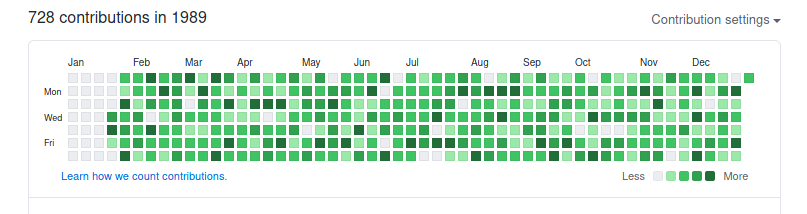
Github streaks are a pretty fun and harmless way of visualizing your
contributions on github or gitlab. Some people use them to brag a little, some
companies use them to check out potential candidates. It s all good as long as
everyone is aware how easily you can manipulate them.
In order to fake a commit date in the past, you have to set the
 I know, I m for sure not the first one to discover this kind of thing, but it
was a fun afternoon project anyways!
 I know, I m for sure not the first one to discover this kind of thing, but it
was a fun afternoon project anyways!
 The virtual version of the annual CCC Congress is underway and feels like a huge playground. Things are bumpy but the participants are still having fun. Of course, we have IRC as a save heaven. That always works.
The virtual world (which is the only thing the sold out tickets are needed for) is really fun. It feels like debugging a DOS game in the 80/90s. Not much works but it is engaging enough to keep poking at things.
 The data formats are 2020 though, the main
 I released version 2.5 of