Search Results: "marv"

20 June 2010

Craig Small: Helping Free Software: Translations

Well the latest version of PSmisc is almost finished, so I pushed the tar archive up to the spot for the translators, waiting for the updates before it gets released.

It reminded me that perhaps a lot of people don't know how their programs get translated. Perhaps there are some that could even contribute. The nice thing about the translation systems is that you don't need to know programming to help.

PSmisc uses the translation project as its method. The program itself uses gettext for the translation part which makes a single text file called a POT file. A translator takes this text file and makes a po file, such as it.po for the Italian translation and then translates, which basically means editing the file, reading each first line of a set and writing the translation on the second line.

For the programmer, once it is setup it is pretty simple to use, just mark your translatable lines and follow some simple rules, mainly about not embedding too much in a string. I've used this system for years for quite a few of my programs and there is little added work for me.

Unfortunately, translating is hard work and should be a long-term commitment. Having a look at the translation project's Translation Matrix and you can see that some languages do suffer, though there are some very good results there too. Particular kudos goes to the Vietnamese group which I think is just Clytie who does a marvellous job and is often the first translation file I get.

For the Debian project, there are many places where translations can occur. There doesn't seem to be a centralised place for this, but some of the places they use translation work are:

<script defer="defer" src="http://static.zemanta.com/readside/loader.js" type="text/javascript"></script>

29 May 2010

Bernd Zeimetz: installing debian on the guruplug server plus

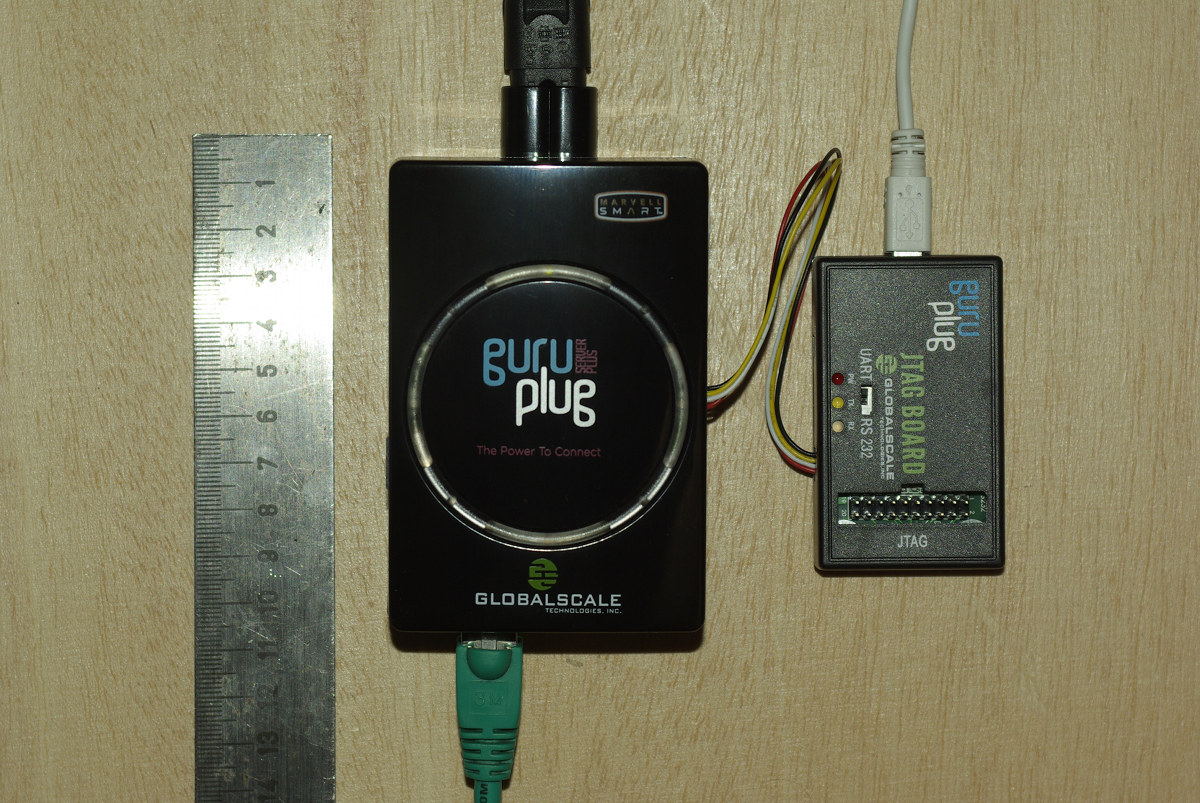
Yesterday finally my GuruPlug Server Plus arrived. Took longer than expected, but as it seems Globalscale had some issues with the power supplies and they were replaced before shipping the GuruPlugs. GuruPlug Server Plus and JTAG Board

The GuruPlug Basically the GuruPlugs are an enhanced version of the well known SheevaPlugs, the biggest difference is probably the need for an external JTAG/UART<>RS232 board to access the serial console. Good thing is that the board comes with a normal JTAG connector and an additional RS232 connector and 2.5V DC power outlet, so it will be useful for other devices, too. Globalscale could have chosen different connectors with less wiggly cables, though. As I was not able to find a useful howto about installing Debian on the Guruplug, I've written down what I did to install Debian unstable on a micro SD card using the Debian installer for the GuruPlug. I did not have a look who modified the Debian installer to work on the plug, but thanks for that! The instructions below are based on Martin Michlmayer's awesome SheevaPlug documentation, the hints from oinkzwurgl.org/guruplug and various forum posts in the plugforum.

Preparations Please note that I'm not resposible for whatever you're doing with your plug. If you follow this tutorial and end up with a brick, it is your fault, not mine. To install the GuruPlug you need the JTAG Board. Connect the UART port to the GuruPlug and the JTAG board to your computer, it should show up as FTDI (thanks for using good chips!) USB<>Serial converter. Serial port settings are 115200, 8-N-1, no hw/sw flow control. The other thing you should prepare is a working tftpd, I'm using aftpd.
apt-get install aftpd
Recent versions share files from /srv/tftp/, in case you're running Lenny /var/lib/tftpboot/ should be the place to drop your files. When everything is connected properly the boot process should show up in minicom, make sure to press some key to enter uBoot. The first thing you should do is to save the original uBoot environment in case you want to restore the factory settings later. Run
printenv
and save the output somewhere.

Upgrading uBoot Unfortunately the uBoot version on the GuruPlug is pretty old and seems to have some issues in booting from USB devices, so the first thing you should do is to upgrade it. You might want to investigate if there is even a better, more recent uBoot version available somewhere, or build one on your own, but I didn't bother and took the uBoot.guruplug.bin from here. The main issue with that is that booting from USB still seems to be buggy (even for FAT partitions) and that ext2load is still not supported. Otherwise it works well :-). I'm mainly following Martin Michlmayer's tutorial again. Download the uBoot.guruplug.bin and drop it into the tftpd directory. Make sure you always set the plug's IP address (ipaddr) and your server's IP address (serverip) properly. I'll use 192.168.121.253 for the plug and 192.168.121.2 for the server in all examples, make sure to change that for your own needs. Stop if something goes wrong, especially when the tftp download failed.
setenv ipaddr 192.168.121.253
setenv serverip 192.168.121.2
tftp 0x6400000 uBoot.guruplug.bin
nand erase 0x00000000 0x0100000
nand write 0x6400000 0x0000000 0x80000
reset
Enter uBoot again after the reset.

Preparing the installer Download uImage and uInitrd to your tftpd directory. Although I've heard that setting mainlineLinux/arcNumber in the uBoot environment is not necessary anymore for very recent kernel, lets set them to make sure the Debian kernel works:
setenv mainlineLinux yes
setenv arcNumber 2097
saveenv
reset
Again, enter uBoot after the reset.

Running the installer Run the following in the uBoot console:
setenv ipaddr 192.168.121.253
setenv serverip 192.168.121.2
tftpboot 0x01100000 uInitrd
tftpboot 0x00800000 uImage
setenv bootargs console=ttyS0,115200n8 base-installer/initramfs-tools/driver-policy=most
bootm 0x00800000 0x01100000
You should see the installer starting now. You might want to follow the following hints:
  • Before configuring the network, go back and set the debconf priority to low, Then continue. While chosing the Debian mirror, chose sid as the Debian version to install. If you don't have sid as choice, use a different mirror. The kernel in testing does not boot on the GuruPlug, you need 2.6.32-13 from sid.
  • You might want to load the 'network console' installer component and continue via ssh. Makes things fater and colourful.
  • Suggested partitioning: I've installed Debian to an 8GB micro SDcard. The SDcard reader is connected via USB and shows up as /dev/sdb (/dev/sda should be the internal NAND and not shown by the installer). I've used 150MB ext2 for /boot and the rest of the space for /, using ext4. You might want to use the noatime option on both filesystems to avoid unnecessary write access to the SDcard. You might choose to add a swap partition, but SDcards are so slow, so I've skipped that.
When you continue the installation, you will hit the following problem:
  • The installer might fail on 'Make the system bootable' (not sure if it does for you, it did so with the kernel from testing).
  • The uBoot is not able to boot from your /boot anyway. USB support is buggy and ext2load missing.
We'll work around these issues by writing the kernel and initrd into the plug's NAND. To do so, enter a shell in the installer and chroot into the install target. We'll then create the necessary uImage.bin and uInitrd and scp them to our tftpd directory:
chroot /target /bin/bash
cd /boot
mkimage -n vmlinuz -A arm -O linux -T kernel -C none -a 0x00008000 -e 0x00008000 -d /boot/vmlinuz uImage.bin
mkimage -n 'vmlinuz initrd' -A arm -O linux -T ramdisk -C gzip -d /boot/initrd.img uInitrd
scp uI* root@192.168.121.2:/srv/tftp
Now leave the shell, finish the installation and reboot, enter uBoot again.

Make the plug bootable To write kernel and initrd to the NAND memory, we have to transfer it via tftp first, then erase the NAND area we want to write to and then write it to the NAND. The values I've chosen here should be fine for the current Debian kernel, but you might need to change the necessary size for the initrd. To do so have a look at the output while transferring the initrd - the transferred bytes are displayed. They have to fit into the amount of bytes you write (the last option to nand write.e).
setenv ipaddr 192.168.121.253
setenv serverip 192.168.121.2
tftp 0x6400000 uImage.bin
nand erase 0x100000 0x400000
nand write.e 0x6400000 0x100000 0x400000
tftp 0x6400000 uInitrd
nand erase 0x500000 0x1fb00000
nand write.e 0x6400000 0x500000 0x600000
Now we need to set the necessary boot options. Make sure to change the root device if you've chosen a different layout from that I've suggested above, or if you're not using a SDcard.
setenv bootargs_debian 'console=ttyS0,115200 root=/dev/sdb2'
setenv bootcmd_nand 'nand start; nand read.e 0x00800000 0x100000 0x400000; nand read.e 0x01100000 0x500000 0x600000'
setenv bootcmd 'setenv bootargs $(bootargs_debian); run bootcmd_nand; bootm 0x00800000 0x01100000'
saveenv
run bootcmd

Finish Your GuruPlug should boot your new Debian installation now. Have fun! I'll try to keep the howto updated for changes in uBoot and the installer, but I might not have the time to so quickly. Patches and comments are welcome!.
root@guruplug:~# uname -a
Linux guruplug 2.6.32-5-kirkwood #1 Fri May 21 05:44:29 UTC 2010 armv5tel GNU/Linux
root@guruplug:~# cat /proc/cpuinfo 
Processor   : Feroceon 88FR131 rev 1 (v5l)
BogoMIPS    : 1192.75
Features    : swp half thumb fastmult edsp 
CPU implementer : 0x56
CPU architecture: 5TE
CPU variant : 0x2
CPU part    : 0x131
CPU revision    : 1
Hardware    : Marvell GuruPlug Reference Board
Revision    : 0000
Serial      : 0000000000000000
root@guruplug:~# 

9 May 2010

Martin Michlmayr: Debian stable installer for SheevaPlug, QNAP TS-11x/TS-21x and OpenRD

We added support for Marvell's Kirkwood platform to the Debian installer a few months ago and a lot of people have installed Debian testing (squeeze) on devices such as the SheevaPlug and QNAP TS-11x/TS-21x. While this works great, some people would prefer to run Debian stable (lenny). Until recently, I thought we wouldn't be able to support lenny in the installer since the kernel in stable doesn't have support for Kirkwood. However, some work by Frans Pop showed me that it would be quite trivial to change the installer so it would install Debian stable plus the kernel from an alternative repository. So from now on, it's possible to install Debian stable (lenny) on the SheevaPlug, QNAP TS-11x/TS-21x and OpenRD. This installation mechanism uses the squeeze installer to install Debian lenny (stable) plus the kernel from a repository I maintain. This repository usually contains the kernel from Debian testing (although I sometimes add the kernel from unstable if it has some important features). Since some users might be wondering which version to install, here is an overview of the benefits and downsides of each version. Debian lenny (stable): it is the current stable version of Debian (version 5.0). Debian squeeze (testing): it is currently under development and will be the next stable version of Debian (version 6.0).

6 May 2010

Andrew Pollock: [life] Crazy few days

Here's why: Zoe's birth Zoe Dianne Pollock was born at 12:30pm PDT, at Lucile Packard Children's Hospital, via Caesarean-section. Her birth weight was 2920 grams (6 lbs, 7 oz) and she's 49.5 centimetres (19.5 inches) long. As for why she was born 11 days early than her previously scheduled early arrival... Monday morning started off like any other normal Monday morning. I got up at 6am to go to the gym with Dan. I got home at around 8am. I asked Sarah if she'd felt any baby movement, and she said she hadn't. Even after some jiggling and a cold glass of orange juice, there was nothing. Not wanting a repeat performance of what happened last time, we wasted no time in heading to Labour and Delivery to get things checked out. When we were nearly at the hospital, Sarah felt some small movement, so that was a relief. When we got to the hospital, they performed a non-stress test as they have previously. They spent a good couple of hours with Sarah hooked up to the monitor, and then the on-call obstetrician asked us how we'd feel about just having the baby today. I asked if there was anything particularly concerning about the NST, and the OB said that she (the baby) was doing marvelously now, but was "less than marvelous" when we first came in. I haven't had a chance since to ask her if there was anything untoward observed during the delivery. Anyway, she (the on call OB) said that rather than have Sarah get stressed out for the following 11 days, she'd talked with our regular OB, and they felt that since she was at 37 weeks (and considered "full term") that it was okay to deliver at that point. At the end of the conversation, it was upgraded to a recommendation, rather than an option. So so much for an attempt at VBAC. We got to the hospital at around 9am, and I think they/we made the decision to deliver at about 10:30am. I had enough time to race home and grab the camera and race back again, and the next thing I knew we were all in the operating room, and Zoe was being delivered. It was amazing getting to see the "extraction". They dropped down the sheet that was blocking our view of the action right at the end, and I got to see (and photograph) Zoe's head and whole body being pulled out. She gave out a little cry, and Sarah and I totally lost it with relief. Things were a bit of a blur after that. I got to come over and meet Zoe while they were weighing her and measuring her, and then they bundled her up and let me take her back to Sarah's head-end on the operating table, so Sarah could get a look at her. Sarah handled this C-section better than last time. She didn't get any nausea, but she still got the itching and involuntary shivering, courtesy of the morphine. While they were still putting Sarah's insides back in, Zoe and I went to the nursery, where they put her under a heater for a little while to warm her up a bit. Then it was back to the recovery room to have a proper meeting with Sarah. Once Sarah was ready to move to the maternity ward, Zoe and I again returned to the nursery, where she got her first bath, had her umbilical cord trimmed some more, and her anti-theft device fitted to her umbilical cord clamp. Then it was off to the maternity ward. I think we were all in the maternity ward by 3pm. After a little while, we managed to get bumped to a private room, which was a lot better than the shared room (the other bed was vacant, but just having more space made a big difference), and that's where we've been ever since. I've stayed each night on the roll away bed, helping out with diaper (sorry Aussies, I've been here too long, and dealt with too many babies, I never think of them as "nappies" any more) changes, and burping and other miscellaneous tasks. Monday night was okay. Tuesday was a bit rough. Sarah didn't get any sleep on Monday night, and the anaesthesia totally wore off and she was in a fair bit of pain. She slept better on Tuesday night, and today, the breastfeeding has been going well, and the post-operative pain is well and truly under control. She's lost a bit of weight since delivery (as is to be expected). She was down to 5 lbs 14 oz (2664 grams) at last night's weigh-in, and at tonight's weigh-in she came in at 5 lbs 13 oz (2636 grams). So the weight loss is starting to plateau. We're already supplementing the breastfeeding with syringes of colostrum/milk that Sarah's pumped previously, so I hope the weight loss will have turned around by tomorrow night's weigh-in. The breastfeeding in general is going pretty well as of today. Mum and bub have both mastered the latch. I think it's just a matter of Sarah's milk coming in now. I've brought forward my 7 weeks paternity leave (an excellent benefit Google offers) to start as of Zoe's delivery. Sarah's Mum arrives on the 19th for 4 weeks, which will be great. We expect to be discharged from hospital on Friday. Luckily we were pretty much all ready for this happening a little bit earlier. We had our last baby classes on the weekend. The nursery is ready enough to bring a baby home to, so aside from Sarah's Mum being disappointed that Zoe's going to be a bit older when she first gets to see her, we're all good. The WiFi in the hospital is great. We've already Skyped with both grandmothers and they've had a chance to see Zoe. We've had a steady trickle of visitors, and the whole baby routine is making the time go pretty quickly.

9 April 2010

Uwe Hermann: coreboot / flashrom in GSOC 2010 -- student application deadline today!

GSoC 2010 logo As you may know there's a Google Summer of Code program again this year. The deadline for student applications is April 9th at 19:00 UTC, so if you're a student and you want to work on a coreboot (open-source BIOS / PC firmware) or flashrom (open-source BIOS chip flasher) project, please apply in time. The following coreboot/flashrom GSOC project ideas have been proposed so far (but you can also suggest your own ideas, of course): See this wiki page for why and how to apply for a coreboot/flashrom project.

26 March 2010

Steve Kemp: I don't like it when people yell at me for no reason at all

Ubuntu always gets a lot of coverage in blogs, and the recent controvesy realisation that it isn't a 100% community-made distribution has triggered yet another round of this. A lot of the controvesy, coverage, and attention can be laid at the feet of Canonical themselves; I think it is fair to say that the visibility, hype, advertising, and the goal of trying to be all things to all men means that even relatively trivial issues can easily get blown out of proportion, and to a certain extent this is a self-inflicted. Live by the sword media & etc ... I think it is fair to say that Ubuntu has attracted a huge swathe of non-technical users. They want something "easy", "free", and "sexy", but more than that they want to use their computer, not develop the operating system. When a particular bug report, with 400+ comments, hits the press we're primarily seeing a marketing-fail rather than technical-fail. The realisation that yes bugs are reported, but no the community (of users) doesn't get input into every single thing is as it should be. If you look back over "controvesy" in the past you'll see comments from the non-technical users which are tantamoint to blackmail:
This should be fixed ... or I'm gonna .. install .. gentoo. yeah. really.
(Similarly you see many comments of the form "I agree", "oh noes", or "Please revert ASAP", rather than technical arguments.) This non-technical nature of the userbase is also readily apparent if you browse through the answers to problems posted in forums for example "Delete this file, I don't know why it works but it fixes it for me!!2!". (I've seen some truly horrific advice upon Ubuntu forums, even so far as chmodding various parts of the system to allow users to write binaries to /bin.) Similarly you'll see that the launchpad is full of generic linux misunderstandings and bugs that aren't "real". The unfortunate fact is that the Ubuntu bug tracker is a wasteland in many places: The tight timescale of releases combined with the sheer number of incoming bug reports means that often issues are overlooked. (For example one bug that bit a colleague is #402188 - on the one hand it is a trivial bug, on the other hand its readily apparent to users. If something like that can be missed it makes you wonder ..?) ObRandom: Ubuntu has 100 bugs open against its Vim package, some of which have been marked as NEW since 2009 (ie. untouched, ignored). By contrast the Debian vim package has way fewer bugs. I'm sure there are packages where the situation is reversed but I think is not an unusual comparison. Finally in addition to sheer numbers of bugs, and tight timescales, it has to be noted that the relative number of developers to users is miniscule, and this in turn has lead to some interesting solutions. The Ubuntu PPA system (personal package archive) should be a good thing. It should allow people to submit new packages for testing, for bugfixes, and for more visibility. Instead downloading a PPA file is no different than going to download.com and downloading a random binary - sure it might be legit, but there's no oversight, no quality control, and most likely no future updates.
Ubuntu as a distribution is interesting, and I'm not trying to be overly critical - A year or two ago had somebody thrown money at me I might have been inclined to accept it. I think most of the perceived problems stem from a single common source, which is largely the issue of scale. (e.g. bug reports to bug handlers. developer numbers to user numbers.)
There are many good things to be said about Ubuntu (& Canonical) in addition to the negative ones that we see in the press or that I've perceived and mentioned above. The truth is it works for a lot of people, and the growing pains will continue until it either dies or both its audience and itself matures. Either way I don't hate Ubuntu, in the same way that I don't hate Microsoft, Oracle, Fedora, Gentoo, or other mass-entities. There are pros and cons to be made for most of them, (and of course Debian itself is no different).
However I will say that every time I see people write "If you want a sexy/shiny/easy to use Linux desktop then install Ubuntu" I glance over at my Debian Lenny desktop, marvel at how sexy, shiny and easy to use it is, and get a little bit disappointed at our own marketing failure(s).
ObFilm: Day of the Woman

10 March 2010

Filippo Giunchedi: welcome to ikiwiki

This was long due, I switched from pyblosxom to the marvelous ikiwiki and gave a general revamp to my website by tweaking ikiwiki's default templates. note: the template still needs a general cleanup, don't look at it as it is not pretty (nor are the CSSes) With some luck and mod_rewrite karma nobody's feed readers nor planets will be flooded. Comments are powered by disqus.

21 February 2010

Martin Michlmayr: Debian Installer 6.0 Alpha1 available

The Debian installer team today announced the alpha1 version of the installer for Debian squeeze (6.0). This release adds a lot of new features but I just wanted to highlight the ARM related enhancements. With this release, Marvell's Kirkwood platform is supported. Specifically, the installer supports the following devices: QNAP TS-110 and TS-119, QNAP TS-210, TS-219 and TS-219P, SheevaPlug and OpenRD. In addition to Kirkwood support, Wouter Verhelst added support for the Intel Storage System SS4000-E.

7 November 2009

Martin Michlmayr: Marvell publishes roadmap of its ARM series called Armada

For those who haven't seen it yet, LinuxDevices published an article recently looking at the roadmap of Marvell's ARM line. The new line is called Armada and for Debian the Armada 510 (known as Dove) is of particular interest. To me, it essentially looks like a Kirkwood (the current platform) but with ARMv6/v7 (instead of ARMv5), integrated VGA and some other features. According to the article, the Armada 510 is aimed at "high-end smartbooks and tablets". I'm happy to see the integration of VGA because I'd like to see more ARM based smartbooks, tablets and thin clients. At the same time, I'm worried that the VGA will be some proprietary chip without proper open source drivers and I'm surprised that the new chip only offers 1.2 GHz. After all, the current Kirkwood chip clocks 1.2 GHz already, so I'd have expected an increase to 2.0 GHz for the next generation.

12 October 2009

Martin Michlmayr: Debian installer for SheevaPlug available

You can now use the Debian installer to install Debian on the Marvell SheevaPlug. This routine will install Debian testing (squeeze), which is currently under development. The installer itself is also under development, so there may be problems from time to time but it should generally work pretty well. The Debian installer doesn't support installations to flash, but you can use it to install to a USB stick or disk as well as to an SD card. Here are installation instructions.

11 October 2009

Martin Michlmayr: Upgrading SheevaPlug's U-Boot to version 3.4.19

Marvell made a new version of U-Boot for the SheevaPlug available last month. This version, 3.4.19, integrates SD card support and improves support for FAT32 USB partitions (although USB support in general is still a bit flaky). This page describes how to install this new version of U-Boot on your SheevaPlug. First of all, download the SheevaPlug U-Boot 3.4.19. Unpack the zip file and copy the file u-boot-3.4.19/u-boot-rd88f6281Sheevaplug_400db_nand.bin to your TFTP server. I suggest you call the file u-boot.bin. Then start your SheevaPlug and type the following:
setenv serverip 192.168.1.2 # IP of your TFTP server
setenv ipaddr 192.168.1.200
bubt u-boot.bin
The upgrade process will ask whether you want to change the environment:
**Warning**
If U-Boot Endiannes is going to change (LE->BE or BE->LE),
Then Env parameters should be overridden..
Override Env parameters? (y/n) n
Make sure to answer "n" here. We also need to make a small change to the u-boot configuration because this version of u-boot no longer accepts the console parameter we have been using. Thanks to Tom Rinehart for pointing this out. Instead of console, we'll therefore add a new bootargs_console and update bootcmd to make use of it:
setenv bootargs_console console=ttyS0,115200
printenv bootcmd
You'll see that bootcmd contains $(console). You have to set a new bootcmd and change the console parameter to $(bootargs_console). In my case, I'd type:
setenv bootcmd 'setenv bootargs $(bootargs_console); run bootcmd_usb; bootm 0x400000 0x0800000; reset'
Make sure you don't forget the quotes! Finally, save the environment and restart your machine:
saveenv
reset

10 October 2009

Martin Michlmayr: Debian installer for QNAP TS-119, TS-219 and TS-219P available

The Debian installer for QNAP TS-119, TS-219 and TS-219P devices (based on Marvell's 1.2 GHz Kirkwood chip) is now available, together with installation instructions. The installer is still under development and it will install Debian testing, which is also under development. However, I think it's working pretty well. If you try the installer, please send me feedback.

6 June 2009

Martin Michlmayr: Fan control on the D-Link DNS-323

The kernel in Debian doesn't have support for the fan control chip on the D-Link DNS-323. Since some people said that their device runs quite hot after installing Debian, I've prepared a 2.6.29 based kernel that includes the fan driver. If you want to install this kernel, edit the file /etc/apt/sources.list and add the following line:
deb http://people.debian.org/~tbm/orion lenny main
Now you can install the new kernel:
apt-get update
apt-get install linux-image-orion5x
After a reboot, you can control the fan this way:
echo   0 > /sys/class/hwmon/hwmon?/device/pwm1  # turn it off
echo 255 > /sys/class/hwmon/hwmon?/device/pwm1  # turn it to full speed
Any values between 0 and 255 will work. According to Anselmo Luginbuhl, you should also be able to use the lm-sensors package to automatically control the fan: "Execute pwmconfig, it will make some tests and generate the fancontrol config file. At the end of the procedure it will ask you to "Select fan output to configure, or other action:", just be sure to pass through choice "1" or it would not fill in the configuration file, save the configuration and start the daemon /etc/init.d/fancontrol. Probably the only thing that needs some attention to get an optimal result is to choose the right parameters for max and min temperature at which the fan should start or stop to minimize the C and the noise." Finally, this kernel also includes some performance patches from Marvell, so you might see some performance increases too.

18 May 2009

Sven Mueller: Link collection 2009/05/18

That s it for now, will update the post if I find more interesting links in the next few days.

16 May 2009

Marco d'Itri: Installing Debian on the Sheevaplug

This document explains how to use deboostrap --foreign to build from scratch and install a minimal Debian system on the Sheevaplug (but it is equally applicable to many other embedded systems). The only piece missing to be able to install from bare metal is a working kernel and initramfs pair, so this document assumes that you already have a kernel which can mount the root file system from a USB key. For the Sheevaplug, the factory kernel in the internal NAND flash will work fine. The Debian kernel package puts us in a chicken and egg situation: it cannot mount the root without an initramfs (because all drivers are modular), but we cannot build one until we can boot the system. I suppose that, as an exercise of style, somebody could create a minimal initramfs with busybox and the kernel modules needed to mount the root and then mount it manually, but if you really lack a working kernel then it's probably faster to boot the file system image for the first time using qemu and the "versatile" debian-installer target. The first step is to run the first stage of debootstrap on another system (which does not need to be ARM), to build a temporary root file system. I use the --variant and --include options to build the smallest possible system with network support, but they can be omitted.
debootstrap \
         --foreign --arch=armel \
         --variant=minbase \
         --include=linux-image-2.6-kirkwood,module-init-tools,udev,netbase,
                   net-tools,ifupdown,iproute,whiptail,vim-tiny \
         sid ./target/ http://ftp.it.debian.org/debian/
As usual when using debootstrap, some manual configuration is needed:
cd target/
echo bokassa.mi.bofh.it > etc/hostname
vi etc/network/interfaces
vi etc/resolv.conf
echo LANG=C > etc/default/locale
echo '127.0.0.1 localhost' > etc/hosts
cat <<END > etc/fstab
/dev/root / ext3 noatime 0 1
tmpfs /tmp tmpfs defaults 0 0
#/tmp /var/tmp none bind 0 0
END
I took some hints from http://wiki.debian.org/ReadonlyRoot to reduce writes to the flash file system:
# the blkid cache is evil anyway
ln -s /dev/null etc/blkid.tab
# this link will be created anyway by the package
ln -s /var/lib/initscripts/nologin etc/nologin
# it's better to not use a static mtab with modern kernels
ln -s /proc/mounts etc/mtab
# unless you plan to use multiple removable network interfaces, persistent
# interface names are not needed
: > etc/udev/rules.d/75-persistent-net-generator.rules
Two small workarounds are needed:
# if this is not set then the preinst of linux-image-* will die trying
# to ask a debconf question in the debootstrap second stage
echo 'do_initrd = yes' > etc/kernel-img.conf
# a workaround for bug #520742
: > etc/udev/disabled
Now you can format a USB pen drive and copy the root file system on it:
mke2fs /dev/sdb1
tune2fs -i 0 -c 0 /dev/sdb1
mount /dev/sdb1 /mnt/
rsync -aH target/ /mnt/
umount /mnt/
After powering the plug press a key to get to the U-Boot prompt and use the factory kernel to boot from USB:
setenv bootargs console=ttyS0,115200 root=/dev/sda1 rootdelay=10 panic=10 init=/bin/bash
run bootcmd
Then you can run the second stage of debootstrap, finish the bare minimal configuration and start init:
./debootstrap/debootstrap --second-stage
# disable the gettys for /dev/tty[1-6], which do not exist
vi /etc/inittab
# and add one for the serial console
echo 'T0:2345:respawn:/sbin/getty -L ttyS0 115200 linux' >> /etc/inittab
# do not forget to set the root password or you will not be able to login...
vi /etc/shadow
rm /etc/udev/disabled
exec /bin/bash
mount / -o ro,remount
exec /sbin/init
Congratulations, now you can login on the system and start to install the packages you like:
echo 'deb http://ftp.it.debian.org/debian/ unstable main' > /etc/apt/sources.list
echo 'APT   Install-Recommends "false";  ;' > /etc/apt/apt.conf.d/no-recommends
apt-get update
# dash is much faster
apt-get install dash
dpkg-divert --add /bin/sh
ln -sf dash /bin/sh
# I do not like these, YMMV
rm /vmlinuz /initrd.img
rmdir /selinux /srv
# the kernel is able to read the time from the RTC by itself, and this
# will allow using a read only root
echo HWCLOCKACCESS=no >> /etc/default/rcS
# faster boot
echo CONCURRENCY=shell >> /etc/default/rcS
# useless on this platform
mv /etc/rcS.d/S01glibc.sh /etc/rcS.d/K01glibc.sh
dpkg-reconfigure tzdata
apt-get install openssh-server screen iptables wget less
U-Boot requires that the kernel and initramfs have a special header:
apt-get uboot-mkimage
cd /boot/
mkimage -A arm -O linux -T kernel  -C none -a 0x00008000 -e 0x00008000 \
  -n Linux-2.6.29-2 -d vmlinuz-2.6.29-2-kirkwood uImage
mkimage -A arm -O linux -T ramdisk -C gzip -a 0x00000000 -e 0x00000000 \
  -n initramfs -d initrd.img-2.6.29-2-kirkwood uInitrd
Now you can reboot and configure u-boot to boot from the USB device. This is the variables scheme I like and it is not mandatory in any way, so I recommend that you read and understand the existing configuration before modifying it (some lines have been broken for readability):
setenv bootargs_nand $(bootargs)
setenv bootcmd_nand $(bootcmd)
setenv bootargs_root root=/dev/sda1
setenv bootargs_misc 'ro panic=10
  mtdparts=nand_mtd:0x400000@0x100000(uImage),0x1fb00000@0x500000(rootfs)'
setenv bootcmd_usb 'usb start; ext2load usb 0:1 0x00200000 /boot/uImage;
  ext2load usb 0:1 0x01100000 /boot/uInitrd'
setenv bootcmd 'setenv bootargs $(console) $(bootargs_root) $(bootargs_misc)
  $(bootargs_more); run bootcmd_usb; bootm 0x00200000 0x01100000'
Since now you are not using anymore the Marvell kernel tree it is mandatory to set these two variables and reboot:
setenv mainlineLinux yes
setenv arcNumber 2097
saveenv
reset
Installation to SD is identical, but requires an updated version of U-Boot with SD support. Due to a kernel bug which prevents autoloading the driver you will need to add mvsdio and mmc_block to /etc/initramfs-tools/modules and rebuild the initramfs. (Yes, the naming theme I use at home is "african dictators"...)

13 May 2009

Martin Michlmayr: Update on QNAP TS-119/TS-219 kernel support

I mentioned a few weeks ago that initial kernel support for the QNAP TS-119 and TS-219 Turbo NAS got accepted for 2.6.30 but that there were some issues left. Here's an update: The SATA and flash fixes are already in our 2.6.29 kernel.

5 May 2009

Luca Bruno: Inkscape 0.47 (tentative) release plan and about-screen contest


Time has come again for a new shiny release of Inkscape, namely 0.47
So Scislac recently published a raw release plan, and we ve already entered the soft freeze period. The stable release is currently due for middle of June, but right now it s a too early stage to fix it on a calendar Meanwhile, we re running the usual about-screen contest, hosted once again at DeviantArt. The contest will be running till May 25th so start working on your sumission right now and have the opportunity to let your signature on this marvelous release! Be sure to check the rules for it first Still a lot of work has to be done, so if you re a bug-hunter (win and and OSX much appreciated), a translator or a documentation writer, feel free to get in touch with the inkscape community and help us make another great release.

29 April 2009

Clint Adams: Here she comes, big as life

What seems like eons ago, I ordered one of those SheevaPlug Development Kits. After about six weeks, they got around to shipping it, and then, yesterday, after I assume a tortoise had piloted it across the country on broken tricycle, it was finally delivered to me. I booted it up, observed that there was some kind of Ubuntu thing on it, and set myself to correct that problem. Within an hour I had managed to lock myself out. Here is something I should have read beforehand. Thanks to Martin Michlmayr, it is now running Debian and allowing me to log in. Here are some steps to follow if you would like to boot Debian off of a USB stick plugged into your Sheevaplug: That should be all there is to it. Next I'm wondering if SDIO wireless cards work.

23 April 2009

Matthew Palmer: Insane/Brilliant Idea of the Day

I've been talking serial consoles with a couple of the other guys at work: how nice they are to have for machines in the datacenter, how annoying it is that vPro serial-over-LAN doesn't seem to be robust (yet?), and how serial access concentrators are lung-and-kidney expensive (especially when you've got 50-some racks to outfit). This discussion, combined with my ongoing embedded-hardware-fascination lust for a SheevaPlug appears to have spurred my brain into coming up with a Brilliant Idea: tie a SheevaPlug to a pile of USB to serial adapters and use that as your per-rack serial concentrator. Imagine: faffenheimer, a dedicated server you manage for a customer, and located in rack 27 of your DC, has just crashed, and you'd like to know WTF has happened rather than just blindly reboot, but you're in the office 15 minutes away from the DC floor, and the customer's going to want that machine back up and running pretty quickly.
workstation:~/porn$ ssh rack27.serial
rack27:~$ sconsole faffenheimer
[screen session attached]
[minicom running, shows the horror of a kernel crash dump]
[oh look at that, kernel bug]
^A ESC
[pgup pgup]
[enter]
[pgdn pgdn]
[enter]
^A >/tmp/faffenheimer-crash-dump
^A d
rack27:~$ exit
workstation:~/porn$ scp rack27.serial:/tmp/faffenheimer-crash-dump ~
workstation:~/porn$ powercycle rack27 faffenheimer
Shiny! We got a crash dump in a minute or so (rather than having to take phonecam photos of KVM screens in the DC), never had to leave our comfy seat, and the machine's on it's way back up. We're now free to pursue diagnostic activities on that crash dump at our leisure. 10 minutes later, the downtime for faffenheimer that was automatically set when we ran powercycle runs out and Nagios sends us threatening messages. Hmm, something's gone wrong here. Back into the console...
workstation:~/porn$ ssh rack27.serial
rack27:~$ sconsole faffenheimer
[screen session attached]
[Boot is hung waiting for root password after initrd has bombed]
[Type root password]
[Oh look, the root MD appears to have come asunder]
[clickety-click... fixee fixee]
[reboot]
The more I think about this, the more I reckon I'm onto a bona fide winner. The sheevaplug is a powerful ARM-based system with USB/ethernet/SD ports that is packaged literally in it's own power supply wall wart -- it's a plastic box with power plug prongs poking out the side. That's all there is to it. The USB to serial adapter things are likely to be a bit more of a pain, but I've played with enough of them by now to not be too scared. So, you plug the Sheeva into a power socket, plug an Ethernet cable and USB hub into the Sheeva, configure things a bit so that the system knows which serial adapter maps to which machine, and you're away. Oh, and the best bit: the Sheeva apparently draws as little as 2W when idle. A whole datacentre's worth of serial goodness for about a server's worth of power. The cost per rack should be somewhere below AU$250, especially in bulk. Let's see if I can convince work to spring for a Sheeva, a USB hub, and a half dozen or so USB to serial adapters to test this whole thing out. Given that the whole thing looks like it'd cost less than AU$250 (plus my R&D time), I can't imagine it'll be too hard a sell to at least give it a go. Watch this space...

2 April 2009

Martin Michlmayr: Test kernel for Orion with performance patches available

Marvell posted some performance patches for ARM that speed up the copy_to_user and clear_user functions which are used to copy data around. I see quite a bit of performance increase with these patches on Orion, and I've prepared a test kernel so you can try them out too. This kernel should be treated as experimental, but I'm looking for testers with Orion-based hardware (e.g. QNAP TS-109, TS-209, and TS-409) who are interested in giving it a go. If your system has a rescue mode (the QNAP devices and the HP mv2120 do), I suggest you first make a backup of your flash. On the QNAP devices, you can do this with:
cat /dev/mtdblock1 /dev/mtdblock2 /dev/mtdblock3 > qnapimg.bin
Then edit the file /etc/apt/sources.list and add the following line:
deb http://people.debian.org/~tbm/orion lenny main
Now you can install the new kernel:
apt-get update
apt-get install linux-image-2.6.29-1-orion5x
Please ignore the warning that the package cannot be authenticated. This is because I haven't signed the repository. After the installation of the kernel, reboot and do some tests: Do you see any speedup? Do you see any problems?

Next.

Previous.