Search Results: "andy"

13 September 2022

Alberto Garc a: Adding software to the Steam Deck with systemd-sysext

Yakuake on SteamOS Introduction: an immutable OS The Steam Deck runs SteamOS, a single-user operating system based on Arch Linux. Although derived from a standard package-based distro, the OS in the Steam Deck is immutable and system updates replace the contents of the root filesystem atomically instead of using the package manager. An immutable OS makes the system more stable and its updates less error-prone, but users cannot install additional packages to add more software. This is not a problem for most users since they are only going to run Steam and its games (which are stored in the home partition). Nevertheless, the OS also has a desktop mode which provides a standard Linux desktop experience, and here it makes sense to be able to install more software. How to do that though? It is possible for the user to become root, make the root filesytem read-write and install additional software there, but any changes will be gone after the next OS update. Modifying the rootfs can also be dangerous if the user is not careful. Ways to add additional software The simplest and safest way to install additional software is with Flatpak, and that s the method recommended in the Steam Deck Desktop FAQ. Flatpak is already installed and integrated in the system via the Discover app so I won t go into more details here. However, while Flatpak works great for desktop applications not every piece of software is currently available, and Flatpak is also not designed for other types of programs like system services or command-line tools. Fortunately there are several ways to add software to the Steam Deck without touching the root filesystem, each one with different pros and cons. I will probably talk about some of them in the future, but in this post I m going to focus on one that is already available in the system: systemd-sysext. About systemd-sysext This is a tool included in recent versions of systemd and it is designed to add additional files (in the form of system extensions) to an otherwise immutable root filesystem. Each one of these extensions contains a set of files. When extensions are enabled (aka merged ) those files will appear on the root filesystem using overlayfs. From then on the user can open and run them normally as if they had been installed with a package manager. Merged extensions are seamlessly integrated with the rest of the OS. Since extensions are just collections of files they can be used to add new applications but also other things like system services, development tools, language packs, etc. Creating an extension: yakuake I m using yakuake as an example for this tutorial since the extension is very easy to create, it is an application that some users are demanding and is not easy to distribute with Flatpak. So let s create a yakuake extension. Here are the steps: 1) Create a directory and unpack the files there:
$ mkdir yakuake
$ wget https://steamdeck-packages.steamos.cloud/archlinux-mirror/extra/os/x86_64/yakuake-21.12.1-1-x86_64.pkg.tar.zst
$ tar -C yakuake -xaf yakuake-*.tar.zst usr
2) Create a file called extension-release.NAME under usr/lib/extension-release.d with the fields ID and VERSION_ID taken from the Steam Deck s /etc/os-release file.
$ mkdir -p yakuake/usr/lib/extension-release.d/
$ echo ID=steamos > yakuake/usr/lib/extension-release.d/extension-release.yakuake
$ echo VERSION_ID=3.3.1 >> yakuake/usr/lib/extension-release.d/extension-release.yakuake
3) Create an image file with the contents of the extension:
$ mksquashfs yakuake yakuake.raw
That s it! The extension is ready. A couple of important things: image files must have the .raw suffix and, despite the name, they can contain any filesystem that the OS can mount. In this example I used SquashFS but other alternatives like EroFS or ext4 are equally valid. NOTE: systemd-sysext can also use extensions from plain directories (i.e skipping the mksquashfs part). Unfortunately we cannot use them in our case because overlayfs does not work with the casefold feature that is enabled on the Steam Deck. Using the extension Once the extension is created you simply need to copy it to a place where systemd-systext can find it. There are several places where they can be installed (see the manual for a list) but due to the Deck s partition layout and the potentially large size of some extensions it probably makes more sense to store them in the home partition and create a link from one of the supported locations (/var/lib/extensions in this example):
(deck@steamdeck ~)$ mkdir extensions
(deck@steamdeck ~)$ scp user@host:/path/to/yakuake.raw extensions/
(deck@steamdeck ~)$ sudo ln -s $PWD/extensions /var/lib/extensions
Once the extension is installed in that directory you only need to enable and start systemd-sysext:
(deck@steamdeck ~)$ sudo systemctl enable systemd-sysext
(deck@steamdeck ~)$ sudo systemctl start systemd-sysext
After this, if everything went fine you should be able to see (and run) /usr/bin/yakuake. The files should remain there from now on, also if you reboot the device. You can see what extensions are enabled with this command:
$ systemd-sysext status
HIERARCHY EXTENSIONS SINCE
/opt      none       -
/usr      yakuake    Tue 2022-09-13 18:21:53 CEST
If you add or remove extensions from the directory then a simple systemd-sysext refresh is enough to apply the changes. Unfortunately, and unlike distro packages, extensions don t have any kind of post-installation hooks or triggers, so in the case of Yakuake you probably won t see an entry in the KDE application menu immediately after enabling the extension. You can solve that by running kbuildsycoca5 once from the command line. Limitations and caveats Using systemd extensions is generally very easy but there are some things that you need to take into account:
  1. Using extensions is easy (you put them in the directory and voil !). However, creating extensions is not necessarily always easy. To begin with, any libraries, files, etc., that your extensions may need should be either present in the root filesystem or provided by the extension itself. You may need to combine files from different sources or packages into a single extension, or compile them yourself.
  2. In particular, if the extension contains binaries they should probably come from the Steam Deck repository or they should be built to work with those packages. If you need to build your own binaries then having a SteamOS virtual machine can be handy. There you can install all development files and also test that everything works as expected. One could also create a Steam Deck SDK extension with all the necessary files to develop directly on the Deck
  3. Extensions are not distribution packages, they don t have dependency information and therefore they should be self-contained. They also lack triggers and other features available in packages. For desktop applications I still recommend using a system like Flatpak when possible.
  4. Extensions are tied to a particular version of the OS and, as explained above, the ID and VERSION_ID of each extension must match the values from /etc/os-release. If the fields don t match then the extension will be ignored. This is to be expected because there s no guarantee that a particular extension is going to work with a different version of the OS. This can happen after a system update. In the best case one simply needs to update the extension s VERSION_ID, but in some cases it might be necessary to create the extension again with different/updated files.
  5. Extensions only install files in /usr and /opt. Any other file in the image will be ignored. This can be a problem if a particular piece of software needs files in other directories.
  6. When extensions are enabled the /usr and /opt directories become read-only because they are now part of an overlayfs. They will remain read-only even if you run steamos-readonly disable !!. If you really want to make the rootfs read-write you need to disable the extensions (systemd-sysext unmerge) first.
  7. Unlike Flatpak or Podman (including toolbox / distrobox), this is (by design) not meant to isolate the contents of the extension from the rest of the system, so you should be careful with what you re installing. On the other hand, this lack of isolation makes systemd-sysext better suited to some use cases than those container-based systems.
Conclusion systemd extensions are an easy way to add software (or data files) to the immutable OS of the Steam Deck in a way that is seamlessly integrated with the rest of the system. Creating them can be more or less easy depending on the case, but using them is extremely simple. Extensions are not packages, and systemd-sysext is not a package manager or a general-purpose tool to solve all problems, but if you are aware of its limitations it can be a practical tool. It is also possible to share extensions with other users, but here the usual warning against installing binaries from untrusted sources applies. Use with caution, and enjoy!

30 August 2022

John Goerzen: The PC & Internet Revolution in Rural America

Inspired by several others (such as Alex Schroeder s post and Szcze uja s prompt), as well as a desire to get this down for my kids, I figure it s time to write a bit about living through the PC and Internet revolution where I did: outside a tiny town in rural Kansas. And, as I ve been back in that same area for the past 15 years, I reflect some on the challenges that continue to play out. Although the stories from the others were primarily about getting online, I want to start by setting some background. Those of you that didn t grow up in the same era as I did probably never realized that a typical business PC setup might cost $10,000 in today s dollars, for instance. So let me start with the background.

Nothing was easy This story begins in the 1980s. Somewhere around my Kindergarten year of school, around 1985, my parents bought a TRS-80 Color Computer 2 (aka CoCo II). It had 64K of RAM and used a TV for display and sound. This got you the computer. It didn t get you any disk drive or anything, no joysticks (required by a number of games). So whenever the system powered down, or it hung and you had to power cycle it a frequent event you d lose whatever you were doing and would have to re-enter the program, literally by typing it in. The floppy drive for the CoCo II cost more than the computer, and it was quite common for people to buy the computer first and then the floppy drive later when they d saved up the money for that. I particularly want to mention that computers then didn t come with a modem. What would be like buying a laptop or a tablet without wifi today. A modem, which I ll talk about in a bit, was another expensive accessory. To cobble together a system in the 80s that was capable of talking to others with persistent storage (floppy, or hard drive), screen, keyboard, and modem would be quite expensive. Adjusted for inflation, if you re talking a PC-style device (a clone of the IBM PC that ran DOS), this would easily be more expensive than the Macbook Pros of today. Few people back in the 80s had a computer at home. And the portion of those that had even the capability to get online in a meaningful way was even smaller. Eventually my parents bought a PC clone with 640K RAM and dual floppy drives. This was primarily used for my mom s work, but I did my best to take it over whenever possible. It ran DOS and, despite its monochrome screen, was generally a more capable machine than the CoCo II. For instance, it supported lowercase. (I m not even kidding; the CoCo II pretty much didn t.) A while later, they purchased a 32MB hard drive for it what luxury! Just getting a machine to work wasn t easy. Say you d bought a PC, and then bought a hard drive, and a modem. You didn t just plug in the hard drive and it would work. You would have to fight it every step of the way. The BIOS and DOS partition tables of the day used a cylinder/head/sector method of addressing the drive, and various parts of that those addresses had too few bits to work with the big drives of the day above 20MB. So you would have to lie to the BIOS and fdisk in various ways, and sort of work out how to do it for each drive. For each peripheral serial port, sound card (in later years), etc., you d have to set jumpers for DMA and IRQs, hoping not to conflict with anything already in the system. Perhaps you can now start to see why USB and PCI were so welcomed.

Sharing and finding resources Despite the two computers in our home, it wasn t as if software written on one machine just ran on another. A lot of software for PC clones assumed a CGA color display. The monochrome HGC in our PC wasn t particularly compatible. You could find a TSR program to emulate the CGA on the HGC, but it wasn t particularly stable, and there s only so much you can do when a program that assumes color displays on a monitor that can only show black, dark amber, or light amber. So I d periodically get to use other computers most commonly at an office in the evening when it wasn t being used. There were some local computer clubs that my dad took me to periodically. Software was swapped back then; disks copied, shareware exchanged, and so forth. For me, at least, there was no online to download software from, and selling software over the Internet wasn t a thing at all.

Three Different Worlds There were sort of three different worlds of computing experience in the 80s:
  1. Home users. Initially using a wide variety of software from Apple, Commodore, Tandy/RadioShack, etc., but eventually coming to be mostly dominated by IBM PC clones
  2. Small and mid-sized business users. Some of them had larger minicomputers or small mainframes, but most that I had contact with by the early 90s were standardized on DOS-based PCs. More advanced ones had a network running Netware, most commonly. Networking hardware and software was generally too expensive for home users to use in the early days.
  3. Universities and large institutions. These are the places that had the mainframes, the earliest implementations of TCP/IP, the earliest users of UUCP, and so forth.
The difference between the home computing experience and the large institution experience were vast. Not only in terms of dollars the large institution hardware could easily cost anywhere from tens of thousands to millions of dollars but also in terms of sheer resources required (large rooms, enormous power circuits, support staff, etc). Nothing was in common between them; not operating systems, not software, not experience. I was never much aware of the third category until the differences started to collapse in the mid-90s, and even then I only was exposed to it once the collapse was well underway. You might say to me, Well, Google certainly isn t running what I m running at home! And, yes of course, it s different. But fundamentally, most large datacenters are running on x86_64 hardware, with Linux as the operating system, and a TCP/IP network. It s a different scale, obviously, but at a fundamental level, the hardware and operating system stack are pretty similar to what you can readily run at home. Back in the 80s and 90s, this wasn t the case. TCP/IP wasn t even available for DOS or Windows until much later, and when it was, it was a clunky beast that was difficult. One of the things Kevin Driscoll highlights in his book called Modem World see my short post about it is that the history of the Internet we usually receive is focused on case 3: the large institutions. In reality, the Internet was and is literally a network of networks. Gateways to and from Internet existed from all three kinds of users for years, and while TCP/IP ultimately won the battle of the internetworking protocol, the other two streams of users also shaped the Internet as we now know it. Like many, I had no access to the large institution networks, but as I ve been reflecting on my experiences, I ve found a new appreciation for the way that those of us that grew up with primarily home PCs shaped the evolution of today s online world also.

An Era of Scarcity I should take a moment to comment about the cost of software back then. A newspaper article from 1985 comments that WordPerfect, then the most powerful word processing program, sold for $495 (or $219 if you could score a mail order discount). That s $1360/$600 in 2022 money. Other popular software, such as Lotus 1-2-3, was up there as well. If you were to buy a new PC clone in the mid to late 80s, it would often cost $2000 in 1980s dollars. Now add a printer a low-end dot matrix for $300 or a laser for $1500 or even more. A modem: another $300. So the basic system would be $3600, or $9900 in 2022 dollars. If you wanted a nice printer, you re now pushing well over $10,000 in 2022 dollars. You start to see one barrier here, and also why things like shareware and piracy if it was indeed even recognized as such were common in those days. So you can see, from a home computer setup (TRS-80, Commodore C64, Apple ][, etc) to a business-class PC setup was an order of magnitude increase in cost. From there to the high-end minis/mainframes was another order of magnitude (at least!) increase. Eventually there was price pressure on the higher end and things all got better, which is probably why the non-DOS PCs lasted until the early 90s.

Increasing Capabilities My first exposure to computers in school was in the 4th grade, when I would have been about 9. There was a single Apple ][ machine in that room. I primarily remember playing Oregon Trail on it. The next year, the school added a computer lab. Remember, this is a small rural area, so each graduating class might have about 25 people in it; this lab was shared by everyone in the K-8 building. It was full of some flavor of IBM PS/2 machines running DOS and Netware. There was a dedicated computer teacher too, though I think she was a regular teacher that was given somewhat minimal training on computers. We were going to learn typing that year, but I did so well on the very first typing program that we soon worked out that I could do programming instead. I started going to school early these machines were far more powerful than the XT at home and worked on programming projects there. Eventually my parents bought me a Gateway 486SX/25 with a VGA monitor and hard drive. Wow! This was a whole different world. It may have come with Windows 3.0 or 3.1 on it, but I mainly remember running OS/2 on that machine. More on that below.

Programming That CoCo II came with a BASIC interpreter in ROM. It came with a large manual, which served as a BASIC tutorial as well. The BASIC interpreter was also the shell, so literally you could not use the computer without at least a bit of BASIC. Once I had access to a DOS machine, it also had a basic interpreter: GW-BASIC. There was a fair bit of software written in BASIC at the time, but most of the more advanced software wasn t. I wondered how these .EXE and .COM programs were written. I could find vague references to DEBUG.EXE, assemblers, and such. But it wasn t until I got a copy of Turbo Pascal that I was able to do that sort of thing myself. Eventually I got Borland C++ and taught myself C as well. A few years later, I wanted to try writing GUI programs for Windows, and bought Watcom C++ much cheaper than the competition, and it could target Windows, DOS (and I think even OS/2). Notice that, aside from BASIC, none of this was free, and none of it was bundled. You couldn t just download a C compiler, or Python interpreter, or whatnot back then. You had to pay for the ability to write any kind of serious code on the computer you already owned.

The Microsoft Domination Microsoft came to dominate the PC landscape, and then even the computing landscape as a whole. IBM very quickly lost control over the hardware side of PCs as Compaq and others made clones, but Microsoft has managed in varying degrees even to this day to keep a stranglehold on the software, and especially the operating system, side. Yes, there was occasional talk of things like DR-DOS, but by and large the dominant platform came to be the PC, and if you had a PC, you ran DOS (and later Windows) from Microsoft. For awhile, it looked like IBM was going to challenge Microsoft on the operating system front; they had OS/2, and when I switched to it sometime around the version 2.1 era in 1993, it was unquestionably more advanced technically than the consumer-grade Windows from Microsoft at the time. It had Internet support baked in, could run most DOS and Windows programs, and had introduced a replacement for the by-then terrible FAT filesystem: HPFS, in 1988. Microsoft wouldn t introduce a better filesystem for its consumer operating systems until Windows XP in 2001, 13 years later. But more on that story later.

Free Software, Shareware, and Commercial Software I ve covered the high cost of software already. Obviously $500 software wasn t going to sell in the home market. So what did we have? Mainly, these things:
  1. Public domain software. It was free to use, and if implemented in BASIC, probably had source code with it too.
  2. Shareware
  3. Commercial software (some of it from small publishers was a lot cheaper than $500)
Let s talk about shareware. The idea with shareware was that a company would release a useful program, sometimes limited. You were encouraged to register , or pay for, it if you liked it and used it. And, regardless of whether you registered it or not, were told please copy! Sometimes shareware was fully functional, and registering it got you nothing more than printed manuals and an easy conscience (guilt trips for not registering weren t necessarily very subtle). Sometimes unregistered shareware would have a nag screen a delay of a few seconds while they told you to register. Sometimes they d be limited in some way; you d get more features if you registered. With games, it was popular to have a trilogy, and release the first episode inevitably ending with a cliffhanger as shareware, and the subsequent episodes would require registration. In any event, a lot of software people used in the 80s and 90s was shareware. Also pirated commercial software, though in the earlier days of computing, I think some people didn t even know the difference. Notice what s missing: Free Software / FLOSS in the Richard Stallman sense of the word. Stallman lived in the big institution world after all, he worked at MIT and what he was doing with the Free Software Foundation and GNU project beginning in 1983 never really filtered into the DOS/Windows world at the time. I had no awareness of it even existing until into the 90s, when I first started getting some hints of it as a port of gcc became available for OS/2. The Internet was what really brought this home, but I m getting ahead of myself. I want to say again: FLOSS never really entered the DOS and Windows 3.x ecosystems. You d see it make a few inroads here and there in later versions of Windows, and moreso now that Microsoft has been sort of forced to accept it, but still, reflect on its legacy. What is the software market like in Windows compared to Linux, even today? Now it is, finally, time to talk about connectivity!

Getting On-Line What does it even mean to get on line? Certainly not connecting to a wifi access point. The answer is, unsurprisingly, complex. But for everyone except the large institutional users, it begins with a telephone.

The telephone system By the 80s, there was one communication network that already reached into nearly every home in America: the phone system. Virtually every household (note I don t say every person) was uniquely identified by a 10-digit phone number. You could, at least in theory, call up virtually any other phone in the country and be connected in less than a minute. But I ve got to talk about cost. The way things worked in the USA, you paid a monthly fee for a phone line. Included in that monthly fee was unlimited local calling. What is a local call? That was an extremely complex question. Generally it meant, roughly, calling within your city. But of course, as you deal with things like suburbs and cities growing into each other (eg, the Dallas-Ft. Worth metroplex), things got complicated fast. But let s just say for simplicity you could call others in your city. What about calling people not in your city? That was long distance , and you paid often hugely by the minute for it. Long distance rates were difficult to figure out, but were generally most expensive during business hours and cheapest at night or on weekends. Prices eventually started to come down when competition was introduced for long distance carriers, but even then you often were stuck with a single carrier for long distance calls outside your city but within your state. Anyhow, let s just leave it at this: local calls were virtually free, and long distance calls were extremely expensive.

Getting a modem I remember getting a modem that ran at either 1200bps or 2400bps. Either way, quite slow; you could often read even plain text faster than the modem could display it. But what was a modem? A modem hooked up to a computer with a serial cable, and to the phone system. By the time I got one, modems could automatically dial and answer. You would send a command like ATDT5551212 and it would dial 555-1212. Modems had speakers, because often things wouldn t work right, and the telephone system was oriented around speech, so you could hear what was happening. You d hear it wait for dial tone, then dial, then hopefully the remote end would ring, a modem there would answer, you d hear the screeching of a handshake, and eventually your terminal would say CONNECT 2400. Now your computer was bridged to the other; anything going out your serial port was encoded as sound by your modem and decoded at the other end, and vice-versa. But what, exactly, was the other end? It might have been another person at their computer. Turn on local echo, and you can see what they did. Maybe you d send files to each other. But in my case, the answer was different: PC Magazine.

PC Magazine and CompuServe Starting around 1986 (so I would have been about 6 years old), I got to read PC Magazine. My dad would bring copies that were being discarded at his office home for me to read, and I think eventually bought me a subscription directly. This was not just a standard magazine; it ran something like 350-400 pages an issue, and came out every other week. This thing was a monster. It had reviews of hardware and software, descriptions of upcoming technologies, pages and pages of ads (that often had some degree of being informative to them). And they had sections on programming. Many issues would talk about BASIC or Pascal programming, and there d be a utility in most issues. What do I mean by a utility in most issues ? Did they include a floppy disk with software? No, of course not. There was a literal program listing printed in the magazine. If you wanted the utility, you had to type it in. And a lot of them were written in assembler, so you had to have an assembler. An assembler, of course, was not free and I didn t have one. Or maybe they wrote it in Microsoft C, and I had Borland C, and (of course) they weren t compatible. Sometimes they would list the program sort of in binary: line after line of a BASIC program, with lines like 64, 193, 253, 0, 53, 0, 87 that you would type in for hours, hopefully correctly. Running the BASIC program would, if you got it correct, emit a .COM file that you could then run. They did have a rudimentary checksum system built in, but it wasn t even a CRC, so something like swapping two numbers you d never notice except when the program would mysteriously hang. Eventually they teamed up with CompuServe to offer a limited slice of CompuServe for the purpose of downloading PC Magazine utilities. This was called PC MagNet. I am foggy on the details, but I believe that for a time you could connect to the limited PC MagNet part of CompuServe for free (after the cost of the long-distance call, that is) rather than paying for CompuServe itself (because, OF COURSE, that also charged you per the minute.) So in the early days, I would get special permission from my parents to place a long distance call, and after some nerve-wracking minutes in which we were aware every minute was racking up charges, I could navigate the menus, download what I wanted, and log off immediately. I still, incidentally, mourn what PC Magazine became. As with computing generally, it followed the mass market. It lost its deep technical chops, cut its programming columns, stopped talking about things like how SCSI worked, and so forth. By the time it stopped printing in 2009, it was no longer a square-bound 400-page beheamoth, but rather looked more like a copy of Newsweek, but with less depth.

Continuing with CompuServe CompuServe was a much larger service than just PC MagNet. Eventually, our family got a subscription. It was still an expensive and scarce resource; I d call it only after hours when the long-distance rates were cheapest. Everyone had a numerical username separated by commas; mine was 71510,1421. CompuServe had forums, and files. Eventually I would use TapCIS to queue up things I wanted to do offline, to minimize phone usage online. CompuServe eventually added a gateway to the Internet. For the sum of somewhere around $1 a message, you could send or receive an email from someone with an Internet email address! I remember the thrill of one time, as a kid of probably 11 years, sending a message to one of the editors of PC Magazine and getting a kind, if brief, reply back! But inevitably I had

The Godzilla Phone Bill Yes, one month I became lax in tracking my time online. I ran up my parents phone bill. I don t remember how high, but I remember it was hundreds of dollars, a hefty sum at the time. As I watched Jason Scott s BBS Documentary, I realized how common an experience this was. I think this was the end of CompuServe for me for awhile.

Toll-Free Numbers I lived near a town with a population of 500. Not even IN town, but near town. The calling area included another town with a population of maybe 1500, so all told, there were maybe 2000 people total I could talk to with a local call though far fewer numbers, because remember, telephones were allocated by the household. There was, as far as I know, zero modems that were a local call (aside from one that belonged to a friend I met in around 1992). So basically everything was long-distance. But there was a special feature of the telephone network: toll-free numbers. Normally when calling long-distance, you, the caller, paid the bill. But with a toll-free number, beginning with 1-800, the recipient paid the bill. These numbers almost inevitably belonged to corporations that wanted to make it easy for people to call. Sales and ordering lines, for instance. Some of these companies started to set up modems on toll-free numbers. There were few of these, but they existed, so of course I had to try them! One of them was a company called PennyWise that sold office supplies. They had a toll-free line you could call with a modem to order stuff. Yes, online ordering before the web! I loved office supplies. And, because I lived far from a big city, if the local K-Mart didn t have it, I probably couldn t get it. Of course, the interface was entirely text, but you could search for products and place orders with the modem. I had loads of fun exploring the system, and actually ordered things from them and probably actually saved money doing so. With the first order they shipped a monster full-color catalog. That thing must have been 500 pages, like the Sears catalogs of the day. Every item had a part number, which streamlined ordering through the modem.

Inbound FAXes By the 90s, a number of modems became able to send and receive FAXes as well. For those that don t know, a FAX machine was essentially a special modem. It would scan a page and digitally transmit it over the phone system, where it would at least in the early days be printed out in real time (because the machines didn t have the memory to store an entire page as an image). Eventually, PC modems integrated FAX capabilities. There still wasn t anything useful I could do locally, but there were ways I could get other companies to FAX something to me. I remember two of them. One was for US Robotics. They had an on demand FAX system. You d call up a toll-free number, which was an automated IVR system. You could navigate through it and select various documents of interest to you: spec sheets and the like. You d key in your FAX number, hang up, and US Robotics would call YOU and FAX you the documents you wanted. Yes! I was talking to a computer (of a sorts) at no cost to me! The New York Times also ran a service for awhile called TimesFax. Every day, they would FAX out a page or two of summaries of the day s top stories. This was pretty cool in an era in which I had no other way to access anything from the New York Times. I managed to sign up for TimesFax I have no idea how, anymore and for awhile I would get a daily FAX of their top stories. When my family got its first laser printer, I could them even print these FAXes complete with the gothic New York Times masthead. Wow! (OK, so technically I could print it on a dot-matrix printer also, but graphics on a 9-pin dot matrix is a kind of pain that is a whole other article.)

My own phone line Remember how I discussed that phone lines were allocated per household? This was a problem for a lot of reasons:
  1. Anybody that tried to call my family while I was using my modem would get a busy signal (unable to complete the call)
  2. If anybody in the house picked up the phone while I was using it, that would degrade the quality of the ongoing call and either mess up or disconnect the call in progress. In many cases, that could cancel a file transfer (which wasn t necessarily easy or possible to resume), prompting howls of annoyance from me.
  3. Generally we all had to work around each other
So eventually I found various small jobs and used the money I made to pay for my own phone line and my own long distance costs. Eventually I upgraded to a 28.8Kbps US Robotics Courier modem even! Yes, you heard it right: I got a job and a bank account so I could have a phone line and a faster modem. Uh, isn t that why every teenager gets a job? Now my local friend and I could call each other freely at least on my end (I can t remember if he had his own phone line too). We could exchange files using HS/Link, which had the added benefit of allowing split-screen chat even while a file transfer is in progress. I m sure we spent hours chatting to each other keyboard-to-keyboard while sharing files with each other.

Technology in Schools By this point in the story, we re in the late 80s and early 90s. I m still using PC-style OSs at home; OS/2 in the later years of this period, DOS or maybe a bit of Windows in the earlier years. I mentioned that they let me work on programming at school starting in 5th grade. It was soon apparent that I knew more about computers than anybody on staff, and I started getting pulled out of class to help teachers or administrators with vexing school problems. This continued until I graduated from high school, incidentally often to my enjoyment, and the annoyance of one particular teacher who, I must say, I was fine with annoying in this way. That s not to say that there was institutional support for what I was doing. It was, after all, a small school. Larger schools might have introduced BASIC or maybe Logo in high school. But I had already taught myself BASIC, Pascal, and C by the time I was somewhere around 12 years old. So I wouldn t have had any use for that anyhow. There were programming contests occasionally held in the area. Schools would send teams. My school didn t really send anybody, but I went as an individual. One of them was run by a local college (but for jr. high or high school students. Years later, I met one of the professors that ran it. He remembered me, and that day, better than I did. The programming contest had problems one could solve in BASIC or Logo. I knew nothing about what to expect going into it, but I had lugged my computer and screen along, and asked him, Can I write my solutions in C? He was, apparently, stunned, but said sure, go for it. I took first place that day, leading to some rather confused teams from much larger schools. The Netware network that the school had was, as these generally were, itself isolated. There was no link to the Internet or anything like it. Several schools across three local counties eventually invested in a fiber-optic network linking them together. This built a larger, but still closed, network. Its primary purpose was to allow students to be exposed to a wider variety of classes at high schools. Participating schools had an ITV room , outfitted with cameras and mics. So students at any school could take classes offered over ITV at other schools. For instance, only my school taught German classes, so people at any of those participating schools could take German. It was an early Zoom room. But alongside the TV signal, there was enough bandwidth to run some Netware frames. By about 1995 or so, this let one of the schools purchase some CD-ROM software that was made available on a file server and could be accessed by any participating school. Nice! But Netware was mainly about file and printer sharing; there wasn t even a facility like email, at least not on our deployment.

BBSs My last hop before the Internet was the BBS. A BBS was a computer program, usually ran by a hobbyist like me, on a computer with a modem connected. Callers would call it up, and they d interact with the BBS. Most BBSs had discussion groups like forums and file areas. Some also had games. I, of course, continued to have that most vexing of problems: they were all long-distance. There were some ways to help with that, chiefly QWK and BlueWave. These, somewhat like TapCIS in the CompuServe days, let me download new message posts for reading offline, and queue up my own messages to send later. QWK and BlueWave didn t help with file downloading, though.

BBSs get networked BBSs were an interesting thing. You d call up one, and inevitably somewhere in the file area would be a BBS list. Download the BBS list and you ve suddenly got a list of phone numbers to try calling. All of them were long distance, of course. You d try calling them at random and have a success rate of maybe 20%. The other 80% would be defunct; you might get the dreaded this number is no longer in service or the even more dreaded angry human answering the phone (and of course a modem can t talk to a human, so they d just get silence for probably the nth time that week). The phone company cared nothing about BBSs and recycled their numbers just as fast as any others. To talk to various people, or participate in certain discussion groups, you d have to call specific BBSs. That s annoying enough in the general case, but even more so for someone paying long distance for it all, because it takes a few minutes to establish a connection to a BBS: handshaking, logging in, menu navigation, etc. But BBSs started talking to each other. The earliest successful such effort was FidoNet, and for the duration of the BBS era, it remained by far the largest. FidoNet was analogous to the UUCP that the institutional users had, but ran on the much cheaper PC hardware. Basically, BBSs that participated in FidoNet would relay email, forum posts, and files between themselves overnight. Eventually, as with UUCP, by hopping through this network, messages could reach around the globe, and forums could have worldwide participation asynchronously, long before they could link to each other directly via the Internet. It was almost entirely volunteer-run.

Running my own BBS At age 13, I eventually chose to set up my own BBS. It ran on my single phone line, so of course when I was dialing up something else, nobody could dial up me. Not that this was a huge problem; in my town of 500, I probably had a good 1 or 2 regular callers in the beginning. In the PC era, there was a big difference between a server and a client. Server-class software was expensive and rare. Maybe in later years you had an email client, but an email server would be completely unavailable to you as a home user. But with a BBS, I could effectively run a server. I even ran serial lines in our house so that the BBS could be connected from other rooms! Since I was running OS/2, the BBS didn t tie up the computer; I could continue using it for other things. FidoNet had an Internet email gateway. This one, unlike CompuServe s, was free. Once I had a BBS on FidoNet, you could reach me from the Internet using the FidoNet address. This didn t support attachments, but then email of the day didn t really, either. Various others outside Kansas ran FidoNet distribution points. I believe one of them was mgmtsys; my memory is quite vague, but I think they offered a direct gateway and I would call them to pick up Internet mail via FidoNet protocols, but I m not at all certain of this.

Pros and Cons of the Non-Microsoft World As mentioned, Microsoft was and is the dominant operating system vendor for PCs. But I left that world in 1993, and here, nearly 30 years later, have never really returned. I got an operating system with more technical capabilities than the DOS and Windows of the day, but the tradeoff was a much smaller software ecosystem. OS/2 could run DOS programs, but it ran OS/2 programs a lot better. So if I were to run a BBS, I wanted one that had a native OS/2 version limiting me to a small fraction of available BBS server software. On the other hand, as a fully 32-bit operating system, there started to be OS/2 ports of certain software with a Unix heritage; most notably for me at the time, gcc. At some point, I eventually came across the RMS essays and started to be hooked.

Internet: The Hunt Begins I certainly was aware that the Internet was out there and interesting. But the first problem was: how the heck do I get connected to the Internet?

Computer labs There was one place that tended to have Internet access: colleges and universities. In 7th grade, I participated in a program that resulted in me being invited to visit Duke University, and in 8th grade, I participated in National History Day, resulting in a trip to visit the University of Maryland. I probably sought out computer labs at both of those. My most distinct memory was finding my way into a computer lab at one of those universities, and it was full of NeXT workstations. I had never seen or used NeXT before, and had no idea how to operate it. I had brought a box of floppy disks, unaware that the DOS disks probably weren t compatible with NeXT. Closer to home, a small college had a computer lab that I could also visit. I would go there in summer or when it wasn t used with my stack of floppies. I remember downloading disk images of FLOSS operating systems: FreeBSD, Slackware, or Debian, at the time. The hash marks from the DOS-based FTP client would creep across the screen as the 1.44MB disk images would slowly download. telnet was also available on those machines, so I could telnet to things like public-access Archie servers and libraries though not Gopher. Still, FTP and telnet access opened up a lot, and I learned quite a bit in those years.

Continuing the Journey At some point, I got a copy of the Whole Internet User s Guide and Catalog, published in 1994. I still have it. If it hadn t already figured it out by then, I certainly became aware from it that Unix was the dominant operating system on the Internet. The examples in Whole Internet covered FTP, telnet, gopher all assuming the user somehow got to a Unix prompt. The web was introduced about 300 pages in; clearly viewed as something that wasn t page 1 material. And it covered the command-line www client before introducing the graphical Mosaic. Even then, though, the book highlighted Mosaic s utility as a front-end for Gopher and FTP, and even the ability to launch telnet sessions by clicking on links. But having a copy of the book didn t equate to having any way to run Mosaic. The machines in the computer lab I mentioned above all ran DOS and were incapable of running a graphical browser. I had no SLIP or PPP (both ways to run Internet traffic over a modem) connectivity at home. In short, the Web was something for the large institutional users at the time.

CD-ROMs As CD-ROMs came out, with their huge (for the day) 650MB capacity, various companies started collecting software that could be downloaded on the Internet and selling it on CD-ROM. The two most popular ones were Walnut Creek CD-ROM and Infomagic. One could buy extensive Shareware and gaming collections, and then even entire Linux and BSD distributions. Although not exactly an Internet service per se, it was a way of bringing what may ordinarily only be accessible to institutional users into the home computer realm.

Free Software Jumps In As I mentioned, by the mid 90s, I had come across RMS s writings about free software most probably his 1992 essay Why Software Should Be Free. (Please note, this is not a commentary on the more recently-revealed issues surrounding RMS, but rather his writings and work as I encountered them in the 90s.) The notion of a Free operating system not just in cost but in openness was incredibly appealing. Not only could I tinker with it to a much greater extent due to having source for everything, but it included so much software that I d otherwise have to pay for. Compilers! Interpreters! Editors! Terminal emulators! And, especially, server software of all sorts. There d be no way I could afford or run Netware, but with a Free Unixy operating system, I could do all that. My interest was obviously piqued. Add to that the fact that I could actually participate and contribute I was about to become hooked on something that I ve stayed hooked on for decades. But then the question was: which Free operating system? Eventually I chose FreeBSD to begin with; that would have been sometime in 1995. I don t recall the exact reasons for that. I remember downloading Slackware install floppies, and probably the fact that Debian wasn t yet at 1.0 scared me off for a time. FreeBSD s fantastic Handbook far better than anything I could find for Linux at the time was no doubt also a factor.

The de Raadt Factor Why not NetBSD or OpenBSD? The short answer is Theo de Raadt. Somewhere in this time, when I was somewhere between 14 and 16 years old, I asked some questions comparing NetBSD to the other two free BSDs. This was on a NetBSD mailing list, but for some reason Theo saw it and got a flame war going, which CC d me. Now keep in mind that even if NetBSD had a web presence at the time, it would have been minimal, and I would have not all that unusually for the time had no way to access it. I was certainly not aware of the, shall we say, acrimony between Theo and NetBSD. While I had certainly seen an online flamewar before, this took on a different and more disturbing tone; months later, Theo randomly emailed me under the subject SLIME saying that I was, well, SLIME . I seem to recall periodic emails from him thereafter reminding me that he hates me and that he had blocked me. (Disclaimer: I have poor email archives from this period, so the full details are lost to me, but I believe I am accurately conveying these events from over 25 years ago) This was a surprise, and an unpleasant one. I was trying to learn, and while it is possible I didn t understand some aspect or other of netiquette (or Theo s personal hatred of NetBSD) at the time, still that is not a reason to flame a 16-year-old (though he would have had no way to know my age). This didn t leave any kind of scar, but did leave a lasting impression; to this day, I am particularly concerned with how FLOSS projects handle poisonous people. Debian, for instance, has come a long way in this over the years, and even Linus Torvalds has turned over a new leaf. I don t know if Theo has. In any case, I didn t use NetBSD then. I did try it periodically in the years since, but never found it compelling enough to justify a large switch from Debian. I never tried OpenBSD for various reasons, but one of them was that I didn t want to join a community that tolerates behavior such as Theo s from its leader.

Moving to FreeBSD Moving from OS/2 to FreeBSD was final. That is, I didn t have enough hard drive space to keep both. I also didn t have the backup capacity to back up OS/2 completely. My BBS, which ran Virtual BBS (and at some point also AdeptXBBS) was deleted and reincarnated in a different form. My BBS was a member of both FidoNet and VirtualNet; the latter was specific to VBBS, and had to be dropped. I believe I may have also had to drop the FidoNet link for a time. This was the biggest change of computing in my life to that point. The earlier experiences hadn t literally destroyed what came before. OS/2 could still run my DOS programs. Its command shell was quite DOS-like. It ran Windows programs. I was going to throw all that away and leap into the unknown. I wish I had saved a copy of my BBS; I would love to see the messages I exchanged back then, or see its menu screens again. I have little memory of what it looked like. But other than that, I have no regrets. Pursuing Free, Unixy operating systems brought me a lot of enjoyment and a good career. That s not to say it was easy. All the problems of not being in the Microsoft ecosystem were magnified under FreeBSD and Linux. In a day before EDID, monitor timings had to be calculated manually and you risked destroying your monitor if you got them wrong. Word processing and spreadsheet software was pretty much not there for FreeBSD or Linux at the time; I was therefore forced to learn LaTeX and actually appreciated that. Software like PageMaker or CorelDraw was certainly nowhere to be found for those free operating systems either. But I got a ton of new capabilities. I mentioned the BBS didn t shut down, and indeed it didn t. I ran what was surely a supremely unique oddity: a free, dialin Unix shell server in the middle of a small town in Kansas. I m sure I provided things such as pine for email and some help text and maybe even printouts for how to use it. The set of callers slowly grew over the time period, in fact. And then I got UUCP.

Enter UUCP Even throughout all this, there was no local Internet provider and things were still long distance. I had Internet Email access via assorted strange routes, but they were all strange. And, I wanted access to Usenet. In 1995, it happened. The local ISP I mentioned offered UUCP access. Though I couldn t afford the dialup shell (or later, SLIP/PPP) that they offered due to long-distance costs, UUCP s very efficient batched processes looked doable. I believe I established that link when I was 15, so in 1995. I worked to register my domain, complete.org, as well. At the time, the process was a bit lengthy and involved downloading a text file form, filling it out in a precise way, sending it to InterNIC, and probably mailing them a check. Well I did that, and in September of 1995, complete.org became mine. I set up sendmail on my local system, as well as INN to handle the limited Usenet newsfeed I requested from the ISP. I even ran Majordomo to host some mailing lists, including some that were surprisingly high-traffic for a few-times-a-day long-distance modem UUCP link! The modem client programs for FreeBSD were somewhat less advanced than for OS/2, but I believe I wound up using Minicom or Seyon to continue to dial out to BBSs and, I believe, continue to use Learning Link. So all the while I was setting up my local BBS, I continued to have access to the text Internet, consisting of chiefly Gopher for me.

Switching to Debian I switched to Debian sometime in 1995 or 1996, and have been using Debian as my primary OS ever since. I continued to offer shell access, but added the WorldVU Atlantis menuing BBS system. This provided a return of a more BBS-like interface (by default; shell was still an uption) as well as some BBS door games such as LoRD and TradeWars 2002, running under DOS emulation. I also continued to run INN, and ran ifgate to allow FidoNet echomail to be presented into INN Usenet-like newsgroups, and netmail to be gated to Unix email. This worked pretty well. The BBS continued to grow in these days, peaking at about two dozen total user accounts, and maybe a dozen regular users.

Dial-up access availability I believe it was in 1996 that dial up PPP access finally became available in my small town. What a thrill! FINALLY! I could now FTP, use Gopher, telnet, and the web all from home. Of course, it was at modem speeds, but still. (Strangely, I have a memory of accessing the Web using WebExplorer from OS/2. I don t know exactly why; it s possible that by this time, I had upgraded to a 486 DX2/66 and was able to reinstall OS/2 on the old 25MHz 486, or maybe something was wrong with the timeline from my memories from 25 years ago above. Or perhaps I made the occasional long-distance call somewhere before I ditched OS/2.) Gopher sites still existed at this point, and I could access them using Netscape Navigator which likely became my standard Gopher client at that point. I don t recall using UMN text-mode gopher client locally at that time, though it s certainly possible I did.

The city Starting when I was 15, I took computer science classes at Wichita State University. The first one was a class in the summer of 1995 on C++. I remember being worried about being good enough for it I was, after all, just after my HS freshman year and had never taken the prerequisite C class. I loved it and got an A! By 1996, I was taking more classes. In 1996 or 1997 I stayed in Wichita during the day due to having more than one class. So, what would I do then but enjoy the computer lab? The CS dept. had two of them: one that had NCD X terminals connected to a pair of SunOS servers, and another one running Windows. I spent most of the time in the Unix lab with the NCDs; I d use Netscape or pine, write code, enjoy the University s fast Internet connection, and so forth. In 1997 I had graduated high school and that summer I moved to Wichita to attend college. As was so often the case, I shut down the BBS at that time. It would be 5 years until I again dealt with Internet at home in a rural community. By the time I moved to my apartment in Wichita, I had stopped using OS/2 entirely. I have no memory of ever having OS/2 there. Along the way, I had bought a Pentium 166, and then the most expensive piece of computing equipment I have ever owned: a DEC Alpha, which, of course, ran Linux.

ISDN I must have used dialup PPP for a time, but I eventually got a job working for the ISP I had used for UUCP, and then PPP. While there, I got a 128Kbps ISDN line installed in my apartment, and they gave me a discount on the service for it. That was around 3x the speed of a modem, and crucially was always on and gave me a public IP. No longer did I have to use UUCP; now I got to host my own things! By at least 1998, I was running a web server on www.complete.org, and I had an FTP server going as well.

Even Bigger Cities In 1999 I moved to Dallas, and there got my first broadband connection: an ADSL link at, I think, 1.5Mbps! Now that was something! But it had some reliability problems. I eventually put together a server and had it hosted at an acquantaince s place who had SDSL in his apartment. Within a couple of years, I had switched to various kinds of proper hosting for it, but that is a whole other article. In Indianapolis, I got a cable modem for the first time, with even tighter speeds but prohibitions on running servers on it. Yuck.

Challenges Being non-Microsoft continued to have challenges. Until the advent of Firefox, a web browser was one of the biggest. While Netscape supported Linux on i386, it didn t support Linux on Alpha. I hobbled along with various attempts at emulators, old versions of Mosaic, and so forth. And, until StarOffice was open-sourced as Open Office, reading Microsoft file formats was also a challenge, though WordPerfect was briefly available for Linux. Over the years, I have become used to the Linux ecosystem. Perhaps I use Gimp instead of Photoshop and digikam instead of well, whatever somebody would use on Windows. But I get ZFS, and containers, and so much that isn t available there. Yes, I know Apple never went away and is a thing, but for most of the time period I discuss in this article, at least after the rise of DOS, it was niche compared to the PC market.

Back to Kansas In 2002, I moved back to Kansas, to a rural home near a different small town in the county next to where I grew up. Over there, it was back to dialup at home, but I had faster access at work. I didn t much care for this, and thus began a 20+-year effort to get broadband in the country. At first, I got a wireless link, which worked well enough in the winter, but had serious problems in the summer when the trees leafed out. Eventually DSL became available locally highly unreliable, but still, it was something. Then I moved back to the community I grew up in, a few miles from where I grew up. Again I got DSL a bit better. But after some years, being at the end of the run of DSL meant I had poor speeds and reliability problems. I eventually switched to various wireless ISPs, which continues to the present day; while people in cities can get Gbps service, I can get, at best, about 50Mbps. Long-distance fees are gone, but the speed disparity remains.

Concluding Reflections I am glad I grew up where I did; the strong community has a lot of advantages I don t have room to discuss here. In a number of very real senses, having no local services made things a lot more difficult than they otherwise would have been. However, perhaps I could say that I also learned a lot through the need to come up with inventive solutions to those challenges. To this day, I think a lot about computing in remote environments: partially because I live in one, and partially because I enjoy visiting places that are remote enough that they have no Internet, phone, or cell service whatsoever. I have written articles like Tools for Communicating Offline and in Difficult Circumstances based on my own personal experience. I instinctively think about making protocols robust in the face of various kinds of connectivity failures because I experience various kinds of connectivity failures myself.

(Almost) Everything Lives On In 2002, Gopher turned 10 years old. It had probably been about 9 or 10 years since I had first used Gopher, which was the first way I got on live Internet from my house. It was hard to believe. By that point, I had an always-on Internet link at home and at work. I had my Alpha, and probably also at least PCMCIA Ethernet for a laptop (many laptops had modems by the 90s also). Despite its popularity in the early 90s, less than 10 years after it came on the scene and started to unify the Internet, it was mostly forgotten. And it was at that moment that I decided to try to resurrect it. The University of Minnesota finally released it under an Open Source license. I wrote the first new gopher server in years, pygopherd, and introduced gopher to Debian. Gopher lives on; there are now quite a few Gopher clients and servers out there, newly started post-2002. The Gemini protocol can be thought of as something akin to Gopher 2.0, and it too has a small but blossoming ecosystem. Archie, the old FTP search tool, is dead though. Same for WAIS and a number of the other pre-web search tools. But still, even FTP lives on today. And BBSs? Well, they didn t go away either. Jason Scott s fabulous BBS documentary looks back at the history of the BBS, while Back to the BBS from last year talks about the modern BBS scene. FidoNet somehow is still alive and kicking. UUCP still has its place and has inspired a whole string of successors. Some, like NNCP, are clearly direct descendents of UUCP. Filespooler lives in that ecosystem, and you can even see UUCP concepts in projects as far afield as Syncthing and Meshtastic. Usenet still exists, and you can now run Usenet over NNCP just as I ran Usenet over UUCP back in the day (which you can still do as well). Telnet, of course, has been largely supplanted by ssh, but the concept is more popular now than ever, as Linux has made ssh be available on everything from Raspberry Pi to Android. And I still run a Gopher server, looking pretty much like it did in 2002. This post also has a permanent home on my website, where it may be periodically updated.

15 August 2022

John Goerzen: The Joy of Easy Personal Radio: FRS, GMRS, and Motorola DLR/DTR

Most of us carry cell phones with us almost everywhere we go. So much so that we often forget not just the usefulness, but even the joy, of having our own radios. For instance: From my own experience, as a person and a family that enjoys visiting wilderness areas, having radio communication is great. I have also heard from others that they re also very useful on cruise ships (I ve never been on one so I can t attest to that). There is also a sheer satisfaction in not needing anybody else s infrastructure, not paying any sort of monthly fee, and setting up the radios ourselves.

How these services fit in This article is primarily about handheld radios that can be used by anybody. I laid out some of their advantages above. Before continuing, I should point out some of the other services you may consider:
  • Cell phones, obviously. Due to the impressive infrastructure you pay for each month (many towers in high locations), in areas of cell coverage, you have this ability to connect to so many other phones around the world. With radios like discussed here, your range will likely a few miles.
  • Amateur Radio has often been a decade or more ahead of what you see in these easy personal radio devices. You can unquestionably get amateur radio devices with many more features and better performance. However, generally speaking, each person that transmits on an amateur radio band must be licensed. Getting an amateur radio license isn t difficult, but it does involve passing a test and some time studying for the exam. So it isn t something you can count on random friends or family members being able to do. That said, I have resources on Getting Started With Amateur Radio and it s not as hard as you might think! There are also a lot of reasons to use amateur radio if you want to go down that path.
  • Satellite messengers such as the Garmin Inreach or Zoleo can send SMS-like messages across anywhere in the globe with a clear view of the sky. They also often have SOS features. While these are useful safety equipment, it can take many minutes for a message to be sent and received it s not like an interactive SMS conversation and there are places where local radios will have better signal. Notably, satellite messengers are almost useless indoors and can have trouble in areas without a clear view of the sky, such as dense forests, valleys, etc.
  • My earlier Roundup of secure messengers with off-the-grid capabilities (distributed/mesh messengers) highlighted a number of other options as well, for text-only communication. For instance:
    • For very short-range service, Briar can form a mesh over Bluetooth from cell phones or over Tor, if Internet access is available.
    • Dedicated short message services Mesh Networks like Meshtastic or Beartooth have no voice capability, but share GPS locations and short text messages over their own local mesh. Generally they need to pair to a cell phone (even if that phone has no cell service) for most functionality.
  • Yggdrasil can do something similar over ad-hoc Wifi, but it is a lower-level protocol and you d need some sort of messaging to run atop it.
This article is primarily about the USA, though these concepts, if not the specific implementation, apply many other areas as well.

The landscape of easy personal radios The oldest personal radio service in the US is Citizens Band (CB). Because it uses a lower frequency band than others, handheld radios are larger, heavier, and less efficient. It is mostly used in vehicles or other installations where size isn t an issue. The FRS/GMRS services mostly share a set of frequencies. The Family Radio Service is unlicensed (you don t have to get a license to use it) and radios are plentiful and cheap. When you get a blister pack or little radios for maybe $50 for a pair or less, they re probably FRS. FRS was expanded by the FCC in 2017, and now most FRS channels can run up to 2 watts of power (with channels 8-14 still limited to 0.5W). FRS radios are pretty much always handheld. GMRS runs on mostly the same frequencies as FRS. GMRS lets you run up to 5W on some channels, up to 50W on others, and operate repeaters. GMRS also permits limited occasional digital data bursts; three manufacturers currently use this to exchange GPS data or text messages. To use GMRS, you must purchase a GMRS license; it costs $35 for a person and their immediate family and is good for 10 years. No exam is required. GMRS radios can transmit on FRS frequencies using the GMRS authorization. The extra power of GMRS gets you extra distance. While only the best handheld GMRS radios can put out 5W of power, some mobile (car) or home radios can put out the full 50W, and use more capable exterior antennas too. There is also the MURS band, which offers very few channels and also very few devices. It is not in wide use, probably for good reason. Finally, some radios use some other unlicensed bands. The Motorola DTR and DLR series I will talk about operate in the 900MHz ISM band. Regulations there limit them to a maximum power of 1W, but as you will see, due to some other optimizations, their range is often quite similar to a 5W GMRS handheld. All of these radios share something in common: your radio can either transmit, or receive, but not both simultaneously. They all have a PTT (push-to-talk) button that you push and hold while you are transmitting, and at all other times, they act as receivers. You ll learn that doubling is a thing where 2 or more people attempt to transmit at the same time. To listeners, the result is often garbled. To the transmitters, they may not even be aware they did it since, after all, they were transmitting. Usually it will be clear pretty quickly as people don t get responses or responses say it was garbled. Only the digital Motorola DLR/DTR series detects and prevents this situation.

FRS and GMRS radios As mentioned, the FRS/GMRS radios are generally the most popular, and quite inexpensive. Those that can emit 2W will have pretty decent range; 5W even better (assuming a decent antenna), though the 5W ones will require a GMRS license. For the most part, there isn t much that differentiates one FRS radio from another, or (with a few more exceptions) one GMRS handheld from another. Do not believe the manufacturers claims of 50 mile range or whatever; more on range below. FRS and GMRS radios use FM. GMRS radios are permitted to use a wider bandwidth than FRS radios, but in general, FRS and GMRS users can communicate with each other from any brand of radio to any other brand of radio, assuming they are using basic voice services. Some FRS and GMRS radios can receive the NOAA weather radio. That s nice for wilderness use. Nicer ones can monitor it for alert tones, even when you re tuned to a different channel. The very nicest on this as far as I know, only the Garmin Rino series will receive and process SAME codes to only trigger alerts for your specific location. GMRS (but not FRS) also permits 1-second digital data bursts at periodic intervals. There are now three radio series that take advantage of this: the Garmin Rino, the Motorola T800, and BTech GMRS-PRO. Garmin s radios are among the priciest of GMRS handhelds out there; the top-of-the-line Rino will set you back $650. The cheapest is $350, but does not contain a replaceable battery, which should be an instant rejection of a device like this. So, for $550, you can get the middle-of-the-road Rino. It features a sophisticated GPS system with Garmin trail maps and such, plus a 5W GMRS radio with GPS data sharing and a very limited (13-character) text messaging system. It does have a Bluetooth link to a cell phone, which can provide a link to trail maps and the like, and limited functionality for the radio. The Rino is also large and heavy (due to its large map-capable screen). Many consider it to be somewhat dated technology; for instance, other ways to have offline maps now exist (such as my Garmin Fenix 6 Pro, which has those maps on a watch!). It is bulky enough to likely be left at home in many situations. The Motorola T800 doesn t have much to talk about compared to the other two. Both of those platforms are a number of years old. The newest entrant in this space, from budget radio maker Baofeng, is the BTech GMRS-PRO, which came out just a couple of weeks ago. Its screen, though lacking built-in maps, does still have a GPS digital link similar to Garmin s, and can show you a heading and distance to other GMRS-PRO users. It too is a 5W unit, and has a ton of advanced features that are rare in GMRS: ability to pair a Bluetooth headset to it directly (though the Garmin Rino supports Bluetooth, it doesn t support this), ability to use the phone app as a speaker/mic for the radio, longer text messages than the Garmin Rino, etc. The GMRS-PRO sold out within a few days of its announcement, and I am presently waiting for mine to arrive to review. At $140 and with a more modern radio implementation, for people that don t need the trail maps and the like, it makes a compelling alternative to Garmin for outdoor use. Garmin documents when GPS beacons are sent out: generally, when you begin a transmission, or when another radio asks for your position. I couldn t find similar documentation from Motorola or BTech, but I believe FCC regulations mean that the picture would be similar with them. In other words, none of these devices is continuously, automatically, transmitting position updates. However, you can request a position update from another radio. It should be noted that, while voice communication is compatible across FRS/GMRS, data communication is not. Garmin, Motorola, and BTech all have different data protocols that are incompatible with radios from other manufacturers. FRS/GMRS radios often advertise privacy codes. These do nothing to protect your privacy; see more under the privacy section below.

Motorola DLR and DTR series Although they can be used for similar purposes, and I do, these radios are unique from the others in this article in several ways:
  • Their sales and marketing is targeted at businesses rather than consumers
  • They use digital encoding of audio, rather than analog FM or AM
  • They use FHSS (Frequency-Hopping Spread Spectrum) rather than a set frequency
  • They operate on the 900MHz ISM band, rather than a 460MHz UHF band (or a lower band yet for MURS and CB)
  • The DLR series is quite small, smaller than many GMRS radios.
I don t have space to go into a lot of radio theory in this article, but I ll briefly expand on some of this. First, FHSS. A FHSS radio hops from frequency to frequency many times per second, following some preset hopping algorithm that is part of the radio. Although it complicates the radio design, it has some advantages; it tends to allow more users to share a band, and if one particular frequency has a conflict with something else, it will be for a brief fraction of a second and may not even be noticeable. Digital encoding generally increases the quality of the audio, and keeps the quality high even in degraded signal conditions where analog radios would experience static or a quieter voice. However, you also lose that sort of audible feedback that your signal is getting weak. When you get too far away, the digital signal drops off a cliff . Often, either you have a crystal-clear signal or you have no signal at all. Motorola s radios leverage these features to build a unique radio. Not only can you talk to a group, but you can select a particular person to talk to with a private conversation, and so forth. DTR radios can send text messages to each other (but only preset canned ones, not arbitrary ones). Channels are more like configurations; they can include various arbitrary groupings of radios. Deconfliction with other users is established via hopsets rather than frequencies; that is, the algorithm that it uses to hop from frequency to frequency. There is a 4-digit PIN in the DLR radios, and newer DTR radios, that makes privacy very easy to set up and maintain. As far as I am aware, no scanner can monitor DLR/DTR signals. Though they technically aren t encrypted, cracking a DLR/DTR conversation would require cracking Motorola s firmware, and the chances of this happening in your geographical proximity seem vanishingly small. I will write more below on comparing the range of these to GMRS radios, but in a nutshell, it compares well, despite the fact that the 900MHz band restrictions allow Motorola only 1W of power output with these radios. There are three current lines of Motorola DLR/DTR radios:
  • The Motorola DLR1020 and DLR1060 radios. These have no screen; the 1020 has two channels (configurations) while the 1060 supports 6. They are small and compact and great pocketable just work radios.
  • The Motorola DTR600 and DTR700 radios. These are larger, with a larger antenna (that should theoretically provide greater range) and have a small color screen. They support more channels and more features (eg, short messages, etc).
  • The Motorola Curve (aka DLR110). Compared to the DLR1060, it adds limited WiFi capabilities that are primarily useful in certain business environments. See this thread for more. These features are unlikely to be useful in the environments we re talking about here.
These radios are fairly expensive new, but DLRs can be readily found at around $60 on eBay. (DTRs for about $250) They are quite rugged. Be aware when purchasing that some radios sold on eBay may not include a correct battery and charger. (Not necessarily a problem; Motorola batteries are easy to find online, and as with any used battery, the life of a used one may not be great.) For more advanced configuration, the Motorola CPS cable works with both radios (plugs into the charging cradle) and is used with the programming software to configure them in more detail. The older Motorola DTR650, DTR550, and older radios are compatible with the newer DLR and DTR series, if you program the newer ones carefully. The older ones don t support PINs and have a less friendly way of providing privacy, but they do work also. However, for most, I think the newer ones will be friendlier; but if you find a deal on the older ones, hey, why not? This thread on the MyGMRS forums has tons of useful information on the DLR/DTR radios. Check it out for a lot more detail. One interesting feature of these radios is that they are aware if there are conflicting users on the channel, and even if anybody is hearing your transmission. If your transmission is not being heard by at least one radio, you will get an audible (and visual, on the DTR) indication that your transmission failed. One thing that pleasantly surprised me is just how tiny the Motorola DLR is. The whole thing with antenna is like a small candy bar, and thinner. My phone is slightly taller, much wider, and only a little thinner than the Motorola DLR. Seriously, it s more pocketable than most smartphones. The DTR is of a size more commonly associated with radios, though still on the smaller side. Some of the most low-power FRS radios might get down to that size, but to get equivolent range, you need a 5W GMRS unit, which will be much bulkier. Being targeted at business users, the DLR/DTR don t include NOAA weather radio or GPS.

Power These radios tend to be powered by:
  • NiMH rechargable battery packs
  • AA/AAA batteries
  • Lithium Ion batteries
Most of the cheap FRS/GMRS radios have a NiMH rechargable battery pack and a terrible charge controller that will tend to overcharge, and thus prematurely destroy, the NiMH packs. This has long ago happened in my GMRS radios, and now I use Eneloop NiMH AAs in them (charged separately by a proper charger). The BTech, Garmin, and Motorola DLR/DTR radios all use Li-Ion batteries. These have the advantage of being more efficient batteries, though you can t necessarily just swap in AAs in a pinch. Pay attention to your charging options; if you are backpacking, for instance, you may want something that can charge from solar-powered USB or battery banks. The Motorola DLR/DTR radios need to sit in a charging cradle, but the cradle is powered by a Micro USB cable. The BTech GMRS-PRO is charged via USB-C. I don t know about the Garmin Rino or others. Garmin offers an optional AA battery pack for the Rino. BTech doesn t (yet) for the GMRS-PRO, but they do for some other models, and have stated accessories for the GMRS-PRO are coming. I don t have information about the T800. This is not an option for the DLR/DTR.

Meshtastic I ll briefly mention Meshtastic. It uses a low-power LoRa system. It can t handle voice transmissions; only data. On its own, it can transmit and receive automatic GPS updates from other Meshtastic devices, which you can view on its small screen. It forms a mesh, so each node can relay messages for others. It is also the only unit in this roundup that uses true encryption, and its battery lasts about a week more than the a solid day you can expect out of the best of the others here. When paired with a cell phone, Meshtastic can also send and receive short text messages. Meshtastic uses much less power than even the cheapest of the FRS radios discussed here. It can still achieve respectable range because it uses LoRa, which can trade bandwidth for power or range. It can take it a second or two to transmit a 50-character text message. Still, the GMRS or Motorola radios discussed here will have more than double the point-to-point range of a Meshtastic device. And, if you intend to take advantage of the text messaging features, keep in mind that you must now take two electronic devices with you and maintain a charge for them both.

Privacy The privacy picture on these is interesting.

Cell phone privacy Cell phones are difficult for individuals to eavesdrop, but a sophisticated adversary probably could: or an unsophisticated adversary with any manner of malware. Privacy on modern smartphones is a huge area of trouble, and it is safe to say that data brokers and many apps probably know at least your location and contact list, if not also the content of your messages. Though end-to-end encrypted apps such as Signal can certainly help. See Tools for Communicating Offline and in Difficult Circumstances for more details.

GMRS privacy GMRS radios are unencrypted and public. Anyone in range with another GMRS radio, or a scanner, can listen to your conversations even if you have a privacy code set. The privacy code does not actually protect your privacy; rather, it keeps your radio from playing conversations from others using the same channel, for your convenience. However, note the in range limitation. An eavesdropper would generally need to be within a few miles of you.

Motorola DLR/DTR privacy As touched on above, while these also aren t encrypted, as far as I am aware, no tools exist to eavesdrop on DLR/DTR conversations. Change the PIN away from the default 0000, ideally to something that doesn t end in 0 (to pick a different hopset) and you have pretty decent privacy right there. Decent doesn t mean perfect; it is certainly possible that sophisticated adversaries or state agencies could decode DLR/DTR traffic, since it is unencrypted. As a practical matter, though, the lack of consumer equipment that can decode this makes it be, as I say, pretty decent .

Meshtastic Meshtastic uses strong AES encryption. But as messaging features require a paired phone, the privacy implications of a phone also apply here.

Range I tested my best 5W GMRS radios, as well as a Motorola DTR600 talking to a DLR1060. (I also tried two DLR1060s talking to each other; there was no change in rnage.) I took a radio with me in the car, and had another sitting on my table indoors. Those of you familiar with radios will probably recognize that being in a car and being indoors both attenuate (reduce the strength of) the signal significantly. I drove around in a part of Kansas with gentle rolling hills. Both the GMRS and the DLR/DTR had a range of about 2-3 miles. There were times when each was able to pull out a signal when the other was not. The DLR/DTR series was significantly better while the vehicle was in motion. In weaker signal conditions, the GMRS radios were susceptible to significant picket fencing (static caused by variation in the signal strength when passing things like trees), to the point of being inaudible or losing the signal entirely. The DLR/DTR remained perfectly clear there. I was able to find some spots where, while parked, the GMRS radios had a weak but audible signal but the DLR/DTR had none. However, in all those cases, the distance to GMRS dropping out as well was small. Basically, no radios penetrate the ground, and the valleys were a problem for them all. Differences may play out in other ways in other environments as well: for instance, dense urban environments, heavy woods, indoor buildings, etc. GMRS radios can be used with repeaters, or have a rooftop antenna mounted on a car, both of which could significantly extend range and both of which are rare. The DLR/DTR series are said to be exceptionally good at indoor environments; Motorola rates them for penetrating 20 floors, for instance. Reports on MyGMRS forums state that they are able to cover an entire cruise ship, while the metal and concrete in them poses a big problem for GMRS radios. Different outdoor landscapes may favor one or the other also. Some of the cheapest FRS radios max out at about 0.5W or even less. This is probably only a little better than yelling distance in many cases. A lot of manufacturers obscure transmit power and use outlandish claims of range instead; don t believe those. Find the power output. A 2W FRS transmitter will be more credible range-wise, and the 5W GMRS transmitter as I tested better yet. Note that even GMRS radios are restricted to 0.5W on channels 8-14. The Motorola DLR/DTR radio gets about the same range with 1W as a GMRS radio does with 5W. The lower power output allows the DLR to be much smaller and lighter than a 5W GMRS radio for similar performance.

Overall conclusions Of course, what you use may depend on your needs. I d generally say:
  • For basic use, the high quality, good range, reasonable used price, and very small size of the Motorola DLR would make it a good all-arounder. Give one to each person (or kid) for use at the mall or amusement park, take them with you to concerts and festivals, etc.
  • Between vehicles, the Motorola DLR/DTR have a clear range advantage over the GMRS radios for vehicles in motion, though the GPS features of the more advanced GMRS radios may be more useful here.
  • For wilderness hiking and the like, GMRS radios that have GPS, maps, and NOAA weather radio reception may prove compelling and worth the extra bulk. More flexible power options may also be useful.
  • Low-end FRS radios can be found very cheap; around $20-$30 new for the lowest end, though their low power output and questionable charging circuits may limit their utility where it really counts.
  • If you just can t move away from cell phones, try the Zoleo app, which can provide some radio-like features.
  • A satellite communicator is still good backup safety gear for the wilderness.

Postscript: A final plug for amateur radio My 10-year-old Kenwood TH-D71A already had features none of these others have. For instance, its support for APRS and ability to act as a digipeater for APRS means that TH-D71As can form an automatic mesh between them, each one repeating new GPS positions or text messages to the others. Traditional APRS doesn t perform well in weak signal situations; however, more modern digital systems like D-Star and DMR also support APRS over more modern codecs and provide all sorts of other advantages as well (though not FHSS). My conclusions above assume a person is not going to go the amateur radio route for whatever reason. If you can get those in your group to get their license the technician is all you need a whole world of excellent options opens to you.

Appendix: The Trisquare eXRS Prior to 2012, a small company named Trisquare made a FHSS radio they called the eXRS that operated on the 900MHz band like Motorola s DLR/DTR does. Trisquare aimed at consumers and their radios were cheaper than the Motorola DLR/DTR. However, that is where the similarities end. Trisquare had an analog voice transmission, even though it used FHSS. Also, there is a problem that can arise with FHSS systems: synchronization. The receiver must hop frequencies in exactly the same order at exactly the same time as the sender. Motorola has clearly done a lot of engineering around this, and I have never encountered a synchronization problem in my DLR/DTR testing, not even once. eXRS, on the other hand, had frequent synchronization problems, which manifested themselves in weak signal conditions and sometimes with doubling. When it would happen, everyone would have to be quiet for a minute or two to give all the radios a chance to timeout and reset to the start of the hop sequence. In addition, the eXRS hardware wasn t great, and was susceptible to hardware failure. There are some that still view eXRS as a legendary device and hoard them. You can still find them used on eBay. When eXRS came out in 2007, it was indeed nice technology for the day, ahead of its time in some ways. I used and loved the eXRS radios back then; powerful GMRS wasn t all that common. But compared to today s technology, eXRS has inferior range to both GMRS and Motorola DLR/DTR (from my recollection, about a third to half of what I get with today s GMRS and DLR/DTR), is prone to finicky synchronization issues when signals are weak, and isn t made very robustly. I therefore don t recommend the eBay eXRS units. Don t assume that the eXRS weaknesses extend to Motorola DLR/DTR. The DLR/DTR radios are done well and don t suffer from the same problems. Note: This article has a long-term home on my website, where it may be updated from time to time.

12 August 2022

Guido G nther: On a road to Prizren with a Free Software Phone

Since people are sometimes slightly surprised that you can go onto a multi week trip with a smartphone running free sofware so only I wanted to share some impressions from my recent trip to Prizren/Kosovo to attend Debconf 22 using a Librem 5. It's a mix of things that happend and bits that got improved to hopefully make things more fun to use. And, yes, there won't be any big surprises like being stranded without the ability to do phone calls in this read because there weren't and there shouldn't be. After two online versions Debconf 22 (the annual Debian Conference) took place in Prizren / Kosovo this year and I sure wanted to go. Looking for options I settled for a train trip to Vienna, to meet there with friends and continue the trip via bus to Zagreb, then switching to a final 11h direct bus to Prizren. When preparing for the trip and making sure my Librem 5 phone has all the needed documents I noticed that there will be quite some PDFs to show until I arrive in Kosovo: train ticket, bus ticket, hotel reservation, and so on. While that works by tapping unlocking the phone, opening the file browser, navigating to the folder with the PDFs and showing it via evince this looked like a lot of steps to repeat. Can't we have that information on the Phone Shell's lockscreen? This was a good opportunity to see if the upcoming plugin infrastructure for the lock screen (initially meant to allow for a plugin to show upcoming events) was flexible enough, so I used some leisure time on the train to poke at this and just before I reached Vienna I was able to use it for the first time. It was the very last check of that ticket, it also was a bit of cheating since I didn't present the ticket on the phone itself but from phosh (the phones graphical shell) running on my laptop but still. PDF barcode on phosh's lockscreen List of tickets on phosh's lockscreen This was possible since phosh is written in GTK and so I could just leverage evince's EvView. Unfortunately the hotel check in didn't want to see any documents . For the next day I moved the code over to the Librem 5 and (being a bit nervous as the queue to get on the bus was quite long) could happily check into the Flixbus by presenting the barcode to the barcode reader via the Librem 5's lockscreen. When switching to the bus to Prizren I didn't get to use that feature again as we bought the tickets at a counter but we got a nice krem banana after entering the bus - they're not filled with jelly, but krem - a real Kosovo must eat!). Although it was a rather long trip we had frequent breaks and I'd certainly take the same route again. Here's a photo of Prizren taken on the Librem 5 without any additional postprocessing: Prizren What about seeing the conference schedule on the phone? Confy(a conferences schedule viewer using GTK and libhandy) to the rescue: Confy with Debconf's schedule Since Debian's confy maintainer was around too, confy saw a bunch of improvements over the conference. For getting around Puremaps(an application to display maps and show routing instructions) was very helpful, here geolocating me in Prizren via GPS: Puremaps Puremaps currently isn't packaged in Debian but there's work onging to fix that (I used the flatpak for the moment). We got ourselves sim cards for the local phone network. For some reason mine wouldn't work (other sim cards from the same operator worked in my phone but this one just wouldn't). So we went to the sim card shop and the guy there was perfectly able to operate the Librem 5 without further explanation (including making calls, sending USSD codes to query balance, ). The sim card problem turned out to be a problem on the operator side and after a couple of days they got it working. We had nice, sunny weather about all the time. That made me switch between high contrast mode (to read things in bright sunlight) and normal mode (e.g. in conference rooms) on the phone quite often. Thankfully we have a ambient light sensor in the phone so we can make that automatic. Phosh in HighContrast See here for a video. Jathan kicked off a DebianOnMobile sprint during the conference where we were able to improve several aspects of mobile support in Debian and on Friday I had the chance to give a talk about the state of Debian on smartphones. pdf-presenter-console is a great tool for this as it can display the current slide together with additional notes. I needed some hacks to make it fit the phone screen but hopefully we figure out a way to have this by default. Debconf talk Pdf presenter console on a phone I had two great weeks in Prizren. Many thanks to the organizers of Debconf 22 - I really enjoyed the conference.

9 July 2022

Andrew Cater: As has become traditional - blogging as part of the media release for Debian 11.4 - 202207091436 UTC

A lower profile release today: Sledge working in the background as affected by COVID. RattusRattus and Isy doing sterling service on the other side of Cambridge, /me over here.Testing on the standard install media is pretty much done: Isy, Andy and Sledge have moved on to testing the live images.Stupidly hot for UK - it's 28 degrees indoors with windows open.All good so far :)

2 July 2022

Fran ois Marier: Remote logging of Turris Omnia log messages using syslog-ng and rsyslog

As part of debugging an upstream connection problem I've been seeing recently, I wanted to be able to monitor the logs from my Turris Omnia router. Here's how I configured it to send its logs to a server I already had on the local network.

Server setup The first thing I did was to open up my server's rsyslog (Debian's default syslog server) to remote connections since it's going to be the destination host for the router's log messages. I added the following to /etc/rsyslog.d/router.conf:
module(load="imtcp")
input(type="imtcp" port="514")
if $fromhost-ip == '192.168.1.1' then  
    if $syslogseverity <= 5 then  
        action(type="omfile" file="/var/log/router.log")
     
    stop
 
This is using the latest rsyslog configuration method: a handy scripting language called RainerScript. Severity level 5 maps to "notice" which consists of unusual non-error conditions, and 192.168.1.1 is of course the IP address of the router on the LAN side. With this, I'm directing all router log messages to a separate file, filtering out anything less important than severity 5. In order for rsyslog to pick up this new configuration file, I restarted it:
systemctl restart rsyslog.service
and checked that it was running correctly (e.g. no syntax errors in the new config file) using:
systemctl status rsyslog.service
Since I added a new log file, I also setup log rotation for it by putting the following in /etc/logrotate.d/router:
/var/log/router.log
 
    rotate 4
    weekly
    missingok
    notifempty
    compress
    delaycompress
    sharedscripts
    postrotate
        /usr/lib/rsyslog/rsyslog-rotate
    endscript
 
In addition, since I use logcheck to monitor my server logs and email me errors, I had to add /var/log/router.log to /etc/logcheck/logcheck.logfiles. Finally I opened the rsyslog port to the router in my server's firewall by adding the following to /etc/network/iptables.up.rules:
# Allow logs from the router
-A INPUT -s 192.168.1.1 -p tcp --dport 514 -j ACCEPT
and ran iptables-apply. With all of this in place, it was time to get the router to send messages.

Router setup As suggested on the Turris forum, I ssh'ed into my router and added this in /etc/syslog-ng.d/remote.conf:
destination d_loghost  
        network("192.168.1.200" time-zone("America/Vancouver"));
 ;
source dns  
        file("/var/log/resolver");
 ;
log  
        source(src);
        source(net);
        source(kernel);
        source(dns);
        destination(d_loghost);
 ;
Setting the timezone to the same as my server was needed because the router messages were otherwise sent with UTC timestamps. To ensure that the destination host always gets the same IP address (192.168.1.200), I went to the advanced DHCP configuration page and added a static lease for the server's MAC address so that it always gets assigned 192.168.1.200. If that wasn't already the server's IP address, you'll have to restart it for this to take effect. Finally, I restarted the syslog-ng daemon on the router to pick up the new config file:
/etc/init.d/syslog-ng restart

Testing In order to test this configuration, I opened three terminal windows:
  1. tail -f /var/log/syslog on the server
  2. tail -f /var/log/router.log on the server
  3. tail -f /var/log/messages on the router
I immediately started to see messages from the router in the third window and some of these, not all because of my severity-5 filter, were flowing to the second window as well. Also important is that none of the messages make it to the first window, otherwise log messages from the router would be mixed in with the server's own logs. That's the purpose of the stop command in /etc/rsyslog.d/router.conf. To force a log messages to be emitted by the router, simply ssh into it and issue the following command:
logger Test
It should show up in the second and third windows immediately if you've got everything setup correctly

24 June 2022

Kees Cook: finding binary differences

As part of the continuing work to replace 1-element arrays in the Linux kernel, it s very handy to show that a source change has had no executable code difference. For example, if you started with this:
struct foo  
    unsigned long flags;
    u32 length;
    u32 data[1];
 ;
void foo_init(int count)
 
    struct foo *instance;
    size_t bytes = sizeof(*instance) + sizeof(u32) * (count - 1);
    ...
    instance = kmalloc(bytes, GFP_KERNEL);
    ...
 ;
And you changed only the struct definition:
-    u32 data[1];
+    u32 data[];
The bytes calculation is going to be incorrect, since it is still subtracting 1 element s worth of space from the desired count. (And let s ignore for the moment the open-coded calculation that may end up with an arithmetic over/underflow here; that can be solved separately by using the struct_size() helper or the size_mul(), size_add(), etc family of helpers.) The missed adjustment to the size calculation is relatively easy to find in this example, but sometimes it s much less obvious how structure sizes might be woven into the code. I ve been checking for issues by using the fantastic diffoscope tool. It can produce a LOT of noise if you try to compare builds without keeping in mind the issues solved by reproducible builds, with some additional notes. I prepare my build with the known to disrupt code layout options disabled, but with debug info enabled:
$ KBF="KBUILD_BUILD_TIMESTAMP=1970-01-01 KBUILD_BUILD_USER=user KBUILD_BUILD_HOST=host KBUILD_BUILD_VERSION=1"
$ OUT=gcc
$ make $KBF O=$OUT allmodconfig
$ ./scripts/config --file $OUT/.config \
        -d GCOV_KERNEL -d KCOV -d GCC_PLUGINS -d IKHEADERS -d KASAN -d UBSAN \
        -d DEBUG_INFO_NONE -e DEBUG_INFO_DWARF_TOOLCHAIN_DEFAULT
$ make $KBF O=$OUT olddefconfig
Then I build a stock target, saving the output in before . In this case, I m examining drivers/scsi/megaraid/:
$ make -jN $KBF O=$OUT drivers/scsi/megaraid/
$ mkdir -p $OUT/before
$ cp $OUT/drivers/scsi/megaraid/*.o $OUT/before/
Then I patch and build a modified target, saving the output in after :
$ vi the/source/code.c
$ make -jN $KBF O=$OUT drivers/scsi/megaraid/
$ mkdir -p $OUT/after
$ cp $OUT/drivers/scsi/megaraid/*.o $OUT/after/
And then run diffoscope:
$ diffoscope $OUT/before/ $OUT/after/
If diffoscope output reports nothing, then we re done. Usually, though, when source lines move around other stuff will shift too (e.g. WARN macros rely on line numbers, so the bug table may change contents a bit, etc), and diffoscope output will look noisy. To examine just the executable code, the command that diffoscope used is reported in the output, and we can run it directly, but with possibly shifted line numbers not reported. i.e. running objdump without --line-numbers:
$ ARGS="--disassemble --demangle --reloc --no-show-raw-insn --section=.text"
$ for i in $(cd $OUT/before && echo *.o); do
        echo $i
        diff -u <(objdump $ARGS $OUT/before/$i   sed "0,/^Disassembly/d") \
                <(objdump $ARGS $OUT/after/$i    sed "0,/^Disassembly/d")
done
If I see an unexpected difference, for example:
-    c120:      movq   $0x0,0x800(%rbx)
+    c120:      movq   $0x0,0x7f8(%rbx)
Then I'll search for the pattern with line numbers added to the objdump output:
$ vi <(objdump --line-numbers $ARGS $OUT/after/megaraid_sas_fp.o)
I'd search for "0x0,0x7f8", find the source file and line number above it, open that source file at that position, and look to see where something was being miscalculated:
$ vi drivers/scsi/megaraid/megaraid_sas_fp.c +329
Once tracked down, I'd start over at the "patch and build a modified target" step above, repeating until there were no differences. For example, in the starting example, I'd also need to make this change:
-    size_t bytes = sizeof(*instance) + sizeof(u32) * (count - 1);
+    size_t bytes = sizeof(*instance) + sizeof(u32) * count;
Though, as hinted earlier, better yet would be:
-    size_t bytes = sizeof(*instance) + sizeof(u32) * (count - 1);
+    size_t bytes = struct_size(instance, data, count);
But sometimes adding the helper usage will add binary output differences since they're performing overflow checking that might saturate at SIZE_MAX. To help with patch clarity, those changes can be done separately from fixing the array declaration.

2022, Kees Cook. This work is licensed under a Creative Commons Attribution-ShareAlike 4.0 License.
CC BY-SA 4.0

28 April 2022

Jonathan McDowell: Resizing consoles automatically

I have 2 very useful shell scripts related to resizing consoles. The first is imaginatively called resize and just configures the terminal to be the requested size, neatly resizing an xterm or gnome-terminal:
#!/bin/sh
# resize <rows> <columns>
/bin/echo -e '\033[8;'$1';'$2't'
The other is a bit more complicated and useful when connecting to a host via a serial console, or when driving a qemu VM with -display none -nographic and all output coming over a serial console on stdio. It figures out the size of the terminal it s running in and correctly sets the local settings to match so you can take full advantage of a larger terminal than the default 80x24:
#!/bin/bash
echo -ne '\e[s\e[5000;5000H'
IFS='[;' read -p $'\e[6n' -d R -a pos -rs
echo -ne '\e[u'
# cols / rows
echo "Size: $ pos[2]  x $ pos[1] "
stty cols "$ pos[2] " rows "$ pos[1] "
export TERM=xterm-256color
Generally I source this with . fix-term or the TERM export doesn t get applied. Both of these exist in various places around the net (and there s a resize binary shipped along with xterm) but I always forget the exact terms to find it again when I need it. So this post is mostly intended to serve as future reference next time I don t have them handy.

27 April 2022

Russ Allbery: Review: Sorceress of Darshiva

Review: Sorceress of Darshiva, by David Eddings
Series: The Malloreon #4
Publisher: Del Rey
Copyright: December 1989
Printing: November 1990
ISBN: 0-345-36935-1
Format: Mass market
Pages: 371
This is the fourth book of the Malloreon, the sequel series to the Belgariad. Eddings as usual helpfully summarizes the plot of previous books (the one thing about his writing that I wish more authors would copy), this time by having various important people around the world briefed on current events. That said, you don't want to start reading here (although you might wish you could). This is such a weird book. One could argue that not much happens in the Belgariad other than map exploration and collecting a party, but the party collection involves meddling in local problems to extract each new party member. It's a bit of a random sequence of events, but things clearly happen. The Malloreon starts off with a similar structure, including an explicit task to create a new party of adventurers to save the world, but most of the party is already gathered at the start of the series since they carry over from the previous series. There is a ton of map exploration, but it's within the territory of the bad guys from the previous series. Rather than local meddling and acquiring new characters, the story is therefore chasing Zandramas (the big bad of the series) and books of prophecy. This could still be an effective plot trigger but for another decision of Eddings that becomes obvious in Demon Lord of Karanda (the third book): the second continent of this world, unlike the Kingdoms of Hats world-building of the Belgariad, is mostly uniform. There are large cities, tons of commercial activity, and a fairly effective and well-run empire, with only a little local variation. In some ways it's a welcome break from Eddings's previous characterization by stereotype, but there isn't much in the way of local happenings for the characters to get entangled in. Even more oddly, this continental empire, which the previous series set up as the mysterious and evil adversaries of the west akin to Sauron's domain in Lord of the Rings, is not mysterious to some of the party at all. Silk, the Drasnian spy who is a major character in both series, has apparently been running a vast trading empire in Mallorea. Not only has he been there before, he has houses and factors and local employees in every major city and keeps being distracted from the plot by his cutthroat capitalist business shenanigans. It's as if the characters ventured into the heart of the evil empire and found themselves in the entirely normal city next door, complete with restaurant recommendations from one of their traveling companions. I think this is an intentional subversion of the normal fantasy plot by Eddings, and I kind of like it. We have met the evil empire, and they're more normal than most of the good guys, and both unaware and entirely uninterested in being the evil empire. But in terms of dramatic plot structure, it is such an odd choice. Combined with the heroes being so absurdly powerful that they have no reason to take most dangers seriously (and indeed do not), it makes this book remarkably anticlimactic and weirdly lacking in drama. And yet I kind of enjoyed reading it? It's oddly quiet and comfortable reading. Nothing bad happens, nor seems very likely to happen. The primary plot tension is Belgarath trying to figure out the plot of the series by tracking down prophecies in which the plot is written down with all of the dramatic tension of an irritated rare book collector. In the middle of the plot, the characters take a detour to investigate an alchemist who is apparently immortal, featuring a university on Melcena that could have come straight out of a Discworld novel, because investigating people who spontaneously discover magic is of arguably equal importance to saving the world. Given how much the plot is both on rails and clearly willing to wait for the protagonists to catch up, it's hard to argue with them. It felt like a side quest in a video game. I continue to find the way that Eddings uses prophecy in this series to be highly amusing, although there aren't nearly enough moments of the prophecy giving Garion stage direction. The basic concept of two competing prophecies that are active characters in the world attempting to create their own sequence of events is one that would support a better series than this one. It's a shame that Zandramas, the main villain, is rather uninteresting despite being female in a highly sexist society, highly competent, a different type of shapeshifter (I won't say more to avoid spoilers for earlier books), and the anchor of the other prophecy. It's good material, but Eddings uses it very poorly, on top of making the weird decision to have her talk like an extra in a Shakespeare play. This book was astonishingly pointless. I think the only significant plot advancement besides map movement is picking up a new party member (who was rather predictable), and the plot is so completely on rails that the characters are commenting about the brand of railroad ties that Eddings used. Ce'Nedra continues to be spectacularly irritating. It's not, by any stretch of the imagination, a good book, and yet for some reason I enjoyed it more than the other books of the series so far. Chalk one up for brain candy when one is in the right mood, I guess. Followed by The Seeress of Kell, the epic (?) conclusion. Rating: 6 out of 10

22 April 2022

Ritesh Raj Sarraf: Systemd Service Hang

Finally, TIL, what can all be the reason for systemd services to hang indefinitely. The internet is flooded with numerous reports on this topic but no clear answers. So no more uselessly marked workarounds like: systemctl daemon-reload and systemctl-daemon-reexec for this scenario. The scene would be something along the lines of:
rrs         6467  0.0  0.0  23088 15852 pts/1    Ss   12:53   0:00          \_ /bin/bash
rrs        11512  0.0  0.0  14876  4608 pts/1    S+   13:18   0:00              \_ systemctl restart snapper-timeline.timer
rrs        11513  0.0  0.0  14984  3076 pts/1    S+   13:18   0:00                  \_ /bin/systemd-tty-ask-password-agent --watch
rrs        11514  0.0  0.0 234756  6752 pts/1    Sl+  13:18   0:00                  \_ /usr/bin/pkttyagent --notify-fd 5 --fallback
The snapper-timeline service is important to me and it not running for months is a complete failure. Disappointingly, commands like systemctl --failed do not report of this oddity. The overall system status is reported to be fine, which is completely incorrect. Thankfully, a kind soul s comment gave the hint. The problem is that you could be having certain services in Activating status, which thus blocks all other services; quietly. So much for the unnecessary fun. Looking further, in my case, it was:
rrs@priyasi:~$ systemctl list-jobs 
JOB  UNIT                           TYPE  STATE  
81   timers.target                  start waiting
85   man-db.timer                   start waiting
88   fstrim.timer                   start waiting
3832 snapper-timeline.service       start waiting
83   snapper-timeline.timer         start waiting
39   systemd-time-wait-sync.service start running
87   logrotate.timer                start waiting
84   debspawn-clear-caches.timer    start waiting
89   plocate-updatedb.timer         start waiting
91   dpkg-db-backup.timer           start waiting
93   e2scrub_all.timer              start waiting
40   time-sync.target               start waiting
86   apt-listbugs.timer             start waiting

13 jobs listed.
13:12                      
That was it. I knew the systemd-timesyncd service, in the past, had given me enough headaches. And so was it this time, just quietly doing it all again.
rrs@priyasi:~$ systemctl status systemd-time-wait-sync.service
  systemd-time-wait-sync.service - Wait Until Kernel Time Synchronized
     Loaded: loaded (/lib/systemd/system/systemd-time-wait-sync.service; enabled; vendor preset>
     Active: activating (start) since Fri 2022-04-22 13:14:25 IST; 1min 38s ago
       Docs: man:systemd-time-wait-sync.service(8)
   Main PID: 11090 (systemd-time-wa)
      Tasks: 1 (limit: 37051)
     Memory: 836.0K
        CPU: 7ms
     CGroup: /system.slice/systemd-time-wait-sync.service
              11090 /lib/systemd/systemd-time-wait-sync

Apr 22 13:14:25 priyasi systemd[1]: Starting Wait Until Kernel Time Synchronized...
Apr 22 13:14:25 priyasi systemd-time-wait-sync[11090]: adjtime state 5 status 40 time Fri 2022->
13:16                   => 3  
Dear LazyWeb, anybody knows of why the systemd-time-wait-sync service would hang indefinitely? I ve had identical setups on many machines, in the same network, where others don t exhibit this problem.
rrs@priyasi:~$ systemctl cat systemd-time-wait-sync.service

...snipped...

[Service]
Type=oneshot
ExecStart=/lib/systemd/systemd-time-wait-sync
TimeoutStartSec=infinity
RemainAfterExit=yes

[Install]
WantedBy=sysinit.target
The TimeoutStartSec=infinity is definitely an attribute that shouldn t be shipped in any system services. There are use cases for it but that should be left for local admins to explicitly decide. Hanging for infinity is not a desired behavior for a system service. In figuring all this out, today I learnt the handy systemctl list-jobs command, which will give the list of active running/blocked/waiting jobs.

21 April 2022

Andy Simpkins: Firmware and Debian

There has been a flurry of activity on the Debian mailing lists ever since Steve McIntyre raised the issue of including non-free firmware as part of official Debian installation images. Firstly I should point out that I am in complete agreement with Steve s proposal to include non-free firmware as part of an installation image. Likewise I think that we should have a separate archive section for firmware. Because without doing so it will soon become almost impossible to install onto any new hardware. However, as always the issue is more nuanced than a first glance would suggest. Lets start by defining what is firmware? Firmware is any software that runs outside the orchestration of the operating system. Typically firmware will be executed on a processor(s) separate from the processor(s) running the OS, but this does not need to be the case. As Debian we are content that our systems can operate using fully free and open source software and firmware. We can install our OS without needing any non-free firmware. This is an illusion! Each and every PC platform contains non-free firmware It may be possible to run free firmware on some Graphics controllers, Wi-Fi chip-sets, or Ethernet cards and we can (and perhaps should) choose to spend our money on systems where this is the case. When installing a new system we might still be forced to hold our nose and install with non-free firmware on the peripheral before we are able to upgrade it to FLOSS firmware later if this is exists or is even possible to do so. However after the installation we are running a full FLOSS system in terms of software and firmware. We all (almost without exception) are running propitiatory firmware whether we like it or not. Even after carefully selecting graphics and network hardware with FLOSS firmware options we still haven t escaped from non-free-firmware. Other peripherals contain firmware too each keyboard, disk (SSDs and Spinning rust). Even your USB memory stick that you use to contain the Debian installation image contains a microcontroller and hence also contains firmware that runs on it.
  1. Much of this firmware can not even be updated.
  2. Some can be updated, but is stored in FLASH ROM and the hardware vendor has defeated all programming methods (possibly circumnavigated with a hardware mod).
  3. Some of it can be updated but requires external device programmers (and often the programming connections are a series of test points dotted around the board and not on a header in order to make programming as difficult as possible).
  4. Sometimes the firmware can be updated from within the host operating system (i.e. Debian)
  5. Sometimes, as Steve pointed out in his post, the hardware vendor has enough firmware on a peripheral to perform basic functions perhaps enough to install the OS, but requires additional firmware to enable specific feature (i.e. higher screen resolutions, hardware accelerated functions etc.)
  6. Finally some vendors don t even bother with any non-volatile storage beyond a basic boot loader and firmware must be loaded before the device can be used in any mode.
What about the motherboard? If we are lucky we might be able to run a FLOSS implementation of the UEFI subsystem (edk2/tianocore for example), indeed the non AMD64/i386 platforms based around ARM, MIPS architectures are often the most free when it comes to firmware. What about the microcode on the processor? Personally I wasn t aware that that this was updatable firmware until the Spectre and Meltdown classes of vulnerabilities arose a few years back. So back to Debian images including non-free firmware. This is specifically to address the last two use cases mentioned above, i.e. where firmware needs to be loaded to achieve a minimum functioning of a device. Although it could also include motherboard support, and microcode as well. As far as I can tell the proposal exists for several reasons: #1 Because some freely distributable firmware is required for more and more devices, in order to install Debian, or because whilst Debian can be installed a desktop environment can not be started or fully function #2 Because frankly it is less work to produce, test and maintain fewer installation images As someone who performs tests on our images, this clearly gets my vote :-) and perhaps most important of all.. #3 Because our least experienced users, and new users will download an official image and give up if things don t just work TM Steve s proposal option 5 would address theses issues and I fully support it. I would love to see separate repositories for firmware and firmware-none free. Additionally to accompany firmware non-free I would like to have information on what the firmware actually does. Can I run my hardware without it, what function(s) are limited without the firmware, better yet is there a FLOSS equivalent that I can load instead? Is this something that we can present in Debian installer? I would love not to require non-free firmware, but if I can t, I would love if DI would enable a user to make an informed choice as to what, if any, firmware is installed. Should we be requesting (requiring?) this information for any non-free firmware image that we carry in the archive? Finally lets consider firmware in the wider general case, not just the case where we need to load firmware from within Debian each and every boot. Personally I am annoyed whenever a hardware manufacturer has gone out of their way to prevent firmware updates. Lets face it software contains bugs, and we can assume that the software making up a firmware image will as well. Critical (security) vulnerabilities found in firmware, especially if this runs on the same processor(s) as the OS can impact on the wider system, not just the device itself. This will mean that, without updatable firmware, the hardware itself should be withdrawn from use whilst it would otherwise still function. By preventing firmware updates vendors are forcing early obsolescence in the hardware they sell, perhaps good for their bottom line, but certainly no good for users or the environment. Here I can practice what I preach. As an Electronic Engineer / Systems architect I have been beating the drum for In System Updatable firmware for ALL programmable devices in a system, be it a simple peripheral or a deeply embedded system. I can honestly say that over the last 20 years (yes I have been banging this particular drum for that long) I have had 100% success in arguing this case commercially. Having device programmers in R&D departments is one thing, but that is additional cost for production, and field service. Needing custom programming headers or even a bed of nails fixture to connect your target device to a programmer is more trouble than it is worth. Finally, the ability to update firmware in the field means that you can launch your product on schedule, make a sale and ship to a customer even if the first thing that you need to do is download an update. Offering that to any project manager will make you very popular indeed. So what if this firmware is non-free? As long as the firmware resides in non-volatile media without needing the OS to interact with it, we as a project don t need to carry it in our archives. And we as principled individuals can vote with our feet and wallets by choosing to purchase devices that have free firmware. But where that isn t an option, I ll take updatable but non-free firmware over non-free firmware that can not be updated any day of the week. Sure, the manufacture can choose to no longer support the firmware, and it is shocking how soon this happens often in the consumer market, the manufacture has withdrawn support for a product before it even reaches the end user (In which case we should boycott that manufacture in future until they either change their ways of go bust). But again if firmware can be updated in system that would at least allow the possibility of open firmware to arise. Indeed the only commercial case I have seen to argue against updatable firmware has been either for DRM, in which case good lets get rid of both, or for RF licence compliance, and even then it is tenuous because in this case the manufacture wants ISP for its own use right up until a device is shipped out the door, typically achived by blowing one time programmable fuse links .

19 April 2022

Steve McIntyre: Firmware - what are we going to do about it?

TL;DR: firmware support in Debian sucks, and we need to change this. See the "My preference, and rationale" Section below. In my opinion, the way we deal with (non-free) firmware in Debian is a mess, and this is hurting many of our users daily. For a long time we've been pretending that supporting and including (non-free) firmware on Debian systems is not necessary. We don't want to have to provide (non-free) firmware to our users, and in an ideal world we wouldn't need to. However, it's very clearly no longer a sensible path when trying to support lots of common current hardware. Background - why has (non-free) firmware become an issue? Firmware is the low-level software that's designed to make hardware devices work. Firmware is tightly coupled to the hardware, exposing its features, providing higher-level functionality and interfaces for other software to use. For a variety of reasons, it's typically not Free Software. For Debian's purposes, we typically separate firmware from software by considering where the code executes (does it run on a separate processor? Is it visible to the host OS?) but it can be difficult to define a single reliable dividing line here. Consider the Intel/AMD CPU microcode packages, or the U-Boot firmware packages as examples. In times past, all necessary firmware would normally be included directly in devices / expansion cards by their vendors. Over time, however, it has become more and more attractive (and therefore more common) for device manufacturers to not include complete firmware on all devices. Instead, some devices just embed a very simple set of firmware that allows for upload of a more complete firmware "blob" into memory. Device drivers are then expected to provide that blob during device initialisation. There are a couple of key drivers for this change: Due to these reasons, more and more devices in a typical computer now need firmware to be uploaded at runtime for them to function correctly. This has grown: At the beginning of this timeline, a typical Debian user would be able to use almost all of their computer's hardware without needing any firmware blobs. It might have been inconvenient to not be able to use the WiFi, but most laptops had wired ethernet anyway. The WiFi could always be enabled and configured after installation. Today, a user with a new laptop from most vendors will struggle to use it at all with our firmware-free Debian installation media. Modern laptops normally don't come with wired ethernet now. There won't be any usable graphics on the laptop's screen. A visually-impaired user won't get any audio prompts. These experiences are not acceptable, by any measure. There are new computers still available for purchase today which don't need firmware to be uploaded, but they are growing less and less common. Current state of firmware in Debian For clarity: obviously not all devices need extra firmware uploading like this. There are many devices that depend on firmware for operation, but we never have to think about them in normal circumstances. The code is not likely to be Free Software, but it's not something that we in Debian must spend our time on as we're not distributing that code ourselves. Our problems come when our user needs extra firmware to make their computer work, and they need/expect us to provide it. We have a small set of Free firmware binaries included in Debian main, and these are included on our installation and live media. This is great - we all love Free Software and this works. However, there are many more firmware binaries that are not Free. If we are legally able to redistribute those binaries, we package them up and include them in the non-free section of the archive. As Free Software developers, we don't like providing or supporting non-free software for our users, but we acknowledge that it's sometimes a necessary thing for them. This tension is acknowledged in the Debian Free Software Guidelines. This tension extends to our installation and live media. As non-free is officially not considered part of Debian, our official media cannot include anything from non-free. This has been a deliberate policy for many years. Instead, we have for some time been building a limited parallel set of "unofficial non-free" images which include non-free firmware. These non-free images are produced by the same software that we use for the official images, and by the same team. There are a number of issues here that make developers and users unhappy:
  1. Building, testing and publishing two sets of images takes more effort.
  2. We don't really want to be providing non-free images at all, from a philosophy point of view. So we mainly promote and advertise the preferred official free images. That can be a cause of confusion for users. We do link to the non-free images in various places, but they're not so easy to find.
  3. Using non-free installation media will cause more installations to use non-free software by default. That's not a great story for us, and we may end up with more of our users using non-free software and believing that it's all part of Debian.
  4. A number of users and developers complain that we're wasting their time by publishing official images that are just not useful for a lot (a majority?) of users.
We should do better than this. Options The status quo is a mess, and I believe we can and should do things differently. I see several possible options that the images team can choose from here. However, several of these options could undermine the principles of Debian. We don't want to make fundamental changes like that without the clear backing of the wider project. That's why I'm writing this...
  1. Keep the existing setup. It's horrible, but maybe it's the best we can do? (I hope not!)
  2. We could just stop providing the non-free unofficial images altogether. That's not really a promising route to follow - we'd be making it even harder for users to install our software. While ideologically pure, it's not going to advance the cause of Free Software.
  3. We could stop pretending that the non-free images are unofficial, and maybe move them alongside the normal free images so they're published together. This would make them easier to find for people that need them, but is likely to cause users to question why we still make any images without firmware if they're otherwise identical.
  4. The images team technically could simply include non-free into the official images, and add firmware packages to the input lists for those images. However, that would still leave us with problem 3 from above (non-free generally enabled on most installations).
  5. We could split out the non-free firmware packages into a new non-free-firmware component in the archive, and allow a specific exception only to allow inclusion of those packages on our official media. We would then generate only one set of official media, including those non-free firmware packages. (We've already seen various suggestions in recent years to split up the non-free component of the archive like this, for example into non-free-firmware, non-free-doc, non-free-drivers, etc. Disagreement (bike-shedding?) about the split caused us to not make any progress on this. I believe this project should be picked up and completed. We don't have to make a perfect solution here immediately, just something that works well enough for our needs today. We can always tweak and improve the setup incrementally if that's needed.)
These are the most likely possible options, in my opinion. If you have a better suggestion, please let us know! I'd like to take this set of options to a GR, and do it soon. I want to get a clear decision from the wider Debian project as to how to organise firmware and installation images. If we do end up changing how we do things, I want a clear mandate from the project to do that. My preference, and rationale Mainly, I want to see how the project as a whole feels here - this is a big issue that we're overdue solving. What would I choose to do? My personal preference would be to go with option 5: split the non-free firmware into a special new component and include that on official media. Does that make me a sellout? I don't think so. I've been passionately supporting and developing Free Software for more than half my life. My philosophy here has not changed. However, this is a complex and nuanced situation. I firmly believe that sharing software freedom with our users comes with a responsibility to also make our software useful. If users can't easily install and use Debian, that helps nobody. By splitting things out here, we would enable users to install and use Debian on their hardware, without promoting/pushing higher-level non-free software in general. I think that's a reasonable compromise. This is simply a change to recognise that hardware requirements have moved on over the years. Further work If we do go with the changes in option 5, there are other things we could do here for better control of and information about non-free firmware:
  1. Along with adding non-free firmware onto media, when the installer (or live image) runs, we should make it clear exactly which firmware packages have been used/installed to support detected hardware. We could link to docs about each, and maybe also to projects working on Free re-implementations.
  2. Add an option at boot to explicitly disable the use of the non-free firmware packages, so that users can choose to avoid them.
Acknowledgements Thanks to people who reviewed earlier versions of this document and/or made suggestions for improvement, in particular:

20 March 2022

Joerg Jaspert: Another shell script moved to rust

Shell? Rust! Not the first shell script I took and made a rust version of, but probably my largest yet. This time I took my little tm (tmux helper) tool which is (well, was) a bit more than 600 lines of shell, and converted it to Rust. I got most of the functionality done now, only one major part is missing.

What s tm? tm started as a tiny shell script to make handling tmux easier. The first commit in git was in July 2013, but I started writing and using it in 2011. It started out as a kind-of wrapper around ssh, opening tmux windows with an ssh session on some other hosts. It quickly gained support to open multiple ssh sessions in one window, telling tmux to synchronize input (send input to all targets at once), which is great when you have a set of machines that ought to get the same commands.

tm vs clusterssh / mussh In spirit it is similar to clusterssh or mussh, allowing to run the same command on many hosts at the same time. clusterssh sets out to open new terminals (xterm) per host and gives you an input line, that it sends everywhere. mussh appears to take your command and then send it to all the hosts. Both have disadvantages in my opinion: clusterssh opens lots of xterm windows, and you can not easily switch between multiple sessions, mussh just seems to send things over ssh and be done. tm instead just creates a tmux session, telling it to ssh to the targets, possibly setting the tmux option to send input to all panes. And leaves all the rest of the handling to tmux. So you can
  • detach a session and reattach later easily,
  • use tmux great builtin support for copy/paste,
  • see all output, modify things even for one machine only,
  • zoom in to one machine that needs just ONE bit different (cssh can do this too),
  • let colleagues also connect to your tmux session, when needed,
  • easily add more machines to the mix, if needed,
  • and all the other extra features tmux brings.

More tm tm also supports just attaching to existing sessions as well as killing sessions, mostly for lazyness (less to type than using tmux directly). At some point tm gained support for setting up sessions according to some session file . It knows two formats now, one is simple and mostly a list of hostnames to open synchronized sessions for. This may contain LIST commands, which let tm execute that command, expected output is list of hostnames (or more LIST commands) for the session. That, combined with the replacement part, lets us have one config file that opens a set of VMs based on tags our Ganeti runs, based on tags. It is simply a LIST command asking for VMs tagged with the replacement arg and up. Very handy. Or also all VMs on host X . The second format is basically free form tmux commands . Mostly commandline tmux call, just drop the tmux in front collection. Both of them supporting a crude variable replacement.

Conversion to Rust Some while ago I started playing with Rust and it somehow clicked , I do like it. My local git tells me, that I tried starting off with go in 2017, but that appearently did not work out. Fun, everywhere I can read says that Rust ought to be harder to learn. So by now I have most of the functionality implemented in the Rust version, even if I am sure that the code isn t a good Rust example. I m learning, after all, and already have adjusted big parts of it, multiple times, whenever I learn (and understand) something more - and am also sure that this will happen again

Compatibility with old tm It turns out that my goal of staying compatible with the behaviour of the old shell script does make some things rather complicated. For example, the LIST commands in session config files - in shell I just execute them commands, and shell deals with variable/parameter expansion, I just set IFS to newline only and read in what I get back. Simple. Because shell is doing a lot of things for me. Now, in Rust, it is a different thing at all:
  • Properly splitting the line into shell words, taking care of quoting (can t simply take whitespace) (there is shlex)
  • Expanding specials like ~ and $HOME (there is home_dir).
  • Supporting environment variables in general, tm has some that adjust behaviour of it. Which shell can use globally. Used lazy_static for a similar effect - they aren t going to change at runtime ever, anyways.
Properly supporting the commandline arguments also turned out to be a bit more work. Rust appearently has multiple crates supporting this, I settled on clap, but as tm supports getopts -style as well as free-form arguments (subcommands in clap), it takes a bit to get that interpreted right.

Speed Most of the time entirely unimportant in the tool that tm is (open a tmux with one to some ssh connections to some places is not exactly hard or time consuming), there are situations, where one can notice that it s calling out to tmux over and over again, for every single bit to do, and that just takes time: Configurations that open sessions to 20 and more hosts at the same time especially lag in setup time. (My largest setup goes to 443 panes in one window). The compiled Rust version is so much faster there, it s just great. Nice side effect, that is. And yes, in the end it is also only driving tmux, still, it takes less than half the time to do so.

Code, Fun parts As this is still me learning to write Rust, I am sure the code has lots to improve. Some of which I will sure find on my own, but if you have time, I love PRs (or just mails with hints).

Github Also the first time I used Github Actions to see how it goes. Letting it build, test, run clippy and also run a code coverage tool (Yay, more than 50% covered ) on it. Unsure my tests are good, I am not used to writing tests for code, but hey, coverage!

Up next I do have to implement the last missing feature, which is reading the other config file format. A little scared, as that means somehow translating those lines into correct calls within the tmux_interface I am using, not sure that is easy. I could be bad and just shell out to tmux on it all the time, but somehow I don t like the thought of doing that. Maybe (ab)using the control mode, but then, why would I use tmux_interface, so trying to handle it with that first. Afterwards I want to gain a new command, to save existing sessions and be able to recreate them easily. Shouldn t be too hard, tmux has a way to get at that info, somewhere.

3 March 2022

Jamie McClelland: LVM Cache Surprises

By far the biggest LVM Cache surprise is just how well it works. Between 2010 and 2020, my single, biggest and most consistent headache managing servers at May First has been disk i/o. We run a number of physical hosts with encrypted disks, with each providing a dozen or so sundry KVM guests. And they consume a lot of disk i/o. This problem kept me awake at night and made me want to put my head on the table and cry during the day as I monitored the output of vmstat 1 and watched each disk i/o death spiral unfold. We tried everything. Turned off fsck s, turned off RAID monthly checks. Switched to less intensive backup systems. Added solid state drives and tried to stragically distribute them to our database partitions and other read/write heavy services. Added tmpfs file systems where it was possible. But, the sad truth was: we simply did not have the resources to pay for the infrastructure that could support the disk i/o our services demanded. Then, we discovered LVM caching (cue Hallelujah). We starting provisioning SSD partitions to back up our busiest spinning disk logical volumes and presto. Ten years of agony gone like a poof of smoke! I don t know which individuals are responsible for writing the LVM caching code but if you see this: THANK YOU! Your contributions to the world are noticed, appreciated and have had an enormous impact on at least one individual.

Some surprises

Filters For the last two years, with the exception of one little heart attack, LVM caches have gone very smoothly. Then, last week we upgraded 13 physical servers straight through from stretch to bullseye. It went relatively smoothly for the first half of our servers (the old ones hosting fewer resources). But, after rebooting our first server with lvm caching going on, we noticed that the cached disk wasn t accessible. No problem, we reasoned. We ll just uncache it. Except that didn t work either. We tried every argument we could find on the Internet but lvm insisted that the block device from the SSD volume group (that provides the caching device) was not available. Running pvs showed an unknown device and vgs reported similar errors. Now I started to panic a bit. There was a clean shutdown of the server, so surely all the data had been flushed to the disk. But, how can we get that data? We started a restore from backup process because we really thought that data was gone for ever. Then we had a really great theory: the caching logical volume comes from the SSD volume group, which gets decrypted after the spinning disk volume group. Maybe there s a timing issue? When the spinning disk volume group comes online, the caching logical volume is not yet available. So, we booted into busybox, and manually decrypted the SSD volume first, followed by the spinning disk volume. Alas, no dice. Now that we were fully desperate, we decided to restore the lvm configuration file for the entire spinning disk volume group. This felt kinda risky since we might be damaging all the currently working logical volumes, but it seemed like the only option we had. The main problem was that busybox didn t seem to have the lvm config tool we needed to restore the configuration from our backup (I think it might be there but it was late and we couldn t figure it out). And, our only readily available live install media was a Debian stretch disk via debirf. Debian stretch is pretty old and we really would have preferred to have the most modern tools available, but we decided to go with what we had. And, that was a good thing, because as soon as we booted into stretch and decrypted the disks, the lvm volume suddenly appeared, happy as ever. We uncached it and booted into the host system and there it was. We went to bed confused but relieved. The next morning my co-worker figured it out: filtering. During the stretch days we occassionally ran into an annoying problem: the logical volumes from guests would suddenly pop up on the host. This was mostly annoying but also it made possible some serious mistakes if you accidentally took a volume from a guest and used it on the host. The LVM folks seemed to have noticed this problem and introduced a new default filter that tries to only show you the devices that you should be seeing. Unfortunately for us, this new filter removed logical volumes from the list of available physical volumes. That does make sense for most people. But, not for us. It sounds a bit weird, but our setup looks like this:
  • One volume group derived from the spinning disks
  • One volume group derived from the SSD disks
Then we carve out logical volumes from each for each guest. Once we discovered LVM caching, we carved out SSD logical volumes to be used as caches for the spinning logical volumes. In restrospect, if we could start over, we would probably do it differently. In any event, once we discovered the problem, we used the handy configuration options in lvm.conf to tweak the filters to include our cache disks and once again, everything is back to working.

Saturated SSDs The other surprise seems unrelated to the upgrade. We have a phsyical server that has been suffering from disk i/o problems despite our use of LVM caching. Our answer, of course, was to add more LVM caches to the spinning logical volumes that seemed to be suffering. But somehow this was making things even worse. Then, we finally just removed the LVM caches from all the spinning disks and presto, disk i/o problems seemed to go away. What? Isn t that the opposite of what s supposed to happen? We re still trying to figure this one out, but it seems that our SSDs are saturated, in which case adding them as a caching volume really is going to make things worse. We re still not sure why they are saturated when none of the SSDs on our other hosts are saturated, but a few theories include:
  • They are doing more writing and/or it s a different kind of writing. I m still not sure I quite have the right tool to compare this host with other hosts. And, this host is our only MySQL network database server, hosting hundreds of GBs of database - all writing/reading direclty onto the SSDs.
  • They are broken or substanard SSDs (smartctl doesn t uncover any problems but maybe it s a bad model?)
I ll update this post as we learn more but welcome any suggestions in the comments. Update: 2022-03-07 Two more possible causes:
  • Our use of the write back feature: LVM cache has a nice feature that caches writes to smooth out writes to the underlying disk. Maybe our disks are simply writing more then can be handled and not using write back is our solution. This server supports a guest with an unusually large disk.
  • Maybe we haven t allocated a big enough LVM cache for the given volume so the contents are constantly being ejected?

John Goerzen: Tools for Communicating Offline and in Difficult Circumstances

Note: this post is also available on my website, where it will be updated periodically. When things are difficult maybe there s been a disaster, or an invasion (this page is being written in 2022 just after Russia invaded Ukraine), or maybe you re just backpacking off the grid there are tools that can help you keep in touch, or move your data around. This page aims to survey some of them, roughly in order from easiest to more complex.

Simple radios Handheld radios shouldn t be forgotten. They are cheap, small, and easy to operate. Their range isn t huge maybe a couple of miles in rural areas, much less in cities but they can be a useful place to start. They tend to have no actual encryption features (the privacy features really aren t.) In the USA, options are FRS/GMRS and CB.

Syncthing With Syncthing, you can share files among your devices or with your friends. Syncthing essentially builds a private mesh for file sharing. Devices will auto-discover each other when on the same LAN or Wifi network, and opportunistically sync. I wrote more about offline uses of Syncthing, and its use with NNCP, in my blog post A simple, delay-tolerant, offline-capable mesh network with Syncthing (+ optional NNCP). Yes, it is a form of a Mesh Network! Homepage: https://syncthing.net/

Briar Briar is an instant messaging service based around Android. It s IM with a twist: it can use a mesh of Bluetooh devices. Or, if Internet is available, Tor. It has even been extended to support the use of SD cards and USB sticks to carry your messages. Like some others here, it can relay messages for third parties as well. Homepage: https://briarproject.org/

Manyverse and Scuttlebutt Manyverse is a client for Scuttlebutt, which is a sort of asynchronous, offline-friendly social network. You can use it to keep in touch with your family and friends, and it supports syncing over Bluetooth and Wifi even in the absence of Internet. Homepages: https://www.manyver.se/ and https://scuttlebutt.nz/

Yggdrasil Yggdrasil is a self-healing, fully end-to-end Encrypted Mesh Network. It can work among local devices or on the global Internet. It has network services that can egress onto things like Tor, I2P, and the public Internet. Yggdrasil makes a perfect companion to ad-hoc wifi as it has auto peer discovery on the local network. I talked about it in more detail in my blog post Make the Internet Yours Again With an Instant Mesh Network. Homepage: https://yggdrasil-network.github.io/

Ad-Hoc Wifi Few people know about the ad-hoc wifi mode. Ad-hoc wifi lets devices in range talk to each other without an access point. You just all set your devices to the same network name and password and there you go. However, there often isn t DHCP, so IP configuration can be a bit of a challenge. Yggdrasil helps here.

NNCP Moving now to more advanced tools, NNCP lets you assemble a network of peers that can use Asynchronous Communication over sneakernet, USB drives, radios, CD-Rs, Internet, tor, NNCP over Yggdrasil, Syncthing, Dropbox, S3, you name it . NNCP supports multi-hop file transfer and remote execution. It is fully end-to-end encrypted. Think of it as the offline version of ssh. Homepage: https://nncp.mirrors.quux.org/

Meshtastic Meshtastic uses long-range, low-power LoRa radios to build a long-distance, encrypted, instant messaging system that is a Mesh Network. It requires specialized hardware, about $30, but will tend to get much better range than simple radios, and with very little power. Homepages: https://meshtastic.org/ and https://meshtastic.letstalkthis.com/

Portable Satellite Communicators You can get portable satellite communicators that can send SMS from anywhere on earth with a clear view of the sky. The Garmin InReach mini and Zoleo are two credible options. Subscriptions range from about $10 to $40 per month depending on usage. They also have global SOS features.

Telephone Lines If you have a phone line and a modem, UUCP can get through just about anything. It s an older protocol that lacks modern security, but will deal with slow and noisy serial lines well. XBee SX radios also have a serial mode that can work well with UUCP.

Additional Suggestions It is probably useful to have a Linux live USB stick with whatever software you want to use handy. Debian can be installed from the live environment, or you could use a security-focused distribution such as Tails or Qubes.

References This page originated in my Mastodon thread and incorporates some suggestions I received there. It also formed a post on my blog.

2 March 2022

Antoine Beaupr : procmail considered harmful

TL;DR: procmail is a security liability and has been abandoned upstream for the last two decades. If you are still using it, you should probably drop everything and at least remove its SUID flag. There are plenty of alternatives to chose from, and conversion is a one-time, acceptable trade-off.

Procmail is unmaintained procmail is unmaintained. The "Final release", according to Wikipedia, dates back to September 10, 2001 (3.22). That release was shipped in Debian since then, all the way back from Debian 3.0 "woody", twenty years ago. Debian also ships 25 uploads on top of this, with 3.22-21 shipping the "3.23pre" release that has been rumored since at least the November 2001, according to debian/changelog at least:
procmail (3.22-1) unstable; urgency=low
  * New upstream release, which uses the  standard' format for Maildir
    filenames and retries on name collision. It also contains some
    bug fixes from the 3.23pre snapshot dated 2001-09-13.
  * Removed  sendmail' from the Recommends field, since we already
    have  exim' (the default Debian MTA) and  mail-transport-agent'.
  * Removed suidmanager support. Conflicts: suidmanager (<< 0.50).
  * Added support for DEB_BUILD_OPTIONS in the source package.
  * README.Maildir: Do not use locking on the example recipe,
    since it's wrong to do so in this case.
 -- Santiago Vila <sanvila@debian.org>  Wed, 21 Nov 2001 09:40:20 +0100
All Debian suites from buster onwards ship the 3.22-26 release, although the maintainer just pushed a 3.22-27 release to fix a seven year old null pointer dereference, after this article was drafted. Procmail is also shipped in all major distributions: Fedora and its derivatives, Debian derivatives, Gentoo, Arch, FreeBSD, OpenBSD. We all seem to be ignoring this problem. The upstream website (http://procmail.org/) has been down since about 2015, according to Debian bug #805864, with no change since. In effect, every distribution is currently maintaining its fork of this dead program. Note that, after filing a bug to keep Debian from shipping procmail in a stable release again, I was told that the Debian maintainer is apparently in contact with the upstream. And, surprise! they still plan to release that fabled 3.23 release, which has been now in "pre-release" for all those twenty years. In fact, it turns out that 3.23 is considered released already, and that the procmail author actually pushed a 3.24 release, codenamed "Two decades of fixes". That amounts to 25 commits since 3.23pre some of which address serious security issues, but none of which address fundamental issues with the code base.

Procmail is insecure By default, procmail is installed SUID root:mail in Debian. There's no debconf or pre-seed setting that can change this. There has been two bug reports against the Debian to make this configurable (298058, 264011), but both were closed to say that, basically, you should use dpkg-statoverride to change the permissions on the binary. So if anything, you should immediately run this command on any host that you have procmail installed on:
dpkg-statoverride --update --add root root 0755 /usr/bin/procmail
Note that this might break email delivery. It might also not work at all, thanks to usrmerge. Not sure. Yes, everything is on fire. This is fine. In my opinion, even assuming we keep procmail in Debian, that default should be reversed. It should be up to people installing procmail to assign it those dangerous permissions, after careful consideration of the risk involved. The last maintainer of procmail explicitly advised us (in that null pointer dereference bug) and other projects (e.g. OpenBSD, in [2]) to stop shipping it, back in 2014. Quote:
Executive summary: delete the procmail port; the code is not safe and should not be used as a basis for any further work.
I just read some of the code again this morning, after the original author claimed that procmail was active again. It's still littered with bizarre macros like:
#define bit_set(name,which,value) \
  (value?(name[bit_index(which)] =bit_mask(which)):\
  (name[bit_index(which)]&=~bit_mask(which)))
... from regexp.c, line 66 (yes, that's a custom regex engine). Or this one:
#define jj  (aleps.au.sopc)
It uses insecure functions like strcpy extensively. malloc() is thrown around gotos like it's 1984 all over again. (To be fair, it has been feeling like 1984 a lot lately, but that's another matter entirely.) That null pointer deref bug? It's fixed upstream now, in this commit merged a few hours ago, which I presume might be in response to my request to remove procmail from Debian. So while that's nice, this is the just tip of the iceberg. I speculate that one could easily find an exploitable crash in procmail if only by running it through a fuzzer. But I don't need to speculate: procmail had, for years, serious security issues that could possibly lead to root privilege escalation, remotely exploitable if procmail is (as it's designed to do) exposed to the network. Maybe I'm overreacting. Maybe the procmail author will go through the code base and do a proper rewrite. But I don't think that's what is in the cards right now. What I expect will happen next is that people will start fuzzing procmail, throw an uncountable number of bug reports at it which will get fixed in a trickle while never fixing the underlying, serious design flaws behind procmail.

Procmail has better alternatives The reason this is so frustrating is that there are plenty of modern alternatives to procmail which do not suffer from those problems. Alternatives to procmail(1) itself are typically part of mail servers. For example, Dovecot has its own LDA which implements the standard Sieve language (RFC 5228). (Interestingly, Sieve was published as RFC 3028 in 2001, before procmail was formally abandoned.) Courier also has "maildrop" which has its own filtering mechanism, and there is fdm (2007) which is a fetchmail and procmail replacement. Update: there's also mailprocessing, which is not an LDA, but processing an existing folder. It was, however, specifically designed to replace complex Procmail rules. But procmail, of course, doesn't just ship procmail; that would just be too easy. It ships mailstat(1) which we could probably ignore because it only parses procmail log files. But more importantly, it also ships:
  • lockfile(1) - conditional semaphore-file creator
  • formail(1) - mail (re)formatter
lockfile(1) already has a somewhat acceptable replacement in the form of flock(1), part of util-linux (which is Essential, so installed on any normal Debian system). It might not be a direct drop-in replacement, but it should be close enough. formail(1) is similar: the courier maildrop package ships reformail(1) which is, presumably, a rewrite of formail. It's unclear if it's a drop-in replacement, but it should probably possible to port uses of formail to it easily.
Update: the maildrop package ships a SUID root binary (two, even). So if you want only reformail(1), you might want to disable that with:
dpkg-statoverride --update --add root root 0755 /usr/bin/lockmail.maildrop 
dpkg-statoverride --update --add root root 0755 /usr/bin/maildrop
It would be perhaps better to have reformail(1) as a separate package, see bug 1006903 for that discussion.
The real challenge is, of course, migrating those old .procmailrc recipes to Sieve (basically). I added a few examples in the appendix below. You might notice the Sieve examples are easier to read, which is a nice added bonus.

Conclusion There is really, absolutely, no reason to keep procmail in Debian, nor should it be used anywhere at this point. It's a great part of our computing history. May it be kept forever in our museums and historical archives, but not in Debian, and certainly not in actual release. It's just a bomb waiting to go off. It is irresponsible for distributions to keep shipping obsolete and insecure software like this for unsuspecting users. Note that I am grateful to the author, I really am: I used procmail for decades and it served me well. But now, it's time to move, not bring it back from the dead.

Appendix

Previous work It's really weird to have to write this blog post. Back in 2016, I rebuilt my mail setup at home and, to my horror, discovered that procmail had been abandoned for 15 years at that point, thanks to that LWN article from 2010. I would have thought that I was the only weirdo still running procmail after all those years and felt kind of embarrassed to only "now" switch to the more modern (and, honestly, awesome) Sieve language. But no. Since then, Debian shipped three major releases (stretch, buster, and bullseye), all with the same vulnerable procmail release. Then, in early 2022, I found that, at work, we actually had procmail installed everywhere, possibly because userdir-ldap was using it for lockfile until 2019. I sent a patch to fix that and scrambled to remove get rid of procmail everywhere. That took about a day. But many other sites are now in that situation, possibly not imagining they have this glaring security hole in their infrastructure.

Procmail to Sieve recipes I'll collect a few Sieve equivalents to procmail recipes here. If you have any additions, do contact me. All Sieve examples below assume you drop the file in ~/.dovecot.sieve.

deliver mail to "plus" extension folder Say you want to deliver user+foo@example.com to the folder foo. You might write something like this in procmail:
MAILDIR=$HOME/Maildir/
DEFAULT=$MAILDIR
LOGFILE=$HOME/.procmail.log
VERBOSE=off
EXTENSION=$1            # Need to rename it - ?? does not like $1 nor 1
:0
* EXTENSION ?? [a-zA-Z0-9]+
        .$EXTENSION/
That, in sieve language, would be:
require ["variables", "envelope", "fileinto", "subaddress"];
########################################################################
# wildcard +extension
# https://doc.dovecot.org/configuration_manual/sieve/examples/#plus-addressed-mail-filtering
if envelope :matches :detail "to" "*"  
  # Save name in $ name  in all lowercase
  set :lower "name" "$ 1 ";
  fileinto "$ name ";
  stop;
 

Subject into folder This would file all mails with a Subject: line having FreshPorts in it into the freshports folder, and mails from alternc.org mailing lists into the alternc folder:
:0
## mailing list freshports
* ^Subject.*FreshPorts.*
.freshports/
:0
## mailing list alternc
* ^List-Post.*mailto:.*@alternc.org.*
.alternc/
Equivalent Sieve:
if header :contains "subject" "FreshPorts"  
    fileinto "freshports";
  elsif header :contains "List-Id" "alternc.org"  
    fileinto "alternc";
 

Mail sent to root to a reports folder This double rule:
:0
* ^Subject: Cron
* ^From: .*root@
.rapports/
Would look something like this in Sieve:
if header :comparator "i;octet" :contains "Subject" "Cron"  
  if header :regex :comparator "i;octet"  "From" ".*root@"  
        fileinto "rapports";
   
 
Note that this is what the automated converted does (below). It's not very readable, but it works.

Bulk email I didn't have an equivalent of this in procmail, but that's something I did in Sieve:
if header :contains "Precedence" "bulk"  
    fileinto "bulk";
 

Any mailing list This is another rule I didn't have in procmail but I found handy and easy to do in Sieve:
if exists "List-Id"  
    fileinto "lists";
 

This or that I wouldn't remember how to do this in procmail either, but that's an easy one in Sieve:
if anyof (header :contains "from" "example.com",
           header :contains ["to", "cc"] "anarcat@example.com")  
    fileinto "example";
 
You can even pile up a bunch of options together to have one big rule with multiple patterns:
if anyof (exists "X-Cron-Env",
          header :contains ["subject"] ["security run output",
                                        "monthly run output",
                                        "daily run output",
                                        "weekly run output",
                                        "Debian Package Updates",
                                        "Debian package update",
                                        "daily mail stats",
                                        "Anacron job",
                                        "nagios",
                                        "changes report",
                                        "run output",
                                        "[Systraq]",
                                        "Undelivered mail",
                                        "Postfix SMTP server: errors from",
                                        "backupninja",
                                        "DenyHosts report",
                                        "Debian security status",
                                        "apt-listchanges"
                                        ],
           header :contains "Auto-Submitted" "auto-generated",
           envelope :contains "from" ["nagios@",
                                      "logcheck@",
                                      "root@"])
     
    fileinto "rapports";
 

Automated script There is a procmail2sieve.pl script floating around, and mentioned in the dovecot documentation. It didn't work very well for me: I could use it for small things, but I mostly wrote the sieve file from scratch.

Progressive migration Enrico Zini has progressively migrated his procmail setup to Sieve using a clever way: he hooked procmail inside sieve so that he could deliver to the Dovecot LDA and progressively migrate rules one by one, without having a "flag day". See this explanatory blog post for the details, which also shows how to configure Dovecot as an LMTP server with Postfix.

Other examples The Dovecot sieve examples are numerous and also quite useful. At the time of writing, they include virus scanning and spam filtering, vacation auto-replies, includes, archival, and flags.

Harmful considered harmful I am aware that the "considered harmful" title has a long and controversial history, being considered harmful in itself (by some people who are obviously not afraid of contradictions). I have nevertheless deliberately chosen that title, partly to make sure this article gets maximum visibility, but more specifically because I do not have doubts at this moment that procmail is, clearly, a bad idea at this moment in history.

Developing story I must also add that, incredibly, this story has changed while writing it. This article is derived from this bug I filed in Debian to, quite frankly, kick procmail out of Debian. But filing the bug had the interesting effect of pushing the upstream into action: as mentioned above, they have apparently made a new release and merged a bunch of patches in a new git repository. This doesn't change much of the above, at this moment. If anything significant comes out of this effort, I will try to update this article to reflect the situation. I am actually happy to retract the claims in this article if it turns out that procmail is a stellar example of defensive programming and survives fuzzing attacks. But at this moment, I'm pretty confident that will not happen, at least not in scope of the next Debian release cycle.

24 February 2022

Dirk Eddelbuettel: #36: pub/sub for live market monitoring with R and Redis

Welcome to the 36th post of the really randomly reverberating R, or R4 for short, write-ups. Today s post is about using Redis, and especially RcppRedis, for live or (near) real-time monitoring with R. market monitor There is an saying that you can take the boy out of the valley, but you cannot the valley out of the boy so for those of us who spent a decade or two in finance and on trading floors, having some market price information available becomes second nature. And/or sometimes it is just good fun to program this. A good while back Josh posted a gist on a simple-yet-robust while loop. It (very cleverly) uses his quantmod package to access the SP500 in real-time . (I use quotes here because at the end of retail broadband one is not at the same market action as someone co-located in a New Jersey data center. It is however not delayed: as an index, it is not immediately tradeable as a stock, etf, or derivative may be all of which are only disseminated as delayed price information, usually by ten minutes.) I quite enjoyed the gist and used it and started tinkering with it. For example, it collects data but only saves (i.e. persists ) it after market close. If for whatever reason one needs to restart recent history is gone. In any event, I used his code and generalized it a little and published this about a year ago as function intradayMarketMonitor() in my dang package. (See this blog post announcing it.) The chart of the left shows this in action, the chart is a snapshot from a couple of days ago when the vignettes (more on them below) were written. As lovely as intradayMarketMonitor() is, it also limits itself to market hours. And sometimes you want to see, say, how the market opens on Sunday (futures usually restart at 17h Chicago time), or how news dissipates during the night, or where markets are pre-open, or . So I both wanted to complement this with futures, and also cache it locally so that, say, one machine might collect data and one (or several others) can visualize. For such tasks, Redis is unparalleled. (Yet I also always felt Redis could do with another, simple, short and sweet introduction stressing the key features of i) being multi-lingual: write in one language, consume in another and ii) loose coupling: no linking as one talks to Redis via standard tcp/ip networking. So I wrote a new intro vignette that is now in RcppRedis. I hope this comes in handy. Comments welcome!) Our RcppRedis package had long been used for such tasks, and it was easy to set it up. Standard use is to loop, fetch some data, push it to Redis, sleep, and start over. Clients do the same: fetch most recent data, plot or report it, sleep, start over. That works, but it has a dual delay as the client sleeping may miss the data update! The standard answer to this is called publish/pubscribe, or pub/sub. Libraries such as 0mq or zeromq specialise in this. But it turns out Redis already has it. I had some initial difficulty adding it to RcppRedis so for a trial I tested the marvellous rredis package by Bryan and simply instantiated two Redis clients. Now the data getter simply publishes a new data point in a given channel, by convention named after the security it tracks. Clients register with the Redis server which does all the actual work of keeping track of who listens to what. The clients now simply listen (which is a blocking operation) and as soon as data comes in receive it. market monitor This is quite mesmerizing when you just run two command-line clients (in a byobu session, say). As sone as the data is written (as shown on console log) it is consumed. No measruable overhead. Just lovely. Bryan and I then talked a litte as he may or may not retire rredis. Having implemented the pub/sub logic for both sides once, he took a good hard look at RcppRedis and just like that added it there. With some really clever wrinkles for (optional) per-symbol callback as closure attached to the instance. Truly amazeballs And once we had it in there, generalizing from publishing or subscribing to just one symbol easily generalizes to having one listener collect and publish for multiple symbols, and having one or more clients subscribe and listen one, more or even all symbol. All with ease thanks tp Redis. The second chart, also from a few days ago, shows four symbols for four (front-contract) futures for Bitcoin, Crude Oil, SP500, and Gold. As all this can get a little technical, I wrote a second vignette for RcppRedis on just this: market monitoring. Give this a read, if interested, feedback on this one is most welcome too! But all the code you need is included in the package just run a local Redis instance. Before closing, one sour note. I uploaded all this in a new and much improved updated RcppRedis 0.2.0 to CRAN on March 13 ten days ago. Not only is it still not there , but CRAN in their most delightful way also refuses to answer any emails of mine. Just lovely. The package exhibited just one compiler warning: a C++ compiler objected to the (embedded) C library hiredis (included as a fallback) for using a C language construct. Yes. A C++ compiler complaining about C. It s a non-issue. Yet it s been ten days and we still have nothing. So irritating and demotivating. Anyway, you can get the package off its GitHub repo. If you like this or other open-source work I do, you can sponsor me at GitHub.

This post by Dirk Eddelbuettel originated on his Thinking inside the box blog. Please report excessive re-aggregation in third-party for-profit settings.

2 February 2022

Norbert Preining: Mechanical keyboards: Pulsar PCMK

Mechanical keyboards the big fat rabbit hole you can disappear I started using mechanical keyboards about a year ago, with a Drevo Blademaster Pro (review coming up), but recently got a Pulsar PCML TKL keyboard in a build-it-yourself order.
The Drevo Blademaster Pro I am using is great, but doesn t allow changing switches at all. So I was contemplating getting a mechanical keyboard that allows for arbitrary switches. My biggest problem here is that I am used to the Japanese JIS layout which gives you a lot more keys which come in extremely handy in Emacs or when typing various languages. Fortunately, APlusX a Korean company manufactures a lot of gear under the Pulsar name, and supports also JIS layout. In addition, they have a great web site to customize your keyboard (layout, color, switch, keycaps) and send you a build-yourself kit for a very reasonable prize at least in Japan. So I got my first keyboard to put together myself . how was I nervous getting all the stuff out! Despite being a DIY keyboard, it is very easy (and they offer also pre-assembly options, too!). You don t need to solder the PCB or similar, the steps are more or less: (i) put in the switches, and (ii) add the key caps. I started with the first, putting the switches (I went with Kailh Box Brown tactile ones) into the PCB board
Well, that was easy at least I thought until I started testing the keys and realized that about 20 of them didn t work!! Pulling out the switches again I saw that I twisted a pin on each of them. One by one I straightened the pins and reinserted them very carefully. Lesson learned! At the end all the switches were on the board and reacted to key presses. Next step was adding the key caps. Again, those are not really special key caps, but simply style and sufficient for me. Of course I messed up 0 and O (which have different heights) and at first were confused about different arrow options etc, but since plugging in and pulling out key caps is very easy, at the end all the caps were in place.
With the final keyboard assembled (see top photo), I connected it to my Linux system and started typing around. And first of all, the typing experience was nice. The Kailh Box Brown switches have a bit stronger actuation point then the switches I have in the Blademaster Pro (which are Cherry MX Brown ones), but above all the sound is a bit deeper and thumbier , which really gives a nice feeling. The keyboard also allows changing the RGB lightening via the keyboard (color, pattern, speed, brightness etc). There is a configuration software for macros etc, unfortunately it only works on Windows (and I couldn t get it to work with Wine, either), a sour point One more negative point is that the LED backlight doesn t have a timeout, that is, it stays on all the time. The Drevo I have turns off after a configured number of seconds, and turns completely black something I really like and miss on the Pulsar. Another difference to the Blademaster is connectivity: While the Blademaster offers cable, bluetooth, and wireless (with dongle), the Pulsar only offers cable (USB-C). Not a real deal-breaker for me, since I use it at my desktop and really don t need wireless/bluetooth capabilities, but still. I have been using the Pulsar now for a few days without even touching the Drevo (besides comparing typing sounds and actuation points), and really like the Pulsar. I think it is hard to get a fully configurable and changeable mechanical keyboard for a similar prize. There is one last thing that I really really miss an ergonomic mechanical keyboard. Of course there are some, like the ErgoDox EZ or the Kinesis Advantage 2, but they don t offer JIS layout (and are very expensive). Then there is the Truly Ergonomic CLEAVE keyboard, which is really great, but quite expensive. I guess I have to dive down the rabbit hole even more and make my own PCB and ergonomic keyboard!

23 January 2022

Antoine Beaupr : Switching from OpenNTPd to Chrony

A friend recently reminded me of the existence of chrony, a "versatile implementation of the Network Time Protocol (NTP)". The excellent introduction is worth quoting in full:
It can synchronise the system clock with NTP servers, reference clocks (e.g. GPS receiver), and manual input using wristwatch and keyboard. It can also operate as an NTPv4 (RFC 5905) server and peer to provide a time service to other computers in the network. It is designed to perform well in a wide range of conditions, including intermittent network connections, heavily congested networks, changing temperatures (ordinary computer clocks are sensitive to temperature), and systems that do not run continuosly, or run on a virtual machine. Typical accuracy between two machines synchronised over the Internet is within a few milliseconds; on a LAN, accuracy is typically in tens of microseconds. With hardware timestamping, or a hardware reference clock, sub-microsecond accuracy may be possible.
Now that's already great documentation right there. What it is, why it's good, and what to expect from it. I want more. They have a very handy comparison table between chrony, ntp and openntpd.

My problem with OpenNTPd Following concerns surrounding the security (and complexity) of the venerable ntp program, I have, a long time ago, switched to using openntpd on all my computers. I hadn't thought about it until I recently noticed a lot of noise on one of my servers:
jan 18 10:09:49 curie ntpd[1069]: adjusting local clock by -1.604366s
jan 18 10:08:18 curie ntpd[1069]: adjusting local clock by -1.577608s
jan 18 10:05:02 curie ntpd[1069]: adjusting local clock by -1.574683s
jan 18 10:04:00 curie ntpd[1069]: adjusting local clock by -1.573240s
jan 18 10:02:26 curie ntpd[1069]: adjusting local clock by -1.569592s
You read that right, openntpd was constantly rewinding the clock, sometimes in less than two minutes. The above log was taken while doing diagnostics, looking at the last 30 minutes of logs. So, on average, one 1.5 seconds rewind per 6 minutes! That might be due to a dying real time clock (RTC) or some other hardware problem. I know for a fact that the CMOS battery on that computer (curie) died and I wasn't able to replace it (!). So that's partly garbage-in, garbage-out here. But still, I was curious to see how chrony would behave... (Spoiler: much better.) But I also had trouble on another workstation, that one a much more recent machine (angela). First, it seems OpenNTPd would just fail at boot time:
anarcat@angela:~(main)$ sudo systemctl status openntpd
  openntpd.service - OpenNTPd Network Time Protocol
     Loaded: loaded (/lib/systemd/system/openntpd.service; enabled; vendor pres>
     Active: inactive (dead) since Sun 2022-01-23 09:54:03 EST; 6h ago
       Docs: man:openntpd(8)
    Process: 3291 ExecStartPre=/usr/sbin/ntpd -n $DAEMON_OPTS (code=exited, sta>
    Process: 3294 ExecStart=/usr/sbin/ntpd $DAEMON_OPTS (code=exited, status=0/>
   Main PID: 3298 (code=exited, status=0/SUCCESS)
        CPU: 34ms
jan 23 09:54:03 angela systemd[1]: Starting OpenNTPd Network Time Protocol...
jan 23 09:54:03 angela ntpd[3291]: configuration OK
jan 23 09:54:03 angela ntpd[3297]: ntp engine ready
jan 23 09:54:03 angela ntpd[3297]: ntp: recvfrom: Permission denied
jan 23 09:54:03 angela ntpd[3294]: Terminating
jan 23 09:54:03 angela systemd[1]: Started OpenNTPd Network Time Protocol.
jan 23 09:54:03 angela systemd[1]: openntpd.service: Succeeded.
After a restart, somehow it worked, but it took a long time to sync the clock. At first, it would just not consider any peer at all:
anarcat@angela:~(main)$ sudo ntpctl -s all
0/20 peers valid, clock unsynced
peer
   wt tl st  next  poll          offset       delay      jitter
159.203.8.72 from pool 0.debian.pool.ntp.org
    1  5  2    6s    6s             ---- peer not valid ----
138.197.135.239 from pool 0.debian.pool.ntp.org
    1  5  2    6s    7s             ---- peer not valid ----
216.197.156.83 from pool 0.debian.pool.ntp.org
    1  4  1    2s    9s             ---- peer not valid ----
142.114.187.107 from pool 0.debian.pool.ntp.org
    1  5  2    5s    6s             ---- peer not valid ----
216.6.2.70 from pool 1.debian.pool.ntp.org
    1  4  2    2s    8s             ---- peer not valid ----
207.34.49.172 from pool 1.debian.pool.ntp.org
    1  4  2    0s    5s             ---- peer not valid ----
198.27.76.102 from pool 1.debian.pool.ntp.org
    1  5  2    5s    5s             ---- peer not valid ----
158.69.254.196 from pool 1.debian.pool.ntp.org
    1  4  3    1s    6s             ---- peer not valid ----
149.56.121.16 from pool 2.debian.pool.ntp.org
    1  4  2    5s    9s             ---- peer not valid ----
162.159.200.123 from pool 2.debian.pool.ntp.org
    1  4  3    1s    6s             ---- peer not valid ----
206.108.0.131 from pool 2.debian.pool.ntp.org
    1  4  1    6s    9s             ---- peer not valid ----
205.206.70.40 from pool 2.debian.pool.ntp.org
    1  5  2    8s    9s             ---- peer not valid ----
2001:678:8::123 from pool 2.debian.pool.ntp.org
    1  4  2    5s    9s             ---- peer not valid ----
2606:4700:f1::1 from pool 2.debian.pool.ntp.org
    1  4  3    2s    6s             ---- peer not valid ----
2607:5300:205:200::1991 from pool 2.debian.pool.ntp.org
    1  4  2    5s    9s             ---- peer not valid ----
2607:5300:201:3100::345c from pool 2.debian.pool.ntp.org
    1  4  4    1s    6s             ---- peer not valid ----
209.115.181.110 from pool 3.debian.pool.ntp.org
    1  5  2    5s    6s             ---- peer not valid ----
205.206.70.42 from pool 3.debian.pool.ntp.org
    1  4  2    0s    6s             ---- peer not valid ----
68.69.221.61 from pool 3.debian.pool.ntp.org
    1  4  1    2s    9s             ---- peer not valid ----
162.159.200.1 from pool 3.debian.pool.ntp.org
    1  4  3    4s    7s             ---- peer not valid ----
Then it would accept them, but still wouldn't sync the clock:
anarcat@angela:~(main)$ sudo ntpctl -s all
20/20 peers valid, clock unsynced
peer
   wt tl st  next  poll          offset       delay      jitter
159.203.8.72 from pool 0.debian.pool.ntp.org
    1  8  2    5s    6s         0.672ms    13.507ms     0.442ms
138.197.135.239 from pool 0.debian.pool.ntp.org
    1  7  2    4s    8s         1.260ms    13.388ms     0.494ms
216.197.156.83 from pool 0.debian.pool.ntp.org
    1  7  1    3s    5s        -0.390ms    47.641ms     1.537ms
142.114.187.107 from pool 0.debian.pool.ntp.org
    1  7  2    1s    6s        -0.573ms    15.012ms     1.845ms
216.6.2.70 from pool 1.debian.pool.ntp.org
    1  7  2    3s    8s        -0.178ms    21.691ms     1.807ms
207.34.49.172 from pool 1.debian.pool.ntp.org
    1  7  2    4s    8s        -5.742ms    70.040ms     1.656ms
198.27.76.102 from pool 1.debian.pool.ntp.org
    1  7  2    0s    7s         0.170ms    21.035ms     1.914ms
158.69.254.196 from pool 1.debian.pool.ntp.org
    1  7  3    5s    8s        -2.626ms    20.862ms     2.032ms
149.56.121.16 from pool 2.debian.pool.ntp.org
    1  7  2    6s    8s         0.123ms    20.758ms     2.248ms
162.159.200.123 from pool 2.debian.pool.ntp.org
    1  8  3    4s    5s         2.043ms    14.138ms     1.675ms
206.108.0.131 from pool 2.debian.pool.ntp.org
    1  6  1    0s    7s        -0.027ms    14.189ms     2.206ms
205.206.70.40 from pool 2.debian.pool.ntp.org
    1  7  2    1s    5s        -1.777ms    53.459ms     1.865ms
2001:678:8::123 from pool 2.debian.pool.ntp.org
    1  6  2    1s    8s         0.195ms    14.572ms     2.624ms
2606:4700:f1::1 from pool 2.debian.pool.ntp.org
    1  7  3    6s    9s         2.068ms    14.102ms     1.767ms
2607:5300:205:200::1991 from pool 2.debian.pool.ntp.org
    1  6  2    4s    9s         0.254ms    21.471ms     2.120ms
2607:5300:201:3100::345c from pool 2.debian.pool.ntp.org
    1  7  4    5s    9s        -1.706ms    21.030ms     1.849ms
209.115.181.110 from pool 3.debian.pool.ntp.org
    1  7  2    0s    7s         8.907ms    75.070ms     2.095ms
205.206.70.42 from pool 3.debian.pool.ntp.org
    1  7  2    6s    9s        -1.729ms    53.823ms     2.193ms
68.69.221.61 from pool 3.debian.pool.ntp.org
    1  7  1    1s    7s        -1.265ms    46.355ms     4.171ms
162.159.200.1 from pool 3.debian.pool.ntp.org
    1  7  3    4s    8s         1.732ms    35.792ms     2.228ms
It took a solid five minutes to sync the clock, even though the peers were considered valid within a few seconds:
jan 23 15:58:41 angela systemd[1]: Started OpenNTPd Network Time Protocol.
jan 23 15:58:58 angela ntpd[84086]: peer 142.114.187.107 now valid
jan 23 15:58:58 angela ntpd[84086]: peer 198.27.76.102 now valid
jan 23 15:58:58 angela ntpd[84086]: peer 207.34.49.172 now valid
jan 23 15:58:58 angela ntpd[84086]: peer 209.115.181.110 now valid
jan 23 15:58:59 angela ntpd[84086]: peer 159.203.8.72 now valid
jan 23 15:58:59 angela ntpd[84086]: peer 138.197.135.239 now valid
jan 23 15:58:59 angela ntpd[84086]: peer 162.159.200.123 now valid
jan 23 15:58:59 angela ntpd[84086]: peer 2607:5300:201:3100::345c now valid
jan 23 15:59:00 angela ntpd[84086]: peer 2606:4700:f1::1 now valid
jan 23 15:59:00 angela ntpd[84086]: peer 158.69.254.196 now valid
jan 23 15:59:01 angela ntpd[84086]: peer 216.6.2.70 now valid
jan 23 15:59:01 angela ntpd[84086]: peer 68.69.221.61 now valid
jan 23 15:59:01 angela ntpd[84086]: peer 205.206.70.40 now valid
jan 23 15:59:01 angela ntpd[84086]: peer 205.206.70.42 now valid
jan 23 15:59:02 angela ntpd[84086]: peer 162.159.200.1 now valid
jan 23 15:59:04 angela ntpd[84086]: peer 216.197.156.83 now valid
jan 23 15:59:05 angela ntpd[84086]: peer 206.108.0.131 now valid
jan 23 15:59:05 angela ntpd[84086]: peer 2001:678:8::123 now valid
jan 23 15:59:05 angela ntpd[84086]: peer 149.56.121.16 now valid
jan 23 15:59:07 angela ntpd[84086]: peer 2607:5300:205:200::1991 now valid
jan 23 16:03:47 angela ntpd[84086]: clock is now synced
That seems kind of odd. It was also frustrating to have very little information from ntpctl about the state of the daemon. I understand it's designed to be minimal, but it could inform me on his known offset, for example. It does tell me about the offset with the different peers, but not as clearly as one would expect. It's also unclear how it disciplines the RTC at all.

Compared to chrony Now compare with chrony:
jan 23 16:07:16 angela systemd[1]: Starting chrony, an NTP client/server...
jan 23 16:07:16 angela chronyd[87765]: chronyd version 4.0 starting (+CMDMON +NTP +REFCLOCK +RTC +PRIVDROP +SCFILTER +SIGND +ASYNCDNS +NTS +SECHASH +IPV6 -DEBUG)
jan 23 16:07:16 angela chronyd[87765]: Initial frequency 3.814 ppm
jan 23 16:07:16 angela chronyd[87765]: Using right/UTC timezone to obtain leap second data
jan 23 16:07:16 angela chronyd[87765]: Loaded seccomp filter
jan 23 16:07:16 angela systemd[1]: Started chrony, an NTP client/server.
jan 23 16:07:21 angela chronyd[87765]: Selected source 206.108.0.131 (2.debian.pool.ntp.org)
jan 23 16:07:21 angela chronyd[87765]: System clock TAI offset set to 37 seconds
First, you'll notice there's none of that "clock synced" nonsense, it picks a source, and then... it's just done. Because the clock on this computer is not drifting that much, and openntpd had (presumably) just sync'd it anyways. And indeed, if we look at detailed stats from the powerful chronyc client:
anarcat@angela:~(main)$ sudo chronyc tracking
Reference ID    : CE6C0083 (ntp1.torix.ca)
Stratum         : 2
Ref time (UTC)  : Sun Jan 23 21:07:21 2022
System time     : 0.000000311 seconds slow of NTP time
Last offset     : +0.000807989 seconds
RMS offset      : 0.000807989 seconds
Frequency       : 3.814 ppm fast
Residual freq   : -24.434 ppm
Skew            : 1000000.000 ppm
Root delay      : 0.013200894 seconds
Root dispersion : 65.357254028 seconds
Update interval : 1.4 seconds
Leap status     : Normal
We see that we are nanoseconds away from NTP time. That was ran very quickly after starting the server (literally in the same second as chrony picked a source), so stats are a bit weird (e.g. the Skew is huge). After a minute or two, it looks more reasonable:
Reference ID    : CE6C0083 (ntp1.torix.ca)
Stratum         : 2
Ref time (UTC)  : Sun Jan 23 21:09:32 2022
System time     : 0.000487002 seconds slow of NTP time
Last offset     : -0.000332960 seconds
RMS offset      : 0.000751204 seconds
Frequency       : 3.536 ppm fast
Residual freq   : +0.016 ppm
Skew            : 3.707 ppm
Root delay      : 0.013363549 seconds
Root dispersion : 0.000324015 seconds
Update interval : 65.0 seconds
Leap status     : Normal
Now it's learning how good or bad the RTC clock is ("Frequency"), and is smoothly adjusting the System time to follow the average offset (RMS offset, more or less). You'll also notice the Update interval has risen, and will keep expanding as chrony learns more about the internal clock, so it doesn't need to constantly poll the NTP servers to sync the clock. In the above, we're 487 micro seconds (less than a milisecond!) away from NTP time. (People interested in the explanation of every single one of those fields can read the excellent chronyc manpage. That thing made me want to nerd out on NTP again!) On the machine with the bad clock, chrony also did a 1.5 second adjustment, but just once, at startup:
jan 18 11:54:33 curie chronyd[2148399]: Selected source 206.108.0.133 (2.debian.pool.ntp.org) 
jan 18 11:54:33 curie chronyd[2148399]: System clock wrong by -1.606546 seconds 
jan 18 11:54:31 curie chronyd[2148399]: System clock was stepped by -1.606546 seconds 
jan 18 11:54:31 curie chronyd[2148399]: System clock TAI offset set to 37 seconds 
Then it would still struggle to keep the clock in sync, but not as badly as openntpd. Here's the offset a few minutes after that above startup:
System time     : 0.000375352 seconds slow of NTP time
And again a few seconds later:
System time     : 0.001793046 seconds slow of NTP time
I don't currently have access to that machine, and will update this post with the latest status, but so far I've had a very good experience with chrony on that machine, which is a testament to its resilience, and it also just works on my other machines as well.

Extras On top of "just working" (as demonstrated above), I feel that chrony's feature set is so much superior... Here's an excerpt of the extras in chrony, taken from the comparison table:
  • source frequency tracking
  • source state restore from file
  • temperature compensation
  • ready for next NTP era (year 2036)
  • replace unreachable / falseticker servers
  • aware of jitter
  • RTC drift tracking
  • RTC trimming
  • Restore time from file w/o RTC
  • leap seconds correction, in slew mode
  • drops root privileges
I even understand some of that stuff. I think. So kudos to the chrony folks, I'm switching.

Caveats One thing to keep in mind in the above, however is that it's quite possible chrony does as bad of a job as openntpd on that old machine, and just doesn't tell me about it. For example, here's another log sample from another server (marcos):
jan 23 11:13:25 marcos ntpd[1976694]: adjusting clock frequency by 0.451035 to -16.420273ppm
I get those basically every day, which seems to show that it's at least trying to keep track of the hardware clock. In other words, it's quite possible I have no idea what I'm talking about and you definitely need to take this article with a grain of salt. I'm not an NTP expert. Update: I should also mentioned that I haven't evaluated systemd-timesyncd, for a few reasons:
  1. I have enough things running under systemd
  2. I wasn't aware of it when I started writing this
  3. I couldn't find good documentation on it... later I found the above manpage and of course the Arch Wiki but that is very minimal
  4. therefore I can't tell how it compares with chrony or (open)ntpd, so I don't see an enticing reason to switch
It has a few things going for it though:
  • it's likely shipped with your distribution already
  • it drops privileges (possibly like chrony, unclear if it also has seccomp filters)
  • it's minimalist: it only does SNTP so not the server side
  • the status command is good enough that you can tell the clock frequency, precision, and so on (especially when compared to openntpd's ntpctl)
So I'm reserving judgement over it, but I'd certainly note that I'm always a little weary in trusting systemd daemons with the network, and would prefer to keep that attack surface to a minimum. Diversity is a good thing, in general, so I'll keep chrony for now. It would certainly nice to see it added to chrony's comparison table.

Switching to chrony Because the default configuration in chrony (at least as shipped in Debian) is sane (good default peers, no open network by default), installing it is as simple as:
apt install chrony
And because it somehow conflicts with openntpd, that also takes care of removing that cruft as well.

Update: Debian defaults So it seems like I managed to write this entire blog post without putting it in relation with the original reason I had to think about this in the first place, which is odd and should be corrected. This conversation came about on an IRC channel that mentioned that the ntp package (and upstream) is in bad shape in Debian. In that discussion, chrony and ntpsec were discussed as possible replacements, but when we had the discussion on chat, I mentioned I was using openntpd, and promptly realized I was actually unhappy with it. A friend suggested chrony, I tried it, and it worked amazingly, I switched, wrote this blog post, end of story. Except today (2022-02-07, two weeks later), I actually read that thread and realized that something happened in Debian I wasn't actually aware of. In bookworm, systemd-timesyncd was not only shipped, but it was installed by default, as it was marked as a hard dependency of systemd. That was "fixed" in systemd-247.9-2 (see bug 986651), but only by making the dependency a Recommends and marking it as Priority: important. So in effect, systemd-timesyncd became the default NTP daemon in Debian in bookworm, which I find somewhat surprising. timesyncd has many things going for it (as mentioned above), but I do find it a bit annoying that systemd is replacing all those utilities in such a way. I also wonder what is going to happen on upgrades. This is all a little frustrating too because there is no good comparison between the other NTP daemons and timesyncd anywhere. The chrony comparison table doesn't mention it, and an audit by the Core Infrastructure Initiative from 2017 doesn't mention it either, even though timesyncd was announced in 2014. (Same with this blog post from Facebook.)

16 January 2022

Chris Lamb: Favourite films of 2021

In my four most recent posts, I went over the memoirs and biographies, the non-fiction, the fiction and the 'classic' novels that I enjoyed reading the most in 2021. But in the very last of my 2021 roundup posts, I'll be going over some of my favourite movies. (Saying that, these are perhaps less of my 'favourite films' than the ones worth remarking on after all, nobody needs to hear that The Godfather is a good movie.) It's probably helpful to remark you that I took a self-directed course in film history in 2021, based around the first volume of Roger Ebert's The Great Movies. This collection of 100-odd movie essays aims to make a tour of the landmarks of the first century of cinema, and I watched all but a handul before the year was out. I am slowly making my way through volume two in 2022. This tome was tremendously useful, and not simply due to the background context that Ebert added to each film: it also brought me into contact with films I would have hardly come through some other means. Would I have ever discovered the sly comedy of Trouble in Paradise (1932) or the touching proto-realism of L'Atalante (1934) any other way? It also helped me to 'get around' to watching films I may have put off watching forever the influential Battleship Potemkin (1925), for instance, and the ur-epic Lawrence of Arabia (1962) spring to mind here. Choosing a 'worst' film is perhaps more difficult than choosing the best. There are first those that left me completely dry (Ready or Not, Written on the Wind, etc.), and those that were simply poorly executed. And there are those that failed to meet their own high opinions of themselves, such as the 'made for Reddit' Tenet (2020) or the inscrutable Vanilla Sky (2001) the latter being an almost perfect example of late-20th century cultural exhaustion. But I must save my most severe judgement for those films where I took a visceral dislike how their subjects were portrayed. The sexually problematic Sixteen Candles (1984) and the pseudo-Catholic vigilantism of The Boondock Saints (1999) both spring to mind here, the latter of which combines so many things I dislike into such a short running time I'd need an entire essay to adequately express how much I disliked it.

Dogtooth (2009) A father, a mother, a brother and two sisters live in a large and affluent house behind a very high wall and an always-locked gate. Only the father ever leaves the property, driving to the factory that he happens to own. Dogtooth goes far beyond any allusion to Josef Fritzl's cellar, though, as the children's education is a grotesque parody of home-schooling. Here, the parents deliberately teach their children the wrong meaning of words (e.g. a yellow flower is called a 'zombie'), all of which renders the outside world utterly meaningless and unreadable, and completely mystifying its very existence. It is this creepy strangeness within a 'regular' family unit in Dogtooth that is both socially and epistemically horrific, and I'll say nothing here of its sexual elements as well. Despite its cold, inscrutable and deadpan surreality, Dogtooth invites all manner of potential interpretations. Is this film about the artificiality of the nuclear family that the West insists is the benchmark of normality? Or is it, as I prefer to believe, something more visceral altogether: an allegory for the various forms of ontological violence wrought by fascism, as well a sobering nod towards some of fascism's inherent appeals? (Perhaps it is both. In 1972, French poststructuralists Gilles and F lix Guattari wrote Anti-Oedipus, which plays with the idea of the family unit as a metaphor for the authoritarian state.) The Greek-language Dogtooth, elegantly shot, thankfully provides no easy answers.

Holy Motors (2012) There is an infamous scene in Un Chien Andalou, the 1929 film collaboration between Luis Bu uel and famed artist Salvador Dal . A young woman is cornered in her own apartment by a threatening man, and she reaches for a tennis racquet in self-defence. But the man suddenly picks up two nearby ropes and drags into the frame two large grand pianos... each leaden with a dead donkey, a stone tablet, a pumpkin and a bewildered priest. This bizarre sketch serves as a better introduction to Leos Carax's Holy Motors than any elementary outline of its plot, which ostensibly follows 24 hours in the life of a man who must play a number of extremely diverse roles around Paris... all for no apparent reason. (And is he even a man?) Surrealism as an art movement gets a pretty bad wrap these days, and perhaps justifiably so. But Holy Motors and Un Chien Andalou serve as a good reminder that surrealism can be, well, 'good, actually'. And if not quite high art, Holy Motors at least demonstrates that surrealism can still unnerving and hilariously funny. Indeed, recalling the whimsy of the plot to a close friend, the tears of laughter came unbidden to my eyes once again. ("And then the limousines...!") Still, it is unclear how Holy Motors truly refreshes surrealism for the twenty-first century. Surrealism was, in part, a reaction to the mechanical and unfeeling brutality of World War I and ultimately sought to release the creative potential of the unconscious mind. Holy Motors cannot be responding to another continental conflagration, and so it appears to me to be some kind of commentary on the roles we exhibit in an era of 'post-postmodernity': a sketch on our age of performative authenticity, perhaps, or an idle doodle on the function and psychosocial function of work. Or perhaps not. After all, this film was produced in a time that offers the near-universal availability of mind-altering substances, and this certainly changes the context in which this film was both created. And, how can I put it, was intended to be watched.

Manchester by the Sea (2016) An absolutely devastating portrayal of a character who is unable to forgive himself and is hesitant to engage with anyone ever again. It features a near-ideal balance between portraying unrecoverable anguish and tender warmth, and is paradoxically grandiose in its subtle intimacy. The mechanics of life led me to watch this lying on a bed in a chain hotel by Heathrow Airport, and if this colourless circumstance blunted the film's emotional impact on me, I am probably thankful for it. Indeed, I find myself reduced in this review to fatuously recalling my favourite interactions instead of providing any real commentary. You could write a whole essay about one particular incident: its surfaces, subtexts and angles... all despite nothing of any substance ever being communicated. Truly stunning.

McCabe & Mrs. Miller (1971) Roger Ebert called this movie one of the saddest films I have ever seen, filled with a yearning for love and home that will not ever come. But whilst it is difficult to disagree with his sentiment, Ebert's choice of sad is somehow not quite the right word. Indeed, I've long regretted that our dictionaries don't have more nuanced blends of tragedy and sadness; perhaps the Ancient Greeks can loan us some. Nevertheless, the plot of this film is of a gambler and a prostitute who become business partners in a new and remote mining town called Presbyterian Church. However, as their town and enterprise booms, it comes to the attention of a large mining corporation who want to bully or buy their way into the action. What makes this film stand out is not the plot itself, however, but its mood and tone the town and its inhabitants seem to be thrown together out of raw lumber, covered alternatively in mud or frozen ice, and their days (and their personalities) are both short and dark in equal measure. As a brief aside, if you haven't seen a Roger Altman film before, this has all the trappings of being a good introduction. As Ebert went on to observe: This is not the kind of movie where the characters are introduced. They are all already here. Furthermore, we can see some of Altman's trademark conversations that overlap, a superb handling of ensemble casts, and a quietly subversive view of the tyranny of 'genre'... and the latter in a time when the appetite for revisionist portrays of the West was not very strong. All of these 'Altmanian' trademarks can be ordered in much stronger measures in his later films: in particular, his comedy-drama Nashville (1975) has 24 main characters, and my jejune interpretation of Gosford Park (2001) is that it is purposefully designed to poke fun those who take a reductionist view of 'genre', or at least on the audience's expectations. (In this case, an Edwardian-era English murder mystery in the style of Agatha Christie, but where no real murder or detection really takes place.) On the other hand, McCabe & Mrs. Miller is actually a poor introduction to Altman. The story is told in a suitable deliberate and slow tempo, and the two stars of the film are shown thoroughly defrocked of any 'star status', in both the visual and moral dimensions. All of these traits are, however, this film's strength, adding up to a credible, fascinating and riveting portrayal of the old West.

Detour (1945) Detour was filmed in less than a week, and it's difficult to decide out of the actors and the screenplay which is its weakest point.... Yet it still somehow seemed to drag me in. The plot revolves around luckless Al who is hitchhiking to California. Al gets a lift from a man called Haskell who quickly falls down dead from a heart attack. Al quickly buries the body and takes Haskell's money, car and identification, believing that the police will believe Al murdered him. An unstable element is soon introduced in the guise of Vera, who, through a set of coincidences that stretches credulity, knows that this 'new' Haskell (ie. Al pretending to be him) is not who he seems. Vera then attaches herself to Al in order to blackmail him, and the world starts to spin out of his control. It must be understood that none of this is executed very well. Rather, what makes Detour so interesting to watch is that its 'errors' lend a distinctively creepy and unnatural hue to the film. Indeed, in the early twentieth century, Sigmund Freud used the word unheimlich to describe the experience of something that is not simply mysterious, but something creepy in a strangely familiar way. This is almost the perfect description of watching Detour its eerie nature means that we are not only frequently second-guessed about where the film is going, but are often uncertain whether we are watching the usual objective perspective offered by cinema. In particular, are all the ham-fisted segues, stilted dialogue and inscrutable character motivations actually a product of Al inventing a story for the viewer? Did he murder Haskell after all, despite the film 'showing' us that Haskell died of natural causes? In other words, are we watching what Al wants us to believe? Regardless of the answers to these questions, the film succeeds precisely because of its accidental or inadvertent choices, so it is an implicit reminder that seeking the director's original intention in any piece of art is a complete mirage. Detour is certainly not a good film, but it just might be a great one. (It is a short film too, and, out of copyright, it is available online for free.)

Safe (1995) Safe is a subtly disturbing film about an upper-middle-class housewife who begins to complain about vague symptoms of illness. Initially claiming that she doesn't feel right, Carol starts to have unexplained headaches, a dry cough and nosebleeds, and eventually begins to have trouble breathing. Carol's family doctor treats her concerns with little care, and suggests to her husband that she sees a psychiatrist. Yet Carol's episodes soon escalate. For example, as a 'homemaker' and with nothing else to occupy her, Carol's orders a new couch for a party. But when the store delivers the wrong one (although it is not altogether clear that they did), Carol has a near breakdown. Unsure where to turn, an 'allergist' tells Carol she has "Environmental Illness," and so Carol eventually checks herself into a new-age commune filled with alternative therapies. On the surface, Safe is thus a film about the increasing about of pesticides and chemicals in our lives, something that was clearly felt far more viscerally in the 1990s. But it is also a film about how lack of genuine healthcare for women must be seen as a critical factor in the rise of crank medicine. (Indeed, it made for something of an uncomfortable watch during the coronavirus lockdown.) More interestingly, however, Safe gently-yet-critically examines the psychosocial causes that may be aggravating Carol's illnesses, including her vacant marriage, her hollow friends and the 'empty calorie' stimulus of suburbia. None of this should be especially new to anyone: the gendered Victorian term 'hysterical' is often all but spoken throughout this film, and perhaps from the very invention of modern medicine, women's symptoms have often regularly minimised or outright dismissed. (Hilary Mantel's 2003 memoir, Giving Up the Ghost is especially harrowing on this.) As I opened this review, the film is subtle in its messaging. Just to take one example from many, the sound of the cars is always just a fraction too loud: there's a scene where a group is eating dinner with a road in the background, and the total effect can be seen as representing the toxic fumes of modernity invading our social lives and health. I won't spoiler the conclusion of this quietly devasting film, but don't expect a happy ending.

The Driver (1978) Critics grossly misunderstood The Driver when it was first released. They interpreted the cold and unemotional affect of the characters with the lack of developmental depth, instead of representing their dissociation from the society around them. This reading was encouraged by the fact that the principal actors aren't given real names and are instead known simply by their archetypes instead: 'The Driver', 'The Detective', 'The Player' and so on. This sort of quasi-Jungian erudition is common in many crime films today (Reservoir Dogs, Kill Bill, Layer Cake, Fight Club), so the critics' misconceptions were entirely reasonable in 1978. The plot of The Driver involves the eponymous Driver, a noted getaway driver for robberies in Los Angeles. His exceptional talent has far prevented him from being captured thus far, so the Detective attempts to catch the Driver by pardoning another gang if they help convict the Driver via a set-up robbery. To give himself an edge, however, The Driver seeks help from the femme fatale 'Player' in order to mislead the Detective. If this all sounds eerily familiar, you would not be far wrong. The film was essentially remade by Nicolas Winding Refn as Drive (2011) and in Edgar Wright's 2017 Baby Driver. Yet The Driver offers something that these neon-noir variants do not. In particular, the car chases around Los Angeles are some of the most captivating I've seen: they aren't thrilling in the sense of tyre squeals, explosions and flying boxes, but rather the vehicles come across like wild animals hunting one another. This feels especially so when the police are hunting The Driver, which feels less like a low-stakes game of cat and mouse than a pack of feral animals working together a gang who will tear apart their prey if they find him. In contrast to the undercar neon glow of the Fast & Furious franchise, the urban realism backdrop of the The Driver's LA metropolis contributes to a sincere feeling of artistic fidelity as well. To be sure, most of this is present in the truly-excellent Drive, where the chase scenes do really communicate a credible sense of stakes. But the substitution of The Driver's grit with Drive's soft neon tilts it slightly towards that common affliction of crime movies: style over substance. Nevertheless, I can highly recommend watching The Driver and Drive together, as it can tell you a lot about the disconnected socioeconomic practices of the 1980s compared to the 2010s. More than that, however, the pseudo-1980s synthwave soundtrack of Drive captures something crucial to analysing the world of today. In particular, these 'sounds from the past filtered through the present' bring to mind the increasing role of nostalgia for lost futures in the culture of today, where temporality and pop culture references are almost-exclusively citational and commemorational.

The Souvenir (2019) The ostensible outline of this quietly understated film follows a shy but ambitious film student who falls into an emotionally fraught relationship with a charismatic but untrustworthy older man. But that doesn't quite cover the plot at all, for not only is The Souvenir a film about a young artist who is inspired, derailed and ultimately strengthened by a toxic relationship, it is also partly a coming-of-age drama, a subtle portrait of class and, finally, a film about the making of a film. Still, one of the geniuses of this truly heartbreaking movie is that none of these many elements crowds out the other. It never, ever feels rushed. Indeed, there are many scenes where the camera simply 'sits there' and quietly observes what is going on. Other films might smother themselves through references to 18th-century oil paintings, but The Souvenir somehow evades this too. And there's a certain ring of credibility to the story as well, no doubt in part due to the fact it is based on director Joanna Hogg's own experiences at film school. A beautifully observed and multi-layered film; I'll be happy if the sequel is one-half as good.

The Wrestler (2008) Randy 'The Ram' Robinson is long past his prime, but he is still rarin' to go in the local pro-wrestling circuit. Yet after a brutal beating that seriously threatens his health, Randy hangs up his tights and pursues a serious relationship... and even tries to reconnect with his estranged daughter. But Randy can't resist the lure of the ring, and readies himself for a comeback. The stage is thus set for Darren Aronofsky's The Wrestler, which is essentially about what drives Randy back to the ring. To be sure, Randy derives much of his money from wrestling as well as his 'fitness', self-image, self-esteem and self-worth. Oh, it's no use insisting that wrestling is fake, for the sport is, needless to say, Randy's identity; it's not for nothing that this film is called The Wrestler. In a number of ways, The Sound of Metal (2019) is both a reaction to (and a quiet remake of) The Wrestler, if only because both movies utilise 'cool' professions to explore such questions of identity. But perhaps simply when The Wrestler was produced makes it the superior film. Indeed, the role of time feels very important for the Wrestler. In the first instance, time is clearly taking its toll on Randy's body, but I felt it more strongly in the sense this was very much a pre-2008 film, released on the cliff-edge of the global financial crisis, and the concomitant precarity of the 2010s. Indeed, it is curious to consider that you couldn't make The Wrestler today, although not because the relationship to work has changed in any fundamentalway. (Indeed, isn't it somewhat depressing the realise that, since the start of the pandemic and the 'work from home' trend to one side, we now require even more people to wreck their bodies and mental health to cover their bills?) No, what I mean to say here is that, post-2016, you cannot portray wrestling on-screen without, how can I put it, unwelcome connotations. All of which then reminds me of Minari's notorious red hat... But I digress. The Wrestler is a grittily stark darkly humorous look into the life of a desperate man and a sorrowful world, all through one tragic profession.

Thief (1981) Frank is an expert professional safecracker and specialises in high-profile diamond heists. He plans to use his ill-gotten gains to retire from crime and build a life for himself with a wife and kids, so he signs on with a top gangster for one last big score. This, of course, could be the plot to any number of heist movies, but Thief does something different. Similar to The Wrestler and The Driver (see above) and a number of other films that I watched this year, Thief seems to be saying about our relationship to work and family in modernity and postmodernity. Indeed, the 'heist film', we are told, is an understudied genre, but part of the pleasure of watching these films is said to arise from how they portray our desired relationship to work. In particular, Frank's desire to pull off that last big job feels less about the money it would bring him, but a displacement from (or proxy for) fulfilling some deep-down desire to have a family or indeed any relationship at all. Because in theory, of course, Frank could enter into a fulfilling long-term relationship right away, without stealing millions of dollars in diamonds... but that's kinda the entire point: Frank needing just one more theft is an excuse to not pursue a relationship and put it off indefinitely in favour of 'work'. (And being Federal crimes, it also means Frank cannot put down meaningful roots in a community.) All this is communicated extremely subtly in the justly-lauded lowkey diner scene, by far the best scene in the movie. The visual aesthetic of Thief is as if you set The Warriors (1979) in a similarly-filthy Chicago, with the Xenophon-inspired plot of The Warriors replaced with an almost deliberate lack of plot development... and the allure of The Warriors' fantastical criminal gangs (with their alluringly well-defined social identities) substituted by a bunch of amoral individuals with no solidarity beyond the immediate moment. A tale of our time, perhaps. I should warn you that the ending of Thief is famously weak, but this is a gritty, intelligent and strangely credible heist movie before you get there.

Uncut Gems (2019) The most exhausting film I've seen in years; the cinematic equivalent of four cups of double espresso, I didn't even bother even trying to sleep after downing Uncut Gems late one night. Directed by the two Safdie Brothers, it often felt like I was watching two films that had been made at the same time. (Or do I mean two films at 2X speed?) No, whatever clumsy metaphor you choose to adopt, the unavoidable effect of this film's finely-tuned chaos is an uncompromising and anxiety-inducing piece of cinema. The plot follows Howard as a man lost to his countless vices mostly gambling with a significant side hustle in adultery, but you get the distinct impression he would be happy with anything that will give him another high. A true junkie's junkie, you might say. You know right from the beginning it's going to end in some kind of disaster, the only question remaining is precisely how and what. Portrayed by an (almost unrecognisable) Adam Sandler, there's an uncanny sense of distance in the emotional chasm between 'Sandler-as-junkie' and 'Sandler-as-regular-star-of-goofy-comedies'. Yet instead of being distracting and reducing the film's affect, this possibly-deliberate intertextuality somehow adds to the masterfully-controlled mayhem. My heart races just at the memory. Oof.

Woman in the Dunes (1964) I ended up watching three films that feature sand this year: Denis Villeneuve's Dune (2021), Lawrence of Arabia (1962) and Woman in the Dunes. But it is this last 1964 film by Hiroshi Teshigahara that will stick in my mind in the years to come. Sure, there is none of the Medician intrigue of Dune or the Super Panavision-70 of Lawrence of Arabia (or its quasi-orientalist score, itself likely stolen from Anton Bruckner's 6th Symphony), but Woman in the Dunes doesn't have to assert its confidence so boldly, and it reveals the enormity of its plot slowly and deliberately instead. Woman in the Dunes never rushes to get to the film's central dilemma, and it uncovers its terror in little hints and insights, all whilst establishing the daily rhythm of life. Woman in the Dunes has something of the uncanny horror as Dogtooth (see above), as well as its broad range of potential interpretations. Both films permit a wide array of readings, without resorting to being deliberately obscurantist or being just plain random it is perhaps this reason why I enjoyed them so much. It is true that asking 'So what does the sand mean?' sounds tediously sophomoric shorn of any context, but it somehow applies to this thoughtfully self-contained piece of cinema.

A Quiet Place (2018) Although A Quiet Place was not actually one of the best films I saw this year, I'm including it here as it is certainly one of the better 'mainstream' Hollywood franchises I came across. Not only is the film very ably constructed and engages on a visceral level, I should point out that it is rare that I can empathise with the peril of conventional horror movies (and perhaps prefer to focus on its cultural and political aesthetics), but I did here. The conceit of this particular post-apocalyptic world is that a family is forced to live in almost complete silence while hiding from creatures that hunt by sound alone. Still, A Quiet Place engages on an intellectual level too, and this probably works in tandem with the pure 'horrorific' elements and make it stick into your mind. In particular, and to my mind at least, A Quiet Place a deeply American conservative film below the surface: it exalts the family structure and a certain kind of sacrifice for your family. (The music often had a passacaglia-like strain too, forming a tombeau for America.) Moreover, you survive in this dystopia by staying quiet that is to say, by staying stoic suggesting that in the wake of any conflict that might beset the world, the best thing to do is to keep quiet. Even communicating with your loved ones can be deadly to both of you, so not emote, acquiesce quietly to your fate, and don't, whatever you do, speak up. (Or join a union.) I could go on, but The Quiet Place is more than this. It's taut and brief, and despite cinema being an increasingly visual medium, it encourages its audience to develop a new relationship with sound.
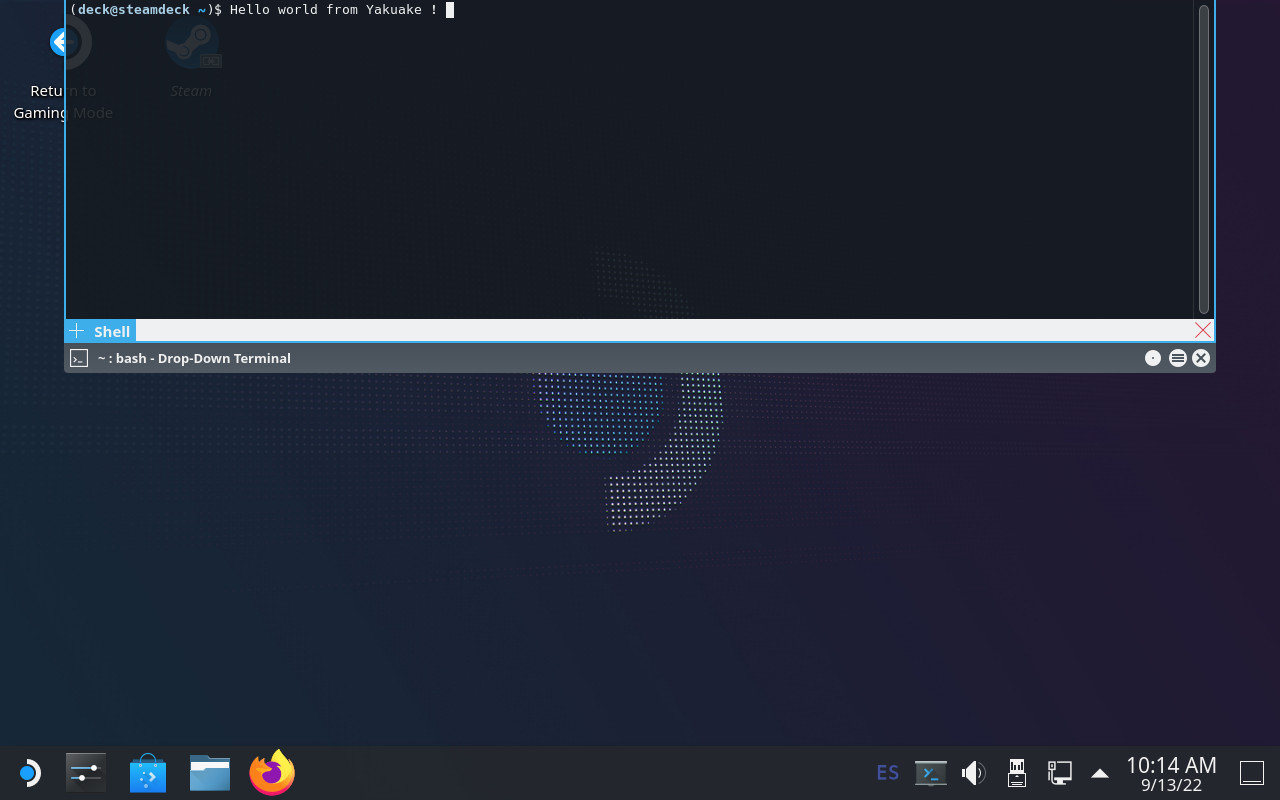
Next.

Previous.