Search Results: "Michael Prokop"

31 May 2026

Russell Coker: Links May 2026

Ron Garrett wrote an interesting blog post about the mathematical possibility of abiogenesis [1]. Cory Doctorow wrote an interesting blog post about the way the current antics of right wing extremists are forcing permanent changes in society away from the old systems [2]. William Angel wrote an insightful blog post comparing the costs of a Macbook and the Openrouter hosted service for LLMs [3]. The Register has an informative article about the threat that management systems built in to Intel and AMD CPUs pose to data sovereignty in EU owned cloud providers [4]. But this is just the first stage of building sovereign clouds, all significaant cloud services run at least 2 types of CPU and adding EU manufactured CPUs at a future time will be easy. Benn Jordan made an interesting YouTube video about the infrasound problems caused by data centers, we need FOSS to measure infrasound [5]. amarok on the Purism forum made a great post about how to setup profiles in Firefox for different uses [6]. fralb5 wrote an informative post on the Purism forum about how to use a Librem 5 (or any other FOSS Linux phone) to firewall spyware on an Android phone [7]. Michael Prokop wrote an interesting blog post about debugging input event problems on Linux which turned out to be due to an analogue headphone connection [8]. This gave me some useful pointers to investigating an input device problem which is probably very different. Patrick Boyle made an insightful youtube video about the ridiculous IPO of SpaceX, it seems like a scam from start to finish [9]. Anarcat wrote an insightful blog post about the LLM apocalypse comparing it to the horsemen of the apocalypse [10]. The Wikimedia Foundation (that runs wikipedia.org among other things) is sacking union organisers and trying to corporatise the organisation which means stealing the donations from the community [11]. Tianon Gravi wrote an informative blog post about containers, Debian, and Docker options [12]. We need a lot more work on these sorts of things in Debian. Memory Tagging and how it improves C/C++ memory safety is an interesting paper from Google researchers giving an overview of the benefits of tagged memory hardware for pointer validation on SPARC and ARM64 [13]. In 2013 a faulty beer fridge motor acted as a spark gap transmitter and blocked mobile phone service for several Melbourne suburbs [14].

20 May 2026

Michael Prokop: The mysterious XF86AudioPlay issue

I was getting <XF86AudioPlay> is undefined in the status bar of Emacs displayed every 2-3 seconds. Nowhere else I noticed any misbehavior or problems, and also couldn t find any related log entries. It didn t stop, though didn t want to reboot my system to see whether that would fix the problem, but it was driving me nuts. Now, as a starting point I adjusted my sway configuration, to react to the XF86AudioPlay key press event:
bindsym XF86AudioPlay exec playerctl play-pause
After reloading sway, my music player started to play for 2-3 seconds, stopped playing, started again, etc. It wasn t a Emacs bug, but something indeed seemed to send the XF86AudioPlay key event every 2-3 seconds. It wasn t my USB keyboard or any stuck key on it, as verified also by unplugging it. So which device was causing this? libinput from libinput-tools to the rescue:
% sudo libinput debug-events
[...]
-event12  KEYBOARD_KEY                 +0.000s  KEY_PLAYPAUSE (164) pressed
 event12  KEYBOARD_KEY                 +0.000s  KEY_PLAYPAUSE (164) released
 event12  KEYBOARD_KEY                 +2.887s  KEY_PLAYPAUSE (164) pressed
 event12  KEYBOARD_KEY                 +2.887s  KEY_PLAYPAUSE (164) released
 event12  KEYBOARD_KEY                 +5.773s  KEY_PLAYPAUSE (164) pressed
 event12  KEYBOARD_KEY                 +5.774s  KEY_PLAYPAUSE (164) released
[...]
The event12 device was sending this event, what s behind this?
% sudo udevadm info /dev/input/event12
P: /devices/pci0000:00/0000:00:1f.3/skl_hda_dsp_generic/sound/card0/input17/event12
M: event12
R: 12
J: c13:76
U: input
D: c 13:76
N: input/event12
L: 0
S: input/by-path/pci-0000:00:1f.3-platform-skl_hda_dsp_generic-event
E: DEVPATH=/devices/pci0000:00/0000:00:1f.3/skl_hda_dsp_generic/sound/card0/input17/event12
E: DEVNAME=/dev/input/event12
E: MAJOR=13
E: MINOR=76
E: SUBSYSTEM=input
E: USEC_INITIALIZED=12468722
E: ID_INPUT=1
E: ID_INPUT_KEY=1
E: ID_INPUT_SWITCH=1
E: ID_PATH=pci-0000:00:1f.3-platform-skl_hda_dsp_generic
E: ID_PATH_TAG=pci-0000_00_1f_3-platform-skl_hda_dsp_generic
E: XKBMODEL=pc105
E: XKBLAYOUT=us
E: XKBOPTIONS=lv3:ralt_switch,compose:rctrl
E: BACKSPACE=guess
E: LIBINPUT_DEVICE_GROUP=0/0/0:ALSA
E: DEVLINKS=/dev/input/by-path/pci-0000:00:1f.3-platform-skl_hda_dsp_generic-event
E: TAGS=:power-switch:
E: CURRENT_TAGS=:power-switch:
% sudo udevadm info -a /dev/input/event12   grep -iE 'kernels drivers name'
    KERNELS=="input17"
    DRIVERS==""
    ATTRS name =="sof-hda-dsp Headphone"
    KERNELS=="card0"
    DRIVERS==""
    KERNELS=="skl_hda_dsp_generic"
    DRIVERS=="skl_hda_dsp_generic"
    KERNELS=="0000:00:1f.3"
    DRIVERS=="sof-audio-pci-intel-tgl"
    KERNELS=="pci0000:00"
    DRIVERS==""
Behind this event12 is sof-hda-dsp Headphone, and evtest confirms that:
% sudo evtest
No device specified, trying to scan all of /dev/input/event*
Available devices:
/dev/input/event0:      AT Translated Set 2 keyboard
/dev/input/event1:      Sleep Button
/dev/input/event10:     ThinkPad Extra Buttons
/dev/input/event11:     sof-hda-dsp Mic
/dev/input/event12:     sof-hda-dsp Headphone
/dev/input/event13:     sof-hda-dsp HDMI/DP,pcm=3
/dev/input/event14:     sof-hda-dsp HDMI/DP,pcm=4
/dev/input/event15:     sof-hda-dsp HDMI/DP,pcm=5
/dev/input/event16:     Yubico YubiKey OTP+FIDO+CCID
/dev/input/event17:     Apple Inc. Magic Keyboard with Numeric Keypad
/dev/input/event18:     Apple Inc. Magic Keyboard with Numeric Keypad
[...]
Select the device event number [0-24]: ^C
We can even get further information:
% sudo evtest /dev/input/event12
Input driver version is 1.0.1
Input device ID: bus 0x0 vendor 0x0 product 0x0 version 0x0
Input device name: "sof-hda-dsp Headphone"
Supported events:
  Event type 0 (EV_SYN)
  Event type 1 (EV_KEY)
    Event code 114 (KEY_VOLUMEDOWN)
    Event code 115 (KEY_VOLUMEUP)
    Event code 164 (KEY_PLAYPAUSE)
    Event code 582 (KEY_VOICECOMMAND)
  Event type 5 (EV_SW)
    Event code 2 (SW_HEADPHONE_INSERT) state 0
Properties:
Testing ... (interrupt to exit)
Event: time 1779295060.175766, type 5 (EV_SW), code 2 (SW_HEADPHONE_INSERT), value 1
Event: time 1779295060.175766, -------------- SYN_REPORT ------------
Event: time 1779295061.951168, type 1 (EV_KEY), code 164 (KEY_PLAYPAUSE), value 1
Event: time 1779295061.951168, -------------- SYN_REPORT ------------
Event: time 1779295061.951194, type 1 (EV_KEY), code 164 (KEY_PLAYPAUSE), value 0
Event: time 1779295061.951194, -------------- SYN_REPORT ------------
Event: time 1779295064.548671, type 1 (EV_KEY), code 164 (KEY_PLAYPAUSE), value 1
Event: time 1779295064.548671, -------------- SYN_REPORT ------------
Event: time 1779295064.548689, type 1 (EV_KEY), code 164 (KEY_PLAYPAUSE), value 0
Event: time 1779295064.548689, -------------- SYN_REPORT ------------
Event: time 1779295067.437172, type 1 (EV_KEY), code 164 (KEY_PLAYPAUSE), value 1
Event: time 1779295067.437172, -------------- SYN_REPORT ------------
Event: time 1779295067.437187, type 1 (EV_KEY), code 164 (KEY_PLAYPAUSE), value 0
Event: time 1779295067.437187, -------------- SYN_REPORT ------------
Event: time 1779295070.323775, type 1 (EV_KEY), code 164 (KEY_PLAYPAUSE), value 1
Event: time 1779295070.323775, -------------- SYN_REPORT ------------
Event: time 1779295070.323790, type 1 (EV_KEY), code 164 (KEY_PLAYPAUSE), value 0
Event: time 1779295070.323790, -------------- SYN_REPORT ------------
Event: time 1779295073.200350, type 1 (EV_KEY), code 164 (KEY_PLAYPAUSE), value 1
Event: time 1779295073.200350, -------------- SYN_REPORT ------------
Event: time 1779295073.200373, type 1 (EV_KEY), code 164 (KEY_PLAYPAUSE), value 0
Event: time 1779295073.200373, -------------- SYN_REPORT ------------
Event: time 1779295076.076228, type 1 (EV_KEY), code 164 (KEY_PLAYPAUSE), value 1
Event: time 1779295076.076228, -------------- SYN_REPORT ------------
Event: time 1779295076.076250, type 1 (EV_KEY), code 164 (KEY_PLAYPAUSE), value 0
Event: time 1779295076.076250, -------------- SYN_REPORT ------------
Event: time 1779295078.961740, type 1 (EV_KEY), code 164 (KEY_PLAYPAUSE), value 1
Event: time 1779295078.961740, -------------- SYN_REPORT ------------
Event: time 1779295078.961754, type 1 (EV_KEY), code 164 (KEY_PLAYPAUSE), value 0
Event: time 1779295078.961754, -------------- SYN_REPORT ------------
Event: time 1779295081.850156, type 1 (EV_KEY), code 164 (KEY_PLAYPAUSE), value 1
Event: time 1779295081.850156, -------------- SYN_REPORT ------------
Event: time 1779295081.850175, type 1 (EV_KEY), code 164 (KEY_PLAYPAUSE), value 0
Event: time 1779295081.850175, -------------- SYN_REPORT ------------
Event: time 1779295083.306612, type 5 (EV_SW), code 2 (SW_HEADPHONE_INSERT), value 0
Event: time 1779295083.306612, -------------- SYN_REPORT ------------
So when I plug in my headphone (see the SW_HEADPHONE_INSERT event), the unexpected behavior starts, unplugging stops the problem.
Good! But what was totally unexpected for me: my headphone, being a Beyerdynamic DT-990 Pro, does not have any keys. 8-) As it turned out, the headphone jack seemed to have been not entirely clean. The analog side of the jack triggers a behavior within the audio codec, where it seems to interpret the fluctuating impedance as a play button of the headset, being pressed, again and again. I cleaned the jack of my headphone and my XF86AudioPlay problem is gone, case closed.

31 January 2026

Michael Prokop: apt, SHA-1 keys + 2026-02-01

You might have seen Policy will reject signature within a year warnings in apt(-get) update runs like this:
root@424812bd4556:/# apt update
Get:1 http://foo.example.org/debian demo InRelease [4229 B]
Hit:2 http://deb.debian.org/debian trixie InRelease
Hit:3 http://deb.debian.org/debian trixie-updates InRelease
Hit:4 http://deb.debian.org/debian-security trixie-security InRelease
Get:5 http://foo.example.org/debian demo/main amd64 Packages [1097 B]
Fetched 5326 B in 0s (43.2 kB/s)
All packages are up to date.
Warning: http://foo.example.org/debian/dists/demo/InRelease: Policy will reject signature within a year, see --audit for details
root@424812bd4556:/# apt --audit update
Hit:1 http://foo.example.org/debian demo InRelease
Hit:2 http://deb.debian.org/debian trixie InRelease
Hit:3 http://deb.debian.org/debian trixie-updates InRelease
Hit:4 http://deb.debian.org/debian-security trixie-security InRelease
All packages are up to date.    
Warning:  http://foo.example.org/debian/dists/demo/InRelease: Policy will reject signature within a year, see --audit for details
Audit:  http://foo.example.org/debian/dists/demo/InRelease: Sub-process /usr/bin/sqv returned an error code (1), error message is:
   Signing key on 54321ABCD6789ABCD0123ABCD124567ABCD89123 is not bound:
              No binding signature at time 2024-06-19T10:33:47Z
     because: Policy rejected non-revocation signature (PositiveCertification) requiring second pre-image resistance
     because: SHA1 is not considered secure since 2026-02-01T00:00:00Z
Audit: The sources.list(5) entry for 'http://foo.example.org/debian' should be upgraded to deb822 .sources
Audit: Missing Signed-By in the sources.list(5) entry for 'http://foo.example.org/debian'
Audit: Consider migrating all sources.list(5) entries to the deb822 .sources format
Audit: The deb822 .sources format supports both embedded as well as external OpenPGP keys
Audit: See apt-secure(8) for best practices in configuring repository signing.
Audit: Some sources can be modernized. Run 'apt modernize-sources' to do so.
If you ignored this for the last year, I would like to tell you that 2026-02-01 is not that far away (hello from the past if you re reading this because you re already affected). Let s simulate the future:
root@424812bd4556:/# apt --update -y install faketime
[...]
root@424812bd4556:/# export LD_PRELOAD=/usr/lib/x86_64-linux-gnu/faketime/libfaketime.so.1 FAKETIME="2026-08-29 23:42:11" 
root@424812bd4556:/# date
Sat Aug 29 23:42:11 UTC 2026
root@424812bd4556:/# apt update
Get:1 http://foo.example.org/debian demo InRelease [4229 B]
Hit:2 http://deb.debian.org/debian trixie InRelease                                 
Err:1 http://foo.example.org/debian demo InRelease
  Sub-process /usr/bin/sqv returned an error code (1), error message is: Signing key on 54321ABCD6789ABCD0123ABCD124567ABCD89123 is not bound:            No binding signature at time 2024-06-19T10:33:47Z   because: Policy rejected non-revocation signature (PositiveCertification) requiring second pre-image resistance   because: SHA1 is not considered secure since 2026-02-01T00:00:00Z
[...]
Warning: An error occurred during the signature verification. The repository is not updated and the previous index files will be used. OpenPGP signature verification failed: http://foo.example.org/debian demo InRelease: Sub-process /usr/bin/sqv returned an error code (1), error message is: Signing key on 54321ABCD6789ABCD0123ABCD124567ABCD89123 is not bound:            No binding signature at time 2024-06-19T10:33:47Z   because: Policy rejected non-revocation signature (PositiveCertification) requiring second pre-image resistance   because: SHA1 is not considered secure since 2026-02-01T00:00:00Z
[...]
root@424812bd4556:/# echo $?
100
Now, the proper solution would have been to fix the signing key underneath (via e.g. sq cert lint &dash&dashfix &dash&dashcert-file $PRIVAT_KEY_FILE > $PRIVAT_KEY_FILE-fixed). If you don t have access to the according private key (e.g. when using an upstream repository that has been ignoring this issue), you re out of luck for a proper fix. But there s a workaround for the apt situation (related see apt commit 0989275c2f7afb7a5f7698a096664a1035118ebf):
root@424812bd4556:/# cat /usr/share/apt/default-sequoia.config
# Default APT Sequoia configuration. To overwrite, consider copying this
# to /etc/crypto-policies/back-ends/apt-sequoia.config and modify the
# desired values.
[asymmetric_algorithms]
dsa2048 = 2024-02-01
dsa3072 = 2024-02-01
dsa4096 = 2024-02-01
brainpoolp256 = 2028-02-01
brainpoolp384 = 2028-02-01
brainpoolp512 = 2028-02-01
rsa2048  = 2030-02-01
[hash_algorithms]
sha1.second_preimage_resistance = 2026-02-01    # Extend the expiry for legacy repositories
sha224 = 2026-02-01
[packets]
signature.v3 = 2026-02-01   # Extend the expiry
Adjust this according to your needs:
root@424812bd4556:/# mkdir -p /etc/crypto-policies/back-ends/
root@424812bd4556:/# cp /usr/share/apt/default-sequoia.config /etc/crypto-policies/back-ends/apt-sequoia.config
root@424812bd4556:/# $EDITOR /etc/crypto-policies/back-ends/apt-sequoia.config
root@424812bd4556:/# cat /etc/crypto-policies/back-ends/apt-sequoia.config
# APT Sequoia override configuration
[asymmetric_algorithms]
dsa2048 = 2024-02-01
dsa3072 = 2024-02-01
dsa4096 = 2024-02-01
brainpoolp256 = 2028-02-01
brainpoolp384 = 2028-02-01
brainpoolp512 = 2028-02-01
rsa2048  = 2030-02-01
[hash_algorithms]
sha1.second_preimage_resistance = 2026-09-01    # Extend the expiry for legacy repositories
sha224 = 2026-09-01
[packets]
signature.v3 = 2026-02-01   # Extend the expiry
Then we re back into the original situation, being a warning instead of an error:
root@424812bd4556:/# apt update
Hit:1 http://deb.debian.org/debian trixie InRelease
Get:2 http://foo.example.org/debian demo InRelease [4229 B]
Hit:3 http://deb.debian.org/debian trixie-updates InRelease
Hit:4 http://deb.debian.org/debian-security trixie-security InRelease
Warning: http://foo.example.org/debian/dists/demo/InRelease: Policy will reject signature within a year, see --audit for details
[..]
Please note that this is a workaround, and not a proper solution.

20 July 2025

Michael Prokop: What to expect from Debian/trixie #newintrixie

Trixie Banner, Copyright 2024 Elise Couper Update on 2025-07-28: added note about Debian 13/trixie support for OpenVox (thanks, Ben Ford!) Debian v13 with codename trixie is scheduled to be published as new stable release on 9th of August 2025. I was the driving force at several of my customers to be well prepared for the upcoming stable release (my efforts for trixie started in August 2024). On the one hand, to make sure packages we care about are available and actually make it into the release. On the other hand, to ensure there are no severe issues that make it into the release and to get proper and working upgrades. So far everything is looking pretty well and working fine, the efforts seemed to have payed off. :) As usual with major upgrades, there are some things to be aware of, and hereby I m starting my public notes on trixie that might be worth for other folks. My focus is primarily on server systems and looking at things from a sysadmin perspective. Further readings As usual start at the official Debian release notes, make sure to especially go through What s new in Debian 13 + issues to be aware of for trixie (strongly recommended read!). Package versions As a starting point, let s look at some selected packages and their versions in bookworm vs. trixie as of 2025-07-20 (mainly having amd64 in mind):
Package bookworm/v12 trixie/v13
ansible 2.14.3 2.19.0
apache 2.4.62 2.4.64
apt 2.6.1 3.0.3
bash 5.2.15 5.2.37
ceph 16.2.11 18.2.7
docker 20.10.24 26.1.5
dovecot 2.3.19 2.4.1
dpkg 1.21.22 1.22.21
emacs 28.2 30.1
gcc 12.2.0 14.2.0
git 2.39.5 2.47.2
golang 1.19 1.24
libc 2.36 2.41
linux kernel 6.1 6.12
llvm 14.0 19.0
lxc 5.0.2 6.0.4
mariadb 10.11 11.8
nginx 1.22.1 1.26.3
nodejs 18.13 20.19
openjdk 17.0 21.0
openssh 9.2p1 10.0p1
openssl 3.0 3.5
perl 5.36.0 5.40.1
php 8.2+93 8.4+96
podman 4.3.1 5.4.2
postfix 3.7.11 3.10.3
postgres 15 17
puppet 7.23.0 8.10.0
python3 3.11.2 3.13.5
qemu/kvm 7.2 10.0
rsync 3.2.7 3.4.1
ruby 3.1 3.3
rust 1.63.0 1.85.0
samba 4.17.12 4.22.3
systemd 252.36 257.7-1
unattended-upgrades 2.9.1 2.12
util-linux 2.38.1 2.41
vagrant 2.3.4 2.3.7
vim 9.0.1378 9.1.1230
zsh 5.9 5.9
Misc unsorted apt The new apt version 3.0 brings several new features, including: systemd systemd got upgraded from v252.36-1~deb12u1 to 257.7-1 and there are lots of changes. Be aware that systemd v257 has a new net.naming_scheme, v257 being PCI slot number is now read from firmware_node/sun sysfs file. The naming scheme based on devicetree aliases was extended to support aliases for individual interfaces of controllers with multiple ports. This might affect you, see e.g. #1092176 and #1107187, the Debian Wiki provides further useful information. There are new systemd tools available: The tools provided by systemd gained several new options: Debian s systemd ships new binary packages: Linux Kernel The trixie release ships a Linux kernel based on latest longterm version 6.12. As usual there are lots of changes in the kernel area, including better hardware support, and this might warrant a separate blog entry. To highlight some changes with Debian trixie: See Kernelnewbies.org for further changes between kernel versions. Configuration management For puppet users, Debian provides the puppet-agent (v8.10.0), puppetserver (v8.7.0) and puppetdb (v8.4.1) packages. Puppet s upstream does not provide packages for trixie, yet. Given how long it took them for Debian bookworm, and with their recent Plans for Open Source Puppet in 2025, it s unclear when (and whether at all) we might get something. As a result of upstream behavior, also the OpenVox project evolved, and they already provide Debian 13/trixie support (https://apt.voxpupuli.org/openvox8-release-debian13.deb). FYI: the AIO puppet-agent package for bookworm (v7.34.0-1bookworm) so far works fine for me on Debian/trixie. Be aware that due to the apt-key removal you need a recent version of the puppetlabs-apt for usage with trixie. The puppetlabs-ntp module isn t yet ready for trixie (regarding ntp/ntpsec), if you should depend on that. ansible is available and made it with version 2.19 into trixie. Prometheus stack Prometheus server was updated from v2.42.0 to v2.53, and all the exporters that got shipped with bookworm are still around (in more recent versions of course). Trixie gained some new exporters: Virtualization docker (v26.1.5), ganeti (v3.1.0), libvirt (v11.3.0, be aware of significant changes to libvirt packaging), lxc (v6.0.4), podman (v5.4.2), openstack (see openstack-team on Salsa), qemu/kvm (v10.0.2), xen (v4.20.0) are all still around. Proxmox already announced their PVE 9.0 BETA, being based on trixie and providing 6.14.8-1 kernel, QEMU 10.0.2, LXC 6.0.4, OpenZFS 2.3.3. Vagrant is available in version 2.3.7, but Vagrant upstream does not provide packages for trixie yet. Given that HashiCorp adopted the BSL, the future of vagrant in Debian is unclear. If you re relying on VirtualBox, be aware that upstream doesn t provide packages for trixie, yet. VirtualBox is available from Debian/unstable (version 7.1.12-dfsg-1 as of 2025-07-20), but not shipped with stable release since quite some time (due to lack of cooperation from upstream on security support for older releases, see #794466). Be aware that starting with Linux kernel 6.12, KVM initializes virtualization on module loading by default. This prevents VirtualBox VMs from starting. In order to avoid this, either add kvm.enable_virt_at_load=0 parameter into kernel command line or unload the corresponding kvm_intel / kvm_amd module. If you want to use Vagrant with VirtualBox on trixie, be aware that Debian s vagrant package as present in trixie doesn t support the VirtualBox package version 7.1 as present in Debian/unstable (manually patching vagrant s meta.rb and rebuilding the package without Breaks: virtualbox (>= 7.1) is known to be working). util-linux The are plenty of new options available in the tools provided by util-linux: Now no longer present in util-linux as of trixie: The following binaries got moved from util-linux to the util-linux-extra package: And the util-linux-extra package also provides new tools: OpenSSH OpenSSH was updated from v9.2p1 to 10.0p1-5, so if you re interested in all the changes, check out the release notes between those versions (9.3, 9.4, 9.5, 9.6, 9.7, 9.8, 9.9 + 10.0). Let s highlight some notable behavior changes in Debian: There are some notable new features: Thanks to everyone involved in the release, looking forward to trixie + and happy upgrading!
Let s continue with working towards Debian/forky. :)

16 May 2025

Michael Prokop: Grml 2025.05 codename Nudlaug

Debian hard freeze on 2025-05-15? We bring you a new Grml release on top of that! 2025.05 codename Nudlaug. There s plenty of new stuff, check out our official release announcement for all the details. But I d like to highlight one feature that I particularly like: SSH service announcement with Avahi. The grml-full flavor ships Avahi, and when you enable SSH, it automatically announces the SSH service on your local network. So when f.e. booting Grml with boot option ssh=debian , you should be able to login on your Grml live system with ssh grml@grml.local and password debian :
% insecssh grml@grml.local
Warning: Permanently added 'grml.local' (ED25519) to the list of known hosts.
grml@grml.local's password: 
Linux grml 6.12.27-amd64 #1 SMP PREEMPT_DYNAMIC Debian 6.12.27-1 (2025-05-06) x86_64
Grml - Linux for geeks
grml@grml ~ %
Hint: grml-zshrc provides that useful shell alias insecssh , which is aliased to ssh -o StrictHostKeyChecking=no -o UserKnownHostsFile=/dev/null . Using those options, you aren t storing the SSH host key of the (temporary) Grml live system (permanently) in your UserKnownHostsFile. BTW, you can run avahi-browse -d local _ssh._tcp resolve -t to discover the SSH services on your local network. Happy Grml-ing!

23 April 2025

Michael Prokop: Lessons learned from running an open source project for 20 years @ GLT25

Time flies by so quickly, it s >20 years since I started the Grml project. I m giving a (german) talk about the lessons learned from 20 years of running the Grml project this Saturday, 2025-04-26 at the Grazer Linuxtage (Graz/Austria). Would be great to see you there!

13 April 2025

Michael Prokop: OpenSSH penalty behavior in Debian/trixie #newintrixie

This topic came up at a customer of mine in September 2024, when working on Debian/trixie support. Since then I wanted to blog about it to make people aware of this new OpenSSH feature and behavior. I finally found some spare minutes at Debian s BSP in Vienna, so here we are. :) Some of our Q/A jobs failed to run against Debian/trixie, in the debug logs we found:
debug1: kex_exchange_identification: banner line 0: Not allowed at this time
This Not allowed at this time pointed to a new OpenSSH feature. OpenSSH introduced options to penalize undesirable behavior with version 9.8p1, see OpenSSH Release Notes, and also sshd source code. FTR, on the SSH server side, you ll see messages like that:
Apr 13 08:57:11 grml sshd-session[2135]: error: maximum authentication attempts exceeded for root from 10.100.15.42 port 55792 ssh2 [preauth]
Apr 13 08:57:11 grml sshd-session[2135]: Disconnecting authenticating user root 10.100.15.42 port 55792: Too many authentication failures [preauth]
Apr 13 08:57:12 grml sshd-session[2137]: error: maximum authentication attempts exceeded for root from 10.100.15.42 port 55800 ssh2 [preauth]
Apr 13 08:57:12 grml sshd-session[2137]: Disconnecting authenticating user root 10.100.15.42 port 55800: Too many authentication failures [preauth]
Apr 13 08:57:13 grml sshd-session[2139]: error: maximum authentication attempts exceeded for root from 10.100.15.42 port 55804 ssh2 [preauth]
Apr 13 08:57:13 grml sshd-session[2139]: Disconnecting authenticating user root 10.100.15.42 port 55804: Too many authentication failures [preauth]
Apr 13 08:57:13 grml sshd-session[2141]: error: maximum authentication attempts exceeded for root from 10.100.15.42 port 55810 ssh2 [preauth]
Apr 13 08:57:13 grml sshd-session[2141]: Disconnecting authenticating user root 10.100.15.42 port 55810: Too many authentication failures [preauth]
Apr 13 08:57:13 grml sshd[1417]: drop connection #0 from [10.100.15.42]:55818 on [10.100.15.230]:22 penalty: failed authentication
Apr 13 08:57:14 grml sshd[1417]: drop connection #0 from [10.100.15.42]:55824 on [10.100.15.230]:22 penalty: failed authentication
Apr 13 08:57:14 grml sshd[1417]: drop connection #0 from [10.100.15.42]:55838 on [10.100.15.230]:22 penalty: failed authentication
Apr 13 08:57:14 grml sshd[1417]: drop connection #0 from [10.100.15.42]:55854 on [10.100.15.230]:22 penalty: failed authentication
This feature certainly is useful and has its use cases. But if you f.e. run automated checks to ensure that specific logins aren t working, be careful: you might hit the penalty feature, lock yourself out but also consecutive checks then don t behave as expected. Your login checks might fail, but only because the penalty behavior kicks in. The login you re verifying still might be working underneath, but you don t actually check for it exactly. Furthermore legitimate traffic from systems which accept connections from many users or behind shared IP addresses, like NAT and proxies could be denied. To disable this new behavior, you can set PerSourcePenalties no in your sshd_config, but there are also further configuration options available, see PerSourcePenalties and PerSourcePenaltyExemptList settings in sshd_config(5) for further details.

20 December 2024

Michael Prokop: Grml 2024.12 codename Adventgrenze

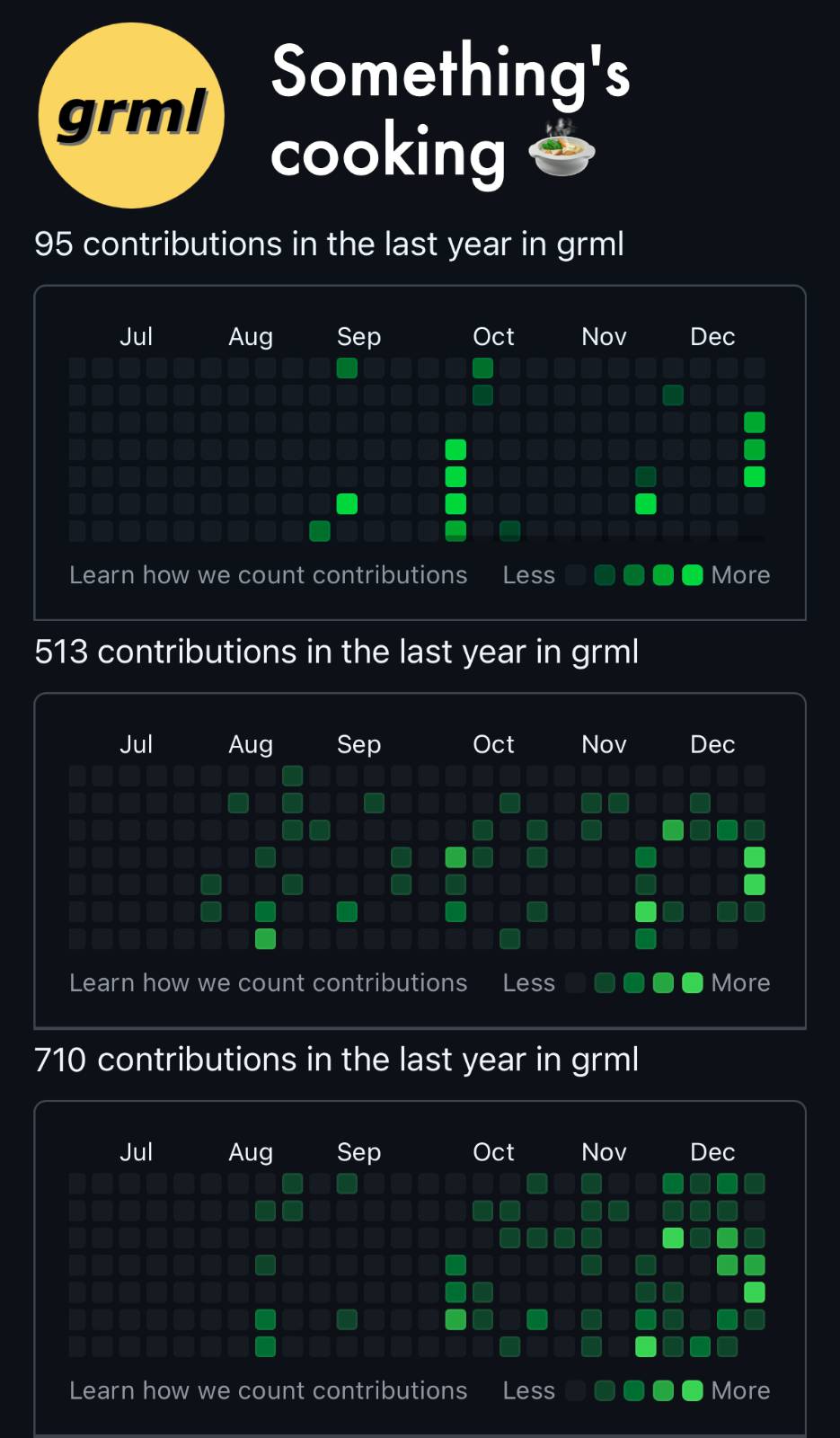
Picture with metrics of three user profiles on GitHub.com, with many contributions especially in the last quarter of the year We did it again ! Just in time, we re excited to announce the release of Grml stable version 2024.12, code-named Adventgrenze ! (If you re not familiar with Grml, it s a Debian-based live system tailored for system administrators.) This new release is built on Debian trixie, and for the first time, we re introducing support for 64-bit ARM CPUs (arm64 architecture)! I m incredibly proud of the hard work that went into this release. A significant amount of behind-the-scenes effort went into reworking our infrastructure and redesigning the build process. Special thanks to Chris and Darsha our Grml developer days in November and December were a blast! For a detailed overview of the changes between releases 2024.02 and 2024.12, check out our official release announcement. And, as always, after a release comes the next one exciting improvements are already in the works! BTW: recently we also celebrated 20(!) years of Grml Releases. If you re a Grml and or grml-zsh user, please join us in celebrating and send us a postcard!

25 September 2023

Michael Prokop: Postfix failing with no shared cipher

I m one of the few folks left who run and maintain mail servers. Recently I had major troubles receiving mails from the mail servers used by a bank, and when asking my favourite search engine, I m clearly not the only one who ran into such an issue. Actually, I should have checked off the issue and not become a customer at that bank, but the tech nerd in me couldn t resist getting to the bottom of the problem. Since I got it working and this might be useful for others, here we are. :) I was trying to get an online banking account set up, but the corresponding account creation mail didn t arrive me, at all. Looking at my mail server logs, my postfix mail server didn t accept the mail due to:
postfix/smtpd[3319640]: warning: TLS library problem: error:1417A0C1:SSL routines:tls_post_process_client_hello:no shared cipher:../ssl/statem/statem_srvr.c:2283:
postfix/smtpd[3319640]: lost connection after STARTTLS from mx01.arz.at[193.110.182.61]
Huh, what s going on here?! Let s increase the TLS loglevel (setting smtpd_tls_loglevel = 2) and retry. But how can I retry receiving yet another mail? Luckily, on the registration website of the bank there was a URL available, that let me request a one-time password. This triggered another mail, so I did that and managed to grab this in the logs:
postfix/smtpd[3320018]: initializing the server-side TLS engine
postfix/tlsmgr[3320020]: open smtpd TLS cache btree:/var/lib/postfix/smtpd_scache
postfix/tlsmgr[3320020]: tlsmgr_cache_run_event: start TLS smtpd session cache cleanup
postfix/smtpd[3320018]: connect from mx01.arz.at[193.110.182.61]
postfix/smtpd[3320018]: setting up TLS connection from mx01.arz.at[193.110.182.61]
postfix/smtpd[3320018]: mx01.arz.at[193.110.182.61]: TLS cipher list "aNULL:-aNULL:HIGH:MEDIUM:+RC4:@STRENGTH"
postfix/smtpd[3320018]: SSL_accept:before SSL initialization
postfix/smtpd[3320018]: SSL3 alert write:fatal:handshake failure
postfix/smtpd[3320018]: SSL_accept:error in error
postfix/smtpd[3320018]: SSL_accept error from mx01.arz.at[193.110.182.61]: -1
postfix/smtpd[3320018]: warning: TLS library problem: error:1417A0C1:SSL routines:tls_post_process_client_hello:no shared cipher:../ssl/statem/statem_srvr.c:2283:
postfix/smtpd[3320018]: lost connection after STARTTLS from mx01.arz.at[193.110.182.61]
postfix/smtpd[3320018]: disconnect from mx01.arz.at[193.110.182.61] ehlo=1 starttls=0/1 commands=1/2
postfix/smtpd[3320018]: connect from mx01.arz.at[193.110.182.61]
postfix/smtpd[3320018]: disconnect from mx01.arz.at[193.110.182.61] ehlo=1 quit=1 commands=2
Ok, so this TLS cipher list aNULL:-aNULL:HIGH:MEDIUM:+RC4:@STRENGTH looked like the tls_medium_cipherlist setting in postfix, but which ciphers might we expect? Let s see what their SMTP server would speak to us:
% testssl --cipher-per-proto -t=smtp mx01.arz.at:25
[...]
Hexcode  Cipher Suite Name (OpenSSL)       KeyExch.   Encryption  Bits     Cipher Suite Name (IANA/RFC)
-----------------------------------------------------------------------------------------------------------------------------
SSLv2
SSLv3
TLS 1
TLS 1.1
TLS 1.2
 xc030   ECDHE-RSA-AES256-GCM-SHA384       ECDH 256   AESGCM      256      TLS_ECDHE_RSA_WITH_AES_256_GCM_SHA384
 xc028   ECDHE-RSA-AES256-SHA384           ECDH 256   AES         256      TLS_ECDHE_RSA_WITH_AES_256_CBC_SHA384
 xc014   ECDHE-RSA-AES256-SHA              ECDH 256   AES         256      TLS_ECDHE_RSA_WITH_AES_256_CBC_SHA
 x9d     AES256-GCM-SHA384                 RSA        AESGCM      256      TLS_RSA_WITH_AES_256_GCM_SHA384
 x3d     AES256-SHA256                     RSA        AES         256      TLS_RSA_WITH_AES_256_CBC_SHA256
 x35     AES256-SHA                        RSA        AES         256      TLS_RSA_WITH_AES_256_CBC_SHA
 xc02f   ECDHE-RSA-AES128-GCM-SHA256       ECDH 256   AESGCM      128      TLS_ECDHE_RSA_WITH_AES_128_GCM_SHA256
 xc027   ECDHE-RSA-AES128-SHA256           ECDH 256   AES         128      TLS_ECDHE_RSA_WITH_AES_128_CBC_SHA256
 xc013   ECDHE-RSA-AES128-SHA              ECDH 256   AES         128      TLS_ECDHE_RSA_WITH_AES_128_CBC_SHA
 x9c     AES128-GCM-SHA256                 RSA        AESGCM      128      TLS_RSA_WITH_AES_128_GCM_SHA256
 x3c     AES128-SHA256                     RSA        AES         128      TLS_RSA_WITH_AES_128_CBC_SHA256
 x2f     AES128-SHA                        RSA        AES         128      TLS_RSA_WITH_AES_128_CBC_SHA
TLS 1.3
Looks like a very small subset of ciphers, and they don t seem to be talking TLS v1.3 at all? Not great. :( A nice web service to verify the situation from another point of view is checktls, which also confirmed this:
[000.705] 	<-- 	220 2.0.0 Ready to start TLS
[000.705] 		STARTTLS command works on this server
[001.260] 		Connection converted to SSL
		SSLVersion in use: TLSv1_2
		Cipher in use: ECDHE-RSA-AES256-GCM-SHA384
		Perfect Forward Secrecy: yes
		Session Algorithm in use: Curve P-256 DHE(256 bits)
		Certificate #1 of 3 (sent by MX):
		Cert VALIDATED: ok
		Cert Hostname VERIFIED (mx01.arz.at = *.arz.at   DNS:*.arz.at   DNS:arz.at)
[...]
[001.517] 		TLS successfully started on this server
I got distracted by some other work, and when coming back to this problem, the one-time password procedure no longer worked, as the password reset URL was no longer valid. :( I managed to find the underlying URL, and with some web developer tools tinkering I could still use the website to let me trigger sending further one-time password mails, phew. Let s continue, so my mail server was running Debian/bullseye with postfix v3.5.18-0+deb11u1 and openssl v1.1.1n-0+deb11u5, let s see what it offers:
% testssl --cipher-per-proto -t=smtp mail.example.com:25
[...]
Hexcode  Cipher Suite Name (OpenSSL)       KeyExch.   Encryption  Bits     Cipher Suite Name (IANA/RFC)
-----------------------------------------------------------------------------------------------------------------------------
SSLv2
SSLv3
TLS 1
 xc00a   ECDHE-ECDSA-AES256-SHA            ECDH 253   AES         256      TLS_ECDHE_ECDSA_WITH_AES_256_CBC_SHA
 xc019   AECDH-AES256-SHA                  ECDH 253   AES         256      TLS_ECDH_anon_WITH_AES_256_CBC_SHA
 x3a     ADH-AES256-SHA                    DH 2048    AES         256      TLS_DH_anon_WITH_AES_256_CBC_SHA
 x89     ADH-CAMELLIA256-SHA               DH 2048    Camellia    256      TLS_DH_anon_WITH_CAMELLIA_256_CBC_SHA
 xc009   ECDHE-ECDSA-AES128-SHA            ECDH 253   AES         128      TLS_ECDHE_ECDSA_WITH_AES_128_CBC_SHA
 xc018   AECDH-AES128-SHA                  ECDH 253   AES         128      TLS_ECDH_anon_WITH_AES_128_CBC_SHA
 x34     ADH-AES128-SHA                    DH 2048    AES         128      TLS_DH_anon_WITH_AES_128_CBC_SHA
 x9b     ADH-SEED-SHA                      DH 2048    SEED        128      TLS_DH_anon_WITH_SEED_CBC_SHA
 x46     ADH-CAMELLIA128-SHA               DH 2048    Camellia    128      TLS_DH_anon_WITH_CAMELLIA_128_CBC_SHA
TLS 1.1
 xc00a   ECDHE-ECDSA-AES256-SHA            ECDH 253   AES         256      TLS_ECDHE_ECDSA_WITH_AES_256_CBC_SHA
 xc019   AECDH-AES256-SHA                  ECDH 253   AES         256      TLS_ECDH_anon_WITH_AES_256_CBC_SHA
 x3a     ADH-AES256-SHA                    DH 2048    AES         256      TLS_DH_anon_WITH_AES_256_CBC_SHA
 x89     ADH-CAMELLIA256-SHA               DH 2048    Camellia    256      TLS_DH_anon_WITH_CAMELLIA_256_CBC_SHA
 xc009   ECDHE-ECDSA-AES128-SHA            ECDH 253   AES         128      TLS_ECDHE_ECDSA_WITH_AES_128_CBC_SHA
 xc018   AECDH-AES128-SHA                  ECDH 253   AES         128      TLS_ECDH_anon_WITH_AES_128_CBC_SHA
 x34     ADH-AES128-SHA                    DH 2048    AES         128      TLS_DH_anon_WITH_AES_128_CBC_SHA
 x9b     ADH-SEED-SHA                      DH 2048    SEED        128      TLS_DH_anon_WITH_SEED_CBC_SHA
 x46     ADH-CAMELLIA128-SHA               DH 2048    Camellia    128      TLS_DH_anon_WITH_CAMELLIA_128_CBC_SHA
TLS 1.2
 xc02c   ECDHE-ECDSA-AES256-GCM-SHA384     ECDH 253   AESGCM      256      TLS_ECDHE_ECDSA_WITH_AES_256_GCM_SHA384
 xc024   ECDHE-ECDSA-AES256-SHA384         ECDH 253   AES         256      TLS_ECDHE_ECDSA_WITH_AES_256_CBC_SHA384
 xc00a   ECDHE-ECDSA-AES256-SHA            ECDH 253   AES         256      TLS_ECDHE_ECDSA_WITH_AES_256_CBC_SHA
 xcca9   ECDHE-ECDSA-CHACHA20-POLY1305     ECDH 253   ChaCha20    256      TLS_ECDHE_ECDSA_WITH_CHACHA20_POLY1305_SHA256
 xc0af   ECDHE-ECDSA-AES256-CCM8           ECDH 253   AESCCM8     256      TLS_ECDHE_ECDSA_WITH_AES_256_CCM_8
 xc0ad   ECDHE-ECDSA-AES256-CCM            ECDH 253   AESCCM      256      TLS_ECDHE_ECDSA_WITH_AES_256_CCM
 xc073   ECDHE-ECDSA-CAMELLIA256-SHA384    ECDH 253   Camellia    256      TLS_ECDHE_ECDSA_WITH_CAMELLIA_256_CBC_SHA384
 xc019   AECDH-AES256-SHA                  ECDH 253   AES         256      TLS_ECDH_anon_WITH_AES_256_CBC_SHA
 xa7     ADH-AES256-GCM-SHA384             DH 2048    AESGCM      256      TLS_DH_anon_WITH_AES_256_GCM_SHA384
 x6d     ADH-AES256-SHA256                 DH 2048    AES         256      TLS_DH_anon_WITH_AES_256_CBC_SHA256
 x3a     ADH-AES256-SHA                    DH 2048    AES         256      TLS_DH_anon_WITH_AES_256_CBC_SHA
 xc5     ADH-CAMELLIA256-SHA256            DH 2048    Camellia    256      TLS_DH_anon_WITH_CAMELLIA_256_CBC_SHA256
 x89     ADH-CAMELLIA256-SHA               DH 2048    Camellia    256      TLS_DH_anon_WITH_CAMELLIA_256_CBC_SHA
 xc05d   ECDHE-ECDSA-ARIA256-GCM-SHA384    ECDH 253   ARIAGCM     256      TLS_ECDHE_ECDSA_WITH_ARIA_256_GCM_SHA384
 xc02b   ECDHE-ECDSA-AES128-GCM-SHA256     ECDH 253   AESGCM      128      TLS_ECDHE_ECDSA_WITH_AES_128_GCM_SHA256
 xc023   ECDHE-ECDSA-AES128-SHA256         ECDH 253   AES         128      TLS_ECDHE_ECDSA_WITH_AES_128_CBC_SHA256
 xc009   ECDHE-ECDSA-AES128-SHA            ECDH 253   AES         128      TLS_ECDHE_ECDSA_WITH_AES_128_CBC_SHA
 xc0ae   ECDHE-ECDSA-AES128-CCM8           ECDH 253   AESCCM8     128      TLS_ECDHE_ECDSA_WITH_AES_128_CCM_8
 xc0ac   ECDHE-ECDSA-AES128-CCM            ECDH 253   AESCCM      128      TLS_ECDHE_ECDSA_WITH_AES_128_CCM
 xc072   ECDHE-ECDSA-CAMELLIA128-SHA256    ECDH 253   Camellia    128      TLS_ECDHE_ECDSA_WITH_CAMELLIA_128_CBC_SHA256
 xc018   AECDH-AES128-SHA                  ECDH 253   AES         128      TLS_ECDH_anon_WITH_AES_128_CBC_SHA
 xa6     ADH-AES128-GCM-SHA256             DH 2048    AESGCM      128      TLS_DH_anon_WITH_AES_128_GCM_SHA256
 x6c     ADH-AES128-SHA256                 DH 2048    AES         128      TLS_DH_anon_WITH_AES_128_CBC_SHA256
 x34     ADH-AES128-SHA                    DH 2048    AES         128      TLS_DH_anon_WITH_AES_128_CBC_SHA
 xbf     ADH-CAMELLIA128-SHA256            DH 2048    Camellia    128      TLS_DH_anon_WITH_CAMELLIA_128_CBC_SHA256
 x9b     ADH-SEED-SHA                      DH 2048    SEED        128      TLS_DH_anon_WITH_SEED_CBC_SHA
 x46     ADH-CAMELLIA128-SHA               DH 2048    Camellia    128      TLS_DH_anon_WITH_CAMELLIA_128_CBC_SHA
 xc05c   ECDHE-ECDSA-ARIA128-GCM-SHA256    ECDH 253   ARIAGCM     128      TLS_ECDHE_ECDSA_WITH_ARIA_128_GCM_SHA256
TLS 1.3
 x1302   TLS_AES_256_GCM_SHA384            ECDH 253   AESGCM      256      TLS_AES_256_GCM_SHA384
 x1303   TLS_CHACHA20_POLY1305_SHA256      ECDH 253   ChaCha20    256      TLS_CHACHA20_POLY1305_SHA256
 x1301   TLS_AES_128_GCM_SHA256            ECDH 253   AESGCM      128      TLS_AES_128_GCM_SHA256
Not so bad, but sadly no overlap with any of the ciphers that mx01.arz.at offers. What about disabling STARTTLS for the mx01.arz.at (+ mx02.arz.at being another one used by the relevant domain) mail servers when talking to mine? Let s try that:
% sudo postconf -nf smtpd_discard_ehlo_keyword_address_maps
smtpd_discard_ehlo_keyword_address_maps =
    hash:/etc/postfix/smtpd_discard_ehlo_keywords
% cat /etc/postfix/smtpd_discard_ehlo_keywords
# *disable* starttls for mx01.arz.at / mx02.arz.at:
193.110.182.61 starttls
193.110.182.62 starttls
But the remote mail server doesn t seem to send mails without TLS:
postfix/smtpd[4151799]: connect from mx01.arz.at[193.110.182.61]
postfix/smtpd[4151799]: discarding EHLO keywords: STARTTLS
postfix/smtpd[4151799]: disconnect from mx01.arz.at[193.110.182.61] ehlo=1 quit=1 commands=2
Let s verify this further, but without fiddling with the main mail server too much. We can add a dedicated service to postfix (see serverfault), and run it in verbose mode, to get more detailled logging:
% sudo postconf -Mf
[...]
10025      inet  n       -       -       -       -       smtpd
    -o syslog_name=postfix/smtpd/badstarttls
    -o smtpd_tls_security_level=none
    -o smtpd_helo_required=yes
    -o smtpd_helo_restrictions=pcre:/etc/postfix/helo_badstarttls_allow,reject
    -v
[...]
% cat /etc/postfix/helo_badstarttls_allow
/mx01.arz.at/ OK
/mx02.arz.at/ OK
/193.110.182.61/ OK
/193.110.182.62/ OK
We redirect the traffic from mx01.arz.at + mx02.arz.at towards our new postfix service, listening on port 10025:
% sudo iptables -t nat -A PREROUTING -p tcp -s 193.110.182.61 --dport 25 -j REDIRECT --to-port 10025
% sudo iptables -t nat -A PREROUTING -p tcp -s 193.110.182.62 --dport 25 -j REDIRECT --to-port 10025
With this setup we get very detailed logging, and it seems to confirm our suspicion that the mail server doesn t want to talk unencrypted with us:
[...]
postfix/smtpd/badstarttls/smtpd[3491900]: connect from mx01.arz.at[193.110.182.61]
[...]
postfix/smtpd/badstarttls/smtpd[3491901]: disconnect from mx01.arz.at[193.110.182.61] ehlo=1 quit=1 commands=2
postfix/smtpd/badstarttls/smtpd[3491901]: master_notify: status 1
postfix/smtpd/badstarttls/smtpd[3491901]: connection closed
[...]
Let s step back and revert those changes, back to our original postfix setup. Might the problem be related to our Let s Encrypt certificate? Let s see what we have:
% echo QUIT   openssl s_client -connect mail.example.com:25 -starttls
[...]
issuer=C = US, O = Let's Encrypt, CN = R3
---
No client certificate CA names sent
Peer signing digest: SHA384
Peer signature type: ECDSA
Server Temp Key: X25519, 253 bits
---
SSL handshake has read 4455 bytes and written 427 bytes
Verification: OK
---
New, TLSv1.3, Cipher is TLS_AES_256_GCM_SHA384
Server public key is 384 bit
[...]
We have an ECDSA based certificate, what about switching to RSA instead? Thanks to the wonderful dehydrated, this is as easy as:
% echo KEY_ALGO=rsa > certs/mail.example.com/config
% ./dehydrated -c --domain mail.example.com --force
% sudo systemctl reload postfix
With switching to RSA type key we get:
% echo QUIT   openssl s_client -connect mail.example.com:25 -starttls smtp
CONNECTED(00000003)
[...]
issuer=C = US, O = Let's Encrypt, CN = R3
---
No client certificate CA names sent
Peer signing digest: SHA256
Peer signature type: RSA-PSS
Server Temp Key: X25519, 253 bits
---
SSL handshake has read 5295 bytes and written 427 bytes
Verification: OK
---
New, TLSv1.3, Cipher is TLS_AES_256_GCM_SHA384
Server public key is 4096 bit
Which ciphers do we offer now? Let s check:
% testssl --cipher-per-proto -t=smtp mail.example.com:25
[...]
Hexcode  Cipher Suite Name (OpenSSL)       KeyExch.   Encryption  Bits     Cipher Suite Name (IANA/RFC)
-----------------------------------------------------------------------------------------------------------------------------
SSLv2
SSLv3
TLS 1
 xc014   ECDHE-RSA-AES256-SHA              ECDH 253   AES         256      TLS_ECDHE_RSA_WITH_AES_256_CBC_SHA
 x39     DHE-RSA-AES256-SHA                DH 2048    AES         256      TLS_DHE_RSA_WITH_AES_256_CBC_SHA
 x88     DHE-RSA-CAMELLIA256-SHA           DH 2048    Camellia    256      TLS_DHE_RSA_WITH_CAMELLIA_256_CBC_SHA
 xc019   AECDH-AES256-SHA                  ECDH 253   AES         256      TLS_ECDH_anon_WITH_AES_256_CBC_SHA
 x3a     ADH-AES256-SHA                    DH 2048    AES         256      TLS_DH_anon_WITH_AES_256_CBC_SHA
 x89     ADH-CAMELLIA256-SHA               DH 2048    Camellia    256      TLS_DH_anon_WITH_CAMELLIA_256_CBC_SHA
 x35     AES256-SHA                        RSA        AES         256      TLS_RSA_WITH_AES_256_CBC_SHA
 x84     CAMELLIA256-SHA                   RSA        Camellia    256      TLS_RSA_WITH_CAMELLIA_256_CBC_SHA
 xc013   ECDHE-RSA-AES128-SHA              ECDH 253   AES         128      TLS_ECDHE_RSA_WITH_AES_128_CBC_SHA
 x33     DHE-RSA-AES128-SHA                DH 2048    AES         128      TLS_DHE_RSA_WITH_AES_128_CBC_SHA
 x9a     DHE-RSA-SEED-SHA                  DH 2048    SEED        128      TLS_DHE_RSA_WITH_SEED_CBC_SHA
 x45     DHE-RSA-CAMELLIA128-SHA           DH 2048    Camellia    128      TLS_DHE_RSA_WITH_CAMELLIA_128_CBC_SHA
 xc018   AECDH-AES128-SHA                  ECDH 253   AES         128      TLS_ECDH_anon_WITH_AES_128_CBC_SHA
 x34     ADH-AES128-SHA                    DH 2048    AES         128      TLS_DH_anon_WITH_AES_128_CBC_SHA
 x9b     ADH-SEED-SHA                      DH 2048    SEED        128      TLS_DH_anon_WITH_SEED_CBC_SHA
 x46     ADH-CAMELLIA128-SHA               DH 2048    Camellia    128      TLS_DH_anon_WITH_CAMELLIA_128_CBC_SHA
 x2f     AES128-SHA                        RSA        AES         128      TLS_RSA_WITH_AES_128_CBC_SHA
 x96     SEED-SHA                          RSA        SEED        128      TLS_RSA_WITH_SEED_CBC_SHA
 x41     CAMELLIA128-SHA                   RSA        Camellia    128      TLS_RSA_WITH_CAMELLIA_128_CBC_SHA
TLS 1.1
 xc014   ECDHE-RSA-AES256-SHA              ECDH 253   AES         256      TLS_ECDHE_RSA_WITH_AES_256_CBC_SHA
 x39     DHE-RSA-AES256-SHA                DH 2048    AES         256      TLS_DHE_RSA_WITH_AES_256_CBC_SHA
 x88     DHE-RSA-CAMELLIA256-SHA           DH 2048    Camellia    256      TLS_DHE_RSA_WITH_CAMELLIA_256_CBC_SHA
 xc019   AECDH-AES256-SHA                  ECDH 253   AES         256      TLS_ECDH_anon_WITH_AES_256_CBC_SHA
 x3a     ADH-AES256-SHA                    DH 2048    AES         256      TLS_DH_anon_WITH_AES_256_CBC_SHA
 x89     ADH-CAMELLIA256-SHA               DH 2048    Camellia    256      TLS_DH_anon_WITH_CAMELLIA_256_CBC_SHA
 x35     AES256-SHA                        RSA        AES         256      TLS_RSA_WITH_AES_256_CBC_SHA
 x84     CAMELLIA256-SHA                   RSA        Camellia    256      TLS_RSA_WITH_CAMELLIA_256_CBC_SHA
 xc013   ECDHE-RSA-AES128-SHA              ECDH 253   AES         128      TLS_ECDHE_RSA_WITH_AES_128_CBC_SHA
 x33     DHE-RSA-AES128-SHA                DH 2048    AES         128      TLS_DHE_RSA_WITH_AES_128_CBC_SHA
 x9a     DHE-RSA-SEED-SHA                  DH 2048    SEED        128      TLS_DHE_RSA_WITH_SEED_CBC_SHA
 x45     DHE-RSA-CAMELLIA128-SHA           DH 2048    Camellia    128      TLS_DHE_RSA_WITH_CAMELLIA_128_CBC_SHA
 xc018   AECDH-AES128-SHA                  ECDH 253   AES         128      TLS_ECDH_anon_WITH_AES_128_CBC_SHA
 x34     ADH-AES128-SHA                    DH 2048    AES         128      TLS_DH_anon_WITH_AES_128_CBC_SHA
 x9b     ADH-SEED-SHA                      DH 2048    SEED        128      TLS_DH_anon_WITH_SEED_CBC_SHA
 x46     ADH-CAMELLIA128-SHA               DH 2048    Camellia    128      TLS_DH_anon_WITH_CAMELLIA_128_CBC_SHA
 x2f     AES128-SHA                        RSA        AES         128      TLS_RSA_WITH_AES_128_CBC_SHA
 x96     SEED-SHA                          RSA        SEED        128      TLS_RSA_WITH_SEED_CBC_SHA
 x41     CAMELLIA128-SHA                   RSA        Camellia    128      TLS_RSA_WITH_CAMELLIA_128_CBC_SHA
TLS 1.2
 xc030   ECDHE-RSA-AES256-GCM-SHA384       ECDH 253   AESGCM      256      TLS_ECDHE_RSA_WITH_AES_256_GCM_SHA384
 xc028   ECDHE-RSA-AES256-SHA384           ECDH 253   AES         256      TLS_ECDHE_RSA_WITH_AES_256_CBC_SHA384
 xc014   ECDHE-RSA-AES256-SHA              ECDH 253   AES         256      TLS_ECDHE_RSA_WITH_AES_256_CBC_SHA
 x9f     DHE-RSA-AES256-GCM-SHA384         DH 2048    AESGCM      256      TLS_DHE_RSA_WITH_AES_256_GCM_SHA384
 xcca8   ECDHE-RSA-CHACHA20-POLY1305       ECDH 253   ChaCha20    256      TLS_ECDHE_RSA_WITH_CHACHA20_POLY1305_SHA256
 xccaa   DHE-RSA-CHACHA20-POLY1305         DH 2048    ChaCha20    256      TLS_DHE_RSA_WITH_CHACHA20_POLY1305_SHA256
 xc0a3   DHE-RSA-AES256-CCM8               DH 2048    AESCCM8     256      TLS_DHE_RSA_WITH_AES_256_CCM_8
 xc09f   DHE-RSA-AES256-CCM                DH 2048    AESCCM      256      TLS_DHE_RSA_WITH_AES_256_CCM
 x6b     DHE-RSA-AES256-SHA256             DH 2048    AES         256      TLS_DHE_RSA_WITH_AES_256_CBC_SHA256
 x39     DHE-RSA-AES256-SHA                DH 2048    AES         256      TLS_DHE_RSA_WITH_AES_256_CBC_SHA
 xc077   ECDHE-RSA-CAMELLIA256-SHA384      ECDH 253   Camellia    256      TLS_ECDHE_RSA_WITH_CAMELLIA_256_CBC_SHA384
 xc4     DHE-RSA-CAMELLIA256-SHA256        DH 2048    Camellia    256      TLS_DHE_RSA_WITH_CAMELLIA_256_CBC_SHA256
 x88     DHE-RSA-CAMELLIA256-SHA           DH 2048    Camellia    256      TLS_DHE_RSA_WITH_CAMELLIA_256_CBC_SHA
 xc019   AECDH-AES256-SHA                  ECDH 253   AES         256      TLS_ECDH_anon_WITH_AES_256_CBC_SHA
 xa7     ADH-AES256-GCM-SHA384             DH 2048    AESGCM      256      TLS_DH_anon_WITH_AES_256_GCM_SHA384
 x6d     ADH-AES256-SHA256                 DH 2048    AES         256      TLS_DH_anon_WITH_AES_256_CBC_SHA256
 x3a     ADH-AES256-SHA                    DH 2048    AES         256      TLS_DH_anon_WITH_AES_256_CBC_SHA
 xc5     ADH-CAMELLIA256-SHA256            DH 2048    Camellia    256      TLS_DH_anon_WITH_CAMELLIA_256_CBC_SHA256
 x89     ADH-CAMELLIA256-SHA               DH 2048    Camellia    256      TLS_DH_anon_WITH_CAMELLIA_256_CBC_SHA
 x9d     AES256-GCM-SHA384                 RSA        AESGCM      256      TLS_RSA_WITH_AES_256_GCM_SHA384
 xc0a1   AES256-CCM8                       RSA        AESCCM8     256      TLS_RSA_WITH_AES_256_CCM_8
 xc09d   AES256-CCM                        RSA        AESCCM      256      TLS_RSA_WITH_AES_256_CCM
 x3d     AES256-SHA256                     RSA        AES         256      TLS_RSA_WITH_AES_256_CBC_SHA256
 x35     AES256-SHA                        RSA        AES         256      TLS_RSA_WITH_AES_256_CBC_SHA
 xc0     CAMELLIA256-SHA256                RSA        Camellia    256      TLS_RSA_WITH_CAMELLIA_256_CBC_SHA256
 x84     CAMELLIA256-SHA                   RSA        Camellia    256      TLS_RSA_WITH_CAMELLIA_256_CBC_SHA
 xc051   ARIA256-GCM-SHA384                RSA        ARIAGCM     256      TLS_RSA_WITH_ARIA_256_GCM_SHA384
 xc053   DHE-RSA-ARIA256-GCM-SHA384        DH 2048    ARIAGCM     256      TLS_DHE_RSA_WITH_ARIA_256_GCM_SHA384
 xc061   ECDHE-ARIA256-GCM-SHA384          ECDH 253   ARIAGCM     256      TLS_ECDHE_RSA_WITH_ARIA_256_GCM_SHA384
 xc02f   ECDHE-RSA-AES128-GCM-SHA256       ECDH 253   AESGCM      128      TLS_ECDHE_RSA_WITH_AES_128_GCM_SHA256
 xc027   ECDHE-RSA-AES128-SHA256           ECDH 253   AES         128      TLS_ECDHE_RSA_WITH_AES_128_CBC_SHA256
 xc013   ECDHE-RSA-AES128-SHA              ECDH 253   AES         128      TLS_ECDHE_RSA_WITH_AES_128_CBC_SHA
 x9e     DHE-RSA-AES128-GCM-SHA256         DH 2048    AESGCM      128      TLS_DHE_RSA_WITH_AES_128_GCM_SHA256
 xc0a2   DHE-RSA-AES128-CCM8               DH 2048    AESCCM8     128      TLS_DHE_RSA_WITH_AES_128_CCM_8
 xc09e   DHE-RSA-AES128-CCM                DH 2048    AESCCM      128      TLS_DHE_RSA_WITH_AES_128_CCM
 xc0a0   AES128-CCM8                       RSA        AESCCM8     128      TLS_RSA_WITH_AES_128_CCM_8
 xc09c   AES128-CCM                        RSA        AESCCM      128      TLS_RSA_WITH_AES_128_CCM
 x67     DHE-RSA-AES128-SHA256             DH 2048    AES         128      TLS_DHE_RSA_WITH_AES_128_CBC_SHA256
 x33     DHE-RSA-AES128-SHA                DH 2048    AES         128      TLS_DHE_RSA_WITH_AES_128_CBC_SHA
 xc076   ECDHE-RSA-CAMELLIA128-SHA256      ECDH 253   Camellia    128      TLS_ECDHE_RSA_WITH_CAMELLIA_128_CBC_SHA256
 xbe     DHE-RSA-CAMELLIA128-SHA256        DH 2048    Camellia    128      TLS_DHE_RSA_WITH_CAMELLIA_128_CBC_SHA256
 x9a     DHE-RSA-SEED-SHA                  DH 2048    SEED        128      TLS_DHE_RSA_WITH_SEED_CBC_SHA
 x45     DHE-RSA-CAMELLIA128-SHA           DH 2048    Camellia    128      TLS_DHE_RSA_WITH_CAMELLIA_128_CBC_SHA
 xc018   AECDH-AES128-SHA                  ECDH 253   AES         128      TLS_ECDH_anon_WITH_AES_128_CBC_SHA
 xa6     ADH-AES128-GCM-SHA256             DH 2048    AESGCM      128      TLS_DH_anon_WITH_AES_128_GCM_SHA256
 x6c     ADH-AES128-SHA256                 DH 2048    AES         128      TLS_DH_anon_WITH_AES_128_CBC_SHA256
 x34     ADH-AES128-SHA                    DH 2048    AES         128      TLS_DH_anon_WITH_AES_128_CBC_SHA
 xbf     ADH-CAMELLIA128-SHA256            DH 2048    Camellia    128      TLS_DH_anon_WITH_CAMELLIA_128_CBC_SHA256
 x9b     ADH-SEED-SHA                      DH 2048    SEED        128      TLS_DH_anon_WITH_SEED_CBC_SHA
 x46     ADH-CAMELLIA128-SHA               DH 2048    Camellia    128      TLS_DH_anon_WITH_CAMELLIA_128_CBC_SHA
 x9c     AES128-GCM-SHA256                 RSA        AESGCM      128      TLS_RSA_WITH_AES_128_GCM_SHA256
 x3c     AES128-SHA256                     RSA        AES         128      TLS_RSA_WITH_AES_128_CBC_SHA256
 x2f     AES128-SHA                        RSA        AES         128      TLS_RSA_WITH_AES_128_CBC_SHA
 xba     CAMELLIA128-SHA256                RSA        Camellia    128      TLS_RSA_WITH_CAMELLIA_128_CBC_SHA256
 x96     SEED-SHA                          RSA        SEED        128      TLS_RSA_WITH_SEED_CBC_SHA
 x41     CAMELLIA128-SHA                   RSA        Camellia    128      TLS_RSA_WITH_CAMELLIA_128_CBC_SHA
 xc050   ARIA128-GCM-SHA256                RSA        ARIAGCM     128      TLS_RSA_WITH_ARIA_128_GCM_SHA256
 xc052   DHE-RSA-ARIA128-GCM-SHA256        DH 2048    ARIAGCM     128      TLS_DHE_RSA_WITH_ARIA_128_GCM_SHA256
 xc060   ECDHE-ARIA128-GCM-SHA256          ECDH 253   ARIAGCM     128      TLS_ECDHE_RSA_WITH_ARIA_128_GCM_SHA256
TLS 1.3
 x1302   TLS_AES_256_GCM_SHA384            ECDH 253   AESGCM      256      TLS_AES_256_GCM_SHA384
 x1303   TLS_CHACHA20_POLY1305_SHA256      ECDH 253   ChaCha20    256      TLS_CHACHA20_POLY1305_SHA256
 x1301   TLS_AES_128_GCM_SHA256            ECDH 253   AESGCM      128      TLS_AES_128_GCM_SHA256
With switching our SSL certificate to RSA, we gained around 51 new cipher options, amongst them being ones that also mx01.arz.at claimed to support. FTR, the result from above is what you get with the default settings for postfix v3.5.18, being:
smtpd_tls_ciphers = medium
smtpd_tls_mandatory_ciphers = medium
smtpd_tls_mandatory_exclude_ciphers =
smtpd_tls_mandatory_protocols = !SSLv2, !SSLv3
But the delay between triggering the password reset mail and getting a mail server connect was getting bigger and bigger. Therefore while waiting for the next mail to arrive, I decided to capture the network traffic, to be able to look further into this if it should continue to be failing:
% sudo tshark -n -i eth0 -s 65535 -w arz.pcap -f "host 193.110.182.61 or host 193.110.182.62"
A few hours later the mail server connected again, and the mail went through!
postfix/smtpd[4162835]: connect from mx01.arz.at[193.110.182.61]
postfix/smtpd[4162835]: Anonymous TLS connection established from mx01.arz.at[193.110.182.61]: TLSv1.2 with cipher ECDHE-RSA-AES256-GCM-SHA384 (256/256 bits)
postfix/smtpd[4162835]: E50D6401E6: client=mx01.arz.at[193.110.182.61]
postfix/smtpd[4162835]: disconnect from mx01.arz.at[193.110.182.61] ehlo=2 starttls=1 mail=1 rcpt=1 data=1 quit=1 commands=7
Now also having the captured network traffic, we can check the details there:
[...]
% tshark -o smtp.decryption:true -r arz.pcap
    1 0.000000000 193.110.182.61   203.0.113.42 TCP 74 24699   25 [SYN] Seq=0 Win=29200 Len=0 MSS=1460 SACK_PERM=1 TSval=2261106119 TSecr=0 WS=128
    2 0.000042827 203.0.113.42   193.110.182.61 TCP 74 25   24699 [SYN, ACK] Seq=0 Ack=1 Win=65160 Len=0 MSS=1460 SACK_PERM=1 TSval=3233422181 TSecr=2261106119 WS=128
    3 0.020719269 193.110.182.61   203.0.113.42 TCP 66 24699   25 [ACK] Seq=1 Ack=1 Win=29312 Len=0 TSval=2261106139 TSecr=3233422181
    4 0.022883259 203.0.113.42   193.110.182.61 SMTP 96 S: 220 mail.example.com ESMTP
    5 0.043682626 193.110.182.61   203.0.113.42 TCP 66 24699   25 [ACK] Seq=1 Ack=31 Win=29312 Len=0 TSval=2261106162 TSecr=3233422203
    6 0.043799047 193.110.182.61   203.0.113.42 SMTP 84 C: EHLO mx01.arz.at
    7 0.043811363 203.0.113.42   193.110.182.61 TCP 66 25   24699 [ACK] Seq=31 Ack=19 Win=65280 Len=0 TSval=3233422224 TSecr=2261106162
    8 0.043898412 203.0.113.42   193.110.182.61 SMTP 253 S: 250-mail.example.com   PIPELINING   SIZE 20240000   VRFY   ETRN   AUTH PLAIN   AUTH=PLAIN   ENHANCEDSTATUSCODES   8BITMIME   DSN   SMTPUTF8   CHUNKING
    9 0.064625499 193.110.182.61   203.0.113.42 SMTP 72 C: QUIT
   10 0.064750257 203.0.113.42   193.110.182.61 SMTP 81 S: 221 2.0.0 Bye
   11 0.064760200 203.0.113.42   193.110.182.61 TCP 66 25   24699 [FIN, ACK] Seq=233 Ack=25 Win=65280 Len=0 TSval=3233422245 TSecr=2261106183
   12 0.085573715 193.110.182.61   203.0.113.42 TCP 66 24699   25 [FIN, ACK] Seq=25 Ack=234 Win=30336 Len=0 TSval=2261106204 TSecr=3233422245
   13 0.085610229 203.0.113.42   193.110.182.61 TCP 66 25   24699 [ACK] Seq=234 Ack=26 Win=65280 Len=0 TSval=3233422266 TSecr=2261106204
   14 1799.888108373 193.110.182.61   203.0.113.42 TCP 74 10330   25 [SYN] Seq=0 Win=29200 Len=0 MSS=1460 SACK_PERM=1 TSval=2262906007 TSecr=0 WS=128
   15 1799.888161311 203.0.113.42   193.110.182.61 TCP 74 25   10330 [SYN, ACK] Seq=0 Ack=1 Win=65160 Len=0 MSS=1460 SACK_PERM=1 TSval=3235222069 TSecr=2262906007 WS=128
   16 1799.909030335 193.110.182.61   203.0.113.42 TCP 66 10330   25 [ACK] Seq=1 Ack=1 Win=29312 Len=0 TSval=2262906028 TSecr=3235222069
   17 1799.956621011 203.0.113.42   193.110.182.61 SMTP 96 S: 220 mail.example.com ESMTP
   18 1799.977229656 193.110.182.61   203.0.113.42 TCP 66 10330   25 [ACK] Seq=1 Ack=31 Win=29312 Len=0 TSval=2262906096 TSecr=3235222137
   19 1799.977229698 193.110.182.61   203.0.113.42 SMTP 84 C: EHLO mx01.arz.at
   20 1799.977266759 203.0.113.42   193.110.182.61 TCP 66 25   10330 [ACK] Seq=31 Ack=19 Win=65280 Len=0 TSval=3235222158 TSecr=2262906096
   21 1799.977351663 203.0.113.42   193.110.182.61 SMTP 267 S: 250-mail.example.com   PIPELINING   SIZE 20240000   VRFY   ETRN   STARTTLS   AUTH PLAIN   AUTH=PLAIN   ENHANCEDSTATUSCODES   8BITMIME   DSN   SMTPUTF8   CHUNKING
   22 1800.011494861 193.110.182.61   203.0.113.42 SMTP 76 C: STARTTLS
   23 1800.011589267 203.0.113.42   193.110.182.61 SMTP 96 S: 220 2.0.0 Ready to start TLS
   24 1800.032812294 193.110.182.61   203.0.113.42 TLSv1 223 Client Hello
   25 1800.032987264 203.0.113.42   193.110.182.61 TLSv1.2 2962 Server Hello
   26 1800.032995513 203.0.113.42   193.110.182.61 TCP 1266 25   10330 [PSH, ACK] Seq=3158 Ack=186 Win=65152 Len=1200 TSval=3235222214 TSecr=2262906151 [TCP segment of a reassembled PDU]
   27 1800.053546755 193.110.182.61   203.0.113.42 TCP 66 10330   25 [ACK] Seq=186 Ack=3158 Win=36096 Len=0 TSval=2262906172 TSecr=3235222214
   28 1800.092852469 193.110.182.61   203.0.113.42 TCP 66 10330   25 [ACK] Seq=186 Ack=4358 Win=39040 Len=0 TSval=2262906212 TSecr=3235222214
   29 1800.092892905 203.0.113.42   193.110.182.61 TLSv1.2 900 Certificate, Server Key Exchange, Server Hello Done
   30 1800.113546769 193.110.182.61   203.0.113.42 TCP 66 10330   25 [ACK] Seq=186 Ack=5192 Win=41856 Len=0 TSval=2262906232 TSecr=3235222273
   31 1800.114763363 193.110.182.61   203.0.113.42 TLSv1.2 192 Client Key Exchange, Change Cipher Spec, Encrypted Handshake Message
   32 1800.115000416 203.0.113.42   193.110.182.61 TLSv1.2 117 Change Cipher Spec, Encrypted Handshake Message
   33 1800.136070200 193.110.182.61   203.0.113.42 TLSv1.2 113 Application Data
   34 1800.136155526 203.0.113.42   193.110.182.61 TLSv1.2 282 Application Data
   35 1800.158854473 193.110.182.61   203.0.113.42 TLSv1.2 162 Application Data
   36 1800.159254794 203.0.113.42   193.110.182.61 TLSv1.2 109 Application Data
   37 1800.180286407 193.110.182.61   203.0.113.42 TLSv1.2 144 Application Data
   38 1800.223005960 203.0.113.42   193.110.182.61 TCP 66 25   10330 [ACK] Seq=5502 Ack=533 Win=65152 Len=0 TSval=3235222404 TSecr=2262906299
   39 1802.230300244 203.0.113.42   193.110.182.61 TLSv1.2 146 Application Data
   40 1802.251994333 193.110.182.61   203.0.113.42 TCP 2962 [TCP segment of a reassembled PDU]
   41 1802.252034015 203.0.113.42   193.110.182.61 TCP 66 25   10330 [ACK] Seq=5582 Ack=3429 Win=63616 Len=0 TSval=3235224433 TSecr=2262908371
   42 1802.252279083 193.110.182.61   203.0.113.42 TLSv1.2 1295 Application Data
   43 1802.252288316 203.0.113.42   193.110.182.61 TCP 66 25   10330 [ACK] Seq=5582 Ack=4658 Win=64128 Len=0 TSval=3235224433 TSecr=2262908371
   44 1802.272816060 193.110.182.61   203.0.113.42 TLSv1.2 833 Application Data, Application Data
   45 1802.272827542 203.0.113.42   193.110.182.61 TCP 66 25   10330 [ACK] Seq=5582 Ack=5425 Win=64128 Len=0 TSval=3235224453 TSecr=2262908392
   46 1802.338807683 203.0.113.42   193.110.182.61 TLSv1.2 131 Application Data
   47 1802.398968611 193.110.182.61   203.0.113.42 TCP 66 10330   25 [ACK] Seq=5425 Ack=5647 Win=44800 Len=0 TSval=2262908518 TSecr=3235224519
   48 1863.257457500 193.110.182.61   203.0.113.42 TLSv1.2 101 Application Data
   49 1863.257495688 203.0.113.42   193.110.182.61 TCP 66 25   10330 [ACK] Seq=5647 Ack=5460 Win=64128 Len=0 TSval=3235285438 TSecr=2262969376
   50 1863.257654942 203.0.113.42   193.110.182.61 TLSv1.2 110 Application Data
   51 1863.257721010 203.0.113.42   193.110.182.61 TLSv1.2 97 Encrypted Alert
   52 1863.278242216 193.110.182.61   203.0.113.42 TCP 66 10330   25 [ACK] Seq=5460 Ack=5691 Win=44800 Len=0 TSval=2262969397 TSecr=3235285438
   53 1863.278464176 193.110.182.61   203.0.113.42 TCP 66 10330   25 [RST, ACK] Seq=5460 Ack=5723 Win=44800 Len=0 TSval=2262969397 TSecr=3235285438
% tshark -O tls -r arz.pcap
[...]
Transport Layer Security
    TLSv1 Record Layer: Handshake Protocol: Client Hello
        Content Type: Handshake (22)
        Version: TLS 1.0 (0x0301)
        Length: 152
        Handshake Protocol: Client Hello
            Handshake Type: Client Hello (1)
            Length: 148
            Version: TLS 1.2 (0x0303)
            Random: 4575d1e7c93c09a564edc00b8b56ea6f5d826f8cfe78eb980c451a70a9c5123f
                GMT Unix Time: Dec  5, 2006 21:09:11.000000000 CET
                Random Bytes: c93c09a564edc00b8b56ea6f5d826f8cfe78eb980c451a70a9c5123f
            Session ID Length: 0
            Cipher Suites Length: 26
            Cipher Suites (13 suites)
                Cipher Suite: TLS_ECDHE_RSA_WITH_AES_256_GCM_SHA384 (0xc030)
                Cipher Suite: TLS_ECDHE_RSA_WITH_AES_128_GCM_SHA256 (0xc02f)
                Cipher Suite: TLS_ECDHE_RSA_WITH_AES_256_CBC_SHA384 (0xc028)
                Cipher Suite: TLS_ECDHE_RSA_WITH_AES_128_CBC_SHA256 (0xc027)
                Cipher Suite: TLS_ECDHE_RSA_WITH_AES_256_CBC_SHA (0xc014)
                Cipher Suite: TLS_ECDHE_RSA_WITH_AES_128_CBC_SHA (0xc013)
                Cipher Suite: TLS_RSA_WITH_AES_256_GCM_SHA384 (0x009d)
                Cipher Suite: TLS_RSA_WITH_AES_128_GCM_SHA256 (0x009c)
                Cipher Suite: TLS_RSA_WITH_AES_256_CBC_SHA256 (0x003d)
                Cipher Suite: TLS_RSA_WITH_AES_128_CBC_SHA256 (0x003c)
                Cipher Suite: TLS_RSA_WITH_AES_256_CBC_SHA (0x0035)
                Cipher Suite: TLS_RSA_WITH_AES_128_CBC_SHA (0x002f)
                Cipher Suite: TLS_EMPTY_RENEGOTIATION_INFO_SCSV (0x00ff)
[...]
Transport Layer Security
    TLSv1.2 Record Layer: Handshake Protocol: Server Hello
        Content Type: Handshake (22)
        Version: TLS 1.2 (0x0303)
        Length: 89
        Handshake Protocol: Server Hello
            Handshake Type: Server Hello (2)
            Length: 85
            Version: TLS 1.2 (0x0303)
            Random: cf2ed24e3300e95e5f56023bf8b4e5904b862bb2ed8a5796444f574e47524401
                GMT Unix Time: Feb 23, 2080 23:16:46.000000000 CET
                Random Bytes: 3300e95e5f56023bf8b4e5904b862bb2ed8a5796444f574e47524401
            Session ID Length: 32
            Session ID: 63d041b126ecebf857d685abd9d4593c46a3672e1ad76228f3eacf2164f86fb9
            Cipher Suite: TLS_ECDHE_RSA_WITH_AES_256_GCM_SHA384 (0xc030)
[...]
In this network dump we see what cipher suites are offered, and the TLS_ECDHE_RSA_WITH_AES_256_GCM_SHA384 here is the Cipher Suite Name in IANA/RFC speak. Whis corresponds to the ECDHE-RSA-AES256-GCM-SHA384 in openssl speak (see Mozilla s Mozilla s cipher suite correspondence table), which we also saw in the postfix log. Mission accomplished! :) Now, if we re interested in avoiding certain ciphers and increase security level, we can e.g. get rid of the SEED, CAMELLIA and all anonymous ciphers, and could accept only TLS v1.2 + v1.3, by further adjusting postfix s main.cf:
smtpd_tls_ciphers = high
smtpd_tls_exclude_ciphers = aNULL CAMELLIA
smtpd_tls_mandatory_ciphers = high
smtpd_tls_mandatory_protocols = TLSv1.2 TLSv1.3
smtpd_tls_protocols = TLSv1.2 TLSv1.3
Which would then gives us:
% testssl --cipher-per-proto -t=smtp mail.example.com:25
[...]
Hexcode  Cipher Suite Name (OpenSSL)       KeyExch.   Encryption  Bits     Cipher Suite Name (IANA/RFC)
-----------------------------------------------------------------------------------------------------------------------------
SSLv2
SSLv3
TLS 1
TLS 1.1
TLS 1.2
 xc030   ECDHE-RSA-AES256-GCM-SHA384       ECDH 253   AESGCM      256      TLS_ECDHE_RSA_WITH_AES_256_GCM_SHA384
 xc028   ECDHE-RSA-AES256-SHA384           ECDH 253   AES         256      TLS_ECDHE_RSA_WITH_AES_256_CBC_SHA384
 xc014   ECDHE-RSA-AES256-SHA              ECDH 253   AES         256      TLS_ECDHE_RSA_WITH_AES_256_CBC_SHA
 x9f     DHE-RSA-AES256-GCM-SHA384         DH 2048    AESGCM      256      TLS_DHE_RSA_WITH_AES_256_GCM_SHA384
 xcca8   ECDHE-RSA-CHACHA20-POLY1305       ECDH 253   ChaCha20    256      TLS_ECDHE_RSA_WITH_CHACHA20_POLY1305_SHA256
 xccaa   DHE-RSA-CHACHA20-POLY1305         DH 2048    ChaCha20    256      TLS_DHE_RSA_WITH_CHACHA20_POLY1305_SHA256
 xc0a3   DHE-RSA-AES256-CCM8               DH 2048    AESCCM8     256      TLS_DHE_RSA_WITH_AES_256_CCM_8
 xc09f   DHE-RSA-AES256-CCM                DH 2048    AESCCM      256      TLS_DHE_RSA_WITH_AES_256_CCM
 x6b     DHE-RSA-AES256-SHA256             DH 2048    AES         256      TLS_DHE_RSA_WITH_AES_256_CBC_SHA256
 x39     DHE-RSA-AES256-SHA                DH 2048    AES         256      TLS_DHE_RSA_WITH_AES_256_CBC_SHA
 x9d     AES256-GCM-SHA384                 RSA        AESGCM      256      TLS_RSA_WITH_AES_256_GCM_SHA384
 xc0a1   AES256-CCM8                       RSA        AESCCM8     256      TLS_RSA_WITH_AES_256_CCM_8
 xc09d   AES256-CCM                        RSA        AESCCM      256      TLS_RSA_WITH_AES_256_CCM
 x3d     AES256-SHA256                     RSA        AES         256      TLS_RSA_WITH_AES_256_CBC_SHA256
 x35     AES256-SHA                        RSA        AES         256      TLS_RSA_WITH_AES_256_CBC_SHA
 xc051   ARIA256-GCM-SHA384                RSA        ARIAGCM     256      TLS_RSA_WITH_ARIA_256_GCM_SHA384
 xc053   DHE-RSA-ARIA256-GCM-SHA384        DH 2048    ARIAGCM     256      TLS_DHE_RSA_WITH_ARIA_256_GCM_SHA384
 xc061   ECDHE-ARIA256-GCM-SHA384          ECDH 253   ARIAGCM     256      TLS_ECDHE_RSA_WITH_ARIA_256_GCM_SHA384
 xc02f   ECDHE-RSA-AES128-GCM-SHA256       ECDH 253   AESGCM      128      TLS_ECDHE_RSA_WITH_AES_128_GCM_SHA256
 xc027   ECDHE-RSA-AES128-SHA256           ECDH 253   AES         128      TLS_ECDHE_RSA_WITH_AES_128_CBC_SHA256
 xc013   ECDHE-RSA-AES128-SHA              ECDH 253   AES         128      TLS_ECDHE_RSA_WITH_AES_128_CBC_SHA
 x9e     DHE-RSA-AES128-GCM-SHA256         DH 2048    AESGCM      128      TLS_DHE_RSA_WITH_AES_128_GCM_SHA256
 xc0a2   DHE-RSA-AES128-CCM8               DH 2048    AESCCM8     128      TLS_DHE_RSA_WITH_AES_128_CCM_8
 xc09e   DHE-RSA-AES128-CCM                DH 2048    AESCCM      128      TLS_DHE_RSA_WITH_AES_128_CCM
 xc0a0   AES128-CCM8                       RSA        AESCCM8     128      TLS_RSA_WITH_AES_128_CCM_8
 xc09c   AES128-CCM                        RSA        AESCCM      128      TLS_RSA_WITH_AES_128_CCM
 x67     DHE-RSA-AES128-SHA256             DH 2048    AES         128      TLS_DHE_RSA_WITH_AES_128_CBC_SHA256
 x33     DHE-RSA-AES128-SHA                DH 2048    AES         128      TLS_DHE_RSA_WITH_AES_128_CBC_SHA
 x9c     AES128-GCM-SHA256                 RSA        AESGCM      128      TLS_RSA_WITH_AES_128_GCM_SHA256
 x3c     AES128-SHA256                     RSA        AES         128      TLS_RSA_WITH_AES_128_CBC_SHA256
 x2f     AES128-SHA                        RSA        AES         128      TLS_RSA_WITH_AES_128_CBC_SHA
 xc050   ARIA128-GCM-SHA256                RSA        ARIAGCM     128      TLS_RSA_WITH_ARIA_128_GCM_SHA256
 xc052   DHE-RSA-ARIA128-GCM-SHA256        DH 2048    ARIAGCM     128      TLS_DHE_RSA_WITH_ARIA_128_GCM_SHA256
 xc060   ECDHE-ARIA128-GCM-SHA256          ECDH 253   ARIAGCM     128      TLS_ECDHE_RSA_WITH_ARIA_128_GCM_SHA256
TLS 1.3
 x1302   TLS_AES_256_GCM_SHA384            ECDH 253   AESGCM      256      TLS_AES_256_GCM_SHA384
 x1303   TLS_CHACHA20_POLY1305_SHA256      ECDH 253   ChaCha20    256      TLS_CHACHA20_POLY1305_SHA256
 x1301   TLS_AES_128_GCM_SHA256            ECDH 253   AESGCM      128      TLS_AES_128_GCM_SHA256
Don t forget to also adjust the smpt_tls_* accordingly (for your sending side). For further information see the Postfix TLS Support documentation. Also check out options like tls_ssl_options (setting it to e.g. NO_COMPRESSION) and tls_preempt_cipherlist (setting it to yes would prefer the servers order of ciphers over clients). Conclusions:

11 June 2023

Michael Prokop: What to expect from Debian/bookworm #newinbookworm

Bookworm Banner, Copyright 2022 Juliette Taka Debian v12 with codename bookworm was released as new stable release on 10th of June 2023. Similar to what we had with #newinbullseye and previous releases, now it s time for #newinbookworm! I was the driving force at several of my customers to be well prepared for bookworm. As usual with major upgrades, there are some things to be aware of, and hereby I m starting my public notes on bookworm that might be worth also for other folks. My focus is primarily on server systems and looking at things from a sysadmin perspective. Further readings As usual start at the official Debian release notes, make sure to especially go through What s new in Debian 12 + Issues to be aware of for bookworm. Package versions As a starting point, let s look at some selected packages and their versions in bullseye vs. bookworm as of 2023-02-10 (mainly having amd64 in mind):
Package bullseye/v11 bookworm/v12
ansible 2.10.7 2.14.3
apache 2.4.56 2.4.57
apt 2.2.4 2.6.1
bash 5.1 5.2.15
ceph 14.2.21 16.2.11
docker 20.10.5 20.10.24
dovecot 2.3.13 2.3.19
dpkg 1.20.12 1.21.22
emacs 27.1 28.2
gcc 10.2.1 12.2.0
git 2.30.2 2.39.2
golang 1.15 1.19
libc 2.31 2.36
linux kernel 5.10 6.1
llvm 11.0 14.0
lxc 4.0.6 5.0.2
mariadb 10.5 10.11
nginx 1.18.0 1.22.1
nodejs 12.22 18.13
openjdk 11.0.18 + 17.0.6 17.0.6
openssh 8.4p1 9.2p1
openssl 1.1.1n 3.0.8-1
perl 5.32.1 5.36.0
php 7.4+76 8.2+93
podman 3.0.1 4.3.1
postfix 3.5.18 3.7.5
postgres 13 15
puppet 5.5.22 7.23.0
python2 2.7.18 (gone!)
python3 3.9.2 3.11.2
qemu/kvm 5.2 7.2
ruby 2.7+2 3.1
rust 1.48.0 1.63.0
samba 4.13.13 4.17.8
systemd 247.3 252.6
unattended-upgrades 2.8 2.9.1
util-linux 2.36.1 2.38.1
vagrant 2.2.14 2.3.4
vim 8.2.2434 9.0.1378
zsh 5.8 5.9
Linux Kernel The bookworm release ships a Linux kernel based on version 6.1, whereas bullseye shipped kernel 5.10. As usual there are plenty of changes in the kernel area, including better hardware support, and this might warrant a separate blog entry, but to highlight some changes: See Kernelnewbies.org for further changes between kernel versions. Configuration management puppet s upstream sadly still doesn t provide packages for bookworm (see PA-4995), though Debian provides puppet-agent and puppetserver packages, and even puppetdb is back again, see release notes for further information. ansible is also available and made it with version 2.14 into bookworm. Prometheus stack Prometheus server was updated from v2.24.1 to v2.42.0 and all the exporters that got shipped with bullseye are still around (in more recent versions of course). Virtualization docker (v20.10.24), ganeti (v3.0.2-3), libvirt (v9.0.0-4), lxc (v5.0.2-1), podman (v4.3.1), openstack (Zed), qemu/kvm (v7.2), xen (v4.17.1) are all still around. Vagrant is available in version 2.3.4, also Vagrant upstream provides their packages for bookworm already. If you re relying on VirtualBox, be aware that upstream doesn t provide packages for bookworm yet (see ticket 21524), but thankfully version 7.0.8-dfsg-2 is available from Debian/unstable (as of 2023-06-10) (VirtualBox isn t shipped with stable releases since quite some time due to lack of cooperation from upstream on security support for older releases, see #794466). rsync rsync was updated from v3.2.3 to v3.2.7, and we got a few new options: OpenSSH OpenSSH was updated from v8.4p1 to v9.2p1, so if you re interested in all the changes, check out the release notes between those version (8.5, 8.6, 8.7, 8.8, 8.9, 9.0, 9.1 + 9.2). Let s highlight some notable new features: One important change you might wanna be aware of is that as of OpenSSH v8.8, RSA signatures using the SHA-1 hash algorithm got disabled by default, but RSA/SHA-256/512 AKA RSA-SHA2 gets used instead. OpenSSH has supported RFC8332 RSA/SHA-256/512 signatures since release 7.2 and existing ssh-rsa keys will automatically use the stronger algorithm where possible. A good overview is also available at SSH: Signature Algorithm ssh-rsa Error. Now tools/libraries not supporting RSA-SHA2 fail to connect to OpenSSH as present in bookworm. For example python3-paramiko v2.7.2-1 as present in bullseye doesn t support RSA-SHA2. It tries to connect using the deprecated RSA-SHA-1, which is no longer offered by default with OpenSSH as present in bookworm, and then fails. Support for RSA/SHA-256/512 signatures in Paramiko was requested e.g. at #1734, and eventually got added to Paramiko and in the end the change made it into Paramiko versions >=2.9.0. Paramiko in bookworm works fine, and a backport by rebuilding the python3-paramiko package from bookworm for bullseye solves the problem (BTDT). Misc unsorted Thanks to everyone involved in the release, happy upgrading to bookworm, and let s continue with working towards Debian/trixie. :)

22 March 2023

Michael Prokop: Automatically unlocking a LUKS encrypted root filesystem during boot

Update on 2023-03-23: thanks to Daniel Roschka for mentioning the Mandos and TPM approaches, which might be better alternatives, depending on your options and needs. Peter Palfrader furthermore pointed me towards clevis-initramfs and tang. A customer of mine runs dedicated servers inside a foreign data-center, remote hands only. In such an environment you might need a disk replacement because you need bigger or faster disks, though also a disk might (start to) fail and you need a replacement. One has to be prepared for such a scenario, but fully wiping your used disk then might not always be an option, especially once disks (start to) fail. On the other hand you don t want to end up with (partial) data on your disk handed over to someone unexpected. By encrypting the data on your disks upfront you can prevent against this scenario. But if you have a fleet of servers you might not want to manually jump on servers during boot and unlock crypto volumes manually. It s especially annoying if it s about the root filesystem where a solution like dropbear-initramfs needs to be used for remote access during initramfs boot stage. So my task for the customer was to adjust encrypted LUKS devices such that no one needs to manually unlock the encrypted device during server boot (with some specific assumptions about possible attack vectors one has to live with, see the disclaimer at the end). The documentation about this use-case was rather inconsistent, especially because special rules apply for the root filesystem (no key file usage), we see different behavior between what s supported by systemd (hello key file again), initramfs-tools and dracut, not to mention the changes between different distributions. Since tests with this tend to be rather annoying (better make sure to have a Grml live system available :)), I m hereby documenting what worked for us (Debian/bullseye with initramfs-tools and cryptsetup-initramfs). The system was installed with LVM on-top of an encrypted Software-RAID device, only the /boot partition is unencrypted. But even if you don t use Software-RAID nor LVM the same instructions apply. The system looks like this:
% mount -t ext4 -l
/dev/mapper/foobar-root_1 on / type ext4 (rw,relatime,errors=remount-ro)
% sudo pvs
  PV                    VG     Fmt  Attr PSize   PFree
  /dev/mapper/md1_crypt foobar lvm2 a--  445.95g 430.12g
% sudo vgs
  VG     #PV #LV #SN Attr   VSize   VFree
  foobar   1   2   0 wz--n- 445.95g 430.12g
% sudo lvs
  LV     VG     Attr       LSize   Pool Origin Data%  Meta%  Move Log Cpy%Sync Convert
  root_1 foobar -wi-ao---- <14.90g
% lsblk
NAME                  MAJ:MIN RM   SIZE RO TYPE  MOUNTPOINT
[...]
sdd                     8:48   0 447.1G  0 disk
 sdd1                  8:49   0   571M  0 part  /boot/efi
 sdd2                  8:50   0   488M  0 part
   md0                 9:0    0   487M  0 raid1 /boot
 sdd3                  8:51   0 446.1G  0 part
   md1                 9:1    0   446G  0 raid1
     md1_crypt       253:0    0   446G  0 crypt
       foobar-root_1 253:1    0  14.9G  0 lvm   /
[...]
sdf                     8:80   0 447.1G  0 disk
 sdf1                  8:81   0   571M  0 part
 sdf2                  8:82   0   488M  0 part
   md0                 9:0    0   487M  0 raid1 /boot
 sdf3                  8:83   0 446.1G  0 part
   md1                 9:1    0   446G  0 raid1
     md1_crypt       253:0    0   446G  0 crypt
       foobar-root_1 253:1    0  14.9G  0 lvm   /
The actual crypsetup configuration is:
% cat /etc/crypttab
md1_crypt UUID=77246138-b666-4151-b01c-5a12db54b28b none luks,discard
Now, to automatically open the crypto device during boot we can instead use:
% cat /etc/crypttab 
md1_crypt UUID=77246138-b666-4151-b01c-5a12db54b28b none luks,discard,keyscript=/etc/initramfs-tools/unlock.sh
# touch /etc/initramfs-tools/unlock.sh
# chmod 0700 /etc/initramfs-tools/unlock.sh
# $EDITOR etc/initramfs-tools/unlock.sh
# cat /etc/initramfs-tools/unlock.sh
#!/bin/sh
echo -n "provide_the_actual_password_here"
# update-initramfs -k all -u
[...]
The server will then boot without prompting for a crypto password. Note that initramfs-tools by default uses an insecure umask of 0022, resulting in the initrd being accessible to everyone. But if you have the dropbear-initramfs package installed, its /usr/share/initramfs-tools/conf-hooks.d/dropbear sets UMASK=0077 , so the resulting /boot/initrd* file should automatically have proper permissions (0600). The cryptsetup hook warns about a permissive umask configuration during update-initramfs runs, but if you want to be sure, explicitly set it via e.g.:
# cat > /etc/initramfs-tools/conf.d/umask << EOF
# restrictive umask to avoid non-root access to initrd:
UMASK=0077
EOF
# update-initramfs -k all -u
Disclaimer: Of course you need to trust users with access to /etc/initramfs-tools/unlock.sh as well as the initramfs/initrd on your system. Furthermore you should wipe the boot partition (to destroy the keyfile information) before handing over such a disk. But that is a risk my customer can live with, YMMV.

12 January 2022

Michael Prokop: Revisiting 2021

* Uhm yeah, so this shirt didn t age well. :) Mainly to recall what happened, I m once again revisiting my previous year (previous edition: 2020). 2021 was quite challenging overall. It started with four weeks of distance learning at school. Luckily at least at school things got back to "some kind of normal" afterwards. The lockdowns turned out to be an excellent opportunity for practising Geocaching though, and that s what I started to do with my family. It s a great way to grab some fresh air, get to know new areas, and spend time with family and friends I plan to continue doing this. :) We bought a family season ticket for Freib der (open-air baths) in Graz; this turned out to be a great investment I enjoyed the open air swimming with family, as well as going for swimming laps on my own very much, and plan to do the same in 2022. Due to the lockdowns and the pandemics, the weekly Badminton sessions sadly didn t really take place, so I pushed towards the above-mentioned outdoor swimming and also some running; with my family we managed to do some cycling, inline skating and even practiced some boulder climbing. For obvious reasons plenty of concerts I was looking forward didn t take place. With my parents we at least managed to attend a concert performance of Puccinis Tosca with Jonas Kaufmann at Schlo bergb hne Kasematten/Graz, and with the kids we saw "Robin Hood" in Oper Graz and "Pippi Langstrumpf" at Studiob hne of Oper Graz. The lack of concerts and rehearsals once again and still severely impacts my playing the drums, including at HTU BigBand Graz. :-/ Grml-wise we managed to publish release 2021.07, codename JauKerl. Debian-wise we got version 11 AKA bullseye released as new stable release in August. For 2021 I planned to and also managed to minimize buying (new) physical stuff, except for books and other reading stuff. Speaking of reading, 2021 was nice I managed to finish more than 100 books (see Mein Lesejahr 2021 ), and I d like to keep the reading pace. Now let s hope for better times in 2022!

5 July 2021

Michael Prokop: Debian bullseye: changes in util-linux #newinbullseye

Continuing with #newinbullseye. One package that isn t new but its tools are used by many of us is util-linux, providing many essential system utilities. There is util-linux v2.33.1 in Debian/buster and util-linux v2.36.1 in Debian/bullseye, and as usual there are many new features and options available. I don t want to replicate the release notes provided by upstream, instead make sure to check out the Release highlights sections in the following release notes: Tools that have been taken over from / moved to other packages Debian s util-linux source package provides new binary packages: eject (and eject-udeb) and bsdextrautils. The util-linux implementation of /usr/bin/eject is used now, replacing the one previously provided by the eject source package. Overall, from a util-linux perspective the following shifts took place: Deprecated / removed tools Tools that are no longer shipped as of Debian/bullseye: New tools Debian s bsdutils package (which is provided by the util-linux source package) provides a new tool from util-linux: The new tools lsirq + irqtop (to monitor kernel interrupts) sadly didn t make it into util-linux s packaging of Debian/bullseye (as without per-CPU data they do not seem mature at this time). The new hardlink tool (to consolidate duplicate files via hardlinks) won t be shipped, as there s an existing hardlink package already. New features/options agetty + getty:
--show-issue    display issue file and exit
blkdiscard:
--force         disable all checking
blkid:
-D, --no-part-details      don't print info from partition table
blkzone:
Commands:
open         Open a range of zones.
close        Close a range of zones.
finish       Set a range of zones to Full.
Options:
-f, --force            enforce on block devices used by the system
cfdisk:
--lock[=<mode>]      use exclusive device lock (yes, no or nonblock)
dmesg:
--noescape             don't escape unprintable character
-W, --follow-new       wait and print only new messages
fdisk:
-x, --list-details          like --list but with more details
-n, --noauto-pt             don't create default partition table on empty devices
--lock[=<mode>]             use exclusive device lock (yes, no or nonblock)
fstrim:
-I, --listed-in <list>   trim filesystems listed in specified files
--quiet-unsupported      suppress error messages if trim unsupported
lsblk:
Options:
-E, --dedup <column> de-duplicate output by <column> 
                     (for example 'lsblk --dedup WWN' to de-duplicate devices by WWN number, e.g. multi-path devices)
-M, --merge          group parents of sub-trees (usable for RAIDs, Multi-path)
                     see http://karelzak.blogspot.com/2018/11/lsblk-merge.html
New output columns:
FSVER         filesystem version
PARTTYPENAME  partition type name
DAX           dax-capable device
lscpu:
Options:
-B, --bytes             print sizes in bytes rather than in human readable format
-C, --caches[=<list>]   info about caches in extended readable format
    --output-all        print all available columns for -e, -p or -C
Available output columns for -C:
        ALL-SIZE  size of all system caches
           LEVEL  cache level
            NAME  cache name
        ONE-SIZE  size of one cache
            TYPE  cache type
            WAYS  ways of associativity
    ALLOC-POLICY  allocation policy
    WRITE-POLICY  write policy
        PHY-LINE  number of physical cache line per cache t
            SETS  number of sets in the cache; set lines has the same cache index
   COHERENCY-SIZE  minimum amount of data in bytes transferred from memory to cache         
lslogins:
--lastlog <path>     set an alternate path for lastlog
lsns:
-t, --type time      namespace type time is also supported now (next to mnt, net, ipc, user, pid, uts, cgroup)
mkswap:
--lock[=<mode>]      use exclusive device lock (yes, no or nonblock)
more:
Options:
-n, --lines <number>  the number of lines per screenful
New long options (in addition to the listed equivalent short options):
  --silent       - equivalent to -d
  --logical      - equivalent to -f
  --no-pause     - equivalent to -l
  --print-over   - equivalent to -c
  --clean-print  - equivalent to -p
  --squeeze      - equivalent to -s
  --plain        - equivalent to -u
mount:
Options:
--target-prefix <path>  specifies path use for all mountpoints
Source:
ID=<id>                 specifies device by udev hardware ID
mountpoint:
--nofollow     do not follow symlink
nsenter:
-T, --time[=<file>]    enter time namespace
script:
-I, --log-in <file>           log stdin to file
-O, --log-out <file>          log stdout to file (default)
-B, --log-io <file>           log stdin and stdout to file
-T, --log-timing <file>       log timing information to file
-m, --logging-format <name>   force to 'classic' or 'advanced' format
-E, --echo <when>             echo input (auto, always or never)
sfdisk:
--disk-id <dev> [<str>]           print or change disk label ID (UUID)
--relocate <oper> <dev>           move partition header
--move-use-fsync                  use fsync after each write when move data
--lock[=<mode>]                   use exclusive device lock (yes, no or nonblock)
unshare:
-T, --time[=<file>]       unshare time namespace
--map-user=<uid> <name>   map current user to uid (implies --user)
--map-group=<gid> <name>  map current group to gid (implies --user)
-c, --map-current-user    map current user to itself (implies --user)
--keep-caps               retain capabilities granted in user namespaces
-R, --root=<dir>          run the command with root directory set to <dir>
-w, --wd=<dir>            change working directory to <dir>
-S, --setuid <uid>        set uid in entered namespace
-G, --setgid <gid>        set gid in entered namespace
--monotonic <offset>      set clock monotonic offset (seconds) in time namespaces
--boottime <offset>       set clock boottime offset (seconds) in time namespaces
wipefs:
--lock[=<mode>] use exclusive device lock (yes, no or nonblock)

9 June 2021

Michael Prokop: efivars is gone with Debian/bullseye #newinbullseye

Continuing with #newinbullseye, it s worth being aware of, that efivars is gone with the kernel version shipped as of Debian/bullseye. Quoting from wiki.debian.org/UEFI:
The Linux kernel gives access to the UEFI configuration variables via a set of files under /sys, using two different interfaces. The older interface was showing files under /sys/firmware/efi/vars, and this is what was used by default in both Wheezy and Jessie. The new interface is efivarfs, which will expose things in a slightly different format under /sys/firmware/efi/efivars.
This is the new preferred way of using UEFI configuration variables, and Debian switched to it by default from Stretch onwards.
Now, CONFIG_EFI_VARS is no longer enabled in Debian due to commit 20146398c4 (shipped as such with Debian kernel package versions >=5.10.1-1~exp1). As a result, the kernel module efivars is no longer available on systems running Debian kernels >=5.10 (which includes Debian/bullseye). Now, when running such a system in EFI mode, chroot-ing into a system and executing e.g. efibootmgr, it might fail with:
# efibootmgr
EFI variables are not supported on this system.
This is caused by /sys/firmware/efi/vars no longer being available, because of the disabled CONFIG_EFI_VARS. To get this working again, you need to make efivarfs available via:
# mount -t efivarfs efivarfs /sys/firmware/efi/efivars
Then efibootmgr and further tools relying on efivars should work again. FYI: if you re a user of Grml s grml-chroot tool, this is going to be handled out of the box for you.

27 May 2021

Michael Prokop: What to expect from Debian/bullseye #newinbullseye

Bullseye Banner, Copyright 2020 Juliette Taka Debian v11 with codename bullseye is supposed to be released as new stable release soon-ish (let s hope for June, 2021! :)). Similar to what we had with #newinbuster and previous releases, now it s time for #newinbullseye! I was the driving force at several of my customers to be well prepared for bullseye before its freeze, and since then we re on good track there overall. In my opinion, Debian s release team did (and still does) a great job I m very happy about how unblock requests (not only mine but also ones I kept an eye on) were handled so far. As usual with major upgrades, there are some things to be aware of, and hereby I m starting my public notes on bullseye that might be worth also for other folks. My focus is primarily on server systems and looking at things from a sysadmin perspective. Further readings Of course start with taking a look at the official Debian release notes, make sure to especially go through What s new in Debian 11 + Issues to be aware of for bullseye. Chris published notes on upgrading to Debian bullseye, and also anarcat published upgrade notes for bullseye. Package versions As a starting point, let s look at some selected packages and their versions in buster vs. bullseye as of 2021-05-27 (mainly having amd64 in mind):
Package buster/v10 bullseye/v11
ansible 2.7.7 2.10.8
apache 2.4.38 2.4.46
apt 1.8.2.2 2.2.3
bash 5.0 5.1
ceph 12.2.11 14.2.20
docker 18.09.1 20.10.5
dovecot 2.3.4 2.3.13
dpkg 1.19.7 1.20.9
emacs 26.1 27.1
gcc 8.3.0 10.2.1
git 2.20.1 2.30.2
golang 1.11 1.15
libc 2.28 2.31
linux kernel 4.19 5.10
llvm 7.0 11.0
lxc 3.0.3 4.0.6
mariadb 10.3.27 10.5.10
nginx 1.14.2 1.18.0
nodejs 10.24.0 12.21.0
openjdk 11.0.9.1 11.0.11+9 + 17~19
openssh 7.9p1 8.4p1
openssl 1.1.1d 1.1.1k
perl 5.28.1 5.32.1
php 7.3 7.4+76
postfix 3.4.14 3.5.6
postgres 11 13
puppet 5.5.10 5.5.22
python2 2.7.16 2.7.18
python3 3.7.3 3.9.2
qemu/kvm 3.1 5.2
ruby 2.5.1 2.7+2
rust 1.41.1 1.48.0
samba 4.9.5 4.13.5
systemd 241 247.3
unattended-upgrades 1.11.2 2.8
util-linux 2.33.1 2.36.1
vagrant 2.2.3 2.2.14
vim 8.1.0875 8.2.2434
zsh 5.7.1 5.8
Linux Kernel The bullseye release will ship a Linux kernel based on v5.10 (v5.10.28 as of 2021-05-27, with v5.10.38 pending in unstable/sid), whereas buster shipped kernel 4.19. As usual there are plenty of changes in the kernel area and this might warrant a separate blog entry, but to highlight some issues: One surprising change might be that the scrollback buffer (Shift + PageUp) is gone from the Linux console. Make sure to always use screen/tmux or handle output through a pager of your choice if you need all of it and you re in the console. The kernel provides BTF support (via CONFIG_DEBUG_INFO_BTF, see #973870), which means it s no longer necessary to install LLVM, Clang, etc (requiring >100MB of disk space), see Gregg s excellent blog post regarding the underlying rational. Sadly the libbpf-tools packaging didn t make it into bullseye (#978727), but if you want to use your own self-made Debian packages, my notes might be useful. With kernel version 5.4, SUBDIRS support was removed from kbuild, so if an out-of-tree kernel module (like a *-dkms package) fails to compile on bullseye, make sure to use a recent version of it which uses M= or KBUILD_EXTMOD= instead. Unprivileged user namespaces are enabled by default (see #898446 + #987777), so programs can create more restricted sandboxes without the need to run as root or via a setuid-root helper. If you prefer to keep this feature restricted (or tools like web browsers, WebKitGTK, Flatpak, don t work), use sysctl -w kernel.unprivileged_userns_clone=0 . The /boot/System.map file(s) no longer provide the actual data, you need to switch to the dbg package if you rely on that information:
% cat /boot/System.map-5.10.0-6-amd64 
ffffffffffffffff B The real System.map is in the linux-image-<version>-dbg package
Be aware though, that the *-dbg package requires ~5GB of additional disk space. Systemd systemd v247 made it into bullseye (updated from v241). Same as for the kernel this might warrant a separate blog entry, but to mention some highlights: Systemd in bullseye activates its persistent journal functionality by default (storing its files in /var/log/journal/, see #717388). systemd-timesyncd is no longer part of the systemd binary package itself, but available as standalone package. This allows usage of ntp, chrony, openntpd, without having systemd-timesyncd installed (which prevents race conditions like #889290, which was biting me more than once). journalctl gained new options:
--cursor-file=FILE      Show entries after cursor in FILE and update FILE
--facility=FACILITY...  Show entries with the specified facilities
--image=IMAGE           Operate on files in filesystem image
--namespace=NAMESPACE   Show journal data from specified namespace
--relinquish-var        Stop logging to disk, log to temporary file system
--smart-relinquish-var  Similar, but NOP if log directory is on root mount
systemctl gained new options:
clean UNIT...                       Clean runtime, cache, state, logs or configuration of unit
freeze PATTERN...                   Freeze execution of unit processes
thaw PATTERN...                     Resume execution of a frozen unit
log-level [LEVEL]                   Get/set logging threshold for manager
log-target [TARGET]                 Get/set logging target for manager
service-watchdogs [BOOL]            Get/set service watchdog state
--with-dependencies                 Show unit dependencies with 'status', 'cat', 'list-units', and 'list-unit-files'
 -T --show-transaction              When enqueuing a unit job, show full transaction
 --what=RESOURCES                   Which types of resources to remove
--boot-loader-menu=TIME             Boot into boot loader menu on next boot
--boot-loader-entry=NAME            Boot into a specific boot loader entry on next boot
--timestamp=FORMAT                  Change format of printed timestamps
If you use systemctl edit to adjust overrides, then you ll now also get the existing configuration file listed as comment, which I consider very helpful. The MACAddressPolicy behavior with systemd naming schema v241 changed for virtual devices (I plan to write about this in a separate blog post). There are plenty of new manual pages: systemd also gained new unit configurations related to security hardening: Another new unit configuration is SystemCallLog= , which supports listing the system calls to be logged. This is very useful for for auditing or temporarily when constructing system call filters. The cgroupv2 change is also documented in the release notes, but to explicitly mention it also here, quoting from /usr/share/doc/systemd/NEWS.Debian.gz:
systemd now defaults to the unified cgroup hierarchy (i.e. cgroupv2).
This change reflects the fact that cgroups2 support has matured
substantially in both systemd and in the kernel.
All major container tools nowadays should support cgroupv2.
If you run into problems with cgroupv2, you can switch back to the previous,
hybrid setup by adding systemd.unified_cgroup_hierarchy=false to the
kernel command line.
You can read more about the benefits of cgroupv2 at
https://www.kernel.org/doc/html/latest/admin-guide/cgroup-v2.html
Note that cgroup-tools (lssubsys + lscgroup etc) don t work in cgroup2/unified hierarchy yet (see #959022 for the details). Configuration management puppet s upstream doesn t provide packages for bullseye yet (see PA-3624 + MODULES-11060), and sadly neither v6 nor v7 made it into bullseye, so when using the packages from Debian you re still stuck with v5.5 (also see #950182). ansible is also available, and while it looked like that only version 2.9.16 would make it into bullseye (see #984557 + #986213), actually version 2.10.8 made it into bullseye. chef was removed from Debian and is not available with bullseye (due to trademark issues). Prometheus stack Prometheus server was updated from v2.7.1 to v2.24.1, and the prometheus service by default applies some systemd hardening now. Also all the usual exporters are still there, but bullseye also gained some new ones: Virtualization docker (v20.10.5), ganeti (v3.0.1), libvirt (v7.0.0), lxc (v4.0.6), openstack, qemu/kvm (v5.2), xen (v4.14.1), are all still around, though what s new and noteworthy is that podman version 3.0.1 (tool for managing OCI containers and pods) made it into bullseye. If you re using the docker packages from upstream, be aware that they still don t seem to understand Debian package version handling. The docker* packages will not be automatically considered for upgrade, as 5:20.10.6~3-0~debian-buster is considered newer than 5:20.10.6~3-0~debian-bullseye:
% apt-cache policy docker-ce
  docker-ce:
    Installed: 5:20.10.6~3-0~debian-buster
    Candidate: 5:20.10.6~3-0~debian-buster
    Version table:
   *** 5:20.10.6~3-0~debian-buster 100
          100 /var/lib/dpkg/status
       5:20.10.6~3-0~debian-bullseye 500
          500 https://download.docker.com/linux/debian bullseye/stable amd64 Packages
Vagrant is available in version 2.2.14, the package from upstream works perfectly fine on bullseye as well. If you re relying on VirtualBox, be aware that upstream doesn t provide packages for bullseye yet, but the package from Debian/unstable (v6.1.22 as of 2021-05-27) works fine on bullseye (VirtualBox isn t shipped with stable releases since quite some time due to lack of cooperation from upstream on security support for older releases, see #794466). If you rely on the virtualbox-guest-additions-iso and its shared folders support, you might be glad to hear that v6.1.22 made it into bullseye (see #988783), properly supporting more recent kernel versions like present in bullseye. debuginfod There s a new service debuginfod.debian.net (see debian-devel-announce and Debian Wiki), which makes the debugging experience way smoother. You no longer need to download the debugging Debian packages (*-dbgsym/*-dbg), but instead can fetch them on demand, by exporting the following variables (before invoking gdb or alike):
% export DEBUGINFOD_PROGRESS=1    # for optional download progress reporting
% export DEBUGINFOD_URLS="https://debuginfod.debian.net"
BTW: if you can t rely on debuginfod (for whatever reason), I d like to point your attention towards find-dbgsym-packages from the debian-goodies package. Vim Sadly Vim 8.2 once again makes another change for bad defaults (hello mouse behavior!). When incsearch is set, it also applies to :substitute. This makes it veeeeeeeeeery annoying when running something like :%s/\s\+$// to get rid of trailing whitespace characters, because if there are no matches it jumps to the beginning of the file and then back, sigh. To get the old behavior back, you can use this:
au CmdLineEnter : let s:incs = &incsearch   set noincsearch
au CmdLineLeave : let &incsearch = s:incs
rsync rsync was updated from v3.1.3 to v3.2.3. It provides various checksum enhancements (see option --checksum-choice). We got new capabilities (hardlink-specials, atimes, optional protect-args, stop-at, no crtimes) and the addition of zstd and lz4 compression algorithms. And we got new options: OpenSSH OpenSSH was updated from v7.9p1 to 8.4p1, so if you re interested in all the changes, check out the release notes between those version (8.0, 8.1, 8.2, 8.3 + 8.4). Let s highlight some notable new features: Misc unsorted

9 April 2021

Michael Prokop: A Ceph war story

It all started with the big bang! We nearly lost 33 of 36 disks on a Proxmox/Ceph Cluster; this is the story of how we recovered them. At the end of 2020, we eventually had a long outstanding maintenance window for taking care of system upgrades at a customer. During this maintenance window, which involved reboots of server systems, the involved Ceph cluster unexpectedly went into a critical state. What was planned to be a few hours of checklist work in the early evening turned out to be an emergency case; let s call it a nightmare (not only because it included a big part of the night). Since we have learned a few things from our post mortem and RCA, it s worth sharing those with others. But first things first, let s step back and clarify what we had to deal with. The system and its upgrade One part of the upgrade included 3 Debian servers (we re calling them server1, server2 and server3 here), running on Proxmox v5 + Debian/stretch with 12 Ceph OSDs each (65.45TB in total), a so-called Proxmox Hyper-Converged Ceph Cluster. First, we went for upgrading the Proxmox v5/stretch system to Proxmox v6/buster, before updating Ceph Luminous v12.2.13 to the latest v14.2 release, supported by Proxmox v6/buster. The Proxmox upgrade included updating corosync from v2 to v3. As part of this upgrade, we had to apply some configuration changes, like adjust ring0 + ring1 address settings and add a mon_host configuration to the Ceph configuration. During the first two servers reboots, we noticed configuration glitches. After fixing those, we went for a reboot of the third server as well. Then we noticed that several Ceph OSDs were unexpectedly down. The NTP service wasn t working as expected after the upgrade. The underlying issue is a race condition of ntp with systemd-timesyncd (see #889290). As a result, we had clock skew problems with Ceph, indicating that the Ceph monitors clocks aren t running in sync (which is essential for proper Ceph operation). We initially assumed that our Ceph OSD failure derived from this clock skew problem, so we took care of it. After yet another round of reboots, to ensure the systems are running all with identical and sane configurations and services, we noticed lots of failing OSDs. This time all but three OSDs (19, 21 and 22) were down:
% sudo ceph osd tree
ID CLASS WEIGHT   TYPE NAME      STATUS REWEIGHT PRI-AFF
-1       65.44138 root default
-2       21.81310     host server1
 0   hdd  1.08989         osd.0    down  1.00000 1.00000
 1   hdd  1.08989         osd.1    down  1.00000 1.00000
 2   hdd  1.63539         osd.2    down  1.00000 1.00000
 3   hdd  1.63539         osd.3    down  1.00000 1.00000
 4   hdd  1.63539         osd.4    down  1.00000 1.00000
 5   hdd  1.63539         osd.5    down  1.00000 1.00000
18   hdd  2.18279         osd.18   down  1.00000 1.00000
20   hdd  2.18179         osd.20   down  1.00000 1.00000
28   hdd  2.18179         osd.28   down  1.00000 1.00000
29   hdd  2.18179         osd.29   down  1.00000 1.00000
30   hdd  2.18179         osd.30   down  1.00000 1.00000
31   hdd  2.18179         osd.31   down  1.00000 1.00000
-4       21.81409     host server2
 6   hdd  1.08989         osd.6    down  1.00000 1.00000
 7   hdd  1.08989         osd.7    down  1.00000 1.00000
 8   hdd  1.63539         osd.8    down  1.00000 1.00000
 9   hdd  1.63539         osd.9    down  1.00000 1.00000
10   hdd  1.63539         osd.10   down  1.00000 1.00000
11   hdd  1.63539         osd.11   down  1.00000 1.00000
19   hdd  2.18179         osd.19     up  1.00000 1.00000
21   hdd  2.18279         osd.21     up  1.00000 1.00000
22   hdd  2.18279         osd.22     up  1.00000 1.00000
32   hdd  2.18179         osd.32   down  1.00000 1.00000
33   hdd  2.18179         osd.33   down  1.00000 1.00000
34   hdd  2.18179         osd.34   down  1.00000 1.00000
-3       21.81419     host server3
12   hdd  1.08989         osd.12   down  1.00000 1.00000
13   hdd  1.08989         osd.13   down  1.00000 1.00000
14   hdd  1.63539         osd.14   down  1.00000 1.00000
15   hdd  1.63539         osd.15   down  1.00000 1.00000
16   hdd  1.63539         osd.16   down  1.00000 1.00000
17   hdd  1.63539         osd.17   down  1.00000 1.00000
23   hdd  2.18190         osd.23   down  1.00000 1.00000
24   hdd  2.18279         osd.24   down  1.00000 1.00000
25   hdd  2.18279         osd.25   down  1.00000 1.00000
35   hdd  2.18179         osd.35   down  1.00000 1.00000
36   hdd  2.18179         osd.36   down  1.00000 1.00000
37   hdd  2.18179         osd.37   down  1.00000 1.00000
Our blood pressure increased slightly! Did we just lose all of our cluster? What happened, and how can we get all the other OSDs back? We stumbled upon this beauty in our logs:
kernel: [   73.697957] XFS (sdl1): SB stripe unit sanity check failed
kernel: [   73.698002] XFS (sdl1): Metadata corruption detected at xfs_sb_read_verify+0x10e/0x180 [xfs], xfs_sb block 0xffffffffffffffff
kernel: [   73.698799] XFS (sdl1): Unmount and run xfs_repair
kernel: [   73.699199] XFS (sdl1): First 128 bytes of corrupted metadata buffer:
kernel: [   73.699677] 00000000: 58 46 53 42 00 00 10 00 00 00 00 00 00 00 62 00  XFSB..........b.
kernel: [   73.700205] 00000010: 00 00 00 00 00 00 00 00 00 00 00 00 00 00 00 00  ................
kernel: [   73.700836] 00000020: 62 44 2b c0 e6 22 40 d7 84 3d e1 cc 65 88 e9 d8  bD+.."@..=..e...
kernel: [   73.701347] 00000030: 00 00 00 00 00 00 40 08 00 00 00 00 00 00 01 00  ......@.........
kernel: [   73.701770] 00000040: 00 00 00 00 00 00 01 01 00 00 00 00 00 00 01 02  ................
ceph-disk[4240]: mount: /var/lib/ceph/tmp/mnt.jw367Y: mount(2) system call failed: Structure needs cleaning.
ceph-disk[4240]: ceph-disk: Mounting filesystem failed: Command '['/bin/mount', '-t', u'xfs', '-o', 'noatime,inode64', '--', '/dev/disk/by-parttypeuuid/4fbd7e29-9d25-41b8-afd0-062c0ceff05d.cdda39ed-5
ceph/tmp/mnt.jw367Y']' returned non-zero exit status 32
kernel: [   73.702162] 00000050: 00 00 00 01 00 00 18 80 00 00 00 04 00 00 00 00  ................
kernel: [   73.702550] 00000060: 00 00 06 48 bd a5 10 00 08 00 00 02 00 00 00 00  ...H............
kernel: [   73.702975] 00000070: 00 00 00 00 00 00 00 00 0c 0c 0b 01 0d 00 00 19  ................
kernel: [   73.703373] XFS (sdl1): SB validate failed with error -117.
The same issue was present for the other failing OSDs. We hoped, that the data itself was still there, and only the mounting of the XFS partitions failed. The Ceph cluster was initially installed in 2017 with Ceph jewel/10.2 with the OSDs on filestore (nowadays being a legacy approach to storing objects in Ceph). However, we migrated the disks to bluestore since then (with ceph-disk and not yet via ceph-volume what s being used nowadays). Using ceph-disk introduces these 100MB XFS partitions containing basic metadata for the OSD. Given that we had three working OSDs left, we decided to investigate how to rebuild the failing ones. Some folks on #ceph (thanks T1, ormandj + peetaur!) were kind enough to share how working XFS partitions looked like for them. After creating a backup (via dd), we tried to re-create such an XFS partition on server1. We noticed that even mounting a freshly created XFS partition failed:
synpromika@server1 ~ % sudo mkfs.xfs -f -i size=2048 -m uuid="4568c300-ad83-4288-963e-badcd99bf54f" /dev/sdc1
meta-data=/dev/sdc1              isize=2048   agcount=4, agsize=6272 blks
         =                       sectsz=4096  attr=2, projid32bit=1
         =                       crc=1        finobt=1, sparse=1, rmapbt=0
         =                       reflink=0
data     =                       bsize=4096   blocks=25088, imaxpct=25
         =                       sunit=128    swidth=64 blks
naming   =version 2              bsize=4096   ascii-ci=0, ftype=1
log      =internal log           bsize=4096   blocks=1608, version=2
         =                       sectsz=4096  sunit=1 blks, lazy-count=1
realtime =none                   extsz=4096   blocks=0, rtextents=0
synpromika@server1 ~ % sudo mount /dev/sdc1 /mnt/ceph-recovery
SB stripe unit sanity check failed
Metadata corruption detected at 0x433840, xfs_sb block 0x0/0x1000
libxfs_writebufr: write verifer failed on xfs_sb bno 0x0/0x1000
cache_node_purge: refcount was 1, not zero (node=0x1d3c400)
SB stripe unit sanity check failed
Metadata corruption detected at 0x433840, xfs_sb block 0x18800/0x1000
libxfs_writebufr: write verifer failed on xfs_sb bno 0x18800/0x1000
SB stripe unit sanity check failed
Metadata corruption detected at 0x433840, xfs_sb block 0x0/0x1000
libxfs_writebufr: write verifer failed on xfs_sb bno 0x0/0x1000
SB stripe unit sanity check failed
Metadata corruption detected at 0x433840, xfs_sb block 0x24c00/0x1000
libxfs_writebufr: write verifer failed on xfs_sb bno 0x24c00/0x1000
SB stripe unit sanity check failed
Metadata corruption detected at 0x433840, xfs_sb block 0xc400/0x1000
libxfs_writebufr: write verifer failed on xfs_sb bno 0xc400/0x1000
releasing dirty buffer (bulk) to free list!releasing dirty buffer (bulk) to free list!releasing dirty buffer (bulk) to free list!releasing dirty buffer (bulk) to free list!found dirty buffer (bulk) on free list!bad magic number
bad magic number
Metadata corruption detected at 0x433840, xfs_sb block 0x0/0x1000
libxfs_writebufr: write verifer failed on xfs_sb bno 0x0/0x1000
releasing dirty buffer (bulk) to free list!mount: /mnt/ceph-recovery: wrong fs type, bad option, bad superblock on /dev/sdc1, missing codepage or helper program, or other error.
Ouch. This very much looked related to the actual issue we re seeing. So we tried to execute mkfs.xfs with a bunch of different sunit/swidth settings. Using -d sunit=512 -d swidth=512 at least worked then, so we decided to force its usage in the creation of our OSD XFS partition. This brought us a working XFS partition. Please note, sunit must not be larger than swidth (more on that later!). Then we reconstructed how to restore all the metadata for the OSD (activate.monmap, active, block_uuid, bluefs, ceph_fsid, fsid, keyring, kv_backend, magic, mkfs_done, ready, require_osd_release, systemd, type, whoami). To identify the UUID, we can read the data from ceph --format json osd dump , like this for all our OSDs (Zsh syntax ftw!):
synpromika@server1 ~ % for f in  0..37  ; printf "osd-$f: %s\n" "$(sudo ceph --format json osd dump   jq -r ".osds[]   select(.osd==$f)   .uuid")"
osd-0: 4568c300-ad83-4288-963e-badcd99bf54f
osd-1: e573a17a-ccde-4719-bdf8-eef66903ca4f
osd-2: 0e1b2626-f248-4e7d-9950-f1a46644754e
osd-3: 1ac6a0a2-20ee-4ed8-9f76-d24e900c800c
[...]
Identifying the corresponding raw device for each OSD UUID is possible via:
synpromika@server1 ~ % UUID="4568c300-ad83-4288-963e-badcd99bf54f"
synpromika@server1 ~ % readlink -f /dev/disk/by-partuuid/"$ UUID "
/dev/sdc1
The OSD s key ID can be retrieved via:
synpromika@server1 ~ % OSD_ID=0
synpromika@server1 ~ % sudo ceph auth get osd."$ OSD_ID " -f json 2>/dev/null   jq -r '.[]   .key'
AQCKFpZdm0We[...]
Now we also need to identify the underlying block device:
synpromika@server1 ~ % OSD_ID=0
synpromika@server1 ~ % sudo ceph osd metadata osd."$ OSD_ID " -f json   jq -r '.bluestore_bdev_partition_path'    
/dev/sdc2
With all of this, we reconstructed the keyring, fsid, whoami, block + block_uuid files. All the other files inside the XFS metadata partition are identical on each OSD. So after placing and adjusting the corresponding metadata on the XFS partition for Ceph usage, we got a working OSD hurray! Since we had to fix yet another 32 OSDs, we decided to automate this XFS partitioning and metadata recovery procedure. We had a network share available on /srv/backup for storing backups of existing partition data. On each server, we tested the procedure with one single OSD before iterating over the list of remaining failing OSDs. We started with a shell script on server1, then adjusted the script for server2 and server3. This is the script, as we executed it on the 3rd server. Thanks to this, we managed to get the Ceph cluster up and running again. We didn t want to continue with the Ceph upgrade itself during the night though, as we wanted to know exactly what was going on and why the system behaved like that. Time for RCA! Root Cause Analysis So all but three OSDs on server2 failed, and the problem seems to be related to XFS. Therefore, our starting point for the RCA was, to identify what was different on server2, as compared to server1 + server3. My initial assumption was that this was related to some firmware issues with the involved controller (and as it turned out later, I was right!). The disks were attached as JBOD devices to a ServeRAID M5210 controller (with a stripe size of 512). Firmware state:
synpromika@server1 ~ % sudo storcli64 /c0 show all   grep '^Firmware'
Firmware Package Build = 24.16.0-0092
Firmware Version = 4.660.00-8156
synpromika@server2 ~ % sudo storcli64 /c0 show all   grep '^Firmware'
Firmware Package Build = 24.21.0-0112
Firmware Version = 4.680.00-8489
synpromika@server3 ~ % sudo storcli64 /c0 show all   grep '^Firmware'
Firmware Package Build = 24.16.0-0092
Firmware Version = 4.660.00-8156
This looked very promising, as server2 indeed runs with a different firmware version on the controller. But how so? Well, the motherboard of server2 got replaced by a Lenovo/IBM technician in January 2020, as we had a failing memory slot during a memory upgrade. As part of this procedure, the Lenovo/IBM technician installed the latest firmware versions. According to our documentation, some OSDs were rebuilt (due to the filestore->bluestore migration) in March and April 2020. It turned out that precisely those OSDs were the ones that survived the upgrade. So the surviving drives were created with a different firmware version running on the involved controller. All the other OSDs were created with an older controller firmware. But what difference does this make? Now let s check firmware changelogs. For the 24.21.0-0097 release we found this:
- Cannot create or mount xfs filesystem using xfsprogs 4.19.x kernel 4.20(SCGCQ02027889)
- xfs_info command run on an XFS file system created on a VD of strip size 1M shows sunit and swidth as 0(SCGCQ02056038)
Our XFS problem certainly was related to the controller s firmware. We also recalled that our monitoring system reported different sunit settings for the OSDs that were rebuilt in March and April. For example, OSD 21 was recreated and got different sunit settings:
WARN  server2.example.org  Mount options of /var/lib/ceph/osd/ceph-21      WARN - Missing: sunit=1024, Exceeding: sunit=512
We compared the new OSD 21 with an existing one (OSD 25 on server3):
synpromika@server2 ~ % systemctl show var-lib-ceph-osd-ceph\\x2d21.mount   grep sunit
Options=rw,noatime,attr2,inode64,sunit=512,swidth=512,noquota
synpromika@server3 ~ % systemctl show var-lib-ceph-osd-ceph\\x2d25.mount   grep sunit
Options=rw,noatime,attr2,inode64,sunit=1024,swidth=512,noquota
Thanks to our documentation, we could compare execution logs of their creation:
% diff -u ceph-disk-osd-25.log ceph-disk-osd-21.log
-synpromika@server2 ~ % sudo ceph-disk -v prepare --bluestore /dev/sdj --osd-id 25
+synpromika@server3 ~ % sudo ceph-disk -v prepare --bluestore /dev/sdi --osd-id 21
[...]
-command_check_call: Running command: /sbin/mkfs -t xfs -f -i size=2048 -- /dev/sdj1
-meta-data=/dev/sdj1              isize=2048   agcount=4, agsize=6272 blks
[...]
+command_check_call: Running command: /sbin/mkfs -t xfs -f -i size=2048 -- /dev/sdi1
+meta-data=/dev/sdi1              isize=2048   agcount=4, agsize=6336 blks
          =                       sectsz=4096  attr=2, projid32bit=1
          =                       crc=1        finobt=1, sparse=0, rmapbt=0, reflink=0
-data     =                       bsize=4096   blocks=25088, imaxpct=25
-         =                       sunit=128    swidth=64 blks
+data     =                       bsize=4096   blocks=25344, imaxpct=25
+         =                       sunit=64     swidth=64 blks
 naming   =version 2              bsize=4096   ascii-ci=0 ftype=1
 log      =internal log           bsize=4096   blocks=1608, version=2
          =                       sectsz=4096  sunit=1 blks, lazy-count=1
 realtime =none                   extsz=4096   blocks=0, rtextents=0
[...]
So back then, we even tried to track this down but couldn t make sense of it yet. But now this sounds very much like it is related to the problem we saw with this Ceph/XFS failure. We follow Occam s razor, assuming the simplest explanation is usually the right one, so let s check the disk properties and see what differs:
synpromika@server1 ~ % sudo blockdev --getsz --getsize64 --getss --getpbsz --getiomin --getioopt /dev/sdk
4685545472
2398999281664
512
4096
524288
262144
synpromika@server2 ~ % sudo blockdev --getsz --getsize64 --getss --getpbsz --getiomin --getioopt /dev/sdk
4685545472
2398999281664
512
4096
262144
262144
See the difference between server1 and server2 for identical disks? The getiomin option now reports something different for them:
synpromika@server1 ~ % sudo blockdev --getiomin /dev/sdk            
524288
synpromika@server1 ~ % cat /sys/block/sdk/queue/minimum_io_size
524288
synpromika@server2 ~ % sudo blockdev --getiomin /dev/sdk 
262144
synpromika@server2 ~ % cat /sys/block/sdk/queue/minimum_io_size
262144
It doesn t make sense that the minimum I/O size (iomin, AKA BLKIOMIN) is bigger than the optimal I/O size (ioopt, AKA BLKIOOPT). This leads us to Bug 202127 cannot mount or create xfs on a 597T device, which matches our findings here. But why did this XFS partition work in the past and fails now with the newer kernel version? The XFS behaviour change Now given that we have backups of all the XFS partition, we wanted to track down, a) when this XFS behaviour was introduced, and b) whether, and if so how it would be possible to reuse the XFS partition without having to rebuild it from scratch (e.g. if you would have no working Ceph OSD or backups left). Let s look at such a failing XFS partition with the Grml live system:
root@grml ~ # grml-version
grml64-full 2020.06 Release Codename Ausgehfuahangl [2020-06-24]
root@grml ~ # uname -a
Linux grml 5.6.0-2-amd64 #1 SMP Debian 5.6.14-2 (2020-06-09) x86_64 GNU/Linux
root@grml ~ # grml-hostname grml-2020-06
Setting hostname to grml-2020-06: done
root@grml ~ # exec zsh
root@grml-2020-06 ~ # dpkg -l xfsprogs util-linux
Desired=Unknown/Install/Remove/Purge/Hold
  Status=Not/Inst/Conf-files/Unpacked/halF-conf/Half-inst/trig-aWait/Trig-pend
 / Err?=(none)/Reinst-required (Status,Err: uppercase=bad)
 / Name           Version      Architecture Description
+++-==============-============-============-=========================================
ii  util-linux     2.35.2-4     amd64        miscellaneous system utilities
ii  xfsprogs       5.6.0-1+b2   amd64        Utilities for managing the XFS filesystem
There it s failing, no matter which mount option we try:
root@grml-2020-06 ~ # mount ./sdd1.dd /mnt
mount: /mnt: mount(2) system call failed: Structure needs cleaning.
root@grml-2020-06 ~ # dmesg   tail -30
[...]
[   64.788640] XFS (loop1): SB stripe unit sanity check failed
[   64.788671] XFS (loop1): Metadata corruption detected at xfs_sb_read_verify+0x102/0x170 [xfs], xfs_sb block 0xffffffffffffffff
[   64.788671] XFS (loop1): Unmount and run xfs_repair
[   64.788672] XFS (loop1): First 128 bytes of corrupted metadata buffer:
[   64.788673] 00000000: 58 46 53 42 00 00 10 00 00 00 00 00 00 00 62 00  XFSB..........b.
[   64.788674] 00000010: 00 00 00 00 00 00 00 00 00 00 00 00 00 00 00 00  ................
[   64.788675] 00000020: 32 b6 dc 35 53 b7 44 96 9d 63 30 ab b3 2b 68 36  2..5S.D..c0..+h6
[   64.788675] 00000030: 00 00 00 00 00 00 40 08 00 00 00 00 00 00 01 00  ......@.........
[   64.788675] 00000040: 00 00 00 00 00 00 01 01 00 00 00 00 00 00 01 02  ................
[   64.788676] 00000050: 00 00 00 01 00 00 18 80 00 00 00 04 00 00 00 00  ................
[   64.788677] 00000060: 00 00 06 48 bd a5 10 00 08 00 00 02 00 00 00 00  ...H............
[   64.788677] 00000070: 00 00 00 00 00 00 00 00 0c 0c 0b 01 0d 00 00 19  ................
[   64.788679] XFS (loop1): SB validate failed with error -117.
root@grml-2020-06 ~ # mount -t xfs -o rw,relatime,attr2,inode64,sunit=1024,swidth=512,noquota ./sdd1.dd /mnt/
mount: /mnt: wrong fs type, bad option, bad superblock on /dev/loop1, missing codepage or helper program, or other error.
32 root@grml-2020-06 ~ # dmesg   tail -1
[   66.342976] XFS (loop1): stripe width (512) must be a multiple of the stripe unit (1024)
root@grml-2020-06 ~ # mount -t xfs -o rw,relatime,attr2,inode64,sunit=512,swidth=512,noquota ./sdd1.dd /mnt/
mount: /mnt: mount(2) system call failed: Structure needs cleaning.
32 root@grml-2020-06 ~ # dmesg   tail -14
[   66.342976] XFS (loop1): stripe width (512) must be a multiple of the stripe unit (1024)
[   80.751277] XFS (loop1): SB stripe unit sanity check failed
[   80.751323] XFS (loop1): Metadata corruption detected at xfs_sb_read_verify+0x102/0x170 [xfs], xfs_sb block 0xffffffffffffffff 
[   80.751324] XFS (loop1): Unmount and run xfs_repair
[   80.751325] XFS (loop1): First 128 bytes of corrupted metadata buffer:
[   80.751327] 00000000: 58 46 53 42 00 00 10 00 00 00 00 00 00 00 62 00  XFSB..........b.
[   80.751328] 00000010: 00 00 00 00 00 00 00 00 00 00 00 00 00 00 00 00  ................
[   80.751330] 00000020: 32 b6 dc 35 53 b7 44 96 9d 63 30 ab b3 2b 68 36  2..5S.D..c0..+h6
[   80.751331] 00000030: 00 00 00 00 00 00 40 08 00 00 00 00 00 00 01 00  ......@.........
[   80.751331] 00000040: 00 00 00 00 00 00 01 01 00 00 00 00 00 00 01 02  ................
[   80.751332] 00000050: 00 00 00 01 00 00 18 80 00 00 00 04 00 00 00 00  ................
[   80.751333] 00000060: 00 00 06 48 bd a5 10 00 08 00 00 02 00 00 00 00  ...H............
[   80.751334] 00000070: 00 00 00 00 00 00 00 00 0c 0c 0b 01 0d 00 00 19  ................
[   80.751338] XFS (loop1): SB validate failed with error -117.
Also xfs_repair doesn t help either:
root@grml-2020-06 ~ # xfs_info ./sdd1.dd
meta-data=./sdd1.dd              isize=2048   agcount=4, agsize=6272 blks
         =                       sectsz=4096  attr=2, projid32bit=1
         =                       crc=1        finobt=1, sparse=0, rmapbt=0
         =                       reflink=0
data     =                       bsize=4096   blocks=25088, imaxpct=25
         =                       sunit=128    swidth=64 blks
naming   =version 2              bsize=4096   ascii-ci=0, ftype=1
log      =internal log           bsize=4096   blocks=1608, version=2
         =                       sectsz=4096  sunit=1 blks, lazy-count=1
realtime =none                   extsz=4096   blocks=0, rtextents=0
root@grml-2020-06 ~ # xfs_repair ./sdd1.dd
Phase 1 - find and verify superblock...
bad primary superblock - bad stripe width in superblock !!!
attempting to find secondary superblock...
..............................................................................................Sorry, could not find valid secondary superblock
Exiting now.
With the SB stripe unit sanity check failed message, we could easily track this down to the following commit fa4ca9c:
% git show fa4ca9c5574605d1e48b7e617705230a0640b6da   cat
commit fa4ca9c5574605d1e48b7e617705230a0640b6da
Author: Dave Chinner <dchinner@redhat.com>
Date:   Tue Jun 5 10:06:16 2018 -0700
    
    xfs: catch bad stripe alignment configurations
    
    When stripe alignments are invalid, data alignment algorithms in the
    allocator may not work correctly. Ensure we catch superblocks with
    invalid stripe alignment setups at mount time. These data alignment
    mismatches are now detected at mount time like this:
    
    XFS (loop0): SB stripe unit sanity check failed
    XFS (loop0): Metadata corruption detected at xfs_sb_read_verify+0xab/0x110, xfs_sb block 0xffffffffffffffff
    XFS (loop0): Unmount and run xfs_repair
    XFS (loop0): First 128 bytes of corrupted metadata buffer:
    0000000091c2de02: 58 46 53 42 00 00 10 00 00 00 00 00 00 00 10 00  XFSB............
    0000000023bff869: 00 00 00 00 00 00 00 00 00 00 00 00 00 00 00 00  ................
    00000000cdd8c893: 17 32 37 15 ff ca 46 3d 9a 17 d3 33 04 b5 f1 a2  .27...F=...3....
    000000009fd2844f: 00 00 00 00 00 00 00 04 00 00 00 00 00 00 06 d0  ................
    0000000088e9b0bb: 00 00 00 00 00 00 06 d1 00 00 00 00 00 00 06 d2  ................
    00000000ff233a20: 00 00 00 01 00 00 10 00 00 00 00 01 00 00 00 00  ................
    000000009db0ac8b: 00 00 03 60 e1 34 02 00 08 00 00 02 00 00 00 00  ... .4..........
    00000000f7022460: 00 00 00 00 00 00 00 00 0c 09 0b 01 0c 00 00 19  ................
    XFS (loop0): SB validate failed with error -117.
    
    And the mount fails.
    
    Signed-off-by: Dave Chinner <dchinner@redhat.com>
    Reviewed-by: Carlos Maiolino <cmaiolino@redhat.com>
    Reviewed-by: Darrick J. Wong <darrick.wong@oracle.com>
    Signed-off-by: Darrick J. Wong <darrick.wong@oracle.com>
diff --git fs/xfs/libxfs/xfs_sb.c fs/xfs/libxfs/xfs_sb.c
index b5dca3c8c84d..c06b6fc92966 100644
--- fs/xfs/libxfs/xfs_sb.c
+++ fs/xfs/libxfs/xfs_sb.c
@@ -278,6 +278,22 @@ xfs_mount_validate_sb(
                return -EFSCORRUPTED;
         
        
+       if (sbp->sb_unit)  
+               if (!xfs_sb_version_hasdalign(sbp)  
+                   sbp->sb_unit > sbp->sb_width  
+                   (sbp->sb_width % sbp->sb_unit) != 0)  
+                       xfs_notice(mp, "SB stripe unit sanity check failed");
+                       return -EFSCORRUPTED;
+                 
+         else if (xfs_sb_version_hasdalign(sbp))   
+               xfs_notice(mp, "SB stripe alignment sanity check failed");
+               return -EFSCORRUPTED;
+         else if (sbp->sb_width)  
+               xfs_notice(mp, "SB stripe width sanity check failed");
+               return -EFSCORRUPTED;
+        
+
+       
        if (xfs_sb_version_hascrc(&mp->m_sb) &&
            sbp->sb_blocksize < XFS_MIN_CRC_BLOCKSIZE)  
                xfs_notice(mp, "v5 SB sanity check failed");
This change is included in kernel versions 4.18-rc1 and newer:
% git describe --contains fa4ca9c5574605d1e48
v4.18-rc1~37^2~14
Now let s try with an older kernel version (4.9.0), using old Grml 2017.05 release:
root@grml ~ # grml-version
grml64-small 2017.05 Release Codename Freedatensuppe [2017-05-31]
root@grml ~ # uname -a
Linux grml 4.9.0-1-grml-amd64 #1 SMP Debian 4.9.29-1+grml.1 (2017-05-24) x86_64 GNU/Linux
root@grml ~ # lsb_release -a
No LSB modules are available.
Distributor ID: Debian
Description:    Debian GNU/Linux 9.0 (stretch)
Release:        9.0
Codename:       stretch
root@grml ~ # grml-hostname grml-2017-05
Setting hostname to grml-2017-05: done
root@grml ~ # exec zsh
root@grml-2017-05 ~ #
root@grml-2017-05 ~ # xfs_info ./sdd1.dd
xfs_info: ./sdd1.dd is not a mounted XFS filesystem
1 root@grml-2017-05 ~ # xfs_repair ./sdd1.dd
Phase 1 - find and verify superblock...
bad primary superblock - bad stripe width in superblock !!!
attempting to find secondary superblock...
..............................................................................................Sorry, could not find valid secondary superblock
Exiting now.
1 root@grml-2017-05 ~ # mount ./sdd1.dd /mnt
root@grml-2017-05 ~ # mount -t xfs
/root/sdd1.dd on /mnt type xfs (rw,relatime,attr2,inode64,sunit=1024,swidth=512,noquota)
root@grml-2017-05 ~ # ls /mnt
activate.monmap  active  block  block_uuid  bluefs  ceph_fsid  fsid  keyring  kv_backend  magic  mkfs_done  ready  require_osd_release  systemd  type  whoami
root@grml-2017-05 ~ # xfs_info /mnt
meta-data=/dev/loop1             isize=2048   agcount=4, agsize=6272 blks
         =                       sectsz=4096  attr=2, projid32bit=1
         =                       crc=1        finobt=1 spinodes=0 rmapbt=0
         =                       reflink=0
data     =                       bsize=4096   blocks=25088, imaxpct=25
         =                       sunit=128    swidth=64 blks
naming   =version 2              bsize=4096   ascii-ci=0 ftype=1
log      =internal               bsize=4096   blocks=1608, version=2
         =                       sectsz=4096  sunit=1 blks, lazy-count=1
realtime =none                   extsz=4096   blocks=0, rtextents=0
Mounting there indeed works! Now, if we mount the filesystem with new and proper sunit/swidth settings using the older kernel, it should rewrite them on disk:
root@grml-2017-05 ~ # mount -t xfs -o sunit=512,swidth=512 ./sdd1.dd /mnt/
root@grml-2017-05 ~ # umount /mnt/
And indeed, mounting this rewritten filesystem then also works with newer kernels:
root@grml-2020-06 ~ # mount ./sdd1.rewritten /mnt/
root@grml-2020-06 ~ # xfs_info /root/sdd1.rewritten
meta-data=/dev/loop1             isize=2048   agcount=4, agsize=6272 blks
         =                       sectsz=4096  attr=2, projid32bit=1
         =                       crc=1        finobt=1, sparse=0, rmapbt=0
         =                       reflink=0
data     =                       bsize=4096   blocks=25088, imaxpct=25
         =                       sunit=64    swidth=64 blks
naming   =version 2              bsize=4096   ascii-ci=0, ftype=1
log      =internal log           bsize=4096   blocks=1608, version=2
         =                       sectsz=4096  sunit=1 blks, lazy-count=1
realtime =none                   extsz=4096   blocks=0, rtextents=0
root@grml-2020-06 ~ # mount -t xfs                
/root/sdd1.rewritten on /mnt type xfs (rw,relatime,attr2,inode64,logbufs=8,logbsize=32k,sunit=512,swidth=512,noquota)
FTR: The sunit=512,swidth=512 from the xfs mount option is identical to xfs_info s output sunit=64,swidth=64 (because mount.xfs s sunit value is given in 512-byte block units, see man 5 xfs, and the xfs_info output reported here is in blocks with a block size (bsize) of 4096, so sunit = 512*512 := 64*4096 ). mkfs uses minimum and optimal sizes for stripe unit and stripe width; you can check this e.g. via (note that server2 with fixed firmware version reports proper values, whereas server3 with broken controller firmware reports non-sense):
synpromika@server2 ~ % for i in /sys/block/sd*/queue/ ; do printf "%s: %s %s\n" "$i" "$(cat "$i"/minimum_io_size)" "$(cat "$i"/optimal_io_size)" ; done
[...]
/sys/block/sdc/queue/: 262144 262144
/sys/block/sdd/queue/: 262144 262144
/sys/block/sde/queue/: 262144 262144
/sys/block/sdf/queue/: 262144 262144
/sys/block/sdg/queue/: 262144 262144
/sys/block/sdh/queue/: 262144 262144
/sys/block/sdi/queue/: 262144 262144
/sys/block/sdj/queue/: 262144 262144
/sys/block/sdk/queue/: 262144 262144
/sys/block/sdl/queue/: 262144 262144
/sys/block/sdm/queue/: 262144 262144
/sys/block/sdn/queue/: 262144 262144
[...]
synpromika@server3 ~ % for i in /sys/block/sd*/queue/ ; do printf "%s: %s %s\n" "$i" "$(cat "$i"/minimum_io_size)" "$(cat "$i"/optimal_io_size)" ; done
[...]
/sys/block/sdc/queue/: 524288 262144
/sys/block/sdd/queue/: 524288 262144
/sys/block/sde/queue/: 524288 262144
/sys/block/sdf/queue/: 524288 262144
/sys/block/sdg/queue/: 524288 262144
/sys/block/sdh/queue/: 524288 262144
/sys/block/sdi/queue/: 524288 262144
/sys/block/sdj/queue/: 524288 262144
/sys/block/sdk/queue/: 524288 262144
/sys/block/sdl/queue/: 524288 262144
/sys/block/sdm/queue/: 524288 262144
/sys/block/sdn/queue/: 524288 262144
[...]
This is the underlying reason why the initially created XFS partitions were created with incorrect sunit/swidth settings. The broken firmware of server1 and server3 was the cause of the incorrect settings they were ignored by old(er) xfs/kernel versions, but treated as an error by new ones. Make sure to also read the XFS FAQ regarding How to calculate the correct sunit,swidth values for optimal performance . We also stumbled upon two interesting reads in RedHat s knowledge base: 5075561 + 2150101 (requires an active subscription, though) and #1835947. Am I affected? How to work around it? To check whether your XFS mount points are affected by this issue, the following command line should be useful:
awk '$3 == "xfs" print $2 ' /proc/self/mounts   while read mount ; do echo -n "$mount " ; xfs_info $mount   awk '$0 ~ "swidth" gsub(/.*=/,"",$2); gsub(/.*=/,"",$3); print $2,$3 '   awk '  if ($1 > $2) print "impacted"; else print "OK" ' ; done
If you run into the above situation, the only known solution to get your original XFS partition working again, is to boot into an older kernel version again (4.17 or older), mount the XFS partition with correct sunit/swidth settings and then boot back into your new system (kernel version wise). Lessons learned Thanks: Darshaka Pathirana, Chris Hofstaedtler and Michael Hanscho. Looking for help with your IT infrastructure? Let us know!
16 February 2021

Michael Prokop: How to properly use 3rd party Debian repository signing keys with apt

(Blogging this, since this is a recurring anti-pattern I noticed at several customers and often comes up during deployments of 3rd party repositories.) Update on 2021-02-19: clarified, that Signed-By requires apt >= 1.1, thanks Vincent Bernat Many upstream projects provide Debian repository instructions like this:
curl -fsSL https://example.com/stable/debian.gpg   sudo apt-key add -
Do not follow this, for different reasons, including:
  1. You do not see what you get before adding the GPG key to your global apt trust store
  2. You can t easily script this via your preferred configuration management (the apt-key manpage clearly discourages programmatic usage)
  3. The signing key is considered valid for all your enabled Debian repositories (instead of only a specific one)
  4. You need GnuPG (either gnupg2 or gnupg1) on your system for usage with apt-key
There s a much better approach to this: download the GPG key, make sure it s in the appropriate format, then use it via deb [signed-by=/usr/share/keyrings/ ] in your apt s sources list configuration. Note and FTR: the Signed-By feature is available starting with apt 1.1 (so apt in Debian jessie/8 and older does not support it). TL;DR: As an example, let s demonstrate this with the Tailscale Debian repository for buster.
Downloading the GPG file will give you an ascii-armored GPG file:
% curl -fsSL -o buster.gpg https://pkgs.tailscale.com/stable/debian/buster.gpg
% gpg --keyid-format long buster.gpg 
gpg: WARNING: no command supplied.  Trying to guess what you mean ...
pub   rsa4096/458CA832957F5868 2020-02-25 [SC]
      2596A99EAAB33821893C0A79458CA832957F5868
uid                           Tailscale Inc. (Package repository signing key) <info@tailscale.com>
sub   rsa4096/B1547A3DDAAF03C6 2020-02-25 [E]
% file buster.gpg
buster.gpg: PGP public key block Public-Key (old)
If you have apt version >= 1.4 available (Debian >=stretch/9 and Ubuntu >=bionic/18.04), you can use this file directly as follows:
% sudo mv buster.gpg /usr/share/keyrings/tailscale.asc
% cat /etc/apt/sources.list.d/tailscale.list
deb [signed-by=/usr/share/keyrings/tailscale.asc] https://pkgs.tailscale.com/stable/debian buster main
% sudo apt update
[...]
And you re done! Iff your apt version really is older than 1.4, you need to convert the ascii-armored GPG file into a GPG key public ring file (AKA binary OpenPGP format), either by just dearmor-ing it (if you don t care about checking ID + fingerprint):
% gpg --dearmor < buster.gpg > tailscale.gpg
or if you prefer to go via GPG, you can also use a temporary GPG home directory (if you don t care about going through your personal GPG setup):
% mkdir --mode=700 /tmp/gpg-tmpdir
% gpg --homedir /tmp/gpg-tmpdir --import ./buster.gpg
gpg: keybox '/tmp/gpg-tmpdir/pubring.kbx' created
gpg: /tmp/gpg-tmpdir/trustdb.gpg: trustdb created
gpg: key 458CA832957F5868: public key "Tailscale Inc. (Package repository signing key) <info@tailscale.com>" imported
gpg: Total number processed: 1
gpg:               imported: 1
% gpg --homedir /tmp/gpg-tmpdir --output tailscale.gpg  --export-options=export-minimal --export 0x458CA832957F5868
% rm -rf /tmp/gpg-tmpdir
The resulting GPG key public ring file should look like that:
% file tailscale.gpg 
tailscale.gpg: PGP/GPG key public ring (v4) created Tue Feb 25 04:51:20 2020 RSA (Encrypt or Sign) 4096 bits MPI=0xc00399b10bc12858...
% gpg tailscale.gpg 
gpg: WARNING: no command supplied.  Trying to guess what you mean ...
pub   rsa4096/458CA832957F5868 2020-02-25 [SC]
      2596A99EAAB33821893C0A79458CA832957F5868
uid                           Tailscale Inc. (Package repository signing key) <info@tailscale.com>
sub   rsa4096/B1547A3DDAAF03C6 2020-02-25 [E]
Then you can use this GPG file on your system as follows:
% sudo mv tailscale.gpg /usr/share/keyrings/tailscale.gpg
% cat /etc/apt/sources.list.d/tailscale.list
deb [signed-by=/usr/share/keyrings/tailscale.gpg] https://pkgs.tailscale.com/stable/debian buster main
% sudo apt update
[...]
Such a setup ensures:
  1. You can verify the GPG key file (ID + fingerprint)
  2. You can easily ship files via /usr/share/keyrings/ and refer to it in your deployment scripts, configuration management, (and can also easily update or get rid of them again!)
  3. The GPG key is valid only for the repositories with the corresponding [signed-by=/usr/share/keyrings/ ] entry
  4. You don t need to install GnuPG (neither gnupg2 nor gnupg1) on the system which is using the 3rd party Debian repository
Thanks: Guillem Jover for reviewing an early draft of this blog article.

15 January 2021

Michael Prokop: Revisiting 2020

* Mainly to recall what happened last year and to give thoughts and plan for the upcoming year(s) I m once again revisiting my previous year (previous editions: 2019, 2018, 2017, 2016, 2015, 2014, 2013 + 2012). Due to the Coronavirus disease (COVID-19) pandemic, 2020 was special for several reasons, but overall I consider myself and my family privileged and am very grateful for that. In terms of IT events, I planned to attend Grazer Linuxdays and DebConf in Haifa/Israel. Sadly Grazer Linuxdays didn t take place at all, and DebConf took place online instead (which I didn t really participate in for several reasons). I took part in the well organized DENOG12 + ATNOG 2020/1 online meetings. I still organize our monthly Security Treff Graz (STG) meetups, and for half of the year, those meetings took place online (which worked OK-ish overall IMO). Only at the beginning of 2020, I managed to play Badminton (still playing in the highest available training class (in german: Kader ) at the University of Graz / Universit ts-Sportinstitut, USI). For the rest of the year except for ~2 weeks in October or so the sessions couldn t occur. Plenty of concerts I planned to attend were cancelled for obvious reasons, including the ones I would have played myself. But I managed to attend Jazz Redoute 2020 Dom im Berg, Martin Grubinger in Musikverein Graz and Emiliano Sampaio s Mega Mereneu Project at WIST Moserhofgasse (all before the corona situation kicked in). The concert from Ton Feinig & RTV Slovenia Big Band occurred under strict regulations in Summer, as well as Elektra Opera by Richard Strau in a very special setting (only one piano player instead of the orchestra because of a Corona case in the orchestra) in Autumn. At the beginning of 2020, I also visited Literaturshow Roboter mit Senf at Literaturhaus Graz. The lack of concerts and rehearsals also severely impacted my playing the drums (including at HTU BigBand Graz), which pretty much didn t take place. :( Grml-wise we managed to publish release 2020.06, codename Ausgehfuahangl. Regarding jenkins-debian-glue I tried to clarify its state and received some really lovely feedback. I consider 2020 as the year where I dropped regular usage of Jabber (so far my accounts still exist, but I m no longer regularly online and am not sure for how much longer I ll keep my accounts alive as such). Business-wise it was our seventh year of business with SynPro Solutions GmbH. No big news but steady and ongoing work with my other business duties Grml Solutions and Grml-Forensic. As usual, I shared childcare with my wife. Due to the corona situation, my wife got a new working schedule, which shuffled around our schedule a bit on Mondays + Tuesdays. Still, we managed to handle the homeschooling/distance learning quite well. Currently we re sitting in the third lockdown, and yet another round of homeschooling/distance learning is going on those days (let s see how long ). I counted 112 actual school days in all of 2020 for our older daughter with only 68 school days since our first lockdown on 16th of March, whereas we had 213(!) press conferences by our Austrian government in 2020. (Further rants about the situation in Austria snipped.) Book reading-wise I managed to complete 60 books (see Mein Lesejahr 2020 ). Once again, I noticed that what felt like good days for me always included reading books, so I ll try to keep my reading pace for 2021. I ll also continue with my hobbies Buying Books and Reading Books , to get worse at Tsundoku. Hoping for vaccination and a more normal 2021, Schwuppdiwupp!

3 July 2020

Michael Prokop: Grml 2020.06 Codename Ausgehfuahangl

We did it again , at the end of June we released Grml 2020.06, codename Ausgehfuahangl. This Grml release (a Linux live system for system administrators) is based on Debian/testing (AKA bullseye) and provides current software packages as of June, incorporates up to date hardware support and fixes known issues from previous Grml releases. I am especially fond of our cloud-init and qemu-guest-agent integration, which makes usage and automation in virtual environments like Proxmox VE much more comfortable. Once as the Qemu Guest Agent setting is enabled in the VM options (also see Proxmox wiki), you ll see IP address information in the VM summary: Screenshot of qemu guest agent integration Using a cloud-init drive allows using an SSH key for login as user "grml", and you can control network settings as well: Screenshot of cloud-init integration It was fun to focus and work on this new Grml release together with Darsha, and we hope you enjoy the new Grml release as much as we do!
14 June 2017

Michael Prokop: Grml 2017.05 Codename Freedatensuppe

The Debian stretch release is going to happen soon (on 2017-06-17) and since our latest Grml release is based on a very recent version of Debian stretch I m taking this as opportunity to announce it also here. So by the end of May we released a new stable release of Grml (the Debian based live system focusing on system administrator s needs), known as version 2017.05 with codename Freedatensuppe. Details about the changes of the new release are available in the official release notes and as usual the ISOs are available via grml.org/download. With this new Grml release we finally made the switch from file-rc to systemd. From a user s point of view this doesn t change that much, though to prevent having to answer even more mails regarding the switch I wrote down some thoughts in Grml s FAQ. There are some things that we still need to improve and sort out, but overall the switch to systemd so far went better than anticipated (thanks a lot to the pkg-systemd folks, especially Felipe Sateler and Michael Biebl!). And last but not least, Darshaka Pathirana helped me a lot with the systemd integration and polishing the release, many thanks! Happy Grml-ing!

Next.