Search Results: "Dominique Dumont"

6 February 2025

Dominique Dumont: Drawbacks of using Cookiecutter with Cruft

Hi Cookiecutter is a tool for building coding project templates. It s often used to provide a scaffolding to build lots of similar project. I ve seen it used to create Symfony projects and several cloud infrastructures deployed with Terraform. This tool was useful to accelerate the creation of new projects.  Since these templates were bound to evolve, the teams providing these template relied on cruft to update the code provided by the template in their user s code. In other words, they wanted their users to apply a diff of the template modification to their code. At the beginning, all was fine. But problems began to appear during the lifetime of these projects. What went wrong ? In both cases, we had the following scenario: User team giving up on updates is a major problem because these update may bring security or compliance fixes.  Note that code conflicts seen with cruft are similar to git merge conflicts, but harder to resolve because, unlike with a git merge, there s no common ancestor, so 3-way merges are not possible. From an organisation point of view, the main problem is the ambiguous ownership of the functionalities brought by template code: who own this code ? The provider team who writes the template or the user team who owns the repository of the code generated from the template ? Conflicts are bound to happen. Possible solutions to get out of this tar pit: Of course your users won t be happy to be faced with a manual migration from the old big template to the new one with external dependencies. On the other hand, this may be easier to sell than updates based on cruft since the painful work will happen once. Further updates will be done by incrementing dependency versions (which can be automated with renovate). If many projects are to be created with this template, it may be more practical to provide use a CLI that will create a skeleton project. See for instance terragrunt scaffold command. My name is Dominique Dumont, I m a devops freelance. You can find the devops and audit services I propose on my website or reach out to me on LinkedIn. All the best

4 February 2025

Dominique Dumont: Azure API throttling strikes back

Hi In my last blog, I explained how we resolved a throttling issue involving Azure storage API. In the end, I mentioned that I was not sure of the root cause of the throttling issue. Even though we no longer had any problem in dev and preprod cluster, we still faced throttling issue with prod. The main difference between these 2 environments is that we have about 80 PVs in prod versus 15 in the other environments. Given that we manage 1500 pods in prod, 80 PVs does not look like a lot.  To continue the investigation, I ve modified k8s-scheduled-volume-snapshotter to limit the number of snaphots done in a single cron run (see add maxSnapshotCount parameter pull request). In prod, we used the modified snapshotter to trigger snapshots one by one. Even with all previous snapshots cleaned up, we could not trigger a single new snapshot without being throttled . I guess that, in the cron job, just checking the list of PV to snapshot was enough to exhaust our API quota.  Azure doc mention that a leaky bucket algorithm is used for throttling. A full bucket holds tokens for 250 API calls, and the bucket gets 25 new tokens per second. Looks like that not enough. I was puzzled  and out of ideas  . I looked for similar problems in AKS issues on GitHub where I found this comment that recommend using useDataPlaneAPI parameter in the CSI file driver. That was it!  I was flabbergasted  by this parameter: why is CSI file driver able to use 2 APIs ? Why is one on them so limited ? And more importantly, why is the limited API the default one ? Anyway, setting useDataPlaneAPI: "true" in our VolumeSnapshotClass manifest was the right solution. This indeed solved the throttling issue in our prod cluster.  But not the snaphot issue  . Amongst the 80 PV, I still had 2 snaphots failing. Fortunately, the error was mentioned in the description of the failed snapshots: we had too many (200) snapshots for these shared volumes. What ??  All these snapshots were cleaned up last week. I then tried to delete these snaphots through azure console. But the console failed to delete these snapshot due to API throttling. Looks like Azure console is not using the right API.  Anyway, I went back to the solution explained in my previous blog, I listed all snapshots with az command. I indeed has a lot of snaphots, a lot of them dated Jan 19 and 20. There was often a new bogus snaphot created every minute. These were created during the first attempt at fixing the throttling issue. I guess that even though CSI file driver was throttled, a snaphot was still created in the storage account, but the CSI driver did not see it and retried a minute later . What a mess. Anyway, I ve cleaned up again these bogus snapshot  , and now, snaphot creation is working fine  . For now. All the best.

18 January 2025

Dominique Dumont: How we solved storage API throttling on our Azure Kubernetes clusters

Hi This issue was quite puzzling, so I m sharing how we investigated this issue. I hope it can be useful for you. My client informed me that he was no longer able to install new instances of his application. k9s showed that only some pods could not be created, only the ones that created physical volume (PV). The description of these pods showed a HTTP error 429 when creating pods: New PVC could not be created because we were throttled by Azure storage API. This issue was confirmed by Azure diagnostic console on Kubernetes ( menu Diagnose and solve problems Cluster and Control Plane Availability and Performance Azure Resource Request Throttling ). We had a lot of throttling:
2025-01-18_11-01-k8s-throttles.png
Which were explained by the high call rate:
2025-01-18_11-01-k8s-calls.png
The first clue was found at the bottom of Azure diagnostic page:
2025-01-18_11-27-throttles-by-user-agent.png
According, to this page, throttling is done by services whose user agent is:
Go/go1.23.1 (amd64-linux) go-autorest/v14.2.1 Azure-SDK-For-Go/v68.0.0
storage/2021-09-01microsoft.com/aks-operat azsdk-go-armcompute/v1.0.0 (go1.22.3; linux)
The main information is Azure-SDK-For-Go, which means the program making all these calls to storage API is written in Go. All our services are written in Typescript or Rust, so they are not suspect. That leaves controllers running in kube-systems namespace. I could not find anything suspects in the logs of these services. At that point I was convinced that a component in Kubernetes control plane was making all those calls. Unfortunately, AKS is managed by Microsoft and I don t have access to the control plane logs. However, we re realized that we had quite a lot of volumesnapshots that are created in our clusters using k8s-scheduled-volume-snapshotter: We suspected that kubernetes reconciliation loop is throttled when checking the status of all these snapshots. May be so, but we also had the same issues and throttle rates on preprod and prod were the number of snapshots were quite different. We tried to get more information using Azure console on our snapshot account, but it was also broken by the throttling issue. We were so puzzled that we decided to try L odagan s advice (tout cr mer pour repartir sur des bases saines, loosely translated as burn everything down to start from scratch ) and we destroyed piece by piece our dev cluster while checking if the throttling stopped. First, we removed all our applications, no change. Then, all ancillary components like rabbitmq, cert-manager were removed, no change. Then, we tried remove the namespace containing our applications. But, we faced another issue: Kubernetes was unable to remove the namespace because it could not destroy some PVC and volumesnapshots. That was actually good news, because it meant that we were close to the actual issue. We managed to destroy the PVC and volumesnapshots by removing their finalizers. Finalizers are some kind of markers that tell kubernetes that something needs to be done before actually deleting a resource. The finalizers were removed with a command like:
kubectl patch volumesnapshots $ volumesnapshot  \
  -p ' \"metadata\": \"finalizers\":null '  --type merge
Then, we got the first progress : the throttling and high call rate stopped on our dev cluster. To make sure that the snapshots were the issue, we re-installed the ancillary components and our applications. Everything was copacetic. So, the problem was indeed with PVC and snapshots. Even though we have backups outside of Azure, we weren t really thrilled at trying L odagan s method on our prod cluster So we looked for a better fix to try on our preprod cluster. Poking around in PVC and volumesnapshots, I finally found this error message in the description on a volumesnapshotcontents:
Code="ShareSnapshotCountExceeded" Message="The total number of snapshots
for the share is over the limit."
The number of snapshots found in our cluster was not that high. So I wanted to check the snapshots present in our storage account using Azure console, which was still broken. Fortunately, Azure CLI is able to retry HTTP calls when getting 429 errors. I managed to get a list of snapshots with
az storage share list --account-name [redacted] --include-snapshots \
      tee preprod-list.json
There, I found a lot of snapshots dating back from 2024. These were no longer managed by Kubernetes and should have been cleaned up. That was our smoking gun. I guess that we had a chain of events like: To make things worse, k8s-scheduled-volume-snapshotter creates new snapshots when it cannot list the old ones. So we had 4 new snapshots per day instead of one. Since we had the chain of events, fixing the issue was not too difficult (but quite long ):
  1. stop k8s-scheduled-volume-snapshotter by disabling its cron job
  2. delete all volumesnapshots and volume snapshots contents from k8s.
  3. since Azure API was throttled, we also had to remove their finalizers
  4. delete all snapshots from azure using az command and a Perl script (this step took several hours)
  5. re-enable k8s-scheduled-volume-snapshotter
After these steps, preprod was back to normal. I m now applying the same recipe on prod. We still don t know why we had all these stale snapshots. It may have been a human error or a bug in k8s-scheduled-volume-snapshotter. Anyway, to avoid this problem is the future, we will: My name is Dominique Dumont, I m a devops freelance. You can find the devops and audit services I propose on my website or reach out to me on LinkedIn. All the best

5 January 2025

Dominique Dumont: cme: new field in fill.copyright.blanks.yml for Debian copyright file

Hi The file fill.copyright.blanks.yml is used to fill missing copyright information when running cme update dpkg-copyright. This file can contain a comment field that is used for book-keeping. Here s an example from libuv1:
README.md:
comment:  -
  the license from this file is used as a main license and tends to
  apply expat or CC to all files. Which is wrong. Let's skip this file
  and let cme retrieve data from files.
skip: true
You may ask: why no use a YAML comments ? The problem is that YAML comments are dropped by cme edit dpkg. So you should not use them in fill.copyrights.blanks.yml. It occurred to me that it may be interesting to copy the content of this comment in to debian/copyright file entries. But not in all cases, as some comments make sense in fill.copyright.blanks.yml but not in debian/copyright. So I ve added a new forwarded-comment parameter in fill.copyright.blanks.yml. The content of this field is copied verbatim in debian/copyright. This way, you can add comments for book keeping and comments for debian/copyright entries. For instance:
pan/gui/*:
  forwarded-comment: some comment about gui
  comment: this is an example from cme test files
yields:
Files: pan/gui/*
Copyright: 1989, 1991, Free Software Foundation, Inc.
License: GPL-2
Comment: some comment about gui
This new functionality is available in libconfig-model-dpkg-perl >= 3.008. All the best

7 December 2024

Dominique Dumont: New cme command to update Debian Standards-Version field

Hi While updating my Debian package, I often have to update a field from debian/control file. This field is named Standards-Version and it declares which version of Debian policy the package complies to. When updating this field, one must follow the upgrading checklist. That being said, I maintain a lot of similar package and I often have to update this Standards-Version field. This field can be updated manually with cme fix dpkg (see Managing Debian packages with cme). But this command may make other changes and does not commit the result. So I ve created a new update-standards-version cme script that: For instance:
$ cme run update-standards-version 
Reading package lists... Done
Building dependency tree... Done
Reading state information... Done
Connecting to api.ftp-master.debian.org to check 31 package versions. Please wait...
Got info from api.ftp-master.debian.org for 31 packages.
Warning in 'source Standards-Version': Current standards version is '4.7.0'. Please read https://www.debian.org/doc/debian-policy/upgrading-checklist.html for the changes that may be needed on your package
to upgrade it from standard version '4.6.2' to '4.7.0'.
Offending value: '4.6.2'
Changes applied to dpkg-control configuration:
- source Standards-Version: '4.6.2' -> '4.7.0'
[master 552862c1] control: declare compliance with Debian policy 4.7.0
 1 file changed, 1 insertion(+), 1 deletion(-)
Here s the generated commit. Note that the generated log mentions the new policy version:
$ git show
commit 552862c1f24479b1c0c8c35a6289557f65e8ff3b (HEAD -> master)
Author: Dominique Dumont <dod[at]debian.org>
Date:   Sat Dec 7 19:06:14 2024 +0100
    control: declare compliance with Debian policy 4.7.0
diff --git a/debian/control b/debian/control
index cdb41dc0..e888012e 100644
--- a/debian/control
+++ b/debian/control
@@ -48,7 +48,7 @@ Build-Depends-Indep: dh-sequence-bash-completion,
                      libtext-levenshtein-damerau-perl,
                      libyaml-tiny-perl,
                      po-debconf
-Standards-Version: 4.6.2
+Standards-Version: 4.7.0
 Vcs-Browser: https://salsa.debian.org/perl-team/modules/packages/libconfig-model-perl
 Vcs-Git: https://salsa.debian.org/perl-team/modules/packages/libconfig-model-perl.git
 Homepage: https://github.com/dod38fr/config-model/wiki
Notes: I hope this will be useful to all my fellow Debian developers to reduce the boring parts of packaging activities. All the best

28 July 2022

Dominique Dumont: How I investigated connection hogs on Kubernetes

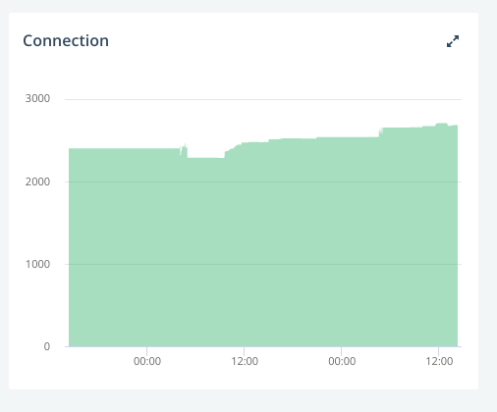
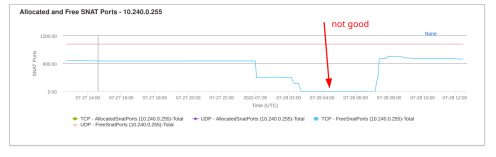
Hi My name is Dominhique Dumont, DevOps freelance in Grenoble, France. My goal is to share my experience regarding a production issue that occurred last week where my client complained that the applications was very slow and sometime showed 5xx errors. The production service is hosted on a Kubernetes cluster on Azure and use a MongoDB on ScaleGrid. I reproduced the issue on my side and found that the API calls were randomly failing due to timeouts on server side. The server logs were showing some MongoDB disconnections and reconnections and some time-out on MongoDB connections, but did not give any clue on why some connections to MongoDB server were failing. Since there was not clue in the cluster logs, I looked at ScaleGrid monitoring. There was about 2500 connections on MongoDB: 2022-07-19-scalegrid-connection-leak.png That seemed quite a lot given the low traffic at that time, but not necessarily a problem. Then, I went to the Azure console, and I got the first hint about the origin of the problem: the SNATs were exhausted on some nodes of the clusters. 2022-07-28_no-more-free-snat.png SNATs are involved in connections from the cluster to the outside world, i.e. to our MongoDB server and are quite limited: only 1024 SNAT ports are available per node. This was consistent with the number of used connections on MongoDB. OK, then the number of used connections on MongoDB was a real problem. The next question was: which pods and how many connections ? First I had to filter out the pods that did not use MongoDB. Fortunately, all our pods have labels so I could list all pods using MongoDB:
$ kubectl -n prod get pods -l db=mongo   wc -l
236
Hmm, still quite a lot. Next problem is to check which pod used too many MongoDB connections. Unfortunately, the logs mentioned that a connection to MongoDB was opened, but that did not give a clue on how many were used. Netstat is not installed on the pods, and cannot be installed since the pods are running as root (which is a good idea for security reasons) Then, my Debian Developer experience kicked in and I remembered that /proc file system on Linux gives a lot of information on consumed kernel resources, including resources consumed by each process. The trick is to know the PID of the process using the connections. In our case, Docker files are written in a way so the main process of a pod using NodeJS is 1, so, the command to list the connections of pod is:
$ kubectl -n prod exec redacted-pod-name-69875496f8-8bj4f -- cat /proc/1/net/tcp
  sl  local_address rem_address   st tx_queue rx_queue tr tm->when retrnsmt   uid  timeout inode                                                     
   0: AC00F00A:C9FA C2906714:6989 01 00000000:00000000 02:00000DA9 00000000  1001        0 376439162 2 0000000000000000 21 4 0 10 -1                 
   1: AC00F00A:CA00 C2906714:6989 01 00000000:00000000 02:00000E76 00000000  1001        0 376439811 2 0000000000000000 21 4 0 10 -1                 
   2: AC00F00A:8ED0 C2906714:6989 01 00000000:00000000 02:000004DA 00000000  1001        0 445806350 2 0000000000000000 21 4 30 10 -1                
   3: AC00F00A:CA02 C2906714:6989 01 00000000:00000000 02:000000DD 00000000  1001        0 376439812 2 0000000000000000 21 4 0 10 -1                 
   4: AC00F00A:C9FE C2906714:6989 01 00000000:00000000 02:00000DA9 00000000  1001        0 376439810 2 0000000000000000 21 4 0 10 -1                 
   5: AC00F00A:8760 C2906714:6989 01 00000000:00000000 02:00000810 00000000  1001        0 375803096 2 0000000000000000 21 4 0 10 -1                 
   6: AC00F00A:C9FC C2906714:6989 01 00000000:00000000 02:00000DA9 00000000  1001        0 376439809 2 0000000000000000 21 4 0 10 -1                 
   7: AC00F00A:C56C C2906714:6989 01 00000000:00000000 02:00000DA9 00000000  1001        0 376167298 2 0000000000000000 21 4 0 10 -1                 
   8: AC00F00A:883C C2906714:6989 01 00000000:00000000 02:00000734 00000000  1001        0 375823415 2 0000000000000000 21 4 30 10 -1 
OK, that s less appealing that netstat output. The trick is that rem_address and port are expressed in hexa. A quick calculation confirms the port 0x6989 is indeed port 27017, which is the listening port of MongoDB server. So the number of opened MongoDB connections is given by:
$ kubectl -n prod exec redacted-pod-name-69875496f8-8bj4f -- cat /proc/1/net/tcp   grep :6989   wc -l
9
What s next ? The ideal solution would be to fix the NodeJS code to handle correctly the termination of the connections, but that would have taken too long to develop. So I ve written a small Perl script to: Why restart a deployment instead of simply deleting the gluttonous pods? I wanted to avoid downtime if all pods of a deployment were to be killed. There s no downtime when applying rollout restart command on deployments. This script is now run regularly until the connections issue is fixed for good in NodeJS code. Thanks to this script, there s no need to rush a code modification. All in all, working around this connections issues was made somewhat easier thanks to:

17 May 2021

Dominique Dumont: Important bug fix for OpenSsh cme config editor

The new release of Config::Model::OpenSsh fixes a bugs that impacted experienced users: the order of Hosts or Match sections is now preserved when writing back ~/.ssh/config file. Why does this matter ? Well, the beginning of ssh_config man page mentions that For each parameter, the first obtained value will be used. and Since the first obtained value for each parameter is used, more host-specific declarations should be given near the beginning of the file, and general defaults at the end. . Looks like I missed these statements when I designed the model for OpenSsh configuration: the Host section was written back in a neat, but wrong, alphabetical order. This does not matter except when there an overlap between the specifications of the Host (or Match) sections like in the example below:
Host foo.company.com
Port 22
Host *.company.com
Port 10022
With this example, ssh connection to foo.company.com is done using port 22 and connection to bar.company.com with port 10022. If the Host sections are written back in reverse order:
Host *.company.com
Port 10022
Host foo.company.com
Port 22
Then, ssh would be happy to use the first matching section for foo.company.com , i.e. *.company.com and would use the wrong port (10022) This is now fixed with Config::Model::OpenSsh 2.8.4.3 which is available on cpan and in Debian/experimental. While I was at it, I ve also updated Managing OpenSsh configuration with cme wiki page. All the best

25 April 2021

Dominique Dumont: An improved GUI for cme and Config::Model

I ve finally found the time to improve the GUI of my pet project: cme (aka Config::Model). Several years ago, I stumbled on a usability problem on the GUI. Some configuration (like OpenSsh or Systemd) feature a lot of configuration parameters. Which means that the GUI displays all these parameters, so finding a specfic parameter might be challenging:
To workaround this problem, I ve added a Filter widget in 2018 which did more or less the job, but it suffered from several bugs which made its behavior confusing. This is now fixed. The Filter widget is now working in a more consistent way. In the example below, I ve typed IdentityFile (1) in the Filter widget to show the identityFile used for various hosts (2):
Which is quite good, but some hosts use the default identity file so no value show up in the GUI. You can then click on hide empty value checkbox to show only the hosts that use a specific identity file:
I hope that this new behavior of the Filter box will make this project more useful. The improved GUI was released with Config::Model::TkUI 1.374. This new version is available on CPAN and on Debian/experimental). It will be released on Debian/unstable once the next Debian version is out. All the best

20 July 2020

Dominique Dumont: Security gotcha with log collection on Azure Kubernetes cluster.

Azure Kubernetes Service provides a nice way to set up Kubernetes
cluster in the cloud. It s quite practical as AKS is setup by default
with a rich monitoring and reporting environment. By default, all
container logs are collected, CPU and disk data are gathered.  I used AKS to setup a cluster for my first client as a
freelance. Everything was nice until my client asked me why logs
collection was as expensive as the computer resources. Ouch  My first reflex was to reduce the amount of logs produced by all our
containers, i.e. start logging at warn level instead of info
level
. This reduced the amount of logs quite a lot. But this did not reduce the cost of collecting logs, which looks like
to a be a common issue. Thanks to the documentation provided by Microsoft, I was able to find
that ContainerInventory data table was responsible of more than 60%
of our logging costs. What is ContainerInventory ? It s a facility to monitor the content
of all environment variables from all containers. Wait What ?  Should we be worried about our database credentials which are, legacy
oblige, stored in environment variables ? Unfortunately, the query shown below confirmed that, yes, we should:
the logs aggregated by Azure contains the database credentials of my
client.
ContainerInventory
  where TimeGenerated > ago(1h)
Having credentials collected in logs is lackluster from a security
point of view.  And we don t need it because our environment variables do not change. Well, it s now time to fix these issues.  We re going to:
  1. disable the collection of environment variables in Azure, which
    will reduce cost and plug the potential credential leak
  2. renew all DB credentials, because the previous credentials can be
    considered as compromised (The renewal of our DB passwords is quite
    easy with the script I provided to my client)
  3. pass credentials with files instead of environment variables.
In summary, the service provided by Azure is still nice, but beware of
the default configuration which may contain surprises. I m a freelance, available for hire. The https://code-straight.fr site
describes how I can help your projects. All the best

4 September 2017

Dominique Dumont: cme: some read-write backend features are being deprecated

Hello Config::Model and cme read and write configuration data with a set of backend classes, like Config::Model::Backend::IniFile. These classes are managed by Config::Model::BackendMgr. Well, that s the simplified view. Actually, the backend manager can handle several different backends to read and write data: read backends are tried until one of them succeeds to read configuration data. And write backend cen be different from the read backend, thus offering the possibility to migrare from one format to another. This feature came at the beginning of the project, back in 2005. This felt like a good idea to let user migrate from one data format to another. More than 10 years later, this feature has never been used and is handled by a bunch of messy code that hampers further evolution of the backend classes. So, without further ado, I m going to deprecate the following features in order to simplify the backend manager: Unless someone objects, actual removal of these feature will be done in the next few months, after a quite short deprecation period. All the best
Tagged: cme, config-model, Config::Model, configuration

4 January 2017

Dominique Dumont: New with cme: a GUI to configure Systemd services

Hello Systemd is powerful, but creating a new service is a task that require creating several files in non obvious location (like /etc/systemd/system or ~/.local/share/systemd/user/). Each file features 2 or more sections (e.g. [Unit], [Service]). And each section supports a lot of parameters. Creating such Systemd configuration files can be seen as a daunting task for beginners. cme project aims to make this task easier by providing a GUI that: For instance, on my laptop, the command cme edit systemd-user shows 2 custom services ( free-imap-tunnel@ and gmail-imap-tunnel@ ) with: cme_edit_systemd_001 The GUI above shows the units for my custom systemd files:
$ ls ~/.config/systemd/user/
free-imap-tunnel@.service
free-imap-tunnel.socket
gmail-imap-tunnel@.service
gmail-imap-tunnel.socket
sockets.target.wants
and the units installed by Debian packages:
$ find /usr/lib/systemd/user/ -maxdepth 1 \
  '(' -name '*.service' -o -name '*.socket' ')' \
  -printf '%f\n'  sort  head -15
at-spi-dbus-bus.service
colord-session.service
dbus.service
dbus.socket
dirmngr.service
dirmngr.socket
glib-pacrunner.service
gpg-agent-browser.socket
gpg-agent-extra.socket
gpg-agent.service
gpg-agent.socket
gpg-agent-ssh.socket
obex.service
pulseaudio.service
pulseaudio.socket
The screenshot above shows the content of the service defined by the following file:
$ cat ~/.config/systemd/user/free-imap-tunnel@.service
[Unit]
Description=Tunnel IMAPS connections to Free with Systemd
[Service]
StandardInput=socket
# no need to install corkscrew
ExecStart=-/usr/bin/socat - PROXY:127.0.0.1:imap.free.fr:993,proxyport=8888
Note that empty parameters are not shown because the hide empty value checkbox on top right is enabled. Likewise, cme is able to edit system files like user files with sudo cme edit systemd: cme_edit_systemd_001 For more details on how to use the GUI to edit systemd files, please see: Using a GUI may not be your cup of tea. cme can also be used as a validation tool. Let s add a parameter with an excessive value to my service:
$ echo "CPUShares = 1000000" >> ~/.local/share/systemd/user/free-imap-tunnel@.service
And check the file with cme:
$ cme check systemd-user 
cme: using Systemd model
loading data
Configuration item 'service:"free-imap-tunnel@" Service CPUShares' has a wrong value:
        value 1000000 > max limit 262144
ok, let s fix this with cme. The wrong value can either be deleted:
$ cme modify systemd-user 'service:"free-imap-tunnel@" Service CPUShares~'
cme: using Systemd model
Changes applied to systemd-user configuration:
- service:"free-imap-tunnel@" Service CPUShares: '1000000' -> ''
Or modified:
$ cme modify systemd-user 'service:"free-imap-tunnel@" Service CPUShares=2048'
cme: using Systemd model
Changes applied to systemd-user configuration:
- service:"free-imap-tunnel@" Service CPUShares: '1000000' -> '2048'
You can also view the specification of a service using cme:
$ cme dump systemd-user 'service:"free-imap-tunnel@"'---
Service:
  CPUShares: 2048
  ExecStart:
    - '-/usr/bin/socat -  PROXY:127.0.0.1:imap.free.fr:993,proxyport=8888'
  StandardInput: socket
Unit:
  Description: Tunnel IMAPS connections to Free with Systemd
The output above matches the content of the service configuration file:
$ cat ~/.local/share/systemd/user/free-imap-tunnel@.service
## This file was written by cme command.
## You can run 'cme edit systemd-user' to modify this file.
## You may also modify the content of this file with your favorite editor.
[Unit]
Description=Tunnel IMAPS connections to Free with Systemd
[Service]
StartupCPUWeight=100
CPUShares=2048
StartupCPUShares=1024
StandardInput=socket
# no need to install corkscrew now
ExecStart=-/usr/bin/socat -  PROXY:127.0.0.1:imap.free.fr:993,proxyport=8888
Last but not least, you can use cme shell if you want an interactive ui but cannot use a graphical interface:
$ cme shell systemd-user 
cme: using Systemd model
 >:$ cd service:"free-imap-tunnel@"  Service  
 >: service:"free-imap-tunnel@" Service $ ll -nz Exec*
name        type   value                                                             
 
ExecStart   list   -/usr/bin/socat -  PROXY:127.0.0.1:imap.free.fr:993,proxyport=8888
 >: service:"free-imap-tunnel@" Service $ ll -nz
name               type      value                                                             
 
StartupCPUWeight   integer   100                                                               
CPUShares          integer   2048                                                              
StartupCPUShares   integer   1024                                                              
StandardInput      enum      socket                                                            
ExecStart          list      -/usr/bin/socat -  PROXY:127.0.0.1:imap.free.fr:993,proxyport=8888
 >: service:"free-imap-tunnel@" Service $ set CPUShares=1024
 >: service:"free-imap-tunnel@" Service $ ll -nz CPUShares 
name        type      value
 
CPUShares   integer   1024 
 >: service:"free-imap-tunnel@" Service $ quit
Changes applied to systemd-user configuration:
- service:"free-imap-tunnel@" Service CPUShares: '2048' -> '1024'
write back data before exit ? (Y/n)
Currently, only service, socket and timer units are supported. Please create a bug report on github if you need more. Installation instructions are detailed at the beginning of Managing Systemd configuration with cme wiki page. As all softwares, cme probably has bugs. Please report any issue you might have with it. For more information: All in all, systemd is quite complex to setup. I hope I made a little bit easier to deal with. All the best
Tagged: config-model, configuration, Perl, systemd

27 December 2016

Dominique Dumont: New dzil command to install author dependencies as Debian packages

Hello Dist::Zilla is a great tool to limit tedious tasks while working on Perl modules. For instance, dzil provides tools like dzil authordeps or dzil listdeps to list dependencies.
This list of Perl modules can then be installed with cpanm:
dzil authordeps --missing   cpanm
dzil listdeps --missing   cpanm
On a Debian system, one may prefer to install Perl modules using Debian packages. Installing build dependencies can be done with apt build-dep, but apt does not handle Dist::Zilla author dependencies. The new authordebs Dist::Zilla sub-command was wriiten to fill this gap. When run in a directory containing the source of a Perl module that uses Dist::Zilla, you can run dzil installdebs to list the Debian packages required to run the dzil command. You can also run dzil installdebs -install to install author dependencies (using sudo under the hood). See: On Debian, authordebs is provided by libdist-zilla-app-command-authordebs-perl All the best
Tagged: debian, dist-zilla, Perl

13 July 2016

Dominique Dumont: A survey for developers about application configuration

Hello Markus Raab, the author of Elektra project, has created a survey to get FLOSS developer s point of view on the configuration of application. If you are a developer, please fill this survey to help Markus work on improving application configuration management. Feeling this survey should take about 15 mns. Note that the survey will close on July 18th. The fact that this blog comes 1 month after the beginning of the survey is entirely my fault. Sorry about that All the best
Tagged: configuration, Perl

18 June 2016

Dominique Dumont: An improved Perl API for cme and Config::Model

Hello While hacking on a script to update build dependencies on a Debian package, it occured to me that using Config::Model in a Perl program should be no more complicated than using cme from a shell script. That was an itch that I scratched immediately. Fast forward a few days, Config::Model now features new cme() and modify() functions that have a behavior similar to cme modify command. For instance, the following program is enough to update popcon s configuration file:
use strict; # let's not forget best practices ;-)
use warnings;
use Config::Model qw(cme); # cme function must be imported
cme('popcon')->modify("PARTICIPATE=yes");
The object returned by cme() is a Config;:Model::Instance. All its methods are available for a finer control. For instance:
my $instance = cme('popcon');
$instance->load("PARTICIPATE=yes");
$instance->apply_fixes;
$instance->say_changes; 
$instance->save;
When run as root, the script above shows:
Changes applied to popcon configuration:
- PARTICIPATE: 'no' -> 'yes'
If need be, you can also retrieve the root node of the configuration tree to use Config;:Model::Node methods:
my $root_node = cme('popcon')->config_root;
say "is popcon active ? ",$root_node->fetch_element_value('PARTICIPATE');
In summary, using cme in a Perl program is now as easy as using cme from a shell script. To provide feedback, comments, ideas, patches or to report problems, please follow the instructions from CONTRIBUTING page on github. All the best
Tagged: config-model, configuration, Perl

24 April 2016

Dominique Dumont: Automount usb devices with systemd

Hello Ever since udisk-glue was obsoleted with udisk (the first generation), I ve been struggling to find a solution to automatically mount a usb drive when such a device is connected to a kodi based home cinema PC. I wanted to avoid writing dedicated scripts or udev rules. Systemd is quite powerful and I thought that a simple solution should be possible using systemd configuration. Actually, auto-mount notion covers 2 scenario :
  1. A device is mounted after being plugged in
  2. An already available device is mounted when a process accesses its mount point
The first case is the one that is needed with Kodi. The second may be usefull so is also documented in this post. For the first case, add a line like the following in /etc/fstab:
/dev/sr0 /mnt/br auto defaults,noatime,auto,nofail 0 2
and reload systemd configuration:
sudo systemctl daemon-reload
The important parameters are auto and nofail : with auto , systemd mounts the filesystem as soon as the device is available. This behavior is different from sysvinit where auto is taken into account only when mount -a is run by init scripts. nofail ensures that boot does not fail when the device is not available. The second case is handled by a line like the following one (even if the line is split here to improve readability):
/dev/sr0 /mnt/br auto defaults,x-systemd.automount,\
   x-systemd.device-timeout=5,noatime,noauto 0 2
With the line above in /etc/fstab, the file system is mounted when user does (for instance) ls /mnt/br (actually, the first ls fails and triggers the mount. A second ls gives the expected result. There s probably a way to improve this behavior, but I ve not found it ) x-systemd.* parameters are documented in systemd.mount(5). Last but not least, using a plain device file (like /dev/sr0) works fine to automount optical devices. But it is difficult to predict the name of a device file created for a usb drive, so a LABEL or a UUID should be used in /etc/fstab instead of a plain device file. I.e. something like:
LABEL=my_usb_drive /mnt/my-drive auto defaults,auto,nofail 0 2
All the best
Tagged: kodi, systemd

10 October 2015

Dominique Dumont: Perl6 is now up to date on Debian sid

Hello Thanks to the help of Daniel Dehennin and Paul Cochrane, The rakudo implementation of Perl 6 is now up to date on Debian/sid. Unlike previous version, Perl 6 on Debian uses moarvm backend. No other backend is provided. Please use the following command to install Perl6 on Debian:
sudo apt-get install rakudo
All the best
Tagged: debian, package, Perl6

30 September 2015

Dominique Dumont: Using custom cache object with AngularJS $http

Hello At work, I ve been bitten by the way AngularJS handles cache by default when using $https service. This post will show a simple way to improve cache handling with $http service. The service I m working on must perform the followings tasks: At first, I ve naively used $http.get cache parameter to enable or disable caching using a sequence like:
  1. $http.get(url, cache: true )
  2. $http.post(url)
  3. $http.get(url, cache: false )
  4. $http.get(url, cache: true )
Let s say the calls above use the following data:
  1. $http.get(url, cache: true ) returns foo
  2. $http.post(url) stores bar
  3. $http.get(url, cache: false ) returns bar
I expected the next call $http.get(url, cache: false ) to return bar . But no, I got foo , i.e. the obsolete data. Turns out that cache object is completely left alone when cache: false is passed to $http.get. ok. Fair enough. But this means that the value of the cache parameter should not change for a given URL. The default cache provided by $https cannot be cleared. (Well, actually, you can clear the cache under AngularJS s hood, but that will probably not improve the readability of your code). The naive approach does not work. Let s try another solution by using a custom cache object as suggested by AngularJS doc. This cache object should be created by $cacheFactory service. This cache object can then be passed to $http.get to be used as cache. When needed, the cache can be cleared. In the example above, the cache must be cleared after saving some data to the remote service. There s 2 possibilities to clear a cache: So, we have to use the first solution and create a cache object for each API entry point:
angular.module('app').factory('myService', function ($http, $cacheFactory)  
  var myFooUrl = '/foo-rest-service';
  
  // create cache object. The cache id must be unique
  var fooCache = $cacheFactory('myService.foo'); 
  function getFooData ()  
    return $http.get( myFooUrl,   cache: fooCache  );
   ;
 
  function saveFooData(data)  
    return $http.post( myFooUrl,   cache: fooCache  ).then(function()  
      myCache.removeAll() ;
     );
   
 );
The code above ensures that: This simple approach has the following limitations: If you need more a more advance cache mechanism, you may want to check jmdobry s angular cache project All the best

27 September 2015

Dominique Dumont: How to automount optical media on Debian Linux for Kodi

Hello This problem has been bugging me for a while: how to setup my Kodi based home cinema to automatically mount an optical media ? Turns out the solution is quite simple, now that Debian has switched for systemd. Just add the following line to /etc/fstab:
/dev/sr0 /media/bluray auto defaults,nofail,x-systemd.automount 0 2
Where: Do not specify noauto: this would prevent systemd to automatically mount a disc, which defeats the purpose. To test you setup: Then, journalctl should show something like:
Sept. 27 16:07:01 frodo systemd[1]: Mounted /media/bluray.
And that s it. No need to have obsolete packages like udisk-glue or autofs. Last but not least: this blog is moderated, please do not waste your time (and mine) posting rants. All the best.
Tagged: automount, debian, kodi, optical, systemd

5 July 2015

Dominique Dumont: Major bug fix for cme update copyright command

Hello Previous version of libconfig-model-dpkg-perl had 2 bugs related to copyright update command : Version 2.067 of libconfig-model-dpkg-perl fixes both issues. This version is available in unstable. To use cme update dpkg-copyright command, the following packages are required: All the best
Tagged: config-model, copyright, debian, DEP-5

20 June 2015

Lunar: Reproducible builds: week 4 in Stretch cycle

What happened about the reproducible builds effort for this week: Toolchain fixes Lunar rebased our custom dpkg on the new release, removing a now unneeded patch identified by Guillem Jover. An extra sort in the buildinfo generator prevented a stable order and was quickly fixed once identified. Mattia Rizzolo also rebased our custom debhelper on the latest release. Packages fixed The following 30 packages became reproducible due to changes in their build dependencies: animal-sniffer, asciidoctor, autodock-vina, camping, cookie-monster, downthemall, flashblock, gamera, httpcomponents-core, https-finder, icedove-l10n, istack-commons, jdeb, libmodule-build-perl, libur-perl, livehttpheaders, maven-dependency-plugin, maven-ejb-plugin, mozilla-noscript, nosquint, requestpolicy, ruby-benchmark-ips, ruby-benchmark-suite, ruby-expression-parser, ruby-github-markup, ruby-http-connection, ruby-settingslogic, ruby-uuidtools, webkit2gtk, wot. The following packages became reproducible after getting fixed: Some uploads fixed some reproducibility issues but not all of them: Patches submitted which did not make their way to the archive yet: Also, the following bugs have been reported: reproducible.debian.net Holger Levsen made several small bug fixes and a few more visible changes: strip-nondeterminism Version 0.007-1 of strip-nondeterminism the tool to post-process various file formats to normalize them has been uploaded by Holger Levsen. Version 0.006-1 was already in the reproducible repository, the new version mainly improve the detection of Maven's pom.properties files. debbindiff development At the request of Emmanuel Bourg, Reiner Herrmann added a comparator for Java .class files. Documentation update Christoph Berg created a new page for the timestamps in manpages created by Doxygen. Package reviews 93 obsolete reviews have been removed, 76 added and 43 updated this week. New identified issues: timestamps in manpages generated by Doxygen, modification time differences in files extracted by unzip, tstamp task used in Ant build.xml, timestamps in documentation generated by ASDocGen. The description for build id related issues has been clarified. Meetings Holger Levsen announced a first meeting on Wednesday, June 3rd, 2015, 19:00 UTC. The agenda is amendable on the wiki. Misc. Lunar worked on a proof-of-concept script to import the build environment found in .buildinfo files to UDD. Lucas Nussbaum has positively reviewed the proposed schema. Holger Levsen cleaned up various experimental toolchain repositories, marking merged brances as such.

Next.